Available Online At www.ijpret.com
INTERNATIONAL JOURNAL OF PURE AND
APPLIED RESEARCH IN ENGINEERING AND
TECHNOLOGY
A PATH FOR HORIZING YOUR INNOVATIVE WORK
BACKUP AND RESTORE DATA IN ANDROID
MEDHAVI S. SHRIWAS, PROF. NEETESH GUPTA, PROF. AMIT SINHAL 1. M Tech 2nd year I.T, Tit, Bhopal.
2. H.O.D. of I.T. Dept, Tit, Bhopal.
3. P.G. Coordinator of I.T. Dept, Tit, Bhopal.
Accepted Date:
27/02/2013
Publish Date:
01/04/2013
Keywords
Flimsy passwords,
DCIM,
MDM.
Corresponding Author Mr. Medhavi S. Shriwas
Abstract
Today, in fastest growing age, Everyone wants to keep their
data safe. But Data loss can be a common experience of
computer users so need to take back up the data. It also
explains different risks of losing the data and how to overcome
this. This paper explains different types of backup and it deals
with why android needs to back up the data? How android can
back up the data? Different available online backup services in
Research Article ISSN: 2319-507X Medhavi Shriwas, IJPRET, 2013; Volume 1(8): 457-465 IJPRET
Available Online At www.ijpret.com 1. INTRODUCTION
[4] In this world of computing technology,
this has become a necessary that one
should restore and back up the data from
any Smartphone for the reason that
technology was invented by human beings
and are neither reliable nor consistent. As
data is important than smart phone these
paper explain different ways of backing up
the data stored in Android. When user
need to access a document user have
stored on a remote server or synchronize
data between his/her systems/devices and
share important business documents with
their clients, they need to have a powerful
online backup and sharing solution that
backs up our data automatically on a
secured cloud storage and make it available
when needed. In this paper we review 10
most popular online backup, online sync
and online sharing solution for Android.[4]
1.1) what is back up? In information
technology, a backup is making copies
of data which may be used
to restore the original after a data loss
event. Backups have two distinct purposes.
The primary purpose is to recover data after
its loss, data deletion or corruption. A 2008
survey found that 66% of respondents had
lost files on their home PC. The secondary
purpose of backups is to recover data from
an earlier time. Backup is the activity of
copying files or databases so that will be
preserved in case of failure or other
catastrophe. [6]
1.2) what is restore? The retrieval of files
from backed up process is called
restoring the data.
2. WHY ANDROID NEEDS TO
BACKUP ?
Today's biggest Android security risks and
what can be done to mitigate them.
1. AWOL androids: In a Juniper survey, 58%
of Smartphone and tablet users feared not
being able to recover lost content. Apple
iPhone users can restore nearly everything
from iTunes, but Androids are not managed
through desktop sync. The data loss can be
avoid in two ways. First, install an auto
backup app to enable quick restoration of
all that matters. Second, "find me" services
to locate and recover lost devices.
2. Flimsy passwords: If Android falls into
Available Online At www.ijpret.com thieves from stealing broadband service,
ringing up SMS fees, reading your email, or
abusing VPN connections. Juniper's survey
says that, 3 out of 4 users locked their
smart phones. Researchers report says
Android swipe-lock patterns over 90% of
the time. Instead of Androids should be
locked with PINs or passwords or
third-party lock apps such as Norton Mobile or
App Protector. Users may use a remote lock
service.
3. Naked data: A major business risk posed
by Android is lack of hardware data
encryption. Fortunately, Android 3.0 adds
an API to let manufacturers offer encryption
and IT enforce use. Unfortunately, existing
Androids cannot yet perform hardware
encryption. Until self-encrypting Androids
appear, stored data can be protected in two
ways. First, those remote lock apps and APIs
can request remote wipe as well, resetting
the device to factory defaults but only when
reachable, without wiping SD card data. For
more rigorous protection, enterprises
should scramble sensitive data such as
email and contacts using self-encrypted
apps.
4. Smashing: This phishing variant uses
texting to trick Smartphone users into
visiting fraudulent or malicious links. For
example, last summer, unlucky SMS
recipients were invited to download
Trojan-SMS, Android, Fake Player, a free
Movie Player. Once installed, without user
knowledge, ringing up huge bills. To block
costly texts, users can add SMS controls
such as SMS Link Guard. Enterprises may
consider using a Mobile Device Manager
(MDM) that can monitor Android wireless
expenses
5. Unsafe surfing: Think web browsing on
Android is safe? Last fall, M.J. Keith showed
that a known WebKit browser vulnerability
could be exploited on Android 2.0 or 2.1.
Thomas Cannon reported an Android 2.2
browser flaw that could give hackers full SD
card access. Recently, Google fixed an
Android Market cross-site scripting (XSS)
vulnerability that enables arbitrary code
execution, found by John Oberheide.
Unfortunately, Android users cannot quickly
patch around bugs, because OS updates are
deployed infrequently by carriers. Using an
app like Bad Link Check or Trend Micro to
avoid known-malicious websites.
Research Article ISSN: 2319-507X Medhavi Shriwas, IJPRET, 2013; Volume 1(8): 457-465 IJPRET
Available Online At www.ijpret.com apps now access device location, while 7.5%
access stored contacts. Android apps must
request permissions during installation
users need to review those requests,
exercise caution, and avoid apps that seem
too nosy.
7. Repackaged and fraudulent apps: Many
repackaged apps found on third-party.
Android markets are free apps, repackaged
to generate ad revenue. But repackaging is
also used to implant Android trojans, such
as the Android Pjapps. Trojan & the
Android Geinimi Trojan.
8. Android malware: According to traffic
analysis, Android malware spike 400% last
year. When Co verity assessed the Android
kernel, it identified 359 code vulnerabilities,
88 of which posed "high risk" of
exploitation. Reason is Android is an open
development platform, hackers have good
opportunity to find and learn how to take
advantage of these kinds of flaws.
Fortunately, application sandboxing is built
into Android to limit potential damage by
malicious apps.
3. TYPES OF BACKUP
3.1local backup[2]
1) Backing up critical files to diskettes is
used by people who keep their checkbooks
and personal finance data on the PC.
Reconstruct checkbook balances, if hard
disk crashes and copy it to a diskette is
quick and economical.
2) Backing up to a Zip drive, Jaz, Syquest, or
similar hard disks. As good habit once a
week or month, back up the files to an
alternative storage device, such as a Zip
drive. About 45 minutes for the contents of
a 500 megabyte hard disk.
3)It is easily removable drive.
3.2 Internet backup
Consider as sending the files to another site
for safekeeping. In case of hard disk
crashes, download from the safekeeping
site. These are some products and services
as fallows.
1) Atrieva provides the user with a client
program that allows the user to send files
being backed up to an Atrieva-designated
backup site. One monthly charge entitles
Available Online At www.ijpret.com 2) Backup Net sells both a server and a
client and is aimed at helping
intranet.
3) Quick Backup is a client program from
McAfee Associates. They have a
the client and a relatively low monthly
charge for storing 30 MB. Quick
save as folder or file types.
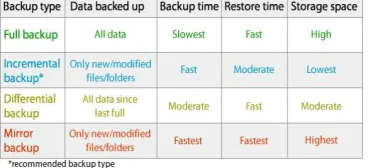
4. DIFFERENT BACKUP METHODS:
4.1full backups: full backup
and folders, frequent full backups result in
faster and simpler restore operations.
approach is good when it does not
large amounts of data.
4.2 incremental backups: It stores all files
that have changed since the last
The advantage of an incremental backup
that it takes the least time to complete
take less disk space. However, during a
restore operation, each
backup must be processed, which could
result in a lengthy restore job.
approach is good when the many files need
to back up for all time.
4.3differential backup: It contains all files
that have changed since the
Available Online At www.ijpret.com Net sells both a server and a
client and is aimed at helping to set up own
Backup is a client program from
e Associates. They have a charge for
the client and a relatively low monthly
ring 30 MB. Quick Backup
DIFFERENT BACKUP METHODS:[7]
stores all files
and folders, frequent full backups result in
faster and simpler restore operations. This
oes not include
It stores all files
that have changed since the last backup.
incremental backup is
that it takes the least time to complete and
take less disk space. However, during a
restore operation, each incremental
must be processed, which could
result in a lengthy restore job. This
many files need
contains all files
that have changed since the previousfull
backup. The advantage of a
backup is that it shortens restore time
compared to a
an incremental backup
perform the differential backup
times, the size of the
be larger than the baseline
intermediate between the first two
methods. It is also good when the
conditions are intermediate.
4.4 mirror backups: Mirror
all files that have changed since the last
mirror backup, missing files
deleted from the backup set. The resulting
backup archive consists of either one
compressed file or one folder.[7]
Table 4.1Comparision of backup types
5. HOW TO BACK UP YOUR ANDROID PHONE?
[3]
Android doesn't offer a native backup
service, before a thief swipes that phone,
follow steps.
. The advantage of a differential
shortens restore time
to a full backup or
incremental backup. However, if you
differential backup too many
times, the size of the differential backup to
er than the baseline full backup. It
intermediate between the first two
. It is also good when the
conditions are intermediate. (2)
Mirrorbackup includes
all files that have changed since the last
mirror backup, missing files are also be
deleted from the backup set. The resulting
backup archive consists of either one
compressed file or one folder.[7]
sion of backup types
5. HOW TO BACK UP YOUR ANDROID PHONE?
Android doesn't offer a native backup
Research Article ISSN: 2319-507X Medhavi Shriwas, IJPRET, 2013; Volume 1(8): 457-465 IJPRET
Available Online At www.ijpret.com
1) google has your back. Go to Settings
then Privacy, and make sure that "Back up
my settings" and "Automatic restore" are
checked off. Go to Settings in that go to the
Accounts and sync, open your Gmail
account, and check off all options. With
these settings in place, your contacts,
system settings, apps, calendar, and e-mail
will be restored whenever we set up a
new Android phone with that same Gmail
account.
2) Photos yet, Google haven’t implemented
a native photo backup service so take help
of third-party apps to safeguard our photos.
Photo bucket Mobile will upload newly
snapped photos in the background
to our Photo bucket
account automatically.
FlickrCompanion and PicasaTool arefree
apps that allow mobile uploading.
3)drag and drop. Connect your phone to
the computer through USB, set it in Disk
Mode and locate the drive Open the drive,
find the DCIM folder, and drag the photos
we'd like to back up onto hard drive.
4) Text messages. Folks at SMS Backup
figured out a smart way to back up text
messages in the cloud."
6. THE DIFFERENT WAYS OF BACKING UP
THE DATA STORED IN YOUR ANDROID
• Sprite backup: [7] This provides a
complete and full back up of the data
stored on the Android devices, which
include contacts, sms, applications, settings
more. Besides, this is possible to set up
Schedule Back up silently to protect data
24/7.
• Titanium backup: This is one of the
favorite and the most widely used backup
software for Android, which does a similar
job like other back up softwares. However,
this software is useful only for those
customers who have rooted devices, which
means user need to have some technical
knowledge and is not user friendly like the
other two softwares. The major advantage
of this software is that this will enable to
restore the Market links so that the
applications can be updated in the
downloaded pages of the market without
any hassles. This is also possible to restore
Available Online At www.ijpret.com Some of the features that can back up using
this software will include contacts, call log,
system settings, home screens sms, music
playlists, and many more. It is a very
powerful Real time backup that comes for
sale in two versions, a free one with limited
features and a full version costing $5.90 in
the Android market.
•my backup pro: This is easy to use backup
software that comes with a systematic
wizard to guide you through the entire
process. The software does the job of
backing up the data to either their own
server or to your SD card, when you plan to
switch phones. Some of the features that
this software backs up will include contacts,
sms, Home screens, music playlists, call log
and many more. What makes this attractive
is that this has an easy to use interface and
accuracy with the backup restores function
that will suit your needs and works on all
phones, both rooted and non-rooted
phones.
7.FREE ONLINE BACKUP SERVICES
When document need to access. The
following web services are available.
1. Dropbox: Dropbox is a Web-based file
hosting service that uses cloud computing
to enable users to store and share files and
folders with others across the Internet using
file synchronization. Dropbox offers a
relatively large number of user clients
across a variety of desktop and mobile
operating systems like Android, Windows
Phone 7, iPhone, iPad and BlackBerry.
2. Spideroak: Spider Oak provides an easy,
secure and consolidated free online backup,
sync, sharing, and access & storage solution
for Windows, Mac OS X, and Linux. It has
mobile clients for iOS and Android
3. Sugar sync: Sugar Sync’s online backup,
file sync, and sharing service makes it easy
to stay connected. With Sugar Sync user get
secure cloud storage for all the files as
documents, music, photos, and videos.
4. Wuala: Wuala is an online storage,
synchronization, and backup service. Data is
stored on Wuala’s own servers as well as ‘in
the cloud’. Data in the cloud is stored as
encrypted blocks, & in multiple copies. It
supports Windows, Mac, Linux, and Mobile
Research Article ISSN: 2319-507X Medhavi Shriwas, IJPRET, 2013; Volume 1(8): 457-465 IJPRET
Available Online At www.ijpret.com
5. Zumodrive: Zumo Drive is cloud-based
file synchronization and storage service that
enables users to store and sync files online
and between computers using their
HybridCloud storage solution. Zumo Drive
has a cross-platform client for Windows,
Mac, Linux, iOS, Android, and Palm webOS.
6. Tonido: Tonido allows to access and
share content directly through a web
browser without uploading or worrying
about storage limits. Using this user can
share files, music, photos and calendar,
download torrents and even manage
finances straight from PC. It is available for
all the popular mobile platforms.
7. Asus web storage: ASUS Web Storage is a
Cloud Storage Service that helps user
backup data, sync file between devices and
share data to friends. It offers auto data
backup for nearly3computers, auto data
synchronization, and data sharing amongst
others.
8. Soonr: Soon offers simple document
organization and file-sharing with automatic
backup and access from any Web browser
or mobile phone. soonr supports over 800
mobile devices including iPhone, iPad,
Android phones and tablets and BlackBerry.
9. Cx (cloud experience): Keeps files in sync
across multiple devices. Manages files,
photos, calendars and address book.
10. Fiabee: Fiabee products allow to
automatically managing all the files
distributed across multiple devices. Every
time create or edit a file, Fiabee’s advanced
technology will detect these changes and
automatically save them to secure data
center.[8]
CONCLUSION:
This paper explains all different ways of
data backup in android to avoid risks of lass
of data. Also explain Android online backup
storage services.
REFENCES:
1. http://developer.android.com/guide/top
ics/data/backup.html page no(6)
2. http://searchstorage.techtarget.com/def
inition/backup
3. www.market.android.com by Sharon
Available Online At www.ijpret.com
4. http://en.wikipedia.org/wiki/Backuppage
page no(2)
5. http://An Introduction to Backup
Manager, September 28, 2011page no (5)
6. http:// introduction of backup ways page
no(1)
7.
www.backup4all.com/kb/backup-types-15.html Aug 22, 2011 backup types page
no. (3)
8. www.fiabee.com. 23 September