A Case Study about Green Cloud Computing:
An Attempt towards Green Planet
Devinder Kaur Padam
1Analyst, HCL Technologies Infra Structure Department, Sec-126 Noida, India1
ABSTRACT: Cloud computing is a highly scalable and cost-effective infrastructure for running HPC, enterprise and Web applications. However, the growing demand of Cloud infrastructure has drastically increased the energy consumption of data centers, which has become a critical issue. High energy consumption not only translates to high operational cost, which reduces the profit margin of Cloud providers, but also leads to high carbon emissions which is not environmentally friendly. Hence, energy-efficient solutions are required to minimize the impact of Cloud computing on the environment. In order to design such solutions, deep analysis of Cloud is required with respect to their power efficiency. Thus, in this chapter, we discuss various elements of Clouds which contribute to the total energy consumption and how it is addressed in the literature. We also discuss the implication of these solutions for future research directions to enable green Cloud computing. The chapter also explains the role of Cloud users in achieving this goal.
KEYWORDS:Cloud Computing; green Cloud; Datacenter; Energy efficiency; Software as a Service (SaaS);Platform as a Service (Paas);Infrastructure as a Service (Iaas).
I. INTRODUCTION
Cloud computing is a promising area in distributed computing. Data centers are the main component of cloud computing. Data centers energy consumption cost and environmental effect are dynamic challenge to cloud computing. Additionally, the growing usage of social applications and the expansion of e-business require an increase in the number of data centers. However, the combination of global warming and inconsistent climate make the cost of energy a major challenge for the sustainability of ebusiness [1]. It is a corner stone of the infrastructure of cloud computing approach by which a variety of information technology (IT) services were built. They extended the ability of centralized repository for computing, hosting, storage, management, monitoring, networking and deployment of data.
With the rapid increase in the capacity and size of data centers, there is a continuous increase in the demand of energy consumption [2]. Data centers, beside their ongoing high energy consumption, also produce carbon dioxide that riddled with IT inefficiencies. International Data Corporation (IDC) annual report found that cloud computing reached $42bn in 2012 and the revenue of cloud in 2013 was $150bn [3].
Environmental impact of Information Technology (IT) under the banner of “Green IT” was been discussed by academia, media and government Since (2007), when the Environmental Protection Agency (EPA) submitted a report to the US Congress [5] about the expected energy consumption of data centers. Since then Green IT has been receiving growing attention. The overall objective of Green IT is to increase energy efficiency and reduce CO2 emissions [6].
II. WHAT ISCLOUD?
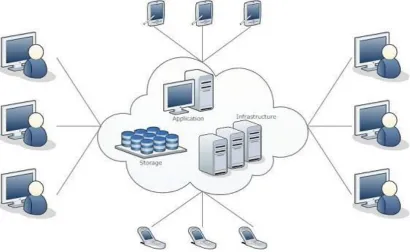
The term Cloud refers to a Network or Internet. In other words, we can say that Cloud is something, which is present at remote location. Cloud can provide services over network, i.e., on public networks or on private networks, i.e., WAN, LAN or VPN. Applications such as e-mail, web conferencing, customer relationship management (CRM),all run in cloud.
Cloud Computing refers to manipulating, configuring, and accessing the applications online. It offers online data storage, infrastructure and application.
Figure 1: General understanding of cloud
Cloud Computing= Software as a Service(SaaS)+Platform as a Service(PaaS)+ Infrastructure as a Service(IaaS)+ Data as a Service(DaaS)
Platform as a Service (PaaS)
From developer’s point of view (i.e. cloud users).
Cloud providers offer an Internet-based platform to developers who want to create services but don't want to build their own cloud
Software as a Service (SaaS)
̵From end user’s point of view.
Apps are located in the cloud.
Software experiences are delivered through the Internet
Infrastructure as a Service (IaaS)
Cloud providers build datacenters
Power, scale, hardware, networking, storage, distributed systems, etc
Data as a Service(DaaS)
Data >>Information>> Knowledge>> Intelligence
infrastructure for Web-scale data mining and knowledge discover.
Empower people with knowledge.
Empower applications and services with intelligence
Figure 2: Constituents of Cloud
III.CLOUDCOMPUTINGHARACTERISTICS
The key characteristics exhibited by Clouds are shown in Figure 2 and they are discussed below.
1. Virtualized: Resources (i.e. compute, storage, and network capacity) in Clouds are virtualized and it is achieved at various levels including VM (Virtual Machine) and Platform levels. The most basic one is at Virtual Machine (VM) level where different applications can be executed within their containers or operating systems running on the same physical machine. Platform level enables seamless mapping of applications to one or more resources offered by different Cloud infrastructure providers.
2. Service-Oriented: Cloud is implemented using Service-Oriented Architecture model where all the capabilities/components are available over the network as a service. Whether it is software, platform or infrastructure everything is offered as a service.
3. Elastic: Resources (i.e. compute, storage, and network capacity) required for Cloud applications can be dynamically provisioned and varied i.e., increase or decrease at runtime depending on user QoS requirements. Major Cloud providers such as Amazon even provide services for automatic scale-out and scale-in based on hosted application requirements.
4. Dynamic and Distributed: Although Cloud resources are virtualized, they are often distributed to enable the delivery of high-performance and/or reliable Cloud services. These resources are flexible and can be adapted according to customer’s requirements such as software, network configuration, etc.
6. Market-Oriented (Pay as you go): In Cloud computing, customers pay for services on a pay-per-use (or pay-as-you-go) basis. The pricing model can vary depending on the QoS expectation of application. Cloud IaaS providers such as Amazon price resources using market models such as commodity or on-spot pricing models. A pricing model proposed by Allen for & Thulasiram [49] for grid resources could be used as a base for cloud resources. This characteristic addresses the utility dimension of cloud computing. That means, Cloud services are offered as “metered” services where providers have an accounting model for measuring the use of the services, which helps in development of different pricing plans and models. The accounting model helps in the control and optimization of resource usage.
7.
Autonomic: To provide highly reliable services, Clouds exhibit autonomic behavior by managing themselves in case of failures or the performance degradation..
IV.GREENCLOUDCOMPUTING:ADATACENTERPERSPECTIVE
The Cloud datacenters are quite different from traditional hosting facilities. A cloud datacenter could comprise of many hundreds or thousands of networked computers with their corresponding storage and networking subsystems, power distribution and conditioning equipment, and cooling infrastructures. Due to large number of equipments, datacenters can consume massive energy consumption and emit large amount of carbon. According to 2007 report on computing datacenters by US Environmental Protection Agency (EPA), the datacenters in US consumed about 1.5% of total energy, which costs about $4.5 billon. This high usage also translates to very high carbon emissions which was estimated to be about 80-116 Metric Megatons each year. Table 3 lists equipments typically used in datacenters with their contribution to energy
consumption. It can be clearly observed that servers and storage systems are not the only infrastructure that consumes energy in the datacenter. In reality, the cooling equipments consume equivalent amount of energy as the IT systems themselves. Ranganathan [7] suggests that for every dollar spent on electricity costs in large-scale datacenters another dollar is spent on cooling.
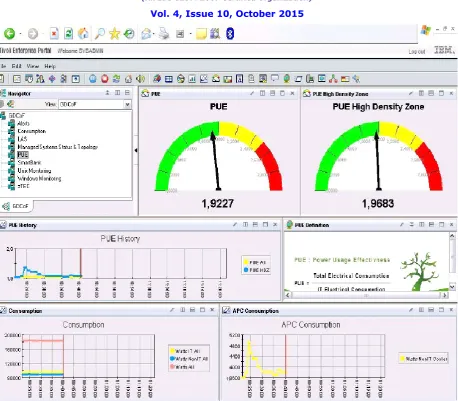
Further energy consumption occurs due to lighting, loss in the power distribution, and other electrical equipment such as UPS. In other words, the majority of power usage within a datacenter is used for other purposes than actual IT services. Thus, to achieve the maximum efficiency in power consumption and CO2 emissions, each of these devices need to be designed and used efficiently while ensuring that their carbon footprint is reduced. A key factor in achieving the reduction in power consumption of a datacenter is to calculate how much energy is consumed in cooling and other overheads. Standard metrics are emerging such as Power Usage Effectiveness (PUE) [9] which can be used to benchmark how much energy is being usefully deployed versus how much is spent on overhead. The PUE of a datacenter is defined as the ratio of the total power consumption of a facility (data or switching center) to the total power consumption of IT equipment (servers, storage, routers, etc.). PUE varies from datacenters depending on the place where datacenter is located and devices used in its construction. Research from the Lawrence Berkley National Labs [8] shows that 22 datacenters measured in 2008 have PUE Values in the range 1.3 to 3.0. PUE of datacenter can be useful in measuring power efficiency of datacenters and thus provide a motivation to improve its efficiency.
V. BALANCINGENERGYINDATACENTER
3. Hard Disk Arrays-Long term Storage
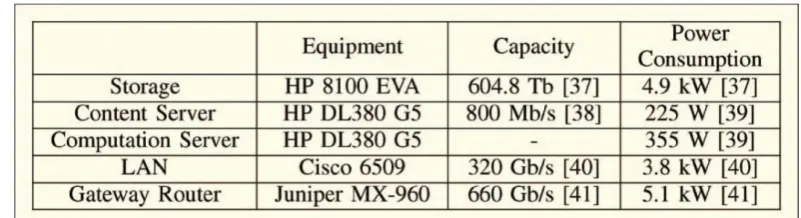
4. Server Consolidation : The figure below describes the Equipment, Capacity and Power Consumption by the components proposed for balancing Energy
Table 1: Equipment, Capacity and power used by servers for balancing Energy
Figure 3: The interface depicting Power Usage Effectiveness
VI. BALANCINGENERGYINDATACENTER
1. UCAD Data Center 2. Campus Wide Backbone
3. Area occupied : -60 square meters 4. Operates 24 hours a day
5. Servers : -500 watts each
6. Green Data Center approach : -Racks 7. Cloud Computing involves : -
a) Workload Diversification b) Power management flexibility
8. Low Power Processors in data centers : -Microsoft Earth Rangers
Solar PV Array
10. Horizontal Approach : -“Rack” Design 11. Peak Daily Energy : -23 KW
12. Normal Daily Usage : -6.8 KW
13. Cloud Scheme : -Two Full Racks completely powered for 24/7
Table 2: The optimum energy usage to balance Energy
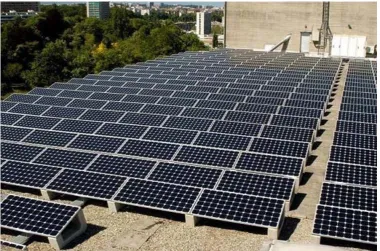
15. Rack Design: Effective approach towards Green cloud is accomplished using solar energy and organizing the panels as below:-
Figure 4: The rack design accepted for energy optimization
VII. INDIANSCENARIO
1. Green ICT Standardization in India : -GISFI 2. Started in 2010
3. Background info
a) High GHG emission
b) Fastest mobile subscriber growth rate c) Erratic power supply
4. Solutions : -
a) To reduce carbon intensity by 20-25 % using fuel efficiency standards b) Network deployment by developing energy efficient base stations 5. Data Centers:
6. As of 2007, 14% of all ICT emission is caused by Data Centers
7. Roughly 50% of the emission due to data centers is due to power system losses and cooling loads 8. Rapid Growth in use of IPTV, VOIP, enterprise IT
9.
Use of both Corporate and Internet Data Centers.VIII. CONCLUSIONANDFUTURE
As the prevalence of Cloud computing continues to rise, the need for power saving mechanisms within the Cloud also increases. This paper presents a Green Cloud framework for improving system efficiency in a data center. To demonstrate the potential of framework, presented new energy efficient scheduling. Though in this paper, we have found new ways to save vast amounts of energy while minimally impacting performance. Not only do the components discussed in this paper complement each other,
they leave space for future work. Future opportunities could explore a scheduling system that is both power-aware and thermal-aware to maximize energy savings both from physical servers and the cooling systems used. Such a scheduler would also drive the need for better data center designs, both in server placements within racks and closed loop cooling systems integrated into each rack. While a number of the Cloud techniques are discussed in this paper, there is a growing need for improvements in Cloud
infrastructure, both in the academic and commercial sectors.
REFERENCES
[1] Mell, P. and T. Grance. The NIST Definition of Cloud Computing,2009.
[2] Mueen Uddin, framework for energy efficient data centers using virtualization, 2012. [3] IDC - Press Release, 2013.
[4] Ian Foster, Cloud Computing and Grid Computing 360-Degree Compared, 2008. [5] James W. Smith, Green Cloud A literature review of Energy-Aware Computing, 2011. [6] Asghar Sabbaghi, Green Information Technology and Sustainability, 2012
[7] Ranganathan P, 2010, Recipe for efficiency: principles of power-aware computing. Communication. ACM, 53(4):60–67.
[8] Greenberg, S., Mills, E., Tschudi, B., Rumsey, P., and Myatt, B., 2008, Best Practices for Data Centers: Lessons Learned from Benchmarking 22 Data Centers. ACEEE Summer Study on Energy Efficiency in Buildings. Retrieved September 4, 2008, from
http://eetd.lbl.gov/emills/PUBS/PDF/ACEEE-datacenters.pdf