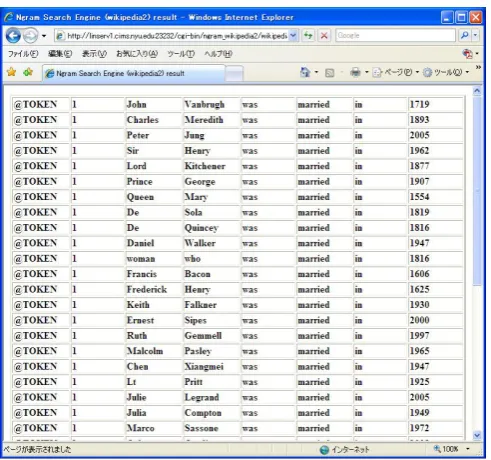
Figure 1. Query page
Figure 2. Output Page (ngram)
3.
Snapshot
The Figures 1, 2 and 3 show a snapshot of the system. Figure 1 is the query page. Figure 2 is the output page of ngram output and Figure 3 is the output page of KWIC output with document ID (i.e. Wikipedia entry title). In the query page (Figure 1), the user types the query ngram with tokens, POS’s, chunk or NE information up to 7gram. The user can also specify the number of outputs, the frequency threshold (the minimum frequency to be displayed), the output style (sentence, KWIC or ngram), the output type (token, POS, chunk, NE and/or document information in case of sentence or KWIC output) and the print format (in text or table). The output will be displayed according to the specifications.
4.
Data and Search Algorithm
4.1
Data
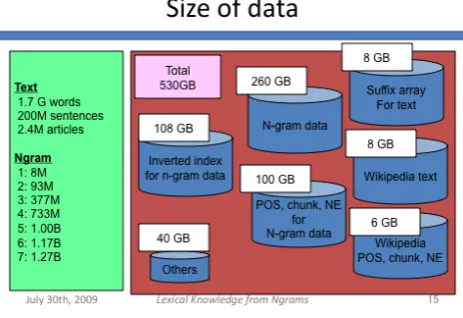
We used Wikipedia as the target corpus in the current system. Google Ngram can also be used, but because it doesn’t contain the original sentences, we chose Wikipedia and create ngram data out of it by ourselves in order to show the original data from where the ngrams are extracted. It is static html documents of Wikipedia as of 18:12, June 8, 2008 version, provided at the following URL http://static.wikipedia.org/downloads/2008-06/en/. It has 1.7 billion tokens, 200 million sentences and 2.4 million articles. The sentences were tagged by the Stanford POS tagger and NE tagger (Stanford tagger), and assigned chunks by the OAK system (OAK system). The same data (actually, the current data available at the site has more annotations than the data explained here)
is available at the following URL: http://nlp.cs.nyu.edu/wikipedia-data.
The numbers of distinct ngrams are shown in Table 1. The numbers are comparable to the Google ngram data, as we have no frequency threshold. We made up to 7grams instead of 5grams in Google ngram. We did not collapse the digits unlike Google Ngram data.
Table 1. Number of distinct ngrams
N
Wikipedia
ngrams
ngram
1
8M
13M
2
93M
315M
3
377M
977M
4
733M
1,314M
5
1,006M
1.176M
6
1,173M
-
7
1,266M
-
#
0
30
#: frequency threshold
4.2
Algorithm Overview
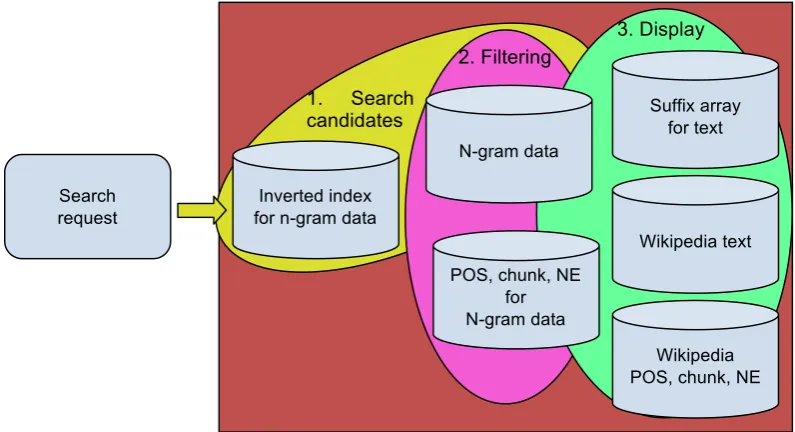
Figure 3 shows the overview of the steps in the ngram search engine and the data. Basically, there are three steps in the search, 1) searching candidates, where the system search candidate ngrams which matches to the query using tokens, 2) filtering, where the candidate ngrams are filtered using the constraint of additional information (POS, chunk and NE), and 3) displaying the results to the user. In the following subsections, we will describe each step and data in detail.
1. Search
candidates
2. Filtering
3. Display
Wikipedia text
Wikipedia POS, chunk, NE N-gram data
Inverted index for n-gram data
Suffix array for text
POS, chunk, NE for N-gram data Search
request