A Machine Learning Approach for Layout Inference in Spreadsheets
Elvis Koci
1, Maik Thiele
1, Oscar Romero
2and Wolfgang Lehner
11Database Technology Group, Department of Computer Science, Technische Universit¨at Dresden, Dresden, Germany
{elvis.koci, maik.thiele, wolfgang.lehner}@tu-dresden.de
2Departament d’Enginyeria de Serveis i Sistemes d’Informaci`o (ESSI), Universitat Politecnica de Catalunya (UPC-BarcelonaTech), C-Jordi Girona 1, Compus Nord, Barcelona, Spain
Keywords: Speadsheets, Tabular, Layout, Structure, Machine Learning, Knowledge Discovery
Abstract: Spreadsheet applications are one of the most used tools for content generation and presentation in industry and the Web. In spite of this success, there does not exist a comprehensive approach to automatically extract and reuse the richness of data maintained in this format. The biggest obstacle is the lack of awareness about the structure of the data in spreadsheets, which otherwise could provide the means to automatically understand and extract knowledge from these files. In this paper, we propose a classification approach to discover the layout of tables in spreadsheets. Therefore, we focus on the cell level, considering a wide range of features not covered before by related work. We evaluated the performance of our classifiers on a large dataset covering three different corpora from various domains. Finally, our work includes a novel technique for detecting and repairing incorrectly classified cells in a post-processing step. The experimental results show that our approach delivers very high accuracy bringing us a crucial step closer towards automatic table extraction.
1
INTRODUCTION
Spreadsheet applications have evolved to be a tool of great importance for transforming, analyzing, and representing data in visual way. In industry, a consid-erable amount of the company’s knowledge is stored and managed in this form. Domain experts from these companies use spreadsheets for financial analysis, lo-gistics and planning. Also, spreadsheets are a popular format in the Web. Of particular importance are those that can be found in Open Data platforms, where gov-ernments, important institutions, and non profit orga-nizations are making their data available.
All this make spreadsheets a valuable source of information. However, they are optimized to be user-friendly rather than machine-user-friendly. The same data can be formatted in different ways in a spreadsheet depending on the information the user wants to con-vey. It is relatively easy for humans to interpret the presented information, but it is rather hard to do the same algorithmically. As a result, we are constrained to cumbersome approaches that limit the potential reuses of data maintained in these types of files. A typical problem that arises in most enterprises is that due to the lack of visibility the data stored in spread-sheets is not available for enterprise-wide data
analy-ses or reuse.
Our goal is to overcome these limitations by de-veloping a method that allows to discover tables in spreadsheets, infer their layout and other implicit in-formation. We believe that this approach can provide us with the means to extract a richer and more struc-tured representation of data from spreadsheets. This representation will act as the base for transforming the data into other formats, such as a relational table or a JSON document, depending on their characteristics and the application requirements.
The relational model seems to be one of the nat-ural progressions for spreadsheet data, since organiz-ing data into a tabular layout is an essential aspect of both worlds. By bringing spreadsheets and RDBMS closer we can open the door to many applications. For instance, it would be easier to digest them into a data warehouse and perform complex data analy-sis. Essentially, spreadsheets can become a substan-tial source of data for existing or new business pro-cesses.
In the literature, spreadsheet table detection has only scarcely been investigated often assuming just the same uniform table layout across all spreadsheets. However, due to the manifold possibilities to struc-ture tabular data within a spreadsheet, the
assump-tion of an uniform layout either excludes a substantial number of tables and data from the extraction process or leads to inaccurate results. Therefore, this paper focuses on incorporating layout classification in the spreadsheet table extraction process. In detail, we ad-dress the following aspects:
• Spreadsheet Building Blocks: Incorporating lessons learned from spreadsheet research, we propose five layout building blocks for spreadsheet tables.
• Features: We consolidate and extend a wide range of features proposed in the literature for each of the building blocks. Using feature se-lection, we evaluate the relevance of each feature with respect to the classification problem.
• Experimental Evaluation: We conduct an ex-perimental evaluation on three spreadsheet cor-pora and compare different classification algo-rithms.
• Handling Classification Errors: We provide a detailed discussion of classification errors and propose a novel technique to detect and repair misclassified cells.
The paper is organized as follows: In Section 2 we define the classification problem for layout inference in spreadsheets. The features used for the classifica-tion problem are listed in Secclassifica-tion 3. In Secclassifica-tion 4 we describe how we annotated spreadsheets for the super-vised learning. The results from the evaluation of the proposed approach are summarized in Section 5. In Section 6 we discuss how to handle misclassification in a post-processing task. Finally, we review related work on table identification and layout discovery in Section 7.
2
THE CLASSIFICATION
PROBLEM
The objective of capturing the tabular data embedded in spreadsheets can be treated as a classification prob-lem where the specific structures of a table have to be identified. In the first part of this section we de-fine these structures or building blocks that form our classes. In the second part we specify the data item granularity on which the classification task will be performed.
2.1
Spreadsheet Layout Building Blocks
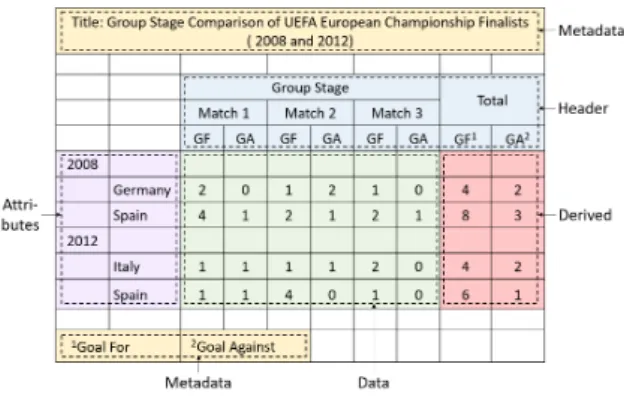
Considering that tables embedded in spreadsheets vary in shape and layout, it is required not only toFigure 1: The Building Blocks
identify them but also recognize their building blocks. We define five building blocks for spreadsheet tables: Headers, Attributes, Metadata, Data and Derived (see Figure 1). A “Header” (H) cell represents the label of a column and can be flat or hierarchical (stacked). Hierarchical structures can be also found in the left-most or right-left-most columns of a table, which we call “Attributes” (A), a term first introduced in (Chen and Cafarella, 2013). Attributes can be seen as instances from the same or different (relational) dimensions placed in one or multiple columns in a way that con-veys the existence of a hierarchy. We label cells as “Metadata” (M) when they provide additional infor-mation about the table as a whole or its specific sec-tions. Examples of Metadata are the table name, cre-ation date, and the unit for the values of a column. The remaining cells form the actual payload of the table and are labeled as “Data”. Additionally, we use the label “Derived” (B) to distinguish those cells that are aggregations of other Data cells’ values. Derived cells can have a different structure from the core Data cells, therefore we need to treat them separately. Figure 1 provides examples of all the aforementioned building blocks.
2.2
Working at the Cell Granularity
One potential solution for the table identification and layout recognition tasks would be to operate un-der some assumptions about the typical structure of spreadsheet tables. That means expecting spread-sheets to contain one or more tables with typical lay-outs that are well separated from each other. In such scenario we could define simple rules and heuristics to recognize the different parts. For example, the top row could be marked as Header when it contains mostly string values. Additionally, cells containing the string “Table:” are most probably Metadata. How-ever, this approach can not scale to handle arbitrary spreadsheet tables. Since, the corpora we have con-sidered include spreadsheets from various domains,Figure 2: The Cell Classification Process
we need to find a more accurate and more general so-lution.
For this reason, our approach focuses on the smallest structural unit of a spreadsheet, namely the cell. At this granularity we are able to identify ar-bitrary layout structures, which might be neglected otherwise. For instance, it is tricky to classify rows when multiple tables are stacked horizontally. The same applies for the cases when Metadata are inter-mingled with Header or Data. Nevertheless, we ac-knowledge that the probability of having misclassifi-cations increases when working with cells instead of composite structures such as rows or columns. There-fore, our aim is to come up with novel solutions that mitigate this drawback.
Figure 2 illustrates the three high-level tasks that compose our cell classification process. Initially, the application reads the spreadsheet file and extracts the features of each non-blank cell. Here we considered different aspects of the cell, summarized in Section 3. In the next step, cells are classified with very high accuracy (see Section 5.2) based on their features. Fi-nally, a post-processing step improves the accuracy of the classifier even further by applying a set of rules that are able to identify cells that are most probably misclassified and have to be relabeled.
To complete the picture, Figure 2 also includes the Table Reconstruction task, which forms a separate topic and is therefore left as future work.
3
FEATURE SPECIFICATION
In this paper we consider cell features especially for Microsoft Excel spreadsheets. However, most of the features listed in the next sections can be used for other spreadsheet tools as well. To process the spreadsheet files and extract the features we are using Apache POI1, which is the most complete Java library for handling Excel documents. Many of the features listed below are directly accessible via the classes of this library. Others require a custom implementation.
1https://poi.apache.org/
More details on this project can be found on our web-site2. These features incorporate and extend the fea-tures proposed by (Adelfio and Samet, 2013; Chen and Cafarella, 2013; Eberius et al., 2015)
3.1
Content Features
The content features describe the cell value, but not its format. We have considered the cell type (numeric, string, boolean, date, or formula), and whether the cell is a hyperlink or not. For numeric cells we check if the value is within a specified year range, to distin-guish values that could also be interpreted as dates. Furthermore, we record the length of the value and the number of tokens that compose it. The latter is always one for non-string cells. Finally, we have de-fined 13 textual features relevant only to cells con-taining string values. We have listed below a subset of these features.
• IS CAPITALIZED: Whether the string is in title case.
• STARTS WITH SPECIAL: True, if the first character is a special symbol.
• IS ALPHANUMERIC: Whether the string contains only alphabetic and numeric characters.
• CONTAINS PUNCTUATIONS : True, if the string contains punctuation characters. Here, we are not considering the colon character, which is the sub-ject of separate feature.
• WORDS LIKE TOTAL: If the string contains tokens like “total”, “sum”, and “max”, this feature is set to true.
3.2
Cell Style Features
In addition to content features, the style of the cell can provide valuable indicators for the classification process. Since the total number of these features is large, we have arranged them below into subgroups.
2https://wwwdb.inf.tu-dresden.de/misc/ DeExcelarator
• ALIGNMENT: Type of horizontal and vertical align-ment, and number of indentations.
• FILL: Whether the cell is filled with a color or not, and the type of fill pattern.
• ORIENTATION: Whether the contents are rotated.
• CONTROL: Checks if the options “wrap text” and “shrink to fit” are set to true.
• MERGE: Checks if the cell is merged and record the number of cells in the merged region. If not merged, it is set to 1.
• BORDERS: The type of the top, bottom, left, and right border. Excel supports 14 border types. Also, we count the number (from 0 to 4) of de-fined borders for the cell.
3.3
Font Features
The features of this group describe the font of the cell. We have considered various aspects of the font, such as its size, effects, style and color.
• FONT COLOR DEFAULT: Whether the font color is the default one (i.e., black) or not.
• FONT SIZE: A numeric value between 1 and 409.
• IS BOLD: Whether the font is bold.
• IS ITALIC: Whether the font is italic.
• IS STRIKE OUT: Whether the font is striked out.
• UNDERLINE TYPE: Single, single accounting, dou-ble, double accounting, none.
• OFFSET TYPE: Superscript, subscript or none.
• FORMATTING RUNS: Number of unique formats in the cell.
3.4
Reference Features
These features explore the Excel formulas and their references in the same or other worksheets. Here, not only have we considered references from the same worksheet (intra-references), but also references from the other worksheets in the file (inter-references). The observation is that the formula cells are mostly found in Data or Derived regions, and that the cells refer-enced by these formulas are predominantly Data. Be-low, we list the features used in our analysis.
• FORMULA VAL TYPE: The result of the formula can be numeric, string, boolean, date, or not applica-ble (n/a).
• IS AGGREGATION FORMULA: Whether the formula is an aggregation or not.
• REF VAL TYPE: The referencing formula can out-put a numeric, string, boolean, date, or not appli-cable (n/a).
• REF IS AGGREGATION FORMULA: Whether the ref-erencing formula is an aggregation or not. We had to introduce the value “Not Applicable” for each of these features, since there are cells that do not contain formulas and are not referenced by a formula.
3.5
Spatial Features
We have also considered features that describe the “neighborhood” of the cell. This includes the location of the cells (defined by the row and column number) and the features of its neighbors. Only the neighbors that share a border (edge) with the cell are inspected, i.e., the top, down, left, and right. When the neigh-boring cells are blank or outside of the bounds of the sheet, we set the value of the corresponding features to “Not Applicable” (n/a).
• ROW NUM: The index of the row the cell is located in.
• COLUMN NUM: The index of the column the cell is located in.
• NUMBER OF NEIGHBORS: The number (from 0 to 4) of neighboring cells that are not blank. For merged cells, we consider each side (the top and bottom row, and the left and right column) in an aggregated manner. If there is at least one non-blank cell, the side is considered as active and thus marked as 1. Otherwise, we mark it as 0.
• MATCHES {TOP,BOTTOM,LEFT,RIGHT} STYLE: Whether the neighbor has the same style as the cell.
• MATCHES {TOP,BOTTOM,LEFT,RIGHT} TYPE: Whether the neighbor has the same content type as the cell.
• {TOP,BOTTOM,LEFT,RIGHT} NEIGHBOR TYPE: The content type of the neighbor. It can take one of the values mentioned in Section 3.1.
4
CREATING THE GROUND
TRUTH
The supervised classification processes requires a ground truth dataset, which is used for both training and validation. In Section 4.1 we briefly describe the three spreadsheet corpora used to extract and gener-ate a representative set of spreadsheets. To cregener-ate the training data we developed a spreadsheet labeling tool
(see Section 4.2) that provides the means to annotate ranges of cells. Given that tool, we randomly selected and annotated files from the three corpora for which we provide statistics in Section 4.3.
4.1
Spreadsheet Corpora and Training
Data
For our experiments we have considered spreadsheets from three different sources. Euses (Fisher and Rothermel, 2005) is one of the oldest and most frequently used corpora. It has 4,498 unique spread-sheets, which are gathered through Google searches using keywords such as “financial” and “inventory”. The Enron corpus (Hermans and Murphy-Hill, 2015) contains over 15,000 spreadsheets, extracted from the Enron email archive. This corpus is of particular in-terest, since it provides access to real-world business spreadsheets used in industry. The third corpus is Fuse (Barik et al., 2015) that contains 249,376 unique spreadsheets, extracted from Common Crawl1. Each spreadsheet in Fuse is accompanied by a JSON file that contains metadata and statistics. Unlike the other two corpora, Fuse can be reproduced and extended.
4.2
The Annotation Tool
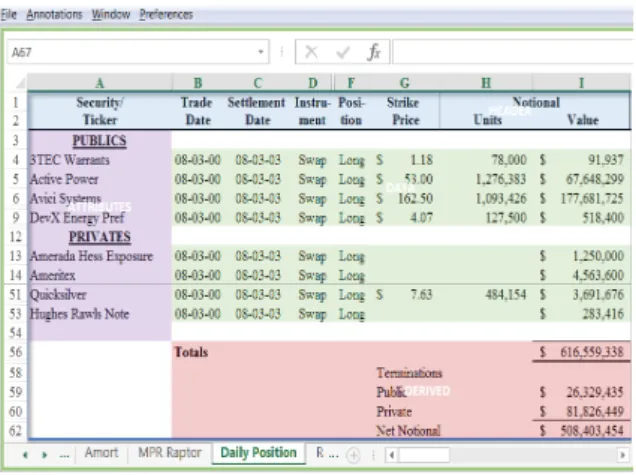
Using the Eclipse SWT2library we developed an in-teractive desktop application that ensures good qual-ity annotations. The original Excel spreadsheet is em-bedded into a Java window and protected from user alteration. To create an annotation, the user selects a range of cells (region) and then chooses the appro-priate predefined label. A rectangle, which is filled with the color associated to the label, covers the an-notated region. The application evaluates the anno-tations and rejects the inappropriate ones. For exam-ple, the user cannot annotate ranges that are empty or overlapping with existing annotations. The data from all the created annotations are stored in a new sheet, named “Range Annotation Data”. This sheet is pro-tected and hidden once the file is closed. Figure 3 provides an example of an annotated sheet.
In addition to the building block described in Sec-tion 2, we have introduced the possibility to annotate a region (area) that represents a whole table. A rect-angle with thick blue borders marks its boundaries. We need the “Table” annotation for two main reasons: Firstly, we can govern the labeling process, to assure valid annotations. For example, Data can only exist
1http://commoncrawl.org/ 2https://www.eclipse.org/swt/
Figure 3: Annotated Sheet
inside a Table. However, Metadata can be left out-side when they provide information relevant to mul-tiple Tables. Secondly, these annotations will help us evaluate the Table Reconstruction task, in the future.
4.3
Annotation Statistics
The graphs below provide an overview of the col-lected annotations and the contribution of each cor-pus.
We considered each corpus individually and as-signed a unique number to their files. Using a random number generator we extracted subsets of files. From these, we annotated a total of 465 worksheets (216 files) and 898 tables.
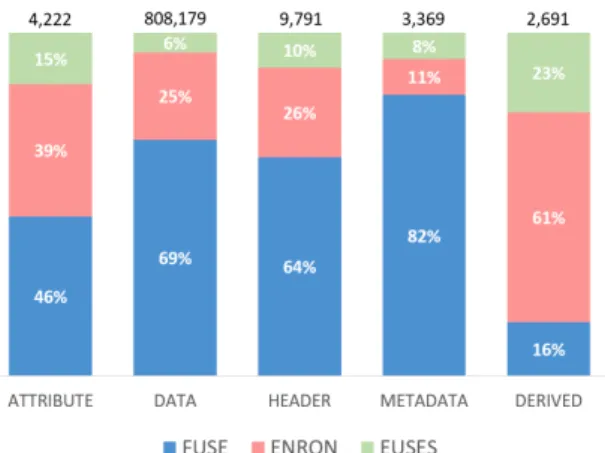
In Figure 5 we examine the annotated cells. The total number of cells for each label (class) is placed at the top of the column bar. There was a small amount of cells that did not match any of the defined labels. These are usually random notes that do not have a clear function and do not provide additional context (information) about the table. We decided to omit such cells.
(a) Sheets (b) Tables Figure 4: Annotation Statistics
As can be seen in Figure 5, the number of Data cells is by orders of magnitude larger than the other label numbers. To adjust the class distribution we un-dersampled the Data class, considering only the most difficult case, which are the first and the last row and
Figure 5: Annotated Cells
three random rows in between. By applying this tech-nique the Data class was reduced to 32,875 instead of 808,179 cells. Considering also the other four classes the final gold standard consists of 52,948 cells in to-tal.
Also, Figure 5 provides a look into the character-istics of the three corpora. For instance, the selected spreadsheets from Enron corpus are more likely to contain Derived cells (aggregations). This result is somehow expected since, as stated before, Enron spreadsheets are coming from the industry, which is characterized by a heavier use of formulas. Also, Eu-ses has a high contribution in the Derived cells con-sidering the number of annotated sheets from this cor-pus. Moreover, we observe that Fuse contributes the vast majority of Metadata cells. Enron and Euses have a high contribution in the Attribute cells. These char-acteristics surely influence the classification results, which are discussed in Section 5.
5
EVALUATION
5.1
Feature Selection
We used Weka1, a well known tool for machine learn-ing tasks, for feature selection and classification. Ini-tially, we binarized nominal features with more than two values, which gave us 219 features in total. We used the “RemoveUseless” option to remove the fea-tures that do not vary at all or vary too much. Addi-tionally, we manually removed those features that are practically constant (i.e., at least 99.9% of cases the value is the same). Furthermore, we decided to ex-clude from the final set features that check the style and content type of the neighbors (see last 3 items in
1http://www.cs.waikato.ac.nz/ml/weka/
Section 3.5). These features will be subject of future experiments related both to the classification task and the post-processing step. We provide more details on this matter in Section 6.
The remaining 88 features were evaluated using the InfoGainAttribute, GainRatioAttribute,
ChiSquaredAttribute,ConsitencySubset, and
CfsSub-setfeature selection methods. For each one of them we performed 10 folds (runs). A bidirectional Best First search was used for ConsitencySubsetand
Cfs-Subset, while the other methods can only be coupled
with Ranker search.
From the results we considered most of the fea-tures that score high in these selection methods. Al-though, we were predominantly influenced by
Con-sistencySubset results, since ,when tested, they
pro-vide the highest classification accuracy for the small-est number of features. We also included in the fi-nal set features that are strong indicators despite the fact that they describe small number of instances. “Words Like Table” is an example of such features, where 48 out of total 49 positive (true) cases are in-stances of the Metadata class.
Table 1: Selected Content and Style Features
Content Cell Style
LENGTH# IDENTATIONS#
NUM OF TOKENS# H ALIGNMENT DEFAULT? LEADING SPACES# H ALIGNMENT CENTER? IS NUMERIC? V ALIGNMENT BOTTOM? IS FORMULA? FILL PATTERN DEFAULT? STARTS WITH NUMBER? IS WRAPTEXT? STARTS WITH SPECIAL? NUM OF CELLS# IS CAPITALIZED? NONE TOP BORDER?
IS UPPER CASE? THIN TOP BORDER? IS ALPHABETIC? NONE BOTTOM BORDER? CONTAINS SPECIAL CHARS? NONE LEFT BORDER?
CONTAINS PUNCTUATIONS? NONE RIGHT BORDER? CONTAINS COLON? MEDIUM RIGHT BORDER? WORDS LIKE TOTAL? HAS 0 DEFINED BORDERS? WORDS LIKE TABLE?
IN YEAR RANGE?
Table 2: Selected Font, Reference and Spatial Features
Font Reference Spatial
FONT SIZE# IS AGGRE FORMULA? ROW NUMBER# FONT COLOR DEFAULT? REF VAL NUMERIC? COL NUMBER#
IS BOLD? HAS 0 NEIGHBORS?
NONE UNDERLINE? HAS 1 NEIGHBOR?
HAS 2 NEIGHBORS? HAS 3 NEIGHBORS? HAS 4 NEIGHBORS?
Table 1 and 2 list the selected features, 43 in to-tal. Those suffixed with ? represent boolean features. While, those suffixed with # represent numeric fea-tures.
The results from the classification evaluation, de-scribed in Section 5.2, show that the above features are good indicators for the ground truth dataset. How-ever, in general spreadsheets exhibit different
charac-teristics depending on the domain they come from. For example, we expect that reference features are more important for industrial rather than for Web spreadsheets, since the former are characterized by heavier use of formulas. Therefore, an independent feature selection might be required for other spread-sheet datasets in order to achieve near optimum accu-racy. Nevertheless, in the appendix we provide more details about the feature selection results from our ex-periments.
5.2
Classifiers
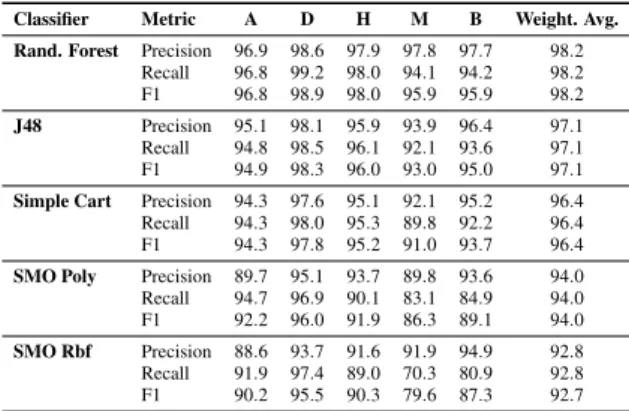
In our evaluation, we consider various classification algorithms, most of which have been successfully applied to similar tasks in the literature. Specifically, we consider CART (Breiman et al., 1984) ( Simple-CARTin Weka), C4.5 (Quinlan, 1993) (J48in Weka), Random Forest (Breiman, 2001) and support vector machines (Vapnik, 1982) (SMO in Weka), which uses the sequential minimal optimization algorithm developed by (Platt, 1998) to train the classifier. Here we consider both a polynomial kernel and an RBF kernel. We evaluate the classification performance using 10-fold cross validation. The results of our evaluation are displayed in Table 3.
Table 3: Classifier Evaluation: All measures are reported as percentages for the following classes: Attribute (A), Data (D), Header (H), Metadata (M), and Derived (B).
Classifier Metric A D H M B Weight. Avg. Rand. Forest Precision 96.9 98.6 97.9 97.8 97.7 98.2
Recall 96.8 99.2 98.0 94.1 94.2 98.2 F1 96.8 98.9 98.0 95.9 95.9 98.2
J48 Precision 95.1 98.1 95.9 93.9 96.4 97.1 Recall 94.8 98.5 96.1 92.1 93.6 97.1 F1 94.9 98.3 96.0 93.0 95.0 97.1
Simple Cart Precision 94.3 97.6 95.1 92.1 95.2 96.4 Recall 94.3 98.0 95.3 89.8 92.2 96.4 F1 94.3 97.8 95.2 91.0 93.7 96.4
SMO Poly Precision 89.7 95.1 93.7 89.8 93.6 94.0 Recall 94.7 96.9 90.1 83.1 84.9 94.0 F1 92.2 96.0 91.9 86.3 89.1 94.0
SMO Rbf Precision 88.6 93.7 91.6 91.9 94.9 92.8 Recall 91.9 97.4 89.0 70.3 80.9 92.8 F1 90.2 95.5 90.3 79.6 87.3 92.7
As can be seen in this table, the scores for all the classes (labels) are satisfactory. We note that decision tree based classifiers perform better than SMO in this classification task. In particular, Random Forest produces the highest results. Another interesting fact is that all the classifiers perform worst with Metadata and Derived classes. The main reason, seems to be low recall for these classes.
Table 4 displays the confusion matrix from the evaluation of the Random Forest classifier. The
Table 4: Random Forest Confusion Matrix
Total A D H M B 4222 4087 88 29 18 0 Attributes 32875 70 32626 86 33 60 Data 9791 36 139 9597 19 0 Header 3369 26 86 88 3169 0 Metadata 2691 0 153 2 0 2536 Derived
values with bold font, in the diagonal of the matrix, represent the number of correctly classified cells per label. We have marked with red color the “prob-lematic” values. There is a considerable number of incorrectly classified data cells, as can be seen in the second row. However, the bigger concern is that other classes are often misclassified as data (see second column). This was somehow expected for Derived cells, since they are close (similar) to the Data cells. These misclassifications together with the low number of instances are the main reasons for the low recall of the Derived class. Also, we note that Metadata cells tend to be falsely classified as Header and Data, which consequently impacts the recall of this class. One potential reason for these results can be the big variety of Metadata cells. In other words, these cells do not exhibit the level of homogeneity found in other classes of cells.
To provide a more concrete picture on the accuracy of the classification, we decided to train and run 10-fold cross validation using Random Forest classifier on the full dataset of annotated cells (828,252) with the selected features. The F1 measure does not change much for the Attributes (96.6%) and Header (97.7%) cells. The classifier scores 99.9% on F1 measure for Data cells, since the full dataset contains a vast number of instances of this class. The F1 measure decreases for Metadata and Derived, 93.5% and 94.9% respectively.
Figure 6: Percentage of Sheets with 2 or Less Misclassifi-cations
which the classifier has misclassified 2 or less cells. We have stacked those cases that have 0 misclassifi-cation with those that have 1 or 2. We observe that more than half of the sheets are classified with no er-rors. Also, we notice that the classifier has the highest accuracy in the Fuse sheets and the lowest in the En-ron sheets.
6
POST-PROCESSING
The objective of the post-processing phase (Step 3 in Figure 2) is to detect and repair misclassifications based on spatial patterns (rules) which were deduced from an empirical study of the classification results. We believe that unusual arrangements of labels could hint the existence of misclassifications. For exam-ple, finding a Data cell in a row that otherwise has only Header cells is considered to be unexpected. The same can be said when an Attribute cell is completely surrounded by instances of the Metadata class.
Identifying incorrectly classified cells is only one part of the repairing process. We would also like to update the labels of these cells. Again here we con-sider the arrangement of labels close to the cell, which we will refer to as the neighborhood of the cell. In the examples provided above, influenced by the neighbor-hood, we would have updated the labels to Header and Metadata respectively.
As seen from the examples, the classification la-bels provide a valuable context. Since our evaluation shows that the classification process has high accu-racy, we expect the vast majority of identified cases to be true positives. In other words, we assume that the neighborhood of the cell mostly contains correctly classified cells. In the following sections we discuss in more detail the identification and relabeling steps.
6.1
Misclassification Patterns
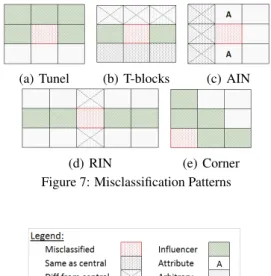
We studied misclassification patterns in the classifi-cation results for the full dataset of annotated cells. From 1,237 misclassified cells, we identified 672 unique patterns. From the first 40 most repeated pat-terns we inferred generic (for all labels) rules to dis-cover misclassifications. Below we discuss five of these rules.
Here our intention is to provide the intuition be-hind each rule (pattern), rather than its specific im-plementation. Figure 7 provides a visual represen-tation of the considered rules. The cells filled with green lines (Influencer) represent neighbors that share the same label but different from the one filled with red dots (i.e., the potential misclassification). The
“Tunel” pattern tries to identify cells that are com-pletely or partially surrounded by instances of a dif-ferent cell class. We only consider the instances of these pattern that occur horizontally. In Figure 7.a
(a) Tunel (b) T-blocks (c) AIN
(d) RIN (e) Corner Figure 7: Misclassification Patterns
we display one of the two possible arrangements of this pattern. The “T-block” pattern identifies misclas-sifications that occur in the border between two dif-ferent sections of the table. In addition to the one pre-sented in Figure 7.b, the T-block pattern can also oc-cur when the “head” of the T-shape is on the top row. The “Attribute Interrupter” (AIN) pattern applies to Attribute cells (see Figure 7.c). For this reason, AIN has a vertical nature. The intention is to identify mis-classified cells in Attribute columns. The “Row In-terrupter” (RIN) pattern discovers the cases when a row is “invaded” by a cell of another class. Figure 7.d displays the arrangement for this pattern. Finally, the “Corner” pattern discovers misclassifications that occur in the corners of the table. Therefore, there are four possible versions of this pattern. Figure 7.e dis-plays one of them. In this figure we do not display the cells on the left and bottom, since they are supposed to be blank or undefined (i.e., outside of the sheet bor-ders).
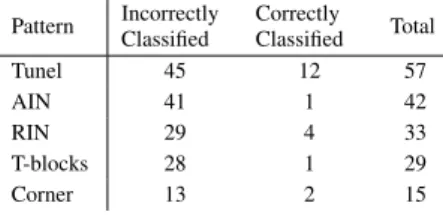
Table 5 displays the number of times each pat-tern occurs in the classification results. We should note that the patterns are not mutually exclusive. In the majority of times these patterns match incorrectly classified cells. However, we also have a considerable number of cases that the cell was correctly classified.
6.2
Relabeling
In this section we describe our strategy for relabeling the misclassified cells based on the matched pattern.
Table 5: Pattern Occurrences Pattern Incorrectly Classified Correctly Classified Total Tunel 45 12 57 AIN 41 1 42 RIN 29 4 33 T-blocks 28 1 29 Corner 13 2 15
Essentially, we infer the new label from the neighbor-ing cells we call “Influencers” (see Figure 7). For the Tunel pattern we update the label to match the ma-jority of the close-neighbors. When the T-block pat-tern is identified, the label of the right and left close-neighbors is used. We set the label for the central cell to Attribute, when the AIN pattern occurs. For the RIN pattern we flip the label to match the rest of the row. Finally, when the Corner pattern occurs, the la-bel of the cell is updated to the match the rest of the neighbors.
We decided to evaluate our approach, this time flipping the label of the identified cells. We performed these updates using all the patterns in a sequential run. The updated list of labels from the occurrences of the previous pattern becomes the input for the next pattern. To avoid overlaps between them, we allow updating the cell label only once. The patterns were used in the ascending order of the number of correctly classified cells they matched (see Table 5): AIN, T-Blocks, Corner, RIN, Tunel. The results show that we managed to repair 152 misclassified and lose 14 correctly classified. Table 6 summarizes the results of this execution per label. Also, in Table 7 we provide the updated F1 measures after the relabeling for the full dataset of cells.
Table 6: Label Flips
Attributes Data Header Metadata Derived
Gained 41 57 26 18 10
Lost 0 1 8 3 2
Table 7: F1 measures before and after relabeling
Attributes Data Header Metadata Derived Original 96.6 99.9 97.7 93.5 94.9 Relabeled 97.3 99.9 97.9 94 95.2
There is potential in using patterns for handling misclassifications in a post-processing step. However, this approach needs further refinement. We believe that one way to improve it is by taking in consid-eration the type and style of the neighbors. During the classification process these features provide a mi-nor improvement. However, under the label context
they should be able to provide us with stronger indica-tions. We are also looking at methods for discovering patterns automatically. The main aim is to identify patterns that apply to specific classes, since we ex-pect them to be more accurate than the generic ones. The results displayed in Table 6 hint towards this di-rection. Finally, we need to avoid overfitting on the current classification results. Hence, we plan in the future to perform tests in multiple samples.
7
RELATED WORK
7.1
Spreadsheet Layout Inference
The paper (Chen and Cafarella, 2013) describes work on automatic extraction of relational data from spreadsheets. The proposed approach processes data frame spreadsheets (i.e., containing attributes or metadata regions on the top/left and a block of nu-meric values). In particular, the authors focus their efforts on hierarchical spreadsheets (i.e., hierarchical left or top attribute regions). They have used machine learning techniques and few heuristics (i) to identify the regions (layout) of the data frames and (ii) to ex-tract the hierarchy of the attributes. This then be-comes the input for the (iii) extraction of data in the form of relational tuples. The extension of this work is reported in (Chen and Cafarella, 2014). From the first paper, we isolate the structure discovery meth-ods, which are closely related to our research prob-lem. In contrast to us, their approach is to classify the rows in a spreadsheet using linear-chain, condi-tional random field (CRF). Their evaluation is per-formed on 100 random hierarchical spreadsheets from their corpus (called Web). The results show that their method, similar to us, has high accuracy for regions that contain Data. However, for the remaining labels the scores are lower. We should note that they have not defined a separate class for Derived cells. Also, what we call “Metadata” is further distinguished into two separate classes, “Title” and “Footer”. In ad-dition to this, the authors have established a set of assumptions for the arrangement of data in spread-sheets. Cases that do not comply to these expecta-tions are simply not treated by their system. However, as we argue in Section 2, the classification at the row level together with the assumptions about the struc-ture limit the abilities of the system.Work on the extraction of schema from Web tab-ular data, including spreadsheets, is presented in (Adelfio and Samet, 2013). The authors have tested various approaches to identify the layout of the ta-bles in spreadsheets. All of them work on the row
level. Their evaluation shows that the most promising results are achieved when a CRF classifier is used to-gether with their novel approach for encoding cell fea-tures into row feafea-tures (called “logarithmic binning”). In contrast to us, they have considered a much smaller number of cell features (15 in total), since their ap-proach had to work for both spreadsheets and HTML tables. There are some differences with what regards the defined labels. They have further differentiated between simple and stacked Headers. Also, they have not defined a separate label for Attributes cells. More-over, they have defined two kinds of Metadata: “Title” and “Non-relational”. Another aspect that differenti-ates our work from theirs, is that we have considered in our analysis industrial spreadsheets in addition to the ones collected from the Web.
In (Eberius et al., 2013), the authors present De-Excelerator, a framework which takes as input par-tially structured documents, including spreadsheets, and automatically transforms them into first normal form relations. Their approach works based on a set of rules and heuristics. For spreadsheets, these have resulted from a manual study on real-world ex-amples. The performance of the framework was as-sessed by a group of 10 database students, on sample of 50 spreadsheets extracted fromdata.gov. DeExcel-erator received good scores for all the various tasks it handles, including layout inference. Nevertheless, we believe that our approach is much more powerful, since the best features are learned automatically from the annotated spreadsheets. Moreover, we have per-formed our evaluation on a considerably larger sam-ple, consisting of spreadsheets from various domains and sources.
Techniques for header and unit inference for spreadsheets are discussed in (Abraham and Erwig, 2004). This paper looks in the same research prob-lem as us from a software engineering perspective. The core idea is that formula (reference) errors can be discovered more accurately in spreadsheets once the system is aware of the table structure. To achieve this, they have developed several spatial algorithms (strategies), and a weighting scheme that combines their results. Same as us, they work on the cell level, but they use heuristics instead of learning methods. They have defined four possible semantical labels for a cell. The notion of Metadata cells does not exist in their analysis. For the other classes we can find sim-ilarities with the ones we have defined. They have performed their evaluation on two datasets, consist-ing of 10 and 18 spreadsheets correspondconsist-ingly. The results from their evaluation are encouraging. How-ever, the lack of reproducibility and the small size of these datasets makes it difficult to judge this approach
in much more general context.
7.2
Table Recognition and Layout
Discovery
One of the typical ways to present information (facts) is by organizing data in a tabular format. As a result, the problems of table recognition and layout discov-ery have been encountered by various research com-munities. Some of the most recent studies are related to HTML (Web) tables. In (Wang and Hu, 2002), de-cision trees and support vector machines (SVM) are considered to differentiate between genuine and non-genuine Web tables. The authors defined structural, content type, and a word group features. The (Crestan and Pantel, 2011) reports the study of large sample of Web tables, which yielded a taxonomy of table lay-outs. It also discusses heuristics, which are based on features similar to the paper above, to classify Web tables into the proposed taxonomy. In (Eberius et al., 2015), the authors describe the creation of the Dres-den Web Table Corpus, by proposing a classification approach that works on the level of different table lay-out classes.
8
CONCLUSIONS
In conclusion, we have presented our approach for discovering the layout (structure) of the data in spreadsheets. The first aspect of this approach in-volves classifying the individual non-blank cells. Us-ing our specialized tool, we have labeled the cells from a considerable number of sheets, taken from var-ious domains. The experiments show that our models have high accuracy and perform well with all the de-fined classes. The best results are achieved when Ran-dom Forest is used to build the classification model. Moreover, in this paper we discuss a technique for identifying and correcting misclassifications. The cell and its neighbors (i.e., cells adjacent to it) are ana-lyzed for improbable label arrangements (patterns). We update the label of the potentially misclassified cell based on the matched pattern. Although not yet mature, the results from the evaluation of this method are encouraging. It is our aim, in the future, to work on more elaborate techniques for identifying patterns pointing to incorrectly classified cells. Also, part of our future plans is to work on the identification of the individual tables in a spreadsheet from the final output of our classification approach.
ACKNOWLEDGEMENTS
This research has been funded by the European Com-mission through the Erasmus Mundus Joint Doctorate “Information Technologies for Business Intelligence -Doctoral College” (IT4BI-DC).
REFERENCES
Abraham, R. and Erwig, M. (2004). Header and unit in-ference for spreadsheets through spatial analyses. In
VL/HCC’04, pages 165–172. IEEE.
Adelfio, M. D. and Samet, H. (2013). Schema extraction for tabular data on the web.VLDB’13, 6(6):421–432. Barik, T., Lubick, K., Smith, J., Slankas, J., and
Murphy-Hill, E. (2015). FUSE: A Reproducible, Extendable, Internet-scale Corpus of Spreadsheets. InMSR’15. Breiman, L. (2001). Random forests. Machine Learning,
45(1):5–32.
Breiman, L., Friedman, J., Olshen, R., and Stone, C. (1984).
Classification and Regression Trees. Wadsworth. Chen, Z. and Cafarella, M. (2013). Automatic web
spread-sheet data extraction. InSSW’13, page 1. ACM. Chen, Z. and Cafarella, M. (2014). Integrating
spread-sheet data via accurate and low-effort extraction. In
SIGKDD’14, pages 1126–1135. ACM.
Crestan, E. and Pantel, P. (2011). Web-scale table cen-sus and classification. InWSDM’11, pages 545–554. ACM.
Eberius, J., Braunschweig, K., Hentsch, M., Thiele, M., Ah-madov, A., and Lehner, W. (2015). Building the dres-den web table corpus: A classification approach. In
BDC’15. IEEE/ACM.
Eberius, J., Werner, C., Thiele, M., Braunschweig, K., Dannecker, L., and Lehner, W. (2013). Deexcelera-tor: A framework for extracting relational data from partially structured documents. InCIKM’13, pages 2477–2480. ACM.
Fisher, M. and Rothermel, G. (2005). The euses spreadsheet corpus: a shared resource for supporting experimenta-tion with spreadsheet dependability mechanisms. In
SIGSOFT’05, volume 30, pages 1–5. ACM.
Hermans, F. and Murphy-Hill, E. (2015). Enron’s spread-sheets and related emails: A dataset and analysis. In
Proceedings of ICSE ’15. IEEE.
Liu, H. and Yu, L. (2005). Toward integrating feature selection algorithms for classification and clustering.
IEEE Transactions on knowledge and data engineer-ing, 17(4):491–502.
Platt, J. C. (1998). Fast training of support vector machines using sequential minimal optimization. InAdvances in Kernel Methods - Support Vector Learning. MIT Press.
Quinlan, J. R. (1993).C4.5: Programs for Machine Learn-ing. Morgan Kaufmann Publishers Inc.
Vapnik, V. (1982). Estimation of Dependences Based on Empirical Data. Springer Series in Statistics. Springer-Verlag New York, Inc.
Wang, Y. and Hu, J. (2002). A machine learning based ap-proach for table detection on the web. InWWW’02, pages 242–250. ACM.
APPENDIX
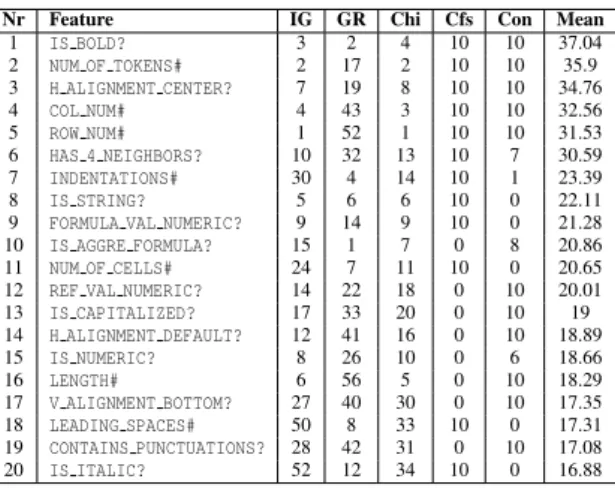
Below we provide a table with the “top” 20 features ordered by mean rank, which is calculated based on the results from 5 feature selection methods. As men-tioned in Section 5.1, a 10 fold cross validation was performed for each one of these methods. The
Cfs-Subset (Cfs)andConsistencySubstet (Con)output the
number of times a feature was selected in the final best subset. The other three methods output the rank of the feature.
Table 8: Top 20 features, considering the results from 5 feature selection methods: InfoGainAttribute (IG), Gain-RatioAttribute (GR),ChiSquaredAttribute (Chi),CfsSubset (Cfs), andConsitencySubset(Con)
Nr Feature IG GR Chi Cfs Con Mean
1 IS BOLD? 3 2 4 10 10 37.04 2 NUM OF TOKENS# 2 17 2 10 10 35.9 3 H ALIGNMENT CENTER? 7 19 8 10 10 34.76 4 COL NUM# 4 43 3 10 10 32.56 5 ROW NUM# 1 52 1 10 10 31.53 6 HAS 4 NEIGHBORS? 10 32 13 10 7 30.59 7 INDENTATIONS# 30 4 14 10 1 23.39 8 IS STRING? 5 6 6 10 0 22.11
9 FORMULA VAL NUMERIC? 9 14 9 10 0 21.28
10 IS AGGRE FORMULA? 15 1 7 0 8 20.86
11 NUM OF CELLS# 24 7 11 10 0 20.65
12 REF VAL NUMERIC? 14 22 18 0 10 20.01
13 IS CAPITALIZED? 17 33 20 0 10 19 14 H ALIGNMENT DEFAULT? 12 41 16 0 10 18.89 15 IS NUMERIC? 8 26 10 0 6 18.66 16 LENGTH# 6 56 5 0 10 18.29 17 V ALIGNMENT BOTTOM? 27 40 30 0 10 17.35 18 LEADING SPACES# 50 8 33 10 0 17.31 19 CONTAINS PUNCTUATIONS? 28 42 31 0 10 17.08 20 IS ITALIC? 52 12 34 10 0 16.88
In order to combine these otherwise incompara-ble results, we decided to use the geometric mean. Features having good rank (from the attribute ods) and selected in many folds (from subset meth-ods) should be listed higher in the table than others. We would also like to favor those feature for which the selection methods agree (the results do not vary too much). For the cases where the variance is big, we would like to penalize the extreme negative results more than extreme positive results. To achieve this
forInfoGainAttribute (IG),GainRatioAttribute (GR),
andChiSquaredAttribute (Chi)methods we invert the
rank. This means the feature that was ranked first (ranki =1) by the selection method will now take the biggest number (the total number of features is 88). In general, we calculate the inverted rank as
(N+1)−ranki, whereNis the total number of fea-tures andrankiis the rank for the ithfeature in the list of results from the specified feature selection method. Once the ranks are inverted we proceed with the geometric mean. Since the geometric mean does not accept 0s, we add 1 to each one of the terms be-fore calculation. Furthermore, we subtract 1 from the result. Finally, we order the features descendingly based on the calculated mean.
The information presented in Table 8 aims at high-lighting promising features. Especially, the seven first features are listed high, because they achieve rel-atively good scores in all the considered methods. However, more sophisticated techniques, such as the ones discussed at (Liu and Yu, 2005), are required to integrate results from different feature selection meth-ods.
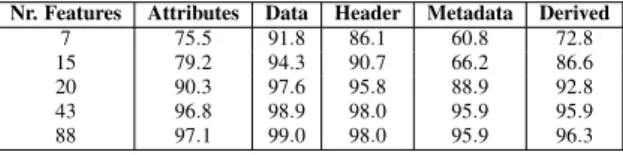
For completeness, in Table 9 we display the result-ing F1 measures when usresult-ing Random Forest with the first 7, 15, and 20 features from Table 8. Addition-ally, we performed the same evaluation with all the 88 features. Also, we list again the results from Sec-tion 5.1, for the 43 features that we used in our main experimental evaluation.
Table 9: F1 measures (as %) per label and number of fea-tures
Nr. Features Attributes Data Header Metadata Derived
7 75.5 91.8 86.1 60.8 72.8 15 79.2 94.3 90.7 66.2 86.6 20 90.3 97.6 95.8 88.9 92.8 43 96.8 98.9 98.0 95.9 95.9 88 97.1 99.0 98.0 95.9 96.3