www.vce.com
VxRack
™
System 1000 FLEX
Solution for VDI
with VMware Horizon View
Version 1.0THE INFORMATION IN THIS PUBLICATION IS PROVIDED "AS IS." VCE MAKES NO
REPRESENTATIONS OR WARRANTIES OF ANY KIND WITH RESPECT TO THE INFORMATION IN THIS PUBLICATION, AND SPECIFICALLY DISCLAIMS IMPLIED WARRANTIES OR
MERCHANTABILITY OR FITNESS FOR A PARTICULAR PURPOSE. Copyright © 2015 VCE Company, LLC. All Rights Reserved.
VCE, VCE Vision, VCE Vscale, Vblock, VxBlock, VxRack, and the VCE logo are registered trademarks or trademarks of VCE Company LLC. All other trademarks used herein are the property of their respective
Contents
Introduction...4 Key highlights... 5 Technology overview... 6 System components...6 Architecture... 7 EMC ScaleIO...8 Networking... 9VxRack™ System Management Software...11
Virtualization...11
VDI on VxRack FLEX... 12
Why run View on VxRack FLEX?...13
VDI on VxRack FLEX evaluation...15
Design considerations... 18
Introduction
Companies are under increasing pressure to deliver enterprise applications on hosted virtual desktops with the user experience and reliability of a conventional physical desktop. Customers are eager to find a solution that addresses the major pain points of a virtual desktop infrastructure (VDI) deployment— scalability, ease of management, elasticity, and performance. Hyper-converged infrastructure provides the flexibility and agility demanded by constantly growing VDI environments while reducing the
complexity.
VxRack™ System 1000 FLEX is a hyper-converged offering that complements VCE converged infrastructure systems. These self-contained units of servers and networking are well suited for VDI implementations. Using EMC ScaleIO technology, VxRack FLEX virtualizes server direct-attached storage to create a shared network storage that is similar to traditional SAN storage. This makes it simple and easy to achieve extreme scale—up to thousands of nodes. VxRack FLEX supports VMware ESXi 6.0 today with alternative hypervisors to follow. Bare metal workloads are supported also.
VxRack FLEX is a turnkey system that is pre-assembled and pre-configured according to a VCE Release Certification Matrix (RCM). The RCM reflects extensive pre-testing of hardware, firmware, and software at specific levels of revision.
VCE provides an enterprise-class end-user computing solution for larger enterprises with the Vblock® System 540. The scalability offered by VxRack FLEX makes it ideal for enterprises seeking solutions suited to initially small-scale VDI deployments but with the flexibility to add capacity virtually endlessly. This whitepaper provides an overview of VxRack FLEX, discusses the benefits of using the system for your VDI environment, and presents best practices for deploying VMware Horizon 6.2 with View on VxRack FLEX.
Key highlights
VCE conducted an in-depth evaluation of a 1000-user VMware Horizon 6.2 with View environment on VxRack™ System 1000 FLEX using a Power worker workload.
Note: Multiple combinations of VxRack FLEX nodes are available. The results documented in this paper are only true for the specific combination used in the evaluation described in Evaluation
environment. Results will differ depending on the specific VxRack FLEX configuration.
The results of the evaluation are summarized here and further described later in this paper:
•
One Dense Compute enclosure was able to support up to 550 Linked-Clone desktops•
One Dense Storage enclosure was able to support up to 120 Linked-Clone desktops•
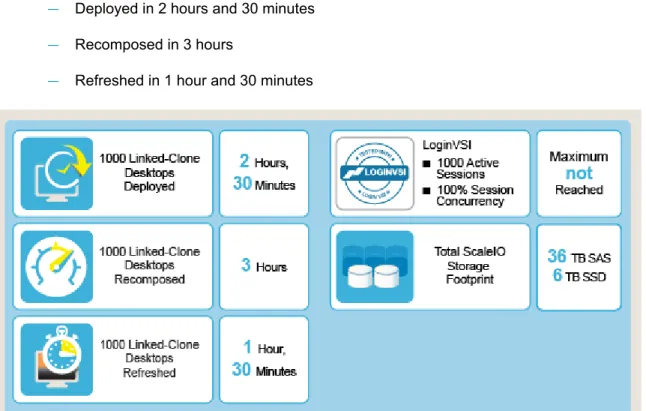
VSIMax was not reached during testing with a1000 concurrent Power worker workload•
All 1000 Linked-Clone desktops were:— Deployed in 2 hours and 30 minutes — Recomposed in 3 hours
— Refreshed in 1 hour and 30 minutes
Figure 1: Key highlights
Related information
Technology overview
System components
VxRack™ System 1000 FLEX has a software-defined architecture with integrated compute, software defined storage (SDS), networking, and virtualization components. Engineered, deployed, and supported by VCE, VxRack FLEX can start small and scale out to support dynamic workloads and evolving business needs.
Note: For detailed information about the components and architecture of the VxRack FLEX, refer to the
VCE VxRack™ System 1000 FLEX Gen 2.0 Architecture Overview available on vce.com. Key components of VxRack FLEX include the following:
Component Configuration
Compute Based on x86 standard architecture Storage SAS and SSD hard drives
Networking Cisco Nexus 10 GbE and 40 GbE switches Server virtualization VMware vSphere 6.0
Software-defined storage EMC ScaleIO 1.3.2 or higher
Management system VCE Vision™ VxRack™ Manager for unified access and management VCE Vision™ Intelligent Operations for telemetry data
Environmental Intelligent Physical Infrastructure consisting of:
•
Cabinet 2.0-fully welded and dynamically load-rated•
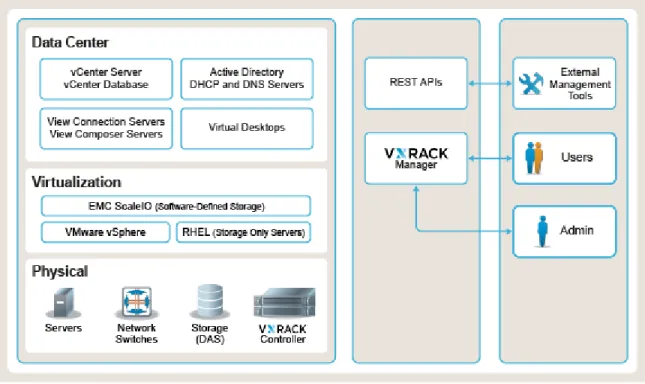
Smart Power Deliver Units (PDU)The following diagram shows the logical layout of VxRack FLEX systems components:
Figure 2: VxRack FLEX system components
Architecture
VxRack™ System 1000 FLEX is deployed as a quarter, half, or full cabinet system scalable to thousands of nodes. The minimum configuration is three enclosures, each enclosure containing either one node or four nodes. You can add enclosures in quarter, half, and full cabinet increments, as required, up to an unlimited number of enclosures.
Enclosures are of the following types:
•
Dense Compute—contains four nodes and VMware ESXi hypervisor•
Dense Storage—contains one node and VMware ESXi hypervisor•
Storage Only—contains one node and Red Hat Enterprise LinuxYou can mix enclosures of different types in a cabinet, scaling a system in small increments and varying the enclosure types in any addition. You can add, relocate, and remove nodes easily. Nodes come with various combinations of SSD or SAS drives or both, and some support host cache. For example, a Dense Compute enclosure can provide up to 2 TB of memory and 20 TB of storage. A Dense Storage enclosure can support 5 TB of SSD drives and more than 20 TB of SAS drives with 512 GB of memory.
EMC ScaleIO
VxRack™ System 1000 FLEX utilizes EMC ScaleIO, software that creates a virtual Storage Area Network (SAN) from existing hosts and their local storage. EMC ScaleIO provides elastic, high-performance, highly scalable, self-healing storage that addresses the main challenges of VDI deployments.
EMC ScaleIO combines hard disk drives, solid-state drives, and Peripheral Component Interconnect Express (PCIe) flash drives to create a virtual pool of block storage, and then aligns storage availability with application requirements as the need arises. Without a traditional storage array, operations are much simpler and costs for cooling and power are much lower. EMC ScaleIO also provides multi-tenant
capabilities and enterprise features such as Quality of Service (QoS), thin provisioning, and snapshots. EMC ScaleIO enables you to successfully tackle the four challenges that stand between you and an economically viable VDI deployment:
•
Storage costsStorage typically makes up a significant portion of the cost of application deployments such as VDI. With EMC ScaleIO, you "pay as you grow" and therefore you do not need to pre-pay for infrastructure you may not need. EMC ScaleIO is a server-based SAN, and there are no
dedicated storage components such as FC switches and HBAs. With EMC ScaleIO, compute and storage resources are converged, maximizing local storage and simplifying management. EMC ScaleIO Data Server (SDS) accesses storage volumes on the application hosts by means of the Virtual Machine File System (VMFS) and EMC ScaleIO Data Client (SDC) exposes volumes as iSCSI targets to the VMFS.
•
ElasticityVDI projects often start small and then grow quickly into many hypervisor servers. Providing the right size of SAN for each stage of this growth presents challenges in dynamically growing scale-out storage. Storage and compute resources can be added to or removed from the EMC ScaleIO cluster as needed, with no downtime and minimal impact to application performance.
•
PerformanceRunning large numbers of virtual desktops per hypervisor requires storage that can share capacity across physical servers and reallocate performance to the relevant servers as needed. The self-healing, auto-balancing capability of the EMC ScaleIO cluster ensures that data is automatically rebuilt and re-balanced across resources when components are added, removed, or failed. Because every server and local storage device in the cluster is used in parallel to process I/O operations and protect data, system performance scales linearly as additional servers and storage devices are added to the configuration.
•
ManagementSimplifying IT operations and management is often one of the main VDI deployment objectives. The storage selected should support this objective, reducing labor-intensive storage tasks to a minimum.
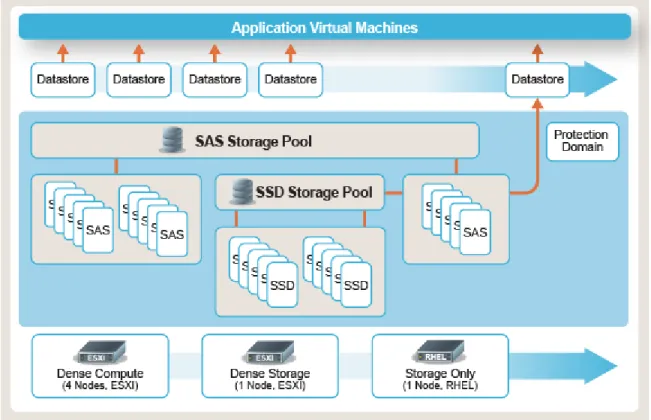
The following diagram is an example of the logical layout of EMC ScaleIO on VxRack FLEX:
Figure 3: EMC ScaleIO logical layout on VxRack FLEX
Networking
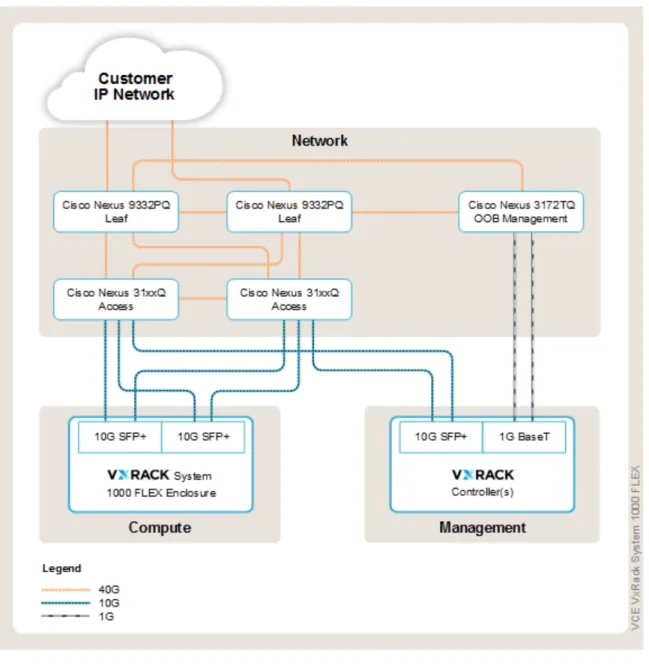
Industry-standard Cisco Nexus Top of Rack (ToR) and Spine switches in the network layer provide 10 GbE and 40 GbE IP connectivity between VxRack™ System 1000 FLEX and the external network. VxRack FLEX includes the following switches:
•
One Cisco Nexus 3172TQ for out-of-band management•
One pair of Cisco Nexus 3132Q-X/3164Q ToR switches•
One pair of Cisco Nexus 9332PQ leaf/aggregation switchesThe following diagram illustrates the network topology for VxRack FLEX.
VxRack
™
System management software
VxRack System management software is a bundle that includes VCE Vision™ VxRack™ Manager and VCE Vision™ Intelligent Operations.
VCE Vision™ VxRack Manager is a hyper-converged infrastructure management tool. It provides a unified management user interface for all VCE hyper-converged systems. VxRack System Administrators use this interface to perform their day-to-day operations-from viewing inventory, monitoring system health and performance, and obtaining RCM guidance-to bootstrapping new nodes and performing logical system management to partition resources.
VCE Vision™ VxRack Manager consists of a graphical user interface (GUI) and hardware management system (HMS) that is used by the VxRack System Administrator. VCE Vision software provides a full view of the data center that is used by the Data Center Administrator.
Virtualization
VxRack™ System 1000 FLEX supports virtualization-based hypervisors and non-virtualized operating systems for bare-metal workloads.
In VxRack FLEX, VMware vSphere provides virtualization services. The core VMware vSphere components are the VMware vSphere ESXi and VMware vCenter Server for management.
VMware vCenter Server 6.0 simplifies planning and deployment by offering two deployment models. The first, embedded, deploys the new Platform Services Controller (PSC) and the vCenter Server instance on the same machine. The second, external, deploys the PSC and the vCenter Server instance on separate machines.
You can also deploy a vCenter Server Appliance, which contains all of the necessary services for running vCenter Server 6.0 along with its components, as an alternative to installing vCenter Server on a
Windows host machine.
The hypervisors are deployed in a cluster configuration. The cluster allows dynamic allocation of
resources, such as CPU, memory, and storage. The cluster also provides workload mobility and flexibility with the use of VMware vMotion and Storage vMotion technology.
Virtual Desktop Infrastructure
Virtual desktop infrastructure (VDI) allows organizations to nimbly and cost-effectively support a mobile workforce while extending the efficiency of server virtualization to the desktop environment.
VxRack™ System 1000 FLEX enables enterprises to roll out VDI for departments or locations at a fraction of the cost of a traditional server environment. You can start small without overspending on hardware and use a pay-as-you-grow model when adding extra desktops, additional components, or models that are more powerful. With VxRack FLEX, you can seamlessly scale to hundreds of virtual desktops while delivering a great user experience without sacrificing performance or scale.
VCE evaluations have shown that VxRack FLEX with one Dense Compute enclosure and two Dense Storage enclosures can support more than 750 VMware Horizon View Linked-Clone virtual desktops at the same time. This mix provides compute and storage for the desktops and user profile data, leaving plenty of space for user data.
Note: Multiple combinations of VxRack FLEX nodes are available. The results documented in this paper are only true for the specific combination used in the evaluation described in Evaluation
environment. Results will differ depending on the specific VxRack FLEX configuration.
Storage is likely to be a make-or-break component of any VDI project because of the following challenges:
•
Designing the infrastructure for scale-out capacity•
Delivering adequate, stable performance for desktop usersVxRack FLEX uses EMC ScaleIO software-defined storage to address the complexity of storage in a VDI environment. A Dense Storage or Storage Only enclosure can be used to extend the EMC ScaleIO cluster and the data stores in the ESXi environment easily. The virtual desktops can then be recomposed to utilize the new storage.
EMC ScaleIO provides the option of creating separate SAS and SSD pools, which greatly enhances performance by storing Replicas in the SSD pool and Linked Clones on the SAS pools. The impact of I/O storms is greatly reduced. EMC ScaleIO is easy to deploy and manage. It uses the directly attached storage and compute components of VxRack FLEX to deliver massively parallel performance, while providing stable bandwidth and IOPs rates even during high demand operations.
Related information
Why run View on VxRack
™
System 1000 FLEX?
The primary benefits of hyper-converged infrastructure for VDI implementations are scalability, flexibility, reduced hardware-related complications, and simplified management and operations.
Scalability
Many VCE customers do not want to create pervasive silos of infrastructure that are prescriptively targeted for specific applications. They want the ability to flexibly scale deployments to meet the evolving requirements of their user community.
VxRack FLEX gives you the flexibility to design and implement a VDI environment based on application needs, budget, and growth. Start with the right-size deployment to meet today's demands, and scale up to web scale.
VxRack FLEX uses EMC ScaleIO technology to enable scaling from a quarter cabinet of compute and storage nodes to very large-scale deployments-greater than 1,000 nodes. This enables a quick turnaround from a Proof of Concept (POC) unit to a full-fledged enterprise environment with minimal disruption.
Flexibility
With VxRack FLEX, customers can start small with a quarter or half cabinet system and grow to data center scale in flexible, discrete increments. If you need to grow storage, VxRack FLEX offers Storage Only nodes to accommodate non-linear storage growth. In addition, you can make granular upgrades to optimize VDI operations.
Hardware
Administrators typically put a lot of effort into hardware selection, capacity planning, and hardware tuning. VxRack FLEX is a software-based architecture with integrated compute, software-defined storage, networking, and virtualization. It enables compute, storage, and networking functions to be decoupled from the underlying infrastructure and run on a common set of physical resources that are based on industry-standard x86 components. VxRack FLEX minimizes the physical data center footprint and collapses the traditional 3-tier legacy infrastructure into one easy-to-manage solution.
Simplified management and operations
VCE Vision™ VxRack™ Manager provides a unified and persona-based user experience to deploy, monitor, sustain and support VxRack FLEX. It provides Administrators and Users a centralized dashboard from which they can perform various operations such as the following:
•
Add nodes to the system•
Get current status including RCM guidance•
Update various components for RCM compliance•
Generate system logs for VCE™ SupportVCE Vision software simplifies operations by providing a consistent, common view of all converged and hyper-converged infrastructure connected to VCE™ Fabric. Information about VxRack FLEX appears with information about other VCE systems.
Using application program interfaces (APIs) with the management and orchestration tools of their choice, customers can access expanded data and gain key intelligence at the data center level such as system health scores, RCM data, and performance thresholds and indicators.
VDI on VxRack FLEX evaluation
VCE performed hands-on evaluation of VMware Horizon 6.2 with View on VxRack™ System 1000 FLEX. Evaluation objectives
The objectives of the evaluation were:
•
Define a standard building block of infrastructure for VDI environments on VxRack FLEX•
Develop best practices for deploying and managing VDI on VxRack FLEXEvaluation environment
We configured VxRack FLEX with the following components:
Category Components
Compute
•
2 x Dense Compute enclosures (Total of 8 nodes, Intel CPU E5-2680 v3 @ 2.50GHz, 24 cores each node)•
4 x Dense Storage enclosures (Total of 4 nodes, Intel CPU E5-2680 v3 @ 2.50GHz, 24 cores each node)— Two nodes are dedicated for: ■ 1 vCenter Server
■ 1 vCenter Database Server ■ 2 View Connection Servers ■ 1 View Composer Server
■ 2 Active Directory, DHCP, and DNS Servers ■ 1 EMC ScaleIO Gateway Server
■ 1 EMC ScaleIO GUI Server
— Remaining nodes are used for virtual desktops
•
All nodes, except Storage Only nodes, must host the EMC ScaleIO VM. Storage•
All nodes have a dedicated 32 GB Serial ATA Disk on Module (SATADOM) forESXi installation and EMC ScaleIO virtual machine installation.
•
Dense Compute enclosure has 4 x 400 GB SSD for host cache and 20 x 1.2 TB SAS drives for storage.•
Dense Storage enclosure has 6 x 800 GB SSD and 18 x 1.2 TB SAS drives for storage.•
One storage pool for Replicas is created from all SSD drives.•
One storage pool for Linked-Clone virtual desktops is created from all SAS drives.•
Plentiful storage is available for user data.Memory
•
512 GB on nodes in Dense Compute enclosures•
256 GB on nodes in Dense Storage enclosuresCategory Components
Network 4 x 10 GbE ports on each node
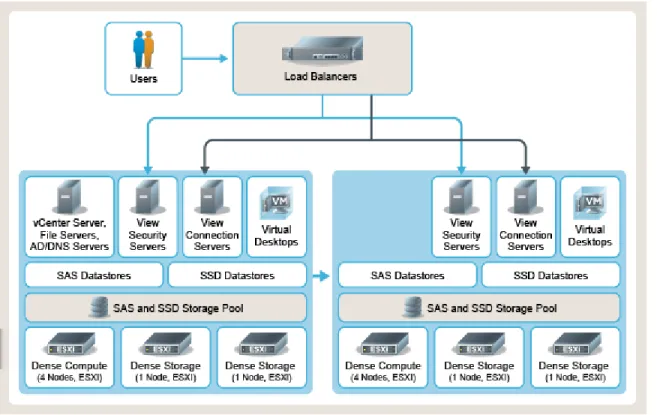
The following diagram illustrates the logical layout of the VDI components on the VxRack FLEX:
Figure 5: Logical layout of VDI components
Evaluation methodology
We used LoginVSI to test performance by simulating user workloads with realistic user behavior. Login VSI is an industry-standard tool designed to measure the maximum capacity of VDI infrastructures by simulating unique user workloads. The simulated users work with the same applications as typical employees, such as Microsoft Word, Excel, Outlook, and Internet Explorer. The results of several testing measurements are compiled into a metric known as VSImax, which quantifies the maximum capacity of VDI workloads running on a given infrastructure while delivering an acceptable user experience.
We configured LoginVSI to run a pre-defined Power worker workload against a 1000 VMware Horizon 6.2 with View desktop configuration. We used a Power worker workload because it consumes more memory and CPU resources due to the increased number of applications simultaneously running, which
addresses most hosted virtual desktop user classes.
During testing, Login VSI sessions were initiated by launchers (simulated user endpoints) that ran on separate compute and storage infrastructure. Fifty launchers were utilized, each running an average of 20 sessions. Each launcher was configured with two vCPUs and 8 GB of vRAM, following Login VSI sizing guidelines.
Other test parameters included:
•
Workload simulates a power user workload using Office, Internet Explorer, and PDF.•
Once a session has been started, the power user workload repeats every 12 minutes.•
During each loop, the response time is measured every two minutes.•
The power user workload opens up to five applications simultaneously.•
The type rate is 160 ms for each character.•
Approximately two minutes of idle time is included to simulate real-world users.Evaluation metrics
We measured response times for the following transactions: Transaction Description
FCTL Copy a local random text file from local temp directory to home drive FCTS Copy a text document from VSIshare to temp directory
NFO Measure how long it takes to show the file-open dialog in VSI notepad NFP Print open VSI-Notepad file [ctrl+p]
NSLD VSI-Notepad starts and loads a 1500 KB document that is copied from the content pool ZHC Compress a local random .pst file that is copied from the content pool (5 MB) using 7zip ZLC Copy a random file and compress it (with 7zip) with low compression enabled
Evaluation results
Results of the evaluation demonstrated the following:
•
One Dense Compute enclosure was able to support up to 550 Linked-Clone virtual desktops•
One Dense Storage enclosure was able to support up to 120 Linked-Clone virtual desktops•
VSIMax was not reached during testing with a 1000 concurrent Power worker workloadNote: Multiple combinations of VxRack FLEX nodes are available. The results documented in this paper are only true for the specific combination used in the evaluation described in this paper. Results will differ depending on the specific VxRack FLEX configuration.
Design considerations
While the design of a VDI environment on VxRack™ System 1000 FLEX will be specific to the customer environment, the following best practices are applicable to all deployments.
Scaling the environment
VCE customers want the ability to scale their VDI deployments flexibly to meet the evolving requirements of their user community. VxRack FLEX supports flexible, granular scaling by cabinet, enclosure, or node. You can:
•
Scale from a quarter cabinet of enclosures to very large-scale deployments—greater than 1,000 enclosures.•
Add unlimited Dense Compute enclosures with various CPU, memory, and drive options. One Dense Compute enclosure contains four nodes and supports up to 550 virtual desktops. Each node provides up to 2 TB of memory and 20 TB of storage.•
Add unlimited Dense Storage enclosures. A Dense Storage enclosure contains one node that supports up to 5 TB of SSD drives and more than 20 TB of SAS drives with 512 GB of memory. Each Dense Storage enclosure supports 120 virtual desktops.Note: Multiple combinations of nodes are available. The results documented in this paper are only true for the specific combination used in the evaluation described in Evaluation environment. Results will differ depending on the specific VxRack FLEX configuration.
•
Add, move, and remove nodes on the fly to extend direct attached storage (DAS) capacityexponentially.
•
Add expansion cabinets with additional resources.•
With VCE Vscale™ Architecture, the existing Vblock® Systems and VxBlock™ Systems can also be extended.EMC ScaleIO best practices
We recommend the following best practices for deploying EMC ScaleIO on VxRack FLEX:
•
In general, follow EMC best practices for deployment and configuration of EMC ScaleIO in your specific environment. Refer to support.emc.com for additional information about EMC ScaleIO.•
To provide consistent performance, we recommend that all devices in the EMC ScaleIO storagepool have similar storage properties. While mixing different types and sizes of media in the same storage pool is allowed, performance will be limited to the least-performing and smallest-sized member of the storage pool due to data distribution.
•
A Storage Only node has very limited computing power so should not be used for running application virtual machines.•
To provide the best EMC ScaleIO and networking performance, configure Jumbo Frames (9000 MTU) across all switches, network devices, and servers.•
If you expand storage by adding an extra node:1 Add the node to the proper EMC ScaleIO storage pool.
2 Wait for rebalancing tasks to complete.
3 Create necessary datastores.
4 Recompose the virtual desktops to take advantage of the new storage.
•
Since EMC ScaleIO does not provide automatic storage tiering, where active data is migrated to high–performance SSD pools and inactive data to SAS pools, monitor datastore performance to ensure proper placement of virtual disks.•
Each ESXi host must run the EMC ScaleIO virtual machine. After ESXi installation and EMC ScaleIO virtual machine setup, not much space is left on the SATADOM. Redirect the host system logs to a central syslog server so that the SATADOM disk is not overrun with log files.General best practices
Based on initial evaluation results, we recommend the following best practices for deploying VDI environments on VxRack FLEX:
•
Follow general VMware Horizon 6.2 with View best practices for virtual machine configuration and optimization, gold image build, and server sizing guidelines. Refer to vmware.com/support/pubs/ view_pubs.html for additional information.•
Consult the VCE Professional Services to correctly estimate the size of the required environment. Because VxRack FLEX provides fast and easy scalability, avoid overestimating initial compute and storage requirements.•
Run application virtual machines on the nodes in the Dense Compute and Dense Storage enclosures only. Storage Only nodes have limited compute and memory and provide storage only.Related information
Summary and conclusions
Virtual desktop infrastructure (VDI) brings a wealth of new features and cost saving possibilities to the problem of managing user environments. VDI is an architecture requiring carefully crafted solutions that meet specific needs. VxRack™ System 1000 FLEX enables you to extend the benefits of converged infrastructure to the VDI environment.
VCE hyper-converged infrastructure complements VCE converged infrastructure by supporting different use cases and consumption models. VxRack FLEX is ideal for applications that grow rapidly and unpredictably.
With VxRack FLEX, factory built and pre-validated for exceptional performance and reliability, you can start small and grow to data center scale in flexible discrete increments. Because you can scale compute and storage quickly and rapidly to precisely match your needs, expanding your VDI environment
becomes more agile.
EMC ScaleIO software makes it easy to scale the VxRack FLEX. Each cabinet can contain storage and compute, or just storage only node types. If a growing application needs more storage only, for example, provision software-based storage using EMC ScaleIO. The ability to configure just the right amount of each resource makes hyper-converged infrastructure highly efficient. In addition, the integrated 10 GB network switches keep the network from limiting growth
Our evaluation results demonstrate that VxRack FLEX easily supports a deployment of 1000 Linked-Clone virtual desktops with 100 percent concurrency and acceptable CPU, memory, and storage use, along with acceptable application response times.
www.vce.com
About VCE
VCE, an EMC Federation Company, is the world market leader in converged infrastructure and converged solutions. VCE accelerates the adoption of converged infrastructure and cloud-based computing models that reduce IT costs while improving time to market. VCE delivers the industry's only fully integrated and virtualized cloud infrastructure systems, allowing customers to focus on business innovation instead of integrating, validating, and managing IT infrastructure. VCE solutions are available through an extensive partner network, and cover horizontal applications, vertical industry offerings, and application development environments, allowing customers to focus on business innovation instead of integrating, validating, and managing IT infrastructure.
For more information, go to http://www.vce.com.
Copyright 2015 VCE Company, LLC. All rights reserved. VCE, VCE Vision, VCE Vscale, Vblock, VxBlock, VxRack, and the VCE logo are registered trademarks or trademarks of VCE Company LLC. All other trademarks used herein are the property of their respective owners.