S
CHNAPPER¨
: A Web Toolkit for Exploratory Relation Extraction
Thilo MichaelandAlan Akbik Technische Universit¨at Berlin Einsteinufer 17, 10587 Berlin
{thilo.michael,alan.akbik}@tu-berlin.de
Abstract
We present SCHNAPPER¨ , a web toolkit for Exploratory Relation Extraction (ERE). The tool allows users to identify relations of interest in a very large text corpus in an exploratory and highly interactive fashion. With this tool, we demonstrate the ease-of-use and intuitive nature of ERE, as well as its applicability to large corpora. We show how users can formulate exploratory, natural language-like pattern queries that return relation instances. We also show how automatically computed suggestions are used to guide the exploration process. Finally, we demonstrate how users create
extractors with SCHNAPPER¨ once a
rela-tion of interest is identified.
1 Introduction
Relation Extraction (RE) is the task of extract-ing instances of semantic relations between enti-ties in unstructured data such as natural language
text. Common examples are the BORNIN
relation-ship between a person and its birthplace, or the CHILDOFrelation between a parent and its child.
A principal challenge in RE is how to build high quality extractors for a given set of relations at minimal effort.
One line of approaches to RE are rule-based,
where users manually define rule-sets consisting of extraction patterns that if observed point to in-stances of a relation. Advantages associated with rule-based RE are a high level of direct control over the extraction process: Ideally, rule-writers build interpretable and maintainable rule-sets, en-abling both the extension and error analysis of rule-based extractors (Chiticariu et al., 2013). In-deed, in a number of recent works, rule-based RE approaches have been found to outperform previous machine-learning based state-of-the-art
systems, for tasks such as temporal expression detection (Str¨otgen and Gertz, 2010) and Ope-nIE (Del Corro and Gemulla, 2013).
Exploratory search for relations. Recently, in
(Akbik et al., 2014), we introduced the paradigm ofExploratory Relation Extraction(ERE). We ar-gued that workflows and tooling can be developed
in such a way as to enable an interactive andopen
ended search for relations. With ERE, relations therefore do not need to be precisely defined in
advance. Rather, users can start a process of
ex-plorationfor interesting relations even if their in-formation needs are only vaguely defined.
We outlined key ideas in order to enable the exploratory workflow: First, extraction patterns should be very easy to define and quick to test, much in the same way as exploratory keyword queries in a web search engine (Marchionini, 2006). Second, the exploration process should be guided through suggestions computed from the available data and previous user interactions. Third, there should be a high level of interactivity. Appropriate tooling is therefore required.
Contributions. With this demo, we present
SCHNAPPER¨ , a web-based tool for ERE that
demonstrates the incremental, data-guided work-flow introduced in (Akbik et al., 2014). The demo is intended to underline a central claim of ERE, which is that non-experts can use it to easily ex-plore a corpus for relational information and build extractors. Additionally, by using a large portion of the CLUEWEB091corpus as dataset, we aim to
highlight the applicability of such an approach to very large datasets.
Paper outline.We first give a quick overview over
the ERE workflow in Section 2. We then present SCHNAPPER¨ , our web interface (Section 3) and
walk through an example workflow with the tool. We then briefly give an overview over related work and give an outlook of possible future additions to
1http://www.lemurproject.org/clueweb09/index.php
Pattern Suggestions
[X] launched from [Y]
[X] arrive at [Y]
[X] built by [Y]
Y_Type Suggestions
Organization Location
Celestrial_Object
1. Launch Initial Query
Initial Query
X_Type Spacecraft
Y_Type
Pattern
Index
2. Select from Suggestions
Updated Suggestions
[X] mission to [Y] [X] orbit [Y]
[X] fly by [Y]
select
Upda
[X] [X]
Updated Selection
X_Type Spacecraft
Y_Type Celestrial_Object Pattern [X] arrive at [Y]
3. Interact
[image:2.595.83.515.64.229.2]unselect
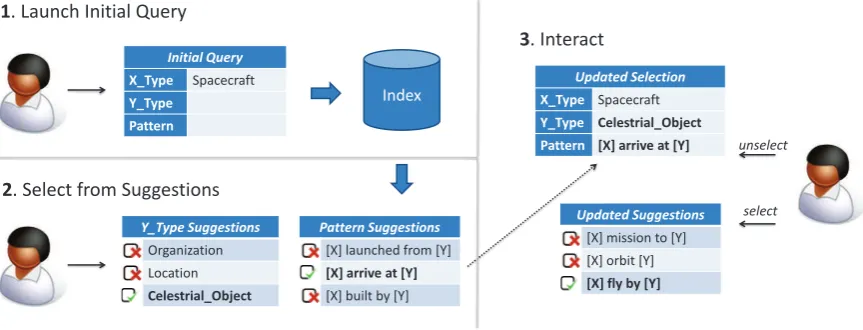
Figure 1: Illustration of the Exploratory Relation Extraction example workflow discussed in Section 2.2.
the toolkit and the method itself.
2 Exploratory Relation Extraction
We demonstrate an approach to findingbinary
re-lationsin text that has been proposed in (Akbik et al., 2014). Each relation holds between two enti-ties: asubject and anobjectentity. Users explore a corpus for information by selecting and compos-ing extraction patterns.
2.1 Pattern Language
Extraction patterns consist of two components:
1. Dependency subtrees. The first component
is the lexico-syntactic pattern that connects two
entities in a sentence. Here, we allow arbitrary
subtrees in a sentence’s dependency tree, as long as they span two entities of interest. To gener-alize the patterns, they are stemmed and the two
entities are replaced by the placeholders “[X]
and[Y]”. Examples of subtree patterns are “[X]
and [Y] married” and “[X] ’s father
[Y]”2. However, since any subtree is a possible
pattern, many subtrees with less obvious meanings are also possible; in the end, it is up to the user to make the decision which patterns are relevant and which are not.
2. Entity type restrictions Optionally, patterns
may be further restricted to match only entities of certain fine-grained types, such as PERSON, LO -CATION, LANGUAGEor MOVIE. The type
restric-tions may be set individually for each subject and object entities. Since the subject is replaced with
2For the purpose of readability, we do not display the deep
syntactic information from the subtrees. Instead, we only show the lexical portion of the patterns. Here, some verbs, such as participles and gerunds, are not stemmed for read-ability purposes.
the placeholder[X]in a pattern, its restriction is referred to asX Type, while the object restriction is referred to asY Type.
Preemptive pattern extraction. Following
the idea of preemptive Information Extrac-tion (Shinyama and Sekine, 2006), we pre-extract and store all subtrees and entity types from a given corpus for each sentence with at least two named entities. This allows not only fast retrieval of matching entity pairs for a given set of subtrees and type restrictions, but also allows us to com-pute pattern correlations over the entire dataset for the presently selected setup. In the next section, we show how fast retrieval and pattern correlations are used to aid the exploration process.
2.2 Example Workflow
We illustrate the exploration process with an ex-ample workflow, the first steps of which are de-picted in Figure 1. Assume that our user is inter-ested in relations that involve “spacecraft”, but is unsure of what types of relations may be found for such entities in the given corpus.
Initial query (1).The user starts by issuing an ini-tial query that is strongly underspecified: By set-tingX Typeto SPACECRAFT and leaving the Pat-ternandY Typefields in the query unspecified, the user searches for all sentences that contain at least one entity of the desired type. At this point, there are no other restrictions to the query with regards to patterns or object entity types.
Explore by reacting to suggestions (2).After
re-strictions that correlate with the user query. The user can now choose from the suggestions:
For instance, by selecting the object type LOCA
-TION and the pattern “[X] launched from
[Y]”, the user may direct the exploration process
towards relations that indicate locations (cities, countries, sites) from which a spacecraft was
launched. Similarly, by choosing ORGANIZATION
as object type and “[X] built by [Y]” as
pattern, the user may select organizations (con-tractors, space agencies) that constructed or de-signed spacecraft as the focus of interest.
In the example shown in Figure 1, the user
in-stead selects the object type CELESTIALOBJECT
and the pattern “[X] arrive at [Y]”. This
directs the search towards relations that indicate spacecraft missions to celestial objects.
User interactions (3). This user interaction
up-dates both the query as well as the suggestions for patterns and restrictions. Now pattern sug-gestions are more specific to the previous selec-tion; For instance, by selecting either the pattern “[X] orbit [Y]” or “[X] fly by [Y]”, the user can specify relations for spacecraft that have achieved orbit around celestial objects, or have made flybys. By following a process of querying, inspecting results, selecting and unse-lecting subtrees and restrictions, the user can in-teractively explore the given corpus for relations of interest. Once an interesting relation is iden-tified, the user utilizes the same approach to build an extractor by compiling a list of relevant patterns from the suggestions. Typically, the more patterns a user selects, the higher the recall of the created extractor will be.
Store extractor. When the user has identified an
interesting relation and selected a list of relevant patterns, she can export the extraction results (i.e. all relation instances found by the extractor). The user can also save the extractor and provide a de-scriptive name for the relation for possible later reuse.
3 Web Demonstration
We now present SCHNAPPER¨ 3, our web toolkit for
Exploratory Relation Extraction.
3The tool was named after thePetroicidaefamliy of birds,
which in German are calledSchn¨apper. This name stems from the verbschnappen(Schmitthenner, 1837), which trans-lates as “to grab” or “to catch”. We found this fitting since the tool is used to “grab” or “catch” information.
3.1 Web Interface
In order to make the use of SCHNAPPER¨ as
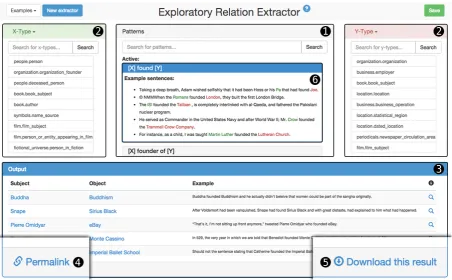
straightforward as possible, the user interface is clearly structured into four panels that fit onto one screen. The top half of the screen consists of three panels in which the user can select patterns and en-tity type restrictions. The bottom half of the screen is the result panel which displays a sample of ex-traction results for the currently selected patterns and entity type restrictions. See Figure 2 for the screen and a breakdown of the panels, which we explain in more detail in the following:
Pattern panel (1) Of the three panels in the
up-per half of the screen, the pattern panel assumes the center stage. Here, the user can enter keywords in the search field to find appropriate patterns. If at least one user interaction has already been made (e.g. one pattern or type restriction selected), a list of pattern suggestions is presented in gray. Sin-gle clicking on a pattern suggestion gives a small number of example sentences and entity pairs for which this pattern holds (this is illustrated in field (6)in Figure 2). Double-clicking on a pattern adds it to the extractor; it is then highlighted blue and suggestions as well as the result panel are updated to reflect the selection. By double-clicking on a selected pattern, users may remove it again from the selection.
Entity type restriction panels (2) Extractors
may also have entity type restrictions which re-strict lexico-syntactic patterns to only apply to en-tities of certain types. The top right and top left panels are used to define restrictions for the sub-ject and obsub-ject of a binary relation respectively. Here, users have a choice between three differ-ent ways of selecting differ-entity type restrictions. The first and default option is to use FREEBASEentity
types (Bollacker et al., 2008). I.e. the user can select the subject of a relation to be only of the FREEBASE type SPACECRAFT, ORGANIZATION
or CELESTIALOBJECT.
The user can also restrict a relation to one spe-cific entity. For instance, by restricting the object of a BORNINrelation to be the country “Finland”,
the extractor will only find persons born in Fin-land.
1
2 2
3
4
6
[image:4.595.73.526.61.341.2]5
Figure 2: Screen capture of the SCHNAPPER¨ tool showing thepattern panel (1)with an activated pattern
showing a list of example sentences (6), the entity type restriction panels (2)and the result panel (3). Thepermalink button (4)and thedownload button (5)are located at the bottom.
finds “Persons born in Finland” may be used to re-strict the subject entity of another extractor. The other extractor can then find a relation between “Persons born in Finland” and, for example,
en-tities of type BUILDING (“Buildings designed by
persons from Finland”).
Similar to the pattern panel, double-clicking is used to select or unselect type restrictions. Upon each interaction, the suggestions as well as the re-sult panel are updated to reflect the current selec-tion.
Result panel (3) The lower half of the screen is
the result panel which lists a set of entity pairs that are found with the presently selected patterns and restrictions. Each entity pair is displayed along with the sentence that matches the pattern. By clicking the magnifying glass symbol next to an entity pair, more details are shown, including the entity pair’s FREEBASEids and a list of sentences
that match the selected patterns.
Storing and exporting extractors After
finish-ing buildfinish-ing an extractor, users can export the setup as a JSON by clicking the download button in the lower right corner of the screen (see field (5)in Figure 2). This exports the selected patterns
and restrictions, together with a result list of entity pairs found with the extractor. In addition, users can generate a “permalink” by clicking the button in the lower left corner of the screen (see field(4) in Figure 2). This allows users to generate links to created extractors and share them electronically.
3.2 Example Usage
We now briefly give an example of using the tool. Assume a user is interested in a relation between persons and the companies they founded.
There are several entry points the user may choose from. For instance, the user might search
for appropriate entity types in the X Type and
Y Typepanels. Another option is to start by look-ing for appropriate patterns. For this, the user can use the search box in the pattern panel(1)to search for the general term “found”. This results in a list of patterns being displayed, which includes the
pattern “[X] found [Y]”. By single-clicking
on it, the user can see a list of sentences that in-clude this pattern. This is illustrated in field(6)in Figure 2.
en-tity types that are suggested based on the current selection. Scanning through the result panel, the user finds that while many matching sentences do
indeed express the desired relation (like “Pierre
Omidyar founded eBay”), some others do not (“Snape found Sirius Black”).
The tool however also presents three sets of sug-gestions that the user can use to refine the
pat-terns. For instance, for bothX TypeandY Typea
ranked list of suggestions highlighted gray appears (2). As illustrated in Figure 2, it suggests PER -SON as X Type and ORGANIZATION as Y Type.
The user can affirm suggestions by double
click-ing on them. When selectclick-ing ORGANIZATIONas
Y Type, the result panel is updated to reflect the most recent changes. Scanning through the results the user sees that the extraction quality has greatly improved as there are far fewer false positives in the list.
The user may now try to further improve the ex-tractor by selecting more specific patterns. The
tool suggests the pattern “[X] be founder
of [Y]”, which more accurately describes the relation the user wants to extract. Again by single-clicking on the suggestion, the user can see exam-ple sentences that match this pattern, as well as the selected entity type restrictions. Double-clicking on the pattern adds it to the extractor, which now consists of two patterns. With multiple patterns selected, the tool is now able to suggest patterns
more accurately, offering patterns such as “[Y]
founded by [X]”, “[X] start [Y]” and “[X] co-found [Y]”. By selecting them and implicitly rejecting those suggestions that do not reflect the desired relation (like the correlated
patterns “[X] president of [Y]” or “[X]
CEO of [Y]”), the user incrementally creates an extractor.
After multiple iterations of selecting suggested patterns and entity type restrictions the user is able to download the results of the extractor by using the download button (5) at the bottom of the page.
3.3 Implementation Details
We use CLUEWEB09 as corpus and make use of
FACC1 annotations (Gabrilovich et al., 2013) to
determine entity mentions and their FREEBASE
types. We extract all English sentences that
con-tain at least 2 FREEBASE entities, yielding over
160 million sentences. We then parse these
sen-tences using the CLEARNLP pipeline (Choi and
McCallum, 2013) and preemptively generate all subtrees for all entity pairs in all sentences. To-gether with information on the entity types, we store all information in a Lucene index for fast re-trieval.
3.4 Hands-on Demonstration
We plan a hands-on demonstration in which
users work with SCHNAPPER¨ to explore the
CLUEWEB09 corpus for relations of interest. Our
purpose is twofold: One the one hand we would like to make the case for the simplicity and in-tuitive nature of the proposed approach. One the other hand, we would like to gather feedback from the NLP community for possible future improve-ments to the approach. In particular some of the more advanced features such as embedding extrac-tors within other extracextrac-tors may be interesting to discuss in a hands-on demo4.
4 Previous Work
Recent work in the field of rule-based RE has in-vestigated workflows and tooling to facilitate the creation of extractors. (Li et al., 2012) presented a wizard-like approach to guide users in the process of building extractors. In (Akbik et al., 2013), we presented an example-driven workflow that allows even users who are unfamiliar with NLP to write extractors using lexico-syntactic patterns over de-pendency trees. Similarly, (Grishman and He, 2014) create a toolkit for persons who are experts in adomainof interest, but not in NLP. Users cre-ate extractors for pre-defined entities and relations by seeding example instances in a semi-supervised fashion. (Gupta and Manning, 2014) use a similar bootstrapping approach and create a tool for vi-sualizing learned patterns for diagnostic purposes. Finally, (Freedman et al., 2011) focus on reduc-ing effort in a user-driven process by includreduc-ing el-ements from active learning and bootstrapping, but target their tool at NLP experts.
Unlike the approach presented with this demo, these approaches are mostly intended for tradi-tional RE in which relations of interest are spec-ified in advance. With this demo, we instead
sup-port an exploratory workflow in which relations
of interest may be discovered through user inter-actions with available data at little effort.
4The tool is also publicly available online. It can be
5 Outlook
While SCHNAPPER¨ is currently focused on binary
relations only, we are investigating the application of comparable workflows at the entity level. Ide-ally, we would like to be able to create extractors that find named entities of custom types and em-bed them into custom relation extractors. While, as the demo shows, it is already possible to em-bed extractors into other extractors, more research is required fully develop the process of creating entity extractors, which possibly includes develop-ing a different pattern language for the entity level. With more extensive capabilities of creating cus-tom entity extractors, such tooling could conceiv-ably be used to use the approach for knowledge base population tasks (Surdeanu and Ji, 2014). The approach could be also used to quickly cre-ate custom knowledge bases for specialized topics such as the biomedical domain (Hunter and Co-hen, 2006). Another point of interest is that, since the tooling is Web-based, collaborative aspects of creating custom knowledge bases can be investi-gated in this context.
References
Alan Akbik, Oresti Konomi, and Michail Melnikov. 2013. Propminer: A workflow for interactive infor-mation extraction and exploration using dependency trees. In ACL System Demonstrations. Association for Computational Linguistics.
Alan Akbik, Thilo Michael, and Christoph Boden. 2014. Exploratory relation extraction in large text corpora. InCOLING 2014, 25th International Con-ference on Computational Linguistics, Proceedings of the Conference: Technical Papers, August 23-29, 2014, Dublin, Ireland, pages 2087–2096.
Kurt Bollacker, Colin Evans, Praveen Paritosh, Tim Sturge, and Jamie Taylor. 2008. Freebase: a col-laboratively created graph database for structuring human knowledge. InProceedings of the 2008 ACM SIGMOD international conference on Management of data, pages 1247–1250. ACM.
Laura Chiticariu, Yunyao Li, and Frederick R Reiss. 2013. Rule-based information extraction is dead! long live rule-based information extraction systems! In Proceedings of the 2013 Conference on Empiri-cal Methods in Natural Language Processing, pages 827–832.
Jinho D. Choi and Andrew McCallum. 2013. Transition-based dependency parsing with selec-tional branching. InProceedings of the 51st Annual Meeting of the Association for Computational Lin-guistics.
Luciano Del Corro and Rainer Gemulla. 2013. Clausie: clause-based open information extraction. InProceedings of the 22nd international conference on World Wide Web, pages 355–366. International World Wide Web Conferences Steering Committee. Marjorie Freedman, Lance Ramshaw, Elizabeth Boschee, Ryan Gabbard, Gary Kratkiewicz, Nico-las Ward, and Ralph Weischedel. 2011. Extreme extraction: machine reading in a week. In Proceed-ings of the Conference on Empirical Methods in Nat-ural Language Processing, pages 1437–1446. Asso-ciation for Computational Linguistics.
Evgeniy Gabrilovich, Michael Ringgaard, and Amar-nag Subramanya. 2013. FACC1: freebase anno-tation of ClueWeb corpora, version 1 (release date 2013-06-26, format version 1, correction level 0). Ralph Grishman and Yifan He. 2014. An
informa-tion extracinforma-tion customizer. InText, Speech and Dia-logue, pages 3–10. Springer.
Sonal Gupta and Christopher D Manning. 2014. Spied: Stanford pattern-based information extrac-tion and diagnostics. Sponsor: Idibon, page 38. Lawrence Hunter and K Bretonnel Cohen. 2006.
Biomedical language processing: what’s beyond pubmed? Molecular cell, 21(5):589–594.
Yunyao Li, Laura Chiticariu, Huahai Yang, Frederick R Reiss, and Arnaldo Carreno-fuentes. 2012. Wizie: a best practices guided development environment for information extraction. In Proceedings of the ACL 2012 System Demonstrations, pages 109–114. As-sociation for Computational Linguistics.
Gary Marchionini. 2006. Exploratory search: from finding to understanding. Communications of the ACM, 49(4):41–46.
Friedrich Schmitthenner. 1837. Kurzes deutsches W¨orterbuch f¨ur Etymologie, Synonymik und Or-thographie. Jonghaus.
Yusuke Shinyama and Satoshi Sekine. 2006. Preemp-tive information extraction using unrestricted rela-tion discovery. InProceedings of the main confer-ence on Human Language Technology Conferconfer-ence of the North American Chapter of the Association of Computational Linguistics, pages 304–311. Associ-ation for ComputAssoci-ational Linguistics.
Jannik Str¨otgen and Michael Gertz. 2010. Heideltime: High quality rule-based extraction and normaliza-tion of temporal expressions. InProceedings of the 5th International Workshop on Semantic Evaluation, pages 321–324. Association for Computational Lin-guistics.