ETRAN’2003, Herceg Novi, 9-13 June 2003
A Secure Web-based Framework for Electronic Design (invited paper)
Tom Kazmierski and Xing Q Yang
Dept of Electronics and Computer Science
University of Southampton
Southampton, SO17 1BJ, United Kingdom
[email protected], [email protected]
Abstract
This contribution presents the concept of a secure im-plementation of a distributed, web-based electronic design framework. Our two-tier client-webserver-toolserver archi-tecture has been extended to support permanent databases for collaborative, distributed design development. In the sample application of the framework, developed in Java, any of the servers can be based on Linux, MS Windows or Sun-SPARC Java-servlet enabled server. The feasibility of a secure, web-based design framework has been sufficiently proved. The technological approach used to do this involves the use of novel, yet tried and tested methods, taking where appropriate from the rapidly advancing field of e-commerce solutions.
1. Introduction
The aim of the work presented in this contribution is to present the implementation of a secure web framework for electronic system design. The convergence of the Internet and distributed-object technologies has facilitated the recent success of electronic markets and it is this convergence that our project aims to take advantage of. A keynote presenta-tion at the DAC 2000 Conference [10] outlined a concept of how Internet-enabled designs will allow companies to create global design groups to complete complex system-on-chip systems. It was stated that ’the most important re-source needed today is not ideas and it is not capital - it is people’. The Internet is a great enabler and multiplier of people resources. Our framework harnesses this concept, building upon legacy design tool frameworks.
The Internet provides the ability to run multiple web-browsers that can be used for a number of tasks, all of which
can be truly global. It is possible to run a web-based chat system, a net-meeting style networked ’whiteboard’ and web cameras concurrently with a web-based design tool to allow design engineers based anywhere in the globe to dis-cuss designs and simulate circuit modules. Having looked at the current position of the Internet as a design framework in the Electronic Design Automation world [1] it is clear that there is a demand for globally accessible tools. Before the concept will be accepted by tool manufactures, not only there must be some system to enable charging customers, either via a subscription or on a per use basis, but above all, there must an assurance of secure data transfer and access. Our project considers the development of a secure, session-based framework to which the addition of some sort of sub-scriber system should be straightforward.
Parallels can be drawn with the development of frame-works in the Computer Aided Design environment, where for many years the number of programs and Application Programming Interfaces (API’s) have been increasing with a corresponding rise in the variety of representations for dis-play, storage and communication. The increasing desire for flexible frameworks has led to the web being explored in order to improve traditional areas of weakness in communi-cation and display of the design process [7].
2
Web-based CAD tools and web
technolo-gies
Star-Hspice optimizing analog circuit simulator is Avant!’s industrial-grade circuit analysis product for the simulation of electrical circuits in steady-state, transient, and frequency domains. It is sufficient for the moment to appreciate that Star-Hspice is a command line driven application that reads a set of input files and produces a set of output files. This is a very common structure for legacy electronic design tools and whilst it would be ideal to assume that tool vendors would redesign their software with an internet-based frame-work in mind it is clear that at there is some reluctance to move in this direction. It is likely that these tool systems will remain in use for some considerable time (especially in academic institutions where savings can be made by uti-lizing older versions of software) and would benefit from a means of web-based access.
Whilst many solutions for dynamic web page generation exist, it is clear that these do not provide the advanced nu-merical processing abilities required for CAD framework. A strong argument for using Java is that security measures are an integral part of Java’s design. Other distributed solu-tions cannot make this claim. The business end of the Java security model [2] is conveniently described by using the metaphor of the ’Sandbox’, which ensures that untrusted -and possibly malicious - applications cannot gain access to system resources.
2.1
Client to WebServer and Webserver to Tool
Servers Communication
The communication used from the client to the web server is the standard HTTP (Hypertext Transfer Protocol) protocol. This is the underlying protocol used by the World Wide Web. HTTP defines how messages are formatted and transmitted, and what actions Web servers and browsers should take in response to various commands.
The communication used from the web server to the client needs to be more functional then the standard http protocol. Hence, the Java RMI (Remote Method Invoca-tion) is used here.
The RMI Java technology is used here for transferring and receiving files from the tool server and for invoking the tools on the tool server.
RMI in general works by a client-server method. Our tool server (server) application creates a remote objects that contains all the methods we need on the tool server, makes references to them so that they are accessible, and waits for clients to invoke methods on these remote objects.
[image:2.596.310.538.72.221.2]Our web server (client) application gets a remote refer-ence to the remote objects in the tool server (server) and then invokes methods on them. RMI provides the mecha-nism by which the server and the client communicate and pass information back and forth.
Figure 1. Two-tier web design framework.
3
Java-based implementation of the web
framework
It was clear from an earlier version of this project [4] that some means of processing data gathered from a user to launch appropriate code modules would be required. In previous electronic design tool frameworks, this had come in the form of proprietary central control software or a com-mand shell. The Internet, as the environment of choice for this project requires that a web server handle this function.
Whilst commercial web servers are available and indeed are simple to administer there are a number of free, open source web servers available that are written in Java and are thus platform independent. The block diagram in figure 3 shows how all the Java servlets relate to each other. Web-database and GroupWeb-database are not servlets but Java ob-jects that are initialized once and used by the Showsession Servlet whenever it is needed. Since all the pages generated are dynamic i.e created by a servlet, it is possible for each and every servlet to perform a security check on the user to determine whether to generate an appropriate web page or to automatically redirect output to another page.
The Apache server is a powerful, flexible, HTTP/1.1 compliant web server that implements the latest protocols. It is also highly configurable and extensible with third-party modules for example Java Servlet and SSL modules. The only set back was the lack of wizards and graphical admin-istration tools for facilitating configuration and administra-tion tasks. Hence some effort is required to install and con-figure the server, once running it is very stable.
ShowSession LoginHandler
WebDataBase
RemoveFileStatus DeleteFile
GroupDataBase
AddRemoveFile
ShareFile
UploadTest
DeleteFileConfirm
ShareFileStatus ShareFile2
(To share file)
ShareRemoveFile (To unshare file)
DataGrapher HSpiceEditor HspiceControlle
r
HspiceConfirm ShowSession
LoginHandler
WebDataBase
RemoveFileStatus DeleteFile
GroupDataBase
AddRemoveFile
ShareFile
UploadTest
DeleteFileConfirm
ShareFileStatus ShareFile2
(To share file)
ShareRemoveFile (To unshare file)
DataGrapher HSpiceEditor HspiceControlle
r
[image:3.596.60.277.70.335.2]HspiceConfirm
Figure 2. Java servlet configuration.
reliable then other Servlet containers tested with the Apache server.
When a JavaServlet is requested from the Apache Web Server, the server will first parse the request and pass it on to the mod jserv module. This opens a connection to the ApacheJserv, authenticates the connection, a requests to the relevant servlet is made and then it waits for a response. This is possible because the servlet class must extend the javax.servlet.Http.Servlet Java class that must implement methods to handle get and post requests. The servlet can use this information to specify what processing is required to produce the correct response. When the response arrives, it is encapsulated with the right http headers (based on web server information and response information) and sent to the http client
Once the web server had been installed a range of sim-ple servlets and web pages were written in order to test the basic functionality. These ranged from a blank web page to a servlet to take input from the user in the form of text and check boxes, process the data and return some derived output to the user.
The multi-user nature of this framework requires the web server to have either temporary or persistent (see section 3.1) ’memory’ of what actions users have already under-taken so that it can prompt for the next stage. HTTP is by definition a stateless protocol and as such maintains no such ’memory’. Java thankfully provides a session tracking API, which makes the best use of the facilities available, such
as cookies, url-rewriting or hidden fields to maintain this ’memory’. Simple servlet code was written to implement this session tracking which could then be integrated later in the project. Java also provides a suite of classes to support database applications, which we have used in our imple-mentation.
The nature of the framework also requires that files (e.g. netlists) be uploaded from a user’s computer to the web server for processing. This is not as simple as it first ap-pears. The file must be streamed through a Java Stream-Reader classes in order to write out to the file system. Com-mercial sensitivity of the transmitted information may re-quire SSL-based secure protocols of data transfers between both a client and the web server, and the web and tool servers. Code was written to do this and it was thoroughly tested to check that no characters were missing or changes as this could have serious effects on a netlist or listing when compiling.
Servlets can be combined to give a system, which will uniquely record a user’s identification when writing the up-loaded files to the web server file system. A system was developed to store data about when files were written and last accessed in order to allow the web server to recover in the event of a crash and delete expired files.
3.1
Persistent data base for collaborative projects
In order to support collaborative and distributed design team work, it is clearly important to choose an implementa-tion that allows the management of persistent data objects, such as records of design files and libraries. Java provides the JDBC (Java Database Connectivity [3]) API for con-necting Java applications, applets and servlets to databases. This provides classes such as java.sql, which allows for very simple remote and local database access.
Where a relational database is too complex and intro-duces a large performance overhead for a given situation it is advised that XML [6] be used in order to introduce a standard to the persistent data format. This will allow the sharing of data with any other tool or application that pro-vides an XML.
Our current approach uses a system based on standard java classes as shown in figure 3.1. This sample diagram shows three registered users and three user files. The web database is composed of a vector of users. The user objects in turn comprise two vectors per each user, one of shared files and one of users’ own files. This example illustrates a situation where User A has a read-only access to file A, which belongs to User B. User C owns file B and file C.
User A Files Owned
Shared Files
User B Files Owned
Shared Files
User C Files Owned
Shared Files WebDatabase
UserFile Owner User B File A Users Accessible:
UserFile Owner User C File B Users Accessible:
UserFile Owner User C File C Users Accessible: User A
Files Owned
Shared Files User A Files Owned
Shared Files
User B Files Owned
Shared Files User B Files Owned
Shared Files
User C Files Owned
Shared Files User C Files Owned
Shared Files WebDatabase
UserFile Owner User B File A Users Accessible: UserFile Owner User B File A Users Accessible:
UserFile Owner User C File B Users Accessible: UserFile Owner User C File B Users Accessible:
[image:4.596.66.267.70.270.2]UserFile Owner User C File C Users Accessible: UserFile Owner User C File C Users Accessible:
Figure 3. Web design database structure.
Access Vector.
The example described above only describes how files can be shared between users. This can become tedious if working in large groups, as each member of the team will need to be given access to the same file. Therefore, a Group database class was also implemented to solve this problem. The group database comprised of a vector of groups. Each group contains a user who is the group leader and has the authority to add members and files to this group. The group itself is structured so that the only member who is able to add files to the group is the group leader and everyone else has a read-only priority. If a member wanted to access a group file it would first need to gain authorisation from the group object other wise it is refused.
Our current implementation uses the MS Windows file system, which for our testing purposes is satisfactory. In order to stores files permanently on the system a structured architecture for storing files was needed for each user so that in case of a crash the Webdatabase and Groupdatabase could be rebuild with out any loss of file, user and group re-lationships. Therefore for each user a permanent directory is kept for them containing configuration files if needed for rebuilding the Webdatabase and Groupdatabase. These di-rectories also contain their files that have been permanently uploaded.
3.2
Waveform Graphing
Once the output file format (e.g. from an HSPICE simu-lation) has been determined and output files have been dis-sected and graphed with a spreadsheet package to check that the algorithm for converting them was correct; methods for drawing graphs in the user’s web browser were examined.
[image:4.596.309.543.158.328.2]A suitable applet was developed in order to assess the fea-sibility of this method. The applet is able to read a graph data file from a local file system and plot two of the data series contained within the file, one as the x-axis, the other the y-axis. The series to plot were specified by initialization parameters contained in the html that called the applet.
Figure 4. HSPICE results graph applet.
Figure 5. HSPICE results graph applet.
4
Security
Java is designed from the ground up for network-based computing. Security measures are an integral part of Java’s design. Other distributed solutions cannot make this claim. From their inception, other distributed solutions utilize a traditional execution model. The business end of the Java security model [5] is conveniently described by using the metaphor of the ’Sandbox’. The sandbox comprises a num-ber of cooperating system components, ranging from se-curity managers that execute as part of the application, to security measures designed into the Java Virtual Machine (JVM) and the language itself. The sandbox ensures that an untrusted - and possibly malicious - application cannot gain access to system resources. To implement sandboxes, the Java platform relies on three major components: the class loader, the byte-code verifier, and the security man-ager. Each component plays a key role in maintaining the integrity of the system. Broadly speaking, these compo-nents serve the following purposes:
• Only the correct classes are loaded.
• The classes are in the correct format.
• Untrusted classes will not execute dangerous
instruc-tions.
• Untrusted classes are not allowed to access protected
system resources.
Also fundamental to the Java security model is the con-cept of a Java Protected Domain. Their unique characteris-tics can serve to extend the Java sandbox into the file sys-tem thereby offering a powerful and independently flexible facility. Java Protected Domains enable the use of ”per-missions” by the user or can use a pre-configured default
setting. This type of capability serves to extend Java’s ex-isting fine-grained control by allowing multiple and unique permissions for individual applications. Collectively, these and other integral features provide a highly secure and flex-ible security model for the Java platform. The security of the web-server [5] must be considered and in particular the security of the requests made to the web-server and those made to the tool servers. Using a Java based approach and a Java based web server it should be a simple matter to im-plement the industry standard Secure Sockets Layer (SSL) technology which using public key cryptography provides a range of security services:
• Server authentication.
• Client authentication (optional).
• Integrity.
• Confidentiality.
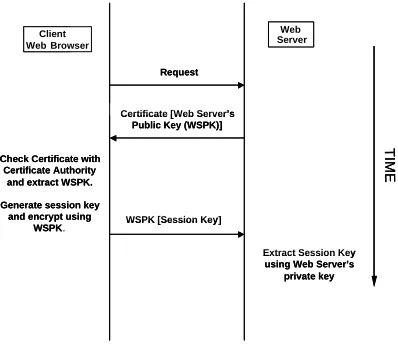
Communication between applets and the web-server can be controlled by using the ’javakey’ system [3] to ’sign’ the applet. Data is then only provided to an applet with the correct signature. Communication links between the Client and Web-Server, as well as the link between the Web-Server and the Tool Server have been secured using an SSL (secure socket layer) protocol, as shown in figure 4.
Client Web
Check Certificate with Certificate Authority
and extract WSPK. Generate session key
and encrypt using WSPK.
Web
Extract Session Key using Web Server’s
private key Request
Certificate [Web Server’s Public Key (WSPK)]
WSPK [Session Key]
T
IM
E
Client Web Browser
Check Certificate with Certificate Authority
and extract WSPK. Generate session key
and encrypt using WSPK.
Web Server
Extract Session Key using Web Server’s
private key Request
Certificate [Web Server’s Public Key (WSPK)]
WSPK [Session Key]
T
IM
E
Figure 6. Secure data transfer protocol.
A secure connection ensures privacy, transmission
in-tegrity, authentication and authorization. Generally, all
[image:5.596.327.526.399.571.2]4.1
Client to Web Server Security
A Java package called Java Secure Socket Extension (JSSE) is available for producing secure sockets that im-plement the SSL protocol. However, it would have been inefficient to add this socket to every servlet on the server. Another approach, instead, is to use the web server to produce a secure link with the client and to use it to
tunnel servlet results. OpenSSL and a special module
(ModSSL) for Apache were installed. OpenSSL is an open source toolkit implementing the Secure Sockets Layer (SSL v2/v3) and Transport Layer Security (TLS v1) protocols as well as a full-strength general-purpose cryptography li-brary. The ModSSL module provides strong cryptography for the Apache Server with the help of the OpenSSL toolkit. Once installed and configured a test certificate was created and self signed to test the connection. ModSSL integrates into the Apache server. This allows functionality for the server to use the OpenSSL toolkit to create secured connec-tions. When a visitor contacts the web server, accessing a secured URL (indicated by a URL that begins with ”https:” instead of just ”http:” or by a message from the browser). The server responds, automatically sending the visitor the site’s digital certificate, which authenticates the web server. This certificate also contains the server’s public key. The visitor’s web browser now generates a unique ”session key” to encrypt all communications with the site. The visitor’s browser encrypts the session key itself with the site’s pub-lic key so only the site can read the session key. This is how a secure session is established. It all usually takes only seconds and requires no action by the user. Depending on the browser, the user may see a key icon becoming whole or a padlock closing, indicating that the session is secure. There are a number of security levels that are available for the server from just authenticating itself using certificates, to encrypting all the data being transmitted between the user and the server.
4.2
Web Server to Tool Server Security
Assuming that the whole system is behind a firewall then the tool servers can be protected from attacks. As only the Web Server would be viewable from the outside world. However, if the tool server was not behind a firewall then some sort of security needs to be applied. In the case of some one else trying to use the tool server with out go-ing through the web server, it can be programmed so that the tool server only accepts connections from certain IP ad-dresses i.e. the web server IP address. However, the link still may not be secure and private. Therefore, our system also implements secure connections by using JSSE (Java Secure Socket Extension) package with RMI. This allows us to create RMI sockets to uses the SSL protocol.
5
Conclusions
The constant development of electronic design tools from standalone simulators through integrated single user suites to network based systems such as the popular Ca-dence system shows the continuing importance of these tools to the electronic design world. The importance of the Internet as an environment for a global Electronic Design tool framework is clear. The feasibility of a web-based de-sign framework has been sufficiently proved. The aim of this project was to further this proof by providing a platform independent framework supporting distributed tool servers that is sufficiently abstracted to make the integration of other tools a simple task. The technological approach used to do this will in the most part use tried and tested meth-ods, taking where appropriate from the rapidly advancing field of e-commerce solutions. Research has shown that the electronic design world is centered on command-line tools that are the result of many years’ iterative growth and as such it is a requirement of a web-based framework to be able to integrate these tools and provide interfaces that en-able internet based communication of parameters and data.
References
[1] C. Ajluni. Internet-enabled tools open doors to new de-sign strategies. Electronic Dede-sign, Penton Media., 8(5), 6th March 2000.
[2] B. Bettig and J. Shah. An object-oriented program shell for integrating cad software tools. Advances in
Engineer-ing Software, 30:529–541, October 1 1999.
[3] J. Jaworski. Java 1.1 Developers Guide. Sams.net Publish-ing, 2nd edition edition, 1997.
[4] T. Kazmierski and N. Clayton. A two-tier distributed elec-tronic design framework. In Proceedings DATE 2002, pages 227–231, Paris, March 2002.
[5] G. McGraw and E. Felten. Secure computing with java: Now and the future. Whitepaper, Sun Microsystems Inc., 1997.
[6] J. Morgenthal and B. L. Forge. Enterprise Application
In-tegration with XML and JAVA. Prentice Hall Publishing.,
2000.
[7] A. Newton. Impact of web technologies on EDAsystem
architectures. In Proceedings ISPD’1998, Monterey, CA. ISPD, April 6 1998.
[8] L. L. Peterson and B. S. Davie. Computer Networks, a Systems Approach. Morgan Kaufman, 2nd edition edition,
2000.
[9] J. L. Rogers and A. O. Salas. Towards a more flexible web-based framework for multidisciplinary design. Advances in
Engineering Software, 30:439–444, January 1 1998.
[10] A. Sangiovanni-Vincentelli. The internet: the nextICdesign
wnvironment. In DAC’2000 Conference, Keynote
presenta-tion, June 2000.