Mobile Forensics: Android Platforms and WhatsApp
Extraction Tools
Saleh AlHidaifi
University of Bedfordshire
Luton, England, UK
ABSTRACT
Today, mobile phones are ones of the technologies that most troublesome and popularity of steadily gaining with better productivity, connectivity, and functionality. Mobile phones are the ever-increasing complexity and give a new level of threats. Android, one of modern mobile operating systems in a highly competitive mobile phone market, is emerging as a significant force. An enormous amount of data can is stored on the Android mobile phones either remotely or locally. These data, as evidence, can be acquired by collecting this valuable information and allows forensic analysts about the investigation. WhatsApp is a one of the popular instant messenger mobile application for the social network which enables the exchange of videos, images, messages, and audio is via mobile phone. The mobile and computer forensic investigators are a goldmine because of the increased use of IM on Android mobile phones. There is some mobile forensic extraction tools both commercial and open source but a few for extracting the WhatsApp database on the Android.
General Terms
Android, WhatsApp Messenger, Mobile Forensic, Extraction Tools.
Keywords
Android, Android File Systems, Android Architecture, Android Mobile, WhatsApp, WhatsApp Forensic, WhatsApp Database, Extraction Tools.
1.
INTRODUCTION
Mobile forensic is gathering digital evidence of the information retrieved from a mobile phone. The evidence extracted when there is a capability to access data relies on the internal memory of a mobile phone. In recent years, there is a witnessed rapid development of mobile phone technology. There are different software tools available for a mobile phone to retrieve and analyse. A set of advantages and limitations are there in each of these tools. WhatsApp Messenger is an application for a smartphone that allows sending messages between users; frequently the WhatsApp is used as a replacement for the regular SMS messaging. [1]
According to the WIKIPEDIA (the Whats App Messenger is a proprietary, cross-platform instant messaging subscription service for smartphones and selected feature phones that use the intranet for communication). By US citizens Jan Koum and Brian Acton the WhatsApp Inc. was founded in 2009, both the US citizens are former employees of Yahoo. More than 55 people employ joined the company. On February 19, 2014, the WhatsApp was a takeover by Facebook Inc. WhatsApp claimed that 400 million actives users in a December 2013 blog host that use the service each month. Over 500 million monthly active users, 100 million videos, and 700 million photos are shared each day as of 22 April 2014 and each day more than 100 billion messages handled by
the messaging system. [2][3][4]
2.
ANDROID OS VERSIONS
Android is an operating system for mobile devices running on the Linux kernel. It initially developed by Android Inc. after which Google company purchased it and finally by the Open Handset Alliance. A consortium of 47 software, telecom, and hardware companies devoted to mobile devices to advancing open standards. It allows and helps the developers in the Java language to write managed code; through Java libraries, Google developed a controlling device. Under the Apache License, Google released most of the Android codes, open source license and free software. This Mobile system has many advantages:
i) On the same platform can use different hardware to make up a phone with different hardware manufacturers that give more choices of consumers.
ii) Advantages of cloud computing. A lot of services and products have a Google and Android system can seamless integration with Google products. The best Mobile Operation System is Android, and none can be better than it.
In November 2007, the Android released a beta version that developed from the old version of the Android mobile operating system. In September 2008, Android released Android 1.0 as the 1st commercial version of Android.
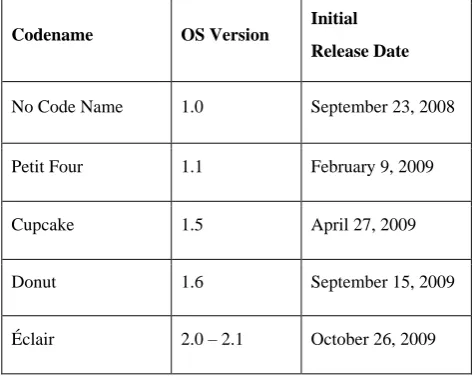
[image:1.595.310.547.574.764.2]Android developing continued under Google, Open Handset Alliance (OHA) and some changes have been updated by OHA to its base operating system since its initial release. Android versions have developed under a confectionery-themed code name since April 2009 and in an alphabetical order released. The versions of the Android go to the in Table 1. [5][6][7]
Table 1 Android OS Versions from 2008 to 2017
Codename OS Version Initial
Release Date
No Code Name 1.0 September 23, 2008
Petit Four 1.1 February 9, 2009
Cupcake 1.5 April 27, 2009
Donut 1.6 September 15, 2009
26
Codename OS Version
Initial
Release Date
Froyo 2.2 – 2.2.3 May 20, 2010
Gingerbread 2.3 – 2.3.7 December 6, 2010
Honeycomb 3.0 – 3.2.6 February 22, 2011
Ice Cream Sandwich 4.0 – 4.0.4 October 18, 2011
Jelly Bean 4.1 – 4.3.1 July 9, 2012
KitKat 4.4 – 4.4.4 October 31, 2013
Lollipop 5.0 – 5.1.1 November 12, 2014
Marshmallow 6.0 – 6.0.1 October 5, 2015
Nougat 7.0 – 7.1.2 August 22, 2016
Oreo 8.0 – 8.1 August 21, 2017
3.
ANDROID FILE SYSTEMS
The way to organise the data efficiently done through a file system. File system for mobile phones and computers are different. File system efficiency evaluated on how the application is fast to write, read, and retrieve data. Linux file system on Android and many of them using for boot the device and run it. Android uses FAT32, YAFFS2, and EXT file system for data storage purposes and booting. Out of these file system the extraction tools use many methods to pull the data. Windows operating system used FAT and FAT32 which are popular files system. Mainly on the SD cards, the Android supports these files system. The securities of these files system are lack of the files this used widely. The flash memory uses the design of a file system is YAFFS2 (Yet Another Flash File System 2). Most of the forensic tools available are not compatible with YAFFS which is one of the problems. However, one of the researchers named Andrew Hoog pointed out that some of the Android handsets were already using EXT4. [13][17]
Android platform is open system architecture, with useful debugging and development environment. It enables replacement and recycles components. Also, it supports different wireless communication means and supports an efficient database. Android uses a Dalvik Virtual Machine to optimise for mobile devices heavily. Google Android on June 26, 2008, was released NDK that descript the stand for Native Development Kit.[8][9][10][11] [12]
4.
ANDROID ARCHITECTURE
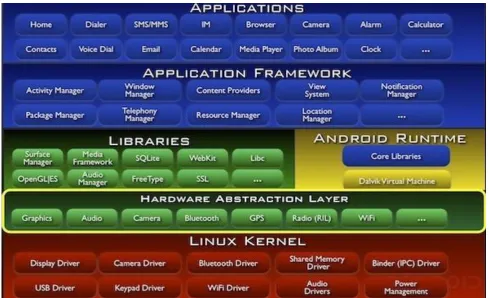
In Android OS, the hierarchical structure is used just like other OSs; there are five layers divided into Android, including the following: Linux kernel, hardware abstraction, libraries, Android runtime, application framework and applications. The system architecture of the Android OS shown in Figure 1
4.1
Linux Kernel
Android relies on Linux 2.6 kernel for core system services such as process management, network stack, memory management, drive model, and finally security. The kernel also acts as an abstraction layer between the rest of the software stack and the hardware. [13]
4.2
Hardware Abstraction Layer
The hardware abstraction layer is general services that are provided by the underlying Linux kernel layer. The underlying implement details can shield it. [14]
4.3
Libraries
Android includes a set of C and C++ programming language used through the Android system by various components. The main core libraries of the Android system are WebKit, OpenGL ES, SQLite, FreeType, Media Framework, etc. Through the Android application framework, these different components exposed to developers. [14][15]
4.4
Application
A set of main applications in the framework are on the top level, including an SMS app, a maps-application, an email client, contacts app, a calendar, web browser, and many more. The Java programming language is used for all apps.[12][16]
4.5
Application Framework
Figure 1 Android Architecture (Android, 2013)
5.
ANDROID FILE SYSTEMS
The way to organise the data efficiently done through a file system. File system for mobile phones and computers are different. File system efficiency evaluated on how the application is fast to write, read, and retrieve data. Linux file system on Android and many of them using for boot the device and run it. Android uses FAT32, YAFFS2, and EXT file system for data storage purposes and booting. Out of these file system the extraction tools use many methods to pull the data. Windows operating system used FAT and FAT32 which are popular files system. Mainly on the SD cards, the Android supports these files system. The securities of these files system are lack of the files this used widely. The flash memory uses the design of a file system is YAFFS2 (Yet Another Flash File System 2). Most of the forensic tools available are not compatible with YAFFS which is one of the problems. However, one of the researchers named Andrew Hoog pointed out that some of the Android handsets were already using EXT4. [13][17]
6.
ANDROID MOBILE
The programming language of Android applications written in Java. The Android SDK (Software Development Kit) tools are allowed to compile the code to apk archive file. In a single .apk file for all the code is considered to be one application and the file that used to install the application of Android-powered devices. Each Android application that installed on a device lives in its security sandbox. In Android, each application is a different user that because the operating system is a multi-user Linux system. [18]
7.
WhatsApp allows sending the images, videos, audio media messages, and text messaging via mobile phones. The application is available for a different operating system such
iOS, Blackberry, Windows phone, and Symbian. WhatsApp as an application is not dependable on the phone; it is certain applications that only support specific phones, such as Motoblur intended for specific Motorola phones. WhatsApp not carrier dependent, like other applications that certain only by service providers such as the ‘Verizon Cloud’ application that only working with the Verizon Wireless phone service users. On most smart mobile phones, the WhatsApp application charges of the amount an initial installation. However, it is free of charge for Android platform. The main reason to test the security of the application on the Android mobile platform in particular. [5][8]
8.
WHATSAPP FORENSIC
WhatsApp is the great instant messenger application for a smartphone. It allows users to send audios, videos, images, and messages to other users like the SMS (Short Message service) both are similar. In additional features, it allows a user to create the owner groups of other users which allow chatting and sending messages to the whole members the group. WhatsApp is allowing the users to set their profile photo or picture. [8]
9.
WHATSAPP DATABASE
A UFED physical analyser is one of the hardware acquisition software used with instant messenger application to analysis conversations on Android applications such as Viber or WhatsApp. Chat message artifices, names, and timestamps of files received and sent to find, but those files were not fond the storage locations. WhatsApp application in the manual examination and after the file system extraction of the database files (msgstore.db and wa.db) were found chat session with details. [8]
28 WhatsApp application analysis data remnants of RAM and
retrieval deleted data. Deleted messages that extracted from RAM are already considered and have been able to do so. Additionally, by using UFED physical analyser to extract the database done, however, if we root the phone then we can obtain an un-encrypted version successfully. [19]
The best example of the software acquisition that contribution to WhatsApp forensics on Android mobile was made by Francesco Picasso who wrote a script tool to decrypt and organise SQLite database files in an organised HTML form. The tool had a capability to works for both encrypted and decrypted WhatsApp database files. [7][8][20][21]
10.
EXTRACTION TOOLS FOR
Mobile forensics is the new area of digital forensics at the moment, and the extract data from the mobile phones required the tools and software, but still, they are at the nascent stage. The extraction tools of the mobile phones depend on how the data are extracted and can be either hardware tools or software tools. There are many extraction tools today on the market available but few extraction tools for WhatsApp. The most tools available for WhatsApp in the market are commercial tools and few open source tools. The software extraction considered in this project are commercial tools and other open source tools. This dissertation will develop open source tool and compare with other tools. Some of extractions tools that will list in this paper which are:
10.1
WhatsApp Xtract Tool
WhatsApp Xtract is a script tool for extract Android WhatsApp messages from the WhatsApp database ‘msgstore.db.crypt’ files. The main features of these tools are allowed to show the attachments of the message such as videos, audio, GPS, contacts, and images, which shown in the message content. Also, the tool can decrypt the encrypted WhatsApp database file and inspect. [21]
10.2
Backup Trans Android WhatsApp
Transfer Tool
The Backuptrans Android WhatsApp Transfer is a software tool to smoothly managing the Android WhatsApp Messages and chats on the computer. It has many features including backup/restore WhatsApp chat history from Android devices to PC and from PC to Android devices, all messages attachments can extract from WhatsApp between Android phones can transfer the WhatsApp chat history easily, additional the software can print on the computer the Android WhatsApp Messages. However, the Backuptrans Android WhatsApp Transfer is commercial software. [22
]
10.3
Backup Text for WhatsApp Tool
Backup Text for WhatsApp is mobile application tool used for export WhatsApp messages; convert the messages to plain text, HTML file, Excel, and CSV file formats. Those files can
be easily read on computer or phone and can save the files
which exported or converted to SD card or send to the email easily. This tool is available free in google play market. [23
]
10.4
WhatsApp Viewer Tool:
WhatsApp Viewer is a small tool to open the Android WhatsApp database ‘msgstore.db.crypt’ file. The main function of this tool is to extract the WhatsApp database but can only show the WhatsApp text messages and images
details without showing the other files such as audio, GPS, etc. WhatsApp Viewer is a free tool and still like a beta version.
11.
COMPARISON WHATSAPP TOOLS
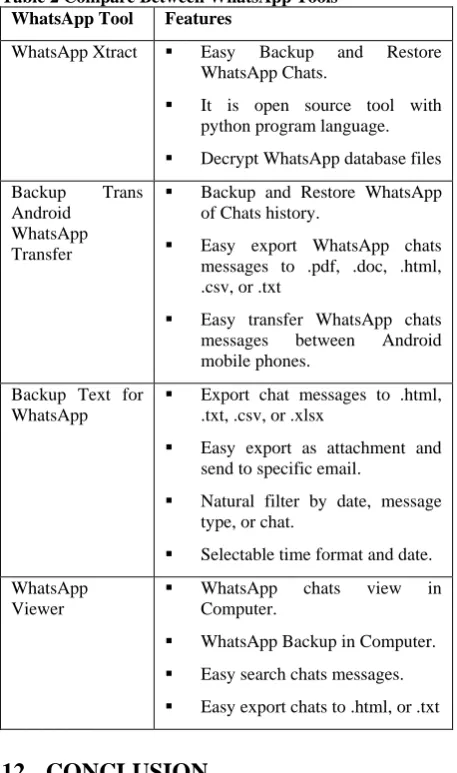
[image:4.595.315.544.167.554.2]In this section will compare the selected tools for WhatsApp in section 10. The comparison by features capability as shown in Table2.
Table 2 Compare Between WhatsApp Tools
WhatsApp Tool Features
WhatsApp Xtract Easy Backup and Restore WhatsApp Chats.
It is open source tool with python program language. Decrypt WhatsApp database files
Backup Trans Android
WhatsApp Transfer
Backup and Restore WhatsApp of Chats history.
Easy export WhatsApp chats messages to .pdf, .doc, .html, .csv, or .txt
Easy transfer WhatsApp chats messages between Android mobile phones.
Backup Text for WhatsApp
Export chat messages to .html, .txt, .csv, or .xlsx
Easy export as attachment and send to specific email.
Natural filter by date, message type, or chat.
Selectable time format and date.
WhatsApp Viewer
WhatsApp chats view in Computer.
WhatsApp Backup in Computer.
Easy search chats messages. Easy export chats to .html, or .txt
12.
CONCLUSION
This research has focused on Android platforms components and architecture. Also, discussed WhatsApp application mobile on Android and had components. Finally, show the WhatsApp tools and show the comparison between those tools.
13.
FUTURE WORK
14.
REFERENCES
[1] Terpstra, M., 2013. WhatsApp & privacy, Netherlands: Radboud University Nijmegen.
[2] Wikipedia, n.d. WhatsApp. [Online] Available at: http://en.wikipedia.org/wiki/WhatsApp
[3] Forbes, 2014. WhatsApp Hits 500 Million Users. [Online] Available at: http://www.forbes.com/sites/amitchowdhry/2014/04/22/ whatsapp-hits-500-million-users/ [Accessed 03 April 2018].
[4] WhatsApp, 2018. WhatsApp Blog. [Online] Available at: http://blog.whatsapp.com/472/400-Million-Stories [Accessed 15 April 2018].
[5] Wikipedia, 2018. Android version history. [Online]
Available at:
http://en.wikipedia.org/wiki/Android_version_history [Accessed 03 April 2018].
[6] Konrad, T., 2013. The Evolution of Android – Part II. [Online] Available at: http://www.xda-developers.com/android/the-evolution-of-android-part-ii/ [Accessed 10 April 2018].
[7] Song, M., Xiong, W. & Fu, X., 2010. Research on Architecture of Multimedia and Its Design Based on Android. Beijing, IEEE Conference Publications.
[8] Hoog, A., 2011. Android Forensics. 1st Edition ed. s.l.:s.n.
[9] Sayed Hashimi, S. K., 2010. Pro Android. S .l. Amazon.
[10]Ehringer, D., 2010. The Dalvik virtual machine Architecture. [Online] Available at: http://davidehringer.com/software/android/The_Dalvik_ Virtual_Machine.pdf [Accessed 2018].
[11]Zhao, X. & Tian, D., 2012. The architecture design of streaming media applications for Android OS. Beijing, IEEE Conference Publications.
[12]VIJAYAN, V., 2012. Android Forensic Capability andEvaluation of Extraction Tools, s.l.: s.n.
[13]Android, 2018. Application Fundamentals. [Online]
Available at:
http://developer.android.com/guide/components/fundame ntals.html [Accessed 2018].
[14]Aditya Mahajan, M. S. D. H. P. S., 2013. Forensic Analysis of Instant Messenger Applications on Android Devices. International Journal of Computer Applications, Volume Volume 68, pp. 38-44.
[15]Hotoloti, n.d. Zena Forensics repository. [Online]
Available at:
http://code.google.com/p/hotoloti/downloads/detail?nam e=Whatsapp_Xtract_V2.0_2012-05-02.zip&can=2&q= [Accessed 2018].
[16]Forensics, Z., 2012. WhatsApp Xtract. [Online] Available at: http://blog.digital-forensics.it/2012/05/whatsapp-forensics.html [Accessed 28 February 2018].
[17]ABackupTrans, n.d. Backuptrans Android WhatsApp Transfer. [Online] Available at:
http://www.backuptrans.com/android-whatsapp-transfer.html [Accessed 2014].
[18]TTools, S., 2018. Google Play Apps. [Online] Available at:
https://play.google.com/store/apps/details?id=com.smeiti .wstotext&hl=en [Accessed 2018].
[19]Andreas-Rausch, n.d. WhatsApp Viewer. [Online] Available at: http://andreas-mausch.github.io/whatsapp-viewer/ [Accessed 2018].
[20]Wikipedia, n.d. Windows 7. [Online] Available at: http://en.wikipedia.org/wiki/Windows_7 [Accessed 2018].
[21]Wikipedia, n.d. Python (programming language). [Online] Available at: http://en.wikipedia.org/wiki/Python_(programming_lang uage) [Accessed 2018].
[22]GitHub, n.d. Database for SQLite. [Online] Available at: http://sqlitebrowser.org [Accessed 2018].
[23]EliteAndroidApps, n.d. Google Play. [Online] Available at:
https://play.google.com/store/apps/details?id=com.tricry pt&hl=en [Accessed 2018].