Technical Report
Oracle Database 11
g
Release 2 Performance:
Protocol Comparison Using Clustered Data
ONTAP 8.1.1
Saad Jafri, NetApp
November 2012 | TR-4109
Abstract
This technical report compares the performance of the Oracle® 11g R2 Real Application Cluster (RAC) using an OLTP workload running in NetApp® clustered Data ONTAP® 8.1.1 and 7-Mode environments over Fibre Channel (FC), Fibre Channel over Ethernet (FCoE), software iSCSI, and Oracle Direct NFS (DNFS). This report demonstrates the readiness of clustered Data ONTAP environments using these protocols to provide a high-performance environment for Oracle Databases.
TABLE OF CONTENTS
1 Executive Summary... 4
Introduction ...4
1.1 Audience ...4
1.2 2 Test Configurations ... 4
3 Summary of Test Results ... 5
4 Results and Analysis... 6
OLTP Workload ...6
4.1 Detailed Test Results ...7
4.2 5 Configuration Details ... 8
Generic Configuration ...8
5.1 Oracle RAC Configuration Using Data ONTAP 8.1.1 Operating in 7-Mode ...8
5.2 Oracle RAC Configuration Using clustered Data ONTAP 8.1.1 ... 14
5.3 6 Conclusion ... 20
Appendixes ... 21
Best Practice Summary for Data ONTAP 8.1.1 Operating in 7-Mode ... 21
Hardware ... 21
Storage Layouts for All Testing Configurations... 22
Oracle Initialization Parameters for RAC Configuration Testing ... 28
Linux Kernel Parameters for RAC Configuration Testing ... 30
Other Linux OS Settings ... 31
References: ... 31
LIST OF TABLES Table 1) Hardware for the Oracle RAC configuration using Data ONTAP 8.1.1 operating in 7-Mode with either FC over 8GB or FCoE, software iSCSI, and DNFS over 10GbE... 10
Table 2) Hardware for the Oracle RAC configuration using clustered Data ONTAP 8.1.1 with either FC over 8GB or FCoE, software iSCSI, and DNFS over 10GbE. ... 16
Table 3) Best practice summary for Data ONTAP 8.1.1 operating in 7-Mode. ... 21
Table 4) Database server hardware specifications for Oracle RAC testing. ... 21
Table 5) NetApp FAS6240 storage system specifications. ... 21
Table 6) Oracle initialization parameters for RAC configuration testing. ... 28
Table 7) ASM instance initialization parameters. ... 30
Table 9) Linux shell limits for Oracle. ... 31
LIST OF FIGURES Figure 1) Protocol comparison using clustered Data ONTAP 8.1.1. ...7
Figure 2) Oracle RAC configuration using Data ONTAP 8.1.1 operating in 7-Mode with 8GB FC network connections for FC tests. ...9
Figure 3) Oracle RAC configuration using Data ONTAP 8.1.1 operating in 7-Mode with 10GbE network connections for FCoE, software iSCSI, and Oracle DNFS tests. ... 10
Figure 4) Oracle RAC configuration using clustered Data ONTAP 8.1.1 with 8GB FC network connections for FC tests. ... 15
Figure 5) Oracle RAC configuration using clustered Data ONTAP 8.1.1 with 10GbE network connections for FCoE, software iSCSI, and Oracle DNFS tests. ... 16
Figure 6) Volume layout for Oracle RAC testing using FC, FCoE, and software iSCSI and Data ONTAP 8.1.1 operating in 7-Mode. ... 23
Figure 7) Volume layout for Oracle RAC testing using DNFS and Data ONTAP 8.1.1 operating in 7-Mode. ... 24
Figure 8) Volume layout for Oracle RAC testing using FC and clustered Data ONTAP 8.1.1. ... 26
Figure 9) Volume layout for Oracle RAC testing using FCoE, software iSCSI, and clustered Data ONTAP 8.1.1. ... 27
1 Executive Summary
Introduction
1.1
NetApp provides up-to-date documentation describing its products to help its customers select the most appropriate solutions for their IT infrastructure. This technical report contains performance information and tuning recommendations for Oracle Database 11g Release 2 (Oracle 11g R2) running in a clustered Data ONTAP 8.1.1 environment. NetApp customers can use this updated information to make informed decisions about the optimal storage protocol for their Oracle Database deployments.
The test configuration environments described in this report consist of the following elements:
Oracle 11g R2 RAC on Red Hat Enterprise Linux® 5 U6
NetApp storage systems running on clustered Data ONTAP 8.1.1 and 7-Mode environments.
The protocols used in this technical report are Fibre Channel (FC) using 8GB connections; Fibre Channel over Ethernet (FCoE); software iSCSI; and Oracle Direct Network File System (DNFS) running over 10GbE connections. DNFS is provided by Oracle 11g R2. It runs as part of the Oracle Database and is optimized specifically for database workloads. Therefore DNFS can be used only to access the Oracle Database files.
This report demonstrates that NetApp storage systems provide a solid environment for running the Oracle RAC database regardless of the protocol used. It also demonstrates that a clustered Data ONTAP 8.1.1 environment is capable of providing a highly comparable performance that NetApp customers expect from 7-Mode, but with all the benefits that a clustered storage environment delivers.
Audience
1.2
This report is intended for the following audiences:
NetApp customers and employees who are investigating deploying their Oracle Databases using NetApp storage running on clustered Data ONTAP 8.1.1 environments.
NetApp customers and employees who are investigating the appropriate storage protocol for use in deployment of their Oracle Databases, using NetApp storage running on clustered Data ONTAP 8.1.1 environments.
This report can also be used as a performance-tuning reference.
2 Test Configurations
These tests focused on measuring and comparing the performance of the Oracle 11g R2 RAC databases that used an online transaction processing (OLTP) workload connected to NetApp FAS6240 storage controllers running, in either 7-Mode or clustered Data ONTAP 8.1.1 configuration.
All test configurations used one of the following protocols: FC using 8GB connections; FCoE using 10GbE connections; software iSCSI using 10GbE connections; or Oracle DNFS using 10GbE connections between the database servers and the FAS6240 storage controllers. The Oracle DNFS protocol was used from within the database servers. Oracle DNFS is an optimized NFS client that provides faster and more scalable access to NFS storage located on network-attached storage (NAS) devices. DNFS is accessible over TCP/IP.
DNFS is built directly into the database kernel and provides better performance compared to the NFS driver in the host system by bypassing the operating system and generating only the requests required to complete the tasks at hand.
The FCoE, software iSCSI, and Oracle DNFS tested configurations used QLogic 8152 10GbE converged network adapters (CNAs) in the database servers connected to NetApp 10GbE unified target adapters
(UTAs) installed in the FAS6240 storage controllers. The FC tested configurations used QLogic 8152 10GbE CNAs in the database servers connected to onboard 8GB FC ports in the FAS6240 controllers. The tests evaluated the following configurations:
FC using a four-node Oracle RAC implementation configured on four physical servers accessing the FAS6240 storage controllers configured in 7-Mode
FC using a four-node Oracle RAC implementation configured on four physical servers accessing the FAS6240 storage controllers configured in clustered Data ONTAP
FCoE using a four-node Oracle RAC implementation configured on four physical servers accessing the FAS6240 storage controllers configured in 7-Mode
FCoE using a four-node Oracle RAC implementation configured on four physical servers accessing the FAS6240 storage controllers configured in clustered Data ONTAP
Software iSCSI using a four-node Oracle RAC implementation configured on four physical servers accessing the FAS6240 storage controllers configured in 7-Mode
Software iSCSI using a four-node Oracle RAC implementation configured on four physical servers accessing the FAS6240 storage controllers configured in clustered Data ONTAP
DNFS using a four-node Oracle RAC implementation configured on four physical servers accessing the FAS6240 storage controllers configured in 7-Mode
DNFS using a four-node Oracle RAC implementation configured on four physical servers accessing the FAS3270A storage controllers configured in clustered Data ONTAP
The NetApp Data ONTAP 8.1.1 operating system was used in conjunction with 64-bit aggregates to demonstrate the performance capabilities offered to NetApp customers. The tests that used 10GbE network connections were conducted by using jumbo frames.
An OLTP workload was used for the performance tests. This workload simulated 750 users interacting with 16,000 product warehouses in an order-processing application. The client processes for the OLTP application were executed on a separate application server (client-server mode). The number of order entry transactions (OETs) completed per minute was used as the primary metric to measure application throughput. The input/output (I/O) mix for the OLTP workload was approximately 60% reads and 40% writes.
3 Summary of Test Results
As the clustered Data ONTAP 8.1.1 configurations become available, it is likely that the Oracle user base will have questions about the performance implications of moving to clustered Data ONTAP. The test results in this report can help answer the following questions about the transition of Oracle Databases from 7-Mode to clustered Data ONTAP 8.1.1 and about the virtualization of Oracle Database
environments that use both 7-Mode and clustered Data ONTAP.
What is the performance impact of migrating a four-node RAC implementation from 7-Mode to clustered Data ONTAP, regardless of the protocol used?
The performance in clustered Data ONTAP was found to be comparable to the performance in 7-Answer:
Mode after installing and configuring clustered Data ONTAP 8.1.1in the previously used FAS6240A supporting the four-node RAC implementation in 7-Mode.
What is the performance impact when comparing FC using 8GB connections for migrating a four-node RAC implementation from 7-Mode to clustered Data ONTAP?
When running the four-node RAC implementation using FC and 8GB connections on clustered Answer:
What is the performance impact when comparing FCoE using 10GbE connections for migrating a four-node RAC implementation from 7-Mode to clustered Data ONTAP?
When running the four-node RAC implementation using FCoE and 10GbE connections on Answer:
clustered Data ONTAP the performance in terms of OETs processed was within 7% of 7-Mode.
What is the performance impact when comparing software iSCSI using 10GbE connections for migrating a four-node RAC implementation from 7-Mode to clustered Data ONTAP?
When running the four-node RAC implementation using software iSCSI and 10GbE connections Answer:
on clustered Data ONTAP 8.1.1, the performance in terms of OETs processed was within 1% of 7-Mode.
What is the performance impact when comparing using Oracle DNFS and 10GbE connections for migrating a four-node RAC implementation from 7-Mode to clustered Data ONTAP?
When running the four-node RAC implementation using FCoE and 10GbE connections on Answer:
clustered Data ONTAP 8.1.1, the performance in terms of OETs processed was within 7% of 7-Mode.
What is the performance impact of FC, FCoE, software iSCSI, and Oracle DNFS protocols used for running a four-node RAC implementation in clustered Data ONTAP?
When running the four-node RAC implementation on clustered Data ONTAP 8.1.1, the Answer:
performance in terms of OETs processed was within 1% between FC and FCoE, and within 3% of FC and FCoE when using Oracle DNFS. Software iSCSI performance in terms of OETs processed was within 9% of FC and FCoE, and within 11% of Oracle DNFS.
To summarize, the test results indicate that clustered Data ONTAP 8.1.1 is an ideal option for providing a high-performance storage environment to support Oracle Databases, regardless of what protocol is utilized.
The remainder of this report presents the details of the test configurations and the full set of test results and analysis.
4 Results and Analysis
Before analyzing the test results, it is important to understand the testing methodology and the workload employed. A consistent testing methodology was employed for all test cases. This methodology used an OLTP workload to demonstrate the capabilities of the configurations using clustered Data ONTAP 8.1.1 and 7-Mode.
OLTP Workload
4.1
The database created for the OLTP workload uses a data model designed for OET processing. The OLTP database was approximately 3.5TB in size and contained 16,000 warehouses. A workload that simulated 750 users and 16,000 active warehouses was used. The client processes for the OLTP application were executed on a separate application server (client-server mode).
To determine the workload, a series of tests was run using different numbers of users, and through an iterative process the load generated was increased against the database. It was observed that the read latencies reported by the database exceeded 10ms, which was chosen as an upper limit of acceptable performance. It was decided to have a load that consisted of 750 users accessing the database. This load was held constant for all tests to have a uniform comparison of application throughput. These tests did not have any bottlenecks on the host, network or NetApp storage platform.
A mix of different types of transactions was used during each OLTP test run. These transaction types included order entries, payments, order status, delivery, and stock level. The number of OETs completed per minute was the primary metric used to measure application throughput.
The I/O mix for the OLTP workload was approximately 60% reads and 40% writes.
Detailed Test Results
4.2
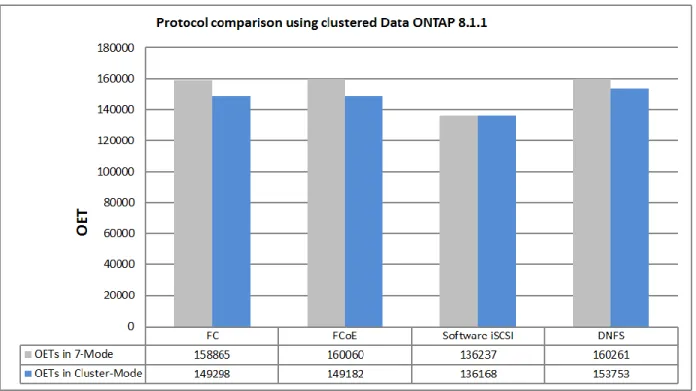
Figure 1 shows the total number of OETs reported by the Oracle Database for each protocol. The following results were observed:
For FC protocol, OETs processed in clustered Data ONTAP were within 6% of OETs processed in 7-Mode.
For FCoE protocol, OETs processed in clustered Data ONTAP were within 7% of OETs processed in 7-Mode.
For software iSCSI, OETs processed in clustered Data ONTAP were within 1% of OETs processed in 7-Mode.
For Oracle DNFS, OETs processed in clustered Data ONTAP were within 3% of OETs processed in 7-Mode.
When comparing protocols running only in clustered Data ONTAP, OETs processed were within 1% between FC and FCoE and within 3% of FC and FCoE when using Oracle DNFS. OETs that were processed using software iSCSI were within 9% of FC and FCoE, and within 11% of Oracle DNFS. The results of these tests show that the performance of the four-node Oracle RAC environment with clustered Data ONTAP 8.1.1 was comparable to its performance in 7-Mode. These results indicate that clustered Data ONTAP 8.1.1is an apt storage platform to support this Oracle environment.
For all tests, the maximum acceptable single-block read latencies was defined as 10ms for clustered Data ONTAP 8.1.1 and 7-Mode.
5 Configuration Details
Generic Configuration
5.1
Wherever possible, similar configurations for the test environments were used, including:
Identical hardware
Similar storage layouts
Similar Oracle initialization parameters
Similar Linux OS settings
This section explains the test configurations in detail. The configurations followed the best practices recommended by NetApp and Oracle.
Oracle RAC Configuration Using Data ONTAP 8.1.1 Operating in 7-Mode
5.2
The tests for this configuration used standard 10GbE for FCoE, software iSCSI, and Oracle DNFS with a QLogic 8152 10GbE CNA in the Oracle RAC servers connected to NetApp 10GbE UTAs. The adapters were installed in the FAS6240A storage controllers and were connected through two Cisco Nexus® 5020 switches. For FC tests, the same QLogic 8152 10GbE CNAs in the Oracle RAC servers were used and connected to onboard 8GB FC ports in the FAS6240A storage controllers, through two Cisco Nexus 5020 switches.
For the tests that were run on Data ONTAP 8.1.1 operating in 7-Mode, the following configurations were used:
FC using a four-node Oracle RAC implementation configured on four physical servers accessing the FAS6240A storage controllers over 10GB FC connections
FCoE using a four-node Oracle RAC implementation configured on four physical servers accessing the FAS6240A storage controllers over 10GbE connections
Software iSCSI using a four-node Oracle RAC implementation configured on four physical servers accessing the FAS6240A storage controllers over 10GbE connections
DNFS using a four-node Oracle RAC implementation configured on four physical servers accessing the NetApp FAS6240A storage controllers over 10GbE connections
To drive the workload, the client processes for the OLTP application were executed on a separate application server (client-server mode) from the Oracle RAC database servers.
Network Configurations
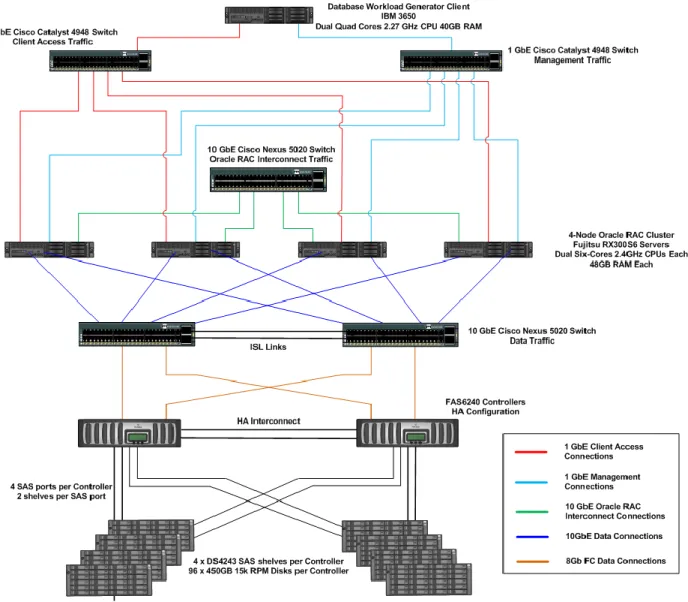
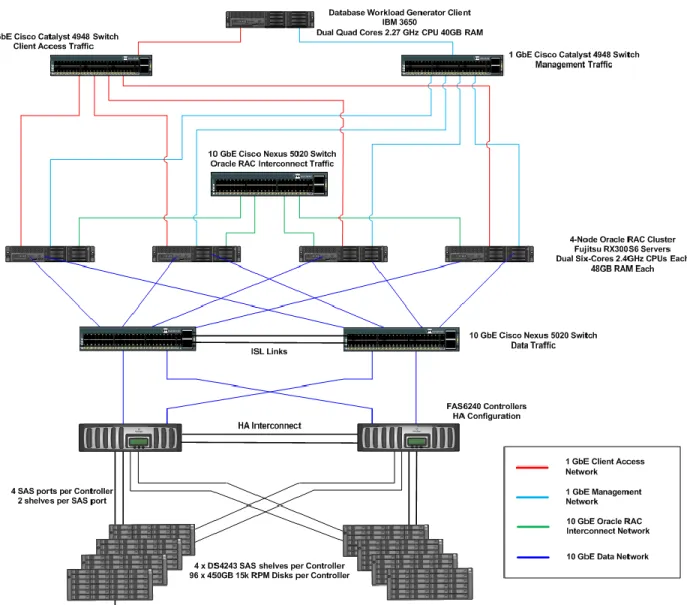
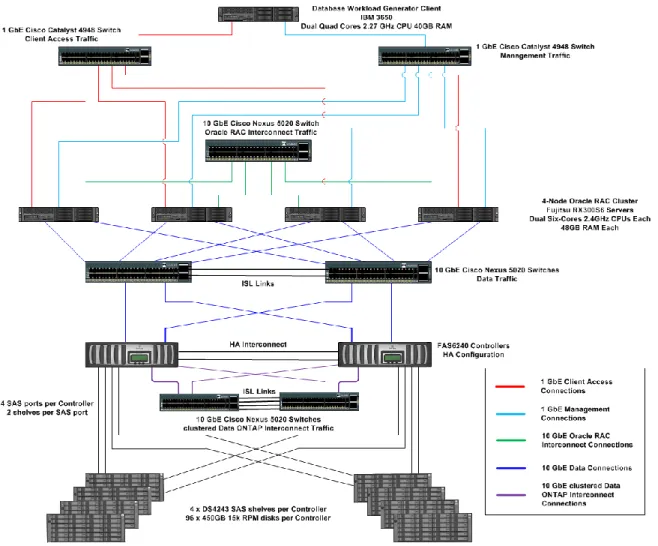
Figure 2 and Figure 3 show the network configurations used for tests, that involved a four-node RAC configuration deployed on four physical servers in a Data ONTAP 8.1.1 7-Mode environment using 8GB FC and 10GbE network connections. Table 2 describes the storage network hardware shown in the figures. The only physical difference in the configurations is the storage interconnect used on the FAS6240A storage controllers.
Figure 2) Oracle RAC configuration using Data ONTAP 8.1.1 operating in 7-Mode with 8GB FC network connections for FC tests.
Figure 3) Oracle RAC configuration using Data ONTAP 8.1.1 operating in 7-Mode with 10GbE network connections for FCoE, software iSCSI, and Oracle DNFS tests.
Table 1) Hardware for the Oracle RAC configuration using Data ONTAP 8.1.1 operating in 7-Mode with either FC over 8GB or FCoE, software iSCSI, and DNFS over 10GbE.
Hardware Description
Database server Four Fujitsu Primergy RX300 S6 dual six-core CPUs @ 2.4GHz.
48GB RAM
RHEL 5 U6
One dual-port 10 GbE QLogic 8152 CNA per server for Oracle data traffic
One dual-port 10GbE Intel® 82599EB NIC per server for Oracle interconnect traffic Switch infrastructure
for data and Oracle RAC interconnect traffic
Two Cisco Nexus 5020 10GbE switches for Oracle RAC data traffic
Hardware Description
NetApp controllers. FAS6240 controllers
Active-active configuration using multipath high availability (MPHA)
One NetApp dual-port 10GbE UTA per storage controller for FCoE
Software iSCSI and Oracle DNFS tests
Two onboard 8GB FC ports per controller for FC tests Storage shelves. Four DS4243 SAS shelves per controller
450GB disks @ 15k RPM
Storage Network Configuration
Jumbo frames were used in this network configuration for all 10GbE connections. During these tests, an MTU size of 9,000 was set for all storage interfaces on the host, for all interfaces on the NetApp
controllers, and for the ports involved on the switch. A single private subnet was used to segment Ethernet traffic between the host and the storage controllers, and a single private subnet was used to segment Ethernet traffic between database servers for Oracle RAC interconnect communications between database servers.
Oracle ASM Configuration for FC, FCoE, and Software iSCSI
For all block-based protocol testing, including FC, FCoE and software iSCSI, Oracle ASM was configured to house the Oracle Database data files, redo logs, and temporary files. For each block-based protocol, a disk group was created consisting of LUNs residing on both FAS6240A storage controllers, to balance the traffic across the two controllers. The default Oracle ASM settings were used when these disk groups were created. Oracle binary files for each RAC server were put on their own LUN, formatted with ext3 file system. All LUNs presented to Oracle ASM were configured using RHEL 5.6 native multipathing,
according to NetApp best practices outlined in Linux Host Utilities 6.1 available on the NetApp Support site.
NFS Mounts and DNFS Configuration
With Oracle DNFS, the NFS mount points and network paths are specified in a new configuration file, oranfstab. However, the NFS mounts must still be specified in the /etc/fstab file because Oracle cross-checks the entries in this file with the oranfstab file. If any of the NFS mounts between
/etc/fstab and oranfstab do not match, DNFS does not use those NFS mount points.
When conducting tests using Oracle RAC and Data ONTAP 8.1.1 operating in 7-Mode, a set of NFS mount points was created on the RAC database nodes that allowed the RAC nodes to access the database files uniformly across the FAS6240A storage controllers. The following mount points were defined in the /etc/fstab file on the Linux hosts supporting RAC nodes 1 through 4.
RAC node 1
megaops-21-e3a:/vol/nfs_orabin1 /u01/app nfs
rw,bg,hard,rsize=65536,wsize=65536,vers=3,actimeo=0,nointr,suid,timeo=600,tcp 0 0 megaops-21-e3a:/vol/nfs_ocr_vote1 /u02/ocr_vote1 nfs
rw,bg,hard,rsize=65536,wsize=65536,vers=3,actimeo=0,nointr,suid,timeo=600,tcp 0 0 megaops-22-e3a:/vol/nfs_ocr_vote2 /u03/ocr_vote2 nfs
rw,bg,hard,rsize=65536,wsize=65536,vers=3,actimeo=0,nointr,suid,timeo=600,tcp 0 0 megaops-21-e3a:/vol/nfs_ocr_vote3 /u04/ocr_vote3 nfs
rw,bg,hard,rsize=65536,wsize=65536,vers=3,actimeo=0,nointr,suid,timeo=600,tcp 0 0 megaops-21-e3a:/vol/nfs_oradata1 /u05/oradata1 nfs
megaops-22-e3a:/vol/nfs_oradata2 /u05/oradata2 nfs
rw,bg,hard,rsize=65536,wsize=65536,vers=3,actimeo=0,nointr,suid,timeo=600,tcp 0 0 megaops-21-e3a:/vol/nfs_oralog1 /u05/oralog1 nfs
rw,bg,hard,rsize=65536,wsize=65536,vers=3,actimeo=0,nointr,suid,timeo=600,tcp 0 0 megaops-22-e3a:/vol/nfs_oralog2 /u05/oralog2 nfs
rw,bg,hard,rsize=65536,wsize=65536,vers=3,actimeo=0,nointr,suid,timeo=600,tcp 0 0 megaops-21-e3a:/vol/nfs_oratemp1 /u05/oratemp1 nfs
rw,bg,hard,rsize=65536,wsize=65536,vers=3,actimeo=0,nointr,suid,timeo=600,tcp 0 0 megaops-22-e3a:/vol/nfs_oratemp2 /u05/oratemp2 nfs
rw,bg,hard,rsize=65536,wsize=65536,vers=3,actimeo=0,nointr,suid,timeo=600,tcp 0 0
RAC node 2
megaops-22-e3a:/vol/nfs_orabin2 /u01/app nfs
rw,bg,hard,rsize=65536,wsize=65536,vers=3,actimeo=0,nointr,suid,timeo=600,tcp 0 0 megaops-21-e3a:/vol/nfs_ocr_vote1 /u02/ocr_vote1 nfs
rw,bg,hard,rsize=65536,wsize=65536,vers=3,actimeo=0,nointr,suid,timeo=600,tcp 0 0 megaops-22-e3a:/vol/nfs_ocr_vote2 /u03/ocr_vote2 nfs
rw,bg,hard,rsize=65536,wsize=65536,vers=3,actimeo=0,nointr,suid,timeo=600,tcp 0 0 megaops-21-e3a:/vol/nfs_ocr_vote3 /u04/ocr_vote3 nfs
rw,bg,hard,rsize=65536,wsize=65536,vers=3,actimeo=0,nointr,suid,timeo=600,tcp 0 0 megaops-21-e3a:/vol/nfs_oradata1 /u05/oradata1 nfs
rw,bg,hard,rsize=65536,wsize=65536,vers=3,actimeo=0,nointr,suid,timeo=600,tcp 0 0 megaops-22-e3a:/vol/nfs_oradata2 /u05/oradata2 nfs
rw,bg,hard,rsize=65536,wsize=65536,vers=3,actimeo=0,nointr,suid,timeo=600,tcp 0 0 megaops-21-e3a:/vol/nfs_oralog1 /u05/oralog1 nfs
rw,bg,hard,rsize=65536,wsize=65536,vers=3,actimeo=0,nointr,suid,timeo=600,tcp 0 0 megaops-22-e3a:/vol/nfs_oralog2 /u05/oralog2 nfs
rw,bg,hard,rsize=65536,wsize=65536,vers=3,actimeo=0,nointr,suid,timeo=600,tcp 0 0 megaops-21-e3a:/vol/nfs_oratemp1 /u05/oratemp1 nfs
rw,bg,hard,rsize=65536,wsize=65536,vers=3,actimeo=0,nointr,suid,timeo=600,tcp 0 0 megaops-22-e3a:/vol/nfs_oratemp2 /u05/oratemp2 nfs
rw,bg,hard,rsize=65536,wsize=65536,vers=3,actimeo=0,nointr,suid,timeo=600,tcp 0 0
RAC node 3
megaops-21-e3a:/vol/nfs_orabin3 /u01/app nfs
rw,bg,hard,rsize=65536,wsize=65536,vers=3,actimeo=0,nointr,suid,timeo=600,tcp 0 0 megaops-21-e3a:/vol/nfs_ocr_vote1 /u02/ocr_vote1 nfs
rw,bg,hard,rsize=65536,wsize=65536,vers=3,actimeo=0,nointr,suid,timeo=600,tcp 0 0 megaops-22-e3a:/vol/nfs_ocr_vote2 /u03/ocr_vote2 nfs
rw,bg,hard,rsize=65536,wsize=65536,vers=3,actimeo=0,nointr,suid,timeo=600,tcp 0 0 megaops-21-e3a:/vol/nfs_ocr_vote3 /u04/ocr_vote3 nfs
rw,bg,hard,rsize=65536,wsize=65536,vers=3,actimeo=0,nointr,suid,timeo=600,tcp 0 0 megaops-21-e3a:/vol/nfs_oradata1 /u05/oradata1 nfs
rw,bg,hard,rsize=65536,wsize=65536,vers=3,actimeo=0,nointr,suid,timeo=600,tcp 0 0 megaops-22-e3a:/vol/nfs_oradata2 /u05/oradata2 nfs
rw,bg,hard,rsize=65536,wsize=65536,vers=3,actimeo=0,nointr,suid,timeo=600,tcp 0 0 megaops-21-e3a:/vol/nfs_oralog1 /u05/oralog1 nfs
megaops-22-e3a:/vol/nfs_oralog2 /u05/oralog2 nfs
rw,bg,hard,rsize=65536,wsize=65536,vers=3,actimeo=0,nointr,suid,timeo=600,tcp 0 0 megaops-21-e3a:/vol/nfs_oratemp1 /u05/oratemp1 nfs
rw,bg,hard,rsize=65536,wsize=65536,vers=3,actimeo=0,nointr,suid,timeo=600,tcp 0 0 megaops-22-e3a:/vol/nfs_oratemp2 /u05/oratemp2 nfs
rw,bg,hard,rsize=65536,wsize=65536,vers=3,actimeo=0,nointr,suid,timeo=600,tcp 0 0
RAC node 4
megaops-22-e3a:/vol/nfs_orabin4 /u01/app nfs
rw,bg,hard,rsize=65536,wsize=65536,vers=3,actimeo=0,nointr,suid,timeo=600,tcp 0 0 megaops-21-e3a:/vol/nfs_ocr_vote1 /u02/ocr_vote1 nfs
rw,bg,hard,rsize=65536,wsize=65536,vers=3,actimeo=0,nointr,suid,timeo=600,tcp 0 0 megaops-22-e3a:/vol/nfs_ocr_vote2 /u03/ocr_vote2 nfs
rw,bg,hard,rsize=65536,wsize=65536,vers=3,actimeo=0,nointr,suid,timeo=600,tcp 0 0 megaops-21-e3a:/vol/nfs_ocr_vote3 /u04/ocr_vote3 nfs
rw,bg,hard,rsize=65536,wsize=65536,vers=3,actimeo=0,nointr,suid,timeo=600,tcp 0 0 megaops-21-e3a:/vol/nfs_oradata1 /u05/oradata1 nfs
rw,bg,hard,rsize=65536,wsize=65536,vers=3,actimeo=0,nointr,suid,timeo=600,tcp 0 0 megaops-22-e3a:/vol/nfs_oradata2 /u05/oradata2 nfs
rw,bg,hard,rsize=65536,wsize=65536,vers=3,actimeo=0,nointr,suid,timeo=600,tcp 0 0 megaops-21-e3a:/vol/nfs_oralog1 /u05/oralog1 nfs
rw,bg,hard,rsize=65536,wsize=65536,vers=3,actimeo=0,nointr,suid,timeo=600,tcp 0 0 megaops-22-e3a:/vol/nfs_oralog2 /u05/oralog2 nfs
rw,bg,hard,rsize=65536,wsize=65536,vers=3,actimeo=0,nointr,suid,timeo=600,tcp 0 0 megaops-21-e3a:/vol/nfs_oratemp1 /u05/oratemp1 nfs
rw,bg,hard,rsize=65536,wsize=65536,vers=3,actimeo=0,nointr,suid,timeo=600,tcp 0 0 megaops-22-e3a:/vol/nfs_oratemp2 /u05/oratemp2 nfs
rw,bg,hard,rsize=65536,wsize=65536,vers=3,actimeo=0,nointr,suid,timeo=600,tcp 0 0
The following excerpts are from the oranfstab file that was used during the RAC performance testing to define the mount points that were to be used by the Oracle DNFS client. The oranfstab file excerpts that follow were used by RAC nodes 1 through 4.
RAC node 1
server: megaops-21-e3a
path: 10.1.2.21 local: 10.1.2.5 path: 10.1.3.21 local: 10.1.3.5
export: /vol/nfs_oralog1 mount: /u05/oralog1 export: /vol/nfs_oradata1 mount: /u05/oradata1 export: /vol/nfs_oratemp1 mount: /u05/oratemp1 server: megaops-22-e3a
path: 10.1.2.22 local: 10.1.2.5 path: 10.1.3.22 local: 10.1.3.5
export: /vol/nfs_oralog2 mount: /u05/oralog2 export: /vol/nfs_oradata2 mount: /u05/oradata2 export: /vol/nfs_oratemp2 mount: /u05/oratemp2
RAC node 2
server: megaops-21-e3a
path: 10.1.2.21 local: 10.1.2.6 path: 10.1.3.21 local: 10.1.3.6
export: /vol/nfs_oralog1 mount: /u05/oralog1 export: /vol/nfs_oradata1 mount: /u05/oradata1 export: /vol/nfs_oratemp1 mount: /u05/oratemp1 server: megaops-22-e3a
path: 10.1.2.22 local: 10.1.2.6 path: 10.1.3.22 local: 10.1.3.6
export: /vol/nfs_oralog2 mount: /u05/oralog2 export: /vol/nfs_oradata2 mount: /u05/oradata2 export: /vol/nfs_oratemp2 mount: /u05/oratemp2
RAC node 3
server: megaops-21-e3a
path: 10.1.2.21 local: 10.1.2.7 path: 10.1.3.21 local: 10.1.3.7
export: /vol/nfs_oralog1 mount: /u05/oralog1 export: /vol/nfs_oradata1 mount: /u05/oradata1 export: /vol/nfs_oratemp1 mount: /u05/oratemp1 server: megaops-22-e3a
path: 10.1.2.22 local: 10.1.2.5 path: 10.1.3.22 local: 10.1.3.5
export: /vol/nfs_oralog2 mount: /u05/oralog2 export: /vol/nfs_oradata2 mount: /u05/oradata2 export: /vol/nfs_oratemp2 mount: /u05/oratemp2
RAC node 4
server: megaops-21-e3a
path: 10.1.2.21 local: 10.1.2.8 path: 10.1.3.21 local: 10.1.3.8
export: /vol/nfs_oralog1 mount: /u05/oralog1 export: /vol/nfs_oradata1 mount: /u05/oradata1 export: /vol/nfs_oratemp1 mount: /u05/oratemp1 server: megaops-22-e3a
path: 10.1.2.22 local: 10.1.2.6 path: 10.1.3.22 local: 10.1.3.6
export: /vol/nfs_oralog2 mount: /u05/oralog2 export: /vol/nfs_oradata2 mount: /u05/oradata2 export: /vol/nfs_oratemp2 mount: /u05/oratemp2
For more information about DNS configuration, refer to the Oracle Database Installation Guide for Oracle 11g R2.
Storage Configuration
For these tests, Data ONTAP 8.1.1 operating in 7-Mode was used for the storage controllers. For details on the storage layout, see the figures in the appendix section “Storage Layouts for All Testing
Configurations.”
Oracle RAC Configuration Using clustered Data ONTAP 8.1.1
5.3
The tests for this configuration used standard 10GbE for FCoE, software iSCSI, and Oracle DNFS with a QLogic 8152 10GbE CNA in the Oracle RAC servers connected to NetApp 10GbE UTAs. The adapters were installed in the FAS6240A storage controllers and were connected through a Cisco Nexus 5020 switch. For FC tests, the same QLogic 8152 10GbE CNA in the Oracle RAC servers was connected to on-board 8GB FC ports in the FAS6240A storage controllers through a Nexus 5020 switch.
For the tests using clustered Data ONTAP 8.1.1, the following configurations were used:
FC using a four-node Oracle RAC implementation configured on four physical servers accessing the FAS6240A storage controllers over 10GB FC connections
FCoE using a four-node Oracle RAC implementation configured on four physical servers accessing the FAS6240A storage controllers over 10GbE connections
Software iSCSI using a four-node Oracle RAC implementation configured on four physical servers accessing the FAS6240A storage controllers over 10GbE connections
DNFS using a four-node Oracle RAC implementation configured on four physical servers accessing the FAS6240A storage controllers over 10GbE connections
To drive the workload, the client processes for the OLTP application were executed on a separate application server (client-server mode) from the Oracle RAC database servers.
Network Configurations
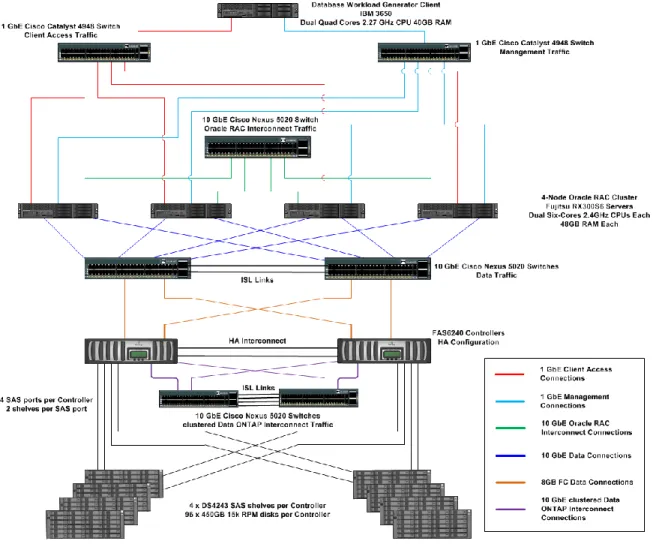
Figure 4 and Figure 5 show the network configurations used for the tests involving a four-node RAC configuration deployed on four physical servers in a clustered Data ONTAP 8.1.1 environment that uses 8GB FC and 10GbE network connections respectively. Table 2 describes the storage network hardware shown in the diagrams. The only physical difference in the configurations is the storage interconnect used on the FAS6240A storage controllers.
Figure 4) Oracle RAC configuration using clustered Data ONTAP 8.1.1 with 8GB FC network connections for FC tests.
Figure 5) Oracle RAC configuration using clustered Data ONTAP 8.1.1 with 10GbE network connections for FCoE, software iSCSI, and Oracle DNFS tests.
Table 2) Hardware for the Oracle RAC configuration using clustered Data ONTAP 8.1.1 with either FC over 8GB or FCoE, software iSCSI, and DNFS over 10GbE.
Hardware Description
Database server Four Fujitsu Primergy RX300 S6 dual six-core CPU @ 2.4GHz
48GB RAM
RHEL 5 U6
One dual-port 10 GbE QLogic 8152 CNA per server for Oracle data traffic
One dual-port 10GbE Intel 82599EB NIC per server for Oracle interconnect traffic
Switch infrastructure for data and Oracle RAC interconnect traffic
Two Cisco Nexus 5020 10GbE switches for Oracle RAC data traffic
One Cisco Nexus 5020 10GbE switch for Oracle RAC interconnect traffic
Switch infrastructure for clustered Data ONTAP traffic
Hardware Description
NetApp controllers FAS6240 controllers
clustered Data ONTAP configuration using multipath high availability
One NetApp 10GbE UTA per storage controller for FCoE, software iSCSI, and Oracle DNFS tests
Two onboard 8GB FC ports per controller for FC tests Storage shelves Four DS4243 SAS shelves per controller
450GB disks @ 15k RPM
Storage Network Configuration
Jumbo frames were used in this network configuration for all 10GbE connections. During these tests, an MTU size of 9,000 was set for all storage interfaces on the host, for all interfaces on the NetApp
controllers, and for the ports involved on the switch. A single private subnet was used to segment Ethernet traffic between the host and the storage controllers, and a single private subnet was used to segment Ethernet traffic between database servers for Oracle RAC interconnect communications between database servers.
Oracle ASM Configuration for FC, FCoE, and Software iSCSI
For all block-based protocol testing, including FC, FCoE, and software iSCSI, Oracle ASM was configured to house the Oracle Database data files, redo logs, and temporary files. A disk group was created for each block-based protocol, consisting of LUNs residing on both FAS6240A storage controllers to balance the traffic across the two controllers. The default Oracle ASM settings were used when these disk groups were created. Oracle binary files for each RAC server were put on their own LUN, formatted with ext3 file system. All LUNs presented to Oracle ASM were configured by using RHEL 5.6 native multipathing in accordance with the NetApp best practices outlined in Linux Host Utilities 6.1, available at the NetApp Support site.
NFS Mounts and DNFS Configuration
With Oracle DNFS, the NFS mount points and network paths are specified in a new configuration file, oranfstab. However, the NFS mounts must still be specified in the /etc/fstab file, because Oracle cross-checks the entries in this file with the oranfstab file. If any of the NFS mounts between
/etc/fstab and oranfstab do not match, DNFS does not use those NFS mount points.
For tests that used Oracle RAC and clustered Data ONTAP 8.1.1, a set of NFS mount points was created on the RAC database nodes that allowed RAC nodes to access the database files uniformly across the FAS6240A storage controllers.
In clustered Data ONTAP 8.1.1, the NFS mount points on the RAC nodes were specified by using a combination of the logical network interface and clustered Data ONTAP junction path that provides access to the different Oracle configuration and database files.
The following mount points were defined in the /etc/fstab file on the Linux hosts supporting RAC nodes 1 through 4.
RAC node 1
e3a_n1:/nfs_orabin1 /u01/app nfs
rw,bg,hard,rsize=65536,wsize=65536,vers=3,actimeo=0,nointr,suid,timeo=600,tcp 0 0 e3a_n1:/nfs_ocr_vote1 /u02/ocr_vote1 nfs
e3a_n2:/nfs_ocr_vote2 /u03/ocr_vote2 nfs
rw,bg,hard,rsize=65536,wsize=65536,vers=3,actimeo=0,nointr,suid,timeo=600,tcp 0 0 e3a_n1:/nfs_ocr_vote3 /u04/ocr_vote3 nfs
rw,bg,hard,rsize=65536,wsize=65536,vers=3,actimeo=0,nointr,suid,timeo=600,tcp 0 0 e3a_n1:/nfs_oradata1 /u05/oradata1 nfs
rw,bg,hard,rsize=65536,wsize=65536,vers=3,actimeo=0,nointr,suid,timeo=600,tcp 0 0 e3a_n2:/nfs_oradata2 /u05/oradata2 nfs
rw,bg,hard,rsize=65536,wsize=65536,vers=3,actimeo=0,nointr,suid,timeo=600,tcp 0 0 e3a_n1:/nfs_oralog1 /u05/oralog1 nfs
rw,bg,hard,rsize=65536,wsize=65536,vers=3,actimeo=0,nointr,suid,timeo=600,tcp 0 0 e3a_n2:/nfs_oralog2 /u05/oralog2 nfs
rw,bg,hard,rsize=65536,wsize=65536,vers=3,actimeo=0,nointr,suid,timeo=600,tcp 0 0 e3a_n1:/nfs_oratemp1 /u05/oratemp1 nfs
rw,bg,hard,rsize=65536,wsize=65536,vers=3,actimeo=0,nointr,suid,timeo=600,tcp 0 0 e3a_n2:/nfs_oratemp2 /u05/oratemp2 nfs
rw,bg,hard,rsize=65536,wsize=65536,vers=3,actimeo=0,nointr,suid,timeo=600,tcp 0 0
RAC node 2
e3a_n2:/nfs_orabin2 /u01/app nfs
rw,bg,hard,rsize=65536,wsize=65536,vers=3,actimeo=0,nointr,suid,timeo=600,tcp 0 0 e3a_n1:/nfs_ocr_vote1 /u02/ocr_vote1 nfs
rw,bg,hard,rsize=65536,wsize=65536,vers=3,actimeo=0,nointr,suid,timeo=600,tcp 0 0 e3a_n2:/nfs_ocr_vote2 /u03/ocr_vote2 nfs
rw,bg,hard,rsize=65536,wsize=65536,vers=3,actimeo=0,nointr,suid,timeo=600,tcp 0 0 e3a_n1:/nfs_ocr_vote3 /u04/ocr_vote3 nfs
rw,bg,hard,rsize=65536,wsize=65536,vers=3,actimeo=0,nointr,suid,timeo=600,tcp 0 0 e3a_n1:/nfs_oradata1 /u05/oradata1 nfs
rw,bg,hard,rsize=65536,wsize=65536,vers=3,actimeo=0,nointr,suid,timeo=600,tcp 0 0 e3a_n2:/nfs_oradata2 /u05/oradata2 nfs
rw,bg,hard,rsize=65536,wsize=65536,vers=3,actimeo=0,nointr,suid,timeo=600,tcp 0 0 e3a_n1:/nfs_oralog1 /u05/oralog1 nfs
rw,bg,hard,rsize=65536,wsize=65536,vers=3,actimeo=0,nointr,suid,timeo=600,tcp 0 0 e3a_n2:/nfs_oralog2 /u05/oralog2 nfs
rw,bg,hard,rsize=65536,wsize=65536,vers=3,actimeo=0,nointr,suid,timeo=600,tcp 0 0 e3a_n1:/nfs_oratemp1 /u05/oratemp1 nfs
rw,bg,hard,rsize=65536,wsize=65536,vers=3,actimeo=0,nointr,suid,timeo=600,tcp 0 0 e3a_n2:/nfs_oratemp2 /u05/oratemp2 nfs
rw,bg,hard,rsize=65536,wsize=65536,vers=3,actimeo=0,nointr,suid,timeo=600,tcp 0 0
RAC node 3
e3a_n1:/nfs_orabin3 /u01/app nfs
rw,bg,hard,rsize=65536,wsize=65536,vers=3,actimeo=0,nointr,suid,timeo=600,tcp 0 0 e3a_n1:/nfs_ocr_vote1 /u02/ocr_vote1 nfs
rw,bg,hard,rsize=65536,wsize=65536,vers=3,actimeo=0,nointr,suid,timeo=600,tcp 0 0 e3a_n2:/nfs_ocr_vote2 /u03/ocr_vote2 nfs
rw,bg,hard,rsize=65536,wsize=65536,vers=3,actimeo=0,nointr,suid,timeo=600,tcp 0 0 e3a_n1:/nfs_ocr_vote3 /u04/ocr_vote3 nfs
rw,bg,hard,rsize=65536,wsize=65536,vers=3,actimeo=0,nointr,suid,timeo=600,tcp 0 0 e3a_n1:/nfs_oradata1 /u05/oradata1 nfs
e3a_n2:/nfs_oradata2 /u05/oradata2 nfs
rw,bg,hard,rsize=65536,wsize=65536,vers=3,actimeo=0,nointr,suid,timeo=600,tcp 0 0 e3a_n1:/nfs_oralog1 /u05/oralog1 nfs
rw,bg,hard,rsize=65536,wsize=65536,vers=3,actimeo=0,nointr,suid,timeo=600,tcp 0 0 e3a_n2:/nfs_oralog2 /u05/oralog2 nfs
rw,bg,hard,rsize=65536,wsize=65536,vers=3,actimeo=0,nointr,suid,timeo=600,tcp 0 0 e3a_n1:/nfs_oratemp1 /u05/oratemp1 nfs
rw,bg,hard,rsize=65536,wsize=65536,vers=3,actimeo=0,nointr,suid,timeo=600,tcp 0 0 e3a_n2:/nfs_oratemp2 /u05/oratemp2 nfs
rw,bg,hard,rsize=65536,wsize=65536,vers=3,actimeo=0,nointr,suid,timeo=600,tcp 0 0
RAC node 4
e3a_n2:/nfs_orabin4 /u01/app nfs
rw,bg,hard,rsize=65536,wsize=65536,vers=3,actimeo=0,nointr,suid,timeo=600,tcp 0 0 e3a_n1:/nfs_ocr_vote1 /u02/ocr_vote1 nfs
rw,bg,hard,rsize=65536,wsize=65536,vers=3,actimeo=0,nointr,suid,timeo=600,tcp 0 0 e3a_n2:/nfs_ocr_vote2 /u03/ocr_vote2 nfs
rw,bg,hard,rsize=65536,wsize=65536,vers=3,actimeo=0,nointr,suid,timeo=600,tcp 0 0 e3a_n1:/nfs_ocr_vote3 /u04/ocr_vote3 nfs
rw,bg,hard,rsize=65536,wsize=65536,vers=3,actimeo=0,nointr,suid,timeo=600,tcp 0 0 e3a_n1:/nfs_oradata1 /u05/oradata1 nfs
rw,bg,hard,rsize=65536,wsize=65536,vers=3,actimeo=0,nointr,suid,timeo=600,tcp 0 0 e3a_n2:/nfs_oradata2 /u05/oradata2 nfs
rw,bg,hard,rsize=65536,wsize=65536,vers=3,actimeo=0,nointr,suid,timeo=600,tcp 0 0 e3a_n1:/nfs_oralog1 /u05/oralog1 nfs
rw,bg,hard,rsize=65536,wsize=65536,vers=3,actimeo=0,nointr,suid,timeo=600,tcp 0 0 e3a_n2:/nfs_oralog2 /u05/oralog2 nfs
rw,bg,hard,rsize=65536,wsize=65536,vers=3,actimeo=0,nointr,suid,timeo=600,tcp 0 0 e3a_n1:/nfs_oratemp1 /u05/oratemp1 nfs
rw,bg,hard,rsize=65536,wsize=65536,vers=3,actimeo=0,nointr,suid,timeo=600,tcp 0 0 e3a_n2:/nfs_oratemp2 /u05/oratemp2 nfs
rw,bg,hard,rsize=65536,wsize=65536,vers=3,actimeo=0,nointr,suid,timeo=600,tcp 0 0
The following are excerpts from the oranfstab file that was used during the RAC performance testing to define the mount points for use by the Oracle DNFS client. The oranfstab file excerpts that follow were used by RAC nodes 1 through 4.
RAC node 1 server: e3a_n1
path: 10.1.2.21 local: 10.1.2.5 path: 10.1.3.21 local: 10.1.3.5
export: /nfs_oralog1 mount: /u05/oralog1 export: /nfs_oradata1 mount: /u05/oradata1 export: /nfs_oratemp1 mount: /u05/oratemp1 server: e3a_n2
path: 10.1.2.22 local: 10.1.2.5 path: 10.1.3.22 local: 10.1.3.5
export: /nfs_oralog2 mount: /u05/oralog2 export: /nfs_oradata2 mount: /u05/oradata2 export: /nfs_oratemp2 mount: /u05/oratemp2
RAC node 2 server: e3a_n1
path: 10.1.2.21 local: 10.1.2.6 path: 10.1.3.21 local: 10.1.3.6
export: /nfs_oralog1 mount: /u05/oralog1 export: /nfs_oradata1 mount: /u05/oradata1 export: /nfs_oratemp1 mount: /u05/oratemp1 server: e3a_n2
path: 10.1.2.22 local: 10.1.2.6 path: 10.1.3.22 local: 10.1.3.6
export: /nfs_oralog2 mount: /u05/oralog2 export: /nfs_oradata2 mount: /u05/oradata2 export: /nfs_oratemp2 mount: /u05/oratemp2
RAC node 3 server: e3a_n1
path: 10.1.2.21 local: 10.1.2.7 path: 10.1.3.21 local: 10.1.3.7
export: /nfs_oralog1 mount: /u05/oralog1 export: /nfs_oradata1 mount: /u05/oradata1 export: /nfs_oratemp1 mount: /u05/oratemp1 server: e3a_n2
path: 10.1.2.22 local: 10.1.2.7 path: 10.1.3.22 local: 10.1.3.7
export: /nfs_oralog2 mount: /u05/oralog2 export: /nfs_oradata2 mount: /u05/oradata2 export: /nfs_oratemp2 mount: /u05/oratemp2
RAC node 4 server: e3a_n1
path: 10.1.2.21 local: 10.1.2.8 path: 10.1.3.21 local: 10.1.3.8
export: /nfs_oralog1 mount: /u05/oralog1 export: /nfs_oradata1 mount: /u05/oradata1 export: /nfs_oratemp1 mount: /u05/oratemp1 server: e3a_n2
path: 10.1.2.22 local: 10.1.2.8 path: 10.1.3.22 local: 10.1.3.8
export: /nfs_oralog2 mount: /u05/oralog2 export: /nfs_oradata2 mount: /u05/oradata2 export: /nfs_oratemp2 mount: /u05/oratemp2
For more information about DNS configuration, refer to the Oracle Database Installation Guide for Oracle 11g R2.
Storage Configuration
For these tests, clustered Data ONTAP 8.1.1was used for the storage controllers. For details on the storage layout, see the figures in the appendix section “Storage Layouts for All Testing Configurations.”
6 Conclusion
NetApp has a long history of providing high-performance storage systems for Oracle Database environments. With the advent of clustered Data ONTAP, NetApp continues to develop leading-edge storage systems that offer the ability to scale out both capacity and performance in support of NetApp customers’ current and future Oracle Database environments.
The test results presented in this report show that clustered Data ONTAP provides excellent performance in Oracle environments regardless of the protocols used.
Appendixes
Best Practice Summary for Data ONTAP 8.1.1 Operating in 7-Mode
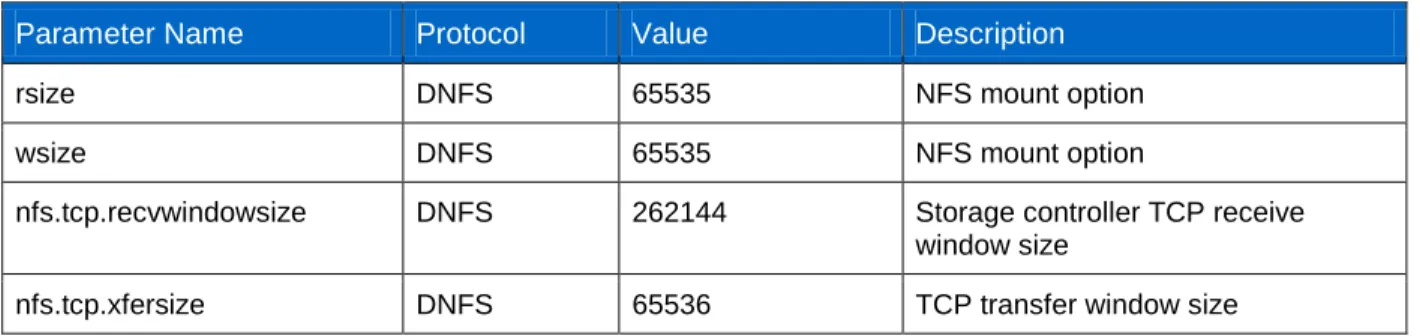
This section summarizes the best practices listed in this report for each of the configurations that were tested. Table 3 contains the parameter name, value, and description, and the protocol for which it was used.
Table 3) Best practice summary for Data ONTAP 8.1.1 operating in 7-Mode.
Parameter Name Protocol Value Description
rsize DNFS 65535 NFS mount option
wsize DNFS 65535 NFS mount option
nfs.tcp.recvwindowsize DNFS 262144 Storage controller TCP receive window size
nfs.tcp.xfersize DNFS 65536 TCP transfer window size
Hardware
Table 4 describes the database server hardware specifications for Oracle RAC testing.
Table 4) Database server hardware specifications for Oracle RAC testing.
Component Details
System type Fujitsu Primergy RX300 S6 Operating system RHEL 5 U6
Processor Two six-core CPU @ 2.4GHz
Memory 48GB
Oracle Database version 11.2.0.1.0
Network connectivity One dual-port 10GbE QLogic 8152 CNA (for data traffic)
One dual-port 10GbE Intel 82599EB NIC (for Oracle RAC interconnect traffic) Table 5 describes the FAS6240 storage system specifications.
Table 5) NetApp FAS6240 storage system specifications.
Component Details (in each storage controller)
System type NetApp FAS6240 HA pair
Operating system Clustered Data ONTAP 8.1.1 and 7-Mode Processor Dual-quad core Intel CPU @ 2.53GHz
Memory 48GB
NVRAM 4GB
Disks Four DS4243 SAS shelves per controller
Component Details (in each storage controller)
Network devices 10GbE UTA
Storage Layouts for All Testing Configurations
FC, FCoE, and Software iSCSI Layout for 7-Mode Testing Using Oracle RAC
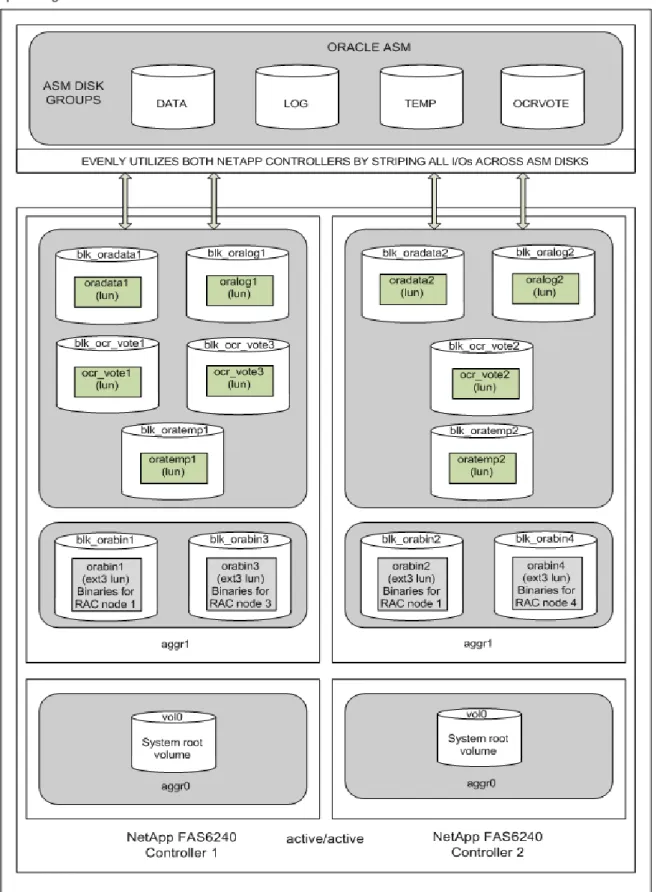
Figure 6 shows the layout used for FC, FCoE, and software iSCSI. At the database level, there were four Oracle ASM disks: DATA. Includes two LUNs, one located in the blk_oradata1 volume on storage controller 1 and the other in the blk_oradata2 volume on storage controller 2 containing Oracle data files.
LOG. Includes two LUNs, one located in the blk_oralog1 volume on storage controller 1 and the other in the blk_oralog2 volume on storage controller 2 containing Oracle online redo logs.
TEMP. Includes two LUNs, one located in the blk_oratemp1 volume on storage controller 1 and the other in the blk_oratemp2 volume on storage controller 2 containing Oracle temporary files.
OCRVOTE. Includes three LUNs, two located in the blk_ocrvote1 volume on storage controller1 and the other in the blk_ocrvote2 volume on storage controller 2 containing the Oracle registry files and voting disks.
The Oracle binary files for each Oracle RAC node resided in dedicated LUNs with ext3 file system. To evenly balance the Oracle binary files across both NetApp storage controllers, LUNs containing the binary files for RAC nodes 1 and 3 were on controller 1 and LUNs containing the binary files for RAC nodes 2 and 4 were on controller 2.
All LUNs were presented to Oracle as block devices. That is, a single partition was created on each LUN. Each LUN was partitioned so that the starting sector of the partition began on a 4K boundary to provide proper LUN alignment. Refer to knowledge base article KB ID: 101071, “How to create aligned partitions in Linux for use with NetApp LUNs, VMDKs, VHDs and other virtual disk containers,” available on the NetApp Support site.
Figure 6) Volume layout for Oracle RAC testing using FC, FCoE, and software iSCSI and Data ONTAP 8.1.1 operating in 7-Mode.
DNFS Layout for 7-Mode Testing Using Oracle RAC
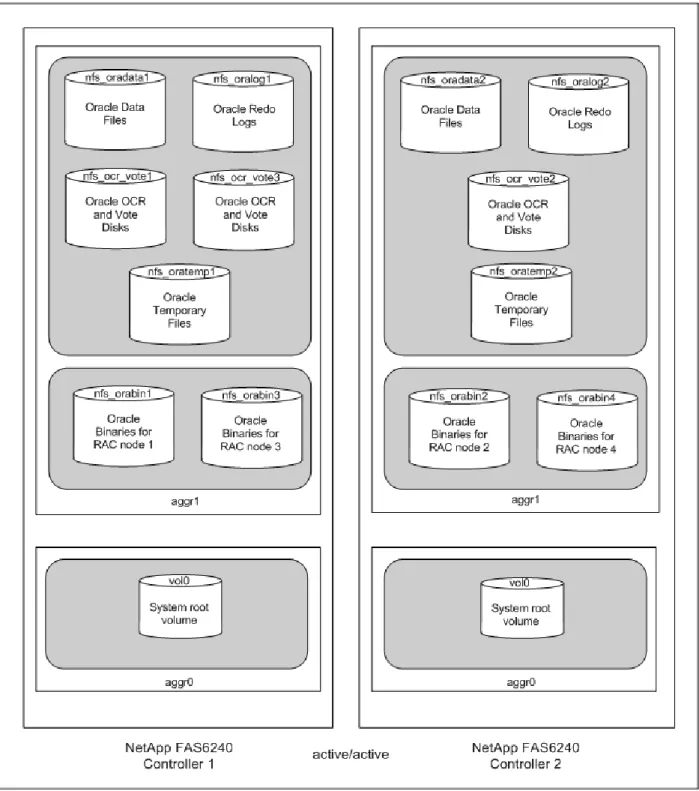
Figure 7 shows the layout used for DNFS. The Oracle data files are distributed evenly across both NetApp storage controllers in the nfs_oradata1 and nfs_oradata2 volumes. The Oracle online redo logs, temporary files, binaries for each RAC node, OCR, and vote disks are also balanced across the two controllers.
FC, FCoE, and Software iSCSI Layout for Clustered Data ONTAP Testing Using
Oracle RAC
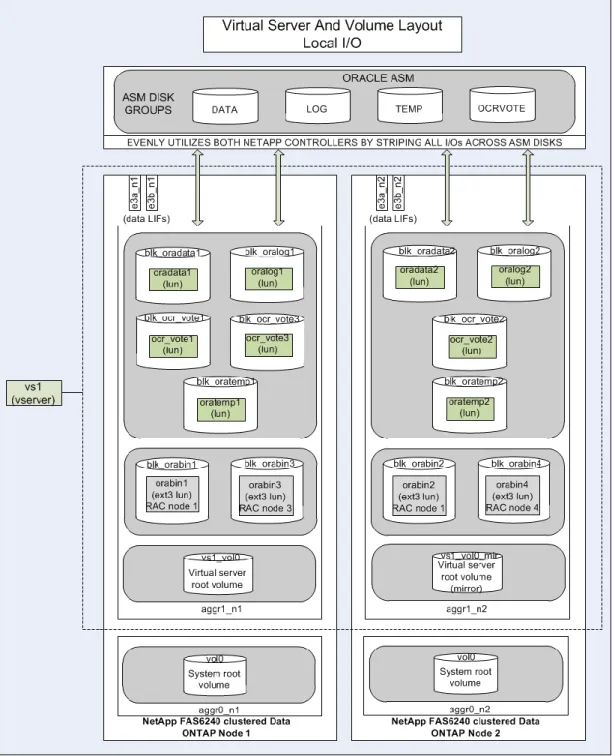
Figure 8 show the layout used for FC, FCoE, and software iSCSI. At the database level, there were four ASM disks groups:
DATA. Includes two LUNs, one located in the blk_oradata1 volume on storage controller 1 and the other in the blk_oradata2 volume on storage controller 2 containing Oracle data files.
LOG. Includes two LUNs, one located in the blk_oralog1 volume on storage controller 1 and the other in the blk_oralog2 volume on storage controller 2 containing Oracle online redo logs.
TEMP. Includes two LUNs, one located in the blk_oratemp1 volume on storage controller 1 and the other in the blk_oratemp2 volume on storage controller 2 containing Oracle temporary files.
OCRVOTE. Includes three LUNs, two located in the blk_ocrvote1 volume on storage controller1 and the other in the blk_ocrvote2 volume on storage controller 2 containing the Oracle registry files and voting disks.
The Oracle binary files for each Oracle RAC node resided in dedicated LUNs with ext3 file system. To evenly balance the Oracle binary files across both the NetApp storage controllers, LUNs containing the binary files for RAC nodes 1 and 3 were on controller 1 and LUNs containing the binary files for RAC nodes 2 and 4 were on controller 2.
All LUNs were presented to Oracle as block devices. That is, a single partition was created on each LUN. Each LUN was partitioned so that the starting sector of the partition began on a 4K boundary to provide proper LUN alignment. Refer to the knowledge base article KB ID 1010717, “How to create aligned partitions in Linux for use with NetApp LUNs, VMDKs, VHDs and other virtual disk containers,” available on the NetApp Support site.
Additionally, in order to present the LUNs and volumes to the Oracle RAC database servers, a Vserver and logical interfaces (LIFs) were created in clustered Data ONTAP on each storage controller, as shown in Figures 8 through Figure 10. A Vserver serves as a logical entity to combine volumes or LUNs across multiple storage controllers and present the storage as a single namespace externally to the hosts. LIFs are assigned to the Vserver to carry data over the physical network connections. For the tests in this report, two LIFs per controller were created and assigned to a single Vserver. The volumes and LUNs designated to contain the Oracle related data or binary files were assigned to the Vserver and then presented to the Oracle RAC database servers.
Figure 8) Volume layout for Oracle RAC testing using FC and clustered Data ONTAP 8.1.1.
DNFS Layout for 7-Mode Testing Using Oracle RAC
Figure 9 shows the layout used for DNFS. The Oracle data files are distributed evenly across both NetApp storage controllers in the nfs_oradata1 and nfs_oradata2 volumes. The Oracle online redo logs, temporary files, binaries for each RAC node, OCR, and vote disks are also distributed across the two controllers.
Figure 9) Volume layout for Oracle RAC testing using FCoE, software iSCSI, and clustered Data ONTAP 8.1.1.
Oracle Initialization Parameters for RAC Configuration Testing
Table 6) Oracle initialization parameters for RAC configuration testing.
Parameter Name Value Description
_allocate_creation_order TRUE During allocation, files should be examined in the order in which they were created
_in_memory_undo FALSE Make in-memory undo for top-level
Parameter Name Value Description
_undo_autotune FALSE Enable autotuning of undo_retention
cluster_database TRUE RAC database
compatible 11.2.0.0.0 Database is completely compatible with this software version
control_files +DATA /control_001, +DATA/control_002 (for blocks tests)
/u05/oradata1/control_001, /u05/oradata1/control_002 (for DNFS tests)
Control file location
db_16k_cache_size 16384M Size of cache for 16K buffers
db_2k_cache_size 256M Size of cache for 2K buffers
db_4k_cache_size 256M Size of cache for 4K buffers
db_block_size 8192 Size of database block in bytes
db_cache_size 5120M Size of DEFAULT buffer pool for standard
block-size buffers
db_files 300 Maximum allowable number of database files
db_name tpcc Database name specified in CREATE
DATABASE
diagnostic_dest /u01/app/oracle Diagnostic files location
dml_locks 2000 One DML lock for each table modified in a
transaction
filesystemio_options setall I/O operations on file system files
log_buffer 16777216 Redo circular buffer size
open_cursors 1204 Maximum number of open cursors
parallel_max_servers 100 Maximum parallel query servers per instance plsql_optimize_level 2 Optimization level that will be used to compile
PL/SQL library units
processes 1200 User processes
recovery_parallelism 40 Number of server processes to use for parallel recovery
remote_listener oraperf-scan:1521 Name of remote listener
sessions 1824 User and system sessions
Parameter Name Value Description
spfile +DATA/spfiletpcc.ora
(for blocks tests)
/u05/oradata1/spfiletpcc.ora (for DNFS tests)
Location of SPFILE
statistics_level typical Statistics level
undo_management AUTO If TRUE, the instance runs in SMU mode;
otherwise it runs in RBU mode
undo_retention 10800 Undo retention in seconds
Initialization Parameters for ASM Instance
Table 7) ASM instance initialization parameters.Parameter Name Value Description
asm_diskgroups +DATA’,’+LOG, +TEMP, +OCRVOTE
Disk groups to mount automatically
asm_diskstring /dev/mapper; Location of mulipathed block devices for ASM disk groups
asm_powerlimit 1 Number of parallel relocations for disk rebalancing diagnostic_dest /u01/app/grid Diagnostics base directory
instance_type asm Type of instance to be executed
large_pool_size 209715200 Size in bytes of the large pool memory_max_target 838860800 Maximum size for the memory target. memory_target 838860800 Size in bytes of the memory target shared_pool_size 209715200 Size in bytes of the shared pool
Linux Kernel Parameters for RAC Configuration Testing
Table 8) Linux nondefault kernel parameters for RAC configuration testing.
Parameter Name Value Description
sunrpc.tcp_slot_table_entries 128 Maximum number of outstanding asynch I/O calls
kernel.sem 250 32000 100 128 Semaphores
net.ipv4.ip_local_port_range 9000 65500 Local port range used by TCP and UDP net.core.rmem_default 262144 Default TCP receive window size (default buffer
size)
net.core.rmem_max 16777216 Maximum TCP receive window size (maximum buffer size)
Parameter Name Value Description
net.core.wmem_default 262144 Default TCP send window size (default buffer size)
net.core.wmem_max 16777216 Maximum TCP send window size (maximum buffer size)
fs.file-max 6815744 Maximum number of file handles that the Linux kernel allocates
fs.aio-max-nr 1048576 Maximum number of allowable concurrent
requests
net.ipv4.tcp_rmem 4096 262144 16777216 Receive buffer size parameters net.ipv4.tcp_wmem 4097 262144 16777216 Send buffer size parameters
net.ipv4.tcp_syncookies 0 Disables TCP syncookies
net.ipv4.tcp_timestamps 0 Disables TCP timestamps
net.ipv4.tcp_sack 0 Disables TCP selective ACKs
net.ipv4.tcp_no_metrics_save 1 Do not save characteristics of the last connection in the flow cache
net.ipv4.tcp_moderate_rcvbuf 0 Disables TCP received buffer autotuning fs.file-max 6815744 Maximum number of file handles that the Linux
kernel allocates
fs.aio-max-nr 1048576 Maximum number of allowable concurrent
requests vm.min_free_kbytes 262144
vm.swapiness 100
Other Linux OS Settings
Table 9) Linux shell limits for Oracle.
Configuration File Settings
/etc/security/limits.conf oracle soft nproc 2047 oracle hard nproc 65536 oracle soft nofile 1024 oracle hard nofile 65536
References:
The following references were used in this report:
Oracle Database Installation Guide
http://docs.oracle.com/cd/E11882_01/install.112/e16763/toc.htm
NetApp KB article 1010717, “How to create aligned partitions in Linux for use with NetApp LUNs, VMDKs, VHDs and other virtual disk containers”
https://kb.netapp.com/support/index?page=content&id=1010717&actp=search&viewlocale=en_US&s earchid=1349252731009
NetApp provides no representations or warranties regarding the accuracy, reliability, or serviceability of any information or recommendations provided in this publication, or with respect to any results that may be obtained by the use of the information or observance of any recommendations provided herein. The information in this document is distributed AS IS, and the use of this information or the implementation of any recommendations or techniques herein is a customer’s responsibility and depends on the customer’s ability to evaluate and integrate them into the customer’s operational environment. This document and the information contained herein may be used solely in connection with the NetApp products discussed in this document.
© 2012 NetApp, Inc. All rights reserved. No portions of this document may be reproduced without prior written consent of NetApp, Inc. Specifications are subject to change without notice. NetApp, the NetApp logo, Go further, faster, and Data ONTAP are trademarks or registered trademarks of NetApp, Inc. in the United States and/or other countries. Cisco Catalyst and Cisco Nexus are Refer to the Interoperability Matrix Tool (IMT) on the NetApp Support site to validate that the exact product and feature versions described in this document are supported for your specific environment. The NetApp IMT defines the product components and versions that can be used to construct configurations that are supported by NetApp. Specific results depend on each customer's installation in accordance with published specifications.