Contents
1. Preface
2. Introduction
3. Language
4. Techniques
5. Windows Techniques
6. Software Project
7. Appendix
Chinese Edition
The Chinese Translation has been made available in mainland China by Post & Telecom Press.
Incredible Bargains
You can buy a used copy of the book for ridiculously low price
Apparently my book was selected as a bait to attract buyers who might also buy more expensive books. I have no problem with it, as long as it makes the book affordable to more people. So enjoy!
You can also buy it new at Barnes and Noble.
Questions and Errors
If you find any errors in the printed version that are not already listed in the errata, post it on our forum. You can also ask C++ and Windows programming questions there.
Compilers
Some code samples on the book's CD-ROM will not compile using the (non-standard-compliant) Microsoft Visual C++ v. 6.0. They will compile with the current v. 7.0, a.k.a. VisualStudio.NET.
Except maybe for Window-specific programs in the second part of the book, you may try using other compilers. These are some recommendations from the readers (I haven't tried them):
● The Windows based MinGW on http://www.mingw.org/ which is based upon GCC, but do not have any (GNU) license issues.
● The Dev-C++ editor at http://www.bloodshed.net/devcpp.html which is an full-featured Integrated Development Environment (IDE) for Win32 and Linux. It uses GCC, Mingw or Cygwin as compiler and libraries.
Preface to the Web edition
This is a Web Book. It is being published on the Internet by me, the author. I realize that the technology is still not there--the
technology that would make a web book as easy to read as its paper based relative. Computer monitors still lag behind paper in terms of resolution, portability and price. Fortunately, you won't need to
spend hours connected to the Internet--there are easy ways browse the web off-line (see link above).
Other than that, a web book is a great thing for both the author and the reader (or, should I say, the user). For the author it offers a much richer medium. I can control the layout, the fonts, the colors and the pictures. Notice that most paper books are monochromatic--the few that offer color (especially throughout) are quite expensive. On the web, I can go crazy with colors, textures, fonts and pictures. Not that I'm planning to, mind you; I will try to strike a reasonable balance between a typerwriter copy and a tabloid.
But that's only the beginning. The web lets me do things that are quite impossible to do on paper. First of all, a web book is a
hypertext document. I can embed jumps to related topics, embed links to in-depth explanations or author's own views--I can digress as much as I want. Second, I can let the reader download code
samples and work with them off line. And third, I can add movement and sound to my book and I can make it interactive by embedding Java applets.
The hope is that all these enhancements will not only make the web book more interesting for the reader, but that they will help the learning process. More importantly, though, Industrial Strength Programming is part of a bigger, ambitious plan to transition programming into the 21st century. Since form should follow function, what's a better form for 21st century ideas than a web book?
From the financial point of view, a web book brings no direct revenue to the author, although it might increase trafic to the
feedback from readers and respond to legitimate criticism by simply fixing the book.
Organization of this book
Code samples from this book are directly downloadable in zipped form. Every time you see an icon like the one on the left, you can click on it and download the source.
The image of a rotten apple will accompany sermons about bad programming practices and tips on how to avoid bugs.
Preface
Why This Book?
During the first four month of 1994 I was presented with a wonderful opportunity. My old University in Wroclaw,
Poland, invited me to give two courses for the students of Computer Physics. The choice of topics was left entirely to my discretion. I knew exactly what I wanted to teach... My work at Microsoft gave me the unique experience of working on large software projects and applying and developing state of the art design and programming
methodologies. Of course, there are plenty of books on the market that talk about design, programming paradigms, languages, etc. Unfortunately most of them are either written in a dry academic style and are quite obsolete, or they are hastily put together to catch the latest vogue. There is a glut of books teaching programming in C, C++ and, more recently, in Java. They teach the language, all right, but rarely do they teach programming.
We have to realize that we are witnessing an
unprecedented explosion of new hardware and software technologies. For the last twenty years the power of
computers grew exponentially, almost doubling every year. Our software experience should follow this exponential
curve as well. Where does this leave books that were
written ten or twenty years ago? And who has time to write new books? The academics? The home programmers? The conference crowd? What about people who are active full time, designing and implementing state of the art
software? They have no time!
In fact I could only dream about writing this book while working full time at Microsoft. I had problems finding time to share experiences with other teams working on the same project. We were all too busy writing software. And then I managed to get a four-month leave of absence. This is how this book started.
way of systematizing and testing ideas and making fast progress writing a book. The goal I put forward for the courses was to prepare the students for jobs in the
industry. In particular, I asked myself the question: If I wanted to hire a new programmer, what would I like him to know to become a productive member of my team as quickly as possible?
For sure, I would like such a person to know
● C++ and object oriented programming.
● Top-down design and top-down implementation techniques.
● Effective programming with templates and C++ exceptions.
● Team work.
He (and whenever I use the pronoun he, I mean it as an abbreviation for he or she) should be able to write reliable and maintainable code, easy to understand by other
members of the team. The person should know advanced programming techniques such as synchronization in a multithreaded environment, effective use of virtual memory, debugging techniques, etc.
Unfortunately, most college graduates are never taught this kind of "industrial strength" programming. Some universities are known to produce first class computer hackers (and seem to be proud of it!). What's worse, a lot of experienced programmers have large holes in that area of their education. They don't know C++, they use C-style programming in C++, they skip the design stage, they
implement bottom-up, they hate C++ exceptions, and they don't work with the team. The bottom line is this: they
waste a lot of their own time and they waste a lot of others' time. They produce buggy code that's difficult to maintain.
So who are you, the reader of this book? You might be a beginner who wants to learn C++. You might be a student who wants to supplement his or college education. You might be a new programmer who is trying to make a
Or you might be a seasoned programmer in search of new ideas. This book should satisfy you no matter what
Introduction
I have divided this book into three parts, the Language, the Techniques, and the Software Project.
Language
The first part teaches C++, the language of choice for general-purpose programming. But it is not your usual C++ tutorial.
For the beginner who doesn't know much about C or C++, it just introduces a new object oriented language. It
doesn't concentrate on syntax or grammar; it shows how to express certain ideas in C++. It is like teaching a
foreign language by conversation rather than by
memorizing words and grammatical rules (when I was teaching it to students, I called this part of the course "Conversational C++"). After all, this is what the
programmer needs: to be able to express ideas in the form of a program written in a particular language. When I learn a foreign language, the first thing I want to know is how to say, "How much does it cost?" I don't need to learn the whole conjugation of the verb 'to cost' in the past, present and future tenses. I just want to be able to walk into a store in a foreign country and buy something.
For a C programmer who doesn't know much about C++ (other than that it's slow and cryptic--the popular myths in the C subculture) this is an exercise in unlearning C in
order to effectively program in C++. Why should a C programmer unlearn C? Isn't C++ a superset of C?
many companies were, and still are, able to gradually phase C++ in. The usual path for such a phase-in is to
introduce C++ as a 'stricter' C. In principle all C code could be recompiled as C++ . In practice, C++ has somewhat stricter type checking and the compiler is able to detect more bugs and issue more warnings. So recompiling C code using a C++ compiler is a way of cleaning up the existing code. The changes that have to be introduced into the source code at that stage are mostly bug fixes and stricter type enforcement. If the code was written in pre-ANSI C, the prototypes of all functions have to be
generated. It is surprising how many bugs are detected during this ANSI-zation procedure. All this work is
definitely worth the effort. A C compiler should only be used when a good C++ compiler is not available (really, a rare occurrence nowadays).
Once the C++ compiler becomes part of the programming environment, programmers sooner or later start learning new tricks and eventually they develop some kind of C++ programming methodology, either on their own or by
reading various self-help books. This is where the bad news starts. There is a subset of C++ (I call it the C ghetto) where many ex-C-programmers live. A lot of C programmers start hating C++ after a glimpse of the C ghetto. They don't realize that C++ has as many good uses as misuses.
For a C-ghetto programmer this book should be a shock (I hope!). It essentially says, "whatever you did up to now was wrong" and "Kernighan and Ritchie are not gods". (Kernighan and Ritchie are the creators of C and the authors of the influential book The C Programming
Language). I want to make this clear right here and now, in the introduction. I understand that the first, quite
natural, reaction of such a programmer is to close the book immediately (or, actually, jump to another Internet site) and ask for a refund. Please don't do this! The shocking, iconoclastic value of this book is not there to hurt
For a C++ programmer, the tutorial offers a new look at the language. It shows how to avoid the pitfalls of C++ and use the language according to the way it should have been designed in the first place. I would lie if I said that C++ is a beautiful programming language. However, it is going to be, at least for some time, the most popular language for writing serious software. We may as well try to take advantage of its expressive power to write better software, rather than use it to find so many more ways to hurt ourselves. For a C++ programmer, this part of the book should be mostly easy reading. And, although the constructs and the techniques introduced there are widely known, I tried to show them from a different perspective. My overriding philosophy was to create a system that promotes maintainable, human-readable coding style. That's why I took every opportunity not only to show various programming options but also to explain why I considered some of them superior to others.
Finally, for a Java programmer, this book should be an eye-opener. It shows that, with some discipline, it is possible to write safe and robust code in C++. Everything Java can do, C++ can do, too. Plus, it can deliver unmatched
performance.
But performance is not the only reason to stick with C++. The kind of elegant resource management that can be implemented in C++ is quite impossible in Java, because of Java's reliance on garbage collection. In C++ you can have objects whose lifetime is precisely defined by the scope they live in. You are guaranteed that these objects will be destroyed upon the exit from that scope. That's why you can entrust such objects with vital resources, like
semaphores, file handles, database transactions, etc. Java objects, on the other hand, have undefined life spans--they are deallocated only when the runtime decides to collect them. So the way you deal with resources in Java harks back to the old C exception paradigm, where the finally clause had to do all the painfully explicit garbage
collection.
programming background. Some of us have a strong C accent, some use Smalltalk-like expressions, others Lisp--The goal of the tutorial is to come as close as possible to being a native speaker of C++. Language is a tool for
expressing ideas. Therefore the emphasis is not on syntax and grammar but on the ways to express yourself. It is not "Here's a cute C++ construct and this is how you might use it." Instead it is more of "Here's an idea. How do I express it in C++?" Initially the 'ideas' take the form of simple sentences like "A star is a celestial body," or "A
stack allows you to push and pop." Later the sentences are combined to form 'paragraphs.' describing the functionality of a software component. The various constructs of C++ are introduced as the need arises, always in the context of a problem that needs to be solved.
Techniques
Writing good software requires much more than just
learning the language. Firstly, the program doesn't execute in a vacuum. It has to interact with the computer. And
interacting with the computer means going through the operating system. Without having some knowledge of the operating system, it is impossible to write serious
programs. Secondly, we not only want to write programs that run--we want our programs to be small, fast, reliable, robust and scaleable. Thirdly, we want to finish the
development of a program in a sensible amount of time, and we want to maintain and enhance it afterwards.
The goal of the second part of the book, The Techniques, is to make possible the transition from 'weekend
programming' to 'industrial strength programming.'
I will describe the technique that makes programming in C++ an order of magnitude more robust and maintainable. I call it "managing resources" since it is centered on the idea of a program creating, acquiring, owning and
releasing various kinds of resources. For every resource, at any point in time during the execution of the program,
powerful in designing and maintaining complex software systems. Many a bug has been avoided or found and fixed using resource ownership analysis.
Resource management meshes very naturally with C++ exception handling. In fact, writing sensible C++ programs that use exceptions seems virtually impossible without the encapsulation of resources. So, when should you use
exceptions? What do they buy you? It depends on what your response is to the following simple question: Do you always check the result of new (or, for C programmers, the result of malloc)? This is a rhetorical question. Unless you are an exceptionally careful programmer--you don't. That means you are already using exceptions, whether you want it or not. Because accessing a null pointer results in an
exception called the General Protection Fault (GP-fault or Access Violation, as the programmers call it). If your
program is not exception-aware, it will die a horrible death upon such an exception. What's more, the operating
system will shame you by putting up a message box, leaving no doubt that it was your application that was
written using sub-standard programming practices (maybe not in so many words).
My point is, in order to write robust and reliable
applications--and that's what this book is about--you will sooner or later have to use exceptions. Of course, there are other programming techniques that were and still are being successfully applied to the development of
reasonably robust and reliable applications. None of them, however, comes close in terms of simplicity and
maintainability to the application of C++ exceptions in combination with the resource management techniques. I will introduce the interaction with the operating system through a series of Windows programming exercises. They will lead the reader into new programming paradigms: message-based programming, Model-View-Controller approach to user interface, etc.
application that takes advantage of multitasking? How does one synchronize multiple threads accessing the same data structure? And most importantly, how does multitasking mesh with the object-oriented paradigm and C++? I will try to answer these questions.
Virtual memory gives your application the illusion of practically infinite memory. On a 32-bit system you can address 4 gigabytes of virtual memory--in practice the amount of available memory is limited by the size of your hard disk(s). For the application you write it means that it can easily deal with multi-megabyte memory based data structures. Or can it? Welcome to the world of thrashing! I will explain which algorithms and data structures are
compatible with virtual memory and how to use memory-mapped files to save disk space.
Software Project
There is more to the creation of a successful application (or system) than just learning the language and mastering the techniques. Today's commercial software projects are
among the most complex engineering undertakings of humankind. Programming is essentially the art of dealing with complexity. There were many attempts to apply traditional engineering methods to control software's
complexity. Modularization, software reuse, software IC's, etc. Let's face it--in general they don't work. They may be very helpful in providing low level building blocks and
libraries, but they can hardly be used as guiding principles in the design and implementation of complex software projects.
The simple reason is that there is very little repetition in a piece of software. Try to visually compare a printout of a program with, say, a picture of a microprocessor wafer. You'll see a lot of repetitive patterns in the layout of the microprocessor. Piece-wise it resembles some kind of a high-tech crystal. A condensed view of a program, on the other hand, would look more like a high-tech fractal. You'd see a lot of self-similarities--large-scale patterns will
exact matches or repetitions. Each little piece appears to be individually handcrafted. Repetitions in a program are not only unnecessary but they contribute to a maintenance nightmare. If you modify, or bug-fix, one piece of code, your are supposed to find all the copies of this piece and apply identical modifications to them as well.
This abhorrence of repetition is reflected in the production process of software. The proportion of research, design and manufacturing in the software industry is different than in other industries. Manufacturing, for instance, plays only a marginal role. Strictly speaking, electronic channels of distribution could make the manufacturing phase totally irrelevant. R & D plays a vital role, more so than in many other industries. But what really sets software
development apart from others is the amount of design that goes into the product. Programming is designing. Designing, building prototypes, testing--over and over again. Software industry is the ultimate "design industry." In the third part of the book I will attempt to describe the large-scale aspects of software development. I will
concentrate on the dynamics of a software project, both from the point of view of management and planning as well as development strategies and tactics. I will describe the dynamics of a project from its conception to shipment. I will talk about documentation, the design process and the development process. I will not, however, try to come up with ready-made recipes because they won't work--for exactly the reasons described above.
There is a popular unflattering stereotype of a programmer as a socially challenged nerd. Somebody who would work alone at night, subsist on Twinkies, avoid direct eye
contact and care very little about personal hygiene. I've known programmers like that, and I'm sure there are still some around. However most of the specimens of this old culture are becoming extinct, and for a good reason.
Progress in hardware and software makes it impossible to produce any reasonably useful and reliable program while working in isolation. Teamwork is the essential part of software development.
of a team is always a big challenge. In traditional
industries members of the team know (at least in theory) what they are doing. They learned the routine. They are performing a synchronized dance and they know the steps and hear the music. In the software industry every team member improvises the steps as he or goes and, at the same time, composes the music for the rest of the team. I will advocate a change of emphasis in software
development. Instead of the old axiom Programs are
written for computers. I will turn the logic upside down and claim that Programs are written for programmers. This
statement is in fact the premise of the whole book. You can't develop industrial strength software if you don't treat you code as a publication for other programmers to read, understand and modify. You don't want your 'code' to be an exercise in cryptography.
The computer is the ultimate proofing tool for your
Language
●
Objects and Scopes
What's the most important thing in the Universe? Is it matter? It seems like everything is built from matter-galaxies, stars, planets, houses, cars and even us, programmers. But what's matter without energy? The
Universe would be dead without it. Energy is the source of change, movement, life. But what is matter and energy without space and time? We need space into which to put matter, and we need time to see matter change.
Programming is like creating universes. We need matter: data structures, objects, variables. We need energy--the executable code--the lifeforce of the program. Objects
would be dead without code that operates on them. Objects need space to be put into and to relate to each other. Lines of code need time to be executed. The space-time of the program is described by scopes. An object lives and dies by its scope. Lines of executable code operate within scopes. Scopes provide the structure to program's space and time. And ultimately programming is about structure.
●
Arrays and References
In a program, an object is identified by its name. But if we had to call the object by its name everywhere, we would end up with one global name space. Our program would execute in a structureless "object soup." The power to give an object different names in different scopes provides an additional level of indirection, so important in programming. There is an old saying in Computer Science--every problem can be solved by adding a level of indirection. This
indirection can be accomplished by using a reference, an alias, an alternative name, that can be attached to a different object every time it enters a scope.
Computers are great at menial tasks. They have a lot more patience that we humans do. It is a punishment for a
hundred times, and it won't even blink. That's the power of iteration (and conformity).
●
Pointers
Using references, we can give multiple names to the same object. Using pointers, we can have the same name refer to different objects--a pointer is a mutable reference.
Pointers give us power to create complex data structures. They also increase our ability to shoot ourselves in the foot. Pointer is like a plug that can be plugged into a jack. If you have too many plugs and too many jacks, you may end up with a mess of tangled cables. A programmer has to strike a balance between creating a program that looks like a
breadboard or like a printed circuit.
●
Polymorphism
Polymorphic means multi-shaped. A tuner, a tape deck, a CD player--they come in different shapes but they all have the same audio-out jack. You can plug your earphones into it and listen to music no matter whether it came as a
modulation of a carrier wave, a set of magnetic domains on a tape or a series of pits in the aluminum substrate on a plastic disk.
●
Small Software Project
Objects and Scopes
1. Global Scope
2. Local Scope
3. Embedded Objects
4. Inheritance
5. Member Functions and Interfaces
6. Member Function Scope
7. Types
8. Summary
9. Word of Caution
10. Exercises
11. Abstract Data Types
Global scope
Class definition, object definition, constructor, destructor, output stream, include, main.
There is an old tradition in teaching C, dating back to
Kernighan and Ritchie (The C Programming Language), to have the first program print the greeting "Hello World!". It is only appropriate that our first C++ program should
respond to this greeting. The way to do it, of course, is to create the World and let it speak for itself.
The following program does just that, but it also serves as a metaphor for C++ programming. Every C++ program is a world in itself. The world is a play and we define the
characters in that play and let them interact. This program in a sense is "the Mother of all C++ programs," it contains just one player, the World, and lets us witness its creation and destruction. The World interacts with us by printing messages on the computer screen. It prints "Hello!" when it is created, and "Good bye!" when it vanishes. So here we go:
#include <iostream>
class World {
public:
World () { std::cout << "Hello!\n"; } ~World () { std::cout << "Good bye!\n"; } };
World TheWorld;
void main() {}
This program consists of the following parts:
● The include statement, ● The class definition,
Let's start from the end, from the main function, and work our way backwards. Whenever you see something weird in C++ it is probably there for the sake of compatibility with C. That's the case with main()1. In this particular program it serves no purpose whatsoever, and in fact is quite
empty. It takes no parameters-you can tell that from the empty set of parentheses; does nothing-you can tell that from the empty set of braces; and returns nothing-you can tell that from the keyword void in front of it. But it has to be there.
The line:
World TheWorld;
defines the object TheWorld of type World. You can also say, TheWorld is an instance of the class World. Like every statement in C++, it is delimited by a semicolon. (Quick exercise: Find all the statements in our program.)
This is the central line of the program. Show this program to a C programmer and ask him what it does. He will say "Nothing!" That's because a C programmer looks at main() and sees nothing there. The trained eye of a C++
programmer will spot the global definition of TheWorld and he will say "Ha!"
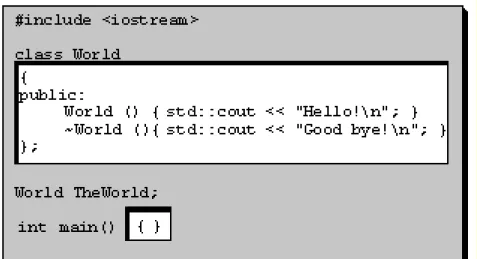
Global means "outside of any curly braces." All this space outside of the curly braces is considered the global scope, Figure 1.
Figure 1 Global scope is everything outside of curly braces.
definition of the type World. It turns out that World is a class-that is a type defined by the programmer. The definition is inside curly braces (and is delimited by a semicolon, did you miss that one?). The keyword public means that we have nothing to hide yet. Later we'll learn about data hiding and we won't be that open any more. First inside the class definition is the constructor.
Constructor is a piece of code that is to be executed every time an object of this particular class is created. It always has the same name as the class itself, but it may take arguments-that's why it has a set of parentheses following it-they're empty, so this particular one doesn't take any arguments. The constructor does something-the curly braces following it are not empty. They contain the statement
std::cout << "Hello!\n";
It means that the object std::cout is sent the string "Hello!\n". This particular predefined object std::cout represents the standard output, presumably the screen of the computer, and it prints whatever is sent to it. (Now we know where this "Hello!" came from.) By the way, '\n' (backslash n) at the end of the string means "newline"-so that the next printout will start on a new line.
Next is the destructor, which always has the same name as the class but is preceded by a tilde. It is the piece of code that is executed every time an object of this class is
destroyed. It never takes any arguments, so the
parentheses following its name are always empty. The destructor of World also does something. It prints "Good Bye!\n".
At the top of the file we have an include statement. It tells the compiler to find the file iostream and include it right there. If your compiler is properly installed, it will find it; if not, reinstall it or read the manual. (Sorry, I have no idea what compiler you are using.) The compiler needs this file to find out what the heck std::cout is and what can be
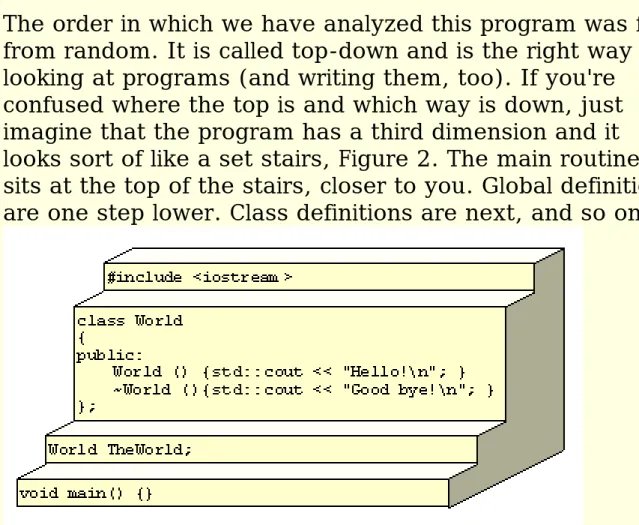
The order in which we have analyzed this program was far from random. It is called top-down and is the right way of looking at programs (and writing them, too). If you're confused where the top is and which way is down, just imagine that the program has a third dimension and it looks sort of like a set stairs, Figure 2. The main routine sits at the top of the stairs, closer to you. Global definitions are one step lower. Class definitions are next, and so on.
Figure 2. Trying to visualize the top-down view of the program. Imagine that the top is closer to you and the bottom is further from you.
The stage is now set, the main player is TheWorld. Its character is defined by the class World-it does something when it is constructed and does something when it is destroyed. The play starts. Here's what happens: 1. All global objects are constructed. In our case the
constructor of TheWorld is executed and prints "Hello!" on the screen.
2. The main routine is executed. In our case it does something very important. It makes C programmers happy.
3. All global objects are destroyed. In our case the
destructor of TheWorld is executed and it prints "Good bye!"
That's it!
Well, not really. If programming were that simple,
difficult there is a whole lot of magical incantations that have to be typed into the computer in order to make the program run. It's these incantations that provide our job security. I can tell you what incantations I had to type into my computer in order to run this program. And I am
already assuming a lot. That I am in the proper directory, that I have the file world1.cpp in it, that the compiler is properly installed, and so on, so forth. I typed
cl world1.cpp
cl is the nickname of my C++ compiler. Yours might have a different nickname, so check with you compiler manual. Once the compilation was finished, I just typed
world1
and voila! By the way, this is the name of the resulting program on my system.
One more hint. If the compiler refuses to compile your program, look at its output. It is supposed to tell you where and what errors it has found. If you understand these error messages, you are probably an experienced programmer already. If you don't, don't despair. Only experienced programmers can understand them.
Your best bet is probably some kind of an integrated
programming environment, with a built-in editor, compiler, debugger and more. You'll be able to build and run your program with a single mouse click. Well, not exactly. You usually have to tell the program that you want to create a new project. The type of the project, in our case, is a
console application (as opposed to a Windows application). Then you have to create a new file, type in the code and save it under the name world1.cpp. Next, and I'm not
and try to correct it. Troubleshooting tips:
● Your compiler can't find the header file, iostream.
You might have an old compiler that doesn't support the new standard library. Try changing iostream to iostream.h and removing the std:: prefixes in front of cout. This is a temporary fix, before you upgrade your compiler.
● Your program prints "Hello!", but doesn't print
"Good bye!" You have a sub-standard library
(unfortunately, even the newest VC++ v. 6.0 has this flaw). In other words, your compiler does not follow the C++ standard. Try to get a refund
(good luck!). Seriously, most examples in this book won't require this feature, so don't worry too much.
At this point you might want to make a small detour into a short Visual C++ tutorial.
In most environments, after you've successfully built your program, you can single-step through it under a debugger. You'll be able to see how each statement is executed and how it changes the state of the program.
To summarize, we have introduced a class and an object. Think of a class as a blueprint for an object. It describes the object's behavior-in our case, what happens when the object is constructed and destroyed. Once you have a blueprint, you can create objects that are based on it.
1 One could think of main as the constructor of the global
source For those of you who have the Microsoft Visual C++™ compiler and development environment, click on the download icon in the left margin and download the source and project files for VC++. That should give you a jump start. Put these files in a separate directory and double click on the World1.dsw file. You'll see a window like the one here. Just click on the Build button (highlighted in the picture) and your program will be built.
To run the program world1.exe created by the compiler, you'll need to open a DOS window, change directory to your project's directory,
change it once more to go into the debug subdirectory and then type world1. Running the program directly from the development
Local scope
Scope of main, passing arguments to constructors, integer type. Private data members, initialization, embedded local scopes, the for loop.
Global scope extends outside of any braces. It is activated (that is, ready to use, all objects constructed) before main is executed, and deactivated (all objects destroyed) after main is exited. Local scopes, on the other hand, are delimited by braces (well, not always, we'll see in a moment that there are cases where braces can be omitted). Local scope is
activated when the flow of the program enters it, and deactivated when it leaves it. Objects in local scope are constructed whenever their
definition is encountered, and destroyed when the scope is exited. Such objects are also called automatic (because they are automatically created and destroyed), or stack objects (because they occupy memory that is allocated on the program's stack).
Our first example of the use of local scope creates a local World called myWorld within the scope of main(). The myWorld object is constructed right after entering main(), then "Hello from main" is printed, and finally the object is destroyed right before exiting the scope of main. The global World is still constructed before main() and destroyed after main(). Another modification to our original program is the use of an integer as an argument to the constructor of World. An integer is of the predefined type int. Its size is compiler dependent. In the constructor, this
argument (called i) is sent to the standard output. Notice how clever the std::cout object is. It accepts strings of characters and prints them as strings and it accepts integers and prints them as decimal numbers. And, as you can see, you can chain arguments to std::cout one after another. Since the constructor expects an argument, we have to provide it when we create the object. Here we just specify it in parentheses after the name of the object being created
World TheWorld (1);
When the constructor of TheWorld is executed it prints "Hello from 1."
Download the whole World series of sources. source #include <iostream>
class World
{
public:
World (int i) {
std::cout << "Hello from " << i << ".\n"; }
std::cout << "Good bye.\n"; }
};
World TheWorld (1);
int main() {
World myWorld (2);
std::cout << "Hello from main!\n"; }
There's still something missing. How do we know which object printed the first "Good bye." and which object printed the second one? Our objects don't remember their identity. In fact they don't remember anything! But before we fix that, let me digress philosophically.
Here we are talking about object oriented programming and I haven't even defined what I mean by an object.
So here we go:
Definition: An object is something that has identity.
If you can think of something that doesn't have an identity, it's not an object. Beauty is not an object. But if you could say "this beauty is
different from the one over there," you would give the two beauties their identities and they would become objects. We sometimes define classes that have non-object names. That just means that we give an old name a new "objectified" meaning. In general, though, it's not such a great idea. If possible one should stick to countable nouns.
I didn't mean to say that our Worlds didn't have identity, because they did. They were just not aware of it. Let's give them memory, so that they'll be able to remember who they are.
#include <iostream>
class World
{
public:
World (int id)
: _identifier (id) {
std::cout << "Hello from " << _identifier << ".\n"; }
~World () {
} private:
const int _identifier; };
World TheWorld (1);
int main () {
World myWorld (2);
for (int i = 3; i < 6; ++i) {
World aWorld (i); }
World oneMoreWorld (6); }
Several new things require explanation. Let's do it top-down. In main, we create our local World, myWorld, with an id of 2 (this time the World will remember it until it is destroyed). Next we have a for loop. The
meaning of it is the following: For integer i starting from 3 as long as it's less than 6, incremented every time the body of the loop is executed (that's the meaning of ++i), do this: Open the scope, define a World called aWorld with an id equal to the current value of i, close the scope. After the loop is done iterating, one more World is defined called
oneMoreWorld. It has the id of 6. The braces delimiting the scope of the for loop may be omitted. This is because here the body of the loop
consists of a single statement. So, in fact, we could have written the loop as in Figure 3 and the program would still execute exactly the same way.
Figure 3 A scope without braces.
What is the scope of the variable i that is defined in the header of the for loop?
for (int i = 3; i < 6; ++i) {
World aWorld (i); }
This is actually a nontrivial question. It used to be that its scope
extended beyond the scope of the loop. That's no longer true. The scope of a variable defined in the head of a loop (or the if statement, when we get to it) is that of the loop itself. Notice that it's not the same as the scope of the body of the loop. Variables defined in the body of the loop are re-initialized on every iteration. The ones defined in the head are initialized once, at loop entry. However, once you exit the loop, neither are accessible.
We still have our global World, TheWorld, with an id of 1.
The class World has a data member _identifier. Its type is int and it's const and private. Why is it private? None of your business. Okay,
okay... It's called data hiding. It means: today it is implemented like this, tomorrow, who knows. Maybe an int, maybe a string, and maybe not at all. If the _identifier weren't private, it would be like with these hidden functions in MS DOS that everybody knew about: Applications started using them and the developers of MS DOS had to keep them forever for compatibility. Not so in our World. The compiler will make sure that nobody, except the World itself, has access to private members. The keyword const means that nobody can change the value of
_identifier during the lifetime of the object. It is physically (or at least "compilatorily") impossible. But even a const has to be initialized some place or another. The compiler provides just one little window when we can (and in fact have to) initialize a const data member. It is in the preamble to the constructor. Not even in the body of the constructor--only in the preamble itself can we initialize a const data member. Preamble is the part of the constructor that starts with a colon and contains a comma-separated list of data members followed by their initializers in parentheses. In our preamble _identifier is initialized with the value of id.
World (int id)
: _identifier (id) {
std::cout << "Hello from " << _identifier << ".\n"; }
World never changes (later we'll learn how to modify non-constant data members). When the destructor of this object is called, it will print the value that was passed to it in the constructor. So when we see "Good bye from 1." we'll know that it's the end of TheWorld (as opposed to the end of aWorld).
Why does _identifier have an underscore in front of it? It's a
convention. In this book the names of all private data members will start with an underscore. Once you get used to it, it actually helps readability. Of course, you can use your own convention instead. In fact everybody may come up with their own conventions, which is exactly what happens all the time.
Speaking of conventions--I will absolutely insist on the brace positioning convention, and for a good reason: In the style of
programming that this book promotes, scopes play a central role. It is of paramount importance for the readability of code to make scopes stand out graphically. Therefore:
The opening brace of any scope should be vertically aligned with the closing brace of that scope.
The screen and printer paper saving convention of yesteryear
for (int i = 3; i < 6; ++i) { // <- BAD!!! World aWorld (i);
}
is declared harmful to program maintainability.
Embedded objects
Embeddings, initialization of embeddings, order of construction/destruction.
We've seen data members of type int--one of the built in types. The beauty of C++ is that it makes virtually no distinction between built in types and the ones defined by the programmer. When a data member of some class is of a user defined type, it is called an embedded object. In the following example Matter is embedded in World (I just gave
matter identity. You know, this matter here is much more stable than the one in the neighboring universe.) Another way to put it is--World contains Matter.
#include <iostream>
class Matter {
public:
Matter (int id)
: _identifier(id) {
std::cout << " Matter for " << _identifier << " created\n"; }
~Matter () {
std::cout << " Matter in " << _identifier << " annihilated\n"; }
private:
const int _identifier; };
class World {
public:
World (int id)
: _identifier (id), _matter (_identifier) // initializing embeddings {
std::cout << "Hello from world " << _identifier << ".\n"; }
~World () {
std::cout << "Good bye from world " << _identifier << ".\n"; }
private:
const int _identifier;
const Matter _matter; // Embedded object of type Matter };
World TheUniverse (1);
int main () {
What's interesting in this example is the preamble to the constructor of World.
World (int id)
: _identifier (id), _matter (_identifier)
It first initializes the _identifier and than _matter. Initializing an object means calling
its constructor. The constructor of Matter requires an integer, and that's what we are
passing there. We made _matter const for the same reason we made _identifier const. It is never changed during the lifetime of the World. It is initialized in the
preamble and never even accessed by anybody. By the way, the double slash // is used
for comments. The compiler ignores everything that follows // until the end of line. And
now for the surprise: The order of initialization has nothing to do with the order in the preamble. In fact, if the constructor of the embedded object doesn't require any
arguments, it can be omitted from the preamble whatsoever. If no explicit initialization is required, the whole preamble may be omitted.
Instead, the rule of initialization is:
Data members are initialized in the order in which they appear in the class definition.
Since _identifier appears before _matter in the definition of World, it will be initialized
first. That's why we could use its value to in the construction of _matter. The order of
embeddings in C++ is as important as the order of statements.
The destruction of embedded objects is guaranteed to proceed in the opposite order of construction. The object that was constructed first will be destroyed last, and so on. In the object-oriented argot, object embedding is called the "has-a" relationship. A World
has a Matter (remember, we have objectified matter).
Figure 4 Graphical representation of the has-a relationship.
To summarize, objects of programmer defined types may be embedded as data members in other classes. The constructors for the embeddings are called before the body of the object's constructor is executed (conceptually you may visualize them as being called in the preamble). If these constructors need arguments, they must be passed in the
Inheritance
Public inheritance, initialization of the base class, order of construction/destruction, type double.
Another important relationship between objects is the "is-a" relationship. When we say that a star is a celestial body, we mean that a star has all the properties of a celestial body, and maybe some others, specific to a star. In C++ this relationship is expressed using inheritance. We can say: class Star inherits from class
CelestialBody, or that CelestialBody is the base class of Star.
Figure 5 Graphical representation the is-a relationships between objects. Here's an example:
#include <iostream>
class CelestialBody
{
public:
CelestialBody (double mass) : _mass (mass)
{
std::cout << "Creating celestial body of mass " << _mass << "\n"; }
~CelestialBody () {
std::cout << "Destroying celestial body of mass " << _mass << "\n";
}
private:
const double _mass; };
class Star: public CelestialBody // Star is a CelestialBody {
public:
Star (double mass, double brightness)
: CelestialBody (mass), _brightness (brightness) {
std::cout << "Creating a star of brightness " << _brightness << "\n";
}
std::cout << "Destroying a star of brightness " << _brightness << "\n";
}
private:
const double _brightness; };
int main () {
std::cout << " Entering main.\n"; Star aStar ( 1234.5, 0.1 );
std::cout << " Exiting main.\n"; }
The line
class Star: public CelestialBody // Star is a CelestialBody
tells the compiler that Star inherits everything from CelestialBody. In particular, since CelestialBody has _mass, Star will have _mass, too.
CelestialBody has a constructor that requires an argument of the type double. Double is a built in type corresponding to double precision floating point numbers. Its single precision counterpart is called a float. Notice that our clever object std::cout has no problem printing doubles.
In the preamble to the constructor of Star we have to pass the argument to the constructor of CelestialBody. Here's how we do it-we invoke the base constructor using the name of its class:
Star (double mass, double brightness)
: CelestialBody (mass), _brightness (brightness)
The order of construction is very important.
First the base class is fully constructed, then the derived class.
The construction of the derived class proceeds in the usual order: first the
embeddings, then the code in the constructor. Again, the order in the preamble is meaningless, and if there are no explicit initializations the whole thing may be
Member functions and Interfaces
Input stream, member functions (methods), return values, interfaces, functions returning void.
So far we have been constructing and destroying objects. What else can we do to an object? We can't access its private data members, because the compiler wouldn't let us (not to mention that I haven't even talked about the syntax one would use to do it). It turns out that only the object itself (as specified in its class definition) can make a decision to expose some of its behavior and/or contents. Behavior is exposed via member functions, also called methods. If a member function is public, anybody can call it (we'll see the syntax in a moment).
Our first member function is called GetValue. It returns an int. From the implementation of this function we can see that the returned value is that of the private data member _num. Now we know what it means to have access to an object; it means to be able to invoke its member functions. Here, the object num of the type InputNum is defined in the scope of main and that's where we can access it. And access we do, calling num.GetValue(). To put it in different words, we invoke the method GetValue() on the object num. Or, we are getting the value of object num. In still other words (Smalltalk-speak) we send the message GetValue to the object num. What we are
getting back is an int, which we print immediately using our old friend std::cout.
Download the Input series of sources source #include <iostream>
class InputNum {
public:
InputNum () {
std::cout << "Enter number "; std::cin >> _num;
}
std::cout << "The value is " << num.GetValue() << "\n"; return 0;
}
A few words of syntax clarification are in order. The type of the return value is always specified in front of the member function definition (or declaration, as will be explained later). A method that is supposed to return something must have a return statement at the end (later we'll see that a return from the middle is possible, too). If a function is not supposed to return anything, its return type is void. In all our previous examples main wasn't returning anything, so it was declared void.
Not this time though. It turns out that main can return an integer. In fact it always returns an integer, even if it is defined as returning void (in that case it returns a more or less random number). By convention, main is supposed to return 0 if the program was
successful. Otherwise it is supposed to return an error level. You can check for the error level after you've run your program from a batch file using the statement similar to this:
if not errorlevel 1 goto end
The keyword const following the declaration of a method, as in
int GetValue () const
means that this method does not change the state of the object. The compiler will not allow such a method to perform assignment, increment, or decrement of any data member, nor will it permit this method to call any non-constant methods of that class.
Moreover, only methods declared const may be called on a const object. So far we've seen a const object _matter inside World. If Matter had a const method, like GetValue, it would have been okay to call it in the context of the object _matter (that is:
_matter.GetValue() would compile all right). We'll see examples of that later.
By the way, _num cannot be declared const any more, since it is not initialized in the preamble. The code in the body of the constructor is changing the (undefined) value of _num. Try compiling this program with a const _num and you'll see what happens.
services of the input object std::cin. Std::cin gets input from the keyboard and stores it in a variable. Depending on the type of the variable, std::cin expects different things from the keyboard. For instance, if you call it with an int, it expects an integer; if you call it with a double, it expects a floating point number, etc.
The set of public methods is called the interface and it defines the way clients may interact with the object. InputNum, for instance, provides read-only access to its contents. Because of that, we are guaranteed that the value of InputNum will never change once it is created. Successive calls to GetValue() will always return the same value.
If it makes sense, it is also possible for an object to grant write access to its contents--for example, in our case, by defining the method
void SetValue (int i) { _num = i; }
Then, after the call
num.SetValue (10);
subsequent calls to GetValue would return 10, no matter what number was input in the constructor of num. By the way, the equal sign in C++ signifies assignment (same as := in Pascal). The statement
_num = i;
sets the value of _num to that of i. Of course the method SetValue
cannot be defined const, because it changes the state of the object (try it!). And if Matter had such a non-constant method, that method couldn't have been called in the context of the constant object _matter inside the World. The compiler would have strongly objected.
To summarize, the set of public member functions defines the
Member function scope
Member function scope, strings as arrays of chars, calling other member functions.
In the next example we will show how the body of a member
function forms its own local scope. We will be able to define objects within that scope, create sub-scopes, and so on.
But first, let's make some simplifications. You are probably tired of typing std:: in front of cin and cout. It is actually enough to tell the compiler once, before you start using them, that you are about to use them. So, once you say the magic words
using std::cout;
you can omit std:: in front of cout. The same goes for cin. There's an even more general way of getting rid of the std:: prefixes, by declaring
using namespace std;
That's because the whole standard library sits in a namespace called std. We'll come back to namespaces later.
So here's a new twist in our input object. #include <iostream>
using std::cout; using std::cin;
class InputNum {
public:
InputNum () {
cout << "Enter number "; cin >> _num;
}
int GetValue () const { return _num; }
{
InputNum aNum; // get a number from user _num = _num + aNum.GetValue ();
} private:
int _num; };
int main() {
InputNum num;
cout << "The value is " << num.GetValue() << "\n"; num.AddInput();
cout << "Now the value is " << num.GetValue() << "\n"; return 0;
}
A new method was added to InputNum. It uses a local object of type InputNum to prompt the user for a number. This number is then retrieved using GetValue() and added to the original value.
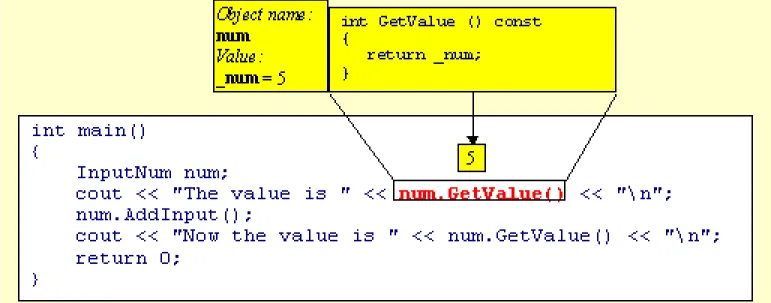
Look at the following series of pictures that visualize the execution of the program.
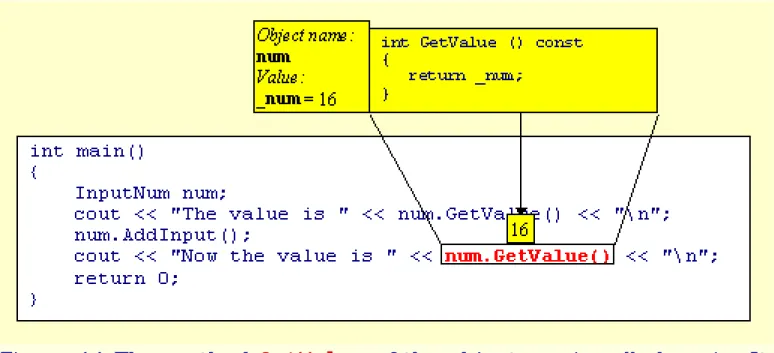
Figure 7 The GetValue method of the object num is called. It
retrieves and returns the value stored in num's private data member _num. This value is 5.
Figure 9 The AddInput method of num creates the object aNum of the class InputNumber. The constructor of aNum prompts the user to input a number. User enters 11 and this value is stored in aNum's private data member _num.
value, equal to 11, is then added to the num's private data member _num. It's value was 5, but after the addition of 11 it changes to 16.
Figure 11 The method GetValue of the object num is called again. It retrieves and returns the value of num's private data member _num, which is now equal to 16.
You might wonder, how it is done that the program executes a method, then returns to the caller and continues exactly where it left off. Where does it keep the information about what it was doing before it made the call? The answer is, it's using the program (or the execution) stack. Calling a procedure means pushing some data on this (invisible) stack. Returning from the procedure means
popping this data from the stack and returning to the previous state.
In particular, a calling sequence might look something like this. First, all the arguments to be passed to the procedure are
pushed on the stack. Then the return address is pushed--that's the address of the next instruction to be executed after the return from the call. Then the execution jumps to the actual code of the procedure. The procedure starts by making room on the stack for its local variables. This way, each procedure
invocation gets a fresh copy of all local variables. The procedure is executed, then it pops its local variables, the
return address and the arguments passed to it, and jumps back to the return address. If there is a return value, it is usually passed in one of the processor's registers.
are both processor- and compiler-dependent.
At this point you might want to make a small detour into a short
debugging tutorial.
In C++ you can do standard arithmetic operations on numbers and variables. Below is a list of basic arithmetic operators.
Arithmetic Binary Operators
+ addition a + b
- subtraction a - b * multiplication a * b
/ division a / b
% division modulo a % b Arithmetic Unary Operators
+ plus +a
- minus -a
Assignment Operator
= assignment a = b
Some of the operators require a word of explanation. For instance, why are there two division operators?
First of all, if you are operating on floating point numbers (for instance, of the type double) you should use the regular division operator /. Even if only one of the two numbers or variables is a decimal fraction, like 3.14, or a double, the result of the division will be a number of the type double. However, if both operands are
integers--literal numbers without a decimal point or variables
defined as int (or other integral types that we'll talk about soon)--applying operator / results in an integer equal to the integral part of the quotient. For instance, 3 / 2 will produce 1, which is the integral part of 1.5. Similarly, 10 / 3 will produce 3, etc.
The % operator, which can only be applied to integral types, yields the reminder from the division. For instance, 3 % 2 (pronounced "3 modulo 2") is equal to 1. Similarly, 11 % 3 yields 2, etc.
It is always true that
However, the results of applying operators / and % when one of the numbers is negative are not well defined (although they still fulfill the equality above). So don't rely on them if you are dealing with numbers of either sign. If you think this sucks, you are right. The arguments for implementing such behavior in C++ are really lame: compatibility with C and efficient implementation in terms of
processor instructions. I rest my case.
The unary plus does nothing. It is there for symmetry with the
unary minus, which inverts the sign of a number. So if a = 2 then -a yields -2 and +a yields 2.
One thing is kind of awkward in the last program. The prompt "Enter number " is always the same. The user has no idea what's going on. Wouldn't it be nice to vary the prompt depending on the context? Ideally we would like to have code like this, in main:
InputNum num( "Enter number " ); num.AddInput( "Another one " ); num.AddInput( "One more " );
Some of the InputNum's methods would have to take strings as arguments. No problem. Here's how it's done:
#include <iostream> using std::cout; using std::cin;
class InputNum {
public:
InputNum (char msg []) {
cout << msg; cin >> _num; }
int GetValue () const { return _num; }
void AddInput (char msg []) {
InputNum aNum (msg);
} private:
int _num; };
const char SumString [] = "The sum is ";
int main() {
InputNum num ("Enter number "); num.AddInput ("Another one "); num.AddInput ("One more ");
cout << SumString << num.GetValue () << "\n"; return 0;
}
Several things are going on here. A new built-in type, char, has been introduced. As the name suggests, this type is used to store characters. Unless you work on some really weird machine, you can safely assume that chars are 8-bit quantities.
We also learn that a string is an array of characters--that's the
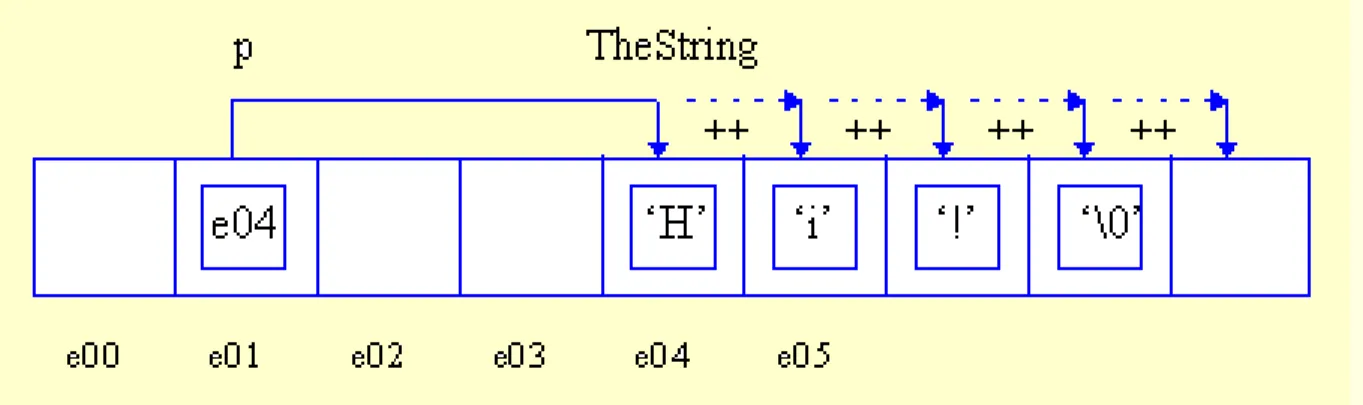
meaning of brackets after the name of the string variable. What we don't see here is the fact that literal strings are zero terminated; that is, after the last explicit character, a null char is added by the compiler. For instance "Hi" is really an array of three characters, 'H', 'i', and 0 (or '\0' for purists). The null character is distinctly different from the character representing the digit zero. The latter is written as '0'. See the difference? Null character: 0 or '\0', zero: '0'. Since we are at it, "\n" is an array of two characters '\n' and '\0'. This terminating null tells various functions operating on
strings, including our friend cout, where the end of the string is. Otherwise it would have no clue.
There is a special string type defined in the standard library. It's extremely useful if you're planning on doing any string manipulations. We'll get to it later.
Another curious thing about this program is the way we call
GetValue() inside AddInput(). We make two calls, one with no object specified, the other targeted at aNum. We know that the second one invokes GetValue on the object aNum. The first one, it turns out, invokes the GetValue() method on the object we are sitting in. The "this" object, as we say in the C++ argot. It simply retrieves its own value of _num. It does it, however, in a way that isolates us from the details of its implementation. Here it may look like an overkill of generality (why don't we just use _num directly?), but many situations it may mean a big win in future maintenance. Some of you are probably asking yourselves the question: how expensive it is. Calling a member function instead of retrieving the value of _num directly. Or even, why not make _num public and
shortcut our way to it everywhere. The syntax for accessing a public data member is:
myNum._num
You won't believe it, but the call is actually free. I'm not kidding, it costs zero additional cycles. Nada, nil, niente, zilch! (Later, I'll explain the meaning of inline functions).
To summarize, the body of a member function forms a separate local scope. This is also true about the body of a constructor and of a destructor. One can define objects within this local scope as well as create sub-scopes inside of it.
Debugging
Wouldn't it be nice to have a tool that would show you, step by step, how your program is executing? Luckily, such tools exist and are called debuggers. There are many implementations of debuggers, but they all offer the same basic
funtionality. There is a debugger built into Microsoft Developer's Studio a.k.a. Visual C++, so I'll use it as an example.
Once you have your program built, you step into it. In VC++ you do it by pressing F11. What happens next is that your program starts executing, but it is stopped immediately after entering main. You have just stepped into main. You can
continue stepping through your program, line by line, by pressing the step over button. When you are positioned at a method call, stepping over will execute the method and position you right after the call. If, on the other hand, you'd like to follow the execution of this method, you should press the step into button. The debugger will jump into the method that's being called and show it to you.
All through the debugging session you'll have additional panes showing the state of the program (if you don't have these panes, go to the View menu and select Debug Windows). One pane shows the values of all the local variables in the current
scope. Another pane shows the call stack, or who called whom, called whom... The top of the call stack shows the place where you are currently stopped.
The great thing about the call stack is that you can double-click on any of the callers and the debugger will show you where in the calling method the call was made. At the same time, the local-variable window will be updated to show the values of local variables of this particular caller.
Look at the screen shot below. I first stepped into main by pressing F11. Then I did
a few step-overs to get to the line in main that calls num.AddInput(). (Incidentally,
when stepping over input statements, you have to go to your application window and actually type in the numbers before you can continue stepping.) Instead of stepping over this call, I chose to step into AddInput. I continued stepping over
until I got to the line that calls aNum.GetValue() at which point I stepped into GetValue(). You can see where I stopped inside GetValue()--there's an arrow
pointing at the appropriate line.
Then I double clicked on InputNum::AddInput() in the call stack in order to see
the values of local variables at the time GetValue() was called. You can see the
second (triangular) arrow pointing at the very point where the call was made. The variable window was updated appropriately, showing the values of aNum and this.
"This" is the current object--the object in whose context the call was made. Notice that, since the variables here are objects of the class InputNum, you can expand
them to see the values of their member variables. In this case, you see the values of _num for both, aNum and this. They are, respectively, 11 and 5. (Your debugger
Types
Built in types, typedefs.
Here is the list of built-in types with a short description of each of them.
● bool-Boolean type. Can take predefined values true and false.
● int -generic signed integral type. Its size is machine dependent, it is considered the most efficient
implementation of an integral type for a given architecture. At least 2 bytes long.
● double - generic signed floating point type.
● char -generic 8-bit character type. Used in ASCII strings. Depending on the compiler, the default signedness of char may be signed or unsigned.
● short and long are a little better defined signed integral types. Usually short is 2-byte long and long is 4-byte long, but on a 64-bit machine it may be 8-bytes long (same as int). If you are writing your program to be run on only one type of processor architectures, you may make assumptions about the sizes of shorts and longs (and chars, of course). Sizes become crucial when you start storing data on removable disks or move them across the network.
Short is often used as a cheap int, space-wise; for example, in large arrays. Long is often used when short or int may overflow. Remember, in two bytes you can store numbers between -32767 and 32767. Your
arithmetic can easily overflow such storage, and the values will wrap around.
● float is a cheaper version of double (again, space-wise), but it offers less precision. It makes sense to use it in large arrays, where size really matters.
● Additional floating point type of even larger size and precision is called long double.
● All integral types may be prefixed by the keyword unsigned or signed (default for all types--except, as