Smart Shopping Cart
Tanvi Patel Vaishali Shah
UG Student UG Student
Department of Electronics & Communication Engineering Department of Electronics & Communication Engineering
SAL Institute of Technology & Engineering Research, Ahmedabad, Gujarat, India
SAL Institute of Technology & Engineering Research, Ahmedabad, Gujarat, India
Barkha Gohil Rusva Soni
UG Student UG Student
Department of Electronics & Communication Engineering Department of Electronics & Communication Engineering
SAL Institute of Technology & Engineering Research, Ahmedabad, Gujarat, India
SAL Institute of Technology & Engineering Research, Ahmedabad, Gujarat, India
Mr. Kunal Thaker Assistant Professor
Department of Electronics & Communication Engineering
SAL Institute of Technology & Engineering Research, Ahmedabad, Gujarat, India
Abstract
Today world is changing very rapidly. There is a race in each object to turn out to be a smart. But smart things come with many challenges Customer gets new experience of this format with smart technology. But as mentioned, the new thing comes with many challenges. The billing process is quite boring and highly time consuming and has created the need for shops to employ increasingly human resource in the billing section, and yet waiting time remains much high. With a problem of waiting in a long queue to check-out the shopping item, new technology must be implemented to provide lowest delay time. Thus, the project team is developing a “SMART SHOPPING CART”, a system that allows faster check-out. A device that consists of an LCD screen, a barcode scanner, load cell, microcontroller, ZigBee, and a portable battery will be implemented on the shopping cart. The user would scan the Universal Product Code (UPC) that contains on the shopping item using the barcode scanner. The barcode information will be stored into a computer’s memory, and checked against database from which it would retrieve the appropriate information. A software package will link up the device with the database and ZigBee device. It will also enable the microcontroller to calculate the total price for all scanned items, and display it on the LCD screen. If the customer is ready to make a payment, he would pass the cart through the cashier. The total price will be sent to the cashier using ZigBee, and the receipt will be automatically printed from the items from the counter. All the customer must do is to pay for the total price without unloading the items from the cart. The team expects that the smart shopping cart will be a more reliable from of check-out process that will decrease the amount of time a customer must wait while shopping.
Keywords: Microcontroller, Load Cell, Barcode Scanner, ZigBee, Power Supply, LCD
________________________________________________________________________________________________________
I. INTRODUCTION
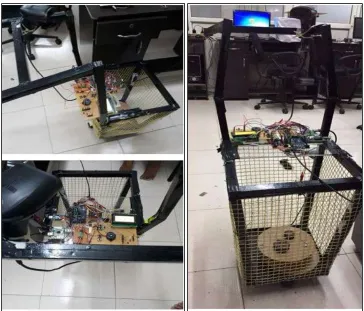
Fig. 1: Smart Shopping Cart II. BLOCK DIAGRAM
Fig. 2: Block Diagram of System Explanation of Block Diagram:
AT mega 2560
The Arduino Mega 2560 is a microcontroller board based on the ATmega2560. It has 54 digital input/output pins (of which 14 can be Used as PWM outputs), 16 analog inputs, 4 UARTs (hardware serial ports), a 16 MHZ crystal oscillator, a USB connection, a power Jack and ICSP header, and a reset button. It contains everything needed to support the microcontroller, simply connect it to a computer With a USB cabel or power it with a AC-to-DC adapter or battery to get started.
Barcode Scanner
the reader with a computer. Because a barcode reader merely capture and translates the barcode into numbers and / or letters, the data must be send to a computer so that a software application can make sense of the data. Barcode scanner can be connected to a computer through a serial port, key board port. A barcode reader works by directing a beam of light cross the barcode and measuring the amount of light that is reflected back. The scanner converts the light energy into the electrical energy, which is then converted into the data by decoder and forwarded to a computer.
Load Cell
A load cell a transducer which converts force into measurable electrical output. Through there are many varieties of load cells, strain gauge based load cell are the most commonly used type. It converts the load acting on them into electrical signals. The gauges themselves are bounded onto a beam or structural member that deforms when weight is applied. In most cases, four strain gauges are used to obtain maximum sensitivity and temperature compensation. Two of the gauges are usually in tension, and two in compression, and are wired with compensation adjustments. When weight is applied, the strain changes the electrical resistance of the gauges in proportion to the load.
ZigBee
ZigBee is expected to provide low cost and low power connectivity for equipment that needs battery life as several years but does not require data transfer rates as high as those enabled by Bluetooth. In addition, ZigBee can be implemented in mesh networks larger 2 than is possible with Bluetooth. ZigBee compliant wireless devices are expected to transmit 10-75 meters, depending on the RF environment and the power output consumption required for a given application, and will operate in the unlicensed RF worldwide. The data rate is 250kbps at 2.4GHz, 40kbps at 915MHz and 20kbps at 868MHz.
Power Supply
A power supply supplies electric energy to an electrical load. The primary function of a power supply is to convert one form of electrical energy to another and, as a result, power supplies are sometimes also referred as the electric power converters. Some power supplies are discrete, stand-alone devices, whereas others are built into larger devices along with their loads.
III. WORKING OF SCHEMATICS
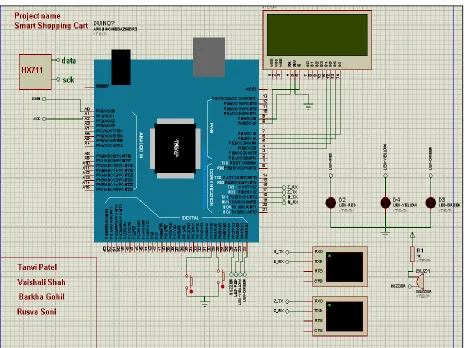
Operation of Schematic
In schematic diagram 12V is given to the Arduino Mega. Pin no. 18(Tx) and 9(Rx) are connected with digital barcode scanner through serial USB host. Pin n. 16(Rx) and 17(Tx) are connected with ZigBee which is used for wireless data transmission. Pin no. 22(Green), 23(Yellow), 24(Red) are connected with LEDs. Pin no 25 is connected with Buzzer. Pin A0 (Data) and A1(Sck) are connected are connected to HX711 which is used to interface between Load cell and Arduino mega. Pin no. 4(D4), 5(D5), 6(D6), 7(D7), 8(E), 9(RS) are connected to LCD.
IV. FLOWCHART OF SYSTEM
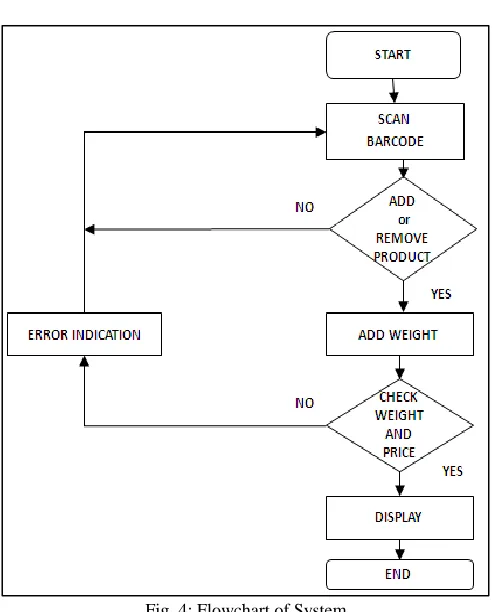
Fig. 4: Flowchart of System How System Work
When customer enters the shopping Mall, first they pick up the cart. Each cart is connected with barcode scanner. The function of the system is given below:
The customer will have to scan the barcode tag of the product through barcode scanner which they want to purchase and put into the cart.
While the customer is scanning the barcode tag of the product, price, name and weight of the product will be display on the LCD which is attached on the cart.
The customer can add and remove the products by using add/remove switch button.
The weight sensor will measure the weight of each product, if there is any mismatch of weigh of barcode and load cell the buzzer will be on continuously. If any customer is putting item into the cart without scanning buzzer will be on till the product is not removed from the cart.
After the done the shopping customer have to press the checkout button so the total billing amount of that cart will be transfer via ZigBee to the main server.
Lastly, the customer can easily check-out from the shopping mall.
V. ADVANTAGES
Users can be aware of the total bill amount during the time of purchase. Wireless communication system to make payments at counter.
Increase efficiency of the checkout process.
Highly reliable. Long-time sustainable. Easy to use and manufacture. Accurate result.
Easy to maintain.
VI. CONCLUSION
Smart shopping cart get rid of queue. And ultimately it reduces the purchase time. This will be leverage the purchaser and shop keeper with the help of automatic billing process purchaser can aware and analyze the total amount of money and go through their budget. All the other side the advantage of shop keeper is need less arrangement of products. And reduce acrimony for their customer
REFERENCES
[1] Automated Shopping Trolley for Super Market Billing System..S. Sainath, K. Surender, V. Vikram Arvind(2013)
[2] Automated Smart Trolley with Smart Billing Using Arduino. Suganya., Swarnavalli., Vismitha. Mrs. G.M. Rajathi(2016)
[3] http://ieeexplore.ieee.org/document/7033996/?reload=true
[4] https://www.youtube.com/watch?v=KdT4miCTbds
[5] https://www.google.co.in/?gfe_rd=cr&ei=z2DnWLX4BIbT8ge24q3QAQ#q=smart+shopping+cart
[6] http://ieeexplore.ieee.org/document/7033996/?reload=true
[7] http://www.sciencedirect.com/science/article/pii/S1877050916002386
[8] https://publications.theseus.fi/bitstream/handle/10024/78617/Elmahboul_Abdelaziz.pdf?sequence=1
[9] http://www.ele.uri.edu/faculty/he/SeniorDWebsite/smartshoppingcart/information/Project_proposal.pdf
[10] https://www.youtube.com/watch?v=2AD_cHx07UU
[11] https://www.youtube.com/watch?v=iLHyTLS8dWo
[12] https://www.youtube.com/watch?v=tsLvqQY8Js0
[13] https://www.google.co.in/#q=20+4+lcd+interface+with+arduino&*
[14] http://circuits4you.com/2016/11/25/hx711-arduino-load-cell
[15] http://www.mantech.co.za/datasheets/products/A000047.pdfhttp://www.lif-u.com/products
[16] http://whatis.techtarget.com/definition/barcode-reader-POS-scanner-bar-code-reader-price-scanner
[17] http://www.omega.com/prodinfo/loadcells.html
[18] https://www.youtube.com/watch?v=nsIVfL3RzWo
[19]
https://www.google.co.in/search?q=DC+operator+buzzer&rlz=1C1GIWA_enIN708IN708&espv=2&source=lnms&sa=X&ved=0ahUKEwjI-Jbw6dXSAhVEsI8KHY10ABIQ_AUIBygA&biw=1242&bih=557&dpr=1.1
[20]
https://www.google.co.in/search?q=DC+operator+buzzer&rlz=1C1GIWA_enIN708IN708&espv=2&source=lnms&sa=X&ved=0ahUKEwjI-Jbw6dXSAhVEsI8KHY10ABIQ_AUIBygA&biw=1242&bih=557&dpr=1.1#q=atmega+2560&*
[21]
https://www.google.co.in/webhp?sourceid=chrome-instant&rlz=1C1GIWA_enIN708IN708&ion=1&espv=2&ie=UTF-8#q=Digital+USB+barcode+reader&*
[22] http://www.atmel.com/Images/Atmel-2549-8-bit-AVR-Microcontroller-ATmega640-1280-1281-2560-2561_datasheet.pdf
[23] https://www.google.co.in/search?q=billing+queue+in+mall&source=lnms&tbm=isch&sa=X&ved=0ahUKEwjMivfrjZLTAhVBo48KHd66Cr4Q_AUIBigB