HGL: A Web-Enabled Geospatial Digital Library
David SiegelHarvard University Library 1280 Mass Ave. Suite 404 Cambridge, MA 02138 [email protected]
Bonnie Burns
Harvard Map Collection Harvard College Library Cambridge, MA 02138 [email protected]
Tim Strawn
Harvard College Library 625 Massachusetts Avenue Cambridge, MA 02139 [email protected]
Abstract
Increasingly, institutions are implementing technology to search and deliver their geospatial data and metadata holdings via the Web. As the quantity of these holdings grows, both private and public institutions are seeking scaleable, robust and non-proprietary solutions. With the widespread adoption of metadata standards taking a strengthening role in the daily practices of GIS professionals we can capitalize on existing technology to search and serve data effectively and refocus our resources on data acquisition. The Harvard Geospatial Library (HGL) provides a web-based interface for search and retrieval of geospatial data and metadata using open standards (MARC, FGDC, and XML) and commercial off-the-shelf (COTS) software (ArcSDE, Oracle, and ArcIMS) in an approach that is different from other emerging solutions.
This paper reviews our methodology in the hope that it can help or be adopted by others.
Introduction
The Harvard Geospatial Library is a catalog and repository of geospatial information run by the Harvard University and Harvard College Libraries. It was originally conceived as a small network of shared GIS files or an SDE database available within the College, which would make data available to students during hours when the library is closed.
It quickly became apparent that there was so much data in the library, and that the layers were so large, that a file based system would be difficult to implement. The Harvard College Library, which is the main source of data for distribution via HGL, supports faculties across Harvard, and therefore does not have a specific topical or geographic focus. Instead, it holds data on a wide variety of themes, from global data sets to detailed city plans. The list of files being shared would have become unmanageable very quickly, and there was no easy way to help users determine the relevance of the data to their work.
The file system solution would have solved one problem, the need to distribute GIS data, but not the problem of finding useful data in the first place. The project clearly needed a catalog component that could handle text and geographic search criteria. Additionally, some data layers are so large that distributing them in a seamless layer was not feasible; for example, downloading a shape file containing the contour lines from the Digital Chart of the World could take hours on a slow network connection. The ability to download part of a layer covering the area of interest, instead of an entire layer, rose to the top of the priority list. The revised goal of HGL became to provide two primary functions: finding data relevant to a user's needs and the ability to download sections of these data.
Many weeks were spent examining the options for meeting these basic requirements. Finding data is comparatively easy; determining relevance is more difficult. Detailed metadata is a must, so HGL adopted the FGDC Content Standard for Digital Geospatial Metadata. One compliant metadata record would be created for each and every layer in the system. Also important to determining relevance is the ability to visually examine a layer as a map, with the capability to zoom in and out, and use some kind of identify tool to provide access into the attribute data of a layer. After further clarifying the goals and examining the commercial off-the-shelf (COTS) options available, the HGL team decide to go with a hybrid approach of some COTS software (ArcSDE, ArcIMS, Oracle) coupled with custom java servlets and java server pages (JSPs).
It is important to note that while many institutions and organizations may not necessarily have the same software components used to run HGL, the methodology used to search for and render geospatial data for use on the web is replicable in many different scenarios. The HGL team applauds the use of open standards for systems such as HGL and adopts (and sometimes adapts to) those standards when possible. However, when pressed to provide a system within our limited resources, commercial, off-the-shelf (COTS) database tools such as Oracle and GIS tools such as ArcIMS and ArcSDE were required. Maintaining the home-grown applications as open solutions is of primary concern to all of us working on HGL.
HGL is a fairly complex system with many different pieces. This paper will discuss the importance of FGDC compliant metadata to the system and how searching is implemented in HGL. Also, it will look at why the decision to use dynamically created map services was made and how data display is handled. Finally, a detailed look into the architecture of HGL is provided.
The Role of Metadata
As HGL developed, it became clear that we were not only creating a repository but a geo-library, if you will, a collection that shared all of the qualities of a library in terms of organization and access to data and metadata and one too that enabled spatial searching. The role that standards-compliant, layer-level metadata plays in the architecture and functionality of the HGL cannot be underestimated. The “traditional” role of metadata as an aid to define, describe and evaluate data would be augmented by the employment of the metadata as a spatial search tool.
In regards to searching for data, the requirements for HGL were that the metadata in a catalog could and should support searches by subject matter, area coverage, theme, author or producer, and additional information through keyword searching. But the role of our metadata is much more robust than simply enabling access and evaluation. In its current form the HGL catalog is capable of supporting numerous applications and varying architectures. In fact, the catalog has a longer life span than any individual on-line GIS to deliver it.
One assumption made during the design process, one that has proven more than fair, was that when users look for geospatial data, a spatial context is needed, but most researchers looking for data would know a place name, or area of concern before they go looking for data. However, users invoking a gazetteer search first need place names to use it. After all, a search on coordinates is almost worthless if it does not elicit robust data. Just knowing the part of the Earth covered by a layer does not automatically make it useful. More analysis is needed to see if it meets that all-important criterion, relevance. Layer and publication level metadata are at least as important in this process as searching on coordinates. The vast majority of HGL searches involve users accessing HGL, zooming to an area and asking for data we have for this defined area. Relatively few (less than 5%) involve gazetteer lookup.
Access and description remain crucial functions and geospatial datasets in HGL may be accessed at the publication level by two methods. Searches conducted via the HGL interface – by keyword/title or spatial searches or both - will elicit both the pertinent layer-level metadata records as well as the publications to which these layers belong (e.g. “Digital Map Database of China”). There are two levels of metadata stored in HGL: publication level, which describes the object held by the library, usually a CD publication, and layer level, which describes each individual GIS layer, usually an SDE layer in the HGL repository. Users may search for geospatial data held in HGL by using Harvard Libraries' online catalog, HOLLIS. All datasets held in HGL have been described and cataloged using MARC encoding in HOLLIS, which allows users to search for geospatial data in a variety of ways. These HOLLIS publication-level records include the MARC 856 field containing the URN link to the dataset in HGL, allowing the user to retrieve all of the metadata records and geospatial data associated with that publication.
Increasingly, the producers of geospatial data are not the only consumers of their data. As the number, complexity, and diversity of geospatial datasets grow, and asindividuals from a wide range of disciplines outside of the geographic sciences and information technologies are becoming interested in geospatial information, the role of metadata as a method for providing access, description and utility grows in importance.
Why Use Dynamic Map Services?
The web is rapidly becoming an effective medium for providing users with access to geospatial data. However, the vast majority of Web sites currently available provide dynamic views on static maps. Users can change how the data is displayed (scale, colors, visibility), and what layers appear but they cannot change which data is included in the map service itself. While we do not debate the utility of such data views (map services) there are in our opinion an equal number of applications that require views into custom combinations of data layers. HGL is such an application, and utilizes dynamic map services for many reasons.
As the number of data sets in a repository increases, so does the number of combinations in which users wish to view these data. The approach of creating one map service to serve all data layers, or creating one service per layer (requiring users to open several map services from HGL at once) is not a scaleable architecture for repositories as large as HGL, which currently contains 4200 individual (vector based) layers. The task of managing and even naming thousands of map services, tracking to make sure that every layer is included somewhere in a map service and making sure all services are running becomes
overwhelming. As the number of layers increases into the hundreds, the application can become unstable. Keeping an application that provides thousands of map services running requires computing and human resources that are better utilized for data delivery and applications development. Technological reasons also make this apparent – data backups and server re-starts are problematic for ArcIMS sites with hundreds
of services, especially those that point to an ArcSDE database. For these reasons, a solution utilizing multiple static map services was not feasible for developing HGL.
In addition to the technology issues involved in using static map services, allowing users to specify their data sets of interest and then spawning a dynamic map service of those data layers creates an entire new level of data discovery and use. Looking at data in new ways, looking at data sets together before downloading, can lead to serendipitous discovery of relationships between layers, and to the exposure of more layers that are relevant. This kind of flexibility in grouping and display means that the data is presented based specifically on users' needs rather than the data publishers'.
Often, pre-defined map services do not serve the needs of a researcher as easily or efficiently as an on-the-fly feature service created with user defined (selected) data layers from a repository. But providing researchers with GIS data in this kind of dynamic environment involves solving many complex problems, including storage of large data sets, data extraction, and data (and metadata) delivery. In addition, there are complex presentation issues, especially the grouping of data sets with different projections, datums, data quality and content. Significant development time on HGL went towards addressing these challenges. HGL was not intended to serve as a desktop GIS tool; however, it does provide some capabilities that are typically seen only on the desktop.
User Interface Tour
As an introduction to the functionality of HGL and the system architecture, we’ll trace a simple query through HGL and present the results as returned from the system. Later, we’ll provide a technical description of the processing steps necessary to handle the requests, process the data and generate both a dynamic map service, and a ZIP file with a complete FGDC metadata record via an ArcIMS extract service.
A user enters the HGL system at the search page (http://hgl.harvard.edu). This page has a map that is used to define an area of interest (AOI) if the user wants to do a spatial search or download clipped data. Usually, the user zooms in using the available map navigation tools until the map encompasses the AOI. In addition, there is a gazetteer of about 7 million records available to help users who have a place name but who don't know where that place is. Gazetteers have an extremely important role in finding geospatial data, but our experience to date has shown that most users come to HGL already familiar with their area of interest. There are also multiple map services in varying levels of detail that can be used as reference for finding the AOI. When a user chooses to run a spatial search, the bounds of the AOI are compared to the bounding box of each layer as stored in ArcSDE. Although this translates to a rectangle and not an actual footprint polygon, it is still efficient for most spatial searches. Depending on which option the user selects, the spatial search can be ignored or it can be limited to layers that either overlap or are completely
contained within the AOI.
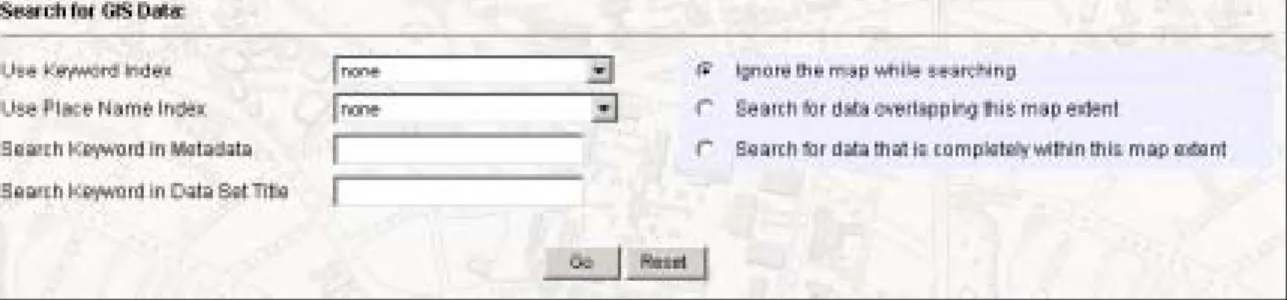
Figure 1: Form entries from HGL web page for metadata and spatial search.
Figure 1 shows the text searching options available from HGL. Users can search either the title of a layer or the body of the metadata record. For the more expansive search, only a preselected set of FGDC tags are searched, including, but not limited to, abstract, purpose, keywords, entity and attribute. If the user chooses to do a spatial search, the spatial envelope of the map is compared to the spatial envelope of each layer, which is stored in the database in decimal degrees.
For example, a user interested in data for Massachusetts would zoom in to the state on the map, and optionally enter “Massachusetts” in the “Search Keyword in Data Set Title” text box and check the “Search for data that is completely within my map extent” option. This search returns the result list shown in figure 2:
Figure 2: Search results as returned from HGL
The result page lists each (ArcSDE) layer that meets the search criteria and shows the publication
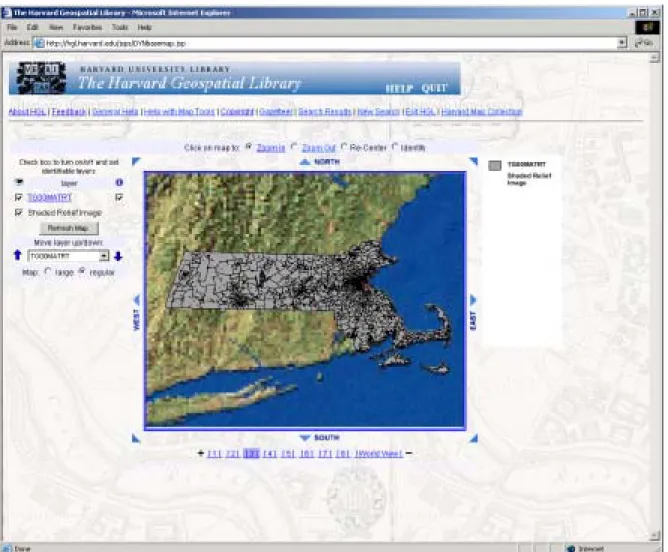
information, layer title, data type (raster or vector), and availability (public, restricted, or off-line). The user could view the metadata of each layer for instance to determine if the data is at a suitable scale. If a layer looks relevant based on the metadata the user could use the "View Geography" link to visually examine a data set as shown in figure 3.
Figure 3: Viewing the geography of a layer in HGL
This functionality provides a quick way to ensure that a data set is complete for an area of interest. An identify button is available in the interface and can be used to access the attribute data. Map zoom and pan tools are also available.
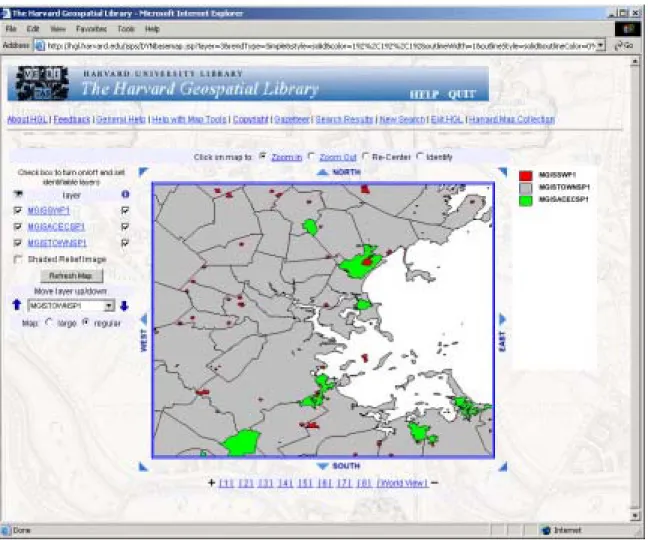
The search results page also includes a "save" button that allows the user to save a layer for either display or download at a later time during their session. If multiple layers are saved, they can be displayed together as shown in figure 4. Users have the ability to change the rendering of vector layers, using a single symbol, unique values of an attribute, or quantitative classifications. In figure 4, "Areas of Critical Environmental Concern" are displayed in green with "Solid Waste Facilities" displayed in red. The result is interesting and can lead users to search for other data that might help explain why these two areas are not mutually exclusive.
Figure 4: Areas of Critical Environmental Concern (green) and Solid Waste Facilities (red) outside Boston, Mass.
Once a list of layers is marked as saved, the user can download the data as a shape file compressed to a ZIP file. Layers are clipped to an area slightly larger than the area of interest; this makes it easier to deal with large seamless layers from sources like the Digital Chart of the World. In addition to the data, an XML file of the complete FGDC metadata is included in the download. Files are maintained for 24 hours, and a URL is provided so users can download their data at a later time.
Although users are not limited in the number of searches they can run per session, for performance and practicality reasons they are limited to saving a maximum of 25 layers at a time. Displaying too many data sets on the same map is not practical just from a visual standpoint. In addition, saving too many layers results in slow performance for most actions, such as display and data extraction. Twenty-five seems a reasonable compromise between convenience and performance.
These are the basic functions available through HGL, which seem to meet the needs of our users well. More sophisticated access for experienced users and for curriculum-based use is under development.
Hardware Architecture
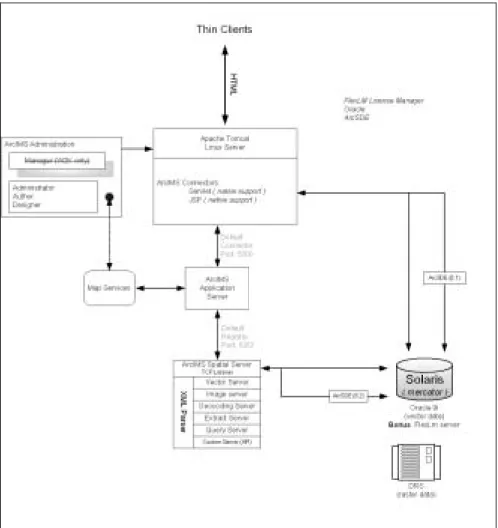
The current HGL architecture consists of a Web Server that is a Windows 2000 machine with four 600-Mhz CPUs, running Netscape iPlanet, chosen because it has its own servlet container. ArcIMS and numerous custom mapping components are also installed here. A Sun E250 is used to house the data repository and runs Oracle 9i and ArcSDE 8.3. A RAID 5 array is connected with approximately a 450-gigabyte capacity. By the time this paper is presented at the 2004 ESRI International User Conference, the architecture will have changed. The SUN E250 will remain, but the Windows servers will be replaced by Linux servers running Apache Tomcat, ArcIMS and custom mapping Java servlets.
Figure 5: Simplified HGL Architecture
Also anticipated in the fall of 2004 is the inclusion of raster data, initially scanned paper maps. The rasters will be stored in the Harvard Digital Repository System (DRS), an in-house storage solution developed as part of a separate initiative by the Harvard University Library. The DRS is designed to provide long term storage of library materials in digital format as well as access to those materials for a variety of campus-wide applications. The majority of the data housed in the DRS is in the form of images. Paper maps from the Harvard Map Collection will be digitized, georeferenced and deposited in the DRS. HGL will read them from the DRS and render them using the recently updated mapping environment.
Program Architecture
From the user perspective, the searching is relatively simple: type in a word and hit the button. On the back end, that search term gets passed around a bit between different components of the system.
The new interface redesign takes advantage of the ArcIMS Java Beans API provided by ESRI. In the previous version, HGL used a mostly homegrown API to support the map interface. This roll-your-own solution communicated with ArcIMS using AXL via our own API, whereas the new interface
communicates directly with the application server via ESRI’s API.
Figure 5 shows a simplified version of the HGL/ArcIMS architecture: Web client applications connect to the web server which is running JSPs and Servlets that talk to the ESRI Java Connector. The Connector talks to the ArcIMS Application Server, which talks to the ArcIMS Spatial Server, which talks to ArcSDE and creates and manages the various map services (image services, features services, the query services and the extract service).
Data searches are formatted into syntactically correct SQL queries using custom Java classes on the server. The SQL query is run against an Oracle database table that contains the FGDC metadata records. These records are stored in XML format as CLOBs and indexed using Oracle's Intermedia tools. If a spatial search is needed, the search is also run against the spatial footprint stored in both the FGDC records and ArcSDE system tables. The only role ArcIMS plays in any query (apart from an identify function) is providing a map extent.
A Java interface handles all data processing outside of the ArcIMS map environment JSPs. As seen in figure 6, HGL uses a controller servlet to broker requests from the user interface. The broker parses the request and passes control to an “action” servlet. Once data processing is complete, control is passed back to the user and displayed via JSP. Java Beans are used to store user preferences, system properties and user data, such as which layers are marked for “save.” These beans are maintained in session scope as opposed to context scope where connection pools reside. HGL stores both “traditional” database connection pools and pools of connections to the ArcIMS administrator that are used for both admin (ADMIN_TCP) and non-admin (TCP) ArcIMS functions.
Action servlets also control functions such as viewing metadata. If a user wishes to see the FGDC metadata record for a particular layer, the XML is retrieved from Oracle and rendered to the user via XSL style sheets. Currently, HGL uses one style sheet; however, at the time of this writing two additional style sheets are in the final stages of completion that will support views of both the complete FGDC record and a ‘slimmed-down’ version for quick reference. Publication level metadata are retrieved from Oracle in a similar manner.
Once data sets are marked as “saved,” the user has the option to either view all these data sets or download them (based on the last map extent used during a search). In either case dynamic map services are used at this point to render or download data. The dynamic services used for display are loaded into the HGL mapping interface, a session-based viewer that combines much of the functionality from the ESRI ArcIMS JSP samples into one application and adds additional functionality such as flexible rendering, data
selection, feature query, multiple layer identify and map extent definition by rubber-banding. These functions are implemented through a combination of JSPs and javascript, which are available for download from the ESRI ArcScripts pages.
Figure 6: Detail of search architecture
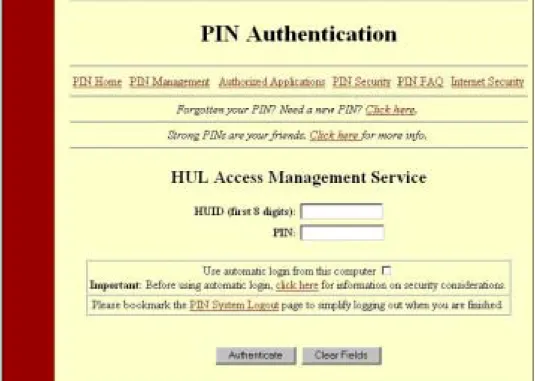
Excluding the four map services available from the main search page of HGL, security is achieved for map service creation and display via the access control list (ACL) functionality in ArcIMS. Users that wish to view or download restricted data sets (for Harvard affiliates only) are authenticated via the University PIN service. A future version of HGL will implement a user name and password scheme for Harvard affiliates that are authenticated via the University PIN service for creating ArcIMS feature services. The new release will provide access to individual map services created on HGL via direct connect from fat clients such as ArcMap. Users will be able to create multiple map services on HGL and have the ability to overlay these services with data from their desktops, or with map services from other sites on the Internet.
Figure 7: User authentication screen
In all cases where dynamic services are used, an XML file outlining all needed parameters (set up, rendering or extract parameters) is written to disk. This XML file uses the ArcXML DTD that is required for ArcIMS to be able to parse the map service instructions. Admin classes in ArcIMS are used to start a new service using the XML file. This was not supported at ArcIMS version 3.1, so a Java wrapper kludge was created. At ArcIMS 4, the functionality is there, but requires significant customization. Finally, once the service is started, the user is redirected to the mapping page that accesses the newly created service. Or, as in the case of extract, the user is redirected to the location where their data will reside for 24 hours before being removed from disk.
At the same time that the file is written to disk, the name and creation date of the map service are written to an Oracle table. With the exception of map services used on the search page and those set up for classroom use, all other map services are maintained for 24 hours, then removed by a custom java servlet.
All vector layers available in the HGL repository are stored in ArcSDE running on Oracle, using the SDE data type. Data is loaded using the SDE command-line tools, usually shp2sde, and tiled data sets, such as the Digital Chart of the World, are appended into a single layer. This appending makes the datasets easier for the users to manipulate, but does lead to some very large SDE layers.
Metadata Search Architecture
As mentioned previously, metadata in HGL conforms to the FGDC Content Standard for Digital Geospatial Metadata. Creating the metadata records is a time consuming task, but is absolutely essential to the success of the system.
The metadata is created using the ESRI Metadata Editor in ArcCatalog pointed at ArcSDE layers, and then written out as XML. This XML file is then loaded into an Oracle table along with other publication information, where it is stored as a CLOB. The CLOBs are indexed using Oracle Intermedia tools, which allow the creation of "section groups," classifications that specify which FGDC tags will be indexed and which will be excluded from searches. This allows for a great deal of flexibility in searching: a search can be run against the entire CLOB, the indexed portions of the CLOB or any of the defined section groups.
HGL searches are run against a subset of the metadata record - for instance the "Metadata Contact" tag is not indexed, nor is the "Abcissa Resolution" tag. Results are displayed grouped by publication, sorted by the Intermedia match score then by layer title. The search parameters come to HGL as POST requests from JSP pages to the controller servlet. Requests for viewing the metadata retrieve an in-memory XML
document that is parsed by the Oracle XML parser, version 2 and formatted using an XSL stylesheet.
The SQL syntax for searching using Intermedia is:
SELECT gis_layer_data FROM hgl_metadata
WHERE CONTAINS( XML_FIELD, ‘National Imagery’ ) > 12 ;
This search would look for the term "National Imagery" within the indexed tags of the metadata record. For searching within a section group the SQL syntax is:
SELECT gis_layer_data FROM hgl_metadata
WHERE CONTAINS( XML_FIELD, ‘National Imagery WITHIN title’ ) > 0;
This search would look for 'National Imagery" only within the title section group, as defined within Oracle.
Interoperability
A key component for growing system use includes a well designed avenue for data interoperability. In the coming months HGL will include at least one WMS map service to support queries allowed under the Open GIS Consortium’s specifications. The Geographic Markup Language (GML) will see extensive use to provide increased functionality in supporting faculty needs for classroom instruction.
HGL is currently used by three different programs at Harvard to map points from their databases onto the HGL base map. These interoperability functions are achieved by using an encoded URL string to pass coordinates and associated attribute information from the database to HGL. Users who enter HGL via an interoperability request can get back the points they have sent as a compressed shape file during any data extract process. The code behind this functionality is implemented using the ESRI MapObjects Java API. While somewhat rudimentary in it’s initial form, it is none the less a powerful tool for users who are not familiar with the necessary steps to create their own shape files from a non-spatially aware database.
Interoperability also comes through gazetteer functionality. There are many systems at Harvard that can benefit by plotting their locations on a map and having data files made for them. For HGL, we created a gazetteer from several sources, holding approximately 7 million place names. Users are allowed to query the database and display a map with a chosen location labeled at the center.
Figure 8: Map made from HGL gazetteer search
In the future, we plan to enhance the gazetteer functionality to service and reconcile data from other systems and applications such as the Visual Information Access site
(http://fiona.hul.harvard.edu:9080/via/deliver/advancedsearch?_collection=via) currently available as a library resource.
The requirements for such integration activities are in the identification phase at the time of this paper while we focus the majority or our efforts in bringing raster data on-line.
Summary
Searching XML documents is not trivial, but certainly not a secret. XPath or XPath-like queries and enabling technologies such as Oracle Intermedia are an efficient tool for data search and retrieval. Whether in a DBMS or not, the ability to search through larger amounts of text, combined with spatial interaction, provides a powerful tool for data discovery.
Despite our use of COTS applications, we don’t assume that proprietary is necessarily better. Limited resources, even at Harvard, dictated that HGL make the most of those resources that were available, which included in-house Oracle and ESRI expertise. Therefore, HGL is built on proprietary architectures (ArcIMS, Oracle), but the approach taken to implement the technology can be migrated to many COTS tools using open source initiatives. Certainly the complexities of developing such an application require adaptation to specific software to produce a useable solution. However, the basic strategies of data search and retrieval within HGL could be effectively cloned/ported to other platforms.
Acknowledgements
The project staff and steering committee of the Harvard Geospatial Library acknowledge with appreciation the generous support of the V. Kann Rasmussen Foundation.