A Conceptual Framework and a Toolkit for Supporting the
Rapid Prototyping of Context-Aware Applications
Anind K. Dey and Gregory D. Abowd
College of Computing & GVU Center
Georgia Institute of Technology
Daniel Salber
IBM T.J. Watson Research Center
http://www.cc.gatech.edu/fce/contexttoolkit
RUNNING HEAD: SUPPORTING RAPID PROTOTYPING OF
CONTEXT-AWARE APPLICATIONS
Corresponding Author’s Contact Information:
Anind K. Dey, College of
Computing & GVU Center, Georgia Institute of Technology, Atlanta, GA
30332-0280, 404-894-5103, [email protected]
Brief Authors’ Biographies: Anind Dey is a computer scientist with an interest in context-aware and ubiquitous computing; he recently received his PhD in computer science and is a Research Scientist in the College of Computing and GVU Center at Georgia Tech.
Daniel Salber is a computer scientist with an interest in software engineering for context aware applications; he is a Research Associate in the Pervasive Computing Applications group at the IBM T.J. Watson Research Center.
Gregory Abowd is a computer scientist with interests in HCI and software engineering
challenges associated with ubiquitous computing; he is an Associate Professor in the College of Computing and GVU Center at Georgia Tech.
ABSTRACT
Computing devices and applications are now used beyond the desktop, in diverse
environments, and this trend toward ubiquitous computing is accelerating. One challenge that remains in this emerging research field is the ability to enhance the behavior of any application by informing it of the context of its use. By context, we refer to any information that
characterizes a situation related to the interaction between humans, applications and the
surrounding environment. Context-aware applications promise richer and easier interaction, but the current state of research in this field is still far removed from that vision. This is due to three main problems: (1) the notion of context is still ill defined; (2) there is a lack of conceptual models and methods to help drive the design of context-aware applications; and (3) no tools are available to jump-start the development of context-aware applications. In this paper, we address these three problems in turn. We first define context, identify categories of contextual
information, and characterize context-aware application behavior. Though the full impact of context-aware computing requires understanding very subtle and high-level notions of context, we are focusing our efforts on the pieces of context that can be inferred automatically from sensors in a physical environment. We then present a conceptual framework that separates the acquisition and representation of context from the delivery and reaction to context by a context-aware application. We have built a toolkit, the Context Toolkit, that instantiates this conceptual framework and supports the rapid development of a rich space of context-aware applications. We illustrate the usefulness of the conceptual framework by describing a number of context-aware applications that have been prototyped using the Context Toolkit. We also demonstrate how such a framework can support the investigation of important research challenges in the area of context-aware computing.
Keywords:
Context-aware computing, ubiquitous computing, context, design, toolkits, applications development
CONTENTS
1. INTRODUCTION
1.1. The Conference Assistant Scenario 1.2. The Difficulties of Handling Context 1.3. Overview of Paper
2. Understanding and Using Context 2.1. Defining Context
Previous Definitions Definition
2.2. Categories of Context 2.3. Context-Aware Functions
3. Requirements and Conceptual Framework for Handling Context 3.1. Requirements for Dealing with Context
Separation of Concerns Context Interpretation
Transparent, Distributed Communications Constant Availability of Context Acquisition Context Storage and History
Resource Discovery 3.2. Context Abstractions
Context widgets Interpreters
Aggregators Services Discoverers
3.3. Using the Conceptual Framework Active Badge Call-Forwarding Mobile Tour Guide
4. The Context Toolkit
4.1. Distributed Communications 4.2. Subscriptions
4.3. Event Handling 4.4. Discovery 4.5. Context Services
4.6. Exploring the Space of Context-Aware Applications
5. In/Out Board and Context-Aware Mailing List: Reuse of a Simple Widget 5.1. In/Out Board
Application Description Building the Application 5.2. Context-Aware Mailing List
Application Description Building the Application 5.3. Toolkit Support
6. DUMMBO: Evolution of Non-Context-Aware Applications 6.1. Application Description
6.2. Building the Application 6.3. Toolkit Support
7. Intercom: Use of Complex Context and Services 7.1. Application Description
7.2. Building the Application 7.3. Toolkit Support
8. Conference Assistant: Use of Complex Context AND systematic design of a context-aware application
8.1. Identifying Context Components 8.2. The Conference Setting
8.3. Using the Conference Assistant 8.4. Applying the Design Methodology
Identifying Entities
Identifying Context Attributes
Identifying Quality of Service Requirements Choosing Sensors
Deriving a Software Design
8.5. From Model to Reality: the Conference Assistant Implementation 9. Applications Summary
10. Related Frameworks
10.1. Context-Aware Frameworks Schilit’s System Architecture Stick-e Notes
CyberDesk CALAIS CoolTown
Situated Computing Service Context Information Service 10.2. Relevant Middleware
Abstractions Agents Tuple Spaces
11. Using the Conceptual Framework as a Research Testbed 11.1. Representation and Acquisition of Context 11.2. Privacy
11.3. Ambiguity in Context Data
11.4. Higher-level Programming Abstractions 12. Conclusions
1. INTRODUCTION
The typical user is not facing a desktop machine in the relatively predictable office
environment anymore. Rather, users have to deal with diverse devices, mobile or fixed, sporting diverse interfaces and used in diverse environments. In appearance, this phenomenon is a step towards the realization of Mark Weiser’s ubiquitous computing paradigm, or “third wave of computing,” where specialized devices outnumber users (Weiser, 1991). However, many
important pieces necessary to achieve the ubiquitous computing vision are not yet in place. Most notably, interaction paradigms with today’s devices fail to account for a major difference with the static desktop interaction model. Devices are now often used in changing environments, yet they do not adapt to those changes very well. Although moving away from the desktop brings up a new variety of situations in which an application may be used, computing devices are left unaware of their surrounding environment. One hypothesis that a number of ubiquitous
computing researchers share is that enabling devices and applications to automatically adapt to changes in their surrounding physical and electronic environments will lead to an enhancement of the user experience.
The information in the physical and electronic environments creates a context for the interaction between humans and computational services. We define context as any information that characterizes a situation related to the interaction between users, applications, and the surrounding environment. A growing research activity within ubiquitous computing deals with the challenges of context-aware computing. Though the notion of context can entail very subtle and high-level interpretations of a situation, much of the effort within the ubiquitous computing community takes a bottom-up approach to context. The focus is mainly on understanding and handling context that can be sensed automatically in a physical environment and treated as implicit input to positively affect the behavior of an application.
Apart from the demonstration of a variety of prototype context-aware applications, the majority of which are location-based services, there has been relatively little advancement in context-aware computing over the past five years. There are technology- and human-centered challenges that stem from a poor understanding of what constitutes context and how it should be represented. We lack conceptual models and tools to support the rapid development of rich context-aware applications that might better inform the empirical investigation of interaction design and the social implications of context-aware computing. The work presented here attempts to enable a new phase of context-aware applications development. We want to help applications developers understand what context is, what it can be used for, and to provide concepts and practical support for the software design and construction of context-aware applications. To give the reader an idea of the richness of context-aware computing we are initially aiming for, we present a scenario of an automated service meant to support attendees at an academic conference.
1.1. The Conference Assistant Scenario
Ashley is attending a technical conference. The conference features a large number of presentations and demos spread over multiple tracks. Ashley is
to try to attend different presentations and to share what they have learned at the end of the day. When Ashley picks up her conference package on the first day, she provides her contact information and the topics she’s most interested in. She also mentions that her colleagues Bob and John are attending. Along with the conference proceedings, she receives a personal conference assistant, a handheld device designed to guide and assist her throughout the conference.
Ashley has a hard time deciding what to attend for the first session. The sessions start in five minutes. She turns to the conference assistant. Based on her interests, it recommends a presentation and a demo and gives her directions to get to the presentation and demo rooms. Ashley chooses the presentation and heads to the room. When she enters the presentation room, the conference assistant displays information about the session that is about to begin, including information on the presenter, relevant URLs and the proceedings’ page numbers of the papers being presented. It also shows a thumbnail of the current slide and offers note-taking capabilities.
During the presentation, Ashley uses the conference assistant note-taking feature to jot down some comments. The conference assistant indicates that both audio and video, as well as the slides’ content are recorded for this session. She marks the diagrams that interest her for later retrieval. At the end of the presentation, she asks a question to the speaker. Her question relates to a particular detail of a diagram on one of the speaker’s slides. Using the conference assistant, she is able to bring up the relevant slide on the room’s screen to make her question clearer to the speaker and the audience. The last talk of the session is cancelled because the speaker missed his flight. Ashley wonders what to do and looks up the conference assistant to find out what Bob and John are up to. The conference assistant shows her that they are both attending different sessions. The conference assistant reports that Bob has indicated that his session is moderately interesting. John however, seems to be enjoying his session a lot. Ashley decides to join John’s session.
Back at work after the conference, Ashley connects to the conference web site to refresh her memory and write up her trip report. She logs in at the conference web site. It shows her the talks she attended and allows her to browse the notes she took. She can also watch and listen to the recorded sessions she has missed. Her trip report contains a complete coverage of the sessions of the conference that are relevant to her team and it is written in a snap!
We have implemented a scaled-down version of the conference assistant application intended to support visitor visits during our lab’s demo days. Our application supports many features described in this scenario. In Section 8 of this paper, we will revisit the conference assistant and describe in detail our design and architecture. But first, we will explain why this type of
applications is difficult to build today, and we will introduce a number of concepts that make context-aware computing easier to comprehend for application designers and developers.
1.2. The Difficulties of Handling Context
The Conference Assistant scenario outlines a variety of possible uses of context information to enhance interaction with devices in dynamic settings. Prior to our work, there has not been a context-aware application that approaches this complexity, in terms of the variety of context used and the ways in which it is used. Difficulties arise in the design, development and evolution of aware applications. Designers lack conceptual tools and methods to account for context-awareness. As a result, the choice of context information used in applications is very often driven by the context acquisition mechanisms available — hardware and software sensors. This
approach entails a number of risks. First, the initial choice of sensors may not be the most appropriate. The details and shortcomings of the sensors may be carried up to the application level and hinder the flexibility of the interaction and further evolution of the application. More importantly, a sensor-driven approach constrains the possibilities of designers by limiting the kind of applications they are able to design and the context uses they can imagine.
Developers face another set of problems related to distribution, modifiability and reusability. Context-aware applications are often distributed because they acquire or provide context
information in a number of different places. For example, in the Conference Assistant scenario, each room and venue of the conference must be able to sense the presence and identity of users. Although mechanisms for distribution are now mainstream on desktops and servers, they are not always appropriate for distributed networks of sensors. Indeed, context-awareness is most relevant when the environment is highly dynamic, such as when the user is mobile. Thus, context-aware applications may be implemented on very diverse kinds of computing platforms, ranging from handheld devices to wearable computers to custom-built embedded systems. As a result, context-aware applications require lightweight, portable and interoperable mechanisms across a wide range of platforms.
As with graphical user interfaces, and more crucially so given the overall lack of experience with context-aware applications, iterative development is key to creating usable context-aware applications. Thus, applications must be implemented in a way that makes it easy to modify context-related functions. There are currently few guidelines, models or tools that support this requirement. Finally, application developers should be able to reuse satisfactory context-aware solutions. But no methods or tools make this task easy either.
1.3. Overview of Paper
This paper has three main goals: (1) to provide an operational understanding of context from which we can derive concepts useful for context-aware applications development; (2) to
introduce a conceptual framework to assist in the design of context-aware applications; and (3) to present a toolkit that can facilitate context-aware computing research by allowing the empirical investigation of the design space and the exploration of difficult challenges in the handling of implicitly sensed context. In Section 2, we present an overview of the current understanding and uses of context in the context-awareness literature. We propose practical basic context types and context uses that help clarify the design space for context-aware computing. In Section 3, we present requirements for a framework that supports the acquisition, representation, delivery and reaction to context information that can be automatically sensed and used as implicit input to
affect application behavior. In Section 4 we discuss relevant details on the Context Toolkit, an instantiation of the conceptual framework (Dey, 2000).1 In Sections 5 through 9 we explore some of the design space of context-aware applications with a description of various applications we have developed using the Context Toolkit. The final example is a detailed discussion of the design and implementation of a prototype of the Conference Assistant. In Section 10, we discuss some related work in conceptual frameworks and architectures to support context-aware
computing and compare that work to what has been presented in this paper. In Section 11, we demonstrate how some existing challenges in context-aware computing — better representations of context, handling higher-level notions of context, support for privacy concerns, support for imperfect or ambiguous sensed context, and higher level programming abstractions — can all be explored as result of the conceptual framework and Context Toolkit.
2. UNDERSTANDING AND USING CONTEXT
In this section, we will use a survey of context-aware computing performed by two of the authors to provide a better understanding of what context is and how it can be used (Dey & Abowd, 2000a). We will first look at previous definitions of context in the ubiquitous computing literature. We build on these definitions to provide a general definition of context that we then refine by looking at entities that provide context information. We next define context-awareness and identify three key categories of context-aware functions.
2.1. Defining Context
We would like to provide an operational definition of context that helps determine what is context. This will enable us to establish what the common characteristics of context are, that can be supported by abstractions and tools. According to Webster’s Dictionary, context is the “whole situation, background or environment relevant to some happening or personality.” This definition is too general to be useful in context-aware computing. Definitions of context by previous
authors fall in two categories: enumerations of examples of context information and categorizations.
Previous Definitions
In the work that first defined the term "context-aware", Schilit and Theimer refer to context as location, identities of nearby people and objects and changes to those objects (1994). In a similar definition, Brown, Bovey, & Chen define context as location, identities of the people around the user, the time of day, season, temperature, etc. (1997). Ryan, Pascoe, & Morse define context as the user’s location, environment, identity, and time (1997). Dey enumerates context as the user’s emotional state, focus of attention, location and orientation, date and time, objects and people in the user’s environment (1998). These definitions that define context by example are difficult to apply. When considering a potential new type of context information, it is not clear how the definition can help us decide whether to classify the information as context or not. For
1 Further details on the Context Toolkit, including downloadable versions and a tutorial can be found at
example, none of the previous definitions helps decide whether a user's preferences or interests are context information.
Other definitions have provided synonyms for context, referring to context as the environment or situation. Some consider context to be the user’s environment, while others consider it to be the application’s environment. For example, Brown defines context to be the elements of the user’s environment that the computer knows about (1996). Franklin & Flaschbart see it as the situation of the user (1998). Ward, Jones, & Hopper view context as the state of the application’s surroundings (1997), and Rodden et al. define it to be the application’s setting (1998). Hull, Neaves, & Bedford-Roberts include the entire environment by defining context to be aspects of the current situation (1997). These definitions are clearly more general than enumerations, but this generality is also a limitation. These latter definitions provide little guidance to analyze the constituent elements of context, much less identify them.
The definitions by Schilit, Adams, & Want (1994), Dey, Abowd, & Wood (1998), and Pascoe (1998) are closest in spirit to the operational definition we seek. Schilit, Adams & Want claim that the important aspects of context are: where the user is, who the user is with, and what resources are nearby. They define context to be the constantly changing execution environment. The environment is threefold:
• Computing environment: available processors, devices accessible for user input and display, network capacity, connectivity, and costs of computing
• User environment: location, collection of nearby people, and social situation
• Physical environment: lighting and noise level
Dey, Abowd, & Wood define context as the user's physical, social, emotional or informational state. Finally, Pascoe defines context to be the subset of physical and conceptual states of interest to a particular entity.
Definition
Based on these prior attempts to define context, we will proceed with the following definition, taken from our previous work (Dey & Abowd, 2000a):
Context: any information that can be used to characterize the situation of entities (i.e. whether a person, place or object) that are considered relevant to the interaction between a user and an application, including the user and the application themselves. Context is typically the location, identity and state of people, groups and computational and physical objects.
This definition encompasses the definitions given by previous authors. As stated earlier, a goal of context acquisition is to determine what a user is trying to accomplish. Because the user’s objective is difficult to determine directly, context cues can be used to help infer this information and to inform an application on how to best support the user. The definition we have provided is quite general. This is because context-awareness represents a generalized model of input, including both implicit and explicit input, allowing almost any application to be
considered more or less context-aware insofar as it reacts to input. In this paper, we will
conceptual framework we will present can be used for both explicit and implicit input, but focuses on supporting the ease of incorporating implicit input into applications.
Our definition does not differentiate between manually acquired information and
automatically acquired information. There is a great division among context-aware researchers as to whether context should only include automatically acquired information, or both manually and automatically acquired information. We have opted for a more inclusive definition. In an ideal setting, context would be obtained automatically and there would be no need for manual acquisition. However, in the real world, most context cannot be sensed automatically and applications must rely on the user to manually provide it. If information is relevant to an
interaction, then how that information is acquired should not impact whether it is seen as context or not. The main goal for providing this definition of context is to offer guidance in identifying broad categories of context.
2.2. Categories of Context
Looking at the scenario of Section 1.1, the Conference Assistant needs to acquire various kinds of information about the environment in order to perform correctly: the location of the user; the topics that might interest the user; the contents of the presentation; whether audio or video are recorded for the session; and the location of other users. Given the diversity of context information, it is useful to attempt to categorize it to make it easier to comprehend in a
systematic manner. We, therefore, introduce a simple classification of context information based on the entities whose context is assessed and categories of context information.
The entities we identified as most relevant are places, people and things. Places are regions of geographical space such as rooms, offices, buildings, or streets. People can be either
individuals or groups, co-located or distributed. Things are either physical objects or software components and artifacts, for instance an application or a file.
We introduce four essential categories, or characteristics, of context information —identity, location, status (or activity) and time. Identity refers to the ability to assign a unique identifier to an entity. The identifier has to be unique in the namespace that is used by the applications.
Location is more than just position information in 2-D space. It is expanded to include orientation and elevation, as well as all information that can be used to deduce spatial
relationships between entities, such as co-location, proximity, or containment. For example, the information that an object is upside down is location information. Location also applies to places. Places can be located in a frame of reference such as geographical coordinates or relative spatial relationships, and thus have a location. Status (or activity) identifies intrinsic characteristics of the entity that can be sensed. For a place, it can be the current temperature, or the ambient light or noise level. For a person, it can refer to physiological factors such as vital signs or tiredness, or the activity the person is involved in, such as reading or talking. Similarly for a group of people, status is a characteristic of the group such as their enthusiasm or global mood, or a description of their activity, such as attending a lecture, or having a meeting. For software components, status basically refers to any attribute of the software component that can be
queried. Typical examples are the uptime or load of a CPU, the existence or state of files in a file system, or the state of a software component such as an application. Finally, time is context
information as it helps characterize a situation. It enables us to leverage off the richness and value of historical information. It is most often used in conjunction with other pieces of context, either as a timestamp or as a time span, indicating an instant or period during which some other contextual information is known or relevant. However, in some cases, just knowing the relative ordering of events or causality is sufficient.
The reason for our choice of these basic context categories is that the information they provide can be used to infer additional pieces of context and lead to a more extensive assessment of a situation. Simple inference, or derivation, of context information happens when related context information is deduced from a single known piece of context information. For example, the phone number or the address of a person can be derived from her identity. More complex inference of context information refers to the process of considering several pieces of context information that describe a situation, and using them to infer a new piece of context information. For example, by knowing that a room is occupied, the number of people in the room, their relative positions in the room, and if they are talking or not, one can determine if a meeting is taking place.
The context categories we have identified, as well as inferred context information, can be used in a number of ways by context-aware applications. To further clarify context and its uses, we now turn to functions that make an application context-aware.
2.3. Context-Aware Functions
Having presented a definition of context and identified key context types, we must now examine how applications can effectively use context information. In our survey on context-aware computing, we proposed a classification of context-context-aware functions that a context-context-aware application may implement (Dey & Abowd, 2000a). This classification introduces three
categories of functions, related to the presentation of information, the execution of services, and the storage of context information attached to other captured information for later retrieval.
The first category, presenting information and services, refers to applications that either present context information to the user, or use context to propose appropriate selections of actions to the user. There are several examples of this class of functions in the literature and in commercially available systems: showing the user’s or her vehicle's location on a map and possibly indicating nearby sites of interest (Abowd et al., 1997, Bederson, 1995, Davies et al., 1998, Feiner et al., 1997, Fels et al., 1998, McCarthy & Meidel, 1999, McCarthy & Anagost, 2000); presenting a choice of printers close to the user (Schilit, Adams & Want, 1994); sensing and presenting in/out information for a group of users (Salber, Dey & Abowd, 1999); ambient information displays (Heiner, Hudson & Tanaka, 1999, Ishii & Ullmer, 1997, Mynatt et al., 1998, Weiser & Brown, 1997); and providing remote-awareness of others (Schmidt, Takaluoma & Mäntyjärvi, 2000).
The second category, automatically executing a service, describes applications that trigger a command, or reconfigure the system on behalf of the user according to context changes.
Examples include: the Teleport system in which a user’s desktop environment follows her as she moves from workstation to workstation (Want et al., 1992); car navigation systems that
recompute driving directions when the user misses a turn (Hertz, 1999); a recording whiteboard that senses when an informal and unscheduled encounter of individuals occurs and automatically starts recording the ensuing meeting (Brotherton, Abowd & Truong, 1999); mobile devices enhanced with sensors that determine their context of use to change their settings and actions (Harrison et al., 1998, Hinckley et al., 2000, Schmidt et al., 1999); a camera that captures an image when the user is startled as sensed by biometric sensors(Healey & Picard, 1998); and devices that deliver reminders when users are at a specified location (Beigl, 2000, Marmasse & Schmandt, 2000).
In the third category, attaching context information for later retrieval, applications tag captured data with relevant context information. For example, a zoology application tags notes taken by the user with the location and the time of the observation (Pascoe, Ryan & Morse, 1998). The informal meeting capture system mentioned above provides an interface to access informal meeting notes based on who was there, when the meeting occurred and where the meeting was located. In a similar vein are Time-Machine Computing (Rekimoto, 1999) and Placeless Documents (Dourish et al., 2000), two systems that attach context to desktop or networked files to enable easier retrieval. Some of the more complex examples in this category are memory augmentation applications such as Forget-Me-Not (Lamming & Flynn, 1994) and the Remembrance Agent (Rhodes, 1997).
In this section, we have established a definition of context, and we have further elicited the dimensions of context information, as well as its possible uses in context-aware applications. We now turn to the software design of context-aware applications.
3. REQUIREMENTS AND CONCEPTUAL FRAMEWORK FOR
HANDLING CONTEXT
The software design of context-aware applications raises new challenges. Handling context is difficult for at least three reasons: (1) there are no guiding principles to support good software engineering practices; (2) designers lack abstractions to think about context; and (3) context sensing is very often distributed and leads to complex distributed designs. In this section, we use separation of concerns between context acquisition and the use of context in applications as a guiding principle. We derive abstractions that help acquire, collect and manage context in an application-independent fashion and identify corresponding software components. These components, along with a simple distributed platform, form the basis of our Context Toolkit, described in Section 4.
When looking at a new technological advance and when trying to make it easily accessible to software designers, a common stepping-stone is to apply tried and true software engineering principles to the particular case of the new technology at hand. With the advent of graphical user interfaces (GUI), the separation of concerns between the actual application (often at first a legacy text-based application) and the new world of windows, icons, menus and pointers quickly
became paramount. This requirement led to software architecture models, design processes, and development tools to more effectively support the design and development of GUIs. Other principles, such as reusability or modifiability stemmed from the particular nature of GUI design
and development, where original solutions are costly to develop and iterative design is key to usability.
With context-aware applications, we are faced with a similar problem. Context-awareness opens new possibilities that can drive the development of new applications but can also be beneficial to legacy applications. Where GUI-based applications focus on explicit input, context-aware applications try to take a more general notion of input, focusing on implicit input but dealing with explicit input as well. Context-aware applications need to take advantage of the sensors and sensing techniques available. Thus, as with GUIs, our major preoccupation is to achieve a separation between the application per se and context acquisition and processing.
Inspired by concepts commonly found in GUI toolkits, we have defined some abstractions that help infer higher-level information from context, and support separation of concerns. We have also identified requirements for dealing with context that are extensions of traditional GUI capabilities. In this section, we introduce these requirements, the context abstractions we have defined, and describe how to derive the abstractions from the application’s specifications. The abstractions form a conceptual framework that can be used to design context-aware applications.
3.1. Requirements for Dealing with Context
With the perspective of an application designer in mind, we want to provide a conceptual framework that automatically supports all the tasks that are common across applications,
requiring the designer to only provide support for the application-specific tasks. To this end, we have identified a number of requirements that the framework must fulfill to enable designers to more easily deal with context. These requirements are:
• Separation of concerns;
• Context interpretation;
• Transparent, distributed communications;
• Constant availability of context acquisition;
• Context storage; and,
• Resource discovery.
We will now discuss each of these requirements.
Separation of Concerns
One of the main reasons why context is not used more often in applications is that there is no common way to acquire and handle context. In general, context is handled in an improvised fashion. Application developers choose whichever technique is easiest to implement, at the expense of generality and reuse. We will now look at two common ways in which context has been handled: connecting sensor drivers directly into applications and using servers to hide sensor details.
With some applications (Harrison et al., 1998, Rekimoto, 1996), the drivers for sensors used to detect context are directly hardwired into the applications themselves. In this situation,
protocol the sensors dictate. There are two problems with this technique. The first problem is that it makes the task of building a context-aware application very burdensome by requiring
application builders to deal with the potentially complex acquisition of context. The second problem with this technique is that it does not support good software engineering practices. The technique does not enforce separation between application semantics and the low-level details of context acquisition from individual sensors. This leads to a loss of generality, making the sensors difficult to reuse in other applications and difficult to use simultaneously in multiple
applications.
Ideally, we would like to handle context in the same manner as we handle user input. User interface toolkits support application designers in handling input. They provide an important abstraction to enable designers to use input without worrying about how the input was collected. This abstraction is called a widget, or an interactor. The widget abstraction provides many benefits and has been used not only in standard keyboard and mouse interaction, but also with pen and speech input (Arons, 1991), and with the unconventional input devices used in virtual reality(MacIntyre & Feiner, 1996). It facilitates the separation of application semantics from low-level input handling details. For example, an application does not have to be modified if a pen is used for pointing rather than a mouse. It supports reuse by allowing multiple applications to create their own instances of a widget. It contains not only a querying mechanism but also possesses a notification, or callback, mechanism to allow applications to obtain input
information as it occurs. Finally, in a given toolkit, all the widgets have a common external interface. This means that an application can treat all widgets in a similar fashion, not having to deal with differences between individual widgets.
There are systems that support event management (Bauer et al., 1998, Schilit, 1995), either through the use of querying mechanisms, notification mechanisms, or both to acquire context from sensors. However, this previous work has suffered from the design of specialized servers, which do not share a common interface (Bauer et al., 1998). This forces an application to deal with each server in a distinct manner, rather than being able to deal with all servers the same way. On the server implementation side, with no common support, it is more difficult to produce servers, resulting in a minimal range of server types being used (e.g. focusing on location
(Schilit, 1995)). It is not a requirement that both querying and notification mechanisms be supported because one can be used to implement the other. For reasons of flexibility, it is to an application’s advantage that both be available (Rodden et al., 1998). Querying a sensor for context is appropriate for one-time context needs. But the sole use of querying requires that applications be proactive (by polling) when requesting context information from sensors. Once it receives the context, the application must then determine whether the context has changed and whether those changes are interesting or useful to it. The notification or publish/subscribe mechanism is appropriate for repetitive context needs, where an application may want to set conditions on when it wants to be notified.
By separating how context is acquired from how it is used, applications can now use
contextual information without worrying about the details of a sensor and how to acquire context from it. These details are not completely hidden and can be obtained if needed.
Context Interpretation
There is a need to extend the notification and querying mechanisms to allow applications to retrieve context from distributed computers. There may be multiple layers that context data go through before reaching an application, due to the need for additional abstraction. This can be as simple as needing to abstract a smart card id into its owner’s name, but can also be much more complex. For example, an application wants to be notified when meetings occur. At the lowest level, location information can be interpreted to determine where various users are and identity information can be used to check co-location. At the next level, this information could be combined with sound level information and scheduling information to determine if a meeting is taking place. From an application designer’s perspective, the use of these multiple layers should be transparent. In order to support this transparency, context must often be interpreted before it can be used by an application. An application may not be interested in the low-level information, and may only want to know when a meeting starts. In order for the interpretation to be easily reusable by multiple applications, it needs to be provided by the architecture. Otherwise, each application would have to re-implement the necessary implementation. There are a number of systems that provide mechanisms to perform transparent recursive interpretation (Dey, Abowd & Wood, 1998, Kiciman & Fox, 2000).
Transparent, Distributed Communications
Traditional user input comes from the keyboard and mouse. These devices are connected directly to the computer with which they are being used. When dealing with context, the devices used to sense context most likely are not attached to the same computer running an application that will react to that context. For example, an indoor infrared positioning system may consist of many infrared emitters and detectors in a building. The sensors might be physically distributed and cannot all be directly connected to a single machine. In addition, multiple applications may require use of that location information and these applications may run on multiple computing devices. As environments and computers are becoming more instrumented, more context can be sensed, but this context will be coming from multiple, distributed machines connected via a computer network. The fact that communication is distributed should be transparent to both sensors and applications. This simplifies the design and building of both sensors and
applications, relieving the designer of having to build a communications framework. Without it, the designer would have to design and implement a communications protocol and design and implement an encoding scheme (and accompanying decoder) for passing context information.
A related requirement is the need for a global timeclock mechanism. Typically, when dealing with a distributed computing environment, each of the distributed computers maintain their own clock and are not synchronized with each other. From our earlier discussion of context (2.1), we see that time is a very important type of context. In order to accurately compare and combine context arriving from distributed computers, these computers must share the same notion of time and be synchronized to the greatest extent possible.
Constant Availability of Context Acquisition
With GUI applications, user interface components such as buttons and menus are instantiated, controlled and used by only a single application (with the exception of some
groupware applications). In contrast, context-aware applications should not instantiate individual components that provide sensor data, but must be able to access existing ones, when they require it. Furthermore, multiple applications may need to access the same piece of context. This leads to a requirement that the components that acquire context must be executing independently from the applications that use them. This eases the programming burden on the application designer by not requiring her to instantiate, maintain or keep track of components that acquire context, while allowing her to easily communicate with them.
Because these components run independently of applications, there is a need for them to be persistent, available all the time. It is not known a priori when applications will require certain context information; consequently, the components must be running perpetually to allow applications to contact them when needed. Context is information that should always be available. Take the call-forwarding example from the Active Badge research ((Want et al., 1992). When a phone call was received, an application tried to forward the call to the phone nearest the intended recipient. The application could not locate the user if the Badge server was not active. If the Badge server were instantiated and controlled by a single application, other applications could not use the context it provides.
Context Storage and History
A requirement linked to the need for constant availability is the desire to maintain historical information. User input widgets maintain little, if any, historical information. For example, a file selection dialog box keeps track of only the most recent files that have been selected and allows a user to select those easily. In general though, if a more complete history is required, it is left up to the application to maintain it. In contrast, a component that acquires context information, should maintain a history of all the context it obtains. Context history can be used to establish trends and predict future context values. Without context storage, this type of analysis could not be performed. A component may collect context when no applications are interested in that particular context information. Therefore, there may be no applications available to store that context. However, there may be an application in the future that requires the history of that context. For example, an application may need the location history for a user, in order to predict his future location. For these reasons, the architecture must support the storage of context. Ideally, the architecture would support storage at the finest level of detail possible in order to meet any application’s requests for historical information.
Resource Discovery
In order for an application to communicate with a sensor (or rather its software interface), it must know what kind of information the sensor can provide, where it is located and how to communicate with it (protocol, language and mechanisms to use). For distributed sensors, this means knowing, at a minimum, both the hostname and port of the computer the sensor is running on. To be able to effectively hide these details from the application, the architecture needs to
support a form of resource discovery (Schwartz et al., 1992). With a resource discovery mechanism, when an application is started, it could specify the type of context information required. The mechanism would be responsible for finding any applicable components and for providing the application with ways to access them. For example, in the case of a simple In/Out Board application, rather than hardcoding the location of the sensing technology being used, the developer can indicate that the application is to be notified whenever any user of the In/Out Board enters or leaves the building. This information can then be provided by any source of location context.
3.2. Context Abstractions
We will now describe a conceptual framework that meets the requirements presented in the previous section. Roughly speaking, we will present a framework that matches the physical world of sensors and supports the ability to transform and collect contextual information. After discussing the framework, we will demonstrate how it can be used to build context-aware applications.
A context widget is a software component that provides applications with access to context information from their operating environment. In the same way that GUI widgets mediate between the application and the user, context widgets mediate between the application and its operating environment. As a result, just as GUI widgets insulate applications from some presentation concerns, context widgets insulate applications from context acquisition concerns. To address context-specific operations, we introduce four additional categories of components in our conceptual framework — interpreters, aggregators, services and discoverers.
Context widgets
GUI widgets hide the specifics of the input devices being used from the application programmer allowing changes with minimal impact on applications, manage interaction to provide applications with relevant results of user actions, and provide reusable building blocks. Similarly, context widgets provide the following benefits:
• They provide a separation of concerns by hiding the complexity of the actual sensors used from the application. Whether the location of a user is sensed using Active Badges, floor sensors, a RF (radio frequency) based indoor positioning system or a combination of these should not impact the application.
• They abstract context information to suit the expected needs of applications. A widget that tracks the location of a user within a building or a city notifies the application only when the user moves from one room to another, or from one street corner to another, and doesn’t report less significant moves to the application. Widgets provide abstracted information that we expect applications to need the most frequently.
• They provide reusable and customizable building blocks of context sensing. A widget that tracks the location of a user can be used by a variety of applications, from tour guides to car navigation to office awareness systems. Furthermore, context widgets can be tailored and combined in ways similar to GUI widgets. For
example, a Presence Widget senses the presence of people in a room. A Meeting widget may be built on top of a Presence Widget and assume a meeting is beginning when two or more people are present.
The widget abstraction has been criticized in the GUI arena because it hides the underlying details of how input is being collected. While context widgets support a uniform interface to allow applications to acquire context, they do not completely hide the underlying details of how context is being acquired from sensors. This includes details on the type of sensor used, how data is acquired from the sensor, and the resolution and accuracy of the sensor. The default behavior is to not provide these details to applications. However, applications can request this information, if desired.
From the application’s perspective, context widgets encapsulate context information and provide methods to access it in a way very similar to a GUI widget. Context widgets provide callbacks to notify applications of significant context changes and attributes that can be queried
or polled by applications (Dey, Salber & Abowd, 1999). As mentioned earlier, context widgets differ from GUI widgets in that they live much longer, they execute independently from individual applications, they can be used by multiple applications simultaneously, and they are responsible for maintaining a complete history of the context they acquire. Example context widgets include Presence Widgets that determine who is present in a particular location, Temperature Widgets that determine the temperature for a location, Sound Level Widgets that determine the sound level in a location, and Activity Widgets that determine what activity an individual is engaged in.
From a designer's perspective, context widgets provide abstractions that encapsulate
acquisition and handling of a piece of context information. However, additional abstractions are necessary to handle context information effectively. These abstractions embody two notions — interpretation and aggregation.
Interpreters
Context interpreters are responsible for implementing the interpretation abstraction discussed in the requirements section (3). Interpretation refers to the process of raising the level of
abstraction of a piece of context. Location for example may be expressed at a low level of abstraction, such as geographical coordinates or at higher levels such as street names. Simple inference or derivation transforms geographical coordinates into street names using for example a geographic information database. Complex inference using multiple pieces of context also provides higher-level information. For example, if a room contains several occupants and the sound level in the room is high, one can guess that a meeting is going on by combining these two pieces of context. Most often, context-aware applications require a higher level of abstraction than what sensors provide. Interpreters transform context information by raising its level of abstraction. An interpreter typically takes information from one or more context sources and produces a new piece of context information.
Interpretation of context has usually been performed by applications. By separating the interpretation out from applications, reuse of interpreters by multiple applications and widgets is
supported. All interpreters have a common interface so other components can easily determine what interpretation capabilities an interpreter provides and will know how to communicate with any interpreter. This allows any application, widget or aggregator to send context to an
interpreter to be interpreted.
Aggregators
Aggregation refers to collecting multiple pieces of context information that are logically related into a common repository. The need for aggregation comes in part from the distributed nature of context information. Context must often be retrieved from distributed sensors, via widgets. Rather than have an application query each distributed widget in turn (introducing complexity and making the application more difficult to maintain), aggregators gather logically related information relevant for applications and make it available within a single software component. Our definition of context given earlier describes the need to collect related context information about the relevant entities (people, places, and objects) in the environment.
Aggregators aid the architecture in supporting the delivery of specified context to an application, by collecting related context about an entity that the application is interested in.
Accessing information provided by aggregators is, therefore, a simplified operation for the application, and several applications can access the same information from a single aggregator. In addition, aggregators facilitate the inference of context information; inferring higher level of context from multiple, potentially distributed, pieces of context information is easier if all the pieces are available in an aggregator. By collecting logically related information, aggregators provide an abstraction that helps handle consistently separate pieces of context information, and offer a "one-stop shop" for applications.
For example, an application may have a context-aware behavior to execute when the following conditions are met: an individual is happy, located in his kitchen, and is making dinner. With no support for aggregation, an application (via the specification mechanism) has to use a combination of subscriptions and queries on different widgets to determine when these conditions are met. This is unnecessarily complex and is difficult to modify if changes are required. An aggregator is responsible for collecting all the context about a given entity. With aggregators, our application would only have to communicate with the single component responsible for the individual entity that it is interested in.
An aggregator has similar capabilities as a widget. Applications can be notified to changes in the aggregator’s context, can query/poll for updates, and access stored context about the entity the aggregator represents. Aggregators provide an additional separation of concerns between how context is acquired and how it is used.
Services
The three components we have discussed so far, widgets, interpreters and aggregators, are responsible for acquiring context and delivering it to interested applications. If we examine the basic idea behind context-aware applications, that of acquiring context from the environment and then performing some action, we see that the step of taking an action is not yet represented in
this conceptual framework. Services are components in the framework that execute actions on behalf of applications.
From our review of context-aware applications, we have identified three categories of context-aware behaviors or services (2.3). The actual services within these categories are quite diverse and are often application-specific. However, for common context-aware services that multiple applications could make use of (e.g. turning on a light, delivering or displaying a message), support for that service within the architecture would remove the need for each application to implement the service. This calls for a service building block from which developers can design and implement services that can be made available to multiple applications.
A context service is an analog to the context widget. Whereas the context widget is
responsible for retrieving state information about the environment from a sensor (i.e. input), the context service is responsible for controlling or changing state information in the environment using an actuator (i.e. output). As with widgets, applications do not need to understand the details of how the service is being performed in order to use them.
Context services can be synchronous or asynchronous. An example of a synchronous context service is to send an e-mail to a user. An example of an asynchronous context service is to send a message to a user on a two-way pager containing a number of possible message responses. The service is complete when the user chooses a response and returns it. This is an asynchronous service because there is no guarantee when the user will respond and the application requesting the service probably does not want to wait indefinitely for a response. Instead, the service notifies the application that the service has been initiated and will deliver the service results when they are available.
Discoverers
Discoverers are the final component in the conceptual framework. They are responsible for maintaining a registry of what capabilities exist in the framework. This includes knowing what widgets, interpreters, aggregators and services are currently available for use by applications. When any of these components are started, it notifies a discoverer of its presence and capabilities and how to contact that component (e.g. language, protocol, machine hostname). Widgets
indicate what kind(s) of context they can provide. Interpreters indicate what interpretations they can perform. Aggregators indicate what entity they represent and the type(s) of context they can provide about that entity. Services indicate what context-aware service they can provide and the type(s) of context and information required to execute that service. When any of these
components fail, it is a discoverer’s responsibility to determine that the component is no longer available for use.
Applications can use discoverers to find a particular component with a specific name or identity (i.e. white pages lookup). For example, an application may want to locate the
Presence_Building_A Widget that contains information about the presence of people in Building A. Alternatively, applications can use discoverers to find a class of components that match a specific set of attributes and/or services (i.e. yellow pages lookup). For example, an application
may want to access the aggregators for all the people that can be sensed in the local environment. Discoverers are similar to widgets in that they can notify applications when there are changes in the available set of components and can be queried or polled by applications.
Applications, and other context components, use the discoverers to locate context
components that are of interest to them. Discoverers allow applications to not have to know a priori where components are located (in the network sense). They also allow applications to more easily adapt to changes in the context-sensing infrastructure, as new components appear and old components disappear.
3.3. Using the Conceptual Framework
We have identified five categories of components that implement distinct functions. Context widgets acquire context information. Interpreters transform and raise the level of abstraction of context information. Interpreters may combine multiple pieces of context to produce higher-level context information. Aggregators gather context information related to an entity for easy access by applications. Services execute behaviors on the environment using acquired context. Finally, discoverers allow applications (and other components) to determine the capabilities of the
environment and to take advantage of them. A limited number of relationships can be established between these components. Widgets are either queried or use notification to inform their clients of changes. Their clients can be applications, aggregators or other widgets. Aggregators in turn act as a bridge between widgets and applications. Interpreters can be solicited at any stage and by any widget, aggregator or application. Services are triggered primarily by applications (although other components may also use services). Discoverers communicate with all the components, acquiring information from widgets, interpreters, and aggregators, and providing this information to applications via notification or queries.
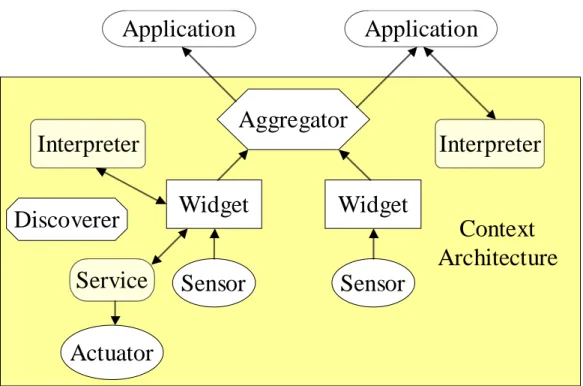
Figure 1 shows an example configuration including two sensing devices, two widgets, an aggregator, two interpreters, a service, a discoverer and two applications. When any of the context components become available, they register their capabilities with a discoverer. This allows aggregators to find relevant widgets and interpreters and allows applications to find relevant aggregators, widgets and interpreters. A sensor provides data to a context widget, which stores the context, can call an interpreter to obtain a higher-level abstraction of the data and then makes the context available to other components and applications. An aggregator collects context from widgets that can provide context about the entity it represents. It also stores the received context, can call an interpreter and then makes the context available to others. Finally, applications can query or subscribe to aggregators (or directly to widgets, if desired) and can call interpreters (if the desired level of abstraction is not available from the widgets and aggregators).
Widget
Sensor
Widget
Application
Application
Interpreter
Interpreter
Aggregator
Sensor
Context
Architecture
Discoverer
Service
Actuator
Figure 1. Example configuration of Context Toolkit components
All of these components execute independently from applications, allowing for the constant acquisition of context and use by multiple applications. In addition, all components and
applications communicate with each other automatically using known network protocols and languages. This allows a programmer who is implementing a particular component or an application to communicate with other components without having to worry about the mechanisms used for communications.
We will now demonstrate how the conceptual framework is used to build applications. In the next two sub-sections, we will describe how the Active Badge call-forwarding application (Want
et al., 1992), arguably the first context-aware application, and a mobile tour guide, the most common context-aware application, can be built.
Active Badge Call-Forwarding
The original Active Badge application helps a receptionist to forward phone calls to the extension nearest the recipient’s most recent location in a building. A dynamically updating table displays the phone extension and location for each person in the system. In addition, a user can:
• request a list of the locations an individual has been in the past five minutes or past hour;
• locate an individual and find the names of others in the same location;
• request a list of the people at a particular location; and,
• request to be notified when an individual is next sensed by the system.
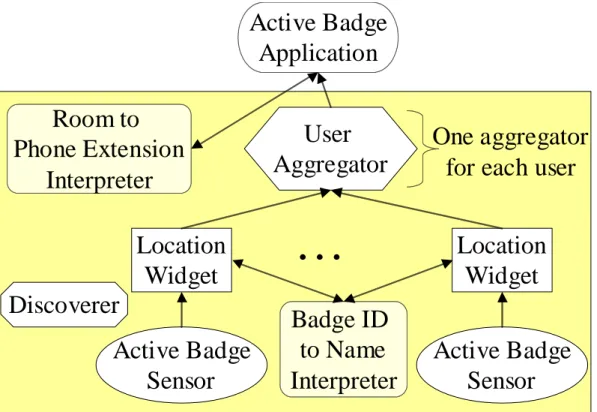
Figure 2 shows how this application can be built with the conceptual framework described above. The Active Badge location system consisted of a number of infrared sensors distributed
throughout a building that detected the presence of user-worn Active Badges. In the figure, a Location Widget represents each sensor. When a sensor detects a badge, its corresponding Location Widget determines the wearer’s identity (using the Badge ID to Name Interpreter), stores this information and passes it wearer’s User Aggregator. Each User Aggregator (one for each user in the system) collects and stores all the location information from each of the Location Widgets for their corresponding user and makes it available to the application. All of these components (the interpreters, aggregators and widgets) register with the Discoverer to allow them to locate each other as needed (widgets need to locate the Badge ID to Name Interpreter and the aggregator needs to locate the widgets). The application then uses the Discoverer to locate the User Aggregators and the Room to Phone Extension Interpreter.
Active Badge
Application
User
Aggregator
…
Location
Widget
Active Badge
Sensor
Location
Widget
Active Badge
Sensor
Badge ID
to Name
Interpreter
Room to
Phone Extension
Interpreter
One aggregator
for each user
Discoverer
Figure 2. Architecture diagram for the Active Badge call-forwarding application.
To display a list of the building occupants, their location and the nearest phone extension, the application just has to subscribe to all location updates in each User Aggregator and convert the room location to a local phone extension. Similarly, to be notified when an individual is next sensed by the system, the application can create a separate subscription to that individual’s User Aggregator. For the other features, displaying all users in a particular location, locating an individual and others around him/her and requesting a location history for a user, the application can poll the aggregators, specifying what information it is interested in.
Mobile Tour Guide
The most common context-aware application is the mobile tour guide (Abowd et al., 1997, Bederson, 1995, Davies et al., 1998, Feiner et al., 1997, Fels et al., 1998). A mobile tour guide
typically runs on a handheld computer and allows a visitor to tour a particular indoor or outdoor space. As the visitor moves throughout the space, she is shown her current location on a map and is shown information about the interesting sites that she is near.
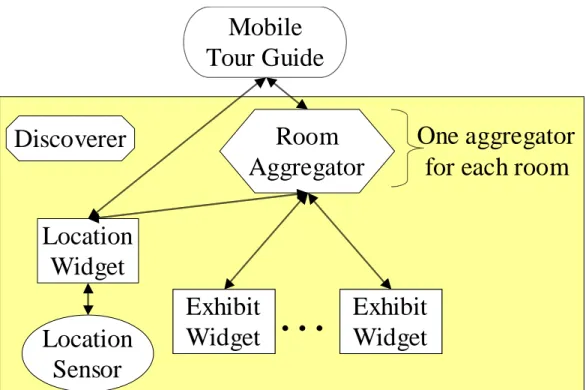
For the purposes of this design, we will assume that we are building a mobile tour guide for an indoor space and that this space has a location system that reports location updates to a centralized server. Figure 3 shows the architecture diagram for this application. A Location Widget is built around the centralized location server. Each Room Aggregator (one for each room) subscribes to the Location Widget to be notified when a user enters and leaves its corresponding room. The Room Aggregators also subscribe to the Exhibit Widgets in their respective rooms so they know which of the exhibits are available at any given time. Each Exhibit Widget contains information about an exhibit on the tour. The application subscribes to the Location Widget for location updates for its user. When it receives an update, it updates its map display and polls the Room Aggregator representing the user’s current location for a list of the available exhibits, if any. It displays the exhibit information to the user and also subscribes to the Room Aggregator to be notified of any changes to the exhibit list. If the application also displays the locations of the user’s friends, it would create an additional subscription to the Room Aggregators for each friend to be notified when a location event corresponding to a friend is received.
Discoverer
Mobile
Tour Guide
Room
Aggregator
Location
Widget
Location
Sensor
Exhibit
Widget
Exhibit
Widget
Exhibit
Widget
Exhibit
Widget
…
One aggregator
for each room
Figure 3. Architecture diagram for the mobile tour guide application.
4. THE CONTEXT TOOLKIT
In the previous section, we have presented the requirements and component abstractions for a conceptual framework that supports the building and execution of context-aware applications. In
this section, we will discuss the details of the Context Toolkit, our implementation of this conceptual framework. The Context Toolkit we have developed provides designers with the abstractions we have described — widgets, interpreters, aggregators, services and discoverers — as well as a distributed infrastructure (Dey, Salber & Abowd, 1999, Salber, Dey & Abowd, 1999). The Context Toolkit was developed in Java, although programming language-independent mechanisms were used, allowing the creation and interoperability of widgets, interpreters,
aggregators and applications in any language. We have instances of widgets and applications that have been written in C++, Frontier, Visual Basic and Python.
Each widget, aggregator, interpreter and discoverer component is implemented as a single process. Typically, different components are distributed on different processors. Thus, the Context Toolkit is built on top of a simple, distributed infrastructure that uses peer-to-peer communications. The main requirement of the distributed infrastructure is to support reliable communication between distributed objects across multiple platforms. Additional features such as multicasting, object migration or resource discovery are desirable but not required.
4.1. Distributed Communications
In our current implementation of the Context Toolkit, we utilize a simple object communication mechanism based on HTTP (HyperText Transfer Protocol) and XML
(eXtensible Markup Language) encoding of messages. This choice was dictated by a portability concern — the only requirement of our communication infrastructure is that the platform supports TCP/IP. With this simple requirement we can support the many unconventional or custom-built devices (such as wearable computers, two-way pagers, handheld computers, mobile phones, and off-the-shelf and custom sensors) that are common in ubiquitous or wearable
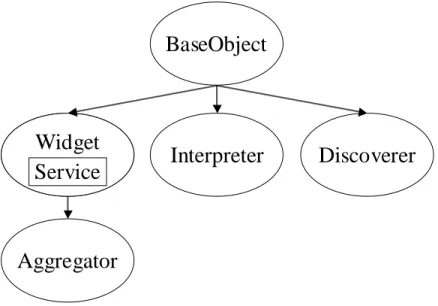
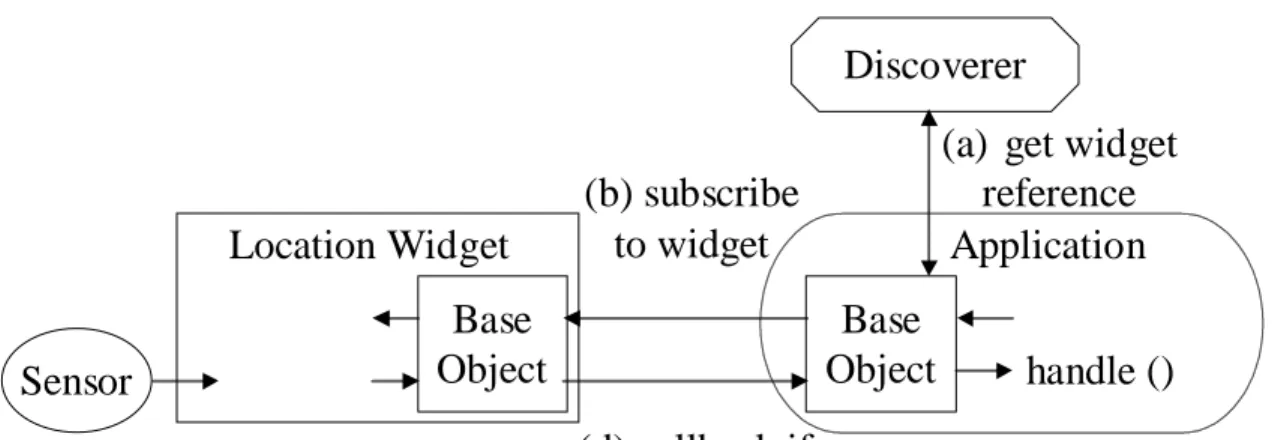
computing environments. Possible alternatives such as CORBA (Common Object Request Broker Architecture) or Java RMI (Remote Method Invocation) can only be deployed on a limited number of platforms and require significantly more computing resources than our bare-bones approach. One drawback of our approach is its limited scalability when the number of components increases. However, we have not reached that limit yet in our experimentation, and solutions to this scalability problem exist in distributed infrastructures such as JiniTM from Sun Microsystems (Sun Microsystems, 1999), at the expense of a more resource-intensive solution. The distributed communications ability is encapsulated in a component called BaseObject. Widgets and interpreters subclass from BaseObject and aggregators subclass from widgets (Figure 4), thereby inheriting this communications ability. The communications protocol and language were designed to be pluggable, allowing instantiation-time replacement of both or either the protocol and language.