ISSN (Print) : 2320 – 3765 ISSN (Online): 2278 – 8875
I
nternational
J
ournal of
A
dvanced
R
esearch in
E
lectrical,
E
lectronics and
I
nstrumentation
E
ngineering
(An ISO 3297: 2007 Certified Organization)
Vol. 4, Issue 7, July 2015
Design and Development of MATLAB GUI
and Zigbee Based Rapid Inventory Access
System
Lalit vashishtha1, Prashant Bhardwaj2
Academic & Consultancy Division (ACSD), Centre for Development of Advanced Computing (C-DAC), Mohali,
India1, 2
ABSTRACT: To meet the demands of growing population the size of the inventories of the large companies isalso
increasing and thereby it is becoming difficult to access the items stored in large inventories manually. Therefore it is need of the time to find an electronic solution for accessing the items which are stored in large inventories. It is possible to speed up the accessing of items stored in the inventories and thus reducing the man power involved in this job to great extent. This wireless rapid inventory access system using Zigbee can be very useful in large industries for quick accessing of parts of equipments from inventories and in large shops to access various items from large number of drawers in inventories. This all can be done wirelessly using a host computer having password protected GUI and Zigbee radios at transmitting and receiving ends. On selecting the desired items by clicking on the buttons available in the GUI, corresponding LEDs glow in the inventory wirelessly and simultaneously an alarm is raised by the buzzer. This is the alarm to the office assistant to fetch the items from the inventory. Now the drawers indicated by glowing LEDs can be accessed easily and quickly without any delay and confusion. The LEDs can be turned off by clicking the corresponding buttons in the GUI, after receiving the desired item on the counter.
KEYWORDS: Inventory access system, MATLAB GUI (GUIDE), ZigBee, microcontroller (PIC18).
I. INTRODUCTION
ISSN (Print) : 2320 – 3765 ISSN (Online): 2278 – 8875
I
nternational
J
ournal of
A
dvanced
R
esearch in
E
lectrical,
E
lectronics and
I
nstrumentation
E
ngineering
(An ISO 3297: 2007 Certified Organization)
Vol. 4, Issue 7, July 2015
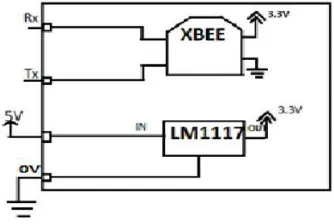
Figure 1.1: Block diagram of the proposed system
But sometimes, when the alarm is raised, the office assistant may be busy with some other task, so it may not be possible to fetch items immediately. By the time office assistant is busy with some other work, more items may also be ordered by the computer operator by glowing more other LEDs, raising the alarm again. When the office assistant finds himself free, all the ordered items can be fetched altogether.
II.HARDWARE DESCRIPTION
a) PIC18F452
Microcontroller PIC18F452 has been used in this proposed work. It has high performance. It uses flash memory and 32 kb of code space, 1536 bytes of RAM. It is having 256 bytes of EEPROM and runs up to 40 MHz of clock speed. PLL option is available which can be enabled or disabled via programming. With the use of PLL the clock frequency gets multiplied by four. In this case maximum frequency for external crystal is 10 MHz. It also has an USB interface.
b) Zigbee
ZigBee is a wireless transmission protocol and low power digital radio. It is based on an IEEE 802.15.4 standard for PANs. Unlicensed ISM bands use ZigBee modules. Power consumption is of vital importance in embedded systems so ZigBee radio modules are used extensively [3]. Coordinator, router and end-device are the main categories of ZigBee devices in a ZigBee network. In a ZigBee network each device has a unique 16 bit PANID.
ISSN (Print) : 2320 – 3765 ISSN (Online): 2278 – 8875
I
nternational
J
ournal of
A
dvanced
R
esearch in
E
lectrical,
E
lectronics and
I
nstrumentation
E
ngineering
(An ISO 3297: 2007 Certified Organization)
Vol. 4, Issue 7, July 2015
III.SOFTWARE DESCRIPTION
a) mikroC
mikroC is a development tool used for the PIC microcontrollers. microC is used to develop embedded system applications. It is very easy for the programmer to develop applications with the help of powerful microC tool. Not only it makes the programming easy to the programmer but also the high performance features are also retained. C language is used mostly to program the microcontrollers, as it becomes much easier to program the microcontrollers in C. Various features made available to the user by the microC includes- ANSI compliant compiler, very advanced Integrated Development Environment, comprehensive documentation, large libraries for hardware, and enriched set of examples.
b) MATLAB
MATLAB stands for the “MATrix LABoratory”. It is a language for high-performance technical computing which includes visualization, computation, and programming in a user friendly environment. In MATLAB problems and their solutions are represented in common mathematical notations.
c) Overview of GUIDE
GUIDE is the acronym for GUI Development Environment. GUIDE provides various tools which helps in creating GUIs. GUIDE can be greatly helpful in designing graphical user interfaces. Two tasks are required to be performed to create GUIs which are mentioned below-
Layout the GUI: The Layout Editor available in GUIDE contains various icons to help us make GUIs. These include icons for button, edit text, static text, toggle button etc. It is very easy to use any component depicted in the toolbox by clicking on it and to use it in our GUI. GUI layout is stored in a FIG-file.
Program the GUI: On creating the GUI in the layout editor, a MATLAB program file is automaticallygenerated
by GUIDE. This program file has the control of the GUI. The GUI is initialized by the code present in that file. When the user clicks on the GUI component commands are executed. We can add our own code to the callbacks with the help of MATLAB editor to make it perform what we want. Callbacks are the functions which respond to user’s action. It is also possible to create GUIs by writing code in
MATLAB without using GUIDE in the MATLAB command window [5].
d) X-CTU
X-CTU is a tool that configures ZigBee modules with whatever settings required. First step is to install X-CTU software. After this, ZigBee module’s configuration begins. A point-to-point network is required to be constructed, which means that the two devices will communicate with each other. For this purpose, one ZigBee should be configured as a Coordinator, and the other should be configured as a Router. To begin, we need to insert the ZigBee module (xbee radio) onto the XBee Explorer device and connect it to computer through RS232 serial port. To make the radio modules to communicate with each other, it is essential to edit the addressing settings appropriately [4]. In the destination address high (DH) and destination address low (DL) of each xbee module, write the serial number high (SH) and serial number low (SL) of the other radio module.
IV.RESULTS
ISSN (Print) : 2320 – 3765 ISSN (Online): 2278 – 8875
I
nternational
J
ournal of
A
dvanced
R
esearch in
E
lectrical,
E
lectronics and
I
nstrumentation
E
ngineering
(An ISO 3297: 2007 Certified Organization)
Vol. 4, Issue 7, July 2015
Figure 1.3: Password window on entering the incorrect password.
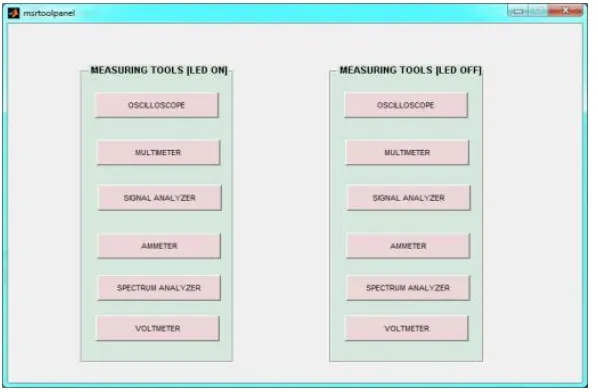
On entering incorrect password, a message window pops up, displaying ‘invalid password’ as shown in the figure 1.3.The password box gets cleared automatically, on entering the incorrect password. This allows the user to enter the password again without any need to erase the wrong password. After entering the correct password the user is allowed to use the application. The GUI has two sets of panels having buttons, viz. LED ON panel and LED OFF panel to turn the LEDs on or off. Now on selecting the desired items by clicking on the buttons available in the LED ON panel of the GUI, the LED corresponding to that item for the drawer glows up, accompanied by the buzzer alarm. This is an alarm for the office assistant to fetch the item from the inventory. When any item is received on the counter, corresponding LED can be turned off by clicking on button of the LED OFF panel.
ISSN (Print) : 2320 – 3765 ISSN (Online): 2278 – 8875
I
nternational
J
ournal of
A
dvanced
R
esearch in
E
lectrical,
E
lectronics and
I
nstrumentation
E
ngineering
(An ISO 3297: 2007 Certified Organization)
Vol. 4, Issue 7, July 2015
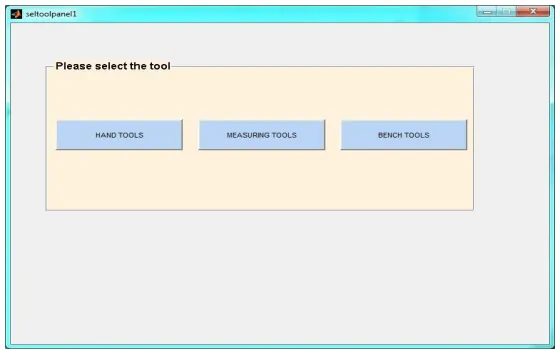
Figure 1.5: Window appearing on clicking on the HAND TOOLS button.
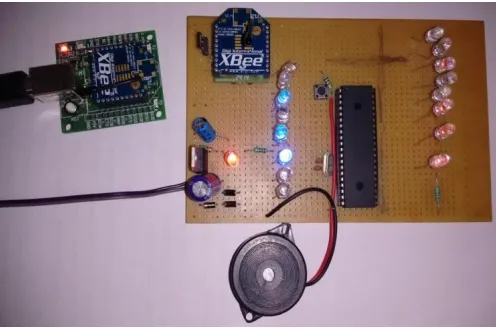
Figure 1.8 shows the image of various LEDs glowing after clicking the corresponding buttons in the GUI of the respective LED ON panels, with the buzzer alarm. In figure 1.9, image showing various LEDs glowing with the buzzer alarm, as in case of the figure 1.8 except one blue LED in off status, after clicking the corresponding button of the LED OFF panel in the GUI, is shown.
ISSN (Print) : 2320 – 3765 ISSN (Online): 2278 – 8875
I
nternational
J
ournal of
A
dvanced
R
esearch in
E
lectrical,
E
lectronics and
I
nstrumentation
E
ngineering
(An ISO 3297: 2007 Certified Organization)
Vol. 4, Issue 7, July 2015
Figure 1.7: Window appearing on clicking on the BENCH TOOLS button.
Figure 1.8: Image showing various LEDs glowing with the buzzer Alarm, after clicking the corresponding buttons in the in the GUI of the respective LED ON panels.
Figure 1.9: Image showing LEDs glowing with the buzzer alarm and blue LED in off status on clicking the corresponding button of the LED OFF panel in the GUI.
V.CONCLUSION
ISSN (Print) : 2320 – 3765 ISSN (Online): 2278 – 8875
I
nternational
J
ournal of
A
dvanced
R
esearch in
E
lectrical,
E
lectronics and
I
nstrumentation
E
ngineering
(An ISO 3297: 2007 Certified Organization)
Vol. 4, Issue 7, July 2015
computer operator can turn off the LEDs, after receiving the desired item on the counter, by clicking the corresponding buttons of the LED OFF panel of the GUI. Following modifications and advancements are possible in this proposed work in future:
More number of Zigbee modules may be used at the receiving end to create more nodes to make the system more useful for larger industries and shops to handle large number of drawers.
Xbee radios of larger range may be used for huge inventories.
Graphical User Interface (GUI) may have more other features to improve the convenience of the user.
REFERRNCES
[1] Huanjia Yang, Shuang-Hua Yang ZhengGuo, “Connectionless Indoor Inventory Tracking in Zigbee RFID Sensor Network”, in proceedings of 35th Annual Conference on Industrial Electronics, pp.2618 – 2623, Nov 2009.
.[2] Liu Yanfei Wang Cheng Qiao Xiaojun Zhang Yunhe, Yu chengbo Liu Yanfei , “An Improved Design of ZigBee
Wireless Sensor Network”, in proceedings of 2nd IEEE International Conference on Computer Science and Information Technology , pp.515 – 518, Aug 2009.
[3] Aniket V. Patil, Prof. U. A. Rane, “Hardware Design of A ZIGBEE Smart Energy Implementation for Energy Efficient Building”, in international journal of engineering sciences & research technology, pp.1630-1633, march 2014.
[4] Yash Vardhan Varshney, Anil Kumar Sharma, “Design & Simulation of Zigbee Transceiver System Using Matlab”, in International Journal of Engineering Trends and Technology (IJETT), vol.4, pp.1316-1319, apr 2013.