ABSTRACT
OJHA, UNNATI. A Lego-NXT Based Fast Prototyping Platform for Distributed Energy Management in Smart Grid. (Under the direction of Dr. Mo-Yuen Chow).
Smart grid is an integration of a variety of controllable energy devices such as distributed generators, distributed energy storage devices, as well as controllable loads and responsive demands that communicate among each other to coordinate optimal energy production. This distributed nature of smart grid has stirred up the research community to shift from centralized supervisory control and data acquisition based systems and study distributed solutions for energy management. In this scenario, it is very important to have an economic and flexible platform in R&D setting to test and validate the convergence, robustness, sensitivity, resilience and self healing capacity of such distributed control algorithms for energy management in smart grid under various operating conditions.
support forums makes it easy to develop a Lego based laboratory platform. Furthermore, Green City uses a three-layered agent-based design by identifying entities in physical, cyber and control layers in order to increase modularity and decrease the dependency between the agents of separate layers. Standard interfaces are defined in each layer to integrate new algorithms, communication channels and energy devices to make it a readily expandable fast prototyping platform.
A Lego-NXT Based Fast Prototyping Platform for Distributed Energy Management in Smart Grid
by Unnati Ojha
A dissertation submitted to the Graduate Faculty of North Carolina State University
in partial fulfillment of the requirements for the Degree of
Doctor of Philosophy
Electrical Engineering
Raleigh, North Carolina 2013
APPROVED BY:
_______________________________ ______________________________
Mo-Yuen Chow Mihail Sichitiu
Chair of Advisory Committee
________________________________ ________________________________
ii DEDICATION
To my mother
iii BIOGRAPHY
Unnati Ojha was born and raised in Kaski, Nepal. After finishing his high school, he went to Los Banos, Philippines for his undergraduate study. He received his Bachelor of Science degree in Electrical Engineering from University of the Philippines at Los Banos in 2004. He then returned to Nepal and worked as an instructor in Electrical and Computer Engineering Department at Kathmandu Engineering College until 2007. He joined Electrical and Computer Engineering (ECE) department of North Carolina State University (NCSU) as a Master’s student in 2007. He is currently a PhD candidate in Electrical Engineering in the ECE Department NCSU.
iv ACKNOWLEDGMENTS
First, I would like to extend the most sincere gratitude to my advisor, Dr. Mo-Yuen Chow. Dr. Chow has provided me with great guidance, inspiration and encouragement on my research. He has always been very patient, understanding and supportive during my research at ADAC lab.
I am grateful to my committee members, Dr. Mihail Sichitiu, Dr. Huiyang Zhou, and Dr. Ralph Smith for being on my committee and supporting me. Your feedback in my qualifying and preliminary examinations has provided me with valuable insights in my research.
I would like to thank my dear friends in the ADAC lab, who have always helped me get a deeper understanding of my research work through countless discussions and feedback. I would like to thank Wente Zeng for his insightful comments about my research. I would like to thank Navid Rahbari-Asr for our discussions on the gene library project as well as on the Green City. Thank you to Ziang Zhang, Habiballah Rahimi-Eichi, Yuan Zhang, and Bharat Balagopal for providing me with constructive criticisms on the design of the Green City Platform. I would also like to thank ECE 756 students from 2010, 2011 and 2012 for their preliminary work on iSpace and Green City Platform. I have been very fortunate to work with you all.
vi TABLE OF CONTENTS
LIST OF TABLES ………xi
LIST OF FIGURES ………..xii
Chapter 1 Introduction ... 1
1.1 Motivation ...1
1.2 Recent Distributed Algorithms for Smart Grid ...3
1.3 Research Platforms for Smart Grid ...4
1.4 Software Architecture for Smart Grid Platforms ...5
1.5 Green City Platform ...6
1.6 Dissertation Organization ...8
Chapter 2 Green City Hardware Description ... 10
2.1 Introduction ...10
2.2 Lego NXT Controller ...12
2.3 Energy Meter/Energy Storage Device ...13
2.3.1 Directional Control Switch... 16
2.4 Generation Units ...17
2.4.1 Wind Turbine ... 17
2.4.2 Solar Panel... 19
vii
2.5 Load units ...26
2.5.1 Household... 26
2.5.2 Charging Station ... 28
2.6 Electric Vehicle ...33
2.6.1 Battery Fuel Gauge... 36
2.6.2 Discharging Circuit ... 37
Chapter 3 Distributed Controllers... 41
3.1 Introduction ...41
3.2 The Distributed Controllers ...43
3.2.1 Physical Layer ... 47
3.2.2 Communication/Cyber Layer ... 49
3.2.3 Control Layer ... 57
Chapter 4 Graphical User Interface ... 63
4.1 Introduction ...63
4.2 Software Architecture ...63
4.3 Model Components in Green City GUI ...66
4.3.1 The Algorithm Data Model ... 66
4.3.2 The Parameter Panel Model ... 69
viii
4.3.4 The Node Model... 72
4.4 View Components in Green City GUI ...73
4.4.1 Setup Window ... 74
4.4.2 Display Window ... 82
4.5 Controllers/Agents in Green City GUI ...85
4.5.1 Simulation Agent... 85
4.5.2 Network Agent ... 87
4.5.3 Algorithm Agent ... 90
4.5.4 Display Agent ... 93
4.5.5 Parameter Panel Agent ... 95
4.5.6 Data Logging Agent ... 97
4.5.7 Communication Agent ... 98
Chapter 5 Router ... 101
5.1 Introduction ...101
5.2 The Communication Module ...102
5.2.1 Bluetooth Class ... 102
5.2.2 TCP_IPSocket Class ... 105
ix
5.3.1 GUICommandHandler Class... 108
5.3.2 NetworkAgent Class ... 109
5.3.3 Node Class... 111
Chapter 6 Fast Prototyping of Incremental Welfare Consensus Algorithm in Green City Platform ... 112
6.1 Description of IWC Algorithm ...112
6.1.1 Distributed Estimation of Power Imbalance ... 112
6.1.2 Local Price Update ... 113
6.1.3 Power Regulation ... 113
6.2 Fast Prototyping of IWC Algorithm ...114
6.3 Experimental Results ...116
6.3.1 Experimental Setup ... 116
6.3.2 Case Study 1: Reconfigurability ... 118
6.3.3 Case Study 2: Flexibility ... 119
6.3.4 Case Study 3: Performance Study under Communication Constraints ... 124
6.3.5 Case Study 4: Real-time Monitoring under Dynamic Scenarios ... 128
Chapter 7 Testing Distributed Energy Management Algorithms under Security Constraints in Green City ... 132
x
7.1.1 Leader-Follower Incremental Cost Consensus Algorithm ... 132
7.1.2 Secured Distributed Control Algorithm ... 135
7.1.3 Attack Models ... 137
7.2 Experiments and Results ...139
7.2.1 Experimental Setup ... 139
7.2.2 Case Study 1: Performance of Algorithms under Fault Attack ... 142
7.2.3 Case Study 2: Performance of Algorithms under False Data Injection Attack ... 145
Chapter 8 Conclusion and Future Work ... 149
8.1 Summary ...149
8.2 Future Work ...150
8.2.1 Power Hardware-in-the-Loop Capability ... 150
8.2.2 Expansion in Other Application Areas for Distributed Control ... 151
xi LIST OF TABLES
Table 2-I: Wind turbine connections to NXT Brick ... 18
Table 2-II: Solar panel connections to NXT Brick ... 21
Table 2-III: Small capacity generator connections to NXT Brick ... 24
Table 2-IV: Large capacity generator connections to NXT Brick ... 25
Table 2-V: Household connections to NXT Brick ... 27
Table 2-VI: Pin-out of the display matrix ... 31
Table 2-VII: Display matrix connections to NXT Brick ... 32
Table 2-VIII: Charging station connections to NXT Brick ... 32
Table 2-IX: Electric vehicle connections to NXT Brick ... 35
Table 2-X: LED combination for different modes of discharge ... 38
Table 3-I: Message types currently used in the Green City platform ... 52
Table 3-II: The set of sensors and actuators used by each node type ... 60
Table 5-I: List of valid destination points for data packets in Router ... 104
Table 5-II: Priorities defined in the Bluetooth Class ... 104
Table 6-I: Generation/Demand Unit Parameters ... 118
Table 7-I: Parameters of the generation units for LFICC ... 140
Table 7-II: Parameters of the Power Network ... 140
xii LIST OF FIGURES
Figure 2.1: Components of the Green City platform at ADAC lab, Raleigh ... 11
Figure 2.2: Lego NXT brick and the components within ... 13
Figure 2.3: Lego Energy Meter/ Energy Storage Device (ESD) ... 15
Figure 2.4: ESD display ... 15
Figure 2.5: Automated actuation system of directional control switch ... 16
Figure 2.6: Wind turbine in Green City ... 17
Figure 2.7: Wind turbine component connections ... 19
Figure 2.8: Solar panel in Green City ... 20
Figure 2.9: Solar panel component connections ... 22
Figure 2.10: Power functions e-motor (left) and XL motor (right) ... 23
Figure 2.11: Small capacity generators in Green City ... 23
Figure 2.12: Large capacity generator in Green City ... 24
Figure 2.13: Conventional generator component connections ... 25
Figure 2.14: Household unit in Green City ... 26
Figure 2.15: Household component connections ... 27
Figure 2.16: Charging station in Green City ... 28
Figure 2.17: Charging pad and mat connection ... 29
Figure 2.18: Electrical vehicle docked in the charging station ... 30
Figure 2.19: Charging station component connections... 33
Figure 2.20: Front view of electric vehicle ... 33
xiii
Figure 2.22: Battery fuel gauge components ... 37
Figure 2.23: Discharging circuit components ... 38
Figure 2.24: Discharging circuit schematic ... 39
Figure 2.25: Actual components on the electric vehicle and their connections... 40
Figure 3.1: Green City platform structure ... 42
Figure 3.2: Distributed controllers in the future power system ... 45
Figure 3.3: Three layered software architecture for distributed controllers ... 46
Figure 3.4: Sensing agent and the sensor class ... 47
Figure 3.5: Actuator agent and actuator class ... 49
Figure 3.6: Data packaging agent and data packet class ... 51
Figure 3.7: Routing agent ... 53
Figure 3.8: Data sending agent and the communication channel class ... 54
Figure 3.9: The data packet structure in green city ... 55
Figure 3.10: Data receiving agent and the communication channel class ... 56
Figure 3.11: Disturbance agent ... 57
Figure 3.12: Configuration agent and node class... 59
Figure 3.13: Functional agent and related classes ... 62
Figure 4.1: Software architecture for GUI ... 64
Figure 4.2: Model-View-Controller architecture ... 65
Figure 4.3: Universal data type ... 67
Figure 4.4: Algorithm data model ... 68
Figure 4.5: Parameter panel model ... 70
xiv
Figure 4.7: Node model ... 73
Figure 4.8: Green City GUI setup window ... 75
Figure 4.9: Menu items in menu bar ... 78
Figure 4.10: Green City GUI display window ... 83
Figure 4.11: Simulation agent’s interaction with the rest of GUI... 85
Figure 4.12: Structure of simulation agent ... 87
Figure 4.13: Network agent relationship with rest of the GUI ... 88
Figure 4.14: Structure of network agent ... 90
Figure 4.15: Relationship of algorithm agent to the rest of GUI ... 91
Figure 4.16: Structure of algorithm agent ... 91
Figure 4.17: Relationship of display agent with the rest of the GUI ... 93
Figure 4.18: Structure of display agent ... 95
Figure 4.19: Relationship of parameter panel agent with the rest of the GUI ... 96
Figure 4.20: Structure of parameter panel agent ... 97
Figure 4.21: Relationship of data logging agent to the rest of GUI ... 97
Figure 4.22: Structure of data logging agent ... 98
Figure 4.23: Relationship of communication agent with the rest of the GUI ... 99
Figure 4.24: Structure of communication agent ... 99
Figure 5.1: Structure of CommunicationChannel abstract class ... 103
Figure 5.2: GUI related servers in Router ... 106
Figure 5.3: Class structure of the network management module... 109
Figure 6.1: Class diagram of the functional agent and the distributed algorithm class ... 115
xv
Figure 6.3: Distributed controllers in a Garver power network ... 117
Figure 6.4: Class diagram of configuration agent and NodeType class ... 119
Figure 6.5: Process involved in changing parameters in Green City ... 120
Figure 6.6: Snapshot of network topologies (left to right: (Top) Chain, Star Fully Connected and (bottom) Garver Power based) created in Green City ... 121
Figure 6.7: Evolution of price for different network topologies (From left to Right - Top: Chain, Star; Bottom: Fully Connected, Garver Power based) ... 122
Figure 6.8: Evolution of price at different values of step size, η (Top: Left – η = 0.001, Right – η = 0.005; Bottom: Left – η = 0.01, Right – η = 0.1) ... 124
Figure 6.9: Evolution of price at delay=100ms (Left) & delay=600ms (Right) ... 125
Figure 6.10: Power imbalance at delay=100ms (Left) and delay = 600ms (Right) ... 126
Figure 6.11: Evolution of price when adding Gaussian noise with 0.01 mean and 0.001 variance (Left) and with 0.1 mean and 0.01 variance (Right) ... 127
Figure 6.12: Evolution of power imbalance estimations when adding Gaussian noise with 0.01 mean and 0.001 variance (Left) and with 0.1 mean and 0.01 variance (Right) ... 127
Figure 6.13: Real-time monitoring in green city under dynamic scenario ... 129
Figure 6.14: Evolution of power imbalance (Left) and welfare (Right) ... 130
Figure 6.15: Evolution of demand (Left) and generation (Right) ... 131
Figure 7.1: Flowchart for LFICC algorithm ... 134
Figure 7.2: Implementation of LFICC in Green City ... 134
Figure 7.3: Implementation of Secure distributed control methodology in Green City ... 137
Figure 7.4: Network topology used for case studies ... 139
Figure 7.5: (a) Evolution of incremental cost value and, (b) evolution of power imbalance when there are no malicious nodes ... 142
1
Chapter 1
Introduction
1.1
Motivation
The “Smart-Grid” concept is revolutionizing the power grid. Smart grid refers to technologies used to update utility electricity systems with computer-based automation and control through two-way communication structures[1]. Recently, power generation system has shifted from relying solely on generators to incorporating clean and renewable energy sources such as solar farms, wind farms etc. Some of the contributing factors for this shift are the increase in global energy demand caused due to recent increase in the electric vehicles [2], increased awareness of global warming, Carbon emission and increased fuel prices [3]. Furthermore, government has also encouraged the installation of photovoltaic cells, small scale wind turbines, battery banks in household and communities [4] to encourage the use of renewable energy in consumer level. As such, smart grid integrates a variety of controllable energy devices such as Distributed Generators (DG), Distributed Energy Storage Devices (DESD), as well as controllable loads and responsive demands that communicate among each other to coordinate optimal energy production[5]. This Cyber-Physical Energy System (CPES) is inherently geographically distributed and does not have a fixed topology.
2 community to study distributed solutions that are scalable in terms of computational and communicational efforts and robust enough to single points of failures to survive the inevitable device/link failures of the complex system of the smart grid.
In this scenario, it is very important to have an economic and flexible platform in R&D setting to test and validate the convergence, robustness, sensitivity, resilience and self healing capacity of such distributed control algorithms [5, 8, 9] for energy management in smart grid under various operating conditions such as plug-n-play type network topology, communication constraints, security threats etc. Such platform needs to have the following features:
• Simple and economical so that it can be easily developed in a laboratory setting,
• Modular so that it is easy to manage, and
• Reconfigurable so that it can be tested with different types of distributed energy devices
• Flexible so that it allows testing under different scenarios
• Distributed so that the computations can be performed in the local controllers
• Should allow testing under communication constraints
• Security is another issue in smart grid, the platform should allow testing algorithms under security threats
3
1.2
Recent Distributed Algorithms for Smart Grid
4
1.3
Research Platforms for Smart Grid
Available literature in the architecture and design of platforms for smart grid can be broadly classified into two categories – In the first category are the distributed platforms that are tailored to test/verify a specific aspect of smart grid [20-24]. In [20], a location-centric hybrid system architecture is presented to facilitate the realization of fault prevention, detection and mitigation in smart grid. In [21], the architecture for plug-n-play type autonomous micro-grid is proposed and performance of such a system under different types of sudden transients is shown. A Matlab/Simulink platform for two-way communication based distributed control for voltage regulation is presented in [22]. A simulation platform for decentralized demand side management is presented in [23] to coordinate large populations of autonomous agents representing smart meters. In [24], a smart grid security test-bed is introduced including the set of control, communication and physical system components required to provide accurate cyber-physical environment.
5 integrate power electronics components along with costly Real-time Digital Simulator (RTDS) to study transient behaviour and identify/mitigate hardware faults.
1.4
Software Architecture for Smart Grid Platforms
Software architecture is a important aspect of designing a research platform. There are several different architectures suggested in the literature that focus on specific aspect of the platform such as modularity, functionality, interoperability etc. In [30-32], a functional division of the system is suggested in order to develop a scalable modular system. Similarly, [33-35] describe a service oriented agent based system with focus on the core concepts of autonomy and interoperability of a through providing and accessing read/write service. Most of these studies [30-32, 36, 37] follow the FIPA standards for creating agents. In [26, 30, 37-39], development of a standardized, clearly defined, possibly, open set of interface is suggested despite the heterogeneity of devices composing the global automation system.
Different tasks have different real-time requirements. In [40], we can find constraints given for such tasks. Several studies have also proposed real-time capability to be important aspect and have provided evaluation criteria using execution times for tasks such as read/write, round trip time, alarm tests (reaction time to set off alarms), connection tests (number of connections that can be maintained)[34], service response time (time taken to execute a service response) [33].
6 41] have also looked into the user interface design especially into the appropriate amount of information to provide situational awareness to the operator.
Finally some studies have pointed out that the developed platform needs to be scalable in terms of the number of agents in the system, the communication requirements and the data handling capability of the systems [32, 36, 38, 42].
1.5
Green City Platform
In this thesis, we present Green City (GC), a Lego NXT based platform in R&D setting to test and validate distributed control algorithms for energy management in smart grid. Below we compare GC with the existing platforms and highlight the uniqueness of GC:
• GC uses a modular three-layered agent-based design by identifying entities in physical, cyber and control layers. Unlike platforms that are tailored for a specific algorithm [20-24], GC provides standard interfaces in each layer to integrate new algorithms, communication channels and energy devices to make it a readily expandable fast prototyping platform.
• Unlike SCADA based platforms [25-28], GC implements distributed controllers [5, 8, 9] which perform sensing, control and actuation on the local energy devices and send/receive information only to their neighbors thus eliminating the need for a supervisory controller.
7 RTDS [27, 28] or VCSE[26, 29], Lego components are simpler and more economical. Furthermore, the availability of various open source firmware (LeJOS [43], BricxCC [44], etc), codes, and online support forums provides a mature development environment for Lego based laboratory platform.
• RTDS based power HiL systems give accurate real-time measurements of the power flow in the system thus allowing testing/validation of system under transient behavior. However, it is equally important to test/validate the distributed algorithms under different operating conditions for parameters such as communication constraints [45] , network topology [5] and security attacks [46] and GC is equipped to test algorithms under such conditions.
Some other key aspects in designing a platform such as GC are modularity[36], interoperability[33-35] and real-time monitoring capability[27, 41]. As such, major features of the GC are:
• Modularity – allows proper management of distributed system through the
use of three layered, agent based design
• Fast Prototyping – allows prompt modification of existing algorithms and
easy integration, implementation and testing of new algorithms,
• Simplicity – uses simple, economic, standard and easily available Lego
8
• Real-time Monitoring – has a graphical user interface that provides real-time access of data to the operator for monitoring and analysis,
• Integration of Communication Constraints – allows testing and verification under different communication constrains such as delay, communication noise etc,
• Reconfigurability/Heterogeneity – allows each distributed controller in GC
to be easily reconfigured to interface with heterogeneous distributed energy devices to facilitate interoperability, and
• Flexibility – accommodates dynamic changes in the network topology,
such as plug-and-play capability. Also allows changes in the algorithm parameters to test the algorithm under different operation conditions.
1.6
Dissertation Organization
In this dissertation we will present detail discussion on the design as well as testing of the Green City Platform developed at Advanced Diagnosis, Automation, and Control Laboratory at North Carolina State University.
9 Chapter 3 will discuss the design of the distributed controller. The distributed controllers are emulated using Lego NXT bricks that have sensing, actuating, communicating and processing capability. The distributed controllers are designed using three layered concept. Details on the design of agents in each layer are presented in this chapter.
Chapter 4 will discuss the design of the Graphical User Interface for the Green City Platform. The GUI serves as an interface for monitoring of distributed controllers and controlling the algorithm setup. The classes and agents in GUI are discussed in detail in this chapter.
Chapter 5 will discuss the structure of the Router which is the third component of the Green City Platform. The communication structure of the Green City is discussed in detail in this chapter.
Chapter 6 will discuss the fast prototyping of Incremental Welfare Consensus algorithm in Green City and present different case studies to showcase the simplicity, modularity, flexibility, reconfigurability and real-time monitoring capability of the Green City Platform.
Chapter 7 will demonstrate the use of Green City platform to evaluate a distributed control algorithm under security constraints. Two algorithms (i) The Leader-Follower Incremental Cost Consensus (LFICC) algorithm and (ii) The Secured LFICC algorithm will be tested under different kinds of security attacks.
10
Chapter 2
Green City Hardware
Description
2.1
Introduction
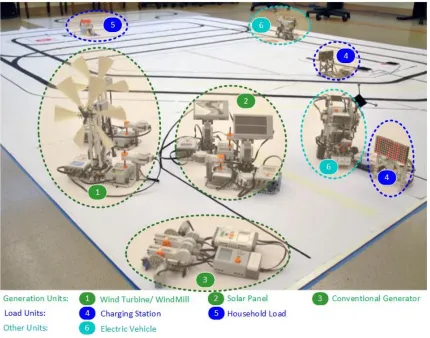
The hardware infrastructure for Green City (GC) platform is constructed using Lego Mindstorm NXT products. Easily available and modular Lego components allow simple integration of several heterogeneous energy generation and load units in the GC platform. These modules can be easily interfaced to and controlled by the Lego NXT Brick. Lego NXT Brick contains an ARM7 based microcontroller and several I/O interfaces to communicate with the Lego sensor and actuator modules. Figure 2.1 shows different components of the Green City platform.
Green City consists of generation units as well as load units. Currently three types of generation units are implemented in the Green City:
• Wind Turbine,
• Solar Panel and
• Conventional Generator.
Wind Turbine and Solar Panel are renewable energy generation units, whereas Conventional Generator is non-renewable energy generation units. Similarly there are two types of loads in the Green City.
11
• Charging Station
Figure 2.1: Components of the Green City platform at ADAC lab, Raleigh
12 when they are being charged, as generators when they are giving the energy back to the grid and as storage units at other times.
All generation as well as load units use two major Lego components:
• Lego NXT Controller and
• Lego Energy Meter.
In the following sections, we will briefly describe the Lego NXT controller and the Energy meter before describing the construction and set up of the generation and load units.
2.2
Lego NXT Controller
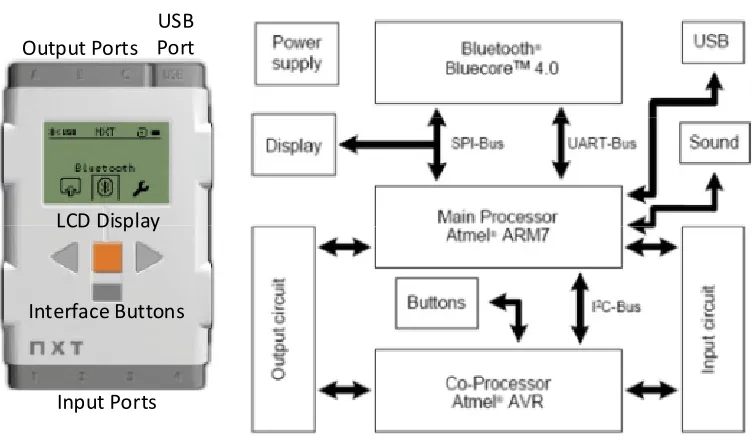
In GC, Lego NXT Bricks are used to emulate the DCs. Lego Mindstorm is an educational platform and it has recently been used in projects for data acquisition for smart homes[47], distributed control of robots[48], sensor/actuator emulators in SCADA based systems[49] etc. A Lego NXT Brick costs US $150 and can be programmed using Labview, Matlab/Simulink, NXT-G, JAVA or C depending on the firmware installed in it. In GC, Lego NXT Bricks have LeJOS (Lego Java Operating System) firmware and are programmed using JAVA.
13 layers of the GC. Different software agents described below are introduced to carry out the functions of each layer.
Output Ports
Input Ports USB Port
Interface Buttons LCD Display
Figure 2.2: Lego NXT brick and the components within
2.3
Energy Meter/Energy Storage Device
14
• Mindstorm Output Port – Allows the ESD to be used with LEGO.
• Display – Shows input and output measurements, as well as power status
and error information. Figure 2.4 shows the details of the ESD Display.
• Directional control switch – Selects the output function. Set to the middle
position to turn the output function off. By controlling the switch, the ESD can be used to charge or discharge the battery that is attached to the ESD. More about this function is described in the following section.
• On/Off button – Turns the Energy Meter on and off. Press and hold for
two seconds to reset the joule counter.
• Output plug – Connect components, such as E-Motor and LED Lights, to
use the stored energy and measure the energy needed to power them.
• Input plug – Connect various power sources here to charge the Energy
15 Figure 2.3: Lego Energy Meter/ Energy Storage Device (ESD)
16 2.3.1
Directional Control Switch
The directional control switch can be controlled to charge or discharge the battery in the ESD. In Green City, an automated switching mechanism is designed to either charge or discharge the ESD battery. The automated actuation system is shown in Figure 2.5. This actuation system helps to simulate a condition where a particular energy source needs to be selected to supply the energy in the grid. For example, if at a particular moment the ESD on the wind turbine has a full battery and the ESD on the conventional generators are running on a low battery ideally we need to start charging the ESD’s on the conventional generators and provide power to the grid from the ESD’s of the wind turbine. The electrical actuation system allows for such flexibility in the system. We can control which energy source provides power in the grid using the intelligent switching of energy source.
17
2.4
Generation Units
Three types of generation units are currently supported in the Green City – Wind Turbine, Solar Panel and Conventional Generators.
2.4.1
Wind Turbine
Wind turbine is a renewable energy source. In Green City, a laboratory scale wind turbine is emulated using components from Lego renewable energy package. Figure 2.6 shows a wind turbine in Green City.
18 The wind turbines installed in Green City have the following components attached:
• Motor: To change the wind turbine blade direction so that they can face the direction of wind.
• Generator: To generate the electricity.
• NXT: To control the actuation of the motor and read the data from the ESD
• ESD: To store the electric energy generated by the wind turbine
Table 2-I shows the connections of the wind turbine to the NXT Brick. Two actuator output ports and a sensor input port is utilized by the wind turbine.
Table 2-I: Wind turbine connections to NXT Brick
Parts Connected NXT Port No
Motor 1 (Orientation) Port A
Motor 2 (ESD Switching Motor) Port B
19 Figure 2.7 shows the schematic diagram of the components in wind turbine and their connection to the NXT and other parts of Green City. A fan is used to generate the wind which turns the blades of the wind turbine.
Wind Turbine
Generator
Figure 2.7: Wind turbine component connections
2.4.2
Solar Panel
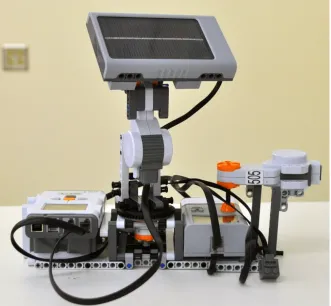
20 Figure 2.8: Solar panel in Green City
The solar panels installed in Green City have the following components attached:
• Solar Panel: To generate the electricity.
• Motor: There are two motors installed on the Solar Panel.
o Motor 1: To control the pitch rotation of the panel. o Motor 2: To control the tilt rotation of the panel.
21
•
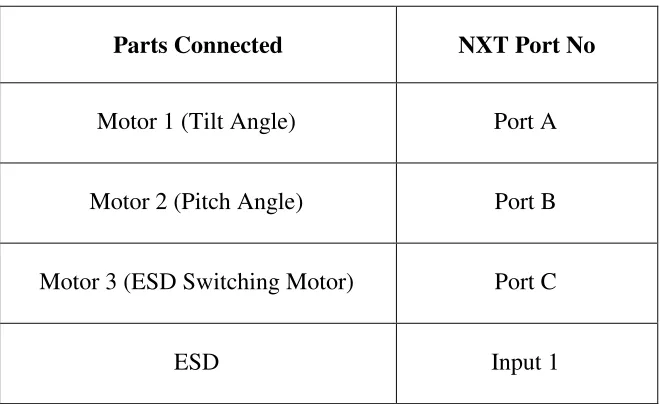
ESD: To store the electric energy generated by the solar panel.Table 2-II shows the connections of the solar panel to the NXT Brick. Three actuator output ports and a sensor input port is utilized by the solar panel. Two motors control the pitch and the tilt of the solar panel to maximize the amount of electricity generated
Table 2-II: Solar panel connections to NXT Brick
Parts Connected NXT Port No
Motor 1 (Tilt Angle) Port A
Motor 2 (Pitch Angle) Port B
Motor 3 (ESD Switching Motor) Port C
ESD Input 1
Figure
2.4.3
Conventional Generators
The generators represent non of generators in the Green City:
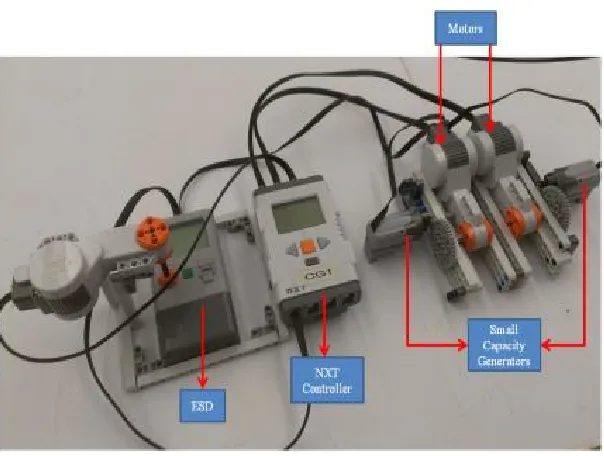
• Two small capacity generators housed
• One large capacity generator
The power functions of small capacity generators.
used in construction of large capacity generators
Figure 2.9: Solar panel component connections
Generators
The generators represent non-renewable energy generation units. There are two types reen City:
Two small capacity generators housed as a single unit, One large capacity generator
unctions e-motors shown in Figure 2.10 (left) are used in the construction small capacity generators. The power function XL motor shown in Figure
used in construction of large capacity generators.
22 renewable energy generation units. There are two types
23 Figure 2.10: Power functions e-motor (left) and XL motor (right)
24 Figure 2.12: Large capacity generator in Green City
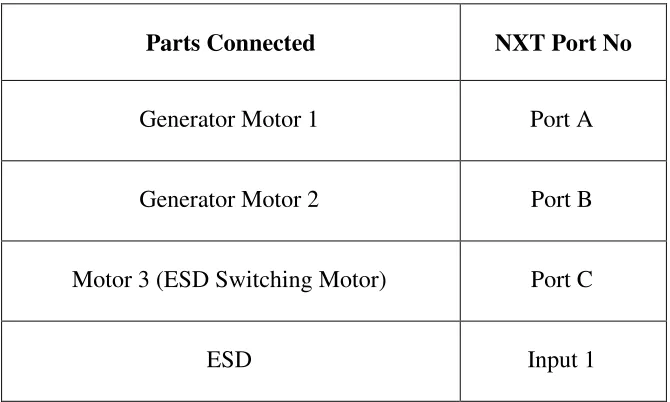
Table 2-III and Table 2-IV show the connections of the small capacity generators and large capacity generators respectively to the NXT Brick. Figure 2.13 shows the schematic diagram of the connections of generators to the NXT and other parts of Green City.
Table 2-III: Small capacity generator connections to NXT Brick
Parts Connected NXT Port No
Generator Motor 1 Port A
Generator Motor 2 Port B
Motor 3 (ESD Switching Motor) Port C
Table 2-IV: Large capacity generator connections to NXT Brick
Parts Connected
Generator Motor 1
Motor 2 (ESD Switching Motor)
Figure 2.13: Conventional
: Large capacity generator connections to NXT Brick
Parts Connected NXT Port No
Generator Motor 1 Port A
Motor 2 (ESD Switching Motor) Port C
ESD Input 1
: Conventional generator component connections
25 : Large capacity generator connections to NXT Brick
26
2.5
Load units
Two types of loads are currently installed in the Green City platform – household and charging stations.
2.5.1
Household
Figure 2.14 shows a household unit in the Green City. The household unit consists of a NXT Brick which is connected to a series of LEDs through the sensor ports 1 and 2. The amount of power consumed by the household unit depends on the number of LEDs that are switched on. Currently two sensor ports are used to connect the LEDs to the NXT Brick.
27 Table 2-V shows the connections in the household unit. Note that the input ports in the NXT Brick are used to supply power to the LEDs.
Table 2-V: Household connections to NXT Brick
Parts Connected NXT Port No
LED Group 1 Input 1
LED Group 2 Input 2
Figure 2.15 shows the schematic diagram of the components in household and their connection to the NXT and other parts of Green City.
NXT
Load
ESD
1
Data
28 When the household unit needs to operate as a responsive load, the NXT controller switches LED groups on or off according to the decision made in the control layer. When household unit is used as a constant load, all LED units are switched on.
2.5.2
Charging Station
Charging station itself cannot act as a load. However, it acts as a load when electric vehicles dock to the charging stations. Figure 2.16 shows a charging station in the Green City. A charging station has the following major components:
• NXT: To connect to and get information about the electric vehicle being charged in the charging station
29
• Display Matrix: To display the state of charge of the battery of the electric
vehicle during the charging process
• Wireless Charging Pad: To charge the electric vehicle wirelessly. Charging
pad comprises half of the charging mat-charging pad pair used in the inductive wireless charging technology.
The charging pad is attached on the bottom of the electric vehicle. The pad is magnetically attracted to the charging mat. The charging mat is fixed to the Green City platform. The charging mat has its own power connector module. The voltage, current and amount of energy transferred from the mat to the pad are measured using the ESD attached in the electric vehicle. Figure 2.17 shows the connections of charging pad, mat and the ESD.
30 The display matrix is RGB LED Matrix with I2C Backpack which has an ATtiny 2313 to provide an I2Cinterface. This interface makes it possible for communication between NXT and the LED Matrix. Table 2-VI shows the pin out connections of the display matrix.
31 Table 2-VI: Pin-out of the display matrix
Pin No Pin Name Pin Function
1,2,3 5V Logic and LED Power
4,6,8 GND Ground
5 SDA I2C Data
7 SCL I2C Clock
9-10 3V3 Not Connected
32 Table 2-VII: Display matrix connections to NXT Brick
NXT Cable Wire LED Matrix Wire LED Matrix Pin
Ground (Black, Red) Grey, Blue, Yellow 4,6,8
+4.3 Supply (Green) Brown, Red, Orange 1,2,3
I2C Clock SCL (Yellow) Violet 7
I2C Data SDA (Blue) Green 5
Table 2-VIII shows the connections in the charging station unit. Note that the input ports in the NXT Brick is configured as a I2C port to communicate with the display matrix.
Table 2-VIII: Charging station connections to NXT Brick
Parts Connected NXT Port No
Display Matrix Input 1
33 NXT
1 Display Matrix
Figure 2.19: Charging station component connections
2.6
Electric Vehicle
Electric vehicle acts as a load in the Green City when it is docked in the charging station. Figure 2.20 shows the electric vehicle constructed in the Green City platform. The electric vehicle is also an automated ground vehicle that can go from one point to another autonomously in the Green City. Thus the electric vehicle has components related to energy monitoring as well as path tracking.
34 The major components of the electric vehicle are:
• NXT: To control the motion of the robot, charging/discharging amount and
various other control tasks.
• Motors: To move the electric vehicle from one point to another (for
example to the charging station when the battery is low). The motors can run up to a speed of 900 degrees/second when the battery is fully charged.
• Ultrasonic Sensor: To sense if there is an obstacle in from the the automated electric vehicle. It can measures distance in centimeters ranging from 0 to 255, with a precision of +/-3cm..
• Light Sensor: To provide the feedback when the electric vehicle is tracking a black line. It measures the intensity of the reflected light. The values range from 0 to 100 with 0 meaning darkness and 100 meaning intense sunlight.
• Discharge Circuit: To simulate the a load for the electric vehicle. More is
described in the following sections.
• ESD: To simulate the battery of the electric vehicle and to monitor the
amount of charge/discharge of the battery.
35 Table 2-IX: Electric vehicle connections to NXT Brick
Parts Connected NXT Port No
Light Sensors (1-3) Input 1-3
Ultrasonic Sensor Input 4 (I2C)
Battery Fuel Gauge Input 4 (I2C)
Discharging Circuit Input 4 (I2C)
ESD Input 4 (I2C)
Motor 1 & 2 (Right and Left Wheel) Ports A and B
Motor 3 (Ultrasonic Sensor Movement) Port C
Table 2-IX shows the connections of the electric vehicle. Note that input port 4 is used with four I2C devices. The nature of I2C communication allows multiple slaves to connect to the master as long as the slaves have different address. NXT is acting as the master in this scenario.
Figure 2.
2.6.1
Battery Fuel Gauge
Figure 2.22 shows the battery fuel gauge magic wand is to display the
PCF8574 chip. The PCF8574 provides general purpose remote I/O expansion for most microcontroller families via the I2C interfa
using the user interface developed in the Le control the output pins of the PCF8574
.21: Electric vehicle component connections
Battery Fuel Gauge
shows the battery fuel gauge in electric vehicle. The
magic wand is to display the state of charge of the ESD. It is constructed using LEDs and a 8574 provides general purpose remote I/O expansion for most microcontroller families via the I2C interface. The communication with the PCF8574
using the user interface developed in the LeJOS software. We can send data in hex format to trol the output pins of the PCF8574.
37 Figure 2.22: Battery fuel gauge components
2.6.2
Discharging Circuit
The discharging circuit shown in Figure 2.23 is used in electric vehicle to provide an electronic load to discharge the ESD battery. The discharging circuit is equipped with three modes of discharge:
• Slow discharging mode
• Medium discharging mode
38 Figure 2.23: Discharging circuit components
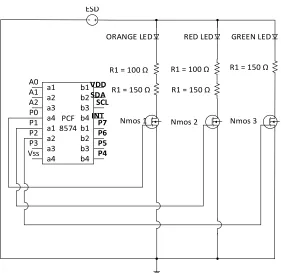
The discharging rate is controlled by using three LEDs in the discharging circuit. PCF8574 is used to communicate with the NXT controller and control the LEDs. The LED combination for different modes of discharge is given in Table 2-X.
Table 2-X: LED combination for different modes of discharge
Discharge Mode LEDs switched ON
Slow mode Green
Medium mode Orange & Red
39 Figure 2.24 shows the schematic diagram of the discharging circuit. Figure 2.25 shows the physical layout of the actual components that are connected to the NXT controller in the electric vehicle
VDD
PCF 8574
ORANGE LED RED LED GREEN LED
R1 = 100 Ω
R1 = 150 Ω R1 = 150 Ω
R1 = 150 Ω
Nmos 1 Nmos 2 Nmos 3
R1 = 100 Ω
41
Chapter 3
Distributed Controllers
3.1
Introduction
Figure 3.1 shows the structure for the Green City (GC) platform. The Green City consists of three major software components given below:
• Distributed Controller,
• The Router, and
• The Graphical User Interface (GUI),
In GC, smart grid is viewed as a multi-agent system where each energy device interfaces and interacts with the power network through a distributed controller. Standard interfaces/templates are defined for incorporating new algorithms, communication channels, and energy devices to make GC a readily expandable fast-prototyping platform. The integration of distributed controllers as well as the ability to perform tests under dynamic communication and processing constraints separates GC from the existing platforms. Major features of the GC are:
• Modularity – allows proper management of distributed system through the
use of three layered, agent based design for distributed controllers,
• Real-time Monitoring –has a graphical user interface that provides
real-time access of data to the operator, for monitoring and control tasks,
42 under different communication constrains such as delay, communication noise etc,
Graphical User Interface (PC)
Network/
Router
Node
n
...
Node 2
Node 1
Setup Window Display Window
Distributed Controllers
43
• Fast Prototyping –allows user to promptly integrate changes in existing
algorithms and supports fast prototyping such that new algorithms can be easily added into the system,
• Reconfigurability/Heterogeneity – allows each distributed controller in GC
to be easily reconfigured to interface with heterogeneous distributed energy devices to facilitate interoperability,
• Flexibility –accommodates dynamic changes in network as well as
algorithm parameters, and
• Simplicity – uses simple, standard and easily available hardware.
Every architecture and design decision in GC platform is taken based on these seven features. This chapter along with Chapter 4 will present the details about the architecture, design and functional description of the software structure for the GC platform. While this chapter will focus on the software design for the distributed controllers, chapter 4 will discuss the details about graphical user interface and the router.
3.2
The Distributed Controllers
44 communication capability [40]. As such each distributed generation, storage and load unit needs to have a local controller which is capable of performing the following major tasks:
• Sense its own data such as voltage, current, power etc,
• Receive data from its neighbors,
• Perform simple computations to make control decisions based on its own as well as its neighbor’s data,
• Actuate based control decisions taken, and
• Send information about its current state to its neighbors.
45 Energy Storage
Device
Distributed Controller
Distributed Controller
Distributed Controller
Distributed Controller
Distributed Controller
Generator Solar
Panel
Responsive Load Wind
Turbine
Figure 3.2: Distributed controllers in the future power system
The major tasks of the distributed controller can be functionally divided into three categories:
• Sensing/Actuating
• Communication
• Control
46 finally the Control functions concern with using the sensed and received data to make an optimal decision for the power system unit.
This functional categorization of major tasks is an important factor in the design decision for software architecture of the distributed controller in the Green City platform. In order to make the platform modular, the software architecture of the distributed controller consists of three layers - physical layer, communication/cyber layer, and control layer as shown in Figure 3.3. Each layer communicates with other layer through the use of standard data structure. This layered approach is used so that the modifications done in each layer are independent of the other layers. Agents are used in each layer to further modularize the Green City platform.
Sensing Agent Actuating Agent Data Packaging Agent Routing Agent Disturbance Agent
Data Receiving Agent
Configuration Agent Functional Agent Data Sending Agent Control Decision Neighbor Data Local Sensor Data Physical Layer Cyber/Communication Layer Control Layer
47 3.2.1
Physical Layer
The physical layer of the system is responsible for providing the interface for sensing and actuating processes. Two agents used in this layer are Sensing Agent and Actuating Agent.
3.2.1.1Sensing Agent
Each distributed controller has a sensing agent which acts as the interface between the sensors and the rest of the system. The major task of the sensing agent is to add, remove, initialize and read the data from the sensors. Figure 3.4 shows the class structure of the sensing agent. SensorAgent can contain one or more Sensors.
SensorAgent
- SensorList[] ...
- setSampl ingInterval(int samplingInterval) - addSensor(Sensor S, int portID) - initializeSensor(int samplingInterval) - getSensorReading(Sensor S) - getAllSensorData() ... Sensor - name - portID - samplingInterval - currentReading ...
- senseData()
- setSamplingInterval(int samplingInterval) ... EnergyMonitor - i2cAddress ... - senseData() ... AbsoluteEncoder ... - senseData() ... 1..*
48 Note that Sensor is designed as an abstract class. The methods those are invariant for different sensor (such as setSamplingInterval() is already implemented in the Sensor class. However, some methods such as senseData() are kept as abstract method because the process of reading a sensor’s data may differ from one sensor to another. For example the method of decoding the I2C data from energy sensor will be much different than the method for reading the absolute encoder values from the motors. As such, senseData() method is uniquely implemented by all the concrete classes that implement the abstract class.
3.2.1.2Actuating Agent
Similar to the sensing agent, each distributed controller has an actuating agent. As seen in Figure 3.5, the structure of the actuator agent is similar to the structure of the sensing agent. Each ActuatorAgent can have one or more Actuators. Any set-up or control command to the Actuator has to come through the ActuatorAgent. The setActuatorValue sets the currentOutput for the Actuator which is used by the actuate method in the concrete Actuator
49
ActuatorAgent
- ActuatorList[] ...
- setActuatingInterval(int samplingInterval) - addActuator(Actuator A, int portID) - initializeActuator(int samplingInterval) - setActuatorValue(Actuator A, double Val) ... Actuator - name - portID - samplingInterval - currentOutput ...
- actuate()
- setSamplingInterval(int samplingInterval) ... Motor ... - actuate() ... 1..*
Figure 3.5: Actuator agent and actuator class
3.2.2
Communication/Cyber Layer
The communication/cyber layer is responsible for sending and receiving data between distributed controllers. In order to perform these tasks, four agents are introduced – Data Packaging Agent, Routing Agent, Data Sending Agent, and Data Receiving Agent. Each
agent is described in detail in the following section. In addition to these four agents, another agent called Disturbance Agent is also defined that allows the operator to inject communication constraints such as delay, packet loss and noise.
3.2.2.1Data Packaging Agent
50
• Maintain the updated list of incoming and outgoing data
• Get sensor data through the sensing agent and add the data to the data packet
• Get control decisions through the output agent and add the data to the data packet
• Configure the data packet by setting its message type.
• Decode the received data based on the message type and send it to proper data buffer
Figure 3.6 shows the UML diagram for data packaging agent. As we can see from the figure, DataPackagingAgent class maintains the two lists for incoming and outgoing data. Both of these lists are of DataPacket type. Furthermore, it also contains a method for each of the task mentioned above.
DataPacket class has properties and methods to perform the primitive tasks related to
packaging and decoding the data such as appending sensor data, appending control data as well as methods to decode the data. A method configureDataPacket is also introduced in the DataPacketAgent class to set the type of the data packet. The message type is the first header
51
DataPackagingAgent
- incomingDataPacketList - outgoingDataPacketList ...
- appendSensorData(SensingAgent S) - appendControlData(OutputAgent O) - configureMessageType(int messageID) - decodeData(DataPacket d)
...
DataPacket
- destinationID - sourceID - messageType - data ...
- appendData(String data) - appendHeader() ...
1..*
Figure 3.6: Data packaging agent and data packet class
52 Table 3-I: Message types currently used in the Green City platform
Message Type Message ID
MESSAGE_DISCONNECT 0
MESSAGE_EXIT 1
MESSAGE_CONTROL 2
MESSAGE_ALGORITHMTYPE 3
MESSAGE_PARAMUPDATE 4
MESSAGE_STARTALGO 5
MESSAGE_NEIGHBORDATA 6
MESSAGE_REQALGODATA 7
MESSAGE_REQNODEDATA 8
MESSAGE_STOPALGO 9
MESSAGE_NODEPARAMS 10
53 3.2.2.2Routing Agent
Because of the distributed nature of the future power system, a distributed controller needs to communicate only with its neighbours. In the Green City platform, the operator decides the network topology. The up-to-date network topology information is stored by the distributed controller using the Routing Agent. Figure 3.7 shows the routing agent. As we can see, RoutingAgent contains routingTable and networkParams which contain the updated parameters related to network topology and behaviour. Methods also exist to update the network related parameters. RoutingAgent is used to set the source and destination ID for the data packet that is to be sent from the distributed controller.
RoutingAgent
- routingTable - networkParams ...
- configureDataPacket() - updateRoutingTable(String d) - updateNetworkParams(String s)
...
Figure 3.7: Routing agent
3.2.2.3Data Sending Agent
54 process could differ; therefore, a data sending agent should act as the standard interface between the actual protocol used to send the data and the rest of the system. Even though the Green City platform uses Bluetooth communication between the distributed controllers, the data sending agent is designed such that it can be easily expanded to use other network protocols. CommChannel is the abstract class that should be inherited by all the concrete communication channel classes. Each of these classes should implement the three basic operations in the commChannel class – connect(), sendData(), and receiveData().
DataSendingAgent
- communicationChannel ...
- setSamplingInterval(int samplingInterval) - appendHeader(DataPacket d)
- sendData(DataPacket d) ... CommunicationChannel - incomingBuffer - outgoingBuffer - samplingInterval ... - connect() - sendData(String s) - receiveData()
- setSamplingInterval(int samplingInterval) ...
Bluetooth
- btConnection ...
- connect()
- sendData(String s) - receiveData() ...
1
55 The DataSendingAgent also has a method appendHeader that invokes the appendHeader method in the DataPacket class. The appending of the header is done here because and not in the DataPackagingAgent because the header should also contain the timestamp information. The timestamp is the exact time when the data is sent from the distributed controller which is why it cannot be determined and added from the DataPackagingAgent. Figure 3.9 Shows the structure of the data packet when it is ready to
be sent to the neighbour.
Destination ID , Source ID , Timestamp , Message Type , dataID ; data : dataID ; data : ...
Data Header
Figure 3.9: The data packet structure in green city
3.2.2.4Data Receiving Agent
Data receiving agent receives the data from the neighbours and stores it in the incomingDataPacketList in DataPackagingAgent. Another agent called the disturbance
agent is also introduced in the communication layer to add noise to the data and to generate
56 DataReceivingAgent
- communicationChannel - receivedData
...
- setSamplingInterval(int samplingInterval) - storeData() - receiveData() ... CommunicationChannel - incomingBuffer - outgoingBuffer - samplingInterval ... - connect()
- sendData(String s) - receiveData()
- setSamplingInterval(int samplingInterval) ...
Bluetooth
- btConnection ...
- connect()
- sendData(String s) - receiveData() ...
1
Figure 3.10: Data receiving agent and the communication channel class
3.2.2.5Disturbance Agent
Disturbance agent has three major tasks:
• To inject delay in the outgoing data packet by introducing background traffic
• To emulate packet loss by dropping the data packet
• To inject noise based on the mean and variance set by the operator
57 disturbance is injected at various points during the data packaging and sending process. For example, noise is added to the data when DataPackagingAgent calls the appendData() method. Background traffic is added to introduce delay when sendData() method in DataSendingAgent is being executed. The decision to drop a packet is also taken in the sendData() method of the DataSendingAgent.
DisturbanceAgent
- delayMean - delayVariance - noiseMean - noiseVariance - packetLoss ...
- setDelayParams(double[] p) - setNoiseParams(double[] p) - setPacketLossParams(double[] p) - injectDelay()
- injectNoise() - isPacketLost() ...
Figure 3.11: Disturbance agent
3.2.3
Control Layer
58 agents are defined for the functioning of the control layer – Configuration Agent and Functional Agent.
3.2.3.1Configuration Agent
59
ConfigurationAgent
- thisNode ...
- setupNode(int i) ... Node - nodeType - nodeID - sensingAgent - actuatingAgent ...
- handleControlReq(String s) - handleDataReq(String s) - setupSensors(String s) - setupActuators(String s) ...
WindTurbine
...
- handleControlReq(String s) - handleDataReq(String s) - setupSensors(String s) - setupActuators(String s) ...
SolarPanel
...
- handleControlReq(String s) - handleDataReq(String s) - setupSensors(String s) - setupActuators(String s) ...
1
Generator
...
- handleControlReq(String s) - handleDataReq(String s) - setupSensors(String s) - setupActuators(String s) ...
ElectricVehicle
...
- handleControlReq(String s) - handleDataReq(String s) - setupSensors(String s) - setupActuators(String s) ...
Load
...
- handleControlReq(String s) - handleDataReq(String s) - setupSensors(String s) - setupActuators(String s) ...
Figure 3.12: Configuration agent and node class
Table 3-II shows the list of actuators and sensors for each type of node.
3.2.3.2Functional Agent
Functional Agent is another agent in the control layer that is designed to make the Green City platform flexible as well as generic. Since Green City platform is a laboratory prototype for the smart grid, it should be designed to allow fast prototyping of the algorithms related to different aspects of the smart grid such as optimal power generation, security, plug-and-play capability etc. Figure 3.13 shows the UML diagram for the functional agent in the Green City. The FunctionalAgent class itself is very simple which performs 3 major tasks
60
• Start the algorithm
• Stop the algorithm
Table 3-II: The set of sensors and actuators used by each node type
Node Sensor Actuator
WindTurbine
1 EnergyMeter (voltage, current)
1 AbsoluteEncoder(Motor position)
1 Motor (Orientation of the Windmill)
SolarPanel
EnergyMeter (voltage, current)
Absolute Encoders (Motor position)
2 Motors (Yaw and pitch of the Solar Panel)
Generator EnergyMeter(voltage, current) None
ElectricVehicle
EnergyMeter(voltage, current)
Absolute Encoders (position)
2 Motors (Left and Right wheel)
Load (Charging
Station)
61 setupAlgorithm() determines the algorithm that is to be run based on the choices made
by the operator. startAlgorithm() and stopAlgorithm() start or stop the algorithm based on the operator’s choice.A standard is defined for the algorithms using the abstract DistributedAlgorithm class. The DistributedAlgorithm class defines the following methods
• updateParameters() - update the parameters related to the algorithm. Data
is received from the operator. Different algorithms may have different sets of parameters.
• updateNeighborData() - update the values of the neighbour’s data.
• updateLocalData() - update the values of the locally sensed data.
• compute() - perform the calculations to update the control data.
Five distributed algorithms have been implemented in the Green City –
• Consensus,
• Leader-Follower Incremental Cost Consensus,
• Secure Incremental Cost Consensus,
• Two Level Incremental Cost Consensus, and
62 DistributedAlgorithm - algorithmType - node - localData - neighborData - controlData ...
- updateParameters(String s) - updateNeighborData() - updateLocalData() - compute() ... Consensus ...
- updateParameters(String s) - updateNeighborData() - compute() ...
Leader-Follower Incremental Cost Consensus (LFICC)
...
- updateParameters(String s) - updateNeighborData() - compute() ... 1 Secure ICC ...
- updateParameters(String s) - updateNeighborData() - compute() ...
Incremental Welfare Consensus (IWC)
...
- updateParameters(String s) - updateNeighborData() - compute() ...
Two Level ICC
...
- updateParameters(String s) - - updateNeighborData() - compute()
...
FunctionalAgent
- distributedAlgorithm ...
- setupAlgorithm(int i) - startAlgorithm() - stopAlgorithm() ...
63
Chapter 4
Graphical User Interface
4.1
Introduction
The graphical user interface (GUI) is another important component of the Green City platform. It is through the use of GUI that real-time monitoring is made possible. GUI plays an important role in setting up the system to run under specific scenarios chosen by the operator. Since Green City is a laboratory platform used for R&D purpose, it is very important that the operator/researcher has complete control and visibility of the Green City environment. Using the GUI in Green City, the operator will be able to:
• Setup network topology,
• Setup/configure the distributed controllers (DCs)
• Setup algorithm parameters,
• Choose simulation/experimental platform,
• Setup communication constraints,
• Display states/control values of single DC or several DCs, and
• Log/save data for future analysis.
4.2
Software Architecture
64 design pattern is a popular design pattern for user interface based on separation of concerns. It divides the software into model, view and controller components.
User Interface: Network Design Canvas Algorithm Setup Parameter Setup Display Panel Menu Bar, ...
Network Agent Display Agent Algorithm Agent Simulation Agent Communication Agent DataLogging Agent Router Algorithm Data Model Node Model Universal Data Type ParameterPanel Agent Operating System Matlab/ Simulink Parameter Panel Model Operator Network Model
Figure 4.1: Software architecture for GUI
65 the data. It can be in several forms such as text, plot or a diagram. A controller receives, interprets and validates the input and updates/modifies the other components of the MVC architecture. For e.g. it can send commands to its related view to change the plot or to update the data in the model. A model can notify the controller when a change has occurred in its state. This notification can trigger an update in the view or controller. In most cases, the model does not actively notify the controller and/or view components but responds to requests/queries from controller with appropriate data. The view requests the data from the model through the controller for representation.
Model
Data representation, storage, validationView
Display and interface
Controller
Receive, interpret and validate input, create and update views, query and modify models
User
operator
Sees Uses
Manipulates, Queries
Updates Notifies
66
4.3
Model Components in Green City GUI
The GUI in Green City maintains four models – algorithm data model, parameter panel model, the network model and the node model.
4.3.1
The Algorithm Data Model
The algorithm data model is the warehouse for all the state/output data related to the currently running algorithm. It is the repository for data from all distributed controllers. The algorithm data model uses a universal data type to be able to store different types of data related to different types of algorithms and distributed controllers. The structure of the UniversalDataType class is given in Figure 4.3. UniversalDataType contains properties such