Copyright to IJIRCCE DOI: 10.15680/IJIRCCE.2017. 0502083 1682
A Survey on Co-Simulation Tools Based on
MATLAB
Preeti Wadhwa
1, Himanshi Saini
2M.Tech Student, Department of Electronics & Communication Engineering, DCRUST, Murthal, Sonipat,
Haryana, India
1Assistant Professor, Department of Electronics & Communication Engineering, DCRUST, Murthal, Sonipat,
Haryana, India
2ABSTRACT:
A Network Simulator is software whose work is to establish a network and to check its functionality
similar to the networks of the real world. Thus it helps in saving both the time and cost of testing the functionality of
network and implementations are made easy. Co-Simulation is done to improve the efficiency of a network simulator
by integrating the functions of a network simulating tool with the mathematical efficiency of Matlab. In this paper, we
introduce the main features of different co-simulating networking tools based on Matlab and consider their advantages
and disadvantages. We hope this survey proves to be a good reference source for those people who wish to work on
Matlab for establishing and simulating networks.
KEYWORDS:
Network Simulator, NS
2, OPNET, OMNET++, MATLAB, Co-simulation
I.
INTRODUCTION
Simulation is an important and most widely used technology of modern times. The simulation is done to model
hypothetical and real-life objects on a computer so that it can be studied. The different networks can also be simulated
on the computer.
A network simulator is a tool for implementing the network on the computer. Through this the behavior of the network
is calculated either by network entities interconnection using mathematical formula, or by capturing and playing back
observations from a production network [1].
“The Network Simulator provides an integrated, versatile, easy-to-use
GUI-based network designer tool to design and simulate a network with SNMP, TL1, TFTP, FTP, Telnet and Cisco
IOS device.”
[3]In co-simulation the different subsystems which form a coupled problem are modeled and simulated in a distributed
manner. Hence, the modeling is done on the subsystem level without having the coupled problem in mind.
Furthermore, the coupled simulation is carried out by running the subsystems in a black-box manner. During the
simulation the subsystems will exchange data [2]. The co-simulation can be performed using any combination of
network simulators and the Matlab. Matlab enhances the working of network simulating tool and increases the speed of
testing and processing by using different toolboxes available in Matlab. These can be compared on the basis of: range
(from the very simple to the very complex), speed and the traffic between the nodes, specify everything about the
protocols used to handle traffic in a network, graphical applications (allow users to easily visualize the workings of
their simulated environment.), text-based applications (permit more advanced forms of customization)
and
programming-oriented tools [1].
description of Network simulating tools used in this paper and some other network simulating tools is as follows:
NS
2(Network Simulator version2):
NS2 is one of the most popular open source network simulators. NS2 is widely
used in academic research and it has a lot of packages contributed by different non-benefit groups. NS2 is an
object-oriented, discrete event driven network simulator and the programming it uses is C++ and OTcl (Tcl script language
with Object-oriented extensions developed at MIT)[4].
NS
3(Network Simulator version3):
NS
3is also an open sourced
discrete-event network simulator which targets
primarily for research and educational use.[1] NS
3is licensed under the GNU GPLv2 license, but. NS3 is a new
simulator and it is not backward-compatible with NS2. The basic idea of NS3 comes from several different network
simulators including NS2, YANS, and GTNets.[4].
OMNeT++:
It is a component-based, modular and open-architecture discrete event simulator framework. The most
common use of OMNeT++ is for simulation of computer networks, but it is also used for queuing network simulations
and other areas as well. It is licensed under the its own Academic Public License, which allows GNU Public
License-like freedom but only in noncommercial settings.
It provides
component architecture for models [16].
OPNET
(Optimized Network Engineering Tools):
It provides a global environment to model, simulate and evaluate
performances of all kinds of wired and wireless communication networks and distributed systems. It is available on
Windows 2000, XP, Linux and Solaris platforms.
A simulation within OPNET is represented by a project including a
set of scenarios. This project is created through the project editor also known as the OPNET central interface [5, 6].
II.
RELATED WORK
This section provides the details of different co-simulation tools that have been studied for literature survey. The tools
mentioned here have already been designed. All these co-simulation tools integrate Matlab with other network
simulating tools like NS2, OPNET, OMNet++ etc. The different co-simulation tools that have studied are:
1. NMLab
A. CO-SIMULATION FRAMEWORK
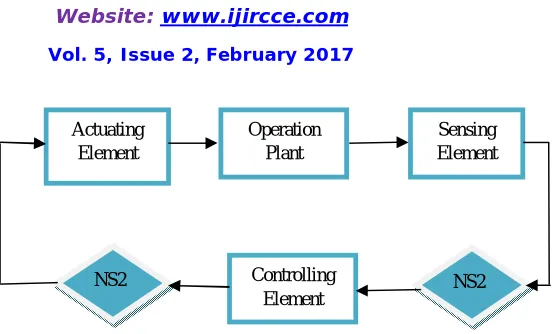
Copyright to IJIRCCE DOI: 10.15680/IJIRCCE.2017. 0502083 1684 Fig. 1 NCS using NS-2 having Matlab controlled Control System
B. NEED FOR NMLAB
Present networked control systems have become more and more complex. Therefore, for analyzing these networked systems, simple analytical procedures cannot be used. So, it is strongly desired to develop appropriate simulating tools. These simulating tools work in different domains like continuous, discrete or the hybrid domain. All the domains have its limitations. Given below are some network simulating tools for different domains with its limitations:
Matlab/Simulink and Scilab/Scicos are the examples of simulating tools that work on continuous dynamics and have only little support for the discrete events. But our networked control systems demand working in both domains.
Opnet and NS2 are two common network simulators that provide realistic framework for discrete event based transmission protocols. These network simulators have a very wide range but again they have only limited support for the continuous dynamics.
Ptolemy II and SimEvents are two hybrid system simulators which have high level of abstraction which makes them unsuitable and require large modeling effort in order to make a realistic networked control system to be feasible for simulation. Even SimEvents has the limitation of wireless support and the wireless support functionality of Ptolemy II is too simple.
Thus Co-Simulation approach for simulating networked control systems is required to efficiently federate existing control and network simulators. NMLab as a co-simulation framework preserves the computational flexibility of Matlab and provide functionality of a tested and verified network simulator. There are some other co-simulating tools also that integrate Matlab and NS2 for efficient design and simulation of networked control systems like NCSWT(Networked Control Systems Wind Tunnel), PiccSIM and ModelSim etc.
2. COSMO
A. INTRODUCTION
COSMO means Co-Simulation with Matlab and OMNet++. It is a co-simulation framework for indoor wireless networks. The available network simulation tools have the limitations of designing accurate indoor models, three dimensional models, models portability and effective validation. But this co-simulation framework removes this limitation for indoor wireless networks. The main feature of COSMO is self-validation. Thus COSMO helps in fast designing and effective simulations for indoor wireless networks. COSMO combines the strength of both Matlab and OMNet++. An indoor wireless network is divided into different layers and each layer is divided into different kinds of tasks, computation tasks and control & communication tasks. Matlab performs computation tasks and protocol models in OMNet++ are used to implement control and communication tasks. The Matlab models are then compiled to header files and shared libraries and integrated into OMNeT++ [8].
B. COSMO BASED DESIGN PROCEDURE
The procedure of using COSMO for indoor wireless network simulation has five phases as shown in Fig. 2: specification, partition, coding, integration, and validation [8].
1) Specification: Define the objectives of the simulation clearly and address the specific issues of the target indoor wireless network[8].
Actuating Element
Operation Plant
Sensing Element
Controlling Element
NS2 NS2
2) Partition: The indoor wireless network can be divided into different layers. Then each layer can be partitioned into two kinds of tasks, computation (Comput.) tasks and control and communication (CC.) tasks. The computation tasks are defined as the tasks for signal processing, matrix operation and complex algorithms that can be realized easily or have well-developed models in Matlab. Other tasks such as scheduling tasks, are classified as control and communication tasks[8].
3) Coding: The computation tasks and control and communication tasks are implemented in MATLAB and OMNeT++ respectively. Some test files or data are employed for debugging these tasks. The algorithms can be improved and the network communication process can be tested. Moreover, some of the system configurations can be fixed, and preliminary simulation results can be obtained at this stage[8].
4) Integration: Compile the MATLAB codes into .h, .lib, .ctf and .dll files, and add these files as well as the mclmcrrt.lib file into OMNeT++. The functions, mclInitializeApplication(NULL,0) and mclTerminateApplication(), are called to initialize and terminate the MATLAB compiler runtime (MCR) respectively. Then test data are used to debug and optimize the simulation[8].
5) Validation: The simulation results in OMNeT++ are compared with those obtained in MATLAB. This is a validation of the co-simulation results. COSMO has the ability of self-validation which is an advantage over other network simulators [8].
Specification: Indoor Wireless Network Specification
...
Layer 1 Layer 2 Layer N Partition:
...
Comput. 1 CC. 1 Comput. 2 CC. 2
Comput. N CC. N
MATLAB OMNeT++
Coding: Implementation Implementation
Debugging & Test
Test File Test Data
Debugging & Test Models and Communication and Algorithms Control Process
Compiled to C++ .h,
Bugs Fixed & Bugs Fixed &
Integration:
Interface to .lib, .ctf and .dll Interface for OMNeT++ Fixed MATLAB Fixed
Test Data Integrated Debugging Validation
Bugs Fixed &
Validation: Simulation Results
Simulation
Results
in MATLAB in OMNeT++
Fig 2. COSMO-based Design Procedure[8]
3. SIMULINK & OPNET
A. CO-SIMULATION FRAMEWORK
Co-Simulation using Simulink and OPNET is done to conduct performance analysis of wireless networked control systems over mobile adhoc networks. Wireless networked control systems over mobile adhoc networks has many potential applications like military or rescue missions, exploring hazardous environments and so on.[12]
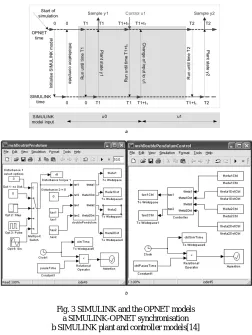
Copyright to IJIRCCE DOI: 10.15680/IJIRCCE.2017. 0502083 1686 OPNET and Matlab have been integrated to evaluate performance of smart antennas using MX interface provided by Matlab, which allows C programs to call functions developed in Matlab [15]. Both SIMULINK and OPNET work parallel in synchronized manner. SIMULINK is time driven and OPNET is event driven, so the challenge for co-simulation approach is to maintain synchronization in time.
Although both system and network can be simulated by using a high level language C but we can save a lot of time and effort by using co-simulation of SIMULINK and OPNET. Once the plant and controller models are built in SIMULINK, different types of network models can be chosen to optimize system performance using OPNET. Co-simulation of SIMULINK and OPNET is a general approach and thus can be used for performance analysis of any of the networked control system.
B. SIMULINK-OPNET Interactive Co-Simulation
In the interactive co-simulation environment of SIMULINK and OPNET, OPNET acts as the master simulator and performs the function of maintaining time. The nodes of OPNET plant and controller invoke two Matlab engine servers to execute the plant and controller SIMULINK models. Before generating the state packet, Simulink model shows the state of the particular sensor and is read by OPNET plant and controller model. When a control packet arrives at the plant, control information is passed to corresponding actuator of the Simulink model [14]. The synchronisation mechanism between the SIMULINK and the OPNET models is explained in Fig. 3a.
Fig. 3 SIMULINK and the OPNET models a SIMULINK-OPNET synchronisation b SIMULINK plant and controller models[14]
III.
FEATURES OF CO-SIMULATION TOOLS
A. NMLAB
Can change easily both network parameters and the control system parameters.
Live analysis and processing is possible because of Matlab.
Does not depend on certain version of NS2.
Improves available NCS simulation
Gives a simple solution for the network simulation.
Flexible simulation method.
Allows interaction between network and system.
B. COSMO
Surpasses other network simulators in terms of workload and validity.
Provide accurate indoor channel model.
Can design three dimensional model.
Models can be made portable and reusable.
Saves much time and effort.
Fast designing and credible simulations are possible.
Self-validation is the main feature.
Fast simulation framework.
Does not need synchronization technologies between simulation tools.
Coding and debugging is easier and faster.
C. SIMULINK AND OPNET
Based on realistic wireless communication model.
Both system dynamics and network events can be simulated simultaneously.
Performance of a feedback scheduling system can be evaluated.
Both linear and no-linear systems can be analysed.
This is a general approach.
Can analyze various parameters effectively.
IV. COMPARISON WITH OTHER SIMULATION TOOLS
Table 1 shows the comparison of different properties of simulation tool NMLab with MATLAB and NS2. It is observed that co-simulation offers higher flexibility and speed. It allows the designer to change both network and system parameters.
Table1: Comparison of NMLab with Matlab and NS2 for Networked Control Systems
S.NO PROPERTY MATLAB/SIM ULINK
OPNET/N S2
NMLab
1. Working domains Only Continuous domain Only Discrete domain Both Continuo us and Discrete domains
2. Flexible No No Yes
3. Versatile No No Yes
4. Advance Implementation
Not Required Not Required
Required
5. Triggering by State based events
Not allowed Not allowed
Allowed
6. Ability to change both N/w & System parameters
No No Yes
7. Live analysis Not Possible Not Possible
Possible
Copyright to IJIRCCE DOI: 10.15680/IJIRCCE.2017. 0502083 1688
offers high scalability and fast debugging. It allows design with parameterized topology models. All these properties
are enhanced when used in co-simulation with Matlab.
Table2. Comparison between NS2, OPNET & OMNeT++ for Indoor Wireless Networks
S.No PROPERTY NS2 OPNET OMNeT++ (used in co-simulation) 1. Graphical
Interface
Not Supported
Supported Supported
2. Hierarchical Models
Not Supported
Supported Supported
3. Topology Fixed Fixed Parameterized 4. Scalability Good Better Best 5. Debugging Slower Slower Faster
V.
CONCLUSION AND FUTURE SCOPE
Co-Simulation Framework has proved to be an effective and efficient tool for the network simulation. There are so
many networking tools available as discussed in this paper. All these different tools can be integrated with Matlab for
different networking scenarios for better results. The computational flexibility of Matlab is very helpful for all types of
network calculations. All the co-simulations tools discussed give efficient results as compared to the results of the
network simulating tools individually. There can be many such co-simulation tools that can be designed for different
networks for different scenarios with different combination of two or even more simulation tools in future. There is a
lot of work that can be done by integrating Matlab with present network simulation tools for effective networking.
REFERENCES
[1] Mrs. Saba Siraj, Mr. Ajay Kumar Gupta, Mrs. Rinku Badgujar, “Network Simulation Tools Survey”, International Journal of Advanced Research in Computer and Communication Engineering, Vol.1, Issue 4, June 2012.
[2] https://en.wikipedia.org/wiki/Co-simulation, accessed on 23 January 2017, 12 P.M.
[3] http://www.webnms.com/simulator/network-simulator-ds.html
,
accessed on 23 January 2017, 12 P.M.[4] Jianli Pan, “A Survey of Network Simulation Tools: Current Status and Future Developments”, November 24, 2008. [5] http://www.omnetpp.org/
,
accessed on 23 January 2017, 10 A.M.[6] Vinita Mishra, Smita Jangale, “Analysis and Comparison of Different Network Simulators”, International Journal of Application or Innovation in Engineering & Management, ISSN 2319-4847, Special Issue for International Technological Conference-2014.
[7] Oliver Heimlich, Rudolf Sailer, Łukasz Budzisz, “NMLab: A Co-Simulation Framework for Matlab and NS2”.
[8] Zhi Zhang, Zhonghai Lu, Qiang Chen, Xiaolang Yan, Li-Rong Zheng, “COSMO: Co-Simulation with Matlab and OMNeT++ for indoor wireless networks”, IEEE Globecom, 2010.
[9] http://www.icir.org/models/simulators.html
,
accessed on 22 January 2017, 1 P.M. [10] http://en.wikipedia.org/wiki/NS2, accessed on 24 January 2017, 3 P.M. [11] http://www.realsimulator.com/,
accessed on 23 January 2017, 5 P.M.[12] M.S. Hasan, H. Yu, A. Carrington, T.C. Yang, “Co-Simulation of wireless networked control systems over mobile adhoc networks using SIMULINK and OPNET”, IET Communications, doi: 10.1049/iet-com.2008.0536, ISSN 1751-8628.
[13] Marek Ma³owidzki, “Network Simulator: A Developer’s perspective”, Proc. of International Symposium on Performance Evaluation of Computer and Telecommunication Systems (SPECTS'04), 2004, page no 73-83.
[14] ROYER E.M, TOH, C.K.: “A Review of Current Routing protocols for adhoc mobile wireless networks”, IEEE Pers. Commun., 1999, 6, (2), pp, 46-55.
[15] DHAM V. : “Link establishment in adhoc networks using smart antennas”, Electrical and Computer Engineering, Master’s thesis, Virginia Polytechnic institute and state university,2003.
[16] http://www.omnetpp.org/pmwiki/index.php?n=Main.OmnetppInN utshell
,
accessed on 22 January 2017, 1 P.M. [17] http://www.odu.edu/engr/networking/Tools.html,
accessed on 23 January 2017, 5 P.M.[19] Dennis McGrath, Doug Hill, Amy Hunt, Mark Ryan, and Timothy Smith, NETSIM: A Distributed Network Simulation to Support Cyber Exercises, Award No. 2000-DT-CX-K001 from the Office for Domestic Preparedness, U.S. Department of Homeland Security.
[20] Srinivasan Keshav, REAL : A Network Simulator, Xerox Corporation, Palo Alto Research Center and in part by the Defense Advanced Research Projects Agency (DoD), ARPA Order No. 4871, monitored by Naval Electronic Systems Command under Contract No. N00039-84-C-0089, December 1988.
[21] http://www.nsnam.org/overview/key-technologies/
,
accessed on 25 January 2017, 2 P.M. [22] http://rtcm.inescn.pt/fileadmin/rtcm/WorkShop_13_Fev_09/ppt3.p df[23] http://utopia.duth.gr/~rdunayts/pdf/guest/OPNET.pdf
,
accessed on 25 January 2017, 2 P.M.[24] M Shahidul Hasan, Hongnian Yu, Alison Carrington, “Overview of Wireless Networked Control Systems Over Mobile Adhoc Networks.”, Proceedings of the 14th International Conference on Automation & Computing, Brunel University, West London, UK, 6 September 2008. [25] Suraj G. Gupta, Mangesh M. Ghonge, Parag D. Thakare, Dr. P. M. Jawandhiya, “Open-Source Network Simulation Tools: An Overview”,
![Fig 2. COSMO-based Design Procedure[8]](https://thumb-us.123doks.com/thumbv2/123dok_us/1412691.1173846/4.595.178.418.385.629/fig-cosmo-based-design-procedure.webp)