Journal of Chemical and Pharmaceutical Research, 2015, 7(4):1201-1206
Research Article
CODEN(USA) : JCPRC5ISSN : 0975-7384Development and application of software for expanding map symbol database
in oracle spatial
Dong Zhengming
Zhejiang Police College, Hangzhou, Zhejiang, China
_____________________________________________________________________________________________
ABSTRACT
In the application of GIS data and the development of the GIS, vector data、raster data、attribute data and
cartographic symbols not only can't be managed easily, but it also reduce the efficiency. Oracle Spatial is the application extension of Oracle database on the storage of spatial data. As it has been developed for about twenty years, at present, it provides powerful support for the storage and operation functions of vector data、raster data
and attribute data, it also provides import tool and developer components for these three kinds of data above. However, it can't satisfy the needs of the clients for it doesn't provide cartographic symbols management tool and it can't extend cartographic symbol library. In order to realize the integrated storage of vector data、raster data、
attribute data and cartographic symbols, this paper elaborates the design and construction of a visual symbol library management system for Oracle Spatial data, this system can realize the import and management from SVG format to Oracle. Practical applications show that the tool provides convenient way for the display of spatial data and web visualization; it also can cooperate with Oracle Builder import tools and Oracle Map server, and become an effective complement of a series of Oracle Spatial tools.
Key words: Oracle Spatial, Map Symbol Database, Share, Java, SVG
_____________________________________________________________________________________________
INTRODUCTION
Table.1Oracle Spatial Space support analysis tools
DEVELOPMENT AND VALIDATION OF RESEARCH IDEAS
Oracle Spatial starts from 11g version, providing a symbol library for storing data table, and Map Builder provides picker and import, export, backup tools such transplants, which provides support for front-end applications and back-end storage conditions for the symbol library on the target system storage and sharing application , specifically as follows:
(1)Storage Support. Oracle Database provides USER_SDO_STYLES and MDSYS.SDO_STYLES_TABLE two data tables as shown in Tables 2 and 3 supports will be stored for each point, line, and surface and annotation style into a table record. Both data sheet contains five fields are used to store data carrier symbol (DEFINITION field) and graphic description (NAME, TYPE, DESCRIPTION, IMAGE). MDSYS.SDO_ STYLES TABLE increase SDO_OWNER field on this basis, each symbol is used to describe all of which user records attribution. Through these two views can be uploaded to an Oracle database symbol, the main difference is: MDSYS.SDO_STYLES_TABLE contains all the symbols and the system comes with user-created, and USER_SDO_STYLES contain only specific users to create symbols. For example, suppose A user (SDO_OWNER is A) create 10 symbols, B user creates 15 symbols, C users creates 20 symbols, Then the symbols of MDSYS.SDO_STYLES_TABLE have not only contains the system's own symbols, but also has A, B, C three symbols, so when will all sign a one-time backup easy backup into a single *. dat files into other hosts share an Oracle server implementation transplant. Therefore, the user receives the best choice for importing symbol target database table should be MDSYS.SDO_STYLES_TABLE. Seen from Table 2: USER_SDO_STYLES contains five fields, NAME field is used to uniquely identify the name of the symbol, DESCRIPTION field is the further description for symbol style, TYPE field values with six kinds are labeled corresponding symbol style types, which Marker, Line, Area, Text corresponds to the point, line, surface, annotation four kinds of symbol type in GIS software, by DEFINITION (CLOB type, SVG symbols) and IMAGE (BLOB type, image symbol) two field data content to achieve.
Table.2The storage structure of table for Oracle Spatial symbol library user_sdo_styles
Column Name Data types Description NAME VARCHAR2 Style name, the name must be unique. Cannot be empty.
TYPE VARCHAR2 Symbol style types, including Area, Color, Line, Marker, Text, Advanced six kinds. Cannot be empty.
DESCRIPTION VARCHAR2 The text description of Symbol style. Can be empty DEFINITION CLOB The XML code of Symbol style. Cannot be empty.
IMAGE BLOB Which means that when used to denote the point? Can be empty
Table.3 The storage structure of table for Oracle Spatial symbol library mdsys.sdo_styles_table
Column Name Data types Description
SDO_OWNER VARCHAR2 Username, the name must be unique. Cannot be empty. NAME VARCHAR2 Style name, the name must be unique. Cannot be empty.
TYPE VARCHAR2 Symbol style types, including Area, Color, Line, Marker, Text, Advanced six kinds. Cannot be empty. DESCRIPTION VARCHAR2 The text description of Symbol style. Can be empty
DEFINITION CLOB The XML code of Symbol style. Cannot be empty.
(2) Supporting of style pickup tool. Oracle provides the style pick-up function developed by Map Builder, the tool provides the main store pickup USER_SDO_STYLES styles and preview display functions as a layer or SQL spatial data sets. However, Map Builder does not provide the additional of symbol library for symbol, the function for modifying, which is the extension of the system needs to content.
(3) Supporting of backup and migration. Map Builder provides output metadata, which can connect all symbol libraries, theme, and map, exported together into a dat file on another computer by importing metadata, enabling backup and migration.
Based on the above conditions is feasible to develop the symbol library system which supports for expansion in line with MDSYS.SDO_STYLES_TABLE data format and content requirements, and is currently provided by Oracle to
Vector Data Raster Data Spatial Data Tools Front-enddevelopment tools
Geometry support vector data storage, spatial query, indexing and analysis, data management support and unified storage attributes associated with the object.
Georaster supports raster data storage,
spatial query,
indexing and
analysis.
Provided EasyLoader,
GeoRasterLoader, Shp2SDO, Map Builder software tools and Oracle Spatial's Java API, OCCI, ADO application interface receives data into GIS.
support the expansion of space or lack of important content. At the same time, taking into account the Map Builder is a pure Java implementation of graphical user interface JAR main pack. Target system as an auxiliary tool for Map Builder, uses the same Java development language, similar style interface JAR package program oracle map style extensor. Development and validation of research ideas as follows:
① SVG symbols using Java to read, upload, preview, edit, delete the full functionality.
② In order to ensure continuity of software, development of data connectivity so that users can connect to the Oracle server user connection parameters established according to the target system. Meanwhile, the use of eclipse plugin jar package to fight Fat jar, packaged into a Jar file cross-platform operation.
③Sharing application test results. Production in line with the "map symbol library to establish the basic requirements" the style, size and color specifications SVG symbols, passed through the symbol library software system developed to Oracle's symbol table, Oracle Map Builder using the experimental data into the topographic maps, pickup corresponding symbol, ArcGIS layers and maps to a single space as a reference, the overall test created SVG symbol library display. To test the portability and sharing symbol library, symbol libraries, together with the bulk export and import the database on the server, using Fusion Middleware Oracle Map Viewer for map publishing, network analysis maps in the front of the display.
KEY TECHNOLOGY
(1) Read and format validation of SVG files
As for the information of symbols are stored in SVG files, so we need load the path and validate the format of the SVG files before saving to SVG files. The implementation process is as follows:
① Import the batik jars. Batik is an application which uses SVG format graphics to realize various functions and a java-based toolkit provided by Applet. JSVGCanvas module is a swing component provided by Batik toolkit, and application developers can use the module in the main program to achieve the function of SVG graphic symbol display. Batik1.7 also has the function of checking whether the files loaded are SVG files and whether the version of SVG files is 1.0, and it is also coincided with the SVG version supported by Oracle Map Builder, making the upload of SVG symbols more standardized.
② Loading and getting path of SVG files. Define a class called myJSCGCanvas in the development environment in
order to display SVG documents and obtaining the path of SVG documents. Create a svgCanvas type which contains internal JSVGCanvas type in the constructor of the class, and then define button events to read the SVG file path, and display them. The core program is as follows:
// create object svgCanvas of JSVGCanvas type JSVGCanvas svgCanvas = new JSVGCanvas (); button.addActionListener (new ActionListener () { Public void actionPerformed (ActionEvent ae) { JFileChooser fc = new JFileChooser ("."); int choice = fc.showOpenDialog(c);
if (choice == JFileChooser.APPROVE_OPTION) { File f = fc.getSelectedFile(); try {svgCanvas.setURI(f.toURI().toString());
// obtain the path of SVG documents d = f.getPath () ;} catch (Exception ex) {
ex.printStackTrace(); }}
(2) Parsing and upload of SVG files
Oracle Map Builder is based on the XML document to store the SVG graphic symbols, so before importing it into the database we need parse the SVG file. Parsing process is roughly consists of the following 3 steps:
①Create the input stream. According to the SVG file path already accessed, create a FileInputStream object fis for reading the original byte stream of SVG files. The code is as follows:
FileInputStream fis = new FileInputStream (d);
② Create a temporary byte array. Put the raw bytes of data of SVG files into a temporary byte array. The code is as follows:
Byte [] buffer = new byte [1024];
③ Read the data. Apply the read method in FileInputStream to read the data in temporary array of bytes. The core code is as follows:fis.read (buffer, 0, buffer.length)
then insert into the MDSYS. SDO_STYLES_TABLE table. The SQL inserting string is defined as follows:
Stringsql="insert into
MDSYS.SDO_STYLES_TABLE(NAME,TYPE,DESCRIPTION,DEFINITION)values('"+text1.getText()+"','"+a+"' ,'"+text4.getText()+"','"+s.trim()+ "')";
(3) Preview display of symbol graphics and code
Before uploading symbols, in order to enable users to view, check the loaded SVG graphics files, this system provides a preview function of SVG symbols and code, users can modify the XML code to edit, modify, SVG files to be loaded, making the uploading of SVG files more humanized. The realization of the symbol graphics and the preview of codes mainly consist of the following two steps:
① Preview of SVG symbol graphics. In the process of loading SVG graphics, SVG symbol graphics can be displayed in the interface and read the SVG file path by capturing the SVG file address.
② Preview of the XML code. In the process of uploading SVG files, the XML documents in SVG files have been
gained, therefore, in order to preview the XML codes we only need to display XML codes in the form of character string. Implementing the preview of XML documents by FileInputStream method, then assign the XML codes to a Text Area object text2 and display it in the interface, the core program is as follows:
// generate objects representing input stream FileInputStream fis = new FileInputStream (d); // generate a byte array
Byte [] buffer = new byte [1024];
// invoke the read method of input stream object int temp = fis.read(buffer, 0, buffer. Length); String k=new String (buffer);
//assign the XML documents
TextArea text2 = new TextArea (k.trim ());
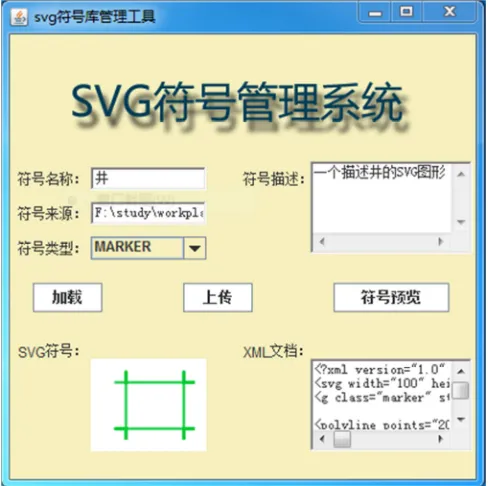
As the function interface shown in figure 1, through the read, verification, parsing and database insert program mentioned above, it implements the storage of notation style in the symbol library data table MDSYS. SDO_STYLES_TABLE. After connecting Map Builder to Oracle, its display in Styles resources list is shown in figure 2.
[image:4.595.184.428.466.709.2]Figure.2 In the display effect of Oracle Map Builder using the symbol library system symbols
RESULTS
Using Xiamen Qiao Ying Sun Cuo communities New Rural Construction of large scale mapping in ArcGIS as the experimental data, import the dataset which contains 55 layers into Oracle by Map Builder, the SVG topographic map symbols of Oracle Map Builder picked upload eventually get the effect shown in Figure 2, the output consistent with the ArcGIS maps to verify the availability of the symbol library.
To further test the symbol library portability sharing, following two pairs of dual operation of spatial data and symbol library import or export on the development machine and server:
① Type “exp sa/sa123 @ orcl file = d: daochu.dmp full = y” in command, export the spatial data tables as *. Dmp
file. Notably, where full = y behalf export the entire database, export data for all users except the users of the system, if the parameter is not specified then the exported data are incomplete, the basic table information found in the Oracle Map Builder cannot be correct in display.
② Open the Oracle Map Builder,When establish a connection, selecting “Export Metadata” under the “Tools menu”
to export the symbol library to *. Dat file.
③ Type “imp sa/sa123 @ orcl file = d: daochu.dmp full = y” in command, to the full import the data collection exported of spatial database on the development machine to the server.
④ Select the “Import Metadata” Under the selection tool of Oracle Map Builder exported *. Dat symbol library
into the database server.
Based on the spatial database and symbol library which imported, using the technology of fusion middleware to publish WebGIS in Oracle Map(show in Figure 3), consistent with the output of ArcMap and display of Map Builder, which verifying the portability sharing of symbol library, at the same time, it also describes the symbol library developed and Oracle provide the ability of collaborative applications for Map Builder and fusion middleware, filling the blank in symbol library management tools for Oracle space expansion tools.
Figure.3The display effect in WebGIS based on Oracle Map
REFERENCES
[1]LIU Xiao, BI Yongnian. The SVG application guide based on XML [J]. Beijing: China Water & Power Press,
2001. (in Chinese)
[2]ZHAI Liang, LI Lin, TONG Xuejuan. Use of Scalable Vector Graphics in Web Map Issue [J]. Bulletin of Surveying and Mapping,2004,(5):38-41.(in Chinese)
[3]ZHANG Junling, XIONG Weidong, XIA Bin. Science of Surveying and Mapping, 2007,32(5):86-88. (in
Chinese)
[4]HE Yuanrong. High Resolution Remote Sensing Monitoring of Mining Area Environment and Its Information Resources Utilization: Methods Applications [D].Changsha: Central South University, 2011. (in Chinese)
[5]YU Zhengwei. Study on Control SVG File Based on Java [J]. Computer Programming Skills & Maintenance, 2008(14):16-18. (in Chinese)
[6]WANG Cheng, LI Lin, YIN Zhang-cai. The area symbols design and implementation based on SVG [J]. Science
of Surveying and Mapping, 2007(3):168-145. (in Chinese)
[7]Xi Y, Wu J. Application of GML and SVG in the development of WebGIS [J]. Journal of China University of
Mining and Technology, 2008, 18(1): 140-143.
[8]Zou Q, Wang Q, Wang C. Integrated Cartography Technique Based on GIS [J]. Energy Procedia, 2012, 17: 663-670.
[9]Robinson A C, Roth R E, Blanford J, et al. A Collaborative Process for Developing Map Symbol Standards [J].
Procedia-Social and Behavioral Sciences, 2011, 21: 93-102.
[10] Li-na D, Gao-feng D, Fan W. The Research on Represention and Realization of Map Symbol Based on Text [J].
Procedia Environmental Sciences, 2011, 10: 2342-2347.
[11] ZUO X, NIE J. Algorithm of symbol generation and configuration of land polygons in present land-use map [J].
Transactions of Nonferrous Metals Society of China, 2011, 21: s743-s747.
[12] Santosh K C, Lamiroy B, Wendling L. Pattern Recognition Letters, 2012, 33(3): 331-341.
[13] Nass A, van Gasselt S, Jaumann R, et al. Planetary and Space Science, 2011, 59(11): 1255-1264.
[14] Dunfey R I, Gittings B M, Batcheller J K. Computers & Geosciences, 2006, 32(10): 1720-1732.
[15] Chang, Y. and Park, H., 2006. International Journal of Geographical Information Science, 20 (4), 371–399. [16] Peng, Z. and Zhang, C., 2004. Journal of Geographical Systems, 6 (2), 95–116.
[17] Huang, C. et al., 2009. Computers& Geosciences, 35 (9), 1802–1816. [18] Guan, J., 2006. Geo-Spatial Information Science, 9 (2), 118–126.
[19] Lin, H. and Huang, B., 2001. IEE Transactions on Knowledge and Data Engineering, 13 (4), 671–682.