Systems Reference Library
COBOL (on Tape) Operating Procedures
IBM 1401
Program Number 1401-CB-070
This publication describes the operating procedures used to assemble a machine-language program from a source program written in 1401 COBOL language. It also describes the operating procedures for producing and modifying the COBOL tapes, the phases that make up the COBOL processor program, and lists diagnostic and error messages in detail.
Fourth Edition
This is a major revision of, and obsoletes C24-3146-1, C24-3146-2, and Technical
Newsletters N24-0244, N21-0032, and N21-004B. The section headed Placing Prescan
Diagnostics on the COBOL Processor System Tape has been deleted. Changes are
indicated by a vertical line at the left of the affected text.
Significant changes or additions to the specifications contained in this publication will be reported in subsequent revisions or Technical Newsletters.
Copies of this and other IBM publications can be obtained through IBM Branch Offices.
A form has been provided at the back of this publication for reader's comments. If the
form has been detached, comments may be directed to IBM Pro gramming Publications,
Rochester, Minnesota, 55901.
Contents
Machine Requirements ... 5
Operating Functions ... 5
Copying the PID Tape ... " ... "... 6
Creating COBOL Processor and Extraction Tapes ... 6
Printing COBOL Phase Listings ... 6
Punching COBOL Subroutines, Sample Program ... 6
Placing COBOL Subroutines in the Autocoder Library... 6
Duplicating the 1401 COBOL Processor System Tape ... 7
Performing a Prescan Diagnostic Run ... 7
Prescan Run Output ... 7
Compiling COBOL Source Programs (COBOL to Autocoder) ... 8
Assembling Autocoder Output (Autocoder to Machine Language) ... 9
Loading the Autocoder Object Program ... 9
Obtaining Storage and Tape Prints for APAR's ... 10
COBOL Dictionary... 10
COBOL Diagnostic Usage ... 10
Pres can Diagnostics ... 10
COBOL Processor Diagnostics ... 12
Diagnostic Reference List ... 14
COBOL Tape Print Program ... 21
COBOL Phase Description ... 22
COBOL Subroutines ... 27
Halts and Messages ... ... ... ... 27
IBM 1401 COBOL (on Tape) Operating Procedures
Machine Require.nents
The 1401 COBOL processor can compile an object pro-gram for any IBM 1401 system that has at least 4,000 positions of core storage. To process the COBOL source program, the 1401 must have at least:
• 4,000 positions of core storage • Four IBM magnetic-tape units • IBM 14m~ Printer, Model 2 • IBM 1402 Card Read-Punch • Advanced Programming Feature • High-Low-Equal Compare Feature • Sense switches.
A minimum of 8000 positions of core storage is re-quired if a prescan diagnostic run (described later in this publication) is to be performed.
The 1401 on which the object program is to be exe-cuted must have:
1. Sufficient core storage to contain the program pro-duced by the COBOL processor. If the object program requires more than the available core-storage capac-ity, either the program must be executed in sections (overlays) or the job must be divided into multiple runs. This is a significant consideration when COBOL is to be used on systems with 4000 posi-tions of main storage.
2. The object machine must have the input and output units defined in the FILE-CONTROL paragraph.
3. Advanced Programming Feature. 4. High-Low-Equal Compare Feature.
5. Sense switches when they are referred to in the SPECIAL-NAMES section.
6. Multiply-Divide Feature if any of these entries ap-pears in the Procedure Division of the COBOL source program:
a. MULTIPLY verb b. DIVIDE verb
c. COMPUTE verb when either /, *, or ** is used as the operator.
Operatilng Functions
The COBOL system contains several processing functions that facilitate compiling and interpreting COBOL pro-grams. These functions are:
• Copying the PID tape.
• Creating the COBOL processor and extraction tapes. • Printing COBOL phase listings.
• Punching COBOL subroutines and sample programs.
• Placing COBOL subroutines in the Autocoder library. • Compiling COBOL source programs (COBOL to
Auto-coder).
• Assembling COBOL output (Autocoder to machine language).
• Loading the object program.
• Duplicating the 1401 COBOL processor system tape. • Obtaining storage and tape prints for APARS.
The 1401 COBOL processor is a self-loading magnetic tape. It should be labeled 1401 COBOL Processor
Sys-tem with the current version number and modification
level of the program.
1401 COBOL Extraction System is a self-loading
program written on magnetic tape. This program is used to print a listing of the COBOL processor system, to punch the COBOL subroutines deck used to update an Autocoder system tape, to punch the sample program:
Table of Salaries (see Operating Functions).
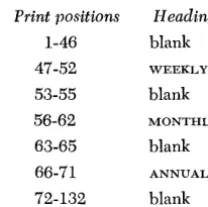
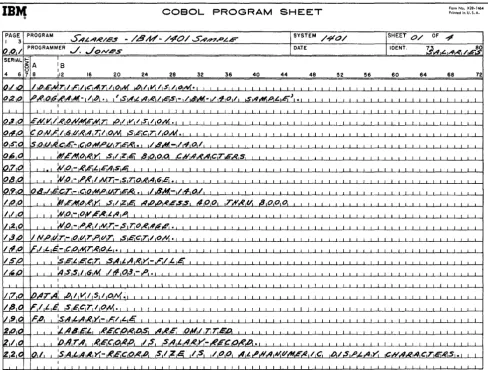
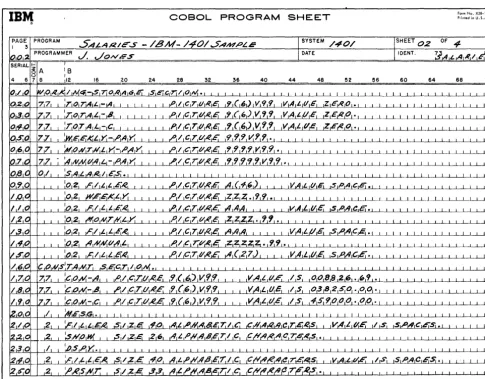
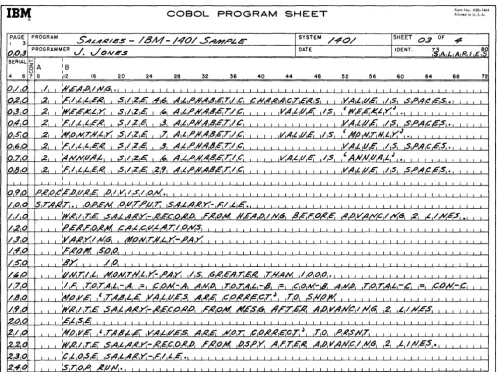
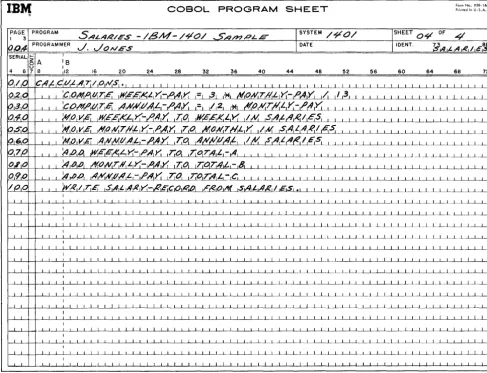
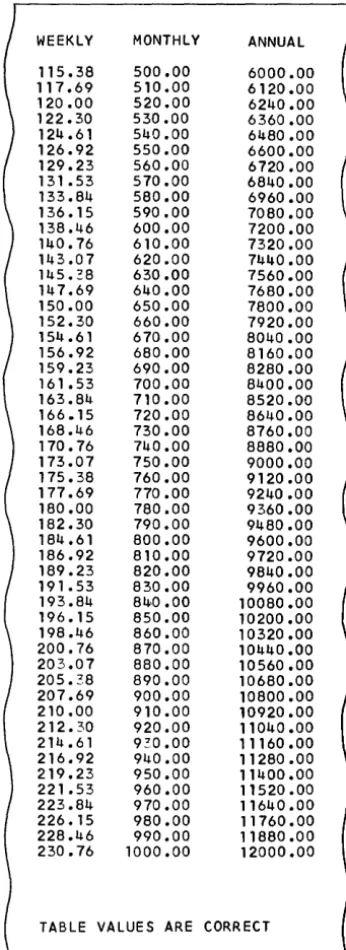
The Table of Salaries in the sample problem is an example of how a computer can be directed by using COBOL language to compute a set of values and list them in tabular form on the printer. The sample pro-gram is written in COBOL source language and must be compiled and assembled before an object run can be made.
To assemble the compiled output of the 1401 COBOL processor, the user's 1401 Autocoder system tape (the latest version and modification level) should be used. This tape must have been updated with the COBOL sub-routines deck and should contain the specific IOCS appropriate to the user's needs (see Placing COBOL
Subroutines in the Autocoder Library).
Operating instructions for using each of these items are included in this publication.
In addition to the material presented here, the pro-grammer should be familiar with the material given in the 1401 Systems Reference Library (SRL) publication that describes the IBM 1401 configuration for which the program is written. These are listed with form numbers in the IBM 1401 Bibliography (A24-1495).
The user must be familiar with the information con-tained in COBOL (on Tape) Specifications f01' IBM 1401 (C24-1492) and the IBAl COBOL General Infor-mation j\.lanual (F2S-S053). Together they provide
pro-grammers with sufficient information to enable them to write programs in the 1401 COBOL. To use the available features of the COBOL language and the COBOL system effectively, the user should have a thorough under-standing of this material.
Copying the PID Tape
The tape labeled 1401 COBOL PID Tape, sent by the IBM Program Information Department, can be copied as follows:
1. Mount the PID tape on tape unit 1. 2. Ready tape 2.
3. Set sense switch G on (up). 4. Press CHECK RESET.
5. Press START RESET. 6. Press TAPE LOAD.
7. At the end of a successful run, a programmed halt occurs with theA-address register containing 003. 8. Remove the tapes from units 1 and 2.
9. File-protect the tape from unit 2 and label it: 1401 COBOL PID Tape.
Creating COBOL Processor
andExtraction Tapes
The tape labeled 1401 COBOL PID Tape, sent by the IBM Program Information Department, is used for this operation. This tape is a self-loading program that pro-duces a 1401 COBOL Processor System tape and a 1401 COBOL Extraction System tape. To obtain these tapes: 1. Mount the PID tape on tape unit 1.
2. Ready tapes 2 and 3. 3. Press CHECK RESET. 4. Press START RESET. 5. Press TAPE LOAD.
6. At the end of a successful run, a programmed halt occurs with theA-address register containing 002. 7. Remove the tapes from the tape units and
file-pro-tect them.
8. Label the tape from unit 2: 1401 COBOL Processor System with Prescan.
9. Label the tape from unit 3: 1401 COBOL Extraction System.
If more than ten read or write errors are encountered for a given record while copying the PID tape or creat-ing the COBOL processor and extraction tapes, a pro-grammed halt occurs with the A-address register con-taining 004. Press the start key to reread or rewrite the record.
Printing COBOL Phase Listings
The tape labeled 1401 COBOL Extraction System,
which is extracted from the 1401 COBOL PID tape, is used for this operation. This tape contains a self-loading program that can be used to produce a symbolic listing
6 Tape COBOL Gp. Proc.
of all phases of the 1401 COBOL system. To obtain this listing:
1. Place the 1401 COBOL Extraction System tape on tape unit 1.
2. Press CHECK RESET and START RESET.
3. Press TAPE LOAD. The program will stop at 364. 4. Press START to produce the listing.
5. After all phases have been printed, the program halts at 600.
6. Press START RESET and STARl,' to rewind the tape, or press START to punch the subroutines and the sample program.
Punching COBOL Subroutines, Sample
ProgramTo punch subroutines and the sample program:
1. Place the 1401 COBOL Extraction System tape on tape unit 1. \
2. Press CHECK RESET and START RESET.
3. Press TAPE LOAD. The program will stop at 364.
4. Press START RESET and START.
5. After the COBOL subroutines and the sample problem have been punched, the program will stop at 709. 6. The COBOL subroutine decks and the sample problem
decks should be separated and labeled for identifica-tion as follows:
a. The deck with the identification number 70001 punched in columns 76-80 should be labeled:
4K COBOL Subroutines.
b. The deck with identification number 70002 punched in columns 76-80 should be labeled:
>
4K Subroutines.c. The deck with identification number 70003 punched in columns 76-80 should be labeled:
COBOL Sample Program.
Placing COBOL Subroutines in the
Autocoder Library
In this operation, an Autocoder system tape is up-dated to contain the routines needed to assemble the machine-language object program from the symbolic statements that the COBOL processor produces from the COBOL source program.
The Autocoder system tape used should contain the specific IOCS and macro combinations appropriate for the user. This choice should be made according to the following criteria:
2. If the user wants non-overlapped
lacs
instructions to be generated by the Autocoder system, the Auto-coder tape must contain IOCS without overlap.3. If the user wants non-overlapped
lacs
instructionsto be generated by the COBOL system (regardless of
the OBJECT-COMPUTER entry), the Autocoder tape must contain those macros that will be used by the
source program while in the ENTER AUTOCODER mode.
If full label checking is used, the RDLIN macro should
be included.
COBOL subroutines must
he
used to update the ap-propriate Autocoder tape for assemblies to be run onan IBM V101 Data Processing System.
To update the Autocoder tape:
1. Place a current version of 1401 Autocoder on tape unit 1.
2. Ready a tape on tape unit 6.
3. Place either the 4K or> 4K COBOL subroutines in the card reader, depending on the size of the object machine used.
4. Turn on sense switches A and F.
5. Press START RESET.
6. Press TAPE LOAD.
7. After the Autocoder system tape has been updated,
the message 1401 AUTOCODER SYSTEM COPIED ON TAPE
UNIT 6 will be printed.
Duplicating
the
1401
COBOL
Processor
System Tape
To make a copy of the 1401 COBOL processor:
1. Place the tape labeled 1401 COBOL Processor
Sys-tem with Prescan on tape unit 1.
2. Ready a working tape on tape unit 2.
3. Place these two control cards in the card reader.
Card
1
Columns 6-12 16-18 16-18
4. Turn on 110 CHECK STOP. 5. Turn on sense switch A.
6. Press CHECK RESET.
7. Press START RESET.
8. Press TAPE LOAD.
Content SYSTEMS RUN END
9. Press START. (Because there are only two control
cards, the start key must be pressed a second time
to read in the END control card.)
10. After the tape has been duplicated, a program-med halt occurs; the A-address register contains
040, and the message NEW SYSTEM ON UNIT 2 is
printed.
Performing
a Prescan Diagnostic
RunA pres can diagnostic run, a separate and optional run,
checks the COBOL source program before compilation.
Input is from cards only. An END OF SOURCE card (see
Compiling COBOL Source Programs), although it is
not required and has no function in a prescan run,
can be included at the end of the COBOL source
pro-gram. To perform a pres can diagnostic run:
1
1. Mount the 1401 COBOL processor system tape on
tape unit 1.
2. Mount scratch tapes on tape units 4, 5, and 6. 3. Turn on sense switch A.
4. Place the following control card ahead of the COBOL source program in the card reader:
Columns Content
6-9 DIAG
16-18 RUN
NOTE: A COBOL RUN card must not be used in the pre-scan run.
5. Press CHECK RESET and START RESET.
6. Press TAPE LOAD.
7. Press START when the machine halts. (This causes
the last card from the reader to be read, and pre-scan processing to begin. )
When the pres can run is complete, the machine halts. The B-address register contains 999.
Prescan Run Output
The output from the pres can diagnostic run is in printed form, and includes at most, three separate listings: a source program listing, a name listing, and a sentence-structure-error listing.
Source Program Listing: This listing contains the COBOL source program (including sequence num-bel's), and always appears in the pres can output. A sequence error in the listing is identified by an
asterisk (0) following the sequence number.
Name Listing: This listing contains all the procedure
and data names used in the source program, plus an indication of the type of each data name. The name listing always appears in the pres can output. A name that refers to more than one field (multide-fined) is identified by an M between the name and
its type indication. The M appears for all multide-fined names, whether qualified or not, and serves as a warning that such names require qualification. A COBOL keyword, used incorrectly, is flagged by the word KEYWORD preceding the type indication. (For examples of the name-associated diagnostics, see COBOL Diagnostic Usage.)
Sentence-Structure-Error Listing: This listing consists
of sentence-structure-error diagnostics generated during the prescan run. It appears only if errors were made in any of the COBOL sentences in the source program. (The sentence-structure-error diag-nostics are more fully explained under CO BO L
Diagnostic Usage.)
Compiling COBOL Source Programs
(COBOL
toAutocoder)
In this operation, the COBOL source program and the COBOL processor system tape are used. The processor compiles and assembles the object program in Auto-coder language. The 1401 COBOL processor prints a list-ing of COBOL source statements followed by the Auto-coder expansion of these statements at assembly time
if desired by the user. This optional source-symbolic listing is controlled by sense switch G at compilation time.
Either the card reader or a program library tape can. be used to supply the source program to the COBOL processor. Two control cards regulate this process.
1. The COBOL RUN card conveys to the compiler a re-quest for a COBOL compilation, the input option re-quested, and the program to be run (if the tape op-tion was requested). The format of the COBOL RUN card is:
Columns
6-10 16-18 21-35
79-80
COBOL RUN
Content
15-character identification (only re-quired when tape option is used) % 0 (request for tape input) bb (request for card input)
8 Tape COBOL Op. Proc.
2. The END OF SOURCE card follows the last card of the source program. It is required when the source gram is written on tape and when the source
pro-gram is stacked in the card reader. Its format is:
Columns
1-13
Content
END OF SOURCE
If the user desires to use the program library feature, the following requisites must be-met:
1. The set of source programs must be recorded as one file, followed by a tape mark, and must be recorded as eighty-character move-mode records. (The 1401 Multiple Utility Program will create this tape.) 2. Each source program must be preceded by a COBOL
RUN card and followed by an END OF SOURCE card. 3. Each COBOL RUN card must have a unique
identifica-tion in columns 21-35 for the processor to select the correct source program (the %0 punches are not re-quired in the COBOL RUN card images on tape). If the processor fails to find the programs requested, it will rewind the library tape and search it once more. After compilation, the library tape will be posi-tioned at the next COBOL RUN card. The cards placed into the card reader may consist only of COBOL RUN cards with %0 punched in columns 79 and 80 (re-questing input from the program library), a single card deck (COBOL RUN, source deck), a stack of card decks (COBOL RUN, source deck, END OF SOURCE, COBOL RUN . . . ), or any combination of the above.
The following restrictions apply to the use of the COBOL RUN and END OF SOURCE cards:
1. If input is to be from the card reader, the COBOL RUN card must not have the %0 punches in columns 79 and 80.
2. If the input is from the card reader, only the last source program need not have an END OF SOURCE card.
To compile the COBOL program:
1. Place the tape labeled 1401 COBOL Processor
2. Ready the tapes on tape units 4, 5, and 6.
3. Ready a tape on tape unit 3 if the COBOL source symbolic listing option is used.
4. Turn on I/O CHECK STOP.
5. Turn on sense switches A and C. Turn off sense switches B, D, and E.
6. Turn on sense switch F' if IOCS generation by COBOL is not desired, or if the overlap feature is used in the object program.
7. Turn on sense switch G if the COBOL source sym-bolic listing option is used.
S. If this is the initial compilation of a stacked job or the compilation of a single program, place the COBOL RUN card( s) and/or the source deck( s) in the card reader.
If the program library option is used (%0 in columns 79 and SO of single COBOI,. RUN card(s)), mount the program library tape on unit 2.
9. Press CHECK RESET.
10. Press START RESET.
11. Press TAPE LOAD.
12. Press START.
13. When card reading stops, press the start key to read in the last card.
14. At the end of a successful compilation, the mes-sages printed are:
IF EXTRA OUTPUT DESIRED B ON FOR PUNCHED AUTOCODER D ON FOR PRINTED LISTING AND PRESS START
IF NO EXTRA OUTPUT DESIRED, PRESS START
15. After a successful compilation, the symbolic ob-ject program can be assembled. However, any errors indicated by diagnostics flagged by ~ ~
should be corrected before the symbolic object program is assembled.
16. If a symbolic listing is desired before assembly, turn on sense switch D and press START.
17. If a punched symbolic deck is desired, turn on sense switch B and press START. A symbolic listing and symbolic deck can be obtained by turning on sense switches Band D and pressing START. This sense-switch option can be used after the compila-tion has been completed and the message (de-scribed in item 13) has been printed.
IS. When no more output is desired, turn off sense switches Band D and press START.
19. At the end of compilation, the tape on tape unit 4 will contain the symbolic program. (The symbolic program will have been punched also if the option
in item 16 was used.) The message END OF COM-pILATION-AuTocoDER ON TAPE 4 will be printed.
Assembling Autocoder
Output
(Autocoder
to Machine Language)
The output from the COBOL compilation process is the object program in Autocoder language. To assemble the machine-language object program:
1. Place a current version of 1401 Autocoder (with COBOL subroutines) on tape unit 1.
2. Ready tapes on tape units 4, 5, and 6.
3. Ready a tape on tape unit 3 if the COBOL source pro-gram specified ASSIGN OBJECT PROGRAM TO TAPE. 4. If card input is used, perform these eleven steps:
a. Turn on sense switch A. b. Turn on I/O CHECK STOP.
c. Place the Autocoder program deck in the card reader.
d. Press CHECK RESET. e. Press START RESET. f. Press TAPE LOAD.
g. If ASSIGN OBJECT PROGRAM TO TAPE was not speci-fied, turn on the card-read punch.
h.
Press START.1. When card reading stops, press START to read in the last card.
j. At the end of assembly, the message END OF
AS-SEMBLY will be printed. k. Press START.
5. If tape input is used, perform these eight steps. a. Turn on sense switches A and C.
b. Turn on I/O CHECK STOP. c. Press CHECK RESET. d. Press START RESET. e. Press TAPE LOAD.
f. If ASSIGN OBJECT PROGRAM TO TAPE was not speci-fied, turn on the card read-punch and press START. g. At the end of assembly, the message END OF
AS-SEMBLY will be printed. h. Press START.
Loading the Autocoder Object Program
To load the object program into the object computer: 1. If the object program is in punched-card form (in-stead of on tape), place the object deck in the card reader and turn on the reader.
Auto-coder output (the object program that was on tape unit 6 at the end of the Autocoder assembly) on tape unit 1.
3. Press CHECK RESET. 4. Press START RESET.
5. Turn on sense switch A and I/O CHECK STOP.
6. If the object program is in card form, press PROGRAM LOAD. If the object program is on tape, press TAPE LOAD.
Obtaining Storage
andTape Prints
forAPAR's
If difficulty is encountered during the processing of a COBOL program, and the COBOL processor is the cause of the error:1. Set the manual address switches to 0359. 2. Set the mode switch to ALTER.
3. Press CHECK RESET.
4. Press the I-address register key. 5. Press START RESET.
6. Press START.
7. Set the mode switch to RUN.
8. Press START.
9. The contents of core storage and tapes 4, 5, and 6 will be printed.
10. After the tape prints are completed, the message
TAPES 5, 6, AND 4 PRINTED will be displayed on the listing.
11. Contact your IBM Systems Engineer to submit an AP AR (Authorized Programming Analysis Report).
Note: If during the tape print program bad records cannot be bypassed, branch manually to 1729.
COBOL Dictionary
After the COBOL source program and diagnostic mes-sages have been printed, the COBOL dictionary is listed.
The COBOL dictionary is divided into three sections: Special Names
Data Names Procedure Names
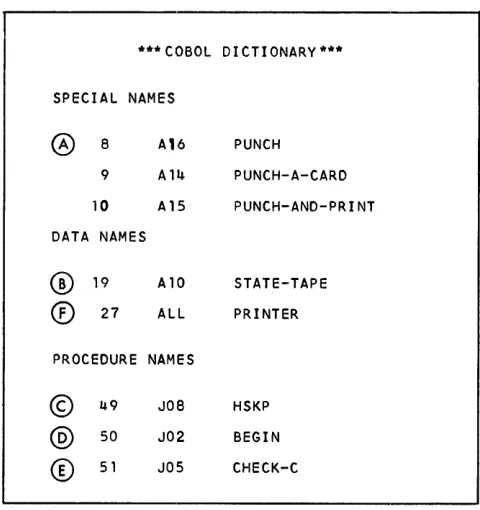
In each section, all names used in the source program are listed beside the sequence number and the com-pressed COBOL name developed during compilation by the COBOL processor. This makes it possible to cross-reference items in the COBOL source-program listing and the Autocoder symbolic listing.
Figure 1 shows a sample COBOL dictionary. The line labeled
@
in Figure 1 refers to the procedure name10 Tape COBOL Op. Proc.
*** COBOL D I CTI ONARY ***
SPECIAL NAMES
0
8 A16 PUNCH9 All.!. PUNCH-A-CARD
10 A15 PUNCH-AND-PRINT
DATA NAMES
®
19 A10 STATE-TAPECD
27 ALL PRINTERPROCEDURE NAMES
©
49 JOe HSKP@
50 J02 BEGIN [image:10.612.305.545.40.295.2]®
51 JOS CHECK-CFigure 1. COBOL Dictionary
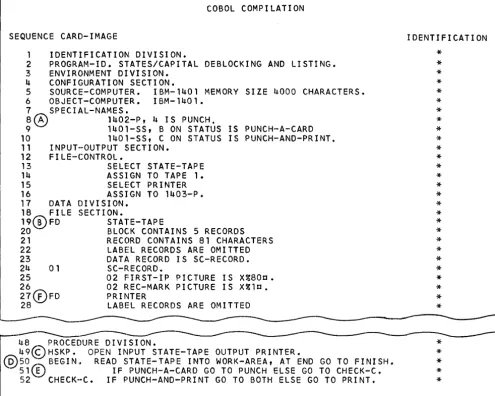
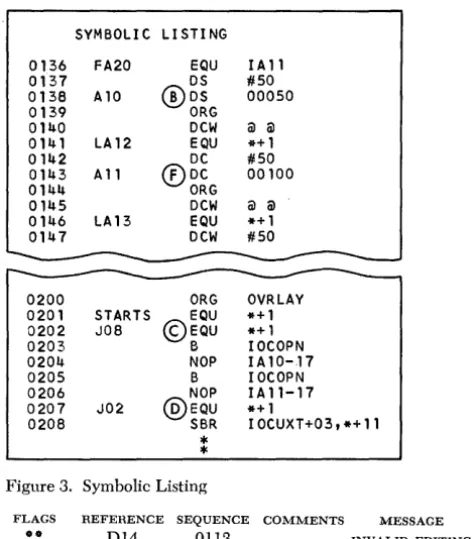
BEGIN which appears in the sample COBOL source pro-gram shown in Figure 2. The COBOL processor assigned BEGIN the compressed name J02 and assigned the COBOL statement the sequence number 50. In the symbolic listing of the Autocoder expansion (Figure 3), the
COBOL processor has used the compressed name J02 as the label for the EQU statement labeled
@.
To refer to the COBOL source paragraph or statements that produced a particular expansion on the symbolic listing, look at the compressed COBOL name and find its equivalent in the COBOL dictionary. For example, the entry labeled
®
on line 19 of the symbolic listing is used as STATE-TAPE in the COBOL source list. This entry also appears in the data-names section of the COBOL dictionary.COBOL Diagnostic Usage
Prescan Diagnostics
An optional pres can diagnostic run can be performed by using the 1401 COBOL processor system to check the source program for errors before compilation.
keywords used as data names. The following is an example of name-associated diagnostics:
TYPE SOURCE
SPEC M CARDS
SPEC PRINTER
SPEC OVERFLOW
SPEC LAST-CARD
FILE STATUS-FILE
REC M CARDS
DATA CARD-ORDER
oOKEY'iVORD DATA DIGIT
DATA RECORD
In the preceding example, the COBOL keyword, DIGIT, was used as a name, and flagged. In addition, the name, CARDS, was used more than once in the source program and was flagged as being multide·· fined. If CARDS has not been qualified in all its uses, an error exists.
The second type of prescan diagnostic message describes problems encountered while analyzing the sentence structure of the source program. In the list-ing, the sequence number of the card containing the
error statement relates that which should have been
coded to that which was coded, If, in order to continue
analysis of the source program, any part of the source program is dropped, the dropped item ( s ) are in-cluded as part of the diagnostic message. In special cases, the expected part of the diagnostic message might be replaced by a language term or a rule de-scribing a requirement of the COBOL language, such as: ENVIRONMENT DIVISION MUST PRECEDE DATA DIVISION.
To correct program errors of this type, the pro-grammer should analyze the diagnostics in sequence. Also, the correction process can be greatly facilitated if the programmer compares the source program error statement with the corresponding cOBoL-prescribed
format outlined in the SRL publication COBL (on
Tape) Specifications for IBM 1401, Form C24-1492 ..
Note, however, that items dropped as a result of an error in sentence structure are not analyzed prior to their deletion.
The following is an example of analyzing COBOL diagnostics:
COB01~ SOURCE PROGRAM
SEQUENCE CARD IMAGE
30 ENVIRONMENT DIVISION.
40 CONFIGURATION SECTION.
50 SOURCE-COMPUTER.IBM-1401.
60 OBJECT -COMPUTER. IBM-1401
NO-OVERLAP
70 SPECIAL NAMES.
80 1402-R IS READER
90 1402-P IS PUNCH
100 AUTON IS COBOLN
110 AUTOZ IS COBOLZ
120 1401-SS A ON STATUS IS LAST -CARD.
130
230
280 290
DATA DIVISION.
PROCEDURE DIVISION.
PARAGRAPH2.
IF COBOLZ IS EQUAL TO REFI OR LESS
300 310 320
OR GREATER THAN 2 OR NOT LESS THAN 7 THEN GO TO GOBOLN. PARAGRAPH3.
COBOL DIAGNOSTICS
SEQUENCE COMMENTS
120 AUTOCODER NAME/'.'=1401-SS=
300 INVALID SUBJECT OR OBJECT=OR=
From the preceding example, first consider the quence number 120. This diagnostic means that in se-quence number 120, either an Autocoder name or a period was expected. Instead, 1401-SS was sensed. As
shown in the reference-format section of the COBOL
(on tape) Specifications SRL publication, the special names paragraph is:
SPECIAL-NAMES.
[deVice-name-l !§ mnemonic-name-l [ device-name-2 !§
mnemonic-name-2 0 0
oJ]
[ sw/tch-name-l [ON STATUS!§. conditwn-name-l
J
[OFF STATUS IS condition-name-2
J
[ switch-name-2 0 0 0
JJ
[AUTOCODER-name IS COBOL-name [AUTOCODER - 0
The switch-name clause in sequence number 120 (1401-SS etc.) should have preceded the Autocoder-name clauses in sequence numbers 100 and 110.
Secondly, consider sequence number 300. This diag-nostic indicates that the error is in sequence number 300. A valid subject or a valid object was expected;
OR was sensed. As shown in the CO BO L (on tape)
Specifications SRL publication, the format for rela-tional conditions is defined:
[~
'd(.Lta_namc
) ] (IS [NOT] GREATERTIIAN'~
) . \ ) IS [NOT] LESS THAN ) literal ( ) IS [NOT] EQUAL TO~arithmetic expression) ~=
-
-
--f
data-namet
) literal
5
~ arithmetic expression
In the source statement (sequence 290 and 300), IF COBOLZ IS EQUAL TO REFI OR LESS OR GREA TER THAN 2 OR NOT LESS, there should be a data-name, a literal, or an arithmetic expression after LESS for comparison with the implied subject, COBOLZ.
Instead, OR was encountered.
The meanings of the symbols in the sentence-struc-ture-error diagnostic message are:
Symbol Meaning
PROCEDURE-NAME Blanks bound COBOL-language terms and rules.
<SECTION' Quotes bound literal values expected. =RAN = Equal signs bound literal values
en-countered.
(ALL TO MASTER) Parentheses bound literal values dropped.
<R UN' /Literal The slash represents the word OR.
12 Tape COBOL Op. Proc.
Additional examples of the prescan sentence-structure-error diagnostic are:
620 UNDECLARED NAME = TAPE-ORDER =
(TAPE-ORDER)
The sequence number 620 is the number assigned to
the card containing the statement in error;
UNDE-CLARED NAME is a language term, bounded by blanks,
representing an error that was encountered; = TAPE~
ORDER = is the undeclared name, bounded by equal
signs; and (TAPE-ORDER) is the item dropped, bounded
by parentheses.
650 'TO'
=
ALL=
(ALL TO MASTER)Sequence number 650 is the assigned sequence num-ber of the card containing the statement in error;
'To' is the literal value, bounded by quotes, expected
by the compiler; = ALL = is the literal value, bounded
by equal signs, encountered during the run; and (ALL
TO MASTER) is the item dropped, bounded by paren-theses.
Cobol
ProcessorDiagnostics
The COBOL processor analyzes each statement for
er-rors as it compiles the COBOL source program. The
processor supplies a diagnostic message describing the nature of a detected error and prints the
mes-sage ( s ) (ahead of the COBOL dictionary) in this
fonnat:
FLAG REFERENCE SEQUENCE
#9 B56 14
MESSAGE FORMAT
COBOL COMPILATION
SEQUENCE CARD-IMAGE IDENTIFICATION
1 IDENTIFICATION DIVISION.
2 PROGRAM-ID. STATES/CAPITAL DEBLOCKING AND LISTING.
3 ENVIRONMENT DIVISION.
* * *
~ CONFIGURATION SECTION.
S SOURCE-COMPUTER. IBM-l~Ol MEMORY SIZE ~OOO CHARACTERS.
6 OBJECT-COMPUTER. IBM-1401.
*
*
*
*
7 SPECIAL-NAMES.
8(~ 1402-P, 4 IS PUNCH.
9 1401-SS, B ON STATUS IS PUNCH-A-CARD * *
10 1401-SS, C ON STATUS IS PUNCH-AND-PRINT.
*
*
11 INPUT-OUTPUT SECTION.
12 FILE-CONTROL.
13 SELECT STATE-TAPE
14 ASSIGN TO TAPE 1.
15 SELECT PRINTER
16 ASSIGN TO 1~03-P.
17 DATA DIVISION.
18 FILE SECTION.
19C~FD STATE-TAPE
20 BLOCK CONTAINS 5 RECORDS
* * * *
21 RECORD CONTAINS 81 CHARACTERS
*
*
*
*
*
*
22 LABEL RECORDS ARE OMITTED *
23 DATA RECORD IS SC-RECORD.
2~ 01 SC-RECORD.
25 02 FIRST-IP PICTURE IS X%80c.
*
*
*
26 02 REC-MARK PICTURE IS X%lc.
27(E)FD PRINTER
28 LABEL RECORDS ARE OMITTED
-
---*
*
*
48 PROCEDURE DIVISION.
~9~~HSKP. OPEN INPUT STATE-TAPE OUTPUT PRINTER.
@50 BEGIN" READ STATE-TAPE INTO WORK-AREA, AT END GO TO FINISH.
*
*
*
*
*
51QD IF PUNCH-A-CARD GO TO PUNCH ELSE GO TO CHECK-C.
[image:13.617.77.572.61.457.2]52 CHECK-C. IF PUNCH-AND-PRINT GO TO BOTH ELSE GO TO PRINT.
Figure 2. COBOL Source Listing
Flag: This indicates the seriousness of the error. If the flag column is blank, the error will not stop compila-tion. If a double asterisk appears in the flag column, compilation stops and the message COMPILATION
sus-PENDED is printed after all statements have been ex-amined.
Reference: This shows the code number of the
diagnos-tic message. A detailed explanation of the error can be found by using this code to look up the associated diagnostic in the Diagnostic Reference List.
Sequence: This refers to the source program statement
in error.
~1 essage: This describes the nature of the error. After
all errors have been analyzed and all diagnostic mes-sages have been printed for this phase of compila-tion, the message TOTAL NUMBER OF ERRORS is printed
with a figure indicating the total number of diag-nostics that occurred. Then the message
COMPILA-TION SUSPENDED is printed if a double asterisk was printed in the flag column for any of the diagnostic messages given. If none of the diagnostic messages was flagged, the message PRESS START TO CONTINUE is printed, and compilation can be continued.
Following this first list of diagnostic messages, the
COBOL dictionary is printed. If a name-oriented error is detected, a diagnostic message will be printed, compilation will be discontinued, and the message
RUN DISCONTINUED will be printed.
As compilation continues, discrepancies between the Data Division and the Procedure Division will be detected. If such errors are found, additional diag-nostic messages will be printed in this format.
SYMBOLI e LI STI NG
0136 FA20 EQU I A 11
0137 OS #50
0138 A10 ®OS 00050
0139 ORG
0140 Dew @ @
0141 LA12 EQU *+1
0142 DC #50
0143 A 11 ®De 00100
0144 ORG
0145 Dew @ @
0146 LA13 EQU *+1
0147 Dew #50
0200 ORG OVRLAY
0201 STARTS EQU *+1 0202 JOB ©EQU *+1
0203 B IoeOPN
0204 NOP IA10-17
0205 B IoeOPN
0206 NOP IAl1-17
0207 J02 *+1
0208 @EQU SBR IOeUXT+03, *+ 11
*
*
Figure 3. Symbolic Listing
FLAGS
••
REFERENCE SEQUENCE COMMENTS D14 0113MESSAGE INVALID EDITING
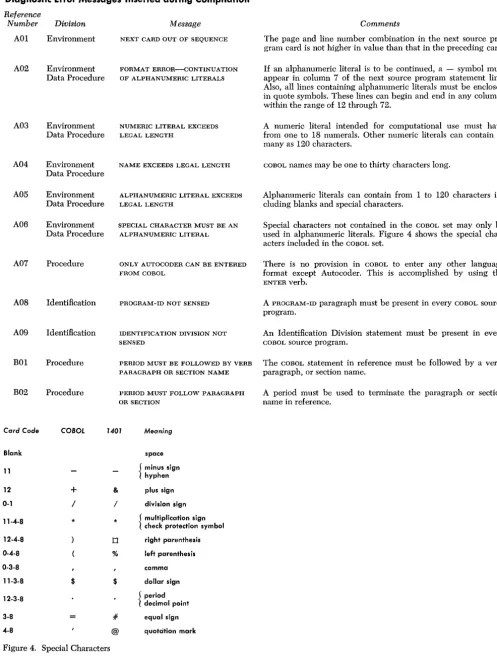
NOTE: Each diagnostic not corrected also appears (altered slightly) as an Autocoder comment line, in-dicated by an (1, in the Autocoder symbolic-program
listing.
**:
This indicates an error that must be corrected be-fore an object run is attempted.D14: This is an example of the reference-list code. The
Diagnostic Reference List contains more detailed
explanations of the diagnostic messages.
0113: This is an example of the Autocoder line number
of the statement.
*:
This is a comments Hag to the Autocoder processor. At essage: This is a general description of the error. Atthe end of compilation, the message NUMBER OF ERRORS NEEDING CORRECTION, followed by the message TOTAL NUMBER OF DIAGNOSTICS, may be printed with figures indicating the number of errors needing cor-rection and the total number of diagnostics. Then this message will be printed to show symbolic listings and/or symbolic punched-card options:
IF EXTRA OUTPUT DESIRED B ON FOR PUNCHED AUTOCODER D ON FOR PRINTED LISTING AND PRESS START
IF NO EXTRA OUTPUT DESIRED, PRESS START
(Also see Operating Functions.)
14 Tape COBOL Op. ProG.
Diagnostic
ReferenceList
Format Error Messages
These diagnostic messages will be given for format er-rors that occur in the divisions under which they are listed. In cases where these diagnostic messages appear, the format specified should be carefully reviewed for errors. No reference code is given for these diagnostic messages.
Environment Division Format Errors
1. 2. 3. 4. 5. 6. 7. 8. 9. 10. 11. 12. FORMAT ERROR-ASSIGN
FORMAT ERROR-DEVICE NAME 1403-cT FORMAT ERROR-DEVICE NAME 1403-p FORMAT ERROR-·SWITCH NAME 1403-P-CB FORMAT ERROR-MEMORY SIZE
FORMAT ERROR-SWITCH ~AME 1403-p-c9 FORMAT ERROR-DEVICE NAME 1402-p FORMAT ERROR-DEVICE NAME 1402-R FORMAT ERROR-SELECT
FORMAT ERROR-RESERVE ALTERNATE AREA FORMAT ERROR-SWITCH NAME 1403-ss FORMAT ERROR-SWITCH NAME 1403-p-cv
Data Division Format Errors
1. FORMAT ERROR-FD
2. FORMAT ERROR-RECORDING MODE 3. FORMAT ERROR-BLOCK CONTAINS 4. FORMAT ERROR-RECORD CONTAINS 5. FORMAT ERROR-LABEL RECORD 6. FORMAT ERROR-VALUE OF 7. FORMAT ERROR-DATA RECORD 8. FORMAT ERROR-SIZE
9. FORMAT ERROR-REDEFINES 10. FORMAT ERROR-OCCURS
11. FORMAT ERROR-POINT LOCATION 12. FORMAT ERROR-PICTURE
13. FORMAT ERROR-JUSTIFICATION 14. FORMAT ERROR-LEAVING 15. FORMAT ERROR-VALUE
Procedure Division Format Errors
[image:14.618.45.282.46.316.2]Diagnostic Error Messages Inserted during Compilation
Reference
Number Division
AOI Environment
A02 Environment Data Procedure
A03 Environment Data Procedure
A04 Environment Data Procedure
A05 Environment Data Procedure
A06 Environment Data Procedure
A07 Procedure
A08 Identification
A09 Identification
BOI Procedure
B02 Procedure
Message NEXT CARD OUT OF SEQUENCE
FORMAT ERROR--CONTINUA TION OF ALPHANUMElUC LITERALS
NUMERIC LITERAL EXCEEDS LEGAL LENGTH
NAME EXCEEDS LEGAL LENGTH
ALPHANUMERIC LITERAL EXCEEDS LEGAL LENGTH
SPECIAL CHARACTER MUST BE AN ALPHANUMElUC LITERAL
ONLY AUTOCODER CAN BE ENTERED FROM COBOL
PROGRAM-ID NOT SENSED
lDENTIFICA TION DIVISION NOT SENSED
Comments
The page and line number combination in the next source pro-gram card is not higher in value than that in the preceding card.
If an alphanumeric literal is to be continued, a - symbol must appear in column 7 of the next source program statement line. Also, all lines containing alphanumeric literals must be enclosed in quote symbols. These lines can begin and end in any columns within the range of 12 through 72.
A numeric literal intended for computational use must have from one to 18 numerals. Other numeric literals can contain as many as 120 characters.
COBOL names may be one to thirty characters long.
Alphanumeric literals can contain from 1 to 120 characters in-cluding blanks and special characters.
Special characters not contained in the COBOL set may only be used in alphanumeric literals. Figure 4 shows the special char-acters included in the COBOL set.
There is no provision in COBOL to enter any other language format except Autocoder. This is accomplished by using the ENTER verb.
A PROGRAM-ID paragraph must be present in every COBOL source program.
An Identification Division statement must be present in every COBOL source program.
PERIOD MUST BE FOLLOWED BY VERB The COBOL statement in reference must be followed by a verb, PARAGRAPH OR SECTION NAME paragraph, or section name.
PElUOD MUST FOLLOW PARAGRAPH A period must be used to terminate the paragraph or section
OR SECTION name in reference.
Card Code COBOL 1401 Meaning
Blank space
11 { minus sign
hyphen
12
+
& plus sign0-1 / / division sign
11-4-8 * * { multiplication sign
check protection symbol
12-4-8 0 right parenthesis
0-4-8 % left parenthesis
0-3-8 comma
11-3-8 $ $ dollar sign
12-3-8 { period
decimal point
3-8 # equal sign
4-8 @ quotcition mark
Figure 4. Special Characters
[image:15.617.75.572.67.724.2]Number
Reference Division
B03 Procedure
B04 Procedure
B21 Environment
B22 Environment
B23 Environment
B24 Environment
B25 Environment
B26 Environment
B27 Environment
B28 Environment
B29 Environment
B31 Procedure
B41 Data
B42 Data
B43 Data
B44 Data
B45 Data
B46 Data
B47 Data
B48 Data
B49 Data
B51 Data
Message
KEYWORD DIVISION MUST DE FOLLOWED DY A PERIOD
KEYWORD DIVISION NOT SENSED
Comments
A period must follow each division name.
The complete name of every division must appear in all source programs.
CONFIGURATION SECTION NOT SENSED Each source program must contain a CONFIGURATION SECTION.
KEYWORD SOURCE-COMPUTER MUST The first entry in the CONFIGURATION SECTION must be the FOLLOW CONFIGURATION SECTION SOURCE-COMPUTER statement.
IBM-1401 CLAUSE NOT SENSED The source program must indicate the types of computers being used for both processing and executing the COBOL program.
INV ALID ENTRY The statement in reference is not valid in a COBOL source pro-gram.
KEYWORD FILE-CONTHOL MUST The file-description entries must follow the INPUT-OUTPUT SEC-FOLLOW INPUT-OUTPUT SECTION TION statement.
PERIOD MUST FOLLOW PARAGRAPH A period must be used to terminate a paragraph, section, or
SECTION OH DIVISION division.
PERIOD MUST FOLLOW ENTHY Review this entry using the sequence reference. This entry must be terminated by a period.
KEYWORD SECTION NOT SENSED The keyword SECTION must appear in these entries:
KEYWORD DIVISION NOT SENSED
MISSING PERIOD AT END OF PROGRAM
WORKING-STORAGE SECTION OUT OF SEQUENCE
CONSTANT SECTION OUT OF SEQUENCE
RECORDING MODE MUST BE 1
DATA RECOHDS CLAUSE MUST BE IN FD
LADEL RECORDS CLAUSE MUST BE IN FD
FILE SECTION
WORKING-STORAGE SECTION CONSTANT SECTION
The complete name of every division must appear in all source programs.
The last entry of all source programs must be tenninated by a period.
The WORKING-STORAGE SECTION must follow the FILE SECTION in the Data Division.
If the source program has a WORKING-STORAGE SECTION, the CON-STANT SECTION must immediately follow it. If the source pro-gram docs not have a WOHKING-STORAGE SECTION, the CONSTANT SECTION must follow the FILE SECTION.
All 1401 CODOL programs must specify a recording mode of 1.
Each FD must end with a DATA RECORDS clause. This pennits the processor to cross-reference the file-description entry and the individual record-description entries of each record.
This LABEL HECORDS clause must always be present in a FILE DESCRIPTION entry.
DUPLICATE RECORDING MODE CLAUSE This statement can be removed from the source program.
DUPLICATE BLOCK CONTAINS CLAUSE This statement can be removed from the source program.
DUPLICATE RECORD CONTAINS This statement can be removed from the source program. CLAUSE
DUPLICATE VALUE OF CLAUSE This statement can be removed from the source program.
A PERIOD MUST FOLLOW ENTRY This statement must be terminated by a period.
Reference
Number Division
B52 Data
B53 Data
B54 Data
B55 Data
B56 Data
B57 Data
B58 Data
B85 Data
B91 Data Procedure
B92 Procedure
B97 Data
B98 Procedure
B99 Environment
COl Procedure
DOl Data
Message
DATA DIVISION NOT FOLLOWED BY
V ALID SECTION
DUPLICATE CONSTANT SECTION
DUPLICATE WORKING-STORAGE SECTION
LEVEL NUMBER MUST BE FOLLOWED BY NAME OR FILLER
FORMAT ERROR
KEYWORD SECTION NOT SENSED
KEYWORD DIVISION NOT SENSED
FIGCON ALL MUST BE FOLLOWED BY ALPHANUMERIC LITERAL
MISSING PERIOD BEFORE PROCEDURE DIVIS'ION
KEYWORD MUST NOT BE USED AS A LABEL
DATA DIVISION NOT SENSED
PROCEDURE DIVISION NOT SENSED
ENVIRONMENT DIVISION NOT SENSED
CONDITION NAMES MUST NOT BE USED AS SUBJECTS
PICTURE EXCEEDS 30 CHARACTERS
Comments
The Data Division statement must be followed by at least one of these sections:
FILE SECTION (contains file- and record-description entries) WORKING-STORAGE SECTION (contains record-description
entries)
CONSTANT SECTION (contains record-description entries)
A COBOL source program can contain only one CONSTANT SECTION.
A COBOL source program can contain only one WORKING-STORAGE SECTION.
All level numbers (01-49, 77 and 78) must be followed by a name or by the word FILLER.
This statement is written in an invalid format. Error examples:
1. PICTURE IS 999 VALUE IS 10 LEFT JUSTIFIED. The statement must be written as JUSTIFIED LEFT.
2. PICTURE IS 99v X (10). Blanks cannot be used in a picture in this manner.
The word SECTION must appear in these entries: FILE SECTION
WORKING-STORAGE SECTION CONSTANT SECTION
The complete name of every division must appear in all COBOL programs.
The ALL figurative constant generates a sequence of characters specified by any non-numeric literal.
The source program statement that precedes the Procedure Divi-sion statement must be tenninated by a period.
Words listed as COBOL keywords must be used only as specified by the COBOL language.
A Data Division statement must he included in every source program.
A Procedure Division statement must be included in every source program.
An Environment Division statement must be included in every source program.
In this example, N1, N2, and N3 are declared as data names with the values defined in the VALUE clauses.
01 NAME1 02 NAME2
88 N1 VALUE IS 1 88 N2 VALUE IS 3, 6 88 N3 VALUE IS 7, 11 Thus, the statement:
IF N2
=
4 THEN, . . . . is in error because N2 was previously defined as having a value of 3 or 6.A COBOL PICTURE description can not contain more than 30 characters.
For example:
The PICTURE description 9(450) eonsists of six actual charac-ters and is, therefore, properly declared. However, if the pro-grammer had written 450 nines on the coding sheet to describe the same PICTURE, the coding sheet would be in error.
Reference
Number Division
D02 Data
D05 Data
D06 Data
D07 Data
DOB Data
D09 Data
Dll Data
D12 Data
D13 Data
D14 Data
D99 Data
Message
CONFLICTING EDITING CLAUSES
CONFLICT BETWEEN PICTURE AND SIZE CLAUSE
CONFLICT BETWEEN PICTURE AND POINT LOCATION CLAUSE
CONFLICT BETWEEN PICTURE AND CLASS
CONFLICT BETWEEN PICTURE AND EDITING CLAUSE
ELEMENTARY ITEM MUST HAVE SIZE OR PICTURE CLAUSE
A RECORD AREA MUST NOT EXCEED 999 CHARACTERS
RLI MUST BE 4 CHARACTERS
RECORD SIZES WITHIN THIS FD MUST NOT CONFLICT
INVALID EDITING
PICTURE CLAUSE INVALID WITH GROUP ITEM
18 Tape COBOL Op. Proc.
Comments
Only one of the following clauses may be used to edit a field: 1. ZERO SUPPRESS
2. CHECK PROTECT 3. FLOAT DOLLAR SIGN
If more than one of these is specified, the last specified clause is chosen for use. Complex editing should be specified by using a PICTURE clause.
If a specified SIZE clause conflicts with a specified PICTURE clause, the PICTURE specifications take precedence over the SIZE specifications.
Example: SIZE IS 10 conflicts with PICTURE 9(6). The processor will use 6 as the size for the item defined.
If there is a conflict between a POINT LOCATION and a PICTURE clause, the PICTURE specifications take precedence over the POINT LOCATION specifications.
Example: PICTURE IS 9V99 conflicts with POINT LEFT 3. The processor will cause the decimal point to be located immediately to the left of the hundreds position of the field. The POINT LOCA-TION clause specifying that the decimal point be located imme-diately to the left of the thousands position is ignored.
If there is a conflict between a CLASS and a PICTURE clause, the PICTURE specification takes precedence over the CLASS clause.
Example: PICTURE IS 999. CLASS IS ALPHANUMERIC
In this example CLASS must be specified as NUMERIC because the PICTURE clause specified a numeric field.
If there is a conflict between an editing and a PICTURE clause, the PICTURE specifications take precedence over the editing clause.
For example, if the clause:
PICTURE IS $$$9
is used and an editing clause specifying FLOAT DOLLAR SIGN is also used, the PICTURE clause takes precedence over the editing clause.
An element of data (elementary item) must never be subdivided. Each elementary item must be specified by either a SIZE or PICTURE clause in the Data Division.
A record may be described as containing as many as, but no more than, 999 characters.
The Record Length Indicator (RLI) must be four characters long, including high-order zeros.
If a FD contains more than one level 01 item, an implied re-definition results in a rere-definition of the first 01. If the record size is variable, the DEPENDING clause should be used. This diagnostic message is given because record lengths within the FD were not the same. This condition could cause an error to occur at object program execution time.
The editing is not specified according to the COBOL requirements. All editing for the entry in reference was omitted by the processor.
Examples of such illegal coding are: 1. Invalid symbols in a PICTURE clause.
2. The size of the item to be edited exceeds 120 characters. 3. Zero suppression is specified for only the high-order position
of a field.
4. DB (debit symbol) or CR (credit symbol) is not specified for the rightmost or leftmost positions of the field.
Reference
Number Division
E01 Data (IOCS)
E02 Data (IOCS)
E03 Data (IOCS)
E04 Data (IOCS)
E05 Data (IOCS)
E06 Data (IOCS)
E07 Data (IOCS)
E08 Data (IOCS)
E09 Data (IOCS)
ElO Data (IOCS)
Ell Data (IOCS)
E12 Data (IOCS)
E13 Data (IOCS)
F01 Procedure
Message
HARDWARE DEVICE MULTI-DEFINED
BLOCK SIZE MUST NOT EXCEED OBJECT-COMPUTER SIZE
FORM 3 RECORDS NOT PERMITTED
BLANKS IN HEADER-LABEL ID
NOT PERMITTED
UNIT RECORD FILES MUST HAVE STANDARD RECORD SIZES
FORM 4 RECORDS-BLOCK SIZE MUST BE IN CHARACTERS
FILE MUST BE SELECTED
BLOCK SIZE MUST NOT EXCEED 4 DIGITS
RECORD SIZE MUST NOT EXCEED BLOCK SIZE
UNIT HECORD FILES MUST HAVE FORM 1 RECORDS
UNIT RECORD FILE-LABEL RECORDS MUST BE OMITTED
FILE MUST BE OPENED
UNIT RECORD FILES MUST NOT RESERVE ALTERNATE AREAS
END STATEMENTS NOT ASSOCIATED WITH THE FOLLOWING FILES
Comments
IBM 1401 Data Processing System devices can not be multi-defined. The example shown illustrates two combinations that will cause multiple-definition errors.
Statements 1 and 2 or statements 1 and 3 cause a multiple defi-nition of the 1402 card punch because 1402-P is assigned to punch
in SPECIAL NAMES. Statements 2 and 3 excluding statement 1 will cause a multiple-definition error because two files cannot be assigned to the same device.
Example:
1. SPECIAL NAMES. 1402-p, 4 IS PUNCH. INPUT-OUTPUT SECTION. FILE-CONTROL.
2. SELECT FILE2 ASSIGN TO 1402-P. 3. SELECT FILE3 ASSICN TO 1402-p.
Blocking specified in the COBOL source program must not specify more than the core-storage capacity of the object computer.
COBOL does not permit unblocked, variable-length records.
Blanks in header-label ID will be replaced with a period.
These sizes must be specified for unit-record files: Card Reader-80 characters
Card Punch-80 characters Printer-100 or 132 characters
The block size for Form-4 records must not be specified by using the keyword RECORD(S). Thus, the example shown is in error.
Example:
BLOCK CONTAINS 400 RECORDS
Each file to be processed by the object program must be named in a SELECT file-name entry. The name must be unique within the source program.
The block size specification can contain a maximum of four digits, including high-order zeros.
A record-size specification must designate more characters than the size specification for the block that contains the record.
Blocked records are not permitted in unit-record files.
The LABEL RECORDS clause for unit-record files must be specified as OMITTED.
The OPEN verb is used to indicate the processing of one or more input and/or output files. At least one of the two clauses must be written. The clauses may specify that one or more files be opened.
All alternate areas needed for unit-record files are reserved auto-matically by the processor. Thus, the programmer must not re-serve alternate areas for unit record files.
Error example:
SELECT READER ASSIGN TO 1402-R HESERVE 1 ALTEHNATE AREA.
At least one implicit or explicit AT END statement must be asso-ciated with every READ statement. Once an AT END statement has been executed, an attempt to read from the associated file will constitute an error unless a subse"quent CLOSE and OPEN have been executed for that file.
Reference
Number Division
HOI Procedure
IOO Procedure
IOI Procedure
I02 Procedure
I03 Procedure
I05 Procedure
I06 Procedure
I07 Procedure
I08 Procedure
I09 Procedure
no
ProcedureIII Procedure
112 Procedure
113 Procedure
20 Tape COBOL Op.
Message
INVALID USE OF SUBSCRIPTING
A-FIELD EXCEEDS B-FIELD
NON-NUMERIC FIELD USED IN COMPUTATION
EDIT MASK TOO SMALL
A-FIELD EXCEEDS 18 DIGITS
B-FIELD EXCEEDS 18 DIGITS
NON-NUMERIC FIGCON USED IN COMPUTATION
INVALID SOURCE
INTERMEDIATE RESULTS MUST NOT EXCEED 20 DIGITS
ALPHANUMERIC TO NUMERIC MOVE
INVALID SOURCE-IN PRECEDING STATEMENT
ROUNDED EXCLUDES LEFT JUSTIFY CLAUSE
GROUP ITEMS MUST NOT HAVE IMPLIED DECIMAL
GROUP ITEM MUST NOT BE USED IN COMPUTATION
Froc.
Comments
This diagnostic message occurs when invalid subscripting is used without an OCCURS clause.
Error example:
DATA DIVISION.
FILE SECTION. 01 NAMEI
02 NAME2t 03 NAME3 PROCEDURE DIVISION.
MOVE NAME2 (3) TO WORK AREA
tThe procedure statement specifies subscripting. Therefore, NAME2 must contain an OCCURS clause.
The field being moved is larger than the field to which it is to be moved. High-order positions will be dropped.
The referenced field is arithmetic and not defined as numeric.
A GIVING, COMPUTE, or MOVE using edited fields too small to ac-cept the field being placed into the edited mask will produce this diagnostic message.
Example: Moving field 12345 to an edited mask $$$99 is erro-neous because this edit mask will accept only four characters.
Fields used in arithmetic computations and expressions must not exceed 18 digits.
See 103.
Only the figurative constant ZERO can be used in arithwetic computations.
If a source-program statement is determined to be meaningless, this diagnostic message is given. Following this message will be an expansion of the STOP RUN literal.
Fields requiring decimal alignment in arithmetic computation must not have intermediate results that exceed twenty digits.
This diagnostic message is given if a group item (declared as numeric) is moved to an elementary numeric field. All group items are classed as alphanumeric.
If an incorrect source program statement is detected in a DISPLAY statement, this error message is given.
Example: DISPLAY ON (name) is incorrect, but DISPLAY UPON (name) is the correct format.
If left justification is used in conjunction with the ROUNDED op-tion, justification is ignored by the processor during compilation.
Decimal alignment is not performed when group items, classified as numeric, are moved.
Reference
Number Division Message
115 Procedure INVALID USE OF GROUP
117 Procedure ITEM EXCEEDS 20 DIGITS
118 Procedure CLASS CONTRADICTION
119 Procedure INVALID USE OF EDITING
120 Procedure SIZE OF LITERAL MUST EQUAL 1
121 Procedure INVALID SUBSCRIPTING
COBOL Tape.P,';nt Prog.'am
Conditions may arise that the COBOL processor recog-nizes as being instrumental in causing a failure. In these cases, the message SYSTEM FAILURE is printed on the printer. The processor then calls in a storage- and tape-print program. The contents of core storage and the tape work files are printed on the printer.
Among the conditions that may cause a system failure are:
Comments
1. When either of the conditionals IF POSITIVE or IF NEGATIVE is used, the field referred to must be elementary.
2. When either the conditional IF NUMERIC or IF ALPHABETIC is used, the field referred to should be elementary. If the fields are not elementary, the diagnostic message will be given to remind the programmer that he should review the units posi-tions of fields being tested for zone bits.
A numeric field defined to be used for computational purposes must not be larger than twenty digits. If such a numeric field exceeding twenty digits is compared, this diagnostic message is given. An instruction to perform a non-numeric compare is also given.
This diagnostic message indicates that the fields being operated on should be reviewed to determine if there is a contradiction in classes. For example, a numeric field compared to a non-numeric figurative constant would cause this diagnostic message to appear.
Editing must be performed on data fields that appear in proce-dure statements with the appropriate verbs.
Example:
1. The field referred to by the ACCEPT verb must not have edit-ing.
2. Editing must not be specified for an integer referred to by name in the TIMES option of the PERFORM verb.
If the literal must be one character long (for example, in use with the EXAMINE verb), this message is given.
Error example:
DATA DIVISION. 01 TABLE
02 NAME1 OCCURS 3 TIMES SIZE IS 2 PROCEDURE DIVISION.
MOVE NAME1 (1,2) . . .
The statement in the Procedure Division contradicts the declara-tion for NAME1.
1. An end-of-file indication was sensed by the proc-essor before the end of the file was reached. 2. An excessive number of tape read or tape write
errors occurred on the work tape.
3. An error in COBOL-prescribed sentence structure occurred when coding the source program. This type of error is detected in the phase of the proc-essor that analyzes the particular part of the pro-gram. For example, an error in subscripting would
be detected in phase
HOI.
COBOL Phase Descriptions
The IBM 1401 COBOL processor has ten sections. Each section performs a particular function in converting the COBOL source-program statements to Autocoder state-ments.
Phase·AOl
1. Reads the COBOL source program from cards or tape. 2. Assigns a sequence number to each entry.
3. Lists the contents of each source-program card on the printer.
Phase A02
Processes the Identification Division.
Phase AOB
Conditions storage and reads in phase A03.
Phase A03
1. Conditions words and operators for further process-ing.
2. Checks the source program for errors in the use of the character set, names, picture clauses, and word lengths.
3. Checks the program for the ENTER verb and condi-tions the included Autocoder statements for further processing.
Phase A04
Searches for the various divisions of the source program and calls in phases A05, A06, and A07 to compress key-words and delete unnecessary key-words as follows:
Phase A05 Environment Division keywords Phase A06 Data Division keywords
Phase A07 Procedure Division keywords.
Phase A20
This phase is called conditionally to place Autocoder entries on tape 4 for future merging by the
J
phases.Phase BOl
Diagnoses the Environment Division.
Phase B02
Checks the FILE SECTION for syntax errors and checks for duplicate entries in the Data Division (first pass).
22 Tape COBOL Op. Proc.
Phase B03
Checks the Procedure Division verbs for syntax errors (first pass).
Phase B04
Checks the CONSTANT and WORKING-STORAGE sections of the Data Division for syntax errors (second pass).
Phase BOS
Checks the Procedure Division verbs for syntax errors (second pass).
Phase B06
1. Calls phases BTl, BT2, and BT3 for printing diag-nostic messages.
Phase BTl Environment Division diagnostic table Phase BT2 Data Division diagnostic table
Phase BT3 Procedure Division diagnostic table. 2. Prints all diagnostic messages and determines
whether compilation is to be suspended.
Phase BOl
1. Conditions the source program for further process-ing.
2. Converts level numbers of data description entries to internal level operators.
Phase B02
1. Builds a table of Procedure Division literals and level 88 VALUES to be processed by phase B11. Du-plicate literals are eliminated.
2. Builds a table of Data Division literals and elimi-nates duplicates.
Phase Bll
1. Calculate class, size, and decimal count for data and procedure literals.
2. Writes literal declarations on tape 4.
Phase B03
1. Builds a table of procedure names used in the COBOL source program.
Phase BO~~
Uses the tables built by phase B03 to convert proce-dure names to reference names for further processing.
Phase BOS
1. Builds a table of names used in procedural state-ments, such as REDEFINES and DEPENDING, and COBOL names referred to by Autocoder statements follow-ing the ENTER verb.
2. Compresses data names, used in procedure state-ments, for further processing.
Phase BO~)
Matches COBOL source programs data names and spe-cial names with the processor-produced compressed names and generates a unique compressed name for each name used in the COBOL program.
Phase
Bm"
Builds a table of processor-produced compressed names used in qualification. It also builds a table of declara-tion names and procedural names used in qualificadeclara-tion.
Phase BOil
Develops a unique compressed name from the quali-fied names used in procedure statements.
Phase B04~
1. Lists all COBOL source names according to Environ-ment Division special names, data names, and pro-cedural names categories. Generated sequence num-bers are listed with these names.
2. If the source program contained errors in names, the errors are detected and phase B10 is called.
Phase B110
1. Analyzes errors detected during the execution of phases B04, B06, and B08.
2. Source names which have multiple definitions or are undefined are listed on the printer.
Phase COl
1. Phase COl is executed if a SPECIAL-NAMES paragraph appears in the source program.
2. Generates statements to equate Autocoder names to COBOL names.
Phase C02
Processes level 88 items.
Phase C03
Processes data values if level 88's are not used in the source program.
Phase 001
1. Analyzes PICTURE clauses to determine size, class, decimal count, and editing.
2. Builds a table of all level 01 items for further proc-essing.
Phase 002
1. Builds a description for each Data Division entry. The information in the source declarations is used as a basis for building this table.
2. Updates these descriptions with information ob-tained from the PICTURE analysis.
3. Generates diagnostic messages if discrepancies are detected.
Phase 003
1. Phase D03 is called if editing is used.
2. Builds and declares edit masks and completes the edit section of the data description. Writes editing masks on tape 4.
Phase 004
1. Establishes the group item size by totaling the sizes of elementary items.
2. Provides padding for OCCURS clauses. 3. Controls redefinition.
4. Generates origins, storage declarations, and equates. 5. Processes subscript levels.
Phase 005
1. Controls the placement of word marks for each entry.
2. Processes file record sizes and equates. 3. Processes nested redefinition entries.
Phase 006
1. Separates data and places delimited items from D05 on the proper output tape.
2. Expands macros and writes storage declarations on tape 4.
Phase EOl
Produces the JOB card for the object program.
Phase E02
1. Examines the source program for control and lOCS information.
2. Stores this data, in an abbreviated form, in corr storage.
3. If no files are declared, phase E04 is called.
Phase E03
1. Executes any required internal computations, based upon data stored by E02.
2. Completes DIOCS-DTF information by examining all of the data obtained from the source program and se-lecting the appropriate implied specifications.
Phase E04
1. Analyzes the legality of the source data.
2. Selects the appropriate set of diagnostic messages.
Phase EOS
1. If no files were defined:
a. 'Vrites CfL and ORG statements on tape unit 4. b. Writes diagnostic message indicators on tape unit
4, if appropriate. c. Calls phase F01.
2. Writes CTL and DIOCS statements on tape unit 4. 3. Writes diagnostic message indicators, if appropriate. 4. Writes DIOCS entries on tape unit 4.
Phase E06
Writes DA entries on tape unit 4, if appropriate.
Phase E07
Writes DTF entries and appropriate diagnostic message indicators on tape unit 4.
Phase FOI
Processes these portions of the Procedure Division: a. oPEN-Deletes INPUT and OUTPUT designations. b. CLosE-Deletes rewind options.
c. WRITE-Converts WRITE to WRITE FROM if such form is appropriate.
Phase F02
1. Processes conditional expressions. 2. Processes COMPUTE statements.
Phase F03
1. Processes conditional expressions. 2. Processes READ statements.
Phase F04
1. This phase is called if the PERFORM verb is used in the Procedure Division.
2. Generates labels for names associated with the PER-FORM statements and inserts them into the symbolic e