Model of a User Friendly System for Library
Cataloguing1
Katarina Belić1 and Dušan Surla2
1 M&I Systems, Co., Ćirila I Metodija 13A
21000 Novi Sad, Serbia, [email protected]
2 Department of Mathematics and Informatics
Faculty of Science, University of Novi Sad Trg D. Obradovića 4, 21000 Novi Sad ,Serbia
Abstract. Aim of the research is to model the system for cataloguing in the UNIMARC format which does not require specific knowledge of cataloguing formats. The Unified Modeling Language (UML 2.0) is used for the specification of both the information requirements and the architecture model of system for cataloguing. The research finding is a model of system for cataloguing in UNIMARC format by which authors themselves can process their bibliographic entries without knowing UNIMARC format. Bibliographic records formed in this way can be further processed according to adopted standards by librarians. Limitation of research results lies in the additional modeling of graphic user interface for the purpose of changing input data set of library documents. This limitation can be surpassed by specifying the input data set which would be used for automatic generation of appropriate user interface. The specification could be realized by means of XML Schema language. Practical usage of the research findings is the basic for the implementation of a Web application intended for the creation of electronic catalogues and bibliographies of researchers and scientific institutions. Integration of the catalogue into BISIS makes it publicly available through a standard user interface for searching bibliographic records on the Internet. In addition, that application could be integrated into various librarian software systems. The contribution of this work is in the model architecture of the system for cataloguing in the UNIMARC format. User interface (described by use case diagrams) is connected with object model of UNIMARC format. According to that, any change or addition of new input data set of library documents requires only the change of use case diagrams which describe user interface while the rest of the model remains the same.
Keywords: cataloguing; UML; bibliographic record; UNIMARC.
1 This paper is a part of the research project "Abstract models and applications in
1. Introduction
The paper represents one of the results of the development of the BISIS library information system. The BISIS system has been continually developed at the University of Novi Sad since 1993. The current version of the system is 3.1. The BISIS system enables work in a single library as well as work in a library network [1, 2]. The BISIS system supports cataloguing based on the UNIMARC format. Thus, in order to use the system, the librarian should have specific knowledge related to cataloguing based on the UNIMARC format.
Intensive efforts were devoted to the application of the XML technologies within the development of the BISIS library software system during the last several years. In the paper [3], it is shown that UNIMARC format, as well as the bibliographic record within the UNIMARC format, can be described by the XMLSchema language. The generation of catalogue cards based on the XML bibliographic record is described in the paper [4]. Quality control of the XML bibliographic records in the UNIMARC format is described in the paper [5]. The paper [6] describes modeling and implementation of the software system for analysis and verification of the application of XML native technologies for cataloguing in the UNIMARC format. Based on this research the forth version of the BISIS system was developed. As an integral part of this research agenda, in this paper we present modeling of system for cataloguing using the UNIMARC formats which does not require specific knowledge of UNIMARC formats. On the base of this model it was given the implementation of the system, which is described in the paper [7].
On the site of the Library of Congress there exists a special section for MARC standards [8] that contains the list of the software packages (with their general properties) that, among other functions of the library and information systems, support also the processing of library documents in accordance with the MARC 21 format [9]. In order to use the most of these systems it is necessary to be knowledgeable about the adopted bibliographic standards. However, there are some applications and software components (for instance Concourse [10]) which do not require any additional knowledge of standards. The main idea which is presented in this paper is to enable processing of library documents in the same environment for boat the librarians and the users who are not familiar with bibliographic standards.
An extension of the BISIS system is proposed in this paper that enables an author of library document to process his bibliographic units on his own. This bibliographic data is structured upon the UNIMARC standard, but knowledge of this standard is not necessary for its updating. A relational database which enables use of UNIMARC is proposed for a data warehouse. A relational database scheme, suitable, just like a memory structure is, for all types of library documents, is created and implemented for data structuring. Special Java classes are used for communication between the database and memory structure. The proposed extension is modelled with UML notation [11].
Integration of the catalogue into BISIS makes it publicly available through a standard user interface for searching bibliographic records on the Internet. In addition, other browsers and search engines of library documents available on Internet can be used [12].
2. UNIMARC
format
Among many common and specialized standards for library document description, the most popular are the MARC (Machine Readable Cataloguing) [13] and UNIMARC (Universal Machine Readable Cataloguing) formats [14].
UNIMARC format is an international standard for the exchange of bibliographic data in the machine-readable form. UNIMARC format structure is hierarchical, and it consists of ten blocks. These blocks are marked with digits from 0 to 9, where each of them represents special kind of bibliographic data. Information inside the blocks is organized into the fields.
A field is identified with three digits, where first digit marks field’s belonging to the particular block. Each field contains two indicators at the most, and the finite set of subfields. The indicators determine more closely the field content, relation with other fields in record or appearance of field data in reports; an indicator consists of one digit or empty character. UNIMARC definition determines which fields contain indicators and their possible values, as well as which subfields are contained in the field. A subfield identifier is an alphanumeric character. The content of a subfield is a text, which is the main information unit of a UNIMARC record, or a code found in one of the UNIMARC standard code books. The field can be mandatory, repeatable or embedded. A field is embedded when it occurs as the content of the subfield 1 belonging to particular fields of the block 4. A subfield can be mandatory and repeatable. Block 9 of UNIMARC, which is defined for the National Use, differs for the different subsets of this format and it is adjusted for national needs. Library software system BISIS is based on the variation of UNIMARC format which is known as a YUMARC format.
3.
Modeling of YUMARC based cataloguing
Cataloguing consists of entering, displaying and updating of the bibliographic records. The use cases describing publication processing will be presented in the further text. In order to complete a bibliographic record of a certain publication, it is necessary to fill in corresponding data for Fields, Subfields and Indicators depending on the publication type (presented in Appendix 1). The data can be grouped as follows:
1. title and physical description, 2. authors,
3. other author’s names, 4. meeting,
5. publishing, 6. base publication, 7. predefined values.
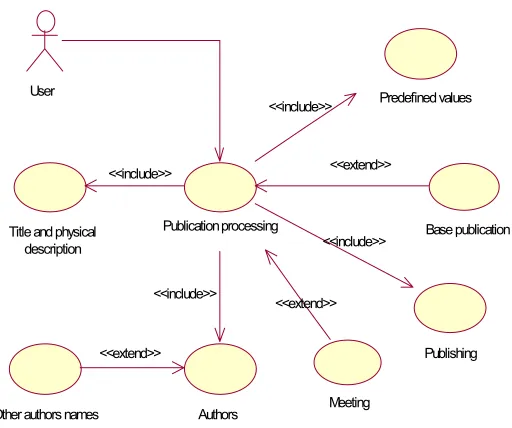
User identification done by the system and selection of a publication type to be processed precede the cataloguing. In order to be identified, the user (author of selected publication or librarian) enters a username and a password. If the inserted data is recognized by the system, user can work with the application; otherwise user receives the message to try a new identification. Selection of a publication type means selection among a monograph, journal, scientific paper collection, or article for processing. After that, the process of creating bibliographic record for the selected publication type begins. This process is shown by use case Publication processing.
3.1. Publication processing
User
Other authors names Authors
Publishing Title and physical
description
Predefined values
<<extend>>
Meeting
Base publication Publication processing
<<include>>
<<include>> <<include>>
<<include>>
<<extend>> <<extend>>
Fig. 3.1. Publication processing
3.1.1 Use cases
The use cases representing the model for publication processing are described in this section.
Use case Publication processing Use case name: Publication processing
Use case purpose: To create a new bibliographic record for the selected publication type.
Preconditions: User is logged into the system and the publication type for processing is selected.
Final conditions: Complete data for the new bibliographic record of the selected type (by the YUMARC format rules) is stored into the database. Restrictions: User who inserts the data must be registered in the system. Main stream:
A. User starts processing a new publication of the selected type Creation of the document.
D. User has selected the paper collection as the publication type EXTENSION: use case Meeting.
E. INCLUSION: use case Publishing.
F. User has selected the scientific paper or the article as the publication type EXTENSION: use case Base publication.
G. INCLUSION: use case Predefined values. H. Storing bibliographic record into the database. I. Use case ends.
The user can carry out the steps B, C, D, E and F in any order.
Use case Title and physical description Use case name: Title and physical description
Use case purpose: To set appropriate YUMARC formatted values for processing title, ISBN, dimensions and page number(s).
Preconditions: Publication processing use case is started. Final conditions: Appropriate data is maintained.
Main stream:
A. User inserts title.
B. OPTIONAL: User inserts subtitle. C. OPTIONAL: User inserts part mark. D. OPTIONAL: User inserts part title. E. OPTIONAL: User inserts collection title. F. OPTIONAL: User inserts number in collection. G. OPTIONAL: User inserts publication number. H. User inserts page number.
I. OPTIONAL: User inserts ISBN number. J. OPTIONAL: User inserts dimensions. K. Use case ends.
Alternative stream:
Alternative stream trigger: User has selected monograph as publication type. K1. User chooses one value for monograph category from list of
values.
K2. User chooses one value for hierarchy level from list of values. K3. Use case ends
Alternative stream trigger: User has selected journal as publication type. E1. OPTIONAL: User inserts former title.
E2. OPTIONAL: User inserts ISSN number.
E3. User chooses one value for periodicity from list of values. E4. OPTIONAL: User inserts impact factor.
E5. Reverting to the step J of the main stream.
Alternative stream trigger: User has selected scientific paper as publication type.
C1. Reverting to the step H of the main stream. I1. Reverting to the step K of the main stream.
C2. User inserts notebooknumber. C3. User inserts year.
C4. Reverting to the step H of the main stream. I1. Reverting to the step K of the main stream.
Use case Authors Use case name: Authors
Use case purpose: Maintaining data about author/authors. Preconditions: Publication processing use case is started.
Final conditions: Data about author/authors is maintained (at least one author).
Main stream:
A. User inserts first-name and last-name for author.
B. User chooses one value for authorship type from list of values (code book).
C. User marks end of the insertion for one author.
D. Data about author is added into the list of authors for that publication and shown to the user.
E. User can select inserted author to insert his other name EXTENSION: use case Other author's names.
F. User repeats steps A-E as many times as there are the authors. G. Use case ends.
Use case Other author's names Use case name: Other author's names
Use case purpose: Maintaining data about author's other names. Preconditions: Authors use case has started. Author is selected. Final conditions: Other name for selected author is maintained. Restrictions: Author must be selected.
Main stream:
A. All other names for selected author are shown (if the names are not previously entered).
B. User inserts other first-name and last-name for author.
C. User marks end of the insertion for other name of the selected author. D. Data about author's other name is added into the list of other names
for the selected author and shown to the user.
E. User repeats steps B-C/ the B and C steps as many times as there are the other names of the selected author
F. Use case ends.
Use case Meeting Use case name: Meeting
Preconditions: Publication processing use case is started. User selected scientific paper collection as the publication type.
Final conditions: Appropriate data is maintained. Main stream:
A. User inserts meeting name.
B. OPTIONAL: User inserts meeting other name (short). C. User inserts meeting location.
D. User inserts meeting number (Arabic). E. User inserts meeting year.
F. Use case ends.
Use case Publishing Use case name: Publishing
Use case purpose: To set appropriate YUMARC formatted values for processing publishing and publication language.
Preconditions:Publication processing use case is started. Final conditions: Appropriate data is maintained.
Main stream:
A. User chooses one value for country of publishing from the list of values.
B. OPTIONAL: User inserts republic of publishing.
C. User chooses one value for translation code from the list of values. D. User chooses one value for language of text from the list of values. E. OPTIONAL: User chooses one value for language of original from
the list of values.
F. User inserts place of publishing. G. User inserts publisher.
H. User inserts year of publishing. I. Use case ends.
Alternative stream:
Alternative stream trigger: User selected journal as the publication type. H1. Reverting to the step I of the main stream.
Alternative stream trigger: User selected scientific paper as the publication type.
F1. Reverting to the step H of the main stream.
Alternative stream trigger: User selected article as the publication type. F1. Reverting to the step H of the main stream.
Use case Base publication Use case name: Base publication
Use case purpose: To select publication on the highest hierarchy level, containing scientificpaper being processed.
Preconditions: Publication processing use case is started. User has selected scientific paper or article as publication type.
Main stream:
A. User inserts part of the name for base publication in order to be searched/retrieved.
B. List of journal titles is shown.
C. User chooses one value from the list of journal names. D. Use case ends.
Alternative stream:
Alternative stream trigger: User has selected scientific paper as publication type.
B1. List of paper collection titles is shown. B2. Reverting on the step C of the main stream.
Use case Predefined values Use case name: Predefined values
Use case purpose: To set predefined YUMARC formatted values for publication.
Preconditions: Publication processing use case is started. Final conditions: Appropriate data is maintained.
Main stream:
A. Predefined values are taken over (e.g. file, XML, database,).
B. Predefined values (status of the record, type of the record, bibliographic level, indicator for name, indicator for meeting) are associated with appropriate elements of the new bibliographic record. The association is made within the loop specially for each value. C. Use case ends.
3.2. Object model
User authorID : Integer firstname : String lastname : String username : String password : String
CodeCountry code : String name : String CodeLanguage
code : St ring name : String CodeAuthority
code : String name : String
CodePeriodicity code : String name : String
CodeCategory code : String name : String
HierarchyLevel code : String name : String
User Interface
Database W arehouse
Document docID : Integer title : String valid : Boolean
SubField s ubfieldID : String c ontent : St ring ord : Int eger
0..n 0..1 0..n 0..1 0..n 0..1 0..n 0..1 0..n 0.. 1 0..n 0.. 1 0..n 0..1 0..n 0..1 0.. n 0..1 0.. n 0..1 0..n 0..1 0..n 0..1 CodeTranslation code : Integer name : String EmbeddedField
Field fieldID : St ring ind1 : Integer ind2 : Integer embedded : Boolean ord : Int eger
1 0..n 1 0..n 1 0..n 1 0..n 0..n 0..1 0..n 0..1 0.. n 1 0.. n 1 field 0..1 1 0..1 1 embedded
Fig. 3.2. Class diagram for cataloguing
On the class diagram and sequence diagrams that follow there are also classes: UserInterface representing a communication window between user and data, Database representing the place of permanent storage for data and Warehouse representing the place where to takeover the specific data from.
3.3. Sequence diagrams
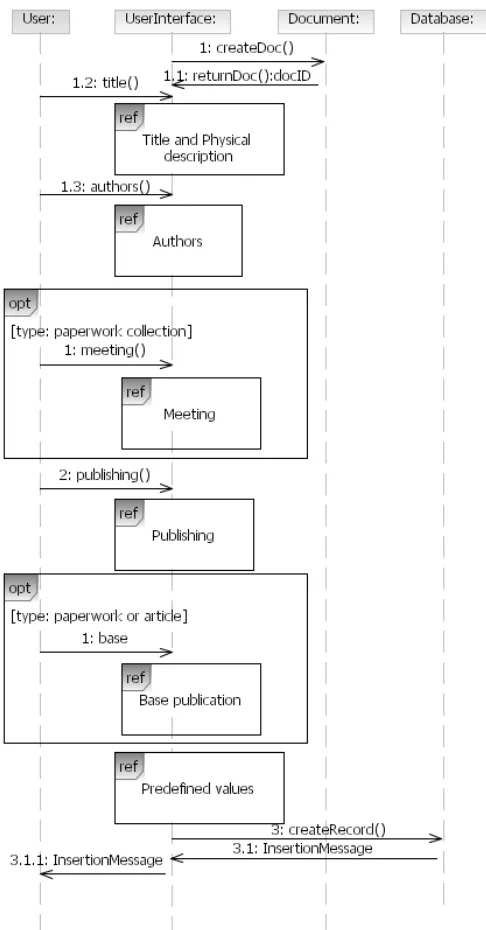
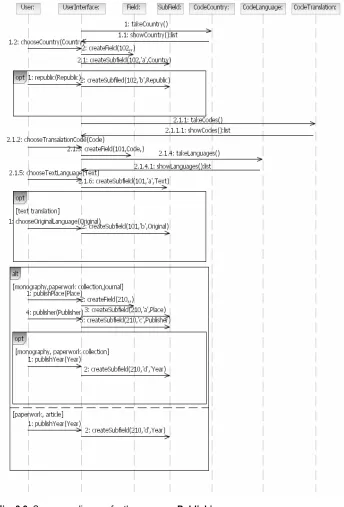
Object models for the use cases specified in paragraph 3.1.1 are shown on the sequence diagrams. Parameters for the methods createField (field, ind1, ind2) and createSubfield (field, subfield, and content) are values that are necessary for Field and Subfield definitions respectively. Since Field Indicators need not be defined, the parameters ind1 and ind2 of the method createField need not have a value (e.g. createField (010,,)).
shown with the mark opt and extension condition written into the square brackets [ ].
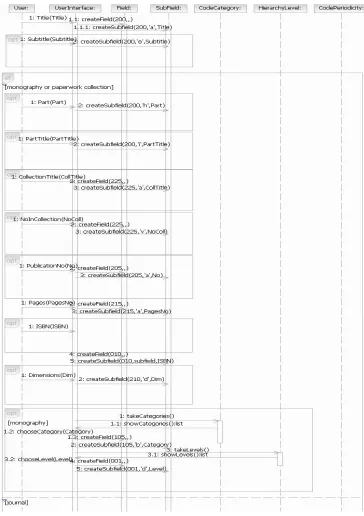
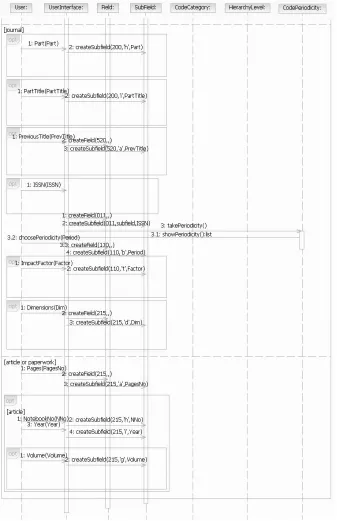
The diagram sequence for use case Title and physical description is on Figure 3.4. Activities that are optional for execution are shown inside the rectangle with mark opt. The arrays of alternative activities are shown designated with the mark alt and a condition written into the square brackets [ ].
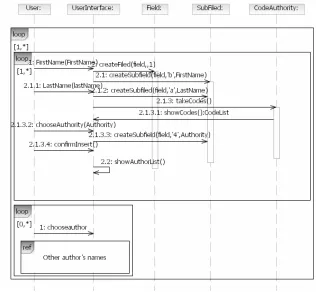
The diagram on Figure 3.5 describes the use case Authors. Mark loop in the rectangle represents repetition of the array of activities. In methods createField and createSubfield the first parameter has value of the variable field, because its value depends on the number of authors.
Depending on the number of authors, data about them is stored into the corresponding Fields. If there is only one author, data is filled in Field 700 (Subfields 4, a, b). If there are three authors the most, data about the first author is filled in Field 700, whereas the data about other two authors is filled in Filed 701 (Subfields 4, a, b). If there are more than three authors, data about all the authors are entered in Field 701 (Subfields 4, a, b). For the authorship type different from author or co-author, data about authors is stored into Field 702 (Subfields 4, a, b). Depending on which Fields are filled out, corresponding values for Indicators are attributed to them.
Fig. 3.5. Sequence diagram for the use case Authors
The values of the second name of the authors whose data is entered into the Field 700 are input into the Field 900; the values of the second name of the authors whose data is entered into the Field 701 are entered into the Field 901; the values of the second name of the authors whose data is entered into the Field 702 are entered into the Field 902.
Fig. 3.6. Sequence diagram for the use case Other author’s names
Fig. 3.7. Sequence diagram for the use case Meeting
The use case Meeting is displayed on Figure 3.7.
belonging to the base publication. This can be seen in the second alternative on the diagram (variable subfield is placed for the second parameter of createSubfield method).
Fig. 3.8. Sequence diagram for the use case Base publication
A use case Predefined values is shown on Figure 3.10. The values of the parameters for the methods createField and createSubfield are taken over from the file. The data related to Field 001 can be found there.
Fig. 3.10. Sequence diagram for the use case Predefined values
Figure 3.11 describes the algorithm for cataloguing. On the diagram, beside the classes described in the next section, the class UserInterface can be seen. The use cases defined earlier in this paper and their sequence diagrams describe functionality of the user interface.
The Message (method) dataInsertion() represents the insertion of the data related to the selected type of publication being described. Details for this insertion are explained in the use cases previously displayed.
4. Conclusion
Software systems for cataloguing are based on the international standard formats (UNIMARC and MARC 21) that most frequently support the protocol for the interchange of bibliographic records. This approach made possible creation of the international library network which significantly improved utilization of the ICT in libraries. In order to use these systems the librarians need specific training in library document cataloguing following the mentioned standard formats.
Fig. 3.11. Sequence diagram for cataloguing
The paper presents the model for cataloguing in accordance with the UNIMARC format. Since the structures of the UNIMARC and MARC 21 formats are similar, the proposed model can also be deployed for the MARC 21 format. The user interface (represented by the use-case diagrams) is connected to the object model of the adopted format via midleware layer. This means that any change in the input data set is reduced only to screen form modification and connecting input data with object model of bibliographic format. Besides, the proposed model can be implemented as an independent software component that can easily be integrated with an existing library software system thus providing for an additional specific bibliographic processing mode.
5. References
1. Surla, D., Konjović, Z., Overview of the Development of the Library Information System BISIS, International Conference on Distributed Library Information Systems, Ohrid, 2004. pp. 13-18
3. Jakšić, M., Mapping of bibliographical standards into XML,. Software Practice and Experience 34, 1051-1064. (2004).
4. Vidakovic J., Rackovic M. Generating content and display of library catalogue cards using XML technology, SOFTWARE-PRACTICE & EXPERIENCE Vol 36, No 5, pp 513-524 APR 25 2006
5. Budimir, G., Surla, D., Quality control system of XML bibliographic records, Novi Sad Journal of Mathematics, Vol. 34, No. 1, 107-130.
6. Škrbić, S., Surla, D. , Bibliographic records editor in XML native environment, Software-Practice and Experience. DOI 10.1002/spe.834
7. Belić, K., Surla, D. ,User Friendly Web Application for Bibliographic Material Processing, The Electronic Library, Vol 26, No 3, scheduled to appear in June 2008
8. MARC 21 XML Schema, viewed May 2008,
http://www.loc.gov/standards/marcxml
9. MARCRecords Systems and Tools, viewed January 2008, http://www.loc.gov/marc/marcservice.html
10. Concourse Software, viewed January 2008, http://www.booksys.com/v2/products/concourse/
11. Naiburg, Eric J., Maksimchuk, Robert A., UML for database design, Addison-Wesley, 2001.
12. IEEE Technical Committee on Digital Libraries (TCDL), viewed February 2006, http://www.ieee-tcdl.org
13. MARC Standards. Network Development and MARC Standards Office, Library of Congress, viewed March 2006, http://lcweb.loc.gov/marc/.
14. UNIMARC Manual: bibliographic format / International Federation of Library Association and Institutions, IFLA Universal Bibliographic Control and International MARC Programme, New Providence, London, 1994.
Appendix 1. Monographic publication processing in accordance with YUMARC format
The detailed description of the adopted processing level in the YUMARC for monographic publication type is given in this Appendix. The processing model for monographic type publications, which is presented in Section 3, is based on the processing level shown here.
In the brackets next to the Field and Subfield names, one can see if they are mandatory and/or repeatable. If this is not the case, these fields and subfields are neither mandatory nor repeatable. If existing, predefined values for Fields, Subfields or Indicators are especially emphasized. The same goes for the description of determinations of these values if it is possible to determine them on the basis of other data. A cross processing that relates to the interdependence of the contents of different subfields is also stated.
Field 001: Record identifier (Mandatory) Subfields:
Predefined values:
- Subfields 001a, 001b, 001c are coded,
- Subfield 001a has value 'i' with meaning First insertion of the bibliographic record,
- Subfield 001b has value 'a' with meaning Text material, printed, - Subfield 001c has value 'm' with meaning Monograph,
- Subfield 001d has value '0' with meaning Not related with other bibliographic records or value '1' with meaning At the highest level.
Field 010: International standard book number (Mandatory) Subfields:
$a ISBN number
$i Identifier of the publication, instead of ISBN number (if ISBN number does not exist)
Cross processing:
- If Subfield 010a does not exist, then Subfield 010i must exist.
Field 100: General processing data (Mandatory) Subfields:
$c Year of publishing (Mandatory) Cross processing:
- Year of publishing (100c) must differ from '????' and '9999'.
Field 101: Language of the publication (Mandatory) Indicator 1: Translation code
0 Original language 1 Translation
2 Contents translations Subfields:
$a Language of text (Mandatory) $c Language of original
Cross processing:
- Values for Subfield 101a and Subfield 101c are not equal,
- If Subfield 101c exists, value of the Indicator1 can not be 0 (101 Ind1≠'0').
Field 102: Country of publication (Mandatory) Subfields:
$a Country of publishing (Mandatory) $b Republic of publishing
Field 105: Coded data Field – Textual materials, Monographic (Mandatory) Subfields:
$b Monographic category (Mandatory)
Field 200: Title and statement of responsibility (Mandatory) Subfields:
$e Subtitle $h Part mark $i Part title
Field 205: Edition statement Subfields:
$a Publication number
Field 210: Publication, distribution (Mandatory) Subfields:
$a Place of publishing (Mandatory) $c Publisher (Mandatory) $d Year of publishing (Mandatory) Cross processing:
- Subfield 210d must have equal value as Subfield 100c.
Field 215: Physical description (Mandatory) Subfields:
$a Page count (Mandatory) $d Dimensions
Field 225: Series (collection) Subfields:
$a Collection title $v Number in collection
Field 700: Personal name – primary responsibility Indicator 2: Form of name indicator
Has predefined value: 1 with meaning Name entered under surname Subfields:
$4 Authorship type (Mandatory) $a Last-name (Mandatory) $b First-name (Mandatory) Cross processing:
- If publication has more than three authors, Field 700 is not used.
Field 701: Personal name – alternative responsibility (Repeatable) Indicator 2: Form of name indicator
Has predefined value: 1 with meaning Name entered under surname Subfields:
$4 Authorship type (Mandatory) $6 Connection to other name $a Last-name (Mandatory) $b First-name (Mandatory)
Has predefined value: 1 with meaning Name entered under surname Subfields:
$4 Authorship type (Mandatory) $6 Connection to other name $a Last-name (Mandatory) $b First-name (Mandatory)
Field 900: Personal name – primary responsibility (other name) (Repeatable)
Subfields
$a Last-name (Mandatory) $b First-name (Mandatory) Cross processing:
- If other name exists in Field 900, then Field 700 must exist.
Field 901: Personal name – alternative responsibility (other name) (Repeatable)
Subfields:
$6 Connection to personal name $a Last-name (Mandatory) $b First-name (Mandatory) Cross processing:
- Each 901 Field must have Subfield 6 to connect to appropriate field 701.
Field 902: Personal name – secondary responsibility (other name) (Repeatable)
Subfields:
$6 Connection to personal name $a Last-name (Mandatory) $b First-name (Mandatory) Cross processing:
- Each 902 Field must have Subfield 6 to connect to appropriate field 702.
The accepted processing levels for other library documents (conference proceedings, serial publications, paper published in conference proceedings and journals) are defined in similar way.
company, Novi Sad, on the position of the information system and database administrator and developer. In 2005 she worked on project of Ministry of Science and Ecology: Corporative Web portal for permanent workers education and had Master scholarship from the Ministry of Science and Ecology of Serbia.
Dušan Surla, Department of Mathematics and Informatics, Faculty of Science and Mathematics, Trg Dositeja Obradovića 5, Novi Sad 2001, Serbia ([email protected]). Mr. Surla received his B. S. degree in mathematics from the University of Novi Sad, Faculty of Philosophy in 1969, M. S. degree in mechanics from the University of Novi Sad, Faculty of Mechanics in 1976, and Ph. D. degree in informatics from the University of Novi Sad, Faculty of Technical Sciences in 1980. Since 1976 he is with the Faculty of Science and Mathematics in Novi Sad. Since 1991 he is holding the full professor position at the Department of Mathematics and Informatics. Mr. Surla participated in 14 science projects; in 8 out of 14 he was the project leader. He published more than 170 scientific and professional papers.