TIMELINING THE CONSTRUCTION IN IMMERSIVE VIRTUAL REALITY SYSTEM USING BIM APPLICATION
A Thesis by
KARTEEK KUNCHAM
Submitted to the Office of Graduate Studies of Texas A&M University
in partial fulfillment of the requirements for the degree of MASTER OF SCIENCE
Chair of Committee, Julian Kang Committee Members, Boong Yeol Ryoo
John Walewski Head of Department, Joe Horlen
August 2013
Major Subject: Construction Management
ii ABSTRACT
Architectural, Engineering, and Construction (AEC) industry has been using 4D construction models (graphical illustration of the construction of a 3D building design with time as the 4th dimension) for many years to improve an existing construction schedule by identifying inconsistencies and out of sequence activities; reducing missing activities; and improving the ability to communicate construction plan information. In practice, majority of the AEC industry has been using a personal computer based monitor to view and analyze these models.
A study on investigating the potential benefits and challenges of using an immersive 3D virtual environment to view 4D models proved that by interactively generating construction schedule in the immersive virtual environment, the construction professionals were able to identify design, constructability, sequencing, and interdisciplinary interfacing issues which resulted in the construction professionals being able to develop a plan that resulted in a 28% savings to their original schedule. The major shortcoming of these immersive virtual reality systems was the Building Information Models (BIM) had to be converted to a specific format before they can be visualized in the immersive virtual environments.
This study is an attempt to address the shortcomings of the previous version of the BIM CAVE which had the control over the camera views for achieving an almost seamless immersive virtual environment by developing a new BIM CAVE application which synchronizes timelining of 4D construction sequence in BIM CAVE. The new
iii
BIM CAVE setup is run by a custom built application that makes use of the .Net API (Application Programming Interface) of the commercially available BIM application, Autodesk Navisworks 2012.
The objective of this research is to investigate the effectiveness, potential benefits and challenges of timelining the 4D construction sequence in BIM CAVE developed at Texas A&M University by using a qualitative research methodology called phenomenological study.
The findings of this research specify that timelining the 4D construction sequence in BIM CAVE has many potential benefits like better spatial perception which increases confidence of construction professionals over the schedule, better sequencing of construction activities, better communication of schedule, evaluating constructability issues, and training the work force. Thus, this research concludes that timelining the construction in BIM CAVE is effective over visualizing 4D construction on a single screen with some limitations mentioned in this research.
iv
ACKNOWLEDGEMENTS
I would like to thank my committee chair, Dr. Julian Kang, and my committee members, Dr. Boong Yeol Ryoo, Dr. John Walewski, for their guidance and support throughout the course of this research.
Thanks also go to my friends and colleagues and the department faculty and staff for making my time at Texas A&M University a great experience. I also would like to extend my gratitude to the industry professionals for participating in my research.
Finally, thanks to my mother and father for their encouragement and to my sisters for their support.
v TABLE OF CONTENTS Page ABSTRACT ... ii ACKNOWLEDGEMENTS ... iv TABLE OF CONTENTS ... v
LIST OF FIGURES ... vii
CHAPTER I INTRODUCTION ... 1 1.1. Research Problem ... 3 1.2. Motivation ... 4 1.3. Research Objective ... 5 1.4. Limitations ... 5 1.5. Thesis Summary ... 6
CHAPTER II LITERATURE REVIEW ... 8
2.1. Virtual Reality Systems ... 8
2.2. CAVE ... 11
2.3. 4D CAD/Graphical Construction Simulation in CAVE Systems .. 14
CHAPTER III RESEARCH METHODOLOGY ... 20
3.1. Development of New BIM CAVE Application ... 21
3.2. Validation ... 22
3.3. Research Design ... 24
3.4. Data Collection ... 25
3.5. Validity and Reliability... 27
3.6. Data Analysis ... 28
CHAPTER IV BIM CAVE SYSTEM ... 30
4.1. Hardware Component of BIM CAVE ... 31
4.2. Software Component of BIM CAVE ... 32
4.2.1.Autodesk Navisworks Manage 2012 ... 32
4.2.2.BIM CAVE Application ... 37
vi
CHAPTER V DATA COLLECTION ... 49
CHAPTER VI RESULTS ... 53
6.1. BIM CAVE for 4D Construction Experience ... 53
6.2. Benefits of Timelining 4D Construction Sequence in BIM CAVE ... 55
6.3. Limitations of the New BIM CAVE Application ... 59
CHAPTER VII CONCLUSION ... 61
7.1. Research Summary ... 61
7.2. Future research ... 62
REFERENCES ... 64
vii
LIST OF FIGURES
Page
Figure 4-1: The Field Of View (FOV) of the BIM CAVE Screens ... 30
Figure 4-2: BIM CAVE Hardware Configuration ... 31
Figure 4-3: Diagram Showing Connectivity and Flow of Information among Server and Client Computers in BIM CAVE ... 32
Figure 4-4: Navisworks Window Showing Plugins under Add-Ins Tab ... 36
Figure 4-5: BIM CAVE Server Application Interface ... 40
Figure 4-6: BIM CAVE Client Application Interface ... 41
Figure 4-7: Navisworks Application Showing Simulation Mode ... 42
1 CHAPTER I INTRODUCTION
Due to increase in the complexity of projects in Architecture, Engineering, and Construction (AEC) industry the focus of visualization techniques has shifted from two dimensional (2D) graphical representations to three dimensional (3D) graphical representations to communicate the AEC data. Building Information Modeling (BIM) can be defined as “a computable representation of the physical and functional characteristics of a facility and its related project/lifecycle information using open industry standards to inform decision making for realizing better value” (NBIMS 2007). Design and construction of buildings have relied on 2D drawings for representing the work to be done. They were defined as contracts - legal documents, were assessed by building codes, and used to manage the facility afterward. The main limitation of 2D drawings is they require multiple views to depict a 3D object in adequate detail for construction, making them highly redundant and thus open to errors. 3D models are more effective than the 2D drawings as it makes the visualization process easier. Apart from using BIM for the purpose of visualization, engineering analysis, conflict analysis, checking code criteria, cost engineering, as-built data, and budgeting it is also used to develop 4D models where activities of a schedule are attached to 3D components to simulate the construction sequence.
As the projects become more complex, the complexity of 3D models also increases. The way humans interact with computers is totally different from their natural
2
tendency of doing the same action in real world as visualizing 3D models on 2D screens limits the amount of information that can be gathered. Immersive virtual reality systems can narrow this gap between the real and the virtual world. Immersive Virtual Reality (IVR) is a technology which consists of immersion in an artificial environment where the user feels just as immersed as they usually feel in consensus reality. Immersive is a term that refers to the degree to which a virtual environment submerges the perceptual system of the user in the computer-generated stimuli (Biocca and Levy 1995). Architects will be able to use the immersive nature of the virtual reality to gain a better understanding of both qualitative and quantitative nature of space that they are designing (Bouchlaghem et al. 2005). Moreover, the increased field of view, both horizontal and vertical, will increase the sense of presence (Hatada et al. 1980). This is the main concept in CAVE (Computer Aided Virtual Environment) virtual reality systems to have the user surrounded by screens to create an immersive environment.
The construction plan development and review process in the construction industry typically involves the use of paper-based drawings and the expertise of experienced construction planners. These planning and review processes are performed by mentally visualizing spaces. However, different people have varying abilities to accurately visualize construction projects. This results in the development of construction plans that lack schedule reliability and diminishes schedule confidence of the project stakeholders (Yerrapathruni 2003). The AEC industry has been witnessing a steady increase in the use of desktop 3D and 4D CAD (graphical illustration of 3D models with time as the 4th dimension) tools for project planning. The idea to link 3D
3
CAD models to construction schedules was conceived in 1986-87 when Bechtel (an international, engineering and construction company) collaborated with Hitachi Ltd., to develop 4D Planner software (Cleveland 1989; Simons and Thornberry1988). A 4D model involves linking the CPM schedule to the 3D CAD model to visualize the construction schedule; actually showing which pieces of the project will be constructed in what sequence (Kumi and Retik 1997). 4D models display the progression of construction over time, sometimes dramatically improving the quality of construction plans and schedules (Rischmoller et al. 2001).
1.1. Research Problem
Several documented studies have shown 4D CAD as a good visualization and schedule review tool. More project stakeholders can understand a construction schedule more quickly and completely with 4D visualization than with the traditional construction management tools (Koo and Fischer 2000). Timelining of construction sequence in current available commercial software on a single screen limits the spatial perception. In the case of large and complex facilities, use of these tools for schedule review may be time consuming as 3D objects are visualized on a 2D desktop screen (Yerrapathruni 2003). This reflects in the longer durations of schedules developed and visualized using the timelining of construction on a single screen as the work force interference between trades is not visualized and taken into account while planning parallel activities (Whisker et al. 2003).
4
Also the earlier version of the BIM CAVE did not have the capability to timeline the construction sequence thus reducing the sense of immersion to the participants during construction simulation. In the phenomenological study conducted by Adithya Ganapathi, Texas A&M University, to test the BIM CAVE with four screens, it was mentioned that the lack of capability to timeline the construction sequence as one of the limitations of the BIM CAVE system.
The problems that the current research is trying to address are as follows:
Existing BIM CAVE’s limitation to timeline the 4D construction sequence thus making it not usable for project planning during pre-construction coordination meetings.
Reduce the gap between the real and virtual world.
1.2. Motivation
With the increasing complexity of the projects, the models are getting equally complex. This creates a demand to have an effective immersive visualization system to view and browse the 4-D models. Previous research has shown that by interactively generating the construction schedule in the immersive virtual environment, the construction professionals developed a plan that resulted in a 28% savings to their original schedule (Yerrapathruni 2003). The existing BIM CAVE system only achieved control over the camera position and its orientation while navigating through the model. It does not have a mechanism that helps in visualizing construction sequence which
5
depicts the project schedule. The .NET API’s (Application Programming Interface) provided by Navisworks Manage 2012 further motivated to investigate the benefits of timelining the construction sequence in BIM CAVE.
1.3. Research Objective
The objective of this research is to investigate the effectiveness of application of timelining construction in immersive virtual environment such as BIM CAVE. Timeline is a way of displaying a list of events in a chronological order. In this research the list of events are activities in a construction schedule. The following tasks were followed to achieve the objective of the research:
BIM CAVE development: software component.
Validation of suggested setup using a qualitative research methodology.
1.4. Limitations
The BIM CAVE application that is developed will only provide the visualization of the 3-D and 4-D simulations and information retrieval in the Commercial application, Navisworks Manage 2012. The application does not support other model manipulation functionalities such as hiding model elements, moving model elements etc. Moreover, this virtual reality system operates only on Navisworks and supports only those model files that the Navisworks supports.
6 1.5. Thesis Summary
The first chapter of the thesis contains the introduction to the current research topic, which explains about the use of BIM and virtual reality systems in the AEC industry. The problems with the existing BIM CAVE setup, motivation for the current research, objective and the limitations were also stated as a part of this chapter.
The second chapter contains the literature review conducted on the use of virtual reality system in general and also specific to the AEC industry. It also encompasses information about the existing CAVE virtual reality systems developed by other leading Universities and previous research carried out on using CAVE systems for visualizing 4D CAD models.
The third chapter explains the methodology used for this research to achieve the desired objective of investigating the effectiveness of timelining the construction sequence in BIM CAVE.
The forth chapter explains the steps followed in the development of the suggested new BIM CAVE Application in detail.
The fifth chapter contains the data collection part of the research, which was used to validate the BIM CAVE Application developed.
The sixth chapter talks about the results obtained from interviewing subject matter experts (SMEs) to investigate the new BIM CAVE Application.
The seventh chapter discusses the conclusion made from the results obtained from the interviews, which contains the experience of SME’s visualizing 4D
7
construction sequence in BIM CAVE, its advantages, and its limitations. Scope for future research is also mentioned in this chapter.
8
CHAPTER II LITERATURE REVIEW
The literature review includes three sections. The first section describes Virtual Reality systems and the development and benefits of VR systems. The second section presents Immersive Virtual Reality systems such as CAVE and its uses to the AEC industry. The third section describes how the use of CAVE system is beneficial when schedule is integrated to the 3D model and a construction sequence is visualized.
2.1. Virtual Reality Systems
Visualization is defined as transformation and analysis to aid in the formation of a mental picture of symbolic data which is simple, persistent, and complete (Kasik et al. 2002). Visualization techniques are being used in a variety of industries like automobile, appliances and aerospace for various purposes including analysis and testing (Kasik et al. 2002). Visualization in construction helps the stakeholders to design and evaluate construction projects and to visually communicate the project information. By visualizing a project electronically, potential problems in the design and schedule can be identified prior to the actual construction (McKinney and Fischer 1997). A project can be visualized in 2D, 3D or 3D CAD linked to the construction schedule, also known as 4D CAD (Koo and Fischer 2000).
9
The benefits of using 3D visualization and walkthrough technologies were first studied and evaluated by Songer and Diekmann (2001). The original 2D drawings were used to develop 3D CAD models which were then used to create a walkthrough model. Construction schedules were developed from 2D, 3D, and walk-thru representations for the case study project by 50 participants of varying experience. The participants were divided into three groups. Each group was instructed to create a list of activities and logic diagram using one of the three representations (2D, 3D or walk-thru). The results of the experiment show that the schedules developed using 2D had more missing activities, more missing relationships, and more logic errors than those created using 3D and walkthrough models. This research better illustrates the practical advantages of 3D CAD and walkthrough functions for creating a construction schedule.
Other technique includes the use of virtual reality technology for visualization of construction projects. Advances in the computing industry have resulted in better software, more available storage, and increasing computing power (Kasik et al. 2002). As a result, the graphical interface between computers and humans has greatly improved. Along with this trend, a migration from static visualization towards utilizing depth sight in the visualization process is taking place (Reeth et al. 1995). Research in the area of StereoMotion: a visualization system realizing true depth sight using stereoscopic display technology has allowed the use of virtual reality visualization (Reeth et al. 1995). Virtual reality as an experience in which a person is surrounded by a three dimensional computer-generated representation, and is able to move around in the virtual world and see it from different angles, to reach into it, grab it, and reshape it
10
(Rheingold 1993). Virtual reality (VR) systems create engagement and excitement to the users, which makes it an ideal tool to be used for education and training purposes (Bricken and Byrne 1993).
Virtual reality (VR) can be classified into two broad areas (Bouchlaghem et al. 2005):
1. Desktop VR and 2. Immersive VR
PC based virtual reality systems are usually classed as Desktop systems. Desktop virtual reality has emerged from animated computer aided design. With these systems the user views and interacts with the computer represented image on a traditional computer graphic screen. The non-immersive approach, also known as desktop virtual reality, enables users to interact with the virtual world with conventional devices such as a keyboard, mouse and a monitor. This solution seems to be an attractive compromise for many users who are uncomfortable about spending a long time in a helmet (Issa 1999).
Immersive Virtual Reality (IVR) is a system in which a person placed in the simulated environment will feel like it is the real world, to some extent (Psotka 1995). A person inside this virtual environment will have a specific sense of self-location within it where he can turn his head and eyes to visually examine/interact with the virtual environment surrounding him (Psotka 1995). Human beings have the general tendency to conceptualize the real world from the 2D drawings, photographs etc. There is a cognitive phenomenon involved in this process where there is lots of imagination going
11
on when the observer tries to grab 3D information from 2D drawings (Psotka 1995). The most direct benefit from using Virtual Reality systems is that it reduces the conceptual load because of the simplifying directness of perception of the virtual world (Psotka 1995). Virtual Reality systems create engagement and excitement to the users, which makes it an ideal candidate to be used for education and training purposes (Bricken and Byrne 1993). Through this system effective collaboration of the participants can be achieved which will facilitate effective communication of ideas and enables understanding of concepts more clearly. Collaborative learning process is proven to be more effective because it helps students clarify their doubts through articulation of ideas and discussion (Kozma and Shank 1998).
The most common IVR systems available are: Head mounted Display
Goggles and Gloves Vehicle Simulators
CAVE (CAVE Automatic Virtual Environment)
This research uses CAVE IVR system which has been modified to address some of the shortcomings of the traditional CAVE systems.
2.2. CAVE
CAVE is an immersive virtual reality environment which was designed in 1991 at the Electronic Visualization Laboratory (EVL), University of Illinois at Chicago, to
12
allow computational scientists to present their research in a one-to-many format on high-end workstations attached to large projection screens interactively. It was implemented and demonstrated in late 1991 as a response to the challenge by SIGGRAPH ’92 showcase effort to develop and display one to many visualization tools which used large screen projectors (Cruz-Neira et al. 1993). The CAVETM that was exhibited by the researchers was a 10’×10’×10’ theater made up of three rear-projection screens for walls and a down-projection screen for the floor. These projectors throw full-color workstation fields (stereo images). A user’s head and hand are tracked with electromagnetic sensors. Stereographic LCD stereo shutter glasses are used to separate the alternate fields going to the eyes. This allows the user to get a different image to each eye. Infrared transmitters cause the lens for each eye to stay transparent and switch during the vertical retrace time. The images are produced at 120 fields per second, updating the whole image at 60Hz, producing flicker-free images. Some of the shortcomings listed in the research include: cost, inability to project on all six sides of the CAVETM, light spillage, fragility, and ability to document.
The Applied Research Laboratory at The Pennsylvania State University has an Immersive Projection Display (IPD) similar to the CAVETM in the Synthetic Environment Applications Laboratory (SEA-Lab) (Shaw 2002). The SEALab at Penn State ARL utilizes a Surround Screen Virtual Reality (SSVR) system, developed by Mechdyne. The SSVR is a CAVE-like immersive projection display (IPD), which may be used to view three-dimensional stereo images and simulations in actual one-to-one scale. Projectors behind the screens project alternating images optimized for the left and
13
right eyes, generating a 3D stereoscopic image. While the traditional format of the CAVETM system is three walls and a floor, the SEALab system has four walls, completely surrounding the user with an image (Whisker et al. 2003). The four screens will provide a 360 degree horizontal field of view and will enable the users to view the models at a 1:1 scale or at any other modified scales (Gopinath 2004). The voice command recognition system, motion tracking system, the 3-D mouse, the pinch glove, and the shutter glasses, provide the user with an interactive, immersive virtual reality experience (Whisker et al. 2003).
The CAVE virtual reality environments that were built previously operates on custom made application developed using standard set of libraries (e.g. CAVETM libraries). To view a model developed in commercially available 3D modeling applications in the CAVE system, they need to be converted into the custom format recognized by the IPD system, where they could be displayed in one-to-one scale. StarCave, the immersive virtual reality system developed at SEALab supports 3D model files in VRML (Virtual Reality Modeling Language) format (DeFanti et al. 2009). The VRML format mainly contains only geometrical information of the 3D components (DeFanti et al. 2009). BIM models created using some of the commercially available application have to be converted to the VRML format before viewing them in the CAVE environment (DeFanti et al. 2009). The custom made application used by the CAVE systems also has their own tool to create 3D models rather than importing from the commercial application.
14
To visualize an information rich building information model from a commercially available BIM application in an immersive virtual reality environment, the model needs to be converted to a special format (VRML in StarCave) that can be used in the VR system. The format could change based on the type of VR system used. The conversion is a long and tedious process. It causes a loss in the BIM information. Most of the time, only geometry related information survives the conversion process (Hussam 2010). BIM CAVE system uses commercially available BIM application which is Navisworks Manage 2012. This application supports many file formats of different BIM applications the construction industry use. This eliminates the daunting task of converting the file formats and loss of BIM information.
2.3. 4D CAD/Graphical Construction Simulation in CAVE Systems
4D CAD may be defined as 3D CAD linked to the construction schedule (Koo and Fischer 2000). 4D CAD has been used extensively on different projects and a lot of research has been done on its benefits in project planning. This section describes the research done in the area of linking 3D models to the construction schedule and their outcome both in Desktop VR and IVR environments.
Several studies performed at The Centre for Integrated Facility Engineering (CIFE) at Stanford University focused on the use of 4D CAD on different building types. Walt Disney Concert Hall project was one of the projects which used 4D visualization of the construction process as a tool to accomplish project objectives such as schedule
15
creation, schedule analysis, communication, and team building as the project was complex and the tight spaces made coordination of construction activities a very high priority for the General Contractor (GC). 3D models were developed by the architects in CATIA (a 3D CAD modeling application) and the construction schedule was developed by the GC in Primavera P3 which consisted of approximately 7,200 activities. The schedule was developed in such a way that the 3D project was divided into chunks that are relevant to an activity. The 3D models in CATIA were imported into Rhino3DTM to allow the addition of names to the geometry and allow for decomposition of the geometry into relevant configurations for the respective construction activities. The geometry was then converted into VRML files. The 4D models were developed with the prototype 4D modeling software developed by Walt Disney Imagineering and CIFE. The 4D models were generated by linking the Primavera P3 schedule to the VRML geometric elements.
The challenges faced during the development of the 4D model can be categorized into three types which were related to the geometry, the schedule, and the linking of the geometry to the schedule. It was difficult to identify a particular 3D element and show the scope of work for its respective activity. Some of the areas in the 3D model lacked enough data to enable 4D simulation. Sometimes the level of detail in the 3D model was too little to generate a 4D model and sometimes there was too much detail, which slowed down the computational processing of the 3D and 4D models. The schedule related issues were inconsistencies in the schedule and the lack of data in the schedule which were time and resource consuming to resolve. The challenges related to linking of
16
3D model and the schedule included: inconsistencies, other data, and representation of activities with no geometry.
4D construction visualization was helpful in planning the lay down areas for the enclosure, to visualize overall project access at critical junctures in the project, to refine the interior and exterior scaffolding strategy, to plan the installation of the complex ceiling of the main concert hall, identifying several conflicts related to schedule well before the construction started, communicating and reviewing by a group of 40 people in the Virtual Reality Cave, and developing a collaborative team of subcontractors.
A study was conducted at SEALab, Pennsylvania State University to investigate the potential benefits and challenges of using an immersive, 3D virtual environment to view 4D models. This study also investigated the use of an Immersive Virtual Environment (IVE) for improving the project planning process by generating and reviewing construction plan in a virtual environment. This study used several research methods such as case study, uncontrolled explanatory experiment, survey techniques, and content analysis. Explanatory research methods were used as the studies describing the use of immersive virtual environments for project planning currently do not exist and the purpose of this study fits into the categories of explanatory research which are to: 1) investigate poorly understood phenomena, 2) identify and discover important variable, and 3) generate hypothesis for further research.
The research case study focused on a portion of the AP1000 nuclear power plant. The study specifically focuses on the installation sequence of the modules and spool pieces that connect the modules in Room 12306 in the auxiliary building of the AP1000
17
nuclear power plant. Two exploratory experiments were performed to test the application of 4D models in an Immersive Virtual Environment (IVE). The first experiment involved the use of the IVE to generate a construction sequence by two teams of graduate students. During the second experiment, two teams of experienced construction superintendents developed a construction plan for the area using the drawings provided by the designer. These plans were input into the IVE for viewing and evaluating.
In Experiment I, two teams of graduate students in construction management who had no prior knowledge of the space were immersed in Room 12306 in the IVE and were given a scripted tour. The students were then asked to develop an installation sequence for Room 12306 in the IVE and were given the freedom to recommend changes to the design and module boundaries. Each team developed a unique sequence one in 120 minutes and the other in 90 minutes. The interactive visualization of the 4D construction sequence helped the students review their schedule to find additional places where parallel activities could be performed and find places where the schedule they have developed can be improved. The enhanced spatial perception and immersion provided by the IVE for a group of students helped them in discussing collaboratively the construction methods that can be used for construction and identify work-space interference between trades while planning parallel activities. This increased their confidence in the schedule they have developed. During the experiment, it was also noted that the immersive virtual environment could be used as a learning tool, especially for inexperienced construction professionals and construction students (Yerrapathruni
18
2003). The students can quickly gain experience and instincts related to construction method selection, activity sequencing, site planning, site logistics, temporary facilities, project safety, and project security (Yerrapathruni 2003).
The feedback from the students from the first experiment resulted in making changes to the mockup to accommodate necessary refinements to the granularity of the schedule activities. The participants suggested additional functionality, such as the announcement of the component name being installed to provide additional benefits to the users. The designer (Westinghouse) of the AP1000 nuclear power plant made a number of changes to the design of Room 12306 after Experiment I. The main purpose of this was to get the design to a level of detail that would be helpful to perform Experiment II (Yerrapathruni 2003). The designer provided 3D isometric paper drawings to the construction professionals to develop schedules based on paper drawings while the researcher modified the initial 3D CAD model to include the design changes.
Two teams of two experienced construction superintendents from Burns & Roe Enterprises were involved in Experiment II to test the ability of an IVE to help construction planners identify critical issues of a project by reviewing/generating schedules in the IVE. These two teams were provided with 3D drawings on papers to review and develop a construction schedule for Room 12306. Each schedule activity was matched to an object model for display in the IVE. Each team viewed their sequence in the IVE and after the sequence was played back from start to finish, each team advanced through the sequence step-by-step and evaluated their performance, while discussing their construction strategy with the researcher (Yerrapathruni 2003). The results of the
19
experiment demonstrated that the construction planners had a better understanding of the constructability issues while they were inside the IVE as number of changes in module boundaries was higher after reviewing the schedule in IVE. During the review, each group found a number of issues with their construction sequences. The construction planners were able to identify out-of-sequence activities in the schedule that they developed in at least four instances.
After the review, the two groups were combined into one and were given the opportunity to develop an installation sequence in the IVE using the interactive scheduling technique. The teams spent less than one hour developing a final sequence using the IVE (Yerrapathruni 2003). The planners managed to identify design issues, constructability issues, and out-of-sequence activities during the review process in the IVE, and were able to reduce the schedule by 28% by collaboratively generating the schedule in the IVE (Yerrapathruni 2003). The experimental results provide valuable insight into the effectiveness of the IVE for project planning. The results illustrate that the IVE was a beneficial schedule review tool, as it helped the construction planners to identify constructability issues they could not identify while developing the schedule using the 3D isometric paper drawings (Yerrapathruni 2003). The IVE was also found to foster good communication as it generated discussions between the two groups with different construction plans, when given the opportunity to critique each other’s plan (Yerrapathruni 2003).
20
CHAPTER III
RESEARCH METHODOLOGY
This section describes the steps taken to achieve the research objective and the research techniques used throughout this study. Due to the nature of this study, a qualitative research method has been utilized and an explanation of the selection is provided.
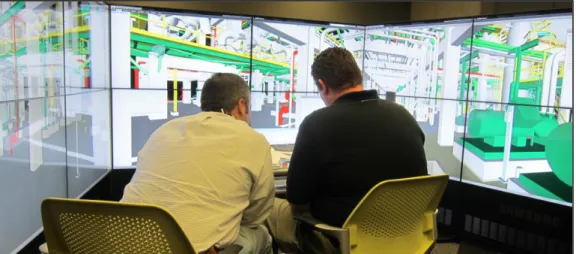
For this study, the BIM CAVE system with three walls and each wall made up of four LCD screens individually connected to a Central Processing Unit (CPU) is used. They were designed to communicate with one another using a wired router. The CPU running the center screen is the server and the other three CPUs controlling the left, and right screens are designated as the clients. The three walls are placed at 100 degree angle to each other immersing an individual in a 240 degree field of view. As mentioned earlier the current BIM CAVE application has gained control over camera position and orientation only thus producing viewer centric images. Time aspect has not yet been controlled and synchronized across these three computers. The first step in the research involves developing a new BIM CAVE application which not only controls camera position and orientation but also the time aspect of construction sequence thus synchronizing the 4D construction sequence across all the three computers to immerse an individual and give him a sense of presence during the virtual construction process.
The research methodology contains two main steps. They are: 1. Development of new BIM CAVE application
21 2. Validation of the application
Each of these steps is described in detail in the following sections and a further detailed description of BIM CAVE system both the hardware component and the software component with new application which has been developed to synchronize timelining is provided in the next chapter.
3.1. Development of New BIM CAVE Application
The software component of BIM CAVE involved development of a stand-alone application that uses the Application Programming Interface (API) of the commercially available BIM application, Autodesk Navisworks Manage 2012. The BIM CAVE application contains two different versions for the server and client computers. The current BIM CAVE application updates the camera orientation of the clients with respect to the server whenever the user browses the 3D model in Navisworks to provide a synchronized view across the screens. The server BIM CAVE application uses the API to obtain the camera parameters of the Navisworks application. The camera parameters are used in a mathematical rotation algorithm to calculate the axis and angle of rotation for the client computer's camera. The calculated camera attributes are then sent over the network, which will be used by the clients to re-orient their camera.
But, when the 4D construction sequence is initiated in the server computer it is not synchronized across the client computers. Thus, the user can visualize the construction sequence only in the server computer which results in the loss of sense of
22
presence and immersion in the BIM CAVE system. The purpose of this research was to add additional functionality of timelining the construction in BIM CAVE to the existing BIM CAVE application by synchronizing the 4D construction sequence across all the three computers. This was achieved in two steps: 1) Developing plugins using the .NET API’s of Navisworks Manage 2012 to move the construction sequence by one day forward, one day backward, one week forward, and one week backward, 2) Executing these plugins in the server application through automation. Whenever the user clicks a button on the server application, the corresponding event is triggered and the construction sequence is moved by a day or a week forward or backward. This information is sent over the network to the client application which forces the corresponding function in the client instances of Navisworks Manage 2012 thus synchronizing the construction sequence across the server and the client computers.
3.2. Validation
This research proposes to study the difference between 4D construction visualization in an immersive virtual reality environment such as BIM CAVE and 4D construction visualization on a single screen and how it helps the construction professionals in making decisions related to project planning. It also aims to study the advantages and disadvantages of timelining the construction in BIM CAVE. For the purpose of this study, it is highly essential to study human interactions with the BIM CAVE system and obtain feedback about its effectiveness. To evaluate the BIM CAVE
23
setup, qualitative research methodology is used. McMillan and Schumacher defined qualitative research as, primarily an inductive process of organizing data into categories and identifying patterns (relationships) among categories (McMillan and Schumacher 2001). Qualitative research methodology is used when little information exists on a topic, when variable are unknown, and when a relevant theory base is missing or inadequate (Leedy and Ormrod 2005). A qualitative study can help define what is important- that is, what needs to be studied (Leedy and Ormrod 2005). Qualitative researchers believe that there isn’t necessarily a single, ultimate truth to be discovered. Instead, there may be multiple perspectives held by different individuals, with each of these perspectives having equal validity, or truth (Creswell 1998). The qualitative research technique used for this research is phenomenological study. Phenomenology seeks to understand a person's or persons' perspectives as he, she, or they experience and understand an event, relationship, program, emotion, etc. (Leedy and Ormrod 2005). The phenomenological study helped to understand the participant's perception towards timelining construction in BIM CAVE. The feedback from the participants was in turn used to identify the differences between 4D visualization in BIM CAVE compared to 4D visualization on a single screen and how it affects the decision making capability of construction professionals in project planning. It also identifies the pros and cons of the setup. Semi structured and informal interviews were conducted with the participants as a part of the research methodology. The main advantage of having an extended informal discussion is that the participants will be able to express their opinion in a clearer and descriptive manner.
24 3.3. Research Design
The research design allowed accessing the participant's experience and knowledge about BIM, project planning, and construction to seek out their perception about the effectiveness of timelining the construction in immersive virtual reality system such as BIM CAVE. This research relies on the in-depth interviews with carefully selected sample of participants, which is one of the important criteria in the phenomenological study. A typical sample size for a phenomenological study ranges from 5 to 25 individuals (Creswell 1998). For this study, six individuals were interviewed. The effectiveness of the research methodology is mainly determined by the four underlying parameters such as:
1. The research participants must be subject matter experts (SMEs) with expertise in BIM and should have working experience in AEC industry (Architecture Engineering & Construction). The SMEs opinions were valued for their in-depth understanding of their field of expertise and rational perspective.
2. The nature of study indicated that there will be some constraints during the study that could hinder the SMEs from fully experiencing the new setup of the BIM CAVE due to the limited amount of time spent in the BIM CAVE. Moreover, the participants might be hesitant to completely describe their experience about the BIM CAVE during the interview sessions when exposed to a new place surrounded by people. It has been made sure that the participants were given
25
enough time to spend with the BIM CAVE and were made to feel comfortable by engaging them in a general conversation before the start of the interviews.
3. The BIM model visualized in the BIM CAVE system during the interviews were relevant to what the participants had experienced before. This process ensured that the participants spent less time understanding the model and more time focusing on the effectiveness of the setup.
4. The researcher during the interaction with the SMEs had to be collaborative and cooperative.
All the four above-mentioned parameters were addressed to make sure the interviews took place without any hindrances.
3.4. Data Collection
The data collection methodology used for the phenomenological study was semi-structured interviews. The interviews were designed in a way to gain the understanding of the SMEs' perception towards timelining the construction in BIM CAVE and its effectiveness in decision making during project planning. The interviews were designed to be more flexible and informal by asking open-ended questions to SMEs, thus facilitating them to communicate their thoughts on the new setup effectively.
26 1. The Pre-System Introduction Phase
The purpose of this initial phase was to allow the SMEs to share their general experience about the use of BIM and 4D construction visualization tools in their company and the kinds of advanced visualizing systems they have used or experienced previously. This phase enabled the researcher to understand the SMEs general notion about BIM, 4D construction visualization and use of advanced visualizing systems to view BIM models.
2. The System Introduction Phase
The research participants were introduced to the BIM CAVE setup during this phase. A brief overview of how the overall system works and technical details about how the separate computers communicate with each other to achieve an immersive view were explained. The system introduction phase had two main sub phases. First, the 4D construction simulation mode was turned off and the setup was made similar to the previous version of BIM CAVE without any timelining functionality. The participants were then allowed to use the timelining function and navigate through the BIM model. They were allowed to go through the construction sequence in BIM CAVE and then navigate in between the construction sequence. This phase acted as a basis for the SMEs discussion with the researcher.
27 3. The Post System Introduction Phase
The Post System Introduction phase had a collaborative discussion between the SMEs and the researcher right after the new BIM CAVE application was introduced. This was the last phase of the interview during which the researcher built up an informal conversation with some preplanned open-ended questions to channelize the thoughts of the SMEs. During this phase the interviewer was also able to obtain the pros and cons of the application developed apart from how they conceptualized the timelining in BIM CAVE.
3.5. Validity and Reliability
Data collection through informal interviews can be accurate as the researcher is certain of the source of the data, the interviewees who are subject matter experts. The interviewees selected for the study had at least five years of experience in AEC industry with an expertise in BIM, project planning, and construction. Typically, findings that emerge from semi-structured interviews can be more accurate and reliable when compared to the findings revealed by the other research methods (Kvale 1996). The informal interactions with the SMEs reduced the amount of misunderstanding and misinterpretation by the researcher. The semi-structured interviews also facilitated obtaining some divergent perspectives to know about the benefits and limitations of the new application.
28 3.6. Data Analysis
The data analysis was performed after the phenomenological study containing the interview information from the SMEs. In a typical data analysis part, the researcher will look for common themes from the transcripts of the descriptive interviews conducted. The theme of interest for this thesis is the effectiveness of timelining the construction in BIM CAVE compared to timelining on a single screen. The researcher will typically take the following steps after transcribing the interviews (Leedy and Ormrod 2005):
1. Identify the statements related to the topic.
In this step, any statement or phrase that the SMEs used to describe the effect of timelining the construction in immersive virtual environment such as BIM CAVE was identified. It was made sure that the researcher remained unbiased while identifying the statements from the interview transcripts. This step allowed understanding the general perspective of SMEs towards the idea of timelining the construction in BIM CAVE.
2. Group statements into meaningful units.
The identified statements from each of the interview transcripts were carefully scrutinized and the clearly redundant statements were removed (Moustakas 1994). With the set of non-redundant units of meaning in hand from each of the
29
interviews, the researcher examined the statements to group them in to meaningful units to elicit the essence of the interviews.
3. Seek divergent perspectives.
The interview transcripts were scanned to identify the pros and cons of the new BIM CAVE application with additional functionality of timelining.
4. Construct a composite.
In this step, the information collected from the previous steps was used to summarize the overall experience of the SMEs with the new BIM CAVE application. From the overall description of the six interviews conducted, the researcher summarized the effectiveness of timelining the construction in BIM CAVE compared to timelining on a single screen.
30 CHAPTER IV BIM CAVE SYSTEM
The BIM CAVE version which will be used for this research is an immersive virtual reality system that uses a commercial BIM application, Autodesk Navisworks. The BIM CAVE uses multiple LCD screens placed at a certain configuration, which is believed to maximize the sense of presence inside the CAVE to better visualize the BIM models. The current version of BIM CAVE system provides a Total Horizontal Field of View (HFOV) of 240 degrees as shown in Figure 4-1. The BIM CAVE application runs on the .Net API (Application Programming Interface) of Navisworks 2012. This chapter discusses about the software and hardware components that make up the BIM CAVE.
31 4.1. Hardware Component of BIM CAVE
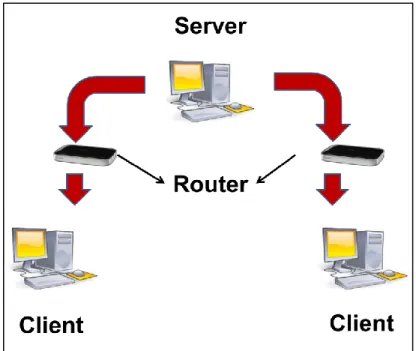
The BIM CAVE version used for this research consists of twelve 46” screens. Four screens form a wall and each wall is connected to a CPU. These four screens act as a single screen to display images from the CPU. Screens are connected to the CPU by a Video Graphics Array (VGA) cables. Twelve screens form three walls which are placed at 100 degree angle to each other. All the CPUs run i-7 processor with high-end graphics card. The computers are connected to a wired router, which enables them to communicate with each other across the network. The computers uniquely identify one another with an IP address during the communication process. The computers have conventional mouse and keyboards as input devices. Figure 4-2 shows the hardware configuration of the BIM CAVE. Figure 4-3 shows how server and client computers are connected and the flow of information among the client and server computers in BIM CAVE.
32
Figure 4-3: Diagram Showing Connectivity and Flow of Information among Server and Client Computers in BIM CAVE
4.2. Software Component of BIM CAVE
The software part of the BIM CAVE has two components. One is the commercial BIM application, Autodesk Navisworks Manage 2012 and the other one is the custom made BIM CAVE application which runs on top of Navisworks Manage and controls it.
4.2.1. Autodesk Navisworks Manage 2012
The Navisworks Manage is one of the commercially available BIM application that can perform model viewing and manipulation functions such as clash detection and 4D construction sequence. Navisworks is widely used software that enables
33
professionals from the AEC industry to combine their work into a single synchronized BIM. It allows the project team to achieve real-time visualization, 3D coordination, and 4D construction simulations.
The main advantages of choosing Navisworks to build the BIM CAVE are: It has a well-documented API (Application Programming Interface) and the
recent extended support offered by Autodesk for the .Net framework API, in addition to the earlier COM (Component Object Model) API.
Autodesk provides a free one-year license for college students to use Navisworks Manage 2012.
Navisworks is one of the powerful and common applications among general contractors as it can support model files from most of the 3D modeling BIM application such as Revit, Tekla and Microstation.
The use of commercially available application for the BIM CAVE saves the complex model conversion process.
4.2.1.1. Navisworks API
The BIM CAVE application that has been built as a part of this research uses the .Net framework of the Navisworks API. The .Net Framework is a software framework that was designed for the softwares to run primarily on Microsoft Windows. Originally, Navisworks supported only Component Object Model (COM) API. Later Autodesk extended its support for the .Net API framework from its 2011 version.
34
The .Net API provided by Navisworks can be used for three different purposes (Autodesk Incorporation 2010). They are:
1. Plugins: Plugins allow the users to extend the functionality in Navisworks. Plugins are generally used inside the scope of the main window of the Navisworks application.
2. Automation: Automation is used to drive the application from outside its scope to automate certain tasks and mainly to invoke plugins.
3. Control: Control facilitates to embed an Autodesk Navisworks file viewer in to a custom made application to examine Navisworks documents without having the full application loaded.
The Navisworks .Net API is made of several assemblies that have a wide range of classes, structures, methods and events, which provides access to the application itself. The API mainly has four assemblies that are frequently used (Autodesk Incorporation 2010). They are:
Navisworks API Assembly: This is the core API used when working with plugins or with the controls API.
Automation Assembly: Used when working with automation to drive Navisworks from outside its scope.
Controls Assembly: Used to access the Navisworks documents within the third party application.
35
This research adds additional functionality of synchronizing timelining in BIM CAVE to the application already existing (Ganapathi 2012) which controls camera position and orientation in BIM CAVE. For the purpose of this research, Navisworks API assembly, and Automation assembly are used among the four for adding the additional functionality to the existing BIM CAVE application.
4.2.1.2. Developing Plugins to Control the Timelining in Navisworks Manage 2012
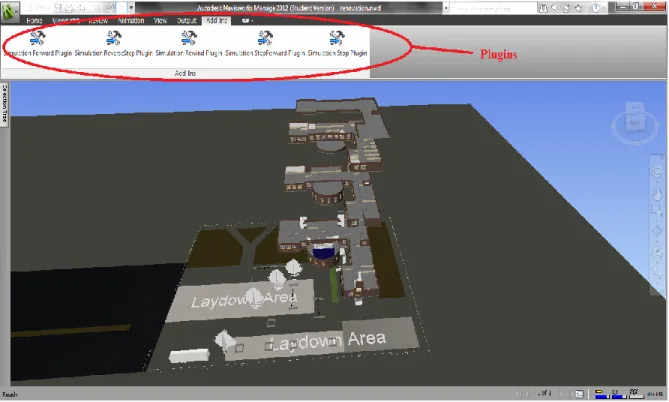
The .Net classes and methods which control timelining in Navisworks Manage 2012 are not exposed to be used in Automation. So, Plugins which control the timelining in Navisworks Manage 2013 had to be developed. These plugins play the 4D construction sequence forward by one day, forward by one week, backward by one day, backward by one week, and bring the construction to the 1st day. These plugins are named:
1. Simulation StepForward Plugin: Progresses 4D construction by one day forward. 2. Simulation Forward Plugin: Progresses 4D construction by one week forward. 3. Simulation ReverseStep Plugin: Progresses 4D construction by one day
backward.
4. Simulation Rewind Plugin: Progresses 4D construction by one week backward. 5. Simulation Stop Plugin: Brings the 4D construction to the 1st day.
These plugins uses methods which are defined under the class “LcTISimulationHelper” under the namespace ‘Autodesk.Navisworks.Api.Interop”
36
which is defined under the assembly “Autodesk.Navisworks.Timeliner”. These plugins are developed in Microsoft Visual Studio C# using the methods “Step()”, “ReverseStep()”, and “Stop()”. After building the solution in Microsoft Visual Studio C# two files are developed under the folder bin\Debug. They are: 1) DLL file, and 2) Program Debug Database. These files are copied to a folder in the Plugins folder under C:\Program Files\Autodesk\Navisworks Manage 2012 in all the three computers in BIM CAVE system. The name of the folder should match the name of the files generated. This ensures the loading of plugin under Add-Ins tab whenever the Navisworks Manage 2012 application is opened to view a model. Figure 4-4 shows the plugins in Navisworks Manage 2012 window.
37
4.2.2. BIM CAVE Application
The BIM CAVE application which was developed by Adithya Ganapathi (Ganapathi 2012) as a part of his research to control camera position and orientation of camera was used to add additional functionality of timelining the 4D construction sequence. The BIM CAVE application is developed using the .NET framework in C# language. C# is an object-oriented programming language and its syntax is very similar to the C++ language. BIM CAVE application is made up of Server application which runs in the server computer and Client application which runs in the client computers. The functionalities of these applications are different and are instrumental in rendering immersive virtual reality experience in the BIM CAVE. Server computer controls the central wall and the client computers control the left and right walls.
4.2.2.1. Server Application
The BIM CAVE server application is a stand-alone executable file (.EXE) which is loaded in the server computer. The previous BIM CAVE server application performed two main functionalities to achieve immersion as follows (Ganapathi 2012):
1. Captures the current camera view of the Navisworks application running in the server computer (using Navisworks API) and applies a mathematical algorithm to the camera coordinates.
38
2. The server application after collecting and manipulating the camera coordinates will send those coordinates over the network to the client computers. The camera coordinates will be sent to the clients whenever the camera position in the Navisworks running on the server changes.
As a part of this research an additional functionality has been added to the previous BIM CAVE server application to achieve immersion during timelining the 4D construction sequence.
1. Captures the action performed in the server application to change the day of construction in 4D construction sequence (such as StepForward, Forward, ReverseStep, Rewind, and Stop) and forces the Navisworks application to show the model on that specific day during construction.
2. The action performed in the server application is sent over the network to the client computers. These actions performed in the server application will be sent to the clients whenever the action is performed along with the camera coordinated and orientation.
4.2.2.2. Client Application
The client application is similar to the server application and it is also a stand-alone executable file which is loaded only into the client computers. The previous BIM CAVE client application performed following tasks (Ganapathi 2012):
39
1. The data packets sent by the BIM CAVE server application containing the camera coordinates will be received by the client application.
2. Once the data packets are received, the BIM CAVE client application will process the information sent and use it to update its current camera orientation in the Navisworks application.
The new BIM CAVE client application has additional functionalities apart from the functionalities mentioned above which are:
1. The data packets sent by the BIM CAVE server application containing the action performed in the server application with respect to timelining will be received by the client application.
2. Once the data packets are received, the BIM CAVE client application will process the information sent and uses it to update the day of construction in 4D construction sequence in the Navisworks instance running in the client computer synchronous to the server application.
4.2.2.3. BIM CAVE Application Interface
The BIM CAVE's server and client application should be installed in the server and client computers respectively. The server and the client application have a button 'Start Navisworks, which will let the user select a Navisworks file and open the same. Essentially all the three computers run a separate instance of the same Navisworks file and only their views and stage of construction in 4D construction sequence are
40
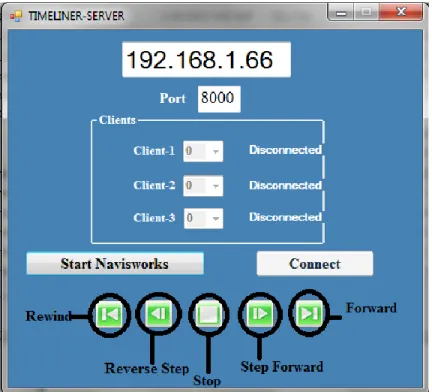
synchronized using the BIM CAVE application. It is highly important to make sure that the files that are opened in the server and client computers are the same to have a meaningful view across the screens. The server application has a dropdown list box that lets the user specify a camera rotation angle for the clients, which is dependent on the orientation of the screens. The 'Connect' button in the server application opens the port to allow the clients to connect with the server. The server application has a textbox that gets the port number input from the user. The default value for the port number is set as 8000 for both the serve and clients. The server shows a status message indicating whether the clients are connected or not. The five buttons in green shown in the Server Application Interface controls Timelining. Figure 4-5 shows the server BIM CAVE application interface.
41
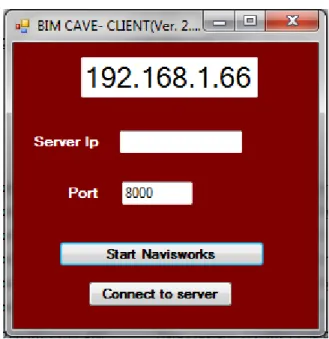
The client application has a textbox to get the IP address input from the user. The server computer's IP address displayed in the server BIM CAVE application should be entered in the textbox and the port number should also be same as the server. The 'Connect' button in the client application will establish a connection between the server and client computers. Figure 4-6 shows the client BIM CAVE application interface.
Figure 4-6: BIM CAVE Client Application Interface
The operating instructions of the BIM CAVE application are explained in the following steps:
1. Using the 'Start Navisworks' button in the server and client BIM CAVE application, the same version of Navisworks file is opened in the server and client computers.
42
2. After opening Navisworks, the server computer's IP address displayed in the server BIM CAVE application is entered in the textbox of the client BIM CAVE application.
3. The server computer should be made to allow the client computers to connect to it by clicking the 'Connect' button in server BIM CAVE application.
4. The clients are then connected to the server by clicking the 'Connect' button in the client BIM CAVE application.
5. Once the clients are connected, the angle of rotation for the right and left clients are specified in the drop down list box of the server BIM CAVE application. 6. In order to control timelining the construction sequence and synchronize the
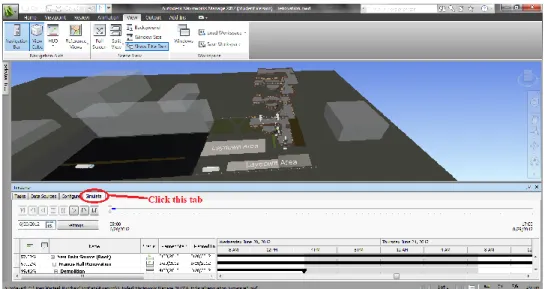
stage of construction across server and client computers use the buttons in green shown in Figure 4-5. But, before using those buttons the Naviworks Applications in all the three computer should be changed to Simulation mode as shown in Figure 4-7.
43 4.2.2.4. Server-Client Algorithm
The same Server-Client algorithm written using .Net sockets in the previous BIM CAVE application is used, through which the sever computer communicates with the two clients (Left, and Right computer). The server application applies a mathematical algorithm to the camera parameters of the Navisworks based on the configuration of the screens and will send the calculated camera parameters and Timelining action performed in the server application to the clients. The unique data packets for each of the clients containing the camera attributes and the timelining action performed will be sent through .Net sockets. The data transfer speed is highly crucial in the BIM CAVE, so the server will send the data packets asynchronously, which means it will not wait for the client's response after each and every transfer (Ganapathi 2012). This process is also multithreaded in both the server and the client BIM CAVE application. The server listens to the connection requests made by the clients in one thread and sends the data packets to the connected clients in another thread simultaneously. Similarly, the client will listen continuously to receive data packets from the server, which is handled by one thread and processing of the data received is performed by another thread (Ganapathi 2012).
44 4.2.2.5. Navisworks API Algorithm
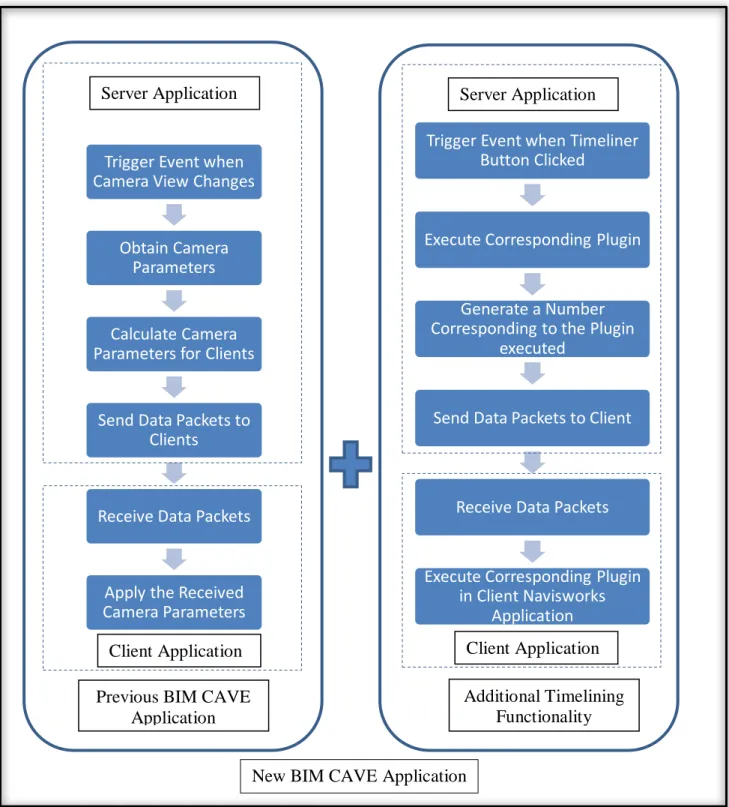
The Navisworks API algorithm deals with the interaction of the BIM CAVE application and Navisworks (Ganapathi 2012). The API algorithm is different for the server and the clients. C# programming language that was used to develop the BIM CAVE application supports event driven programming. In other words, a certain set of actions can be performed if a particular event is triggered. This process of event triggering mechanism is used in the BIM CAVE application. Each button on server application interface which controls timelining has been assigned to an Event Handler which gets initiated whenever that button is clicked. This Event Handler executes a set of functions which is called a method. This method executes the corresponding plugin which controls timelining and updates the stage of construction in the running instance of the Navisworks application. A number is generated corresponding to the button pressed in the server application interface which is sent to the client application.
The BIM CAVE client application receives this number whenever a button which controls timelining is pressed in the server application and it in-turn executes the corresponding plugin in the running instance of Navisworks application in the client computer to synchronize the stage of construction during timelining.
45 4.2.2.6. BIM CAVE Mechanism
The BIM CAVE application developed for this research integrates the hardware and the software components to achieve an immersive virtual reality environment. The BIM application executes the three algorithms Server-Client, Navisworks API and Mathematical Rotation in a particular order to achieve a coherent view in all the three walls. The following steps explain the working process of the BIM CAVE application developed:
1. First, the Navisworks API algorithm is executed in the server BIM application. The API algorithm will collect the camera parameters such as position, view direction vector and up vector whenever the current view of the camera changes. It also captures the button pressed (which control timelining) in the BIM CAVE server application interface and assigns a number to it.
2. Once the server's camera parameters are generated, the mathematical rotation algorithm will be applied to the gathered camera parameters and the axis and angle of rotation for each of the clients will be calculated.
3. The Server-Client algorithm will be used to transfer the data packets containing the axis, angle of rotation, and unique number generated corresponding to the button pressed (which control timelining) in the BIM CAVE server application interface to each of the clients connected with the server.
4. Clients receive the data packets sent by the server using the Server-Client algorithm.