RNA Express
Introduction 3
Run RNA Express 4
RNA Express App Output 6
RNA Express Workflow 12
This document and its contents are proprietary to Illumina, Inc. and its affiliates ("Illumina"), and are intended solely for the contractual use of its customer in connection with the use of the product(s) described herein and for no other purpose. This document and its contents shall not be used or distributed for any other purpose and/or otherwise communicated, disclosed, or reproduced in any way whatsoever without the prior written consent of Illumina. Illumina does not convey any license under its patent, trademark, copyright, or common-law rights nor similar rights of any third parties by this document. The instructions in this document must be strictly and explicitly followed by qualified and properly trained personnel in order to ensure the proper and safe use of the product(s) described herein. All of the contents of this document must be fully read and understood prior to using such product(s).
FAILURE TO COMPLETELY READ AND EXPLICITLY FOLLOW ALL OF THE INSTRUCTIONS CONTAINED HEREIN MAY RESULT IN DAMAGE TO THE PRODUCT(S), INJURY TO PERSONS, INCLUDING TO USERS OR OTHERS, AND DAMAGE TO OTHER PROPERTY.
ILLUMINA DOES NOT ASSUME ANY LIABILITY ARISING OUT OF THE IMPROPER USE OF THE PRODUCT(S) DESCRIBED HEREIN (INCLUDING PARTS THEREOF OR SOFTWARE) OR ANY USE OF SUCH PRODUCT(S) OUTSIDE THE SCOPE OF THE EXPRESS WRITTEN LICENSES OR PERMISSIONS GRANTED BY ILLUMINA IN CONNECTION WITH CUSTOMER'S ACQUISITION OF SUCH PRODUCT(S).
FOR RESEARCH USE ONLY © 2014 Illumina, Inc. All rights reserved.
Illumina,IlluminaDx,24sure,BaseSpace,BeadArray,BeadXpress,BlueFish,BlueFuse,BlueGnome,cBot,CSPro, CytoChip,DASL,DesignStudio,Eco,GAIIx,Genetic Energy,Genome Analyzer,GenomeStudio,GoldenGate,HiScan, HiSeq,HiSeq X,Infinium,iScan,iSelect,MiSeq,MiSeqDx,NeoPrep,Nextera,NextSeq,NuPCR,SeqMonitor,Solexa, TruGenome,TruSeq,TruSight,Understand Your Genome,UYG,VeraCode,VeriSeq, the pumpkin orange color, and the Genetic Energy streaming bases design are trademarks of Illumina, Inc. in the U.S. and/or other countries. All other names, logos, and other trademarks are the property of their respective owners.
In
tro
d
u
c
tio
n
Introduction
The BaseSpace® RNA Express app combines the capabilities of the STAR aligner and DE-Seq analysis tools in one simple workflow. The aim of this app is to provide the most commonly used set of RNA analysis features in a convenient and rapid analysis
package.
Versions
The following module versions are used in the RNA Express apps: } STAR 2.3.1s
} DESeq2 1.0.17
Current Limitations
Before running the RNA Express app, be aware of the following limitations: } Reads must be at least 35 bp and no more than 500 bp in length. } Individual samples must be between 100,000 and 400 million reads. } The total read count across all samples must be less than 2 billion reads.
} Only UCSC hg19 (human), UCSC mm10 (mouse), and UCSC rn5 (rat) are currently supported.
Run RNA Express
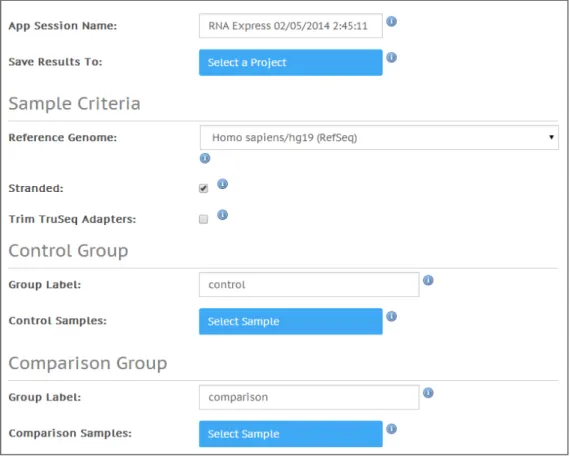
1 Navigate to the project or sample that you want to analyze.
2 Click theLaunch Appbutton and selectRNA Expressfrom the drop-down list.
3 Read the End-User License Agreement and permissions, and clickAcceptif you agree.
4 Fill out the app session storage information:
a App Session Name: provide the app session name. Default name is the app
name with the date and time the app session was started.
b Save Results To: select the project that stores the app results.
5 Fill out the sample criteria:
a Reference Genome: select the reference genome.
b Stranded: Indicate if samples were stranded.
c Trim TruSeq Adapters: If selected, the application attempts to trim TruSeq®
adapters from the FASTQ sequence. Typically, this trimming is unnecessary as adapter trimming is performed as part of demultiplexing during sample upload. However, if the user did not specify adapter sequences in the sample sheet during upload, this option provides a second opportunity to trim the adapters.
6 Fill out the control group information:
a Group Label: provide the control group label. Default name iscontrol.
b Select Sample: browse to the sample you want to use as control, and select the
checkbox. You can use multiple samples as control.
7 Fill out the comparison group information:
a Group Label: provide the comparison group label. Default name iscomparison.
b Select Sample: browse to the sample you want to use as comparison, and select
the checkbox. You can use multiple samples as comparison.
8 ClickContinue.
RNA Express starts analyzing your sample. When completed, the status of the app session is automatically updated, and you receive an email.
u
n
R
N
A
E
xp
re
ss
RNA Express App Output
This chapter describes the RNA Express output. To go to the results, click theProjects
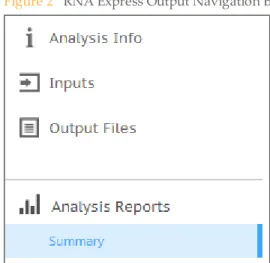
button, then the project, then the analysis. Figure 2 RNA Express Output Navigation Bar
When the analysis is completed, you can access your output through the left navigation bar, which provides the following:
} Analysis Info: an overview of the analysis. SeeAnalysis Infoon page 9for a
description.
} Inputs: an overview of the input samples and settings. SeeRNA Express Inputs
Overviewon page 10for a description.
} Output Files: access to the output files, organized by sample and app session. See
RNA Express Output Fileson page 10for descriptions.
} Analysis Reports: Summary: access to analysis metrics for the aggregate results. See
RNA Express Reporton page 6for a description.
RNA Express Report
The RNA Express app provides an overview for all samples on the Summary page. A brief description of the metrics is below.
Primary Analysis Information
Statistic DefinitionRead Length Number and length of reads. Number of
reads
Total number of reads passing filter for this sample.
Alignment Information
Statistic DefinitionN
A
E
xp
re
ss
A
p
p
O
u
tp
u
t
Statistic Definition% Abundant Percentage of reads that aligns to abundant transcripts, such as mitochondrial and ribosomal sequences.
% Unaligned Percentage of reads that do not align to the reference. Multi-mapped (%
Aligned Reads)
The percentage of aligned reads that have more than one equally good alignment position in the genome.
Reads with spliced alignment (% Aligned Reads)
The percentage of aligned reads that map over splicing-events. Each case where a read-alignment skips over a known or discovered intron is counted.
Link to BAM File Download link to BAM file for this sample.
Read Counts
Statistic Definition
Exonic Reads (%)
Reads mapping to exonic regions (% of uniquely aligned reads). Non-exonic
Reads (%)
Reads mapping to non-exonic regions (% of uniquely aligned reads). Ambiguous
Reads (%)
Reads aligning to more than one locus or to a locus overlapping multiple genes (% of uniquely aligned reads).
Differential Expression
Statistic DefinitionAnnotation Gene Count
Number of genes in annotation. Assessed Gene
Count
Number of genes tested for statistical significance. Differentially
Expressed Gene Count
Number of significantly differentially expressed genes.
Link to Merged Gene Counts
Download link to CSV file CSV file describing the number of reads mapped to each gene for each sample in the control and comparison groups.
Link to Results Download link to CSV file describing the mean expression, log2 fold change, standard error of log2 fold change, p-value, adjusted p-value, and the expression status for each gene.
Sample Correlation Matrix
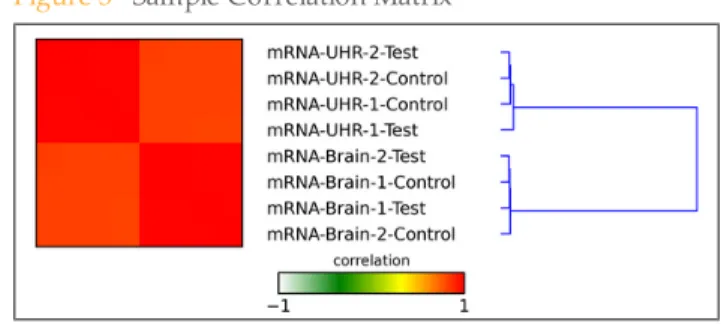
A heat map showing the relative similarity between all replicates in this analysis-run. Each row and column represents one replicate, ordered by similarity (hierarchical clustering). The color of each field indicates the Spearman Rho correlation between these
Figure 3 Sample Correlation Matrix
Control vs Comparison
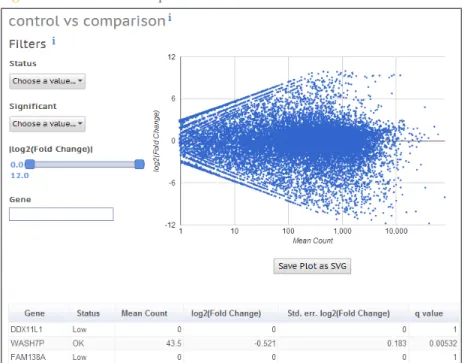
The control vs comparison plot shows an interactive scatter plot of the log2(Fold Change) against the mean count for a gene. You can filter the results by the following metrics:
} Test status:
• OK: test successful
• Low: low average expression across samples (mean normalized count across all samples less than 10)
• Outlier: a single (outlier) replicate strongly affects the result
} Significance: Genes with a multiple-testing adjusted p-value (q-value) for differential expression of less than 0.05
} Gene: allows you to search for a particular gene in the plot and the gene table below the scatter plot
The gene table below the scatter plot shows those metrics for individual gene results, in addition to the standard error of the Log2(Fold Change). If you click a gene, the
corresponding dot is circled in the scatter plot. Likewise, if you click any of the dots in the scatter plot, the gene is highlighted in the gene table.
The following additional metrics are reported in the gene table:
} Std. err. log(Fold Change): Standard error of the Fold Change estimate
} q value: Multiple-testing adjusted p-value for differential expression (used for Significance filter)
N
A
E
xp
re
ss
A
p
p
O
u
tp
u
t
Figure 4 Control vs Comparison Plot
Analysis Info
This app provides an overview of the analysis on the Analysis Info page. A brief description of the metrics is below.
Row Definition
Name Name of the app session. Application App that generated this analysis. Date started Date the app session started. Date completed Date the app session completed. Duration Duration of analysis.
Session Type The number of nodes used. Size Total size of all output files. Status Status of the app session.
Log Files
Clicking theLog Fileslink at the bottom of the Analysis Info page provides access to RNA Express app log files.
The following files log information to help follow data processing and debugging:
} WorkflowLog.txt: Workflow standard output (contains details about workflow steps,
} Logging.zip: Contains all detailed workflow log files for each step of the workflow.
} IlluminaAppsService.log.copy: Wrapper log file containing information about
communication (get and post requests) between BaseSpace and AWS.
} CompletedJobInfo.xml: Contains information about the completed job.
} SampleSheet.csv: Sample sheet.
The following files contain additional information in case things (like mono) do not work as expected:
} monoErr.txt: Wrapper mono call error output (contains anything that
WorkflowError.txt does not catch; in most cases empty, except one line).
} monoOut.txt: Wrapper mono call standard output (contains command calling the
workflow and anything that WorkflowLog.txt does not catch).
NOTE
For explanation about mono, see www.mono-project.com.
RNA Express Status
The status of the RNA Express app session can have the following values (in order): } Downloading data
} Aligning
} Post-alignment processing } Read counting
} Differential expression analysis } Generating report
} Finalizing results
Depending on the size and number of samples, the complete analysis can take between a few hours and several days.
RNA Express Inputs Overview
The RNA Express app provides an overview of the input app results and settings on the Inputs page. A brief description of the metrics is below.
Statistic Definition
Group Label The group label for the comparison or control group. Comparison Samples Samples selected for comparison group.
Control Samples Samples selected for control group. Reference Genome Reference genome selected.
Save Results To The project that stores the app results. Stranded Indicates if samples were stranded.
Trim TruSeq Adapters If selected, the application trims TruSeq adapters.
N
A
E
xp
re
ss
A
p
p
O
u
tp
u
t
<AppResult>/differential/global
} deseq.corr.pdf—PDF file showing a heat map of the sample correlation matrix. } deseq.corr.png—PNG file showing a heat map of the sample correlation matrix. } deseq.corr.csv—CSV file describing the sample correlation matrix.
} gene.counts.csv—CSV file describing the number of reads mapped to each gene for each sample.
<AppResult>/differential/<control>_vs_<comparison>
} <control>_vs_<comparison>.deseq.ma.pdf—PDF file showing a scatter plot of log2 (fold change) versus mean of normalized counts. This file is not available when DESeq2 fails to converge.
} <control>_vs_<comparison>.deseq.counts.csv—CSV file describing the number of reads mapped to each gene for each sample in the control and comparison groups.
} <control>_vs_<comparison>.deseq.disp.pdf—PDF file showing a scatter plot of dispersion versus mean of normalized counts. This file is not available when DESeq2 fails to converge.
} <control>_vs_<comparison>.deseq.heat map.pdf—PDF file showing a heat map of the expression of the differentially expressed genes with adjusted p-values < 0.05 for samples in the control and comparison groups. Only the top-5000 differentially expressed genes are used if there are more than 5000 differentially expressed genes. This file is not available when DESeq2 fails to converge or when there are no differentially expressed genes.
} <control>_vs_<comparison>.deseq.res.csv—CSV file describing the mean expression, log2 (fold change), standard error of log2 (fold change), p-value, adjusted p-value, and the expression status for each gene.
<AppResult>/samples/<group>/replicates/<sample>/alignments
} <sample>.alignments.sorted.bam—Alignments of reads against the genome (andtranscriptome). For description, see alsoBAM Fileson page 11.
} <sample>.coverage.bedGraph.gz—Genome coverage with aligned RNA-Seq reads.
<AppResult>/samples/<group>/replicates/<sample>/counts
} <sample>.counts.genes—Tab-delimited file describing the number of reads mapped to each gene. The last two lines in this file are not gene counts and should be removed.
BAM Files
The Sequence Alignment/Map (SAM) format is a generic alignment format for storing read alignments against reference sequences, supporting short and long reads (up to 128 Mb) produced by different sequencing platforms. SAM is a text format file that is human-readable. The Binary Alignment/Map (BAM) keeps the same information as SAM, but in a compressed, binary format that is only machine readable.
If you use an app in BaseSpace that uses BAM files as input, the app locates the file when launched. If using BAM files in other tools, download the file to use it in the external tool.
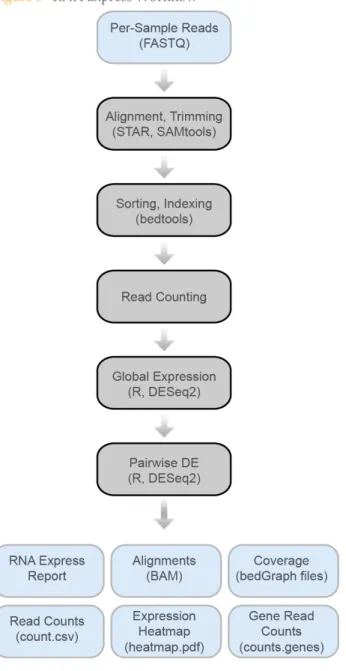
RNA Express Workflow
This chapter describes the workflow and modules that are used in the RNA Express app.
1 Alignment.
Reads for each sample are aligned against the corresponding genome using the Spliced Transcripts Alignment to a Reference (STAR) software1. STAR alignments are converted to BAM files in real time with samtools2.
There is no pre-treatment (trimming or filtering) of the FASTQ files. Instead a trim5’ and trim3’ option is passed to STAR, which does the trimming. In addition, STAR performs local alignment, allowing it to softclip read ends automatically (e.g. low quality or missed splice-junctions). STAR is run in a mode looking for novel junctions. After the initial alignment, RNA Express filters the junction list by confidence and retains only alignments across high confidence junctions. Only correctly paired alignments are reported for paired-end runs.
2 Post-Alignment.
After alignment, the BAM files are sorted, indexed, and bedGraph coverage files are created using bedtools3. Alignments to abundant sequences are determined from genomic alignments based on annotation of abundant regions of the genome.
3 Read Counting.
Gene expression is estimated at the gene level by counting the number of aligned reads that overlap each gene present in the annotation. The counting strategy is similar to htseq-count in the ‘union’ mode4.
Ambiguous reads, either aligning to more than one locus or to a locus overlapping multiple genes, are not counted. Only if both reads of a pair overlap exons with the same unique gene_id, is the read counted towards that gene. The counts are written to .csv files per sample. The counter also reports basic statistics (number of reads filtered, assigned, unassigned).
4 Global Expression.
The raw read counts are used as input for differential expression analysis using R and DESeq25. The workflow writes an R script that loads all .csv files with read counts, generates a data frame from them and computes pairwise correlations. A Python script uses matplotlib to create a sample-to-sample correlation heat map. The correlations, a merged table with the read counts for all samples and the heat map are written to the output directory.
5 Pairwise Differential Expression.
A new R script for the differential analysis is executed. This script loads the counts for all samples in this comparison and performs a pairwise differential expression analysis between them using DESeq2 (see online documentation for details of the model5). The script filters low expressed genes (mean count across all samples less than 10) before testing to decrease the multiple testing burden. The DESeq2 variance model is used to detect outliers (based on extreme variation between replicates), which are also excluded.
In the end, the status (filtered or passed) and the result of the analysis (mean expression, fold change, standard error, p-value, etc.) is reported for each gene. The script writes a table of raw counts across all replicates and plots a gene-level heat map sorted by hierarchical clustering. This heat map contains up to 5000
N
A
E
xp
re
ss
W
o
rk
flo
w
Figure 5 RNA Express Workflow
References
1 Dobin A, Davis CA, Schlesinger F, Drenkow J, Zaleski C, Jha S, Batut P, Chaisson M, Gingeras TR. (2013) STAR: ultrafast universal RNA-seq aligner. Bioinformatics 29 (1):15-21
2 SAMtools: samtools.sourceforge.net
3 Bedtools: bedtools.readthedocs.org
4 Htseq-count: www-huber.embl.de/users/anders/HTSeq/doc/count.html
e
c
h
n
ic
a
lA
ssi
st
a
n
c
e
Technical Assistance
For technical assistance, contact Illumina Technical Support.
Illumina Website www.illumina.com
Email [email protected]
Table 1 Illumina General Contact Information
Region Contact Number Region Contact Number
North America 1.800.809.4566 Italy 800.874909 Austria 0800.296575 Netherlands 0800.0223859 Belgium 0800.81102 Norway 800.16836
Denmark 80882346 Spain 900.812168
Finland 0800.918363 Sweden 020790181 France 0800.911850 Switzerland 0800.563118 Germany 0800.180.8994 United Kingdom 0800.917.0041 Ireland 1.800.812949 Other countries +44.1799.534000
Table 2 Illumina Customer Support Telephone Numbers
Safety Data Sheets
Safety data sheets (SDSs) are available on the Illumina website at www.illumina.com/msds.
Product Documentation
Product documentation in PDF is available for download from the Illumina website. Go to www.illumina.com/support, select a product, then clickDocumentation & Literature.