SKF @ptitude Observer
Condition monitoring software optimized to
collect and analyze continuous measurement
data from critical rotating machinery
SKF @ptitude Observer is the on-line application in a
family of reliability software applications that work
together as SKF @ptitude Monitoring Suite.
The SKF @ptitude Observer along with the SKF Multilog IMx-M 19” rack mounted sys-tem is our most powerful solution for the protection and condition monitoring of criti-cal machinery. This solution has been care-fully designed according to the API 670 standards.
By combining the SKF Multilog On-line System IMx family of data acquisition devices with the power of the SKF @ptitude Observer version 10 software, delivers a powerful condition monitoring solution which can be ordered with or without the advanced machine protection features.
Overview
Successful condition monitoring requires powerful and user-friendly machine diag-nostics software for data management and analysis. SKF @ptitude Observer’s easy-to-use operator interface and intelligent diag-nostics functions provide users of all levels the tools needed to set up and run effective on-line monitoring programs.
SKF @ptitude Observer software works together with the SKF Multilog On-line Sys-tem IMx (all versions), SKF MasCon 48 (all versions) and SKF MasCon 16 (all versions). Within SKF @ptitude Observer, powerful Wizards allow users to easily set up and maintain machine and measurement con-figurations. The system’s optimized design enables users to monitor several hundred machines from a single location. In addition, the SKF @ptitude Observer machinery measurement hierarchy display is easy to navigate and enables an unlimited number of hierarchy levels, while clearly displaying the alarm status of each hierarchy item. Using SKF @ptitude Observer Workspaces, it’s possible to easily extract portions of the machinery measurement hierarchy for clar-ity and focused analysis and reporting on areas of specific interest.
SKF @ptitude decision support Enterprise resource planning Computerized Maintenance Management System On-line surveillance / protection SKF @ptitude Observer
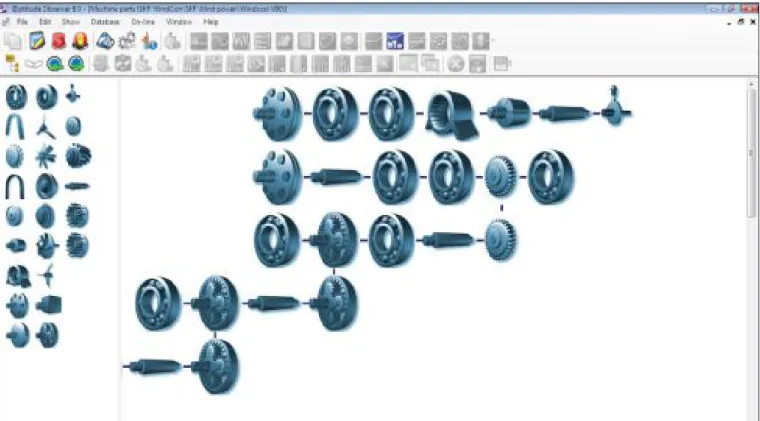
Figure 2. Machine parts setup.
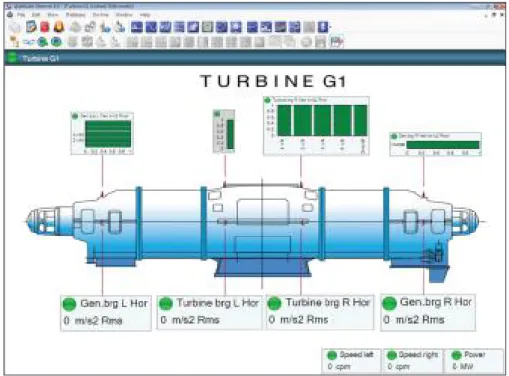
Measurement data and relevant information are shown in user-friendly displays. Live data, updated every second (depending on measurement configurations), and long term historical data can easily be displayed in a variety of useful formats. A specific user friendly feature is the multi-level process overview window, in which live data and alarm indicators are shown in a descriptive control room display for individual machines, or groups of machines.
In the system overview, the status of each of the system hardware components is shown clearly displaying any system component malfunction.
Historical data can be displayed in multiple trends, where one or more monitored parameters can automatically be displayed and compared to time, speed, or process parameters (such as, power, temperature, water level, etc.). Live trends can also be updated every second (again, depending on the measurement configura-tions).
With SKF @ptitude Observer’s machine information database, each machine is defined by its mechanical components, and the interac-tion between the components is also defined. This allows all machine fault frequencies to be dynamically calculated and dis-played in frequency spectra.
Machines are easily defined by dragging and dropping machine components together to build the machine (such as, shafts, bear-ings, gears, impellers, etc.) († fig. 2). For each component, relevant information is defined (such as, bearing code, number of gear teeth, number of vanes, etc.). Based on this information and the actual shaft speeds, all fault frequencies are dynamically calculated and advanced diagnostic rules are applied. In live spectrum mode, fault frequencies are continuously updated based on current shaft speed.
Advanced displays
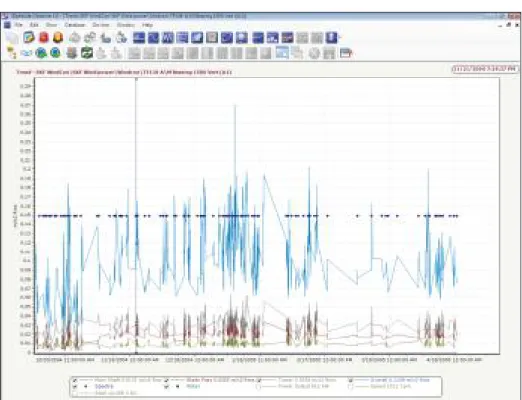
Figure 3. Advanced trend plot.
• Machine diagnostics • Historical comparison of data • Profile plot
• Polar plot • Shaft centerline • Transient analysis • Improvedgear analysis
Enhanced trend plots
Trend plots († fig. 3) in SKF @ptitude Observer not only show the overall value but also various important parameters such as, speed, BOV and bands.
In addition to standard displays such as single trend, spectrum (FFT), and time waveform, SKF @ptitude Observer has a variety of enhanced data displays for improved interpretation and root cause failure analysis, such as:
• Enhanced trend plots • Trend / Bode • FFT tools • Topology plot • 3D plot • Orbits
FFT tools
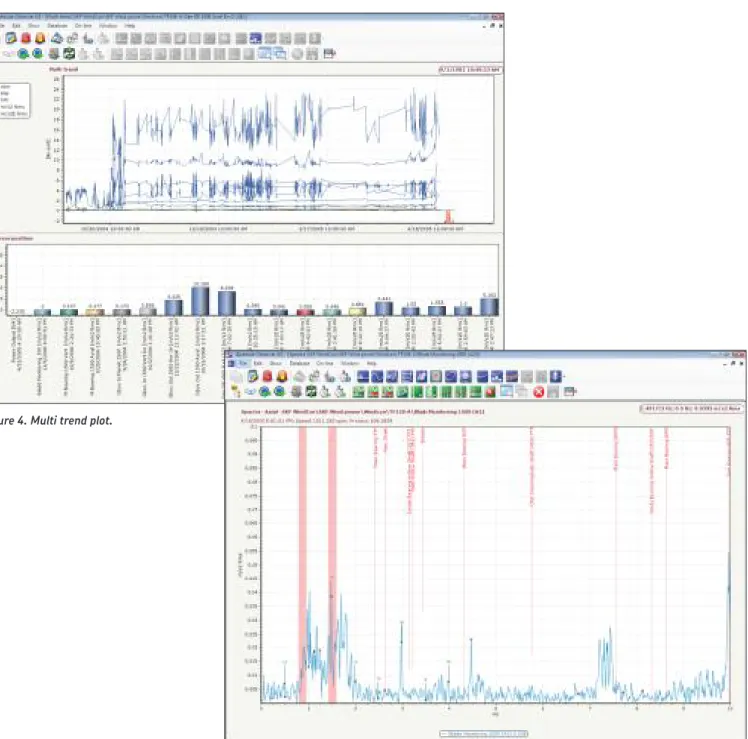
Frequency plots († fig. 5) include useful tools for identifying peaks such as bearing markers, sideband cursors, etc.
Harmonic frequencies can be displayed for any specified funda-mental frequency. The system automatically calculates the best fit for the harmonic frequencies, making harmonic effects much more visible. This is often used together with machine component fault frequencies.
Figure 4. Multi trend plot.
In a multi trend plot († fig. 4), several measurements are displayed together and the overall values are displayed as bars for easy com-parison.
Trend/Bode
Vibration amplitude / phase can be trended as a function of time, speed, or any process parameter recorded. It is possible to trend dis-crete frequencies (fixed or speed following) with a user selected number of harmonics, or a user selected frequency range. Data from different measurements can be overlaid in the same plot for easy comparison.
Topology plot
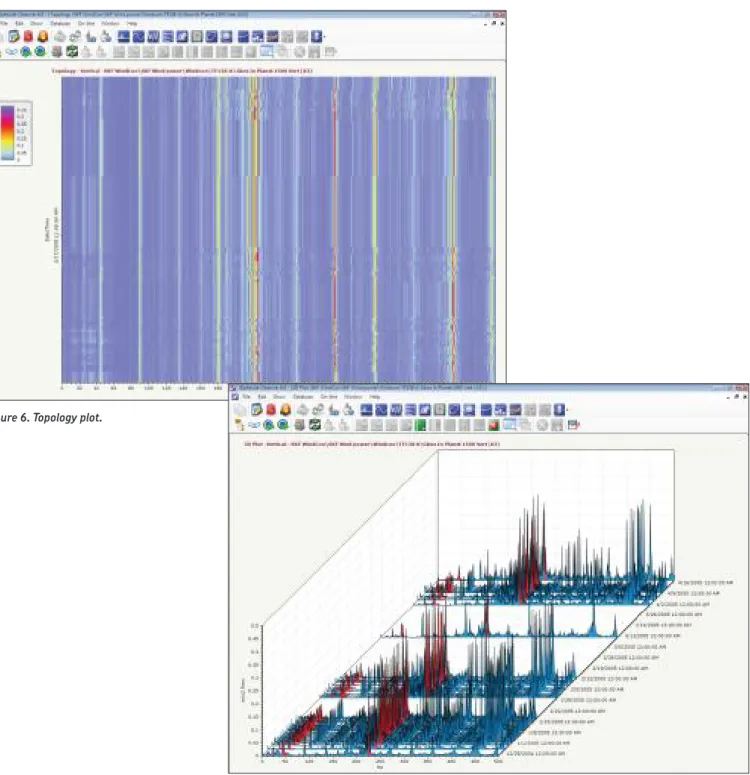
Topology plots († fig. 6) are a powerful tool to illustrate frequency spectra vs. speed or time. They use color separation, a method that easily identifies variations in machine behavior. These plots are used with any historical data, or during Run up / Coast down analysis.
Figure 6. Topology plot.
3D plot
A 3D plot († fig. 7) illustrates frequency spectra vs. speed, process data or time. Users can freely zoom, rotate, or elevate the plot to view the trace from any position. 3D plots are used with any histori-cal data or during run up coast down analysis.
Figure 7. 3D plot.
Advanced displays
Machine diagnostics
The powerful machine diagnostics feature includes standard rules for common machine faults, such as unbalance, misalignment, vari-ous bearing faults, gear faults, cavitation, etc. User defined diagnosis rules can also be easily implemented. SKF @ptitude Observer’s machine diagnostics feature is always active, constantly monitoring incoming data, detecting machine faults, and displaying clear text alarms († fig. 9).
Orbits
Using signals from two orthogonally mounted transducers (typically eddy current probes), shaft orbits can be displayed and analyzed
(† fig. 8). Orbits are performed using the raw signal (true orbit), or using a filtered signal (filtered orbit) at shaft speed or shaft speed harmonics, or at a user defined frequency range.
Figure 8. Orbit plot.
Profile plot
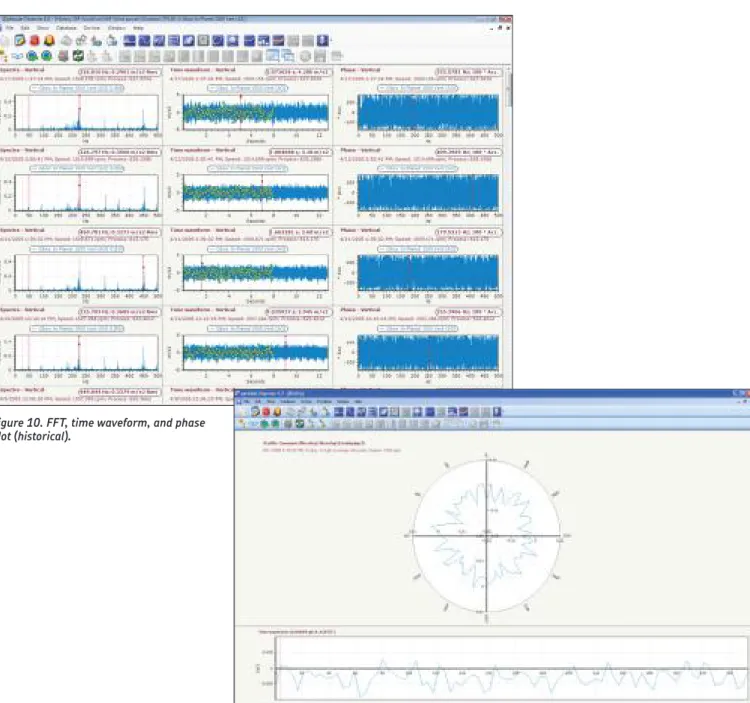
The profile is a convenient way of visualizing a vibration time wave-form referenced to one revolution of a rotating component. It is par-ticularly useful for analyzing data from rolls, felts and similar com-ponents whose surface condition is critical to operation († fig. 11).
Historical comparison of data
Frequency spectra collected at different times can be displayed and be individually compared. In addition, subtraction of a selectable measurement can be performed. User selected reference data may be fixed, and automatically compared with new or earlier measure-ments († fig. 10).
Figure 10. FFT, time waveform, and phase plot (historical).
Figure 11. Profile plot.
Advanced displays
Transient analysis
Machine Run up / Coast down is automatically detected and starts a user defined measurement procedure. Measurements are taken at defined speed changes and all data is stored in a transient buffer. The data can be viewed in a wide variety of displays, such as 3D, spectra, time waveform, Bode, polar, orbit and shaft centerline.
Improved gear analysis
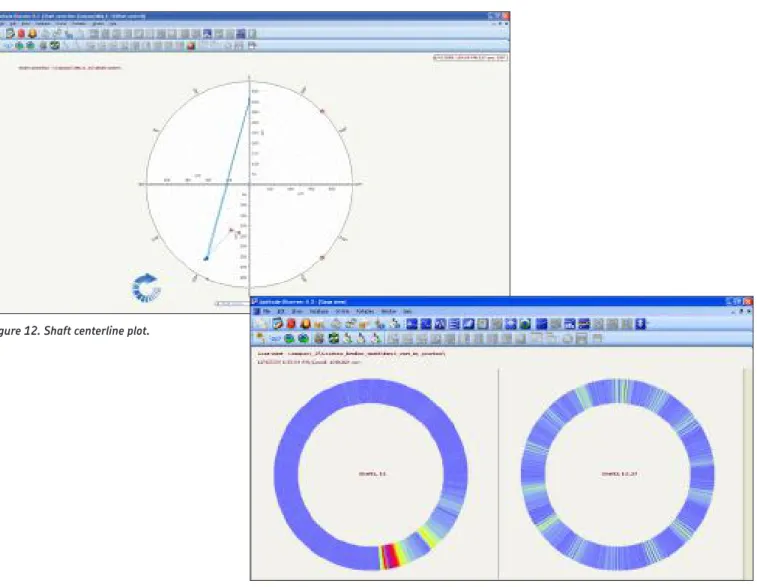
Gear Inspector is a powerful time signal processing and display fea-ture for better detection and visualization of gear problems. It is especially useful for finding localized gear damage († fig. 13).
Figure 12. Shaft centerline plot.
Polar plot
The polar plot illustrates vibration phase and amplitude in a polar diagram. Alarms are set as alarm circles for changes in phase or amplitude. The polar plot can display live data, historical data or data captured during Run up / Coast down.
Shaft centerline
Using signals from two orthogonally mounted transducers (typically eddy current probes), the shaft radial position relative to the bearing cross-section can be displayed. The shaft centerline plot can display live data, historical data or data captured during Run up / Coast down († fig. 12).
Planning tools
Maintenance plannerScheduled tasks such as lubrication, replacements, etc. can now be planned and tracked efficiently via the maintenance planner. This feature keeps track of machine assets, their running hours and when maintenance is due. Actual machine running hours are meas-ured and recorded with the SKF Multilog IMx.
Data export for ODS analysis
Data can be exported to a Universal file format which can be imported into software that can do animation. This is especially use-ful when diagnosing complex problems involving multiple measure-ment points, such as when investigating structural or resonance problems.
Data tagging of measurements
Condition monitoring often requires knowledge of operating param-eters / conditions that may influence how data is interpreted or ana-lyzed. With this feature, a text string can be appended to measure-ments either via manual input or automatically through OPC. This text string “characteristic” can be used to view or classify data in a variety of ways, such as by product type, specific asset (such as a drive motor), model / manufacturer, etc.
Diagnosis and analysis
Process overview
The process overview is a graphical user interface that allows users to use a machine schematic, picture, etc. to show measure-ments, and status. It is fully configurable and supports several levels († fig. 14).
Multi-parameter analysis
SKF @ptitude Observer provides a wealth of tools and features for sophisticated multi-parameter machinery analysis. For example, the software supports oil quality monitoring displays, blade monitoring displays and more.
Alarms and warnings
In SKF @ptitude Observer, there are two types of alarms – primary alarms (typically checked every second, depending on meas-urement configuration) and secondary alarms (checked at every system event and at a time interval selected by the user).
For acceleration enveloping and vibration
measurement points, primary alarms perform at four different fre-quencies, fixed or speed dependent, with a selectable number of harmonics and one frequency range. All measurement values can be exponentially averaged. Alarm levels can be configured to automati-cally adjust for speed and / or load variances. Primary alarms can also be set to detect process measurement points for both high and low alarms, with two levels each.
Secondary alarms are performed by advanced machine diagnos-tics, with sophisticated alarm conditions selected from an alarm condition library or created by the user. Secondary alarms make a diagnosis three months ahead. If a primary alarm is triggered, sec-ondary alarm diagnostics are automatically performed.
For vibration measurements, both primary alarms and secondary alarms can be utilized in acceleration, velocity or displacement measurements, regardless of sensor type.
All alarms are transferred to SKF @ptitude Observer Monitor and stored in the database together with corresponding measurement data. The SKF @ptitude Observer Monitor computer can be equipped with relay cards containing 16 relays each, fully program-mable to respond to any type of alarm. Additionally, alarm informa-tion can also be distributed via e-mail or SMS.
Reports
SKF @ptitude Observer software has the capability to generate a variety of useful reports. System diagrams, plots and images can be included in reports along with tabular data and notes. Supplied report templates allow quick and easy report configuration for standard report setups. In addition, users may pre-configure and save their own report setups for easy, quick regeneration (such as, measurements in alarm, last measurement, etc.).
All reports can be sent to screen, PDF file, Word DOC file, RTF file, Open Office or printer and also posted to Internet, intranet or e-mailed.
Storage
SKF @ptitude Observer software stores data in a Microsoft SQL Server. Using the royalty free Microsoft SQL Server Express, the database size can be up to 10 GB. Using a full version of Microsoft SQL Server, database size is virtually unlimited.
All stored data is date and time stamped for later use in trouble-shooting and trend analysis. Storage is performed in the following methods:
Trend storage
Trend data consists of different trend buffers storing data typically once every 10 seconds. Data is also stored in the archive buffer once every ten minutes. All trend buffers and the archive buffer are using a first-in-first-out process. Data is also stored in transient mode (see transient analysis).
Spectrum and Time Domain storage
At a user defined time interval, manually, or upon a system event (see below), vibration spectrum and time domain data is stored. Spectrum and time domain data can be enabled for:
• vibration
• vibration, harmonic • acceleration enveloping • process FFT
Event related storage
Measurement points can be configured as members of “event groups.” An event can be based on an alarm or a change in process data. When an event occurs, based on data from one of the group members, measurement data from all group members are stored.
Client / Server
SKF @ptitude Observer is a fully TCP/IP based client / server appli-cation, which means SKF @ptitude Observer Monitor can be con-nected to the Internet through a firewall and easily accessed from a Windows-based computer anywhere that has SKF @ptitude Observer installed.
System integrity
In theory, on-line condition monitoring systems should always be operating. If something happens that interrupts the monitoring, the system must be able to detect the fault and report it to the operator. If possible, the system itself should be able to correct the fault and continue to operate.
Following is a description of the SKF @ptitude Observer system integrity:
• checks all sensor signals and reports on sensor failure • easy for operator to disable a sensor upon sensor failure • a “watchdog” looks after both the SKF Multilog On-line System
IMx/SKF MasCon units and the SKF @ptitude Observer Monitor and reports, then restarts upon failure
• system faults are stored in the database and can be accessed by the operator, for example, for access during system service
OPC support
SKF @ptitude Observer can be connected to other systems or devices through an OPC server using the OPC standard communica-tion protocol. Data transmission (data publicacommunica-tion) of trend data and alarm information, and data reception (data subscription) of process data is fully supported.
Advanced balancing
Advanced balancing for SKF @ptitude Observer is an add-on for on-line applications to enable a full dynamic rotor balancing operation. Balancing data is obtained from SKF Multilog On-line System IMx, SKF MasCon48, and SKF MasCon16, and the balancing operation is performed in a step-by-step method. Dynamic rotor balancing can be performed from 1 up to 15 planes in one session, and if needed, the number of correction planes can be reduced using balancing plane elimination.
Data quality used by the balancing software is continuously checked and displayed, allowing the operator to easily replace erro-neous measurements. Balancing results, including the Influence coefficient matrix, are stored in the SKF @ptitude Observer data-base. When rebalancing, stored balancing data can be quickly recalled to minimize machine stops to one.
WebCon
SKF @ptitude Observer’s database fully supports WebCon, providing data and alarm information to the WebCon web server which can be accessed by any PC using Internet Explorer.
Alarms
• Alarm window
– Quickly find and identify all points in alarm within the hierarchy, process view or system view
• Alarm detail
– Provides a summary of type of alarm and status
• Trend alarms
– Trend alarms frequency can be fixed or speed following with a selectable number of harmonics
– The trend alarm level can be speed or process data dependent
following a user defined graph
– Unlimited number of alarms can be configured in the system
– Alarms based on data from multiple measurement points
– Run up coast down alarming using speed dependent alarm
lev-els
– Vector alarms using circular alarm levels
– Alarm hysteresis
– Exponential filtering
– Activation of user selectable on-line device relay for each alarm level violation
– Activation of user selectable SKF @ptitude Observer Monitor device relay for each alarm level violation
– User defined vibration unit selection (acceleration, velocity or displacement)
– Data storage selection (maximum, minimum or instant)
– Alarm blocking (on/off)
– Alarm groups
• Four overall alarm levels per measurement point
– Danger high, alert high, alert low, danger low
– Adaptive alarming whereas the trend alarm level can be speed
or process data dependent following a user defined graph
– Enhanced event log capabilities • Machine diagnostics
– Alarms based on rules created to detect a particular machine fault
– Standard rules and user defined rules available
– Clear text message on machine fault
• Active range
– Speed range setting and/or process data range setting
– Setting for maximum allowed speed and/or process data
varia-tion during measurement
– Advanced data gating
Communication
• Automatic e-mail or SMS generation upon alarm
• Data transfer with SKF Multilog On-line System IMx and SKF MasCon. For other devices contact your local SKF Representative. • TCP/IP
• RS232 or USB
• OPC – subscription as well as publication • Modbus
Features and capabilities
Machine parts
• Graphical tool for machine library creation • Automatic defect frequency calculation • Automatic calculation of all shaft speeds • Seamless connection to machine diagnostics • Standard library
• Machine template
Data display
All displays can be used in live mode for transient as well as for steady-state analysis
• True orbit • Filtered orbit • Shaft centerline
• Polar (including circular alarm levels) • Bode
• Profile • Topology • 3D plot
• Overall trend displays
• Process (Temperature, pressure, speed, etc.) • Digital images
• Spectrum displays
• Single point, multiple point displays • Triaxial point • Time waveform • Phase displays • History plot • Multi-channel display • Trend list • Process overview – Live update – Amplitude/phase – Speed
– Links to other process views
– Live bars
• Graph overlays • Spectrum
– Machine part defect frequency
– Single, harmonic, sideband, peak, band cursors
– Running speed
– Spectral band alarm
– Overall alarms
General
• Multiple languages available • Windows-based functionality
– True multi-processing operating environment allowing
simul-taneous background and foreground processing
– Complete right click functionality (drop down menus)
– Drag and drop
– Cut/Copy/Paste
– Complete integration of third party applications • User preferences allow customization
• Context sensitive help
• Complete user manual on installation CD-ROM
Measurements
The following measurements can be entered manually or automati-cally
• Acceleration • Amps • Displacement • English or metric units • Enveloped acceleration • Flow (GPM, LPM)
• High Frequency Detection (HFD) and Digital High Frequency Detection (DHFD)
• Inspection points (user definable) • Multi-channel
• Operating hours
• Operating time (elapsed and cumulative)
• Peak, Peak-to-peak, True peak, True peak-to-peak and RMS • Pressure (PSI and bars)
• RPM • Speed • Temperature (°C and °F) • Triax • User-specific units • Velocity • Volts (AC or DC) • Torsion • Time difference
• Simultaneous speed, process and digital storage together with vibration, speed or process measurement
• Derived point – user definable mathematical formula to calculate a derived value from data collected on multiple points across all type of devices.
• Display tools
– Notes with image attachment and priority setting capability
– Percent of alarm level setting
– Auto scaling
– Cursor micro-manipulation
– Auto-linking of displays and active hierarchy
– Linear or log scaling
– Grid
– Orders, frequency scaling
– Amplitude threshold %
– Waterfall slant angle setting in all directions
– Date range setting
– User selectable color settings
– Waterfall spacing (time / date, speed or process data)
– Spectrum data post processing (integration / differentiation)
– Zero Padding
– Inverse FFT
– Baseline spectrum storage
– Run-out compensation
– User-individual display settings
Database
• Microsoft SQL Server 2005, 2008, 2012 or 2014
• ODBC, SQL and TCP/IP protocol compliant database opens the database content
• User friendly database management
– Back-up scheduling
– Database upgrade
• Full support in Local Area Network (LAN), Wide Area Network (WAN), and Thin client (Terminal) environments
• Unlimited number of:
– Hierarchies
– Hierarchy levels
– Workspaces
– Collection points
– Measurements
• Smart data storage
– Data storage based on time, speed variation, process data vari-ation, alarm status, and trend variation
– Exception based storage
• Capability of data reduction due to aging • Database supports
– XML data importing and exporting
– Binary importing and exporting
– Data export to Image file, Text, XML, HTML, Microsoft Excel • Database libraries
– Bearing library
– Machine template library
Transient analysis
• Run up/Coast down measurements
• Run up/Coast down measurement point groups • Vector, polar, shaft centerline, orbit, profile • Adaptive alarming
• Run-out compensation
• Live data display update for multiple graphs
Reports
• Preserved reports – enables you to maintain a history of reports • Shared reports – allows you to share and pre-configure reports
for selected users
• Send reports to screen, PDF file, Word document, RTF, open Office or printer
• Report file can be posted to internet, intranet or e-mailed • Customizable report content
• Data plots, supplemental information, and digital images can be included in reports • Report types – Last measurement – Exception – Collection status – History – Inspection – Work notification
– Blank (user defined)
• Report templates allow quick and easy report configuration for use and reuse
Security
• Fully configurable user rights that allow you to read only or have full access
• Pre-configured user roles (analyst, super user, operator) • Password encryption for database login
Monitoring system supervision
• BIAS range setting and alarm upon failure • Measurement range setting and alarm upon failure • SKF @ptitude Observer Monitor supervision
• On-line device supervision (automatic hardware reset) • System supervision alarm distribution using e-mail and SMS • On-line device and SKF @ptitude Observer Monitor device restart
upon failure
• Automatic remote firmware upgrade of all on-line devices (SKF MasCon, SKF Multilog On-line System IMx)
• System event recording for all parameter modifications including date/time and user information
Templates and wizards
• Machine parts creation wizard • Multiple point update wizard
• Statistical alarm wizards use historical data to help refine machine diagnostic alarms
• Hierarchy template wizard allows for rapid hierarchy creation and machine templates for reuse
• Report template allows for the custom configuration of reports and report templates for reuse
• Machine expert wizard
Note 1
Supports 64 bit operating systems.
Note 2
These requirements apply to SKF @ptitude Observer complete with database manage-ment system. Other applications running simultaneously may degrade performance.
Note 3
These requirements ONLY apply to SKF @ptitude Observer complete with database management system. Additional storage disk space is required for data.
Note 4
SKF @ptitude Observer is designed for windows font size of 100% (Smaller). Using any larger font size can cause some of the interfaces / forms in SKF @ptitude Observer to not fit the contents.
Notice
If running other versions of Microsoft SQL Server, or other database management sys-tem are expected to run in the same PC environment, please contact your local SKF Representative to inquire about compatibility.
Stand alone configuration • Running SKF @ptitude Observer
• Running Microsoft SQL Server database management system • Storing data
Configuration Minimum requirements Recommended requirements
Operating system (Note 1) • Windows XP Professional with Service Pack 3 • Windows 7 • Windows 8 • Windows Vista • Windows 2003
Server with Service Pack 1
• Windows 2008 Server
Any of the specified operating systems in the minimum requirements with the latest service pack available installed
Processor (Note 2) Pentium IV, 1.0 GHz Pentium IV, 2.4 GHz or better
RAM 2.0 GB 2.0 GB or more Disk space available for standalone computer (Note 3) 1.2 GB 1.2 GB or more
DVD drive One (1) required One (1) required Video display
(Note 4) 1366 ™ 768 1600 ™ 1200 or larger
Microsoft SQL
Server SQL Server 2005, 2008, 2012 or 2014 SQL Server 2005, 2008, 2012 or 2014
Network configuration – Network Client • Running SKF @ptitude Observer • Running database client software
Configuration Minimum requirements Recommended requirements
Operating system (Note 1) • Windows XP Professional with Service Pack 3 • Windows 7 • Windows 8 • Windows Vista
Any of the specified operating systems in the minimum requirements with the latest service pack available installed Processor (Note 2) Pentium IV, 1.0 GHz Pentium IV, 2.4 GHz or better
RAM 1.0 GB 2.0 GB or more
Disk space available for each
network client 500 MB 1.0 GB or more DVD drive One (1) required One (1) required Video display
(Note 4) 1366 ¥ 768 1600 ™ 1200 or larger
Network configuration – Server
• Running Microsoft SQL Server database management system • Storing data
Configuration Minimum requirements Recommended requirements
Operating system
(Note 1)
• Windows 2003 Server with Service Pack 1
• Windows 2008 Server
Any of the specified operating systems in the minimum requirements with the latest service pack available installed Processor (Note 2) Pentium IV, 2.0 GHz Pentium IV, 3.2 GHz or better
RAM 2.0 GB 2.0 GB or more
Disk space
available (Note 3) 1.2 GB 1.2 GB or more
Microsoft SQL
Ordering information
SKF Product Support Plans
• SKF @ptitude Observer software for On-line Systems[CMSW 7600]
• SKF Multilog On-line System IMx-M Manager software, Single Client [CMSW 7600-MMGR-SC]
– Each SKF Multilog On-line System IMx-M Protection system
must be ordered with at least one license for the
CMSW 7600-MMGR-SC. This software application enables a single client software license which allows a single user the ability to configure or change the SKF Multilog IMx-M Protec-tion system.
The SKF @ptitude Observer is available in Single and Multi Client configurations. Please contact your local SKF representative for Multi Client model information.
Installation and training
Installation and training is available through your local SKF sales representative.
SKF is committed to customer support excellence. The goal of a SKF Product Support Plan (PSP) is to help you increase and optimize your return on investment in SKF products. This includes extending the life of their product and facilitating the success of their program. This allows you to compete in your industry, save downtime and be on the cutting edge of technology.
SKF Product Support Plans give you full confidence that your equipment is maintained to the SKF quality standards. Condition monitoring products are an investment and there is no better way to protect your investment for years than with a SKF Product Support Plan.
Greater peace of mind
• Unlimited telephone technical support • E-mail/web-based technical support • Live chat technical support
• Software maintenance releases • Software updates
• Remote Workstation access • SKF Knowledge Centre subscription
• SKF Technical Support Self-Help Portal access • Live webinar training notifications
® SKF, @PTITUDE, MASCON and MULTILOG are registered trademarks of the SKF Group. Microsoft, Windows, Excel, SQL Server, Internet Explorer, and Windows Vista are either registered trademarks or trademarks of Microsoft Corporation in the United States and/or other countries. All other trademarks are the property of their respective owners.
© SKF Group 2015
The contents of this publication are the copyright of the publisher and may not be reproduced (even extracts) unless prior written permission is granted. Every care has been taken to ensure the accuracy of the information contained in this publication but no liability can be accepted for any loss or damage whether direct, indirect or consequential arising out of the use of the information contained herein. SKF reserves the right to alter any part of this publication without prior notice.
PUB CM/P8 10253/4 EN · May 2015
Mechatronics Services wide. Having expert ise in multiple competence areas supports SKF Life Cycle Management, a
proven approach to improv ing equipment reliabil-ity, optimizing operational and energy efficiency and reducing total cost of ownership.
SKF’s global footprint provides SKF customers with uniform quality standards and worldwide product availability. Our local presence provides direct access to the experience, knowledge and ingenuity of SKF people.
SKF BeyondZero is more than our climate strategy for a sustainable environment: it is our mantra; a way of thinking, innovating and acting.
For us, SKF BeyondZero means that we will reduce the negative environmental impact from our own operations and at the same time, increase the positive environmental contri bution by offering
our customers the SKF BeyondZero portfolio of products and services with enhanced envir on-mental performance characteristics.
For inclusion in the SKF BeyondZero portfolio, a product, service or solution must deliver signifi-cant environmental benefits without serious envir onmental trade-offs.
Please contact:
SKF Condition Monitoring Center – Luleå Aurorum 30, S-977 75 • Luleå, Sweden
Tel: +46 (0) 31 337 10 00 • Fax: +46 (0) 920 134 40 Web: www.skf.com/cm