User Guide for
Data Transfer
(
From
AVIII 400 to
NMR Server
)
November 11, 2012
The CBC NMR Laboratory
ii
1 Introduction ... 5 2 NMR Data Transfer ... 6
iii
List of Figures
Figure 1: The Blue Folder ... 6
Figure 2: Terminal Command Shell ... 7
Figure 3: gFTP Interface – 1 ... 8
Figure 4: gFTP Interface – 2 ... 9
NMR Data Transfer
4
PREFACE
Purpose of This Document
This user guide aims to help you to transfer NMR data collected on AVIII 400 NMR spectrometer (located in 049 BRL) to the NMR server.
Intended Audience
This document is intended for users of the AV400, AVIII 400, and AV III 600 spectrometer. It is assumed that user account has been created for the user on these instruments.
5
The NMR workstations in 045 BRL are mounted to the NMR server through network. After the NMR data are collected on the AVIII 400 MHz NMR spectrometer, it is highly recommended to transfer the NMR data to the NMR server as a key stage of data backup. After the data are transferred, the workstations in 045 BRL can be used to access the NMR data collected on AVIII 400 NMR spectrometer.
Use the workstations in 045 BRL can be used to transfer the NMR data.
The NMR workstations are preloaded with Bruker TopSpin software and other NMR data processing software.
Login information, including login name and password, will be provided by the NMR spectroscopist after the NMR training on the AVIII NMR 400 MHz has been
NMR Data Transfer
6
Follow these steps to transfer NMR data from the AVIII 400 NMR spectrometer computer to the NMR server.
1. Before transfering the NMR data from AVIII 400 MHz NMR spectrometer to the
NMR server, make sure the workstations have been set up according to the procedures described in the “User Guide for Setting Up NMR Workstations” 2. In the desktop of the NMR workstation, click on “blue folder” as shown in Figure
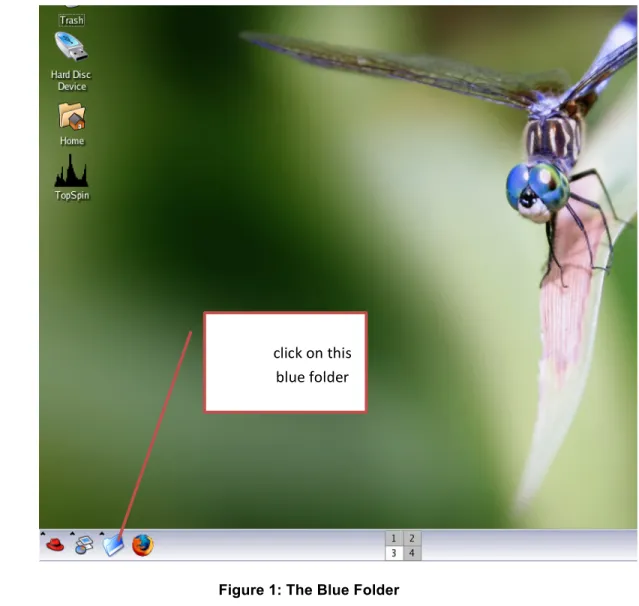
1 and select Terminalfrom the manu, a new terminal shell window appears as shown in Figure 2.
Figure 1: The Blue Folder
click on this blue folder
7
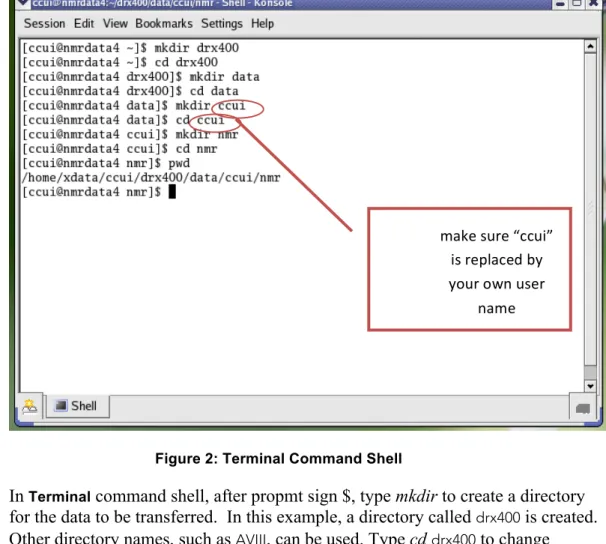
Figure 2: Terminal Command Shell
3. In Terminal command shell, after propmt sign $, type mkdir to create a directory for the data to be transferred. In this example, a directory called drx400 is created. Other directory names, such as AVIII, can be used. Type cddrx400 to change directory to the drx400. After getting into the directory of drx400, create a directory called data by typing mkdirdata. Then get into the directory data by typing cd data. At this level, create a new directory which is named after your username. To do so, type mkdirccui, where ccui is a username. You should replace “ccui” with your own username. Get into the directory of ccui by typing cdccui and then create a directory call nmr by typing mkdirnmr. Finally get into the directory nmr
(cdnmr) and type pwd to show the current directory. Now a path
/home/xdata/ccui/drx400/data/ccui/nmr and the assoicated directories are created for incoming data.
Note: the directory ccui is used as an example here. It should be replaced by your own username.
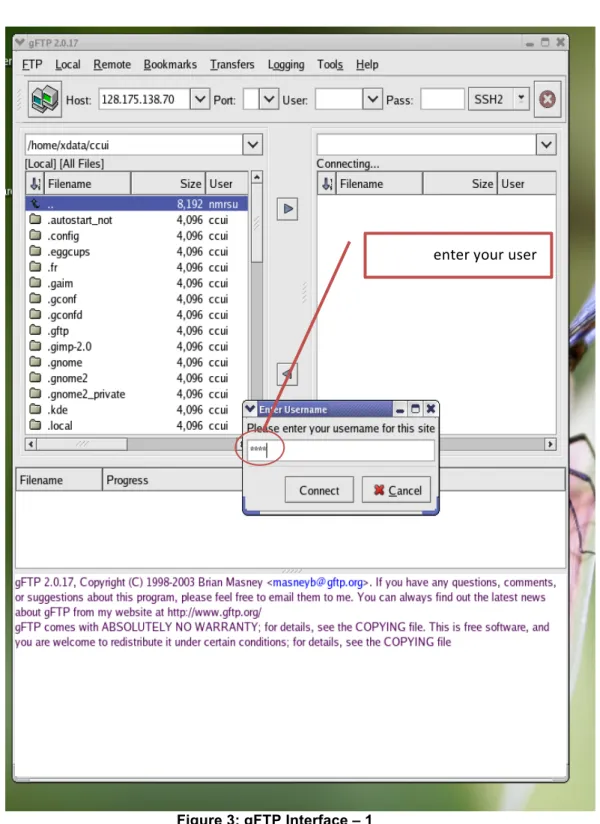
4. Click on the “blue folder” again and this time select gFTP from the manu. A gFTP window appears as shown in Figure 3. In the field of host, enter the
computer IP address (128.175.138.54) for the AVIII 400 NMR. Click on the field of User, fill in your username on the AVIII 400 spectrometer. Finally click on the field of Pass and enter your password of the AVIII 400 NMR.
make sure “ccui” is replaced by your own user
NMR Data Transfer
8
Figure 3: gFTP Interface – 1
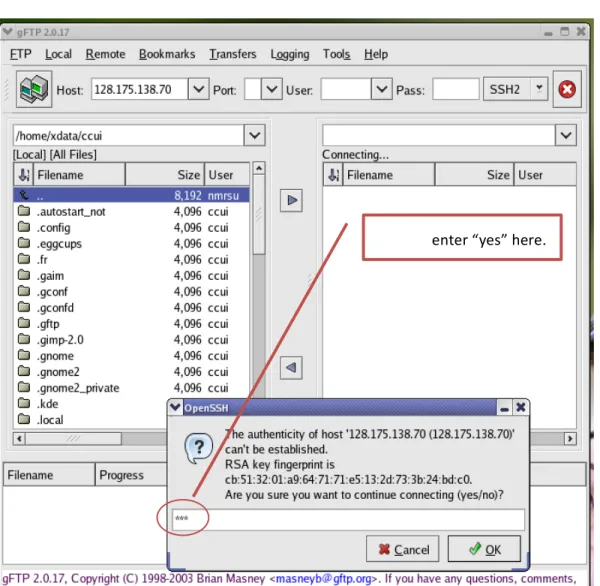
5. When entering login information the first time, you will be prompted by gFTP interface to confirm a security inquiry. Just enter “yes” as indicated in Figure 4. A similar procedure is followed for the password. The password may be required for twice.
enter your user name
9
Figure 4: gFTP Interface – 2
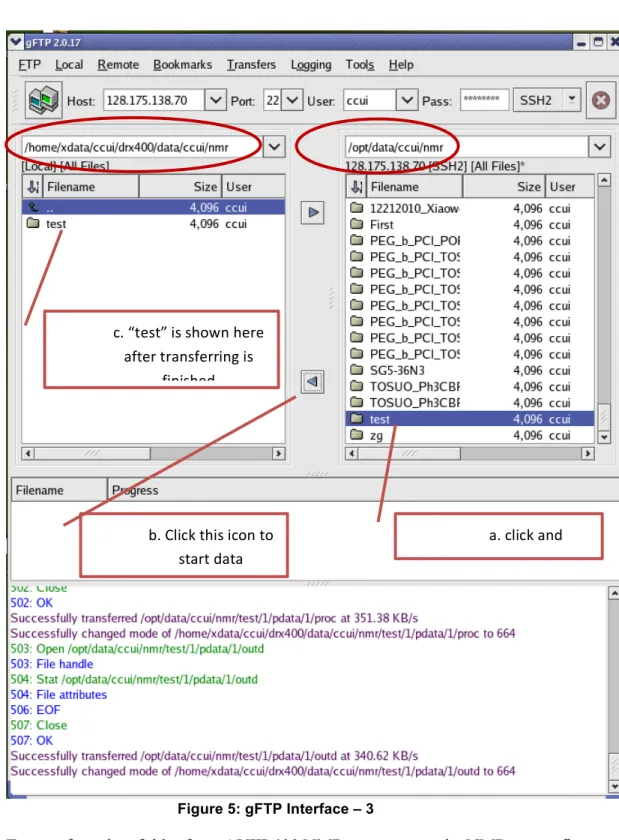
6. Once the network connection is established and the user authenticity is verified, gFTP interface (shown in Figure 5) provides two data panels: the left panel is for the NMR server and the right panel is for the AVIII 400 NMR workstation. On the left panel, type in the directory path as /home/xdata/ccui/drx400/data/ccui/nmr.
On the right panel, enter the NMR data path on the AVIII 400 NMR spectrometer computer, for example: /opt/data/ccui/nmr.
NMR Data Transfer
10
Figure 5: gFTP Interface – 3
7. To transfer a data folder from AVIII 400 NMR computer to the NMR server first click on the folder to be transferred in the right panel of gFTP interface, then clcik on a transfer triangle as shown in Figure 5. The transferred NMR data folder is then appeared in the left panel. The details of data transfering are shown in the gFTP message board. As a step-by-step example (Figure 5), a data folder “test” is being transferred from the AVIII 400 NMR computer to the NMR server.
a. click and highlight “test” b. Click this icon to
start data transferring c. “test” is shown here
after transferring is finished
11
8. After the data transfer, first starts the TopSpin NMR software, then righ-click on the left panel (the data broswer panel) of the TopSpin interface, select “Add New Data Dir…”. Type in the data directory path as /home/xdata/ccui/drx400 when
propmted, an NMR data directory is then shown in the data borswer panel, from which the transferred data can be accessed directly by the workstations in 045 BRL.
Remember change “ccui” to