Investigation onto the Software Testing Techniques and
Tools: An Evaluation and Comparative Analysis
Isiaka Shuaibu
Machine Vision & Robotics Lab Changchun University of Science
and Technology, China
Mustapha Musa Machina
Medical Image Processing Lab Changchun University of Science
and Technology, China
Muazzamu Ibrahim
Machine Vision & Robotics Lab Changchun University of Science
and Technology, China
ABSTRACT
Software testing are executed throughout all phases of software development life cycle (SDLC). It is though time consuming, labour intensive and now becoming expensive due to the used of an automated tool system.Errors and defect detection in software are identify using software techniques and tools. These techniques and tools are numerous and to improve on the software quality, there is the need to conduct a testing activity using a suitable technique so as to ascertained a product with an excellent quality features such as being; reliable, secure, efficient etc. In most cases, multiple automated techniques and tools are required to cover all the possible testing state, with the requirement of high skilled expertise, making it professional. The aim of this paper is to investigate on some kind of dynamic testing techniques (white, black and grey box) and an automated tools (load, web and mobile) given their comparative and evaluation analysis based on an established criterion. The conclusion of this investigation, has shown that choosing an appropriate techniques/tools increases test depth, software reliability and as well reduces their execution period with greater flexibility.
Keywords
SDLC, techniques, tools, OSSTAT, PSTAT.
1.
INTRODUCTION
Software testing techniques is an approach adopted in testing for a particular software product throughout a software development life cycle (SDLC) [1]. According to [1],[2]-[4], software testing aids in defects/bugs detection during product execution and as well acts as an integral part of quality assurance. Most times, the products are validated against client’s requirements by software developers in delivering a defect free product. In order to test for the software product appropriately, it is vital to determine the types of tests required and when it is needed to be performed.
There are many ways of testing for a software product and incorrectly chosen a testing approach may result in a failure to detect number of errors or late errors detection. Hence the needs to conduct a testing activity using a suitable technique so as to ascertained a product with the quality features such as being; reliable, secure, capable, efficient, portable,
functionable, reusable, manageable, maintainable etc. [5]. The ultimate aim of software development process is to produce high quality software which is defect-free. Bigger quality software has characteristics like high cost implication, consistent, user satisfactory and time efficiency [7].
The basic software testing techniques are Dynamic (white box, black box and grey box) and Static (Inspection, walkthrough, technical and informal reviews) with each having its unique attribute and functionality [5, 22]. Dynamic testing is an automated testing technique which is executed by a professional for proper analysis of the software dynamic relationship behavior. While Static techniques require no code and it is performed prior to code deployment for accurate code evaluation by a non-professional. Similarly, the testing tools are broadly categorized into Manual and Automated tools. While Manual testing tools are executed manually by the developers with the use of a test plan, an automated testing tools is said to overcome the manual challenges. Hence, the exponential rise in the number of companies embracing and developing automated testing tools for series of applications. Automated software is further sub-divided into Proprietary Software Test Automation Tools (PSTAT) which is licensed and otherwise known as commercial tool and Open Source Software Test Automation Tools (OSSTAT)which is free. This research work is aimed at investigating onto some popular software techniques (black, white and grey box) and automated tools (test complete, Selenium, JMeter and Hpload runner) and as well to carried out a comparative and evaluation analysis of both.
2.
SOFTWARE TESTING TECHNIQUES
Figure 1. Software Testing Techniques
2.1 White Box Testing
[image:2.595.91.515.71.259.2]The testing techniques is based on the knowledge of the inner logic of an application code and otherwise known as Open Box or Logic Driven box. The Internal functioning of a code and software is known and become accessible by the user. In this, test cases are being made based on the code. The applicable strategiesto white box testing as defined by [9] are; units, integration and system testing.
Figure 2. White-box testing
2.2 Black Box Testing
[image:2.595.53.253.340.428.2]This is a type of techniques handling the tests based on requirements and functionality without the consideration of the internal system design and otherwise referred to as functional/non-functional testing. In this type of testing, the inner configuration parts are not known and then cannot be accessible by the user [16]. The information of the code is only required for the test cases design from the Input / Output without the test personnel knowing how the execution is done.
Fig. 3. Blackbox testing
2.3 Grey Box Testing
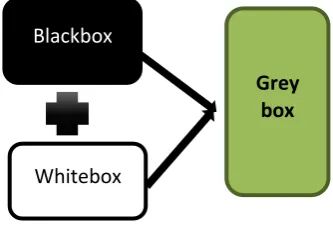
It is a testing technique which combine Black Box Testing and White Box Testing technique. It required a finite amount of knowledge on testing the internal working of an application. The main goal of using this testing approaches is to increase effective coverage of the application code. In this kind of testing, the test personnel have a partial understanding of the internal structure of the system under test. Hence the need for debugging software applications by making an input through the front-end, and verifying the data on the back-end [16].
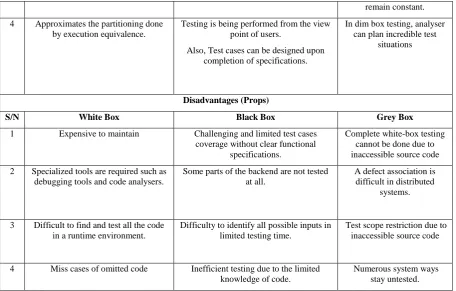
Figure 4. Grey-box testing Table 1. Cons and Pros of Testing Techniques (white, black and grey box)
Advantages (Cons)
S/N White Box Black Box Grey Box
1 Code knowledge is required Also offers code optimization
Code knowledge is unknown Offers both white-box and black box testing benefits.
2 Coverage of more test cases due to tester’s knowledge of the code
Speedy test case improvement without any access to code
Logically deal with complex test case scenario
3 Reveals hidden code errors. Tester and Programmer are autonomous to each other.
For independent testers and developers, boundary
White
Box
• Statement, Loop Coverage, Branch, Path, Data flow, Condition, Mutation, Logic & Fault Based, Domain & Boundary
Black
Box
• Boundary Value Analysis, Equivalence Class Partioning, Comparison Testing, Cause Effect Graph. Fuzzing
Grey
Box
•Matrix Testing, Pattern, Regression, Orthogonal Array,
Blackbox
Whitebox
Grey
box
OUTPUT INPUT
Blackbox
(Program
Execution)
OUTPUT
INPUT
Whitebox
[image:2.595.345.512.468.584.2] [image:2.595.69.528.615.767.2]remain constant. 4 Approximates the partitioning done
by execution equivalence.
Testing is being performed from the view point of users.
Also, Test cases can be designed upon completion of specifications.
In dim box testing, analyser can plan incredible test
situations
Disadvantages (Props)
S/N White Box Black Box Grey Box
1 Expensive to maintain
Challenging and limited test cases coverage without clear functional
specifications.
Complete white-box testing cannot be done due to inaccessible source code 2 Specialized tools are required such as
debugging tools and code analysers.
Some parts of the backend are not tested at all.
A defect association is difficult in distributed
systems.
3 Difficult to find and test all the code in a runtime environment.
Difficulty to identify all possible inputs in limited testing time.
Test scope restriction due to inaccessible source code
4 Miss cases of omitted code Inefficient testing due to the limited knowledge of code.
Numerous system ways stay untested.
2.4 Levels of Testing
[3, 4, 15, 22], proposed the following levels of testing a) Unit testing: It is a kind of white box testing otherwise referred to as components/module testing. It is the smallest testable part of an entire application that validate the functionality of a definite segment of code and as well satisfy the business requirements.
b) Integration testing: It is a top-bottom approach with the code divided into an individual segment and tested as a group. The main task is to analyze parameters such as functional, performance and reliability requirements which are placed on major design items.
c) Functional testing: It can be referred as black-box testing. The testing is done by providing validate input and thus outcomes are observed accordingly. Functional testing will test the entire functionality of the system by comparing expected output with actual output.
d) Structural testing (white box): It mainly focus on the internal design of the program like path coverage, statement coverage, control structure and program complexity etc. thereby improving the design and usability.
e) System testing: It is considered as more limited type of testing, that seeks to detect any defects within the software units that are integrated together. It is also a black box testing which is used to evaluate the system compliance against a stipulated requirement.
(f) Acceptance Testing: It is a kind of black box testing which is done by the user to authenticate the business requirement conformance and the readiness of a product, service or system as part of a quality assessment measures. [1]. The user has no knowledge of the internal working of the system, so it is done upon the completion of the projects prior to handling over by the developers to the clients or users. The
[image:3.595.71.528.71.362.2]objective is to give utmost assurance of running an error free system with maximal reliability and efficiency [22].
Figure 5. Levels of Testing
3.
SOFTWARE TESTING TOOLS
Software testing tools are series of tools used for error detection. It is always a good practice to introduce them as early as possible in the software development lifecycle (SDLC). The tools are used to automate certain tasks, improve testing efficiency and discover issues that might be difficult to find using manual review alone. They inspect behavior of a program on a finite set of test cases (a set of inputs, execution, preconditions, and expected outcomes developed for a particular objective, such as to exercise a particular program path or to verify compliance with a specific requirement, for which valued inputs always exist) [2],[3],[4],[11], [6]. The software testing tool should meet an organization short and long term goals [6].
In this research; the testing tools were chosen for their crucial roles played in various automated organizational sectors across the nation, with their quality assurance consideration.
Testin
g
UnitFunctional
Acceptance
System
Structural
Figure 6. Software Testing Tools
3.1 Proprietary Software Test Automation
Tools (PSTAT)
Proprietary Software Test Automation Tools are Commercial software’s developed by companies which require licenses to be purchased. Some of the top emerging proprietary software include HP, IBM, Oracle, Microsoft etc. It provides access to the software code to those users who had purchased the license or procured an agreement to use it [18].
3.2 Open Source Test Automation Tools
(OSSTAT)
Open Source Software Test Automation tool is an emerging market with companies offering testing tools free of cost and the Source code of the tools are available for modification/customization. Support is also available for these tools from Open Source development community [18].
3.3 Web, Mobile & Functional Testing
Tools
It is a type of testing which verifies that each function of the software application and operation are in conformance with the requirement specification. This testing involves checking of User Interface, APIs, Database, security, client/ server applications and functionality of the Application under Test. The coverage tools are;( Selenium and Test Complete).
3.3.1 Selenium
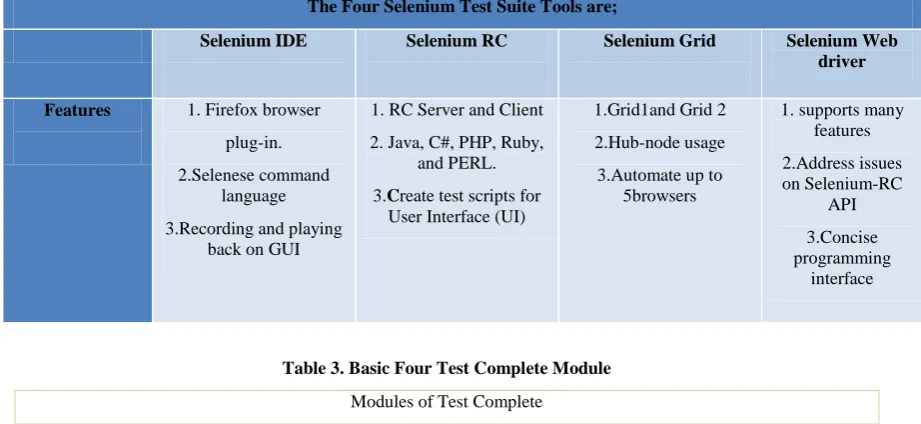
Selenium is an open-source software automation tool developed by Apache 2.0 license [14], which supports different types of testing in web applications. It is not just a single tool but it consists of four tools: Selenium IDE, Selenium RC, Selenium Web driver and Selenium Grid. Selenium perform tests like functional and regression and possess the potential of generating test scripts in programming languages like C#, Groovy, Java, Perl, PHP etc. Their tests can run on fire-fox web browsers with Windows, Linux, and OS X platforms. It can be also integrated with various frameworks to provide a hybrid framework, which makes the testing simpler [10].
3.3.2 Test Complete
Test Complete is a functional automated testing platform developed by Smartbear and operates with test projects and project suites. Tests can be recorded, scripted or manually created with keyword driven operations and used for automated playback and error logging. It is used to create and automate different software test types for different applications. It has a flexible architecture and used for functional testing, database testing, data driven testing. It basically comprises of three modules and each module contains functionality for creating automated tests on that specific platform [17]-[18].
Table 2. Selenium Test Suite The Four Selenium Test Suite Tools are;
Selenium IDE Selenium RC Selenium Grid Selenium Web driver Features 1. Firefox browser
plug-in. 2.Selenese command
language 3.Recording and playing
back on GUI
1. RC Server and Client 2. Java, C#, PHP, Ruby,
and PERL. 3.Create test scripts for
User Interface (UI)
1.Grid1and Grid 2 2.Hub-node usage 3.Automate up to
5browsers
1. supports many features 2.Address issues on Selenium-RC
API 3.Concise programming
interface
Table 3. Basic Four Test Complete Module
Modules of Test Complete
Desktop applications
(executed on desktop PC running on Windows OS)
Web applications
(executed in web browsers embedded in desktop)
Mobile applications
(executed on Android or iOS devices)
Proprietary
&
Open Source
Software Testing Tools
Hploadrunner
Selenium
TestComplete
[image:4.595.74.535.459.671.2]3.4 Load Testing Tools
Load testing is the computation of the device with respect to its response. It is performed to determine a system's behavior under both normal and predicted peak load conditions. The respective open and commercial coverage tool are (JMeter and HP LoadRunner).
3.4.1 JMeter
JMeter is an open source java application testing tool developed by “Apache Software Foundation (ASF)”. It is used to load test client/server. JMeter is originally used for testing Web Application or FTP application. Nowadays, it is used for functional test, database server test etc [17], [21]. Moreover, JMeter is used in regression testing by generating test scripts and provides offline reporting of test results [17].
3.4.2. Hp Load Runner
LoadRunner has various types of Virtual users (Vusers). Each type is designed to handle different aspects of client/server
architectures [6], [7], [17]. Vuser can be used in any types of combination of scenario in order to create a comprehensive client/server test. Some of the Vuser types includes: GUI (Windows and UNIX), Database (Oracle), and Web (Java).
4.
EVALUATION STUDY
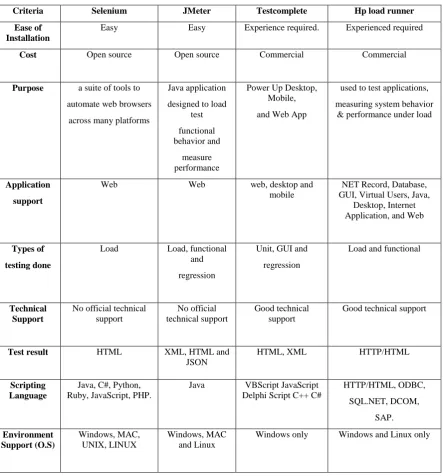
It is referred to as a benchmarking study. It involves the evaluation and comparison study analysis of the selected testing tools and techniques from multiple sources. This is simply carried out by defining a criterion to provide essential application functionality, so as to effectively assess all the tools and techniques prior to testing. In this regard, a tool can be appropriately selected with their respective techniques having satisfied the expected requirement.
[image:5.595.79.523.289.766.2]The tables below give the outline of the benchmarked, for the tools and techniques using some set of an established criterion [10]-[18], [6], [22].
Table 4. Software tools comparative analysis
Criteria Selenium JMeter Testcomplete Hp load runner Ease of
Installation
Easy Easy Experience required. Experienced required
Cost Open source Open source Commercial Commercial
Purpose a suite of tools to automate web browsers
across many platforms
Java application designed to load
test functional behavior and
measure performance
Power Up Desktop, Mobile, and Web App
used to test applications, measuring system behavior
& performance under load
Application support
Web Web web, desktop and
mobile
NET Record, Database, GUI, Virtual Users, Java,
Desktop, Internet Application, and Web
Types of testing done
Load Load, functional
and regression
Unit, GUI and regression
Load and functional
Technical Support
No official technical support
No official technical support
Good technical support
Good technical support
Test result HTML XML, HTML and JSON
HTML, XML HTTP/HTML
Scripting Language
Java, C#, Python, Ruby, JavaScript, PHP.
Java VBScript JavaScript Delphi Script C++ C#
HTTP/HTML, ODBC, SQL.NET, DCOM,
SAP.
Environment Support (O.S)
Windows, MAC, UNIX, LINUX
Windows, MAC and Linux
Browser support
Firefox (IDE), chrome, IE, Safari.
IE (Internet explorer)
All IE, Mozilla, Opera,
Netscape, Firefox
Manufacturer Apache 2.0 Apache Software Foundation (ASF)
Smart bear Hewlett Packard
Recording Ability
[image:6.595.68.524.202.395.2]Excellent Good Good Excellent
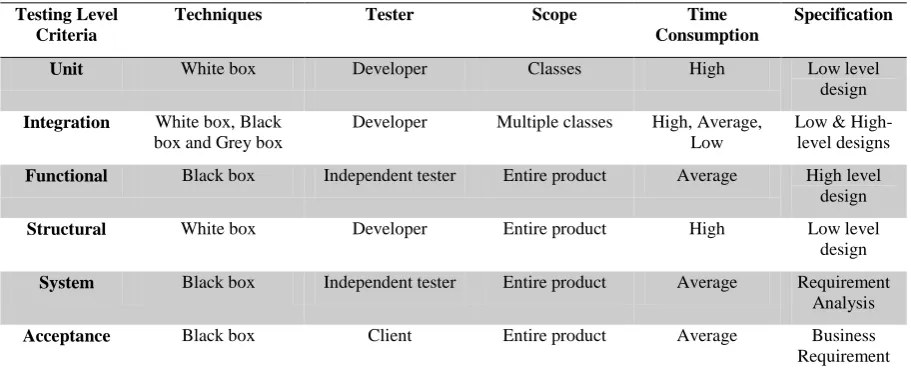
Table 5. Testing Techniques Evaluation Testing Level
Criteria
Techniques Tester Scope Time Consumption
Specification
Unit White box Developer Classes High Low level design
Integration White box, Black box and Grey box
Developer Multiple classes High, Average, Low
Low & High-level designs
Functional Black box Independent tester Entire product Average High level design
Structural White box Developer Entire product High Low level design
System Black box Independent tester Entire product Average Requirement Analysis
Acceptance Black box Client Entire product Average Business Requirement
5.
CONCLUSION
Software testing is the basic activity of software engineering. It is an act executed on the software tools with the sole aim of detecting and debugging errors and improving software quality reliability. To achieve this objective, an appropriate techniques and tools are used by a high skilled tester/ developer expertise based on their functional requirements. In this paper, we have successfully investigated on dynamic kind of testing techniques covering the white, black and grey boxes, levels of testing and some automated testing tools (Selenium, Test Complete, JMeter and LoadRunner). Hence, an evaluation and comparative analysis has been outlined based on some selected functional criteria to provide a usable insight.
6.
ACKNOWLEDGEMENTS
Our special gratitude goes to Dr. Dylan and our amiable CUST friends for their tremendous encouragement in making this research a success.
7.
REFERENCES
[1] S. Ghuman, "Software Testing Techniques", vol. 3, no. 10, pp. pg.988 – 993, 2014. [Accessed 3 May 2019]. [2] R. Sudha, "A Study and Analysis on Software Testing
Tools", International Journal of Pure and Applied Mathematics, vol. 11818, no. 1311-8080, pp. 1783-1800, 2019. Available: http://www.ijpam.eu. [Accessed 4 May 2019].
[3] S. Bharti Nagpal, "Descriptive Study of Software Testing & Testing Tools", International Journal of Innovative Research in Computer and Communication Engineering, vol. 4, no. 6, pp. 10288-10295, 2016. Available: 10.15680/ijircce.2016.0406006.
[4] D. Kannan, "Comparison of Software Testing Tools with Respect to Tools and Technical Related Parameters", International Journal of Advanced Research in Computer Science, vol. 8, no. 9, pp. 70-75, 2017. Available: 10.26483/ijarcs. v8i9.4908 [Accessed 1 May 2019].
[5] M. Atifi, A. Marzak and A. Mamouni, "A Comparative Study of Software Testing Techniques", pp. 373–390, 2017. Available: DOI: 10.1007/978-3-319-59647-1_27 [Accessed 4 May 2019].
[6] Minna Tiitinen, Key Factors for Selecting Software Testing Tools, Helsinki Metropolia University of Applied Sciences Master Degree in Business Informatics Key Factors for Selecting Software Testing Tools, Date 30.11.2013
[7] P. Kunte and D. Mane, "Automation Testing of Web based application with Selenium and HP UFT (QTP)", International Research Journal of Engineering and Technology (IRJET), vol. 0406-2017, no. 2395-0072, pp. 2579-2583, 2017. [Accessed 27 April 2019].
[8] N. S N, N. S N and B. Sriraman, "Comparative Study on Software Testing Techniques", International Journal of Computer Science and Mobile Computing, vol. 3, no. 10, pp. pg.151 – 158, 2014. [Accessed 4 April 2019]. [9] H. Babbar, "software testing: techniques and test cases
Himanshi Babbar", vol. 53, no. 2320-7345, pp. Pg.: 44-53, 2017. Available:
[10] N. Islam, "A Comparative Study of Automated Software Testing Tools", the Repository at St. Cloud State, 2016.
https://repository.stcloudstate.edu/csit_etds/12/. [Accessed: 09- May- 2019].
[11]K. Alnafjan, T. Hussain, H. Ullah and Z. Paracha, "Comparative Analysis of Various Testing Techniques used for Aspect-Oriented Software System", World Academy of Science, Engineering and Technology International Journal of Computer and Information Engineering, vol. 7, no. 0000000091950263, pp. 687-692, 2013. [Accessed 11 May 2019].
[12]M. Imran, "A Comparative Study of QTP and Load Runner Automated Testing Tools and their Contributions to Software Project Scenario", International Journal of Innovative Research in Computer and Communication Engineering, vol. 4, no. 1, pp. 457-466, 2016. [Accessed 7 May 2019].
[13]R. Rattan, "Performance Evaluation & Comparison of Software Testing Tool", International Journal of Information and Computation Technology, vol. 3, 72013, no. 0974-2239, pp. pp. 711-716, 2013. Available: House http://www. irphouse.com /ijict.htm. [Accessed 5 April 2019].
[14]A. Satheesh and M. Singh, "Comparative Study of Open Source Automated Web Testing Tools: Selenium and Sahi", Indian Journal of Science and Technology, vol. 10,
no. 13, pp. 1-9, 2017. Available:
10.17485/ijst/2017/v10i13/109048 [Accessed 5 March 2019].
[15]M. Ehmer and F. Khan, "A Comparative Study of White Box, Black Box and Gray Box Testing Techniques", International Journal of Advanced Computer Science and Applications, vol. 3, no. 6, 2012. Available: 10.14569/ijacsa.2012.030603 [Accessed 1 March 2019].
[16]S. Gojare, R. Joshi and D. Gaigaware, "Analysis and Design of Selenium WebDriver Automation Testing
Framework", Procedia Computer Science, vol. 50, pp. 341-346, 2015. Available: 10.1016/j.procs.2015.04.038 [Accessed 3 March 2019].
[17] R. Abbas, Z. Sultan and S. Bhatti, "Comparative Study of Load Testing Tools: Apache JMeter, HP LoadRunner, Microsoft Visual Studio (TFS), Siege", Sukkur IBA Journal of Computing and Mathematical Sciences, vol. 1, no. 2, p. 102, 2017. Available: 10.30537/sjcms. v1i2.24 [Accessed 3 March 2019].
[18] R. Khan and S. Gupta, "Comparative Study of automated Testing Tools: Rational Functional Tester, Quick Test Professional, Silk Test and LoadRunner", International Journal of Advanced Technology in Engineering and Science, vol. 3, no. 23487550, pp. pp167-172, 2015. [Accessed 9 May 2019].
[19] N. Jha and R. Popli, "Comparative Analysis of Automated Functional Testing Tools", Journal of Network Communications and Emerging Technologies (JNCET), vol. 6, no. 6, pp. 50-53, 2016. [Accessed 14 May 2019].
[20] M. Mendiratta and D. Kumar, "Relative Study of Automated Testing Tools: Selenium, Quick Test Professional and Test Complete", IMS Manthan (The Journal of Innovations), vol. 10, no. 2, 2016. Available: 10.18701/imsmanthan. v10i2.11120 [Accessed 3 February 2019].
[21] Nisha Jha and Rashmi Popli "Comparative Analysis of Web Applications using JMeter", International Journal of Advanced Research in Computer Science, vol. 8, no. 3, pp. pp774-777, 2017. [Accessed 14 May 2019]