AN EVALUATION OF USER SUPPORT STRATEGIES FOR
MANAGED LEARNING IN A MU
L
TI USER VIRTUAL
ENVIRONMENT
Galhenage Indika Udaya Shantha Perera
A Thesis Submitted for the Degree of PhD
at the
University of St Andrews
2013
Full metadata for this item is available in
Research@StAndrews:FullText
at:
http://research-repository.st-andrews.ac.uk/
Please use this identifier to cite or link to this item:
http://hdl.handle.net/10023/4049
An Evaluation of User Support Strategies for Managed
Learning in a Multi User Virtual Environment
Galhenage Indika Udaya Shantha Perera
PhD Thesis
A thesis submitted
for the degree of Doctor of Philosophy
School of Computer Science
University of St Andrews
Abstract
The management of online learning environments so that they are effective and efficient presents a significant challenge for institutions and lecturers due to the complexity of requirements in the learning and teaching domain. The use of 3D Multi User Virtual Environments (MUVEs) for education introduces a novel set of management challenges. MUVEs were designed to cater for entertainment and commercial needs and as such do not intrinsically support managed learning. When MUVEs are used for educational purposes, forming 3D Multi User Learning Environments (MULEs), user support for learning management becomes an important factor.
This thesis highlights the importance of managed learning in MULEs. It proposes a coordinated approach which accommodates the existing education institutional infrastructure. The research has focused on two very widely used and closely compatible MUVEs, Second Life (SL) and OpenSim. The thesis presents system and user studies that have been carried out on these selected MUVEs. The findings reveal the challenges that academics and students can experience if they do not have sufficient knowhow to manage learning activities in SL/OpenSim. User guidance and training tools were then developed for supporting learning management strategies in the context of SL/OpenSim and demonstrated in exemplar use-case scenarios.
Acknowledgement
I owe my gratitude to many people who have made this research possible.
My deepest gratitude is to my supervisor, Dr. Colin Allison for the opportunities and the support he gave. I was very fortunate to have him as my supervisor. His valuable input and the flexibility in shaping the best path for my research interests have helped me a lot for this work. I really appreciate his support extended to develop my research and academic competencies.
I would like to thank my second supervisor, Dr. Alan Miller, and my reviewers Dr. Mark-Jan Nederhof and Dr. Alex Voss, for their support and feedback.
I highly appreciate the financial support received from the Commonwealth Scholarship Programme (UK) and the Scottish Informatics and Computer Science Alliance (SICSA) to complete this work.
I am thankful to Dr. Iain Oliver, Dr. Thomas Sturgeon, Dr. Ying Zhai, Dr. Meng Yu, Dr. Ittipong Khemapech, Mr. John McCaffery and Mr. Ross Nicoll for the collaborative research, inspirational discussions and knowledge sharing.
I would like to thank my friends and the staff at the School of CS. It was a wonderful experience to work with them.
I am grateful to my family for their love and kind support throughout.
Declarations
I Galhenage Indika Udaya Shantha Perera, hereby certify that this thesis, which is
approximately 66,000 words in length, has been written by me, that it is the record of work
carried out by me and that it has not been submitted in any previous application for a higher
degree. I was admitted as a research student and a candidate for the degree of Doctor of
Philosophy in September 2009; the higher study for which this is a record was carried out in
the University of St Andrews between 2009 and 2013.
Date
Signature of candidate
I hereby certify that the candidate has fulfilled the conditions of the Resolution and
Regulations appropriate for the degree of PhD in Computer Science in the University of St
Andrews and that the candidate is qualified to submit this thesis in application for that degree.
Date
Signature of supervisor
In submitting this thesis to the University of St Andrews I understand that I am giving
permission for it to be made available for use in accordance with the regulations of the
University Library for the time being in force, subject to any copyright vested in the work not
being affected thereby. I also understand that the title and the abstract will be published, and
that a copy of the work may be made and supplied to any bona fide library or research worker,
that my thesis will be electronically accessible for personal or research use unless exempt by
award of an embargo as requested below, and that the library has the right to migrate my thesis
into new electronic forms as required to ensure continued access to the thesis. I have obtained
any third-party copyright permissions that may be required in order to allow such access and
migration, or have requested the appropriate embargo below.
The following is an agreed request by candidate and supervisor regarding the electronic
publication of this thesis:
Access to printed copy and electronic publication of thesis through the University of St
Andrews.
Contents
1. Introduction ... 1
1.1 Research Overview ... 1
1.2 Thesis Statement ... 1
1.3 Research Objectives and Methodology ... 2
1.3.1 System Environment for the Research... 2
1.4 Research Contributions ... 3
1.4.1 Overview of Research Contributions ... 3
1.4.2 Selected Publications ... 4
1.5 Thesis Structure... 6
1.6 Summary ... 6
2. Review of Literature ... 7
2.1 Introduction ... 7
2.2 Multi User Virtual Environments... 7
2.2.1 Game Environments - MMORPGs ... 7
2.2.2 MUVEs – an Overview ... 8
2.2.3 Related Terminology of MUVEs ... 11
2.2.4 Management Challenges in MUVEs ... 12
2.3 Technology Enhanced Learning ... 13
2.3.1 E-Learning ... 13
2.3.3 Other Approaches ... 14
2.3.4 Blended Learning... 15
2.4 Teaching and Learning with MUVEs ... 16
2.4.1 Related Educational Projects ... 19
2.5 Educational Theories for MUVE based Learning ... 20
2.5.1 Generic Learning Taxonomies and Models ... 20
2.5.2 Experiential Learning ... 23
2.5.3 Exploratory Learning ... 24
2.5.4 Constructivist Learning ... 25
2.5.5 Collaborative and Corporative Learning ... 26
2.5.6 Constructive Alignment ... 27
2.5.7 3P Model ... 27
2.6 Management of Learning Environments ... 28
2.6.2 Management Approaches in e-Learning ... 30
2.6.3 Summary ... 31
2.7 Behavioural and System Usability Aspects for Learning ... 31
2.7.1 Learning Environment Usability ... 31
2.7.2 Self-regulatory Learning ... 33
2.8 Concluding remarks ... 34
3. A MUVE for Learning - System Study ... 35
3.1 Introduction ... 35
3.2 Second Life ... 35
3.3 Open Simulator ... 37
3.4 Browser Applications ... 39
3.4.1 Second Life Viewer ... 39
3.4.2 Hippo OpenSim Viewer ... 40
3.4.3 Phoenix and Firestorm Viewers ... 40
3.4.4 Other Viewers ... 41
3.5 Overview of SL and OpenSim System Models ... 41
3.5.1 Access Control and User Management ... 42
3.5.2 Land Management Models ... 42
3.5.3 Content Management Models ... 43
3.5.4 Group Management Models ... 49
3.5.5 Avatar Activities ... 52
3.6 Challenges for Learning ... 53
3.6.1 An Approach to Manage Avatar Appearance Change ... 56
3.7 MUVEs in Student Learning – User studies ... 57
3.7.1 User Study in Second Life ... 58
3.7.2 User Study in OpenSim ... 59
3.8 Concluding remarks ... 62
4. User Support Models for Managing a MULE ... 63
4.1 Introduction ... 63
4.2 A Model for Blended Learning with MULEs ... 63
4.2.1 The Model – Strategic View ... 63
4.2.2 An Analysis of Use Cases for a Blended MULE ... 65
4.2.3 Use Case Mapping Challenges – A Case Study ... 71
4.2.4 A Case Study on a Learning Aid within Different Domains ... 75
4.3.1 Research Model ... 78
4.3.2 Experiment Design ... 79
4.3.3 Observed Student Engagements ... 81
4.3.4 Data Analysis ... 84
4.3.5 Open Feedback ... 89
4.3.6 Study Limitations... 91
4.4 A Taxonomy for Managing a MULE ... 91
4.5 User Support for Policy Based MULE Management ... 93
4.5.1 Policy Based Management in Academia ... 93
4.5.2 A Process for Policy Implementation in MUVEs ... 94
4.6 Concluding remarks ... 95
5. Tool Support for Learning Management in OpenSim ... 97
5.1 Introduction ... 97
5.2 The Need for User Support in OpenSim Management ... 97
5.2.1 User Study ... 98
5.2.2 Data Analysis ... 99
5.2.3 Findings from the Interview ... 101
5.2.4 Overview of the Study Findings ... 102
5.3 Rendering OpenSim Function Interrelations for User Guidance ... 102
5.3.1 A Framework of OpenSim Functions for Management ... 102
5.3.2 A Network of OpenSim Functions ... 104
5.4 Tool Evaluation for Accuracy ... 107
5.4.1 Evaluation Using Eigen Vector Centrality ... 107
5.4.2 Evaluation Using Betweenness Centrality ... 110
5.4.3 Analysis Overview... 111
5.5 Case study – Tool Evaluation ... 112
5.5.1 Case Study Overview – The VHD Project ... 112
5.5.2 VHD Project Management – User Support Approaches ... 114
5.5.3 Scenario I – Training with VHD Environment ... 115
5.5.4 Scenario II – Role Play and Simulation ... 119
5.5.5 Scenario III – Training through Development ... 123
5.5.6 Overview of Tool Support for VHD Project Management ... 126
5.6 Concluding remarks ... 127
6. An OpenSim Training Environment ... 129
6.2 An Evaluation of OpenSim User Training Methods ... 129
6.2.1 Document Based and Island Based User Support... 129
6.2.2 Pre Test to Examine a Suitable Approach ... 131
6.2.3 Results and Analysis ... 134
6.2.4 Participant Feedback ... 141
6.2.5 Overview of the Findings ... 142
6.3 Training Environment Design ... 143
6.3.1 Introduction Island Design ... 145
6.3.2 Management Island Design ... 147
6.4 Training Environment Development... 149
6.4.1 Special Implementation Practices ... 149
6.4.2 Teleporting between Training Places ... 151
6.4.3 Islands Review ... 153
6.5 Concluding Remarks ... 158
7. Evaluation of User Support for Managing OpenSim ... 159
7.1 Introduction ... 159
7.2 Evaluation Scenario ... 159
7.2.1 Experiment Setup and Sample Selection ... 159
7.2.2 Task Scenario... 160
7.2.3 Sloodle Mediated MCQ Session ... 162
7.2.4 Marking Scheme for Evaluation ... 164
7.3 Experiment Island Design and Development ... 165
7.3.1 Experiment Island ... 165
7.4 Data Analysis ... 167
7.4.1 Data analysis on scenario tasks ... 167
7.4.2 Analysis of MCQ responses ... 178
7.4.3 Comparison of Group Scores ... 180
7.4.4 Usability Analysis ... 182
8.4.5 Educational Value ... 184
7.5 Open Feedback ... 186
7.5.1 Unstructured Interview Findings – Informal and Unguided ... 188
7.6 Case study ... 189
7.6.1 Structured Feedback ... 189
7.6.2 Student Feedback and Other Observations ... 191
7.7.1 Study Limitations... 192
7.8 Concluding Remarks ... 192
8. Conclusion ... 193
8.1 Introduction ... 193
8.2 Research Review and Contributions ... 193
8.2.1 Thesis Review ... 193
8.2.2 Objective Achievements and Overview of Contributions ... 194
8.3 Future Work ... 195
8.4 Concluding Remarks ... 197
Reference ... 199
List of Figures
Figure 1.1: Training support for MULE management – Management Island ... 4
Figure 2.1: SL and OpenSim region growth ... 10
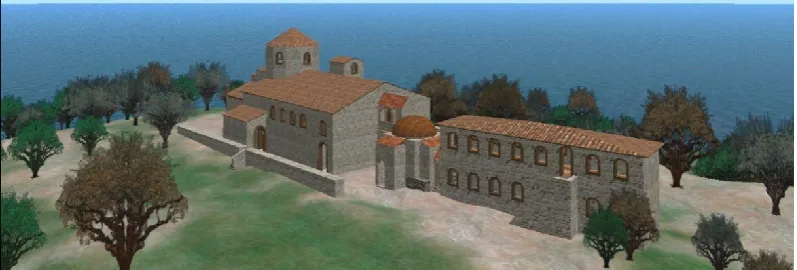
Figure 2.2: LAVA project in OpenSim ... 19
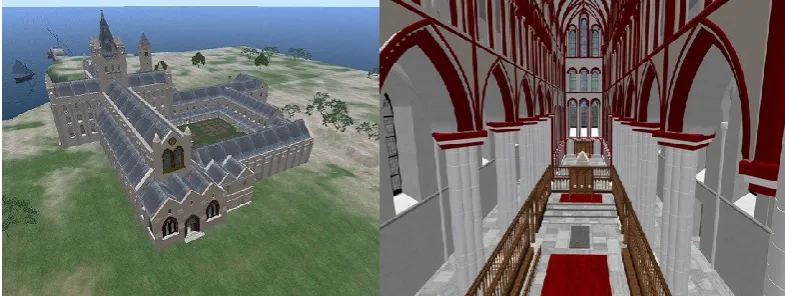
Figure 2.3: The virtual reconstruction of the St. Andrews Cathedral in OpenSim ... 20
Figure 2.4: Bloom's Model - Cognitive Domain ... 21
Figure 2.5: MUVE learning affordance model proposed by Gamage et al. ... 23
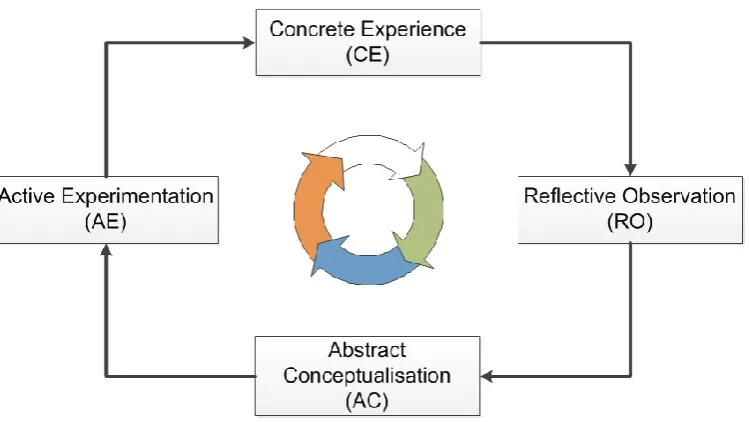
Figure 2.6: The Kolb’s model of experiential learning ... 24
Figure 2.7: Zone of Proximal Development model of learning ... 25
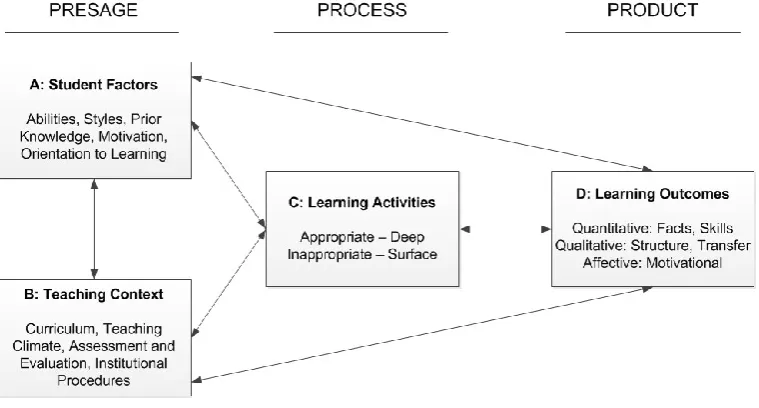
Figure 2.8: The 3P Model of Teaching and Learning (adapted from Biggs, 2001) ... 28
Figure 3.1: Content development session in Second Life ... 36
Figure 3.2: OpenSim system architectural modes: Standalone and Grid ... 38
Figure 3.3: Second Life viewer - version 3.3.4 (262321)... 39
Figure 3.4: Hippo OpenSim Viewer – version 0.6.3 ... 40
Figure 3.5: Phoenix Viewer 1.6.1 (1691) ... 41
Figure 3.6: World Map of several regions (SL): A square is a region of 65,536m2 ... 43
Figure 3.7: Client permission settings options for different roles ... 47
Figure 3.8: Cyclic Permission Model ... 48
Figure 3.9: Fair Ownership Model ... 49
Figure 3.10: System architecture of Groups in OpenSim ... 50
Figure 3.11: Standard Phoenix Viewer (left) and Modified Phoenix Viewer without user options to change appearance or remove clothes (right) ... 57
Figure 3.12: Completed student projects in SL - Dijkstra’s shunting algorithm ... 58
Figure 3.13: Completed student projects in OpenSim – Interactive Door Systems ... 60
Figure 4.1: High level model to analyse MUVE integration for blended learning with MULEs ... 64
Figure 4.2: The Comparison of the key use cases of the student role in Moodle with available OpenSim/SL use cases ... 66
Figure 4.3: The comparison of the key use cases of the teacher role in Moodle with the available OpenSim/SL use cases ... 68
Figure 4.4: The comparison of the available key use cases in Moodle and OpenSim/SL for the academic role module coordinator ... 70
Figure 4.5: Creating a rich text entry for a Moodle course using the in-world web browser without Sloodle mediation (direct access to Moodle through URL) ... 73
Figure 4.7: A collaborative activity in the Routing Island – the construction of hypothetical Internet
core as a hypercube of degree 4 ... 77
Figure 4.8: Wireless Island overview and a simulation... 79
Figure 4.9: The map of experiment regions: left - the world map, right - a region ... 80
Figure 4.10: Varying levels of avatar customisations: ... 82
Figure 4.11: Student content creation and content alteration in the learning environment ... 82
Figure 4.12: A region compared at the end of the session: left – original layout and right - the terrain modified and content altered region ... 83
Figure 4.13: The Component Plot in Rotated Space and Rotated Component Matrix ... 85
Figure 4.14: Taxonomy for classifying different management practice scenarios based on management aspects ... 92
Figure 4.15: Process to be followed for developing policy considerations ... 94
Figure 5.1: The distribution of the study participants ... 99
Figure 5.2: OpenSim function framework for policy implementation ... 103
Figure 5.3: An example graph topology written in DOT ... 105
Figure 5.4: The graph representation of Gephi for the topology script in Fig. 5.3 ... 105
Figure 5.5: The complex network of OpenSim functions for educational uses ... 106
Figure 5.6: The selected Avatar Fly ego-network and the legend for users ... 107
Figure 5.7: Hypothesis test output (PASW) ... 110
Figure 5.8: The map of the designed VHD training environment ... 113
Figure 5.9: Completed VHD training environment ... 114
Figure 5.10: A VHD researcher referring to the guidance document while practicing policy implementations on VHD islands ... 115
Figure 5.11: Dilemma situations presented in Notecards for disaster management decision making .... 116
Figure 5.12: Directed learning paths and Sloodle activities for VHD learning scenario 1 ... 117
Figure 5.13: The ego-network of avatar activity function - Terraform ... 118
Figure 5.14: Role-play character avatars – a refugee female (left) and a male (right) ... 119
Figure 5.15: Disaster management official avatars – British Red Cross Aid Worker (left) and Refugee Camp Officer (right) ... 120
Figure 5.16: The ego-network of Avatar Teleport obtained from the tool ... 122
Figure 5.17: An example usage of an allocated land parcel with content and land alteration ... 124
Figure 5.18: A selection of a complex ego-network for land management ... 125
Figure 6.1: Pre-test Prototype Island and a training guide at the arrival point ... 131
Figure 6.2: Design map of Test Island for the pre-test evaluation ... 133
Figure 6.3: Completed Test Island with parcel settings and sensors ... 134
Figure 6.5: Boxplots of walking times to each sensor for the document users ... 135
Figure 6.6: Average times taken by each group to reach sensors ... 136
Figure 6.7: Average time taken by the two groups – Task Flying ... 137
Figure 6.8: Average time taken by the two groups – Task object creation ... 138
Figure 6.9: Average time taken by the two groups – Task object editing ... 138
Figure 6.10: Average time taken by the two groups – Task IM and finishing ... 139
Figure 6.11: Group-Doc user feedback for the questionnaire ... 141
Figure 6.12: Group-Island user feedback for the questionnaire ... 142
Figure 6.13: The design architecture of Training Islands ... 144
Figure 6.14: Special development practices: region border tree fence (left) and the ramped seating for the cinema (right) ... 150
Figure 6.15: Campus view and developed training centres ... 150
Figure 6.16: Cinema for media display (Media on Prim use) ... 151
Figure 6.17: Teleport control flow for the training islands ... 152
Figure 6.18: Implemented teleport links and locations ... 153
Figure 6.19: Developed buildings: a training centre (left) and Information Centre (right) ... 154
Figure 6.20: Developed buildings: Cinema and discussion rooms (left) and the interior of a discussion room (right) ... 154
Figure 6.21: Developed buildings: The Open Forum (left) and Sandbox (right) ... 155
Figure 6.22: Training content in textual forms ... 155
Figure 6.23: Training content and additional information ... 156
Figure 6.24: Complex interrelationships of OpenSim functions are shown ... 156
Figure 6.25: Aerial view of completed Introduction Island ... 157
Figure 6.26: Aerial view of completed Management Island ... 157
Figure 7.1: Experiment Island ... 165
Figure 7.2: Land border walls for parcel creation for individual and group projects ... 165
Figure 7.3: Content objects and empty content holders for evaluation tasks ... 166
Figure 7.4: Sloodle setup with user registration and MCQ quizzes on Quiz Chair ... 166
Figure 7.5: Average performance scores (%) for Subtask 1 ... 168
Figure 7.6: Average performance scores (%) for Subtask 2 ... 169
Figure 7.7: Average performance scores (%) for Subtask 3 ... 170
Figure 7.8: Average performance scores (%) for Subtask 4 ... 171
Figure 7.9: Average performance scores (%) for Subtask 5 ... 172
Figure 7.10: Average performance scores (%) for Subtask 6 ... 172
Figure 7.11: Average performance scores (%) for Subtask 7 ... 174
Figure 7.13: Average performance scores (%) for Subtask 9 ... 176
Figure 7.14: Average performance scores (%) for Subtask 10 ... 177
Figure 7.15: Average percentage score for the task scenario ... 178
Figure 7.16: Number of correct responses for each question ... 179
Figure 7.17: Percentage score differences per each MCQ ... 179
Figure 7.18: Total score distribution box plots for both groups ... 180
Figure 7.19: SPSS (v19) output of ANOVA for testing hypothesis ... 181
Figure 7.20: SUS value distributions of the two groups... 183
Figure 7.21: SPSS (v19) output for ANOVA to test hypothesis ... 183
Figure 7.22: The distribution of educational value scores of the two groups ... 185
List of Tables
Table 1.1: Research objectives and the corresponding discussions ... 5
Table 3.1: A Comparison of land units and ownerships in SL and OpenSim ... 42
Table 3.2: Roles and task types in content management ... 44
Table 3.3: Content Ownership and Permission Model of SL and OpenSim ... 46
Table 3.4: Content types available for composite permissions in SL and OpenSim ... 46
Table 3.5: Composite permission model for objects with scripts ... 47
Table 3.6: Abilities available in Groups and their function categories ... 52
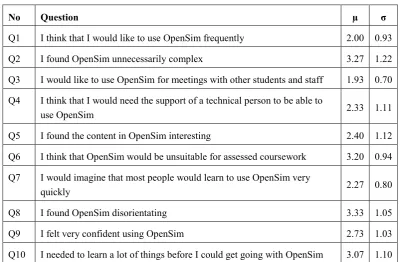
Table 3.7: Modified SUS Questionnaire items and relevant mean and std. dev. ... 61
Table 4.1: Sloodle tools and corresponding Moodle functions ... 72
Table 4.2: The summary of experiment groups and module details... 79
Table 4.3: Questionnaire items ... 81
Table 4.4: Questions on student engagement and the descriptive statistics ... 86
Table 4.5: Questions on student self-regulation and descriptive statistics ... 87
Table 4.6: Questions on system environment management and descriptive statistics ... 88
Table 4.7: Summary of the analysis variables and their internal consistency measures ... 88
Table 4.8: Regression analysis summary ... 89
Table 5.1: An example management policy with brief details on possible conflicts ... 98
Table 5.2: Questionnaire items and descriptive statistics of the responses ... 100
Table 5.3: Analysis variable summary with consistency measures ... 101
Table 5.4: A sample of EVC ranks and corresponding PLoS values ... 108
Table 5.5: Descriptive Statistics for the two groups of PLoS ... 109
Table 5.6: A selected sample of Betweenness Centrality measures of functions ... 111
Table 5.7: A set of policies for the management of VHD learning Scenario I... 117
Table 5.8: A set of policies for VHD use scenario 2 management ... 121
Table 5.9: A set of policies for VHD use Scenario 3 management ... 123
Table 6.1: Average time comparison for the four task phases ... 140
Table 6.2: Descriptive statistics of the entire task for the two groups ... 140
Table 6.3: Key observations of each user on the task engagement ... 140
Table 7.1: The Task Scenario given to the experiment participants ... 162
Table 7.2: Sloodle MCQ set with the answers ... 163
Table 7.3: Allocated score points for each subtask and its component activities ... 164
Table 7.4: The comparison of subtask score means between the groups ... 177
Table 7.6: Average response values for educational value questionnaire ... 184
Table 7.7: SUS questionnaire response per each participant ... 190
Table 7.8: educational value responses per participant ... 190
1
1.
Introduction
1.1 Research Overview
Immersive 3D Multi User Virtual Environments (MUVEs) designed for education, referred to as 3D Multi User Learning Environments (MULEs), have shown sufficient success to warrant their consideration as a mainstream educational paradigm [1, 2]. With the use of MUVEs for supporting learning and teaching, educational institutions are facing a novel set of management challenges that come alongside the immersive and engaging learning experience. Although MULEs have been extended to various innovative and attractive use cases, their management can be challenging: lecturers can find that the underlying system functionalities and use cases are less cohesive than conventional online facilities, while students can be overwhelmed by the rich and engaging nature of the 3D immersion and might focus more on environment features rather than the Intended Learning Outcomes (ILO). In order to overcome this challenge the research discussed in this thesis has developed a set of user support models and tools for managed learning in MULEs.
Existing online learning environment management practices have been specialised for non 3D environments, such as 2D Web and static learning content, user collaboration and associated learning objectives. MUVEs however are designed to cater for entertainment [3] and commercial needs; hence, the system models used are not explicitly designed to support educational requirements. MUVEs at present are not adequate in themselves as a complete learning environment; there must be additional support for formal course module management and student guidance [4]. However, in order to perform these MUVE management tasks and student support, academics need to be aware of the functions and mechanisms available in them. Since MUVEs have a steep learning curve [5-7], suitable user support strategies on MUVEs can help teachers and students to overcome this challenge. This research investigates problems in this domain using two widely used and closely related MUVEs: Second Life (SL) [8] and Open Simulator (OpenSim) [7]. The research provides its recommendations and contributions with respect to these MUVEs.
1.2 Thesis Statement
The thesis of this research can be stated as follows:
The provision of user support for enhancing user self-regulation and contextual environment management can improve the management of learning in a Multi User Learning Environment.
Evidence in support of this thesis is shown in:
2
subsequent research studies. The research rationales are supported by related studies and standard theories on learning with MUVEs and e-Learning.
Domain Feasibility – The system studies were performed on the selected MUVEs, Second Life [8] and Open Simulator [7], and have been incorporated into the design of user support models and tools. The design and implementation of user guidance tools are compatible with the selected MUVEs; these tools are shown to be capable of provisioning effective user support for managed learning.
Validity and Acceptance – This research includes the evaluation of the thesis by way of an intervention strategy of prototype implementations of user support tools and the evaluation of those for usability and educational value. The solutions are examined with quantitative analyses. Case studies on working projects and artefacts in the selected MUVEs are also used to validate the thesis statement.
1.3 Research Objectives and Methodology
This research aims to provide user guidance for the effective use and management of the selected MUVEs. It therefore seeks to achieve the following objectives:
Objective 1 - Identify appropriate system models of the selected MUVEs for learning
Objective 2 - Identify productive use cases for teaching and learner support in these MULEs
Objective 3 - Identify the most significant management aspects for MULEs
Objective 4 - Develop user guidance models for MULE management
Objective 5 - Design and implement prototype user guidance and training tools for the selected MUVEs
Objective 6 - Evaluate the guidance and tools and make recommendations for learning management in the selected MUVEs
1.3.1 System Environment for the Research
3
of St Andrews has an OpenSim grid that hosts virtual regions for education and research. Further details on SL and OpenSim will be discussed in Chapter 3.
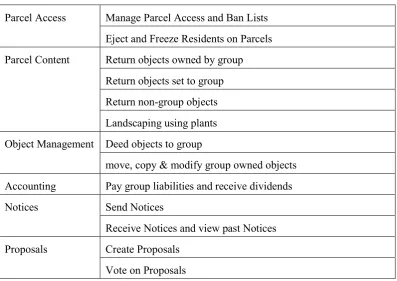
MUVEs in general and OpenSim in particular leave the management of educational environments on these platforms as the sole responsibility of academic institutions [9, 11]. The development model for OpenSim is a generic MUVE platform [7] catering for a plethora of application domains, without domain specific tools or user support. This high degree of platform generalisation offers many positive features such as flexibility, exclusive ownership and autonomous sessions, yet introduces a wide gap between existing mainstream educational practices and MUVE education potential [12], creating significant challenges for managing the learning infrastructure. A possible solution might be to change the core design of OpenSim to support formal educational requirements. However, such an approach would introduce a critical problem of maintaining modified server compatibility with future architectural changes in OpenSim as an on-going open source project. Moreover, server modification to align with institution specific academic needs could result in compatibility issues with other academic MUVEs that are based on the standard OpenSim server; this can make the modified server based academic activities isolated, which may not be an productive way to address the problem. At the same time, SL allows very little opportunity in this prospect because of its proprietary nature.
This research addresses this challenge through a set of user support models and tools. It is intended that the recommendations based on the selected MUVEs can help academics and students explore and exploit these environments for their teaching and learning needs while fulfilling their formal educational requirements.
1.4 Research Contributions
1.4.1 Overview of Research Contributions
The major contributions of this research can be summarised as follows:
This dissertation highlights the need for managed learning in MULEs and proposes an approach based on a set of user support strategies.
A review of related MUVE supported education and applicable pedagogical theories has been carried out, summarised and presented.
Key system and functional attributes of the selected MUVEs (SL and OpenSim) that affect educational use have been identified and reviewed.
This work has presented a model in which MUVEs play a central role in defining blended MULEs for effective learning. The model is examined for possible integrations with e-Learning through user functions and application scenarios.
4
An interactive network topology was developed to demonstrate the complex and interrelated SL/OpenSim functions to helping users in their management tasks. This tool support was validated for its accuracy through statistical analysis. The tool was further evaluated by using a case study of module teaching at a university.
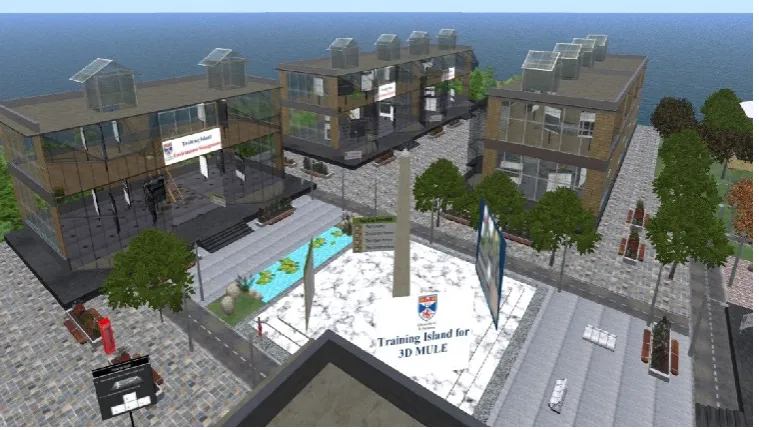
A training environment catering for basic and advanced SL/OpenSim management needs was implemented utilising the study findings (Fig. 1.1 shows a section of one of the training islands). The training regions were evaluated for usability and educational value. The results were used to inform revisions to the tools and support methods. The completed training environment is now hosted in the university MULE (OpenSim grid).
[image:25.595.109.489.268.483.2] Evaluation of the user support models and training tools showed a positive and significant response from participants; the peer-reviewed publications demonstrate an interest from the wider academic community.
Figure 1.1: Training support for MULE management – Management Island
1.4.2 Selected Publications
A selected set of publications representing the contributions of this research is shown below. A complete list of the research publications associated with this work is in Appendix 1.
P1. G. I. U. S. Perera, C. Allison, J. Nicoll, T. Sturgeon, and A. Miller, 2010 Managed Learning in 3D Multi User Environments, International Journal of Digital Society, 1(4):323-332
5
P3. I. Perera, C. Allison, A. Miller, 2012, Effective Policy Based Management of 3D MULE - An Exploratory Study Towards Developing Student Supportive Policy Considerations, In 4th Computer Supported
Education – CSEDU 2012 Conference INSTICC, Portugal, pp. 193-199
P4. I. Perera, C. Allison, J. McCaffery, and A. Miller, 2011, Towards Effective Blended Learning With 3D MUVE - An Analysis of Use Case Implementations for 3D MUVE Learning, In 3rd Computer Supported Education – CSEDU 2011 Conference, INSTICC, The Netherlands, Vol. 2: pp. 46-55.
P5. I. Perera, C. Allison, A. Miller, 2012, 3D Multi User Learning Environment Management –An Exploratory Study on Student Engagement with the Learning Environment, in Applications of Virtual Reality, C. S. Lanyi (Ed), ISBN 978-953-51-0583-1, INTECH Open, pp. 109-134
P6. G. I. U. S. Perera, C. Allison, T. Sturgeon, and J. R. Nicoll, 2009, Towards Successful 3D Virtual Learning - A Case Study on Teaching Human Computer Interaction, in the 4th International Conference for Internet Technology and Secured Transactions, IEEE Press, London, 159-164
P7. I. Perera, C. Allison, and A. Miller, 2011, Policy Considerations for Managing 3D Multi User Learning Environments – Achieving Usability and Trust for Learning, in Proc. of6th International Conference on Virtual Learning, Bucharest University Press, pp. 106-112
P8. I. Perera, C. Allison, A. Miller, 2012, Effective Training for Policy Based Management of 3D Multi User Learning Environments, in 7th International Conference on Virtual Learning, ICVL2012, M. Vlada, Editor, 74-80.
P9. I. Perera, C. Allison, A. Miller, 2010, “Secure Learning in 3 Dimensional Multi User Virtual Environments – Challenges to Overcome”, in Proc. of 11th PGNET 2010, Liverpool
P10. C. Allison, A. Campbell, CJ Davies, L. Dow, S. Kennedy, J. McCaffery, A. Miller, I. Oliver, I. Perera, 2012, Growing the Use of Virtual Worlds in Education: an OpenSim Perspective. In: Gardner M, Garnier F, Kloos C.D., (Eds.), 2nd European Immersive Education Summit - E-iED2012; Paris, France, pp. 1-13
The achievement of research objectives and the related discussions for each objective with contributions can be summarised as shown in Table 1.1.
Objective Discussed in Chapter Related Publications
1 2, 3 P1, P6, P9
2 4 P4
3 4 P3, P5
4 4, 5 P2, P7
5 5, 6 P2, P8, P10,
6 5, 7 P2
6
1.5 Thesis Structure
The thesis starts by establishing the value of MUVE supported education and the importance of providing user support for managing these learning environments.
Chapter 2 reviews related work. The chapter discusses MUVEs and educational uses, technology enhanced education, relevant educational theories, management and usability of learning environments and self-regulatory learning practices.
Chapter 3 describes system studies on SL and OpenSim with respect to their educational use while highlighting the challenges that ensue. The chapter initiates the discussion about managing these MUVEs for learning activities.
Chapter 4 discusses the integration of MUVEs with the existing online learning infrastructure. It presents a user study which identifies key management aspects for MUVE supported learning. The findings are used for developing user support models for managing learning using MUVEs.
Chapter 5 presents a user study evaluating the need for user support on MULE management. The chapter then presents the network developed to depict the complex and interrelated nature of the functions of the selected MUVEs. Statistical analyses are performed to validate the accuracy of the network. The final section presents a case study on evaluating this user support tool for managing a MULE used in a course module.
Chapter 6 describes a user study conducted to select a suitable form of user training for MUVEs. The analysis of data and user feedback suggested developing a set of user training islands to help perform introductory and advanced functions in-world. The design considerations for these islands are presented.
Chapter 7 presents the evaluation of user training islands (Introduction Island and Management Island) for managing an OpenSim MULE. It describes the revisions made and relevant further evaluations carried out before deploying the training environments in the university OpenSim grid.
Chapter 8 concludes with a review of the research contributions before presenting potential future research areas linked to the outcomes of this study.
1.6 Summary
7
2.
Review of Literature
2.1 Introduction
This chapter reviews related literature and previous work. Section 2.2 gives a brief overview about MUVEs including details about some MUVEs for learning. Section 2.3 discusses Technology Enhanced Learning, e-Learning and blended learning; Section 2.4 presents related studies and previous projects on using MUVEs for education; it includes educational projects developed using Second Life and OpenSim at the University of St Andrews. Section 2.5 elaborates a range of educational theories and learning models with respect to the learning and teaching in 3D MUVEs; details about successful applications of theoretical models are also included. Section 2.6 discusses aspects of the management of learning environments. Finally, Section 2.7 presents related work on users behavioural and usability aspects.
2.2 Multi User Virtual Environments
Virtual environments with a 3D space that allow multiple users to immerse and explore are referred to as 3D Multi User Virtual Environments (MUVEs). The term MUVEs can be used to describe any system that allows multi user interactions. However, this work refers to the common understanding of MUVEs that allow users to interact and explore the 3D environment without predefined goals or story plots. Therefore, Massively Multiplayer Online Role Playing Games (MMORPGs) and other types of multi user games are not considered; nevertheless, a brief overview of MMORPGs is provided acknowledging the shared attributes and common ancestry of the development of MUVEs.
2.2.1 Game Environments - MMORPGs
Games have been a popular application type for entertainment throughout the history of computing and the Internet. Although today’s very sophisticated, graphic intensive multiplayer games substantially differ from the early types of casual games, certain core concepts, such as a predefined plot of story to follow, fixed game environment functions, goal achievements, etc. have been preserved throughout. In comparison to the traditional games (casual games) 3D virtual environments that allow multiple users to play different roles of a game (MMORPGs) have been quite popular and share some common attributes with MUVEs.
8
quest based user actions and cultures. MMORPGs require significantly lower bandwidth in comparison to MUVEs[13]. Moreover the simulation strategies result in a fixed environment with no flexibility for user content creation, which is often noted by academics who have tried using MMORPGs for teaching.
World of Warcraft (WoW) [14] is a prominent MMORPG, developed by Blizzard Entertainment. It follows a series of game plots and releases with respect to the Warcraft universe, the simulated game virtual world. WoW has been used for a range of educational activities [15, 16]; however, WoW and MMORPGs in general have been criticised for their lack of flexibility for designing required educational spaces [17, 18].
2.2.2 MUVEs – an Overview
MUVEs (also referred to as 3D virtual worlds or Metaverses) show unique characteristics, which distinguish them from other systems and environments in the widely accepted Reality-Virtuality (RV) Continuum [19]. MUVEs fit into the virtual environment end of RV Continuum, and can be associated with augmented virtuality and augmented reality spaces to define immersive, mixed reality environments for educational purposes as in [11, 20]. MUVEs follow a client-server system architecture. A relatively thick client application [3], known as the viewer or MUVE browser, is used as the client, depicting the virtual reality according to the server responses. MUVEs provide a seamless, persistent virtual environment where users can transparently roam around without predefined goals or story plot [21]. Users interact with the virtual environment through special 3D virtual persona called avatar; avatars can be in the forms of abstract shapes, an animal or mythological creature, or the regular human body shape. The simulated world is generated following a realistic physical law of motion and dynamics through a physics engine. MUVEs allow users to create and develop customised content; users mostly design, develop and modify their content objects to populate their virtual space [21, 22]. To support these user activities MUVEs incorporate a range of utility functions and collaboration tools for community building. MUVEs provide a mechanism to enhance environment and content behaviour through user programming known as scripting (in SL and OpenSim). Second Life and OpenSim were used as the MUVEs and further details are discussed in Chapter 3.
Some MUVEs support virtual economies and commercial transactions within the MUVE as well as between the real world and the MUVE. For this feature, virtual currencies are often used with respect to the MUVE: for example Linden $ in SL[23], and ThereBucks in There[24]. To prevent artificial manipulation of these economies and virtual currency values, MUVEs follow a tight monitoring and controlling process regulating their commercial transactions. These controls sometimes can introduce additional challenges limiting the required control and flexibility for learning (in SL to form groups for group collaboration activities users must pay a fee).
9
been researched previously; Messinger and others [18] have proposed a five scale taxonomy on purpose (orientation), place (location of interaction), platform (synchronous or asynchronous activities), population (demographic data) and profit model to group MUVEs; a classification of popular MUVEs according to these factors is presented in [18]. Another factor to consider for classifying MUVEs is the accessibility of the virtual environment, i.e., public access or limited to a specialised group that meets a condition (institution specific). SL and Active Worlds [25] are examples of publicly accessible large community based MUVEs whereas certain private installations of OpenSim or Open Wonderland based MUVEs impose access restrictions.
There are a large number of MUVEs at present and a good snapshot overview on MUVE industry is provided by the quarterly virtual world universe reports of KZero[26]. There are many kinds of virtual worlds but all of them share the following features [27]: Shared space, Avatar, Immediacy of actions (realtime diffusion), Immersion, Persistence and Socialization with creation of social groups. An elaborated and extended view of these MUVE characteristics are given in [28]; it identifies seven central characteristics of MUVEs as follows:
• Realistic: the environment captures essential aspects of the real world which allows navigation and communication to be intuitive.
• Persistence: the environment persists over a long period of time as do changes that are made to that environment.
• Mutability of environment: users are able to create content for and edit spaces within the environment and not simply arrange or rearrange objects provided by the system.
• User control over objectives: There are no predefined set of goals, these can be created by users of the system.
• 3D: The world is 3D providing a realistic environment
• Avatar: the world is experienced through the proxy of an Avatar.
• Distributed: MUVEs are of necessity distributed allowing humans in diverse locations to interact with each other through their avatars.
These MUVE characteristics make them a unique type of application. Moreover, when MUVEs are used for education they offer unique learning affordances and opportunities to overcome challenges associated with other types of learning, which will be discussed later.
The MUVE industry is dynamic and growing; new system features and visually appealing virtual environments regularly emerge. At the same time, some of the MUVEs that perform well can disappear. For example, Teen Second Life [29], There (old version) [24], Google Lively [30] are a few of the MUVEs that could not be sustained. The free and open nature of OpenSim has attracted many innovative approaches from academics and researchers to develop their educational environments in a cost effective manner while accommodating the desired educational theoretical support.
10
provides a platform and a set of tools to implement MUVEs; there are many publically hosted OpenSim grids placing the total region count in the same range as SL.
Fig. 2.1 (right image, obtained from [35]) shows the growth of OpenSim regions in the most popular 40 grids. The cross compatibility of these two environments (SL and OpenSim) enables users to experience a similar environment and features. This allows them to decide which is better for educational hosting based on the required flexibility, technical expertise, cost concerns and the need for accessing a large community. Further to the objectives of selecting these two environments for this study, these data also indicate that the study contributions can help a large user community in these two MUVEs, which is likely to represent a considerable portion of MUVE supported higher education at present.
Figure 2.1: SL and OpenSim region growth
With respect to the focus of this study apart from SL and OpenSim, a few of the popular MUVEs that are widely used for education are briefly discussed as follows to give an overview about other available alternatives.
Active Worlds
Active Worlds [25] is one of the earliest MUVEs, which started in 1995 and made the service publicly available, from 1996. It provides a 3D environment with several separate worlds either owned by Active Worlds or the users. Initial system designs of Active Worlds universe had orientations towards being the 3D equivalent of 2D Web browser, where users can create 3D virtual places instead of web pages.
Open Wonderland
[image:31.595.101.488.211.347.2]11
between virtual worlds easily. There are a number of successful educational projects for immersive learning with Open Wonderland such as the SIMiLLE project [37].
RealXtend
RealXtend [38] is another open source MUVE platform which was developed by the RealXtend Association and the RealXtend Foundation following the OpenSim initiative. RealXtend extends the capabilities of OpenSim incorporating different features that are not in the OpenSim platform. Its unique viewer, Naali, supports OpenSim’s ROBUST architecture [7]; the RealXtend server and viewer applications are closely aligned with the conceptual implementations of the OpenSim architecture.
2.2.3 Related Terminology of MUVEs
There are some unique terms specific to MUVEs, in particular to Second Life and OpenSim. This section provides a brief overview about a set of terms that are frequently used for this thesis.
Avatar – A virtual persona where the users are represented in-world. It can be of any form such as human, animal or an abstract shape. The appearance of an avatar can be changed according to user’s preference.
Estate – The highest level of land entity that groups several regions together to support delegation of land management privileges. An estate has an estate owner and one or more assigned estate managers.
Inventory – A persistent virtual folder that keeps references to the different types of content objects belonging to an avatar. Users can take objects or content types from their inventory or save the developed or copied content in the inventory for future use.
God – The in-world administrator role to perform admin tasks through the client viewers.
Island – A virtual region surrounded by sea.
Parcel – The smallest unit of land that a virtual region can be divided into. At the maximum size a parcel is the same size as a region (65,536 m2) and at the smallest size it is 16 m2.
Physics Engine – is the software component that accounts for simulating the physics. It mainly simulates the gravitational forces and relevant dynamic properties. Physics can either be enabled or disabled at various levels depending on the desired simulation.
Prim – the smallest unit available for content object creation. Different virtual worlds provide different shapes; however, every system ensures a set of basic 3D shapes required for construction.
Region – an area of land with fixed boundaries. Often, surrounded by sea (i.e. an Island), if not adjacent to other land.
12
Sandbox – an openly accessible land area within a virtual region with no (or minimum) restrictions to practice content creation and to get familiar with the virtual environment. Students can be allowed to access it freely to experience the virtual environment before engaging in educational tasks.
Teleporting –an action that instantaneously moves an avatar between two regions or between two places within a region.
2.2.4 Management Challenges in MUVEs
Research on MUVE management challenges often takes the perspective from the original entertainment and commercial objectives. Moreover, a common view towards considering MMORPGs and MUVEs together treating them as 3D virtual worlds can be seen. Although these findings are mainly about managing these environments to facilitate game play and financial stability, but not the educational challenges per se, these can provide a useful insight for this study.
The European Network and Information Security Agency (ENISA) published a report on 3D virtual world security and management challenges [39]. A similar study and congruent list of challenges have been published by [40]. The key challenge areas presented in these studies can be summarised as follows.
Age verification – This is a common challenge for any application that has an age limit to fulfil for its service access. Usually, this is addressed through Terms of Service (ToS) or End User Licencing Agreement (EULA), but it is not fool-proof.
Identity Theft, Authentication and Authorisation challenges – These are common areas of concern for users who have accumulated wealth or invested real money in the system. Games tend to report a higher rate of incidents associated with this.
Intellectual Property Theft, Copyright issues – These challenges can be at different levels relating purely virtual content or properties that have a close association with an entity or content in the real world.
Confidentiality and privacy of user actions/data – Eavesdropping on other avatars actions and communications, access to sensitive information relevant to real life, and exposure of such information without the notice of the victim.
Anti-Social Behaviours – This is the broadest category of misbehaviours that an avatar can practice. It includes vandalism, user harassment and stalking, defamation, cybersquatting and Griefing attacks (a harmful action similar to bullying[41]). These actions can affect the user experience to varying levels depending on the management strategies implemented in the environment.
anti-13
social behaviours. Plagiarism and confidentiality challenges can be addressed through institutional academic policies. In order to transform these generic MUVEs into managed learning environments for education this work has researched and developed appropriate user support strategies and methods which exploit the technical and behavioural aspects of the MUVE technologies.
2.3 Technology Enhanced Learning
Technology Enhanced Learning (TEL) can be described as the support of learning and teaching activities by associating suitable technologies with formal education requirements. TEL aims to improve learning opportunities and student experiences by extending the boundaries of traditional learning in terms of place, time, cost and styles of learning. TEL hopes to provide opportunities which enhance learning practices by opening up multiple forms of learner participation, student centred course activities, efficient and effective learning processes and higher levels of learner collaboration to name a few. TEL enables more convenient ways to construct learning materials and can optimise the efficiency and effectiveness of how information is conveyed to the learner [43]. Moreover, TEL provides opportunities to associate a range of suitable assessment and feedback methods supported through technology, thereby letting the students and teachers communicate clearly about learning objectives and student achievements. TEL can be facilitated in various educational environments that may or may not involve computers [44]. Widely used and critical technologies which are used to enhance education include: web based e-Learning, complex gaming and immersive technologies, mobile learning platforms, interactive videos, electronic blackboards and presentation tools [43]. In fact, although the associated technology plays a significant role by providing the infrastructure for learning, it should be directed by the relevant pedagogical and educational processes to make learning a formal activity. According to Boytchev (et al.,) [44] using sophisticated equipment and/or software in education may incur a high, sometimes unacceptable, burden that has little relevance to educational goals; appropriate user support for the technology in TEL is often essential for users to avoid such burdens or overcome the challenges they experience.
In summary, TEL is widely used in today’s education; Internet based e-Learning is one of the most prominent forms.
2.3.1 E-Learning
E-Learning offers the advantages of TEL by incorporating Information and Communication Technologies (ICT). Several views and ideas can be found explaining what e-Learning is. Welsh (et al.) have indicated e-learning as the use of computer network technology, primarily over an intranet or through the Internet, to deliver information and instruction to individuals [45]. E-Learning practices and learning styles indicate a transformation of individual experiences in learning and knowledge through a process of knowledge construction in active participation in the given activities [46].
14
[47]. Whatever the focused characteristics and the learning instruments and tools, e-Learning eventually provides an improved learning opportunity for individuals [46]. E-learning practices can be used for either synchronous or asynchronous modes of learning: in the synchronous methods more opportunities are given for group collaboration, interactive participation with others and virtual simulation of a classroom whereas the asynchronous approaches let the students learn at their own pace.
ICT services in e-Learning has provided significant gains in operational efficiencies and cost reductions with respect to the demanding educational needs [48]. E-Learning solutions often provide more sophisticated and seamless module management functions with required pedagogical alignments. E-learning is no longer seen as a purely technical and administrative tool; academics can also get the benefit of this pedagogically sound, learner focused approaches of e-Learning [49]. With the advantages gained from the Internet and Web technologies e-Learning has been able to become a mainstream teaching and learning practice in almost all universities and academic institutions. We can find a large body of literature and related work on case studies, pedagogical analysis, management and successful use of e-Learning, which indicate the wide extent of its use and its acceptance. Moreover the recent technological trends of the Internet and Web such as Web 2.0 and social network platforms have introduced new paths for enhanced and attractive learning offers with shared virtual spaces as part of e-Learning. Furthermore, e-Learning helps to overcome the traditional learning barriers (physical, time and resource) supporting students to participate in collaborative group activities, certain types of simulation for learning, contribute to shared learning spaces and active engagements in module activities.
The high demand and wide acceptance of e-Learning practices in universities and HEIs has resulted in a number of commercial, institutional specific, as well as free and open source e-Learning solutions being developed during the last decade. These solutions provide a generic set of teaching and learner support activities, multiple forms of user participation and collaborative activities, resource and knowledge sharing functions and content management tasks incorporating learning management into the e-Learning solution through a blended approach of certain traditional learning activities. In this study Moodle [50], a globally popular and widely used e-Learning solution, is considered for the proposed blended MULE models discussed in Chapter 4.
2.3.3 Other Approaches
Although the popular e-Learning practices with the Internet support account for a larger portion of today’s TEL, there have been certain practices for supporting student learning through different technologies and devices. Draper and others have successfully used an electronic device based student response tracking method for Multiple Choice Questions (MCQ) session with a large group of students [51]. Several schools in the University of St Andrews also use such devices, called “Clickers” to engage students in interactive lecture sessions. However, these approaches tend to be diminishing with the wide use of e-Learning and immersive technologies with pedagogical underpinning.
15
context where internet penetration and access to a computer is a significant challenge. With the increased use and popularity of advanced portable devices such as tablets and smart phones, it can be seen that mobile learning will be incorporated into e-Learning, forming an enhanced e-Leaning offer. This stance was taken considering e-Learning with portability for the model development of MULEs in this work; however, the research did not consider other TEL approaches.
No doubt, the portability and ubiquity presented by hand held devices add a significant value to existing learning activities. Many researchers tend to consider it as a sub category of broad e-Learning application domain. Lefrere [53] has examined activity based scenarios for ubiquitous mobile e-Learning. In his findings, he concludes that prevailing resource constraints of mobile infrastructure and the complex nature of existing e-Learning use case scenarios has prevented mobile learning being considered as a broad and independent learning technology, but rather as a rich extension of existing e-Learning practices. Moreover, learning with mobile device support does not replace existing learning practices, but it offers a way to extend the support of learning outside the classroom, to the conversations and interactions of everyday life, as a value addition to e-Learning [54].
2.3.4 Blended Learning
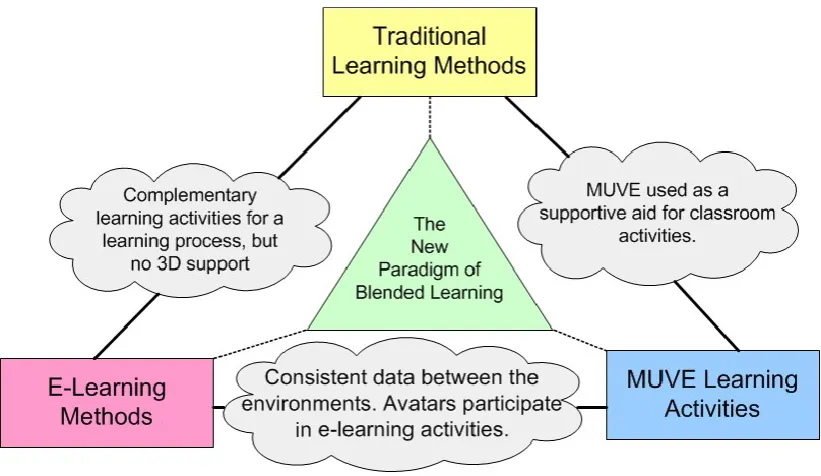
The vision that underpins technology enhanced teaching and learner support methods has a broad conceptual richness beyond the specific application types of teaching such as e-Learning. Importantly, e-learning gives many advantages, but there have been criticisms on using it alone as a mainstream method of education. In fact, this concern was examined by Graf and Kinshuk in their work on e-Learning adaption to standard learning styles [55], which suggested the benefits of a blended approach. The abstract view of blended learning including suitable technologies to fulfil educational requirements allows the use of multiple paths to achieve the same learning objectives. With this opportunity, educationalists and teachers have been utilising a combined approach of e-Learning techniques and established traditional classroom practices.
A definition of the term ‘blended learning’ is not generally agreed upon [56, 57]. Colis and Moonen [58] have emphasised the flexibility gains of blended learning approaches and stated it as a combination of traditional face-to-face and online learning components where online activities are an extension to traditional classroom teaching. Rovai and Jordan [59] have defined blended learning as “a flexible approach to course design that supports the blending of different times and places for learning, offering some of the conveniences of fully online courses without the complete loss of face-to-face contact”. Blended learning is characterized as maximizing the best advantages of face-to-face and online education practices [60]. Blended learning can offer more robust educational experience than the offer one can get from either traditional or complete online learning solution, alone [59]. Davis and Fill believe that blended learning, the combination of face-to-face teaching methods with authentic online learning practices, has the potential to transform student learning experiences and learning outcomes [61].
16
that embrace blended learning possibilities. Their view on focusing the key attributes and possibilities of blended learning rather than defining the concept seems more realistic for the purpose of practical application. In the context of improving learning practices, blended learning can be considered as the attempt of overcoming the challenges of e-Learning and traditional learning so that teaching and learning activities meet the stakeholder expectations without introducing difficulties.
Gomez and Duart [64] claim that there is a subtle difference in the way blended learning practices are implemented; well-known blended learning practices allow the distinction to be made between component parts, whereas the other possibility, which they call hybrid learning, “is a cross between the elements from different sources that become fully integrated and inseparable” [64]. With this view, they also see the challenge of compulsory redesign of the courses from top to bottom, i.e., from learning objectives to the teaching and assessment tasks; this specialised hybrid concept may not be universally possible or convenient to practice in the myriad of learning and teaching support arrangements, contrary to general blended learning practice.
Littlejohn and Pegler considers blending of MUVEs for learning as “immersion in online multi-player gaming or multimedia role-playing, using extended, authentic simulations to explore real-life problem solving” [62]. However, with the recent advancements in MUVEs broader use cases and application scenarios have become available for today’s learning needs. As a result, it is fair to consider that MULEs may go far beyond the narrow scope of role-playing or just exploring for solving real-life problems. MUVE supported learning addresses the core requirements of course delivery goals by covering all major phases of learning; in particular, Kolb’s [65] suggestions for experiential learning [33] through its unique learning affordances [66].
No two blended learning designs are identical; this results in a great complexity of blended learning [67]. This is another challenge that teachers have to face when they design and deliver course modules in blended environments. In spite of the advantages from blended learning, university teachers often find it difficult to adopt new online techniques [61]. Suitable user support strategies can help to overcome these challenges.
2.4 Teaching and Learning with MUVEs
17
MUVEs are highly interactive and provide dynamic feedback, learner experimentation, real-time personalised task selection and exploration [73]. Beard et al., [74] indicate that MUVEs offer unique didactic experiences to users through educating them on various topics of importance. All of these have a strong relevance to this research. Jarmon et al. have used SL for their study of experiential learning [33]. Moreover, appropriate pedagogical studies and student learning approaches have been discussed in [75-77], [33, 78]. More details are discussed later.
Immersive approaches can prompt users to employ well learned interaction patterns from the physical world in the virtual world, in contrast to e-learning [44]. Limited features available in webpages may not provide intuitive user experiences for field work training; compared to 2D web interfaces MUVEs provide more engaging simulated environment with user immersion for learning [12]. Using MUVEs for training is advantageous as it decreases the training budget, giving the flexibility for training schedule, and improves trainees’ motivation [79]. It provides richer interactions whereby face to face communication is replicated more closely than in other mediums and users are allowed to replicate body language and gestures [80]. 3D virtual worlds are suitable environments for conducting Role-plays as avatars can demonstrate various types of human characteristics, including communication expressions and gestures [81]. In relation to conventional forms of education in the ‘real world’, virtual worlds allow participants to experience roles and to do things safely, which can be difficult or impossible to do in the physical world [82-84].
Virtual worlds facilitate engaged learning through their dynamic and collaborative environment features [85]. There are unique advantages of using MUVEs for teaching and learner support, which we may not achieve from the other methods, as described above. Dalgarno et al. believe that interactive MUVEs demonstrate great educational potential due to their ability to engage learners in the exploration, construction and manipulation of virtual objects, structures and metaphorical representations of ideas [86]. A number of similar educational uses can be found from literature and related projects such as [78, 87, 88]. Incorporating these unique benefits of MUVEs for learning, Dalgarno and Lee, have defined the learning affordances of 3D virtual learning environments (3D VLEs) in a framework with five affordances [66], as:
Affordance 1: 3D VLEs can be used to facilitate learning tasks that lead to the development of enhanced spatial knowledge representation of the explored domain.
Affordance 2: 3D VLEs can be used to facilitate experiential learning tasks that would be impractical or impossible to undertake in the real world.
Affordance 3: 3D VLEs can be used to facilitate learning tasks that lead to increased intrinsic motivation and engagement.
Affordance 4: 3D VLEs can be used to facilitate learning tasks that lead to improved transfer of knowledge and skills to real situations through contextualisation of learning.
Affordance 5: 3D VLEs can be used to facilitate tasks that lead to richer and/or more effective collaborative learning than is possible with 2D alternatives.
![Fig. 2.1 (right image, obtained from [35]) shows the growth of OpenSim regions in the most popular 40 grids](https://thumb-us.123doks.com/thumbv2/123dok_us/8706370.382342/31.595.101.488.211.347/right-image-obtained-shows-growth-opensim-regions-popular.webp)