Int. J. Human-Computer Studies 67 (2009) 677–702
Artifact awareness through screen sharing for distributed groups
Kimberly Tee
a,, Saul Greenberg
a, Carl Gutwin
b aUniversity of Calgary, 2500 University Drive NW, Calgary, Alta., Canada T2N 1N4bUniversity of Saskatchewan, 57 Campus Drive, Saskatoon, Sask., Canada S7N 5A9 Received 4 June 2008; received in revised form 6 April 2009; accepted 7 April 2009
Communicated by A. Sears Available online 18 April 2009
Abstract
Co-located collaborators can see the artifacts that others are working on, which in turn enables casual interactions. To help distributed collaborators maintain mutual awareness of people’s electronic work artifacts, we designed and implemented an awareness tool that leverages screen-sharing methods. People see portions of others’ screens in miniature, can selectively raise larger views of a screen to get more detail, and can engage in remote pointing. People balance awareness with privacy by using several privacy-protection strategies built into the system. A preliminary evaluation with two groups using this system shows that people use it to maintain awareness of what others are doing, project a certain image of themselves, monitor progress, coordinate joint tasks, determine others’ availability, and engage in serendipitous conversation and collaboration. While privacy was not a large concern for these groups, a theoretical analysis suggests that privacy risks may differ for other user communities.
r2009 Elsevier Ltd. All rights reserved.
Keywords:Artifact awareness; Screen sharing; Informal awareness; Casual interaction; Distributed groupware
1. Introduction
Previous studies have shown thatcasual interaction– the brief, unplanned meetings that commonly occur during the day between co-located people with shared interests – is important for seeding collaborations, coordinating joint work, tracking progress of joint work, exchanging knowl-edge and information, and building relationships (Kraut et al., 1988; Whittaker et al., 1994). Casual interaction is made possible byinformal awareness, the naturally gained understanding of who is around, what tasks they are performing, and whether or not they are available for conversation or collaboration (Kraut et al., 1988). In-formal awareness is easy to maintain in a co-located setting, such as when people inhabit a shared office space. Just by being in the same environment, people naturally accumulate background information about what is going
on around them (Bly et al., 1993). People also do
walkabouts, where they wander around a shared space just to see what others are up to (Bellotti and Bly, 1996). Because many awareness cues are available in a co-located environment, transitioning to casual interaction is typically effortless.
For distributed groups, however, initiating casual inter-action is problematic; people do not see who is around, do not know if others are available for conversation, and lack the awareness cues that naturally lead to serendipitous interaction. Consequently, distributed collaborators must expend a relatively large amount of effort to explicitly coordinate interaction (e.g., by scheduling meetings), or do without this interaction altogether. Kraut et al. (1988) argue that much useful communication between workers in a knowledge-based environment is unplanned and would not occur if it had to be planned, suggesting that distributed groups miss out on valuable interaction opportunities that naturally occur in co-located groups. This partially explains the explosion and success of low-effort awareness servers and casual interaction systems, such as the widespread adoption of instant messaging (IM) systems by diverse user groups (Nardi et al., 2000), or how
www.elsevier.com/locate/ijhcs
1071-5819/$ - see front matterr2009 Elsevier Ltd. All rights reserved. doi:10.1016/j.ijhcs.2009.04.001
Corresponding author. Tel.: +1 403 210 9499; fax: +1 403 284 4707.
E-mail addresses:[email protected] (K. Tee),[email protected] (S. Greenberg),[email protected] (C. Gutwin).
email is often used for casual ongoing conversations rather than as a formal messaging system. Many existing electronic tools succeed because: (a) they let people know about the activities and thus the approximate availability of their colleagues, and (b) they make initiating conversa-tion extremely easy.
Yet, an important component of informal awareness that is not handled by these awareness servers and instant messengers is artifact awareness, defined as ‘one person’s up-to-the-moment knowledge of the artifacts and tools that other distributed people are using as they perform their individual, ongoing work’. By individual work, we mean the activities that one is pursuing at the moment by oneself, even though this work may be something that others are involved in over time. This awareness contributes to all parts of interpersonal interaction—it helps people discover opportunities for initiating casual interaction, it informs knowledge exchange, it is vital for helping people coordinate their tightly coupled work, and it helps people build social relationships. For example, consider colla-borators who inhabit a co-located environment such as a shared office space. Artifact awareness is typically easy and tacit. As collaborators move around the space, they naturally gather visual and auditory cues about other people’s presence and activities. They notice what artifacts others are working on as they glance at their desks and see their computer displays. This creates interaction opportu-nities, where they can easily move into more tightly coupled work. In the real world, for example, if a document on a person’s desk catches the eye of someone walking by, that person can stop, discuss, and even work over that artifact with its owner. That is, artifact awareness moves between information noticed in the periphery (or background) of one’s attention, through to information that is in one’s active (or foreground) attention.
Artifact awareness is crucial in some co-located settings (and indeed in various theories of group behaviour), where work environments are explicitly crafted to encourage such awareness between collaborators. First, consider thestudio space used by groups of designers, artists, and/or archi-tects. In these studios, people craft their work on easels or other semi-public surfaces strategically placed to be within the flow of traffic, so that others moving through the space can monitor, comment, and critique the work as it unfolds over time (Buxton et al., 2000). The studio space promotes easy visibility of people’s work, which in turn leads to casual interaction. Indeed, the hallmark of a good studio is whether it has a continual ‘buzz’, where its inhabitants are constantly discussing and reflecting on current projects and, in the process, are learning from one another. Second, consider supervisory control environments, e.g., for subway routing, power plants, factories, and so on. A good supervisory control environment provides easy visibility of the actors, their actions, and their artifacts (Heath and Luff, 1992). Through this visibility, the team is aware of what individuals are doing, the effect of these actions, and the global state of the system. It creates implicit
opportunities where people can micro-coordinate and interleave actions to control the system as a whole. That is, a good control room enables distributed cognition, a cognitive organization where the team seamlessly works together (Hutchins, 1995). Third, consider the everyday conversational environmentand how artifact visibility plays a role in supporting conversations by the way it contributes to joint activities and common ground (Clark, 1996). If the conversation involves the artifacts around them, the artifact helps participants form their initial common ground (i.e., the presupposed facts, assumptions, and beliefs recognized and shared between them), and then informs the current state of the joint activity (i.e., how they perceive, coordinate, and synchronize their individual and joint activities). In part, the verbal conversation often confirms, clarifies, and corrects people’s mutual understanding and actions surrounding these artifacts (Clark, 1996).
The various theories of casual interaction, distributed cognition, common ground, and studio design all presup-pose, to some extent, a degree of artifact awareness. However, even in a co-located environment, artifact awareness can be difficult to maintain, particularly if the artifact is digital. Most digital artifacts appear only on a screen, which hinders awareness when people’s bodies shield their on-screen work from others or when social etiquette prevents others from taking a closer look at someone’s display. Part of the etiquette problem is that the screen contains both semi-public information and highly personal information. A viewer cannot distinguish between these unless he or she is looking closely at the information, and by that time, it is too late to avoid looking at any private information. Another problem with maintaining awareness of digital artifacts is that with current computer windowing systems, artifacts are often overlapped or are not even shown on screen when another artifact is being used. Switching from using one digital artifact to another digital artifact takes little time and can be easily missed by others. Artifact awareness is even more difficult to maintain in a distributed setting; despite the availability of awareness servers and casual interaction systems, distributed groups still lack the easy awareness of others’ artifacts that is normally found in a co-located shared environment. Whittaker et al. (1994) found in their study that a little over half of all casual interactions in an office involved document sharing, strongly suggesting that distributed groups would benefit from being able to more easily share artifacts. Yet, for distributed groups, there is still no real equivalent to the way co-located collaborators can visually share their individual work and maintain artifact aware-ness. While there are many groupware systems (e.g., shared editors and webcast meeting tools) that do let a distributed group share artifacts, they work only after interaction is initiated. That is, they are intended for focused collabora-tive work rather than for artifact awareness. They also tend to be heavyweight to set up, e.g., they may involve many interaction steps to get going, which inhibits their use for casual interaction.
Given all the above, our first research goal is to recreate artifact awareness for distributed groups:
Goal 1. Design a system that supports artifact awareness and opportunistic interaction, where the audience is a small distributed group with a strong desire to stay in up-to-the-moment contact.
We have a specific audience for this system. We primarily consider the well-formed group somewhat similar to a co-located work group comprising trusted people with both a working and social relationship, and who share at least a modest degree of mutual interest in the artifacts under consideration. That is, we targetintimate collabora-torswho have a real need and desire to stay connected. In sharp contrast, we are not suggesting such a system for (say) an Internet cafe´, where strangers frequently comingle. To satisfy this goal, we created an awareness tool that leverages screen-sharing techniques to provide the distrib-uted group of intimate collaborators with mutual awareness of artifacts and individual work by letting each other continually see some or all of each other’s screen contents. Our hypothesis is that ‘screen sharing is a critical component of distributed artifact awareness, because the screen contents capture almost all of a person’s digital activities’.
At this point, many readers may become concerned with
our goal due to its privacy implications (Boyle and
Greenberg, 2005). As mentioned, while people’s screens may contain semi-public information relevant to the group, they may also contain highly personal information that one would likely not want to share. The existing culture of screen use, where screens are considered personal vs. public spaces, means that even people in a closely knit group may be unwilling to share their screens and/or view other people’s screens. Thus our second research goal is to balance the awareness information people want others to have of their work with their own privacy needs:
Goal 2. Design privacy controls that allow individuals to balance the artifact awareness they want to provide to others with their own particular privacy needs.
We can now restate our hypothesis as: ‘screen sharing is a critical component of distributed artifact awareness, because one’s screen contents, as mediated by privacy controls, let a person selectively indicate what digital activities they want their collaborators to see’. Yet this is just a hypothesis, and we need to see if this hypothesis holds in real situations, at least in principle. Thus our third goal is to evaluate the system and privacy mechanisms.
Goal 3. Evaluate how groups use screen sharing for artifact awareness, and the effectiveness of its privacy controls.
This article1begins with a brief discussion of previous work on awareness tools and screen sharing (Section 2).
We then describe and provide the design justification of the artifact-awareness system that we built (Section 3) and its privacy mechanisms (Section 4). Finally, we report preliminary results from end-user evaluations (two field trials; Section 5). We close with a discussion of the ways in which the idea of using screen sharing to support artifact awareness can benefit distributed work groups.
2. Related work
Artifact awareness is not new, in the sense that many existing collaboration theories and groupware systems contain some notion of artifact sharing and support how group members coordinate their actions over these artifacts by maintaining some degree of awareness of them. To provide context, a sampling of these theories and systems is briefly described below. What sets our work somewhat apart from this prior work is that we are primarily interested in how artifact awareness leads into casual interaction (particularly through screen sharing), and the nuances of supporting such awareness in light of privacy concerns.
2.1. Artifact awareness in everyday coordination and work
As mentioned, artifact awareness is one person’s up-to-the-moment knowledge of the artifacts and tools that other distributed people are using as they perform their individual, ongoing work. For office workers, artifacts include the documents and drawings (both physical and digital) that people work on over the course of a day, the secondary materials that support their tasks, and the tools they use to carry out their work. More generally, artifact awareness is valuable – sometimes crucial – for team work. Indeed, various theories of group activity incorporate artifact awareness as a key element. Several examples are listed below.
Casual interaction theory (Kraut et al., 1988). Artifact information informs many aspects of casual interaction. First, it creates serendipitous opportunities for people to engage in artifact-oriented conversations, and to move into collaboration over the artifact. We previously mentioned that Whittaker et al. (1994)found that over half of all casual interactions in an office involved some form of document sharing, where documents were mostly used as a cue or conversational prop. In some cases, this interaction helps the group accomplish a goal, e.g., Nardi (1993) found that people opportunistically collaborate over spreadsheets, CAD systems, and other documents over the course of a day. In other cases, the
interaction is more social, e.g., Greenberg (1999)
describes how seeing another person’s public activity, even if it is not part of a joint task, can trigger interest and conversation around that activity. Second, knowl-edge of artifacts in use is yet another source of contextual information that helps people determine 1
While parts of this article have appeared previously in (Tee et al., 2006), this paper expands considerably on it.
others’ availability, e.g., how busy others are and when they can be interrupted (Kraut et al., 1988; Whittaker et al., 1994).
Workspace awareness theory (Gutwin and Greenberg, 2002). Workspace awareness is defined as ‘the up-to-the-moment understanding of another person’s interaction with a bounded shared visual workspace’ (e.g., a tabletop surface, a whiteboard, a shared display). It is awareness of people and how they interact with the workspace and its contained artifacts, rather than just awareness of the workspace itself. It is limited to events happening in the workspace—inside the temporal and physical bounds of the task that the group is carrying out. Similar to situated awareness theory, this awareness informs the group’s perception of relevant elements of the environment, their comprehension of those elements, and the prediction of the states of those elements in the near future (Endsley, 1995). The artifacts provide this awareness information in how they manifest themselves within the space, and in how they provide the group with feedthrough, i.e., when artifacts are manipulated, they give off information that informs others who are watching (Dix et al., 1993). While workspace awareness includes some degree of artifact awareness, the two are not the same. Workspace awareness describes how people monitor their focused interaction over a small visual area, while artifact awareness (as used in this paper) is focused on how artifact visibility within the environment both informs participants and creates opportunities for casual interaction that then leads into this focused interaction over these artifacts.
Common ground theory(Clark, 1996). Artifact visibility supports conversations by the way it contributes to people’s understanding of each other’s utterances and joint activities. When artifacts are not visible, people have to expend greater effort in understanding, con-firming, and repairing verbal conversations concerning these artifacts. As with workspace awareness, common ground mostly concerns itself with focused interaction.
Distributed cognition theory (Hutchins, 1995). The artifact state and people’s actions around artifacts inform how the team works and think together as a whole (Heath and Luff, 1992; Hutchins, 1995). For example, collaborators who are responsible for different aspects of a joint task can monitor each other’s progress and coordinate their activities. Distributed cognition is a more global perspective of group activity, where casual interaction, focused work, workspace awareness, arti-fact awareness, and common ground all inform the group’s cognition.
2.2. Systems supporting informal awareness, casual interaction, and joint work
A large number of groupware tools have been developed to support informal awareness and casual interaction
leading to joint work within small communities of distributed collaborators (e.g., the ACM CSCW and CHI Proceedings document the evolution of many such systems over the years). These tools purportedly help distributed groups overcome the disadvantages of being distance separated by providing them with awareness cues and opportunities for informal communication not normally available in a distributed environment. A sampling is included below.
Instant messaging systems primarily support real-time text chat across the Internet, though newer systems offer richer communication channels such as internet telephony (VoIP), video, groupware applications, and information exchange via file transfer. IM systems are extremely popular both at home and in the workplace, and are being used by millions of people worldwide for social and work purposes (Isaacs et al., 2002). IM systems typically provide status indicators showing if a person on a contact list is logged on, busy, away, or off-line. Some IM systems also display additional information for each contact on the list, such as a personal message set by that person. This information, as well as the presence information, is valuable to people for creating and maintaining a sense of social connection to those on their lists (Nardi et al., 2000;Smale and Greenberg, 2005). Without even having to interact with them, people are able to get a sense of others, such as how they are feeling, what they are doing, or where they are. While the awareness information provided by IM is basic, it succeeds because it lets people easily establish communication with one another at opportune times. As a result of this, people use IM for a number of purposes, including: coordinating work tasks, asking quick questions, coordinating impromptu social meetings, and keeping in touch with friends and family (Isaacs et al., 2002). However, unless a contact on a list explicitly sets a personal message for others to view, there is no awareness of what that contact’s current activities are.
In contrast to IM, which primarily supports casual interaction between personal contacts in mostly dyadic conversations, chat rooms are public places where all can see and post messages. Examples include text-based chat rooms such as Internet Relay Chat (IRC), where conversa-tions often happen between people whose real-world identities are unknown to each other; graphical chat rooms such as Comic Chat (Kurlander et al., 1996), where people can create avatars to represent themselves while they meet and participate in conversations with others; and virtual worlds, where people can view and manipulate visual artifacts that comprise that virtual world (Bartle, 2004). While there can be strong awareness of the group and/or virtual shared artifacts within chat rooms, it is uncommon for people to use them to share artifacts with their co-workers.
Shared workspaces provide a distributed group with a common digital work area. Ideally, all participants can work simultaneously, where all artifacts and people’s fine-grained actions with them are immediately reflected on
other people’s displays. Examples include graphical draw-ing systems (e.g., groupware sketchpads and CAD systems) and joint editing systems (e.g., groupware text editors). Early systems typically implemented ‘what you see is what I see (WYSIWIS)’, where all saw exactly the same thing on their displays (Stefik et al., 1987). While this worked well for tightly coupled work, it proved too constraining for loosely coupled work. Thus later systems relaxed WYSIWIS. People could now scroll to different regions of the workspace (Stefik et al., 1987), or even have different view representations of the artifacts within it (Greenberg et al., 1996). Yet workspace awareness in these relaxed WYSIWIS settings was still considered crucial for group activity. Consequently, researchers created and evaluated a broad variety of awareness widgets (e.g., Gutwin et al., 1995; Gutwin and Greenberg, 2002; Greenberg et al., 1996). A variant of the shared workspace is screen sharing, which will be discussed shortly in its own subsection.
Collaborative virtual environments (CVEs) expand on the notion of a shared workspace, where participants move about a (usually 3-D) spatial world (e.g.,Sohlenkamp and Chwelos, 1994). Within this world, people see its stationary aspects (e.g., buildings, landscape), the other people who inhabit the world, and the artifacts within the world that can be manipulated. CVEs have become very successful as social virtual worlds (e.g., Second Life), and in massively multiplayer online games (as found in many PC and console network game systems). While applying CVEs to work settings have been a constant theme over the years
(e.g., Sohlenkamp and Chwelos, 1994; Greenberg and
Roseman, 2003), they have yet to gain more than niche acceptance.
Media spaces link offices and public spaces through networks of audio and video to provide rich awareness of people and their immediate surroundings (Bly et al., 1993). The resulting collection of ‘always-on’ videos can be shown on a personal computer, on a dedicated television monitor (for earlier analogue systems), or even on a video wall placed in a common area. By seeing others through the media space, people get a sense of others’ presence and availability, their social interactions, and sometimes their activities. Media spaces are typically good for seeing other people; however, one problem reported by 90% of the participants in Fish et al.’s (1992) study in the use of the Cruiser media space (Root, 1988) was that it did not allow any way of sharing work artifacts. While Cruiser enabled casual conversation, it did not allow transitions into work-related talk or focused collaboration around work artifacts. More recent media spaces (e.g.,Dourish and Bly, 1992; Greenberg and Rounding, 2001;McEwan and Greenberg, 2005) ‘relax’ the notion of video by instead providing occasionally updated snapshots, sometimes mixed with other media. However, while these media spaces have been successful at building and maintaining the sense of ‘connection’ or ‘community’ between people at different locations (Dourish and Bly, 1992;Greenberg and Round-ing, 2001), they still typically do not enable people to easily
share dynamic, work-related artifacts such as reports, spreadsheets, code, or other documents. The artifacts such as photos and web pages that some media spaces allow people to share are usually explicitly posted for disseminat-ing information of interest to the group, rather than to provide awareness of ongoing activities. While actual work artifacts can be captured in the video, in practice this rarely happens due to camera angle and resolution limitations.
The social web – web-based systems and sites that let people link and socialize with one another – have caught the world by storm (e.g., Porter, 2008). Systems vary considerably. Some sites, such as MySpace, Facebook, and LinkedIn, are centered around how people identify themselves on the web, and how they form relationships with others on the web. These include not only strong relationships (collaborators, close friends), but weak ties as well. Artifact sharing happens as a side effect and consequence of these relationships, where artifacts (such as personal photos or activity announcements) are broad-cast and available to others. Other social web sites are focused primarily on particular styles of artifact sharing, such as Flickr for photos, SlideShare for PowerPoint slides, and YouTube for videos. Artifact awareness happens two ways. First, people can subscribe to events (such as posting of photos) produced by others, where they receive asynchronous notifications that give an overview of the event as well as a way to quickly access details of that event via a web link. Second, they can opportunistically browse the web sites of their relations – often done as a side effect of receiving a notification – and explore the various links. While this lets people know what others are doing, it rarely leads to real-time interaction over the artifact.
Going beyond individual systems, the need for large distributed teams to share information and artifacts has long been recognized by the research community. For example, in 1989 the US National Science Foundation promoted the idea of a national collaboratory, a nation-wide structure that provides tools enabling researchers to perform their work and collaborations without regard to geographical locations (Lederberg and Uncapher, 1989). Collaboratories were expected to provide many functions, such as a community knowledge base, the ability to find collaborators, project management, digital libraries, and so on. Most relevant to artifact awareness is the idea of supporting remote and collaborative experimentation, where people can share scarce resources and physical instruments. An example is the UARC Collaboratory, where various tools were crafted to provide the distributed upper atmosphere research community with ‘real-time
access to remote instrumentation and y collaborative
tools that would allow them to interact with each other over real-time data’ (Olson et al., 1998).
2.3. Screen sharing
Screen-sharing applications let people explicitly share their computer screens, windows, or window fragments
with each other. This genre of groupware is often called ‘collaboration transparent’, as the underlying application or screen being shared has no knowledge that multiple people are viewing and/or using it (Lauwers and Lantz, 1990). Because these applications were usually designed for just a single person to use at a time, the shared view is usually implemented by intercepting the graphical output and sending it to multiple screens. Similarly, input is usually done through turn taking, where one person is given control of the system, and their input actions are funnelled to the application. While free-for-all input is possible, the application can become quite confused unless participants take care in how they interleave their actions. Because of the above, screen sharing has many known disadvantages. People cannot work in parallel, they cannot easily see different parts of the display, they must resort to turn taking, and so on. However, its primary advantage outweighs these many disadvantages—they work over the unaltered single-user applications, which make up the vast majority of software systems in use today. This is why we use screen sharing for the basic artifact-awareness system we report in this paper, rather than a true groupware system.
Screen sharing was first demonstrated in 1968 (Engelbart and English, 1968), replicated in more detail in 1984 (Sarin, 1984), and then gained considerable research interest in the late 1980s (e.g., Lauwers and Lantz, 1990). It became available commercially and has been used in real-time distributed collaboration for around 20 years, e.g.,
Farallon Timbuktu (WOS Data Systems, 1987), VNC
(Richardson et al., 1998), and NetMeeting (Summers, 1998). Screen sharing is often a key component of desktop conferencing systems, in which audio/video teleconferen-cing technologies are integrated with desktop computer application sharing in order to allow individuals to meet, collaborate, and work together from their offices. Other common uses of screen sharing include application sharing (similar to desktop conferencing, without requiring the use of audio/video) and remote assistance (a system adminis-trator or an expert user can remotely control another’s computer to assist them in performing certain tasks). In essence, screen sharing emulates over-the-shoulder, face-to-face sharing of a computer—one person can show others what they are working on, and each can take turns interacting with the system.
Although 40 years have passed since its first appearance (Engelbart and English, 1968), little work has been done investigating the use of screen sharing for providing awareness leading to casual interaction. There are a few exceptions. First, the SMART Sync classroom manage-ment software – formerly called SynchronEyes – is a commercial system that lets one person view others’
desktops as thumbnails (SMART Technologies, Inc.,
2009). However, it is designed for a quite different educational setting where a teacher monitors/controls a co-located class of students, and not as a peripheral awareness tool used by geographically distant peers.
Second, preliminary work by us and our colleagues explored the idea of screen sharing for awareness. The Notification Collage Desktop media item (Rounding, 2004) let people post an intermittently updating desktop thumb-nail that others could see and select if desired to activate a ‘full’ screen-sharing session. Multi-VNC (Gutwin et al., 2008) later followed, in which multiple instances of a screen-sharing application were run so that each member of a group could see the other members’ computer desktops. Multi-VNC and the Notification Collage Desk-top media item were both proof of concept. We extend their idea, where we examine in detail how to provide awareness using screen sharing.
3. An artifact-awareness tool
Goal 1. Design a system that supports artifact awareness and opportunistic interaction, where the audience is a small distributed group with a strong desire to stay in up-to-the-moment contact.
Basic design justification: Mimic the real-life way co-located collaborators maintain artifact awareness—they glance at each other’s work as they move about the shared space, and have the opportunity to move into casual interaction if desired.
As we will see, we created an artifact-awareness tool based on screen sharing to provide a small group of intimate collaborators with awareness of each others’ artifacts and their individual work. Because we wanted people to be able to move into casual interaction, we embedded this tool into the Community Bar (CB), an augmented media space developed in our laboratory that provides a group with both awareness and communication capabilities (McEwan and Greenberg, 2005).
3.1. Community Bar overview
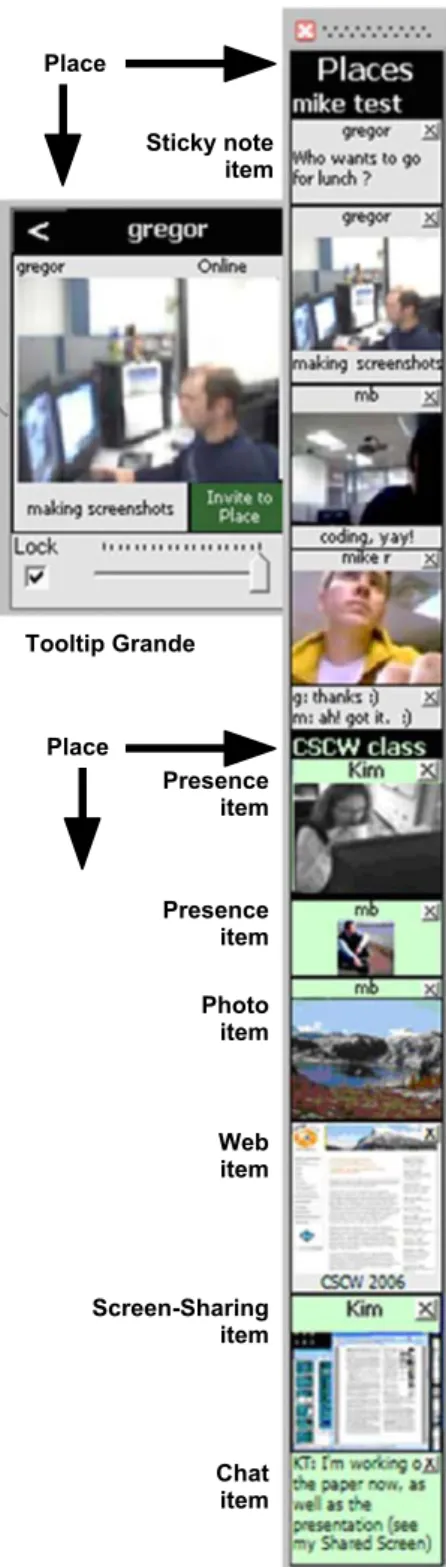
We begin by briefly describing the Community Bar, a groupware environment that provides basic facilities for group awareness and communication. Additional details about the system and its design justification are found in McEwan and Greenberg (2005)andMcEwan et al. (2006). Fig. 1shows a screen snapshot of CB in use. As can be seen, CB is divided into Places; two are shown in the figure—‘mike test’ and ‘CSCW class’. Each place repre-sents a sub-group of people and the communications, tools, and information they are sharing. These are visualized through a number of media items, all holding different information and all being publicly visible to the sub-group. As illustrated in the figure, thePresence itemrepresents a person as live video, their image, or their name.Chat items
hold multi-person public conversations, similar to a chat room.Sticky notescontain one person’s text posting to the group, much like a physical note might. People use these items to broadcast information, ask questions, initiate opportunistic conversations with others, or to easily and serendipitously join an existing conversation. CB allows
people to share some of their artifacts, where one person can explicitly post information they believe to be of interest to others in the group. For example, one can share web pages, photos, and slide shows with others through the
Web itemandPhoto item.
Media items are presented within a sidebar that displays three levels of granularity, each providing different levels of awareness information and interaction possibilities (Cadiz et al., 2002). The media item’stileview is always visible in
the sidebar; these are the many small items seen inFig. 1. If something of interest is seen in the tile, individuals can choose to explore and interact with that information in more detail by mousing over the tile, which displays its
tooltip grandenext to it. For example, the tooltip grande in Fig. 1 shows that person’s video at a large size and faster frame rate. Finally, a person can click on the tooltip grande’s title bar to raise the full-view window, which displays even more information and interaction capabilities (not shown inFig. 1). This easy transition from awareness to interaction is partly what makes CB successful (Romero et al., 2007). Media items also have the idea of an owner
(the person who creates the media item) and an audience
(all others who can see the item). Depending on the media item, the view and controls available on the tile, tooltip grande, and full view may be different for the owner than for the audience. For example, owners of a Presence item have additional controls in their full view to change what others see, whereas all people see a Chat item in exactly the same way.
Fundamental to the philosophy of CB is the idea that all the media items within a place are publicly visible to all the people in that place, i.e., it serves as a virtual communal shared setting. We note, however, that each person can have a somewhat different view of this community. For example, each person can resize particular tiles to increase or decrease his or her own level of awareness of that particular activity. Similarly, a person raising a tooltip grande and full view are local actions, i.e., others’ displays are not affected. Next, while basic information is always visible at the periphery, progressively more information can be revealed through focused interaction. The sidebar design encourages peripheral awareness because it cannot be covered up and because it is situated at the screen’s side (Cadiz et al., 2002).
As currently described, CB lacks support for artifact awareness and artifact-centered serendipitous interactions. That is, people do not have the ability to show their actual ongoing work to others, to monitor other people’s work, or to move into interaction over that work. To enable this, we created the Screen-Sharing media item.
3.2. The Screen-Sharing item
CB is an open-ended system based on a plug-in architecture. Using an API and development environment, third-party developers can create and add their own custom media items to CB without recompilation ( McE-wan et al., 2006). We chose to develop our screen-sharing awareness tool as a CB media item plug-in. By doing so, we could immediately leverage existing CB features—its group-based public display, its always-visible sidebar interface supporting transitions from peripheral awareness to interaction, and its provision of other communication and information channels such as presence indicators, text communication, and so on. As well, we had access to a community which had been using CB on a daily basis for Sticky note item Place Place Presence item Presence item Photo item Web item Screen-Sharing item Chat item Tooltip Grande
Fig. 1. Community Bar.
over a year. By adding our new item to CB as used by this group, we could see how it provided artifact awareness between its members—this will be discussed in Section 5. The following subsections describe by scenario how the
Screen-Sharing itemworks,2as well as our design justifica-tion for each component.
3.2.1. Tile view
Design justification: The ‘owner’ of the work artifacts should be able to provide others with a coarse overview of their ongoing work by broadcasting infrequently updated miniatures of their screen. Similarly, the audience members should see this overview at the periphery of their attention. ‘Kim’ (initials K.T.) is working on a paper of interest to her group, so she decides to share her display with them. Through the CB place’s context menu, she invokes the Screen-Sharing item. A tile view is immediately added to that CB place in the sidebar, which contains a thumbnail of her entire screen labelled with her name (Fig. 1, second tile from the bottom). At the same time, she adds a Chat item (Fig. 1, bottom tile) saying ‘‘I’m working on the paper now, as well as the presentation (see my Shared Screen)’’ – this serves the same role as a verbal aloud (Heath and Luff, 1992), where it gives the group some context to help interpret the image.
By default, this thumbnail is updated once a minute. However, the owner (and only the owner) can trigger an immediate update by clicking the tile. For example, Kim may do this to rapidly replace a screen shot that she did not want others to see, or (more typically) to show others changed screen content in a timely way, e.g., as part of a discussion of the image that may be occurring in an ongoing text chat.
Although small, the thumbnail, and its update fre-quency, suffices to provide all others in that CB place with a coarse overview (i.e., basic awareness) of what Kim is working on. Typically, the visual characteristics of windows within the 7060 pixel thumbnail are sufficiently recognizable (Kaasten et al., 2002) so that others can tell if the person who posted their screen is editing a document, browsing the web, preparing a presentation, etc. While actual content is hard to distinguish, visual landmarks such as photos and text formatting are discernable. For example, the first five thumbnails in Fig. 2 show people visiting a web page, editing a Word document with
highlighting turned on, looking at email through the Outlook email reader and checking MSN Messenger’s buddy list, using the Picasa photo viewer, and working on a presentation. The last two thumbnails show particular regions of people’s screens—part of a code window in a programming environment and part of a document.
Now reconsider the shared screen in the tile fromFig. 1. From the audience’s previous knowledge of Kim’s work habits and from the contents of her Chat item, they correctly guess that she is currently editing a document in Microsoft Word, where the PowerPoint presentation she mentions is partially visible in the background. The audience can also tell that this is a two-column document typical of most ACM papers, and that a figure is positioned at the top right of the page. If the viewer is a co-author of this paper, then that person could likely guess what page it is from their knowledge of the paper.
3.2.2. Tooltip grande
Design justification: An audience member should, if interested, be able to quickly see additional details of another person’s work artifacts by raising a higher fidelity, annotated view of the shared artifact. This act is somewhat equivalent to an extended glance.
The tooltip grande for both the owner and the audience shows a somewhat larger thumbnail (Figs. 3a and b, left side). Akin to a glance, people in the CB place may raise this to help them further recognize certain features in the owner’s screen. Above the thumbnail is a brief description of what is being shared, i.e., the full screen, a region of the screen, the active window, or a particular window (to be discussed shortly). Below the thumbnail is a timestamp indicating when the image was last updated. For example, the tooltip grande views of Kim’s desktop inFigs. 3a and b (left) show that she is sharing a region of the screen, and that it was last updated at 12:31 PM today. The arrow at the top left of the tooltip grande, common to all CB media items, is used to invoke an even more detailed full view, discussed shortly. As before, the owner (and only the owner) can trigger an immediate update by clicking the thumbnail or by pressing the ‘Update’ button visible at the tooltip grande’s bottom right (Fig. 3a, left).
Design justification: An audience member should be able to reduce or increase the visibility and detail of the shared artifact to correspond with their interest in it, e.g., by adjusting the size of the tile.
The lock and slider that appear at the bottom of the tooltip grande are common to all CB media items, and are
Fig. 2. Thumbnails of people’s screens.
2
Implementation details are not discussed here; they can be found in (Tee, 2007).
used by the viewer to adjust the size of the tile in the sidebar. When the tile is resized to dimensions that are too small for the thumbnail to be recognizable, the thumbnail is replaced by a descriptive text label. To illustrate, the bottom tile inFig. 3c is a Screen-Sharing item posted by Stephanie, where she is sharing a specific window (‘CBC New Brunswick—Mozilla Firefox’) rather than a screen region. Using its tooltip grande, the current viewer has shrunk his view of Stephanie’s tile; only a text description is displayed that gives the name of the window being shared.
3.2.3. Full view
Design justification: An audience member should, if interested, be able to see full details of the shared artifact, equivalent to directly attending the artifact after being attracted to the information contained by it. As well, the owner should be able to prescribe limits on what the viewer can see to safeguard privacy.
The full view as seen by both the audience and the owner gives a larger and much more detailed preview of the captured display (Figs. 3a and b, right). As with other views, this preview is live—its contents are replaced as
updates come in. As visible on the left side of the full view in Fig. 3a, the owner has additional controls that will let him/her adjust and limit how the display is shared, thus providing some balance between awareness and privacy. These privacy controls are described in Section 4.
A zoom slider below the image lets the viewer zoom into the image as desired for greater detail. When the zoomed-in image does not fit within the window, the viewer can pan the image by directly selecting and dragging it with the mouse. As will shortly be discussed, for privacy reasons the permissible level of zoom depends on how the owner has configured sharing, i.e., zooming may be restricted to much less than true screen resolution. For example, in the full views inFigs. 3a and b, it can be seen that Kim has set the maximum zoom level to 79%. The audience member is looking at her screen at this maximum zoom level (Fig. 3b, full view), while Kim is looking at it at a 32% zoom so that the entire region fits the full view’s window (Fig. 3a, full view). It can also be seen that 79% zoom of the true screen resolution produces a fairly legible image (Fig. 3b, full view)—subsection titles of the paper are easily visible, and the paper text can be read with some effort.
The owner’s tooltip grande and full view of the Screen-Sharing item.
Tooltip Grande Full View
Full View Tooltip Grande
3.2.4. Moving to interaction
Design justification: As appropriate opportunities arise, an audience member should be able to engage the artifact owner by moving into conversation and direct interaction over the shared artifact.
Any audience member can initiate a real-time remote pointing session by pressing the ‘Remote Pointing’ button in the tooltip grande or the full view (Fig. 3b). The owner sees a remote pointing request via a dialog box, and can approve or deny it. If the owner denies it, a short message is displayed to the audience member who requested remote pointing notifying them that permission was not granted.
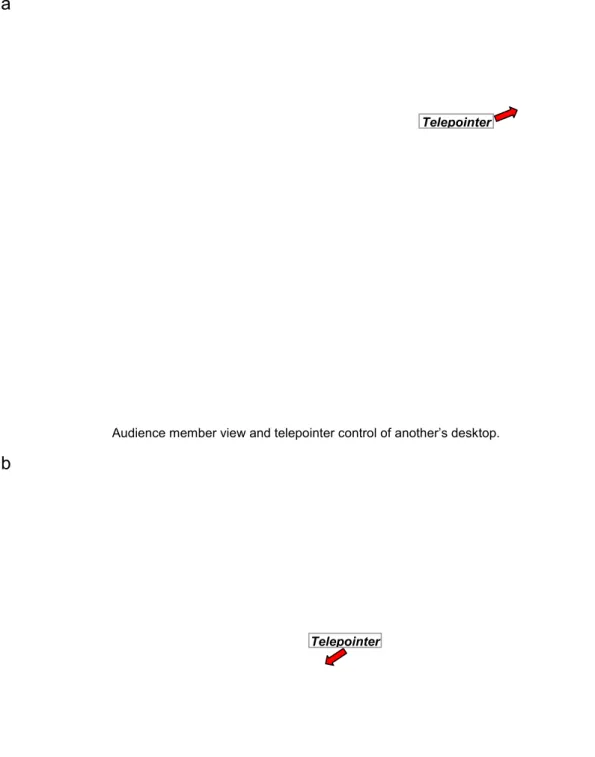
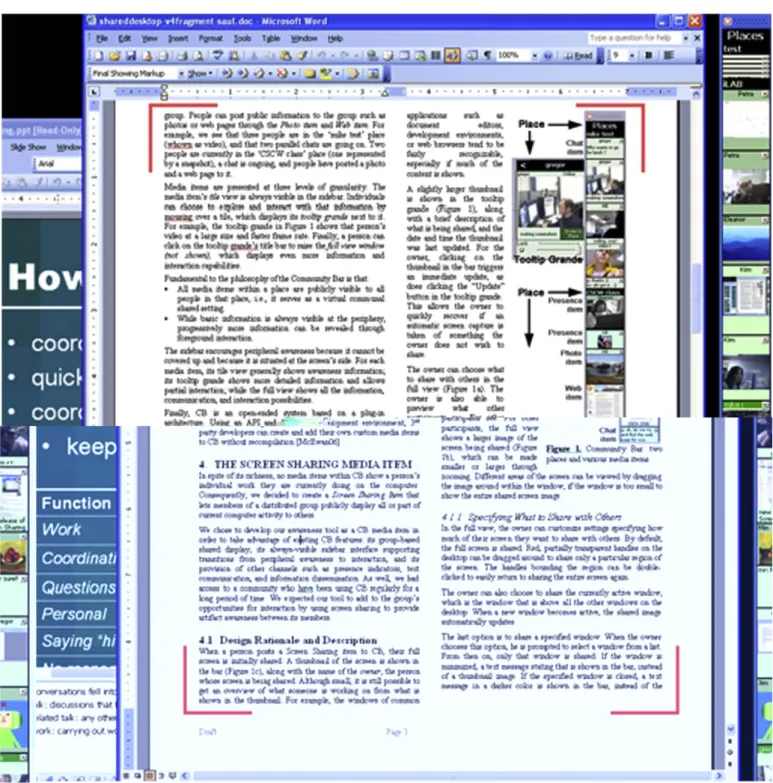
If the owner approves it, a remote pointing window (Fig. 4a) appears on the screen of that audience member. This remote pointing window displays the shared screen image at the maximum allowable resolution. It also includes a full-sized chat box (Fig. 4a, left) linked to a Chat item in the sidebar (Figs. 4a and b, top right) so that the audience member can communicate with the owner in the same window as remote pointing, rather than having to switch between the remote pointing window and the CB sidebar or the Chat item’s full-view window.
The audience member can drag a small red telepointer around the shared screen image, visible at the top right of Fig. 4a. A corresponding named telepointer appears and moves around on the owner’s actual desktop in the corresponding location, as shown in the partial screenshot of the owner’s desktop inFig. 4b. Either the owner or the other participant can terminate the session at any time. Remote pointing is currently limited to two participants; if another person tries to request remote pointing while the owner is already involved in a remote pointing session, that person is notified of this and asked to try again later.
Although remote pointing is not as powerful as systems that let people take turns interacting with the application such as VNC (Richardson et al., 1998) or Timbuktu (WOS Data Systems, 1987), remote pointing suffices for most situations. As Whittaker suggests from his observations of casual interactions in offices, ‘‘Document use indicates a requirement for simple systems rather than full-blown shared editors. A system that allowed mutual viewing of documents, with the ability to point at and possibly make simple annotations, may be all that is required here’’ (Whittaker et al., 1994).
4. Privacy controls
Goal 2. Design privacy controls that allow individuals to balance the artifact awareness they want to provide to others with their own particular privacy needs.
Basic design justification: Give artifact owners full control of what artifacts they wish to share with others, as well as how viewable those artifacts are.
Privacy is, of course, a serious consideration in an always-on screen-sharing system. For example, imagine a situation when Kim inadvertently displays a sensitive email message that others should not be seeing. The challenge is
how people can balance the awareness information they want others to have of their work with their own privacy needs.
First and foremost, note that privacy is not just a technical issue (Boyle and Greenberg, 2005). Rather, it is heavily dependent on the group culture and the actual practice of use that develops over time. As an always-on media space, CB is designed for a community of intimate collaborators who have a real need and desire to stay connected. This is akin to a shared office of close-knit workers (or close friends, or family members) who are comfortable with seeing each other as they move around the shared space, as well as any information they are working on. Of course, this intended use could be abused by (say) an office manager who insists that all employees use the Screen-Sharing media item so that their work can be monitored (see Section 4.4). However, even in the benign case, people may want some control over what others can see.
Privacy is a generic term that means different things to different people. To enable the unambiguous description and discussion of privacy-related issues in media spaces, Boyle and Greenberg (2005) created a framework that collects various terms and concepts related to privacy from the literature. Their framework broadly divides privacy into the three ‘control modalities’ of confidentiality,
autonomy, and solitude. In the framework, each modality contains additional terms that detail aspects of it. The modalities and a sampling of terms are described below. Full details are available in Boyle and Greenberg (2005) andBoyle et al. (2009).
Confidentiality relates to a person’s control over what information others can access about oneself. It directly regulates the outward flow of information to others. Example information topics include identity, activity whereabouts, encounters, utterances, actions, and relation-ships. Other terms include information sensitivity, security, authorization, information fidelity (precision, accuracy, temporal, misinformation, and disinformation), ambiguity, surreptitious surveillance, misuse, and misappropriation. Confidentiality is also influenced by properties of the information channel medium, i.e., whether it is aural, visual, numeric, or textual, and how that information is obtained, e.g., by sampling, interpolation, aggregation, and inference.
Autonomy relates to how a person chooses to present him/herself to others. That is, it is the freedom to choose how one acts and interacts in the world. Example terms include social construction of self, identity, digital persona, appearance, impression, social relationships, back- and front-stage performances, and aesthetic and strategic harms. It also includes norms about self, such as expectations, preferences, deviance, conformance, and social acceptability.
Solitude relates to how a person controls interper-sonal interactions with oneself, i.e., how a person can be ‘apart’ from others. Example defining terms include
crowding, isolation, intimacy, anonymity, attention, re-fuge, awareness regulation, distraction, availability, and accessibility.
In the following subsections, we use these three modalities and some of their terms (shown italicized) to describe our design justification for privacy-related con-trols and feedback in the Screen-Sharing item. We also discuss some of the limitations of these privacy controls,
which were revealed by a post hoc theoretical analysis of privacy using Boyle’s (2005) technique of systematically applying his framework to the Screen-Sharing item.
4.1. Specifying what to share with others
Design justification: The primary concern of artifact sharing within the CB is confidentiality, and the owner of
Audience member view and telepointer control of another’s desktop.
Telepointer
Telepointer
Partial screen snapshot of the owner’s desktop, illustrating the telepointer. The red outline in the Screen-Sharing item’s tile indicates that someone is looking at a full view of this screen.
Fig. 4. A remote pointing session.
the artifact should be able to control one’s information confidentiality.
The CB targets a small community of intimate colla-borators, i.e., people who know each other well and have a desire to stay connected. Thus a person’sautonomy is not particularly threatened, as the CB community should extend existing social practices. Similarly, because each member can opt to enter or leave a CB place at any time, or remove CB from their display,solitude is also not largely threatened. Of course, solitude and autonomy threats can become serious if CB is not used as expected. For example, a dictatorial manager can insist that his staff join CB with their video media item always on (affecting autonomy), where they are expected to immediately engage in all conversations initiated by that manager (affectingsolitude). Turning specifically to the Screen-Sharing item, its function is to share the contents of a person’s screen with
other group members through the visual information
channel, obtaining this information by sampling the bitmapped contents of one’s screen. Thus, within the context of Boyle and Greenberg’s framework, the Screen-Sharing item primarily affects confidentiality, the compo-nent of privacy that relates to a person’s control over what information others can access about him/her. From the shared screen image, much information can potentially be seen or inferred. The information being shared can be
sensitive (e.g., personal communications or financial records) or not (e.g., publicly available information). While the expectation is that work-related artifacts or activities will have low sensitivity with respect to other members of the same group, it is possible that a person’s work may be highly sensitive. For example, people often pursuepersonal activitieson their computer that they may not wish others to see: playing games, reading and composing personal email, online shopping, etc. Even if the information contents are not sensitive, it may reveal information about self (e.g., an online gambling addiction) that one may not want others to see. Alternately, they may be working on projects where information should notpersist, e.g., a legal report where drafts are discoverable. While CB does not persist this information, there is nothing to stop others from capturing and storing it through an image-grabbing tool. As another example, one group member may be viewing information that she – and only she – isauthorized
to see; accidentally revealing this to others undermines the authorization control.
Consequently, the Screen-Sharing item offers a number of privacy controls primarily for mitigating confidentiality concerns.
4.1.1. Specifying the capture region
Design justification: Owners should be able to restrict what visual information is pushed out – and thus is viewable – to others.
Owners have full control over whatinformation visualsto ‘push’ out as artifact awareness; the audience cannot ‘pull’ any extra information. Thus, the first level of privacy
control is to let the owner specify how much of the display he or she wishes to share with others: a particular screen region selected by handles (which can include a small area up to and including the entire screen), the currently active window, or a particular owner-specified window. The choice restricts what others can see to only those parts of the display the owner wishes to reveal. The bitmap image explicitly reveals only the visual information being worked on. However, viewers will likely be able to infer other information, such as the owner’s activities (from changes made) and one’s whereabouts (if the information is changing then the owner is likely there working on it). Because viewers can see what the owner is doing (or not doing), the owner becomes accountable to their actions, andplausible deniabilityis threatened.
By default, a screen region encompassing the full (primary) screen is shared. Anything displayed in this region is captured: partial and overlapping windows, background wallpaper, dialog boxes, etc. This can be readjusted at anytime. Semi-transparent red handles define the region being shared (Fig. 5), and the owner can adjust the bounds of the region by dragging these handles around. The owner can quickly return to sharing the entire (primary) screen by double clicking a handle. For people with two displays, right double clicking a handle shares the full secondary screen.
The owner can opt to share individual windows instead of screen regions. First, the owner can selectively share the currently active window. This is the window that has the input focus, and that appears atop all the other windows on the desktop. As the user switches to a different window (thus making that one the active window), the shared image automatically updates to replace the old window with this new one. This does not safeguard privacy very well, for the owner can inadvertently share a window containing sensitive information. Second, the owner can share a specified window from a list of all windows. When selected, only that window is captured and shared (regardless of its position on the screen). If the owner minimizes or closes the window, an appropriate text message comprising the title of the window is shown instead of a thumbnail image. When the owner resumes working in the window, the thumbnail is displayed again.
4.1.2. Specifying update frequency
Design justification: Owners should be able to adjust the sampling of the visual information pushed out, which controls the temporal fidelity and persistence of informa-tion that others can see.
Our second level of privacy control lets the owner specify how often the display should be captured, and thus how often the audience gets this update. This control allows owners to managetemporal fidelity. Specifically, the owner can specify if updates are manual or automatic. If manual, the display is updated only when the owner explicitly clicks the thumbnail in the tile view, or the ‘Update’ button in the tooltip grande and full view. If automatic, the owner can
specify an update frequency interval between 10 and 90 s, where they can still opt to transmit an immediate snapshot at any time by clicking the thumbnail/update button. Unlike commercial Screen-Sharing systems tailored for real-time interaction, this infrequent auto-update should suffice for artifact awareness, as they help inform others of basic activities while minimizing distraction that might otherwise arise from real-time movement in the various views.
Because screen contents are largely transient, the shared information should reflect that attribute. The information shared by the Screen-Sharing item typically has low
persistence; on auto-update, a new shared screen image replaces the previous one at least once every 90 s. Images are not stored anywhere for archival purposes; when an owner logs off of Community Bar, their Screen-Sharing item (and thus their shared screen image) is automatically removed.
Fig. 5. The capture region of the screen is marked by adjustable semi-transparent red handles.
4.1.3. Specifying how much detail to share
Design justification: Owners should be able to adjust the visual fidelity of the information pushed out, which limits the details that others can see.
The third level of privacy control lets the owner manipulate the image fidelity that others can see through
distortion filtration. One of our techniques reduces image resolution by letting the owner adjust the zoom level and/or distort the image through image-manipulation techniques. The less detail visible, the greater the perceived privacy.
An audience member is allowed to zoom into details in a shared screen image only up to a maximum zoom level set by the owner. Low zoom limits transform the image into a low-resolution image. For example, if Kim set a low zoom level of around 33% and her captured region
encompasses 12801024 pixels, the shared image is
visually compressed to about 1/9 of the original area (426341). Alternatively, she can set an increasingly higher zoom limit, so that others can zoom in and view the shared image up to the original resolution. For example, Kim could set the level so that a viewer can read large-font section headings in a text document, but not the actual text contents in paragraphs.
Alternatively or in combination with zoom limits, the owner can mask and distort the image by selecting one of several image-masking effects. Current options include
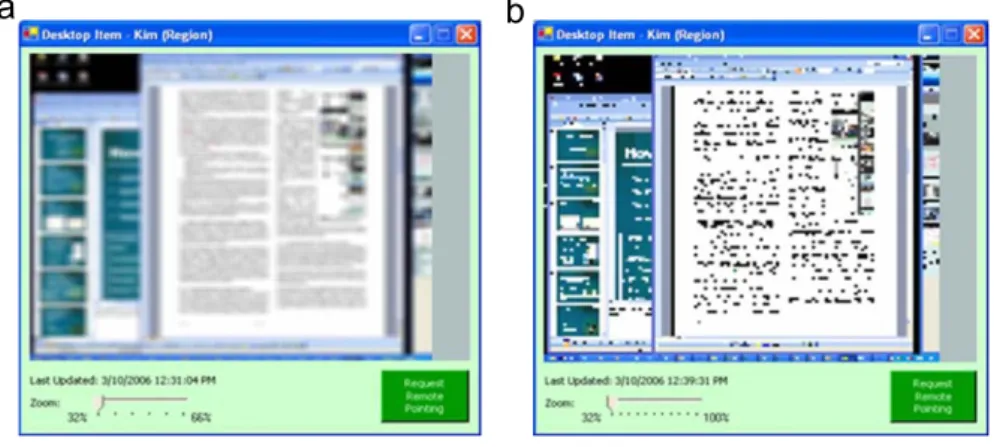
image blurring, pixelization, and image randomization; others could be easily added. These distortion techniques offer people a high degree of control of image fidelity not only in the thumbnails, but in the larger zoomed-in full views as well. For example, Fig. 6 illustrates what people would see when Kim uses the blur effect (6a) or the pixelate effect (6b) at 32% zoom. These effects let others roughly see what Kim is working on, while preserving her privacy because the image does not reveal legible detail.
Of course, image fidelity is not guaranteed to fully protect confidentiality. For example, text legibility is influenced by font size and word shape. Some images,
especially if large and of high contrast, may be easily recognizable even when heavily blurred. Still, it should be a reasonable safeguard for typical sensitive information, such as email and detailed document contents.
4.2. Providing feedback
The Screen-Sharing item has secondary effects on
autonomy through its relationships to confidentiality. Autonomy is the component of privacy that relates to how a person chooses to present himself/herself through ‘observable manifestations of the self’ (Boyle and Green-berg, 2005) such as appearance, identity, and impression. Autonomy is related to confidentiality in that people can present themselves in a particular way by controlling what information about themselves others can access. Thus, the information that is shared through the Screen-Sharing item about what a person is doing on their computer can influence others’impressionsof that person. In particular, if a person works from a remote location where one of the only information channels about them is their shared screen, they may be judged by others primarily based on what their shared screen shows. This can become a problem when back-stage performances mistakenly occur on the front stage, such as when someone working from home forgets that they are sharing their screen and starts looking at videos that are inappropriate for a work environment, though acceptable for watching at home. Privacyharmssuch as these that relate to autonomy can be
aesthetic(e.g., a person often seen watching videos online instead of working being thought of as unproductive) or
strategic (e.g., that same person being passed over for a promotion because they are perceived as being unproduc-tive). One’s behaviour can also be judged in terms of how well they follow the norms of the work culture, i.e., where actionsconformordeviatefromexpectations.
Our strategy to safeguard these threats is to give people feedback about what they are transmitting, so that they can adjust either their behaviours or what is being transmitted as needed.
Blurring with a low level of clarity. Pixelization with a medium level of clarity.
4.2.1. Feedback of image capture
Design justification: Owners need feedback about what they are transmitting, so they can safeguard threats to their autonomy.
The Screen-Sharing item aims to prevent mistaken back-stage performances from occurring on the front stage by providing appropriate warnings or reminders before a screen capture is taken. That is, the fourth level of privacy control is for the system to provide sufficientfeedback to the owner about what others can see. First, the Screen-Sharing item supportsreflexive interpretability of action— the owner can always see exactly what the audience can see, because their Screen-Sharing item is visible on both owners and audience members’ sidebars. Similarly, if the owner raises the tooltip grande or the full view, they always see exactly the same transmitted image as the audience member.
Second, several mechanisms warn the owner just before an update happens. Five seconds prior to an auto-update, the owner’s tile in the bar is outlined in yellow. If sharing a region, the red handles that bound the region turn yellow as well. Colours revert back to normal after the update is completed. This feedback aims to be a reasonable compromise that reminds the owner of what is going on without being overly distracting.
Third, when an audience member opens the full view belonging to the owner, the Screen-Sharing item in the owner’s bar is outlined in red (Fig. 4b). This outline remains until the full view is closed, indicating to the owner that at least one person has their full view open. However, no identifying information is supplied as to who is looking at the full view; we initially wanted to encourage opportunistic interaction and we felt that adding identify-ing information would discourage others from ‘peekidentify-ing’ at someone’s screen in the large view if they knew that they could be identified. However, in practice, users commonly requested that people looking at their full view be identified; this is discussed more in a later section.
4.2.2. Communal feedback
Design justification: Owners need feedback from their community, i.e., who is present and any concerns they may have about what they can see.
The fifth level of privacy control is social, as defined by the CB group. Screen-Sharing items are visible only to the other people in the CB place. Because all people logged on in a CB place are visible, the owner of an item knows who can see it. That is,reciprocity of presence is enforced. As well, because people in a CB place are part of a social group, one can reasonably expect – security and social violations aside (there is noaccess control orauthorization
in CB) – that only socially appropriate people can see it. Finally, because these people are expected to be colleagues, the viewers themselves can use the other facilities in the CB to warn the owners about inappropriate things that are being shared to help the owners preserve their privacy if needed, e.g., the group canself-police.
4.3. Managing interruptions and distraction
Finally, the Screen-Sharing item has secondary effects on
solitude. Solitude is the component of privacy that relates to how a person controls interpersonal interactions. Like autonomy, solitude is also related to confidentiality; people can somewhat control their interactions with others by controlling what information about themselves others can see. For example, the Screen-Sharing item shows what a person is doing on their computer. This information can be used to determine that person’s availability and also sometimes that person’saccessibility, which can help others to determine whether that person can be interrupted.
Part of how people control their interactions involves how they focus their attention and how they react to distraction. The Screen-Sharing item typically shares information about others’ screens through its tile in the bar, which sits on the peripheryof the user’s attention. If more information is desired, the user can see additional detail in the tooltip grande or full view, or can transition intofocused interaction by engaging in a remote pointing session with another user. The information others are sharing may not always be of direct relevance to one’s work. However, the idea is that valuable interactions can still be triggered by ‘unimportant’ artifacts on someone’s screen.
4.4. Discussion
Following our system design, we performed a theoretical analysis of privacy using Boyle’s technique (2005) of systematically applying his framework to the Screen-Sharing item. Boyle’s (2005) work includes an analytic method that helps reveal (perhaps tacit) privacy-related assumptions made during the design process of a colla-borative technology. While it is beyond the scope of this paper to describe his methods and how we applied them to the Screen-Sharing item, we summarize several situations in which privacy problems can occur in spite of our safeguards. Additional examples of possible privacy
problems are included inTable 1.
Sharing with intimate collaborators: Our assumption is that groups using the Screen-Sharing item will comprise people who trust and collaborate with each other. Thus no explicit precautions are included to prevent privacy problems such as deliberate abuses. We do not expect the Screen-Sharing item to work well in a competitive or malignant environment, except perhaps as a source of disinformation.
Sharing voluntarily: Another assumption is that people will be motivated to share parts of their screen useful for others to see. If people are forced to use the Screen-Sharing item involuntarily (e.g., through peer pressure or because upper management wants to monitor them), they might potentially share parts of their screen that are not useful to others (e.g., an empty area of their computer desktop), or they might use the privacy controls to obscure information.
They may also disinform others (e.g., by raising and posting a seemingly work-oriented window, when they are actually pursuing personal activities), thus reducing the effectiveness of the system.
Primary privacy concern—inadvertent privacy violations: In a community of intimate collaborators, we assume that inadvertent privacy violations are more likely to occur than deliberate abuses. Thus, the privacy controls currently built into the Screen-Sharing item seek primarily to prevent inadvertent violations such as people accidentally sharing information they meant to keep private. With the Screen-Sharing item, the possibility for various kinds of privacy
violations of varying probability and severity exists. One example of a low-probability, high-severity privacy viola-tion is adeliberate abuse, where a staff member from a rival company manages to intercept the shared screen data being sent to or from CB internal server (that stores and transmits information) in order to gain information for competitive advantage.
Primary type of sensitive information—high-precision details: The Screen-Sharing item primarily uses image-manipulation techniques such as blur filtration, where we assume this is sufficient to obscure high-precision details (such as text from an email or IM window) in a shared screen. However, these details may not always be what is sensitive in a shared screen image; for example, if a person were playing a game or looking at inappropriate videos or
pictures at work, this may still be obvious from the overall colours and shapes seen in a shared screen image, even if the image were distorted. In fact, blur filtration has been shown to fail to preserve privacy in some high-risk situations in a home media space (Neustaedter et al., 2006), such as when people are caught by the camera in a state of undress. In other words, blur filtration can work well in cases where modest-sized text is the sensitive part of a shared screen, but can fail to preserve privacy when sensitive images or large-font text banners or visual symbols or even graphical layout remains identifiable. Perhaps a better approach would be to change theaccuracy
of the information being shared (e.g., by replacing a graphic with an icon, and text with dummy lorem ipmsum text), rather than the imageprecision. Another option is to completely mask selected parts of the display, as done by Berry et al. (2005).
It is possible for someone to make a persistent copy of a shared screen image. We assume that information in our screen-sharing item is transient, but this may not be the case. Taking and saving screen snapshots of what is currently shown in the shared screen item is trivial. More sophisticated people could also ‘hack’ into the underlying distributed data structure (which is currently not protected) held by the server in order to automate screen recording. Thus people can have access to the information record for a far longer time than intended. They can even pass it on to
Table 1
Potential privacy problems that might occur through use of the Screen-Sharing item.
Privacy problem Common cause Example
Inadvertent privacy infraction
People forget that their screen is being shared Jane forgets that she is sharing her screen when she starts working with confidential data, and inadvertently shares it
Apprehension People do not want to make a bad impression in front of others
John does not want to share his screen because he is afraid others might see him reading comics online during the day and think he doesn’t work very hard
Resentment People resent a loss of control over their own privacy
Jane dislikes being required to share her screen so that her boss can monitor her work, an implied lack of trust
Decontextualisation People share their screen or a region of their screen without its surrounding context
John is sharing his web browser, which currently contains comics. Others may think he is taking a break, but he is actually creating a presentation in another window, and looking at comics for graphics to include
Disembodiment People share their screens from different locations/ environments than their distant colleagues
Jane, sharing her screen from home, forgets that others on CB are working from the office, and she starts looking at some photos taken at a wild party last weekend, photos inappropriate for a work setting
Role conflict People play different roles in different social worlds and some-times previously non-overlapping social worlds ‘collide’
Dissociation The Screen-Sharing item has no explicit way to identify which audience members are looking at a shared screen
John notices that someone is looking at his shared screen in detail in their full view, but he does not know which of the ten people currently on CB that person is
Misappropriation People can be competitive and might take any opportunity to advance their career
John sees on Jane’s shared screen that she has come up with a solution to a problem the team has been working on; he quickly puts together an email to their boss in which he takes credit for the idea
Misuse People might take any opportunity to make personal or financial gain
Jane sees non-public information on John’s shared screen and based on that, sells some of her company stock
Identity theft People might take any opportunity to make personal or financial gain
John sees Jane shopping online and copies down her credit card number and expiry date for future use
Impersonation People might act maliciously towards others they dislike or might take any opportunity to make personal or financial gain
Jane has some of John’s personal information from previously seeing it on his shared screen, and cancels his home internet service as a prank