User Manual for Wrist Oximeter
I
Instructions to User
PC-68A Wrist Oximeter is a precision measuring device, please read the manual very carefully before using this device. Failure to follow these instructions may cause measuring abnormality or damage to the oximeter. No part of this manual may be photocopied, reproduced or translated into another language without the prior written consent. Shenzhen Creative Industry Co., Ltd. reserves the right to improve and amend it at any time without prior notice.
Version of This Manual: Ver 1.2 Revised date: June 1, 2011 All rights reserved.
3502-2290031
Notes
User Manual for Wrist Oximeter
change without prior notice.
Information furnished by Creative is believed to be accurate and reliable. However, no responsibility is assumed by us for its use, or any infringements of patents or other rights of third parties that may result
from its use.
Instructions for Safe Operations
Check the device to make sure that there is no visible damage that may affect user’s safety or measurement performance with regard to sensors and clips. It is recommended that the device should be inspected minimally once a week. When there is obvious damage, stop using the device.
Necessary maintenance must be performed only by qualified service technicians. Users are not permitted to maintain it by themselves.
The oximeter cannot be used together with devices not specified in User Manual.
Cautions
Explosive hazard—DO NOT use the oximeter in environment with inflammable gas such as some ignitable anesthetic agents.
DO NOT use the oximeter while the testee is under
User Manual for Wrist Oximeter
III
Warnings
An uncomfortable or painful feeling may appear if using the oximeter continuously on the same place for a long time, especially for poor microcirculation patients. It is recommended that the oximeter should not be applied to the same location for longer than 2 hours. If any abnormal condition is found, please change the position of oximeter. DO NOT clip this device on edema or tender tissue. The light (the infrared light is invisible) emitted
from the device is harmful to the eyes, so service technician or testee should not stare at the light. The local law must be followed when disposing of
the device.
Attentions
Keep the oximeter away from dust, vibration,
corrosive substances, explosive materials, high temperature and moisture.
The device should be kept out of the reach of
children.
If the oximeter gets wet, please stop using it and do not resume operation until it is dry. When it is carried from a cold environment to a warm and humid environment, please do not use it
User Manual for Wrist Oximeter
immediately.
DO NOT operate the button on the front panel with
sharp materials.
High temperature or high pressure steam disinfection to the oximeter is not permitted. Refer to related chapter for instructions of cleaning and disinfection.
Declaration of Conformity:
The manufacturer hereby declares that this device complies with the following standards:
IEC 60601-1 ISO 9919
and follows the provisions of the council directive MDD93/42/EEC.
User Manual for Wrist Oximeter
V
Table of Contents
1 OVERVIEW ... 1
1.1 Appearance ... 1
1.2 Name and Model ... 2
1.3 Conformation ... 3 1.4 Features ... 3 1.5 Intended Use ... 4 1.6 Key of Symbols ... 5 2 BATTERY INSTALLATION... 6 3 OPERATION ... 7 3.1 Measuring Operation ... 7
3.2 Alarm Limit Settings ... 12
3.3 Upload Data ... 15
3.4 Low Battery Indication ... 16
4 ADDITIONAL ADVICE FOR OPERATION... 17
5 TECHNICAL SPECIFICATIONS ... 18
6 ACCESSORIES ... 20
7 REPAIR AND MAINTENANCE ... 21
7.1 Maintenance ... 21
7.2 Cleaning and Disinfecting Instruction... 22
8 TROUBLESHOOTING ... 23
9 APPENDIX ... 24
A Common Knowledge ... 24
1 Overview
1.1 Appearance
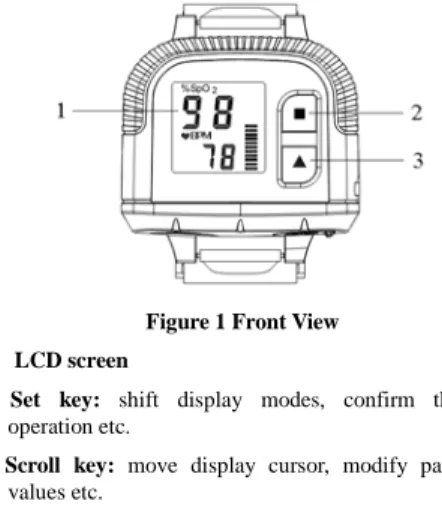
Figure 1 Front View 1. LCD screen
2. Set key: shift display modes, confirm the
operation etc.
3. Scroll key: move display cursor, modify parameter
User Manual for Wrist Oximeter
-2-
Figure 2 Frontal Side View
4. Buzzer 5. Data interface 6. Wristband Underlay
Figure 3 Right Side View
7. SpO2probe receptacle
1.2 Name and Model
Name: Wrist Oximeter
User Manual for Wrist Oximeter
1.3 Conformation
It comprises the main unit and SpO2 probe.
1.4 Features
Wrist Oximeter can be used to monitor pulse oxygen saturation (SpO2) and pulse rate accurately. Simply put
your finger into sensor, SpO2 value and pulse rate value
will be displayed on screen and stored in the device. It is lightweight, small in size and easy to carry; Segment LCD display;
Automatic starts to measure SpO2 and Pulse
Rate(PR) and display pulse intensity bar graph as well;
Numerical value flash alarm function;
It is convenient for you to monitor SpO2 in long-term
while sleeping or at other daily activity.
Data storage and transmission to PC for viewing and analysis;
Smart battery power management with low battery indication;
User Manual for Wrist Oximeter
-4- monitoring continuously.
1.5 Intended Use
This Wrist Oximeter is intended for measuring the pulse rate and functional oxygen saturation (SpO2). It is
applicable for long-term measurement of adult’s SpO2 and
User Manual for Wrist Oximeter
1.6 Key of Symbols
Symbols Descriptions
%SpO2 Pulse Oxygen Saturation
BPM Pulse rate icon(Unit: beats per minute) Low battery voltage
Memory full. CE mark Serial number Date of manufacture
Authorised representative in the European community
Manufacturer (including address and date)
With Type BF applied part Warning ─ See User Manual Disposal of this device according to WEEE regulations
User Manual for Wrist Oximeter
-6-
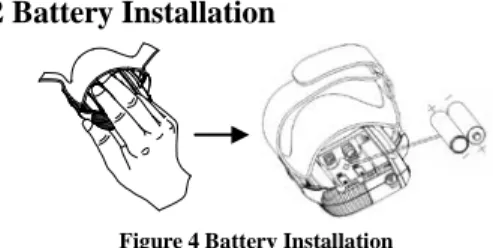
2 Battery Installation
Figure 4 Battery Installation
1. Lift up the cloth covered on the battery cover. Then, use your index finger and middle finger to press against the battery cover. Meanwhile, slide it towards the side with SpO2 probe (as shown in Figure 4).
2. Refer to Figure 4, insert two AAA size batteries into the battery compartment properly in the right direction. 3. Replace the cover.
Remark:
After finishing battery installation, the oximeter will automatically power on and display software version number firstly.
In order to record data in real time in future, please set the date/time in the oximeter via PC software-“Oximeter Data Manager”.
User Manual for Wrist Oximeter
Please take care when you insert the batteries, as the improper insertion may make the device not work.
3 Operation
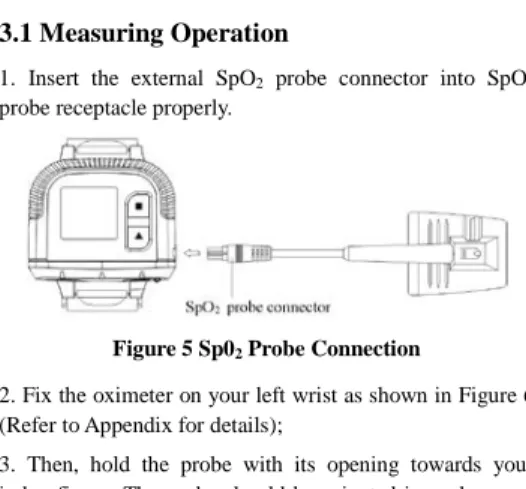
3.1 Measuring Operation
1. Insert the external SpO2 probe connector into SpO2
probe receptacle properly.
Figure 5 Sp02 Probe Connection
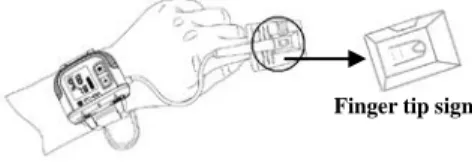
2. Fix the oximeter on your left wrist as shown in Figure 6 (Refer to Appendix for details);
3. Then, hold the probe with its opening towards your index finger. The probe should be oriented in such a way that the sensor side with a finger tip sign is positioned on the top (Figure 6).
User Manual for Wrist Oximeter
-8-
Figure 6 Placement Demonstration
3. Next, insert your index finger into the probe until the fingernail tip rests against the stop at the end of the probe (Figure 7). Adjust the finger to be placed evenly on the middle base of the sensor (make sure the finger is in the right position). If the index finger cannot be positioned correctly, or is not available, other finger can be used.
Figure 7
User Manual for Wrist Oximeter
Wrong Placement of the Probe:
Figure 8
4. The oximeter will automatically start measurement in 2 seconds. Then the default screen will be displayed (Figure 9). User can read the values from the display screen.
Figure 9 Default Screen “%SpO2”: SpO2 icon; “98”: SpO2 value;
“ BPM”: Pulse rate icon; “BPM”: pulse rate
unit, beats per minute; “78”: Pulse rate value; “ ”: Pulse intensity bar graph.
Key Operations:
Longtime press “■” key: alarm limit setting screen
User Manual for Wrist Oximeter
-10-
will be displayed, refer to section 3.2 for details; Longtime press “▲” key: turn on/off LCD display; 5. Prompt Information
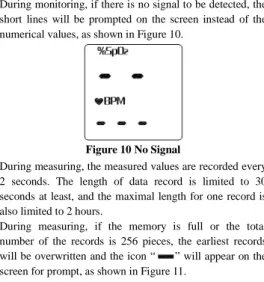
During monitoring, if there is no signal to be detected, the short lines will be prompted on the screen instead of the numerical values, as shown in Figure 10.
Figure 10 No Signal
During measuring, the measured values are recorded every 2 seconds. The length of data record is limited to 30 seconds at least, and the maximal length for one record is also limited to 2 hours.
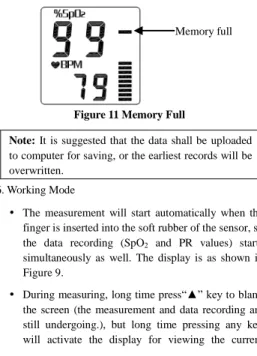
During measuring, if the memory is full or the total number of the records is 256 pieces, the earliest records will be overwritten and the icon “ ” will appear on the screen for prompt, as shown in Figure 11.
User Manual for Wrist Oximeter
Figure 11 Memory Full
Note: It is suggested that the data shall be uploaded to computer for saving, or the earliest records will be overwritten.
6. Working Mode
The measurement will start automatically when the finger is inserted into the soft rubber of the sensor, so the data recording (SpO2 and PR values) starts
simultaneously as well. The display is as shown in Figure 9.
During measuring, long time press“▲” key to blank the screen (the measurement and data recording are still undergoing.), but long time pressing any key will activate the display for viewing the current
User Manual for Wrist Oximeter
-12- measuring information again.
If there is no signal to be detected (e.g. finger off) for 20 seconds, the device will be at idle state (i.e. blank screen and standby for measurement).
When the device is at idle state, long time pressing any key will activate the LCD display, or once the finger is inserted in the soft rubber of the sensor, the measurement will start and LCD display will be activated as well.
3.2 Alarm Limit Settings
3.2.1 SpO2 Lower Alarm Limit Setting
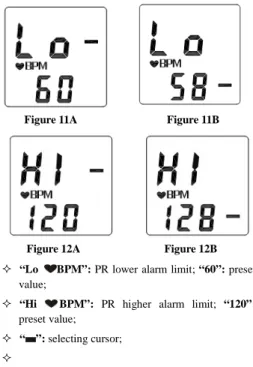
On default display screen(Figure 9), longtime press “■” key to enter SpO2 Lower Limit Setting Screen, as shown in
Figure 12A.
User Manual for Wrist Oximeter
“%SpO2 Lo”: SpO2 lower alarm limit; “90”: SpO2
preset value; “ ”: selectingcursor;
Key Operations:
On SpO2 Lower Limit Setting screen (Figure 12A),
press “■” key to move cursor to SpO2 value (Figure
12B).
Then press “▲” key to change its value;
Short time press “▲” key: increase the numerical value single time;
Long time press “▲” key: increase the numerical value continuously;
Next, long time press “■” key to confirm the preset value and exit the setting.
3.2.2 PR Lower and Higher Alarm Limit Settings
On SpO2 Lower Limit Setting Screen (Figure 10A), when
the cursor stays in the upper area, short time press “▲” key to shift the screen among PR Lower Limit Setting screen (Figure 11A), PR Higher Limit Setting screen (Figure 12A) and SpO2 Lower Limit Setting screen (Figure
User Manual for Wrist Oximeter
-14-
Figure 11A Figure 11B
Figure 12A Figure 12B
“Lo BPM”: PR lower alarm limit; “60”: preset
value;
“Hi BPM”: PR higher alarm limit; “120”:
preset value; “ ”: selectingcursor;
User Manual for Wrist Oximeter
Key Operations:
Short time press “■” key: move the cursor upwards or downwards;
Short time press “▲” key: increase the numerical value single time;
Long time press “▲” key: increase the numerical value continuously;
Long time press “■” key: confirm the preset value and exit the setting.
Note: During measuring if SpO2 or/and PR values
exceed the preset alarm limit, the numerical value exceeded limit will flash.
3.3 Upload Data
Before uploading the data to PC, please quit from the menu screen if you are doing the setup. When start uploading, connect the data cable between the device and PC, then do the following operation by the instruction in “Oximeter Data Manager User Manual”, the data uploading will be activated. If the device and the PC realize communication successfully, the oximeter will display the screen as shown in Figure 13.
User Manual for Wrist Oximeter
-16-
Figure 13 Data Upload
3.4 Low Battery Indication
When “ ” occurs on the screen, it indicates battery power is not enough. If you keep on using, the measuring error may be caused, please change batteries in time.
User Manual for Wrist Oximeter
4 Additional Advice for Operation
The finger should be put in properly and correctly. Avoid shaking finger as possible as you can duringmeasuring;
Do not put wet finger directly into sensor.
Avoid placing the device on the same limb which is wrapped with a cuff for blood pressure measurement or during venous infusion.
Do not let anything block the emitting light from device.
Electrosurgical device interference may affect the measuring accuracy.
Using enamel or other makeup on the nail may affect the measuring accuracy.
If the first reading appears with poor waveform (irregular and not smooth), then the reading is unlikely true, the more stable value is expected by waiting for a while, or a restart is needed when necessary.
User Manual for Wrist Oximeter
-18-
5 Technical Specifications
A. Display mode:Segment LCD Screen
B. Power supply requirement:
2 x LR03 (AAA) alkaline batteries or Ni-MH rechargeable batteries Supply voltage: 3.0VDC
C. Operating current: ≤40mA
D. SpO2 Parameter Specifications
Transducer: dual-wavelength LED Measurement wavelength:
Red light: 663 nm, Infrared light: 890 nm. Maximal optical output power: less than 1.5mW maximum average
Measuring range: 35~99% Measuring accuracy:
Not greater than 3% for SpO2 range from 70% to 100%
*NOTE: Accuracy defined as root-mean-square value of deviation according to ISO 9919.
E. Pulse Rate Parameter Specifications
Measuring range: 30bpm~240bpm
User Manual for Wrist Oximeter
F. Preset alarm limits:
SpO2 alarm: Lower limit: 90%
Pulse Rate alarm: Upper limit: 120bpm Lower limit: 50bpm
G. Update rate:
6 seconds moving average for SpO2 and 8 beats
average for Pulse Rate readings.
H. Record Interval
2 seconds per group (SpO2 and PR values)
I. Performance under low perfusion condition
The measurement accuracy still keeps the above specification while the perfusion index is as low as 0.6%.
J. Resistance to interference of surrounding light:
The difference between the SpO2 value measured in
the condition of indoor natural light and that of darkroom is less than ±1%.
K. Resistance to 50Hz /60Hz interference
SpO2 and PR are precise which have been tested by
BIO-TEK pulse oximeter simulator.
L. Physical feature
User Manual for Wrist Oximeter
-20-
Net Weight: about 60g (not including batteries)
M. Classification
The type of protection against electric shock:
Internally powered equipment.
The degree of protection against electric shock:
Type BF applied part.
The degree of protection against harmful ingress
of liquids: Ordinary equipment without protection
against ingress of water.
Electro-Magnetic Compatibility: Group I, Class B
6 Accessories
A data cable (optional)Oximeter Data Manager software (optional) A wristband
A SpO2 probe Two batteries (AAA) A User Manual Quality Certificate
Note: The accessories are subject to change. See the Packing List for detailed items and quantity.
User Manual for Wrist Oximeter
7 Repair and Maintenance
7.1 Maintenance
The life of this device is 5 years. In order to ensure its long service life, please pay attention to the use of maintenance.
Please change the batteries when the low-voltage indicator lightens.
Please clean the surface of the device before using. Use cloth with alcohol to wipe the device first, and then let it dry in air or wipe it dry.
Please take out the batteries if the oximeter will not be used for a long time.
The recommened storage environment of the device: ambient temperature: -20ºC ~60ºC, relative humidity 10%~95%, atmospheric pressure: 50kPa~107.4kPa. The oximeter is calibrated in the factory before sale,
there is no need to calibrate it during its life cycle. However, if it is necessary to verify its accuracy routinely, the user can do the verification by means of SpO2 simulator, or it can be done by the local third
party test house.
High-pressure sterilization cannot be used on the device.
User Manual for Wrist Oximeter
-22-
Do not immerse the device in liquid.
7.2 Cleaning and Disinfecting Instruction
Surface-clean sensor with a soft gauze by wetting with a solution such as 75% isopropyl alcohol, if low-level disinfection is required, use a 1:10 bleach solution. Then surface-clean with a damp cloth and dry with a piece of cloth.
Clean the wristband with soapy water. Please detach the wristband from the oximeter firstly. (Refer to Appendix for detailed disassembly method)
Caution: Do not sterilize by irradiation steam, or ethylene oxide.
User Manual for Wrist Oximeter
8 Troubleshooting
Trouble Possible Reason Solution
The SpO2
and Pulse Rate display instable
1. The finger is not placed inside enough.
1. Place the finger properly and try again.
Can not turn on the device
1. The batteries are drained or almost drained. 2. The batteries are not inserted properly. 3. The device’s malfunction. 1. Change batteries. 2. Reinstall batteries.
3. Please contact the local service center.
Always display “No Signal”
1. The probe is not connected to the oximeter properly. 2. The finger is not placed well. 3. The probe connector or the probe sensor is broken. 1. Connect the probe to the oximeter properly and try again.; 2. Place the finger properly and try again. 3. Please contact the local service center.
User Manual for Wrist Oximeter
-24-
9 Appendix
A Common Knowledge
1 Meaning of SpO2
SpO2 is the saturation percentage of oxygen in the blood,
so called O2 concentration in the blood; it is defined by the
percentage of oxyhemoglobin (HbO2) in the total
hemoglobin of the arterial blood. SpO2 is an important
physiological parameter to reflect the respiration function; it is calculated by the following method:
SpO2 = HbO2/ (HbO2 +Hb)×100%
HbO2 are the oxyhemoglobins (oxygenized hemoglobin),
Hb are those hemoglobins which release oxygen.
2 Principle of Measurement
Based on Lamber-Beer law, the light absorbance of a given substance is directly proportional with its density or concentration. When the light with certain wavelength emits on human tissue, the measured intensity of light after absorption, reflecting and attenuation in tissue can reflect the structure character of the tissue by which the light passes. Due to that oxygenated hemoglobin (HbO2) and
deoxygenated hemoglobin (Hb) have different absorption character in the spectrum range from red to infrared light
User Manual for Wrist Oximeter
(600nm~1000nm wavelength), by using these characteristics, SpO2 can be determined. SpO2 measured
by this oximeter is the functional oxygen saturation -- a percentage of the hemoglobin that can transport oxygen. In contrast, hemoximeters report fractional oxygen saturation – a percentage of all measured hemoglobin, including dysfunctional hemoglobin, such as carboxyhemoglobin or metahemoglobin.
Clinical application of pulse oximeters: SpO2 is an
important physiological parameter to reflect the respiration and ventilation function, so SpO2 monitoring used in
treatment has become more popular. (For example, such as monitoring patients with serious respiratory disease, patients under anesthesia during operation and premature and neonatal infants) The status of SpO2 can be determined
in timely manner by measurement and will allow finding the hypoxemia patient earlier, thereby preventing or reducing accidental death caused by hypoxia effectively.
3 Factors affecting SpO2 measuring accuracy
(interference reason)
Intravascular dyes such as indocyanine green or methylene blue
Exposure to excessive illumination, such as surgical lamps, bilirubin lamps, fluorescent lights, infrared heating lamps, or direct sunlight.
User Manual for Wrist Oximeter
-26-
Vascular dyes or external used color-up product such as nail enamel or color skin care
Excessive patient movement
Placement of a sensor on an extremity with a blood pressure cuff, arterial catheter, or intravascular line Exposure to the chamber with High pressure oxygen There is an arterial occlusion proximal to the sensor Blood vessel contraction caused by peripheral vessel
hyperkinesias or body temperature decreasing
4 Factors causing low SpO2 Measuring value
(pathology reason)
Hypoxemia disease, functional lack of HbO2 Pigmentation or abnormal oxyhemoglobin level Abnormal oxyhemoglobin variation
Methemoglobin disease
Sulfhemoglobinemia or arterial occlusion exists near sensor
Obvious venous pulsations
Peripheral arterial pulsation becomes weak Peripheral blood supply is not enough
User Manual for Wrist Oximeter
B Wristband Installation and Disassembly
Step 1: Fix the wristband on your left wrist(Fig.A).
Step 2: Put the oximeter on the propriate site of the
wristband. Then press the oximeter to make the wristband underlay(Fig.B) stick to the wristband firmly. Next, follow the Fig.C to fix the oximeter well.
Step 3: The process of wristband disassembly is similar to the installation method, but with reverse procedure.
Note: Please detach the wristband from the oximeter before cleaning the wristband.
Wristband underlay Fig. A Fig.C Fig. B Wristband
User Manual for Wrist Oximeter