Microsoft.Test-inside.70-669.v2013-11-28.by.ROD.239q
Number: 70-669 Passing Score: 800 Time Limit: 120 min File Version: 16.5
http://www.gratisexam.com/
Exam Code: 70-669
Exam A QUESTION 1
You work as a desktop technician at ABC.com. The ABC.com network consists of an Active Directory Domain Services domain named ABC.com. All servers on the network run Windows Server 2008. The client
computers run a mix of Windows XP Professional and Windows 7 Enterprise.
The company is planning to roll out Windows 7 Enterprise throughout the network. Users that require legacy applications will be able to run them in Windows XP Mode virtual machines on their computers.
You are conducting some testing with Windows XP Mode virtual machines (VMs). You have two Windows XP Mode VMs on your Windows 7 client computer.
You want to configure the networking options for the two VMs so that they have network connectivity to each other but not to your host computer or the rest of the ABC.com network.
How should you configure the VMs?
A. You should navigate to the Networking node in the VM Settings and configure the network adapter to use the Internal Network option.
B. You should navigate to the Networking node in the VM Settings and configure the network adapter to use the Shared Networking (NAT) option.
C. You should navigate to the Networking node in the VM Settings and configure the network adapter to use the Bridge Mode option.
D. You should configure the Bridge Connections option in the Network Adapter properties in Windows XP on each VM.
Correct Answer: A Section: (none) Explanation
Explanation/Reference: Explanation:
QUESTION 2
You work as a desktop technician at ABC.com. The ABC.com network consists of an Active Directory Domain Services domain named ABC.com. All servers on the network run Windows Server 2008 R2 and all client computers run Windows 7 Enterprise.
The network includes a Windows Server 2008 R2 server named ABC-Deploy1. ABC-Deploy1 runs the IIS Server role and is part of the company's Microsoft Enterprise Desktop Virtualization (MED- V) environment. Your Windows 7 client computer is named Tech1. The MED-V Management console is installed on ABC-Tech1.
You are configuring the Microsoft Enterprise Desktop Virtualization (MED-V) environment to deploy MED-V virtual machines to several client computers.
You have configured a MED-V image with the required applications. You run Sysprep on the image and upload it to ABC-Deploy1.
Which two of the following steps will ensure that computer names following a specified naming convention are generated when the VMs are first run after the deployment? Choose two.
A. In the Workspace settings, navigate to the VM Setup tab and configure the computer name pattern. B. In the Workspace settings, navigate to the Deployment tab and configure the computer name pattern. C. Add a Script Action to rename the computer.
E. Add the computer names to Sysprep.inf. Correct Answer: AC
Section: (none) Explanation
Explanation/Reference: Explanation:
QUESTION 3
You work as a desktop technician at ABC.com. The ABC.com network consists of an Active Directory Domain Services domain named ABC.com. All servers on the network run Windows Server 2008 R2 and all client computers run Windows 7 Enterprise.
You are in the process of configuring a Microsoft Enterprise Desktop Virtualization (MED-V) environment. You need to configure a central image repository for client computers to download images from.
You install a Windows Server 2008 R2 member server named ABC-Deploy1. You create a folder named MEDVImages on ABC-Deploy1.
What should you do next on ABC-Deploy1? A. You should share the MEDVImages folder.
B. You should install the IIS Server role and configure a virtual directory to point to the MEDVImages folder. C. You should install the FTP Server component of IIS and configure an FTP site to point to the MEDVImages
folder.
D. You should install an SSL Certificate. Correct Answer: B
Section: (none) Explanation
Explanation/Reference: Explanation:
QUESTION 4
You work as a network administrator at ABC.com. The ABC.com network consists of an Active Directory Domain Services domain named ABC.com. All servers on the network run Windows Server 2008 R2 and all client computers run Windows 7 Enterprise.
ABC.com runs a Microsoft Enterprise Desktop Virtualization (MED-V) environment. A Windows Server 2008 R2 member server named ABC-Deploy1 is configured to run Microsoft Enterprise Desktop Virtualization (MED-V) Server and hosts the central MED-V image repository.
You notice that the disk space on ABC-Deploy1 is running low due to the MEDVImages folder taking up a large amount of disk space.
You open the MED-V Management Console and note that there are several versions of the MED- V Workspace virtual machines (VMs).
How can you minimize the disk space used by the MEDVImages folder? A. By deselecting the "Workspace is persistent" option.
B. By configuring the image update settings to keep a limited number of images.
C. By configuring the image update settings to select the "Clients should use the Download manager when downloading the images" option.
Correct Answer: B Section: (none) Explanation
Explanation/Reference: Explanation:
QUESTION 5
You work as a network administrator at ABC.com. The ABC.com network consists of an Active Directory Domain Services domain named ABC.com. All servers on the network run Windows Server 2008. The client computers run a mix of Windows XP Professional and Windows 7 Enterprise.
You are in the process of migrating the Windows XP Professional client computers to Windows 7 Enterprise.
http://www.gratisexam.com/
You need to design a solution to resolve application compatibility issues. You are planning a desktop virtualization solution that will run legacy applications on virtual machines (VMs) running Windows XP Professional.
You want to deploy Windows Virtual PC 2007 and a virtual machine image to the client computers when they are migrated to Windows 7 Enterprise.
How can you create a single installation package that includes both Windows Virtual PC 2007 and a virtual machine image?
A. By using the Packaging Wizard from Microsoft Enterprise Desktop Virtualization (MED-V).
B. By using Package Manager (pkrmgr.exe) from the Windows Automated Installation Kit (WAIK) tools. C. By using a template created using Microsoft System Center Virtual Machine Manager (VMM) 2008 R2. D. By using Windows System Image Manager from the Windows Automated Installation Kit (WAIK) tools. Correct Answer: A
Section: (none) Explanation
Explanation/Reference: Explanation:
QUESTION 6
You work as a network administrator at ABC.com. The ABC.com network consists of an Active Directory Domain Services domain named ABC.com. All servers on the network run Windows Server 2008 R2. You have recently migrated 2000 client computers from Windows XP Professional to Windows 7 Enterprise and deployed Microsoft Enterprise Desktop Virtualization (MED-V) to resolve application compatibility issues. All client computers use a single MED-V Workspace. For performance reasons, company policy states that the hard drives of the client computers should not be indexed.
You are planning to update the Workspace image.
A. By configuring the image update settings to select the "Clients should use the Trim Transfer when downloading the images" option.
B. By compressing the folder on the deployment server that contains the images. C. By using the Pack option in MED-V to compress the images.
D. By compressing the folder on the client computers that contains the virtual machine. Correct Answer: C
Section: (none) Explanation
Explanation/Reference:
QUESTION 7
You work as a network administrator at ABC.com. The ABC.com network consists of an Active Directory Domain Services domain named ABC.com. All servers on the network run Windows Server 2008 R2 and all client computers run Windows 7 Enterprise.
You have been asked to deploy a custom sales application named SalesApp to the client computers in the Sales department. However the custom application will only run on Windows XP Professional.
You install Windows XP Mode on your Windows 7 computer. You plan to test the application in Windows XP Mode and deploy Windows XP Mode to the Sales department computers if your tests are successful. You install the application in the Windows XP Mode virtual machine. You click the start menu in the VM and successfully launch SalesApp. You attempt to start the application from your Windows 7 start menu but there is no shortcut to SalesApp.
How can you ensure that Sales users will be able to start SalesApp from their Window 7 start menus? A. By copying the SalesApp application shortcut to the All Users profile in Windows 7.
B. By copying the SalesApp application shortcut to the All Users profile in the Windows XP Mode virtual machine.
C. By installing the Virtual PC Integration Components in the Windows XP Mode virtual machine. D. By installing the Virtual PC Integration Components in Windows 7.
Correct Answer: B Section: (none) Explanation
Explanation/Reference: Explanation:
QUESTION 8
You work as a network administrator at ABC.com. The ABC.com network consists of an Active
Directory Domain Services domain named ABC.com. All servers on the network run Windows Server 2008 R2 and all client computers run Windows 7 Enterprise.
You are in the process of configuring a Microsoft Enterprise Desktop Virtualization (MED-V) environment. All client computers will use a single MED-V Workspace. The virtual machine (VM) image will be downloaded from a central image repository on a Windows Server 2008 R2 computer.
A. By configuring the Allow Write permission on the server folder containing the VM image. B. By configuring the Allow Write permission on the VM image files on the client computers. C. By selecting the Workspace is revertible option in the MED-V Management Console. D. By selecting the Workspace is persistent option in the MED-V Management Console. Correct Answer: D
Section: (none) Explanation
Explanation/Reference: Explanation:
QUESTION 9
You work as a network administrator at ABC.com. The ABC.com network consists of an Active Directory Domain Services domain named ABC.com. All servers on the network run Windows Server 2008 R2 and all client computers run Windows 7 Enterprise.
You are in the process of configuring a Microsoft Enterprise Desktop Virtualization (MED-V) environment. You want to install MED-V in a server cluster. You install MED-V on one server in the cluster.
What should you do next?
A. You should install Network Load Balancing (NLB) on all servers in the cluster. B. You should install the MED-V client on all servers in the cluster.
C. You should install Cluster Administrator on all servers in the cluster.
D. You copy the <InstallDir>/Servers/ConfigurationServer folder from the installed node to a shared network folder.
Correct Answer: D Section: (none) Explanation
Explanation/Reference:
QUESTION 10
You work as a network administrator at ABC.com. The ABC.com network consists of an Active Directory Domain Services domain named ABC.com. All servers on the network run Windows Server 2008 R2 and all client computers run Windows 7 Enterprise.
ABC.com includes a Development department. Users in the Development department develop software applications for use by ABC.com customers.
You have configured a Microsoft Enterprise Desktop Virtualization (MED-V) environment to provide the Developers with temporary test environments.
The temporary MED-V Workspaces have expiry dates configured on them. How can you minimize the disk space used by obsolete MED-V Workspaces?
A. By configuring the option to keep a limited number of old image versions on the Virtual Machine tab in the MED-V Management console.
B. By configuring the Workspace Deletion options on the Deployment tab in the MED-V Management console. C. By selecting the Workspace is revertible option on the Virtual Machine tab in the MED-V Management
D. By clearing the Enable Workspace option on the Deployment tab in the MED-V Management console. Correct Answer: B
Section: (none) Explanation
Explanation/Reference: Explanation:
QUESTION 11
You work as a network administrator at ABC.com. The ABC.com network consists of an Active Directory Domain Services domain named ABC.com. All servers on the network run Windows Server 2008 R2 and all client computers run Windows 7 Enterprise.
A server named ABC-Deploy1 runs Microsoft System Center Configuration Manager 2007 R2 and is used to manage client computers. ABC-Deploy1 also runs Microsoft Enterprise Desktop Virtualization (MED-V) Server. A server named ABC-Deploy2 runs IIS and is configured as a central repository to store MED-V Workspace images.
A server named ABC-SQL1 runs Microsoft SQL server 2008.
You want to configure the deployment infrastructure to store MED-V logging information in a central location and provide the ability to generate reports from the logs.
Where should you store the logs?
A. You should store the logs in a Public folder on a member server. B. You should store the logs in an SQL database on ABC-SQL1. C. You should store the logs in virtual directory on ABC-Deploy2. D. You should store the logs in a folder on ABC-Deploy1.
Correct Answer: B Section: (none) Explanation
Explanation/Reference: Explanation:
QUESTION 12
You work as a network administrator at ABC.com. The ABC.com network consists of an Active Directory Domain Services domain named ABC.com. All servers on the network run Windows Server 2008 R2 and all client computers run Windows 7 Enterprise.
A desktop administrator named Clive Allen is using a Windows 7 client computer to learn about PC virtualization. He has downloaded and installed Windows Virtual PC on his computer.
Clive wants to create multiple virtual machines (VMs) all running Windows XP Professional. Clive creates a VM named XP1. Clive asks you how he can easily create additional VMs and minimize the hard disk space used by the VMs.
What advice should you provide to Clive?
A. You should advise Clive to create dynamically expanding virtual hard disks (VHDs) for the additional VMs. B. You should advise Clive to create fixed size virtual hard disks (VHDs) for the additional VMs.
C. You should advise Clive to use Windows Explorer to make multiple copies of the virtual hard disks (VHD) file used by XP1.
D. You should advise Clive to create differencing virtual hard disks (VHDs) for the additional VMs and configure them to use XP1's VHD as the parent VHD.
Correct Answer: D Section: (none) Explanation
Explanation/Reference: Explanation:
QUESTION 13
You work as a network administrator at ABC.com. The ABC.com network consists of an Active Directory Domain Services domain named ABC.com.
The client computers in the domain run Windows XP Professional or Windows 7 Professional. The functional level of the domain is Windows Server 2008 R2.
You use Microsoft Volume Licensing for the Windows 7 client computers and Windows Server 2008 R2 servers.
A server named ABC-KMS1 runs the Key Management Service (KMS) to activate the volume licenses. The company purchases 10 new client computers for users in the Sales department. You install Windows 7 Professional on the client computers. You discover that the operating systems haven't automatically activated. Which two of the following options could you take to manually activate the operating systems using the KMS server? (Choose two. Each answer represents a complete solution.)
A. You could activate the operating systems using the Control Panel System applet.
B. You could activate the operating systems using the slmgr.vbs script with the -rearm parameter. C. You could activate the operating systems using the slmgr.vbs script with the -ato parameter. D. You could activate the operating systems using the Volume Activation Management Tool (VAMT). E. You could activate the operating systems using the Computer Management tool.
Correct Answer: AC Section: (none) Explanation
Explanation/Reference: Explanation:
QUESTION 14
You work as a network administrator at ABC.com. The ABC.com network consists of an Active Directory Domain Services domain named ABC.com. All servers on the network run Windows Server 2008 R2 and all client computers run Windows 7 Enterprise.
The company has decided to deploy Remote Desktop Services for application consolidation purposes. Users will use Remote Desktop Connections to connect to servers to run applications in Remote Desktop sessions. You install Windows Server 2008 R2 on a server and name it ABC-RDS1. You configure ABC- RDS1 to run the Remote Desktop Session Host role.
You need to migrate user profile settings from client computers to ABC-RDS1.
How can you automate the migration of user profile settings from their client computers to ABC- RDS1? A. By running the Scanstate and Loadstate commands from the User State Migration Tool (USMT) 4.0. B. By running the Windows Easy Migration tool.
C. By using the ImageX tool from the Windows Automated Installation Kit (WAIK). D. By using the Windows Optimized Desktop Toolkit.
Correct Answer: A Section: (none) Explanation
Explanation/Reference: Explanation:
QUESTION 15
You work as a network administrator at ABC.com. The ABC.com network consists of an Active Directory Domain Services domain named ABC.com. All servers on the network run Windows Server 2008 R2. The client computers run a mix of Windows XP Professional, Windows Vista Business and Windows 7 Enterprise.
You are planning to deploy a virtual desktop infrastructure (VDI). The virtual machine computer accounts are located in an organizational unit (OU) named VirtualPCs.
To provide a standard desktop environment to all users and to ensure that users cannot change the desktop environment, you configure a mandatory user profile.
How can you ensure that all virtual desktop users use the mandatory profile?
A. By configuring a Group Policy object (GPO) linked to the Default Domain Controllers OU to apply the mandatory user profile.
B. By configuring a Group Policy object (GPO) linked to the VirtualPCs OU to apply the mandatory user profile. C. By copying the mandatory user profile to the All Users profile on each virtual machine.
D. By copying the mandatory user profile to the Default User profile on each domain controller. Correct Answer: B
Section: (none) Explanation
Explanation/Reference: Explanation:
QUESTION 16
You work as a network administrator at ABC.com. The ABC.com network consists of an Active Directory Domain Services domain named ABC.com. All servers on the network run Windows Server 2008 R2 and all client computers run a mix of Windows Vista Business and Windows 7 Enterprise.
The network includes a Remote Desktop Services environment for application consolidation.
A Windows Server 2008 R2 server named ABC-RDS1 runs the Remote Desktop Session Host role. Users use Remote Desktop Connections to connect to ABC-RDS1 to run applications in Remote Desktop sessions. You deploy another Windows Server 2008 R2 server named ABC-RDGW1 and install the Remote Desktop Gateway (RD Gateway) role on it. ABC-RDGW1 will be used to provide external users access to virtual desktops on ABC-RDS1.
You need to configure the corporate firewall to allow access to ABC-RDGW1. How should you configure the firewall?
A. You should enable inbound port 3389. B. You should enable inbound port 443. C. You should enable outbound port 3389.
D. You should enable outbound port 443. Correct Answer: B
Section: (none) Explanation
Explanation/Reference: Explanation:
QUESTION 17
You work as a network administrator at ABC.com. The ABC.com network consists of an Active Directory Domain Services domain named ABC.com. All servers on the network run Windows Server 2008 R2. The client computers run a mix of Windows XP Professional, Windows Vista Business and Windows 7 Enterprise.
The network includes 10 servers that run the Remote Desktop Session Host (RD Session Host) role. The computer accounts for the RD Session Host servers are located in an organizational unit (OU) named ABC-RDSHservers. The computer accounts for the client computers are located in an organizational unit (OU) named ABC-Clients.
The roaming user profile cache is using a large amount of disk space on the system drive of the RD Session Host servers.
How can you limit the amount of disk space used by the roaming user profile cache?
A. By configuring a Group Policy Object linked to the ABC-RDShservers OU that configures the Limit the size of the entire roaming user profile cache setting.
B. By configuring a Group Policy Object linked to the ABC-Clients OU that configures the Limit the size of the entire roaming user profile cache setting.
C. By configuring a Group Policy Object linked to the ABC-RDShservers OU that configures disk quotas for the system drive.
D. By configuring a Group Policy Object linked to the ABC-Clients OU that configures disk quotas for the system drive.
Correct Answer: A Section: (none) Explanation
Explanation/Reference: Explanation:
QUESTION 18
You work as a network administrator at ABC.com. The ABC.com network consists of an Active Directory Domain Services domain named ABC.com. All servers on the network run Windows Server 2008 R2. The client computers run Windows 7 Enterprise.
The network includes 10 servers that run the Remote Desktop Session Host (RD Session Host) role. Company users can connect to any of the RD Session Host servers.
The computer accounts for the RD Session Host servers are located in an organizational unit (OU) named ABC-RDSHservers.
The computer accounts for the client computers are located in an organizational unit (OU) named ABC-Clients. The user accounts for all users are located in an organizational unit (OU) named ABC-Users.
You create a Group Policy object (GPO). The GPO is configured to redirect the Documents folder so that users can access their own Documents folder from any of the RD Session Host servers.
Where should you link the GPO?
A. You should link the GPO to the ABC-RDSHservers OU. B. You should link the GPO to the ABC-Clients OU. C. You should link the GPO to the ABC-Users OU.
D. You should link the GPO to the Default Domain Controllers container. Correct Answer: A
Section: (none) Explanation
Explanation/Reference: Explanation:
QUESTION 19
You work as a network administrator at ABC.com. The ABC.com network consists of an Active Directory Domain Services domain named ABC.com. All servers on the network run Windows Server 2008 R2 and all client computers run Windows 7 Enterprise.
The company has decided to deploy Remote Desktop Services for application consolidation purposes. Users will use Remote Desktop Connections to connect to servers to run applications in Remote Desktop sessions. You install Windows Server 2008 R2 on a server and name it ABC-RDS1. You configure ABC- RDS1 to run the Remote Desktop Session Host role.
You have purchased Remote Desktop Services client access licenses (RDS CALs). What should you do before installing the CALs?
A. You should install the Active Directory Certificate Services role on a server. B. You should install Remote Desktop Licensing role.
C. You should install the Remote Desktop Services Manager role. D. You should run the Manage RDS CALs application.
Correct Answer: B Section: (none) Explanation
Explanation/Reference: Explanation:
QUESTION 20
You work as a network administrator at ABC.com. The ABC.com network consists of an Active Directory Domain Services domain named ABC.com. All servers on the network run Windows Server 2008 R2. The client computers run Windows 7 Enterprise.
The network includes 10 servers that run the Remote Desktop Session Host (RD Session Host) role. A server named ABC-RDLicensing runs the Remote Desktop Licensing role and has 200 Remote Desktop Services client access licenses (RDS CALs) installed.
You are planning to deploy 20 new Windows 7 client computers to the network.
accommodate the new client computers.
How can you return 20 RDS CALs to the license pool?
A. By rebooting 20 client computers that have Per Device RDS CALs. B. By logging off 20 users that have Per User RDS CALs.
C. By reinstalling 20 RDS CALs. D. By revoking 20 Per User RDS CALs. E. By revoking 20 Per Device RDS CALs. Correct Answer: E
Section: (none) Explanation
Explanation/Reference: Explanation:
QUESTION 21
You work as a network administrator at ABC.com. The ABC.com network consists of an Active Directory Domain Services domain named ABC.com. All servers on the network run Windows Server 2008 R2. The network includes a virtual desktop infrastructure (VDI) environment that is used to provide a virtual Windows 7 desktop environment to company users.
The virtual desktop image is stored on a server named ABC-VDI1.
You have created an updated virtual desktop image and uploaded it to ABC-VDI1.
You plan to use User State Migration Tool (USMT) 4.0 to migrate application settings from the original virtual desktop image to the new virtual desktop image.
Which two of the following options describe how you should run the USMT commands? Choose two. A. On the original virtual desktop image, run Scanstate.exe with the /offlinewinold option.
B. On the original virtual desktop image, run Scanstate.exe with the /hardlink option. C. On the original virtual desktop image, run Loadstate.exe with the /offlinewinold option. D. On the original virtual desktop image, run Loadstate.exe with the /hardlink option. E. On the new virtual desktop image, run Scanstate.exe with the /offlinewinold option. F. On the new virtual desktop image, run Scanstate.exe with the /hardlink option. G. On the new virtual desktop image, run Loadstate.exe with the /offlinewinold option. H. On the new virtual desktop image, run Loadstate.exe with the /hardlink option. Correct Answer: AH
Section: (none) Explanation
Explanation/Reference: Explanation:
QUESTION 22
You work as a network administrator at ABC.com. The ABC.com network consists of an Active Directory Domain Services domain named ABC.com. All servers on the network run Windows Server 2008 R2. The client computers in the domain run Windows 7 Professional.
You use Microsoft Volume Licensing for the Windows 7 client computers and Windows Server 2008 R2 servers.
A newly installed server named ABC-KMS1 runs the Key Management Service (KMS) to activate the volume licenses. You discover that the client computers are not being activated.
You suspect a DNS issue. You check the DNS zone for ABC.com and verify that there is a Host (A) record for ABC-KMS1.
Which other type of DNS record should you check for?
A. You should check that a PTR record exists for ABC-KMS1. B. You should check that an SOA record exists for ABC-KMS1. C. You should check that an SRV record exists for ABC-KMS1. D. You should check that a CNAME record exists for ABC-KMS1. Correct Answer: C
Section: (none) Explanation
Explanation/Reference: Explanation:
QUESTION 23
You work as a network administrator at ABC.com. The ABC.com network consists of an Active Directory Domain Services domain named ABC.com. All servers on the network run Windows Server 2008 R2. The client computers run a mix of Windows XP Professional, Windows Vista Business and Windows 7 Enterprise.
A server named ABC-CA1 is configured as a Certificate Authority for the ABC.com domain.
You have installed a server named ABC-RDHost1 that runs the Remote Desktop Session Host (RD Session Host) role. Users will use RemoteApp connections to connect to ABC-RDHost1.
You are creating Remote Desktop Protocol (.rdp) files to issue to users for the RemoteApp connections. You want to use certificates from ABC-CA1 to sign the .rdp files.
Which three types of certificate could you use to sign the .rdp files? (Choose three.) A. You could use a Workstation Authentication certificate.
B. You could use a Code Signing certificate.
C. You could use a Server Authentication (SSL) certificate. D. You could use a User Authentication certificate.
E. You could use a Remote Desktop Protocol (RDP) Signing certificate. Correct Answer: BCE
Section: (none) Explanation
Explanation/Reference: Explanation:
QUESTION 24
You work as a network administrator at ABC.com. The ABC.com network consists of an Active Directory Domain Services domain named ABC.com. All servers on the network run Windows Server 2008 R2. The client computers run Windows 7 Enterprise.
The computer accounts for the RD Session Host servers are located in an organizational unit (OU) named ABC-RDSHservers.
The computer accounts for the client computers are located in an organizational unit (OU) named ABC-Clients. A new company security policy states that before users are authenticated for Remote Desktop Connections, the computer identities should you validated.
You need to configure a Group Policy Object (GPO) to comply with the company security policy. Which three of the following steps describe how you should configure the GPO? Choose three. A. Enable the "Configure server authentication for client" setting.
B. Disable the "Configure server authentication for client" setting. C. Select the "Do not connect if authentication fails" option. D. Select the "Always connect, even if authentication fails" option. E. Link the GPO to the ABC-RDSHservers OU.
F. Link the GPO to the ABC-Clients OU. Correct Answer: ACE
Section: (none) Explanation
Explanation/Reference: Explanation:
QUESTION 25
You work as a network administrator at ABC.com. The ABC.com network consists of an Active Directory Domain Services domain named ABC.com. All servers on the network run Windows Server 2008 R2 and all client computers run Windows 7 Enterprise.
The company has decided to deploy Remote Desktop Services for application consolidation purposes.
You install Windows Server 2008 R2 on a server and name it ABC-RDS1. You configure ABC- RDS1 to run the Remote Desktop Session Host role.
There are several different print devices in the ABC.com network. The client computers have multiple printer drivers installed locally according to which print devices the users print to.
You need to configure printing for ABC-RDS1. You install three different printers on ABC-RDS1.
How can you ensure that users can print to only the three printers installed on ABC-RDS1 when they are using Remote Desktop Connections?
A. By configuring the Deny - Manage Printers permission on ABC-RDS1.
B. By configuring a Group Policy Object (GPO) with the "Do not set default client printer to be default printer in a session" set to Enabled.
C. By configuring a Group Policy Object (GPO) with the "Do not set default server printer to be default printer in a session" set to Disabled.
D. By disabling client printer redirection in Remote Desktop Connection options. Correct Answer: B
Section: (none) Explanation
Explanation/Reference: Explanation:
QUESTION 26
You work as a network administrator at ABC.com. The ABC.com network consists of an Active Directory Domain Services domain named ABC.com. All servers on the network run Windows Server 2008 R2 and all client computers run Windows 7 Enterprise.
The company has decided to deploy Remote Desktop Services for application consolidation purposes.
You install Windows Server 2008 R2 on a server and name it ABC-RDS1. You configure ABC- RDS1 to run the Remote Desktop Session Host role.
You need to ensure the Remote Desktop connections are as secure as possible by ensuring that the session is not created until the user is authenticated.
How should you configure ABC-RDS1?
A. You should set the security layer option to the RDP Security Layer. B. You should configure the firewall to block port 3389.
C. You should configure the server to allow connections only to Remote Desktop client computers that use Network Level Authentication.
D. You should set the encryption level option to FIPS Compliant. Correct Answer: C
Section: (none) Explanation
Explanation/Reference: Explanation:
QUESTION 27
You work as a network administrator at ABC.com. The company consists of a main office and a branch office. Both offices are part of a single Active Directory Domain Services domain named ABC.com. The two offices are connected by a slow WAN link.
All servers are located in the main office and run Windows Server 2008 R2. All client computers in both offices run Windows 7 Enterprise.
The company has decided to deploy Remote Desktop Services for application consolidation purposes. You install Windows Server 2008 R2 on a server in the main office and name it ABC-RDS1. You configure ABC-RDS1 to run the Remote Desktop Session Host role.
Users in the branch office report slow performance when accessing applications on ABC-RDS1. You want to minimize the bandwidth used by branch office user's connections to ABC-RDS1. How can you minimize the bandwidth used?
A. By installing a Global Catalog server in the branch office.
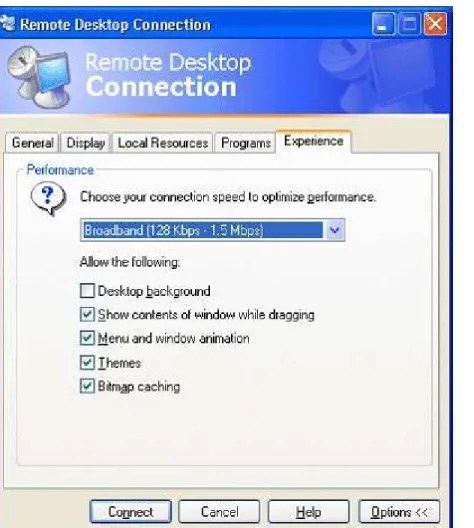
B. By configuring ABC-RDS1 to allow computers from clients running any version of Remote Desktop. C. By selecting a lower connection speed in the Remote Desktop Connection options on each client computer
in the branch office.
D. By selecting High Color (16 bit) in the Remote Desktop Connection options on each client computer in the branch office.
Correct Answer: D Section: (none)
Explanation
Explanation/Reference: Explanation:
QUESTION 28
You work as a network administrator at ABC.com. The ABC.com network consists of an Active Directory Domain Services domain named ABC.com. All servers on the network run Windows Server 2008 R2. The client computers run a mix of Windows XP Professional and Windows 7 Enterprise.
A Windows Server 2008 R2 server named ABC-RDS1 runs the Remote Desktop Session Host role. You install a custom graphics application named ABCApp1 as a RemoteApp application on ABC- RDS1. You need to ensure that ABCApp1 opens when a user double-clicks on a bitmap (.bmp) picture file. You plan to use TS RemoteApp Manager on ABC-RDS1 to create a Windows Installer file to distribute the RemoteApp package to users.
How should you configure the RemoteApp package?
A. You should enable the Allow any arguments setting when creating the package. B. You should remove the .bmp file extension association on the client computers.
C. You should enable the client extensions for this program option when creating the package.
D. You should deploy a Remote Desktop Protocol (.rdp) file to the client computers before installing the package.
Correct Answer: D Section: (none) Explanation
Explanation/Reference: Explanation:
QUESTION 29
You work as a network administrator at ABC.com. The ABC.com network consists of an Active Directory Domain Services domain named ABC.com. All servers on the network run Windows Server 2008 R2 and all client computers run Windows 7 Enterprise.
A Windows Server 2008 R2 server named RDS1 runs the Remote Desktop Session Host role. ABC-RDS1 hosts several RemoteApp applications. The RemoteApp applications are available to users in all ABC.com company departments.
A Windows Server 2008 R2 server named ABC-RDSW runs the Remote Desktop Web Access (RD Web Access) role. RDSW provides Remote Desktop Web Access to the RemoteApp applications on ABC-RDS1.
You install a custom sales application named ABCSalesApp as a RemoteApp application on ABC- RDS1. You need to configure RD Web Access so that only users in the Sales department can see ABCSalesApp as an available RemoteApp.
Which two of the following steps would achieve this goal? (Choose two.)
A. Move all user accounts for the Sales users to an Organization Unit (OU) named SalesUsers. B. Add all user accounts for the Sales users to a global security group named SalesUsers. C. Allow only the SalesUsers group NTFS permission to the folder containing ABCSalesApp.
E. Assign only the SalesUsers group to the ABCSalesApp RemoteApp when enabling RD Web Access. Correct Answer: BE
Section: (none) Explanation
Explanation/Reference: Explanation:
QUESTION 30
You work as a network administrator at ABC.com. The ABC.com network consists of an Active Directory Domain Services domain named ABC.com. The corporate firewall divides the network into an internal Local Area Network (LAN) and an external perimeter network. All servers on the network run Windows Server 2008 R2 and all client computers run Windows 7 Enterprise.
The perimeter network hosts servers that are accessible from the public internet.
A Windows Server 2008 R2 server named ABC-RDS1 is located in the LAN and runs the Remote Desktop Session Host role.
A Windows Server 2008 R2 server named ABC-RDSW is located in the LAN and runs the Remote Desktop Web Access (RD Web Access) role. ABC-RDSW provides Remote Desktop Web Access to the RemoteApp applications on ABC-RDS1.
A Windows Server 2008 R2 server named ABC-RDGW is located in the perimeter network and runs the Remote Desktop Gateway (RD Gateway) role.
To improve security, you move ABC-RDSW to the perimeter network.
Users now report that they are unable to see the RemoteApp applications when the log on to RD Web Access. How can you ensure that RemoteApp applications on ABC-RDS1 are available through RD Web Access? A. By configuring the firewall to allow port 3389 between ABC-RDSW and ABC-RDS1.
B. By configuring the firewall to allow Windows Management Instrumentation (WMI) communication between ABC-RDSW and ABC-RDS1.
C. By restarting the World Wide Web Publishing Service on ABC-RDSW.
D. By configuring the firewall to allow port 443 between ABC-RDSW and ABC-RDGW. Correct Answer: B
Section: (none) Explanation
Explanation/Reference: Explanation:
QUESTION 31
You work as a network administrator at ABC.com. The ABC.com network consists of an Active Directory Domain Services domain named ABC.com. All servers on the network run Windows Server 2008 R2. The client computers run a mix of Windows XP Professional and Windows 7 Enterprise.
A Windows Server 2008 R2 server named ABC-RDS1 runs the Remote Desktop Session Host role. You install a custom graphics application named ABCApp1 as a RemoteApp application on ABC- RDS1. You need to deploy ABCApp1 so that users can access the application from a Start menu shortcut. How should you create a package to deploy to the client computers?
A. You should use TS RemoteApp Manager to create a Remote Desktop Protocol (.rdp) file. B. You should use TS RemoteApp Manager to create a Windows Installer (.msi) file.
C. You should use Package Manager to create a Windows Image (.wim) file. D. You should use Windows Explorer to create a Shortcut (.lnk) file.
Correct Answer: B Section: (none) Explanation
Explanation/Reference: Explanation:
QUESTION 32
You work as a network administrator at ABC.com. The ABC.com network consists of an Active Directory Domain Services domain named ABC.com. All servers on the network run Windows Server 2008 R2. The client computers run a mix of Windows XP Professional and Windows 7 Enterprise.
A Windows Server 2008 R2 server named ABC-RDS1 runs the Remote Desktop Session Host role and the Microsoft Application Virtualization (App-V) 4.6 client.
You use App-V to publish a custom Sales application named ABC-SalesApp on ABC-RDS1.
You want to provide external Sales users access to ABC-SalesApp. You provide the external Sales users a Remote Desktop Protocol file that enables them to use the Connect From Anywhere feature to access ABC-SalesApp on ABC-RDS1.
You now need to configure the corporate firewall to allow the external connections to ABC-RDS1. Which port should you open on the firewall?
A. You should open HTTP port 80. B. You should open RTSP port 554. C. You should open HTTPS port 443. D. You should open RDP port 3389. Correct Answer: D
Section: (none) Explanation
Explanation/Reference: Explanation:
QUESTION 33
You work as a network administrator at ABC.com. The ABC.com network consists of an Active Directory Domain Services domain named ABC.com. All servers on the network run Windows Server 2008 R2 and all client computers run Windows 7 Enterprise.
A Windows Server 2008 R2 server named ABC-RDS1 runs the Remote Desktop Session Host role. Most users have USB Flash Drives (UFDs) that they plug into their client computers.
When users connect to ABC-RDS1 using Remote Desktop connections, their local disk drives are redirected to their Remote Desktop sessions.
A new company security policy states that USB Flash Drives should not be redirected to ABC- RDS1. Other client computer drives should continue to be redirected.
How can you comply with the new security policy?
A. By configuring a group policy object (GPO) to enable the "Prevent installation of removable devices" setting on the client computers.
B. By configuring a group policy object (GPO) to enable the "Prevent installation of removable devices" setting on ABC-RDS1.
C. By configuring a group policy object (GPO) to enable the "Do not allow drive redirection" setting on the remote desktop clients.
D. By configuring a group policy object (GPO) to disable mapping for the "Drives that I plug in Later" setting. Correct Answer: B
Section: (none) Explanation
Explanation/Reference: Explanation:
QUESTION 34
You work as a network administrator at ABC.com. The ABC.com network consists of an Active
Directory Domain Services domain named ABC.com. All servers on the network run Windows Server 2008 R2 and all client computers run Windows 7 Enterprise.
You have been asked to evaluate application virtualization using Microsoft Application Virtualization (App-V) 4.6 to see if it would be suitable as a software solution for ABC.com.
You have a copy of the Microsoft Desktop Optimization Pack. Which component do you need to install to test Microsoft Application Virtualization (App-V) 4.6 in a stand-alone configuration?
A. You need to install Microsoft System Center Configuration Manager (SCCM) with the Application Virtualization Streaming Server plug-in.
B. You need to install Microsoft System Center Configuration Manager (SCCM) with the Application Virtualization Management Server plug-in.
C. You need to install the Microsoft Application Virtualization Desktop Client. D. You need to install Microsoft Enterprise Desktop Virtualization (MED-V). Correct Answer: C
Section: (none) Explanation
Explanation/Reference: Explanation:
QUESTION 35
You work as a network administrator at ABC.com. The company consists of a main office and a branch office. Both offices are part of a single Active Directory Domain Services domain named ABC.com. The two offices are connected by a slow WAN link.
All servers are located in the main office and run Windows Server 2008 R2. All client computers in both offices run Windows 7 Enterprise.
You are configuring a Microsoft Application Virtualization (App-V) 4.5 environment.
You use App-V to virtualize an application. The virtual application will be used by users in both offices.
When you test the virtual application from the branch office, you discover that the bandwidth of the WAN link is not sufficient to run the application.
Which two of the following options would enable the virtual applications to work in the branch office? (Choose two. Each answer represents part of the solution).
A. Use App-V Desktop Client version 4.6 instead of version 4.5 on the branch office client computers. B. Install a Windows Server 2008 R2 server in the branch office.
C. Install Microsoft System Center Application Virtualization Management Server in the branch office. D. Configure serverCache in Host Cache mode in the branch office.
E. Configure an Application Virtualization File Server in the branch office. Correct Answer: CE
Section: (none) Explanation
Explanation/Reference: Explanation:
QUESTION 36
You work as a network administrator at ABC.com. The ABC.com network consists of an Active Directory Domain Services domain named ABC.com. All servers on the network run Windows Server 2008 R2. The client computers run a mix of Windows XP Professional, Windows Vista Business and Windows 7 Enterprise.
The network includes a Microsoft Application Virtualization (App-V) environment.
All Windows XP Professional client computers are 32-bit operating systems and run App-V Desktop Client 4.5. The Windows Vista client computers run either the 32-bit or 64-bit operating systems and run App- V Desktop Client 4.5.
The Windows 7 client computers run either the 32-bit or 64-bit operating systems and run App-V Desktop Client 4.6.
You plan to install a reference computer which will be used to virtualize a custom application. The virtualized application will be used by all company users.
Which software configuration should you use on the reference computer? (Choose two. Each answer represents part of the solution).
A. You should install Windows 7 64-bit. B. You should install Windows 7 32-bit. C. You should install Windows Vista 64-bit. D. You should install Windows Vista 32-bit.
E. You should install Windows XP Professional 32-bit. F. You should install App-V Sequencer 4.5.
G. You should install App-V Sequencer 4.6. Correct Answer: EF
Section: (none) Explanation
Explanation/Reference: Explanation:
You work as a network administrator at ABC.com. The ABC.com network consists of an Active Directory Domain Services domain named ABC.com.
You are deploying an application virtualization environment using Microsoft Application Virtualization (App-V) 4.6.
When you attempt to test the App-V environment by virtualizing an application, you receive an error saying the App-V Sequencer is unable to save temporary files.
How can you successfully sequence the application?
A. By running the App-V Sequencer on a Windows Server 2008 R2 server.
B. By installing System Center Application Virtualization Management Server on the App-V Sequencer computer.
C. By moving the Scratch directory to a larger drive.
D. By increasing the RAM on the App-V Sequencer computer. Correct Answer: C
Section: (none) Explanation
Explanation/Reference: Explanation:
QUESTION 38
You work as a network administrator at ABC.com. The company consists of a main office and two branch offices. All three offices are part of a single Active Directory Domain Services domain named ABC.com. The two branch offices are connected by slow WAN links to the main office.
All servers are located in the main office and run Windows Server 2008 R2. All client computers run Windows 7 Enterprise. Users with portable Windows 7 computers often travel between offices.
A server named ABC-DC1 in the main office is configured as a domain controller and primary DNS server for the domain.
You are configuring a Microsoft Application Virtualization (App-V) 4.6 environment.
You deploy Windows Server 2008 R2 servers in the main office and both branch offices. The three servers run the IIS Server role.
App-V users in each office will stream virtual applications from the local IIS server.
How would you configure DNS to ensure that users in each office connect to their local IIS server to stream virtual applications? (Choose three. Each answer represents part of the solution).
A. By creating a Host (A) record with the same name for each server.
B. By creating an Alias (CNAME) record with the same name for each server. C. By creating a Service Locator (SRV) record with the same name for each server. D. By disabling Round Robin.
E. By disabling Netmask Ordering. F. By enabling Round Robin. G. By enabling Netmask Ordering. Correct Answer: ADG
Section: (none) Explanation
Explanation/Reference: Explanation:
QUESTION 39
You work as a network administrator at ABC.com. The company consists of a main office and a branch office. Both offices are part of a single Active Directory Domain Services domain named ABC.com. The two offices are connected by a slow WAN link.
All servers are located in the main office and run Windows Server 2008 R2. All client computers in both offices run Windows 7 Enterprise.
You are configuring a Microsoft Application Virtualization (App-V) 4.5 environment.
You use App-V to virtualize an application. The virtual application will be used by users in both offices.
When you test the virtual application from the branch office, you discover that the bandwidth of the WAN link is not sufficient to run the application.
How can you enable the branch office users to run the virtual application?
A. Use App-V Desktop Client version 4.6 instead of version 4.5 on the branch office client computers. B. Create a Windows Installer (.msi) package for the virtual application and deploy that to the
branch office client computers.
C. Install Microsoft System Center Application Virtualization Management Server in the branch office. D. Configure BranchCache in Distributed Cache mode in the branch office.
Correct Answer: B Section: (none) Explanation
Explanation/Reference: Explanation:
QUESTION 40
Your franchise company is deploying a Microsoft Virtual Desktop Infrastructure (VDI) on servers that run Windows Server 2008 R2.
The franchise owners need access to corporate applications that run on virtual desktops. The owners will use a web browser to connect to the virtual desktops. Web Single Sign-On (SSO) is not required.
You need to authorize the Microsoft Remote Desktop (RD) servers for Microsoft RemoteApp and Desktop Connection.
Which three actions should you perform? (Each correct answer presents part of the solution. Choose three.) A. On the RD Session Host server, add the RD Virtualization Host server to the TS Web Access Computers
group.
B. Add the RD Licensing role service to the RD Web Access server.
C. On the RD Connection Broker server, add the RD Web Access server to the Session Broker Computers group.
D. On the RD Session Host server, add the RD Web Access server to the TS Web Access Computers group. E. On the RD Session Host server, add the RD Connection Broker server to the TS Web Access Computers
group.
F. On the RD Connection Broker server, add the RD Virtualization Host server to the Session Broker Computers group.
Correct Answer: DEF Section: (none) Explanation
Explanation/Reference:
Populate the TS Web Access Computers Security Group
If the RD Web Access server and the Remote Desktop Session Host (RD Session Host) server that hosts the RemoteApp programs are separate servers, you must add the computer account of the RD Web Access server to the TS Web Access Computers security group on the RD Session Host server.
http://technet.microsoft.com/en-us/library/cc771623.aspx
---AND---In this step, you will configure RemoteApp and Desktop Connection so that users in the CONTOSO domain can access it by using Remote Desktop Web Access (RD Web Access). Use the following steps to configure RemoteApp and Desktop Connection:
Add the RDCB-SRV (RD Connection Broker) computer account object to the TS Web Access Computers security group on RDSH-SRV (RD Session Host).
Add a RemoteApp program by using RemoteApp Manager.
Add the RDWA-SRV (RD Web Access) computer account object to the TS Web Access Computers security group on RDCB-SRV.
Assign a RemoteApp source on the RD Web Access server (RDWA-SRV).
Add a RemoteApp source on the RDCB-SRV computer by using Remote Desktop Connection Manager., you must add the RDCB-SRV computer account object to the TS Web Access Computers security group on RDSH-SRV.
http://technet.microsoft.com/en-us/library/dd883260(v=ws.10)
---AND---Configure Security Groups on an RD Connection Broker Server
You must configure the following two security groups on the Remote Desktop Connection Broker (RD Connection Broker) server:
TS Web Access Computers Session Broker Computers
If you have installed and configured a Remote Desktop Session Host (RD Session Host) server to provide redirection to virtual desktops, you must add the computer account for that computer to the local Session Broker Computers group on the RD Connection Broker server. For information about configuring an RD Session Host server for redirection, see Configuring an RD Session Host Server to Provide Redirection to Virtual Desktops.
If you have deployed a load-balanced RD Session Host server farm to provide RemoteApp programs through RemoteApp and Desktop Connection, add the computer account for each RD Session Host server in the load-balanced RD Session Host server farm to the Session Broker Computers group.
Note
The Session Broker Computers group on the RD Connection Broker server must also contain the computer accounts for any Remote Desktop Virtualization Host (RD Virtualization Host) servers that are hosting virtual machines used for RemoteApp and Desktop Connection. The computer account for an RD Virtualization Host server is automatically added to the Session Broker Computers group when you add the RD Virtualization Host server by using the Remote Desktop Connection Manager tool. For more information, see Add an RD
Virtualization Host Server for RemoteApp and Desktop Connection.
QUESTION 41
The company has the following profile redirection requirements: A single GPO must be used to perform all redirection.
All users' Documents folders must reside on their client computers.
Redirection must be based on the membership of five existing AD DS security groups. All five AD DS security groups must be defined with a unique folder redirection path. You need to redirect the users' Pictures folders.
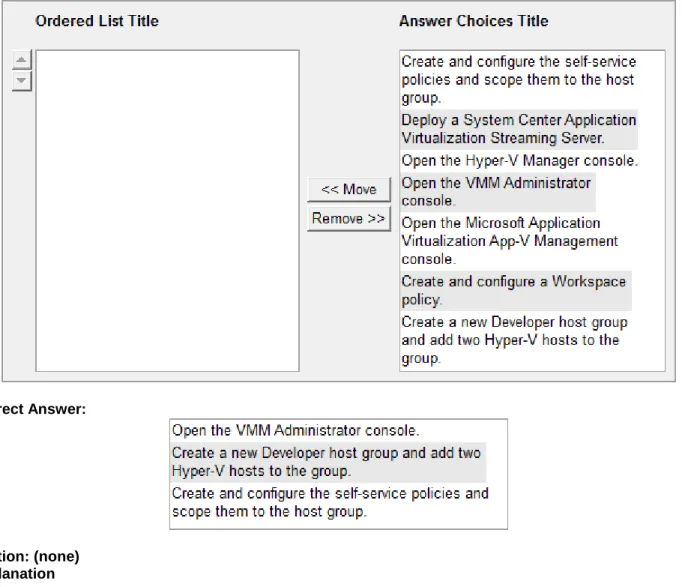
Which Group Policy setting should you select? To answer, select the appropriate setting in the answer area. Point and Shoot:
Correct Answer:
Section: (none) Explanation
Explanation/Reference:
Basic Redirection and Advanced Redirection
Basic Redirection and Advanced Redirection are available to all folders listed in the snap-in. You use basic redirection when you store the selected folder in the Group Policy object on the same share for all users. You use Advanced Redirection when you want to redirect the selected folder to a different location based
on a security group membership of the user. For example, you would use Advanced Folder Redirection when you want to redirect folders belonging to the Accounting group to the Finance server and folders belonging to the Sales group to the Marketing server.
Note
If a user is a member of multiple security groups listed for a specific folder, Folder Redirection will use the path of the first security group that matches for the given user.
Follow Documents folder
The Music, Pictures, and Videos folders support another Folder Redirection setting called Follow Documents folder. The Follow Documents folder setting redirects the Music, Pictures, and Videos folders as subfolders of the Documents folder. This folder redirection will make the selected folder inherit folder redirection options from the Documents folder and disable the folder redirection options for the selected folder.
http://technet.microsoft.com/en-us/library/cc766489(v=WS.10).aspx
QUESTION 42
A university is deploying folder redirection for the members of the Students, Staff, and Faculty Active Directory Domain Services (AD DS) security groups. All client computers run Windows 7. Currently, there are no redirection policies in place.
The IT department requires that members of each security group store data on a separate file server. Each user must have access to only their data from any client computer.
You need to enable folder redirection for all of the users. What should you do?
A. Deploy a single Group Policy object and use the Grant the user exclusive rights setting.
2000 Server, Windows XP, and Windows 2003 operating systems setting.
C. Deploy a single Group Policy object and use the Advanced - Specify locations for various user groups setting.
D. Deploy three Group Policy objects and use the Redirect to the local user profile location setting. Correct Answer: C
Section: (none) Explanation
Explanation/Reference:
Basic Redirection and Advanced Redirection
Basic Redirection and Advanced Redirection are available to all folders listed in the snap-in. You use basic redirection when you store the selected folder in the Group Policy object on the same share for all users. You use Advanced Redirection when you want to redirect the selected folder to a different location based on a security group membership of the user. For example, you would use Advanced Folder Redirection when you want to redirect folders belonging to the Accounting group to the Finance server and folders belonging to the Sales group to the Marketing server.
Note
If a user is a member of multiple security groups listed for a specific folder, Folder Redirection will use the path of the first security group that matches for the given user.
http://technet.microsoft.com/en-us/library/cc766489(v=WS.10).aspx
QUESTION 43
Your company uses Microsoft Remote Desktop Services (RDS) in a virtual environment. The Remote Desktop Licensing (RD Licensing) database has become corrupted.
You need to ensure that you can manage the RDS client access licenses (RDS CALs). What should you do first?
A. Reinstall the RDS CALs.
B. Migrate the RDS CALs from another license server to this license server. C. Rebuild the license server database.
D. Reactivate the license server. Correct Answer: A
Section: (none) Explanation
Explanation/Reference:
Event ID 47 — Remote Desktop License Server Database Availability Event Details
Message: The RD Licensing database is corrupt. RD Licensing could not rename the RD Licensing database file "%1!s!" to create a backup. Rename the file manually and restart the Remote Desktop Licensing service. To reinstall the Remote Desktop Services client access licenses (RDS CALs), you will need to call the Microsoft Clearinghouse. When you call the Clearinghouse, ensure that your License Purchase Agreement information is readily available.
Resolve
Reinstall the RDS CALs onto the license server by using the telephone method To resolve this issue, do the following on the Remote Desktop license server:
Rename the RD Licensing database file. Start the Remote Desktop Licensing service.
Reinstall the Remote Desktop Services client access licenses (RDS CALs) by using the telephone method. To perform these procedures, you must have membership in the local Administrators group, or you must have been delegated the appropriate authority.
http://technet.microsoft.com/en-us/library/ee891345(v=ws.10).aspx
QUESTION 44
A company is migrating all of its computers from Windows Vista to Windows 7.
You need to use the Microsoft User State Migration Tool (USMT) to migrate user profiles and application customization settings to Windows 7.
Which three actions should you perform in sequence? (To answer, move the appropriate actions from the list of actions to the answer area and arrange them in the correct order.)
Correct Answer:
Section: (none) Explanation
Explanation/Reference:
Scenario One: PC refresh using a compressed migration store
For example, a company has just received funds to update all of its computers to Windows® 7. Each employee will keep the same computer, but the operating system on each computer will be updated.
1. An administrator runs the ScanState command-line tool on each computer. ScanState saves each user state to a server.
2. On each computer, an administrator installs the company's standard operating environment, which includes Windows 7, Microsoft® Office, and other company applications.
3. An administrator runs the LoadState command-line tool on each computer. LoadState restores each user state back to the source computer.
QUESTION 45
Your company has an Active Directory Domain Services (AD DS) domain. All servers run Windows Server 2008 R2.
You use a virtual desktop infrastructure (VDI) environment to provide access to applications. AII virtual desktop computer objects are located in an organizational unit (OU) named VirtuaIDesktops. All client computer objects are located in an OU named Desktops.
You need to ensure that all existing users receive the same desktop shortcuts, and that they are not able to modify the shortcuts from virtual desktops.
Which two actions should you perform? (Each correct answer presents part of the solution. Choose two.) A. Create a new default user profile.
B. Create a Group Policy object (GPO) that configures the user profile. Link the GPO to the VirtuaIDesktops OU.
C. Create a Group Policy object (GPO) that configures the user profile. Link the GPO to the Desktops OU. D. Create a mandatory user profile.
Correct Answer: BD Section: (none) Explanation
Explanation/Reference:
A mandatory user profile is a special type of pre-configured roaming user profile that administrators can use to specify settings for users. With mandatory user profiles, a user can modify his or her desktop, but the changes are not saved when the user logs off. The next time the user logs on, the mandatory user profile created by the administrator is downloaded. There are two types of mandatory profiles: normal mandatory profiles and
super-mandatory profiles.
User profiles become mandatory profiles when the administrator renames the NTuser.dat file (the registry hive) on the server to NTuser.man. The .man extension causes the user profile to be a read-only profile.
User profiles become super-mandatory when the folder name of the profile path ends in .man; for example, \ \server\share\mandatoryprofile.man\.
Super-mandatory user profiles are similar to normal mandatory profiles, with the exception that users who have super-mandatory profiles cannot log on when the server that stores the mandatory profile is unavailable. Users with normal mandatory profiles can log on with the locally cached copy of the mandatory profile.
Only system administrators can make changes to mandatory user profiles.
http://msdn.microsoft.com/en-us/library/windows/desktop/bb776895(v=vs.85).aspx
To create a roaming user profile
1. Open Active Directory Users and Computers.
2. Click the domain and the OU where the user account resides.
3. Right-click the user account for which to set a roaming profile, and then click Properties.
4. Click the Profile tab, and then type the profile path information in Profile path. (Use the full path in each user account. For example, type \\Server\ShareName\UserName.)
To create a roaming user profile for a user that has a local profile
Open Active Directory Users and Computers.1. Click the domain and the OU where the user account resides.
2. Right-click the appropriate user account for which to set a roaming profile, and then click Properties. 3. Click the Profile tab, and type the profile path information in Profile path (for example, type \\Server
\ShareName\UserName).
Additional Policy Settings That Are Related to User Profiles
Prevent roaming profile changes from propagating to the serverThis policy determines if the changes a user makes to their roaming profile are merged with the server copy of their profile. If this policy is set, at logon users receive their roaming profile, but any changes users make to their profile are not merged to the users’ roaming profile at logoff.
Then create a dummy account as described earlier, log on to a desktop machine using this account,
preconfigure the desktop, and log off. Log on to the desktop as Administrator and open the User Profiles dialog box as before, using System in Control Panel. Select the local profile for your template account and click on Copy To as before. But this time, in the Copy To box above, type \\<dcname>\NETLOGON\Default User,
where <dcname> is the name of your domain controller. Then click on Change and specify Everyone so that any user can use this new profile. Now when you click on OK, your preconfigured profile is copied to the NETLOGON share on your domain controller as a folder named Default User. When a user logs on to the network for the first time, her machine will access this share and use this preconfigured profile as the basis for creating her roaming profile, which is saved in \\<servername>\<sharename> as before.
http://windowsdevcenter.com/pub/a/windows/2004/08/17/roaming_profiles.html
QUESTION 46
Your company has an Active Directory Domain Services (AD DS) domain. You install the Remote Desktop Session Host (RD Session Host) role service on a server that runs Windows Server 2008 R2. All client computers run Windows 7.
You need to ensure that the current Libraries from users' computers are available when they Iog on to the RD Session Host server.
What should you do?
A. Redirect each user s Documents folder to a network share.
B. Use Group Policy Preferences to copy .library-ms files from the client computers to the RD Session Host server.
C. Redirect each user's Links folder to the RD Session Host server.
D. Use a startup script to copy .library-ms files from the client computers to the RD Session Host server. Correct Answer: B
Section: (none) Explanation
Explanation/Reference:
Administrators can deploy customized libraries in the following ways:
Using a logon script or Group Policy Preferences (through the Default User profile) Adding custom libraries to the server where Roaming User Profiles are redirected Deploying through a logon script or Group Policy Preferences
You can copy the .library-ms files to a local computer or copy them to a server if the users’ library directories are redirected to a network location. You can use a logon script or Group Policy Preferences to copy libraries to the %userprofile%\Appdata\roaming\Microsoft\Windows\Libraries directory.
The locations specified in custom libraries need to be accessible by the target users. These locations include known folders, fixed local folders, mapped drives on the users’ computers, or network shared resources where users have access. If a user does not have permissions to a folder, that folder does not appear in the library and no warning appears for the user.
Using the Default User profile Administrators can edit the set of libraries associated with the Default User profile, and then deploy the libraries to users who derive from Default User.
Deploying libraries using Roaming User Profiles
Remote libraries can include content from locations that are local or remote to the server, much as local libraries can. To support this, the user’s known folders are ideally redirected and available in the Roaming User Profiles. Library definition files are located in the %userprofile%\Appdata\roaming\Microsoft\Windows \Libraries directory, and they can be shared on a server.
http://technet.microsoft.com/en-us/library/ee461108(v=ws.10).aspx
QUESTION 47
Your company has an Active Directory Domain Services (AD DS) domain that runs at the Windows Server 2008 functional level. All servers run Windows Server 2008 R2. AII client computers run Windows XP Professional.
You use the Key Management Service (KMS) to manage your volume license activations. AII servers have been activated by using KMS.
You deploy 20 Windows 7 virtual desktops. The virtual desktop operating systems do not activate. You need to ensure that the virtual desktops activate by using KMS.
What should you do?
A. Deploy five more virtual desktops.
B. Raise the domain functional level to Windows Server 2008 R2. C. Use the Volume Activation Management Tool (VAMT).
D. Run slmgr vbs with the -ato parameter. Correct Answer: A
Section: (none) Explanation
Explanation/Reference: KMS Activation Thresholds
KMS can activate both physical computers and virtual machines. To qualify for KMS activation, a network must meet the activation threshold: KMS hosts activate client computers only after meeting this threshold. To ensure that the activation threshold is met, a KMS host counts the number of computers that are requesting activation on the network. For computers running Windows Server 2008 or Windows Server 2008 R2, the activation threshold is five. For computers running Windows Vista or Windows 7, the activation threshold is 25. The thresholds include client computers and servers that are running on physical computers or virtual machines.
A KMS host responds to each valid activation request from a KMS client with the count of how many computers have contacted the KMS host for activation. Clients that receive a count below their activation threshold are not activated. For example, if the first two computers that contact the KMS host are running Windows 7, the first receives an activation count of 1, and the second receives an activation count of 2. If the next computer is a Windows 7 virtual machine, it receives an activation count of 3, and so on. None of these computers is activated, because computers running Windows 7 must receive an activation count ≥25 to be activated. KMS clients in the grace state that are not activated because the activation count is too low connect to the KMS host every two hours to get the current activation count and will be activated when the threshold is met.
http://technet.microsoft.com/en-us/library/ff793434.aspx
QUESTION 48
Your company has an Active Directory Domain Services (AD DS) domain. You have multiple Remote Desktop Session Host (RD Session Host) servers. You have 100 Windows Server 2008 R2 Remote Desktop Services client access licenses (RDS CALs) installed on your license server.
You need to return 10 RDS CALs to the pool on the license server. What should you do?
A. Remove the Per User RDS CALs. B. Remove the Per Device RDS CALs. C. Revoke the Per User RDS CALs. D. Revoke the Per Device RDS CALs. Correct Answer: D
Section: (none) Explanation
Explanation/Reference:
A permanent RDS Per Device CAL issued by a license server is configured to automatically expire after a random period between 52 and 89 days, at which time the RDS Per Device CAL returns to the pool of available RDS Per Device CALs on the license server.