Microsoft Private Cloud Fast Track
Reference Architecture Guide
Published: July 2012
Contributors
Microsoft Consulting Services
Adam Fazio ([email protected]) Solution Architect
David Ziembicki ([email protected]) Solution Architect
Joel Yoker ([email protected]) Solution Architect
Business stakeholders
Mike Truitt ([email protected]) Senior Product Planner
Bryon Surace ([email protected]) Senior Program Manager, Windows Server Jim Dial ([email protected])
Principal Knowledge Engineer, Server & Cloud Division, Information Experience Solutions
Copyright information
This document is provided “as-is”. Information and views expressed in this document, including URL and other Internet Web site references, may change without notice.
Some examples depicted herein are provided for illustration only and are fictitious. No real association or connection is intended or should be inferred.
This document does not provide you with any legal rights to any intellectual property in any Microsoft product. You may copy and use this document for your internal, reference purposes.
© 2012 Microsoft. All rights reserved.
Active Directory, Forefront, Hyper-V, Microsoft, SharePoint, SQL Server, Windows, Windows Server, Windows PowerShell, and Windows Vista are trademarks of the Microsoft group of companies.
Contents
Introduction... 5
Private Cloud Fast Track Program Description ... 6
Business Value ... 6
Technical Benefits ... 6
Technical Overview ... 7
Using this Document ... 9
Microsoft Private Cloud Overview ... 10
Private Cloud Architecture Principles & Concepts ... 11
Resource Pooling ...11
Elasticity and Perception of Infinite Capacity ...11
Perception of Continuous Service Availability...11
Drive Predictability ...11
Take a Service Provider’s Approach ...11
Multitenancy ...12
Security and Identity ...12
Private Cloud Reference Model ... 12
Conceptual Architecture... 13 Fabric ...14 Management ...16 Service Delivery ...17 Operations...18 Reference Architecture...18 Use Cases ... 18 Service Models ...18 IaaS ...19
Data Center Consolidation and Virtualization...19
Virtual Desktop Infrastructure ...20
Fabric Logical Architecture ... 20
Fabric ...20
Server Architecture ... 21
Rack or Blade Chassis Design ...22
Server and Blade Design Recommendations ...22
Server and Blade Storage Connectivity Recommendations ...22
Server and Blade Network Connectivity ...22
Server and Blade High Availability and Redundancy Recommendations ...22
Storage Architecture ... 23
Storage Options ...23
SAN Storage Protocols ...23
Cluster Shared Volumes ...25
Storage Automation ...32
Network Architecture ... 33
Three-Tier Network Design ...33
Collapsed Core Network Design...34
High Availability and Resiliency ...35
Network Security and Isolation ...35
Network Automation ...36
Virtualization Architecture ... 36
Virtualization ...36
Windows Server 2008 R2 SP1 and Hyper-V Host Design ...39
Hyper-V Failover Cluster Design...46
Hyper-V Guest Virtual Machine Design ...49
Management Architecture ... 54
Management Hosts ...54
Management Logical Architecture ...56
Management Systems Architecture ...58
Management Scenarios Architecture...65
Service Management ...71
Backup and Disaster Recovery...72
Security ...73
Service Delivery Layer ... 76
Operations ... 78
Introduction
The Microsoft®Private Cloud Fast Track Program is a joint effort between Microsoft and its hardware partners. The goal of the program is to help organizations decrease the time, complexity, and risk of implementing private clouds. The program provides:
Reference implementation guidance: Lab-tested and validated guidance for implementing multiple Microsoft products and technologies with hardware that meets specific, minimum, hardware vendor-agnostic requirements. Customers can use this guidance to implement a private cloud solution with hardware they already own, or that they purchase.
Reference implementations: Microsoft hardware partners define physical architectures with computing, network, storage, and value-added software components that meet (or exceed) the minimum hardware requirements defined in the reference implementation guidance. Each implementation is then validated with Microsoft and made available for purchase to
customers. Further details can be found by reading the information at Private Cloud How To Buy.
The customer has the choice of building the solution by using the reference implementation guidance or purchasing a solution from a Microsoft hardware partner that couples the guidance with optimized hardware configurations. Although both options decrease the time, cost, and risk in implementing private clouds, purchasing a reference implementation from a Microsoft hardware partner will result in the fastest, lowest-risk solution. This is due to the fact that in this option, all of the hardware and software best practice implementation choices have been determined by Microsoft and its hardware partners’ engineering teams. As a result, this will often also prove to be the most inexpensive option.
The private cloud model provides much of the efficiency and agility of cloud computing in addition to the increased control and customization that is achieved through dedicated private resources. With the Microsoft Private Cloud Fast Track Program, Microsoft and its hardware partners can help provide organizations with the control and flexibility required to reap the potential benefits of the private cloud.
The Private Cloud Fast Track Program includes three documents to help you create your private cloud solution. Refer to the following companion guides:
Microsoft Private Cloud Fast Track Reference Deployment Guide
Private Cloud Fast Track Program Description
The Microsoft Private Cloud Fast Track Program is a joint reference architecture for building private clouds, which combines Microsoft software, consolidated guidance, and validated configurations with hardware partner computing power, network, and storage architectures; and value-added software components. Specifically, the Microsoft Private Cloud Fast Track Program utilizes the core capabilities of the Windows Serveroperating system, Hyper-V technology, and Microsoft System Center 2012 to deliver the building blocks of a private cloud infrastructure as a service offering. The key software components of every reference implementation are the Windows Server 2008 R2 SP1 operating system, Hyper-V, and Microsoft System Center 2012.
Business Value
The Microsoft Private Cloud Fast Track Program includes a set of three documents that provide reference implementation guidance and reference implementations (as described previously). The program can be used to build private clouds that are flexible and extensible. A Microsoft Private Cloud Fast Track solution helps organizations implement virtualization and private clouds with increased ease and confidence. The potential benefits of the Microsoft Private Cloud Fast Track Program include faster deployment, reduced risk, and a lower cost-of-ownership.
Faster Deployment
End-to-end architectural and deployment guidance
Streamlined infrastructure planning due to predefined capacity
Enhanced functionality and automation through deep knowledge of infrastructure
Integrated management for virtual machine and infrastructure deployment
Reduced Risk
Tested end-to-end interoperability for compute, storage, and network (if the solution is purchased from a Microsoft hardware partner)
Predefined, out-of-box solutions based on a common cloud architecture
High degree of service availability through automated load balancing
Lower Cost-of-Ownership
Near-zero downtime with exceptional fault tolerance, providing high availability
Dynamic pooling that can enhance the use of virtualization resources with Hyper-V and with supported storage and network devices
Utilization of low-cost switches that consume less power and deliver high throughput for large bandwidth requirements
Technical Benefits
The Microsoft Private Cloud Fast Track Program integrates multiple Microsoft products and technologies, in addition to hardware requirements, to create reference implementation guidance. If the solution is purchased from a Microsoft hardware partner, the reference implementation guidance is implemented with partner hardware and sold as a reference implementation. Whether the customer decides to implement the Microsoft-validated reference implementation guidance with their own hardware or with hardware from a Microsoft partner, it goes through a validation process. In either case, Microsoft and its hardware partners have created a solution that is ready to meet customer needs.
Technical Overview
To establish a baseline of understanding for the term “cloud computing,” this document utilizes
terminology from the United States National Institute of Standards and Technology’s (NIST) Definition of Cloud Computing. This is one of the more popular definitions in use today. The current release is version 16 of the definition, which was created with input from many public and private reviewers and
contributors. For more information, see Final Version of NIST Cloud Computing Definition Published. Note: The following text in this section is an excerpt from NIST Definition of Cloud Computing (Mell and Grance 2011).
Cloud computing is a model for enabling ubiquitous, convenient, on-demand network access to a shared pool of configurable computing resources (such as networks, servers, storage, applications, and services) that can be rapidly provisioned and released with minimal management effort or service provider interaction. This cloud model is composed of five essential characteristics, three service models, and four deployment models.
Essential Characteristics:
On-demand self-service. A consumer can unilaterally provision computing capabilities, such as server time and network storage, as needed automatically without requiring human interaction with each service provider.
Broad network access. Capabilities are available over the network and accessed through standard mechanisms that promote use by heterogeneous thin or thick client platforms (such as mobile phones, tablets, laptops, and workstations).
Resource pooling. The provider’s computing resources are pooled to serve multiple consumers using a multi-tenant model, with different physical and virtual resources dynamically assigned and reassigned according to consumer demand. There is a sense of location independence in that the customer generally has no control or knowledge over the exact location of the provided resources but may be able to specify location at a higher level of abstraction (such as country, state, or data center). Examples of resources include storage, processing, memory, and network bandwidth.
Rapid elasticity. Capabilities can be elastically provisioned and released, in some cases automatically, to scale rapidly outward and inward commensurate with demand. To the consumer, the capabilities available for provisioning often appear to be unlimited and can be appropriated in any quantity at any time.
Measured service. Cloud systems automatically control and optimize resource use by leveraging a metering capability1at some level of abstraction appropriate to the type of service (such as storage, processing, bandwidth, and active user accounts). Resource usage can be monitored, controlled, and reported, providing transparency for both the provider and consumer of the utilized service.
Service Models:
1
Software as a Service (SaaS). The capability provided to the consumer is to use the provider’s applications running on a cloud infrastructure2. The applications are accessible from various client devices through either a thin client interface, such as a web browser (web-based email) or a program interface. The consumer does not manage or control the underlying cloud infrastructure including network, servers, operating systems, storage, or even individual application capabilities, with the possible exception of limited user-specific application configuration settings.
Platform as a Service (PaaS). The capability provided to the consumer is to deploy onto the cloud
infrastructure consumer-created or acquired applications created using programming languages, libraries, services, and tools supported by the provider.3The consumer does not manage or control the underlying cloud infrastructure including network, servers, operating systems, or storage, but has control over the deployed applications and possibly configuration settings for the application-hosting environment.
Infrastructure as a Service (IaaS). The capability provided to the consumer is to provision processing, storage, networks, and other fundamental computing resources where the consumer is able to deploy and run arbitrary software, which can include operating systems and applications. The consumer does not manage or control the underlying cloud infrastructure but has control over operating systems, storage, and deployed applications; and possibly limited control of select networking components (host firewalls). Deployment Models:
Private cloud. The cloud infrastructure is provisioned for exclusive use by a single organization comprising multiple consumers (business units). It may be owned, managed, and operated by the organization, a third party, or some combination of them, and it may exist on or off premises.
Community cloud. The cloud infrastructure is provisioned for exclusive use by a specific community of consumers from organizations that have shared concerns (such as mission, security requirements, policy, and compliance considerations). It may be owned, managed, and operated by one or more of the organizations in the community, a third party, or some combination of them, and it may exist on or off premises.
Public cloud. The cloud infrastructure is provisioned for open use by the general public. It may be owned, managed, and operated by a business, academic, or government organization, or some combination of them. It exists on the premises of the cloud provider.
Hybrid cloud. The cloud infrastructure is a composition of two or more distinct cloud infrastructures (private, community, or public) that remain unique entities, but are bound together by standardized or proprietary technology that enables data and application portability (such as cloud bursting for load balancing between clouds).
2
A cloud infrastructure is the collection of hardware and software that enables the five essential characteristics of cloud computing. The cloud infrastructure can be viewed as containing both a physical layer and an abstraction layer. The physical layer consists of the hardware resources that are necessary to support the cloud services being provided, and typically includes server, storage and network component s. The abstraction layer consists of the software deployed across the physical layer, which manifests the essential cloud characteristics. Conceptually the abstraction layer sits above the physical layer.
3
Using this Document
This document will be of most benefit to system architects, designers, and engineers who plan, design, or implement private cloud solutions in their organization.
The physical architecture detailed in this document was designed to achieve goals of high availability, scalability, and performance, while providing security for the infrastructure, and the virtual machines within it. In addition to the physical architecture, this document includes a private cloud reference model and principles that serve as the foundation for the physical architecture. Further, the document includes many best practice recommendations from Microsoft product and enterprise service teams.
Microsoft Private Cloud Overview
The private cloud is a computing model that uses resources that are dedicated to your organization. A private cloud shares many of the characteristics of public cloud computing including resource pooling, self-service, elasticity, and usage-based metering. However, a private cloud is delivered in a standardized manner with the additional control and customization available from dedicated resources.
Figure 1: Private cloud attributes
Although virtualization is an important technological component of a private cloud, the key differentiator is the continued abstraction of computing resources from the infrastructure and the machines (virtual or otherwise) that are used to deliver those resources. Only by delivering this abstraction, can customers achieve the potential benefits of a private cloud, which include improved agility and responsiveness, increased business alignment and focus, and reduced total cost-of-ownership. In addition, a private cloud can exceed the cost effectiveness of a virtualized infrastructure through higher workload density and greater resource utilization.
Microsoft private cloud solutions are built on four key pillars:
All about the app: An application-centric cloud platform that helps you focus on business value.
Cross-platform from the metal up: Cross-platform support for multi-hypervisor environments, operating systems, and application frameworks.
Foundation for the future: A Microsoft private cloud allows you to go beyond virtualization to a true cloud platform.
Cloud on your terms: The ability to consume cloud on your terms, providing you the choice and flexibility of a hybrid cloud model through common management, virtualization, identity, and developer tools.
Private Cloud Architecture Principles & Concepts
Resource Pooling
Resource optimization is a principle that drives efficiency and cost reduction. It is achieved primarily through resource pooling. Abstracting the platform from the physical infrastructure enables optimization of resources through shared use. Multiple consumers sharing resources results in higher resource utilization and leads to a more efficient, effective use of the infrastructure. Optimization through abstraction enables many of the Microsoft private cloud principles, and this technique can ultimately help drive down costs and improve agility.
Elasticity and Perception of Infinite Capacity
From a consumer’s perspective, cloud services appear to have infinite capacity. Using an electric utility provider as a metaphor, the consumer can use as much or as little of the service as he needs. This utility approach requires that capacity planning be paramount and proactive so that requests can be satisfied on demand. Applying this principle reactively and in isolation often leads to an inefficient use of resources and unnecessary costs. Combined with other principles, like encouraging a desired consumer behavior, this principle allows for a balance between the cost of unused capacity and the desire for agility.
Perception of Continuous Service Availability
From the consumer’s perspective, cloud services should always appear available when needed. The consumer should never experience an interruption of service, even if failures occur within the cloud
environment. To achieve this perception, a provider must have a mature service management approach, an inherent application resiliency, and infrastructure redundancies in a highly automated environment. Much like the perception of infinite capacity, the perception of continuous availability can only be achieved in conjunction with the other Microsoft private cloud principles.
Drive Predictability
Predictability is a fundamental cloud principle whether you are a consumer or a provider. From the
vantage point of the consumer, cloud services should be consistent, and they should have the same quality and functionality any time they are used.
A provider must deliver an underlying infrastructure that drives a consistent experience to the hosted workloads to achieve predictability. This consistency is realized through the homogenization of underlying physical servers, network devices, and storage systems.
From the service management perspective of a provider, predictability is driven through the
standardization of service offerings and processes. The principle of predictability is necessary for driving service quality.
Take a Service Provider’s Approach
When you take a service provider’s approach for delivering information technology, a key capability is to be able to meter resource utilization and charge users for that usage. Historically, when IT departments have been asked to deliver a service to the business, they purchase the necessary components and then
build an infrastructure that is specific to the service requirements. This process can result in an increase in time-to-market, higher costs because of duplicate infrastructures, and unmet business expectations of agility and cost reduction. Further compounding the issue, this model is often used when an existing service needs to be expanded or upgraded.
IT departments can transform their organization by taking a service provider’s approach. When infrastructure is provided as a service, IT departments can use a shared resource model that enables economies of scale, and they can also combine other private cloud architecture principles & concepts to achieve greater agility for providing services.
Multitenancy
Multitenancy refers to a principle in which an infrastructure can be logically subdivided and provisioned to organizations or organizational units. The traditional example is a hosting company that provides servers to multiple customer organizations. Increasingly, this model is being used by organizations with a centralized IT department that provides services to multiple business or organizational units and treats each as a customer or tenant.
Security and Identity
Security for a Microsoft private cloud is founded on three pillars: protected infrastructure, application access, and network access.
Protected infrastructure: Uses security and identity technologies to help make sure that hosts, information, and applications are secured across all scenarios in the data center, including physical (on premises) and virtual (on premises and in the cloud) scenarios.
Application access: Allows IT professionals to extend vital application access to internal users, business partners, and cloud users.
Network access: Uses an identity-centric approach to provide users (internal employees or users in remote locations) with more secure access on numerous devices to help foster greater
productivity.
A more secure data center uses common, integrated technology to provide users simple access with a common identity. A more secure data center also integrates management across physical, virtual, and cloud environments so that a business can take advantage of all IT capabilities without requiring significant financial investments.
Private Cloud Reference Model
Infrastructure as a service (IaaS) is the application of the private cloud architecture principles & concepts to deliver infrastructure. As the cloud ecosystem matures, product features and capabilities broaden and deepen. The following reference model can be used as a guide for delivering a holistic solution that spans all the layers that are required for a mature IaaS. This model is a reference only, and it can assist architects in developing a private cloud architecture. Some elements are emphasized more than others in the
technical reference architecture, and that preference is based on the experience of operating private clouds in real-world environments.
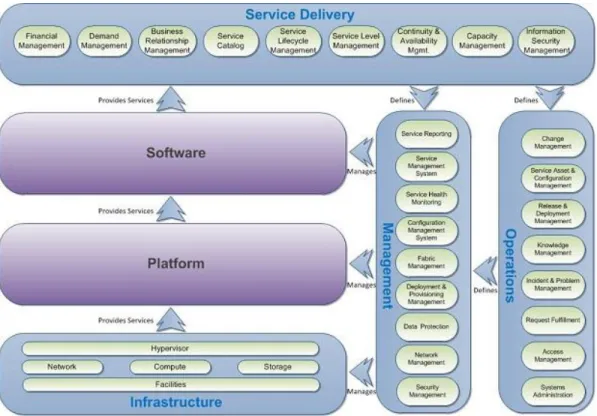
Figure 2: Private Cloud Reference Model - IaaS view
The reference model is split into the following layers:
The software, platform, and infrastructure layers represent the technology stack. Each layer provides services to the layer above.
The service operations and management layers represent the process perspective, and they include the management tooling required to implement the process.
The service delivery layer represents the alignment between business and IT.
This reference model is a deliberate attempt to blend technology and process perspectives because cloud computing is as much about service management as it is about the technologies involved in it. For more information, see the following resources:
Information Technology Infrastructure Library (ITIL)
Microsoft Operations Framework (MOF)
Private Cloud Reference Model
Conceptual Architecture
A key driver of the layered approach to infrastructure architecture is to enable complex workflows and automation to be delivered over time. This approach can be achieved by creating a collection of simple automation tasks, assembling and managing procedures in the management layer, and then creating the workflows and process automation that are controlled by the orchestration layer.
Fabric
Scale Units
In a modular architecture, the concept of a scale unit refers to the point to which a module in the architecture can scale before another module is required. For example, an individual server is a scale unit because it can be expanded to a certain point in terms of CPU and RAM, but when it reaches its maximum scalability, an additional server is required to continue scaling. Each scale unit also has an associated amount of physical installation and configuration labor. With large scale units, like a preconfigured full rack of servers, the labor overhead can be minimized.
It is critical to know the scale limits of all components, both hardware and software, when you are determining the optimum scale units for the overall architecture. Scale units enable the aggregation of all the requirements that are needed for implementation (for example, space, power, HVAC, and connectivity).
Servers
Data center architects have constantly evolved their choice of hardware architecture. Choices range from rack-mounted servers to tightly integrated, highly redundant blade systems to container models. A similar spectrum exists for storage and networking equipment.
Server scale limits are well published, and examples include the number and speed of CPU cores, the maximum amount and speed of RAM, and the number and type of expansion slots. The number and type of onboard input/output (I/O) ports and the number and type of supported I/O cards are particularly important. Ethernet and Fibre Channel expansion cards often provide multiport options where a single card can have four ports. Additionally, in blade server architectures, there are often limitations in the amount of I/O card and supported combinations. It is important to be aware of these limitations in addition to the oversubscription ratio between blade I/O ports and blade chassis switch modules. A single server is not typically a good scale unit for a private cloud solution because of the overhead that is required to install and configure an individual server.
Storage
Storage architecture is a critical design consideration for private cloud solutions. The topic is
challenging because it is rapidly evolving in terms of new standards, protocols, and implementations. Storage and supporting storage networking is critical to the performance of the environment. The overall cost is also significantly impacted because storage tends to be costly compared to other components of the infrastructure.
Current storage architectures have several layers that can include the storage arrays, the storage network, the storage protocol, and for virtualization, the file system that is utilizing the physical storage.
One of the primary objectives of a private cloud solution is to enable rapid provisioning and de-provisioning of virtual machines, but doing so at a large scale requires tight integration with the storage architecture and robust automation. Provisioning a new virtual machine on an existing logical unit number (LUN) is a simple operation; however, provisioning a new LUN and adding it to a host cluster are relatively complicated tasks that can benefit from automation.
Networking
Many network architectures include a tiered design with three or more tiers, such as core, distribution, and access. Designs are driven by the port bandwidth and quantity required at the edge, in addition to the ability of the distribution and core tiers to provide higher speed uplinks to aggregate traffic. Examples of additional considerations include Ethernet broadcast boundaries and limitations, the spanning tree algorithm, and loop avoidance technologies.
A dedicated management network is a frequent feature of advanced data center virtualization solutions because it allows hosts to be managed through a dedicated network to help eliminate competition with guest traffic needs and provide a degree of separation for security purposes. A dedicated management network typically implies dedicating a network adapter per host and a port per networked device to the management network.
With advanced data center virtualization, a frequent use case is to provide isolated networks in which different owners, such as particular departments or applications, are provided with a dedicated network. Multitenant networking refers to using technologies such as virtual local area networks (VLANs) or Internet protocol security (IPsec) isolation techniques to provide dedicated networks that utilize a single network infrastructure or wire.
Managing the network environment in an advanced data center virtualization solution can present challenges that must be addressed. Ideally, network settings and policies are defined centrally and applied universally by the management solution. In the case of IPsec-based isolation, this can be accomplished by using Active Directory® Domain Services (AD DS) and Group Policy to control firewall settings across the hosts and guest, in addition to the IPsec policies controlling network
communication.
For VLAN-based network segmentation, several components, including the host servers, host clusters, Microsoft System Center 2012 Virtual Machine Manager, and the network switches must be configured correctly to enable rapid provisioning and network segmentation. With Hyper-V and host clusters, identical virtual networks must be defined on all nodes for a virtual machine to fail over to any node and maintain its connection to the network. On a large scale, this configuration task can be
accomplished by scripting with Windows PowerShell®.
Virtualization
Decoupling hardware, operating systems, data, applications, and user state opens a wide range of options for better management and distribution of workloads across the physical infrastructure. The ability of the virtualization layer to migrate running virtual machines from one server to another without downtime and many other features that are provided by hypervisor-based virtualization technologies enable a rich set of solution capabilities. These capabilities can be utilized by the automation, management, and orchestration layers to maintain desired states, proactively address decaying hardware, or handle other issues that would otherwise cause faults or service disruptions. Like the hardware layer, the automation, management, and orchestration layers must be able to manage the virtualization layer. Virtualization provides an abstraction of software from hardware that enables the majority of management and automation to move from manual human tasks to
Management
Fabric Management
Fabric management is the concept of treating discrete capacity pools of servers, storage, and networks as a single fabric. The fabric is then subdivided into capacity clouds, or resource pools, which carry characteristics such as delegation of access and administration, service level agreements (SLAs), and cost metering. Fabric management centralizes and automates complex management functions that can be carried out in a highly standardized, repeatable fashion to increase availability and lower operational costs.
Process Automation and Orchestration
The orchestration layer that manages the automation and management components must be implemented as the interface between the IT organization and the infrastructure. Orchestration
provides the bridge between IT business logic, such as "Deploy a new web-server virtual machine when capacity reaches 85 percent," and the dozens of steps in an automated workflow that are required to implement such a change.
Ideally, the orchestration layer provides a graphical interface that combines complex workflows with events and activities across multiple management system components and forms an end-to-end IT business process. The orchestration layer must provide the ability to design, test, implement, and monitor these IT workflows.
Service Management System
A service management system is a set of tools that is designed to facilitate service management processes. Ideally, these tools should integrate data and information from the entire set of tools found in the management layer. The service management system should process and present the data as needed.
At a minimum, the service management system should link to the configuration management system (CMS), commonly known as the configuration management database (CMDB), and it should log and track incidents, issues, and changes. The service management system should be integrated with the service health modeling system so that incident tickets can be auto-generated.
User Self-Service
Self-service capability is a characteristic of private cloud computing, and it must be present in any implementation. The intent is to permit users to approach a self-service capability and be presented with options that are available for provisioning. The capability may be basic (provision a virtual machine with a predefined configuration), more advanced (allow configuration options to the base configuration), or complex (implement a platform capability or service).
Self-service capability is a critical business driver that enables members of an organization to become more agile in responding to business needs with IT capabilities that align and conform to internal business and IT requirements.
The interface between IT and the business should be abstracted to a well-defined, simple, and
from the command line. The business can select these services from the catalog, start the provisioning process, and be notified upon completion, at which point they are charged only for the services that are actually used.
Service Delivery
Service Catalog
Service catalog management involves defining and maintaining a catalog of services that are offered to consumers. This catalog lists the following:
Classes of services that are available
Requirements to be eligible for each service class
Service-level attributes and targets that are included with each service class
Cost models for each service class
The service catalog might also include specific virtual machine templates that are designed for
workload patterns. Each template defines the virtual machine configuration specifics such as amount of allocated CPU, memory, and storage.
Capacity Management
Capacity management defines the processes necessary to achieve the perception of infinite capacity. Capacity must be managed to meet existing and future peak demand while controlling
underutilization. Business relationships and demand management are key inputs into effective capacity management, and they require a service provider’s approach, as first mentioned in the Private Cloud Architecture Principles & Concepts section of this document. Predictability and optimization of resource usage are primary principles to achieve capacity management objectives.
Availability Management
Availability management defines the processes that are necessary to achieve the perception of
continuous availability. Continuity management defines how risk will be managed in a disaster scenario to help make sure minimum service levels are maintained. The principles of resiliency and automation are fundamental.
Service-Level Management
Service-level management is the process of negotiating SLAs and making sure that the agreements are met. SLAs define target levels for cost, quality, and agility by service class, in addition to metrics to measure actual performance. Managing SLAs is necessary for achieving the perception of infinite capacity and continuous availability. Service-level management also requires a service provider’s approach by IT.
Service Lifecycle Management
Service lifecycle management takes an end-to-end management view of a service. A typical journey starts with identifying a business need, and then moves to managing a business relationship, and it concludes when that service becomes available. Service strategy drives the service design. After launch,
the service is transitioned to operations and refined through continual service improvement. A service provider’s approach is critical to successful service lifecycle management.
Operations
Change Management
Change management controls the lifecycle of all changes. The primary objective of change management is to eliminate, or at least minimize, disruption while desired changes are made to services. Change management focuses on understanding and balancing the cost and risk of making the change versus the potential benefit of the change to the business or the service. Driving
predictability and minimizing human involvement are the core principles to achieve a mature service management process and ensure that changes can be made without impacting the perception of continuous availability.
Incident and Problem Management
Incident management resolves events that impact, or threaten to impact, services quickly and with minimal disruption. Problem management identifies and resolves the root causes of incidents. Problem management also tries to prevent or minimize the impact of possible incidents.
Configuration Management
Configuration management helps make sure that the assets required to deliver services are properly controlled. The goal is to have accurate and reliable information about those assets available when and where it is needed. This information includes details about asset configuration and the relationships between assets.
Configuration management typically requires a CMDB, which is used to store configuration records throughout their lifecycle. The configuration management system maintains one or more CMDBs, and each CMDB stores the attributes of the configuration items and their relationships to other
configuration items.
Reference Architecture
Use Cases
Service Models
The following image depicts the taxonomy of cloud services and defines the separation of responsibilities when you adopt each service model. Please see the next section for more details about the service models.
Figure 3: Taxonomy of cloud services
IaaS
IaaS abstracts hardware into a pool of computing, storage, and connectivity capabilities that are delivered as services for a usage-based cost. IaaS provides a flexible, standard, and virtualized operating environment that can become a foundation for platform as a service (PaaS) and software as a service (SaaS).
IaaS usually provides a standardized virtual server. The consumer takes responsibility for configuration and operations of the guest operating system, software, and database. Compute capabilities (like performance, bandwidth, and storage access) are also standardized. Service level agreements cover the performance and availability of the virtualized infrastructure. The consumer takes on the operational risk that exists above the infrastructure.
The Microsoft Private Cloud Fast Track Program aims primarily to deliver IaaS and to enable PaaS and SaaS.
Data Center Consolidation and Virtualization
Consolidation and virtualization enable enterprise customers to migrate physical computers and virtual machines to Hyper-V virtualization technology and Hyper-V-based cloud environments. Migrating to these technologies reduces capital and operational expenses while improving manageability of virtual and physical environments by utilizing the products in Microsoft System Center 2012.
Goals
Deploy a highly standardized Hyper-V network and storage infrastructure to reduce the costs of facilities, hardware, and licensing incurred by alternative solutions
Implement a holistic and robust management solution to reduce server sprawl
Transition from organically-grown virtualized environments to a private cloud solution while implementing new capabilities and business
Virtual Desktop Infrastructure
Virtual desktop infrastructure (VDI) enables IT staff to deploy desktops in virtual machines on centralized, data center hardware. A centralized, optimized virtual desktop enables users to access and run their desktop and applications wherever they may be. By using virtual desktops, the IT department is able to build a more agile and efficient IT infrastructure. Flexible desktop scenarios that are running Windows operating systems give organizations the ability to choose the client computing scenarios that meet the unique needs of their businesses.
Fabric Logical Architecture
The logical architecture is comprised of two parts. The first part is the fabric, which is the physical infrastructure comprised of servers, storage, and the network that will host and run all customer or consumer virtual machines. The second part is fabric management, which is a set of virtual machines comprised of the Microsoft SQL Server data management software and the System Center 2012 management infrastructure.
The recommended practice is to have two or more Hyper-V host servers in a dedicated cluster for the fabric management virtual machines, and then have separate clusters for the fabric. For smaller scale deployments, the fabric management virtual machines could be hosted on the fabric itself.
Fabric
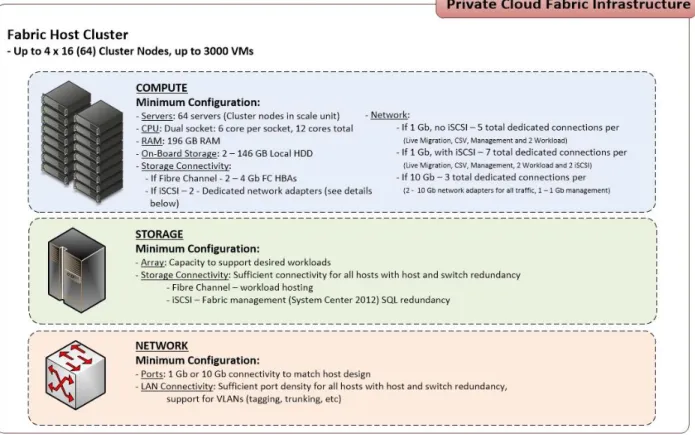
The following graphic depicts the high-level minimum requirements for the fabric. The requirements are categorized in compute, storage, and network layers. The minimums and recommendations are designed to balance cost versus density and performance.
Figure 4: Private cloud fabric infrastructure
Server Architecture
The host server architecture is a critical component of the virtualized infrastructure and a key variable in the consolidation ratio and cost analysis. The ability of the host server to handle the workload of a large number of consolidation candidates increases the consolidation ratio and helps provide the desired cost benefit.
The system architecture of the host server refers to the general category of the server hardware itself. Examples include rack mounted servers, blade servers, and large symmetric multiprocessor servers (SMP). The primary tenet to consider when selecting system architectures is that each Hyper-V host will contain multiple guest operating systems with multiple workloads. Processor, RAM, storage, and network capacity are critical, as are high I/O capacity and low latency. The host server must be able to provide the required capacity in each of these categories.
Note: The Windows Server Catalog is useful to assist customers in selecting appropriate hardware. It contains all servers, storage, and other hardware devices that are certified for Windows Server 2008 R2 and Hyper-V. The logo program and support policy for failover cluster solutions changed with Windows Server 2008 R2 and Windows Server 2008, and cluster solutions are not listed in the Windows Server Catalog. All individual components that comprise a cluster configuration need to earn the appropriate "Certified for" Windows Server 2008 R2 or Windows Server 2008 designations, and they will be listed in their device-specific category in the Windows Server Catalog. To find out if your components are certified:
Open the Windows Server Catalog. Under Hardware Testing Status, click Certified for Windows Server 2008 R2.
Rack or Blade Chassis Design
The rack or blade chassis design should provide redundant power connectivity (that is, multiple power distribution unit or PDU) capability for racks, or multiple hot-swappable power supplies for the blade chassis.
Server and Blade Design Recommendations
2 to 8 socket server with a maximum of 64 logical processors enabled
64-bit CPU with virtualization technology support, data execution prevention (DEP), and second level address translation (SLAT)
64 GB RAM minimum
Min 40 GB local RAID 1 or 10 hard-disk space for the operating system partition or an equivalent boot from a storage area network (SAN) design
For more information, see Installing Windows Server 2008 R2.
Server and Blade Storage Connectivity Recommendations
Internal serial advanced technology attachment (SATA) or serial attached storage (SAS) controller for direct attached storage unless design is 100 percent SAN-based including boot from storage area network (SAN) for the host operating system
If you are using a Fibre Channel SAN, two or more 4 to 8 gigabit fibre channel (GFC) host bus adapters (HBAs)
If you are using iSCSI, two or more 1 Gb or 10 Gb network adapters or HBAs
If you are using Fibre Channel over Ethernet (FCoE) two or more 10 Gb converged network adapters (CNAs)
Note: For iSCSI, 10 Gb network adapters are recommended because of the dynamic nature of
virtualized data centers. If 1 Gb network adapters are used, throughput should be carefully monitored.
Server and Blade Network Connectivity
Use multiple network adapters and/or multiport network adapters on each host server. For converged designs, network technologies that provide teaming or virtual network adapters can be utilized. This arrangement assumes that two or more physical adapters can be teamed for redundancy and that multiple virtual network adapters and/or VLANs can be presented to the hosts for traffic segmentation and
bandwidth control. For the recommended configuration by quantity and type of network adapter, see
Hyper-V: Live Migration Network Configuration Guide.
Server and Blade High Availability and Redundancy
Recommendations
If you are using rack mounted servers, each server should have redundant power supplies.
If you are using rack mounted servers, each server should have redundant fans.
If you are using blade servers, each chassis should have redundant power supplies.
If the Hyper-V host system partition uses direct attached storage, each server should provide SAS or SATA RAID capability for the system partition.
Storage Architecture
The storage design for any virtualization-based solution is a critical element that is typically responsible for a large percentage of the solution’s overall cost, performance, and agility.
Storage Options
Not all workloads have the same availability requirements nor achieve their requirements in the same way. In the case of data center architecture, workloads are classified as stateful or stateless. A stateful workload has data specific to that virtual machine that, if lost, would become unavailable. A stateless workload uses data stored elsewhere in the data center, and it can achieve high availability through resiliency in the application. An example of a stateless workload is a front-end web server farm.
Many data centers run more stateful workloads; therefore, this architecture assumes SAN storage will be used throughout. However, the solution implementer may want to use non-clustered Hyper-V hosts and direct-attached storage (DAS) for stateless workloads or for special cases such as for a VDI.
After the workload type is determined, the performance and availability characteristics of the specific workload should be analyzed as follows to determine the storage characteristics required:
Shared storage is required for Hyper-V host clustering.
The use of non-shared storage (for example, DAS) is an exception, which may be preferable, depending on the implementation requirements.
iSCSI shared storage is required for Hyper-V guest clustering
SAN Storage Protocols
Block-based versus File-based Storage
In Windows Server 2008 R2 with SP1, file-based storage is not supported for Hyper-V host clusters. Hyper-V host clusters require block-based shared storage that is accessible to each host in the cluster. Block-based shared storage is required for Hyper-V host clustering.
iSCSI versus Fibre Channel versus FCoE
Fibre Channel has historically been the storage protocol of choice for enterprise data centers for a variety of reasons, including performance and low latency. These considerations have offset the typically higher costs of Fibre Channel. In the last several years, the continually advancing performance of Ethernet from 1 Gb to 10 Gb and beyond has led to great interest in storage protocols that use Ethernet transports such as iSCSI, and recently, Fibre Channel over Ethernet (FCoE).
A key advantage of the protocols that use Ethernet transport is the ability to use a converged network architecture. Converged networks have an Ethernet infrastructure that serves as the transport for LAN and storage traffic. This can reduce costs by eliminating dedicated Fibre Channel switches and
reducing cabling. FCoE allows for the potential benefits of using an Ethernet transport while retaining the advantages of the Fibre Channel protocol and the ability to use Fibre Channel storage arrays. Several enhancements to the standard Ethernet are required for FCoE. The enriched Ethernet is commonly referred to as enhanced Ethernet or Data Center Ethernet. These enhancements require Ethernet switches that are capable of supporting enhanced Ethernet.
For Hyper-V, iSCSI-capable storage provides an advantage in that it is the protocol that can also be utilized by Hyper-V guest virtual machines for guest clustering. A common practice in large-scale virtualization deployments is to use Fibre Channel and iSCSI. Fibre Channel provides the host storage connectivity, and iSCSI is used only by guest operating systems that require built-in operating system iSCSI connectivity, such as a guest cluster. In this case, although Ethernet and some storage I/O will be sharing the same pipe, segregation is achieved by VLANs and quality-of-service (QoS) that can be applied with the OEM’s networking software.
Storage Network
FCoE and iSCSI use an Ethernet transport for storage networking, which provides another architecture choice. The choices are to use a dedicated Ethernet network with separate switches, cables, and paths, or to use a converged network in which multiple traffic types are run over the same cabling and infrastructure.
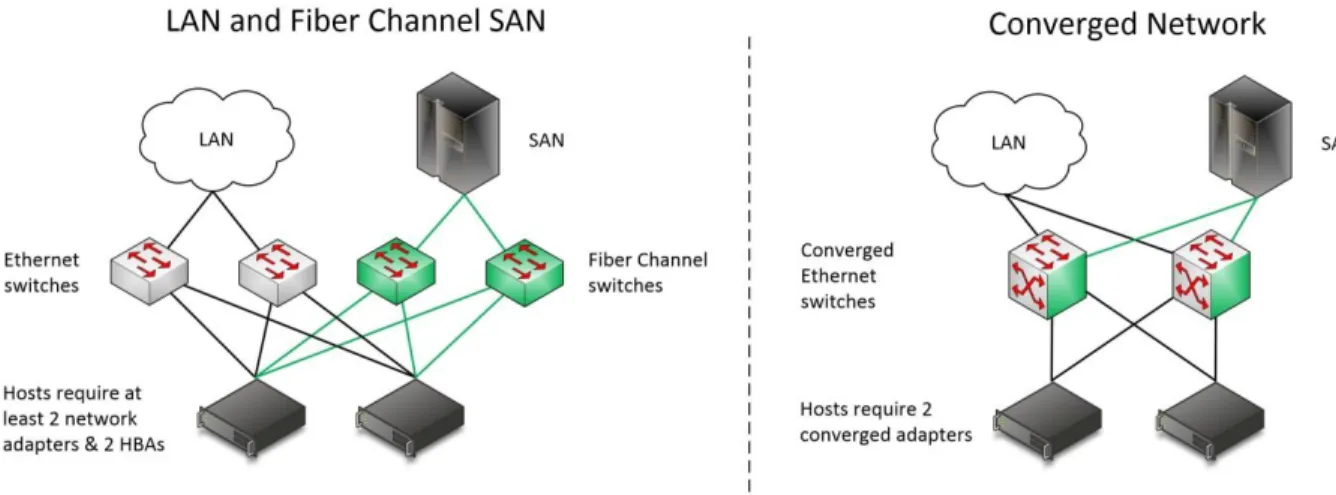
The following diagram illustrates the differences between traditional and converged architectures. On the left, is a traditional architecture with separate Ethernet and Fibre Channel switches, each with redundant paths. On the right, is a converged architecture in which both Ethernet and Fibre Channel (through FCoE) utilize the same set of cables while still providing redundant paths. The converged architecture requires fewer switches and cables; however, the switches must be capable of supporting enhanced Ethernet.
Figure 5: Storage network architectures
When you plan your storage network, consider the following:
Provide logical or physical isolation between storage and Ethernet I/O.
Ensure that host bus adapters (HBAs) or converged adapters are logo certified for Windows Server 2008 R2 with SP1.
Provide iSCSI connectivity for guest clustering.
Provide fully redundant, independent paths for storage I/O.
For FCoE, use standards-based converged network adapters, switches, and Fibre Channel storage arrays.
Make sure that the selected storage arrays provide iSCSI connectivity over standard Ethernet so that Hyper-V guest clusters can be utilized.
If you are using iSCSI or Fibre Channel, make sure that there are dedicated network adapters or HBAs, switches, and paths for the storage traffic.
Cluster Shared Volumes
Windows Server 2008 R2 includes the first version of Failover Clustering to offer a distributed file access solution. Clustered shared volumes (CSV) is a feature in Windows Server 2008 R2 that is designed exclusively for use with the Hyper-V role. It enable all nodes in the cluster to access the same cluster storage volumes at the same time. CSV use standard NTFS, and it has no special hardware requirements beyond supported block-based shared storage.
CSV provides shared access to the disk and a storage path for I/O fault tolerance (dynamic I/O redirection). If the storage path on one node becomes unavailable, the I/O for that node will be rerouted through a server message block (SMB) to another node. A performance impact can be expected while running this state. It is designed for use as a temporary failover path while the primary dedicated storage path is brought back online. This feature can use any cluster communications network and further increases the need for high-speed networks.
CSV maintains metadata information about the volume access and requires that some I/O operations take place over the cluster communications network. One node in the cluster is designated as the coordinator node, and it is responsible for these disk operations. However, virtual machines have direct I/O access to the volumes, and they only use the dedicated storage paths for disk I/O, unless a failure scenario occurs as described previously.
CSV Limits
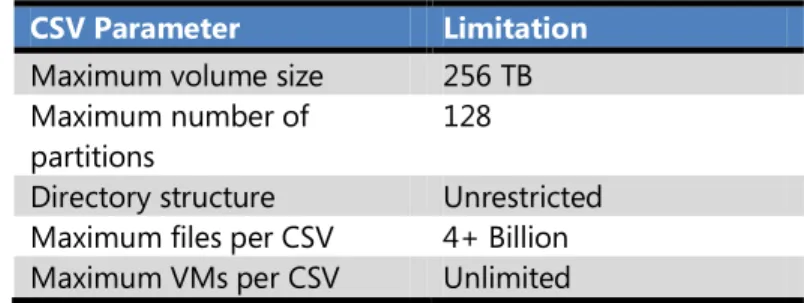
The following limitations are imposed by the NTFS file system and are inherited by CSV.
CSV Parameter Limitation
Maximum volume size 256 TB Maximum number of
partitions
128
Directory structure Unrestricted Maximum files per CSV 4+ Billion Maximum VMs per CSV Unlimited
Table 1: CSV Limits
CSV Requirements
All cluster nodes must use Windows Server 2008 R2 SP1.
All cluster nodes must use the same drive letter for the system disk.
All cluster nodes must be on the same logical network subnet. VLANs are recommended for multisite clusters running CSV.
NT LAN Manager (NTLM) authentication in the local security policy must be enabled on cluster nodes.
SMB must be enabled for each network on each node that will carry CSV cluster communications.
Client for Microsoft Networks and File and Printer Sharing for Microsoft Networks must be enabled in the network adapter’s properties to enable all nodes in the cluster to communicate with CSV.
The Hyper-V role must be installed on any cluster node that might host a virtual machine.
CSV Volume Sizing
Because all cluster nodes can access all CSV volumes simultaneously, in a cluster with CSV, you can now use standard LUN allocation methodologies based on performance and capacity requirements of the workloads running within the virtual machines. Generally speaking, isolating the virtual machine operating system I/O from the application data I/O on separate LUNs is a good start, in addition to application-specific I/O considerations such as segregating databases and transaction logs and creating SAN volumes and/or storage pools that factor into the I/O profile (for example, random Read and Write operations versus sequential Write operations).
The CSV architecture differs from other traditional clustered file systems, which makes it free from common scalability limitations. As a result, there is little guidance for scaling the number of Hyper-V nodes or virtual machines on a CSV volume. Make sure that the overall I/O requirements of the expected virtual machines running on the CSV are met by the underlying storage system and storage network. Although rare, disks and volumes can enter a state that require running chkdsk, and large disks might take a long time to complete, causing downtime of the volume during this process roughly proportional to the volume’s size.
Each enterprise application that you plan to run within a virtual machine might have unique storage recommendations or virtualization-specific storage guidance. That guidance also applies to use with CSV volumes. Be aware that all virtual disks running on a particular CSV will contend for storage I/O. It is worth noting that individual SAN LUNs do not necessarily equate to dedicated disk spindles. A SAN storage pool or RAID array may contain many LUNs. A LUN is simply a logical representation of a disk that is provisioned from a pool of disks. Therefore, if an enterprise application requires specific storage I/O operations per second (IOPS) or disk response times you must consider all the LUNs that are in use in that storage pool. An application that would require dedicated physical disks (if it is not virtualized) might require dedicated storage pools and CSV volumes running within a virtual machine. Consider the following when using CSV:
The CSV feature in Windows Server 2008 R2 or an equivalent clustered file system that supports Hyper-V is recommended to enable Hyper-V Live Migration.
For maximum flexibility, configure LUNs for CSV with a single volume so that 1 LUN equals 1 CSV.
For I/O optimization or performance critical workloads, at least 4 CSVs per host cluster are recommended for segregating operating system I/O, random read/write I/O, sequential I/O, and other virtual machine-specific data.
Follow the vendor’s recommendations for storage with CSVs.
Create a standard size and IOPS profile for each type of CSV LUN to utilize for capacity planning. When additional capacity is needed, provision additional standard CSV LUNs.
Consider prioritizing the network that is used for CSV traffic. For more information, see
Designating a Preferred Network for Cluster Shared Volumes Communication.
CSV Design Patterns
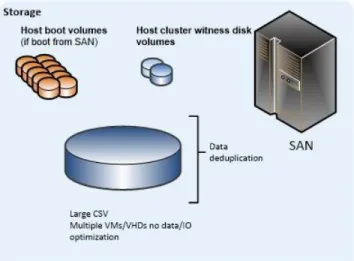
Single CSV per ClusterIn the single CSV per cluster design pattern, the SAN is configured to present a single large LUN to all the nodes in the host cluster. The LUN is configured as a CSV in failover clustering. All virtual machine-related files that belong to the virtual machines that are hosted on the cluster are stored on the CSV. Optionally, data deduplication functionality that is provided by the SAN can be utilized (if it is supported by the SAN vendor).
Figure 6: Virtual machines on a single large CSV
Multiple CSVs per Cluster
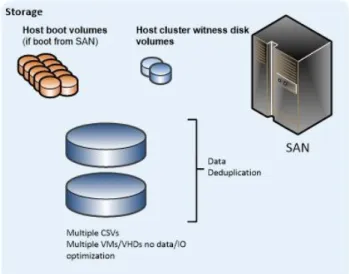
In the multiple CSV per cluster design pattern, the SAN is configured to present two or more large LUNs to all the nodes in the host cluster. The LUNs are configured as a CSV in failover clustering. All virtual machine-related files that belong to the virtual machines that are hosted on the cluster are stored on the CSVs. Also, data deduplication functionality that is provided by the SAN can be utilized (if it is supported by the SAN vendor).
Figure 7: VMs on multiple CSVs with minimal segregation
For the single and multiple CSV patterns, each CSV has the same I/O characteristics, so each individual virtual machine has all its associated virtual hard disks (VHDs) stored on one of the CSVs.
Figure 8: Each virtual machine’s virtual disks reside together on the same CSV
Multiple I/O Optimized CSVs per Cluster
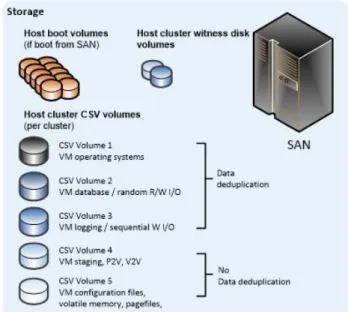
In the multiple I/O optimized CSVs per cluster design pattern, the SAN is configured to present multiple LUNs to all the nodes in the host cluster. However, the LUNs are optimized for particular I/O patterns like fast sequential Read performance or fast random Write performance. The LUNs are configured as CSV in failover clustering. All VHDs that belong to the virtual machines that are hosted on the cluster are stored on the CSVs, but they are targeted to the appropriate CSV for the given I/O needs.
Figure 9: Virtual machines with a high degree of virtual disk segregation
In the multiple I/O optimized CSVs per cluster design pattern, each individual virtual machine has all its associated VHDs stored on the appropriate CSV per required I/O requirements.
Figure 10: Virtual machines with a high degree of virtual disk segregation
Note: A single virtual machine can have multiple VHDs, and each VHD can be stored on a different CSV (provided all CSVs are available to the host cluster on which the virtual machine is created).
SAN Design
High Availability
The high availability SAN design should have no single points of failure, for example redundant power from independent PDUs, redundant storage controllers, redundant target ports of network adapters per controller, redundant Fibre Channel or IP network switches.
Performance
Storage performance is a complicated mix of drive, interface, controller, cache, protocol, SAN, host bus adapter (HBA), driver, and operating system considerations. The overall performance of the storage architecture is typically measured in terms of maximum throughput, maximum I/O operations per second (IOPS), and latency or response time. Although each of the factors is important, IOPS and latency are highly relevant to server virtualization.
Many modern SANs use a combination of high-speed disks, slower-speed disks, and large memory caches. Storage controller cache can improve performance during burst transfers or when the same data is accessed frequently by storing it in the cache memory, which is typically several orders of magnitude faster than the physical disk I/O. However, cache is not a substitute for adequate disk spindles because caches are ineffective in aiding heavy Write operations.
Drive Types
The type of hard drive that is utilized in the host server or in the storage array will have significant impact on the overall storage architecture performance. The critical performance factors for hard disks are the interface architecture (for example, U320 SCSI, SAS, SATA), the rotational speed of the drive (7200, 10K, 15K RPM), and the average latency in milliseconds. Additional factors, such as the cache on the drive and support for advanced features, can improve performance. As with the storage
connectivity, high IOPS and low latency are more critical than maximum sustained throughput for host server sizing and guest performance.
When you select drives, this translates into selecting those with the highest rotational speed and lowest latency possible. Utilizing 15K RPM drives over 10K RPM drives can result in up to 35 percent more IOPS per drive. The workloads that are targeted to run within the virtual machines play a critical role in determining acceptable disk subsystem latency. Make sure that the latency reflects a minimum
assumption that production-class workloads will be running within the virtual machines that are running on Windows Server 2008 R2 with SP1.
RAID Array Design
The RAID type should provide high availability and high performance even in the event of disk failures and RAID parity rebuilds. In general, RAID 10 (0+1), or a proprietary hybrid RAID type are
recommended for virtual machine volumes. RAID 1 is also acceptable for host boot volumes, although many proprietary RAID types and additional SAN capabilities can be employed. In general, the RAID type must be able to tolerate a single drive failure and not sacrifice performance for capacity.
Multipathing
In all cases, multipathing should be used. Generally, storage vendors will build a device specific module (DSM) on top of Microsoft Multipath I/O (MPIO) in Windows Server 2008 R2. Each DSM and HBA will have a unique multipathing option and a recommended number of connections.
Fibre Channel (if Fibre Channel is used)
Fibre channel is an option, and it is a supported storage connection protocol.
iSCSI
The iSCSI SAN should be on an isolated network, for security and performance reasons. You can use the following options to achieve this:
A physically separate, dedicated storage network.
A physically shared network with the iSCSI SAN running on a private VLAN. The switch hardware should provide Class or Service (CoS) or Qualify of Service (QoS) assurances for the private VLAN.
Encryption and Authentication
If multiple clusters and/or systems are used on the same SAN, proper segregation or device isolation should be provided. The storage used by cluster A should be visible only to cluster A, and not to any other cluster or to a node from a different cluster. The use of session authentication (for example, Challenge Handshake Authentication Protocol or CHAP) is highly recommended. This provides a degree of security in addition to segregation. Mutual CHAP or IPsec can also be used, but if so, performance implications should be considered.
Jumbo Frames
If supported at all points in the iSCSI network, jumbo frames can increase throughput by up to 20 percent. Jumbo frames are supported in Hyper-V at the host and guest levels.
Data Deduplication
Data deduplication can yield significant storage cost savings in virtualization environments. Some common considerations are the performance hits during the deduplication cycle and the maximum efficiency that is achieved by locating similar data types on the same volume or LUN.
Thin Provisioning
In virtualization environments, thin provisioning is a common practice because it allows for efficient use of the available storage capacity. The LUN and corresponding CSV can grow as needed, typically in an automated fashion to secure the availability of the LUN. However, as storage becomes
over-provisioned, careful management and capacity planning are critical.
Volume Cloning
Volume cloning is another common practice in virtualization environments. Volume cloning can be used for host and virtual machine volumes to dramatically improve host installation and virtual machine provisioning times.
Volume Snapshots
SAN volume snapshots are a common method of providing a point-in-time, instantaneous backup of a SAN volume or LUN. These snapshots are typically block-level, and they only utilize storage capacity as blocks that change on the originating volume. Some SANs provide tight integration with Hyper-V and integrate the Hyper-V VSS writer on hosts and volume snapshots on the SAN. This integration provides a comprehensive and high-performing backup and recovery solution.
Storage Tiering
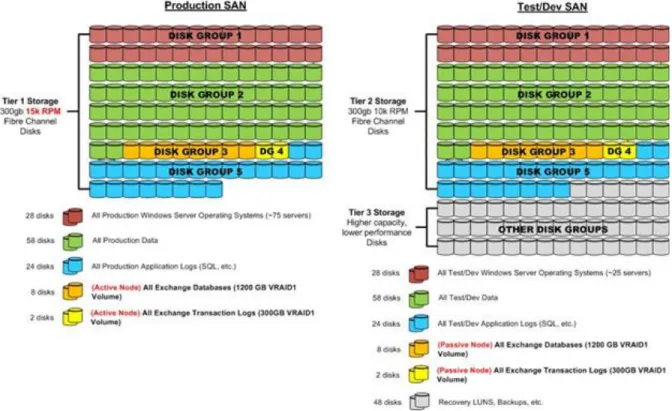
Storage tiering is the practice of physically partitioning data into multiple distinct classes, such as price or performance. Data can be dynamically moved among classes in a tiered storage implementation based on access, activity, or other considerations.
Storage tiering is normally achieved through a combination of varying types of disks that are used for different data types (for example, production, non-production, or back-up data types). The following figure shows an example of storage tiering for a high I/O application such as MicrosoftExchange Server.
Figure 11: Example of storage tiering
Storage Automation
One of the objectives of a private cloud solution is to enable rapid provisioning and deprovisioning of virtual machines. Doing so on a large scale requires tight integration with the storage architecture and robust automation. Provisioning a new virtual machine on an already existing LUN is a simple operation; however, provisioning a new CSV LUN and adding it to a host cluster are relatively complicated tasks that should be automated. Virtual Machine Manager enables end-to-end automation of this process through SAN integration by using the Storage Management Initiative Specification (SMI-S) protocol.
Historically, many storage vendors have designed and implemented their own storage management systems, application programming interfaces (APIs), and command-line utilities. This customization has made it a challenge to use a common set of tools and scripts across heterogeneous storage solutions. For the robust automation that is required in an advanced data center virtualization scenario, a SAN solution that supports SMI-S is required. Preference is also given to SANs that support standard and common automation interfaces like Windows PowerShell. Consider the following when you design a storage solution:
The SAN should support SMI-S, and it should pass the Virtual Machine Manager 2012 SMI-S validation test harness and certification. (Actual usage of SMI-S is not required if an OEM-specific solution provides greater capability.)
The storage solution should provide mechanisms to achieve automated provisioning at a minimum—ideally, automation of all common administrative tasks.
Network Architecture
There are a variety of design considerations for the network that supports the private cloud solution.
Three-Tier Network Design
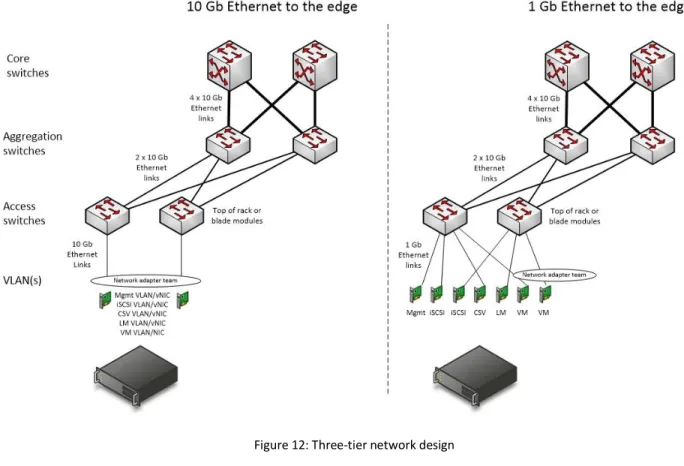
Many network architectures include a tiered design with three or more tiers, such as core, aggregation (or distribution), and access. Designs are driven by the port bandwidth, quantity required at the edge, and the ability of the core and aggregation tiers to provide higher speed uplinks to aggregate traffic. Additional considerations include Ethernet broadcast boundaries and limitations, in addition to the spanning tree algorithm and other loop avoidance technologies.
Core
The core tier is the high-speed backbone for the network architecture. The core is typically comprised of two modular switch chassis that provide a variety of service and interface module options. The data center core tier might interface with other network modules.
Aggregation
The aggregation (or distribution) tier consolidates connectivity from multiple access tier switch uplinks. This tier is commonly implemented in end-of-row switches, a centralized wiring closet, or a main distribution frame (MDF) room. The aggregation tier provides high-speed switching and more advanced features, such as Layer 3 routing and other policy-based networking capabilities. The aggregation tier should have redundant, high-speed uplinks to the core tier for high availability.
Access
The access tier provides device connectivity to the data center network. This tier is commonly implemented by using Layer 2 Ethernet switches, typically through blade chassis switch modules or top-of-rack (ToR) switches. The access tier should provide redundant connectivity for devices, required port features, and adequate capacity for access (device) ports and uplink ports. The network switches should support: