U
SER
G
UIDE
Training Sponsored By
The
Office
of
Audit,
Assessment,
and
Management
Grants
Management
Division
G
G
G
RANT
RANT
RANT
P
P
P
AYMENT
AYMENT
AYMENT
R
R
R
EQUEST
EQUEST
EQUEST
S
S
S
YSTEM
YSTEM
YSTEM
(GPRS)
(GPRS)
(GPRS)
TABLE OF CONTENTS
Introduction ... 1
Getting Started ... 3
Active Award List ... 9
Create a Payment Request ... 11
Transaction History ... 13
User Profile ... 15
Help and Additional Resources ... 17
Appendices ... 20
Glossary ... 21
Acronyms ... 33
Frequently Asked Questions ... 35
INDEX
OF
INSTRUCTIONS
How to Access GPRS ... 4How to Register as a New OJP/OVW User ... 6
How to Register as a New COPS User ... 8
How to Print/Export ... 10
INTRODUCTION
A
A
A
Figure 1: GPRS Application
B
B
B
C
C
C
D
D
D
E
E
E
Welcome to the Grant Payment Request System (GPRS) user’s guide for recipients. This guide provides
DOJ recipients with step‐by‐step instructions and illustrations to help them use the GPRS online
application.
The GPRS application is a web‐based payment request system that allows grant recipients to submit
payment requests via the Internet. This application has replaced the Office of Justice Programs’ (OJP)
previous payment request system, the Phone Activated Paperless Request System (PAPRS). GPRS
maintains the core functionality of PAPRS and includes several new features to enhance recipients’
ability to manage awards, such as:
• Secure individual login with audit tracking for each award.
• The ability to submit payment requests at anytime (including during blackout periods).
• The ability to view the status of submitted payment requests.
• The ability to print and export an award’s transaction history.
A change that has been introduced with the launch of the GPRS application is that PAPRS packages,
which provided funding information and instructions, will no longer be sent via U.S. mail. Instead, once a
grant has been awarded, recipients will receive an email with information on funding resources and
accessing GPRS.
GPRS APPLICATION SECTIONS
There are four primary sections in GPRS that are accessible by clicking on its corresponding tab in the
header bar (fig. 1, A). The sections are: Active Award List, User Profile, Transaction History, and Create
Payment Request; each of which will be discussed in further detail in this guide.
Throughout GPRS, you will have access to the following features:
• Award Number Search (B)—this allows you to search for a specific award by entering the
award number and clicking the Go button.
• Help (C)—this will open a Frequently Asked Questions (FAQ) pop‐up window.
• Contact Us (D)—this will open a pop‐up window with federal contact information based on
your user type (OJP/OVW or COPS awards).
• Text Size (E)—this dropdown menu includes options to change the size of the text in GPRS.
G
ETTING
S
TARTED
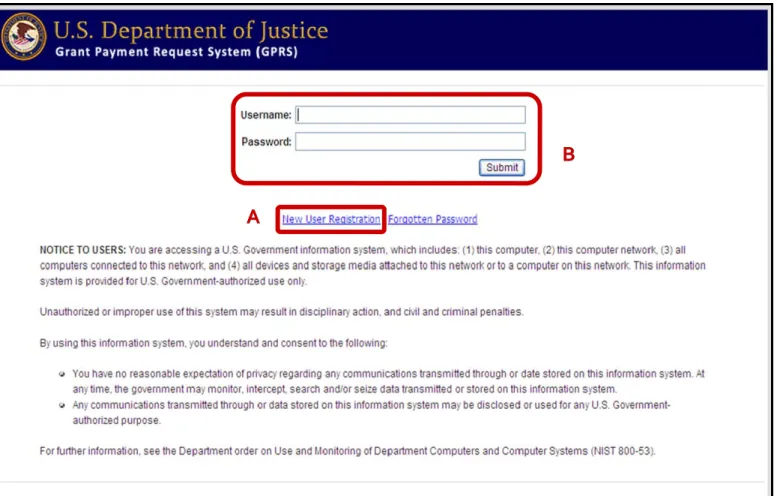
Figure 2: GPRS Log In Screen
A
A
A
HOW TO. . .
ACCESS
GPRS
1. Go to grants.ojp.usdoj.gov/gprs.
2. If you have not registered in GPRS, click the New User Registration link and submit a
registration (fig. 2, A).
3. If you have registered and have received an approval email from GPRS, enter your Username, Password, and click the Submit button (B).
Note: Your username and password will vary based on the federal agency that issued the
award.
ACCESSING THE GPRS APPLICATION
The GPRS application is accessible online using a current Internet browser such as Internet Explorer
version 7 or higher. You may encounter issues if using Firefox or Safari Internet browsers.
The username and password used to access the application (fig. 2) will vary based on the federal
organization that issued your award:
• If your award was issued by OJP or the Office on Violence Against Women (OVW), only
user(s) within your organization that have been designated as the Financial Point of Contact
(FPOC) for the award in the Grants Management System (GMS) may access GPRS. To login
and submit payment requests, the FPOC must first register in GPRS. (see p. 6).
• If your award was issued by the Office of Community Oriented Policing Services (COPS
Office) and you have received a pre‐registration email from GPRS, then you may login to
GPRS using the username and temporary password provided in the email. If you have not
received a pre‐registration email, then the person(s) within your organization responsible for
payment requests must register in GPRS (see p. 8).
Note: Recipients with both OJP/OVW and COPS awards will be required to maintain two separate accounts
G
ETTING
S
TARTED
E
E
E
Figure 3: OJP/OVW User Registration Pages
B
B
B
D
D
D
C
C
C
A
A
A
REGISTERING IN GPRS - OJP/OVW AWARDS
To login to the GPRS application and submit payment requests, recipients with OJP/OVW awards must
be registered in GPRS. Individuals within your organization that are designated as the Financial Point of
Contact (FPOC) for the award in GMS may register in GPRS (fig. 3, A). The FPOC is the only user that
may access the application. To complete the GPRS registration, the FPOC will need their GMS username
and password (C).
Once the registration has been successfully submitted, the information will be verified against GMS.
During this time, the FPOC will not be able to login to GPRS until they receive an email from GPRS
approving their access. After the FPOC receives the approval email, they may login to GPRS using their
existing GMS username and password.
Note: Any updates to your organization’s FPOC must be made in GMS. If at any point the user designated as
your organization’s FPOC for a particular award is removed, they will no longer have access to GPRS for
that award. In order to restore their access, they must be added back into GMS as an FPOC for that award.
HOW TO. . .
REGISTER
AS
A
NEW
OJP/OVW
USER
1. On the GPRS login page, click on the New User Registration link (fig. 3, A). 2. Select OJP/OVW from the Organization dropdown menu (B).
3. Enter your GMS Username and GMS Password (C).
4. Click the Register button (D).
5. A confirmation message will appear. Once you have reviewed the message, click the OK button (E). Once the registration has been approved, the FPOC will be sent an
G
ETTING
S
TARTED
Figure 4: COPS User Registration Pages
D
D
D
E
E
E
A
A
A
B
B
B
C
C
C
F
F
F
HOW TO. . .
REGISTER
AS
A
NEW
COPS
USER
1. From the GPRS Login Screen, click on the New User Registration link (see p. 5, fig. 3, A). 2. Select COPS from the Organization dropdown menu (see p. 5, fig. 3, B). The COPS registra‐
tion form will open. (p. 7, fig. 4, A).
3. Enter all the required information indicated with an asterisk (*) and click the Award Selection
button (B).
4. Enter your COPS Vendor Number and click the Add Vendor button (C).
5. Select the awards you would like to submit payment requests for in GPRS (D) and click the Sub‐ mit Registration button (E).
6. A confirmation message will appear. Once you have reviewed the message, click the OK button
(F). Once the registration has been approved, you will be sent an approval email with your user‐
name and temporary password to access GPRS.
REGISTERING IN GPRS - COPS AWARDS
To login to the GPRS application and submit payment requests, recipients with COPS awards must be
registered in GPRS. If you have received a pre‐registration email from GPRS for your COPS award, then
you may login to GPRS using the username and temporary password provided in the email. If you have
not received a pre‐registration email from GPRS, then the person(s) within your organization responsible
for submitting payment requests must register in GPRS.
To register in GPRS for COPS awards, registrants will need to enter the following information (fig. 4, A):
• A unique username and response to a secret question
• Name and contact information
• Vendor number found on your COPS award document
The registrant must also indicate the awards they wish to have access for submitting payment requests.
Note: Registrants will only be able to submit payment requests for the COPS awards selected.
Once the registration has been successfully submitted, the user and award information will be verified by
the COPS Office. During this time, the registrant will not be able to login in GPRS until they receive an
approval email from GPRS with their login information. The approval email will also list the COPS awards
to which they have been given access. If access was denied to any award selected during registration, the
rejection reason will be included in the GPRS email. After the registrant receives the approval email, they
may login to GPRS using the username and temporary password provided in the email. For assistance
A
CTIVE
A
WARD
L
IST
Figure 5: Active Award List Page
Figure 6: Printer‐Friendly Generated Report
F
F
F
G
G
G
A
A
A
E
E
E
B
B
B
D
D
D
C
C
C
THE ACTIVE AWARD LIST PAGE
The Active Award List page is the default home page for GPRS. This will continue to be the first page
displayed until it is changed in your default home page settings (see p. 16). The Active Award List
displays all awards associated with your GPRS account and provides a summary of award and financial
information including the Award Number, Award Amount, Total Funds Requested, Pending Payment
Requests, Hold Amount, Funds Available, Award Begin Date, Award End Date, and the date of the last
submitted FFR (SF‐425) (fig. 5, A). All of the information listed can be sorted by clicking on respective
column header. The sections below will explain the actions you may take on the Active Award List Page. VIEW RESULTS
The number of awards that appear per page can be set by selecting a value from the View Results
dropdown menu (E). PRINT/EXPORT
A printer‐friendly version of the page can be created by clicking on the Print/Export button (B). The
number of awards that will appear is determined by the value in the View Results dropdown menu (E).
On the printer‐friendly version, you will have the option to print or export the list into an MS Excel
spreadsheet (fig. 6, F).
CREATE PAYMENT REQUEST AND TRANSACTION HISTORY
You may create a payment request or view the transaction history for a specific award by selecting the
radio button next to the award number (C) and clicking the respective action button at the bottom of the
screen (D). This will open the Create a Payment Request (see p. 12) or Transaction History (see p. 14)
pages.
HOW TO. . .
AND
EXPORT
1. Click on the Print/Export button (fig. 5, B). A printer‐friendly version of the Active Award List page will open.
2. To print, click the Print button. To export to MS Excel, click the Export button (fig.
6, F).
3. If you clicked the Export button, a window will open asking if you would like to open
C
REATE
A
P
AYMENT
R
EQUEST
Figure 7: Create Payment Request Page
A
A
A
B
B
B
C
C
C
D
D
D
E
E
E
CREATING A PAYMENT REQUEST
You can request payment for an individual award using the Create Payment Request form. Payment
requests can be submitted at anytime, including during blackout periods. However, if your award has a
delinquent quarterly SF‐425 report, a hold will be placed on your account, and you will not be able to
submit a payment request. Once the outstanding report has been submitted, the hold will be removed
from your account. The average turnaround time for a payment request to be deposited is two to three
business days.
Note: It will take approximately one business day for the hold to be removed once the outstanding report
has been submitted.
MAKING A PAYMENT REQUEST
In addition to your award number, you will need the following information in order to submit a payment
request (D):
• Draw Type: Advance—funds that have been requested before expenses are incurred. Expense
claim dates can occur ten days in advance of the day the request is made. Reimburse—funds
that have been requested after expenses have been incurred. Expense dates can occur
anytime prior to or on the day the request is made.
• Expense Claim Begin and End Dates: The start and finish dates for expenses that will be
incurred (advance) or were incurred (reimburse).
Note: Recipients can submit multiple payment requests as long as the dates are not the same or
do not overlap. A date cannot be used twice.
• Payment Amount: The amount of the requested payment.
Note: Not all recipients can draw down their total funded amounts in one request. Recipients
with awards that have this restriction must submit at least two payment requests to draw down
the total amount.
Note: In support of the continuing effort to meet the accelerated financial statement reporting requirements
mandated by the U.S. Department of the Treasury, the Office of the Chief Financial Officer will not process payment requests during the last 4 business days of each month. For this reason, OJP strongly suggests that recipients make payment requests before 10:00 a.m. eastern standard time, prior to the last 4 business days of each month.
HOW TO. . .
CREATE
A
PAYMENT
REQUEST
1. On the Create Payment Request page (fig. 7, A), select the award that you wish to create pay‐
ment request from the Award Number dropdown menu (B).
2. Once you have selected the award, GPRS will automatically change the page to the Create Pay‐ ment Request detail screen (C).
3. Enter in the Draw Type, Expense Claim Begin and End Dates, and the Requested Payment Amount (D).
T
RANSACTION
H
ISTORY
Figure 8: Transaction History Page ‐ All Awards View
Figure 9: Transaction History Page ‐ Individual Award View
A
A
A
G
G
G
F
F
F
H
H
H
E
E
E
D
D
D
B
B
B
VIEWING A TRANSACTION HISTORY
All GPRS payment request transactions will be recorded and displayed on the Transaction History page.
You will be able to view all the transactions for each award that you are approved to access with your
GPRS account. The page will automatically default to displaying transactions for all awards (fig. 8, A).
GPRS will also display all PAPRS transactions back to May 2009.
Note: The name that will be displayed in the User column (C) for PAPRS transactions will be Phone System
User.
TRANSACTION TYPES
The Transaction Type column will display one of the following types (B):
• Advance—funds that have been requested before expenses are incurred. Expense claim dates
can occur ten days in advance of the day the request is made.
• Reimburse—funds that have been requested after expenses have been incurred. Expense
dates can occur anytime prior to or on the day the request is made. STATUSES
The Payment Request Status column will display one of the following statuses (D):
• Pending—a request that has been submitted by the recipient, but has not been processed by
the Office of the Chief Financial Officer (OCFO) Accounting Control Branch.
• Cancelled—a pending payment request that has been cancelled by the recipient.
• Processing— a payment request that is being processed by the OCFO Accounting Control
Branch.
• Transferred—a payment requested that has been transferred to OCFO for verification. If the
payment is valid, it is sent to Treasury for payment. CANCELLING A PAYMENT
GPRS will also give recipients the ability to cancel payment requests. Payment requests can only be
cancelled while the status is shown as Pending. While the payment request is pending, a Cancel button
(E) will be available on the Transaction History page. Once the status has changed to Processing and/or Transferred, you will no longer have the option to cancel the request.
Note: A user cannot cancel another user’s payment request.
SINGLE AWARD VIEW
You may also change the display of the Transaction History page to a single award view that will display
all the transaction information for a specific award. If you select an award from the Award Number
dropdown menu (fig. 8, A), the single award view will be displayed (fig. 9). This view will show a filtered
list of transactions for the award (F), as well as an Award at a Glance box that will provide a summary of
the award’s financial information (G). Additionally, you have the option to print or export the summary
U
SER
P
ROFILE
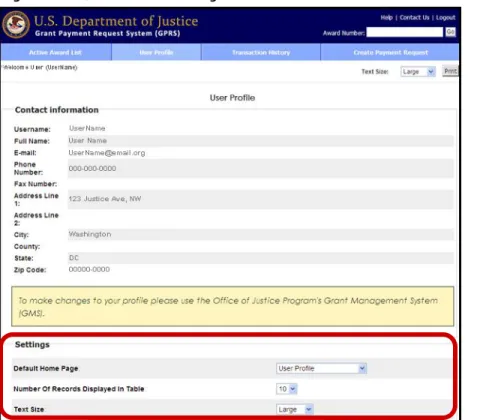
Figure 10: OJP/OVW User Profile Page
A
A
A
THE USER PROFILE
The User Profile page displays the information that was either entered during registration for COPS
awards or the information pulled from GMS for OJP/OVW awards. You will not be able to make changes
to any information shown in GPRS. To update your user profile, you must do one of the following:
• Users with OJP/OVW awards will need to update their profiles in GMS.
• Users with COPS awards will need to contact the COPS Office Response Center at 1‐800‐421‐
6770 or [email protected] to update their profile information. SETTINGS
Also found on the User Profile page are your page settings (fig. 10, A). You can set your preferences for
the following:
• Default Home Page—this will be the page that first appears when you log in. You can choose
from the Active Award List, User Profile, Transaction History, or Create Payment Request
pages.
• Number of Records Displayed in Table—this will set the default number of records that will
be displayed in a table per page for the Active Award List and Transaction History pages.
You can choose from 2, 10, 20, 50, or All records.
• Text Size—this will set the default text size on each page. You can choose from small,
If you need assistance navigating the online Grant Payment Request System beyond this guide, please
refer to the sections below or contact your grant manager.
FOR
QUESTIONS
REGARDING
GPRS
OCFO Customer Service Branch (OJP/OVW recipients): 1‐800‐458‐0786 or [email protected]
OJP and OVW recipients, contact the Customer Service Branch for questions concerning access to funds
or any financial aspect of your award.
COPS Office Response Center (COPS recipients): 1‐800‐421‐6770 or [email protected]
COPS recipients, please contact the COPS Office Response Center for questions concerning access to
funds or any financial aspect of your award.
SYSTEM
LOCK
‐
OUTGMS Helpdesk: 888‐549‐9901 (option 3) or [email protected]
If you lock yourself out of GPRS, contact the GMS Helpdesk for your account to be reset (OJP, OVW, and
COPS recipients).
*If you lock yourself out of GMS, you will also be locked out of GPRS (and vice‐versa).
GMS users, contact the GMS helpdesk if you need assistance with your user ID or password.
OTHER
RESOURCES
OJP Financial Guide: ojp.usdoj.gov/financialguide/index.htm
Information concerning financial administration of grant funds is available in the OJP Financial Guide. Post‐Award Instructions: ojp.usdoj.gov/funding/pdfs/post_award_instructions.pdf
Information concerning Post Award Instructions is available in the OJP Funding website.
Federal Financial Report (FFR) Filing: ojp.usdoj.gov/training/pdfs/gms_userguide.pdf
Information concerning the online filing of the Federal Financial Report is available on the OJP Funding
website.
COPS Grant Funds Information: cops.usdoj.gov/Default.asp?Item=100
Information concerning the administrative and financial maintenance of COPS grant funds is available
on the COPS website.
Automatic Clearinghouse (ACH) Enrollment Form: ojp.usdoj.gov/funding/forms/ach_vendor.pdf
If you have not already done so, please complete and submit an Automated Clearinghouse (ACH) Enroll‐
ment Form. This form will designate the banking information necessary for us to deposit funds directly
to the account for your organization. The ACH form and instructions can be accessed online at the link
APPENDIX
Appendix A: Glossary ... 21 Appendix B: Acronyms ... 33 Appendix C: Frequently Asked Questions (FAQs) ... 35
G
LOSSARY
This glossary lists terms related to the OJP award process and GMS functions. Terms specific to this
guide's topic are listed in red.
Accrual Basis: The method of recording revenues in the period in which they are earned (regardless of
when cash is received) and reporting expenses in the period when the charges are incurred
(regardless of when payment is made). Each recipient chooses their type of accounting basis
(Accrual or Cash). Once the choice is made on the first SF‐425, the type selected is locked for
subsequent reports.
Accrued Expenditures: Charges incurred by a recipient during a given period requiring the provision of
funds for: (1) goods and other tangible property received; (2) services performed by employees,
contractors, subrecipients, and other payees; and (3) other amounts becoming owed under
programs for which no current services or performance is required.
Accrued Income: The income generated by a recipient as a result of award funds and/or activities. Acquisition Cost of Equipment: The net invoice price of the equipment purchased by award funds,
including the cost of modifications, attachments, accessories, or auxiliary apparatus necessary to
make the property usable for the purpose for which it was acquired. Other charges, such as the
cost of installation, transportation, taxes, duty or protective in‐transit insurance, shall be included
or excluded from the unit acquisition cost in accordance with the recipient’s regular accounting
practices.
Action Items: A type of conclusion that does not require grantee action to resolve. Generally, action
items are tasks that require program officer follow up after a monitoring activity (e.g., verifying
report status).
Active Award: Award open in GMS and currently being used to accomplish associated goals.
Active Award List: In GPRS, this is a list of all active awards associated with the FPOC account for GMS
users or all awards selected during the registration process for COPS users.
Administrative Closeout: A GMS grant closeout initiated by OJP. Most often, this type of closeout is
automatically initiated by GMS when the award is 91 days past the end date.
Advance Payment: A payment made to a recipient before expenditures are made by the recipient.
Agency Tracking Number: The number issued by Grants.gov for a successful application transfer to
GMS. Can be viewed in the browser footer by hovering the mouse over the application number
link.
All Active: A link in GMS that opens a summary page of all applications, awards, GANs, progress reports
and closeouts that are active within GMS.
Allowable Cost: A cost that meets the criteria for authorized expenditures.
Alternate Contact: The individual within the recipient organization primarily responsible for
Applicant: An organization or individual applying for funds based on a solicitation issued by OJP. Applicant Approval: An optional action in GMS (set by the solicitation administrator) where the
eligibility of an applicant is determined before they can submit an application. This action is only
available in the grant manager role.
Application: Data and documents submitted by an applicant requesting funds under a solicitation
issued by OJP.
Application Appendices/Attachments: Supporting documentation required by the solicitation to be
submitted with an application. Examples of documents found here are Budget Detail
Worksheets, Project Narratives, and internal attachments. These attachments are displayed on
the Application Information screen. Program office grant managers can upload an attachment on
this screen. Recipients, however, will be unable to view the documents uploaded. Application Deadline: The date by which an application must be submitted.
Application Package Template: A package of forms assembled by a bureau or program official to
collect complete applicant information through Grants.gov.
Approved Link: A sidebar link in GMS that opens a summary page of all applications, awards, GANs,
progress reports, and closeouts that have been approved.
Archive: An award that has been closed out and sent to the Federal Records Retention Center.
Audit: A status in GMS that indicates that a review of the award is in progress. The review could be an
audit by the DOJ Office of the Inspector General (OIG), a single audit, a financial site visit by the
OJP Office of the Chief Financial Officer (OCFO), or a programmatic site visit by the DOJ program
office that issued the award.
Audit Issue: A concern identified by OJP during an audit that must be resolved prior to award closeout.
Also referred to as a Finding.
Audit Trail: A record of all actions taken on applications, awards, GANs, progress reports and closeouts;
listed by date, time, and user name.
Authorized Organization Representative (AOR): An officer of the organization applying for funds who
has legal authority to sign grant applications and the required certifications and/or assurances.
Also referred to as the Authorized Signing Official.
Award: Financial assistance that provides support or stimulation to accomplish a public purpose. Also
referred to as a Grant.
Award Number: A unique identifier assigned to an award. The current GMS award number format
appears as: 2008‐DD‐BX‐0155; where 2008 is the fiscal year, DD is the grant identifier, B is the
fund code, X is the current fiscal year, and 0155 is a four‐character descriptor. The award number
is first assigned during the Redbook stage.
Award Notification: An electronically generated notification of an award. After the award notification is
Block Grants: Funds awarded by the federal government to state or local governments. See also
Discretionary Grants and Formula Grants.
Breadcrumbs: A string of links, appearing at the top of all GMS screens, that allow a user to trace their
path back through GMS.
Budget Detail Worksheet: Standard form provided by OJP that applicants may use as a guide in
preparing a budget and budget narrative for their application.
Budget Period: An interval of time, specified in an award, into which a project is divided for budgeting
or funding. The budget period may be equal to or shorter than the project period, but cannot
exceed the project period.
Cancellation Letter: A letter sent by a program manager via GMS notifying the recipient that a site visit
has been canceled.
Cancelled Payment Request: A transaction status in GPRS. A pending payment request can be
cancelled by the user who made the request. Only pending payment requests may be cancelled.
Cash Basis: The method of reporting revenues and expenses when cash is actually received or paid out.
Each recipient chooses their type of accounting basis (Cash or Accrual). Once the choice is made
on the first SF‐425, the type selected is locked for subsequent reports.
Catalog of Federal Domestic Assistance (CFDA): An online database of all federal programs available
to groups and individuals.
Central Contractor Registry (CCR): A database utilized by the federal government for validation of
applicant information. All applicants must be registered with the CCR to receive OJP awards. Certification: The online signature by the recipient's Financial Point of Contact (FPOC) when submitting
an SF‐425.
Change Requested: A process through which the grant manager returns an application, GAN, or report
to an applicant or recipient and asks them to provide additional, updated, or corrected
information to OJP.
Closed: A sidebar link in the closeout module of GMS that opens a summary page of awards that have
been programmatically and fiscally closed in GMS.
Closeout: The formal process for certifying that both OJP and a recipient have completed the necessary
administrative actions and required work for an award.
Closeout Type: Identifies the type of closeout process (either standard or administrative) an award will
follow.
Comments: A type of monitoring conclusion that provides general notes on a monitoring activity.
Comments are general in nature but specific to the award, vendor and/or site visit. Competition ID: An identifying number for a funding opportunity created by OJP.
Conclusions: All action items, comments, and issues for resolution identified during a site visit. Pre‐site
visit conclusions (action items or comments) may be identified during a pre‐site visit desk review.
Issues for resolution are identified during the on‐site visit and are tracked from creation through
resolution.
Conditional Review: A conditional financial clearance that allows an award to be made, pending a full
financial review.
Conferences: Organized events that are funded by OJP.
Conflict of Interest: A situation in which official actions affect, or appear to affect, one's own private
interests, whether those interests are financial or non‐financial in nature. Congressional Earmarks: Funds awarded to specific projects as directed by Congress.
Consultant/Contractor: An individual or organization that provides professional advice or services. Cooperative Agreement: Award that requires substantial programmatic involvement on the part of OJP
(e.g., an award supporting training and technical assistance).
COPS Management System (CMS): A web‐based, data‐driven computer application that provides
cradle‐to‐grave support for the application, award, and management of awards at COPS office. COPS Response Office: A COPS resource that provides customer service and technical assistance for
COPS recipients. Call 1‐800‐421‐6770 or email at [email protected].
Corrective Action Plan (CAP): A formal plan submitted by a recipient to resolve issues or concerns
identified by OJP.
Cost Share/Cost Match: The portion of program costs not borne by the federal government. Data Change Request (DCR): An OJP‐governed process that allows GMS internal users to request
changes to applicant or award information that cannot be changed through user actions. A DCR
entry can be found on the notes transaction list.
Data Universal Numbering System (DUNS): A nine‐digit identification number assigned to an
organization by Dun & Bradstreet; required of all federal grant applicants. Date of Completion: The date on which all work under an award is completed.
Date Submitted: The date an item was initially submitted by a recipient or grant manager, or was
generated by GMS.
Debarment: The suspension of OJP award eligibility. The US Treasury maintains a list of organizations
that are currently ineligible to receive awards.
Default Settings: The settings that your computer or an application will automatically refer to when
used.
Deliverable: Specific work product (e.g., document, report, website) that OJP requires recipients to
submit as evidence of accomplishment.
A desk review record can be created and viewed within the Grant Monitoring module; the actual
report is generated using the Grant Assessment Tool (GAT).
Disallowed Costs: Charges that are determined to be in conflict with applicable federal cost principles or
any other terms and conditions of an award.
Discretionary Grants: Funds awarded directly by OJP to eligible recipients. These are most often
awarded on a competitive basis. See also Block Grants and Formula Grants.
Draft Status Link: A link that opens a summary list of all applications, awards, GANs, progress reports,
or closeouts that have been saved but not yet completed and submitted.
Drawdown: The disbursement of funds to a recipient. The process is initiated by a request for drawdown
within GPRS.
Draw Type: Type of drawdown that will be requested; advance or reimburse.
Equipment: Property charged directly to an award that has a life of more than one year and an
acquisition cost of $5,000 or more per unit.
Expenditure: For financial reports prepared on a cash basis, expenditures are the sum of cash
disbursements for direct charges for property and services; the amount of indirect expense
charged; the value of third‐party, in‐kind contributions applied; and the amount of cash advance
payments and payments made to subrecipients.
For financial reports prepared on an accrual basis, expenditures are the sum of cash
disbursements for direct charges for property and services; the amount of indirect expense
incurred; the value of in‐kind contributions applied; and the net increase or decrease in the
amounts owed by the recipient for (1) goods and other property received, (2) services performed
by employees, contractors, subrecipients, and other payees, and (3) programs for which no
current services or performance are required.
Expense Claim Dates: Begin and end dates that expenses were incurred (reimbursed draw) or will be
incurred (advanced draw).
Federal Financial Report (FFR): The standard financial reporting form, also known as the SF‐425.
Financial reports are submitted quarterly to provide OJP with up‐to‐date information on how
grant funds are being utilized. Required use of the SF‐425 form began with the October 2009— December 2009 reporting period.
Federally Recognized Indian Tribal Government: The governing body of any Indian tribe, band, nation,
or other organized group or community (including any Native village as defined in section 3 of the
Alaska Native Claims Settlement Act) certified by the Secretary of the Interior as eligible for
special programs and services provided through the Bureau of Indian Affairs.
Final Progress Report: A requirement that must be completed in order to submit a closeout package.
The last performance report to be submitted for an award within 90 days after the project end
date. The performance report must be submitted and approved by the OJP grant manager before
submit financial reports or request grant funds for assigned awards.
Financial Reconciliation: A link within the closeout module of GMS that opens a comparison between
the final financial status report and the recipient's actual drawdowns. The status of the financial
reconciliation will appear as incomplete until all funds have been drawn down.
Financial Status Reports (FSR): The GMS module used to submit and review federal financial reports
(SF‐425s).
Formula Grants: Funds awarded to recipients based on statistical variables such as population or crime
rates, as authorized by statute. See also Block Grants and Discretionary Grants.
Funding Period: The period of time during which federal funds are available for use by the recipient. GMS External: The GMS interface used by applicants/recipients.
GMS Helpdesk: A resource for customer service or technical assistance. Call 1‐888‐549‐9901 and choose
option 3, or send an email to: [email protected].
GMS Internal: The GMS interface used by OJP program offices, bureaus, and reviewing offices to
process applications and awards.
Grace Period: An additional, finite period of time extended by OJP to allow for the completion of a
specific task past the original due date.
Grant: Financial assistance that provides support or stimulation to accomplish a public purpose. Also
referred to as an Award.
Grant Adjustment Notice (GAN): Changes to an original award agreement between OJP and the
recipient. OJP requires a GAN to be submitted in GMS for any programmatic, administrative, or
financial changes made to an award during the project period.
Grant Assessment Tool (GAT): A resource that provides grant managers with standard criteria and a
scoring mechanism for assessing grants and conducting desk reviews. Grant Identifier: A portion of an OJP award number. See also Award Number.
Grant Manager's Manual (GMM): The manual that serves as the basic reference source for the
administration of OJP awards. The manual is accessed via the Grantmakers Community on the
OJP Portal.
Grant Monitoring: A collection of formal processes used to assess the programmatic and fiscal
performance of a recipient’s usage of an award.
Grant Monitoring File: A record of award documentation relating to monitoring activities, including site
visit letters and reports, attachments, and desk reviews.
Grant Monitoring Module: The module of GMS in which desk reviews and site visits are documented
and tracked.
Grant Payment Request System (GPRS): The web‐based application used for the management of
as a Recipient.
Grants Management System (GMS): A web‐based, data‐driven computer application that provides
cradle‐to‐grave support for the application, award, and management of awards at OJP. It consists
of several modules that correspond with different stages of the award process. GMS interacts
with other applications (e.g., GPRS), that facilitate the award process. Also referred to as Community Partnership Grants Management System (CPGMS).
Grants.gov: A unified site for interaction between award applicants and the federal agencies that
manage award funds. The site provides information and links about funding opportunities per
OMB requirements.
Grants.gov Tracking Number: A number assigned by Grants.gov used to identify each application
received for a funding opportunity.
Hold Amount: Funds that are placed on hold and not available to the user. This hold is mainly used for
special conditions.
Indirect Cost Rate: The costs of an organization that are not readily assignable to a particular project,
but are necessary to the operation of the organization and the performance of the project. Initial Review: A stage during the review of funding applications when OCFO reviews financial
application information. OCFO conducts a Financial Review and issues Financial Clearance
Memoranda that are labeled Initial, Conditional, Final, or Final Supplemental.
Initial Review Module: The module in GMS used after Not Initiated to further review incoming
applications. The initial review ensures that the application is complete.
In‐Process: Applications, awards, GANs, progress reports, or closeouts which have not been
programmatically and fiscally closed.
Issues for Resolution: A type of conclusion based on a site visit that identifies areas of concern or non‐
compliance and requires recipient action for resolution.
Legacy Closed: Closeouts which have been migrated into GMS from previous paper systems. Local Government: Any agency or instrumentality of local government (e.g., city, county).
Login: The process of connecting to a secure computer system by providing credentials. Credentials are
most often a user name and a password.
Match: The total amount of the recipient's share of the project costs. The match may be either in‐kind or
cash. An in‐kind match includes the value of donated services. A cash match includes actual cash
spent by the recipient and must have a cost relationship to the Federal award that is being
matched.
Multiyear Grant: A grant with a project period longer than one year.
National Environmental Policy Act (NEPA) Letter: A standard letter included in an award package
Non‐Profit/Not‐for‐Profit: These terms, though often used interchangeably, have different meanings
from legal and fiscal standpoints. An organization can incorporate as not‐for‐profit through a
state corporation commission. Conversely, non‐profit status is accorded by the Internal Revenue
Service. An entity that is given such a status is defined as a charitable, tax‐exempt organization.
In order to receive non‐profit status under IRS code 501(c)(3), the applicant/recipient must apply
directly to the IRS and secure a Letter of Determination.
Not Accepted Awards: Awards not yet accepted by a recipient for various reasons.
Obligation: A legal liability to pay under a grant, subgrant, and/or contract when determinable sums for
services or goods are incurred during the project period.
Office of Community Oriented Policing Services (COPS Office): The office of the Department of
Justice responsible for advancing the practice of community policing by the nation's state, local,
territory, and tribal law enforcement agencies through information and grant resources.
Office of Management and Budget (OMB) Circulars: The instructions or information issued to federal
agencies by OMB.
Office of the Chief Financial Officer (OCFO): The office responsible for financial management and fiscal
oversight of OJP awards. At closeout, OCFO performs final fiscal reconciliation for awards and
completes the final closeout process.
Office of the Chief Financial Officer, Customer Service Branch: An OCFO resource to OJP, OVW, and
COPS recipients that provides assistance regarding financial aspects of an award. Call 1‐800‐458‐
0786 or email at [email protected].
Office on Violence Against Women (OVW): The office of the Justice Department that administers
financial and technical assistance to communities across the country that are developing
programs, policies, and practices aimed at ending domestic violence, dating violence, sexual
assault, and stalking.
OJP Financial Guide: The reference manual created to assist recipients in fulfilling their fiduciary
responsibilities. The provisions of the guide apply to all OJP awards. OJP employees can view the
guide in the Grantmakers Community on the OJP Portal.
On Hold: Applications, Redbooks, GANs or closeouts put on hold by internal users. Often, items are
placed on hold because further information or action is required before approval. Passed End Date: An award past the project end date.
Password: A unique string of letters, numbers, and/or special characters. A password is one of the
credentials necessary to access a secure computer system.
Payment Request: A petition made in GPRS or PAPRS to receive funds from an award.
Peer Review: Review by a panel of evaluators to assess the merits of an application. The panel uses the
criteria as provided in the solicitation, as well as a scoring system to evaluate eligibility.
Performance Metrics: Agency‐specific data collected by a bureau or program office during the progress
report submission. At OJP, this includes specific questions that a recipient must answer when
submitting progress reports in GMS. Performance metrics can be viewed in the Progress Report
module. BJA and OJJDP require the recipient to submit performance measurement in a separate
system, the Performance Measurement Tool (PMT).
Phone Activated Paperless Request System (PAPRS): The legacy system used by recipients to access
fund balances, drawdown funds, and transfer funds between awards that was replaced by GPRS. Point of Contact (POC): The individual within the recipient organization primarily responsible for
communicating with OJP and managing the administration and documentation of an award in
GMS. Also referred to as the Alternate Contact.
Portable Document Format (PDF): A file format created by Adobe Systems that allows for the
exchange of documents. The PDF format allows a document to be viewed without using the
program in which it was created.
Post‐Site Visit Letter: Formal communication sent by a program manager to recipient after a site visit.
The letter summarizes the outcome of the site visit including a list of any issues for resolution
that were identified.
Pre‐agreement Costs: Costs which are considered necessary to a project but occur prior to the start
date of the award period. Prior approval by program office management is required.
Pre‐Site Visit Letter: A formal notification to a recipient of an upcoming site visit; sent by the program
manager via GMS.
Prior Approval: Approval by an agency official evidencing prior consent for program activities.
Processing Payment Request: A transaction status in GPRS. Once the Accounting Control Branch
begins processing on a payment request the status becomes “Processing” until the request is
transferred to OCFO for verification.
Profile: Identifying information entered by an applicant when creating a GMS user ID that is stored for
future use.
Program Income: Gross income earned by the recipient during the funding period as a direct result of
the award. Direct result is defined as a specific act or set of activities that are directly attributable
to award funds and which are directly related to the goals and objectives of the project.
Determination of direct results will be made by the awarding agency for discretionary grants and
by the State for block/formula subawards. Fines/penalties are not considered program income.
Program income may be used only for allowable program expenses.
Program Office: A subdivision of OJP (e.g., Bureau of Justice Administration (BJA)) which funds and
manages specific award programs.
Programmatic Point of Contact (PPOC): Primary person within a recipient organization responsible for
deliverables as directed by the program office.
Progress Report: A collection of materials submitted at a prescribed point within the program period
that evidences a recipient's compliance with programmatic requirements.
Project Costs: Allowable costs as set forth in the applicable federal cost principles incurred by a recipient
and the value of contributions made by third parties in accomplishing the objectives of an award
during the project period.
Project End Date: The date listed as the end of the project period on the award package or on
subsequent change of period GANs.
Project Grant: Funds given to an agency to support a specific, well‐defined, often short‐term project or
set of activities designed to address a specific need or achieve a specific goal.
Project Identifiers: A sidebar link in GMS that opens a page where the award program type is selected
by the program manager.
Project Manager (Recipient): An individual within the recipient organization who is tasked with the
overall responsibility and authority for the day‐to‐day activities associated with a project. Project Narrative: The portion of an application that provides a comprehensive description of award
activities.
Project Period: The period for which implementation of a project is authorized. The project period may
be equal to or longer than the budget period for an award, but cannot be shorter than the budget
period.
Recipient: An organization awarded funding from OJP to carry out a project or program. Also referred
to as a Grantee.
Recipient Share: The total amount of the recipient's share of project costs. Also referred to as a Match. Redbook: 1) The process where an application becomes an award. 2) The collection of award documents
compiled prior to recipient notification of an award.
Redbook Generation: The first stage of the award process that occurs after Initial Review. Award
documents are created under this tab in GMS, after which the package progresses to the
Redbook tab.
Registration Deadline: The date by which an application must be created in GMS. An application can be
submitted after the registration deadline, but new applications cannot be initiated after this date.
Reimburse Payment: A drawdown payment made to a recipient for expenses already incurred.
Reporting Period: The time frame specified in a solicitation for which the recipient must submit award
activity information.
Scope: The established boundary of what must be accomplished during an award period. Changes to the
scope of a project can be requested by a Change of Scope GAN.
Site Visit: The most intensive form of grant monitoring, distinguished by a complete review of
programmatic, financial, and administrative aspects of an award. A site visit usually occurs at the
recipient site, but may also be conducted at meetings or activities, such as conferences or
training events. A site visit record can be created and viewed in the Grant Monitoring module of
GMS.
Site Visit Package: A collection of GMS documents created in the post‐site visit phase that includes post
‐site visit letter(s), site visit report(s), and any associated conclusions.
Site Visit Report: A standard report created in GMS that summarizes site visit activities and outcomes. Sole Source Justification Review: An applicant’s justification for awarding contracts non‐competitively. Solicitation: A publicly available document through which OJP makes known its intention to award
funds. Also referred to as a Program Announcement, Notice of Funding Availability, Funding Opportunity Announcement, or Request for Proposal (RFP).
Special Conditions: Conditions with which a recipient must comply in order to be eligible to expend
funds awarded by OJP. Special conditions may be removable, meaning the condition(s) must be
retired by a GAN before closeout, or non‐removable, such as the OJP enterprise‐wide conditions. Special Condition Categories: Special conditions are either Standard or Custom. There are four
categories of special conditions: programmatic, withholding funds, financial clearance memo,
and unclassified.
Special Condition Compliance: A requirement that must be completed in order to process a standard
closeout package. Recipients are required to comply with the special conditions listed on the
award document. During the closeout process, the grant manager will release a special condition
if it was met throughout the award process.
Special Reports: A report submitted by the recipient to supply updated or additional information to a
grant manager. In some circumstances, a special report may be an additional reporting
requirement based upon the terms of a award.
Standard Closeout: A closeout process which involves the consent and participation of both the
recipient and OJP and follows standard procedures. Standard closeouts can only be initiated for
awards with no open audit exceptions and no open site visits and must be initiated by the
recipient no more than 90 days after the project end date.
Standard Form 269a (SF‐269a): OMB Standard Form 269a. The form previously used to submit
quarterly financial reports. The SF‐269a is only available for reporting periods ending before
October 1, 2009.
Standard Form 424 (SF‐424): OMB Standard Form 424. The standard form applicants use to apply for
funds (formally known as the Application for Federal Assistance). In most cases, applicants are
required to attach documents to the SF‐424 that provide detailed information about their
term SF‐425 is used interchangeably with FFR.
Subaward: An award of financial assistance in the form of money or a procurement contract made
under an award by a recipient.
Subrecipient: The legal entity to which a subaward is made. The subrecipient is accountable to the
recipient for the justification of the use of the funds provided.
Supplement: The addition of funds to an existing award and an extension of the grant period, noted
in GMS by adding an additional application number to the original award identifier.
Transaction History: A list of transactions made on awards in a GPRS account. Histories can be
viewed for all awards or for a single award.
Transferred Payment Request: A transaction status in GPRS. Once a payment request is processed
by GPRS and sent to OCFO for verification, the status of the payment will become
Transferred.
Unliquidated Obligation: Debt that has been incurred for an award, but has not yet been paid out.
On an accrual basis, obligations are incurred, but the expenditures have not been recorded.
On a cash basis, obligations are incurred but not yet paid. The final financial report should
reflect a balance of zero for either accounting basis.
Unobligated Balance: The portion of funds authorized by OJP that has not been obligated by the
recipient. This amount is determined by deducting the cumulative obligations from the
cumulative funds authorized.
User ID: A unique identifier, such as last name and first initial, that serves as one of the credentials
necessary to access a secure computer system.
User Profile: A section in the GPRS application listing identifying and contact information entered by
the recipient during the registration process (COPS users), or information that resides in the
profile of GMS (GMS users).
Vendor Number: Unique identifying number assigned by DOJ to an organization.