Summary
With embedded systems becoming more popular, many designers want to reduce their component count and increase flexibility. To accomplish both of these goals, a microprocessor already available in the system can be used to configure an FPGA. This application note provides a thorough discussion of FPGA configuration via a microprocessor, coveringVirtex® and Spartan® FPGA families. Also, this application note presents a system-level model using a Xilinx® Complex Programmable Logic Device (CPLD) to implement an interface to the FPGA configuration pins. C code is included to illustrate an example application using either Slave Serial or SelectMAP mode. CPLD design files are also included to illustrate a possible synchronous interface between the processor and the FPGA.
System
Overview
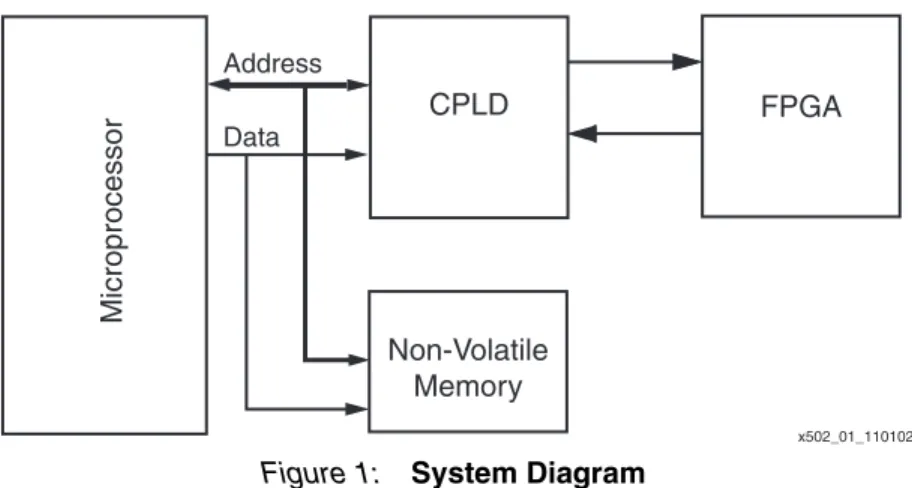
Today's systems demand greater functionality in less space and at reduced cost. In addition, each generation of Xilinx FPGAs delivers higher performance and increased capabilities. Although the Platform Flash PROMs provide an easy-to-use, pre-built configuration solution for Xilinx FPGAs, an embedded processor-based configuration solution can allow for advanced FPGA configuration applications and reduce board real estate requirements, assuming that an external, embedded processor with sufficient memory is already a pre-requisite for the system. This application note describes a technique for configuring an FPGA from an embedded processor. Three common components are required: an embedded microprocessor, some non-volatile memory, and a CPLD. Cost, as well as real estate, can be reduced if the function of a dedicated configuration device, such as a PROM, can be integrated within these three components. A system diagram is shown in Figure 1.
Note: Some systems might not require a CPLD if the microprocessor has a sufficient number of general-purpose I/O (GPIO) pins available. For these systems, the Xilinx FPGA can be configured directly by the microprocessor. For this type of configuration, this application note still applies. The overall configuration flow remains the same, but the user must modify the source code so that the microprocessor strobes its GPIO pins instead of its address and data bus.
Instead of using a dedicated PROM, the configuration bitstream can be loaded into unused portions of non-volatile system memory. Furthermore, a microprocessor, whose primary purpose is to perform other tasks, can also be used to coordinate the loading of configuration data into a Xilinx FPGA device. Unused register bits of a CPLD accessible to the
XAPP502 (v1.6.1) August 24, 2009
Using a Microprocessor to Configure Xilinx
FPGAs via Slave Serial or SelectMAP Mode
Author: Mike Peattie R
X-Ref Target - Figure 1
Figure 1: System Diagram
x502_01_110102
Microprocessor
CPLD
Non-Volatile Memory
FPGA
Address Data
Configuration Background R
microprocessor can then be used to monitor and instrument the FPGA’s control, data, and status bits. Microprocessors typically have a limited number of control signals, and a simple CPLD design can map a portion of the microprocessor’s address space to control FPGA configuration. Using this method, the CPLD establishes a synchronous interface between the microprocessor and the Xilinx FPGA. Such an interface can also allow the microprocessor to do more advanced functions, such as partial reconfiguration and readback.
Configuration
Background
Microprocessor programming of Virtex and Spartan FPGA families can be accomplished in either Slave Serial or SelectMAP mode. There are several similarities between Slave Serial and SelectMAP modes. Most importantly, the overall configuration flow is identical for both modes (Figure 2).
Note: Some Spartan FPGA families use the term parallel mode. Parallel mode is equivalent to the SelectMAP mode in function. See the Spartan FPGA data sheets for details. The Spartan/XL FPGAs do not support a parallel mode.
• Power-Up
Power-up is when power is first applied to the FPGA. Internal state machines are reset, and the device begins to wake up. At this point, the PROGRAM and INIT pins are both driven Low by the FPGA.
• Device Initialization
The device has properly powered up, but the internal configuration memory needs to be reset. This portion of the configuration flow is signaled by PROGRAM going High and INIT going High a short time later (see the appropriate data sheet for this delay). The device can remain permanently in this state if the user holds either PROGRAM or INIT Low externally.
• Configuration Load
The start of the configuration load phase is signaled by the INIT signal going High. After INIT goes High, the mode pins (M2:M0) are sampled (the mode pins indicate which configuration mode is desired). Consult the data sheet for the mode-pin settings required for the mode/device combination. In this phase, the device receives configuration data. All configuration events occur on the rising edge of CCLK.
• Start-Up
After the device receives all the configuration data, it proceeds to the start-up sequence. This sequence governs when the global reset signals (GTS, GWE, and for
Virtex/Virtex-E/Spartan-II/Spartan-IIE FPGAs, GSR) are toggled, and when the DONE pin goes High. DONE going High does not signal completion of configuration—additional CCLK cycles are needed to complete the start-up sequence. The number of CCLK cycles needed
X-Ref Target - Figure 2
Figure 2: Configuration Flow
Power-Up
Device Initialization
Configuration Load
Start-Up
Development Systems Reference Guide within the ISE® software manuals for additional BitGen options and details.
Slave-Serial-Specific Topics
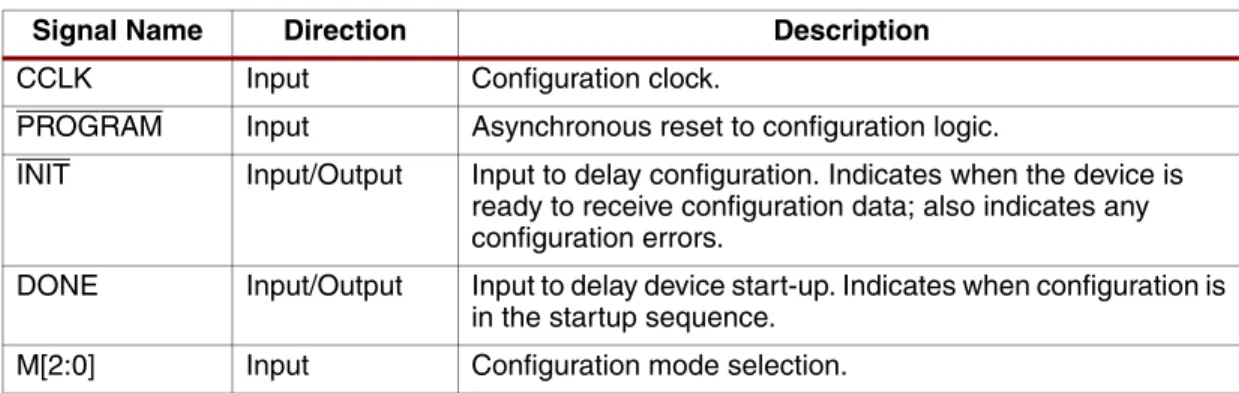
After INIT goes High, one bit of Slave Serial configuration data (presented on the DIN pin) is loaded into the configuration logic on each rising CCLK edge (refer to the appropriate data sheet for setup and hold-time specifications). Table 1 describes the pins used during Slave Serial configuration.
Slave-SelectMAP-Specific Topics
Slave-SelectMAP configuration data is loaded one byte at a time when presented on the D[0:7] bus on each rising CCLK edge, with the most significant bit (MSB) of each configuration byte on the D0 pin (see “Data Formatting and Byte-Swapping,” page 4 for more details). Table 2 lists the SelectMAP pins.
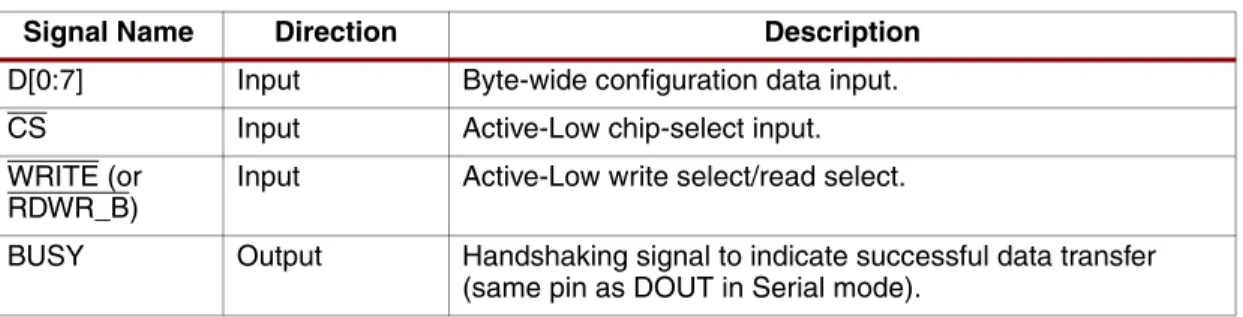
Two extra control signals are present for SelectMAP: CS and WRITE. These signals must both be asserted Low for a configuration byte to be transferred to the FPGA. A third signal, BUSY, is an output from the FPGA. When SelectMAP configuration is run quickly (for example, greater than 50 MHz for Virtex families), the BUSY line must be monitored to ensure that data is transferred. BUSY going High indicates that the last data byte was not transferred and must remain on the data bus.
Note: Check the appropriate FPGA family data sheet for the existence of a BUSY pin and the CCLK frequency above which the BUSY pin becomes active. Also, refer to the appropriate data sheet for setup-and-hold specifications for all signals. The SelectMAP configuration reference design for this application note demonstrates configuration via only the 8-bit SelectMAP bus. A few FPGA families also support 16- or 32-bit-wide SelectMAP buses. With appropriate modifications and attention to bit ordering, the principles of this reference design can be extended for the 16- or 32-bit-wide SelectMAP bus. See the configuration user guide specific to the target FPGA to determine the supported bus widths and bus bit order.
Table 1: Slave Serial Pin Descriptions
Signal Name Direction Description
CCLK Input Configuration clock.
PROGRAM Input Asynchronous reset to configuration logic.
INIT Input/Output Input to delay configuration. Indicates when the device is ready to receive configuration data; also indicates any configuration errors.
DONE Input/Output Input to delay device start-up. Indicates when configuration is in the start-up sequence.
M[2:0] Input Configuration mode selection. DIN Input Serial configuration data input. DOUT Output Data output for serial daisy chains.
Table 2: Slave-SelectMAP Pin Descriptions
Signal Name Direction Description
CCLK Input Configuration clock.
PROGRAM Input Asynchronous reset to configuration logic.
INIT Input/Output Input to delay configuration. Indicates when the device is ready to receive configuration data; also indicates any configuration errors.
DONE Input/Output Input to delay device start-up. Indicates when configuration is in the startup sequence.
Configuration Background R
Data Formatting and Byte-Swapping
Because the configuration bitstream is loaded into memory connected to the processor, it must be formatted in a way that the processor (or whatever device programs the memory) can use. To support various solutions, Xilinx tools can produce a number of different formats (Table 3).
Generally, either the .bin or .hex files are the most useful data source for programming non-volatile memory. A Perl script (bitformat.pl) is included with this application note should additional formatting be required. This script uses the .bit or .rbt file as a source and produces a user-customizable ASCII file that can be helpful in programming the onboard memory. Xilinx implementation software must be installed on the machine running this Perl script because the PROMGen program is called from within the script (for details, see the bitformat.readme file included).
In terms of data ordering, Slave Serial configuration is very simple. Loading begins with the first bit in the bitstream and continues one bit at a time until the end of the file is reached.
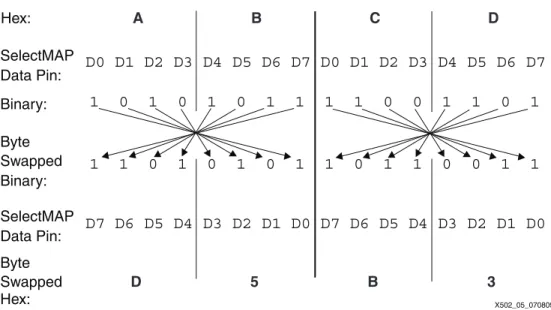
In contrast, data ordering for SelectMAP configuration is slightly more complex. Configuration data is loaded one byte at each rising CCLK edge, and the MSB of each byte is presented on the D0 pin, not the D7 pin. Because of this non-conventional ordering, presenting the data as is from the .bin file is generally incorrect. The reason is that most processors interpret D7 (not D0) as the most significant bit in each byte. Connecting D7 on the processor to the D7 on the FPGA SelectMAP data bus effectively loads the data backwards, resulting in unsuccessful configuration. For this reason, the source data stream might need to be byte-swapped, with bits in each byte in the data stream reversed. Figure 3 shows two bytes (0xABCD) being reversed.
D[0:7] Input Byte-wide configuration data input. CS Input Active-Low chip-select input. WRITE (or
RDWR_B)
Input Active-Low write select/read select.
BUSY Output Handshaking signal to indicate successful data transfer (same pin as DOUT in Serial mode).
Table 3: Xilinx Tool Formats
File Extension Description
.bit Binary file containing header information that should not be downloaded to the FPGA.
.rbt ASCII file containing a text header and ASCII 1s and 0s. .bin Binary file containing no header information.
.mcs, .exo, .tek ASCII PROM formats containing address as well as checksum information.
.hex ASCII PROM format only containing data. Table 2: Slave-SelectMAP Pin Descriptions (Cont’d)
Regardless of the orientation of the data, the MSB of each byte of the data must transmitted to D0. However, in the byte-swapped version of the data, the bit that must be transmitted to D0 is the rightmost bit and, in the non-byte-swapped data, the leftmost bit. The Perl script included in this application note can be customized to produce byte-swapped files or not, as needed (see the bitformat.readme file for details). With Xilinx software, the .mcs, .exo, and .tek files are always byte-swapped, and the .bit, .rbt, and .bin files are never byte-swapped. Hex files can be produced byte-swapped according to command-line options.
Note: Whether or not data is byte-swapped is entirely processor/application dependent and is generally only applicable for SelectMAP applications. Non-byte-swapped data should be used for Slave Serial downloads.
Errors and Troubleshooting
If configuration is not successful, the DONE pin does not go High after all the data is loaded. There are many different reasons why this situation can occur. Possible causes can be discovered by searching the Xilinx Answers Database or using the Configuration Problem Solver at: http://support.xilinx.com.
Hardware
Implementation
Microprocessor
The application reference design is based on a Motorola Dragonball MC68VZ328 processor. This specific design uses a Handspring Visor handheld computer to configure a Virtex FPGA. To complete the system, an Insight Springboard Development Kit provides 32 Mb of onboard flash memory, as well as a 256-macrocell CoolRunner™ CPLD.
Figure 4 shows the memory map for the Dragonball processor used in this design. The Handspring Visor Springboard expansion slot provides two chip select regions available to the user, called Chip Select 0 and Chip Select 1. The flash memory is connected to the
Chip Select 0 region, defined as the address space between 0x28000000 and 0x28FFFFFF. The CPLD is connected to the Chip Select 1 region, defined by the address space between 0x29000000 and 0x29FFFFFF. Each address location references eight bits of data. However, the Dragonball processor does not support byte-wide addressing. As a consequence, the microprocessor’s address line 0 is not used. Therefore, data can only be accessed on even address locations (in other words, 0x28000000, 0x28000002, etc.). Each access reads or writes 16 bits of data. Accessing address locations on odd boundaries is not allowed.
X-Ref Target - Figure 3
Figure 3: Byte-Swapping Example
X502_05_070809
Hex:
Binary: Byte Swapped Binary:
Byte Swapped Hex: SelectMAP Data Pin:
D0 D1 D2 D3 D4 D5 D6 D7 D0 D1 D2 D3 D4 D5 D6 D7
1 0 1 0 1 0 1 1 1 1 0 0 1 1 0 1
1 1 0 1 0 1 0 1 1 0 1 1 0 0 1 1
D7 D6 D5 D4 D3 D2 D1 D0 D7 D6 D5 D4 D3 D2 D1 D0
SelectMAP Data Pin:
A B C D
Hardware Implementation R
The shaded area on the bottom of the memory map shown in Figure 4 represents portions of memory used specifically by the processor for internal functions. This memory space is not utilized in this reference design.
Note: Even though a Motorola Dragonball processor is used in this reference design, any
microprocessor can be used. In addition, the microprocessor code in this reference design can be easily ported to different processors. However, remapping requires an understanding of how to retarget the memory-mapped Dragonball I/O structure to match the memory map of another processor.
Flash Memory
In this design, the 16-bit-wide flash memory begins at address 0x28000000 and ends at address 0x28FFFFFF. As shown in Figure 5, a Virtex XCV50configuration bitstream consists of 559,200 bits. Because each address location contains 16 bits of data, a total of 34,950 addresses are needed. The first 16 bits of configuration data reside at address 0x28000200 and the final 16 bits are located at address 0x2801130A. This design arbitrarily chose address 0x28000200 to be the starting address in order to simulate actual customer scenarios in which flash memory is also used to hold other system data.
The data within the flash memory might need to be byte-swapped, depending upon the application. For this design, byte-swapped data is used for SelectMAP configuration but not for Slave-Serial configuration. Byte-swapping reformats the FPGA configuration data so that the order of the bits within each byte is reversed. For a complete description of byte-swapping, refer to the description in “Configuration Background,” page 2.
X-Ref Target - Figure 4
Figure 4: Microprocessor Memory Map
16 MB
0x28000000 0x29000000 0x29FFFFFF
16 MB
X502_06_111507 CPLD Memory Space
(Chip Select 1)
Flash Memory Space (Chip Select 0)
Internal Memory Space 8 Bits
Slave-SelectMAP Hardware
This section discusses a reference design allowing a microprocessor to configure an FPGA device via the SelectMAP mode (SelectMAP configuration mode is the fastest configuration option). In order to accomplish SelectMAP configuration, this design uses a combination of a microprocessor, CPLD, and flash memory (Figure 6).
A 16-bit wide flash memory device is used to store the FPGA configuration data. Because each flash address stores 16-bits of data, the microprocessor reads each address to retrieve the 16-bit wide data and delivers the data in a byte-wide fashion to the FPGA. During this process, the microprocessor provides the FPGA with a configuration clock and monitors the DONE and BUSY pins. A CPLD is used to form the glue logic between the microprocessor and the FPGA device.
X-Ref Target - Figure 5
Figure 5: Flash Memory Map
X-Ref Target - Figure 6
Figure 6: SelectMAP Configuration 69,898 Addresses (559,200 bits) 0xFFFF 0xFFFF 0x???? . . . . DATA[15:0] . . . . . . . . X502_07_111507 0x28000000 0x28000200 0x28FFFFFF
Flash Address 0 Begin FlashMemory
End Flash Memory Begin Virtex Bitstream End Virtex Bitstream 0x2801130A
Last Flash Address
Virtex Configuration Bitstream
Microprocessor CPLD FPGA
Memory ADDRESS DATA CS0 CS1 WE OE PROGRAM CS WRITE CCLK D[0:7] INIT DONE BUSY Program Register Config. Register Input Register
Used for storage of the configuration bitstream
Hardware Implementation R
CoolRunner CPLD
A Xilinx CoolRunner CPLD is used for glue logic between the microprocessor and the Xilinx Virtex FPGA. In the SelectMAP configuration mode, the CoolRunner device is responsible for driving the Virtex FPGA configuration pins, namely PROGRAM, CS, WRITE, CCLK, and D[0:7]. The Virtex FPGA’s INIT, DONE, and BUSY pins are also registered by the CPLD, allowing the status of these pins to be monitored by the microprocessor.
The CoolRunner CPLD is used to establish a synchronous interface between the microprocessor and the Xilinx FPGA. This interface is comprised of three registers: the Configuration Register, Program Register, and Input Register. These registers store FPGA configuration signals each time the processor does a read or write to the port, supporting the set of signals required for SelectMAP mode (PROGRAM, CCLK, DATA[0:7], INIT, CS, WRITE, DONE, and BUSY). The Configuration Register and Program Register are write-only registers, while the Input Register is read-only.
A detailed block diagram of the CPLD is shown in Figure 7.
X-Ref Target - Figure 7
Figure 7: CPLD Block Diagram DATA[15:0]
Address Decode ADDR[23:0]
WE
WE
OE Program Register Configuration Register
Input Register
CS, WRITE, PROGRAM D[7:0], CCLK
BUSY, DONE, INIT
D Q
CE
D Q
CE
D Q
CE
The register address map is shown in Table 4.
SelectMAP.c
The C code discussed in this section allows a microprocessor to:
• Read FPGA configuration data from flash memory
• Generate a CCLK
• Deliver byte-wide data to the FPGA
• Check the status of the BUSY pin (optional)
Note: Different microprocessors have different memory-mapped I/O structures, depending upon the system configuration. Therefore, while the majority of the C code listed here should be easily
transportable, the user must modify the sections of code that command the microprocessor to perform a write operation on its data bus to match the memory map of the new microprocessor.
To allow for maximum readability, all C code shown in this reference design accesses the microprocessor address and data bus uniformly using two functions: IOWrite() and IORead(). IOWrite() writes a 16-bit word to a specified address location; IORead() retrieves a 16-bit result from a specified location. Refer to “Microprocessor,” page 5 for this reference design’s memory map and to “Appendix: Processor Specific I/O Function Calls,” page 15 for the syntax of the IOWrite() and IORead() functions.
The SelectMAP.c source file contains three important functions: SelectMAP(),
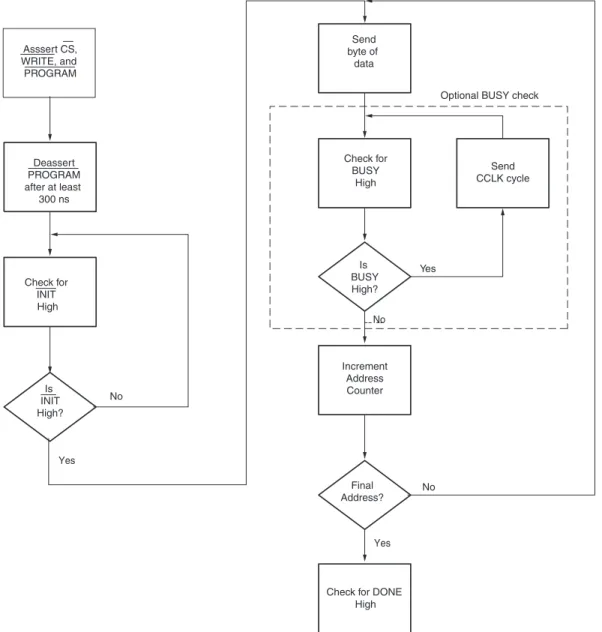
SelectMAP_output(), and Busy_Check(). The SelectMAP() function is called from within the main function to begin configuration. SelectMAP() pulses the FPGA’s PROGRAM pin and checks for INIT deassertion. After INIT is deasserted, the FPGA is ready to receive configuration data, and the SelectMAP_output() function is called. A software flow diagram is shown in Figure 8, page 10. First, the processor writes to the Program Register to assert the PROGRAM pin, resetting the FPGA.
Note: A loop might be required to assert the FPGA’s PROGRAM pin for the minimum required time (refer to the appropriate data sheet). If the FPGA just completed power-up or is reset through other means, this loop is not necessary.
After the PROGRAM bit is asserted, the SelectMAP() function checks the CPLD Input Register until INIT is High. Then, the function enters a for loop that cycles through the flash memory address range containing the FPGA configuration data. In this example, using a XCV50 device, the address range is between 0x28000200 and 0x2801130A. For each address location, 16-bit data is retrieved, and the SelectMAP_output() function is called to perform presentation of byte-wide data to the FPGA.
Note: In the SelectMAP_output() function, two write cycles are needed for each byte in the configuration file. One cycle is needed for driving CCLK Low and to present the next configuration byte. A second cycle is needed to drive CCLK High. Immediately after driving the CCLK pin High, Busy_Check() is called to ensure that the data is properly received by the FPGA.
Table 4: Register Address Map Register
Address A[23:0]
Register Name
Register Data
D[15:9] D8 D7 D6 D5 D4 D3 D2 D1 D0
0x000000 Configuration
Register D[7:0] – – – – – – – – CCLK
0x000002 Program
Register – – – – – – – CS WRITE PROGRAM
0x000004 Input
Hardware Implementation R
Note: The maximum speed of SelectMAP configuration varies for different FPGA families. Check the appropriate data sheet for this specification.
After all configuration data is loaded, the for loop is terminated, and the SelectMAP() function checks the CPLD Input Register for DONE assertion.
Slave Serial Hardware
This section discusses a reference design allowing a Virtex FPGA to be configured in the Slave
X-Ref Target - Figure 8
Figure 8: Select MAP Configuration Flow Diagram
Yes
No
Optional BUSY check
Check for DONE High No
Asssert CS, WRITE, and
PROGRAM
Deassert PROGRAM after at least 300 ns
Check for INIT High
Is INIT High?
Send byte of
data
Check for BUSY
High
Is BUSY High?
Increment Address Counter
Final Address?
Send CCLK cycle
x502_04_103101
Yes
Yes No
is used to decode both the serialized bitstream, as well as the configuration clock, and is ultimately responsible for toggling the Virtex FPGA’s configuration pins.
CoolRunner CPLD
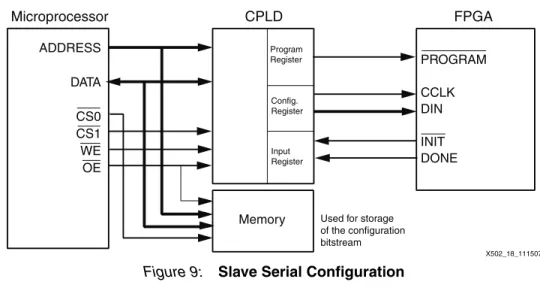
A Xilinx CoolRunner CPLD is used for glue logic between the microprocessor and the Xilinx Virtex FPGA. In the Slave Serial mode of configuration, the CoolRunner device is responsible for driving the Virtex FPGA configuration pins, namely PROGRAM, CCLK, and DIN. The Virtex device’s INIT and DONE pins are also registered by the CPLD, allowing the status of these pins can be read by the microprocessor.
The CoolRunner CPLD is used to establish a synchronous interface between the microprocessor and the Xilinx FPGA. The interface is comprised of three registers: the Configuration Register, Program Register, and Input Register. These registers store FPGA configuration signals each time the processor does a read or write to the port, supporting the set of signals required for Slave Serial mode (PROGRAM, DIN, CCLK, INIT and DONE). The Configuration Register and Program Register are write-only registers, while the Input Register is read-only. A detailed block diagram of the CPLD design is shown in Figure 10. The Register Address Map is shown in Table 5, page 12.
X-Ref Target - Figure 9
Figure 9: Slave Serial Configuration
Microprocessor CPLD FPGA
Memory ADDRESS
DATA CS0 CS1 WE OE
PROGRAM CCLK DIN INIT DONE Program
Register
Config. Register
Input Register
Used for storage of the configuration bitstream
Hardware Implementation R
SlaveSerial.c
The C code discussed in this section allows a microprocessor to:
• Read FPGA configuration data from flash memory
• Provide a CCLK
• Serialize the configuration bitstream
Note: Different microprocessors have different memory-mapped I/O structures, depending upon the system configuration. Therefore, while the majority of the C code listed here should be easily
transportable, the user must modify the sections of code that command the microprocessor to perform a write operation on its data bus to match the memory map of the new microprocessor.
X-Ref Target - Figure 10
Figure 10: CPLD Block Diagram DATA[15:0]
Address Decode ADDR[23:0]
WE
WE
OE Program Register Configuration Register
Input Register
CCLK, DIN
PROGRAM
DONE, INIT
D Q
CE
D Q
CE
D Q
CE
X502_17_111507
Table 5: Register Address Map Register Address
A[23:0] Register Name
Register Data
D7 D6 D5 D4 D3 D2 D1 D0
0x000000 Configuration Register – – – – – – CCLK DATA
0x000002 Program Register – – – – – – – PROGRAM
First, the processor writes to the Program Register to assert the PROGRAM pin, resetting the FPGA.
Note: A loop might be required to assert the FPGA’s PROGRAM pin for the minimum required time (refer to the appropriate data sheet). If the FPGA just completed power-up or is reset through other means, this loop is not necessary.
After the PROGRAM bit is asserted, the SlaveSerial() function checks the CPLD Input Register until INIT is High. Then, the function enters a for loop that cycles through the flash memory address range containing the FPGA configuration data. In this example, using a XCV50 device, the flash address range is between 0x28000200 and 0x2801130A. For each address location, the 16-bit data is retrieved, and the ShiftDataOut() function is called to perform serialization and presentation of the data to the FPGA.
Note: The ShiftDataOut() function, two write cycles are needed each bit in the configuration file. One cycle is needed for driving CCLK Low and to present the next configuration bit. A second cycle is needed to drive CCLK High. After all configuration data is loaded, the for loop is terminated, and the SlaveSerial() function checks the CPLD Input Register for DONE assertion.
Reference
Design Files
The latest version of this application note and reference design files can be downloaded from the Xilinx website at:
https://secure.xilinx.com/webreg/clickthrough.do?cid=139211 X-Ref Target - Figure 11
Figure 11: Slave Serial Configuration Flow Diagram
No
No Deassert
PROGRAM after at least
300 ns
Increment Address Counter
Check for DONE
High Send bit of data Assert
PROGRAM
Check for INIT High
x502_03_103101
Final Address?
Is INIT High?
Yes
Conclusion R
Conclusion
This application note provides a background on configuration as well as a description of two complete sets of reference designs allowing a Xilinx FPGA device to be configured through SelectMAP or Slave Serial mode. While the microprocessor C code targets a Motorola 68VZ328 Dragonball processor, it was written with portability in mind. Porting the code to another processor requires some effort, but all the design files are documented extensively. Also, complete design files for a Xilinx CPLD design are included to provide a synchronous interface between the microprocessor and the target Xilinx FPGA.Appendix:
Processor
Specific I/O
Function Calls
IOWrite(int Addr, int Data)
To use IOWrite(), an address and data must be passed to the function. In this reference design, the Configuration, Program, and Input Registers are located at 0x29000000, 0x29000002, and 0x29000004, respectively. These are the only three address values ever written to.
I/O Write Usage Example
The timing diagram for a microprocessor write cycle is shown below in Figure 12.
IORead(int Addr)
To use IORead(), an address must be provided. The 16-bit data value at that address is then returned. In this design, data is read from address ranges between 0x28000200 and 0x2801130A, as well as address location 0x29000004. The former is where the FPGA Configuration bitstream is stored, and the latter is the location of the Input Register.
I/O Read Usage Example
Table 6: I/O Write Usage Example IOWrite(0x29000000, 0x0011)
Write to CPLD Configuration Register: “1” = CCLK
“1” = DATA
IOWrite(0x29000000, 0x0001)
Write to CPLD Configuration Register: “0” = CCLK
“1” = DATA
IOWrite(0x29000002, 0x0001) Write to CPLD Program Register: “1” = Program
X-Ref Target - Figure 12
Figure 12: Write-Cycle Timing Diagram
Table 7: I/O Read Usage Example
IORead(0x28000200) Retrieve the first 16 bits of configuration data from flash memory.
IORead(0x28000201) Retrieve the second 16 bits of configuration data from flash memory.
IORead(0x2801130A) Retrieve the final 16 bits of configuration data from flash memory.
IORead(0x29000004) Read from Input Register to determine values of
ADDR
CS
WE
DATA
x502_15_103101
ADDR VALID
Revision History R
The timing diagram for a microprocessor read cycle is shown below in Figure 13.
Revision
History
The following table shows the revision history for this document.
X-Ref Target - Figure 13
Figure 13: Read-Cycle Timing Diagram
ADDR
CS
OE
DATA DATA VALID
ADDR VALID
x502_19_103101
Date Version Revision
12/03/01 1.0 Initial Xilinx release.
01/08/02 1.1 Added Spartan-IIE to “Summary,” page 1.
06/10/02 1.2 Added "Virtex Series, Virtex-II Series Platform FPGAs, and Spartan-II Series" to “Summary,” page 1.
11/06/02 1.3 Updated Figure 5, page 7 and Figure 7, page 8. 11/13/02 1.4 Updated Figure 10, page 12.
12/03/07 1.5 • Updated document template.
• Update URLs.
• Updated list of applicable FPGA families.
• Updated BUSY activation frequency in “SelectMAP-Specific Topics,” page 3.
• Enhanced start-up CCLK requirements in “Configuration Background,” page 2.
• Completed other edits and corrections.
07/08/09 1.6 • Updated appropriate SelectMAP references to distinguish between Slave- and Master-SelectMAP mode.
• Table 1, page 3: Updated PROGRAM pin description.
• “Slave-SelectMAP-Specific Topics,” page 3: Updated note.
• Updated Table 3, page 4.
Notice of
Disclaimer
Xilinx is disclosing this Application Note to you “AS-IS” with no warranty of any kind. This Application Note is one possible implementation of this feature, application, or standard, and is subject to change without further notice from Xilinx. You are responsible for obtaining any rights you may require in connection with your use or implementation of this Application Note. XILINX MAKES NO REPRESENTATIONS OR WARRANTIES, WHETHER EXPRESS OR IMPLIED,STATUTORY OR OTHERWISE, INCLUDING, WITHOUT LIMITATION, IMPLIED WARRANTIES OF MERCHANTABILITY, NONINFRINGEMENT, OR FITNESS FOR A PARTICULAR PURPOSE. IN NO EVENT WILL XILINX BE LIABLE FOR ANY LOSS OF DATA, LOST PROFITS, OR FOR ANY SPECIAL, INCIDENTAL, CONSEQUENTIAL, OR INDIRECT DAMAGES ARISING FROM YOUR USE OF THIS APPLICATION NOTE.

![Figure 6: SelectMAP Configuration69,898 Addresses(559,200 bits)0xFFFF0xFFFF0x????....DATA[15:0].......](https://thumb-us.123doks.com/thumbv2/123dok_us/8538747.2299907/7.918.274.833.649.934/figure-selectmap-configuration-addresses-bits-xffff-xffff-data.webp)
![Figure 7: CPLD Block DiagramDATA[15:0]AddressDecodeADDR[23:0]WEWE OE Program Register Configuration RegisterInput Register CS, WRITE, PROGRAM D[7:0], CCLK BUSY, DONE,INITDQCEDQCEDQCE X502_09_111507](https://thumb-us.123doks.com/thumbv2/123dok_us/8538747.2299907/8.918.246.855.388.837/diagramdata-addressdecodeaddr-program-register-configuration-registerinput-register-initdqcedqcedqce.webp)
![Table 4: Register Address Map Register Address A[23:0] Register Name Register DataD[15:9]D8D7D6D5D4 D3 D2 D1 D0 0x000000 Configuration Register D[7:0] – – – – – – – – CCLK 0x000002 Program](https://thumb-us.123doks.com/thumbv2/123dok_us/8538747.2299907/9.918.64.870.129.320/register-address-register-address-register-register-configuration-register.webp)