A Case Study of Usability Testing – the SUMI Evaluation Approach of
the EducaNext Portal
TANJA ARH, BORKA JERMAN BLAŽI
Č
Laboratory for Open Systems and Networks
Jožef Stefan Institute
Jamova cesta 39, 1000 Ljubljana
SLOVENIA
{tanja, borka}@e5.ijs.si http://www.e5.ijs.si
Abstract: - The new challenge for designers and Human–computer interaction (HCI) researchers is to develop
software tools and applications for effective e-learning. Software usability is one aspect of Human–computer interaction that can benefit from knowledge of the user and their tasks. However, in practice not much attention is given to this issue during testing. Evaluators often do not have the knowledge, instruments and/or time available to handle usability. One set of methods for determining whether an application enables users to achieve their predetermined goals effectively and efficiently is usability evaluation with end users. The paper presents the results of empirical study of usability evaluation which was based on SUMI (Software Usability Measurement Inventory) questionnaires. The software application tested was a multilingual educational portal EducaNext.
Key-Words: - human computer interaction (HCI), EducaNext educational portal, distance learning, software
usability measurement inventory (SUMI), usability, end users
1 Introduction
Despite the fact that there has been an abundance of e-learning websites that offer education over the Internet over the past decade, their usability, educational effectiveness, practical efficiency, and general level of satisfaction with such websites on the Internet [13] are still not yet well known or understood. In the literature, there are numerous recommendations for the design of pages, text, graphics, and navigation in web-based systems, but in spite of that, it is still recognized that “severe usability problems are present and common” [14]. Despite the increased awareness of these problems when adopting internet-based education (e.g., Johnson & Hegarty) [15] the usability of e-learning sites has still not been sufficiently explored and solutions not yet provided. At the same time, usability is becoming an area that is beginning to touch those who would not previously have thought that understanding these issues was relevant to their work, i.e. e-learning service providers and web designers. It is becoming apparent that for e-learning websites to be usable, an appreciation of what students expect from the site, how they learn, what motivates them, and what helps them to achieve their learning goals is needed.
These are some of the realizations that led us to perform the experiment described in this paper and to analyze the results. The experiments were
undertaken as part of a FOCUS-SIAT project – e-learning and training in the field of cross border cooperation centered on the issues of introducing internet-based education in a region that suffers from a low level of business-oriented usage of the Internet and related e-services together with a relatively high level of unemployment. We found the environment and the context of this study extremely suitable for an evaluation and assessment of the usability of the e-learning system, offered over the Internet, and to try to identify the “threshold of acceptability beyond which users can begin to interact productively and voluntarily instead of simply acting and reacting” [16].
2 Current Approaches to Usability
Evaluation
The usability testing is of key importance in the human-computer interaction. It is one of the basic elements used to verify the user interface quality [7]. There are many definitions of usability. The de facto definition of usability is based on the implicit
assumption that users are rational agents, interacting with a system by using their knowledge and deriving information from the system’s reactions to achieve their specific goals [12]. In usability testing, which is one of the mostly applied methods for identifying usability problems of a system, test
participants are usually required to perform specific tasks with the system for which they have incomplete or even erroneous concepts. We claim that these imperfect concepts can presumably be improved when users engage in achieving tasks with the system, given their ability to reason, learn and reflect. The improved mental models of the system will better support the subsequent interaction; users can then accomplish their tasks more effectively and efficiently. While we seldom query the take-for-granted assumption about the rationality of human behaviours, there is a concern to what extent is this assumption applicable to users of ever-changing information technologies (IT). How learnable should a system be so that novice users can adapt their conceptual models to situational demands with ease and effectiveness? Indeed, learnability is one of the quality metrics to be evaluated in usability tests. However, it is usually measured in terms of subjective perceptions with the use of a retrospective questionnaire (e.g., Kirakowski & Corbett) [1] rather than objective performances such as time-on-task and error rate.
All of the definitions, including ISO 9241/11[4], consider multiple factors, such as ease of learning, ease of use, effectiveness of the system, user satisfaction; the definitions connect those factors to the impact on humans. There are many evaluation methods [8] used in usability evaluations. To ensure a software project has the essential usability characteristics, we divide the usability methods into
inspection methods (without end users) and test methods (with end users).
Inspection methods are methods for identifying usability problems and improving the usability of an interface design by checking it against established standards. These methods include heuristic evaluation, cognitive walkthroughs, and action analysis. Heuristic evaluation (HE) is the most
common informal method. It involves having usability specialists’ judge whether each dialogue or other interactive element follows established usability principles [9]. A cognitive walkthrough (CW) is a task-oriented method by which the analyst
explores the system’s functionalities; that is, CW simulates step-by-step user behaviour for a given task [10]. The action analysis method is divided into
formal and back-of-the-envelope action analysis; in both, the emphasis is more on what the practitioners do than on what they say they do. The formal method requires close inspection of the action sequences a user performs to complete a task. [11].
Testing with end users is the most fundamental usability method and is in some sense indispensable. It provides direct information about how people use
our systems and their exact problems with a specific interface. There are several methods for testing usability, the most common being thinking aloud, field observation, and questionnaires. Thinking aloud (THA) [7] may be the single most valuable
usability engineering method. It involves having an end user continuously thinking out loud while using the system. By verbalizing their thoughts, the test users enable us to understand how they view the system, which makes it easier to identify the end users’ major misconceptions. Field observation is
the simplest of all methods. It involves visiting one or more users in their workplaces. Notes must be taken as unobtrusively as possible to avoid interfering with their work. Many aspects of usability can best be studied by querying the users. This is especially true for issues related to the subjective satisfaction of the users and their possible anxieties, which are difficult to measure objectively.
Questionnaires are useful for studying how end
users use the system and their preferred features, but need some experience to design.
3 Aspects of User Satisfaction
Studies have shown that satisfaction can be subdivided into five aspects [1]:
• Efficiency: this refers to the user feeling that
the software is enabling the taks(s) to be performed in a quick, effective and economical manner or, at the opposite extreme, that the software is getting in the way of performance;
• Affect: this is a psychological term for
emotional feeling. In this context it refers to the user feeling mentally stimulated and pleasant or the opposite as a result of interacting with the software;
• Helpfulness: this refers to the user's
perceptions that the software communicates in a helpful way and assists in the resolution of operational problems;
• Control: degree to which the user feels that he,
and not the product, is setting the pace;
• Learnability: ease with which a user can get
started and learn new features of the product; In the next chapters the approach and methodology used are described in more details.
4 SUMI Evaluation
The method selection often depends on what is being evaluated, the software and hardware used, users that are tested and the research budget. In our
case, we used the Software Usability Measurement Inventory (SUMI) method [1], which was developed in the project 'Metrics for Usability Standards in Computing' (MUSiC, CEC ESPRIT project number 5429) by the Human Factors Research Group (HFRG), University College, Cork.
Software Usability Measurement Inventory (SUMI) is a solution to the recurring problem of measuring users' perception of the usability of software. It provides a valid and reliable method for the comparison of (competing) products and differing versions of the same product, as well as providing diagnostic information for future developments. SUMI provides an objective way of assessing user satisfaction with software.
This generic usability tool is comprised of a validated 50-item paper-based questionnaire in which respondents score each item on a three-point scale (i.e., agree, undecided, disagree). The following sample shows the kind of questions that are asked:
• This software responds too slowly to inputs;
• I would recommend this software to my
colleagues;
• The instructions and prompts are helpful;
• I sometimes wonder if I am using the right command;
• Working with this software is satisfactory;
• The way that system information is presented is clear and understandable;
• I think this software is consistent;
The questionnaire is designed to measure the affect, efficiency, learnability, helpfulness and control [3]. During its development, the questionnaire was standardized as a measurement tool for some of the user-orientated requirements expressed in the European Directive on Minimum Health and Safety Requirements for Work with Display Screen Equipment (90/270/EEC). SUMI is also mentioned in the ISO 9241 standard as a recognized method of testing user satisfaction [4].
Users normally need about ten minutes to complete the inventory. In a software development environment if the users have no previous experience of the software, additional time is needed for introduction, training, and carrying out a set of benchmark task with the software. Benchmark tasks refer to tasks that reflect the realistic context of use of the software. These tasks are usually written as scenarios, or tasks that are embedded within a real-world situation. How long this takes depends on the complexity of the software being evaluated and may be from 20 minutes to more than an hour.
5 Software Environment
FOCUS-SIAT project decided to provide Internet-based education to the target groups by using a model of e-learning services similar to a business portal with e-shopping facilities. The selected service is known as the EducaNext portal. Hence,
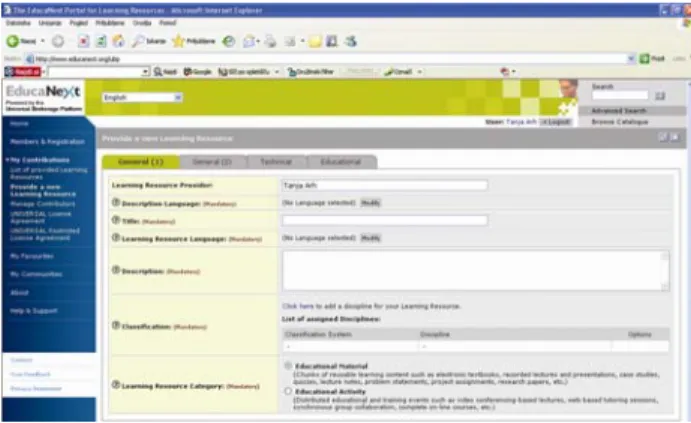
the basic purpose of our usability testing was to evaluate the affects (emotional response), efficiency, learnability, helpfulness, and ease of use of the EducaNext educational portal (Fig. 1). The
EducaNext portal (www.educanext.org) addresses the new trends in higher education by providing a web-based tool for the sharing of learning resources. On EducaNext, educators are able to provide learning resources to their peers and specify offer conditions on which interested consumers are required to agree before accessing the learning resources [5, 6].
Fig. 1: The educational portal Educanext – v. 1.0 Based on general educational metadata and target-audience specific offer information (e.g. commercial offer, open content-like license agreement, etc.), learning resources are advertised through a catalogue and interest-specific mailing lists. Based on this information, educators can choose and access learning resources from dispersed delivery systems such as video conferencing applications, learning management systems, streaming media servers and standard web servers after agreeing on the terms specified. The process of agreeing on the offer terms is referred to as booking and constitutes an important means for creating awareness about intellectual property rights issues.
As such, the EducaNext portal provided an excellent infrastructure for the activities of the FOCUS-SIAT project. EducaNext is an educational mediator created within the European UNIVERSAL project from the EU 5th Framework Programme [17]. The EducaNext portal resides in a distributed multi-lingual, web-based, and learning content management system called the Universal Brokerage
Platform (UBP). It is built from open-source components and is being used by national ministries of education and the European Academic Consortium of Management Schools (CEMS). The EducaNext portal is available in Slovenian language that is relevant for the FOCUS-SIAT project.
For the purpose of SUMI evaluation we used the data of the usability tests on the Slovenian versions of the platform. Standard user test procedures were adopted [2]. Slovenian native speakers were involved.
6 Procedures and Observations
Usability testing of EducaNext educational portal was done in computer-equipped rooms with a computer dedicated to each of the participants. The evaluation process was almost identical for every group of participants in Slovenia. The experimenters met with each group for 10 minutes to explain the purpose of the evaluation session and present the methodology of SUMI evaluation. Throughout the detailed explanation about evaluation session, the participants received verbal instructions from the experimenters. The experimenters were present to assist with any difficulties with the questionnaire and to answer questions as they possibly arose. In the second phase, the users were asked to fill the SUMI questionnaire for user-interaction satisfaction. The evaluation sessions lasted about 20 minutes each. During the sessions users were not allowed to ask the evaluator questions.
6.1 Participants
We tested the EducaNext web portal with 31 individuals in three groups at three institutions. The first group consisted of 10 trainees, the second of 9, and the third of 12. Two groups were situated at the Faculty of Electrical Engineering and Computer Science in Maribor and one in Chamber of Commerce in Maribor, but separately in each own session. The participants included mostly adults, who were partially employed and partially unemployed. The age range of the participants was 18 to 50. As part of the recruiting process, we ensured that all participants had some basic computer and web browser experience. Beyond this basic level, the participants varied in their computer skills as well as in their language skills (mother language and English language).
6.2 SUMI Questionnaires
The Slovenian version of SUMI questionnaire was developed for measuring the usability. The SUMI questionnaire includes as already mentioned 50 items for which the user selects one of three responses (“agree”, “don’t know”, “disagree”). The statements presented to the participants are about their attitudes to the software they have just used.
Once questionnaires are completed, a dedicated software program named SUMISCO that comes in the SUMI evaluation package scores them and compares the results to the standardization database. The mean score of the standardization database is 50, with a standard deviation of 10. Since the standardization database is developed from successful commercial products, a system that achieves a score in the range 40–60 is comparable in terms of usability to most of these products (the standardization database does include score below and above that range).
In addition to the global and subscale scores, the SUMI questionnaire can also provide information about particular items on the questionnaire. This analysis is called Item Consensual Analysis. The
SUMISCO software compares the results of each item – the number of responses in each of the three response categories – to the expected values from the standardization database, using a Chi-square test. Those items with patterns that are significantly different from the expected values are flagged in the SUMISCO output.
6.3 Study Results
The results from the SUMI evaluations are presented in Table 1 in terms of the median, upper, and lower confidence levels. These levels are derived from the global usability scale and each of the five usability sub-scales. The median is the middle score when the scores are arranged in numerical order. It is an indicative sample statistic. The upper and lower confidence limits represent the limits within which the theoretical true score falls 95 % of the time for this sample of users. Based on the data in the SUMI database, it can be stated that the global score has an average value of 50 in a normal distribution with a standard deviation of 10 (with a maximum score of 73). This means that by definition for a value exceeding 50 the user satisfaction is higher than average [19].
On the global scale, the most reliable of all the SUMI scales indicates that the usability of the evaluated system is comparable to successful commercial systems. In terms of the usability,
sub-scales show that the results are consistent and that the scores obtained are above average.
Scale Lcl Median Ucl
GLOBAL n=31 43 56 59 Efficiency 55 58 61 Affect 50 63 66 Helpfulness 57 60 63 Control 33 49 52 Learnability 51 55 59
Table 1: The results of SUMI Questionnaires
The higher values/scores were obtained for Effect, Helpfulness and Efficiency, while the lowest values/score was given to the Control and Learnability.
Fig. 2: Comparison of quantitative usability measurements
6.4 Item Consensual Analysis
The Goodness of Fit between the observed and expected values is summarised using Chi Square [18] and these statistics were presented in the SUMISCO output. The greater the value of the total Chi Square, the more likely it was that the obtained values differ from what is expected from the standardisation database.
In this output, the SUMI items which differ most (at least 99.99 % certain) from the standardisation are presented in the order of appearance:
1. “It is relatively easy to move from one part of a task to another.” => more people were
undecided than expected
2. “There have been times in using this software when I have felt quite tense.” => more people
were undecided or disagree than expected
3. “I feel in command of this software when I am using it.” => more people were undecided than
expected
4. “Working with this software is mentally stimulating.” => more people agreed than
expected
5. “The software documentation is very informative.” => more people agreed than
expected
6. “I feel safer if I use only a few familiar commands or operations.” => more people
were undecided than expected, but mostly agreed as expected
7. “This software occasionally behaves in a way which can't be understood.” => more people
disagree than expected
8. “The instructions and prompts are helpful.” =>
more people agreed than expected
7. Applicability of SUMI
On the basis of the test carried out in practice, a number of conclusions have been drawn regarding the applicability of SUMI:
• it is easy to use; not many costs are involved. This applies both to the evaluator and the student. On average a SUMI test can be carried in approximately 4 days; this includes the time necessary for a limited context analysis and reporting;
• during the testing the emphasis is on finding defects, this often results in a negative quality indications. SUMI however, provides an objective opinion;
• the usability score is split into various aspects, making a thorough more detailed evaluation possible (using the various output data).
However, also some disadvantages can be distinguished:
• a running version of the system needs to be available; this implies SUMI can only be carried at a relatively late stage of the project;
• the high (minimum of ten) number of users with the same background, that needs to fill out the questionnaire. Quite often the implementation or test doesn’t involve ten or more users belonging to the same user group;
• the accuracy and level of detail of the findings is limited (this can partly be solved by adding a small number of open question to the SUMI questionnaire).
8 Discussion
Generally speaking, the above findings are consistent with the assumption that users behave rationally when working with an interactive system such as an educational portal EducaNext. The users’ behaviors indicate that they were aware of the fact
that their own knowledge state slightly deviated from the optimum level required for interacting effectively with the portal. This is an obvious conclusion if the context and the targeted audience, selected according to the set principles, are taken in account. Consequently, the users have shown sufficient engagement regarding exploratory actions. The lower the user’s level of domain knowledge required for interacting effectively with the system, the higher the tendency for the user to explore the situation to bridge the knowledge gap. For the provider of the educational service, the most important findings were that the EducaNext portal has shown a high level of learnability, especially in the case of a novice user.
Based on the usability ratings which we gathered for the user interface, as shown in Fig. 2, we received a result that on Global scale the user interface shown better results than average. Also for all other sub-scales was seen that results were better than average and in the desired range of 40 to 60.
In order to improve the score, there was only evidence that the designers need to make modifications in the user interface to improve control and learnability with better navigation and informative functions. Control scores were the most none spreading and this shows that most people did not agree or were undecided about control of the user interface.
There is a need to make faster responds of the software and to make easier path for moving from one task to another task. Also user interface should be more economically in the mean of keystroke using. On the other way it was found that users has to read too much before starting the portal and do not have a possibility to see all options at a glance.
9 Conclusions
The usability methodology presented in this paper for evaluating the learnability of an educational portal EducaNext is plausible. It provides better understanding of the cognitive mechanism underlying the observed effects and precise information about the tradeoffs in using SUMI methodology.
The results and findings of the study gave important information for the producers and designers of the educational portal EducaNext to know how users learn from their problems in interacting with the system and how effective their workarounds are. This is certainly relevant for the bodies and governmental institutions interested in supporting lifelong learning systems over the
Internet and improving the general educational level in the country.
Acknowledgment
This work has been performed in the framework of the European PHARE CBC Slovenia – Austria Grant Scheme S1000-316-01-002, FOCUS-SIAT.
References:
[1] Kirakowski, J., Corbett, M. SUMI: The Software Usability Measurement Inventory.
British Journal of Educational Technology,
24(3), 1993, pp. 210-212.
[2] Synytsya, K. Learning object metadata: Implementations and open issues - Introduction to the special issue. Learning Technology Newsletter, 5(1), 2003.
[3] Dumas, J. & Redish, J. A Practical Guide to Usability Testing. Exeter, UK: Intellect, 1993.
[4] ISO. Guidance on usability specification and measures. ISO, CD 9241-11, 1992.
[5] Law, L.-C., Maillet, K., Quemada, J., and Simon, B. EducaNext: A Service for Knowledge Sharing, in: Proceedings of Ariadne Conference, Leuven, Belgium,
November, 2003.
[6] Simon, B., Vrabič G. Resource catalogue design of the UNIVERSAL brokerage
platform, Proceedings of ED-MEDIA,
Tampere, Finland, 2001, pp. 1973–1978.
[7] Nielsen, J. Usability Engineering, Morgan
Kaufmann, San Francisco, 1993.
[8] Holzinger, A. Usability Engineering for Software Developers. Communications of the ACM, 48(1), 2005, pp. 71–74.
[9] Sears, A. L. Heuristic walkthroughs: Finding problems without the noise. International Journal of Human-Computer Interaction, 1997,
pp. 213–234.
[10]Shneiderman, B., Designing the User Interface,
3rd ed., Addison-Wesley, Reading, MA, 1997. [11]Card, S. K., Moran, T. P. and Newell, A, The
Psychology of Human-Computer Interaction.
Erlbaum, Hillsdale, NJ, 1983.
[12]Law, E., Jerman-Blažič, B., Assessment of user rationality and adaptivity: a case study. V: KINSHUK (Ed.), SAMPSON, Demetrios G. (Ed.), ISAÍAS, Pedro (Ed.). Proceedings of the IADIS International Conference on Cognition and Exploratory Learning in Digital Age
(CELDA 2004), Lisbon, Portugal, December 15-17, 2004. IADIS, 2004, pp. 404–408.
[13]Badii, A., P3ie - EnCKompass, Proceedings of the 8th European Conference on Information Technology Management: E-Content
Management Stream. Oxford, 18th of
September, 2001.
[14]Brinck, T., Gergle, D., Wood, S. D., Usability for the Web: Designing Web Sites that Work.
Morgan Kaufmann, San Francisco, 2002.
[15]Johnson, R., Hegarty, J. R., Websites as Educational Motivators for Adults with Learning Disability. British Journal of Educational Technology, 34(4), 2003, pp:
479−486.
[16]Hémard, D., Language Learning Online: Designing Towards User Acceptability, in Felix, U. (ed.): Language Learning Online: Towards Best Practice, Lisse, 2003, pp. 21–42.
[17]Brantner, S., Enzi, T., Guth, S., Neumann, G,
Simon, B., “UNIVERSAL − Design and
Implementation of a Highly Flexible E-Market Place of Learning Resources”, Proceedings of the IEEE International Conf. on Advanced Learning Technologies. Madison (WI), USA,
August, 2001.
[18]Kirakowski, J.: The Use of Questionnaire Methods for Usability Assessment. [URL: http://www.ucc.ie/hfrg/questionnaires/sumi/su mipapp.html], 14. 3. 2008.
[19]Van Veenendaal, P. W. M, Erik: Questionnaire based usability testing, in Proceedings of European Software Quality Week, Brussels,