econstor
www.econstor.eu
Der Open-Access-Publikationsserver der ZBW – Leibniz-Informationszentrum Wirtschaft
The Open Access Publication Server of the ZBW – Leibniz Information Centre for Economics
Nutzungsbedingungen:
Die ZBW räumt Ihnen als Nutzerin/Nutzer das unentgeltliche, räumlich unbeschränkte und zeitlich auf die Dauer des Schutzrechts beschränkte einfache Recht ein, das ausgewählte Werk im Rahmen der unter
→ http://www.econstor.eu/dspace/Nutzungsbedingungen nachzulesenden vollständigen Nutzungsbedingungen zu vervielfältigen, mit denen die Nutzerin/der Nutzer sich durch die erste Nutzung einverstanden erklärt.
Terms of use:
The ZBW grants you, the user, the non-exclusive right to use the selected work free of charge, territorially unrestricted and within the time limit of the term of the property rights according to the terms specified at
→ http://www.econstor.eu/dspace/Nutzungsbedingungen By the first use of the selected work the user agrees and declares to comply with these terms of use.
Goedicke, Michael; Striewe, Michael; Balz, Moritz
Working Paper
Computer aided assessments and programming
exercises with JACK
ICB-Research Report, No. 28
Provided in Cooperation with:
University Duisburg-Essen, Institute for Computer Science and Business Information Systems (ICB)
Suggested Citation: Goedicke, Michael; Striewe, Michael; Balz, Moritz (2008) : Computer aided assessments and programming exercises with JACK, ICB-Research Report, No. 28
This Version is available at: http://hdl.handle.net/10419/58160
ICB-RESEARCH REPORT
ICB
Institut für Informatik und Wirtschaftsinformatik
Computer Aided Assessments and
Programming Exercises with JACK
Michael Goedicke
Michael Striewe
Moritz Balz
Die Fors chu ngs ber ichte d es Insti tu ts
fü r I nf or ma ti k u n d Wi r ts chaf tsi nf or‐
ma tik di e ne n d er Da rstellu ng vorläu‐
fi ger Erge bnisse, die i. d. R. noch für
s pä t ere Ver öff e ntli chu ng en überarbei‐
tet we rd e n. Die A u tor e n si nd de sha lb
fü r kri ti sc he Hi nwei se dank bar .
Al l ri ghts r es er v ed. N o part of this
r e por t may be reprodu ced by any
mea ns, or tra ns la te d.
Conta ct:
I n s ti tu t für I nf or ma ti k u n d
Wi r ts chaf tsi nf or ma tik ( IC B)
U ni ve rsi tä t Dui sbur g‐Essen
U ni ve rsi tä ts s tr. 9
45141 Ess en
Tel.: 0201‐183‐4041
Fa x: 0201‐183‐4011
Email: i c b@ uni‐dui s bu rg‐ess en.d e
Authors’ Address: Mi chael Goe di ck e
Mi chael S tri ewe
M or i tz Ba lz
I n s ti tu t für I nf or ma ti k u n d
Wi r ts chaf tsi nf or ma tik ( IC B)
U ni ve rsi tä t Dui sbur g‐Essen
Schützenbahn 70
D‐45127 Essen
g oe di ck e@s3 .u ni‐du e.d e
mi cha el. s tri [email protected] ni‐due .d e
mori [email protected]‐due .d e
The ICB Resea rch Reports compri se
p r eli mi nary re sul ts which will usua lly
be revised f o r su bsequent publi ca‐
ti ons. C ri ti cal comments would be
a ppr ecia ted by the authors.
Al le Rechte vorbehalten. Insbesondere
die d er Übe rs e tzu ng, d es Nachdru‐
ckes, d es V or trags , d er Entnahme von
A b bil du nge n u nd Tabellen – a uc h bei
nur auszu gs weiser V er w er tu ng .
ICB Research Reports Edite d by:
Prof. Dr . Heimo Adelsbe rg er
Prof. Dr . Pe te r Cha moni
Prof. Dr . Fra nk Dorloff
Prof. Dr . Klau s Echtle
Prof. Dr . Stefan Ei ck er
Prof. Dr . Ul rich Fra nk
Prof. Dr . Mi cha el Goedicke
Prof. Dr . Tobias Kollmann
Prof. Dr . Br uno Müll er‐Closte rma nn
Prof. Dr . Klau s P o hl
Prof. Dr . Er wi n P. Ra thgeb
Prof. Dr . Al brecht Schmidt
Prof. Dr . Rai ner Unland
Prof. Dr . S te p ha n Zel ewski
Abstract
In this report a system for computer aided assessments and exercises on Java program-ming is presented and discussed. The report includes a detailed system description, experiences and evaluations from using the system, plans for future development and a brief overview about related work and discussions.
Contents
1 Introduction 1
1.1 Teaching Java to First-Year Students . . . 1
1.2 General Concept and System Architecture . . . 3
1.2.1 Core System . . . 4
1.2.2 Web Access for Students . . . 5
1.2.3 Rich Client Access for Students . . . 5
1.2.4 Web Access for Teachers . . . 6
1.2.5 Backend System . . . 7
2 Checking Java Exercises 7 2.1 Checker Component Workflow . . . 8
2.2 Static Analysis . . . 10
2.3 Dynamic Analysis . . . 12
2.4 Example . . . 14
3 Multiple-Choice Exercises 18 3.1 Questionnaire Checking . . . 18
4 Organizing Examinations and Exercises 19 4.1 Java Self-training Mode . . . 20
4.2 Java Attestations . . . 20 4.3 Multiple-choice questions . . . 21 5 Evaluation 22 5.1 Organizational Evaluation . . . 22 5.2 Technical Evaluation . . . 24 5.3 Didactical Evaluation . . . 27
5.4 Feedback from Students . . . 29
6 Future Work 29 6.1 Advanced Java Checking . . . 30
6.1.1 Model Checking . . . 30
6.1.2 Online Test Generation . . . 32
6.1.3 Dynamic White-Box and Graphical Feedback . . . 33
6.2 Advanced Multiple-Choice Questions . . . 33
6.3 New Types of Exercises . . . 34
7 Conclusions 35 7.1 Bibliographic Remarks and Related Work . . . 36 7.2 Acknowledgements . . . 37
List of Figures
Figure 1.1: Basic architecture of JACK . . . 3
Figure 1.2: Screenshots from teacher’s web frontend . . . 6
Figure 2.1: Checker workflow for Java exercises. . . 8
Figure 2.2: Use of NACs in static checks . . . 15
Figure 2.3: A pessimistic rule for static checks . . . 16
Figure 2.4: Optimistic rules for static checks . . . 17
List of Tables
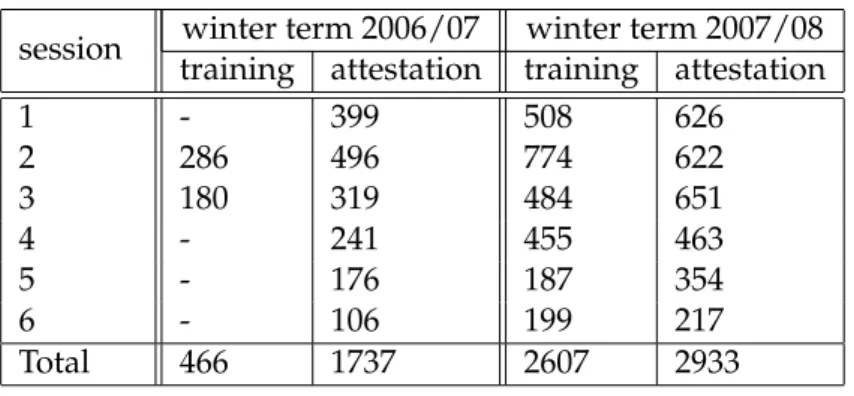
Table 5.1: Solutions submitted to Java exercises in winter term 2006/07 and winter term 2007/08. . . 23 Table 5.2: Precision of checker results for Java attestations in winter term 2007/08. . . . 25 Table 5.3: Details for checker results of Java attestations in winter term 2007/08 . . . 27 Table 5.4: Success rates in final exams . . . 28
1
Introduction
Computer based exercises, e-learning and computer aided assessments (CAA) became important topics of research and discussion in recent years. Both increasing numbers of students and steady progress in computer infrastructures made it more and more de-sirable to offer computer based exercises and examinations. Main goals were increased efficiency, reduced manpower needed for corrections and possibilities to apply various media and modern teaching techniques. Although one might think of automated grad-ing of multiple-choice tests or submittgrad-ing exercise solutions via e-mail as the first applica-tions of CAA-systems, a program for automated grading of ALGOL programs published in 1965 [FW65] can be considered the oldest CAA-system.
Since then, much progress has been made in making CAA-systems easy to use both for students and teachers, in applying them in different subjects and in analysing their use-fulness. This report presents JACK, a web-based system for exercises and examinations on Java programming, which is developed by the research group for Specifications of Software Systems at the University of Duisburg-Essen. Computer aided learning and computer aided assessments are treated as very closely related in this context, because we are convinced that a tool used for grading solutions should be precise enough to ex-plain its decisions in a way that improves the students’ learning process and especially increase their ability to actually transfer solution ideas into programming constructs.
1.1
Teaching Java to First-Year Students
Finding an algorithmic solution and an implementation for a given problem is a ma-jor challenge for first-year students of computer science. Abstract concepts have to be learned to find mappings from problems to algorithms. Program structures have to be known to derive a corresponding program later on. Teaching both abstract structural concepts and corresponding program structures in one course seems to be an adequate teaching concept. To make sure both theoretical concepts and their practical realizations are well understood, the lectures have to be complemented with numerous accompa-nying coding exercises [WW05] as well as asking frequently comprehensive questions. Although it is not impossible to learn programming by writing programms on paper, it suggests itself to apply e-learning techniques in this subject at a larger scale and to make use of methods for automated grading of submitted solutions.
that a given problem induces only a small number of principal solutions in most cases. Furthermore, we can expect a set of similar “standard flaws” to occur in the solutions, which can be derived from incorrect usage of the concepts and structures of the related lesson. In our scenario several hundreds of first-year students took part in six exercise sessions, leading to much more than thousand pieces of code having to be corrected. In each case the purpose of the code pieces was well known to the correctors, but nev-ertheless they had to get an almost full understanding of the actual solutions to give valuable feedback to the students. Even the students who coded a particular solution could not be expected to understand completely what they were doing. It was a major goal of the exercise to raise their capabilities of understanding programs. To reduce the need of manpower for this task we developed a checking system called JACK for partial automation of these corrections by means of static and dynamic tests. Static tests check the program without starting it, e.g. by looking for right syntax and presence or absence of certain program statements. Dynamic tests check the program by running it, e.g. by comparing its output to the output of a sample solution.
We used JACK for the first time in winter term 2006/07 during the programming lecture for first-year students and used a slightly enhanced version one year later. The goal of JACK was not only to test the code in terms of right or wrong, but to give detailed hints on possible flaws and hence to support a better program comprehension both for students and correctors. Static and dynamic checks complement each other to reach this goal, because both can reveal errors not detectable by the other. For example, the dynamic test based on input-output-conformance can reveal that an algorithm with a loop returns the wrong value for a given input, but it cannot determine whether this happens because of a wrong arithmetic statement or a wrong loop counter. The static test based on analysis of the abstract syntax graph can for example reveal whether a counter increment is placed correctly inside this loop or a certain arithmetic statement is present, but it cannot determine whether the output is correct for all given inputs. Both tests together can reveal the error and give valuable feedback to the student.
When talking about automated grading complex of solutions from programming exer-cises, it is no big step to include automated exercise checking for simple multiple-choice questions into the existing system. Comprehensive questions on programming lessons for example can be formulated very well as multiple-choice questions and both benefits mentioned above apply here, too. The teacher can concentrate on preparing good ques-tions instead of checking hundreds of answers and each possible answer on the multiple-choice forms could be combined with explaining statements, giving feedback to the
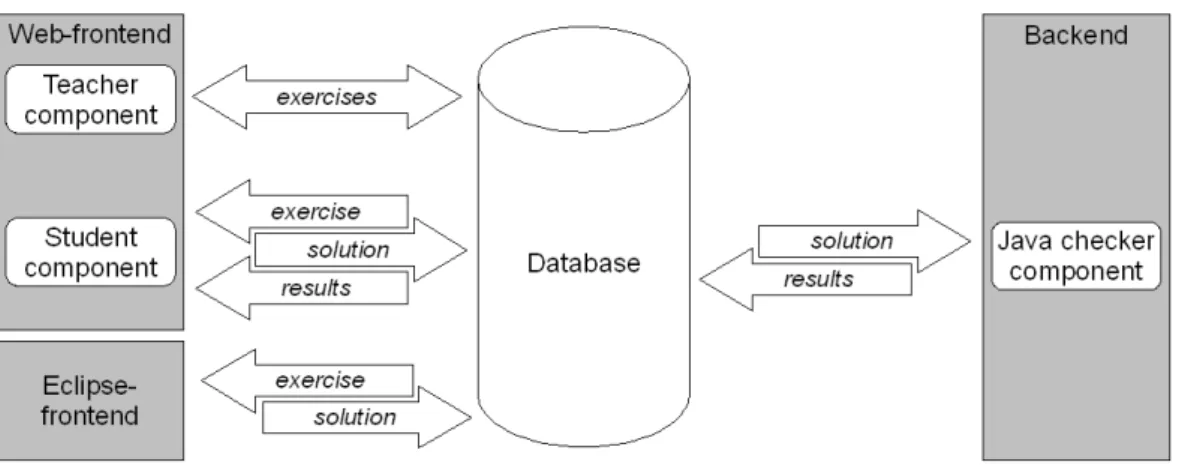
stu-Figure 1.1: Basic architecture of JACK. The backend can be extended by other checker components than the one shown for Java checking. Other rich clients than ECLIPSEcan be
used at the front end side when they provide appropiate plug-in mechanisms.
dents when revealing right and wrong answers. We added support for multiple-choice questions for the programming exercises in winter term 2007/08.
In the following, we describe the environment of the sketched scenario and the general architecture of the system. Chapter 2 explains the workflow inside the checking com-ponent for Java exercises in detail. Both the dynamic and the static checks are explained here. Chapter 3 covers the use of JACK for multiple-choice tests. In chapter 4 we describe how we organized exercises and examinations with JACK and evaluate the system based on our experiences. Our plans for further work are sketched in chapter 6.
1.2
General Concept and System Architecture
In general, the whole assessment system is designed and deployed as packages running on Java Enterprise Edition application servers connected with a separate database sys-tem. At the front end side of the system, teachers and students can interact with the system through a web interface. Additionally, students can use a plug-in for the ECLIPSE
[Ecl] development environment while attending exams. At the back end side of the sys-tem, so-called checker components are running in order to read submitted solutions from the database and mark them. Figure 1.1 gives an overview about this general architec-ture. The single parts are explained in subsections 1.2.1 to 1.2.5 in more detail.
minimum installation uses only the package containing the core system and the server-side parts of web access front ends used by students and teachers. The web services communicating with the ECLIPSEfront end are deployed in a separate package that has to be run on the same server as the first package. Another package contains the backend system and can be run on the same server as well as on a different server. The database server location is also independent and can be connected via network access.
Our JACKsystem is configured in a way we consider the default design: All packages except the backend system are hosted on the same server as the database. The backend system is separated for security reasons and several security requirements are imple-mented by using elaborated network and firewall settings. The two servers have been set up as virtual machines, making management and complete system backups easier. Additionally, we were able to provide a copy of these virtual machines to another de-partment of the University of Duisburg-Essen, who were able to use JACK right out of the box this way, with only small local configuration changes for network addresses and server names.
1.2.1 Core System
The core system serves as a broker for all information used in the assessment process, the main tasks being: (1) Management of authentication; (2) import and management of according student data; (3) management of exercise definitions, creation of exams and assignment to examinees; (4) delivery of exams to students; (5) collection of results; (6) delivery of solutions to marking components depending on the type of the tasks and abilities of available components; (7) management of reviews and manual corrections if necessary. Errors occuring during user activities are recorded using logging mechanisms of the application server to make any interaction with the system traceable.
All persistent data is stored in a single relational database to avoid different storage lo-cations like separate files in the file system. By using a relational database we can rely on database transaction mechanisms to prevent critical data loss during examinations. Additionally, it is easy to backup all system data from this single storage location. Each submitted solution to an exercise is stored with time stamp, unique identification num-ber of the submitting account and network address of the computer used for submitting the solution, making them traceable even without using the server logs. The business logic itself uses object-relational mappings to represent data and thus facilitates a struc-tured development approach regarding the data model.
1.2.2 Web Access for Students
The web-based front end for students provides two perspectives on the system. The de-fault perspective is theself-training modethat can be accessed by students with a personal account. Once logged in, students can work with available self-training exercises and are for this purpose free to submit multiple solutions without any time restrictions. The personal account also allows a review of existing results of self-training exercises as well as exams. Since this user interface is not appropriate for exam situations, we provide a second, simplified perspective. This exam mode uses TANs to identify students and allows to attend only one assigned exam. Students can thus neither review results nor choose to attend different exercises. Nevertheless they are allowed to submit multiple solutions.
The general handling of exercises is similar in both perspectives. Multiple-choice ques-tions as a simple type of exercises can be handled directly inside the web browser, so students can directly tick their answers and submit them to the server. More complex types of exercises are handled by offering files as downloads. Students have to know how to handle them properly, e.g. opening them in an appropriate editor. Similarly, files have to be uploaded again to the server in order to submit a solution. Since all expected files of the solutions are known beforehand, the system guides the user through the up-load process by specifying all expected resources. This ensures that a solution can only be submitted if all expected files are present.
The result review allows students to examine their submitted data as well as all output from the marking run time and possibly manual teacher comments. All files attached to a solution are offered as downloads. Solutions cannot be changed in any way in this view.
1.2.3 Rich Client Access for Students
Our solution of a plug-in for the widely used ECLIPSEIDE is an example how arbitrary client software for certain purposes can be integrated in the overall system with lean communication layers. Rich clients can be used to offer extended features to the students that assist them in solving their task and to enable the use of more complex exercises at all. The communication between core system and rich clients is realized with SOAP web services. The according server-side communication layer allows to deploy customized adapter components for different types of clients that can be independently enabled and disabled.
(a) (b)
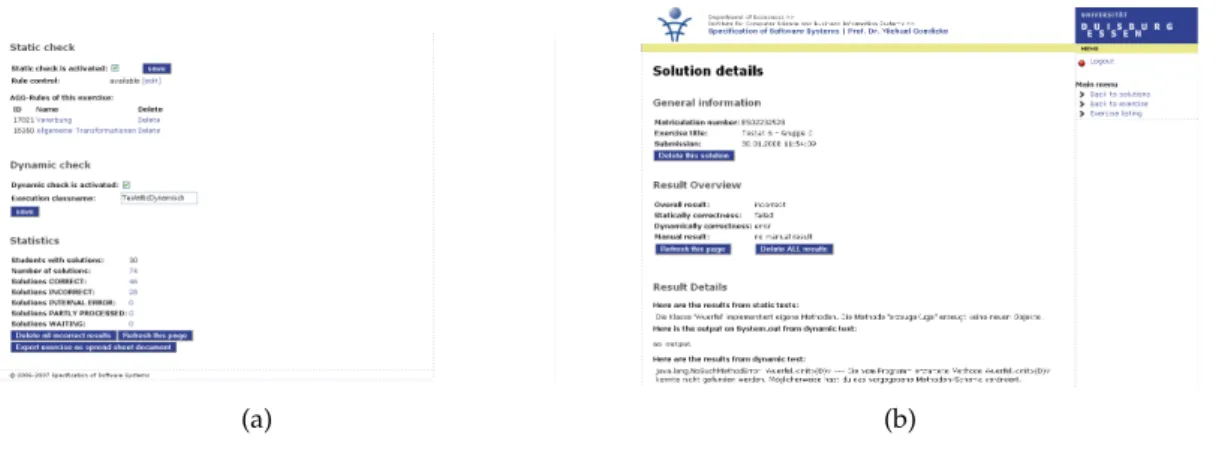
Figure 1.2: Screenshots from teacher’s web frontend, showing management of checking options (a) and review of checking results for a single solution (b).
The client plug-in itself uses the provided ECLIPSEplatform, especially the Java Devel-opment Tools [JDT], to accomplish programming exercises. A dialog guides the student through the login process by requesting a TAN, downloading files and opening a Java project as well as all resources the student is expected to edit. Additionally, the user in-terface is simplified by closing all elements except a navigational view and a view for console output. To identify source code files and the according compiled binaries our plug-in relies on unambiguous information provided by the platform and avoids asking the user for additional information.
1.2.4 Web Access for Teachers
In contrast to the student user interfaces that are as simple as possible, the administra-tive access for teachers must provide comprehensive and flexible tools to create, edit and analyze assessment data. User accounts can be created by importing existing user data. Exams can be assembled by using a repository of single exercises. Exercises have for this purpose been defined independently by specification of a description, attached files and an assignment to a checking component (see fig. 1.2a). Questions and answers in multiple-choice exercises can directly be edited in the web-browser, while source code templates for programming exercises have to be provided as uploaded files. The TAN creation process which joins login and exam data relies on standard techniques for gen-erating random strings and explicit checks for duplicates to produce unique values. Re-viewing results (see fig. 1.2b) includes the opportunity to view or download the sub-mitted solution code and to override automated results from the marking components. Detailed statistics for every exercise can be exported as spreadsheets for further
process-ing in external tools.
1.2.5 Backend System
The checking components are executed in a run time system that can operate indepen-dently from all other parts of the system, thus forming a master-worker architecture. In this way different checking components may be distributed over multiple physical servers for security or performance reasons and thus perform their work in parallel. Since checking and result submission is subject to security concerns, we set up strict net-work access rules using firewalls to ensure that access to the core server is only possible from valid backend systems.
The backend systems themselves are able to execute multiple checking components on one physical server by providing only an environment and a network connection to the core system which is dynamically configurable. The core system is contacted regularly to access upcoming checking tasks which are then passed to an appropriate component. The result of the check is submitted to the core system including all error messages and hints like the console output from black-box tests for programming exercises. This architecture is to some degree fault tolerant because the core system is not affected by the checking process. Thus checking components or the related servers may be disabled, disconnected or even crash without any consequences for the exam situation. Hence it would also be possible to design checking components connecting to different core systems, but running on one fixed physical machine, for example because of specialized hardware resources not available on all servers.
When checking programming exercises by executing code submitted by examinees, this code is started in a sandbox environment and not inside the marking run time system. This allows to apply security constraints to the sandbox, for example to prevent file and network access, and to catch easily any kind of runtime exception without affecting the checking component itself.
2
Checking Java Exercises
Checking Java exercises is the core feature of JACK and hence most of the program logic and data structures are concerned with it. Each Java exercise consists of a description, some settings and a set of files. Descriptions are used to explain the exercise to the students and to store internal notes from the teachers. Settings determine whether an
Figure 2.1: Checker workflow for Java exercises.
exercise is visible to the students and checked by static or dynamic checks. Both can be switched on and off separately. Files could be Java source files visible to the students, source files for the dynamic tests or rule files and control scripts for the static test. A special kind of files are placeholders being identified by a file name. They do not provide content, but indicate files that have to be submitted as part of a solution.
Students can access Java exercises either via the web interface or the ECLIPSE plug-in. Both in examination mode and self-training mode, the web interface offers a list of exercises that belong to the examination or are available for training, respectively. Students select an exercise from this list and receive a set of code templates for this exercise which may be copied to a local source code editor. For uploads, the according exercise has to be choosen again from a list and the system asks for all necessary files successively. The ECLIPSEplug-in can be used alternatively in an examination as already described in the introduction.
2.1
Checker Component Workflow
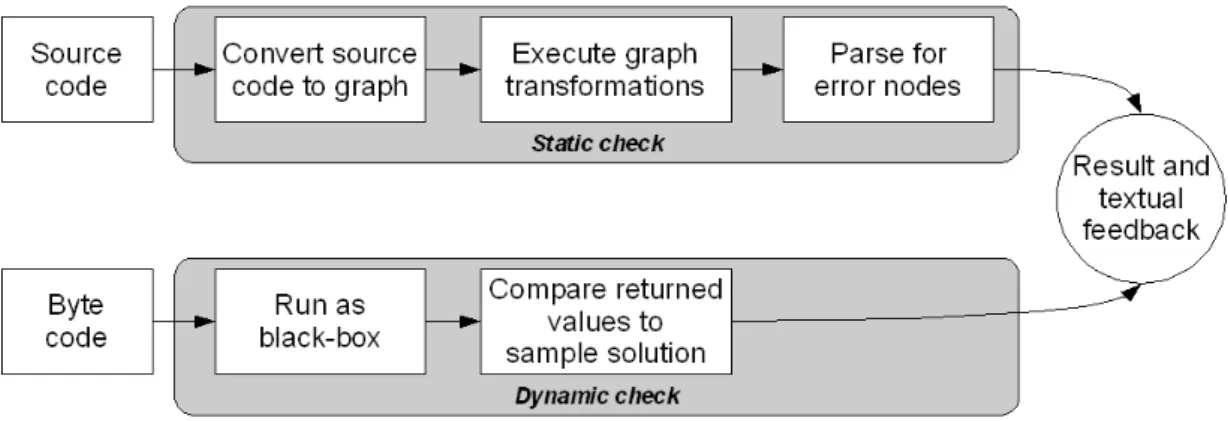
The currently implemented workflow of the checker component is depicted in figure 2.1. It combines several tools, APIs and techniques. A major challenge was the integration of the various data formats in a way which assures a coherent presentation of the source code along the tool chain in order to generate useful hints related to the submitted original source code in the case of an error.
As described in the general architecture, the checker component is running in the back-end. Each solution submitted by a student is inititially marked as “WAITING” in the
database. The backend searches for solutions with this marker and selects the oldest for processing. It is then marked as “PARTLY_PROCESSED”. If there are several instances of the backend running, the next one will hence select a different solution for processing. After selecting a solution, the checker component looks for the checking settings of the respective exercise. If no checks are activated for this exercise, the solution is immedi-ately marked as “WAITING_BUT_NOTHING_TO_DO”. Whenever the teacher decides to activate checks for this exercise somewhere later, all solutions belonging to this exer-cise are set back to “WAITING” and will be processed again by the backend. If there are checks activated for the exercise, the according static or dynamic checkers will be invoked. They process the solutions using the tool chain described below and attach an individual result to the solution. One solution can thus have more than one partial result from different checkers which may differ. However, each checker does only provide one partial result for a solution.
After all activated checks are completed, the overall result for the given solution is set. This is either “CORRECT” if all attached results mark the solution as correct or “IN-CORRECT” if at least one result marks the solution as incorrect. If any kind of internal error occured during the checks, the solution status is set to “INTERNAL_ERROR”, in-dicating that this solution needs manual checking. Independent from this hint, a teacher can allways review the solution manually and attach a manuel result, marking the solu-tion as correct or incorrect. In contrast to automated results, where one incorrect result forces the solution to be marked as incorrect, manual results are allways considered with higher priority. Thus, if a teacher marks a solution as correct manually, it is marked as “CORRECT” in the database, independent from the other results and even if no checks have been performed at all. Analogously, a solution is marked as “INCORRECT” when-ever the teacher marks it as failed. The teacher can add textual comments to the result to explaini the decision to the students and point towards errors to increase program understanding.
Depending on the amount of students that are submitting solutions to the server at the same time and on the size and complexity of the solutions, it can take several minutes until the results for a submitted solution are available. Espacially the static analysis can be time-consuming if nested structures have to be analyzed and complex rules take much time when searching for matches. Dynamic checks can take up to 30 seconds in case a solution contains an endless loop and the test execution does not stop until it is aborted by the system.
2.2
Static Analysis
As described in [KG06], the checker component for static analysis is based on a graph transformation engine. Graph transformation techniques as the underlying core of this checker were choosen to provide a stable way for structured representation, verification and modification of the Java source code. We are thereby able to handle the source code structure in a well-defined way as in several other contexts like program refactoring [FBB+00, GS07]. This can be used for static analysis as well as to merge elements and insert additional statements into the code as an initialization before performing dynamic checks.
Graph transformations are realized by applying a series of transformation rules to a host graph [EEPT06]. We use an attributed graph grammar, so every node and edge in the graph has a type and each type has a set of typed attributes. Consequently, the first step of the static analysis is to transform the source code into a graph structure by using a tool namedjava2ggx. It supports the full Java 5 syntax and is designed as a basic toolkit for different kinds of more extensive analyses and transformations. We developed this general-purpose tool to treat Java source code as an abstract syntax graph in the “GGX” file format of the Attributed Graph Grammar (AGG) system [Tae00, AGG]. Support for Java 6 syntax is planned for future relases of JACK, but most concepts taught in programming lectures are already available in Java 5.
When the solution source code is represented as a graph the checker can start to apply rules. Each rule consists of a left hand side (LHS) and a right hand side (RHS) and possibly one or more negative application conditions (NAC). First, the transformation engine tries to find a match for the LHS in the host graph, i.e. a set of nodes and edges that are connected the same way and having the same types and attributes as the LHS of the rule. Rules do not have to specify all attributes, so it is possible to make a match on a node representing a method with an attribute with a certain name, but to neglect the attribute telling whether this method is public or private. When a match is found, the engine tries to find matches for the NACs if they are specified. Whenever a match for a NAC is found, this rule is discarded and the next one is processed. If no NAC matches or none is specified, the rule will be applied. In this case, all nodes and edges that are present in the LHS are replaced by elements from the RHS if there is a replacement defined for them. If no replacement is defined, they are removed from the host graph. If the RHS contains elements without origins on the LHS, they are inserted into the host graph. Inside JACK this is done by using the AGG API and our own control script handler RuleControl. The script handler allows to apply rules in a certain order
and to apply rules only if other rules matched before. Typically, checking rules can be designed in one of the two following ways (see section 2.4 for an example):
• Optimistic rules assume that the solution is correct unless a undesirable structure is present. In this case, the erroneous structure is placed on the LHS of the rule. The RHS contains the same structure, because we don’t want to change the code, and an additional “error node”, which is a node of a fixed type that does not appear in normal syntax graphs and that contains a message describing the detected error. So whenever the erroneous structure is present in a solution, this rule matches and inserts the error node into the graph. A NAC containg the error node assures that the rule is not applied twice.
• Pessimistic rules assume that the solution is wrong unless a certain structure is present. In this case, the LHS of a rule is empty and correct structures are added as NACs. The RHS contains only an appropiate error node. Because of the empty LHS, this rule can be applied always, except when one of the correct structures is present. Again an additional NAC assures that the rule is not applied twice. It is possible to apply other transformation rules before the actual checking rules are applied. For example,i += 1;is a semantically equivalent, but syntactically different short version of the longer i = i + 1;. To avoid two versions of each rule dealing with assignments like this, a general transformation can be applied before, replacing all long statements with an according short version. These changes are only performed internally for checking the solution, but not written back into the database, so the original code submitted by the student remains unchanged. More sophisticated rule sets can use manipulations to add auxiliary nodes or edges with additonal information, for example counters for recursive method calls, that can be used to perform more complex checks. Another good and often used example is to connect all literals of a logical statements with new edges to an additional auxiliary node. This enables easy access by other rules, for example, when checking the correct use of complex termination conditions in a loop. Additionally to NACs, rules can be parameterized by using attribute conditions. For example, a check may be performed for field declaration that are either private or protected, but not for those that are public. Of course this could be done by two versions of the respective rule, each using the appropriate attribute. A more convenient way is to define a rule variable for this attribute and add an attribute condition, forcing this variable to contain either “private” or “protected”. Rule variables can also be used to record attribute values from the LHS when finding the match and to reuse them on the RHS when placing an error node.
After processing all rules the resulting graph is parsed for the inserted error nodes. Their content is stored in the database as a report of the static test and helps to get a better understanding of the source structure and possible mistakes. In detail, the static test can have one of the following four results:
• Correct: A result is marked as correct, if the static analysis could be performed completely and no error nodes where produced. In this case, the error record is empty.
• Failed: A result is marked as failed, if the static analysis could be performed com-pletely, but at least one error node was produced. In other words, the submitted source code has no syntactical errors, but contains semantically wrong structures or needed structures are missing. The error record contains the contents of all error nodes produced during the analysis.
• Error: A result is marked as an error, if the static analysis was terminated by an exception. In contrast to the former result, in this case the tested code has no valid syntax at all. This error can occur because of wrong character encondings, too. The error record contains one message explaining the exception.
• Internal error: A result is marked as an internal error, if the checker component itself failed to perform the static analysis or collect the error nodes. This is expected to be a serious error and involves human inspection of the occured problems. In most cases, this will not help to gain any deeper understanding of the solution.
2.3
Dynamic Analysis
The dynamic analysis currently consists of a simple black-box test of a compiled piece of code, using the tests submitted by the teacher. If all tests are passed, the source code is marked as dynamically correct. Otherwise, error messages are generated and stored in the database that explain the faults to make the program behaviour quickly understandable for students and correctors. For example, a sequence of tests may reveal that an algorithm ignores one of its input parameters.
The black-box tests take a byte code version of the exercise solution to be tested and try to execute it with a set of pre-defined inputs. The methods to be called and the inputs to be used are defined by the teacher and stored in the database. Typically it is sufficient to write a single class file containing all the testing code, but additional class files may
be added. The tests are designed in a similar way as unit tests by calling methods on the tested code and comparing the returned value to a specified reference value [Lin03]. If the expected value is not met, the test method may write a detailed error message to the standard error output. The effectiveness of the system for the purpose of program comprehension depends directly on the quality of these error messages. Hence the tests may execute several method calls before generating an error message as well as terminate the test after the first unexcepted output from the tested code. When terminating the test method either after having performed all tests or as a consequence of a failed test, the method returns a value indicating the overall outcome of the test.
To handle possible exceptions that may occur during the test execution, a wrapper class encapsulates all tests for one piece of code. This way general error handling can hap-pen indehap-pendently from the actual tests. Nevertheless the stack traces and messages of exceptions can be read out and used to create further detailed error messages to improve program comprehension and error analysis. The wrapper class is called as a seperate process on a second Java Virtual Machine either by using the command Runtime.exec()or by executing a shell script. This seperate process is necessary for several reasons. First, the process can easily be terminated after a fixed amount of time when it runs e.g. into an endless loop. This can be done automatically and is also im-portant during the mass validation without manual interaction. We used JACK with a time limit of 30 seconds, which turned out to be sufficient to check all long running but terminating solutions for our exercises. Second, the new VM may have a special environment defined by its commandline parameters. This allows to set memory lim-its independent from the settings of the testing system lim-itself. Third, the new VM can make use of SUN’s security concept by involving thejava.security.managerand java.security.policyoptions [Gon]. This prevents malicious code from tampering with the testing system. Furthermore, it is a comfortable way for checking the absence of certain code structures (e.g. access to input or output streams or network sockets) without running static tests for them.
As already explained, the testing process contains the wrapper class that transforms ex-ceptions into helpful error messages. To get more precise and comfortable messages, the tests are split up into an action phase and a verification phase. Exceptions thrown during the action phase hint at errors in the tested code while exceptions from the verification phase hint at errors in the testing process itself, e.g. a missing test on a returned null value. In addition to a possible exception, the wrapper class takes the return values of the tests and sets the exit state for the testing process. In particular, black-box tests may
have five different results:
• Correct: A result is marked as correct if the testing process terminated, no excep-tions where thrown and all tests returned the expected value. In this case, the error output is empty.
• Failed: A result is marked as failed, if the testing process terminated, no exceptions were thrown but at least one test did not return the expected value. In other words, the tested code works basically, but not correctly. The error output contains at least one message with hints at the reason of the failure. As explained above, a single failure needs not to terminate the whole testing process, so the error output may contain more hints on different failures.
• Error: A result is marked as an error if the testing process was terminated by an exception. In contrast to the former result this indicates that the tested code does not work at all. The error output does in this case contain a message explaining the exception.
• Cancelled: A result is marked as cancelled if the testing process did not terminate before a given point of time. It is most likely that the code contained an infinite loop in these cases, although it might be possible that the code would have returned the correct result later. As far as an acceptable execution time may be part of a desired behaviour, a cancelled test can be assumed to be failed. If the tested code passed lines of code writing to standard or error output so far, this can help to get a better program understanding regarding the position of the erroneous loop, but more hints can not be given using black box testing methods.
• Internal error: A result is marked as an internal error if the checker component itself failed to execute the test or to verify the returned results. Similar as in static checks, this is expected to be a serious error. It involves human inspection of the occured problems and will not help to gain any understanding of the tested code.
2.4
Example
To illustrate static and dynamic checks on Java programs, we present an example from the first attestation session of winter term 2007/08. In this attestation, students were asked to implement a forloop for calculating the faculty of a given input, add some constant and test whether the result is a prime number. Both static and dynamic checks
public class Testat1abc {
public boolean berechnung(int zahl) {
//Loesung eintragen
}
public static void main(String[] args) {
Testat1abc t = new Testat1abc();
System.out.println(t.berechnung(5)); }
}
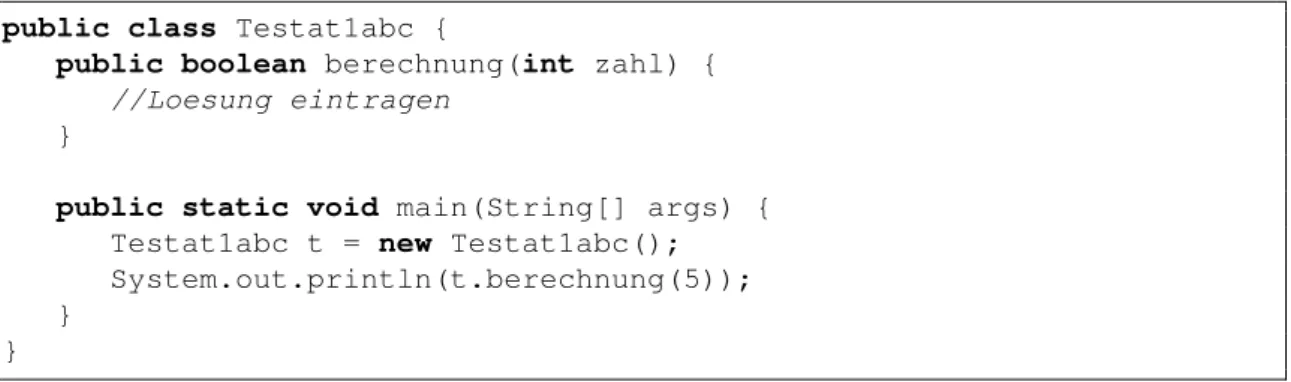
Listing 2.1: Code template for a Java exercise. If students change the signature of the method “berechnung”, the static check from figure 2.2 will fail. Themain-method is irrelevant for
automated checks.
Figure 2.2: A NAC for a static check. This NAC ensures that the checked solutions contains a method named “berechung” that takes an Integer as parameter and returns a boolean value. The code template shown in listing 2.1 provides this structure and students were expected to
leave it unchanged.
were activated for this attestation. The code template provided to the students is shown in listing 2.1.
Since students where not allowed to change the basic structure of the template the first rule in all our static checks was concerned with the general program structure as pre-scribed by this template. These checks can be easily implemented as pessimistic rule, marking each solution as wrong that does not contain the given methods. Figure 2.2 shows the structure placed in the NAC of this rule. Note that static tests like these are important hints for dynamic checks, too, because those checks will fail if an expected method is not present.
After checking the structure, some common transformations are applied to align dif-ferent semantically equivalent statements, to mark empty block statements and to add auxiliary nodes and edges. These auxiliary nodes and edges are used directly when
Figure 2.3: A pessimistic rule for checking the correct use of afor-loop. The complete rule
contains five more NACs that catch variations of the one shown.
checking the structure of theforloop. One of the pessimistic rules used here is shown in figure 2.3. Note that his is a pessimistic rule although it has a node on the LHS, as-suring that this rule is only applied to source code that contains aforloop. Code where this node is missing is handled by a different rule. The check whether the structure of the loop is right or wrong is done via the NACs. We show only one NAC here, but there are five more, which are very similar. In general, they look for a forloop that refers to a primitive variable in its init statement (center), its termination condition (right) and its update statement (left). The NACs differ regarding the update statement where the variable may be “leftHandSide” or “leftOperator” in several cases or “rightOperator” of an increment expression. Additionally, the variable may not only be declared in the init statement, but also be declared beforehand and only referenced there.
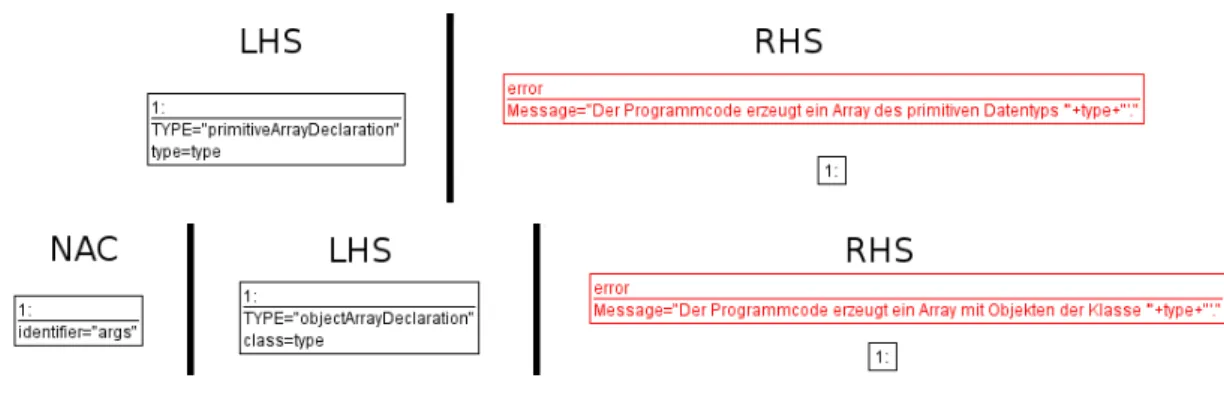
Besides the presence of a general structure and certain detail elements, the absence of other structures has to be checked, too. In the given example, the students where not allowed to use arrays. Figure 2.4 shows the two rules checking this constraint. Both are optimistic rules, adding an error node only if they find an array declaration. Neverthe-less the second rule has a NAC excluding the array named args, because this array is part of themain-method in Java and hence the only accepted exception. Note that both rules use a rule variable named “type” to record the type from the node on the LHS and insert it into the error message created on the RHS.
Listing 2.2 shows the method implementation of a student who failed the exam. While the first forloop is correct, the second is obviously wrong. In fact, there are several errors in there, but one of them is the incorrect use of the counter variablei, which is initialized, but used neither in the termination condition nor in the update expression. Consequently, the static check results in an error message indicating the incorrect use of
Figure 2.4: Optimistic rules for checking the presence of accesses to arrays.
public boolean berechnung(int zahl) {
int fak = 1;
for(int i=zahl; i>0 ;i--) {
fak = fak * i; }
int erg2 = fak + 5;
boolean prim = true;
for (int i = erg2; erg2<0; erg2++) {
if (erg2%i==0) { prim = false; } else if (erg2%i==1) { prim = true; } } return prim; }
Listing 2.2: A student’s solution for the presented example. The secondfor-loop is not
correct, which was detected during the static checks.
the counter variable and marking the result als incorrect.
Nevertheless, the dynamic check is executed as well, because it could possibly add more useful information on faults in this solution. The dynamic checks in this exam were quite lazy because the method was only called two times with parameters 3 and 5, expecting “true” as a result in the first case and “false” in the second. However, in case of the solution listing discussed above, this was sufficient to produce another error message, because the wrong loop was never executed and hence the solution always returned “true”.
3
Multiple-Choice Exercises
The system component for multiple-choice questions was introduced into the JACK system one year after the initial development. It differs much from the components for Java checking and required some new features in the system architecture. The support for multiple-choice questions was intended to be only a secondary feature and can thus only be used in a limited range of cases in the current version. However, it will become a more prominent and better integrated feature in future releases of JACK, as we are going to show in chapter 6.
In general, this component supports two kinds of multiple-choice questions: questions where one of several suggested answers has to be choosen (1-out-of-n) and questions where many of several suggestions may be choosen (m-out-of-n). Similar to Java ex-ercises, where one exercise is the top-level element that may cover several source files, in multiple-choice exercises there are questionnaires as the top-level element, that may contain an arbitrary number of questions. Questions cannot be managed separately, i.e. assigned to different questionnaires at the same time. An arbitrary number of possible answers can be assigned to each question and the teacher must mark each answer as either right or wrong. The system does not require to have at least one right or wrong answer per question, thus it is as flexible as possible. Both the ordering of questions in a questionnaire and the order of answers in a question have to be maintained by the teacher and JACK will not change this order for display.
The ECLIPSE plug-in for JACK is not capable of displaying questionnaires, so they can
only be used through the web interface. Students can select them the same way than Java exercises from a list of available questionnaires. The web interface displays a form containing all questions of the selected questionnaire. Students can make their choices by ticking the according checkboxes or radio buttons as usual in web-interfaces. The choice which marks are ticked of the various questions can be changed until the entire questionaire is submitted to the server.
3.1
Questionnaire Checking
In contrast to Java Exercises, the checker for questionnaires is not running on the back-end, but integrated into the frontend. Hence each solution is checked immediately after submission and the result is available instantly. The main reason for this is that question-naire checking is a very easy process and will not slow down the frontend significantly.
At the moment the system does not support complex checking rules for questionnairs, so there are three simple possible results:
• Correct: A result is marked as correct if in each question each answer that is marked as right was ticked by the student and none of the answers that are marked as wrong was ticked by the student as well.
• Failed: A result is marked as failed, if either at least one answer that is marked as right was not ticked by the student or at least one answer that is marked as wrong was ticked by the student at any of the questions of a questionnaire.
• Internal error: A result is marked as an internal error if the checker component failed to verify the submission.
Similar to Java exercises, the teacher may add a manual result with a textual comment to a solution and override the automatic result. When reviewing a result, the student can see his own choices and a notice at each answer indicating whether this answer was expected to be selected or not. The possibility to display an explaination for each question would raise the teaching effect of the questionnaires, but is not implemented yet.
4
Organizing Examinations and Exercises
JACK can be used for self-training by students as well as for attestations or examinations. In general there are no differences in preparing Java exercises for one of these purposes, but attestations require additional steps for creating TANs. Questionnaires were only used for self-training in winter term 2007/08, so we can only report some basic experi-ences. In any case it is necessary for students to have an account for JACK in order to participate in exercises and examinations. We connected JACK to the login module of our general website, so students could use their personal login from this page for JACK. In another case, JACK used an XML file to identify admininstrators and allowed stu-dents to use the self-training mode without password, while the usual TAN-based login was used for attestations.
4.1
Java Self-training Mode
For self-training, Java exercises were set up in the system as described in chapter 2. An exercise sheet with detailed information was available on the website for the lecture, so it was sufficient to place a hyperlink in the exercise description presented to the students. Usually there where two or three different exercises available at the same time. Students where free to access the JACK server whenever they wanted and from anywhere to download the code templates. No restrictions where made on which tools to use for coding, although the use of ECLIPSE was recommended. Not surprisingly, students
organized themselfs in internet forums to discuss the exercises and exchange accepted solutions. In fact, this was no bad replacement to an official support desk, because false negatives in error recordes where explained there quite quickly and animated students to submit slight variants of their solutions. It only took some minutes per day, if any, for a teacher to review the submitted solutions and set manual results or explain results to students who did not understand them.
4.2
Java Attestations
In winter term 2006/07 we used nearly the same steps mentioned above for attestations, because the ECLIPSE plug-in and the TAN login were not yet available in that year. The setup differed in just two points: First, the server was only reachable from our computer pools to avoid manipulated uploads from anywhere else. Students could use their personal logins for JACK as known from self-training mode, but got dedicated logins for the computers. Second, there was only one exercise available at the same time, so students could not make any choice.
Students where divided into groups, each with a time slot of one hour. Each student got an exercise sheet upon entering the room that explained the task and gave short instruc-tions on using JACK. The sheet had to be signed and handed back to the supervisors to document that the student was present and got instructions. To avoid the effects of com-munication between earlier and later groups, we used several slight variants of one task in an attestation and switched them manually between the groups by hiding one exercise and publishing a different one. The computer pools had to be prepared very carefully to ensure that web browser, Java compiler and at least one Java editor where running without problems on each computer. Despite the exercise sheet mentioned before, sev-eral students encountered problems in dealing with the different tools and a significant amount of time was consumed by solving those problems instead of working on the
ex-ercise. Some students even lost their personal login and the supervisors had quickly to create new accounts for them during the attestation session.
To avoid these complications, TAN login and ECLIPSEplug-in where invented for winter term 2007/08. We prepared a dedicated version of ECLIPSE just for the attestations,
including the plug-in for connecting to the JACK server. This version was distributed in the computer pool and was made accessible for the accounts used for attestations. These accounts could in turn be even more restricted than in the year before to avoid attempts of deception by using other tools or accessing external resources. Problems in dealing with the tools could be minimized this way and students could spend more time on solving their tasks.
The TAN login required additonal steps in preparation of the exercise sheets. A list of registered students was provided to JACK in order to generate an unique TAN for each of them. These TANs where used to print personalized exercise sheets with a conventional mail merge function of a wordprocessor. Both the import of the student list and the export of TANs was done by manual copy-and-paste, which was easy enough to defer the implementation of a proper import and export functions for common office applications. Another benefit of the TAN login was a more flexible assignment of task variations to students, so that tasks could not only be changed between time slots but also be mixed in the groups.
In both years, students were allowed to submit more than one solutions and all of them were checked. To pass the attestation it was sufficient to submit at least on correct solu-tion, which had not necessarily to be the latest one. In average every student submitted two solutions for each attestation. Students were allowed to review all their results a few days after the attestation. They could use their personal login again and got thereby ac-cess to all their solutions and the lists of error messages produced by the checkers. Please refer to the next chapter for an evaluation of the expressiveness of these messages.
4.3
Multiple-choice questions
We used multiple-choice questions only for self-training in winter term 2007/08. Several questionnaires where made available during the term in loose succession. Due to the simple structure of the questionnaire module no further preparations or reviews where necessary. Results where reviewed by the teacher mainly to get some statistics or to learn which topics have been well understood by the students and which ones needed further explainations or exercises.
In the current version of JACK, the use of multiple-choice questions in attestations would require the use of the web interface because the ECLIPSEplug-in is not able to display questionnaires, yet. Please note that TAN login is not restricted to the ECLIPSEplug-in, but also available through the web-interface.
5
Evaluation
As mentioned in the introduction, JACK was first used in winter term 2006/07 to assist in the lecture on programming for first-year students. In winter term 2007/08 it was used in the same lecture again. In both years, students had to take part in six attestation sessions per term, each preceded by a self-training session for the same topics. The years before no mandatory attestations were offered to the students because of the huge amount of time this would consume without automated support. In winter term 2001/02 students had to implement a short program and demonstrate it in an oral attestation. About 500 students took part and it took two weeks until all attestations were finished. In winter term 2005/06 optional attestations were offered that were corrected manually.
Looking at these experiences, JACK and its components for Java exercises can be evalu-ated with respect to organizational, technical and didactical aspects. The organizational evaluation includes the question whether the use of JACK can reduce the needed man-power for preparing, executing and correcting exercises or examinations in the expected way. The technical evaluation asks for the precision of the different checkers and the amount of rules and tests that have to be written to reach this precision. The didactical evaluation examines whether JACK gives valuable feedback to the students that is at least sufficient to understand their errors and explain a failed attestation.
Since the component for multiple-choice questions was only used for self-training ex-ercises in winter term 2007/08, we don’t give a separate evaluation for this component here. It can be assumed that it influenced the didactical use of the whole system. Hence it will be discussed in the respective section. For experiences and evaluations regarding the organization of examinations, please refer to the previous chapter.
5.1
Organizational Evaluation
In both winter terms 2006/07 and 2007/08 students had to take part in six Java attesta-tions during the term and to pass at least three to be admitted to the final examination.
session winter term 2006/07 winter term 2007/08 training attestation training attestation
1 - 399 508 626 2 286 496 774 622 3 180 319 484 651 4 - 241 455 463 5 - 176 187 354 6 - 106 199 217 Total 466 1737 2607 2933
Table 5.1: Solutions submitted to Java exercises in winter term 2006/07 and winter term 2007/08.
In winter term 2006/07 the self-training mode was only used as an experimantal feature for two sessions, but one year later each attestation was accompanied by a similar, more extensive exercise in self-training mode. Not surprisingly, the first attestations and ex-ercises had more participants than the later ones, because students who passed already three attestations or failed in four tended to avoid the work for further exercises. In winter term 2006/2007 a total amount of 1737 solutions for Java attestations had to be corrected. The highest number of results produced in one attestation session was 496. In winter term 2007/08 the numbers where even higher with a total amount of 2933 solu-tions and up to 651 solusolu-tions in one attestation session. On the self-training server there were 2607 solutions submitted in winter term 2007/08 and up to 774 solutions for one exercise. All figures based on submitted solutions can be seen in table 5.1.
Preperations of the attestations, i.e. writing dynamic tests and rules for static tests, took at most one day for one teacher for each session. Running both static and dynamic tests on the results was an over-night job for our server. Reviewing all solutions marked as incorrect and random reviewing of correct solutions took never more than one day for one teacher. In summary it took up to two days for one teacher to process a complete attestation session, excluding the time needed to write the exercises themselves, the time spent for attestation supervision as well as time needed for postprocessing of statistics and the announcement of results. In comparison, typical written examination or attesta-tions on paper take about 5 minutes per solution, which would result in 50 hours of work for one teacher to correct 600 solutions. Again time for common pre- and postprocessing is excluded here. Hence it can clearly be seen that the use of JACK resulted in a massiv reduce of manpower and time for the accomplishment of attestations.
review exercises for the self-training mode. Preperations took less then one day per task, too, because on the one hand the tasks were more complex and hence needed more complex checker rules, but on the other hand no variations had to be produced. So we can summerize here, too, that JACK reduced the needed manpower significantly. Additionally, it has to be taken into account that with server-based self-training there is no need to organize computer pools and avoid collision of exercise sessions with other events, because students can work on the exercises from everywhere and whenever they want.
In summary we can point out that the service for the students was extended to a level which was impossible by using only manual means. Thus the automation has helped clearly to enhance the service for the students. In addition we should mention here that 26 hours of contact time per week were also available where students could get personal explanation and help for their programming problems.
5.2
Technical Evaluation
The technical evaluation has to consider the amount of rules and tests that were needed for checking, the test coverage and precisison of this rules and the quality of error records that were produced by them. The latter can only be done informally based on our experiences and feedback of students based on our teaching evaluations. When students were allowed to review their results, most misunderstandings regarding the correctness of a solution could be cleared quickly and often by carefully reading the generated error messages without additional explainations by the teacher. So in most cases the error messages generated by JACK where sufficient to explain the critical part of the program behaviour.
Nevertheless it turned out that the quality of results was unsteady. Sample figures from attestations in winter term 2007/08 are shown in table 5.2. Due to the checker workflow explained in chapter 2, a checker result may not correspond to the overall result and thus give wrong hints. A result is considered as false positive if it marks a solution as correct while the overall result marks the solution as incorrect because of an related automated or manual result. A result is considered as false negative if it marks a solution as incorrect and is overridden by a manual result marking this solution as correct. Hence, totals of false positives count the intersection of false positives in static and dynamic checks. Totals in false negatives count the union of false negatives in static and dynamic checks. In both cases there might be an estimated number of unreported case, because not all
session solutions false positive false negative static dynamic static dynamic
1 626 99 (16%) 4 (1%) 86 (14%) 0 (0%) 2 622 65 (10%) 3 (0%) 15 (2%) 0 (0%) 3 651 106 (16%) 16 (2%) 38 (6%) 1 (0%) 4 463 92 (20%) 9 (2%) 1 (0%) 0 (0%) 5 354 5 (1%) 4 (1%) 99 (28%) 0 (0%) 6 217 37 (17%) 1 (0%) 2 (1%) 8 (4%)
Table 5.2: Precision of checker results for Java attestations in winter term 2007/08.
results where reviewed manually. We validate, however, all solutions manually which are marked by the checkers as failed.
Up to 28% of the results needed manual correction by the teacher, in most cases because of false negatives. Nevertheless there were very satisfactory sessions where only 2% of the automatic results needed to be overridden by the teacher. The main reason for man-ual changes were false reports in static tests. Between 12% and 30% of the results from static tests did not correspond to the overall result, either by being too lazy (false posi-tive) or too rigorous (false negaposi-tive). It seemed nearly impossible to cover all potential correct code structures by means of checking rules even in large rule sets with both op-timistic and pessimistic rules. Often the rules pointed to an error that wasn’t present. In this case the choosen implementation was valid but not covered by the rules. As a conse-quence, rule sets were either too rigorous and producing false negatives or rules known as too inprecise were left out by the teacher, resulting in more lazy checks with false positives. As a minor variation of too rigorous checks, an error record could contain mis-leading information when correct messages were mixed with false reports. At the same time, dynamic checks produced a very low fraction of wrong results, eleminating at least most of the false positive results. Passing the dynamic test became thereby the main criterion for passing an exercise. The output from these tests was correspondingly im-portant for understanding program behaviour and explaining results. False negatives in dynamic tests origin from tasks where less precise results of calculations were accpeted, e.g. by use of the constant3.14instead ofMath.PI. When tolerance margins were not initially included in the tests, the automated results where treated as false negatives and overridden by manual results.
On the one hand we can summarize that dynamic checks are more precise and less misleading. On the other hand it must clearly be stated that there are various errors
that can not be detected by dynamic checks at all, e.g. the correct (required) use of inheritance structures. Additionally, there is a need of interpreting the error record of a dynamic check i.e. to trace it back from an observed wrong output to the wrong statement. In this case the static checks are very helpful since they point directly to a wrong statement. So we can summarize that static and dynamic checks complement each other in the expected way, both in detecting errors and in explaining them.
As an absolute figure, 28% of false reports seem to be not very convincing at the first glance. However several points have to be taken into account to set this figure into perspective. First, in the average case it is both easier and faster to confirm or reject reports made by the system than finding errors without automated guidance. Second, JACK has never any symptoms of fatigue as human correctors would have. If a human corrector has to check large amounts of solutions that look all very similar, it is most likely to have some oversights in small details, that make the difference between a right and a wrong solution. This cannot happen with JACK. Third, if a checking rule is known to be misleading, it can be corrected and the automated checks can be restarted, at least for all solutions that were rated as incorrect. If similar would happen in manual checks, it would be much more expensive to check all solutions again. Finally, even if 28% of all solutions need additional manual supervision, this is nevertheless a reduction of time by more than 70% of the a complete manual processing. An additional aspect is here, if the marking process is farmed out to several human teachers. As experience shows this causes variations in the marking based on individual differences in (subjective) judgement. Since some of this subjectivity cannot be ruled out by using JACK it can be, however, decreased considerably since due to the great saving in assessment time only a small number – in our case one – of persons has to be coordinated / synchronized in the manual supervision task.
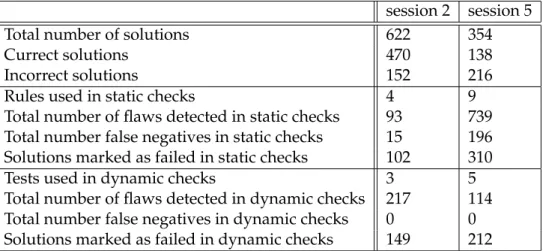
According to table 5.2 the rules and tests were best in the second attestation session with only 12% false reports in static tests, only 2% total false negatives and no false positives. Only 15 results out of 622 had to be overridden manually. In contrast to this, the fifth session had an extraordinary high number of false negative in static tests. Table 5.3 compares and inspects the rules and tests used in this sessions in more detail.
Already a few rules and tests seem to be sufficient to get a good coverage of possible flaws. As can be expected in case of static checks, an increased number of tests leads to a higher amount of detected programming flaws. The same is not valid for dynamic tests, where less flaws are detected although the total number of incorrect solutions in-creased from session 2 to session 5. Hence, beside testing with different input values, one
session 2 session 5
Total number of solutions 622 354
Currect solutions 470 138
Incorrect solutions 152 216
Rules used in static checks 4 9
Total number of flaws detected in static checks 93 739 Total number false negatives in static checks 15 196 Solutions marked as failed in static checks 102 310
Tests used in dynamic checks 3 5
Total number of flaws detected in dynamic checks 217 114 Total number false negatives in dynamic checks 0 0 Solutions marked as failed in dynamic checks 149 212
Table 5.3: Details for checker results of Java attestations in winter term 2007/08. Solutions marked as failed may be higher than the number of flaws detected by rules or tests, because
encountered syntax errors, endless loops and similar are counted seperately.
key benefit of dynamic checks is the fact that submitted solutions are actually executed leading to the discovery of exceptions, potential endless loops or similar errors.
For static checks there seems to be a trade-off between few rules, resulting in few false negatives but many overseen flaws, and many rules, resulting in many false negatives. It has to be kept into account that fewer rules imply smaller error records giving less feedback to the students. As already mentioned in the organizational evaluation, it turned out to be acceptable to manually check all solutions marked as failed in order to eliminate false negatives. Still, more precise rules will help to reduce the number of false negatives from the start.
5.3
Didactical Evaluation
All technical benefits and achievements of JACK and especially its Java checkers would be worthless if many exercises with automated results would not lead to better learning success than less exercises with personal feedback from human tutors. The effect can be considered by analyzing the results from the final examinations over several years. The relevant data is summarized in table 5.4.
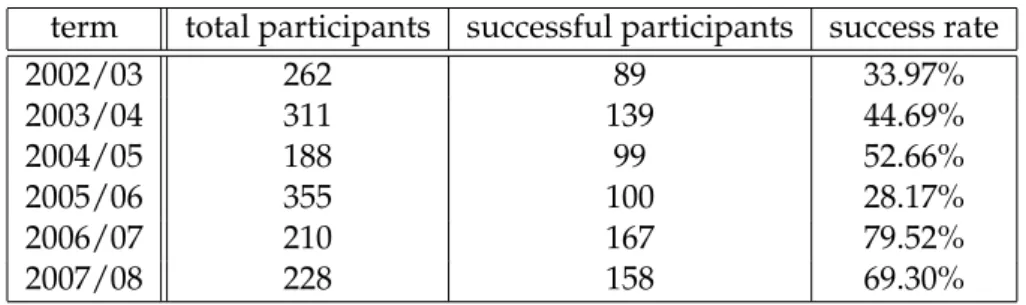
Both the absolute number of students who passed the final examination as well as the rate of successful participants was higher in years where JACK was used than in the years before. This cannot prove that many oral attestations or exercises would not have lead to even better results, but when those are not possible due to the great number of
term total participants successful participants success rate 2002/03 262 89 33.97% 2003/04 311 139 44.69% 2004/05 188 99 52.66% 2005/06 355 100 28.17% 2006/07 210 167 79.52% 2007/08 228 158 69.30%
Table 5.4: Success rates in final examinations from 2002/03 to 2007/08. Attestations with JACK where used in 2006/07 and 2007/08.
students, automated exercises can substitute them with measurable success. So it can be stated that automated exercises and attestations lead to better learning success.
Still it has to be considered critically how students used JACK in self-training mode. In attestations they had no possibility to get feedback from the server in between and had to check their solutions on their own as in the final examination with pen and paper. In self-training, they could submit solutions, wait for results and use the error messages to incremently correct their solution. Although it is the obvious intention of an exercise to point out errors and missunderstandings and allow students to correct them, it was not the intention to save the students from the burden of testing their solutions carefully. Sometimes it could be observed that single students submitted solutions in rapid succession in order to explore the checks made by JACK and provide a solution that satisfies these checks afterwards. When dynamic checks defined by the teacher where not covering the complete desired behavior, this leads to solutions that where assumed to be correct although they still contained errors. Fortunately, this combatative programming against JACK got reduced quickly when checking a solution on the server took more than a few seconds and students realized that their own testing would be faster in the end. Of course, a similar effect is not unlikely in manual attestations, when a teacher starts to oversee errors.
Another important point of discussion is the question whether students should be al-lowed to submit more then one solution in attestations. Similar to exploring the checks in self-training mode, this could theoretically inspire immature students to make random changes to their solutions and to hope that one of them will be a success. This behaviour could only be observed in very few cases in winter term 2007/08. In nearly all of these cases students had marked their variations by code comments in order to explain what they were trying to do. Attempts like these are also well known from written examina-tions on paper, so this phenomenon is ne