A REVIEW ON HOW TO MEASURE CLOUD
PERFORMANCE USING LINPACK IN A CLOUD
ENVIRONMENT
1
Navdeep Kaur ,
2Mr.Harinderpal Singh
1
M.Tech Student, IT ,Adesh Institute Of Engg. &Technology , Faridkot , PTU , (India)
2
Assistant Professor , CSE , Adesh Institute Of Engg. &Technology , Faridkot , PTU , (India)
ABSTRACT
Cloud computing is a general term for anything that can be accessed as the service over the internet. From the technical point of view, two pillars of cloud computing are service-oriented architecture and virtualization. The important progress seen lately in virtualization is due to the development of several virtual machine hypervisors. Virtual Machine technology enables multiple OS environments to coexist on the same physical computer in strong isolation from each other. To evaluate the performance of the Cloud infrastructure, I have selected a scientific computing application and well known synthetic benchmark, the Linpack numerical library.
Using this application I will evaluate the impact in performance of several key factors in cloud computing such as the influence of the number of virtual machines employed per host, as well as the I/O operations, on the
performance of the Linpack benchmark. Linpack benchmark was executed under different configuration of the physical host, with and without hyperthreading, and with the virtual machines managed using the VMWare hypervisor.
Keywords: Cloud Computing, Virtualization, VMWare, Hyperthreading, Benchmarking, Linpack
I INTRODUCTION
Cloud computing is a general term for anything that can be accessed as the service over the internet. The
services can be Infrastructure as a Service (IaaS), Platform as a Service (PaaS), Software as a Service (SaaS)
and Storage as a service [1]. The key properties of the cloud computing is user centric, task centric, powerful,
accessible, intelligent and programmable. In order to do this type of project, it need to deploy the project to the
cloud so that the project can be accessed from anywhere from the internet enabled locations.
However, at the same time there are some major obstacles that need to be tackled, such as data transfer
bottlenecks due to the more and more data-intensive applications or performance unpredictability issues.
From the technical point of view, two pillars of cloud computing are service-oriented architecture (SOA) and
Virtual Machine technology begins to emerge as a focus of research and deployment. Virtual Machine
technology such as Xen, VMWare, Microsoft Virtual Servers, and new Microsoft Hyper-V technology etc,
enables multiple OS environments to coexist on the same physical computer in strong isolation from each other.
VMs share the conventional hardware in a secure manner with excellent resource management capacity, while
each VM is hosting its own operating system and applications. Hence, VM platform can facilitate
server-consolidation and co-located hosting facilities [3-5].
To evaluate the performance of the Cloud infrastructure, I have selected a scientific computing application and
well known synthetic benchmark, the Linpack numerical library. Using this application I will evaluate the
impact in performance of several key factors in cloud computing: the number of virtual machines per host, the
influence of the hyper threading and the hard disk I/O. This paper is organized as follows: Section II discuses
Virtual machine and explores VMWare. Section III list and explores the parameters used for measuring the
performance of cloud infrastructure. Section IV describes the main characteristics, history and variants of the
Linpack application used as benchmarks. Section V presents the performance measurement methodology of this
study.
II VIRTUAL MACHINE
From the technical point of view, two pillars of cloud computing are service-oriented architecture (SOA) and
virtualization of hardware and software [1]. The important progress seen lately in virtualization is due to the
development of several virtual machine hypervisors. Many years ago, a problem aroused. How to run multiple
operating systems on the same machine at the same time? The solution to this problem was virtual machines.
Virtual machines monitor the core part of virtual machines sits between one or more operating systems and the
hardware and gives the illusion to each running OS that it controls the machine. Virtual Machine technology
begins to emerge as a focus of research and deployment. Virtual Machine technology enables multiple OS
environments to coexist on the same physical computer in strong isolation from each other. VMs share the
conventional hardware in a secure manner with excellent resource management capacity, while each VM is
hosting its own operating system and applications [4, 5].
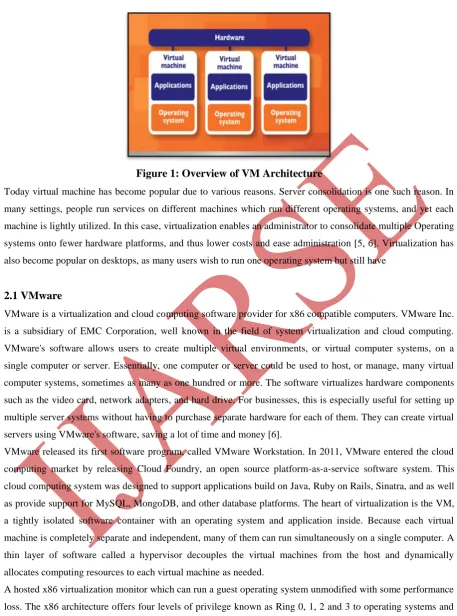
Indeed, the VMM serves as an operating system for operating systems, but at a much lower level; the OS must
Figure 1: Overview of VM Architecture
Today virtual machine has become popular due to various reasons. Server consolidation is one such reason. In
many settings, people run services on different machines which run different operating systems, and yet each
machine is lightly utilized. In this case, virtualization enables an administrator to consolidate multiple Operating
systems onto fewer hardware platforms, and thus lower costs and ease administration [5, 6]. Virtualization has
also become popular on desktops, as many users wish to run one operating system but still have
2.1 VMware
VMware is a virtualization and cloud computing software provider for x86 compatible computers. VMware Inc.
is a subsidiary of EMC Corporation, well known in the field of system virtualization and cloud computing.
VMware's software allows users to create multiple virtual environments, or virtual computer systems, on a
single computer or server. Essentially, one computer or server could be used to host, or manage, many virtual
computer systems, sometimes as many as one hundred or more. The software virtualizes hardware components
such as the video card, network adapters, and hard drive. For businesses, this is especially useful for setting up
multiple server systems without having to purchase separate hardware for each of them. They can create virtual
servers using VMware's software, saving a lot of time and money [6].
VMware released its first software program, called VMware Workstation. In 2011, VMware entered the cloud
computing market by releasing Cloud Foundry, an open source platform-as-a-service software system. This
cloud computing system was designed to support applications build on Java, Ruby on Rails, Sinatra, and as well
as provide support for MySQL, MongoDB, and other database platforms. The heart of virtualization is the VM,
a tightly isolated software container with an operating system and application inside. Because each virtual
machine is completely separate and independent, many of them can run simultaneously on a single computer. A
thin layer of software called a hypervisor decouples the virtual machines from the host and dynamically
allocates computing resources to each virtual machine as needed.
A hosted x86 virtualization monitor which can run a guest operating system unmodified with some performance
loss. The x86 architecture offers four levels of privilege known as Ring 0, 1, 2 and 3 to operating systems and
applications to manage access to the computer hardware. While user level applications typically run in Ring 3,
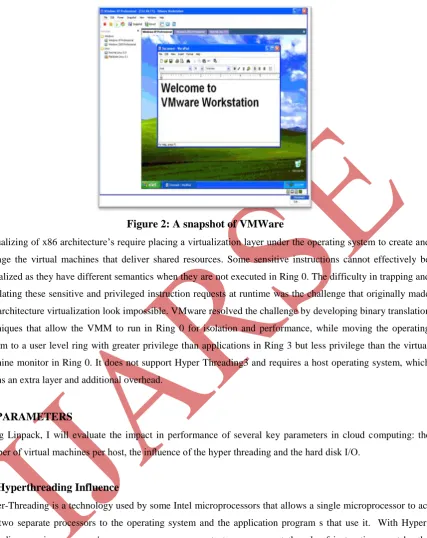
Figure 2: A snapshot of VMWare
Virtualizing of x86 architecture’s require placing a virtualization layer under the operating system to create and
manage the virtual machines that deliver shared resources. Some sensitive instructions cannot effectively be
virtualized as they have different semantics when they are not executed in Ring 0. The difficulty in trapping and
translating these sensitive and privileged instruction requests at runtime was the challenge that originally made
x86 architecture virtualization look impossible. VMware resolved the challenge by developing binary translation
techniques that allow the VMM to run in Ring 0 for isolation and performance, while moving the operating
system to a user level ring with greater privilege than applications in Ring 3 but less privilege than the virtual
machine monitor in Ring 0. It does not support Hyper Threading3 and requires a host operating system, which
means an extra layer and additional overhead.
III PARAMETERS
Using Linpack, I will evaluate the impact in performance of several key parameters in cloud computing: the
number of virtual machines per host, the influence of the hyper threading and the hard disk I/O.
3.1 Hyperthreading Influence
Hyper-Threading is a technology used by some Intel microprocessors that allows a single microprocessor to act
like two separate processors to the operating system and the application program s that use it. With
Hyper-Threading, a microprocessor's core processor can execute two concurrent threads of instructions sent by the
operating system. Having two threads of execution units to work on allows more work to be done by the
processor during each clock cycle. To the operating system, the Hyper-Threading microprocessor appears to be
two separate processors. Because most of today's operating systems are capable of dividing their work load
among multiple processors, the operating system simply acts as though the Hyper-Threading processor is a pool
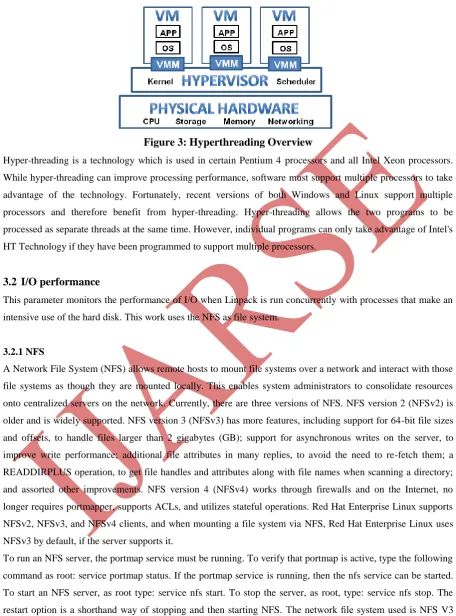
Figure 3: Hyperthreading Overview
Hyper-threading is a technology which is used in certain Pentium 4 processors and all Intel Xeon processors.
While hyper-threading can improve processing performance, software must support multiple processors to take
advantage of the technology. Fortunately, recent versions of both Windows and Linux support multiple
processors and therefore benefit from hyper-threading. Hyper-threading allows the two programs to be
processed as separate threads at the same time. However, individual programs can only take advantage of Intel's
HT Technology if they have been programmed to support multiple processors.
3.2
I/O performance
This parameter monitors the performance of I/O when Linpack is run concurrently with processes that make an
intensive use of the hard disk. This work uses the NFS as file system.
3.2.1 NFS
A Network File System (NFS) allows remote hosts to mount file systems over a network and interact with those
file systems as though they are mounted locally. This enables system administrators to consolidate resources
onto centralized servers on the network. Currently, there are three versions of NFS. NFS version 2 (NFSv2) is
older and is widely supported. NFS version 3 (NFSv3) has more features, including support for 64-bit file sizes
and offsets, to handle files larger than 2 gigabytes (GB); support for asynchronous writes on the server, to
improve write performance; additional file attributes in many replies, to avoid the need to re-fetch them; a
READDIRPLUS operation, to get file handles and attributes along with file names when scanning a directory;
and assorted other improvements. NFS version 4 (NFSv4) works through firewalls and on the Internet, no
longer requires portmapper, supports ACLs, and utilizes stateful operations. Red Hat Enterprise Linux supports
NFSv2, NFSv3, and NFSv4 clients, and when mounting a file system via NFS, Red Hat Enterprise Linux uses
NFSv3 by default, if the server supports it.
To run an NFS server, the portmap service must be running. To verify that portmap is active, type the following
command as root: service portmap status. If the portmap service is running, then the nfs service can be started.
To start an NFS server, as root type: service nfs start. To stop the server, as root, type: service nfs stop. The
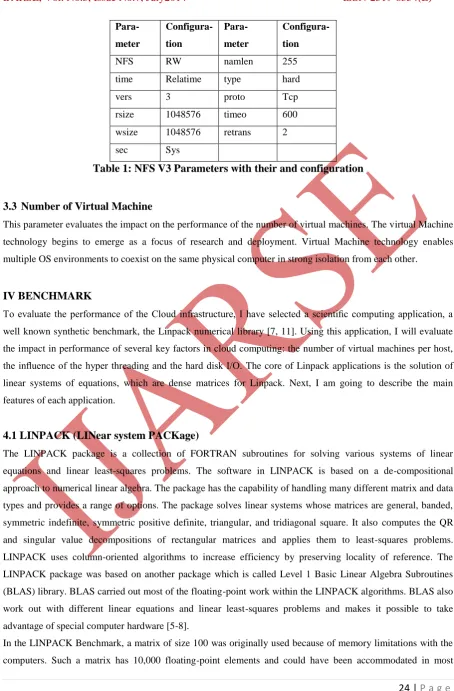
restart option is a shorthand way of stopping and then starting NFS. The network file system used is NFS V3
wsize 1048576 retrans 2
sec Sys
Table 1: NFS V3 Parameters with their and configuration
3.3
Number of Virtual Machine
This parameter evaluates the impact on the performance of the number of virtual machines. The virtual Machine
technology begins to emerge as a focus of research and deployment. Virtual Machine technology enables
multiple OS environments to coexist on the same physical computer in strong isolation from each other.
IV BENCHMARK
To evaluate the performance of the Cloud infrastructure, I have selected a scientific computing application, a
well known synthetic benchmark, the Linpack numerical library [7, 11]. Using this application, I will evaluate
the impact in performance of several key factors in cloud computing: the number of virtual machines per host,
the influence of the hyper threading and the hard disk I/O. The core of Linpack applications is the solution of
linear systems of equations, which are dense matrices for Linpack. Next, I am going to describe the main
features of each application.
4.1 LINPACK (LINear system PACKage)
The LINPACK package is a collection of FORTRAN subroutines for solving various systems of linear
equations and linear least-squares problems. The software in LINPACK is based on a de-compositional
approach to numerical linear algebra. The package has the capability of handling many different matrix and data
types and provides a range of options. The package solves linear systems whose matrices are general, banded,
symmetric indefinite, symmetric positive definite, triangular, and tridiagonal square. It also computes the QR
and singular value decompositions of rectangular matrices and applies them to least-squares problems.
LINPACK uses column-oriented algorithms to increase efficiency by preserving locality of reference. The
LINPACK package was based on another package which is called Level 1 Basic Linear Algebra Subroutines
(BLAS) library. BLAS carried out most of the floating-point work within the LINPACK algorithms. BLAS also
work out with different linear equations and linear least-squares problems and makes it possible to take
advantage of special computer hardware [5-8].
In the LINPACK Benchmark, a matrix of size 100 was originally used because of memory limitations with the
environments of that time [5, 6]. This was done so users could estimate the time required to solve their matrix
problem by extrapolation. Over the years additional performance data was added and today the collection
includes over 1300 different computer systems. In addition to the increasing number of computers, the scope of
the benchmark has also expanded.
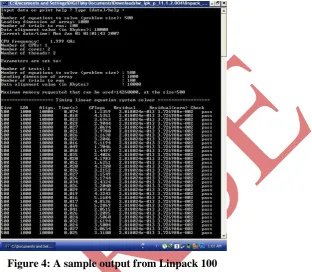
Figure 4: A sample output from Linpack 100
LINPACK was designed for applying to supercomputers in the early 1980s and now acts as one of the most
authoritative benchmarks in high performance computers. The TOP 500 computers in the world are sorted by
the LINPACK’s result. To follow the development of computer architectures, LINPACK evolves into EISPACK and LAPACK. EISPACK mainly dedicates to numerical computation of the Eigen values and
eigenvectors of matrices. LINPACK measures the actual peak value of float-point computing power indicated in
giga of float-point operations per second (GFLOP) [7, 9].
LINPACK was chosen because it is widely used and performance numbers are available for almost all relevant
systems. A detailed description as well as a list of performance results on a wide variety of machines is available
in postscript form from netlib. The benchmark used in the LINPACK Benchmark is to solve a dense system of
linear equations. For the TOP500, we used that version of the benchmark that allows the user to scale the size of
the problem and to optimize the software in order to achieve the best performance for a given machine. This
performance does not reflect the overall performance of a given system, as no single number ever can. It does,
however, reflect the performance of a dedicated system for solving a dense system of linear equations. Since the
problem is very regular, the performance achieved is quite high, and the performance numbers give a good
correction of peak performance.
In multiprogramming environments it is often difficult to reliably measure the execution time of a single
The LINPACK benchmark report appeared first in 1979 and was designed to help users estimate the time
required by their systems to solve a problem using the LINPACK package, by extrapolating the performance
results obtained by 23 different computers solving a matrix problem of size 100. This matrix size was chosen
due to memory and CPU limitations at that time. 10000 floating-point entries from -1 to 1 are randomly
generated to fill in a general, dense matrix.
Over the years, additional versions with different problem sizes, like matrices of order 300 and 1000, and
constraints were released, allowing new optimization opportunities as hardware architectures started to
implement matrix-vector and matrix-matrix operations. Parallel processing was also introduced in the
LINPACK Parallel benchmark in the late 1980s. In 1991 the LINPACK was modified for solving problems of
arbitrary size, enabling High Performance Computers to get near to their asymptotic performance. Two years
later this benchmark was used for measuring the performance of the first Top500 list [9, 10].
4.3 Linpack Variant
LINPACK 100 is very similar to the original benchmark published in 1979 and obtained by Gaussian
elimination with partial pivoting with 2/3n³ + 2n² floating point operations where n is 100, the order of the dense
matrix A that defines the problem. Its small size and the lack of software flexibility do not allow most modern
computers to reach their performance limits. However, it can still be useful to predict performances in
numerically intensive user written code using compiler optimization. LINPACK 1000 can provide a
performance nearer to the machine's limit because to offering a bigger problem size, a matrix of order 1000,
changes in the algorithm are possible. The previous benchmarks are not suitable for testing parallel computers.
For that Linpack’s Highly Parallel Computing benchmark or HP Linpack benchmark was introduced. In
HPLinpack the size n of the problem can be made as large as it is needed to optimize the performance results of
the machine [10, 11].
V PERFORMANCE MEASUREMENT METHODOLOGY
TO Evaluate and analyze the influence of hyper-threading, number of virtual machines employed per host and
I/O operations on the performance of Virtual Machine, I use Linpack benchmark. This benchmark will execute
under different configurations of physical host, with and without hyper threading, and with virtual machines
managed using the VMWare hypervisor.
Here I have created a VMware by benchmarking virtual machines using LINPACK. The virtual machines
LINPACK tool was the problem size. The output is the number of GFlop operations per second. 5 tests were
performed with problem sizes 1000, 3000, 5000, 7000, 10000 their corresponding leading dimensions being
1000, 3008, 5000, 7008 and 10000 respectively. The number of trials will be 1, 2, 2, 3, and 2 respectively with
data alignment value of 4 KB. In order to make a proper Analysis of the results obtained when using Linpack,
use the execution time versus the number of VMs for the Linpack test. The impact of the hyper-threading will
also discussed.
VI CONCLUSION
[
Cloud technologies are drawing the attention from the industry, research centers and the IT community since
they offers the possibility to virtualized services, providing virtual machines to users for their execution.
Currently, there is a wide range solutions for building private, public or even hybrid Clouds. In this paper I have
used the VMWare hypervisor included in this platform to manage the virtualized services. The objective is to
analyze the influence of the hyperthreading, the number of virtual machines employed per host and the I/O on
the performance of Linpack parallel benchmark.
REFERENCES
[1] L. J. Zhang, J. Zhang, J. Fiaidhi and J. M. Chang, “Hot Topics in Cloud Computing”, IEEE IT
Professional, Vol. 12, No. 5, PP: 17-19, 2010.
[2] M. T. Jones, “Discover- Linux Kernel Virtual Machine”, EMULEX Corp. IBM-Developer Works,
2007
[3] I. Habib, “Virtualization with KVM”, Linux Journal, 2008
[4] F. Gomez-Folgar, J. L´opezCacheiro, C. Fern´andezS´anchez, A. Garcia-Loureiro and R. Valin, “An
e-Science infraestructure for nanoelectronic simulations based on Grid and Cloud technologies”, Spanish
Conference Electron Devices (CDE), PP: 1-4, 8-11, 2011
[5] A.J. Garc´ıaLoureiro, T.F. Pena, J.M. L´opezGonz´alez and Ll. Prat, “Parallel implementation of a
simulator for hetero junction bipolar transistors, VIII Symp. on Parallelism”, C´aceres, pp. 41-50, 1997
[6] J. J. Dongarra, C. B. Moler,J. R. Bunch and G.W. Stewart, “LINPACK Users’ Guide”, SIAM
publishing, 1979
[7] S. Selberherr, “An Analysis and Simulation of Semiconductor Devices”, Springer, 1984
[8] D.L. Scharfetter and H.K. Gummel, “Large-Signal Analysis of a Silicon Read Diode Oscillator, IEEE
Trans. On Electron Devices, pp. 64-77, 1969
[9] R.E. Bank and D.J. Rose, “Parameter Selection for Newton-Like Methods Applicable to Nonlinear
Partial Differential Equations”, SIAM J. Num. Anal., Vol. 17, No. 6, pp. 806-822, 1980
[10] J.J. Dongarra, P. Luszczek and A. Petitet. “The LINPACK Benchmark: past, present and future”,
Concurrency and Computation Practice and Experience, vol: 15 issue: 9, PP: 803−820, 2003.
[11] Edward Anderson et. al., “LAPACK User’s Guide”, Society for Industrial and Applied Mathematics,
[16] Linpack, http://software.intel.com
[17] Top 500 list, http://www.top500.org/project/linpack