Available Online at www.ijcsmc.com
International Journal of Computer Science and Mobile Computing
A Monthly Journal of Computer Science and Information Technology
ISSN 2320–088X
IMPACT FACTOR: 6.199
IJCSMC, Vol. 8, Issue. 10, October 2019, pg.6 – 11
Website for Agriculture
S.DICKENS LEONOT
1; MR. C.DANIEL NESAKUMAR
2; MRS. R.ARUNA
3 ¹MCA Student, PG & Research Department of Computer Application, Hindusthan College of Arts and Science ²Assistant Professor, PG & Research Department of Computer Application, Hindusthan College of Arts and Science3
Assistant Professor, Department of IT, Coimbatore Institute of Engineering & Technology [email protected] 1; [email protected] 2; [email protected] 3
ABSTRACT: The project entitled “Website for Agriculture” is developed by PHP as Front End and MY SQL Back End. Find articles on agriculture website, including for sales product, farm management, coconut details, Banana Details and more. Get agricultural website updates for your farm by interacting with experts and other farmers. Agricultural website package that tracks harvest data, crops, chemicals, fertilizer, planting, tillage, contracts, elevator inventory, expenses, net income and custom trucking for your farm. India has made impressive strides on the agricultural front during the last three decades. Much of the credit for this success should go to the several million small farming families that form the backbone of Indian agriculture and economy. Policy support, production strategies, public investment in infrastructure, research and extension for crop, livestock and farmer have significantly helped to increase food production and its availability. This farm website allows you to track important information on your farm such as the previous crop, condition of the field when planted, planting depth, planting population, rates, etc. Generate farm record keeping reports to use at your local office and insurance agency to prove your crop yields. This agricultural website package allows you to generate custom-made reports for a specific person, year, field, commodity, or elevator to send to your tenants or landlords. Management system website for the farming and commercial sectors produced by Plan-A-Head, a leading computer application software company. Website Farm's mission is to always develop software products of outstanding quality and deliver the best service and support to our dealers and clients.
I.
I
NTRODUCTIONThe main goal of “website for Agriculture” is maintaining the coconut details, Banana Details,
different equipment details which are related to the Market. Maintaining the item details, Customer details, Buy
Product details, list of all Customer details and generates the summary report of pay bill for each user.
Agriculture System was approached by a Very big system to develop a web based application to be accessed by
the users over the web. Farmers added the products and can be sells, buys, report. The interface of the system
will be Customer friendly and as simple as possible yet powerful requiring Report to Farmer. The Agriculture
typically comprises fresh produce, products and baked goods departments along with shelf space reserved for
canned. This agricultural website package allows you to generate custom-made reports for a specific person,
applications include finding out the retail price of the things which is kept in the store. By using this system we
can minimize the billing time to the store not only accuracy also improved. The price Details and quantity value
which is stored in the database.
II.
EXISTING
SYSTEM
&
PROPOSED
SYSTEM
EXISTING SYSTEM
The Agriculture system, which is followed at present, the farmer Used the Product Distributing is
manual system. The Farmer consists of Booked Product details and Accounts Details, Printing work that has to
be maintained in all aspects are difficult. In the existing system each and every time a reference should be made
manually. There are high possibilities to commit errors and mistakes, which leads to produce the wrong
statements to the management. Report generation is also not an easy task.
DRAW BACKS
Manual Work.
Security of information is low.
Time Consumption.
High Manpower.
PROPOSED SYSTEM
The drawbacks, which are faced during existing system, can be eradicated by using the proposed
system. The Agriculture System which is proposed now computerizes all the details. Once the Farmer Add the
Product details are stored into the computer and Easy to Use Customer View and Buy a Product. Only a single
person is enough to maintain all the reports. The security can also be given as per the requirement of the users.
ADVANTAGES OF PROPOSED SYSTEM
Large volumes of data can be stored with case.
Newly Products stored are updated.
Stored data and procedures can be easily edited.
Reports can be generated with case.
Accurate calculations are made.
III.
M
ODULES 1. Authentication:-2. Customer Registration / Login
Customer who wants to buy Products should register with website by providing personal details. After the registration, he will be issued with valid user id and password by the Administrator. The Customer can log into the system with this user Id and Password. After successfully login into the system, the Customer moves to the instruction web page where he will get instruction about the product process. It makes easy to integrate email and password authentication into your web app. The credentials are not stored in your database. Customer Registration Screen Contains Various fields available for Username Password, Email id, Address, Gender, Contact Number, Pin code , user id City .,etc. They are kept in a secure database behind the Authentication servers, and stored securely. This separates sensitive user credentials from your application data, and lets you focus on the user interface and experience for your app.
3. Add Product
In this Module Farmer Add The Products Details. It Contains Information about the product select the category coconut Details, banana details such that product Id, Product name, kg/piece, available stock, amount. The Product Details Stored the Database. Farmer Maintain the Product Details.
4. View Order
In this Module Farmer view the Customer Order products coconut Details, banana details wise. Farmer View the Order details such that name, price, quantity, available,
5. View Product Details
In this Module Customer view the Product Details. It Contains Information about the product such that product Id, Product name, kg/piece, available stock, amount. Farmer maintain the Product Details.
6. Order
In this module provides the functionality for User to place their order. User View the Products details category wise and order the particular product details and Details Should be sent to the Farmer.
7. Send Delivery Status
In this Module Administrator View the Customer Order Details and Send the Delivery Address to Customer for Collecting the Products.
8. Payment
In this Module Customer view the delivery address product payment mode should be displayed. Select the Payment mode option and Paid to the farmer. The Details Stored in the Database.
9. View payment Details
Administrator View the Total Amount Collected the Products and Available Products in that Web Page.
IV. INPUT DESIGN
The input design is the link between the information system and the user. It comprises the developing
specification and procedures for data preparation and those steps are necessary to put transaction data in to a
on controlling the amount of input required, controlling the errors, avoiding delay, avoiding extra steps and
keeping the process simple. The input is designed in such a way so that it provides security and ease of use with
retaining the privacy. Input Design considered the following things:
What data should be given as input?
How the data should be arranged or coded?
The dialog to guide the operating personnel in providing input.
Methods for preparing input validations and steps to follow when error occur.
V. OUTPUT DESIGN
A quality output is one, which meets the requirements of the end user and presents the information
clearly. In any system results of processing are communicated to the users and to other system through outputs.
In output design it is determined how the information is to be displaced for immediate need and also the hard
copy output. It is the most important and direct source information to the user. Efficient and intelligent output design improves the system’s relationship to help user decision-making.
1. Designing computer output should proceed in an organized, well thought out manner; the right output must be
developed while ensuring that each output element is designed so that people will find the system can use easily
and effectively. When analysis design computer output, they should Identify the specific output that is needed to
meet the requirements.
2. Select methods for presenting information.
3. Create document, report or other formats that contain information produced by the system.
The output form of an information system should accomplish one or more of the following objectives.
Convey information about past activities, current status or projections of the
Future.
Signal important events, opportunities, problems, or warnings.
Trigger an action.
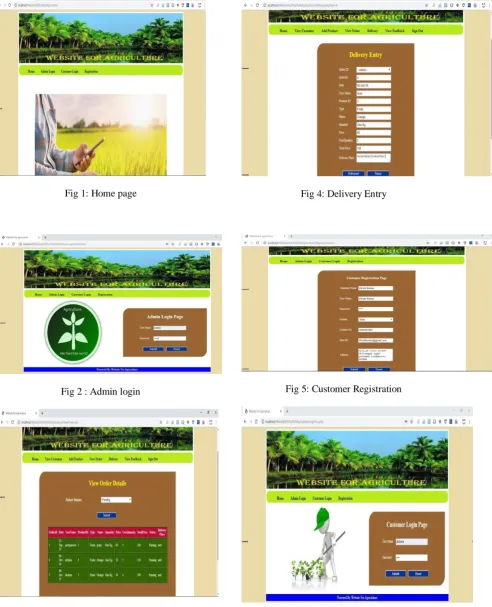
Fig 1: Home page
Fig 2 : Admin login
Fig 3: Order Details
Fig 4: Delivery Entry
Fig 5: Customer Registration
Fig 6: Customer Login
VI. C
ONCLUSIONSThe “Website for Agriculture” has been developed to satisfy all proposed requirements. The process is
maintained more simple and easy. The system is highly scalable and user friendly. Almost all the system
objectives have been met. The system has been tested under all criteria. The system minimizes the problem
arising in the existing manual system and it eliminates the human errors to zero level. The design of the database
is flexible ensuring that the system can be implemented. It is implemented and gone through all validation. All
phases of development were conceived using methodologies. User with little training can get the required report.
The software executes successfully by fulfilling the objectives of the project. Further extensions to this system
can be made required with minor modifications.
REFERENCES
[1]. Professional PHP6, By Ed Lecky-Thompson, Steven D. Nowicki, and Thomas Myer.
[2]. Learning PHP, MySQL, and JavaScript: A Step-by-Step Guide to Creating Dynamic Websites, By Robin Nixon.
[3]. PHP Solutions: Dynamic Web Design Made Easy, By David Powers.
[4]. Beginning PHP and MySQL: From Novice To Professional, By W. Jason Gilmore.
[5]. Head First PHP & MySQL, By Lynn Beighley and Michael Morrison.
[6]. Core PHP programming By Leon Atkinson, ZeevSuraski.
[7]. PHP Object-Oriented Solutions By David Powers.
[8]. www.w3schools.com
[9]. www.php.net/manual/en/tutorial.php [10]. www.tutorialspoint.com
[11]. www.tizag.com/php