A Novel Method for Making a Photo-book Using
Cloud
Aishwarya Habib #1, Praveen Mulgund#2,Abdul Kareem Sirasgi#3, Priyadarshini Kalwad*4 #
Student, B.V.B. College of Engineering and Technology, Hubbali 580031, Karnataka, India
*
Assistant Professor, B.V.B. College of Engineering and Technology, Hubbali 580031, Karnataka, India
Abstract- Cloud computing usually comprises of front-end user devices and back-end cloud servers. It is a type of computing which relies on sharing computing resources instead of using local servers and personal devices to handle applications. This gives users the access to a large volume of storage on cloud. In our project, we our making the technology of cloud, business oriented. Our work provides a cloud-based system that enables photographers to design photo-books easily and effectively. The user i.e. a photographer can upload photos and related data from a desktop application to the cloud storage. This information will be received by the respective clients through a website, who can customize photos like selection, deletion, tag, comment etc., and submit it to the photographer. The cloud storage eliminates the problem of data loss. The photographer receives the information using which s/he designs the album and sends it back to client who will then approve it with or without alteration.
Keywords - Cloud, Synchronize, Photos, Job, Photo-book, Desktop application, web application, upload on cloud.
I. INTRODUCTION
In today’s generation almost everybody has craze to capture every moment of their life. People spend tremendously on getting the best photographer to capture their best moments. The most current trend is to make a Photo-book, a printed album on every special occasion. With this increase in demand for making attractive and eye-catching albums, the Photo-book making industries are flourishing. But the problem that has been witnessed quite often is that, the photographers capture photos in various events but fail to satisfy the costumer’s expectations when they deliver their product i.e. an Album or a Photo-book. This dissatisfaction is hindering the growth of this new flourishing business of making the Photo-book.
There is tremendous increase in competition on this industry in recent years, and the urge of the industry to make the Photo-book exactly and meticulously as demanded by the customers has led towards capturing complete information about the needs of the customers before designing the album and this competition has forced many enterprises to make use of new applications, reduce processing time and cost, and simultaneously satisfy the customers’ expectations. In response to this challenge, the idea of cloud computing has been gaining interest lately [2]. With the use of Cloud technology users can access resources via Internet from anywhere without worrying about any management or maintenance of actual resources. Besides, resources stored in cloud are very dynamic [8].
The aim of our work is to provide a software platform that uses Cloud technology to bridge the gap between the business people and customers as Cloud Computing is evolving as a technology for sharing information [8].
II. CLOUD COMPUTING
Cloud-based services are becoming popular in recent years, providing enterprises and people the benefits of computing and storage facility on remote data-centers [3] as a result of this there is no need of purchasing, managing and maintaining expensive hardware. The best example of cloud computing is Google Apps where any application can be accessed using a browser and it can be deployed on thousands of computer through the Internet.
We can generalize Cloud computing [6] for anything that involves delivering hosted services over the Internet. These services are broadly divided into three categories: Infrastructure-as-a-Service (IaaS), Platform-as-a-Service (PaaS) and Software-as-a-Service (SaaS).
A. Infrastructure-as-a-Service
In this type of service the customer is provided with resources which include virtual server instances and storage, application program interfaces (APIs) that allow the customer to start, stop, access and configure their virtual servers and storage. Here, the customer pays for only as much capacity as is needed. Since this pay-for-what-you-use model is similar to the way water, fuel and electricity are used up; it is often referred to as utility computing.
B. Platform-as-a-service
In this type of service the providers provide computing platform for the developers to create applications. The set of software development tools hosted on the provider’s platform include operating system, programming language execution, databases and webserver. PaaS providers may use APIs, website portals or gateway software installed on the customer's computer. Force.com, (an outgrowth of Salesforce.com) and GoogleApps are examples of PaaS.
C. Software-as-a-service
III. CLOUD STORAGE OVERVIEW
Cloud Storage has been gaining popularity just like Cloud Computing due to many of the same reasons as Cloud Computing. Cloud Storage delivers virtualized storage on demand, over a network based on a request for a given quality of service (QoS).
Cloud Storage [7] can be used in many different ways. For example: local data (such as on laptop) can be backed up to cloud storage; a virtual disk can be “synched” to the cloud and distributed to other computers; and the cloud can be used as an archive to retain (under policy) data for regulatory or other purposes.
For web facing applications, like our work, that provide data directly to their clients via the network, cloud storage can be used to store that data and the client can be redirected to a location at the cloud storage provider for the data [7].
IV. IMPLEMENTATION
a. Desktop application
Desktop application is available anytime offline and provides faster response and rich user experience. The main reason to provide desktop application is to enable the user to maintain information about his/her clients offline.
The photographer uploads the photos of particular client on cloud through desktop application, which generates thumbnails of those photos and uploads them on cloud.
The thumbnails are created by reducing the quality of the image. The image size is maintained so that the client can view the enlarged image in light box in the web application. The logic is as shown in the following snippet:
EncoderParameter qualityParam = new
EncoderParameter(System.Drawing.Imaging.
Encoder.Quality, quality); string lookupKey = "image/jpeg";
var jpegCodec =
ImageCodecInfo.GetImageEncoders().Where(i => i.MimeType.Equals (lookupKey)).FirstOrDefault();
var encoderParams = new EncoderParameters(1);
encoderParams.Param[0] = qualityParam;
ResizedBitmap.Save(des_path + "\\" + fiImage.Name, jpegCodec, encoderParams);
The photographer should create an account and log in to the desktop application shown in Fig. 1, with his/her valid credentials. This application will check whether the user is valid or not and proceed with authentication.
Fig 1: Desktop application
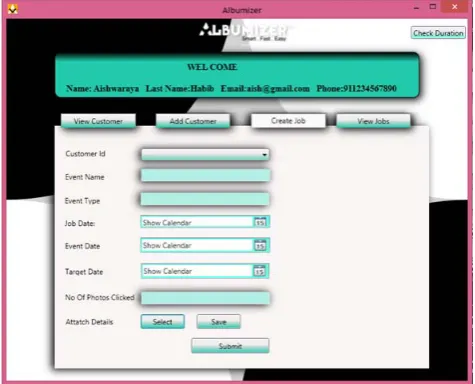
The next interface provides the user to register his/her clients with their valid details. Photographer can view his/her client details and create jobs for the client. Each job creation consists of filling details of the client’s event and then uploading folder/s of the client’s event’s photos. Fig. 2 shows the job creation interface.
Fig 2: Job creation interface of Desktop application
The system automatically creates thumbnails of these images and stores in the destination folder chosen by the photographer.
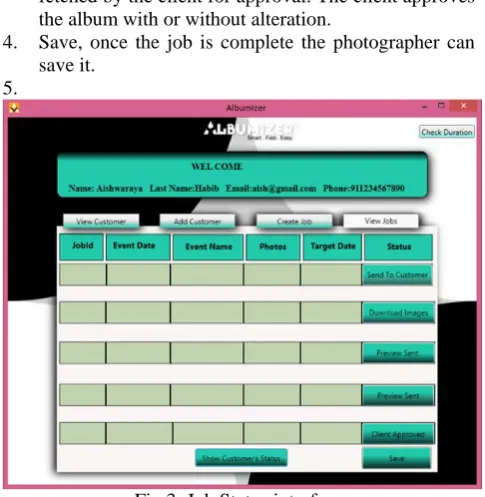
In the Job Status interface as shown in Fig. 3, the photographer can choose a particular client and view jobs created for him/her with their status. Statuses include: 1. Send to client, when job is created but not uploaded
on cloud, on clicking on this status button the images are uploaded on the cloud and a link is sent to the client through his/her email Id.
3. Preview Sent, once the photo book is designed as desired by the client it can be uploaded on cloud to be fetched by the client for approval. The client approves the album with or without alteration.
4. Save, once the job is complete the photographer can save it.
5.
Fig 3: Job Status interface
Additional feature
The photographer gets a notification on his/her client’s birthday and the system automatically sends wishes on behalf of the photographer to the client in the form of text.
b. Web Application
Upon receiving the photos the client can carry out the operation of selection of photos, deletion, tagging and commenting, through the application. The photos can also be viewed in light box. Fig.4 shows web application.
Fig 4: Web application.
The selected photos can be tagged as ‘big’ to appear in bigger size in the album. The client can give comments on each photo describing its appearance in the album. The comment icon appears red when the photo is commented shown in Fig. 5.
Fig 5: Selected photos that can be commented and/or tagged.
After all these tasks the client has to fill up an order form which includes name and date of the event, the name to be printed on the album, photo-book size and number of copies. After designing the album the photographer uploads the album on cloud which can be approved by the client with or without alteration.
c. Sending Link
The client can be redirected to a location at the cloud storage provider for the data by sending a link to his/her email account.
d. Notifying about the link
The clients can be notified about the link by sending an SMS to their cellphones using SMS integration gateway.
V. Related Work and Comparison
Many Cloud-based web services are present today similar to our work that will organize photographers’ uploaded photos and share them out. The most popular web services for robust image hosting and sharing include [4]:
i.
PixiesetPixieset, shown in fig. 6, appeared back in 2013 for photographers to use online media in their business. It has online features for image proofing and delivery. Just like our work, photos can be marked as favorite which makes it easy for photographer to proof pictures for printing and photo books. It delivers private galleries, image and entire gallery download, integrated Google analytics and billing system for prints and digital downloads. Our system supports most of these features. Pixieset is adding new features at a fast pace. But it does not have a desktop application like our system and entirely depends on web application. The drawback of this system is that it needs internet for every task and photographers cannot maintain their clients offline as there is no desktop application.
ii.
PassPass is another well-known photo-sharing platform for the photographer but not as good as Pixieset. It has beautiful galleries enabling customers to download photos right from the gallery and easily share them on Facebook with a linkback to the photographer. They call it the “Shoot and Share” principle. However, pass charges $29 per event (gallery) which is a serious issue for many photographers, followed by even bigger issue, which is, it doesn’t not allow the photographers to set their own prices. The app’s interface is clean and easy to use; however, its software platform is Adobe Air. There are loading speed issues and piles of dialogs appear asking to update Adobe Air. It is not a web-based cloud solution which is a major drawback. Fig 7 shows Pass interface.
Fig 7: Pass
iii.
ShootproofShoot proof is similar product in the field of client gallery tools. It has 6 plans to choose from ranging from 100 photos for free to 100,000 for $50 a month. However the drawback of this product is that it has not so usable interface and not so clean gallery design. Fig 8 shows Shootproof website.
Fig 8: Shootproof online photo proofing service
iv.
SmugMugSmugMug is a website for the photographers to showcase their work, share their photos with anyone who wants to see them, customize their photo site's design to suit their tastes, and more. While there’s no free plan available with SmugMug (there’s free 14-day trial, though), each plan includes unlimited storage space and galleries. SmugMug mainly deals with marketing photographer skills and advertising his/her company. Fig. 9 shows SmugMug, a photo hosting service.
Fig 9: SmugMug.
v.
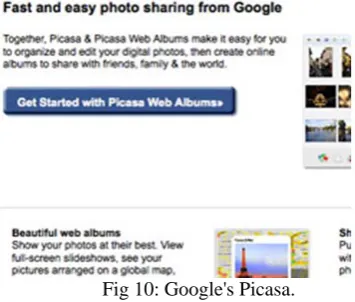
PicasaGoogle's Picasa, shown in fig. 10, was initially a small service but with age and features it grew into a photo hosting and image sharing powerhouse. The software's Web component, Picasa Web Album is an image viewer, organizer, editor and photo-sharing Web site originally created by Lifescape [1] and then owned by Google since 2004. Picasa allows web users with Google accounts to store and share photos. Photos can be structured into albums, either as private or public and, images can be uploaded in various ways.
It is free for everyone to use and continues to impress with the smoothness with which it lets you import, organize, and perfect your digital photos. It is both a desktop app to keep track of your photos locally and a web app to help you build galleries to share with the web.
Fig 10: Google's Picasa.
deletion, tag, rate etc. The photographer can also upload the design of the photo book and client can approve it. For any changes the client can mention in the comment box provided and submit it back to the photographer. Hence it involves the entire cycle of making the photo book and consequently becomes a novel method for making the photo book.
VI. CONCLUSION
Using Cloud Computing as a technology for making a photo-book eliminates the problem of data loss as Cloud services routinely back up their data, so one never permanently loses his\her priceless and irreplaceable images, even if their own computer explodes into flames.
Our system makes the technology of image hosting and photo sharing using cloud, business oriented. It mainly concentrates on business aspects. It is intended to enable the business of making photo-books flourish by enabling photographers communicate with their clients easily and efficiently. It not just allows the photographers to upload pictures on cloud so that their clients can view but also integrates the entire cycle of making an album or a photo-book; i.e. from selecting to tagging, rating and adding notes to selecting the themes for making an album. With this framework, clients can also alter the album design before it is printed.
REFERENCES
[1] C. Vanker, “Designing a C# class library to access cloud based images using Google’s Picasa Web Albums and ASP.NET”, Proceedings of the 14th Annual Conference on World Wide Web Applications, 7-9 Nov 2012.
[2] Dr. RaoNemani, “The Journey from Computer Time-Sharing to Cloud Computing: A Literature Review”, International Journal of Computer Science and Engineering Technology, pages 267-273, Vol 1, Issue 6, July 2011.
[3] I. Drago, M. Mellia, M. M. Munaf`o, A. Sperotto, R. Sadre, and A. Pras. “Inside Dropbox: Understanding Personal Cloud Storage Services”. In Proceedings of the 12th ACM Internet Measurement
Conference, IMC’12, pages 481–494, 2012.
[4] Julia May ( Sept 7, 2014) “Battle of the Client Galleries: Comparing 11 of The Best Tools for Proofing and Presentation” [Online] Available at: http://petapixel.com/2014/09/07/battle-client-galleries-comparing-10-best-tools-image-proofing-presentation/ [5] Kent K. Pawar, “Cloud Computing: For A Better Tomorrow”
[Online] Available at: http://www.academia.edu/7277820/Cloud_Computing_For_A_Bett
er_Tomorrow
[6] Margaret Rouse (Feb 2015) “cloud computing definition” [Online]
Available at:
http://searchcloudcomputing.techtarget.com/definition/cloud-computing.
[7] Open Grid Forum and Storage networking Industry Association, “Cloud Storage for Cloud Computing”, Sept 2009.