Honours Project
University of Canterbury Computer Science Department 1983
Design and Implementation of a TROFF postprocessor for Typesetting
on a Printronix 300
written by Anthony M. Verdellen
supervised by Dr. B. J. McKenzie
1. 2. 3.
4.
5. 6.7.
8.Table of Contents
Background
Project Definition 2.1
2.2
TROFF
Printronix 300
... . ... .
.
. .
.
page 1 6 7 82.3 The Hershey Fonts
....
•.•... .
1013 16 17 17 18 18 19 19 20 24 27 29 30 Decoding TROFF Output •••••
Printronix Output Routines Character Fonts
5.1 Font Selection 5.1.1
5.1.2
Times Roman Font Times Italic Font Times Bold Font
. .
. .
.
.
5.2
5.3
5 .1. 3
5.1.4 Filling
Special Mathematical Font Algorithm •••••••
Font Scaling and Phototypesetter-Simulator Conclusion References
. .
Storage Postprocessor.
.
..
. . .
.
...
...
AppendicesAppendix A Appendix B Appendix
c
Appendix D Appendix EAppendix F Appendix G Appendix H
GIMMS System Fonts Decoding
Plotting
Program Routines Roman Font
...
.
. .
.
Italic FontBold Font
...
Greek Font
...
Filling Routines1. Background
Almost every computer system will have, within its set of peripheral devices, at least one device that produces output in a human readable form. Many of these output devices are very limited in the form of output that they produce. Devices like VDUs, matrix printers and line printers have limited character sets, fixed size characters and will not allow characters to appear at any arbitrary position on a page. One output device that does not suffer from these limitations is the phototypesetter.
A phototypesetter forms characters on photographic paper by passing light through a character font stencil, through a series of lenses and onto the photographic paper. Because the optical system of the phototypesetter can direct light anywhere on the photographic paper characters can appear at any position on the output page that the user desires. The lens system is under the control of the user and therefore by selecting appropriate lenses the user can produce characters of varying size from a single character font stencil. With most phototypesetters a number of character fonts can be mounted at one time and as a result the user can select any of these fonts at will. Because the photographic paper is a continuous roll any page length can be catered for. The ability of the phototypesetter to position characters anywhere on an output page means that characters may overlap one another and this gives the user the power to create new characters by overprinting a number of characters (eg the Greek letter phi can be formed by overprinting 'O' and ' / ' ) .
A phototypesetter is a very powerful and versatile document formatting tool and indeed many published items, such as articles in technical journals, are produced with the aid of
-phototypesetting techniques as opposed to the more traditional mechanical typesetting. Despite its power the phototypesetter is very hard to use because the commands used to control it are at a very low level. The user must, for example, specify explicitly all the vertical and horizontal positioning concerned with indenting, justification and spacing. Document formatting with low-level phototypesetter commands is like writing a major piece of software in machine language. The need for some form of intermediary between the user and the phototypesetter prompted the development of a phototypesetting text processor called TROFF [ 1 ] [ 2 ] [ 9] •
TROFF was developed by J. F. Ossanna at Bell Laboratories during the early to mid-1970s. It was written for the Unix operating system in the programming language
c.
TROFF accepts an ordin-ary text file interspersed with document formatting commands and produces output to control a Graphic Systems phototypesetter. Users of TROFF have full use of all the features of the phototypesetter but can also allow some facilities such as centering, indenting, spacing and justification to be handled automatically. Special features called traps and diversions allow the user to write TROFF code to deal with page headers and footers and also footnotes. It would be impossible to give a complete description of TROFF in this document, it is sufficient to say that TROFF is a powerful and flexible phototypesetting document formatter.preprocessors have been developed to enable the user to work at a higher level than is possible with raw TROFF.
A number of macro packages are available which utilise the macro facility of TROFF to provide some high-level pseudo-commands in addition to the usual TROFF commands. The -ms macro package provides macro commands to enable some features to
be taken care of automatically, including headers, footers, section headings, multiple columns and indenting. The use of macro packages provides the user with a number of high-level commands that help to avoid some of the detail of pure TROFF. Using the -ms macro package to perform document formatting is comparable to writing major software in assembly language with the use of a number of predefined system routines. TROFF preprocessors on the other hand present the user with a complete formatting language that is a superset of TROFF .
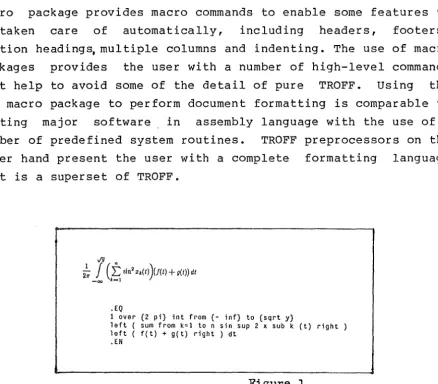
EQN[3]
• EQ
1 over {2 pi} int from {- inf} to {sqrt y}
left ( sum from k=l ton sin sup 2 x sub k (t) right ) left ( f(t) + g(t) right ) dt
.EN
Figure 1
is a TROFF preprocessor that provides a high-level declarative language for specifying mathematical equations within TROFF-prepared documents. Figure 1 shows an example of a
[image:5.600.96.534.242.625.2]-mathematical equation followed by its EQN definition. From this example it can be seen that the processor permits mathematical equations to be specified in. a logical and orthogonal manner. EQN accepts normal TROFF input which contains EQN definitions delimited by .EQ and .EN and produces an output file suitable for input to TROFF.
AT&T Common Stock
Year Price Divli::lend
1971 41-54 $2.60
2 41-54 2.70
3 46-55 2.87
4 40-53 3.24
5 45-52 3.40
6 51-59 .95•
• (first quarter only)
.TS
all box:
c s s c c c
n n n.
AT&T Common Stock
YearEBP rice EBO iv i dend 1971EB41-54EB$2. 60 2EB41-54EB2. 70 3EB46-55EB2. 87 4EB40-53EB3. 24 5EB45-52EB3. 40 6EB51-59EB.95•
.TE
• (first quarter only)
Figure 2
TBL[4] is another TROFF preprocessor. TBL allows the user to format tables in much the same way that EQN allows the user to format mathematical equations. Figure 2 shows a sample table with its corresponding TROFF definition. TROFF commands may be included within TBL definitions thus providing a high degree of flexibility when describing tables. As with EQN, TBL produces an output file containing text and TROFF commands.
[image:6.598.103.490.275.526.2]independent of TROFF the user can work at a fairly high level of abstraction and does not have to get his/her hands dirty with TROFF. The preprocessors designed for TROFF make document formatting comparable to writing software in a high level language.
It is obvious that TROFF, along with its macro packages and preprocessors, is a powerful phototypesetting tool that would be an asset to any computer system that has the need to provide document formatting facilities.
-2. Project Definition
The background material gave a brief description of the document formatting facilities available with a TROFF implementation and the associated Graphic Systems phototypesetter. The University of Canterbury has available on the Prime 750 computer system a working TROFF implementation (including macro packages and preprocessors) but does not have a phototypesetter on which to produce output. To utilise the potential document formatting facilities provided by TROFF it is necessary to produce output on some other device. The only suitable hard copy graphics output device available on the Prime is the Printronix 300 line printer. The Printronix 300 produces output on normal computer output paper but has the capability to treat an output page as a 792 x 792 matrix of (slightly overlapping) dots.
The aim of this project is therefore to design and implement a program that accepts the output from the TROFF package and produces the equivalent of phototypesetter output on the Printronix. Since the Printronix when operating in graphics mode simply plots points the program must be responsible for the creation and the scaling of the character images to be plotted.
To realize the aim of this
,
project it is necessary to combine three (presently unrelated) components, namely TROFF, the Printronix 300 and the Hershey fonts. What follows is a brief description of the information knowen about each at the time when this project was started.2.1 TROFF
For the purposes of this project the only real interest in TROFF is the output that it produces. It is necessary to be able to decode the output from TROFF to determine the actions the phototypesetter is expected to perform in response. Decoding of the TROFF output will make it possible to simulate the actions of the phototypesetter on the Printronix.
Unfortunately the only documentation available for TROFF was a user manual[l] and a number of tutorials[2] [9]. These documents provided excellent instructions for users of TROFF but gave no hint as to how the formatter worked. The only useful information in this area was a listing of TROFF and a listing of TCAT (a phototypesetter-simulator preprocessor for TROFF that produces an approximation of phototypesetter output on a Tektronix 4014).
There was virtually no information about the phototypesetter itself apart from a brief description of some operating characteristics (page width etc.) in the user manual. Apart from this the only information available about the phototypesetter was the brand name 'Graphic Systems'.
-2.2 Printronix 300
Part of the user documentation[lO] for the Printronix 300 gave a full description of the use of the graphics mode (called Plot Mode by the manufacturers).
Plot Mode allows the user to treat each 13.2 in. x 11 in. output page as a 792 x 792 matrix of dots (60 dots per horizontal inch and 72 dots per vertical inch). More specifically a page is treated as 792 rows each consisting of 792 dots.
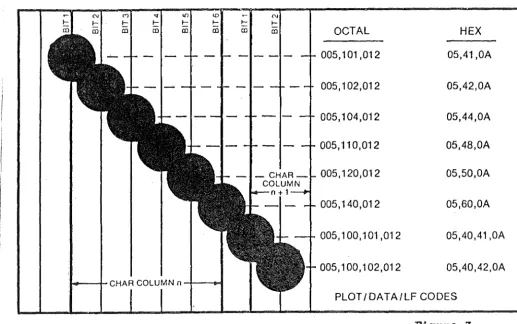
To specify a row of dots the user first sends a byte with octal value 005. This byte is followed by a number of data bytes each representing 6 dot positions. Finally a line feed character is sent to mark the end of the dot row. Of the bytes that specify dot positions the first byte represents the leftmost 6 dot positions, the second byte represents the next 6 dot positions to the right, and so on. Each of these bytes must have the 7th bit set while the low order 6 bits carry information about dot positions. The dot positions from left to right are specified by the low order 6 bits from lowest to highest respectively. A set bit corresponds to a dot and an unset bit corresponds to a vacant dot position.
To move to a new page the form feed character is used. Figure 3 gives an example of a dot pattern and the corresponding
input sequence.
l()
t::
CD
<D
f--(D
---1-CHAR COLUMN n -+--m-ll
N
f--(D
9
-OCTAL HEX
005, 101 ,012 05,41,0A
005, 102,012 05,42,0A
005, 104,012 05,44,0A
005, 110,012 05,48,0A
005, 120,012 05,50,0A
005, 140,012 05,60,0A
005, 100, 101 ,012 05,40,41 ,OA
005, 100, 102,012 05,40,42,0A
[image:11.605.43.561.195.519.2]PLOT/DATA/LF CODES
2.3 The Hershey Fonts
The Hershey fonts[5] [11) are described on the Prime by a
font number
---2 and 3 4 and 5 6 and 7 11 12 13 14 15 16 17 23 24 26 32 33 41 42 43 44 48 51 52 53 60 61 62 63 64 description
Special characters, simplex Special characters, complex
Special characters, small complex Sanserif, cartographic, wide simplex Sanserif, simplex
Serif, complex
Serif, small complex Sanserif, duplex Serif, triplex
Block letters (from L. Johnson) Italic, complex
Italic, small complex Italic, triplex
Script, simplex Script, complex Greek, cartographic Greek, simplex
Greek, complex
Greek, small complex Cyrillic, complex Gothic, German Gothic, English Gothic, Italian OCR type
Helvitica Medium Clarendon Bold Hershey 15
Stephenson Blake
-Note: Small complex differs from complex in that~complex characters are created with smaller strokes and thus they have a smoother appearance when printed.
Appendix A gives a complete pictorial representation of all the Hershey fonts.
3. Decoding TROFF Output
In order to simulate the actions of the phototypesetter it is necessary to be able to decode these actions from the coded output produced by TROFF. As stated earlier the only applicable documents available were the source listing of TROFF and TCAT. In addition to this it was possible to execute TROFF on an input file and look at the output produced (useful for empirical testing).
Inspection of TROFF revealed that is was a very large and complex program. It was possible to isolate a number of routines involved with ptoducing output for the phototypesetter but the code gave no indication of the phototypesetter actions involved. It was however apparent that output was in a bytewise manner with all eight bits containing information.
The TCAT program was a little more useful in that it too must decode the output from TROFF. A problem with the TCAT program was that the code involved with the interpreting of TROFF output and the code concerned with the control of the Tektronix 4014 was so intermixed that not knowing how the Tektronix was operated made distinguishing between the two very difficult. Along with the problem of scarcity of comments (especially those describing the phototypesetter commands corresponding to the data being read) the task of decoding the phototypesetter commands seemed daunting.
Faced with these problems another approach seemed to be in order. An attempt was made to find out directly what the phototypesetter codes meant by getting in contact with the manufacturers or a user of the machine. Investigation revealed that there were no current dealers in Graphic Systems
- 13
phototypesetters in New Zealand and that the closest machine was in Ashburton. A trip to see this phototypesetter and to study its manuals seemed appropiate.
Study of the phototypesetter made the task of decoding TROFF output much easier (and indeed it may have been impossible without the knowledge this study brought). It was obvious that the were only a small number of basic operations that the
i
phototypesetter performed and that these must match one-for-one with the codes produced by TROFF. The basic phototypesetter operations are outlined below.
(i) vertical motion (both up and down),
(ii) horizontal motion (both left and right), (iii) character size changes,
(iv) font changes (selection of one of the four mounted fonts),
(v) upper/lower case changes,
(vi) write a character at current position, (vii) reset.
Unfortunately the phototypesetter studied was controlled by paper tape and hence the codes did not match those produced by TROFF.
At this point it was necessary to decide which programming language was to be used for .any programs written as part of this project. The language chosen was
c
and the reasons for this decision follow. C was a likely choice because all the TROFF software is written inc
and this would make the two related programs compatible. Because of the low-level nature of much of the required processing the need for efficiency suggested that a low-level language such as C or BCPL was required. Major portions of the TCAT program were directly applicable to the decoding program that was to be written and using C as the programming language meant that sections of the code could be used untouched.The logic of the decoding program is far too complex to describe here so appendix B contains a (fully commented) listing of the decoding program along with an example of its operation.
- 15
4. Printronix Output Routines
To enable output to be produced on the Printronix in a convenient manner a number of simple, but efficient, routines were written. The basic operations provided by these routines enable a programmer to draw lines and plot points at will on the output page.
Descriptions of the routines follow. The procedure createmap creates a memory image of the output page. The procedure setplot clears this memory image ready for use. The procedure bitplot plots a point while bitdraw uses bitplot to draw lines. Procedure sen~plot sends the memory image of the output page to a file ready for spooling on the Printronix. There are two macros called XTRANS and YTRANS that convert values expressed in 1/1000 inch to dot values. For these routines the origin is at the top left of the page and all coordinate values are positive.
These routines are designed to be as efficient as possible. As a result of this aim the slowest routine, namely sendplot, had to be made as fast as possible. The reason sendplot is slow is because of the I/0 operations involved. To reduce time spent in this routine the memory image of the output page in kept in a form that means sendplot need only send the bytes contained in the memory image {plus a few extra) to a file to produce correct output for the Printronix.
5. Character Fonts
There are various tasks associated with implementing the character fonts that must be generated and stored by the TROFF simulator program.
5.1 Font Selection
TROFF provides the user with four character fonts which are all mounted on the phototypesetter at once. TROFF has commands which allow the user to switch from one font to the other at will. A description of the fonts is given in [1]. A brief description of each of the fonts follows.
Times Roman
Times Italic
Times Bold
- Normal character font, similar to the font that is used in this document.
Basically consists of ASCII characters plus a few extra.
- Normal Italic font with the same characters as Roman.
- Normal bold font with the same characters as Roman and Italic.
Special Mathematical - Special font containing characters such as Greek alphabet characters, arrow symbols and the mathematical integration symbol.
-It was necessary to select from the Hershey fonts the four
fonts that were most similar to those required by TROFF.
A program was written to produce large copies of the various
Hershey fonts so that details of the fonts could be seen more
easily. From the resultant pictorial representations it was not
difficult to choose the fonts that most closely resembled those
used by TROFF. The fonts are discussed individually in the
following sections.
5.1.1 Times Roman Font
The Hershey font corresponding to this font is font 13
(Serif, complex). A detailed representation appears in appendix
D.
It should be noted that only the outlines of the font
characters are given and that certain areas of the figures must
be filled for the font to be displayed correctly.
5.1.2 Times Italic Font
The Hershey font corresponding to this font is font 23
(Italic, complex). This font appears in appendix E.
As with the Roman font certain areas of the font must be
filled. Also some extra lines need to be added to the font so
5.1.3 Times Bold Font
The Hershey (Clarendon Bold).
font corresponding to this font is font 62 The font appears in appendix F.
Some of the characters (numeral 6, upper case R etc.) have errors in their description and must be corrected. All characters in this font obviously require filling.
5.1.4 Special Mathematical Font
Because this font is not standard it is necessary to build it up from characters from a number of other fonts. The Greek alphabet that is part of the Special Mathematical font is Hershey font 43 (Greek, complex), and is showen in appendix G. As mentioned earlier appendix A shows all Hershey fonts and the Special Mathematical characters required can be identified there.
-5.2 Filling Algorithm
Because almost all the characters of the Hershey fonts that are to be used require areas of them to be filled a special technique to do this must be developed.
No purely automatic technique can be used, such as those described by Theo Pavlidis[7], because there are certain parts of some characters that must not be filled (the hole on the
'O'
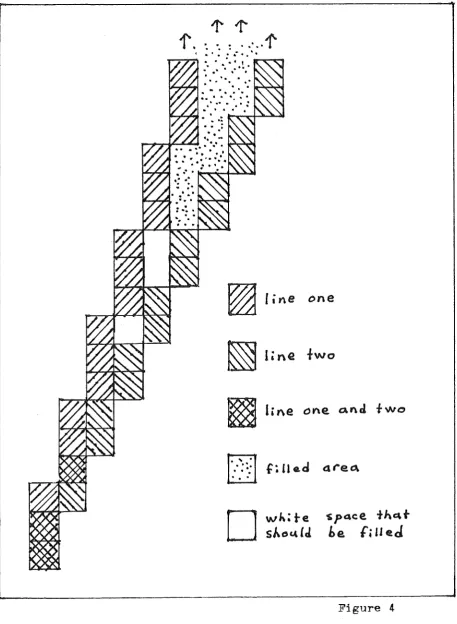
for example). For this reason the areas to be filled must be specified by a human. Probably the easiest way to do this is to add extra information to the Hershey font file specifying areas to be filled.Henry Lieberman[6] gives a description of an algorithm to fill enclosed spaces when given a point in the area to be filled. This algorithm however does not work perfectly because of the way the Hershey fonts are described along with the limited resolution of the Printronix. Figur~ 4 shows the intersection of two lines that could be part of a Hershey character. Note that when the enclosed area is filled some white space is left that should have been filled.
~
line
one
~
!One fwo
~
line
""e
and two....
.,·
::·
f:
u
e.d
a rec,.
...
D
wh;te
'$ J)Q.Ce,thc\t
sJ..oc.4
CJ.
be.
f;HeJ
Figure 4
[image:23.595.81.539.128.753.2]-A procedure and is completely accepts a 2-D
implementing Lieberman's algorithm was.written independent of the item being filled. It coordinate that indicates where to begin filling and uses two procedures ( bitplot and point) that are assumed to already exist. The procedure bitplot is used to plot points and the procedure point indicates if points are set or not. The procedure is called fill and appears in appendix H.
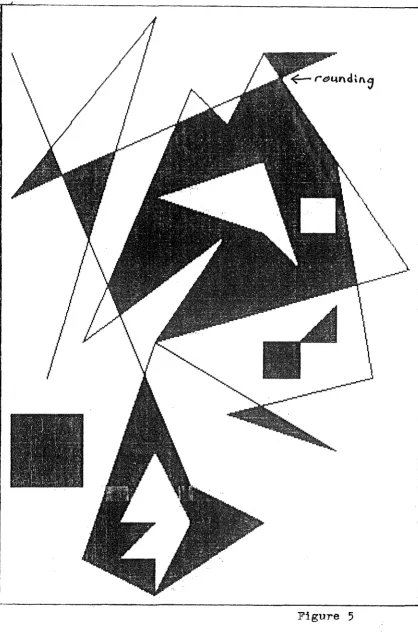
A procedure that implements the extra phase to ensure figures filled with Lieberman's algorithm are filled correctly has also been written. The parameters passed to the procedure describe a region in two-space that must be checked for proper filling. Once again bitplot and point are used. This procedure only needs to be used once on any region of two-space and this should be only when all areas that need to be filled by Lieberman's algorithm have been. This procedure is called tidyup and it too appears in appendix H.
Figure
5-5.3 Font Scaling and Storage
TROFF allows characters to be produced in point sizes of 6, 7, 8, 9, 10, 11, 12, 14, 16, 18, 20, 22, 24 and 36. This is a range of 1/12 inch to 1/2 inch (one point is 1/72 inch and font size is measured by the height of the main body of a character, the height of a capital H for example). Because TROFF only allows page widths up to 7.54 inch and the paper used by the Printronix is almost twice this width it is clear that users of the TROFF/Printronix interface program should be allowed to specify a scaling factor for their output so that the full page width can be utilised (probably only scale factors greater than one).
Roman
(point size
14)
1Jg;;
=
'lABCDEFGHIJf:l,1ilNC}P~)RS'I'T.])'~bL":!:d,i;fghijkl.Iamopcp·stwrwxyzlRoman (point size
7)+,-./r:1:11.2!":l.:LM"i'cll'.a:::=?.ABc:DB!F~Olf>f,;iRS'IU'l'Pf':XY'zlabcdl'!!ffhllj~p~tnV'n.pj
-Rom~n (point size
6)
Italic (point 3ize
11)
Italic
(point
~ize6)
TIJR~
C@([~([~.~IBrrw'i~,,.~~~~,-... ~®iThx!ml~fl'i~l!niLf~1.$Jhrrm.1m~w:grir
Bold (point size 11)
Figure 6
Once
the fonts have been stored an efficient but reasonable
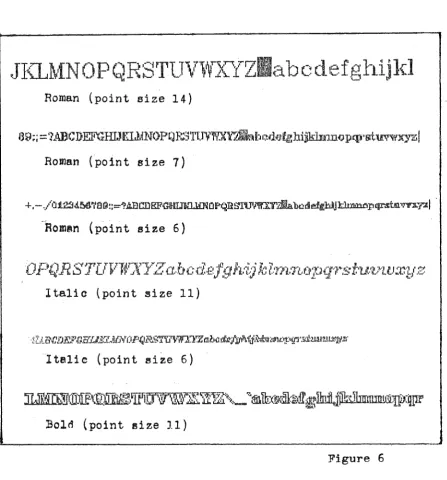
method of scaling them must be chosen. Figure 6 shows a number of
characters scaled using a simple
interpolation
technique.
With
[image:27.595.83.531.149.630.2]-interpolation each pixel in the output is defined by. a fixed mapping from a neighbourhood of pixel values in the input pattern. The interpolation method showen sets the output pixel if any of the input pixels in the corresponding neighbourhood are set. The interpolation-scaled characters of Figure 6 show that the result is reasonable but not as good as it could be.
6. The Phototypesetter-Simulator Postprocessor
Previous sections of this documant have described the TROFF interpreter program, the Printronix plotting procedures, the scaling technique and the character storage technique. The following is a discussion of the way in which these components should be linked together.
Essentially the TROFF interpreter program should be run and instead of producing descriptions of characters to be plotted it should select the appropiate character of the appropiate font, scale it and place the scaled image at the correct place in the memory image of the output. page. When a new page is started the current page should be sent to the output file and the memory image of the page cleared. The only phase left to discuss is how the characters should be buffered so as to reduce disk traffic.
There are various ways of doing this buffering and this is simply a summary of various ideas. When buffering it is possible to buffer a whole font at a time or just individual characters. A whole font will be buffered only if it is assumed that the user will be using the font for a long time (because of the initial overhead cost). This is probably only true for the Roman font as the others are only used for special purposes. It would therefore seem to be best to buffer in terms of single characters and perhaps store the the Roman font permanently.
Another choice that that needs to be made concerns the changing of font size. Should characters be buffered in their scaled form so that when used again they are already scaled or should they be buffered in the same form as in the file so that scaling must always take place? The decision made will depend on whether the user is inclined to change font size often and use
-many sizes for an equal amount of time or whether the user tends to spend most time using a single font size. In my opinion users of TROFF would tend to use one font size and only move to other font sizes for short periods (for headings etc.) and hence characters should be stored in their scaled form.
7. Conclusion
A great deal of the work required to realize the aim of this project has been completed but a significant amount remains to be done. The decoding of TROFF output which was perhaps.the most difficult (and certainly the least straightforward) part is finished and the resultant program is essentially the front-end of the TROFF postprocessor that is the aim of this project. Routines that simulate the basic actions of the phototypesetter on the Printronix need to be written. Many of these routines are trivial (such as horizontal and vertical motion) and parts of the more complex routines (such as printing characters) have already
been written or been described in some detail (for example i
Printronix control routines and scaling by interpolation). f
The major task that remains is the creation of high resolution forms of the character fonts on a direct access file. The way in which the characters are stored must be efficient in
terms of file space and in terms of access time.
The aim of this project was to design and implement a phototypesetter-simulator postprocessor for TROFF that produces output on the Printronix 300 and it is unfortunate that this aim has not been fully realized.
-[10] Using the Plot Mode,
Printronix Application Note No. 102370.
_Appendix A - GIMMS System Fonts
The following pages give the GIMMS fonts equivalent to the Hershey fonts except that font number is the default GIMMS font is not a Hershey font.
- 32
-which are
.
..
t t'
.
< < , , ' '. .
I'
< , I v \ \
-A " n n <
'
~ ~ •.
• •
,..._
>---~ ,,
;
A :
' ' e e
. .
' '>---.
-. -.
I : ' ' e c.
.
' 't
.
( ('
I ',
t
.
( (' I \ \
t
; • < (' ' ' I
t
' ' ; < (' ' ' \
~
t
.
( < I' ' I
t
~ ~' ( <
' I '
,
t
.
< ('
( \ It
( ('
'
' I; ( (
' I ' \
..
..
• ( ( I I ' \i
.
., ., ( ( I g \ \t
( ('
'
' I
-t
..
..
' ( ( I I' \
l l i $ l l. 1 i l l l l
..
-0
I r
-~ ~ 'U\ 0
I r
-~ ~ 'U'I 0
.
-~ ~ 'U'I 0
(>--1 (.-<
t::
,:,x
V' ~
h
"x
V' ~
t::
0x
V' o.'.::,
' 0
x
0
x
( ~ ,:~
t::
(,x
'°"
,;.';); v x < ... ·:~ 0( ... (,:->
h
Jx
, ... ,;r;->
t::
0 xo-• <.-< 0
1 - <-- 0
,
... (.-<t::
ux
(I--· (.-<
t::
(, x( - ( - 0
x
0
x
l l l . l 1 :· .__:!_~ f
. . · -
-.
G(I~ 4J
'<, Ui
= rul
u b0
.
.
.
·I· '>
.
.
·I··I·
>
.
. ·I· ?
-~ ·I·
>
.
·I·>
.
.
·I·.
·I· ?@
.
.
.
.
·I· . ·I·>
.
·I· ?'"
$ l . l. ~ l
- . '
-"' "''
-
..----. ..----. -il 'R '
il '
il '
.,
il ~
il
.
~
R '
il '
-'1i ' il
-il
-:: ~ ' j l li: ( c. (c J
-
--GJ ? ? ,,
*
-
-
-;, ':, ? ? ? ? 'r ? ? ? ? ? 7 ? ? ? ? ') ? ? ~ ory,? 'r1
\?
'}'62 > > , ' \ x
)
~)
·2=> >
>
>
>
>
> >
>
> >
>
) ~ > >f, l .::: --- ~ + - - ---
-
- --
-
A --
-
- --
- - - n..
=
--
--
-
-50 < < " ~
(
~(
~<
<
<
~<
<
< <
< < <
<
'
4 < <59:
.
~ 0 E. E..
.
.
.
r .J
, ) ;
' )
,
,
{ ;'
; ; )' ; > t
'
'
,,"
(:, I58 ~
.
·,,,,----
~ ('. fl.
.
.
.
,, -- ;' ' '
.-~
::JI
9
9 Io)
:_) :_) 9 9 99
9 9 ~ 99
9
9 9 9 9 99
9
9 9 9g
® ® 9 ~56
8
8
I ~ ~u
u
8
8
8
8
8 8 ~8
8 88
8 8 8 88
8 8 88
[j ® Q '8
§55
7
70
v
c
•
c
7
77
7
7 7 ]7
7
7
7
7
7
7
7
77
7
7
7
1 '{/ rj7
754 6
5
0
-- ) 0 ) 6 6 6 6 6 6 ~ D 6 6 66
6 66
6 6 6 6 6 6 D ® - 06
ij53
5· 5
0 (\ ( 0 ' .),-
5
5
5
55
@5
5
5
~s
5
s
5
55
55
5
5i
,'j) rs t'55
fj52 4 4 0 ,-, ( ,)
'
4 44
4
4 4 §,4
4
4
44
4 44
4
4
4
4
4
q
4i ~ 4 45i. 3
~,
':) (- -- ' 'l ' ] j3
3
33
j:3
3
3.3
3
3
3
3
3 3 3 3 3J
~ ~3 5
50
2
2
' ) v v2
2 2 2 2 2 ~ 2 2z
2z
22
2 2 2 2 2 2 @2 ~ ~2
2Ji
i
' I ' I l 1 l 1 1 1 i l 1 1 1 1 1 1 1 1 1 1 l l 0 iiI
i11
].49 " i
0 0 , , I 0 0 0
0
0 0 © 0 0 0 0 0 0 0 0 0 0 0 0 0 [C;j CT @ 0 048
...
-P ' }I J
47 / I
.
y ,,,___--
} 'I
I I I
I I
I
I I
I
I
I
I
I I I
blI
I
I
/
/ /I
I
46 0 I
.
)c, <XCX I
u;
J.
,.I • j
.
'45 -- ~ 0 ,= =f I -- --- ···- --
-
-
~·
- --
-- --
- - - b-
-
-..
--
-
--, t
I
t
-44 ' ' o{ ± ±
I
l ' ' ' '
,
' ,1,
' ' ' i 'SI
• ' ' ,_ ~ !: s'
43 + + t'j:i .1
ii
f
II
~ ) '+
+ +
+
+ +
{,+ + +
+
+
+
+ + +
b
+ + +
+
42
* *
(f, r-' c;-[1
<;'[I'*
*
*
** *
*
*
**
*
*
*
*
*
* E*
*
*
*
I I I
4 j_ J J ) r--1
¢
I ¢ I ) ' ))
)
I) I) I}
)
) 1) ,)
)
))
)
)
bl)
I )
)
]]
1'
)
)40
c
c
( "ve
Ie
I
((
(
(
( !(
( ((
(
(
1(
((
((
~,(
(
(
[«
(
(3] / /
()
<
Ee
E' E I l ' I •,
r I I I I I I J,
,
h,
, I ' ' ,, I'
38 & &
v
--- 1 l l 'l & & & & & & t & & & & & & & & & 5l & & & {§£1
{s, & &-:)' ~
~,
!.
/, Q .___,,ffl
ffl
ffi
!ft
7c
7c
:?c:/..
% :;;;;:7:
% % %:?::
'b Y.'/
z
JG
g;
l'
ffiffi
ffi
ffi
$ $$
$
$
$
0$
$
:ft
$.$
i
$
$$
c
$$ $
~l!;il
$
© $
®
35 ll /:I i_ _)
fl
fl
flfl
#
#
#
#
:!*#
#
#
#
#
#
# # # '
-#
34 " "
l
fifi
fl
fi
11 " " I I ,," ,: II I I I f I I I I II "
,,
I I ,, I I II" ,, r:· r:.- r;
..
\._
-:,-:, I I
II
r ff.ff
ffff
! I I I!
I ! I I I I I I I I I I T'
! - P. ~ ~ I f.,_,., '
>---l
., ' '!S>Cr 0L l li JG
I - I
- ~ ~ ~-~
~ mmi
II
ii
II
I
I I I
a
11 1
1-~11r11~11r~- _
~-
--.•. •.
~
,. ~ ,.
94
--
,.._ ,-...----
-- --
...93] J
]
]
]
]
]
]
]
]
]
]
]
]
]92 \ \
\
"
'
\
\
91 [ [
[
[
[
[
[
[
[
[
[
[
[
[ [90
l
l
t.5
:lEu
z z z z z z
l
z z z
$
2z z
z z
33
z
a ra
~ ~z
z
G9
y
v In
- n
yy
y
y
y
yv
y
y y '(f y 1.).r'+"
~'¥
ym
~ gv
lw
w
y
yx x
v
*
\,f*
x x
x
x
x
x
}(x
x
x
x
:x
·- ·--
-
x x x
x
H
2'.{ ~x
x
GS
-
- ~-- -
-ff7
w
w
'
0
er-
.;" d-w
w w
w
w w
~w
w
w
'vV 'Wc
n n
D
m;.~
w
OJ [kl 1§§ ~w
w
GG
v v
I ~,I,, ([m
([v
v
v
v
v v
v
v
v
v
'(} 1}v v
v
v
B
m
i9v
\'lJlw
.w
v
v
G5
u .. u
/ 0w
.fl-
1JJ .,.u
L'u u
u
tJu
[!u
[!'u
u
''(T
T
TI-0
u
{!!a
[J (Lrym-
u
lIT8-1
r r
. - 0 0 1"!}J0
T
T
T T
T T1
T
T
Ty
'3
T
T
T T T
~m
Dr
1
1fT
TG3
s
c ""'- j; 1-i Q ~ ("" C's
s
s
s
(,:s s s
.b
::I
I
I
~ :Ec
~ § § g] @; l[js
§-J ~ ._) ,d) ,'!)
82
R
F;
\
t
]J. § 1/. RR
R RR R
~ R R R 'DVl·
R
p
p
p p pm
fil B fi ITTIIB R
BGl Q Q
I
D.
cf l:( d' Q0
Q
Q Q Q Ct Q QQ
2 2e
0
e e
ill
n
(@ Q Q Q .<.t1
Q ijG,J p F I ¢
EB
'r::fEB
p
p pp
p
p F p pp
? :Pn n
11
IT
11
5J.)w
.Q
ErI
IP
IP
p
Jr>79
0
0
/ (C <.;? T ~0
00
·o
0
0
~0
a
0
G
c
0
0
0
0 0 fJ ([Bo
o
\rgi
IG..i0
0"?S i~ i~ - {, ~
x
~ NIN IN NN
N
ffN
N N '(:_ KN IN
NN
HIH
IN
Dn
Ir:£ 1£5
N
N
77 M M
""" J:i
G 9
0
M
IM
MM
M
M
~M
MM
<'1"f I v .,,{,{
M
IM
MM
Mmi
~ ill Q !f£ if£lv1
}ill·75 L L
I
4, 3 11 3 LIL
L L LL
L L L L 1.:.t
A
I!\
A A
IIg
ill 0 lll~
i1LL
JL
75 K K
/
A ·r t ~:t
KK
K
K
KK
[ KK
Kx x
K K
K
KK
Jt&
IT C"'ile~
IB
K
IK
7,1 J JI -
'X't
(;j)
·r
j JJ
J jJ
J J J J11
J jl
jJ
J q ~ JJJI~ Ir
t,,_j . ~/1r
• c;J j Jn l i
lg
·r§
'1 § I II
I
II
x
I
I Is
.J I ! II
I
11
~ _] Iu
I [
I TI
I JInlh
\H
R .t nox
00 H HH H
HH
r-,; H H H;{
J{x x
x
x
}f(·.p
ill5
f:-':I
G": ffiH
]8[?1
lc
le
00 I":f
-,..
:f
GG G
G GG
~ G G G .b ~r
r
r
r
r
® (Iie
[;_':;©
' @G
G~
r:- (\,..)*
J
If
/, F F F F F Fr
FF
F :f ::} cp cp <p tP CDff
] ie
[f IFw
F1F
I
r r
"'
-v
\
,J
-,;
E E
E IE
E E
It:
EE
E [:&
E E
E
E
11
~ft:
8. CT'. ITT ~E
Jill- L .) , ,
f,8
0
[; 'v,,.
v
-~
v
D0
D
ID
DD
['.] DD D ..B
j} D. !:::. 11 Ll ~ ;a:m
0 [Ci j.[Q; ill)D
D57
c
c
< ~a
ba
c
c
c c
c
c
re
c
c
c c
'@ H H H H 30:
(!J 0 IT:; © ©c
c
56
B
8
' 4 !q
J.B B B B
BB Di
B B BJJ
IJ.J
BB B B B
m
™
flG
IB
ills·
Bl•27
i
~
:-+--
E_i~+-f--++t
D D D <-
liz~t---
---
~-"'-' -.., "' "'-' ,.._, ,.., ...., ....,
-
.,.
-i25 J
)--r
- Ifll
l!
I
--
l
I
l
~
l
J Jl l
. ]'124 \ I
I
I I I
I I
I I
I
I I I I
u I'-
\
I ':
---i23 [ (
~
~
!
~
t
t
~
~
t
t
I
[ ' i122
z
lz
z
z
z
z
z
z
z
;, !1'?
(r
3 3z
J ca ~ §z
z;'
121 y y y y
y
y
y
y
y
y
c.p 'f' 1j;'1f
·,J;
y
tJ
yy
~ YIw
y
y :I
i20
x
xx
xx x x
x
x x x, 1,t
~t
x
!x
x
[.,i 11 ~x
JI. 'i 19 vJ w w w w
w
ww
WjW (.jJ- <»- u) CJ wm.
ro
w w a!il 'i!l{J ww
w I118
v
vv
v
v
vv
v
v
v
v- u-¢
¢
r/J
B l:) u v ll.Ew w
vv
117
u·
uu
u
u
u uu
u 'U U, U,v
vv
IO u u u a.l M m u 1ili.116 T t
t
t
t t tt
t
t
i
l
T T "T T tt
t t tk ~t
ti 15
s
s
s
s
s
s
s
s
s
s
,:., ~ (Ja
ac
f
.s
5 fjj &3 S'js
a114
R
r r rr
r r rr
r
,,
?'- p pp
p
r r r fi Ii' lJ' r Jl'i 13 Q q q
q
q
qq
Iq
q
q
g,, g,e e e
Ill q lJ q 5:j @] (ijq
qi112
p
Ip p pp
p p p p p P' fi, Ti 7T 7T TIp
p p ~ [,Q)w
p
Ji) i
--i 1 1 0 0 0 0 0 0 0 0 0 0 0- 0- 0 0 0 0 0 0 0 El @ (ID 0 0
i 10 N n n n
n
n nn
n
n
n, n,I
v
v
v
H n lt n ITT [ii) l]]. n l!D.i09 M m m m
n1
m Ill.m
1TL rn 7Tl, 711, µ µµ
M m mm
r;!;l [Jill) mlm
mi08
L
l I,~
I 1 lI
l
ll
le t
AA
A nr
l Iu
u 11I
].i
i07 K k
-a:
kk
k kk
k
k
k k, k, K IC IC K f k k ~ I;! fuk
k_:i06
J
J?ij)
J j j I JJ
j
J
j, j E E E. q j ji
h
] Jji
Ji105
I
I '1 I 1 i I i t ii
..
"
l l l, l1 \ t l G fi fti
i iiQ<l H h
/.
hh
h
hh
h
h
h
h Ii,x
x
x
)1'6
Ir
~ rn rm fuh
hi03 G g
-
g g (J gg
gg
g
9' g,
y
y
)' r g g g ~ ® f!I:g
g0 :
iOZ F f f f f f f
f
f
f
t t
r.p cp c.pcp
f
f fi
~ iff
jfiOl
E
G ee
e
ee
e
ee
(!, e, [.. [.. £ I1 ce
r t.! ® @e
e
iOO
0
d-
dd
d 1d
dd
d
d d., d c56
0
..o; b b ll d - @ @1 d iill.99
c
c b c cc
cc
c c c C, c, 77 ·77 . 1J 3 c t" r ~ @ @c
c
98 B b
q
b bb
bb
bb
b
i,.. /... {3 f3/3
6 f, h b [\'l @) Th:Jb
b97
A
0tt
aa :a
a
aa
a a a, a, ex (Xa:
a
a
a
u ~ ~ 0, a Bl,95 © I ,
_J
! iI I
' ~
..
" \
RLPHSS~1-> ~SSL 2 3 4 5 6 7 t 1 12 13 14 i5 16 i7 23 /-'! ~~
Appendix B - Decoding Program
This appendix contains an examole of the operation of the program that decodes output from •r:ROFF as well as a listinq of the program.
Example
The following data was input to TROFF and the subsequent output was saved in a file for later input to the decoding program. Line numbers are.given and all lines of data start in column one •
1 • ps 13
2 .ft R
3 a\fIB\fB c\fR
4 .ps 36
5 .sp 2i
6
\(14
+
\(12 = \(347 >\h'li'\(*S
=
\(*a\(*bThe input data has the following meaning:
Line 1 - Change character size to 13 points (this will-be rounded up bv TROFF).
Line 2 - Change to Roman font. Line 3 - Print 'a',
change to Italic font, print 'B',
change to Bold font, print' c',
change to Roman font.
Line 4 - Change to 'point size' 36,
Line 5 - Move down 2 inches.
Line 6 - Print '1/4 + 1/2 = 3/4'. Line 7 - Print'>',
move 1 inch to the right,
Print '<Sigma>= <alpha><beta>'.
The output produced bv the decoding program follows. Note that coordinates given are in terms of 1/2 points (one point is 1/72 inch) where the origin is the too left corner of the page.
OK, seg decode test/* test contains TROFF output New Paqe
Character output Font .is Roman Point size is 14
Position is (527, 24) Character is 'a'. Character output
Font is Italic Point size is 14
Position is (567, 24) Character is
'B'.
Character output Font: is Bold Point size is 14
Position is (651, 24) Character is 'c'. Character output
Font is Roman Point size is 36
Position is (527, 336) Character is '1/4'. Character output
Font is Roman Point size is 36
Position is (773, 336) Character is
'+'.
Character outputFont is Roman Point size is 36
Position is (1061, 336) Character is '1/2'. Character output
Font is Roman Point size is 36
Position is (1307, 336) Character is '='.
Character output Font is Roman
-Point size is 36
Position is _(1595, 336) Character is '3/4'. Character output
Font is Spc. Math. Point size is 36
Position is (1841, 336) Character is
'>'.
Character output
Font is Spc. Math. Point size is 36
Position is (2489, 336) Character is 'Sigma'. Character output
Font is Roman Point size is 36
Position is (2711, 336) Character is
'='.
Character output
Fent is Spc. Math. Point size is 36
Position is (2999, 336) Character is 'alpha'. Character output
Font is Spc. Math. Point size is 36
Position is (3143, 336) Character is 'beta' New Page
Listing
#include <stdio.h>
/*
TROFF output interpreter
*/
#define DBL 0200
psize 10; /* point size */
esc1 /* short horizontal escd:
verd; esct; osize 021 size 021
/* /*
/*
x coordinate
*/
move uo/down */ move left/riqht
motion
*/
leadtot -317 /* v coordinate*/ railmag7
/*
current font*/*/ int int int int int int int int int int int int
lead7 . /* distance between lines*/
int
mcase; /*upper/lowercase*/ stab [ l { 0 l O, O, O 1, 0 7, O 2, O 3, 'O 4 , O 5, O 211,
06,0212,0213,0214,0215,0216,0217}1 /* phototypesetter commands*/ rtab(l{6, 7, 8, 9, 10, 11, 12, 14{ 16,
18, 20, 22, 24, 28, 36, l8j7
/* corresponding point sizes*/ int alpha7
extern char *asctab[l28l; /* Roman, Italic and Bold*/ extern char *spectab[l2811
/*
Special Mathematical*/ FILE *fp7 /* input file (TROFF output) */extern short bin$read1 main(argc,argv)
int argc7 char **argv·
{ I
register i, j7
register char *k1 if(--argc){
if( (fp=fopen( (++arqv) [01, "r") )==NULL) {
printf("Cannot open: %s\n",argvf01) 1
exit(l)1
}
}
bin$read = 17
while ( (i = getc (fp)) >= 0) { if(!i)continue; if (i & 0200) {
}
if (esc) {
'eSC =+ (-i)
continue;
& 01777
if(escd)esc = -esc;
-esct =+ esc; sendpt();
esc
=
O;}
switch ( i) {
}
case 0100~ /*init*/
case case case case case case case case case case case case case case case
escd
=
verd =
mcase
=
railmag =
O;
leadtot
=
-31;sendPt();
printf("New Page\n"); continue;
0101: /*lower rail*/
railmaq =& "'01;
continue;
0102: /*upper rail*/
railmag
=I
01;continue;
0103: /*upper mag*/
railmag
=
I
02; ·continue;
0104: /*lower mag*/
railmag =& "'02;
continue;
0105: /*lower case*/
mcase
=
O;
continue;
0106: /*upper case*/
mcase
=
0100;continue;
0107: /*escape forward*/
escd =
O;
continue;
0110: /*escape backward*/
escd
=
l;continue;
0111: /*stop*/ continue;
0112: /*lead forward*/
verd
=
O;
continue;
0113: /*undefined*/ continue;
0114: /*lead backward*/
verd
=
l;continue;
0115: /*undefined*/
0116:
0117:
}
exit(O);
}
sendpt () {
if((i & 0340) == 0140) { /*leadinq*/
lead
=
(-i) & 0371if(verd)lead = -leadp
leadtot =+ lead1
sendpt () 1
continue,
}
if ( ( i & 0360)
==
0120) { /*size change*/i
=&
017;for(j
=
O;i != (stab[jl & 017);
j++) 1
osize = size;
size
=
stab[jl 1psize = rtab[jl;
i.= 01
if ( ! (osize & DBL) && (size & DBL))
i
=
-55;}
else if((osize & DBL) &&
! (size & DBL)) i
=
55;if(escd)i = -i1
esc =+ i; continue;
if(i & 0300)continue1
i
=
(i & 077)I
mcase;if(railmaq != 03)k
=
asctab[il 1else k
=
spectab[il 1if(alpha)sendpt()1
printf("Character output\n")r
printf(" Font is ")1
switch(railrnag){
case 0: printf("Rornan")1 case 1: printf("Italic")p
case 2: printf("Bold") 1
case 3: printf("Spc. Math.")1
}
pr in tf ( "\n") ;
break; break; brealq break1
printf(" Point size is ld\n", psize)p
printf(" Position is (Id, %d)\n",
esct,
leadtot) 1
printf(" Character is '%s'.\n", k)1
alpha++; continuer
/* a hangover from TCAT */
alpha= 01
![Figure 2 TBL[4] is another TROFF preprocessor. TBL allows the user to](https://thumb-us.123doks.com/thumbv2/123dok_us/9990828.499323/6.598.103.490.275.526/figure-tbl-troff-preprocessor-tbl-allows-user.webp)