© 2018 IJSRST | Volume 4 | Issue6 |Print ISSN: 2395-6011 | Online ISSN: 2395-602X National Conference on Smart Computation and Technology in Conjunction with The Smart City Convergence 2018
Virtual Keyboard
Rupali Pandey*, Amit Kumar JhaDepartment of Information Technology, Poornima College Of Engineering, Jaipur, Rajasthan, India
ABSTRACT
Nowadays People uses Standard computing devices like Desktop Computers and Laptops to cut back their everyday work, in addition more advanced gadgets like mobiles and PCs. To enhance the mobility and quality individual wants to cut back the dimensions of the devices. Thus most of the mobile devices and hand-held devices contain really small keypads. Individuals who use such a tool find it tough to see the letters on the keypads. With a mobile device, a full size physical keyboard is not compatible. However all of traditional keyboard deficit the accuracy and convenience of a full size keyboard [1].
This paper confers an innovative approach for virtual keyboard to hammer the above mentioned issues, which might be a feasible replacement for fold-up keyboards. The keyboard primarily based on the vision based human-computer interaction concept, image capturing and image processing technique that contains virtual keys adequate to the dimensions of traditional keys within the normal QWERTY keyboard. The final result of the virtual keyboard project was a economical, user friendly and movable virtual keyboard, that sends typed characters to any laptop. This virtual keyboard provides the short touch-typing feedback to the uses[1].
Keywords: Virtual Keyboard, The sensor Module, The IR Light Source, The pattern projector, image processing, camera
I.
INTRODUCTION
Machine writing was invented for mechanical typewriters which had the current QWERTY key layout since 1874.This QWERTY interface survived because of its many positive outlooks. QWERTY is widely used keyboard layout on English-language computer and typewriter keyboards. It takes its name from the first six characters present in the far left of the keyboard's top first row of letters.
However, this is not achievable for text entry in smaller computing devices such as PDA’s and mobile devices and input to the small devices is becoming an increasingly important factor in
development for even more powerful embedded market. Touch typing is an initial method that deploys discrete sensors, or sensed area, or buttons for one or a set of atomic symbols (characters, digits, letters) of a natural language. E.g. common keyboard, the keypad of a mobile phone, on-screen keyboards on PDAs. This definition explicitly consist virtual keypad buttons that only differ from the surrounding physique in that their extent is sensed by some ways for touch by a finger or pointer[2].
programmed to act as one. Therefore, sensing area can be realized with image sensors, finger tracing methods, or a touch pad. The latter is different from a keypad as it does not have a prior designated area for buttons.
Virtual keyboards that employ different sensing areas for each symbol inherently pass the realization of soft keyboard. The basic idea behind creating virtual keyboard is it is confined in space , well designed, handy and really easy to operate too, which results in the perfect solution for cross multilingual text input.
II.
SYSTEM ARCHITECTURE
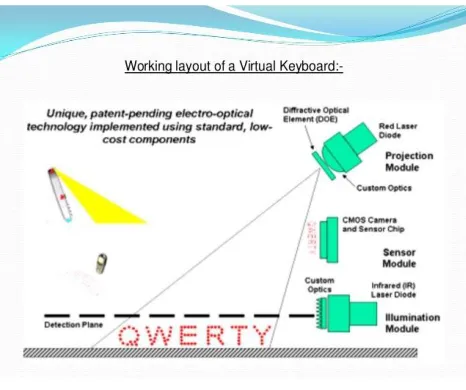
The 3-D range camera is placed several cm over the input surface, with a well-defined angle facing the working place. The suggested system consists of three main hardware modules. The sensor module is mounted on the camera, facing the same area, which would generate the observable feedback for the keyboard and input info [3].
A. Sensor module:-
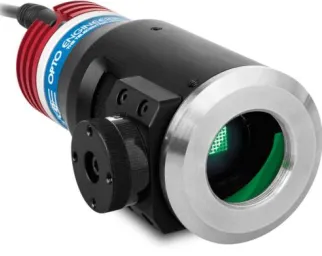
The sensor module serves as an eye of keyboard perception technology. The sensor module operates but locating users fingers in 3-D space and tracking the deliberated key strokes. Key stroke information is processed and can then be output to host device via a Bluetooth or USB[3].
Figure 1. Sensor Module
B. IR Source (illumination module):-
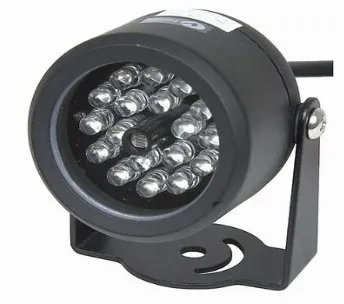
The IR light source emits a beam of infrared light. This IR light beam is designed to overlie the area on which the keyboard pattern projector is mounted. This is done so as emblaze the users fingers by infra-red light beam. This helps to identifying the hand movements and pressing of keys. The light beam ease in scanning the image. Accordingly information is passed on sensor module which decodes that information[3].
C. Pattern projector
It presents the image of keyboard. This forecasted image is of standard QWERTY keyboard, with all the keys and control functions as in the keyboard. The projector features a wide-angle lens so that large pattern can be calculated from relatively low heights. In some type of virtual keyboard, a second infra-red beam is not compulsory. A sensor or camera in projector takes up finger movements, and passes the information on sensor modules[3].
Figure 3. Pattern Projector
III.
WORKING OF VIRTUAL KEYBOARD
A. Template projection
A template produced by a highly designed and highly efficient projection element with a red diode laser is projected onto the nearby interface surface. The template is not however intricate in the detection process and it is only used as a reference for the user. In an environment, the template can just as easily be printed onto the surface [4]. It shows projection of template (keyboard).Various types of projection elements are obtainable in market.
B. Reference plane illuminations
An IR plane of light is generated on the interface surface. The plane is however located just above and parallel to the surface. The light can’t be visible to the user and hovers a few mm above the surface. When a key position is forced on the surface, the light is reflected back from the IR plane in the surrounding of the key and directed towards the sensor module.
C. Map reflection coordinates
The reflected light user correlation with the interface surface is directed through an infra-red filter and imaged on to an image sensor in the sensor module. The sensor chip is made up of a custom hardware which is embedded such as the VIP (Virtual Interface Processing) Core and it is capable of generating a real time determination of the location from where the light was reflected.
Figure 4. Virtual Keyboard
D. Image Processing with MATLAB
surroundings to explore design ideas and create distinctive solutions for imaging systems.
MATLAB toolbox used in this project is as follows :- 1. Image acquisition Toolbox.
2. Image processing toolbox 3. GUI builds.
Figure 5. Working Layout
IV.
ALGORITHM
1. ycbcr2rgb - to change ycbcr image to rgb. 2. Color based thresholding.
3. Find the logarithmic values of color.
4. Blob detection algorithm - to detect rgb color blob (stickers)[7].
5. Divide keyboard image into a sector. 6. Positioning the stickers with sectors. 7. Find the word of sector.
8. Show the output on command window.
V.
ADVANTAGES
1.Highly Portability, accuracy, flexibility.
2. Speed of text entry.
3. Noise less than conventional keyboards.
4. The typing does not require a lot of force. So
easing the strain on wrists and digits.
5. They are also made to be water proof and hence less prone to damage when spills occur
6. Maintenance of the laser keyboards is much
easier.
VI.
DISADVANTAGES
1. Tactile feel is not possible.
2. Dirty screens.
3. Virtual keyboards are hard to get used to. Since it combines of typing in thin air, hence it requires a little practice. Only people who are good at typing can use it efficiently [5].
4. It is very costly ranging from 150-200 dollars.
VII. FUTURE ASPECTS
1. Laser keyboards can be embedded into ATM’s. 2. Laser keyboards can be used into space craft’s as
they are very lighter and smaller.
3. It can be embedded into digital lockers into banks, hostels for entering passwords and digital door lockers based on passwords.
VIII. CONCLUSION
1. A virtual keyboard system based on a true-3d optical range camera is presented.
2. No training is required by the system that automatically adapts itself to the background conditions when turned on.
4. It is also used in 6th sense technology device in
which it is not depends on surface.
IX. REFERENCES
[1] M. Kolsch and M. Turk “Keyboards without keyboards: a survey of virtual keyboards” 2016. [2] R. Rosenberg, “computing with mice and keyboards: text and graphic input devices for mobile computing,” PhD Thesis, Dept. of Computer Science, University college London, 2015.
[3] “VIRTUAL LASER KEYBOARD” Vidyut Agarwal, Shivam Mishra, Manoj Nehriya, Rupali Satpute, 23rd March 2016.
[4] A Virtual Keyboard System based on Multi-Level Feature Matching Huan Du and Edoardo Charbon , Member IEEE, 2014.
[5] Reconfigurable Virtual Keyboard Mrunmai Kanade, Priyanka Kharat, Ashwini Raundale, 2012 [6] M. Goldstein, and D. Chincholle. “Finger-joint gesture wearable keypad” second workshop on human computer interaction with mobile devices, 2010.
[7] Z. Zang, Y. Wu, Y. Shan, and S. Shafer, “Visual panel: virtual mouse, keyboard and 3d controller with an ordinary piece of paper,” ACM workshop on perceptive user interfaces, Nov. 2009.
[8] V. R. Pratt, “thumb code: a device-independent digital sign language,”