AN ARCHITECTURE FOR
INTEGRATING MULTIPLE
REAL TIME DATA FEEDS
Neil Roodyn
A thesis submitted for the degree of
Doctor of Philosophy
University o f London
Department o f Computer Science
University College London
ProQ uest Number: U641916
All rights reserved
INFORMATION TO ALL U SE R S
The quality of this reproduction is d ep en d en t upon the quality of the copy subm itted.
In the unlikely even t that the author did not sen d a com plete manuscript
and there are m issing p a g e s, th e se will be noted. Also, if material had to be rem oved,
a note will indicate the deletion.
uest.
ProQ uest U641916
Published by ProQ uest LLC(2015). Copyright of the Dissertation is held by the Author.
All rights reserved.
This work is protected against unauthorized copying under Title 17, United S ta tes C ode.
Microform Edition © ProQ uest LLC.
ProQ uest LLC
789 East E isenhow er Parkway
P.O. Box 1346
Abstract
This thesis investigates ‘industry strength’ solutions for integrating multiple real time data feeds. It addresses one of the major problems challenging computing namely ‘information overload’. The thesis focuses on those problems faced by a user of multiple data sources, either real time data feeds or databases. The thesis’ goal is a system architecture providing a generic interface which allows die coimection of one or more data sources to a unified collection point. On entering the system the data is screened and filtered for information which is pertinent to the end user. This data is then available for other programs that use the data, through a standard interface.
The thesis comprises four parts: a critique of existing commercial real time products, and then the invaition of three experimental real time systems, constituting the core of this research. These systems have been created in collaboration with industry, providing unique end user feed back, and also ensuring a degree of compliance with industry standards. The three experimental systems comprise: (i) a 16 bit real time system for providing private investors with financial information; (ii) a 32-bit system for tracking buses in real time; (iii) a 32 bit ‘generic’ real time system which caters for multiple feeds. The three systems have all been designed and implemented by the author, and the systans are now being tested in a commercial environment.
The critique examines several commercial real time systems and analyses their key features relating to information overload. It studies the fimdamental aspects of real time data processing with specific reference to the industry standard Microsoft Windows in the PC aivironment.
The second part describes tiie design and implementation of a 16-bit real time system for providing end users with stock exchange data fit>m one or more data sources. To provide experimental data on the use of the system it was built in collaboration with Updata Software. It utilises 16 bit DLLs for multiple process information sharing and providing data in a soft’ real time manner.
The third part describes the design and implementation of a 32-bit real time system. This system provides feedback on vehicle positions and with the aid of Hançshire County Council is being tested for passenger information systems on buses. It utilises shared global memory blocks to share information between processes.
The final part presents the new generic’ system architecture, whose design draws on experience gamed from the previous two systems and ftie feedback, provided firom users. Lessons learnt fi'om previous systems include the need for integration of filtering into the system and providing an open interface to ease data input frcmi new data feeds. This system also addresses the need for compliance with industry standards. It makes strong use of object architectures and, being WOSA compliant, provides COM interfaces to satisfy the need to share information and provide an open interface. The two chapters covering this work contain the design of the system and the strategy employed to implement the design, and then test the system.
TABLE OF CONTENTS
C H A P T E R 1.IN T R O D U C T IO N ... 8
1.1. AN Ar c h it e c t u r ef o r Mu l t ip l e Re a l Tim e Da t a Fe e d s... 8
1.2. In f o r m a t io n Ov e r l o a d... 8
1.3. Re a l Tim e Sy s t e m s...10
1.4. Re a l Wo r l d Ap p l ic a t io n s... 11
1.5. Re s e a r c h Mo t iv a t io n s... 13
1.6. Th e sis Or g a n is a t io n... 14
1.7. Re s e a r c h Co n t r ib u t io n s...16
C H A P T E R 2. R E A L T IM E P R O C E S S IN G O F D A T A F E E D S ...18
2.1. INTRODUCTION... 18
2.2. Ex is t in gs y s t e m s...18
2.3. Re a l Tim e Da t a Pr o c e s s in gu n d e r Win d o w s... 24
2.4. In d u s t r ia l St r e n g t h So f t w a r e En g in e e r in g...35
C H A P T E R 3 R E A L T IM E S Y S T E M F O R P R IV A T E I N V E S T M E N T ... 38
3.1. In t r o d u c t io n...38
3.2. Sy s t e m Re q u ir e m e n t s...38
3.3. Ov e r v ie wo f Th e Sy s t e m De s ig n... 42
3.4. De t a il e d De s i g n... 45
3.5. Ov e r v ie w Of Th e Sy s t e m Im p l e m e n t a t io n... 49
3.6. De t a il e d Im p l e m e n t a t io n... 50
3.7. Th e Ev e n t s...53
3.8. Th e Pr o b l e m Do m a in Co m p o n e n t...55
3.9. Th e Ta s k Ma n a g e m e n t Co m p o n e n t... 55
3.10. Da t a Ma n a g e m e n t Co m p o n e n t... 55
3.11. En d Us e r Fe e d b a c k...56
3.12. Co n c l u s io n... 56
C H A P T E R 4. R E A L T IM E S Y S T E M F O R T R A C K I N G V E H I C L E S ...57
4.1. In t r o d u c t io n...57
4.2. Sy stem Re q u ir e m e n t s... 57
4.3. Ov e r v ie wo fi h e Sy s t e m De s ig n...58
4.4. De t a il e d Sy s t e m De s i g n... 60
4.5. Ov e r v ie w Of Th e Sy s t e m Im p l e m e n t a t io n... 63
4.6. De t a il e d IMPLEMENTATION... 63
4.7. Th e Ev e n t s...68
4.8. Th e Pr o b l e m Do m a inc o m p o n e n t...68
4.9. Da t a Ma n a g e m e n t Co m p o n e n t...68
4.10. En d Us e rf e e d b a c k... 68
4.11. Co n c l u s io n...69
C H A P T E R 5. G E N E R I C R T D SYSTTEM F O R M U L T I P L E D A T A F E E D S 70 5.1. In t r o d u c t io n...70
5.2. Sy s t e m En g in e e r in g... 7 0 5.3. ANALYSIS...71
5.4. To p Le v e l De s ig n... 72
5.5. Su m m a r y... 87
C H A P T E R 6
.
G E N E R I C R T D S Y S T E M I M P L E M E N T A T I O N ... 886.1. In t r o d u c t io n...88
6.2. La n g u a g e Ch o ic e An d St y l e...88
6.3. Th e Ob je c t s... 89
6.4. Th e Re l a t io n s h ip s... 91
6.6. Da t a Ma n a g e m e n t... 96
6.7. Te s t in gm e t h o d o l o g ie s... 97
6.8. CONCLUSION... 103
CHAPTER 7. A SSESSM EN T... 105
7.1. In t r o d u c t io n... 105
7.2. Pr iv a t e In v e s t m e n t Sy s t e m...105
7.3. Ve h ic l e Tr a c k in g Sy s t e m...107
7.4. R TD Sy s t e m...108
7.5. Less o n s Le a r n t... 110
7.6. Su m m a r y... 110
CHAPTER 8. CONCLUSIONS AND FUTURE W O R K ... 112
8.1. In t r o d u c t io n... 112
8.2. Co n c l u s io n s...112
8.3. Fu r t h e r Wo r k... 117
8.4. Su m m a r y... 119
APPENDICES
1. The Live Data DLL API 122
2. Price File DLL API 125
3. The Tempdata Objects 129
4. The Pricefile Objects 132
5. Generic System Interfaces 135
6. Developers Rules 138
7. Class Listing For Generic System 145
LIST OF FIGURES
Figure 1-1 Screen Shots From Reuters Trading Terminal... 9
Figure 1-2 Comparison of multiple systems to single sytem...10
Figure 1-3 Each data supplier provides a proprietary system to view the data... 12
Figure 2-1 Screen shot of Reuters Trader's Workstation... 20
Figure 2-2 Screen shot of Reuters Graphics...20
Figure 2-3 Screen shot of Bloomberg system...21
Figure 2-4 Screen shot of Bloomberg charts screen...22
Figure 2-5 Screen shot of Bloomberg chart full screen... 23
Figure 2-6 Screen shot of Fair Shares Professional... 24
Figure 2-7 Priority Spectrum For Windows NT[11]...32
Figure 2-8 Priority Inversion... 34
Figure 2-9 The Water Fall M odel... 36
Figure 3-1 Modular based product range... 43
Figure 3-2 General Data Flow Model for Modularity...44
Figure 3-3 More Detailed Data Flow Design...45
Figure 3-4 Objects for the live data DLL... 46
Figure 3-5 Objects for Historical Data DLL... 48
Figure 3-6 Cardinality of Data Relationships in Live Data DLL... 51
Figure 3-7 Class Relationships in Live Data DLL... 52
Figure 3-8 Cardinahty o f Data Relationships in the Pricefile DLL... 52
Figure 3-9 Class Relationships in the Pricefile DLL... 53
Figure 4-1 Overview o f initial system design... 58
Figure 4-2 Overview o f Data Flow in Server Software System...59
Figure 5-1 How the system will act to control data flow...71
Figure 5-2 Initial Design Ideas... 72
Figure 5-3 Database Tables and Relationships...73
Figure 5-4 Object Relationships for R T D ... 78
Figure 5-5 Object Relationships after adding new values list...79
Figure 5-6 Method for offline storage o f live data... 80
Figure 5-7 Structure Storage 'Price Files'...83
Figure 5-8 Using structured storage files for system folders...83
Figure 5-9 Using a single structure storage file for all historical data... 84
Figure 5-10 Custom Folder files... 85
Figure 5-11 Extract o f Visual Basic code to input data...87
Figure 6-1 Object Model for Data Input...92
Figure 6-2 Object Model for Filtra- Component...93
Figure 6-3 Class Relationships in RTD...94
Figure 6-4 Object Model for Output Component...94
Figure 6-5 Flow Chart for White Box testing... 100
Figure 6-6 Flow Graph For White Box Testing... 101
LIST OF TABLES
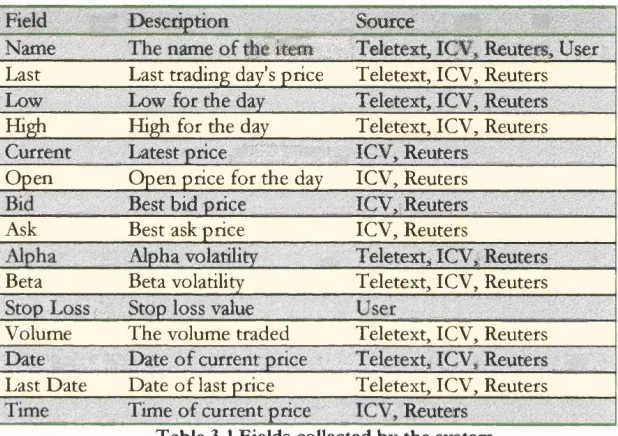
Table 3-1 Fields collected by the system...40
Table 3-2 Data required by external applications... 41
Table 3-3 Fields Required for Live Data Object... 47
Table 3-4 Fields Required for Tick data Object...47
Table 3-5 Price file entries... 48
ACKNOWLEDGMENTS
The author wishes to thank Professor Philip Treleaven for his advise and
guidance on this work, and Professor Anthony Finkelstien for his comments
on the first draft of this thesis.
I also would like to thank the people from industry who aided in this work.
Amongst them are; Graeme Ellisson for his help at Updata Software, Joe
Field and Jeff Hayes for their input to the Bus Tracking system, and the
C
h a p t e r
1
IN TR O D U C TIO N
This chapter presents an introduction to real tim e system s, the issues surrounding information overload and how real world applications currently cop e It also contains the aims, contributions and organisation o f this thesis. T h e major contribution o f this thesis is to present a software architecture that integrates multiple real time data feeds.
1.1. An Architecture for Multiple Real Time Data Feeds
With the growing amount of information available to end users on personal
computers there is an increasing need to integrate this data. Much of this data
is available in the form of a stream of data, known as a data feed. This thesis
presents three experimental architectures for integrating multiple real time
data feeds. Each architecture builds upon its predecessor in order to obtain a
more generic architecture. These architectures address the issue of
‘information overload’, which is one of the major problems challenging
computing today. The thesis focuses on solving the problems faced by a user
of multiple data sources, either real time data feeds or databases. The thesis’
goal is to create an architecture that provides a generic interface allowing the
connection of one or more data sources to a singje collection point. This
architecture will allow the data to be filtered for information that is relevant to
the end user. This data is then made available for other programs to use
through a standard interface. It is this architecture that integrates multiple real
time data feeds that is the main contribution of this thesis to solving the
problem of information overload.
1.2. Information Overload
Jan Wyllie, an industry pundit, recently made the following comment in a
paper entitled ‘Turning information overload into useful knowledge
‘Information is a resource which - unlike physical resources - is not scarce. People are overwhelmed ^ the sheer volume - huge and ever growing numbers o f newspapers, teleidsion programs, learned journals and conmrsations. The World Wide Web and email simply make a desperate situation worse. '
It highlights the ever growing problem o f inform ation overload; there is too much inform ation for the user to cope with. Nowhere is this m ore apparent than in the domain o f financial inform ation systems, where along with thousands o f stock prices updated every second, a vast quantity o f news and financial reports are available, an example o f this can be seen in figure 1-1.
G. Miller states that the human mind can only simultaneously cope with seven (plus or minus two) chunks o f inform ation [49]. It seems unlikely that humans will be able to absorb m ore inform ation so the problem may be alleviated by simply reducing the am ount o f data with which users have to handle [16].
3
IF
F igu re 1-1 Screen S hots From R euters T ra d in g T erm inal
This approach is ideally suited to be carried out by a com puter system, rather than the end user, d he com puter can sift through vast quantities o f data in order to retrieve, o r filter out, that which is useful inform ation for the end user. This solution also fits in with current industry thinking on providing a single interface for multiple tasks; one o f the reasons M icrosoft’s Windows has been so successful.
not a generic system available that allows new filters to be singly added to an
existing system without being concerned about the information domain.
One area, in which much work has been carried out to lessen the impact of
information overload, is that of stock market surveillance systems. The
quantity o f information, provided by a stock market, can be too excessive to
monitor without the aid of filtering tools. Many o f the tools available
concentrate on filtering the data from a single proprietary feed.
It was this problem o f information overload which inspired the ideas for this
thesis, to provide a single collection point for all data on the desktop, so that
the data may then be filtered for information which the user actually wanted
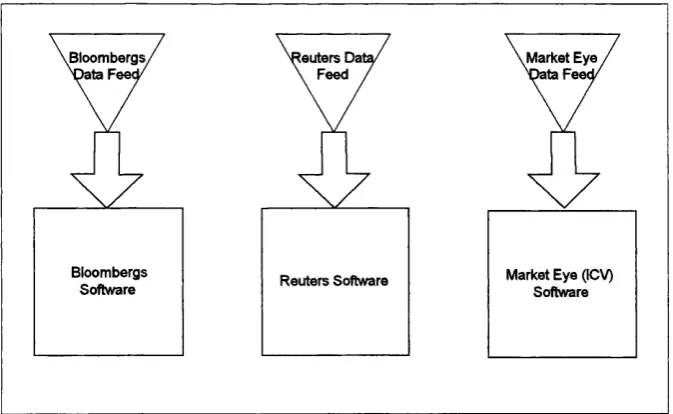
to see. Figure 1-2 illustrates the concept of providing a unified collection
point as shown in B, where the generic system software provides the task of
collating the data, rather than the data user.
Data User
Specific System Specific System
Data Feed Database
Data User
Generic System
Data Feed Database
A. M ultiple Systems, one fo r each data source. B. Single G eneric System, collects and filters from m ultiple data sources. Figure 1-2 Comparison o f multiple systems to single sytem
1.3, Real Tim e Systems
This thesis addresses the issue of information overload with real time systems.
In general ‘systems’ can be broken down into three main groups:[1]
1. Batch: The response time is not important to the user and often could be
2. On-line: Results are expected within a short time scale of seconds or
minutes, but the time is not critical.
3. Real time: The results must be delivered within a definite short time,
milliseconds to seconds, or the system will not work.
Batch systems usually require lengthy processing using resources that are
scarce or expensive. Quite often the user will pre process information on a
local computer before sending a job to a remote computer. These jobs will
usually be sent in groups or batches, hence the name. The results will then be
sent back to the local computer when the job has completed. Due to the non
urgent nature of this type of processing, transmissions may be queued until
communication rates are cheaper, or more processor time is available.
On-line systems often don’t use local processing, but instead rely on terminals
communicating with a central computer, which handles transactions using
some from of time slicing. These are sometimes known as ‘soft* real time
systems, since they are not always time critical, and the response time is often
dependent upon the amount of activity.
Real time systems on the other hand are always time critical, and are
sometimes called Tiard’ real time systems. With these systems a delayed
response in considered unacceptable.
Although there are a number of architectures for real time systems there is
not one that exists to solve the problem o f collecting data from multiple
sources on a widely used operating system (such as Microsoft Windows). The
major reason for this is that such operating systems are not designed to
support such systems. The architectures provided in this thesis attempt to
overcome the shortcomings of the Microsoft Windows operating system,
with respect to handling real time data.
1.4. Real World Applications
The information overload problem can currently be seen in many areas. One
reports. This data is generally incomprehensible as simply prices with times
and dates, and is best viewed using charts or some other analysis tools. It is
also useful to be able to view the fluctuations in the market with respect to
other events, which take place in the World such as the News. Certain
applications, like Reuters 2000 and Bloomberg, are starting to provide some
functionality in this area, althou^ generally they are targeted at one
proprietary data feed. They work by linking into a proprietary API, which is
controlled by the feed provider. This then forces the user to use that one data
source, and does not permit comparisons (except manually) with other
information providers.
Another area in which information overload is already becoming a problem is
the Internet, with email, the World Wide Web and news groups providing a
seemingly endless stream of information to sort through[2]. This is possibly
the area in which most work has been done in order to help alleviate the
current situation of information volume by providing various means of
sorting and filtering. But mostly this processing is done off-line after the data
has been received and not in real time as it is collected.
Bloombergs, V ata Feecy
[outers Dal \ Feed .
Market Eye ^ t a Feed/
Bloombergs Software
Market Eye (ICV) Softvrare Reuters Software
M.A.LD. pic, which is currently one o f the leading suppliers of on-line
business information, has realised there is a problem and has created a
business out of working towards a solution. Dan Wagner, Chief Executive of
M.A.LD. pic stated in a press release[14]:
o f the key probkms in the online industry have been information overload and unpredictable, variable costings. M .A.LD have met these problems head on and notv have in place a series of products that will give
compcmies more control over their information budget tvithout any of the problems of information overload. ”
But once ag^n this solution is only for data provided by M.A.I.D. over the
Internet, and although this is currently quite extensive, it doesn't cover
everything which is available. It isn't clear how to plug a third party data
source into the system, or even if it's possible.
What is required is a more open and generic system which isn't specifically
targeted at a proprietary data feed, but which provides an interface to allow
any third party feed provider enter data into the system.
1.5. Research Motivations
This thesis was initially conceived, to create an architecture to receive data
from various information sources (some live and real time), store the data,
allow for the retrieval of that data and display it. Initially the data was to be
financially based only with a view to expanding the system to cope with other
types of data in the future. It quickly became apparent that it would be a far
more powerful tool if the data could be of any type. So a generic system to
handle all real time data types was written.
It was also realised that in order to be of any use the system being designed
would have to be usable by the majority of the people suffering from the
information overload problem. To this end it would be pointless designing a
system that provided a specific programming language style interface, it would
have to be configurable by a non technical person.
Microsoft has already provided guidelines on designing simple real time
Model), represented in the Windows Open System Architecture (WOSA)
extensions for real time (XRTQ. These would have to be followed in order to
be compatible with any other systems that follow these guidelines.
This thesis provides an architecture that extends the WOSA guidelines by
adding a more detailed storage hierarchy, allowing for simple data input and
catering for historical data. This architecture has the following features:
[1] Multiple sources o f data can be input simultaneously. The data can be of
multiple types and C2in be linked together to provide a single way of
traversing through it.
[2J The data can be filtered for information that is pertinent to the end user.
A standard interface is provided to easily allow new filtering tools to be
added. The system starts by selecting only the information that is actually
chosen by the user to be collected.
[3] An interface is provided in order to retrieve the data which has been
filtered. Multiple data clients can obtain the either all or a subset of the
filtered data.
[4] Data clients can request to be notified of new filtered data. In this way
clients can easily be written which take an action upon a change in the
data being filtered.
1.6. T hesis Organisation
This thesis is organised into 8 chapters.
Chapter Two - Real Time Processing of Data Feeds, surveys existing systems,
and their usage. These include Reuters, Bloombergs and Fairshares. Also
covered are issues involving real time data processing on personal computers
running Microsoft Windows, this is important as Windows now presents the
majority of installed users in the World and it is deemed commercially
Chapter Three - Real Time System For Private Investment, presents a new
architecture for integrating multiple real time data feeds and contains a case
study of the design and implementation of a 16 bit real time system written
for the private investment market, and currently marketed by Updata software
Ltd. This system is based on the first experimental architecture for integrating
multiple data feeds.
Chapter Four - Real Time System For Bus Tracking, studies the design and
implementation of a 32 bit real time system, written in order to track buses
and provide passenger information. This system was designed and written in
conjunction with H an^ shire County Council, and is currently in use and
providing feedback. The architecture for this system builds upon the
architecture presented in the previous chapter.
Chapter Five - Generic RTD System For Multiple Data Feeds, describes the
final architecture presented in this thesis and examines the methodologies
used for engineering the generic software system, along with an in-depth view
of the design of the system. Including ways it could be made more future
proof. The architecture for this system is the third presented in this thesis and
builds upon those presented in the previous two chapters.
Chapter Six - Generic RTD System Implementation, describes in detail the
ultimate target of this thesis. Covering the implementation phase of the
project, examining the language choice and style as well as specific details o f
implementation. Also considered in this chapter are testing strategies.
Chapter Seven - Assessment, assesses the three different architectures
presented in previous chapters. Pointing out what can be learned from each
one and how these lessons have changed the way in which the next system
was created.
Chapter Eight - Conclusions And Future Work, rounds up the thesis by
making notes to the success of the various systems in the real world, and
1.7. Research Contributions
This thesis provides an architecture that makes four contributions to science.
Uniform Data Collection Point. This provides an interface for filtering and sorting data, by providing an ‘engine’ to which any feed can be added using
only a few simple lines o f Visual Basic.
Standard Real Time Engine. The data that is collected can be real time. By providing a system for immediately notifying data users of changes to the
data, the system can cope with data that is constantly changing. This real time
engine is fully compliant with the Microsoft WOSA XRT specifications. The
system also provides a mechanism for handling historical data.
Resolving Information Overload. To resolve information overload, the system provides a somewhat more complex interface so that programs can be
written to examine the data and filter out the required information. Selecting
only the information that is of interest to the end user can do this.
The ‘intelligence’ of the sorting and filtering software will dictate the level to
which the information overload problem can be resolved. The sirrçlest would
be to allow the user to choose categories of information from which to collect
data, if they choose an area then all the data would be collected. A more
intelligent approach would be to provide an agent which actually searched the
incoming data for topics of interest, or keywords [17]. Either way it is
expected that the information overload problem will be lessened to some
extent.
The Industry Aspect. A unique point of this thesis is that the experimental software, in order to be realistic, has addressed two points;
[1] Industry compliance; the architectures presented have all attempted to
overcome the shortcomings of the Microsoft Windows operating system in
order to provide systems which would gain commercial acceptance, and thus
[2] End user feedback; by providing architectures which could be deployed in
the real world it was possible to obtain a level o f end user feedback that is not
C h a p t e r
2
REAL TIME PROCESSING OF DATA FEEDS
T his chapter exam ines several com m ercial real tim e system s and identifies their key features relating to information overload. It studies the fundamental aspects o f real tim e data processing with specific reference to the industry standard Microsoft W indows in the PC environm ent
2.1. Introduction
To provide an understanding of the complex nature of real time data delivery,
along with mechanisms for achieving the goals of this thesis, this chapter
provides an insight into the methods employed by existing systems to provide
large amounts of data to the user in a timely manner. The financial sector is
the largest market for real time systems on PC’s. These systems aim to
provide end users with the price of shares as soon as they change in the
markets, along with news and financial reports.
The second section of this chapter studies some of the various techniques
which can be employed to create these types of systems, under what is
essentially not a real time operating system, namely Microsoft Windows.
2.2. Existing systems
The financial markets provide large quantities of data that the end user
requires in the shortest possible time frame. The data consists o f anything
that is quantifiable that occurs within the markets, such as prices of shares,
exchange rates, times of trades and volumes of trades. Each item for which
data is provided is called an instrument. This data is usually provided in the
form of a ‘feed’, which is simply a stream o f the data. Three systems are
examined.
Reuters Traders Workstation
Reuters provide a range of real time financial systems for the PC market
place, the one which is examined here is their Trader’s Workstation. This
aim to provide the information to the desktop within one second of a price
change occurring on the trading room floor.
The software they provide has a Windows style interface, with some standard
menus, r i ^ t click popup menus, and child windows.
It has some useful features, such as the ability to build up a set of child
windows, as shown in the screen shot in figure 2.1, and then save that layout
as a workspace for future use. This helps solve the information overload
problem by allowing the users to define what they view. By double clicking on
an instrument a more detailed child window opens, with information
pertaining specifically to that instrument. The user can also perform searches,
change the formatting of the output along with standard Windows features,
such as changing fonts. It is possible to draw charts on an instrument, by
selecting to draw a chart, a separate application is launched, Reuters Graphics.
Charts are a common method that it is used to lessen the information
overload problem, by providing a view o f the data that is easier for humans to
understand.
This system also provides a means of getting data out of this application into
other applications, it does this by means of a DDE (Dynamic Data
Exchange) link. This provides some clues as the underlying technologies used
to create this system.
The first thing to note is the fact that the system runs under Windows For
Workgroups as well as Windows 95. This would indicate that it is a 16 bit
system. While running the Reuters software there are always a couple of
background tasks that are running. It would appear that these provide the link
from the feed to the front end software. Through further examination, using
software spies, it would seem likely that they use DDE as a communication
protocol. The fact that it uses DDE (Dynamic Data Exchange) linking rather
than COM (Component Object Model) also suggests use of old 16 bit
technologies. While there are commercial considerations for Reuters to
older technologies the Reuters system has the benefit o f backward compatibility, but it does incur the penalty o f not utilising the m ore advanced up to date technologies which would provide faster data handling and more open interfaces.
a m
mm
..
onrrsoii: Trm«u 32.17 «0.19 osss srasA.."! s i
'iJ*
E
l i i
4 M mm
S I* .
S S sS ... t 09.96 ^2.01 tflM.I VI06 AG
CnlltacHpeflw
Î ® as i m a «
Pet Chng Vdlwe I-$.M X 19362.35 19369?!?^ Rm 00 Vr -Higti Pr ¥» li* H«. Pr Vi
Mfl WWW AK ■'èftwwror %
I 1 02^ m 7 V r H i o h
Yield Ix Date mmx
Ri#i.Jan87 M023.S2 19298.90 190(6 19
I f # H i g h L l f H i . O e t L l f e . ü M
00915.0? 29KC09 05.25
Figure 2-1 Screen shot o f Reuters Trader^s Workstation
Figure 2-2 Screen shot o f Reuters Graphics
Bloomberg
Bloomberg provide an integrated package o f software along with their feed, which requires a card inside the PC. This provides on-line data along with radio and TV, so could be considered to provide multiple feeds. It provides two main screens for viewing the inform ation, and for this reason two actual VDU’s are usually used, splitting the desktop between them. This helps to reduce the am ount o f inform ation displayed on each screen and therefore reduce the inform ation overload.
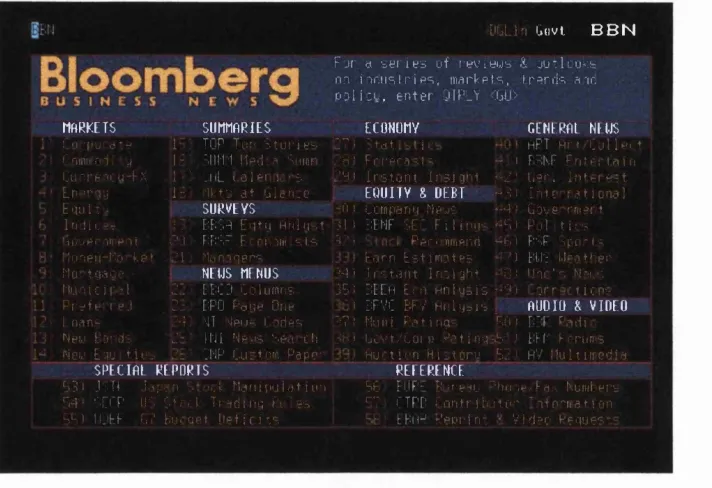
This system does n o t have a W indows ‘look and feel’, it has no pull dow n menus o r icons, in fact it looks very m uch like a text based terminal.
BuLiri Giivi B B N
F j t d '=y[ i e d u f r e v i « g y & a u : k u < b m i - i r . i i s l r i p = i , m a r k p t - = , , t r = r i i ' = . a m P 3 l i : L , e n t e r 9 ( P _ Y <GU>
MA R K E T S S U M M A R I E S EC ONOMY : 'I p u c " d 1 _ TO P T u p f t u r i e - . ' C ' k a t i . T a mi i i r H : ^ 1 - ‘. HIM l i e d a G i i m r . ' A ' F r r p r . a - . l s i . . u " r e ' t i : u - F . T M ' . i i L i , o 1 e i . i u e . "Hi I r s t u n t i n e i i g h t E n : T ] . j 1 - 11 t : a t G l c n . e E Q U I T Y 8 D E B T ; E n u M - j S U R V E Y S .. , M M L c m p a r n j . M e j e
I n . h i . - ' T ! : BF ' . H E u t i ) H n l n - . t M ' T E N F S E ' F i I i
mj-G E N E R A E NEI-JS
APT A l t ' L u l l P L t
- I FM|\ F F n t P i l a i n ' - Z I l . e r . i l U M ' P z t ••- M M i t e r.at. ! o n . ? ]
‘M ' Gove rmft t
> - F i P .11 t i l s
i f . u p , -iti p I t M M FTi'M Frrrivam '-I
Icnen-M'i'kei '1 Mnoqere
t o t g a u e NEWS ME N U S
l u - i i c i r a i Z '.‘. [B' Mi C o l u m n s
^ r s f e - , e . l 2 : E P O P a i j e O n e
n . a n - . ' 4 '-11 ' i pi i - . F a r t p s
Mo t g a N
MunicIr?I 22 E
P r s f e - , e . l 2 : E I n . a n p . 4 '•! N e w l o r d s 2 - I N e w Em - t i e : . S P E t l A E R E P O R T S
45 1 J ;.M id; u'l
-M -M C F C r IM. U-r.cï
T E C - F r r . i v a m ' - i s A,“-j P p r u n m e n H “ h i EC F \ p r - t s ' M n a q e r s . E . o r n E s t i m o t e s I ET.!'; U r a t i - e r 1 EWS M E N U S 4 M . I r s t . o n t I n o i g h t - 41 U n e ' - . Nai..:. EE'Mi C o l u m n s 3 5 t E E Eh E m H i i l u s i s - ' " u o r r t i c n s EPO P d i j e O n e "‘ I E F V C B F v H n l y . i s . A U D I O & V I D E O '•II N p i . i s L a r t p s T ? : M u n i P a t i n g - F u i E ' F E . a d i : I N I N e , IS c e a i l l C-ib.i U c v t / t o r p Mm j n g M . , ' EM' E c r i m s . N P L u : t o m P a p e - _ H u . t i o n H i ^ t o r u E. : ' h V !1u 11 i i r c d i a S k c M L M V y R E E E R E N C E ■
-'.'..I M d i i i p u l d t u r M F t F U P - Î; i r e ? L ' ‘h i . r i e . ' F d v K u m l . p r s T r a c l i t i q Pt. s s FT F T P E L n n t r i n i t u " ' a t c - ' n s t i o n
F F ) l U E E u V E m g e t H e t i r i t s -t- t E i i - ' r ’e p i - i n - V i c l ? c P e q u e s i
Figu re 2-3 Screen sh ot o f B lo o m b erg system
system is huge and n o t only provides the user w ith inform ation but also connects all the Bloomberg users together. So it is possible to send messages to other users o f the same system. It contains areas w here ideas can be tested and portfolios can be created.
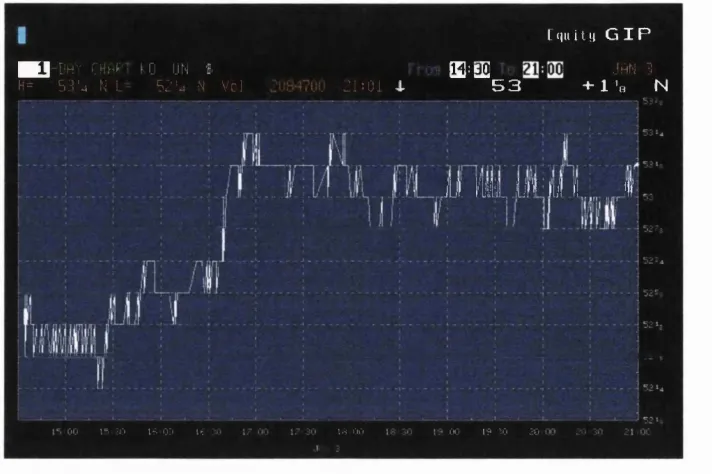
The graphing it provides is integrated into the same system but is rather primitive. The user can draw charts on almost any instrum ent but the charts cannot be manipulated. There are sets o f predeterm ined types o f chart that can be viewed.
These charts can be customised to the extent that the user can choose to view more than one instrum ent on a chart but the kind o f zoom ing features provided by the Reuters package are n o t available, although it is possible to view the chart full screen.
I N D U 6 5 4 4 . 0 9 Y a= of c.o^e 1
KB rm " pt;
531 i 6560.51- 12/2? D i v - Y l c 2.02
:.2L c _ ■ 00 J y i j - t ■ V o i 4 4,228.100
Til ilex B O
! 2 J ] 7 % - 1 . J •• 2 ? 1. 4
1. / 4. 96 - 1. 3/97 29.346Z^ .— --- - — ---r-jcc'-'u MOy :»ün;bul,. r i ' i i o C! fi‘j I n u x pt 7 u l
i -. : - - I i 44 I | 4 T i k ’-l i V J ' e . + : L. ' 1 2 0 1 4
;...
i v - ■ :--- i--- : ] LIE . 90 e +2T +3.001 38i
b i p ' 40-3 T ' -2:094 145;
d t m W l t m n v r . T i T B i . ' l i i i r ' ' - # 1 w - 1.924 4::4:
..-f.Fi'-j.. r< •••ri .41 5 7 ~ ' z “ 1 . 5 9 9 . ' I H c
_ _ _ _ _ _ _ _ _ _ IIhPI ET ' l l . l l i i H P f _ _ _ _ _ _ _ _ _ _ _
T i û b i l P r i f ' ^ / V i p l d I ' . h a n g p f i n e I4DIJ ■ 5514.09 ti: 1.6 1/0:
TX 746.03 -11,0: 1,0:
J3H7 111-18 + 1/0:
:D(-7 94.38 UU-- I/o:
7T30 ■ 9.7-02 . " - 1/0.
E.39 1.186 - .(':i2C 1/0:
.175 HE. 7 r.2 : l./O:
15 00 r 00 1? OC 2\ oc
1*^ UM I * LIU1:4 UL iT UU
F igu re 2-4 Screen sh o t o f B loom b erg charts screen
■ I D h y C H h P
H = 53-4 N L
0 UN I
52'4 N V c !
[f|ii ity G I P
[E^eE JAN 3
21:01 4. 5 3 + 1 'a N
jU m iilT W l!,.„ . 1
00 i=. -j't I:; 0:1 ir 1.3 r,r, oo i9 30 30
F igure 2-5 Screen sh o t o f B loom b erg chart full screen
So w hat is the underlying technology behind this system? Well it would appear that it is simply a terminal based front end with a fast connection to a powerful real time system managed by Bloomberg. So really the system on the desktop isn’t real time at all, it is on-line to a real time system which resides elsewhere.
FairShares
It w orth taking a look at a far simpler package here, FairShares is certainly aimed at the lower end o f the market than either the Reuters o r Bloomberg systems. FairShares main strength is portfolio management. The professional product is a W indows rewrite o f die original D O S product. It offers general coverage o f technical analysis and a facility to record fundamental information on a company. O n the portfolio managem ent side the software covers just about everything a private investor could need including; C G T, Dividends, Scripts and r i ^ t s . Reports can be produced for tax purposes and portfolio valuation and perform ance as well as com pound grow th rate.
simple tools such as trend lines. The package has facilities to enter data on PE, Yields and Com pany Results. It is possible to plug various thrid party feeds into this system, e.g. Teletext or Market Eye, none o f these provide the accuracy o f either Reuters or Bloomberg but they are less than half the price.
The fact that it is a p o rt o f a D O S based system and that it supports D D E indicates that it is 16 bit, it does provide a much m ore W indows type look and feel than either o f the two m ore expensive packages, unfortunately it also feels cheaper as can be seen from the screen shot shown in figure 2-6.
edot
F a irS h a res P r o fe s sio n a l - [S u m m ary of Brltisfi T elecom }
Summary ot British T elecom f^
______
. . . -elecom m unications % ShereType # ^ # O r d i n a r y
|M k l,C »p.(£ m ) l l ' 2 4 0 1 2 5 I'Price on 10 S e p 94' 389.00
^.Business : ^ f e ^ T e l e c o m m u n i c a h o n s ’^'^
Investors Chronicle com m ent on 29 Jul 94 .v Fairly priced
Investment A, e a - .^1... 0 0 /, J,
^t'.Recent R esults ^ Year End M er 3 1 s t-.ff'
syr'eor|Tumt eriv.Pie-Tox!;
P o ft£ m "Profit £m C ? (p)"^^ '^V'^iterim''* - t-inai
1990!? 12.315 00 2,302.00^ 1 535 00 24 83 4 6 5 0 f f 7 1 5 0 h S
I T e l e c o m m Nonei
Order
Now!!
PE ratio §;-:13.6:3 # G r o ss Yield \:^ '3.2% (j'<î5ÿ« T im es C overed ÿ ; / 2.8%
Div in 12 months ?a«10
&ÈWX: N o n e
t o y R etained'^ Earning ":%^^Dividends (net)
£m "Profit £m ^ f o l-5*^ "^....'Interim'‘i Final
100 4 oou
F igure 2-6 Screen sh ot o f FairShares P rofessional
2.3. Real Time Data Processing under Windows
This section examines the mechanisms that can be employed to achieve the goal o f creating software that deals with data in ‘real time’. This section clarifies what is m eant by real time. It is im portant at this time to explain some o f the fundamental aspects o f why W indows is n o t a real time system, and how commercial programmers can get around this limitation. It is assumed that the reader has a working knowledge o f abstract data types, and the W indows environment.
There are Operating Systems designed especially for real time applications
(RTOS’s) and Microsoft Windows is certainly not one of them [11]. The
reason for studying ways of creating a system for Microsoft Windows is
commercial acceptance. More and more companies are trying to use
Windows as a standard environment at all levels of the industrial hierarchy. So
it is becoming a requirement that real time data be handled within this
environment. Another good reason for selecting Windows as an environment
is the broad and powerful API (Application Programming Interface) which it
provides. There are many good development platforms and compilers which
support this API, and also many skilled programmers who know the API
well. This leads to the fact there are many other applications already available
for Windows, some of which may complement a real time system being
written.
Definition of a Real Time System
Real time, as stated in the previous chapter, is any data that is only of use
during a certain time frame. Data that can still be of use some time after this
time frame has elapsed (e.g. for statistical analysis) is considered to be
historical data.
One of the most con^rehensive definitions was found in the real time FAQ
on the Internet's comp.realtime news group: “A real time system is one in
which the correctness of the computations not only depends upon the logical
correctness of the computation, but also upon the time at which the result is
produced. If the timing constraints of the system are not met, system fiiilure is
said to have occurred.”
To fulfil this definition, a couple of basic requirements must be met:
1. Meet deadlines. After an event has occurred an action must be taken
within a predetermined time limit. Missing a deadline is considered a
software fault.
The first requirement does not mean that it is a software fault if a text editor
or spreadsheet application reacts slowly and thus slows down the user’s
progress. This would be considered as a performance problem that could be
solved by using a faster processor. Using a faster processor may not
necessarily relieve the problem of missing deadlines.
Simultaneity suggests that a real time system requires inherent parallelism in
the form of either multiple processors and/or multi-tasking.
The data involved will generally come from an external source, the user will
wish to view the changes in that data within a specified time frame. Each
application will tend to be different, but generally real time data becomes
historical data once that specified time frame has elapsed. The aim of the
software is therefore to get the data to the user within that time frame.
An example of this is software which handles data from the financial markets;
users of this data need to know the values of their shares before that value
changes. Reuters claim to deliver the price to a user’s screen within 1 second
of it changing in the marketplace. So, for this type of data, the time frame is
measured in milliseconds.
Hard and Soft Real Time Systems
Dr. M. Timmerman, in his paper Windows NT as Real Time OS?’ [9], makes
a distinction between hard and soft real time systems based on their
properties.
The properties of a hard real-time system are:
1. No lateness is accepted under any circumstances
2. Useless results if late
3. Catastrophic failure if deadline missed
Whereas a soft real-time system is characterised by:
1. Rising cost for lateness of results
2. Acceptance of lower performance for lateness
A hard real time system must, without fail, respond to some kind of event
within a specified time window. This response must be predictable and
independent of other activities undertaken by the operating system. This
implies that all system calls will have a specific measured latency period.
Latency refers to the time taken for the CPU to acknowledge and handle an
interrupt. This generally involves three steps.
1. The CPU must finish processing the current instruction, flush the
instruction pipeline, read the interrupt vector, locate the address of the
handler, and jump to that address.
2. The handler records the current state of the computer, and creates a frame
that records the state of the thread which was interrupted (this includes
program counters and registers). The handler then starts an intermpt
dispatcher which determines the source of the interrupt. This dispatcher
then transfers control to either an interrupt service routine (ISR) or an
internal kernel routine. The ISR would have been provided by a device
driver for a particular device which caused the interrupt.
3. Finally the ISR starts an I/O transfer from the device, and can execute
other threads when the transfer completes. When this is done the CPU is
again interrupted for service.
Windows 3,x
Within the following section the word "Windows' will apply to Windows 3.x
and not Windows NT.
Microsoft produced a short white paper on real time systems under its
The information in this article applies to - Microsoft Windows Software Development K it (SDK) fo r Windows versions 3.0 and 3.1
In no sense can Microsoft Windows be considered a "real-time" ppstem. It is a message-driven, event-polling p^stem, with nonpreemptive scheduling. The following is additional information:
1. It is possible to write a Windows-based explication that sits on some interrupt in order to watch board-level activity. In general, this facility is used Jy manufacturers of boards to write drivers that
watch and respond to interrupts used by the board. I t is extremely dangerous to allocate!sit on any interrupt used by Windows itself (keyboard, mouse, etc.).
2. Dedicated ystems (those that will not run general-purpose Windows applications) mcy sit on the timer interrupt, as long as Windows is eventually notified of the timer ticks. Because of the
nonpreemptive aspect of the Windows ystem, it is insensitive to delays in the arrival of timer ticks. Tying to run more than one time-critical (plication that sits on the timer interrupt is likely to fa il
3. You must arrange for a Windows "library" of routines to proude access to information available from a board. The issue is one of how to dimde the work between the folbwingportions:
a. The driver portion, which watches the interrupt, logs data, and notifies clients [through PostMessageQ] of the availability of data
b. The client portion, which obtains datafrom the driver portion, andprocesses, displcys, and stores data
Drivers can be implemented as Windows libraries, and clients of the device can be implemented as Windows-based applications. The driver portion can be made N E A R real time; the cpplication portion is going to be message driven.
Copyright Microsoft Coporation 1995.
It is importîint at this stage to understand some fundamental aspects of how
Windows works. Windows presents the illusion of multi-tasking, in fact it
simply switches between applications while they are idle. So it would seem
that the obvious solution to writing a system which involves constant
processing would be to never allow the system to become idle. This is
suggested in point 2 above, and this would work but no other applications
would be able to run. It would only be usable in a dedicated system, this
defeats the whole purpose of using Windows.
In the article produced by Microsoft point 1 states how a driver for a board
can sit on an hardware interrupt, it then suggests that these interrupts be used
driver knows about the applications which are going to use the data it
provides. This is not always the case, and some driver software gets around
this by allowing applications to register themselves as users of the data. The
driver software can then post the data to the registered applications. This
solution is fine if the amount of data is limited and the application using the
data wishes to know about all the data. It is very inefficient if the application
using the data only wishes to process a very small amount of the data being
collected by the driver.
For example a card which collects data from the stock exchange may be
pulling in information about thousands of share prices. If the application
being written is for drawing a graph for one or two share prices, it certainly
doesn’t want to be called every time any share price changes. One way in
which this application could receive its data would be to ask the driver every
so often for the latest change in the two prices in which it is interested; this is
polling.
Polling
Vs.
Idle Loop Processing
Polling
Within the Windows environment polling is very easily achieved by setting iç>
a timer and then requesting the data during the timer event. There are several
ways of using timers:
1. A window handle is given when the timer is set up, this will place
WM_TIMER messages into the given window’s message queue. This is a
fairly safe method.
2. A pointer to a call-back function is given when the timer is set up, the call
back function will then be called every time the timer goes off. This can be
3. No handle or function pointer is given when the timer is set up, this will
cause the WM_TIMER messages to be placed on the applications message
queue. This is by far the safest way of using a timer.
The second method can lead to problems if the processing being done within
the call-back function takes longer than the interval between timer calls. This
will cause the function to be called again while the first instance is still
working, this could lead to unpredictable behaviour.
The first and third methods are safer as the messages will be queued if the
application is still busy processing the last timer message or dealing with user
interaction. Specifying a specific window for a timer message could be useful
if the application has multiple windows each of which are interested in
different data, although it is important to remember that there is a limit to the
number of timers available, within Windows. For this reason the safest
method would be to create a single timer for the application. For more
information see the Microsoft documentation on the SetTimer API [50].
Idle Loop Processing
When an application is not doing anything it enters a loop, the default
behavior for which is to simply monitor for incoming messages then yield
some time for other applications, this is known as the idle loop. It is possible
to perform some other functionality within this loop, but it is important not
to spend too long in here as it will cause other applications to slow down.
This technique is useful if the application wishes to know about changes in a
large amount of data, each time it enters the idle loop it could pop one change
from a queue of the latest changes.
Summary
The section above considers Windows 3.x, it is possible that this environment
could be used for a soft real time system, and the user should be aware that
data is likely to be missed if it starts to come in at a rate faster than it can be
Windows 3.x, even on the fastest available machines is useless for a hard real
time system, as one application can keep the control forever and block the
rest of the system, Windows 3.x is co-operative.
This hasn't stopped people from trying to create real time systems under
Windows, and there are currently several packages available on the market
which claim to be real time, and although they are obviously soft real time,
they do still deliver data within some form of constrained time limits.
Windows N T
Being a full operating system rather than just a GUI environment Windows
NT shows rather more promise as a platform for real time systems. Once
again it is worth looking at what Microsoft have to say about using NT for
real time systems. This time they provide much more information, hinting
that they envisage NT as a more suitable platform. Although the point that
NT is not a real time OS (RTOS) is made very clear [33] :
\.Microsofi® Windows NT™ Workstation is not a hard real-time operating system. Rather, it is a general-purpose operating system that has the capability to provide very fa st response times, but is not as deterministic as a hard real-time system. ’
In order to judge just how good Windows NT is at providing a platform for
real time systems we need to take a look at some of the facilities it provides.
As some of the developers of the VMS operating system helped to create
Windows NT, some real time characteristics have been introduced into the
system. An example is the real time class processes that are scheduled in the
same way as they would be in a RTOS.
Windows NT is a multi-threaded and pre-emptive OS, unlike Windows 3.x
which requires co-operation from the applications, NT has a scheduler. This
scheduler can pre-empt any thread in the system, in order to give resource to
a thread which needs it more. The OS also enables pre-emption at the
In order to find which thread needs a resource the m ost, the OS needs to know when a thread has to finish its job and how m uch time it needs in order to do so. At the m om ent no OS can do this at it is simply far too complex to implement. The solution is to give each thread a priority, this is the job o f the system designer, w ho has to convert deadline requirements into thread priorities. W indows N T provides 32 priority levels, o f which 16 are reserved for the operating system and real time processes. Each process has a base priority class, the priority spectrum diagram in figure 2-7 shows which priorities are used for different types o f process.
m Real-time time-critical Real-time
classes
Real-time normal
System levels like input, cursor, cache flushing, file sys., drivers
Real-time idle
15-Nonreal-time/ time-critical
13-High foreground N g T „ n
^
Ht
9-Norm al foreground g g T
Dynamic classes
K
7-Normal background4 - Low fo reg ro u n d /b ac k g ro u n d
If
1 -Nonreal-time/idle
0-Idle thread «
Figure 2-7 Priority Spectrum For W indows N T [11]
Each process will have one or m ore threads, and each thread will inherit its priority from the associated process. Using an API each thread can have its priority varied by ±2, so for a given process there can only be five different thread priorities. For example the threads o f a process with base priority 24 can only have priorities in the range o f 22 - 26. Many RTOS’s have 256 levels o f priority, this allows the system to be designed for m ore predictable outcomes, and the best way to design a system is to give each thread a different priority.
One way around this is to use different processes and pass information
between them, this increases the number of priorities to 16, but does bring up
another problem which is that of the time taken to switch between the
processes. This context switch time is higher than the time to switch between
threads in the same process. This is because threads in the same process share
their memory address space, unlike separate processes, which each need an
individual address space in order to avoid any interference with other
processes.
In fact it is this which distinguishes a thread from a process, the
synchronisation and inter thread communication mechanism which exist
within a processes address space but not across process boundaries. Older
versions of UNIX are multi-tasking but not multi threaded, each task is a
process that can only communicate via pipes and shared memory, both of
which use the file system, which cannot provide predictable behaviour.
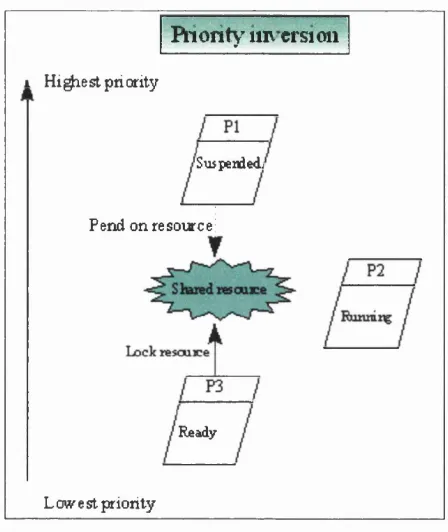
One problem, which often gets uncovered in real time systems is priority
inversion. For this condition to occur at least three threads of different
priority are required to be involved. When the lowest priority thread has
locked a resource which is shared with the highest priority thread, and the
middle priority thread is running. This leads to a situation where the highest
priority thread is suspended until the resource is unlocked, and the resource
will only be unlocked by the lowest priority thread once the middle priority
thread has finished running. Hence the highest priority thread is waiting on
the lowest priority thread - priority inversion. This can be avoided by the OS
allowing priority inheritance to boost the lowest priority thread above the
middle one, a blocking thread inherits the priority of the thread it has blocked
if it is higher than its own priority. Windows NT does not do this and so extra
care needs to be taken in order to avoid such a situation.
Another problem related to priority inversion, occurs due to the way in which
some API calls are implemented in a synchronous manner. They block the
calling thread until the API call has completed. This implies that a lower level
Riority' inversion
1 H ip e s t priority
'Suspendedj
Pend on resource
Ready
Low est priority
Figure 2-8 Priority Inversion
Memory Management
O ne o f the features o f N T is its virtual memory system, this is n o t necessarily such a problem for real time systems as it might first appear. The paging 1 /O (disk sw apping occurs at a lower priority than real time processes, paging can still occur within a real time process, but this is m eant to ensure that background memory management doesn’t interfere with any processing at real time priorities. A nother p oint is that W indows N T allows an application to lock itself into physical memory (as long the machine actually has enough). I'his will ensure that the application is n o t affected by paging within its own memory address space. The last tiling that W indows N T provides is mem ory mapping, which allows multiple processes to share the same physical memory. This permits very fast data transfers between co-operating processes.
O ne o f the problem s with using a general purpose OS such as W indows N T can be seen in the memory caching technique which is used to increase the
overall system performance. This method uses a small amount of high speed
physical memory to hold the most recently used code or data, if the next
piece of data required is not in this cache memory then it must be retrieved
from the slower main memory. This can lead to unpredictable behaviour as
far as accurate timing of latency periods.
Conclusion
Windows NT is not written specifically for use as a real time operating
system, but it does provide some features that allow for fast response times. It
is therefore conceivable that a reasonable performance could be expected
from a not too complex real time system written to run on Windows NT.
2.4. Industrial Strength Software Engineering
The software created in this thesis is far larger and more robust than the
demonstration software produced by most research projects. This is due to
the fact that it needed to be tested in a commercial environment. In order to
create software that will stand up to use within this environment it needs to
be of industrial strength.
In order to create industrial strength software a strict approach to the design
and implementation needs to be taken along with a broader view of the
requirements for the system being created. This section outlines the steps that
were taken to create each of the three systems in this thesis.
All o f the systems created for this thesis utilised a loose form o f the waterfall
model. A strict adherence to the waterfall model would ensure that any
previous steps could not be addressed after the next step had been taken.
This is not usually a realistic constraint to put on a commercial system, where
the market place is constantly changing [40].
The Waterfall model
This model views the system being designed as a whole from the h ip e st level
and breaking the project down a stage at a time, as shown in Figure 2-9. Each
System Engineering
Analysis
Design
Code
Testing
Maintenance
Figure 2-9 The Water Fall Model
System Engineering. This stage involves establishing the requirements for all system elements including those that are not software. Then the
relationship of the software to the rest of the system should be considered
along with a small amount of top level design and analysis.
Analysis. During this stage the information domain of the system being created should be understood along with the required functions, performance
and interfacing. These should all be documented and reviewed with the
management or client.
Design. This stage can be broken down into a multi-step process, focusing on the different attributes of the system. These are the data structures, the
software architecture, procedural detail and interfaces. Again this stage should
be fully documented, as it will become part of the software configuration.
Coding. If the design has been done properly the coding should become as simple mechanistic task of translating the design into a machine-readable
form.
Testing. Once the code has started being generated testing can begin. This testing should initially focus on the logical internals of the software, making
the functional externals, ensuring that defined inputs will produced the
required results.
Maintenance. All systems require modifications after they have been finished, either because bugs need to be fixed or extra functionality is
required. Maintenance applies each of the preceding steps to an existing
system rather than a new one.
These steps are what Booch[48] terms the Macro processes. He also specifies
a set of Micro processes, which are also used within the software developed
for this thesis, they are:
1. Identify the classes and objects
2. Identify the semantics of these classes and objects.
3. Identify the relationships between these classes and objects.
4. Specify the interfaces and implementation of these classes and objects.
Evolutionary Approach
While each system was developed using a loose form of the waterfall model
an evolutionary approach has been used throughout this thesis. Each system
designed has built upon the previous system in order to obtain the final
architecture.
Summary
By adhering to a known commercial design methodology it should be
possible to create software that was not merely a proof of concept but could



![Figure 2-7 Priority Spectrum For Windows N T [11]](https://thumb-us.123doks.com/thumbv2/123dok_us/8622222.1411930/33.595.144.452.286.491/figure-priority-spectrum-windows-n-t.webp)