Oracle® Endeca Server
Cluster Guide
Copyright and disclaimer
Copyright © 2003, 2013, Oracle and/or its affiliates. All rights reserved.
Oracle and Java are registered trademarks of Oracle and/or its affiliates. Other names may be trademarks of their respective owners. UNIX is a registered trademark of The Open Group.
This software and related documentation are provided under a license agreement containing restrictions on use and disclosure and are protected by intellectual property laws. Except as expressly permitted in your license agreement or allowed by law, you may not use, copy, reproduce, translate, broadcast, modify, license, transmit, distribute, exhibit, perform, publish or display any part, in any form, or by any means. Reverse engineering, disassembly, or decompilation of this software, unless required by law for interoperability, is prohibited.
The information contained herein is subject to change without notice and is not warranted to be error-free. If you find any errors, please report them to us in writing.
If this is software or related documentation that is delivered to the U.S. Government or anyone licensing it on behalf of the U.S. Government, the following notice is applicable:
U.S. GOVERNMENT END USERS: Oracle programs, including any operating system, integrated software, any programs installed on the hardware, and/or documentation, delivered to U.S. Government end users are "commercial computer software" pursuant to the applicable Federal Acquisition Regulation and agency-specific supplemental regulations. As such, use, duplication, disclosure, modification, and adaptation of the programs, including any operating system, integrated software, any programs installed on the hardware, and/or documentation, shall be subject to license terms and license restrictions applicable to the programs. No other rights are granted to the U.S. Government.
This software or hardware is developed for general use in a variety of information management applications. It is not developed or intended for use in any inherently dangerous applications, including applications that may create a risk of personal injury. If you use this software or hardware in dangerous applications, then you shall be responsible to take all appropriate fail-safe, backup, redundancy, and other measures to ensure its safe use. Oracle Corporation and its affiliates disclaim any liability for any damages caused by use of this software or hardware in dangerous applications.
This software or hardware and documentation may provide access to or information on content, products and services from third parties. Oracle Corporation and its affiliates are not responsible for and expressly disclaim all warranties of any kind with respect to third-party content, products, and services. Oracle Corporation and its affiliates will not be responsible for any loss, costs, or damages incurred due to your access to or use of third-party content, products, or services.
Table of Contents
Copyright and disclaimer ...
ii
Preface...
v
About this guide...v
Who should use this guide...v
Conventions used in this guide...v
Contacting Oracle Customer Support...vi
Chapter 1: Introducing the Endeca Server Cluster ...
1
Overview...1
Endeca Server Cluster...1
Data domain cluster...2
Building a cluster...3
Data domain cluster concepts ...4
Cluster diagrams...4
Diagram with a single data domain...5
Diagram with multiple data domains...6
Cluster behavior ...7
Allocation of data domains...7
Load balancing and routing of requests ...8
Data domain cluster startup...9
How updates are processed...9
Role of the Cluster Coordinator ...10
How enhanced availability is achieved ...10
Chapter 2: Managing the Endeca Server Cluster...
13
Listing Endeca Server nodes...13
Obtaining version information...14
About the node profile...14
Configuring a custom node profile ...15
Monitoring node status...16
Monitoring cluster status ...16
Deleting an Endeca Server node ...16
Chapter 3: Managing Data Domain Profiles...
18
About the data domain profile...18
Deciding which data domain profile to use ...19
Data Domain profile parameters...20
Default data domain profile ...24
Defining a data domain profile...26
Listing data domain profiles...27
Removing a data domain profile...28
Table of Contents iv
How profiles affect hardware utilization...29
Example: data domain profile with low hardware usage...32
Example: data domain profile with high hardware usage...32
Chapter 4: Managing Data Domains ...
34
Adding, removing, and changing data domains...34
Adding a new data domain...34
Removing a data domain...36
Cloning an existing data domain...37
Adding nodes to a data domain ...38
Importing, exporting, enabling, or disabling data domains ...39
Exporting and importing a data domain...39
Enabling a data domain...41
Disabling a data domain ...41
Monitoring data domains...42
Obtaining information about existing data domains ...42
Monitoring the data domain health...43
Obtaining data domain statistics...43
About loading data into data domains...44
Configuring session affinity for data domains ...44
Updating spelling dictionaries for a data domain...46
Chapter 5: Using the Cluster Web Service...
47
About the Cluster Web Service...47
Accessing the Cluster Web Service ...47
List of operations in the Cluster Web Service ...48
Chapter 6: Using the Manage Web Service ...
53
About the Manage Web Service...53
Accessing the Manage Web Service...54
List of operations in the Manage Web Service...54
Preface
Oracle® Endeca Server is the core search-analytical database. It organizes complex and varied data from disparate source systems into a faceted data model that is extremely flexible and reduces the need for up-front data modeling. This highly-scalable server enables users to explore data in an unconstrained and impromptu manner and to rapidly address new questions that inevitably follow every new insight.
About this guide
This guide describes the Oracle Endeca Server cluster, consisting of multiple Endeca Server instances that can host one or more Endeca data domains.
This guide does not discuss deploying a single Endeca Server with a single Endeca data domain. Even though you can configure single-node Endeca data domains hosted by single Endeca Server instances, single Endeca Server instances are not highly available and can only be used in development environments. For information on installing an Endeca Server on a single node and starting a data domain on it, see the Oracle
Endeca Server Installation Guide.
Who should use this guide
This guide is intended for administrators who configure and deploy an Oracle Endeca Server cluster and make it available for use by the clients. It also addresses those administrators who use an already deployed Endeca Server cluster to create and manage the Endeca data domains.
This guide assumes that the Oracle Endeca Server software is already installed on multiple servers, and that the Endeca Server cluster is already deployed. For information on installation and deployment of an Endeca Server cluster, see the Oracle Endeca Server Installation Guide.
Conventions used in this guide
The following conventions are used in this document.
Typographic conventions
This table describes the typographic conventions used when formatting text in this document.
Typeface Meaning
User Interface Elements This formatting is used for graphical user interface elements such as pages, dialog boxes, buttons, and fields.
Code Sample This formatting is used for sample code phrases within a paragraph.
Variable This formatting is used for variable values.
For variables within a code sample, the formatting isVariable.
File Path This formatting is used for file names and paths.
Table of Contents vi
Symbol conventions
This table describes the symbol conventions used in this document.
Symbol Description Example Meaning
> The right angle bracket, File > New > Project From the File menu,
or greater-than sign, choose New, then from
indicates menu item the New submenu,
selections in a graphic choose Project.
user interface.
Path variable conventions
This table describes the path variable conventions used in this document.
Path variable Meaning
$MW_HOME Indicates the absolute path to your Oracle Middleware home directory, which is the root directory for your WebLogic installation.
$DOMAIN_HOME Indicates the absolute path to your WebLogic domain home directory. For example, ifendeca_server_domainis the name of your WebLogic domain, then the$DOMAIN_HOMEvalue would be the
$MW_HOME/user_projects/domains/endeca_server_domain
directory.
$ENDECA_HOME Indicates the absolute path to your Oracle Endeca Server home directory, which is the root directory for your Endeca Server installation.
Contacting Oracle Customer Support
Oracle Endeca Customer Support provides registered users with important information regarding Oracle Endeca software, implementation questions, product and solution help, as well as overall news and updates. You can contact Oracle Endeca Customer Support through Oracle's Support portal, My Oracle Support at
https://support.oracle.com.
Chapter 1
Introducing the Endeca Server Cluster
This section introduces the concepts and capabilities of the Endeca Server Cluster and includes diagrams of data domains hosted in it.
Overview
Cluster diagrams Cluster behavior
Overview
This section discusses the Endeca Server Cluster and the data domain cluster, and describes the cluster concepts.
Endeca Server Cluster Data domain cluster Building a cluster
Data domain cluster concepts
Endeca Server Cluster
The Endeca Server cluster is a deployment of multiple Endeca Server instances that host and manage multiple clustered data domains.
A data domain is a logical collection of data and metadata managed by the Endeca Server. Through its interfaces, the Endeca Server allows for data loading, configuration, and querying of a data domain. A data domain may impose order on subsets of its data through semantic entities. A data domain is the largest unit of data over which the Endeca Server allows queries to be expressed. (Applications wishing to correlate, join, or display data from multiple data domains, must do so themselves.)
The Endeca Server cluster has the following characteristics:
• It serves as a building block for delivering other services on top of the Oracle Endeca Server software. It also supports on-premise deployments of Oracle Endeca Information Discovery Studio.
• It runs in WebLogic on a homogeneous cluster of hardware nodes, all of which have access with write permissions to shared storage. Each such node in the Endeca Server cluster is known as the Endeca Server node. The Endeca Server cluster allows system administrators to add additional servers to the cluster over time.
Introducing the Endeca Server Cluster 2
• It encapsulates the details of setting up data domain clusters, by keeping details about the location of the Endeca Server nodes and hosted data domain nodes hidden from the end users. (The end users are users of any front-end application configured on top of a particular data domain cluster.)
• The Endeca Server cluster makes decisions about how to allocate resources to data domains, performs routing of requests to the appropriate nodes, and maintains enhanced availability of query processing for data domains.
• It provides a unified interface for provisioning and managing data domains while automating the process of data domain cluster setup, allocation of processing resources, and configuration.
• It lets you create a reusable set of data domain profiles for data domains. Each of the data domain profiles maps to different allotments of the underlying hardware resources on the Endeca Server nodes. When you create a data domain cluster, a previously defined profile is used initially; a data domain cluster can be changed after it has been created.
• It provides routing and load balancing of requests for data domains.
Data domain cluster
One or more data domain clusters can be hosted in a clustered Endeca Server deployment. This topic introduces the data domain cluster and describes its capabilities.
A data domain cluster is a set of Dgraph processes that together handle requests for a given data domain. One of these Dgraph processes is responsible for handling all write operations (updates, configuration
changes), while the remaining Dgraph processes serve as read-only. All Dgraph nodes in a given data domain cluster utilize the same index residing on shared storage. Each data domain cluster node is hosted on a separate Endeca Server node.
In this guide, the term Dgraph node is used interchangeably with the term data domain node. The Dgraph node is the node in the data domain cluster that runs the Dgraph process. The Dgraph process of the Oracle Endeca Server is the main computational module that provides the features of the Endeca Server, such as search, refinement computation, and Guided Navigation. For information about the capabilities of the Dgraph process, see the Oracle Endeca Server Developer's Guide.
Additionally, the term data domain is used interchangeably with the term data domain cluster.
For definitions of the data domain cluster and the data domain nodes seeData domain cluster concepts on page 4.
Data domain cluster capabilities
A data domain cluster provides the following capabilities:
• Enhanced availability of query processing by the Oracle Endeca Server. In a cluster of Dgraphs (a data domain cluster), if one of the Dgraph nodes fails, queries continue to be processed by other Dgraph nodes.
• Increased throughput by the Oracle Endeca Server. In a data domain cluster, you change throughput capacity by adding Dgraph nodes. This allows you to spread the query load across them, without the need to increase storage requirements at the same rate.
• Routing of requests to the data domains. Requests to a given data domain can be submitted to any Endeca Server instance in the Endeca Server cluster, regardless of whether or not it hosts the target data domain. The Endeca Server instance receiving the request will route it appropriately.
Introducing the Endeca Server Cluster 3
• Automatic allocation of the data domain leader node. The leader and follower nodes differ in the types of queries they can process, however, this is transparent to the end users of applications running on top of Endeca data domains. The allocation of leader and follower node roles is performed by the Endeca Server cluster, when you add data domain clusters. Allocation of the leader node ensures high availability of data loading.
Building a cluster
This topic provides at-a-glance summary of high-level tasks required to deploy a data domain cluster hosted in the Endeca Server cluster.
The creation of an Endeca data domain hosted in the Endeca Server cluster assumes two administrative roles:
• An administrator who will be installing and deploying the Endeca Server software on a homogenous set of hardware nodes, and setting up the Endeca Server cluster.
• An administrator who will be creating an Endeca data domain on an already deployed Endeca Server cluster, utilizing the data domain profiles provided by the Endeca Server cluster administrator.
The following procedure describes the overall process end-to-end, with the assumption that various parts of this process are performed by different administrative roles: Steps 1 - 3 are performed by the administrator responsible for the Endeca Server cluster deployment and management; steps 4 - 5 are performed by the administrator responsible for the creation of data domains hosted in an already provisioned Endeca Server cluster.
To build an Endeca Server cluster:
1. Install the Endeca Server software on a set of hardware nodes, and deploy an Endeca Server cluster. For information, see the Endeca Server Installation Guide.
2. Configure the node profile for the Endeca Server nodes. For information, see the sectionManaging the Endeca Server Cluster on page 13in this guide.
After you set up the node profile, its characteristics will be used by all nodes in the Endeca Server cluster.
3. Configure one or more data domain profiles. For information, see the sectionManaging Data Domain Profiles on page 18in this guide.
The data domain profiles you create will be available to the administrator responsible for the data domain cluster configuration — for each new data domain, one of these data domain profiles will be used.
4. Add a new data domain. For information, see the sectionManaging Data Domains on page 34. 5. Perform various tasks in the data domain, including loading data into it. For information, see the
sectionManaging Data Domains on page 34.
Introducing the Endeca Server Cluster 4
Data domain cluster concepts
This topic introduces the terms used to describe data domain clusters — the leader and follower nodes, and the Cluster Coordinator.
Leader node
The leader node of a data domain cluster is a single Dgraph process in the data domain cluster responsible for receiving and processing updates to the index and configuration. This node can also be configured to process queries, like other nodes. This node is responsible for generating information about the latest versions of the index and propagating this information to the follower nodes.
When you create a new data domain cluster, the Endeca Server software creates and starts the leader node and then the follower nodes. Each data domain cluster (that is not read-only) is created with one leader node and a specified number of follower nodes.
The leader node periodically receives full or incremental index updates. It also receives administration or configuration updates. It is the only node in the data domain cluster that makes updates to the index. After processing updates, the leader publishes a new version of the data and notifies all follower nodes, alerting them to start using the updated version of the index. The follower nodes acquire read-only access to an updated version of the index.
Follower node
A follower node is a node in the data domain cluster responsible for processing queries. The follower node does not update the index. When you create a data domain cluster (that is not read-only), the Endeca Server software creates and starts the required number of the follower nodes after starting the leader node for the data domain. (In the read-only data domain cluster, all nodes are allocated follower node roles by the Endeca Server).
During the process of acquiring access to the recently updated index, follower nodes continue to serve queries. Each query is processed against a specific version of the index available to it at any given time. Query processing performance may slow down as follower nodes acquire read-only access to the updated index.
Cluster Coordinator
The Cluster Coordinator provides coordination services between cluster nodes. For detailed information about the tasks it performs, seeRole of the Cluster Coordinator on page 10.
Cluster diagrams
Many scenarios of data domain clusters are possible — a single Endeca Server cluster can host one or more data domains. This section includes diagrams that illustrate the cluster topology.
Diagram with a single data domain Diagram with multiple data domains
Introducing the Endeca Server Cluster 5
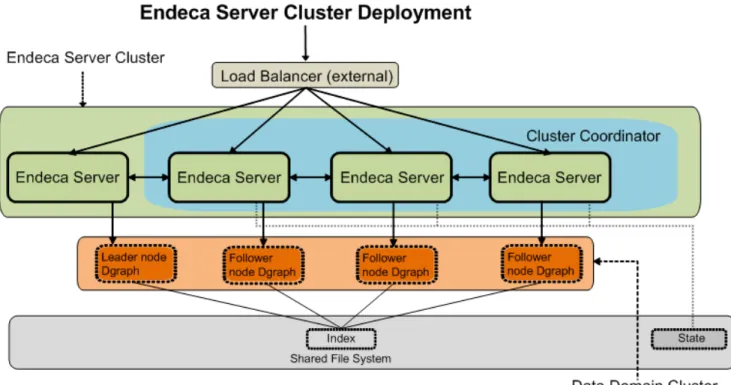
Diagram with a single data domain
The diagram in this topic illustrates a clustered Endeca Server deployment serving a single data domain cluster.
In this diagram, starting from the top, the following components of the Endeca Server cluster deployment are included:
• The external load balancer serves as the single point of entry to the Endeca Server cluster. All requests to the single hosted data domain cluster go through this load balancer.
Note: Although it is recommended to use an external load balancer in your deployment, it is
optional. For information, seeLoad balancing and routing of requests on page 8.
• The Endeca Server cluster comprises a set of four Endeca Server nodes. All Endeca Server nodes in the cluster are aware of one another.
• Three out of four Endeca Server nodes are hosting the Cluster Coordinator instances. The Cluster Coordinator maintains a cluster state for all participating members of the Endeca Server cluster.
• A single data domain cluster consisting of four Dgraph nodes is hosted on the four Endeca Server nodes. • Each node in this data domain cluster is represented by the Dgraph process running on each of the
Endeca Server nodes. In this example, there is a one-to-one mapping between the data domain nodes and the Endeca Server nodes hosting them.
• In the data domain cluster that is not configured as read-only, exactly one node serves as the leader node, and the remaining nodes are follower nodes. For definitions of leader and follower nodes, seeData domain cluster concepts on page 4.
• Finally, all nodes in the data domain cluster have write access to a shared file system on which the index for the data domain is stored. Only the leader Dgraph node in any data domain cluster is allowed to write
Introducing the Endeca Server Cluster 6
to the index located on the file system. Follower Dgraph nodes can only read from the index. On the diagram, the index resides on the shared file system. The cluster state is also maintained in the shared file system by the Cluster Coordinator.
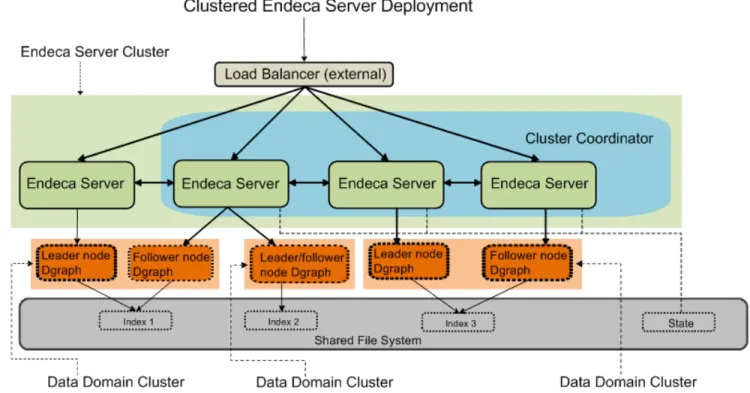
Diagram with multiple data domains
The following diagram illustrates a clustered Endeca Server deployment serving multiple data domain clusters.
In this diagram, starting from the top, the following components of the Endeca Server cluster deployment are included:
• The external load balancer serves as the single point of entry to the Endeca Server cluster. All requests to all hosted data domain clusters go through this load balancer.
Note: Although it is recommended to use an external load balancer in your deployment, it is
optional. For information, seeLoad balancing and routing of requests on page 8.
• The Endeca Server cluster comprises a set of four Endeca Server nodes. All Endeca Server nodes in the cluster are aware of one another.
• Three out of four Endeca Server nodes are hosting the Cluster Coordinator instances. The Cluster Coordinator maintains a cluster state for all participating members of the Endeca Server cluster. • Three data domain clusters are hosted on the Endeca Server nodes. (Depending on the size of the
Endeca Server cluster, multiple data domain clusters can be hosted.) • Starting from the left:
• The first data domain cluster consists of two Dgraph nodes, one of which is the leader node. This data domain cluster uses "Index 1" stored on a shared file system.
Introducing the Endeca Server Cluster 7
• The second data domain cluster consists of one Dgraph node that serves both as the leader and follower node; this data domain cluster uses "Index 2" stored on a shared file system.
• Finally, the third data domain cluster has two Dgraph nodes, with one leader node and one follower node; this data domain cluster uses "Index 3", which is also stored on a shared file system.
• The following characteristics are shared by all data domain clusters in the Endeca Server cluster and are also reflected in this diagram:
• Each Dgraph node is hosted on a different Endeca Server node — the allocation of Dgraph nodes to the Endeca Server nodes occurs automatically when you add data domains.
• In each data domain cluster that is not read-only, exactly one node serves as the leader node, and the remaining nodes are follower nodes. (In a read-only data domain cluster, all Dgraph nodes serve as follower nodes.)
• All Endeca Server nodes hosting all data domain nodes have access to a shared file system on which the indices for each data domain are stored. The cluster state is also maintained in the shared file system by the Cluster Coordinator.
Cluster behavior
This section discusses the Endeca Server cluster behavior, and the data domain cluster behavior in various scenarios, such as data domain cluster startup, updates to the data domain index, and response to a data domain node failure. It also describes how the Endeca Server ensures enhanced availability of its query processing for data domains.
Allocation of data domains
Load balancing and routing of requests Data domain cluster startup
How updates are processed Role of the Cluster Coordinator How enhanced availability is achieved
Allocation of data domains
When a data domain is created, Endeca Server determines which nodes will host it.
Endeca Server allocates the nodes to data domains based on the requirements configured in the data domain profile, and the available total capacity of the Endeca Server cluster.
Note: For information on the data domain profiles and their impact on node allocation, seeHow profiles affect hardware utilization on page 29.
The Dgraph nodes for a given data domain cluster are placed on different Endeca Server nodes. In other words, the Endeca Server software does not support hosting multiple Dgraph nodes for the same data domain on the same Endeca Server node.
For example, in a three-node Endeca Server cluster, you cannot create a data domain with five Dgraph nodes. For this data domain to be created, the number of Endeca Server nodes would need to also increase to five.
Introducing the Endeca Server Cluster 8
The Manage Web Service of the Endeca Server returns a fault to any request that attempts to create or rescale a data domain beyond the number of Endeca Server nodes in the cluster.
If more than one data domain cluster is hosted in the Endeca Server, then whenever possible, the leader nodes for each of the data domain clusters are hosted on different Endeca Server nodes.
Load balancing and routing of requests
This topic discusses the load balancing and routing of external requests targeting different data domains hosted by the Endeca Server cluster.
Load balancing of requests
Depending on your deployment strategy, to the external clients, the entry point of contact with the Endeca Server cluster could be either any Endeca Server node in the cluster, or an external load balancer. The Endeca Server cluster relies on the following two levels of load balancing of requests:
1. Load balancing of requests across the nodes in the Endeca Server cluster. This task should be performed by an external load balancer, if you choose to use it in your deployment (it is not included in the Endeca Server package).
If an external load balancer is used, it receives all requests and distributes them across all of the nodes in the Endeca Server cluster. Once requests are received by any Endeca Server node, they are routed by the Endeca Server to the requested data domain.
If an external load balancer is not used, external requests can be sent to any node in the Endeca Server cluster. They will not be distributed across the nodes, but will be routed to the appropriate nodes serving the data domain, and then load-balanced between the data domain nodes.
2. Load balancing of requests across the nodes of a given data domain. This task is automatically handled by the Endeca Server cluster — it accepts requests on any node running an Endeca Server instance and provides load balancing of these requests across the nodes in the data domain.
Routing of requests
The Endeca Server cluster can host multiple data domain clusters. The allocation of data domains to specific Endeca Server nodes is not transparent to the clients issuing the requests. The Endeca Server automatically directs requests sent to any Endeca Server node to the subset of the cluster hosting the targeted data domain.
The following statements describe the behavior of the Endeca Server cluster for routing of requests: • Requests can be submitted to any node in the Endeca Server cluster.
• The Endeca Server routes requests to the appropriate Endeca Server nodes hosting the data domain specified in the request.
For example, if the request is an updating request, such as a data loading request, or a configuration update, it will be routed to the leader node of the data domain cluster. If the request represents a non-updating (query processing) request, it will be routed to any of the follower nodes.
• Non-updating requests are load-balanced randomly across the data domain cluster. To support session affinity, you can optionally configure the data domain profile with a session ID parameter, URL, or cookie that will be used to re-route requests from the same session to the same node in the data domain.
Introducing the Endeca Server Cluster 9
Configuring session affinity in the Endeca Server guarantees that queries with the same session ID are routed to the same Dgraph nodes in the data domain. This improves query processing performance by efficiently utilizing the Dgraph process cache, and improves performance of caching entities (known in Studio as views). For information, seeConfiguring session affinity for data domains on page 44.
Data domain cluster startup
Once the Endeca Server cluster is started, it activates the Endeca data domain clusters it is hosting. This topic discusses the behavior of the data domain cluster at startup.
On startup, the following actions take place:
• Any data domain node is started in either a leader or follower mode and in any order. Any number of follower nodes and zero or one leader node are started in each data domain cluster.
• Once started, each data domain node registers with the Cluster Coordinator that manages the distributed state of the cluster. The leader node determines the current version of the index and informs the Cluster Coordinator.
• Follower nodes do not alter the index in any way; they continue answering queries based on the version of the index to which they have access at startup, even if the leader node is in the process of updating, merging, or deleting index versions on disk. Follower nodes do not receive updating requests. Follower nodes acquire access to the new index once the update completes. For information, seeHow updates are processed on page 9.
How updates are processed
In a data domain cluster, updates to the records in the index and updates to the configuration are routed to the Oracle Endeca Server that is hosting the leader node.
The leader node processes the update and commits it to the on-disk index. Upon completion, the Cluster Coordinator informs all follower nodes that a new version of the index is available. The leader node and all follower nodes can continue to use the previous version of the index to finish query processing that had started against that version.
As each node finishes processing queries on the previous version, it releases references to it. Once the follower nodes are notified of the new version, they acquire read-only access to it and start using it.
Interaction of outer transactions and updates
An outer transaction is a request to the Endeca Server that lets you include into it other requests, and process all of them as a single atomic operation. Using an outer transaction request is useful when running updates to the data domain index. To ensure that all updates either succeed or fail as a unit, it is recommended to wrap updates in the data domain cluster in an outer transaction request to the Endeca Server, although this is optional.
The following statements describe the behavior of an outer transaction request in the data domain cluster: • A request to start an outer transaction can be sent to any of the nodes in the Endeca Server cluster. The
Endeca Server routing service sends the request to the leader node in the data domain cluster, which processes it.
• If, while an outer transaction is in progress, the leader Dgraph node fails, the outer transaction request is not applied. This means that the data domain index is not changed in any way. In this case, the request
Introducing the Endeca Server Cluster 10
logs for the data domain may contain messages about not finding an open transaction with the specified ID. This is because the transaction is no longer running in the data domain. It is recommended to restart the outer transaction once the Endeca Server cluster establishes a new Dgraph leader node for the data domain.
For more information about how outer transactions work, see the Oracle Endeca Server Developer's Guide.
Role of the Cluster Coordinator
The Cluster Coordinator provides configuration and state management and distributed coordination services to members of the Endeca Server cluster. It ensures high availability of the query processing provided by the nodes in the Endeca Server cluster and in the data domain clusters.
Any node in the Endeca Server cluster can optionally be configured to run the Cluster Coordinator. Since the availability of a clustered Endeca Server deployment depends on the running of the Cluster Coordinator services, it is highly recommended that an odd number (at least three) Endeca Server nodes are configured as Cluster Coordinators to avoid the Cluster Coordinator being a single point of failure.
The Cluster Coordinator service has the following characteristics:
• It is a shared information repository that provides a set of distributed coordination services. It ensures that all systems in the cluster coordinate their actions relative to all other systems running in your environment. If one of the nodes communicates any cluster information, all other nodes recognize it and react to it in a manner that ensures synchronization, event notification, and coordination between the nodes.
The communication and coordination mechanisms continue to work in the case when connections or data domain cluster nodes fail.
• It provides communication between the Endeca Server nodes, ensuring that if one of these nodes fails, requests are sent to other active nodes, until the node rejoins the Endeca Server cluster.
• It provides communication between Dgraphs in a data domain cluster. It prevents node isolation, ensures that updates from a cluster client are applied in the order that they were sent, guarantees that updates are either applied in full or not at all, and ensures that all data domain nodes have access to the most recent version of the index after updates. It also controls the election of the Dgraph leader node in the data domain cluster, in case the current leader node fails. The newly-elected leader node identifies the most recent version of the index, and using the Cluster Coordinator, informs other nodes of the current version. To summarize, in order to run, the Cluster Coordinator service requires a majority of its nodes to be active. Therefore, it is recommended that the Cluster Coordinator instance runs on an odd number (at least three) of the Endeca Server nodes in the deployed Endeca Server cluster. For information on deploying Cluster Coordinator services on a subset of Endeca Server nodes, see the Oracle Endeca Server Installation Guide.
How enhanced availability is achieved
This topic discusses how the Endeca Server cluster ensures enhanced availability of query-processing to the data domain clusters.
Important: The Endeca Server cluster provides enhanced availability, but does not provide high
availability. This topic discusses the cluster behavior that enables enhanced availability, and notes instances where system administrators need to take action to restore services.
Introducing the Endeca Server Cluster 11
The following sections discuss the Endeca Server cluster behavior for providing enhanced availability: • Availability of Endeca Server nodes on page 11
• Availability of data domain nodes on page 11
• Availability of Cluster Coordinator services on page 12
This topic discusses clusters of Endeca Server nodes that contain more than one running instance of the Endeca Server. Even though you can configure single-node data domains hosted by single Endeca Server instances, single Endeca Server instances can only be used in development environments, as they do not guarantee the availability of query processing to the data domain. Namely, in a single-node data domain hosted by a single Endeca Server instance, a failure of the Endeca Server node leads to the shutting down of the Dgraph process.
Availability of Endeca Server nodes
In an Endeca Server cluster with more than one Endeca Server instance, an ensemble of the Cluster
Coordinator services running on a subset of nodes in the Endeca Server cluster ensures enhanced availability of the Endeca Server nodes in the Endeca Server cluster.
When an Endeca Server node in an Endeca Server cluster goes down, all Dgraph nodes hosted on it, and the Cluster Coordinator service (which may also be running on this node) also go down. As long as the Endeca Server cluster consists of more than one node, this does not disrupt the processing of non-updating user requests for the data domains. (It may negatively affect the Cluster Coordinator services. For information on this, seeAvailability of Cluster Coordinator services on page 12.)
If an Endeca Server node fails, the Endeca Server cluster is notified and stops routing all requests to the data domain nodes hosted on that Endeca Server node, until you restart the Endeca Server node.
Let's consider an example that helps illustrate this case. Consider a three-node single data domain cluster hosted on the Endeca Server cluster consisting of three nodes, where each Endeca Server node hosts one Dgraph node for the data domain. In this case:
• If one Endeca Server node fails, incoming requests will be routed to the remaining nodes.
• If the Endeca Server node that fails happens to be the node that hosts the leader node for the data domain cluster, the Endeca Server cluster selects a new leader node for the data domain from the remaining Endeca Server nodes and routes subsequent requests accordingly. This ensures availability of the leader node for a data domain.
• If the Endeca Server node goes down, the data domain nodes (Dgraphs) it is hosting are not moved to another Endeca Server node. If your data domain has more than two nodes dedicated to processing queries, the data domain continues to function. Otherwise, query processing for this data domain may stop until you restart the Endeca Server node.
When you restart the failed Endeca Server node, its processes are restarted by the Endeca Server cluster. Once the node rejoins the cluster, it will rejoin any data domain clusters for the data domains it hosts. Additionally, if the node hosts a Cluster Coordinator, it will also rejoin the ensemble of Cluster Coordinators.
Availability of data domain nodes
The ensemble of Cluster Coordinator services running on a subset of Endeca Server nodes in the cluster ensures the enhanced availability of the data domain cluster nodes and services:
• Failure of the leader node. When the leader node goes offline, the Endeca Server cluster elects a new leader node and starts sending updates to it. During this stage, follower nodes continue maintaining a
Introducing the Endeca Server Cluster 12
consistent view of the data and answering queries. When the node that was the leader node is restarted and joins the cluster, it becomes one of the follower nodes. Note that is also possible that the leader node is restarted and joins the cluster before the Endeca Server cluster needs to appoint a new leader node. In this case, the node continues to serve as the leader node.
If the leader node in the data domain changes, the Endeca Server continues routing those requests that require the leader node to the Endeca Server cluster node hosting the newly appointed leader node.
Note: If the leader node in the data domain cluster fails, and if an outer transaction has been in
progress, the outer transaction is not applied and is automatically rolled back. In this case, a new outer transaction must be started. For information on outer transactions, see the section about the Transaction Web Service in the Oracle Endeca Server Developer's Guide.
• Failure of a follower node. When one of the follower nodes goes offline, the Endeca Server cluster starts routing requests to other available nodes, and attempts to restart the Dgraph process for this follower node. Once the follower node rejoins the cluster, the Endeca Server adjusts its routing information accordingly.
Availability of Cluster Coordinator services
The Cluster Coordinator services themselves must be highly available. The following statements describe the requirements in detail:
• Each Endeca Server node in the Endeca Server cluster can be optionally configured at deployment time to host a Cluster Coordinator instance. To ensure availability of the Cluster Coordinator service, it is recommended to deploy the Cluster Coordinator instances in a cluster of their own, known as an
ensemble. At deployment time, it is recommended that a subset of the Endeca Server nodes is configured to host Cluster Coordinator services. As long as a majority of the ensemble is running, the Cluster
Coordinator service is highly available and its services are used by the Endeca Server cluster and the data domain clusters hosted in it. Because the Cluster Coordinator requires a majority, it is best to start an odd number of its instances — this means that the Cluster Coordinator service must be started on at least three Endeca Server nodes in the Endeca Server cluster. An Endeca Server node that is configured to host a Cluster Coordinator assumes responsibility for ensuring the uptime of the Cluster Coordinator process it hosts — it will start the Cluster Coordinator service upon the start of the Endeca Server, and will restart it should it stop running.
To summarize, although the Cluster Coordinator can run on only one node, to ensure high availability of the Cluster Coordinator services, the Cluster Coordinator service must run on at least three nodes (or an odd number of nodes that is greater than three) in any Endeca Server cluster. This prevents the Cluster Coordinator service itself from being a single point of failure. For information on deploying the Cluster Coordinator in the cluster, see the Oracle Endeca Server Installation Guide.
• If you do not configure at least three Endeca Server nodes to run the Cluster Coordinator service, the Cluster Coordinator service will be a single point of failure. Should the Cluster Coordinator service fail, access to the data domain clusters hosted in the Endeca Server cluster becomes read-only. This means that it is not possible to change the data domains in any way. You cannot create, resize, start, stop, or change data domains; you also cannot define data domain profiles. You can send read queries to the data domains and perform read operations with the Cluster and Manage Web Services, such as listing data domains or listing nodes. No updates, writes, or changes of any kind are possible while the Cluster Coordinator service in the Endeca Server cluster is down — this applies to both the Endeca Server cluster and data domain clusters. To recover from this situation, the Endeca Server instance that was running a failed Cluster Coordinator must be restarted or replaced (the action required depends on the nature of the failure).
Chapter 2
Managing the Endeca Server Cluster
This section describes listing and deleting nodes in the Endeca Server cluster, obtaining the cluster status and version information, and listing and changing the hardware node profile.
Listing Endeca Server nodes Obtaining version information About the node profile
Configuring a custom node profile Monitoring node status
Monitoring cluster status
Deleting an Endeca Server node
Listing Endeca Server nodes
To list the Endeca Server nodes, use theendeca-cmd list-nodescommand. This command utilizes the
listNodesrequest from the Cluster Web Service.
When you start any of the WebLogic servers on which the Endeca Server software is installed and deployed, the Endeca Server instances are started on these servers.
Note: You cannot add nodes to the Endeca Server cluster using any interfaces — the nodes are
added automatically, once you start the WebLogic servers on which the Endeca Server instances are deployed.
To list Endeca Server cluster nodes:
1. Use a command-line window (for example, open a Command Prompt in Windows) and navigate to the
endeca-cmddirectory. Alternatively, access the Cluster Web Service of the Endeca Server cluster at the URL, similar to the following example:
https://my-endeca-server:7002/endeca-server/ws/cluster. In this example,my-endeca-serveris the host name of the Endeca Server cluster,7002is the port, andendeca-serveris the default root context in the WebLogic Server in which Endeca Server instance is running.
2. Issue the command as in this example:
endeca-cmd list-nodes
Version 7.5.1.1 • May 2013
The command returns the protocol, host names, and ports of the Endeca Server instances running in your Endeca Server cluster.
Alternatively, you can issue a request with thelistNodesoperation of the Cluster Web Service. Here is an abbreviated example of a response fromlistNodes, listing one Endeca Server node:
Managing the Endeca Server Cluster 14
<ns3:nodeInfo>
<ns2:protocol>https</ns2:protocol> <ns2:hostname>dev-node</ns2:hostname> <ns2:nodePort>7002</ns2:nodePort> </ns3:nodeInfo>
Version 7.5.1.1 • May 2013
Obtaining version information
You can useendeca-cmd version, or theversionoperation of the Manage Web Service, to list the version of the Oracle Endeca Server and the Dgraph processes for each of the enabled data domains. Theversioncommand returns information about the Endeca Server software version, and the version of the Dgraph nodes in each of the enabled data domains hosted by this Endeca Server cluster.
To request a version:
1. Use a command-line window (for example, open a Command Prompt in Windows) and navigate to the
endeca-cmddirectory. Alternatively, access the Manage Web Service of the Endeca Server at the URL, similar to the following example:
https://my-endeca-server:7002/endeca-server/ws/manage. 2. Use one of these options:
• Issue this command:
endeca-cmd version
• Issue a request with the Manage Web Service, as in this abbreviated example:
<ns1:version xmlns:ns1="http://www.endeca.com/endeca-server/manage/1/0"/>
About the node profile
The node profile for the Endeca Server defines the hardware characteristics that the Endeca Server cluster uses to create an Endeca Server node.
The node profile for the Endeca Server nodes defines:
• Number of CPU cores. This is the number of CPU cores allocated to each Endeca Server instance in the cluster. When the Endeca Server application is deployed in the WebLogic Server, the number of CPU cores is determined automatically at startup. The default is the larger of 2 or the number of available CPU cores on the node.
• The size of RAM in MB. The default is 1024 MB. This is the size of RAM allocated to each Endeca Server instance in the cluster.
Only one node profile can be configured in the system. It is used by all Endeca Server instances (nodes) in the Endeca Server cluster.
The hardware characteristics specified in the node profile have the following effect:
• When you initially deploy an Endeca Server instance in the WebLogic Server, the default node profile settings are used. In addition, depending on the choices you make during the installation process, the HTTPS protocol can be used for communication between the Endeca Server instances.
Managing the Endeca Server Cluster 15
• Once the Endeca Server is deployed in a WebLogic Server, you can change the hardware node profile by running the command for changing it on any Endeca Server node. Once you change it, it overrides the default node profile, and all nodes in the Endeca Server cluster start using the new node profile.
Typically, administrators set the node profile to consume most if not all available hardware resources on the nodes. For example, if a machine has 12 CPUs, the node profile'snumCPUcoreswill be set to 12 also.
• Before changing the hardware node profile, it is useful to obtain the current node profile. Use the
endeca-cmd get-node-profilecommand, or thegetNodeProfileoperation of the Cluster Web Service.
Important: It is not recommended to change the node profile after creating data domains,
especially in cases when you reduce the number of CPU cores or the size of RAM available to the nodes in the Endeca Server cluster.
Configuring a custom node profile
When the Endeca Server instance is deployed in the WebLogic Server, it uses the hardware characteristics from the default node profile. You can override it with a custom node profile, by specifying different hardware characteristics in the node profile after the Endeca Server node is deployed, usingendeca-cmd set-node-profile.
It is recommended to set the node profile for the Endeca Server nodes before any data domains are created. If the custom node profile is not set, the default node profile is used for data domains.
Important: Once you change the node profile on any Endeca Server node, all nodes in the Endeca
Server cluster start using this profile.
Before you configure a custom node profile, useendeca-cmd get-node-profileto request information about the default hardware node profile from the Endeca Server cluster.
To specify the hardware characteristics of the node profile:
1. On any Endeca Server node that is already deployed, access theendeca-cmdutility or the Cluster Web Service.
2. Use the command as in the following example:
endeca-cmd set-node-profile --num-cpu-cores 4 --ram-size 2048
Version 7.5.1.1 • May 2013
Alternatively, you can use thesetNodeProfileoperation in the Cluster Web Service request:
<ns1:setNodeProfile xmlns:ns1="http://www.endeca.com/endeca-server/cluster/1/0"> <ns1:nodeProfile>
<ns2:numCpuCores xmlns:ns2="http://www.endeca.com/endeca-server/types/1/0">4< /ns2:numCpuCores>
<ns3:ramSizeMB xmlns:ns3="http://www.endeca.com/endeca-server/types/1/0">2048< /ns3:ramSizeMB>
</ns1:nodeProfile> </ns1:setNodeProfile>
The hardware characteristics specified in this node profile will now be used for all of the Endeca Server instances running on managed nodes in a WebLogic domain.
After you have changed your Endeca Server node profile, the data domain profiles can be created. You can then use the data domain profiles to create data domain clusters hosted in the Endeca Server cluster.
Managing the Endeca Server Cluster 16
Monitoring node status
Use theendeca-cmd get-node-health node_hostnamecommand, orgetNodeHealthoperation in the Cluster Web Service request to obtain information about the Endeca Server node's status.
Theendeca-cmd get-node-healthoperation lists the health information for the specified Endeca Server node in the cluster. It requires you to specify the node's hostname as the main argument.
To obtain information about the status of the Endeca Server node:
1. Issue theendeca-cmd get-node-healthcommand as in the following example:
endeca-cmd get-node-health My_Node
Version 7.5.1.1 • May 2013
Alternatively, you can issue the following request with the Cluster Web Service, as in the following abbreviated example:
<ns1:getNodeHealth xmlns:ns1="http://www.endeca.com/endeca-server/cluster/1/0"> <ns1:hostname>My_Node</ns1:hostname>
</ns1:getNodeHealth>
The operation returns the Endeca Server node's host name, port, and status. Additionally, it lists the status of the Dgraph nodes hosted on this Endeca Server node (these Dgraph nodes belong to different data domain clusters).
Monitoring cluster status
Use theendeca-cmd get-cluster-healthcommand, orgetClusterHealthoperation in the Cluster Web Service request, to obtain information about the status of the Endeca Server cluster.
Theendeca-cmd get-cluster-healthoperation lists the health information for the Endeca Server cluster. This operation does not require any arguments.
To obtain information about the status of the Endeca Server cluster:
1. Issue theendeca-cmd get-cluster-healthcommand as in the following example:
endeca-cmd get-cluster-health
Alternatively, you can issue the following request with the Cluster Web Service:
<ns1:getClusterHealth xmlns:ns1="http://www.endeca.com/endeca-server/cluster/1/0"/>
The command returns the Endeca Server nodes and their status, the host names and ports of the nodes running the Cluster Coordinator services and their status, and the names of data domains along with their status.
Deleting an Endeca Server node
To delete a node, use theendeca-cmd delete-node node_hostnamecommand, or thedeleteNode
operation of the Cluster Web Service.
Deleting an Endeca Server node affects the Endeca Server cluster in the following ways:
• When you delete a node, you leave fewer nodes in the cluster for hosting data domain clusters. This may negatively affect the level of availability and the overall throughput of the Endeca Server cluster.
Managing the Endeca Server Cluster 17
• If you delete one of those Endeca Server nodes on which the Cluster Coordinator service was running in the cluster, fewer active nodes will run the Cluster Coordinator services. This may negatively affect availability of the Cluster Coordinator services, which in turn will compromise availability of the Endeca Server cluster itself. For information, seeRole of the Cluster Coordinator on page 10.
• If you delete a node that is hosting any data domains, the Endeca Server cluster attempts to relocate data domains from this node to other nodes, before deleting the node. If it does not have sufficient resources to migrate data domains, the node is not deleted (it prevents you from deleting it).
Therefore, before removing an active Endeca Server node, ensure the following:
• A sufficient number of Endeca Server nodes continue hosting active data domain clusters.
To verify whether the Endeca Server node is hosting any Dgraph nodes, use theendeca-cmd get-node-healthcommand, or thegetNodeHealthrequest of the Cluster Web Service.
• A sufficient number of Endeca Server nodes continue running the Cluster Coordinator service. To
guarantee high availability of Cluster Coordinator services, at least three Endeca Server nodes should be running the Cluster Coordinator service.
To verify the number of Cluster Coordinator services running in your cluster, use theendeca-cmd get-cluster-healthcommand, or thegetClusterHealthrequest of the Cluster Web Service.
To delete a node in the Endeca Server cluster: 1. Issue the command as in this example:
endeca-cmd delete-node my_node
Version 7.5.1.1 • May 2013
wheremy_nodeis the host name of the node you want to delete. The equivalent web service request looks similar to the following example:
<ns1:deleteNode xmlns:ns1="http://www.endeca.com/endeca-server/cluster/1/0"> <ns1:hostname>my_node</ns1:hostname>
</ns1:deleteNode>
If the node is not hosting any data domains, it is deleted from the Endeca Server cluster. Additionally, if the node is hosting data domains and the Endeca Server cluster finds other nodes to which the data domains can be migrated, it moves the data domain nodes (Dgraphs) to other Endeca Server nodes and deletes the data domain.
Deleting a node means that the Endeca Server cluster removes this node's information and will no longer route requests to this node, for any data domain.
Note: This operation fails if the Endeca Server node does not have sufficient resources to
re-allocate data domains hosted on the node you are attempting to delete.
2. In the WebLogic Server Administration Console, undeploy the Endeca Server application on that node.
Chapter 3
Managing Data Domain Profiles
This section describes how to create and manage profiles for data domains in the Endeca Server cluster. It also lists data domain profile parameters.
About the data domain profile
Deciding which data domain profile to use Data Domain profile parameters
Default data domain profile Defining a data domain profile Listing data domain profiles Removing a data domain profile How profiles affect hardware utilization
Example: data domain profile with low hardware usage Example: data domain profile with high hardware usage
About the data domain profile
The data domain profile is a collection of characteristics that the Endeca Server uses to create a data domain. Before you can create a data domain, a data domain profile must exist.
The profile serves as a template for the Endeca Server when it initially creates data domains and allocates resources to them, from the pool of provisioned Endeca Server instances. You can change a data domain after it has been initially created based on the previously defined profile.
A data domain profile defines the resources available to a data domain, such as the number of Dgraph nodes. It also defines the hardware utilization pattern the Endeca Server cluster will use when allocating its servers to the data domains using this profile.
A data domain profile is defined with theputDataDomainProfileoperation of the Cluster Web Service, or usingendeca-cmd put-dd-profile.
A data domain profile includes a name, description, the number of follower nodes required; whether the leader is dedicated to updating requests or is sharing a regular query load; whether the Endeca Server can
oversubscribe its nodes while sharing them with other data domains; whether the Dgraph processes should be read-only; session affinity configuration; the hardware characteristics of Dgraph processes — the number or required CPU threads and the cache size; and, optionally, the arguments that are passed to the Dgraph processes for this profile.
Managing Data Domain Profiles 19
Deciding which data domain profile to use
You can define several data domain profiles, each serving a typical service use case.
Before you define a data domain profile, it is useful to know the following about the Endeca Server cluster and its data domains:
• Determining query load distribution in the data domain. The Dgraph nodes in the data domain cluster can process two types of queries — read queries and updating queries. Read queries can be processed by any Dgraph node (follower or leader node); they represent responses to Guided Navigation requests or search requests from the end users. Updating queries represent data updates to the index, changes in the records schema, or changes in the Dgraph configuration. Updating requests must be processed only by the leader node and cannot be processed by follower nodes.
In the data domain profile, you can decide whether your data domain requires a dedicated leader node for handling updates, or the leader node that shares the regular query load with follower nodes.
For example, if the frequency and size of your updating requests are high, it is recommended to dedicate the leader node to process only the updating requests and not to process regular queries — this way the follower nodes process read query requests. On the contrary, if the index for the data domain is updated rarely, you can configure the leader node in the data domain to share the regular non-updating query load with other nodes, along with processing updates. The data domain profile allows you to specify this option. • Determining the desired number of query processing nodes in the data domain. When creating data
domain profiles, you can specify the number of follower nodes (these are the nodes that process only read queries, as opposed to the leader node that can process both queries and updates). The number of follower nodes you need depends on the usage patterns for the end users of the data domain. A data domain cluster may need more query processing Dgraph nodes if the number of end users is high, and they issue a high number of queries, often concurrently.
Keep in mind that you can only create a data domain with a certain number of Dgraph nodes if you have a sufficient number of Endeca Server instance nodes in the Endeca Server cluster. For each data domain, the Endeca Server creates only one Dgraph node on a specific Endeca Server instance. In other words, if you want to create a five-node data domain, the Endeca Server cluster hosting it should have at least five Endeca Server nodes.
• Determining the allocation of processing hardware resources in the Endeca Server cluster. When you create a new data domain, the Endeca Server cluster allocates the CPU resources from its servers to meet the needs of the data domain based on the configuration specified in the data domain profile for the number of threads required for each data domain node.
When defining a data domain profile, you can choose whether the Endeca Server cluster should use one of the following hardware utilization patterns:
• Dedicate 100% of its nodes capacity to one hosted data domain.
• Share its capacity with other data domains but remain within its total capacity.
• Is allowed to oversubscribe — it can start multiple Dgraph nodes (for different data domains) on its Endeca Server nodes, where the total number of CPU threads requested by data domains may exceed the total amount of CPU available to each Endeca Server node.
A data domain profile relies on the characteristics defined in the Endeca Server node profile. In particular, the characteristics in the node profile determine the potential limit on the number of dedicated data domains that could be hosted on the node (dedicated data domains are those for which the Endeca Server nodes dedicate 100% of their capacity).
Managing Data Domain Profiles 20
• Determining whether the data domain should be read-only. When defining a data domain profile, you can specify whether the data domain should be created as read-only. This is useful in the development environment or for demonstration purposes. For example, you can export an existing data domain and then import its index using a read-only data domain profile. This way, an imported data domain will have an index with the same data in it, but its Dgraph nodes will be read-only (follower nodes), thus preventing end-users from modifying its configuration or index in any way.
Note that when you initially create a new data domain that is empty of source data, its profile should not be configured as read-only, because its index needs to be populated with data.
You define these characteristics when configuring data domain profiles.
Data Domain profile parameters
Theendeca-cmd put-dd-profilecommand, or the Cluster Web ServiceputDataDomainProfile
operation, let you configure a data domain profile and its parameters. This topic lists these parameters and provides their descriptions.
Each data domain profile you create in the Oracle Endeca Server using the Cluster Web Service has the following parameters:
Note: The following table lists the parameters as they appear in the Cluster Web Service WSDL.
Therefore, if you are using the Cluster Web Service requests directly, use this format. The endeca-cmdutility utilizes calls to the Cluster Web Service and therefore lets you specify the same
characteristics with a slightly different format. For example, theallowQueriesOnLeaderparameter from the Cluster Web Service is equivalent to theendeca-cmd put-dd-profile --query-leader
command. Whenever possible, both formats are included in the table.
If you would like to use default values for any of the parameters, depending on the tool you use for sending web service requests, you may or may not need to specify the default values explicitly. For example, soapUI fills in the default if it is not specified, by looking it up in the web service's WSDL. Similarly, if you use the JRF web services interface, the Endeca Server also fills in the default value if the parameter is omitted in the request, or if parameter is listed but its value is not specified. However, other clients may not fill in the default if you do not specify the parameter and its value explicitly.
Parameter Type Description
name string Name of the data domain profile. Theendeca-cmdcommand
does not have an equivalent option; the name is specified to
endeca-cmdon the command line.
description string Description of the data domain profile. The equivalent command using this parameter inendeca-cmdis:
endeca-cmd --description
If you useendeca-cmd, then if the description has spaces, it must be enclosed in double quotes.
Managing Data Domain Profiles 21
Parameter Type Description
allowQueriesOnLeader boolean If set totrue, indicates that the leader node should handle read (non-updating) queries in addition to handling updating queries. The default istrue. If set tofalse, indicates that the leader node should be dedicated to handling updating queries only. The equivalent command using this parameter inendeca-cmdis:
endeca-cmd
put-dd-profile --query-leader true
Note: Non-updating queries represent read requests to
the index. Updating queries change the index or other configuration settings in the Dgraph process; they represent write requests to the index.
numFollowers integer Specifies the desired number of follower nodes to handle non-updating query load. The default is 0 (in this case, the data domain cluster consists of one leader node). If you set
allowQueriesOnLeadertofalse,numFollowersmust be equal to or greater than one.
Note: Only one Dgraph node for each data domain could
be hosted by each Endeca Server instance. Therefore, you must have a sufficient number of Endeca Server nodes before adding follower nodes to a data domain. For example, you cannot create a four-node data domain in an Endeca Server cluster with only three Endeca Server nodes.
The equivalent command with this parameter is:
endeca-cmd put-dd-profile --num-followers 2
Managing Data Domain Profiles 22
Parameter Type Description
allowOversubscribe boolean If set totrue, indicates that the Endeca Server Cluster can exceed its capacity while sharing nodes hosting this data domain with other data domains. The default istrue. The setting for this flag works together withnumComputeThreads.
When this setting istrue, the data domain cluster nodes may still use less capacity than is available on the Endeca Server node. However, this flag allows the Dgraph nodes to compete for processing threads configured in the data domain profile, even if the Endeca Server node may not have these threads available. The thread allocation in this case is handled by the operating system. Allowing the node to oversubscribe can be useful if you are setting data domain profiles for the development environment and would like to conserve hardware resources.
If a data domain cluster is allowed to oversubscribe, the Endeca Server cluster may host the nodes for this data domain on a node that does not have enough capacity. For example, an Endeca Server node with 12 CPUs can host 7 Dgraph nodes (for 7 different data domain clusters), each configured with --num-compute-threads 2and--oversubscribe true. The Endeca Server nodes in this data domain's configuration are considered "oversubscribed".
If set tofalse, indicates that the nodes in the Endeca Server cluster hosting this data domain can share their resources only within their capacity. For example, if the Endeca Server node has 16 CPUs, and is hosting 2 Dgraph nodes each configured with 8 threads, it is sharing its capacity equally between two data domain nodes, utilizing 100% of its CPU, but not oversubscribing.
Configuring the data domain profile that is not allowed to oversubscribe is useful when setting a data domain with high hardware-utilization requirements in a production environment. The equivalent command with this parameter is:
endeca-cmd put-dd-profile --oversubscribe true
numComputeThreads integer The number of threads to allocate for processing requests on each Dgraph node serving a data domain using this profile. The number of threads should be equal to or greater than 2. The default is 2. The equivalent command with this parameter is:
endeca-cmd put-dd-profile ---num-compute-threads 4
Managing Data Domain Profiles 23
Parameter Type Description
computeCacheSizeMB integer The amount of RAM, in MB, to allocate to the result cache on each Dgraph node in the data domain. The default is0, which is interpreted as follows:
When an absolute value is 0, the default Dgraph cache size is computed as 10% of the amount of RAM available on the Endeca Server node hosting the Dgraph node. The equivalent command with this parameter is similar to this example that specifies 1MB as value of the Dgraph cache:
endeca-cmd put-dd-profile --compute-cache-size 1
startupTimeoutSeconds integer The time for the Dgraph nodes to start up in the data domain. The default is600seconds. The equivalent command with this
parameter is:
endeca-cmd put-dd-profile --startup-timeout <num_sec>
shutdownTimeoutSeconds integer The time for the Dgraph nodes to gracefully shut down. The default is30seconds. The equivalent command with this parameter is:
endeca-cmd put-dd-profile --shutdown-timeout <num_sec>
sessionIdType string Specifies the method you would like to use for handling session affinity, when routing requests to this data domain. The default method isheader— the HTTP header is used for session affinity if you don't specifysessionIdTypein the data domain profile. Available options are:
• HEADER. The HTTP headers will be used for session affinity. • PARAMETER. The URL parameters will be used.
• COOKIE. Cookies will be used.
The values for these options are not case-sensitive.
The equivalentendeca-cmdcommand with this parameter is:
endeca-cmd put-dd-profile --session-id-type header
This example specifiesheaderas the session ID key.