Workflow Systems
Jianrui Wang and Akhil KumarSmeal College of Business,
Pennsylvania State University, University Park, PA 16802, U.S.A.
{JerryWang, AkhilKumar}@psu.edu
Abstract. We propose and demonstrate the feasibility of a framework
for document-driven workflow systems that requires no explicit control flow and the execution of the process is driven by input documents. The framework can assist workflow designers to discover the data de-pendencies between tasks in a process and achieve more efficient control flow design. The framework also provides an architecture to separate the workflow system from application data and facilitate inter-organizational processes. Document-driven workflow systems are more flexible than tra-ditional control flow processes, easier to verify and work better for ad hoc workflows. We also implemented a prototype workflow system using the framework entirely in a RDBMS using Transact-SQL in Microsoft SQL Server 2000. A detailed comparison with control driven workflows has also been done.
1
Introduction
Academic interest in workflow systems has increased considerably in the past decade, especially with the boom in e-business and supply chain management. Workflow is built into most commercial e-business and supply chain management software, and functions as a foundation module to support business process performance and coordination.
ARIS (Architecture of Integrated Information Systems) [17] developed a pio-neering approach to model business processes, and also served as a foundation of SAP/R3. ARIS takes five views of business processes:functional,organizational, data,output, andcontrol. The Workflow Management Coalition views workflows as interactions of process, information and resource [9]. Depending on the di-mension used for modeling, workflow systems can be viewed from one of the following perspectives:
1. Process based perspective. This perspective tends to emphasize process as the dominant dimension; processes consume, produce or transform informa-tion under a set of business rules.
2. Information based architectures. This perspective emphasizes the informa-tion dimension, viewing processes as operainforma-tions that are triggered as a result of information changes.
W.M.P. van der Aalst et al. (Eds.): BPM 2005, LNCS 3649, pp. 285–301, 2005. c
3. Organization perspective. This perspective views workflow as a mapping of organization structures and focuses on the utilization of organization re-source.
Unfortunately, although it is well accepted that workflow systems are an integration of data, control, and resource, most workflow modeling languages such as WSBPEL [16] (formerly BPEL4WS) and XPDL [19] focus on control flow, and give less attention to other dimensions. One popular control flow study is the one on workflow patterns by Aalst [1]. There are only a few studies on data flow modelling [4,6,7,11,12]. However, for the most part, data and resource flow research has received little attention compared with control flow [15].
In this paper, we take the information based perspective, and extend the ideas in the WIDE approach [8]. As noted there, workflow systems must be able to respond to data events, temporal events and external events. One logical development of this idea is to consider the possibility of implementing a complete workflow system inside a database using events as the main mechanism to drive the workflow. In our study, we propose a framework and implementation of document-driven workflow systems. This framework is more flexible than control flow oriented workflow systems and works much better for ad hoc workflows. The rest of the paper is organized as follows. In Section 2 we provide a motivation for our approach with a clear example. Then in Section 3, we give a framework and meta-models for document-driven workflow systems. An implementation of this framework is described in Section 4. Here we discuss our SQL-based implementation for a document-driven workflow system. Finally, in section 5 we discuss the advantages and disadvantages of document-driven workflow systems compared with control flow based systems. The paper is concluded in Section 6.
2
Motivation
In this section, we motivate our approach with a detailed example that compares a control flow based workflow with the corresponding data flow based approach. Fig. 1(a) shows an order process using control flow design. In this process, an order is received, and then the customer’s credit rating is checked. Based on the result of the credit check, either the order is cancelled or the steps of warehouse pickup, shipping, invoicing and close order are performed. (To simplify the case, we ignore the exception handling issues.)
The control flow design puts emphasis on the process, that is, the execution sequence of the tasks. It does not explicitly explain why a task should be per-formed before another. For example, it is not clear why theWarehouse Pickup task is done before Ship (in Fig. 1(a)), or Invoice is done after Ship. In gen-eral, control flow diagrams assume that the process designer has the business knowledge to layout the task sequence. Tasks have various kinds of dependen-cies between them. Zlotkin [20] summarizes three basic types of dependendependen-cies: Fit,Flow, andSharing, as shown in Fig. 2. Using Zlotkin’s dependency theory, we can find that the tasks Warehouse Pickup and Ship have aflow dependency between them, i.e. the output of taskWarehouse Pickup is one of the required
inputs of task Ship. A sharing dependency arises when several tasks compete for the same resource. Fit dependencies arise when multiple activities collec-tively produce a single resource, and they do not occur very often in workflow situations. Receive Order Check Credit Warehouse Pickup Invoice Ship Close Order Approve Reject Cancel Order OR OR ReceiveOrder Check Credit Warehouse Pickup Invoice Ship Order
Payment Order Items Shipping advice
Package List
Close Order
Invoice Shipping Report Payment (approved) AND AND AND AND AND Payment (rejected) OR Cancel Order Order Summary
(canceled) Order Summary(fulfilled)
OR
soft constraint
(a) (b)
Fig. 1.Order processing workflow with the control and document flow approaches
Fig. 2.Three basic types of dependencies among activities (Zlotkin [20])
If we take the dependency analysis approach one step further, and focus on data dependencies, then we can develop a data flow chart as shown in Table 1 for the order process of Fig. 1(a). The data flow analysis provides the input data for a task to be executed, and its output data. Then we can draw a new process diagram using data flow analysis. This is shown in Fig. 1(b). As can be seen from Fig. 1(b), the taskInvoice does not have to be performed after task Ship because there is no data dependency between them. However, a seller may
have a policy that invoicing can only be done after shipment. Thus, we have two types of constraints which determine the sequence of tasks:data dependency constraints andbusiness policy constraints. We call data dependency as a hard constraint and business policy as asoft constraintbecause the former applies to all organizations, while the latter may vary from one organization to another.
Table 1.Data flow analysis for tasks in an order process
Task Input Data Output Data
Receive order Order Information:
– Payment information(i.e. Cus-tomer ID, credit card.)
– Order items(i.e. SKUs, unit price, quantity.)
– Shipping Advice(i.e. UPS ground.)
The order information in the in-put document is split into three documents:
– Payment information
– Order items
– Shipping Advice Check credit Payment Approved or rejected Warehouse pickup Order items Pickup List Invoice Payment, Package List, and Shipping
Advice
Invoice
Ship Pickup List and Shipping Advice Proof of Shipment
The process in Fig. 1(b) also raises two important questions about informa-tion flow. The first quesinforma-tion is: Why did the taskReceive Order split the original order data into three documents (payment, order items and shipping advice), instead of handling it as one document? There are two advantages of doing so. First, it is more efficient. If we simply send the whole order to taskWarehouse Pickup, then the whole order is locked when the task is executing, which pre-vents others from making changes to any part of the order. However, such a lock is unnecessary because change of shipping advice has nothing to do with Ware-house Pickup. Second, it is more secure. The payment information is sensitive and should be only released to relevant staff, i.e. the Credit Check staff. The second question is: Can the two tasks,Invoice and Ship, be performed concur-rently? Since both tasks require Shipping Advice and Package List information, the question actually is, can Shipping Advice and Package List information be accessed at the same time? The answer in this case is yes, because both tasks only need read access to the data in the documents. In the next section, we will introduce a document meta-model to go deeper into these issues.
The above data flow analysis has two advantages. First, it provides a partial ordering for the tasks. Second, it imposes restrictions on the way in which the process can be reconfigured because of soft constraints.
3
A Framework for Document-Driven Workflow Systems
We propose a four-layer architecture for modeling document-driven workflow systems as shown in Fig. 3. The four layers areschema,runtime,scheduling, and
application layer. Theschema layer defines workflow processes, which consist of tasks, documents and resources. Theruntime layer specifies how processes and tasks are started and ended. Thescheduling layer contains algorithms to assign documents and resources to a task so they can be executed. Theapplication layer provides links between the workflow system and the applications. It defines how application data can be linked to the corresponding documents. Since there is a clear separation between workflow data and application data, the details of the application data are not important in the context of the workflow architec-ture and are not discussed in detail here. The significant differences between our
Activity change trigger activate assign to has
Process Task DocumentClass ResourceClass
perform input Schema layer Runtime layer Scheduling layer Case <<Process>> Workitem <<Task>> Document <<DocumentClass>> Resource <<ResourceClass>> Application Data change Application layer folder role initiate trigger instantiate terminate instantiate change
Fig. 3.Document-driven workflow framework
document-driven workflow systemsand conventionalcontrol flow based workflow systemslie in the runtime and the application layers. In document-driven work-flow systems, a process is instantiated into a case when certain external events arrive (say, along with a message or a document). The process also creates a set of initial documents of theprocess instance(orcase). Atask is instantiated into aworkitem when its input documents exist. The input documents required by one task are usually the output documents from a previous task, except the initial documents for the first task, which are generated by the process reposi-tory when the process is instantiated. After a workitem gets its input documents and associated resources (at the scheduling layer), it becomes anactivity, which can be executed. An activity changes input documents or produces new docu-ments, which drives the next task. A process ends when its desired documents are produced and its exit constraints are satisfied.
It is important to realize that the input documents may not be available for the workitem when it is instantiated (because someone else may be using them). Therefore, multiple workitems can be created concurrently if their input documents exist, and they will compete for both resources and documents to become executable activities.
The application layer serves as a bridge between the workflow system and the applications. It should be noted that users cannot change application documents
directly, rather it is done under the control of the workflow system. When an attempt is made to change a document (by a user or another application), each document has its own event adapter that will capture the changes and check the associated constraints, and then update the document if the constraints are satisfied. Although the architecture encompasses resource and scheduling, the main focus is on documents in this paper. However, it is important to incorporate resource and scheduling in the future research.
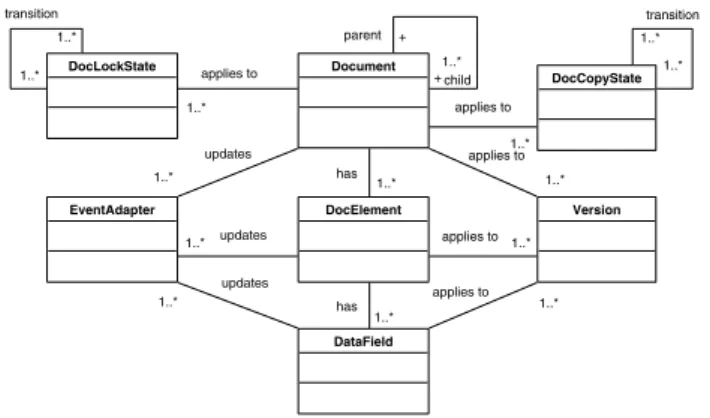
Document DocLockState 1..* 1..* transition DocCopyState 1..* 1..* transition DocElement DataField 1..* has Version 1..* applies to 1..* applies to 1..* applies to 1..* has 1..* applies to 1..* applies to EventAdapter 1..* updates 1..* updates 1..* updates child + 1..* parent +
Fig. 4.Document meta-model
To support this framework, we develop a meta-model for documents as shown in Fig. 4. A Document is a set of information pieces which are composed to-gether to serve a well defined business purpose. A Document consists of several DocElements. A DocElement is a group ofDataFields which have certain busi-ness meaning. For example, address can be a DocElement which may consist of street number, street, city, state, and zip code. A DataField is a piece of infor-mation which is treated atomically. Moreover, changing a zip code from 16801 to 16802 is an example of an atomic change. A document may receive events from its DocElements and DataFields, or from other documents. Not all the received events will produce changes in the document. For example, an order form will not be changed if the order has already been shipped. This is managed by the use of constraints (to be discussed shortly). A document generates updateevents if its content is changed.EventAdapters along with theirs constraints are used to determine which events documents should respond to.
Fig. 4 also shows that a document hasVersions. Aversionis used to model the traceable history of workflow data. Since workflow transactions have long transaction time, it is very common that some of the original data have been changed before the transaction is completed. Therefore, keeping the data trace-able is necessary and helpful. An order may also be splitinto two sub orders, which result in two new documents with their own versions. A version may ap-ply to a DataField, DocElement, or Document, but it is most relevant for a Document. In general, a series of related data field changes will lead to a new
document version. Documents can also have a link or parent-child relationship between them. It is the responsibility of the application to keep the historical data; the workflow system only provides a link to the application.
Unlocked ShareLocked ExclusiveLocked read modify release modify release release AppendLocked append relase append release (a) DocLockState Original Duplicate Split Duplicate Merge Split Merge (b) DocCopyState
Fig. 5.State diagram of DocLockState and DocCopyState
We also introduceDocCopyState andDocLockState to model concurrent ac-cess to a Document. The different values of DocLockState (ShareLocked, Exclu-siveLocked and AppendLocked) and the permissible transitions between them can be found in Fig. 5(a). The DocCopyStates areDuplicate (which means an identical copy of the original) andSplit which divides the DocFields into sep-arate documents. ShareLocked means that the lock mode is shared between multiple tasks, while ExclusiveLock mode can be held by only one task. Finally AppendLock mode means that the task can attach (or append) data into the document, but not change any existing data. Multiple access is allowed in this mode. DocCopyState can be used to trace and monitor documents when several copies are distributed in the workflow system. The two types of states are related; however, in a manual workflow system or in an inter-organizational system, the DocCopyState is needed in addition to the DocLockState to keep track of how many copies of a physical document are in circulation.
Fig. 5(b) shows the state diagram of DocCopyState. If a document has to be used by more than one task (say, in a manual system), copies must be made, thus the document enters the Duplicate state. Once a task is done, its duplicate copy must be destroyed to avoid inconsistency. A document can also be split, for example, if an order is partially fulfilled, then the order can be divided into two parts: the fulfilled part and the back order part. The former can be shipped immediately and the latter will still remain in process. In this case, the split documents require no merge. However, there are other situations in which merge may be necessary. For example, if the customer asks for all items to be sent in one shipment, then split documents (corresponding to individual item orders) should be merged.
DocLockState and DocCopyState together play a key role in determining the control flow. A parallel split is only feasible when the document supports certain state combinations given in Table 2. For example, row 1 of this table shows that if the DocCopyState is Duplicate and the DocLockState is ShareLocked, then
Table 2.State combinations that support parallel split DocCopyState DocLockState Duplicate SharedLocked Duplicate AppendLocked Split SharedLocked Split AppendLocked Split ExclusiveLocked
it is possible to access the document simultaneously in parallel. However, if the DocCopyState is Duplicate and the DocLockState is Exclusive then sharing is not possible. Hence, there is no entry for this combination. On the other hand, when the DocCopyState is Split, then all three lock states are permissible.
The impact of application data changes on documents can be very complex and has not been fully studied. From a systems perspective, the application data is dynamic and subject to change over time. Any time some application data changes, all associated tasks may be triggered. For example, a customer may change his shipping address after he submits the order. Then, the order form may be changed depending on the order status and the seller’s business policy (i.e. the order form will not be changed if the order has already been shipped; otherwise, it can be changed).
EventAdapter Constraint EventListener EventAction 1..* register 1..* invoke 1..* *
Fig. 6.EventAdapter and Constraint meta-model
Next, we turn to the EventAdapter and Constraint meta-model shown in Fig. 6. All the workflow entities (e.g. process, task, resource, document) in a document-driven workflow system communicate with each other through events. Fig. 6 shows that the EventAdaptor registers itself with EventListener and re-ceives specified events. If an event arrives and all the constraints are satisfied, then an EventAdaptor performs one or more EventActions. An EventAction is a set of SQL statements. A constraint is an SQL statement that returns a Boolean value. For example, we may have a constraint that says that an order can only be changed when it is open. The constraint for order #99 can be written in a Transact-SQL [14] statement as:
Exists(Select * from Orders Where ID= 99 and State=’open’)
If this constraint returns FALSE, the EventAdaptor will ignore the order change event, and the corresponding action will not be executed. In general, this constraint language is powerful because any kind of constraint that can be expressed in SQL can be handled by this system. In the next section, we turn to implement this framework.
4
Implementation
We implemented the document-driven workflow system using Transact-SQL on Microsoft SQL Server 2000. We use triggers to enact the workflow system. The framework presented in Fig. 3 is mapped into a RDBMS using the architecture described in Fig. 7. It shows that when a database table is changed (through an insert, update, or delete operation), a corresponding trigger is fired. This trigger generates appropriate events and puts them into the event queue table. Then the trigger associated with the event queue table sends new event messages to event listeners and the listeners execute all the event adapters that registered for these events. Finally, the event adapters update the associated tables and start the next iteration. The architecture shown in Fig. 7 consists of two loops: workflow layer loopandapplication layer loop. The workflow layer loop updates the workflow tables (through the workflow event adapter) and the application layer loop updates the application table (through the application event adapter). There are two types of triggers shown in Fig. 7, the system triggers (i.e. work-flow and event triggers) and application triggers. Both use the same underlying technology. However, it is the user’s responsibility to supply application triggers, event adapters and tables for the application layer.
Event Triggers
Workflow Tables
EventListeners
Application EventAdapters
Application Tables Event Queue Table
Workflow layer loop Application layer loop
Workflow Triggers Application Triggers
Workflow EventAdapters fire send event insert insert update update execute execute fire fire
Fig. 8.Workflow system entity schema
Fig. 8 shows the tables for entities presented in the document meta-model arranged by the layers of the framework (the scheduling layer is not shown because it was not implemented). The entities in the schema layer areProcess, Tasks, DocumentType and associated tables. The entities in the runtime layer are:Case, Workitem, Document and associated tables. There are no entities at the scheduling level. Finally, the entities at the application layer are:DataField andDataFieldType. DataField also serves as a link between the workflow system and the application data by mapping a document data field into a cell in the application data tables. This is indicated by theTableName and ColumnName attributes in the DataFieldType table, and the RowId in the DataField table. Therefore, we can link application data back to the workflow system by looking up these two tables. This is also how a clean separation between the workflow system and the application is achieved.
Fig. 9 shows the mechanism that drives the workflow system and belongs to the runtime layer. It shows the implementation of the architecture in Fig. 7. The main entities are: Event, EventAdapter and EventListener. The EventAction entity in the meta-model is implemented as an attribute (calledCommandText) in the EventAdapter table.
Fig. 10 shows the trigger used to fire events when new documents arrive. The trigger is fired when a new record is inserted into tableDocument by the workflow system. It first retrieves the new document context into the @docId variable using the select query in line 10. Then it retrieves the corresponding
Fig. 9.Workflow system event schema
Fig. 10.System trigger for new document arrival
event into the variable@eventType using the select query in lines 12-13. Then it generates a new event and inserts it into the event queue (i.e. the Events table) in lines 15-16.
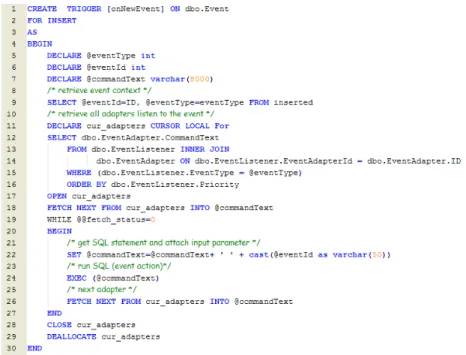
Fig. 11 demonstrates another system trigger used to activate event adapters when events arrive. A cursor is declared to retrieve all the event adapters regis-tered to listen to this event in lines 11-16. Then a loop is used to execute each entry in the cursor in lines 18-27. Each iteration through the loop will retrieve the event action stored in the variable @commandText, and attach the case Id to the event action as a part of the SQL statement stored in the new string @commandText (line 22). Then this SQL statement is executed in line 24. It should be noted that no application data or tables are directly touched in the above system triggers.
The workflow designer has to supply aprocess definition file to load the pro-cess into the workflow system. The propro-cess is defined in an XML file that includes three sections:interfaces,documents andtasks. The interfaces section describes the events and event adapters for the process repository. The documents and tasks sections define all the documents and tasks related to the process. Fig. 12
shows parts of an order process definition file. The top part of this file describes the interfaces section. There can be multiple interfaces in this section. Each in-terface consists of an event element and the associated eventAdapter element. For example, the definition shows that the order Arrives event is an external event and the event type isOrder. The corresponding event adapter has an action calleddbo.wfEAOrderArrives. This event adapter looks for an external event of type order in listen mode (as opposed to send mode). This interface defines the event that triggers the process repository to instantiate the process into a case. The actual code of instantiating the process is implemented in the adapter action (e.g. dbo.wfEAOrderArrives). The constraints associated with each adapter can also be defined as child elements of the eventAdapter element. Each constraint has a name attribute and aconstraintText attribute as shown in line 12.
Fig. 11.System trigger for new event arrival
The next section of the file describes an Order Form document. Two events are associated with this document. When a new instance of this document is created, it will generate the New Document event. When an existing instance of this document is updated, it will generate the Document Updated event. A document may also have other events such asSplit and Duplicate as described in the document meta-model.
The last section of the file describes a Receive Order task. A task has at least three definition subsections: inputDocument, outputDocument, and even-tAdapter. The inputDocument subsection specifies the input documents for a
Fig. 12.Sample process description file
task (i.e. the Receive Order task requires an Order Form document as its input document). In general, a task must have at least one input document. The out-putDocument subsection defines the output of the task. There are three output documents:Payment, Pickup List, and Shipping Advice. The last subsection is eventAdapters, which describes all the eventAdapters for the task. A task has at
least one eventAdapter that instantiates the task into a workitem. For example, the eventAdapter waiting for a new document event of type Order (lines 44-45) creates an instance for the task (e.g. workitem) when it receives such an event. A task may haveentryConstraints andexitConstraints which are not shown in Fig. 12. An example of an entryConstraint could be some business rules such as: if the shipping option is UPS ground, then the Receive Order will wait for one day to instantiate.
In this section we have demonstrated that the framework proposed in Section 3 can be implemented entirely inside a database system using SQL. The general methodology consists of the workflow designer creating a process definition file such as the one in Fig. 12 (using a text editor), and loading it into the workflow system. Then the application developer supplies the application triggers and event adapters to operate on the application data. After that the system triggers enable the execution of the process, and react to events from the application.
5
Discussion and Related Work
It is evident that researchers are realizing the importance of integrating data flow (document) into workflow modeling as indicated by some recent work on document-centric workflows [6,7,11,12]. These studies present useful concepts for modeling aspects of documents; however, the role of document (and it’s more general concept, resource) and the dependencies between documents are not addressed. Therefore, it is unclear how documents can be integrated fully into workflow systems in the design stage.
Flexibility is one of the most important issues in a workflow management sys-tem. Different approaches such as structured processes [10], workflow patterns [1], and Petri-Nets [2,3] offer varying degrees of flexibility. All these approaches are based on control flow, and try to achieve better flexibility by using complex flow structures built upon split, join, loop, and wait-for constructs [3]. However, they cannot predict the upper boundary of the flexibility. In the document-driven architecture, this upper boundary is obviously the dependency between docu-ments. For example, a customer cannot start to eat unless the food is produced, but whether the customer should pay before or after eating may vary from one restaurant to another. Therefore, the food dependency is a hard dependency, and the payment policy is a soft one. The document-driven design can easily discover the hard dependencies and provides the upper boundary of flexibility.
This flexibility makes document-driven workflows especially suitable for ad hoc workflowprocesses as opposed toproduction workflows. Voorhoeve and Aalst [18] define an ad-hoc workflow as an intermediate between well-structured, high volume production workflow and less-structured cooperative groupware systems. They also note that traditional workflow management systems (mostly based on control flow) could be error-prone when the processes require frequent changes. As an example, document-driven workflows may work well for most maintenance processes which have a few tasks and no strict control flow. There are two issues here. On the one hand, verification of document driven workflow is easier than
Table 3.Comparison between document-driven workflow and control flow workflow
Document-Driven Workflow Control Flow Workflow
Process is driven by the documents. Process is driven by the control flow. The process is very flexible and can be
changed instantly by changing constraints.
The process is less flexible because of the limi-tation of flow patterns. It is difficult to change a control flow of an instance because all the instances share the same control flow pattern. There are no fork/join design issues since
there is no control flow.
Fork/join elements are used to describe con-trol flow. The concon-trol flow may not be feasible because resource dependencies are ignored. Application Data is separated from the
pro-cess.
In most case, the application data are at-tached to the control flow.
Suited for ad hoc workflows. Good for production workflows with mature processes and a large number of tasks. Verification is relatively easy. Verification could be hard.
Need conflict resolution in complex workflows. No need for conflict resolution. Difficult to visualize the process. Process can be visualized easily.
for a control driven workflow. However, document driven workflows can lead to multiple triggers being enabled simultaneously when a document is created or updated. In this situation, it is necessary to use priorities with triggers in order to choose between enabled triggers. Table 3 shows a detailed comparison between document-driven and control flow methodologies.
A drawback of document-driven workflows is that they lack visualization of processes since there is no explicit control flow. The lack of visualization makes document-driven workflows unsuitable for modeling processes with a large number of tasks. Besides, a control flow diagram is still needed to get the big picture when designing the process.
Another advantage of our approach is that it produces a clean separation of application data from workflow processes. TheDataField andDataFieldType tables with associated events and eventAdpaters act as a middle layer between the workflow system and the application. Any changes on each side only require the middle layer to be changed and will not affect the other side. This strict separation of application data from the process can facilitate the implementa-tion of inter-organizaimplementa-tional processes because no control informaimplementa-tion needs to be exchanged between organizations.
The use of triggers in workflow system has been discussed in the WIDE project [8]. Triggers are used to capture events and handle exceptions in addi-tion to the normal workflow which is designed as a control flow. However, our study takes this approach one step further by the use of database triggers as mechanisms to drive and enact the workflow system, and removing the need for a workflow “engine”. As a result, the workflow system can be implemented en-tirely inside the database. The concept of constraints has been studied in most workflow systems and they are usually represented as ECA (Event-Condition-Action) rules [13]. Finally, a State Entity Activity Model (SEAM) was developed
by Bajaj and Ram [5] to model workflows at the conceptual level. While SEAM provides a direct mapping between the SEAM models and RDBMS, it is unclear whether SEAM could support complex workflows such as the ones in [1].
6
Conclusion and Future Research
We proposed a framework for document-driven workflow systems. In addition we implemented this framework to demonstrate that it is feasible to build a work-flow system entirely inside a RDBMS. The most important difference between this approach and conventional workflows is that, in document-driven workflow systems there is no predefined control flow. All the tasks are executed based on the availability of their input documents and associated resources. Therefore, the extra work of checking the correctness of control flow can be reduced. In addition, the framework provides a simple way to find deadlock and dangling tasks through the input/output documents analysis.
The prototype workflow system was implemented entirely in a RDBMS using Transact-SQL. The enactment depends on various events fired by database trig-gers. The RDBMS based workflow system can be embedded into any database application easily.
The document-driven approach may not work well when a large number of data changes occur concurrently. This may lead to concurrency and conflict resolution issues. Moreover, as mentioned above, lack of visualization is also a drawback. While this approach may not be appropriate in all environments, we feel that for the most part it is especially suitable for ad hoc workflows. The concept of a document-driven model can be extended into a more comprehensive resource-based model by viewing documents as a type of resource along with other resources such as people, machines, facilities and equipment. Information about all these resources can be kept in a database, and tasks would be enabled only when all the resources are available. Thus, the same approach presented here can be easily extended to encompass multiple types of resources.
References
1. Aalst, W.M.P. van der: Workflow Patterns. http://is.tm.tue.nl/research/
patterns/.
2. Aalst,W.M.P. van der and Hee, K.van: Workflow Management: Models, Methods, and Systems. The MIT Press, January,2002.
3. Aalst, W.M.P. van der, and Kumar, A.: XML-Based Schema Definition for Support of Interorganizational Workflow. Information System Research, Vol. 14, No. 1, March 2003, 23-46.
4. Bae, H., et al.: Document configuration control process captured in a workflow. Computers in Industry, No.53, 2004, 117-131.
5. Bajaj, A. and Ram, S.: SEAM: A state-entity-activity-model for a well-defined workflow development methodology. Knowledge and Data Engineering, IEEE Transactions on Volume 14, Issue 2, March-April 2002 Page(s):415 - 431.
6. Botha, R.A., Eloff, J.H.P., 2001. Access control in document-centric workflow systems–an agent-based approach. Computers and Security 20 (6), 525-532. 7. Paul Dourish, W. Keith Edwards, Anthony LaMarca, et al., Extending document
management systems with user-specific active properties. ACM Trans. Inf. Syst. 18(2): 140-170 (2000).
8. Grefen, P., et al.: Database Support for Workflow management - The WIDE Project. Kluwer Academic Publishers, 1999.
9. Hollingsworth, D.: The Workflow Reference Model 10 Years On.http://www.wfmc.
org/standards/model.htm.
10. Kiepuszewski, B., Hofstede, A.H.M, and Bussler, C.: On Structured Workflow Mod-eling. In Proceedings CAiSE’2000, LNCS Vol.1797, Springer Verlag.
11. Krishnan, R., Munaga, L., and Karlapalem, K., 2002, ”XDoC-WFMS: A Frame-work for Document Centric Workflow Management System,” Lecture Notes on Computer Science, 2465, pp. 348-362.
12. Mazumdar, S. and AbuSafiya, M., 2004. A Document-Centric Approach to Busi-ness Process Management. In Proc. Intl. Conf. on Information and Knowledge Engineering, pages 461-466.
13. McCarthy, D.R. and Dayal, U.: The Architecture of an Active Database System. in Proc. ACM SIGMOD Conf. on Management of Data, Portland, 1989, pp. 215-224. 14. Micorsoft Corporation: SQL Server Books Online:Transact-SQL Reference. 2000. 15. Muehlen, M. zur: Resource Modeling in Workflow Applications. http://
www.workflow-research.de/Publications/PDF/MIZU-WF99.PDF.
16. OASIS: Web Services Business Process Execution Language (WSBPEL).
http://www.oasis-open.org.,fig:Architecture
17. Scheer, A.W.: ARIS - Business Process Frameworks. 2ed, Springer, 1998.
18. Voorhoeve, M. and van der Aalst, W.: Ad-hoc workflow: Problems and solutions. International Conference on Database and Expert Systems Applications - DEXA, 1997, p 36-40
19. WFMC: XML Processing Description Language (XPDL).http://www.wfmc.org/
standards/XPDL.htm.
20. Zlotkin, G.: Organizing Business Knowledge - The MIT Process Hand-book. Edited by Malone, T.W., et al, The MIT Press, 2003, pp. 20.