HP OpenView Operations
Reporting and Database Schema
Software Versions:
A.08.10 and A.08.20
Legal Notices
Warranty.
Hewlett-Packard makes no warranty of any kind with regard to this
document, including, but not limited to, the implied warranties of
merchantability and fitness for a particular purpose. Hewlett-Packard
shall not be held liable for errors contained herein or direct, indirect,
special, incidental or consequential damages in connection with the
furnishing, performance, or use of this material.
A copy of the specific warranty terms applicable to your Hewlett-Packard
product can be obtained from your local Sales and Service Office.
Restricted Rights Legend.
Use, duplication or disclosure by the U.S. Government is subject to
restrictions as set forth in subparagraph (c) (1) (ii) of the Rights in
Technical Data and Computer Software clause at DFARS 252.227-7013.
Hewlett-Packard Company
United States of America
Rights for non-DOD U.S. Government Departments and Agencies are as
set forth in FAR 52.227-19(c)(1,2).
Copyright Notices.
©Copyright 1999 - 2004 Hewlett-Packard Development Company, L.P.
No part of this document may be copied, reproduced, or translated to
another language without the prior written consent of Hewlett-Packard
Company. The information contained in this material is subject to
change without notice.
Trademark Notices.
Intel Itanium
Logo: Intel, Intel Inside and Itanium are trademarks or
registered trademarks of Intel Corporation in the U.S. and other
countries and are used under license.
Java
is a U.S. trademark of Sun Microsystems, Inc.
Microsoft
is a U.S. registered trademark of Microsoft Corporation.
MS-DOS
is a U.S. registered trademark of Microsoft Corporation.
Netscape
and Netscape Navigator
are U.S. trademarks of Netscape
Communications Corporation.
OpenView
is a registered U.S. trademark of Hewlett-Packard Company.
Oracle
is a registered U.S. trademark of Oracle Corporation, Redwood
City, California.
OSF, OSF/1, OSF/Motif, Motif, and Open Software Foundation are
trademarks of the Open Software Foundation in the U.S. and other
countries.
Pentium
is a U.S. registered trademark of Intel Corporation.
SQL*Plus
is a registered U.S. trademark of Oracle Corporation,
Redwood City, California.
UNIX
is a registered trademark of the Open Group.
Windows NT
is a U.S. registered trademark of Microsoft Corporation.
Windows
and MS Windows
are U.S. registered trademarks of
Contents
1. The OVO Database Schema
In This Chapter . . . 22
Introduction . . . 23
General Conventions . . . 24
Performing Queries. . . 25
Adding Your Own OVO Reports . . . 26
Adding a Program Report. . . 26
Using Variables as Parameters for Reports . . . 27
Adding an SQL*Plus Report . . . 28
Adding Your Own OVO Service Reports . . . 31
HP OpenView Service Navigator Reports . . . 31
2. Entity Relationship Diagrams
In This Chapter . . . 34
Entity Relationship Diagrams. . . 35
3. User Tables
In This Chapter . . . 46
opc_appl_groups Table . . . 47
opc_appl_in_group Table . . . 48
opc_appl_login Table . . . 49
opc_appl_node_list Table . . . 50
opc_appl_platforms Table . . . 51
opc_applgrp_in_grp Table . . . 52
opc_application Table. . . 53
opc_capabilities Table . . . 56
opc_integr_appl Table . . . 57
opc_op_browser_set Table . . . 58
opc_op_browser_set_cma Table . . . 61
Contents
opc_ov_appl Table . . . 75
opc_user_data Table. . . 76
4. Node Tables
In This Chapter . . . 78
opc_chsets Table . . . 79
opc_cluster_map Table. . . 80
opc_comm_type Table . . . 81
opc_mgmtsv_config Table . . . 82
opc_net_machine Table . . . 84
opc_net_sec_types Table . . . 94
opc_node_alt_addr Table . . . 95
opc_node_alt_name Table . . . 96
opc_node_alt_v6_addr Table . . . 97
opc_node_defaults Table . . . 98
opc_node_groups Table . . . 103
opc_node_names Table. . . 104
opc_node_pattern Table . . . 105
opc_nodehier_layout Table . . . 106
opc_nodehiers Table . . . 107
opc_nodes Table . . . 108
opc_nodes_in_group Table . . . 116
opc_pltfrm_family Table . . . 117
5. Template Tables
In This Chapter . . . 120
opc_console_source Table. . . 121
opc_ec_source Table . . . 123
opc_interf_source Table . . . 124
opc_logfile_source Table. . . 126
Contents
opc_templ_on_ngrp Table . . . 137
opc_templ_options Table . . . 138
opc_templ_status Table . . . 140
opc_tmpl_on_node Table . . . 141
opc_tgrp_in_tgrp Table . . . 142
opc_tgrp_on_ngrp Table . . . 143
opc_tgrp_on_node Table. . . 144
opc_trap_source Table . . . 145
6. Condition Tables
In This Chapter . . . 148
opc_appresp_id_lst Table . . . 149
opc_cond Table . . . 150
opc_cond_appl_list Table . . . 151
opc_cond_cust_attrib Table . . . 152
opc_cond_mgrp_list Table . . . 153
opc_cond_node_list Table. . . 154
opc_cond_obj_list Table . . . 155
opc_cond_oper_list Table . . . 156
opc_cond_sev_list Table . . . 157
opc_cond_stat_var Table . . . 158
opc_cond_text Table . . . 159
opc_cond_type_list Table . . . 160
opc_monitor_cond Table. . . 161
opc_mpi_reg_conds Table. . . 162
opc_msg_cond Table . . . 164
opc_msg_key_rel Table . . . 168
opc_open_mpis Table . . . 169
opc_rgr_cond Table. . . 170
Contents
opc_escal_assign_m Table . . . 185
opc_forward_msgs Table . . . 186
opc_hist_anno_text Table. . . 187
opc_hist_annotation Table . . . 188
opc_hist_cust_attrib Table . . . 189
opc_hist_messages Table . . . 190
opc_hist_msg_text Table . . . 196
opc_hist_orig_text Table . . . 197
opc_instr_interf Table . . . 198
opc_instructions Table . . . 199
opc_msg_text Table . . . 200
opc_orig_msg_text Table . . . 201
opc_service_msgs Table . . . 202
8. Other Tables
In This Chapter . . . 204
opc_agent_status Table . . . 205
opc_audit Table . . . 206
opc_audit_param Table . . . 207
opc_change_status Table . . . 208
opc_cma_names Table . . . 210
opc_db_maintenance Table . . . 211
opc_message_groups Table . . . 213
opc_notif_schedule Table . . . 214
opc_notif_services Table. . . 215
opc_service Table . . . 216
opc_service_log Table . . . 217
opc_symbols Table . . . 218
opc_temp_appl_list Table. . . 219
opc_temp_msgrp_list Table . . . 220
opc_temp_node_list Table . . . 221
Contents
opc_tmp_filter_msggrp Table . . . 227
opc_tmp_filter_node Table . . . 228
opc_tmp_filter_obj Table . . . 229
opc_tmp_filter_pattern_node Table. . . 230
opc_tmp_filter_service Table . . . 231
opc_tmp_misc_msggrp Table . . . 232
opc_tmp_msg_id Table . . . 233
opc_tmp_msg_id_service Table . . . 234
opc_tmp_valid_msggrp Table . . . 235
opc_tmp_visible_msggrp Table . . . 236
opc_tmp_visible_node Table . . . 237
opc_tmp_visible_node2 Table . . . 238
opc_tmp_visible_pattern Table . . . 239
opc_tmp_visible_profile Table . . . 240
opc_tmp_visible_service Table. . . 241
opc_trouble_ticket Table . . . 242
9. Secondary Indexes
In This Chapter . . . 244
Secondary Indexes . . . 245
10. Foreign Keys
In This Chapter . . . 248
Foreign Keys. . . 249
A. Database Changes
Changes from OVO A.07.00 to A.08.10 . . . 252
Printing History
The manual printing date and part number indicate its current edition.
The printing date will change when a new edition is printed. Minor
changes may be made at reprint without changing the printing date. The
manual part number will change when extensive changes are made.
Manual updates may be issued between editions to correct errors or
document product changes. To ensure that you receive the updated or
new editions, you should subscribe to the appropriate product support
service. See your HP sales representative for details.
First Edition: February 1999
Second Edition: September 1999
Third Edition: June 2000
Fourth Edition: January 2002
Fifth Edition: May 2004
Sixth Edition: September 2004
Conventions
The following typographical conventions are used in this manual.
Table 1
Typographical Conventions
Font
Meaning
Example
Italic
Book or manual titles, and man page
names
Refer to the OVO Administrator’s
Reference and the opc(1M) manpage
for more information.
Emphasis
You must follow these steps.
Variable that you must supply when
entering a command
At the prompt, enter
rlogin
username.
Parameters to a function
The
oper_name
parameter returns
an integer response.
Bold
New terms
The HTTPS agent observes...
Computer
Text and other items on the
computer screen
The following system message
displays:
Are you sure you want to
remove current group?
Command names
Use the
grep
command ...
Function names
Use the
opc_connect()
function to
connect ...
Computer
Bold
Text that you enter
At the prompt, enter
ls -l
Keycap
Keyboard keys
Press
Return.
[Button]
Buttons in the user interface
Click
[OK]
.
OVO Documentation Map
HP OpenView Operations (OVO) provides a set of manuals and online
help that help you use the product and understand the concepts
underlying the product. This section describes what information is
available and where you can find it.
Electronic Versions of the Manuals
All manuals are available as Adobe Portable Document Format (PDF)
files in the documentation directory on the OVO product CD-ROM.
With the exception of the OVO Software Release Notes, all manuals are
also available in the following OVO web server directory:
http://<management_server>:3443/ITO_DOC/<lang>/manuals/*.pdf
In this URL, <
management_server
> is the fully qualified hostname of
your management server, and <
lang
> stands for your system language,
for example
C
for English and
japanese
for Japanese environments.
Alternatively, you can download the manuals from the following website:
http://ovweb.external.hp.com/lpe/doc_serv
Watch this website regularly for the latest edition of the OVO Software
Release Notes, which gets updated every 2-3 months with the latest
news such as additionally supported OS versions, latest patches and so
on.
OVO Manuals
This section provides an overview of the OVO manuals and their
contents.
Table 2
OVO Manuals
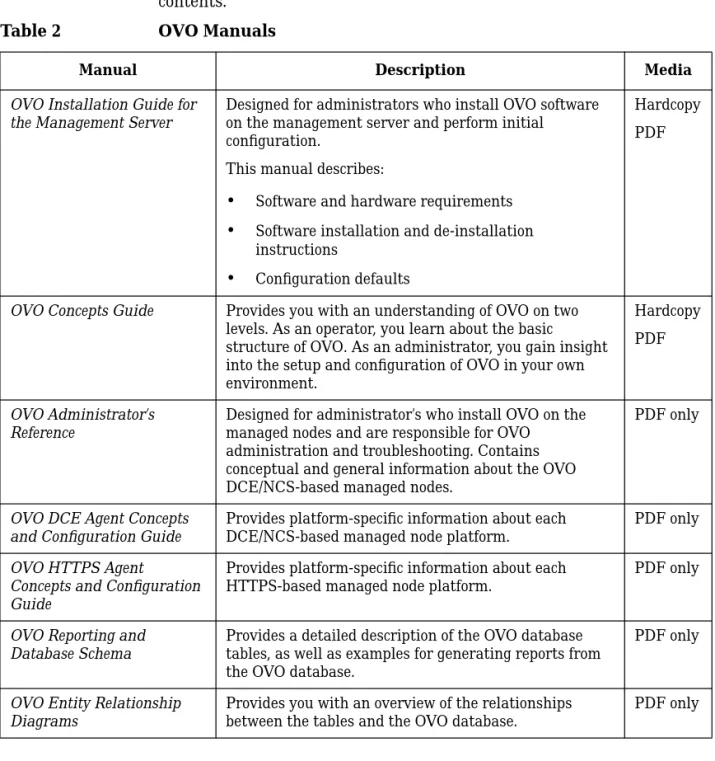
Manual Description Media
OVO Installation Guide for the Management Server
Designed for administrators who install OVO software on the management server and perform initial configuration.
This manual describes:
•
Software and hardware requirements•
Software installation and de-installation instructions•
Configuration defaultsHardcopy PDF
OVO Concepts Guide Provides you with an understanding of OVO on two levels. As an operator, you learn about the basic structure of OVO. As an administrator, you gain insight into the setup and configuration of OVO in your own environment.
Hardcopy PDF
OVO Administrator’s Reference
Designed for administrator’s who install OVO on the managed nodes and are responsible for OVO
administration and troubleshooting. Contains conceptual and general information about the OVO DCE/NCS-based managed nodes.
PDF only
OVO DCE Agent Concepts and Configuration Guide
Provides platform-specific information about each DCE/NCS-based managed node platform.
PDF only
OVO HTTPS Agent
Concepts and Configuration Guide
Provides platform-specific information about each HTTPS-based managed node platform.
OVO Java GUI Operator’s Guide
Provides you with a detailed description of the OVO Java-based operator GUI and Service Navigator. This manual contains detailed information about general OVO and Service Navigator concepts and tasks for OVO operators, as well as reference and troubleshooting information.
PDF only
Service Navigator Concepts and Configuration Guide
Provides information for administrators who are responsible for installing, configuring, maintaining, and troubleshooting the HP OpenView Service Navigator. This manual also contains a high-level overview of the concepts behind service management.
Hardcopy PDF
OVO Software Release Notes Describes new features and helps you:
•
Compare features of the current software with features of previous versions.•
Determine system and software compatibility.•
Solve known problems.PDF only
OVO Supplementary Guide to MPE/iX Templates
Describes the message source templates that are available for MPE/iX managed nodes. This guide is not available for OVO on Solaris.
PDF only
Managing Your Network with HP OpenView Network Node Manager
Designed for administrators and operators. This manual describes the basic functionality of HP OpenView Network Node Manager, which is an embedded part of OVO.
Hardcopy PDF
OVO Database Tuning This ASCII file is located on OVO management server on the following location:
ASCII
Additional OVO-related Products
This section provides an overview of the OVO-related manuals and their
contents.
Table 3
Additional OVO-related Manuals
Manual Description Media
HP OpenView Operations for UNIX Developer’s Toolkit
If you purchase the HP OpenView Operations for UNIX Developer’s Toolkit, you receive the full OVO documentation set, as well as the following manuals:
OVO Application Integration Guide
Suggests several ways external applications can be integrated into OVO.
Hardcopy PDF
OVO Developer’s Reference Provides an overview of all available application programming interfaces (APIs).
Hardcopy PDF HP OpenView Event Correlation Designer for NNM and OVO
If you purchase HP OpenView Event Correlation Designer for NNM and OVO, you receive the following additional documentation. Note that HP OpenView Event Correlation Composer is an integral part of NNM and OVO. OV Composer usage in the OVO context is described in the OS-SPI documentation.
HP OpenView ECS Configuring Circuits for NNM and OVO
Explains how to use the ECS Designer product in the NNM and OVO environments.
Hardcopy PDF
OVO Online Information
The following information is available online.
Table 4
OVO Online Information
Online Information Description
HP OpenView Operations Administrator’s Guide to Online Information
Context-sensitive help system contains detailed help for each window of the OVO administrator Motif GUI, as well as step-by-step
instructions for performing administrative tasks. HP OpenView Operations
Operator’s Guide to Online Information
Context-sensitive help system contains detailed help for each window of the OVO operator Motif GUI, as well as step-by-step instructions for operator tasks.
HP OpenView Operations Java GUI Online
Information
HTML-based help system for the OVO Java-based operator GUI and Service Navigator. This help system contains detailed information about general OVO and Service Navigator concepts and tasks for OVO operators, as well as reference and troubleshooting information. HP OpenView Operations
Man Pages
Manual pages available online for OVO. These manual pages are also available in HTML format.
To access these pages, go to the following location (URL) with your web browser:
http://<management_server>:3443/ITO_MAN
In this URL, the variable <management_server> is the fully qualified hostname of your management server. Note that the man pages for the OVO HTTPS-agent are installed on each managed node.
In This Chapter
In This Chapter
This chapter introduces the OVO database schema. It explains the areas
that this book covers and describes how to use the information provided
to write and display your own reports in OVO.
Introduction
Introduction
This chapter provides information about the definitions and contents of
the OVO database tables. You can generate reports or perform queries
via any report tools compatible with the Oracle database.
NOTE
All of the tables defined in this manual are considered read-only. You can
query the tables at any time for report generation, but you must not
write to the tables. Writing to the tables directly is not supported by
Hewlett-Packard.
Also, tables and fields may change in future releases of OVO.
Hewlett-Packard does not guarantee that the reports you develop will
work with future releases of OVO.
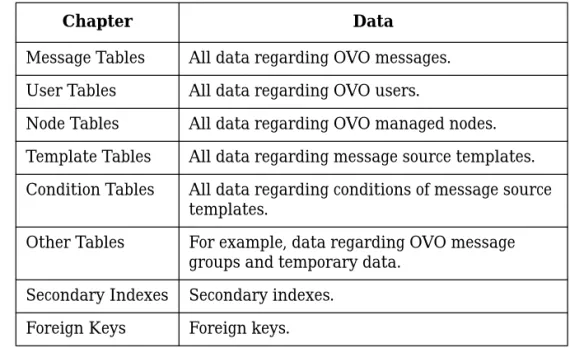
Table 1-1 gives an overview of the organization of the information in this
manual.
Table 1-1
The OVO Database
Chapter
Data
Message Tables
All data regarding OVO messages.
User Tables
All data regarding OVO users.
Node Tables
All data regarding OVO managed nodes.
Template Tables
All data regarding message source templates.
Condition Tables
All data regarding conditions of message source
Introduction
General Conventions
Most indexing key fields are implemented as 36-byte character Universal
Unique Identifiers (UUIDs) to make key generation easier and be
consistent with the object identifiers used by other OpenView databases.
OVO uses a special null ID that consists of 36 zeros, except for foreign
keys which use Oracle null values.
Enumerated types are implemented as integer fields. The possible values
are given in the Description column. The values for Yes/No are 1/0.
The Constraint column describes the constraints of each table column.
See Table 1-2 on page 24 for the constraints that are used:
Table 1-2
Notation of the Constraint Field
Short Form
Constraint
Description
P
Primary Key
Values in primary key columns
may never be null. The primary
key identifies a row and therefore
must be unique. If several
columns in a table belong to the
primary key, the combination of
the primary keys has to be
unique.
F
Foreign Key
A foreign key column references
the primary key of another table.
N
Not Null
Not null columns must contain a
value. Note that Oracle
interprets an empty string as
NULL. String columns that
cannot contain empty strings are
NOT NULL.
Introduction
Performing Queries
OVO supports the following query methods:
❏
OVO user interface
OVO reports that are called from the OVO user interface. OVO
provides the following report types:
•
Report programs
You can add your own programs as described in the section
“Adding a Program Report” on page 26.
•
SQL reports using SQL*Plus
You can add your own SQL reports as described in the section
“Adding an SQL*Plus Report” on page 28.
•
OVO internal reports
These reports use internal C functions and, consequently, may
not be added or modified.
❏
Reporting tools accessing the database directly
Reports generated by any reporting tool that can access the Oracle
database.
❏
Service Reports
OVO-specific service reports are included in the HP OpenView
Reporter product and can be viewed over the web. For more
information on how to add new service reports and how to go about
modify existing ones, see the HP OpenView VantagePoint Reporter
documentation.
Adding Your Own OVO Reports
Adding Your Own OVO Reports
This section gives you an idea of how to add your own reports to the list
of reports already available to OVO users in the OVO GUI. It covers the
following general areas:
❏
Adding a Program Report
❏
Using Variables as Parameters for Reports
❏
Adding an SQL*Plus Report
Adding a Program Report
If you have a program that you want to make accessible to the OVO users
as a report from the GUI, you need to carry out the following steps:
1. Decide whether the report should be accessible by the administrator,
by the operators, or both. Administrator reports are registered in the
following file:
/etc/opt/OV/share/conf/OpC/mgmt_sv/reports/<LANG>/\
admin.rpts
Operator reports are registered in the following file:
/etc/opt/OV/share/conf/OpC/mgmt_sv/reports/<LANG>/\
oper.rpts
2. Open the appropriate file and add or modify the following lines. The
example below creates an OS user report that displays the
/etc/passwd
file:
REPORTNAME OS user report
REPORTTYPE PGM
DESCRIPTION
Show all OS users configured on this system
Adding Your Own OVO Reports
Using Variables as Parameters for Reports
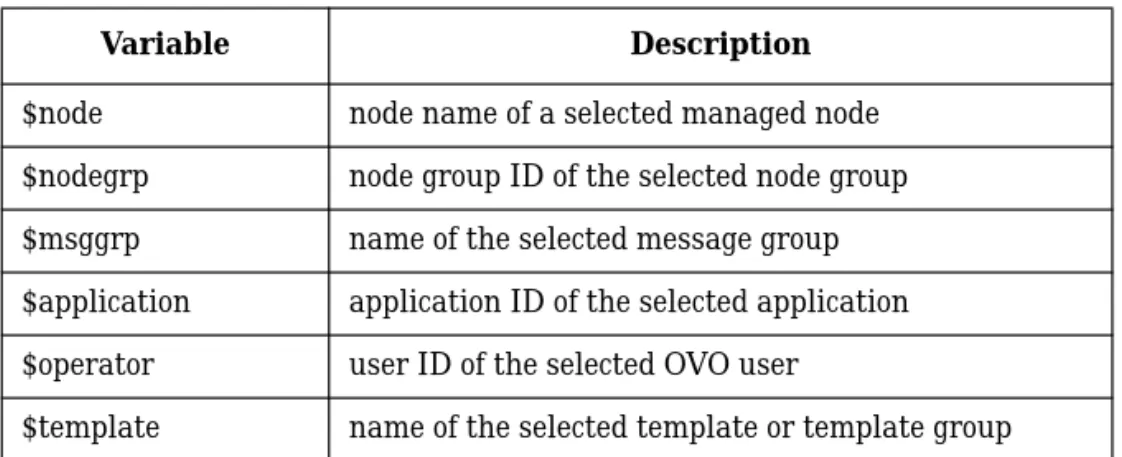
OVO provides a number of predefined variables that allow you to run a
report about an object that is selected in the GUI, for example nodes or
message groups. Table 1-3 on page 27 shows which variables are
available in the administrator GUI. “Adding an SQL*Plus Report” on
page 28 contains examples of the variables in use.
Table 1-4 on page 27 shows which variables are available in the operator
GUI and from the administrator’s Message Browser.
Table 1-3
Available OVO Variables in the Administrator GUI
Variable Description
$node node name of a selected managed node $nodegrp node group ID of the selected node group $msggrp name of the selected message group $application application ID of the selected application $operator user ID of the selected OVO user
$template name of the selected template or template group
Table 1-4
Available OVO Variables in the Operator GUI and Administrator
Message Browser
Variable Description
$message_active message ID of selected active message $message_pending message ID of selected pending message $message_history message ID of selected history message
Adding Your Own OVO Reports
Adding an SQL*Plus Report
This section illustrates the steps for defining a report that allows OVO
users to query data from the OVO database. It uses SQL*Plus to run an
SQL script. The example described creates an administrator’s report that
shows which users are responsible for a selected message group and
what the corresponding node groups are. You will need to carry out the
following steps:
1. Decide which data you need for the report. The OVO database tables
and their relationships are described in the following sections of this
manual.
For this example, the table
opc_op_realm
contains details of the
responsibilities of the OVO users and, in addition, the message group
name that is specified as a parameter. The table
opc_user_data
lists
the OVO users. The link between
opc_op_realm
and
opc_user_data
is the
user_id
, namely
opc_op_realm.user_id
->
opc_user_data.user_id
. The table
opc_node_groups
lists the node
group names and is linked to
opc_op_realm
by means of the
node_group_id
, namely
opc_op_realm.node_group_id
->
opc_node_groups.node_group_id
.
2. Create the SQL statement that extracts the information you need. As
a test, set a fixed value for the message-group name, for example:
select distinct u.name, g.node_group_name
from
opc_user_data u, opc_op_realm r, opc_node_groups g
where r.user_id = u.user_id
and r.node_group_id = g.node_group_id
and r.msg_group_name = ‘OS’
order by 1,2;
You can use, for example, SQL*Plus to test the SQL statement. You
will be asked for the
opc_report
password, then enter the following
Adding Your Own OVO Reports
SQL*Plus allows you to pass parameters. In the SQL*Plus script, the
first parameter is referred to as
&1
. Since the parameter in the
example is a string, it has to be enclosed in single quotes:
‘&1’
The name of the report in this example is
msggrp_users.sql
. It
resides in the directories specified in “Adding a Program Report” on
page 26. You can copy an existing report and modify the header as
appropriate. The report in this example,
msggrp_users.sql
, is as
follows:
REM various SQL*Plus settings, e.g. to suppress terminal
output
set heading off
set termout off
set echo off
set linesize 79
set pagesize 0
set feedback off
set newpage 0;
set Verify Off
set arraysize 5
ttitle off;
REM OVO reports write to the file /tmp/rep.lst
REM (.1st may be omitted)
spool /tmp/rep
REM Print a report header like the other OVO reports
select ‘ ‘ from dual;
select ‘
OVO Report‘ from dual;
select ‘
---‘ from dual;
select ‘ ‘ from dual;
select ‘Report Date: ‘,sysdate from dual;
select ‘ ‘ from dual;
Adding Your Own OVO Reports
select
‘---‘ from
dual;
REM Our SQL statment; the message group name is passed as
REM parameter &1
select distinct u.name, g.node_group_name
from
opc_user_data u, opc_op_realm r, opc_node_groups g
where r.user_id = u.user_id
and r.node_group_id = g.node_group_id
and r.msg_group_name = ‘&1‘
order by 1,2;
REM Finally, exit SQL*Plus
quit
4. Test the report using the OVO report script,
call_sqlplus.sh
. It
connects as user
opc_op
to the OVO database and runs the report
script using SQL*Plus. Note that the file type
.sql
is not specified.
Enter the following command:
/opt/OV/bin/OpC/call_sqlplus.sh msggrp_users OS
For more information see the man page call_sqlplus.sh(1).
5. Decide whether the report should be accessible by the administrator,
by the operators, or by both. See “Adding a Program Report” on
page 26 for information on what to do once you have made the
decision. Since the report in this example is only available to the
administrator, add the following lines to the file,
admin.rpts
:
REPORTNAME
Message group users
REPORTTYPE
PGM
DESCRIPTION
Users responsible for a selected message
group
REPORTFILE
/opt/OV/bin/OpC/call_sqlplus.sh
Adding Your Own OVO Service Reports
Adding Your Own OVO Service Reports
OVO-specific service reports use information taken directly from the
OVO database and may be viewed using HP OpenView Reporter. You can
add new service reports and modify the existing reports to suit the
demands of your own particular environment. For more information
about what you need to be able to edit OVO-specific service reports and
how to go about doing it, see the HP OpenView Reporter product
documentation.
HP OpenView Service Navigator Reports
HP OpenView Reporter also comes with several reports for Service
Navigator. They display information about the monitored services in
statistical or graphical format, for example, the general availability of
services over time, the number of messages received for each service over
time, or the services with the highest number of messages.
To write your own reports, you need to query the tables
opc_service
and
opc_service_log
, see Table 8-8 on page 216 and Table 8-9 on
page 217 respectively.
opc_service
contains basic information about
each service, for example, the label of a service.
opc_service_log
contains the status logs which consist of the severity and the duration of
the severity status. Both tables are empty, if logging is not enabled or
disabled.
When you query
opc_service_log
to generate a report about the status
of a service within a time interval, for example, how often and how long a
service was in a warning status during a particular month, make sure
that your query takes into account the fact that the start and end time of
Adding Your Own OVO Service Reports
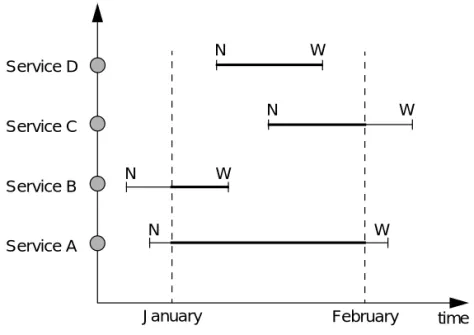
the severity status can be outside of the queried time interval. Figure 1-1
on page 32 shows how the time when a service entered or left a certain
severity status can affect service reporting.
Figure 1-1
Reporting on Service Status Duration
The following situations must be considered:
❏
Start time is outside the interval
See
Service A
and
Service B
in Figure 1-1: both services change
from normal to warning before the start of the queried time interval.
❏
End time is outside the interval
Service A
Service B
Service C
Service D
time
January
February
N
N
N
N
W
W
W
W
In This Chapter
In This Chapter
This chapter contains the entity relationship diagrams for the OVO
database.
Entity Relationship Diagrams
Entity Relationship Diagrams
Entity relationship diagrams show the relationship between the tables
in the OVO database.
The following figures are also available full-size in PDF format in the
OVO documentation software fileset and can be printed on DIN A3 or
Tabloid (11 x 17 inches) paper. See the OVO Installation Guide for the
Management Server for more information about installing the OVO
product bundles.
See Figure 2-1 on page 35 for an explanation of the notation that is used
in the diagrams.
Figure 2-1
Diagram Notation
NOTE
The entity relationship diagrams only show the tables relating to users,
nodes, templates, conditions and messages. They do not represent the
entire OVO database.
Exactly One
Many (more than one)
One Or More
Multiplicity of Relationships
Zero, One Or More Optional (0 or 1)
Entity Relationship Diagrams
Relationships that cannot be described using the notation are described
in free text.
Figure 2-2
Multiplicity Example 1
Figure 2-2 shows that a user in the opc_user_data table has zero, one, or
more saved browser settings in opc_op_browser_set. In other words, a
user may save one or more browser settings, but does not have to.
Each browser setting belongs to exactly one user. Since no name appears
on the relationship line, the relationship is based on the common key,
user_id.
Figure 2-3
Multiplicity Example 2
Figure 2-3 shows that a browser setting may have zero, one, or more
selected objects, for example selected nodes. Each of the selected objects
in opc_op_browser_set_obj belongs to exactly one browser setting. To
opc_op_browser_set user_id setting name opc_user_data user_id symbol_type_id nodehier_id opc_op_browser_set user_id setting name opc_op_browser_set_obj user_id setting_name object_type object_name user_id setting_name
Entity Relationship Diagrams
show that the tables are related by a combination of user_id and
setting_name, both these column names appear next to the relationship
line.
Figure 2-4
Multiplicity Example 3
Figure 2-4 shows that the table opc_nodehier_layout represents a
hierarchy of nodes through a relationship with itself. If a hierarchy
element (represented by layout_id) has no parent hierarchy, the
parent_id is null. Otherwise, the parent_id points to the layout_id of the
layout element that contains this one.
A layout element may contain zero, one, or more other layout elements.
opc_nodehier_layout layout_id
nodehier_id parent_id node_id layout_id
Entity Relationship Diagrams
Figure 2-5
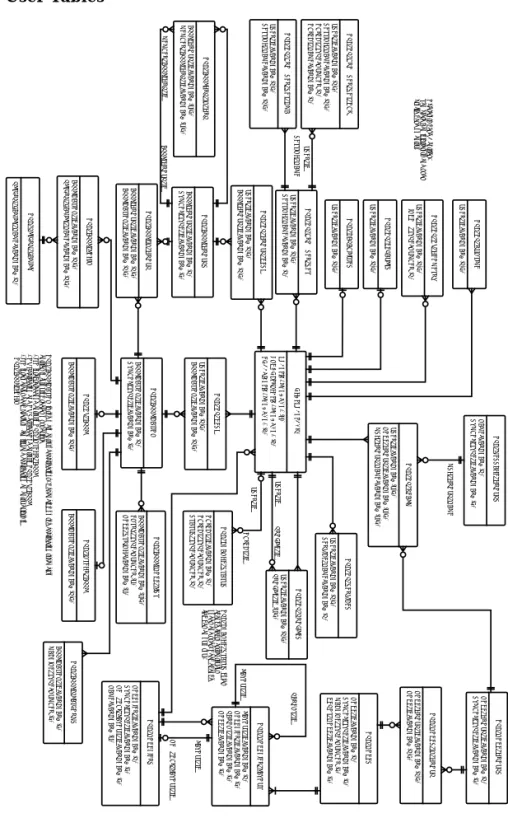
User Tables
USER_ID: VARCHAR2 (P,F)
APPLICATION_ID: VARCHAR2 (P,F)
OPC_OP_DESK
USER_ID: VARCHAR2 (P,F)
OPC_OP_DEFAULTS
USER_ID: VARCHAR2 (P,F)
OPC_CAPABILITIES
APPLICATION_ID: VARCHAR2 (P)
SYMBOL_TYPE_ID: VARCHAR2 (F)
OPC_APPLICATION
APPL_GROUP_ID: VARCHAR2 (P)
SYMBOL_TYPE_ID: VARCHAR2 (F)
OPC_APPL_GROUPS
APPL_GROUP_ID: VARCHAR2 (P,F)
APPLICATION_ID: VARCHAR2 (P,F)
OPC_APPL_IN_GROUP
APPLICATION_ID: VARCHAR2 (P,F)
PLTFRM_FAMILY_NAME: VARCHAR2 (P,F)
OPC_APPL_LOGIN
APPLICATION_ID: VARCHAR2 (U,F)
ENTRY_TYPE: NUMBER (U)
NODE_STRING: VARCHAR2 (U)
OPC_APPL_NODE_LIST
APPLICATION_ID: VARCHAR2 (P,F)
OPC_INTEGR_APPL
PLTFRM_FAMILY_NAME: VARCHAR2 (P)
OPC_PLTFRM_FAMILY
APPLICATION_ID: VARCHAR2 (P,F)
OPC_OV_APPL
USER_ID: VARCHAR2 (U,F)
NODE_GROUP_ID: VARCHAR2 (U,F)
MSG_GROUP_NAME: VARCHAR2 (U,F)
OPC_OP_REALM
USER_ID: VARCHAR2 (P,F)
OPC_OP_RUNTIME
NAME: VARCHAR2 (P)
SYMBOL_TYPE_ID: VARCHAR2 (F)
OPC_MESSAGE_GROUPS
USER_ID: VARCHAR2 (P)
SYMBOL_TYPE_ID: VARCHAR2 (F)
NODEHIER_ID: VARCHAR2 (F)
OPC_USER_DATA
MSG_GROUP_NAME
USER_ID: VARCHAR2 (P,F)
WINDOW_TYPE: NUMBER (P)
OPC_OP_OV_GEOMETRY
Operators have 3 entries.
Template Administrators and user
profile have no entry.
OPC_APPLICATION is the main entry of applications. Depending on the application type, also
entries in following tables must exist:
- ITO integrated: one entry in OPC_INTEGR_APPL
- OV Application and OV Service: One entry in OPC_OV_APPL
- ITO internal: for each platform familiy and application an entry exists in
OPC_APPL_LOGIN
USER_ID: VARCHAR2 (P,F)
PROFILE_ID (U,F)
OPC_OP_PROFILES
USER_ID
PROFILE_ID
USER_ID: VARCHAR2 (P,F)
APPL_GROUP_ID: VARCHAR2 (P,F)
OPC_OP_GROUP_DESK
APPL_GROUP_ID: VARCHAR2 (U,F)
MEMBER_APPL_GRP_ID: VARCHAR2 (U,F)
OPC_APPLGRP_IN_GRP
MEMBER_APPL_GRP_ID
APPL_GROUP_ID
USER_ID: VARCHAR2 (P,F)
SETTING_NAME: VARCHAR2 (P)
OPC_OP_BROWSER_SET
USER_ID: VARCHAR2 (P,F)
SETTING_NAME: VARCHAR2 (P,F)
OBJECT_TYPE: NUMBER (P)
OBJECT_NAME: VARCHAR2 (P)
OPC_OP_BROWSER_SET_OBJ
USER_ID
SETTING_NAME
OBJECT_ID: VARCHAR2 (P)
OBJECT_TYPE: NUMBER (P)
STATUS_TYPE: NUMBER (P)
OPC_CHANGE_STATUS
OBJECT_ID
USER_ID
OPC_CHANGE_STATUS holds
change flags, currentlly for
nodes and user. Each change
flag has an own row.
USER_ID: VARCHAR2 (P,F)
SERVICE_NAME: VARCHAR2 (P)
OPC_OP_SERVICES
USER_ID: VARCHAR2 (P,F)
SETTING_NAME: VARCHAR2 (P,F)
OPC_OP_BROWSER_SET_CMA
APPLICATION_ID: VARCHAR2 (F)
MACHINE_TYPE: NUMBER (F)
Entity Relationship Diagrams
Figure 2-6
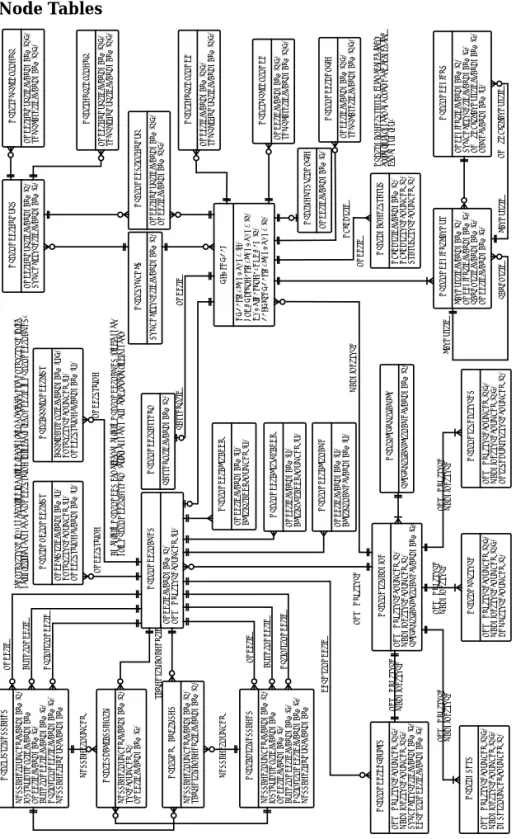
Node Tables
NODE_GROUP_ID: VARCHAR2 (P) SYMBOL_TYPE_ID: VARCHAR2 (F)
OPC_NODE_GROUPS
NODE_GROUP_ID: VARCHAR2 (P,F) NODE_ID: VARCHAR2 (P,F)
OPC_NODES_IN_GROUP
NODE_ID: VARCHAR2 (P) SYMBOL_TYPE_ID: VARCHAR2 (F) MACHINE_TYPE: NUMBER (F) DEPOT_NODE_ID: VARCHAR2 (F)
OPC_NODES
APPLICATION_ID: VARCHAR2 (U,F) ENTRY_TYPE: NUMBER (U) NODE_STRING: VARCHAR2 (U)
OPC_APPL_NODE_LIST
NETWORK_TYPE: NUMBER (P,F) MACHINE_TYPE: NUMBER (P,F) COMM_TYPE: NUMBER (P)
OPC_COMM_TYPE
NODELIST_ID: VARCHAR2 (U) ENTRY_TYPE: NUMBER (U) NODE_STRING: VARCHAR2 (U)
OPC_COND_NODE_LIST
NODE_ID: VARCHAR2 (P,F) TEMPLATE_ID: VARCHAR2 (P,F)
OPC_NODE_CONFIG
NETWORK_TYPE: NUMBER (P) MACHINE_TYPE: NUMBER (P) PLTFRM_FAMILY_NAME: VARCHAR2 (F)
OPC_NET_MACHINE
NETWORK_TYPE: NUMBER (P,F) MACHINE_TYPE: NUMBER (P,F) NET_SECURITY_TYPE: NUMBER (P)
OPC_NET_SEC_TYPES
NODE_ID: VARCHAR2 (P) NETWORK_TYPE: NUMBER (U)
OPC_NODE_NAMES
PATTERN_ID: VARCHAR2 (P)
OPC_NODE_PATTERN
PLTFRM_FAMILY_NAME: VARCHAR2 (P)
OPC_PLTFRM_FAMILY
NODE_GROUP_ID: VARCHAR2 (P,F) TEMPLATE_ID: VARCHAR2 (P,F)
OPC_TEMPL_ON_NGRP
NODE_GROUP_ID: VARCHAR2 (P,F) TEMPL_GROUP_ID: VARCHAR2 (P,F)
OPC_TGRP_ON_NGRP
NODE_ID: VARCHAR2 (P,F) TEMPL_GROUP_ID: VARCHAR2 (P,F)
OPC_TGRP_ON_NODE
NODE_ID: VARCHAR2 (P,F) TEMPLATE_ID: VARCHAR2 (P,F)
OPC_TMPL_ON_NODE
NODE_STRING
NODE_STRING
MACHINE_TYPE
An entry in OPC_NODES has either an entry in OPC_NODE_NAMES (single node) or in OPC_NODE_PATTERN (external node, may match several single nodes)
SYMBOL_TYPE_ID: VARCHAR2 (P)
OPC_SYMBOLS PATTERN_ID NODE_ID NETWORK_TYPE MACHINE_TYPE NETWORK_TYPE MACHINE_TYPE NETWORK_TYPE
NODE_ID: VARCHAR2 (F)
OPC_MGMTSV_CONFIG
If ENTRY_TYPE is 0, node_string is a string that contains a variable. Else ENTRY_TYPE is the network_type of a node and NODE_STRING is linked to the NODE_ID in OPC_NODE_NAMES.
LAYOUT_ID: VARCHAR2 (P) NODEHIER_ID: VARCHAR2 (F) PARENT_ID: VARCHAR2 (F) NODE_ID: VARCHAR2 (F)
OPC_NODEHIER_LAYOUT
NODEHIER_ID: VARCHAR2 (P) SYMBOL_TYPE_ID: VARCHAR2 (F) NEW_OBJ_LAYOUT_ID: VARCHAR2 (F) NAME: VARCHAR2 (U)
OPC_NODEHIERS
LAYOUT_ID
PARENT_ID
OBJECT_ID: VARCHAR2 (P) OBJECT_TYPE: NUMBER (P) STATUS_TYPE: NUMBER (P)
OPC_CHANGE_STATUS
OBJECT_ID
NODE_ID
OPC_CHANGE_STATUS holds change flags, currentlly for nodes and user. Each change flag has an own row.
NEW_OBJ_LAYOUT_ID
LAYOUT_ID
NODE_ID: VARCHAR2 (U) ALT_IP_ADDR: NUMBER (U)
OPC_NODE_ALT_ADDR
NODE_ID: VARCHAR2 (U) ALT_IPV6_ADDR: NUMBER (U)
OPC_NODE_ALT_V6_ADDR
NODE_ID: VARCHAR2 (U) ALT_IP_NAME: VARCHAR2 (U)
Entity Relationship Diagrams
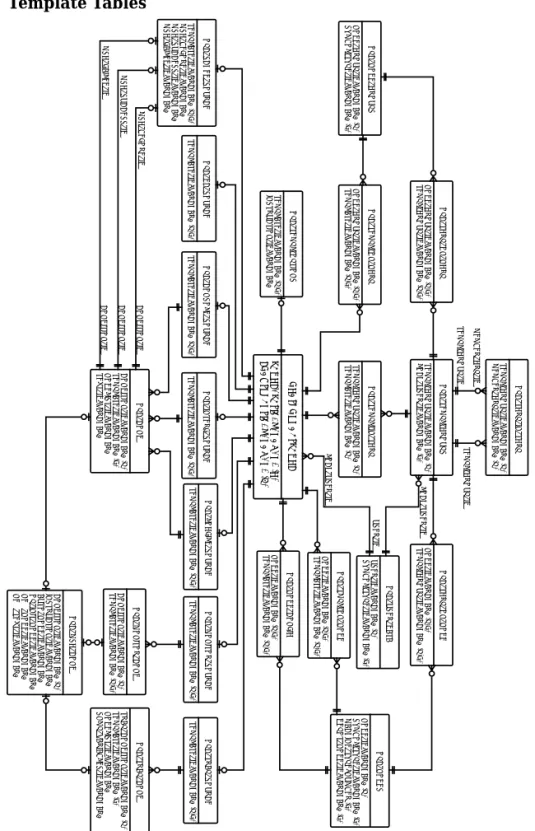
Figure 2-7
Template Tables
TEMPLATE_ID: VARCHAR2 (P)
LOCK_USER_ID: VARCHAR2 (F)
OPC_SOURCE_TEMPL
TEMPL_GROUP_ID: VARCHAR2 (P)
LOCK_USER_ID: VARCHAR2 (F)
OPC_TEMPL_GROUPS
TEMPL_GROUP_ID: VARCHAR2 (P)
TEMPLATE_ID: VARCHAR2 (P)
OPC_TEMPL_IN_TGRP
NODE_GROUP_ID: VARCHAR2 (P,F)
TEMPLATE_ID: VARCHAR2 (P,F)
OPC_TEMPL_ON_NGRP
TEMPLATE_ID: VARCHAR2 (P,F)
INSTRUCTION_ID: VARCHAR2
OPC_TEMPL_OPTIONS
TEMPL_GROUP_ID: VARCHAR2 (P)
MEMBER_GRP_ID: VARCHAR2 (P)
OPC_TGRP_IN_TGRP
NODE_GROUP_ID: VARCHAR2 (P,F)
TEMPL_GROUP_ID: VARCHAR2 (P,F)
OPC_TGRP_ON_NGRP
NODE_ID: VARCHAR2 (P,F)
TEMPL_GROUP_ID: VARCHAR2 (P,F)
OPC_TGRP_ON_NODE
NODE_ID: VARCHAR2 (P,F)
TEMPLATE_ID: VARCHAR2 (P,F)
OPC_TMPL_ON_NODE
TEMPLATE_ID: VARCHAR2 (P,F)
MSG_BEFORE_ID: VARCHAR2
MSG_SUCCESS_ID: VARCHAR2
MSG_FAILED_ID: VARCHAR2
OPC_SCHED_SOURCE
NODE_ID: VARCHAR2 (P,F)
TEMPLATE_ID: VARCHAR2 (P,F)
OPC_NODE_CONFIG
TEMPLATE_ID: VARCHAR2 (P,F)
OPC_MONITOR_SOURCE
CONDITION_ID: VARCHAR2 (P)
TEMPLATE_ID: VARCHAR2 (P,F)
OPC_MONITOR_COND
TEMPLATE_ID: VARCHAR2 (P,F)
OPC_LOGFILE_SOURCE
TEMPLATE_ID: VARCHAR2 (P,F)
OPC_INTERF_SOURCE
TEMPLATE_ID: VARCHAR2 (P,F)
OPC_EC_SOURCE
TEMPLATE_ID: VARCHAR2 (P,F)
OPC_CONSOLE_SOURCE
CONDITION_ID: VARCHAR2 (P)
TEMPLATE_ID: VARCHAR2 (F)
NODELIST_ID: VARCHAR2
TEXT_ID: VARCHAR2
OPC_COND
CONDITION_ID: VARCHAR2 (P)
INSTRUCTION_ID: VARCHAR2 AUTO_NODE_ID: VARCHAR2 OP_INIT_NODE_ID: VARCHAR2 NEW_NODE_ID: VARCHAR2 NEW_TEXT_ID: VARCHAR2 OPC_MSG_COND
NODE_GROUP_ID: VARCHAR2 (P)
SYMBOL_TYPE_ID: VARCHAR2 (F)
OPC_NODE_GROUPS MEMBER_GRP_ID TEMPL_GROUP_ID CONDITION_ID CONDITION_ID CONDITION_ID TEMPL_GROUP_ID
USER_ID: VARCHAR2 (P)
SYMBOL_TYPE_ID: VARCHAR2 (F)
OPC_USER_DATA LOCK_USER_ID USER_ID LOCK_USER_ID MSG_BEFORE_ID MSG_SUCCESS_ID MSG_FAILED_ID
Entity Relationship Diagrams
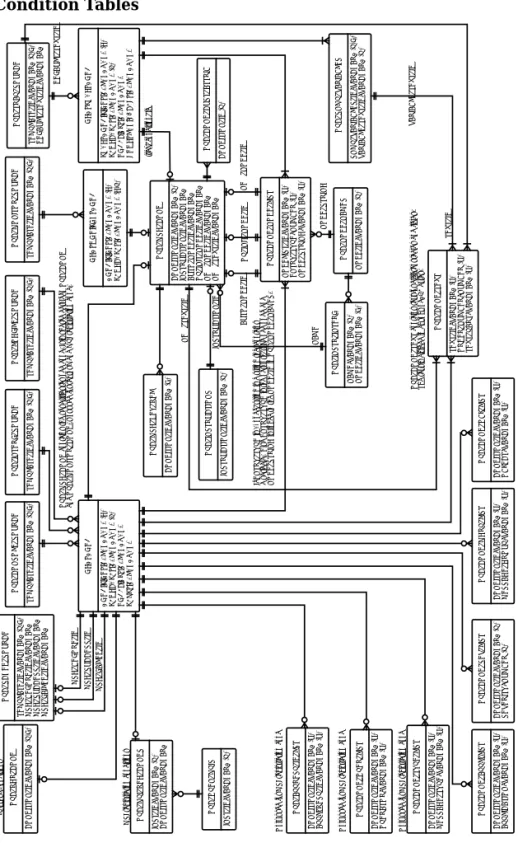
Figure 2-8
Condition Tables
SNMP_VARIABLES_ID: VARCHAR2 (P,F) VARIABLE_TEXT_ID: VARCHAR2 (P)
OPC_SNMP_VARIABLES
TEXT_ID: VARCHAR2 (U) ORDER_NUMBER: NUMBER (U) TEXT_PART: VARCHAR2 (U)
OPC_COND_TEXT
CONDITION_ID: VARCHAR2 (U) OBJECT: VARCHAR2 (U)
OPC_COND_OBJ_LIST
NODELIST_ID: VARCHAR2 (U) ENTRY_TYPE: NUMBER (U) NODE_STRING: VARCHAR2 (U)
OPC_COND_NODE_LIST
CONDITION_ID: VARCHAR2 (U) MESSAGE_GROUP: VARCHAR2 (U)
OPC_COND_MGRP_LIST
INSTRUCTION_ID: VARCHAR2 (P)
OPC_INSTRUCTIONS
NAME: VARCHAR2 (P) NODE_ID: VARCHAR2 (F)
OPC_INSTR_INTERF
TEMPLATE_ID: VARCHAR2 (P,F) DEFAULT_TEXT_ID: VARCHAR2
OPC_TRAP_SOURCE
TRAP_CONDITION_ID: VARCHAR2 (P) TEMPLATE_ID: VARCHAR2 (F) NODELIST_ID: VARCHAR2 SNMP_VARIABLES_ID: VARCHAR2
OPC_TRAP_COND
TEMPLATE_ID: VARCHAR2 (P,F)
OPC_MONITOR_SOURCE
CONDITION_ID: VARCHAR2 (P) TEMPLATE_ID: VARCHAR2 (P,F)
OPC_MONITOR_COND
TEMPLATE_ID: VARCHAR2 (P,F)
OPC_LOGFILE_SOURCE
TEMPLATE_ID: VARCHAR2 (P,F)
OPC_INTERF_SOURCE
TEMPLATE_ID: VARCHAR2 (P,F)
OPC_CONSOLE_SOURCE
CONDITION_ID: VARCHAR2 (P) TEMPLATE_ID: VARCHAR2 (F) NODELIST_ID: VARCHAR2 TEXT_ID: VARCHAR2
OPC_COND
CONDITION_ID: VARCHAR2 (P) INSTRUCTION_ID: VARCHAR2 AUTO_NODE_ID: VARCHAR2 OP_INIT_NODE_ID: VARCHAR2 NEW_NODE_ID: VARCHAR2 NEW_TEXT_ID: VARCHAR2
OPC_MSG_COND
NODE_ID: VARCHAR2 (P)
OPC_NODE_NAMES TEXT_ID NODE_STRING NAME AUTO_NODE_ID OP_INIT_NODE_ID NEW_NODE_ID INSTRUCTION_ID NEW_TEXT_ID VARIABLE_TEXT_ID
OPC_MSG_COND contains the set attributes of a cond. It is shared between OPC_COND and OPC_MONITOR_COND. Not used for regroup and MPI registration cond.
OPC_COND_TEXT contains text for different tables and fields. The text is divided in chunks of 254 bytes.
If ENTRY_TYPE is 0, node_string is a string that contains a variable. Else ENTRY_TYPE is the network_type of a node and NODE_STRING is linked to the NODE_ID in OPC_NODE_NAMES.
DEFAULT_TEXT_ID
trap_condition_id
CONDITION_ID: VARCHAR2 (F)
OPC_MSG_KEY_REL
CONDITION_ID (P)
Entity Relationship Diagrams
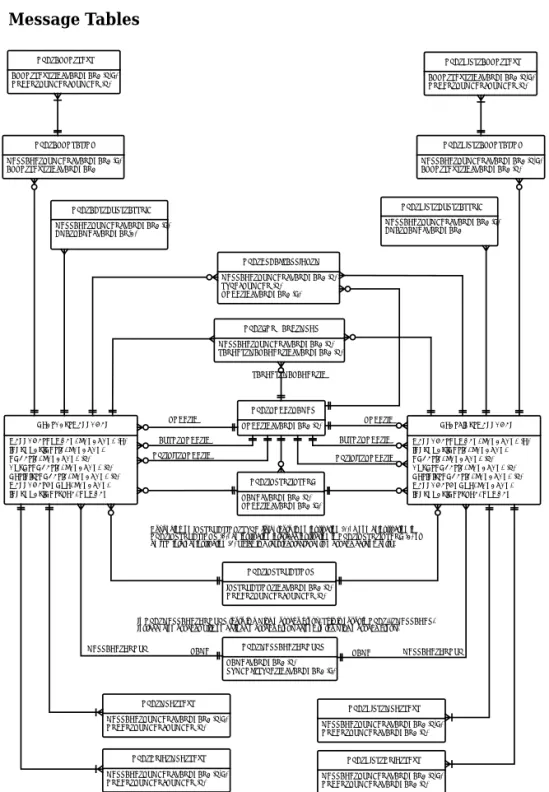
Figure 2-9
Message Tables
MESSAGE_NUMBER: VARCHAR2 (P) INSTRUCTION_ID: VARCHAR2 NODE_ID: VARCHAR2 (F) AUTO_NODE_ID: VARCHAR2 (F) OP_INIT_NODE_ID: VARCHAR2 (F) MESSAGE_GROUP: VARCHAR2 INSTRUCTION_TYPE: NUMBER OPC_ACT_MESSAGES
MESSAGE_NUMBER: VARCHAR2 (P) INSTRUCTION_ID: VARCHAR2 NODE_ID: VARCHAR2 (F) AUTO_NODE_ID: VARCHAR2 (F) OP_INIT_NODE_ID: VARCHAR2 (F) MESSAGE_GROUP: VARCHAR2 INSTRUCTION_TYPE: NUMBER OPC_HIST_MESSAGES MESSAGE_NUMBER: VARCHAR2 (F)
ANNO_TEXT_ID: VARCHAR2 OPC_ANNOTATION
ANNO_TEXT_ID: VARCHAR2 (P,F) ORDER_NUMBER: NUMBER (P)
OPC_HIST_ANNO_TEXT
INSTRUCTION_ID: VARCHAR2 (P) ORDER_NUMBER: NUMBER (P)
OPC_INSTRUCTIONS NAME: VARCHAR2 (P) NODE_ID: VARCHAR2 (F)
OPC_INSTR_INTERF MESSAGE_NUMBER: VARCHAR2 (P) TYPE: NUMBER (P) NODE_ID: VARCHAR2 (F)
OPC_ESCAL_ASSIGN_M
MESSAGE_NUMBER: VARCHAR2 (P) TARGET_MANAGER_ID: VARCHAR2 (P)
OPC_FORWARD_MSGS
NODE_ID: VARCHAR2 (P) OPC_NODE_NAMES NODE_ID AUTO_NODE_ID OP_INIT_NODE_ID NODE_ID AUTO_NODE_ID OP_INIT_NODE_ID TARGET_MANAGER_ID
NAME: VARCHAR2 (P) SYMBOL_TYPE_ID: VARCHAR2 (F)
OPC_MESSAGE_GROUPS
MESSAGE_GROUP MESSAGE_GROUP In OPC_MESSAGE_GROUPS there is a Misc message group. This is never in OPC_..._MESSAGES. Instead, all messages with no defined message group belong to the Misc message group.
Depending on INSTRUCTION_TYPE field, there is no instruction (0), a nomal instruction in OPC_INSTRUCTIONS (1), an instruction interface instruction in OPC_INSTR_INTERF (2) or an ITO internal instruction (3) which is a text that represents message catalog entry. ANNO_TEXT_ID: VARCHAR2 (P,F)
ORDER_NUMBER: NUMBER (P) OPC_ANNO_TEXT
MESSAGE_NUMBER: VARCHAR2 (P,F) ANNO_TEXT_ID: VARCHAR2 (P)
OPC_HIST_ANNOTATION
NAME NAME
MESSAGE_NUMBER: VARCHAR2 (F) CMA_NAME: VARCHAR(2)
OPC_ACT_CUST_ATTRIB
MESSAGE_NUMBER: VARCHAR2 (F) CMA_NAME: VARCHAR2
Entity Relationship Diagrams
Figure 2-10
Other Tables
SERVICE_ID: VARCHAR2 (F) DAY: NUMBER
START_TIME: VARCHAR2 END_TIME: VARCHAR2
OPC_NOTIF_SCHEDULE
SERVICE_ID: VARCHAR2 (P) OPC_NOTIF_SERVICES
STATUS_FLAG: NUMBER TT_CALL: VARCHAR2
OPC_TROUBLE_ TICKET
SERVICE_NAME: VARCHAR2 (P) LABEL: VARCHAR2
ACTIVE_LOG_DATETIME: NUMBER LOG_SERVICE: NUMBER
OPC_SERVICE
SERVICE_NAME: VARCHAR2 (P,F) DATETIME: NUMBER (P) LOCAL_DATETIME: DATE SEVERITY: NUMBER END_DATETIME: NUMBER LOCAL_END_DATETIME: DATE
In This Chapter
In This Chapter
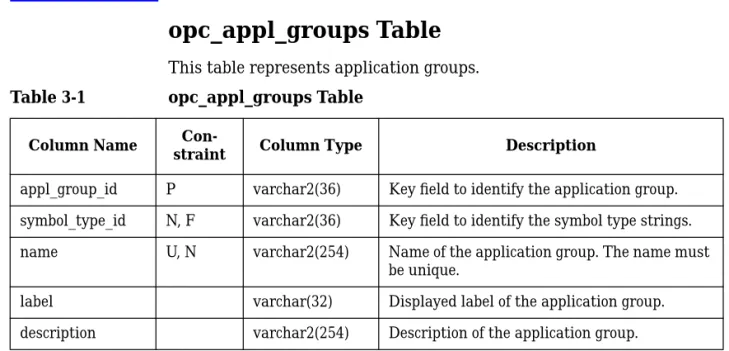
opc_appl_groups Table
opc_appl_groups Table
This table represents application groups.
Table 3-1
opc_appl_groups Table
Column Name
Con-straint Column Type Description
appl_group_id P varchar2(36) Key field to identify the application group. symbol_type_id N, F varchar2(36) Key field to identify the symbol type strings. name U, N varchar2(254) Name of the application group. The name must
be unique.
label varchar(32) Displayed label of the application group. description varchar2(254) Description of the application group.
opc_appl_in_group Table
opc_appl_in_group Table
This table represents the relationships of applications to application
groups. Each application in each application group has an entry in this
table.
Table 3-2
opc_appl_in_group Table
Column Name
Con-straint Column Type Description
appl_group_id P, F varchar2(36) Key field to identify the application group. application_id P, F varchar2(36) Key field for identification of the
opc_appl_login Table
opc_appl_login Table
This table stores the name and password combinations for OVO internal
applications for different platform families.
Table 3-3
opc_appl_login Table
Column Name
Con-straint Column Type Description pltfrm_family_name P, F varchar2(32) Unique name for platform family. application_id P, F varchar2(36) ID of internal application.
user_name varchar2(254) Actual user name.
opc_appl_node_list Table
opc_appl_node_list Table
This table contains details of the target nodes on which to execute
applications. The administrator configures this in OVO.
Table 3-4
opc_appl_node_list Table
Column Name
Con-straint Column Type Description application_id P, F varchar2(36) Key field to identify the application. entry_type P number(3) Type of entry: node_id or string.
node_string P varchar2(254) This field contains a string representing an object or a node_id (depending on the entry_type field).
Possible values:
0…Variable (the node string contains text with pattern matching)
1…IP node (the node string contains the node’s ID in opc_node_names)
2…non-IP node (the node string contains the node’s ID in opc_node_names)
opc_appl_platforms Table
opc_appl_platforms Table
NOTE
Table 3-5 is reserved for future use.
This table contains, for each application, a list of machine types where
the application is available. The combination of application_id and
machine_type must be unique.
Valid keys for machine types depend on Table 4-5, “opc_net_machine
Table,” on page 84, and are linked to the entries found there.
Table 3-5
opc_appl_platforms Table
Column Name
Con-straint Column Type Description
application_id U, N, F varchar2(36) Key field to identify the application; linked toapplication_idin table opc_application (see page 53).
machine_type U, N number(5) Key field to identify the machine type; linked tomachine_type in table opc_net_machine (see page 84).
opc_applgrp_in_grp Table
opc_applgrp_in_grp Table
This table contains the assignments of application groups to application
groups.
Table 3-6
opc_applgrp_in_grp Table
Column Name
Con-straint Column Type Description
appl_group_id P, F varchar2(36) Key field to identify the application group. member_appl_grp_id P, F varchar2(36) Key field to identify the assigned
opc_application Table
opc_application Table
This table contains attributes that are common to all applications. Other
details exist in different tables, depending on the application type:
❏
OVO internal applications have one entry per platform family in
opc_appl_login (see page 49).
❏
OVO integrated applications have one entry in opc_integr_appl (see
page 57).
❏
OpenView applications and services have one entry in opc_ov_appl
(see page 75).
Table 3-2, “opc_appl_in_group Table,” on page 48 describes which
application belongs to which application group.
Table 3-7
opc_application Table
Column Name
Con-straint Column Type Description application_id P varchar2(36) Key field to identify the application. symbol_type_id N, F varchar2(36) Key field to identify the symbol type strings. application_type N number(3) Type of application: OV-, OVO-integrated or
internal. Possible values:
0…OVO internal application 1…Integrated application
opc_application Table
target N number(3) The target on which to start this application.
Possible values:
0…Start on management server 1…Start on target nodes selected by operator
2…Start on target node list 3…Start on local GUI client 4…Start URL on local web browser intern_appl_action N number(3) Action for internal application: broadcast,
open physical console, open virtual console. Possible values:
0…Virtual Terminal 1…Physical Terminal 2…Broadcast
3…Virtual Terminal on a PC
name U, N varchar2(254) Name of the application. The name must be unique.
label varchar2(32) Displayed label of the application symbol. description varchar2(254) Description of the purpose of this
application.
appl_call varchar2(4000) The command that calls the application.
Table 3-7
opc_application Table (Continued)
Column Name
opc_application Table
appl_license_flag int2 If set to 1, apply execution confirmation dialog. If set to 0 (default), do not ask before execution.
appl_license_text varchar2(2048) Application confirmation text to be shown.
Table 3-7
opc_application Table (Continued)
Column Name
opc_capabilities Table
opc_capabilities Table
This table contains details of what a user is or is not allowed to do in
OVO.
Table 3-8
opc_capabilities Table
Column Name
Con-straint Column Type Description user_id P varchar2(36) Key field to identify the user. op_init_act_flag N number(3) Whether the user can start
operator-initiated actions: Yes/No. acknowledge_flag N number(3) Whether the user can acknowledge or
unacknowledge messages: Yes/No. change_msg_attr N number(3) Whether the user can change message
attributes: Yes/No.
own_flag N number(3) Whether the user can own messages: Yes/No.
customize_appl N number(3) Reserved for future use.
Whether command customization capability is allowed: Yes/No.
Both this field and theallow_customize field in theopc_applicationtable must be set before command customization is allowed.
opc_integr_appl Table
opc_integr_appl Table
This table contains details of OVO-integrated applications.
Table 3-9
opc_integr_appl Table
Column Name
Con-straint Column Type Description application_id P varchar2(36) Key field to identify the application. start_in_term_flag N number(3) Start application in terminal window.
Possible values are: 0…No window
1…Window (input and output) 2…Window (output only) parameters varchar2(254) Parameters for the program call.
user_name varchar2(254) The user name under which the program is started.
password varchar2(52) The appropriate password for the user_name.
opc_op_browser_set Table
opc_op_browser_set Table
This table contains the main entry of an operator’s saved browser
settings. These are the filters that specify which messages appear in the
View and History Message browsers, and the Pending Messages Browser.
Table 3-10
opc_op_browser_set Table
Column Name
Con-straint Column Type Description user_id P, F varchar2(36) Key field to identify the user.
setting_name P varchar2(32) Key field to identify the browser setting. selected_flag N number(3) Display selected messages: Yes/No.
severity N number(3) Display messages filtered by severity levels: Possible values:
1…Unknown 2…Normal 4…Warning 16…Minor 32…Major 8…Critical
To filter for more than one severity, use a logical OR.
time_mode N number(3) Time mode: Absolute/Relative time. time_from N number(12) Start date/time of message reception on the
opc_op_browser_set Table
creat_time_to N number(12) Reserved for future use.
Finish date/time of message creation on the managed node.
ackn_time_from N number(12) Reserved for future use.
Start date/time of message acknowledgement.
ackn_time_to N number(12) Reserved for future use.
Finish date/time of message acknowledgement.
pattern varchar2(254) Text pattern to be used as message filter. unmatched_flag N number(3) Display only unmatched messages: Yes/No. logonly_flag N number(3) Filter out all but log only messages: Yes/No. notification_flag N number(3) Reserved for future use.
Filter out all but notification messages: Yes/No.
trouble_tick_flag N number(3) Reserved for future use.
Filter out all but trouble ticket messages: Yes/No.
escalate_flag N number(3) Reserved for future use.
Filter out all but escalation messages: Yes/No.
Table 3-10
opc_op_browser_set Table (Continued)
Column Name
opc_op_browser_set Table
sort N number(3) Sorting order of messages.
Possible values: 0…Date/Time 1…Node
2…Message Group 3…Application 4…Severity
ownership N number(3) Display messages filtered by own state. Possible values:
1…Unowned 2…Owned by me
4…Owned by someone else To filter for more than one type of ownership, use a logical OR. sort_cma_name N varchar2(254) Reserved for future use.
Custom message attribute name to sort by, if set.
unbuffer_time_from int4 Start of desired unbuffer time frame. unbuffer_time_to int4 End if desired unbuffer time frame.
Table 3-10
opc_op_browser_set Table (Continued)
Column Name
opc_op_browser_set_cma Table
opc_op_browser_set_cma Table
This table contains the object list of the custom message attribute name
and value pairings for an operator’s saved browser settings. There is one
entry for each custom message attribute pairing within each browser
setting.
Table 3-11
opc_op_browser_set_cma Table
Column Name
Con-straint Column Type Description user_id N varchar2(36) Key field to identify the user.
setting_name N varchar2(32) Key field to identify the browser setting. cma_name N varchar2(254) Name of the custom message attribute. cma_value N varchar2(1024) Value of the custom message attribute.
opc_op_browser_set_obj Table
opc_op_browser_set_obj Table
This table contains the object list of an operator’s saved browser settings.
There is one entry for each browser setting. This is the content of the
On
Selected Symbols
listbox.
Table 3-12
opc_op_browser_set_obj Table
Column Name
Con-straint Column Type Description user_id P, F varchar2(36) Key field to identify the user.
setting_name P, F varchar2(32) Key field to identify the browser setting.
object_type P number(5) Type of object.
Possible values: 1…Node
8…Message Group
13…Service Name (Reserved for future use.) 14…Message Type (Reserved for future use.) 16…Application
64…Object
128…External Node object_name P varchar2(254) Name of the object.
opc_op_defaults Table
opc_op_defaults Table
This table contains the default settings of browsers for individual OVO
users. This includes details of the size and which columns are visible.
Table 3-13
opc_op_defaults Table
Column Name
Con-straint Column Type Description user_id P varchar2(36) Key field to identify the user.
act_browser_x N number(12) Last onscreen x position of active message browser.
act_browser_y N number(12) Last onscreen y position of active message browser window.
act_browser_heig N number(12) Last onscreen height of active message browser.
act_browser_width N number(12) Last onscreen width of active message browser window.
act_header_flag N number(3) Header line visible: Yes/No. act_sever_flag N number(3) Severity column visible: Yes/No. act_unmatch_flag N number(3) Unmatched column visible: Yes/No. act_instr_flag N number(3) Instruction column visible: Yes/No. act_auto_flag N number(3) Automatic action status column visible:
Yes/No.
act_oper_flag N number(3) Operator-initiated action status column visible: Yes/No.
opc_op_defaults Table
act_msggrp_flag N number(3) Message group column visible: Yes/No. act_object_flag N number(3) Object column visible: Yes/No.
act_escal_flag N number(3) Escalated: Yes/No. act_assign_flag N number(3) Assigned: Yes/No.
act_dupl_flag N number(3) Duplicate count column visible: Yes/No. hist_browser_x N number(12) Last onscreen x position of history browser. hist_browser_y N number(12) Last onscreen y position of history browser. hist_browser_heig N number(12) Last onscreen height of history browser. hist_browser_width N number(12) Last onscreen width of history browser. hist_header_flag N number(3) Header line visible: Yes/No.
hist_sever_flag N number(3) Severity column visible: Yes/No. hist_unmatch_flag N number(3) Unmatched column visible: Yes/No. hist_instr_flag N number(3) Instruction column visible: Yes/No. hist_auto_flag N number(3) Automatic action status column visible:
Yes/No.
hist_oper_flag N number(3) Operator initiated-action status column visible: Yes/No.
hist_note_flag N number(3) Annotation column visible: Yes/No. hist_date_flag N number(3) Date column visible: Yes/No. hist_time_flag N number(3) Time column visible: Yes/No.
Table 3-13
opc_op_defaults Table (Continued)
Column Name
opc_op_defaults Table
hist_assign_flag N number(3) Assigned: Yes/No.
hist_dupl_flag N number(3) Duplicate count column visible: Yes/No. view_browser_x N number(12) Last onscreen x position of view browser . view_browser_y N number(12) Last onscreen y position of view browser. view_browser_heig N number(12) Last onscreen height of view browser. view_browser_width N number(12) Last onscreen width of browser window. view_header_flag N number(3) Header line visible: Yes/No.
view_sever_flag N number(3) Severity column visible: Yes/No. view_unmatch_flag N number(3) Unmatched column visible: Yes/No. view_instr_flag N number(3) Instruction column visible: Yes/No. view_auto_flag N number(3) Automatic action status column visible:
Yes/No.
view_oper_flag N number(3) Operator-initiated action status column visible: Yes/No.
view_note_flag N number(3) Annotation column visible: Yes/No. view_date_flag N number(3) Date column visible: Yes/No. view_time_flag N number(3) Time column visible: Yes/No. view_node_flag N number(3) Node column visible: Yes/No. view_applic_flag N number(3) Application column visible: Yes/No.
Table 3-13
opc_op_defaults Table (Continued)
Column Name