Designing a Shared Single Display Education
Application through Interactive Patterns
Wai Shiang Cheah1, Edwin Mit1, Marlene Valeri AiSiok Lu2
1Department of Computing, Universiti Malaysia Sarawak, Kota Samarahan, Malaysia 2Faculty of Engineering, Computing and Science, Swinburne University, Sarawak, Malaysia
Email: [email protected], [email protected], [email protected]
Received 20 September 2014; revised 20 October 2014; accepted 13 November 2014
Copyright © 2014 by authors and Scientific Research Publishing Inc.
This work is licensed under the Creative Commons Attribution International License (CC BY). http://creativecommons.org/licenses/by/4.0/
Abstract
Interactive patterns are able to promote the notion of reusability in groupware application de-velopment. Hence, these patterns support the comprehensiveness of both the interaction design and implementation while easing code modification for groupware application. Groupware is used to describe a broad range of technologies that support person-to-person collaboration. How to de- sign and develop a groupware in an effective manner remains a research question worth explor-ing. This paper introduces a reusable method, patterns, to develop a single shared display applica-tion. Nine different interactive patterns that allow participants to interact collaboratively or non- collaboratively in a single shared display application are introduced in this paper. This is followed by the presentation of our quantitative results on the usability of the interactive patterns and the reusability of the patterns in designing and maintaining a single shared display application. From the results, not only are the patterns useful and easy to understand, the patterns actually ease the process of designing and maintenance during the application development under a single shared display.
Keywords
Collaborative Learning, Interaction Design, Shared Single Display
1. Introduction
While various SDG applications have been developed [2]-[4], we argue that the development of SDG is still a trivial job. Neither the applications disclose the details design nor the activities behind the interaction. Hence, how to develop a SDG that is engaging, communicative, coordinating and interactivity is still a challenge. We are taking a reusable approach in dealing with this development. Our motivation is to reuse the recurring prob-lem and solution in rapidly developing a SDG application.
We introduce a reusable method, patterns, to develop a single shared display application. Patterns are defined according to a generic template form. This template form is also known as a problem-frame in the literature [5]. The template is generally expressed by means of the pattern elements like name, intent, applicability, problem, force, solution, example, implementation, consequence and related patterns.
Nine different interactive patterns that allow participants to interact collaboratively or non-collaboratively in a single shared display application are introduced in this paper. This is followed by the presentation of our quan-titative results on the usability of the interactive patterns and the reusability of the patterns in designing and maintaining a single shared display application. From the results, not only are the patterns useful and easy to understand, the patterns actually ease the process of designing and maintenance during the application develop-ment under a single shared display.
Patterns for general development of collaborative applications are proposed in [6]. When developing colla-borative application, we should consider the design aspect of group memory, handle the collaborators informa-tion (e.g. access rights to the informainforma-tion), handle the floor of individual user and handle the collaborative ses-sion by monitoring who is entering or leaving from the collaboration. Our work is related to [6][7]. We further detail the floor control policy pattern by introducing various “floor control” for single shared single display ap-plication. Asenso et al. [7] have introduced two collaborative activity patterns for collaborative application. We introduce more collaborative activities as reported in this paper.
In this paper, Section 2 introduces the proposed reusable interactive patterns. We first present the description on method to populate a pattern, known as pattern mining. This is followed by the description of interactive pat-tern catalog, details discussion on one interaction patpat-tern and provides the brief description of the rest of the proposed interaction patterns. Section 3 presents the evaluation of the proposed patterns with the results showing the usability and reusability of the patterns in developing a shared single display application. We conclude with some remarks of the proposed methods on shared single display application development in Section 4.
2. Introduction to Patterns Pattern Language for Interactive Shared Single Display
Application
Producing a pattern is not a straightforward process [8]. Systematic approaches have been proposed to identify and produce pattern by the first author. We had reviewed the development process of the multiplayer games in SDG applications previously done by others. We then captured the important aspects and this is followed by producing a draft version of the pattern description. This is known as the blue-print for the interaction design. Then, we started to prototype those interactions. Upon the completion of the prototype, we record our expe-rience in designing each interaction to the pattern template as designed in [9]. Discussion will be conducted for every cycle of improvement. This involved turning the blue-print into concrete development. Then, we refined the pattern documentation which we known as the beta version of interactive patterns for SDG.
2.1. Pattern Catalogue for Interactive Shared Single Display Application
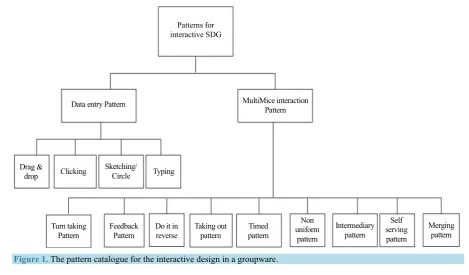
Figure 1 shows the pattern catalogue for interactive shared single display application. The pattern can be di-vided into two categories. There are data entry patterns and multi mice interaction patterns or known as interac-tive patterns. The details on each pattern are elaborated in the following subsections.
Patterns for interactive SDG
MultiMice interaction Pattern Data entry Pattern
Drag &
drop Clicking Sketching/ Circle Typing
Turn taking
Pattern Feedback Pattern Taking out pattern pattern Timed
Non uniform
pattern
Merging pattern Intermediary
pattern
Self serving pattern Do it in
[image:3.595.73.543.81.356.2]reverse
Figure 1.The pattern catalogue for the interactive design in a groupware.
Table 1. Description of data entry patterns.
Data Entry Pattern Description
Drag & Drop Pattern that covers the handling of movement from one position into another position within a shared single display. This may happen within its own working space or region or the whole display.
Clicking The clicking pattern is the most common pattern for single shared display. It records the handling of mouse click by the user through the onClick handler and onRelease handler.
Typing
[image:3.595.90.537.511.639.2]Typing is the basic literacy skills required of the students. In this case, the student needs to spell the words or complete the sentences. The pattern records the experience when the students are sharing keyboard as well as having individual keyboard. It is feasible to design the application with one keyboard per student but this will create confusion due to the screen size limitation. In contrary, having a shared keyboard will promote collaboration and reduce the confusion among the students in a single shared display.
Table 2. Interactive patterns for shared single display application.
Collaborative Mode Non-Collaborative Mode/Peer Learning/Self Learning
Feedback Turn taking
Intermediary Self service
Merging Taking out
Do it in reverse Non-uniform Timed pattern
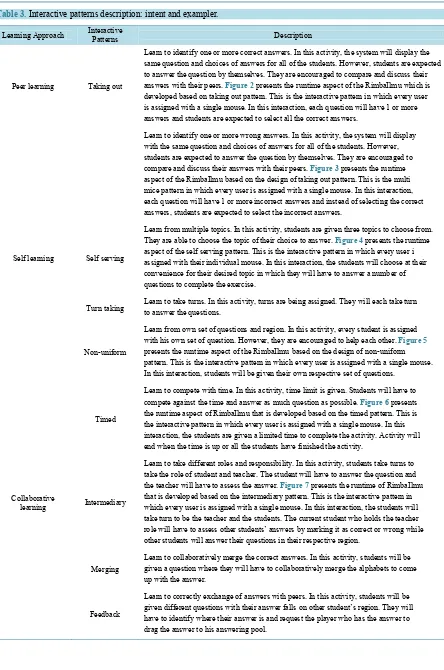
Table 3. Interactive patterns description: intent and exampler.
Learning Approach Interactive Patterns Description
Peer learning Taking out
Learn to identify one or more correct answers. In this activity, the system will display the same question and choices of answers for all of the students. However, students are expected to answer the question by themselves. They are encouraged to compare and discuss their answers with their peers. Figure 2 presents the runtime aspect of the RimbaIlmu which is developed based on taking out pattern. This is the interactive pattern in which every user is assigned with a single mouse. In this interaction, each question will have 1 or more answers and students are expected to select all the correct answers.
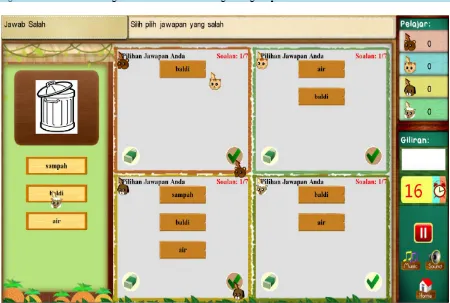
Learn to identify one or more wrong answers. In this activity, the system will display with the same question and choices of answers for all of the students. However, students are expected to answer the question by themselves. They are encouraged to compare and discuss their answers with their peers. Figure 3 presents the runtime aspect of the RimbaIlmu based on the design of taking out pattern. This is the multi mice pattern in which every user is assigned with a single mouse. In this interaction, each question will have 1 or more incorrect answers and instead of selecting the correct answers, students are expected to select the incorrect answers.
Self learning Self serving
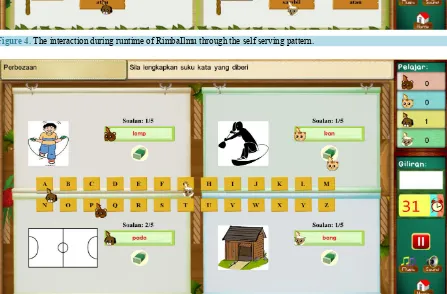
Learn from multiple topics. In this activity, students are given three topics to choose from. They are able to choose the topic of their choice to answer. Figure 4presents the runtime aspect of the self serving pattern. This is the interactive pattern in which every user i assigned with their individual mouse. In this interaction, the students will choose at their convenience for their desired topic in which they will have to answer a number of questions to complete the exercise.
Turn taking Learn to take turns. In this activity, turns are being assigned. They will each take turn to answer the questions.
Non-uniform
Learn from own set of questions and region. In this activity, every student is assigned with his own set of question. However, they are encouraged to help each other. Figure 5 presents the runtime aspect of the RimbaIlmu based on the design of non-uniform pattern. This is the interactive pattern in which every user is assigned with a single mouse. In this interaction, students will be given their own respective set of questions.
Timed
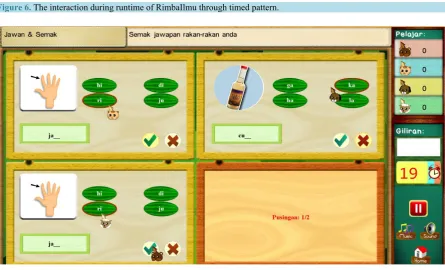
Learn to compete with time. In this activity, time limit is given. Students will have to compete against the time and answer as much question as possible. Figure 6presents the runtime aspect of RimbaIlmu that is developed based on the timed pattern. This is the interactive pattern in which every user is assigned with a single mouse. In this interaction, the students are given a limited time to complete the activity. Activity will end when the time is up or all the students have finished the activity.
Collaborative
learning Intermediary
Learn to take different roles and responsibility. In this activity, students take turns to take the role of student and teacher. The student will have to answer the question and the teacher will have to assess the answer. Figure 7 presents the runtime of RimbaIlmu that is developed based on the intermediary pattern. This is the interactive pattern in which every user is assigned with a single mouse. In this interaction, the students will take turn to be the teacher and the students. The current student who holds the teacher role will have to assess other students’ answers by marking it as correct or wrong while other students will answer their questions in their respective region.
Merging
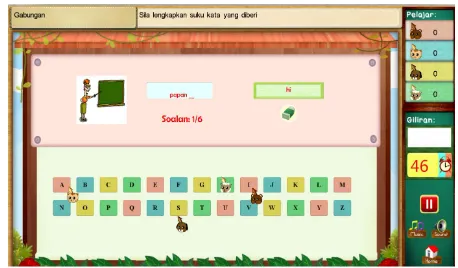
Learn to collaboratively merge the correct answers. In this activity, students will be given a question where they will have to collaboratively merge the alphabets to come up with the answer.
Feedback
Figure 2.The interaction during runtime of RimbaIlmu through taking out pattern.
[image:5.595.87.537.399.702.2]Figure 4. The interaction during runtime of RimbaIlmu through the self serving pattern.
Figure 5. The interaction during runtime of RimbaIlmu through non-uniform pattern.
2.2. Interaction Design for SDG-Merging Pattern Intent: Utilizing multi-mice on collaborative learning.
Context/Applicability: This pattern is used as one of the strategies in collaborative learning. Problem: How to work together in answering a problem given.
Forces: Describes the solution properties in which the pattern is situated or based in the context of the prob-lem.
[image:6.595.90.537.288.582.2]Figure 6. The interaction during runtime of RimbaIlmu through timed pattern.
Figure 7. The interaction during runtime of RimbaIlmu through intermediary pattern.
Quality goal:Allows for simultaneous inputs without the players having to wait for their turns and thus, re-duces waiting time for the players.
Role:All the users are regarded as peers in this pattern holding similar roles, i.e. learner or student. Resource:multi mouse, single display.
Solution: This is the interactive pattern in which the player will merge the answers accordingly. In this inter- action, the students will have to collaborate using their mouse and their collective intelligence to derive the an-swers or complete the activity. The pattern serves the following responsibility to
[image:7.595.90.536.331.601.2]-loading the questions for the player;
-coordinating the players in the combination of the answers given, answer can be merged by replacing or combining into an answer pool.
However, the pattern leads to a constraint in which students may not agree with each other’s answer.
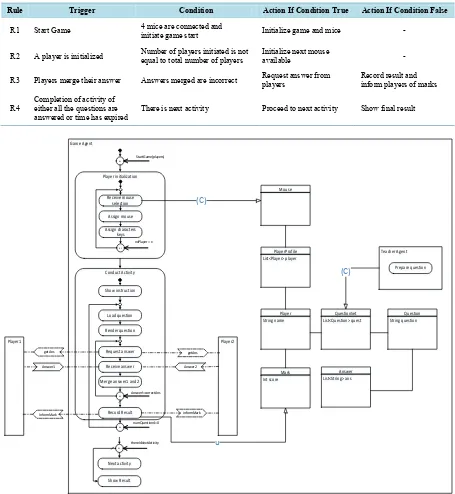
[image:8.595.84.539.206.700.2]Dynamic: The dynamic element details the arrangement of the solution according to a particular context. The application context that is used when modelling the runtime behaviour of this pattern is presented in Table 4, scenario model and the behaviour models as shown in Figure 8. The running examplar of this pattern is shown in Figure 9.
Table 4. The scenario model of rules of the merging pattern.
Rule Trigger Condition Action If Condition True Action If Condition False
R1 Start Game 4 mice are connected and initiate game start Initialize game and mice -
R2 A player is initialized Number of players initiated is not equal to total number of players Initialize next mouse available -
R3 Players merge their answer Answers merged are incorrect Request answer from players Record result and inform players of marks
R4 Completion of activity of either all the questions are
answered or time has expired There is next activity Proceed to next activity Show final result
Player1 Game Agent Player2 Answer1 informMark Conduct Activity Render question Load question Receive answer
Merge answer1 and 2
R3 Answer!=correctAns R4 numQuestions!=0 Request answer getAns Answer2 Record Result InformMark getAns Player initialization Receive mouse selection R1 StartGame(players) Assign mouse R2
noPlayer = x
Next activity Show Result R5 thereIsNextActivity Teacher Agent Prepare question QuestionSet List<Question> quest Question String question Answer List<String> ans Player String name PlayerProfile List<Player> player Mouse (C) Mark Int score u (C) Assign characters keys Show instruction
Figure 9. Examplar, Learning malay through the merging pattern.
3. Evaluation
Interactive patterns for single shared display have been presented in the previous sections. In addition, we had presented the runtime executions of the developed patterns in RimbaIlmu. As mentioned earlier, we started by first drafting the pattern design. Then, we developed a prototype of RimbaIlmu which contains various interac-tions to promote collaborative and competitive learning among the peers or working as group. The outcome of the prototype is to show the feasibility of the interactive design. In addition, the prototype is also used to further refine the pattern description as presented previously.
In order to evaluate the usability and reusability of the patterns, two experiments had been conducted and will be reported in this section. The study was conducted from the perspectives as both the end user as well as de-veloper.
3.1. Analysis of the Total Response Time of the Interactive Design
The response time used by the players when giving the answer through various interactions on RimbaIlmu is captured. The response time is measured in second. The aim of this particular part of the study is to understand the usefulness of the patterns for the end users. RimbaIlmu is designed with the expectation of bahasa Malaysia (BM) literacy among the players. The difficulty of the content could influence the players’interaction in the game, which will jeopardize the validity of our results. In order to minimise such effect, we captured only the response time based on the same level of difficulty in the game. From our observations, most of the students scored well in band 1 and band 2 where almost all of the students managed to score full marks. Hence, we ana-lyzed only the interactions within that group of questions.
We had conducted the experiments with groups of students from two primary schools in the remote area of Sarawak. Here, we will be using the acronym SM to represent St. Micheal’s school while, the SB abbreviation to stand for SK Bario, which is another school. Each group consists of four members as RimbaIlmu is designed to support four players in a single shared display.
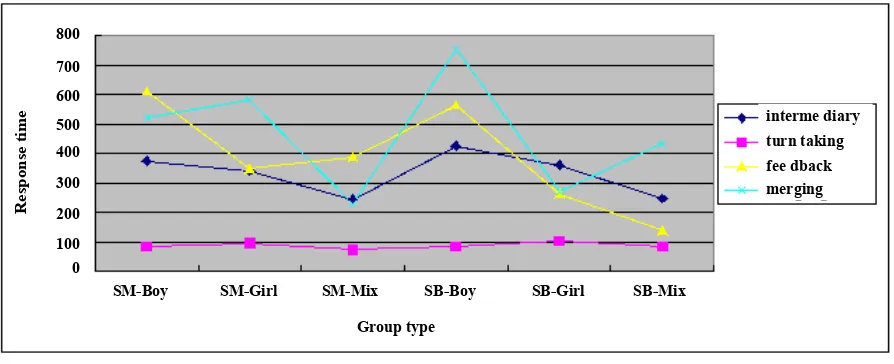
the intermediary pattern, feedback pattern and merging pattern are categorised under collaborative pattern. These patterns do require students’ cooperation during the working periods. Meanwhile, turn taking pattern falls under non-collaborative pattern but it requires indirect cooperation among the students. In this case, students can observe other students during the working periods.
From our empirical results (Figure 10), it is proven that the interaction time among the students in both schools is less when it comes to turn taking pattern. Despite that no timer was preset during the turn-taking, the students were able to work within a consistent time frame. This further re-enforced that RimbaIlmu is able to capture the attention of the students regardless of genders. Under the circumstances that all players have the same knowledge, students respond in a consistent manner. Further study is required to understand this more. On the other hand, we observed that the students took longer time to complete the exercise within the interactive environment using the merging pattern. The justification for this is the merging pattern requires students to compare what they have and finding a solution.
Our observation on the effect of gender in interaction, boys tend to discuss or talk more during the collabora-tion, hence they took longer time when working with exercises that are developed using the intermediary pattern, feedback pattern and merging pattern.
3.2. Pattern Workshop
Is the pattern reusable? This section will present an experiment conducted to evaluate the reusability of patterns in developing single shared display application. A half day workshop was conducted among the students in the Faculty of Computer Science and Information Technology, UNIMAS with the aim to observe the reusability properties of the interactive patterns.
Background of the population: One of the key aspects for this experiment is that the participants are required to have similar background knowledge of the development platform. A group of second year students currently undergoing their Bachelor degree in Computer Science were selected. This group consists of students from dif-ferent majoring. They were given four months training with an average of 5 days a week to learn the basic of C# programming and XNA development through Visual Studio IDE. The students are guided to build a simple C# program and XNA games. Although the students have the background knowledge of software engineering (all of them had undergone compulsory first year subjects), they do not have the background knowledge about pat-terns.
Experimental Design: The aspects taken into consideration when demonstrating the reusability of the patterns are the measurement of the effort, the effectiveness and comprehension of the pattern design documentation. Overall, there are eight participants who were involved. During the experiment, the students are located in a room with three partitions. Each of the students was provided with a laptop with Visual Studio 2010 installed and a mouse. In other words, they were required to develop a single shared display application that consists of two players. Due to the time constraints, the students were provided with the skeleton code. The skeleton con-sists partially of the code that described turn taking interaction. The experiment is conducted based on the fol-lowing steps.
Step 1: Briefed the objective of this test that is to evaluate the usefulness of agent patterns. In order to avoid biasness, the specific aim of this test was not specified.
Step 2 (for the purpose of group management): The participants were divided into two groups. One is known as the controlled group and another one is known as the treatment group.
-In the controlled group, the participants were not provided with the pattern documentation. This group con-sists of four participants.
-In the treatment group, the participants were provided with pattern documentation.
After the groups were assigned, the controlled group was given a sample code in which this code was devel-oped based on the turn taking pattern. The treatment group was given a sample code but with the addition of pattern documentation and the mapping guideline. The pattern documentation is described in Section 3. Reader can request for a complete mapping guideline.
Step 3: Briefed both groups. The aim of the briefing is to explain the flow of the educational application (a generic application flow was given to each of the participants).
on the interaction behavior class. Game initialization was taken out as it was not feasible for beginners to code the game initialization and so forth. This is to avoid biases on the controlled group.
3.3. Results from the Workshop and Discussion
The average time is calculated based on the consumed time in accomplishing task from the treatment group and control group after the experiments and is shown inFigure 11. Reader can refer to the author for the details of the tasks given to the students. From the results, the maximum time spent by the treatment group is 87 minutes. Meanwhile the lowest accomplishment time for the treatment group is 47 minutes. On the other hand, the max-imum accomplishment time for the controlled group is 190 minutes whereas the lowest accomplishment time is 98 min. From Figure 11, we can conclude that the interactive pattern is able to reduce the time to design a single shared display application. Overall, the adoption of interactive pattern is able to reduce the designing time for single display application by a half.
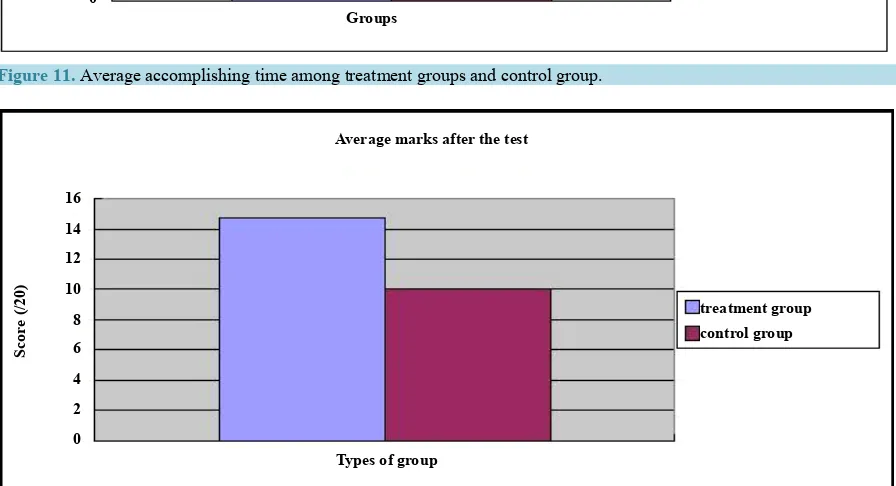
The comprehensiveness of the pattern design contributed to the reduction of time when designing and imple-menting an application. We had proven that by referring to the documentations when developing RimbaIlmu, the patterns allow the developer or novice to rapidly perform the development activities. The result is shown in
Figure 12.
When further examination is conducted, we identified that the patterns support better code understanding and making code modification or maintenance easier. Figure 10 shows the marks given to the participants upon the usage of patterns in performing several activities (i.e. understand the code and modify the code) for one of the interactive design pattern (i.e. turn taking) in RimbaIlmu.
From the test, the highest score obtained by the treatment group is 17/20 and the lowest score is 12/20. Meanwhile, the highest score for the controlled group is 11/20 and the lowest score is 8/20. Three of four mem-bers in the treatment group manage to score 15/20 and higher. By looking into the job accomplishment in modi-fying the code, two students from the treatment group manage to modify the code based on the tasks given. Overall, 92% of the members from the treatment group are able to modify the code whereas there only 79% of the members from controlled group manage to modify the code.
Even though the sample size is small (four members for each group), our preliminary results demonstrated that users’ satisfaction is high after adopting the patterns when developing single shared display application.
The results validity threat: In this experiment, the participants are only required to adopt one pattern, which is turn taking. Hence, it is understandable that the accuracy of the results is questionable. Under the circumstances that we had presented, the result is acceptable. Furthermore, similar trends are predicted as all of the patterns are designed in a similar format. Another concern of this experiment is the validity of the tasks. This is because the difficulty level of the tasks is included in the overall results of the test. Post-experiment survey questionnaires were conducted among the participants in order to validate the overall results. From the feedback we obtained, most of them agreed that the descriptions of the tasks were clear and the objectives of the tasks were also clear.
SM-Boy Group type 0 800 R es po ns e t im
e interme diary
turn taking fee dback merging
SM-Girl SM-Mix SB-Boy SB-Girl SB-Mix
700 600 500 400 300 200 100
[image:11.595.90.537.526.708.2]Accomplishing Time among groups Groups 0 20 40 60 80 100 120 140 Ti m e ( m inut es ) treatment group control group
Figure 11.Average accomplishing time among treatment groups and control group.
Average marks after the test
Types of group 0 2 4 6 8 10 12 14 16 Sc or e ( /2 0) treatment group control group
Figure 12. Results show the overall comprehensiveness of patterns.
4. Conclusion and Discussion
As demonstrated in the development of RimbaIlmu, the interactive patterns are usable. Different interactions will lead to different response time, while collaborative style of patterns require much response time compared with non-collaborative style. The response time indicates the usefulness of the patterns in driving the discussion and interaction among the group members. The interaction patterns are reusable as these patterns have assisted the controlled group or novice to develop the single shared display application with minimum guidance. Finally, the patterns lead to source code comprehensiveness and this in return has easily helped the novice in developing the single shared display. As future works, more empirical studies are needed to further validate the usability and reusability of interactive patterns. In addition, more case studies are needed to reveal the potential of inter-active patterns in rapidly prototyping a single shared display application.
Acknowledgements
Thanks to Ministry of Education Malaysia and UNIMAS to support on this research.
References
Hu-man Factors in Computing Systems: CHI, 286-293, ACM Press.
[2] Alcoholado, C., Nussbaum, N., Tagle, A., Gomez, F., Denardin, F., Susaeta, H., Villalta, M. and Toyama, K. (2011) One Mouse per Child: Interpersonal Computer for Individual Arithmetic Practice. Journal of Computer Assisted Learn-ing, 28, 295-309.
[3] Pawar, U., Pal, J., Gupta, R. and Toyoma, K. (2007) Multiple Mice for Retention Tasks in Disadvantaged Schools. Computer Human Interaction, San Jose, 28 April-3 May 2007, 1581-1590.
[4] Moraveji, N., Inkpen, K., Cutrell, E. and Balakrishnan, R. (2009) A Mischief of Mice: Examining Children’s Perform-ance in Single Display Groupware Systems with 1 to 32 Mice. Proceedings of the 27th International Conference on Human Factors in Computing Systems, New York, 9 April 2009, 2157-2166.
[5] Buschmann, F., Henney, K., et al. (2007) Pattern Oriented Software Architecture: On Patterns and Pattern Languages (Wiley Software Patterns Series), John Wiley & Sons.
[6] Guerrero, L.A. and Fuller, D. (2001) A Pattern System for the Development of Collaborative Applications. Group De-cision and Negotiation, 43, 457-467.
[7] Asensio, J., Dimitriadis, Y., Heredia, M., Martinez, A., Alvarez, F., Blasco, M. and Osuna C. (2004) Collaborative Learning Patterns: Assisting the Development of Component-Based CSCL Applications. Proceeding of the 12th Eu-romicro Conference on Paralle, Distributed and Network Based Processing, 11-13 February 2004, 218-224. [8] WaiShiang, C. and Mit, E. (2011) Reusability Assessment of Task Knowledge Patterns through Metrics. The 2nd
In-ternational Conference on Software Engineering and Computer System (ICSECS 2011), Kuantan, 27-29 June 2011. [9] WaiShiang, C., Sterling, L. and Taverter, K. (2010) Task Knowledge Patterns Reuse in Multi-Agent System
Develop-ment. 13th International Conference on Principles and Practice of Multi-Agent Systems (PRIMA-2010), Kolkata, 12- 15 November 2010, 459-474.
[10] Zanella, A. and Greenberg, S. (2010) Reducing Interference in Single Display Groupware through Transparency. Pro-ceedings of ECSCW, Kluwer, 2001, 339-358.