Model Driven Adaptation and Usability for Context
Aware User Interfaces
Wided Bouchelligua
Lille Nord University of France,F-59000 Lille, France UVHC, LAMIH, F-59313
Valenciennes, France CNRS, UMR 8530, F-59313
Valenciennes, France
Adel Mahfoudhi
ENIS, CES, Soukra Road km 3.5, B.P: w 3038 Sfax, TunisiaMourad Abed
Lille Nord University of France,F-59000 Lille, France UVHC, LAMIH, F-59313
Valenciennes, France CNRS, UMR 8530, F-59313
Valenciennes, France
ABSTRACT
In recent years, given the development of networks and technological innovations, the user mobility has increased so much. That is why the interactive applications must be executed on both mobile devices as PDAs, mobile phones and PC. The user is then progressing in a varied and dynamic environment. Therefore, the challenges of the User Interface are related to the adaptation to the context of use. This paper describes a model-based approach to generate user interfaces adapted to their context of use, while respecting usability. The Model Driven Engineering is used to provide solutions to the problems of adaptation and usability and allow automatic generation of user interfaces. The case study pertaining to a tourist guide system is used to illustrate our approach.
General Terms
Human Computer Interaction, Design.
Keywords
User Interface, Adaptation, Usability, Model Driven Engineering.
1.
INTRODUCTION
Ubiquitous or pervasive computing is invented in 1991 by Mark Weiser [1]. It is characterized by the change of context, which is due to user mobility. For [2]: "ubiquitous computing makes information available anywhere, anytime". In the field of pervasive computing, the research work relating to a class of applications called "context aware" or "context adaptable" has become numerous, since the explosion of wireless networks. Schilt and Theimer [3] define a context aware interactive system as a system that can dynamically capture information from its context. This information represents variables such as location, user profile and object sensors of information.
Currently, several research works on the context aware user interfaces (also known as plastics) have been conducted. It is in this context that our research work lies. The User Interface (UI) should be able to be dynamically adapted to the context of use while maintaining usability. "A system is usable when it allows the user to perform his task with effectiveness, efficiency and satisfaction in the specified context of use" [4]. In the literature, there are several definitions of context [5]. The most widespread definition is that of Dey [6]: "any information that can be used to characterize the situation of an entity. An entity is a person, place, or object that is considered
relevant for interaction between a user and an application, including user and application themselves".
Building on the concept of transformation parameterized by the context as defined within the framework of Model-Driven Engineering (MDE) [7,8], the proposed approach assures the adaptation of the UI to the context of use. It is based on MDE that goes beyond the framework of Model Driven Architecture (MDA) [9]. The latter can be summarized in the elaboration of the Platform Independent Models (PIM) and in their transformation into Platform Specific Models (PSM) [7], to cover the methodological aspects. We apply the parameter setting at the level of the transformation of an abstract user interface into a concrete user interface, whose generation is made on three phases parameterized by the user, the platform and the environmental model respectively.
Because the usability of the user interface is often a determining factor in the success of a computing project and its acceptance by users, we use ergonomic criteria that we insert into the process of generation of an adaptable UI. The approach of C. Bastien and D. Scapin [10] is adopted in this research work and the ergonomic criteria are integrated in the process of UI generation. So, in order to improve the usability of adaptable UI, an ergonomic model serves as a parameter in the three transformation modules.
The remainder of this paper is structured as follows. Section 2 presents a state of the art on the model-based approaches for the adaptation of the UI, approaches for the usability on the UI and Model-Driven Engineering Approach. As for section 3, it describes the proposed approach in terms of meta-models and (adaptation and usability) rules. Then, section 4 provides a case study illustrating the suggested approach. Finally, section 5 draws the conclusion and provides perspectives to future research.
2.
LITERATURE REVIEW
2.1
UI adaptation
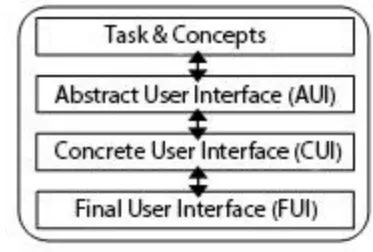
presentation of model-based approaches for UI adaptation and UI usability. In fact, the Cameleon reference framework [12] represents an excellent framework of UI adaptation as it defines four essential stages for the development of the user interfaces in a pervasive environment (Fig 1): tasks and concepts, abstract user interface, concrete user interface, and final user interface.
Fig 1: The four main stages of Cameleon framework
The Human Computer Interaction (HCI) engineering has been the interest of a great deal of research work, among which we can quote the TERESA method [13] that supplies the tasks as a single model, and allows the generation of several interfaces for various platforms. We can also cite the Comets (COntext sensitive Multi-target widgETS) [14], which essentially proposes a model for the plastic interactors that can be adapted to the variation of the screen size. Likewise, the UsiXML (User Interface eXtensible Markup Language) [12,15] approach represents a UI approach of engineering defined according to the Cameleon reference framework [16]. Such an approach describes a context model consisting of three components: user, environment and platform. But, only the variant platform is considered during the UI generation.
Hariri [17,18] propose a method of UI conception, by considering the biggest possible range of every element of the context <user, platform, environment>. This method is based on the use of the patterns use to facilitate the choice of business components related to the system tasks and the presentation components appropriate to the context of use.
The work of [19] is considered as one of the pioneering studies to join Model Driven Engineering with the domain of Human Computer Interaction. The reported approach has shown that the concepts of the MDE could be successfully applied to the UI engineering. Sottet [19] proposes meta-models and meta-models transformations to generate adaptable or plastic UI, and defines a general context meta-model. Based on the same approach (MDE), Hachani [20] suggest the introduction of the context of use at the tasks level rather than at the interactors level. This approach is characterized by the definition of the generic rules appropriate to all the contexts of use. However, both approaches lack a detailed description of each constituent of the context of use. As in [20] and [21], we opt for the proposition of a model-based approach and its transformation according to the characteristics of the context but we seek to detail the context in accordance with three generic meta-models (user meta-model, platform meta-model and environment meta-model).
2.2
UI Usability
Several methods that identify usability problems of interactive systems exist for the evaluation of user interfaces. For
improving Web site usability. He defines and implements a number of design criteria for vision-impaired users. In the same direction, Leporini [23] provides a MAGENTA tool for supporting inspection-based evaluation of accessibility and usability guidelines. In addition, building on a method of assessing compliance with the recommendations, Vigo [24] proposes an application evaluation that considers specific device features in the evaluation process. A design environment GUIDE2ux is proposed by [25] to identify usability problems automatically and facilitate the job for designers to verify their designs on the target device easily.
However, despite the existence of several evaluation methods, most of them are targeted for the evaluation of final products. But today, with the expansion of model-based approaches for development user interfaces, research is oriented to integrate the evaluation at the level of modeling steps.
Among these research works, we find that of Frey [26] Offering QUIMERA, a quality meta-model. QUIMERA is composed of Criteria that can be decomposed into sub-criteria. The meta-model provides different recommendations specified for each Criterion. QUIMERA covers the evaluation methods that are specified by metrics and/or practices. However, this meta-model has not yet been implemented in order to be used at design time and runtime.
Presently, Sottet [27] proposed not only meta-models and model transformations to derive plastic UI, but also a meta-model that allows the characterization of the changes in models with ergonomic criteria. In [27], Sottet proposed an adaptation controlled by an intelligent system in order to automate the generation of plastic UI all along with the respect of certain ergonomic criteria. This intelligent system allows the choice of the appropriate transformation to a given context, while respecting such ergonomic properties. For example, if the user makes many mistakes, we should choose the UI that limits his wrong manipulations; i.e., to throw the rules of model transformations classified as "protection against error". In this case, it is necessary to create an N transformation to an N context and the intelligent system chooses the transformation that best suits a given situation.
2.3
MDE Approach
2.3.1
Principles of MDE approach
Since the recent adoption of the MDA by the OMG [28], the model driven approach has aroused a big interest. Then, the MDA approach has become a particular variant of the Model Driven Engineering to cover the methodological aspects as well.
The MDE is based on three essential concepts: the models, the meta-models [29] and the transformations. These frequently-used terms in the MDE and the relations between them were widely discussed in the literature [7,30,8,31]. In [30], Bézivin identifies two fundamental relations: the first relation called "RepresentedBy" is connected to the notion of model, and the second called "ConformsTo" defines the notion of model with regard to that of meta-model (Fig 2).
the productivity of a model because it is in compliance with its meta-model. This facilitates the transformation of models. The notion of transformation is another central concept for the MDE, the mechanism of transformation allows using both Model and Meta-model notions. The power of the MDE consists in creating the transformation models, which build on meta-model corresponding to the source model and the target model. So the relation "IsTransformedInto" allows the automation of the transformation of a model into another.
Fig 2: Basic Notions in Model Driven Engineering
2.3.2
Principles of the parameterized
transformation of MDE
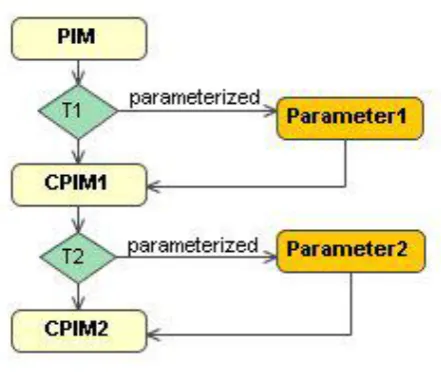
Our objective is to handle the adaptation of the UI to the context of use (user, platform and environment) and to improve usability of adaptable UI. To do so, our research work will build on the parameterized transformations defined by [32]. The cited work describes a parameterized transformation within the framework of the model driven engineering for a contextual development. The authors propose a parameterized transformation focusing on PIM to PIM transformations (Fig 3).
By the use of this transformation technique, the contextual parameter identified into the model will be contextualized with the parameterizable element which represents context information [32]. Such correspondences are guaranteed by the transformation parameter setting, whose basic principle is to take into consideration the properties of the context during the specification of transformation rules (right of Fig 3). Quoting [33], "a parameter specifies how arguments are passed into or out of an invocation of a behavioural feature like an operation. The type and multiplicity of a parameter restrict what values can be passed, how many, and whether the values are ordered".
Indeed, Frankel [34] indicates the importance of the parameterization in the operations within the models by associating the tagged values with PIM and PSM. Tagging model elements allows an easy filtering of some specific elements.
The use of the parameterized transformations is envisaged with the aim of either improving new features (values, properties, operations) or changing the behaviour of an application. For that purpose, the designer has to specify the parameters intended to be inserted during the phase of transformation. In his work, [32] proposes that these parameters are the context information, thus after the transformation, the application will join the context information specified into the parameters as illustrated in Fig. 3
Fig 3: MDE Parameterized transformation
A PIM model can be developed without considering the contextual information: the name of the user, his profile, the platform type, and the location etc. can be added as parameters that will be used during the phase of transformation. The same PIM model can be transformed and refined several times by adding, or deleting each time the information relative to the context, thus obtaining different CPIM (Contextual PIM). In fact, to the same PIM we can attribute various CPIM, just by modifying the contextual information. A CPIM in turn, can generate a CPSM (Contextual PSM) by resorting to the traditional techniques of transformation. CPSM specifies operation system requirements, programming languages, middleware architectures and networking.
Building on the concept of transformation parameterized by the context as defined within the framework of MDE. Our previous research works have focused on the generation of multi-platform user interfaces [35,36]. We have proposed a complete approach for generating a UI adapted to the context of full use [37].
In this paper, the proposed approach assures the adaptation to the context of use and the usability of the UI. The generation process consists of three transformation modules starting with an Abstract User Interface and generating a Concrete User Interface by inserting the user platform and environment model, respectively. The ergonomic model serves as a parameter in the three transformation modules.
3.
METHOD BASED ON MODEL
DRIVEN ENGINEERING APPROACH
3.1
The general principles for adaptation
and usability of UI process
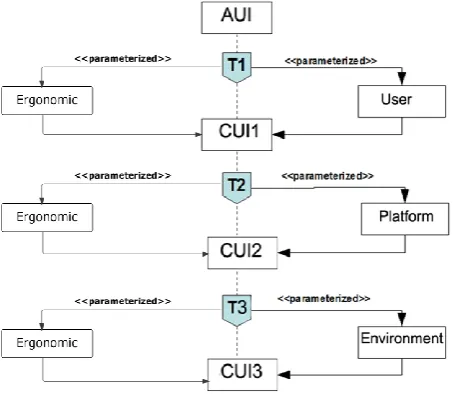
The abstraction levels of the Cameleon framework [16] incorporated in the proposed approach, and shown in Fig 4 are Abstract User Interface (AUI) and Concrete User Interface (CUI). The objective of the passage to the concrete level is the generation of an adaptable interface adapted to the planned context. Our approach facilitates the adaptation of the UI to the user, because the latter is a key focus of all UI research, hence everything revolves around him.
[image:3.595.62.273.173.285.2]suitable to him and echoing them on this intermediate interface.
[image:4.595.55.282.312.509.2]On the other side of the coin, we are interested in the injection of the characteristics of the platform used to assure the adaptability towards this context. Indeed, for the reasons behind choosing this injection order of the characteristics are multiple. On the one hand, it is around the user that revolves everything and it is his characteristics that are going to impose the choice of the platform. Besides, it is the user who decides about the device on which he even wishes to post the information. Indeed, this variation is going to require the appearance and the disappearance of the other devices of interaction. It is also according to his preferences that the modality: graphic, hearing or even olfactive is going to be chosen. Then, in case of change at the level of one of the contextual dimensions, an adaptation is launched to protect the usability [38]. Certainly, the specific properties and the capacity characteristics of the target device have to satisfy the needs of the user. This second transformation (T2 in Fig 4) adapts the first CUI1 to the characteristics of the platform which is going to host the application, from which the second CUI (CUI2 in Fig 4) results.
Fig 4: Parameterized transformation for the adaptation and usability of UI
Now, having fixed and adapted the characteristics of the target platform to their own motivations and intentions, the user has nothing but to choose the environment which is going to host the application. In fact, this environmental variant has to be in accordance with the characteristics of the user and the target platform. Actually, the environmental aspect is going to be determined by two items. The first one is the profile of the user, defined as being a first order entity for the process of adaptation and the second is the accompanied intentions, naturally, symptomatic of the platform. The latter are going to be implemented during the process of adaptation to succeed in the generation of an adaptable UI while taking into account
three facets of the context. Hence, in the third place, we are going to inject the environmental properties in the third transformation (T3 in Fig 4) to have the interface (CUI3 in Fig 4).
The ergonomic evaluation can be carried out at different stages of the development cycle of the UI and is usually performed in the final generation of the interface. But aiming at an early detection of the major problems of usability of an interface, we will incorporate the ergonomic assessment in the different transformation modules of the process of generating the adaptable UI. The three transformations (T1, T2 and T3) are parameterized by ergonomics criteria involved in proving the usability of the generated concrete UI (Fig 4).
Therefore, the generation of the concrete user interface is made up of three phases. In what follows, we clarify the pillars of our approach: the AUI model, the CUI meta-model, the user meta-meta-model, the platform meta-meta-model, the environment meta-model, the ergonomic meta-model and the transformations rules for the UI adaptation and the UI usability.
3.2 Context of use Meta-Models
The context is identified by many teams [16,11,12,16] by the triplet <User, Platform, Environment>. Thus, three categories of contextual information can be distinguished [6]:
Information pertaining to the platform (processor, memory, peripheral equipments, connection network, the size of the display screen, and the available interaction tools ...).
Information relative to the user (his profile, his current activity, his preferences, his habits, his cultural characteristics ...).
The information corresponding to the environment (light, noise, geographical localization ...).
3.2.1
User Meta-Model
The user model has to contain information allowing the characterization of the user. Our meta-model (Fig 5) builds strongly on the work of [39,40]. The contained information is classified into four categories:
Information stuff (the name and the first name of the user, the age, the genre).
Knowledge (The expertise level of the user in computer science, the expertise level regarding task or manipulated concept).
Preference (The modality of interaction (graphic, vocal, olfactive, tactile, etc.), font, the character size, colour and the sound volume).
Fig 5: User Meta-model
3.2.2
Platform Meta-Model
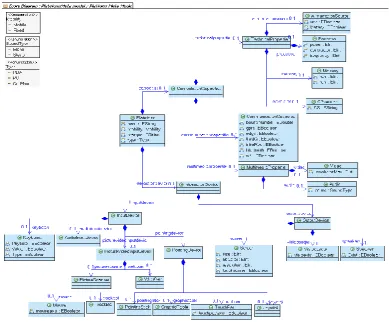
Although most of the research on adaptable UI made adaptation to the platform, it did not provide a complete and detailed platform meta-model. The existing approaches are limited to its description at a high abstraction level or the description of the display surface of the platform which represents the most used interactional resource in the adaptations made so far. However, the adaptation can be prepared in the presence and absence of the other interaction devices. For example, if we do not have a mouse, we can suggest as a form of adaptation using a vocal interactor where the activation of the actions will be made vocally. Fig 6 presents our platform meta-model [35]. Generally, the platform consists of:
Calculation resources represented in Fig 6 by the "ComputationalCapacities" class. These resources do not only include the physical aspects, such as the memory or processor, but also the software aspects as e.g. the supported operating system;
Interaction resources that are the input-output devices represented in our meta-model by the "InteractionDevices" class. We identify two classes of interaction devices: the input devices ("InputDevice" class in Fig 6) and the output devices ("OutputDevice" class in Fig 6) Certain devices inherit both classes and are thus input/output devices, such as the touch screen.
[image:5.595.103.493.428.750.2]3.2.3
Environment Meta-Model
In this meta-model, illustrated in Fig 7, we try to cover all the environmental facets of the context that are susceptible to react directly or indirectly on the interactive system. In fact, we are trying to take into account the maximum of environmental aspects. Therefore, our meta-model consists of four classes that explain the general characteristics of the environment.
The first class characterizes the ambient environment that surrounds the interactive system "AmbientEnvironment". But with the spread of ubiquitous computing, the ambient conditions are changeable from one moment to another. This class inherits three sub-classes: "ClimaticEnvironment",
"LuminousEnvironment and
"SonorousEnvironment".
o The class "ClimaticEnvironment" specifies the climatic conditions susceptible to act on the interactive system.
o The class "SonorousEnvironment" indicates the sonor state dominating the interactive.
o The class "LuminousEnvironment", the luminous environment describing this class is determined by the intensity of the light which can be high, medium or low.
The second class composing our meta-model is the class "TemporalEnvironment". In this class, we have specified two attributes; the first is "date" and it is of the type "Month". As for the second, it is of the type "time" and it is of the type enumeration "Time".
As for the third class, named "SocialEnvironment", it characterizes the social environment receiving the interactive system. This class is decorated with a single attribute: "atmosphere" of the type enumeration "Atmosphere".
[image:6.595.62.545.255.551.2] To specify the characteristics of the environment where the application is to be deployed, we used the fourth class named "SpatialEnvironment". Indeed, this class gives information about the geographical location of the interactive system.
Fig 7: Environment Meta-model
3.2.4
Validation constraints of Context
Meta-models:
The model validation is an important factor assuring the reliability and the coherence of a meta-model. Generally, to strengthen a meta-model, the designer has to associate constraints with it. Therefore, we have determined a set of constraints for the validation of the various models of the context of use. The expression of the constraints is made with the Object Constraint Language OCL language [41] within the Kermeta meta-model [42].
As an example, the code below shows a constraint on the user's meta-model. Indeed, the user having no visual capacity (namely hearing) cannot select the graphic preference (namely hearing) as a modality of communication.
inv GraphicalModality is
if(getSensor(getCapacity(self)).visual == Level.lower) and getPreference(self).modalityOfCommunication!= Modality.graphical)
then // treatment end
As an example of constraint on the environment meta-model, we can notice that if the type of the chosen environment is an internal environment then it is necessary that the value of the attribute "precipitation" of the class "ClimaticEnvironment" is "false".
context Environment inv:
self.ambientenvironment.climatenv.precipitation implies self.spatialEnvironment->forAll(s |
3.3
Ergonomic Meta-Model
Faced with the multitude of the existing recommendations, C. Bastien and D. Scapin have conducted, since 1997, the synthesis of about 900 recommendations in the field of computing ergonomics at the large sense [10]. Their work has led to a list of 18 criteria divided into eight dimensions. The set of these criteria can help the evaluator to estimate the ergonomic quality of the UI in terms of usability.
[image:7.595.101.497.176.409.2]In the process of building the UI, Sottet proposed a meta-model that allows the characterization of the meta-model transformation by ergonomic criteria [27]. Building on this idea and the ergonomic criteria of C. Bastien and D. Scapin [10], we propose our own meta-model of ergonomic which seeks to explain the ergonomic evaluation. An ergonomic model conform to this meta-model is taken as a parameter for improve usability of adaptable UI. Fig 8 shows the proposed meta-model.
Fig 8: Ergonomic Meta-model
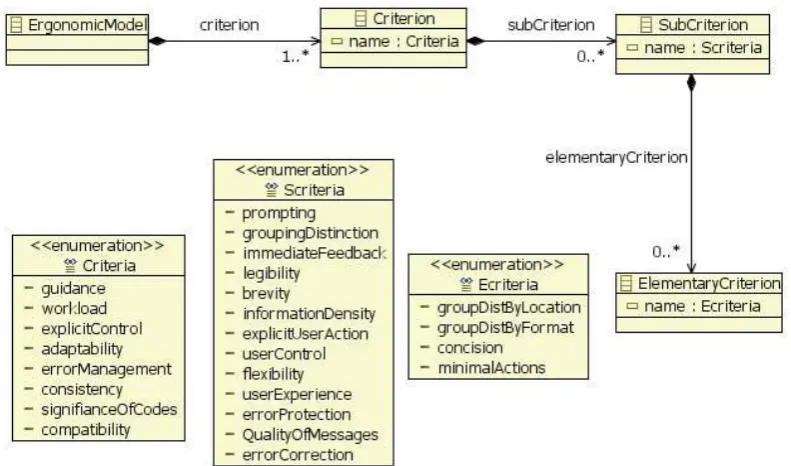
In this meta-model, we attempt to present elementary criteria that are really integrated in the transformation model. But, for legibility reasons of the model, we have not discarded the other criteria, which are eight. Some of the criteria are divided into sub-criteria, 18 of which are counted elementary. So, our meta-model is composed of three classes.
The first class is the class "Criterion", in which we have specified a unique attribute that is "name" of the type "Criterion". We have defined an enumeration called "Criterion", whose values are the eight basic criteria.
We have also defined a second class called "SubCriterion" which consists of one attribute "name" of the type "Scriteria", whose enumeration values "Scriteria" are the sub-criteria of the basic criteria.
Because certain sub-criteria are in turn subdivided into other criteria, we have added a third class "ElementaryCriterion". Just like the other two classes, this class contains one attribute "name" of the type "Ecriteria", whose enumeration values are the sub-criteria of the sub-criteria.
The notion of priority between the criteria does not appear in this meta-model, but is introduced implicitly in the processing modules. Indeed, the addition of criteria to the processing modules is done so that some priority is respected in function of the user preferences outlined in the user model, as well as the characteristics of the platform and environment presented in the platform model and the environment model. For example, to a large screen, if the "minimal actions" criteria are
taken into account, then the "informational density" sub-criteria will be ignored.
Several constraints are added to the meta-model of ergonomics. As an example, the code below is intended to ensure that the hierarchy of criteria is respected. For instance, if you want to insert the guide criterion in the ergonomics model, only under incitation criteria, Grouping/Distinction of Items, Immediate Feedback and Legibility can be put under this criterion.
invariant crt;
self.criterion->forAll(c.Criterion| //Criteria with subcriteria c.name=Criteria::guidance implies c.subCriterion->forAll(sc : SubCriterion | sc.mame = Scriteria::prompting
or sc.name = Scriteria::immediateFeedback or sc.namc = Scriteria::legibility
or (sc.namc = Scriteria::groupingDistinction implies sc.elementaryCriterion->forAll(ec : ElementaryCriterion | ec.name=Ecriteria::groupDistByLocation
or ec.name=Ecriteria::groupDistByFormat)))) and(c.name=Criteria::workload implies ...)... //criteria have not sub criteria
and(c.name=Criteria::consistency implies c.subCriterion->isEmpty()))
3.4
UI Meta-Models
3.4.1
Abstract User Interface Meta-Model
In the literature, the Abstract User Interface (AUI) is defined in several ways. For instance, [43] defines it as a set of interconnected workspaces. A workspace is an abstract structure in which an interaction is organized. The connection between workspaces is made according to links between the tasks and the domain concepts. As another example, in [44], the abstract user interface is defined as the logical windows and the presentation units. The interactive tasks and/or the concepts are grouped together in the form of logical windows.
In our approach, the AUI allows the transformation of the specification in the modelling of the abstract components of the interface. In order to describe the Abstract User Interface and the Concrete User interface, we have resorted to the static model of interactions [45]. Aiming at applying a model-to-model transformation, we have refined the static model-to-model of the
[image:8.595.59.539.274.469.2]interactions of [45] in the form of two meta-models: the AUI and CUI meta-models [35]. Indeed, the AUI meta-model which is shown in Fig 9 describes the hierarchy of the abstract components "UIComponent" corresponding to the logical groups of interactions "UISpace". The modelling of the abstract interface of an application is then made by one or several "UIGroup" which model containers forming coherent graphic elements (a window in a Windows environment, for example). Each "UIGroup" consists of one or several "UIUnitSuit" and/or "UIUnit". A "UIUnit" gathers a set of interaction elements which cannot be separated from a logical business standpoint of the application (a treatment form for example). It can include one or several "UISubUnit". The advantage of this modelling is to allow the creation of the application by assembling the existing elements, resulting in a strong reusability. The AUI is expressed by means of the BPMN (Business Process Modeling Notation) [46], through the use of an ad-hoc sub-process.
Fig 9: Abstract User Interface Meta-model
3.4.2
Concrete User Interface Meta-Model
The Concrete User Interface (CUI) is deduced from the Abstract User Interface to describe the interface in terms of graphic containers, interactors and navigation objects. It is also expressed through the BPMN notation. The CUI meta-model extended from the static meta-model of the interactions of [45] is presented in Fig 10. The meta-model presented in [35] has been expanded to cover vocal components. The meta-model (Fig 10) consists of one or several windows represented in the meta-model by the "UIWindow" class (graphical modality) and by the "UIVocalForm" class (vocal modality). Besides, the "UIPanel" class (respectively "UIVocalGroup"') allows the modelling of the possible hierarchies of containers. The interactors presented by the "UIField" class (respectively "UIVocalComponent") of the concrete interface are classified according to their types in three groups: "UIFieldMultimedia", "UIFieldData" and "UIFieldControl".
Unlike any other approaches of the UIs conception, an original characteristic of our concrete user interface is
represented by the use of the functional services [45]. A functional service is a set of treatments that allows the execution of a precise operation on the element with which it is connected [45]. In our meta-model, a functional service is connected to any type of container and to all the constituents belonging to it.
Fig 10: Concrete User Interface Meta-model
3.5
Transformations, adaptation and
usability rules
The generation process of CUI follows the approach proposed in Fig 11. As mentioned before, there are three transformation steps. In what follows we detail these transformations and show the impact of each context parameter and ergonomic criteria on the result of each transformation.
3.5.1
Step 1: Transformation of AUI into CUI1
parameterized by user model and ergonomic
model
The generation stages of the concrete user interface from abstract user interface lean strongly on the work of [43,15]. The three transformations of the approach are developed with the transformation language Kermeta [42]. The transformation of an AUI into a CUI1 (T1 transformation) is implemented by the following four stages:
Creation of the application: creation of the application in the "ConcreteUserInterface" target model by the "AbstractUserInterface" of the source model;
Realization of the abstract containers;
Choice of the interactors;
Definition of the navigation.
We have developed a set of rules allowing the T1 transformation. As an illustration, we clarify the phase of the choice of the interactor in what follows. This stage aims at associating an adequate interactor with the abstract component of AUI. Such a choice depends on the properties of the abstract component: its type (Input or Output) its nature (Specify, Select, Turn ...) and the user preferences.
The following excerpt of our code shows the "UIFieldSpecification" method for the choice of the appropriate interactor. In that case, we need to choose the interactor for an abstract component of the "Select1FromN" nature. Having retrieved the nature of the constituent (nat:
Nature init uic.nature) and if the constituent can "Select1FromN", the program evaluates the number of concepts treated by the constituent. This number (enumNB) is obtained through the restoration of the annotation attached to this constituent through link lnk. If the number of the treated concepts is strictly lower than 5, then the realization of the abstract constituent will be in the form of a label "UIStaticField", calling the method createStaticField (uiw, uic, lnk), and a set of radio buttons "RadioButton" is created, calling the method (createRadioButton (uiw, uic, lnk)). On the contrary, the realization is in the form of a drop-down list (createDropDownList (uiw, uic, lnk)).
//UIFieldSpecification operation
UIFieldSpecification(inputmodel:AbstractUserInterface, uic:CollapsedUIUnit,uiw:UIWindow,evaluationModel:Ergon omicModel)
is do
//restore nature of component var nat : Nature init uic.nature
//recuperate restore manipulated concepts var lnk : Link
lnk := getAllLinks(inputmodel).
detect{c|stdio.writeln ("link" + c.uicomponent.name) c.uicomponent.name == uic.name}
// Select one item from N
if(nat == Nature.Select1FromN) then if(lnk.uicomponentannot.enumNB>0)and lnk.uicomponentannot.enumNB<5) then
createStaticField(uiw,uic,lnk) from var i : Integer init 0 until i == enumNB-1 loop
createRadioButton(uiw,uic,lnk) end
else
Several existing characteristics in the model of the user can have an impact during the realization of the AUI. Certain characteristics have an impact on the choice of the concrete object of interaction, such as the preference property of the user in terms of the modality of communication. The impact is thus expressed in terms of the reshaping of the interface. The extract of the Kermeta code below illustrates the impact of the preference modality of communication on the realization.
operation transform (inputModel : AbstractUserInterface, paramModel:UserModel, evaluationModel : ErgonomicModel)
: ConcreteUserInterface is do
AUI2CUI := Trace <UIElement, CUIElement>.new AUI2CUI.create
result := ConcreteUserInterface.new var modpref : Modality init
getPreference(paramModel).modalityOfCommunication if (modpref == Modality.graphical)
then
stdio.writeln("Graphical Modality") //Graphical treatment
else if (modpref== Modality.auditive) then stdio.writeln("Auditive Modality") //Auditive treatment
end end
Other characteristics in the model of the user influence are the properties of the objects of interactions rather than the choice of concrete object. The extract of the following code allows the function to create a service (createServicePerso method). It shows the activation of the two services "useoflanguage" and "useoftooltip" as example. The latter is activated if the user does not have strong computer capacities ("Computer aptitude").
operation createServicePerso(nameuiw :String,pref : Preference,
knl : Knowledge) : PersonalizationService is do
var srv:PersonalizationService init
PersonalizationService.new srv.name :=nameuiw
if pref.language != Language.french then srv.useoflanguage := true
srv.language := pref.language.name else
srv.useoflanguage := false end
if knl.computerAptitude!= Level.hight then srv.useoftooltip := true
else
srv.useoftooltip := false end //rest of code result := srv end
Our research work lies within the reference of C. Bastien and D. Scapin [10] and adopts the perspective [47] in the distribution of the criteria of ergonomics in the process of generation of UI (Fig. 11]).
The first transformation module consists in concretizing abstract containers while at the same time taking into account the characteristics of the user. This concretization is motivated by the incitation criteria, explicit actions, user control and protection against errors. We decided to insert the incitation criteria at this level because the concretization of the containers allows the specification of the container type and
[image:10.595.316.541.171.353.2]another additional indication with the container of text fields type. Besides, because the type of the container is known, then we can associate buttons with concrete containers and therefore the explicit actions and user control criteria can be inserted at this level. Moreover, the text fields can be replaced by drop-down lists to minimize the risk of seizing erroneous values. At this stage, it is the protection against errors criterion that is implemented. In the following, we detail the rules of the criteria of usability injected at this level.
Fig 11: Injection of ergonomic criteria in transformation modules
Incitation: it is to associate a label with each text field to guide the user. Besides, at the level of the label, further clues about the entry format of data can be added. For an input field having enumeration type (unit of measurement or some other symbol), we add a label next to the input field to properly guide the user.
In this first transformation module a component of the type "specify" in AUI is transformed into a "FieldIn" (Textfield) in the first concrete user interface generated. The code below is an excerpt from the kermeta code which outlines the method explaining the incitation criteria.
//prompting criterion var nat : Nature init uic.nature var tp : AnnotationType init lnk.uicomponentannot.type if (nat == Nature.Specify) then //TextField creation
createFieldIn(uiw,uic,lnk) if (prompting == true) then
if (tp == AnnotationType.EEnumerator) then //Creation of Label with symbol
createStaticField(uiw,uic,lnk,symbol) end
end end
operation createFieldIn(uiw :UIWindow, uic : CollapsedUIUnit,lnk : Link) is do var fi : UIFieldEdit
init UIFieldEdit.new fi.name := lnk.uicomponentannot.data uiw.uifieldW.add(fi)
stdio.writeln("creation of FieldIn"+ fi.name) //explicit actions
if (ExplicitUserAction == true) then var bt : UIButton init UIButton.new bt.name := "OK"
uiw.uifieldW.add(bt)
stdio.writeln("creation of UIButton"+ bt.name) end
end
User control: Allowing the user to interrupt an action or processing in progress at any time using the button "cancel".
//user control
var btCancel : UIButton init UIButton.new btCancel.name := "Cancel"
uip.uifieldP.add(btCancel)
stdio.writeln("creation of UIButton"+ btCancel.name)
Protection against error: The protection of the user against error can be translated at this level, by the fact of creating a list happening instead of the text field. In fact, the user has only to choose the appropriate values and he is protected against entering the incorrect values.
if (ErrorProtection == false) then createFieldIn(uiw,uic,lnk) else
if (lnk.uicomponentannot.enumNB >5)then createDropDownList(uiw,uic,lnk)
else
createRadioButton(uiw,uic,lnk) end
end
3.5.2
Step 2: Transformation of CUI into CUI2
parameterized by platform model and ergonomic
model
The obtained CUI1 is the source model of the second transformation that takes as parameters the characteristics of the platform. We have addressed the impact of the property screen size and inputting/outputting devices of the platform. The following code produces the testing for the required devices of graphical or vocal interaction.
operation transform (inputModel : ConcreteUserInterface, paramModel : Plateform, evaluationModel:ErgonomicModel) :ConcreteUserInterface is do
CUI2CUI1 := Trace <CUIElement, CUIElement>.new CUI2CUI1.create
result := inputModel var width :Integer
init getScreen(getOutputD(getID(paramModel))).width var height:Integer
init getScreen(getOutputD(getID(paramModel))).height getCUIWindow(inputModel).each{uiw1|if
(MouseExist(paramModel)
and ScreenExist(paramModel)and
KeyboardExist(paramModel)) or(TouchPadExist(paramModel)and ScreenExist(paramModel)
and KeyboardExist(paramModel)) or
TouchscreenExist(paramModel) then
/*Treatment*/
else stdio.writeln("Inexistent Device") end}
getVocalGroup(inputModel).each{vg|if VisiocasqueExist(paramModel)
or (MicrophoneExist(paramModel)and
ScreenExist(paramModel) and then
getVocalForm(vg).each{vf| /*Treatment*/
else stdio.writeln("Inexistent Device") end}
end
Concerning the second transformation, we have tried to find a solution to have the possibility of specifying the platform and injecting the corresponding ergonomic criteria so as to create the adequate interface independently. Therefore, the second transformation module is controlled by several criteria among which minimal actions, informative density, legibility and protection against error can be mentioned. Thus, the injection of the ergonomic criteria depends on the choice of the platform, that is why, we can favor one ergonomic criterion to another with regard to the platform characteristics, namely the screen size. For that reason, we have introduced the notion of priority between the criteria in an implicit manner.
The already-realized work in [48] presents a development process of a plastic UI that is applicable to the context of use. The latter takes into account the context of use is considered especially on the platform. The UI for PC is produced first, and following a series of iterations starting from the, UI of the PC for an iPhone is produced. That is to say, to create an interface for the iPhone, it is necessary at the first place to create an interface for PC. The distribution of ergonomic criteria in [48] is done in iteration and certain criteria taken into account for a given platform can be non-applicable or another platform. In our work we have tried to find a way to be able to specify the platform and create the appropriate interface independently (the relationship between UI for different platforms is horizontal).
The injection of ergonomic criteria relies then on the choice of the platform. So we can focus on one ergonomic criterion instead of another depending on the characteristics of the platform, namely for example the size of the screen. And that is how we introduced the notion of priority between the criteria, which is made implicitly.
For a large-sized screen:
Minimal actions: This is to reduce the path length of interaction, limiting, particularly, the actions of navigation, which do not contribute to the achievement of the business task. Of course, to limit the navigation we replace the windows with panels while respecting the relationship between windows regardless of being sequential or simultaneous.
var width : Integer init
getScreen(getOutputD(getID(paramModel))).width var height: Integer init
getScreen(getOutputD(getID(paramModel))).height if ((width >= withMin) and (width <= withRef) and (height >= heightMin) and (height <= heightRef)) then
//treatment
else //Minimal Action
//sequential relationship if (String.clone(newrs.type) .equals("Sequential")) then
stdio.writeln("window source: " + uiwsrc.name) stdio.writeln("window target: "
+ uiw1.name)
createPanel(result,uiw1,uiwsrc)
stdio.writeln("Creation of panel in window "
+uiwsr.name+"in the place of window " + uiw1.name) result.uiwindow.remove(uiw1)
end end
// operation createPanel
operation createPanel(outputmodel : ConcreteUserInterface,uiw1 :UIWindow, uiwsr : UIWindow) is do
//create new Panel
var uip: UIPanel init UIPanel.new uip.name := uiw1.name
getCUIPanel(uiw1).each{p| createUIPanelP(p,uip)} getCUIFieldW(uiw1).each{f| createFieldPanel(uip,f)} uiwsr.uipanel.add(uip)
end
If the relation between windows is simultaneous, then both windows become two panels in source window if it exists or in a new window.
operation createPanels(outputmodel : ConcreteUserInterface,uiw1 : UIWindow, uiwsr : UIWindow,nwin : UIWindow ) is do //first panel
var uip1: UIPanel init UIPanel.new uip1.name := uiw1.name
getCUIPanel(uiw1).each{p|createUIPanelP(p,uip1) } getCUIFieldW(uiw1).each{f|createFieldPanel(uip1,f)} nwin.uipanel.add(uip1)
//second panel
var uip2: UIPanel init UIPanel.new uip2.name := uiwsr.name
getCUIPanel(uiwsr).each{p|createUIPanelP(p,uip2)}
getCUIFieldW(uiwsr).each{f|createFieldPanel(uip2,f)} nwin.uipanel.add(uip2)
end
On the other hand, in order to satisfy the the sub-criterion "minimal actions", each panel composed only of buttons is deleted and replaced by destinations panels related to these buttons.
//panels
var panels : OrderedSet<UIPanel> panels := getCUIPanel(uiw1) var panel : UIPanel init panels.each{p| stdio.writeln(p.name)
var fields : OrderedSet<UIField> fields := getCUIFieldP(p) var test : Boolean init true var Nb : Integer init 0
fields.each{f|if(f.getMetaClass()!= UIRadioButton)
then test:= false else Nb:=Nb+1
stdio.writeln(Nb.toString) end}
stdio.writeln(test.toString) if test == true then
var rs : OrderedSet<UIRelationShip> //UIRelationShip
rs := getRelationShip(inputModel) //.detect{src|
var rscp : UIRelationShip
init rs.detect{u|u.source == p.name} var ps : OrderedSet<UIPanel> ps := getCUIPanel(uiw1)
var panelt : UIPanel init ps.detect{pt| rscp.target == pt.name}
//var paneltar : UIPanel init panelt from var j : Integer init 0 until j == Nb
loop
var fs : OrderedSet<UIField> fs := getCUIFieldP(panelt) fs.each{f|stdio.writeln(f.name)} createPanelW(panelt,uiw1) j := j + 1
end
uiw1.uipanel.remove(p) uiw1.uipanel.remove(panelt) end
}
For a small-sized screen:
The height of a small-sized screen is not sufficient to display all information and the user must (scroll) to watch the entire window. This informational density negatively influences the performance of the user who can easily fall into error if he does not see the rest of the window.
The insertion of the two criteria of informational density and protection against error at this level of transformation is crucial to solving this problem.
Informational density: To reduce the informational density we replace the panels with windows. The window should also be divided into multiple windows appropriate to the size of the screen.
if ((width >= withMin) and (width <= withRef) and (height >= heightMin) and (height <= heightRef)) then
getCUIPanel(uiw1).each{cuip| // RelationShip Treatment
var uirs : OrderedSet<UIRelationShip> uirs := getRelationShip(inputModel) var rscp : UIRelationShip init uirs. detect{u|u.source == cuip.name} var newrs : UIRelationShip init UIRelationShip.new
newrs := rscp
createWindow(result,cuip,uiw1,srv) stdio.writeln("Creation of window in the place of panel " + cuip.name) }
Legibility: The fact of replacing the panels by the window increases the legibility and clarity of the interface.
As a consequence, the quality of the interface in terms of informational density and protection against error increases.
3.5.3
Step 3: Transformation of CUI2 into CUI3
parameterized by environment model and
ergonomic model
The third transformation injects the properties of the environment that will host the application. Environment properties do not affect the objects of interaction, but do affect the existence or nonexistence of interface services. The following code shows the activation of service "useofbackground".
getService(inputModel).each{srv|
if(getLuminousEnv(getAmbiantEnv(paramModel)).lightInten sity
== Level.hight)or (getSocialEnv(paramModel).atmosphere == Atmosphere.religious)or(getSpatialEnv(paramModel). getMetaClass() == OutDoorEnvironment and getTemporalEnv
(paramModel).time == Time.daytime) then srv.useofbackground :=true
srv.background :=BackGroundType.light end
The third transformation module takes the environment meta-model as a parameter. Certainly, this meta-meta-model includes all the facets of the environmental context susceptible to react directly or indirectly to the interactive system and to this level of transformation; the only ergonomic criterion on which we decided to inject in this module is the legibility criterion.
The injection of ergonomic criteria in the third transformation module parameterized by environment model can mainly improved the legibility criteria.
Legibility: The performance is enhanced when the presentation of information on the screen reflects the characteristics of the environment. Good legibility facilitates reading the information presented. For example, if we are at night, we use an appropriate interface. Hence the criterion of clarity depends sometimes on environmental characteristics, which explains the insertion of this criterion at the level of this transformation module.
4.
CASE STUDY
In order to illustrate the generation and the adaptation processes, a real-world case study is investigated. The application concerns the case of a Tourist Guide System (TGS), whose scenario is adapted from [49].
It is assumed that the mayor's office of a touristic town decides to provide visitors with a tourist guide. This system offers the possibility to choose the visit type (tourism, shopping, work, etc.). During the visit, the system firstly
offers tourists several choices of visit circuits, secondly shows the way to be followed, and thirdly delivers information on the points of interest close to the visitor. Throughout the circuits, the system can deliver to the tourist all kinds of information on the characteristics of a touristic area, or the promotion of a range of clothing while passing in front of a store. Tourists in this city, can use this system to find a place such as a restaurant or a hotel nearby, to get information about a place (a place, a street, a building, monument, ...) to know the routes of access, etc.. One possibility for detecting the position of the user can be used (now using the GPS system).
Various users can reach the system. The tourist who is using this guide system can be a child or an adult. The User Interface must have the ability to display text and messages in the language of the user. The UI must also respect the user preferences with regard to the colors (background, text, ...) and the preferred modes of interaction of the user (graphical, vocal, ...).
The system is used on platforms of various types (PC, PDA, cellular phone, etc.). In addition, the UI should be adaptable to an unknown target platform based on these characteristics that are taken into account during the process of adaptation. As certain users of the system will be on the move, the characteristics of the environment are unstable and the system has to be adapted to these changes. The use of the system can be influenced essentially by the level of light and noise.
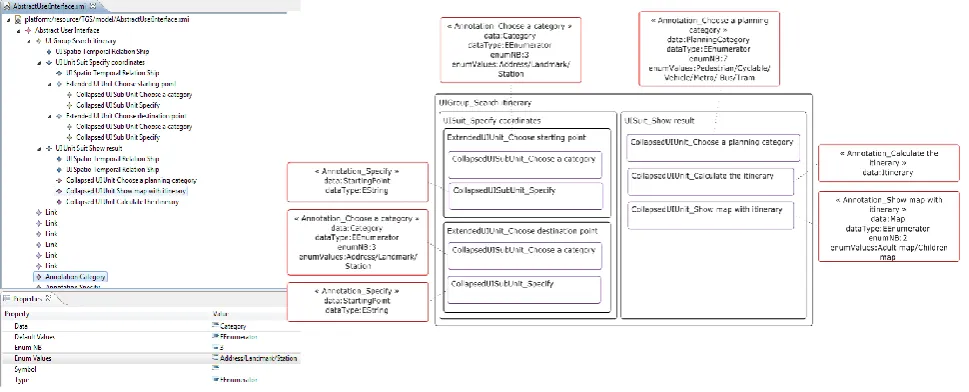
As the tourist guide system is large, we are then interested in the generation of the concrete user interface for the task of "Search itinerary". We suppose to have the abstract user interface from Fig 12 as a result of the transformation of the task model "Search itinerary" [49]. This transformation is explained in details in [35]. The result of the transformation is an XML file which is in accordance with the AUI meta-model (Fig 12)
Fig 12: (Left) The tree-based description of Abstract User Interface (Right) Abstract User Interface
For our case study and to better explain the impact of the ergonomic model of the transformation, we choose only a few ergonomic criteria for injecting into the process of generating the user interface. The criteria are guidance, workload, explicit control and error handling. The ergonomic model that we added as a parameter is presented by the following xml code.
<?xml version="1.0" encoding="ASCII"?>
<ErgonomicMetaModel:ErgonomicModel xmi:version="2.0" xmlns:xmi="http://www.omg.org/XMI" xmlns:xsi= "http://www.w3.org/2001/XMLSchema-instance"
xmlns:ErgonomicMetaModel="ErgonomicMetaModel" .../ErgonomicMetaModel.ecore">
<criterion name="guidance"> <subCriterion name="prompting"/> <subCriterion name="legibility"/> </criterion>
<criterion name="workload"> <subCriterion name="brevity">
<elementaryCriterion name="concision"/> <elementaryCriterion name="minimalActions"/> </subCriterion>
<subCriterion name="informationDensity"/> </criterion>
<criterion name="explicitControl">
<subCriterion name="explicitUserAction"/> <subCriterion name="userControl"/> </criterion>
<criterion name="errorManagement"> <subCriterion name="errorProtection"/> </criterion>
</ErgonomicMetaModel:ErgonomicModel>
4.1
Step 1: Transformation of AUI into
CUI1 parameterized by user model and
ergonomic model
The transformation T1 having as a source model the abstract user interface of Fig 12 and as transformation parameters the user model and the ergonomic model of (Left of Fig 13) generates a first ergonomic concrete user interface adapted to the user characteristics.
The transformation output is an XML file that is in accordance with the CUI meta-model (Fig 10). Right of Fig 13 presents the visualization of the CUI1 with our ConcreteUserInterface editor.
The realization of the AUI is in graphical mode since the user has chosen a modality of graphical communication. A set of personalization services is activated giving as an example the service "Use of language" which results from the fact that the user prefers the English language.
[image:14.595.56.541.73.269.2]Fig 13: (Left) The tree-based description of user and ergonomic models (Right) Concrete User Interface specific to the the user and ergonomic models
4.2
Step 2: Transformation of CUI into
CUI2 parameterized by platform model
and ergonomic model
As a concrete example, left of Fig 14 gives the tree-based description of "iPAQ Hx2490 Pocket PC" and of ergonomic model. The refinement of the CUI1 taking into account this platform allows the generation of a concrete interface responding to the properties of this platform, as in the example of the value of the screen size (height="320" width="240"). Moreover, the choice of the appropriate interactor is related to the inputting devices that exist in the platform. In this case, we have a touch screen (TouchScreen) and a text input device (TextInputDevice). That is why the concretisation in the graphic form is possible.
Taking into account the properties of the platform "iPAQ Hx2490 Pocket PC" (Left of Fig 14), the transformation of CUI1 (Right of Fig 13) produces a CUI2 with a remodelling
of containers. Right of Fig 14 presents the visualization of the CUI2 with our ConcreteUserInterface editor. Given the size of the screen "iPAQ Hx2490 Pocket PC" and the number of manipulated concepts (>5), the realization of the abstract component "CollapsedUIUnit_Choose a planning category" of AUI is a "UIUpDropDownList". A "UIStaticField" interactor called "Planning category" is added in order to support the guidance/prompting criteria defined in [10].
[image:15.595.57.540.74.335.2]Fig 14: (Left) The tree-based description of platform and ergonomic models (Right) Concrete User Interface specific to the the user, platform and ergonomic models
4.3
Step 3: Transformation of CUI2 into
CUI3 parameterized by environment model
and ergonomic model
Our case study is situated in an open environment (outDoorType). As regards the ambient characteristics that specify this type of environment, it will be restored to the intensity of light as well as that of the sound level. This model (Left of Fig 15) is going to feed the third module of transformation which will lead to the generation of a concrete interface adaptable to the context of use passing through the three elements that define it.
Taking into account the properties of environment (Left of Fig 15), the transformation of CUI2 (Right of Fig 14) producing a CUI3 (Right of Fig 14) with the background service retains "light" value since the light intensity was high.
The dark letters on a light background are easier to read than the other way around and therefore taking into consideration the sub-criteria "legibility" is translated by the addition of the attribute Color which presents the color of the letters which has the value "Blue".
[image:16.595.54.542.74.352.2] [image:16.595.56.537.518.739.2]5.
Conclusion and perspectives
In this paper, we have presented a model driven engineering approach for the development of adaptive UI while preserving usability. To apply "model-to-model" transformations, we set up two meta-models: Abstract User Interface meta-model and Concrete User Interface meta-model. In order to adapt the UI to its context of use, we proposed three meta-models describing the context of use. The generation process consists of three transformation modules starting from an AUI and generating a CUI by inserting the user, platform and environment model, respectively. Encountered by a new context, a definition of a model for this context will be enough. So, our transformations rules are generic. The second objective of our research is the preservation of the adaptive UI usability. To achieve this objective, we propose a ergonomic meta-model that serves as a parameter in the three transformation modules of the process of generating adaptive UI.
The continuation of our work will naturally lead to study the possibility of merging the three transformation modules into a single model that has a source model which is the abstract interface, a target model which is the concrete interface and four parameter models that are the user, platform, environment and ergonomic. The problem that arises is the causal relationship between the different thirds of the context of use as well as the priority between the different ergonomic criteria of the ergonomic model.
6.
REFERENCES
[1] Weiser, M. 1991. The computer for the 21st century. Scientific American, Vol. 265, No.3, pp. 94-104.
[2] Agoston, T-C., Ueda, T., and Nishimura, Y. 2000. Pervasive Computing in a Networked World. In Global Distributed Intelligence for Everyone, INET2000, 10th Annual Internet Society Conference, July 18-21, Yokohama, Japan.
[3] Schilit, B. and Theimer, M., 1994 Disseminating active map information to mobile hosts. IEEE Network, 8(5), pp. 22-32.
[4] ISO 9241-11 1998. Exigences ergonomiques pour travail de bureau avec terminaux à écrans de visualisation (TEV) - Partie 11: lignes directrices relatives à l’utilisabilité.
[5] Strang, T., and Linnhoff-Popien, C. 2004. A context modeling survey. In International Workshop on Advanced Context Modelling, Reasoning and Management, UbiComp2004-The Sixth International Conference on Ubiquitous Computing, Nottingham/England.
[6] Dey, A. (2000) Providing architectural support for building contextaware applications. Master’s thesis, College of Computing, Georgia Institute of Technology.
[7] Bézivin, J., Blay, M., Bouzeghoub, M., Estublier, N., Favre, J. M. 2005. Action spécifique CNRS sur l’Ingénierie Dirigée par les Modèles (Rapport de synthèse). CNRS, France.
[8] Favre, J. M. 2004. Toward a Basic Theory to Model: Model Driven Engineering. The Workshop on Software Model Engineering, Wisme’2004, Lisbonne, Portugal.
[9] MDA 2012. Model Driven Architecture. http://www.omg.org/mda.
[10]Bastien, J. M. C., and Scapin, D. L. 1993. Ergonomic Criteria for the Evaluation of Human-Computer Interfaces (version 2.1). Technical report N156, INRIA, May.
[11]Samaan, K., and Tarpin-Bernard, F. 2004. Task models and Interaction models in a Multiple User Interfaces generation process. In Proceedings of 3rd International Workshop on TAsk MOdels and DIAgrams for user interface design TAMODIA’2004. Prague, Check Republic, November, ACM, pp 137-144.
[12] Vanderdonckt, J. 2005. A MDA-Compliant Environment for Developing User Interfaces of Information Systems. In: Proc. of CAiSE’05, pp 16-31, Springer-Verlag, Berlin.
[13] Mori, G., Patern, F., and Santoro, C. 2003. Tool Support for Designing Nomadic Applications. In Proceedings of the International Conference on Intelligent User Interfaces, pp 141-148, Miami.
[14]Calvary, G., Coutaz, J., Dassi, O., Balme, L. and Demeure, A. 2004. Towards a new generation of widgets for supporting software plasticity: the “comet”. The 9th IFIP Working Conference on Engineering for Human-Computer Interaction Jointly with The 11th International Workshop on Design, Specification and Verification of Interactive Systems, Bastide, R., Palanque, P., Roth, J. (Eds), Lecture Notes in Computer Science 3425, Springer, ISSN 0302-9743, Hamburg, Germany, pp 306-323.
[15]Limbourg, Q. and Vanderdonckt, J. 2004. UsiXML: A User Interface Description Language Supporting Multiple Levels of Independence. In Matera, M., Comai, S. (eds.): Engineering Advanced Web Applications. Rinton Press, Paramus, pp 325-338.
[16] Calvary, G., Coutaz, J., Thevenin, D., Limbourg, Q., Bouillon, L. and Vanderdonck, J. 2003. A Unifying Reference Framework for Multi-Target User Interfaces. Interacting with Computers 15, 3, pp 289-308.
[17] Hariri, M. A., Lepreux, S., Tabary, D., and Kolski, C. 2009. Principes et étude de cas d’adaptation d’IHM dans les SI en fonction du contexte d’interaction de l’utilisateur. Ingénierie des Systèmes d’Information (ISI), 14, pp. 141-162.
[18]Hariri, M. A., Tabary, D., Lepreux, S., and Kolski, C. (2008) Context aware Business adaptation toward User Interface adaptation. Communications of SIWN, 3, pp 46-52
[19]Sottet J-S, Calvary G, Favre J-M, Coutaz J, Demeure A, Balme L (2005) Towards Model-Driven Engineering of Plastic User Interfaces. Conference on Model Driven Engineering Languages and Systems (MoDELS’05) satellite proceedings, Springer LNCS, pp 191-200
[20]Hachani, S., Dupuy-Chessa, S., and Front, A. 2009. Une approche générique pour l’adaptation dynamique des IHM au contexte. IHM’09, Grenoble, France.