Deploying Oracle RAC 11g R2
Database on Red Hat Enterprise
Linux 6
Best Practices
Roger Lopez, Principal Software Engineer RHCE
Version 1.1
December 2013
1801 Varsity Drive™ Raleigh NC 27606-2072 USA Phone: +1 919 754 3700 Phone: 888 733 4281 Fax: +1 919 754 3701 PO Box 13588
Research Triangle Park NC 27709 USA
Linux is a registered trademark of Linus Torvalds. Red Hat, Red Hat Enterprise Linux and the Red Hat "Shadowman" logo are registered trademarks of Red Hat, Inc. in the United States and other
countries.
Oracle and Java are registered trademarks of Oracle.
Intel, the Intel logo and Xeon are registered trademarks of Intel Corporation or its subsidiaries in the United States and other countries.
All other trademarks referenced herein are the property of their respective owners.
© 2013 by Red Hat, Inc. This material may be distributed only subject to the terms and conditions set forth in the Open Publication License, V1.0 or later (the latest version is presently available at
http://www.opencontent.org/openpub/).
The information contained herein is subject to change without notice. Red Hat, Inc. shall not be liable for technical or editorial errors or omissions contained herein.
Distribution ofmodified versions of this document is prohibited without the explicit permission of Red Hat Inc.
Distribution of this work or derivative of this work in any standard (paper) book form for commercial purposes is prohibited unless prior permission is obtained from Red Hat Inc.
The GPG fingerprint of the [email protected] key is:
Comments and Feedback
In the spirit of open source, we invite anyone to provide feedback and comments on any reference architectures. Although we review our papers internally, sometimes issues or typographical errors are encountered. Feedback allows us to not only improve the quality of the papers we produce, but allows the reader to provide their thoughts on potential improvements and topic expansion to the papers. Feedback on the papers can be provided by emailing [email protected]. Please refer to the title within the email.
Staying In Touch
Join us on some of the popular social media sites where we keep our audience informed on new reference architectures as well as offer related information on things we find interesting.
Like us on Facebook: https://www.facebook.com/rhrefarch Follow us on Twitter: https://twitter.com/RedHatRefArch Plus us on Google+: https://plus.google.com/u/0/b/114152126783830728030/
Accessing Reference Architectures
There are two ways to access Red Hat reference architectures:
• The Red Hat customer portal at http://access.redhat.com using a customer login
Table of Contents
1 Executive Summary... 1
2 Reference Architecture Environment... 2
2.1 Reference Architecture Overview... 2
2.2 Network Topology... 3
2.3 Hardware Details... 4
2.4 File System Layout & Disk Space Details... 5
2.5 Storage Layout... 7
2.6 Swap Space... 7
2.7 Security: Firewall Settings... 8
2.8 Security: SELinux... 9
3 Reference Architecture Configuration Details... 10
3.1 Setting OS Hostname... 10
3.2 Network Configuration... 11
3.2.1 Configuring /etc/resolv.conf file... 11
3.2.2 Configure SCAN via DNS... 11
3.2.3 Configure Virtual IP (VIP) via DNS... 13
3.2.4 Public Network Configuration... 14
3.2.5 Private Network Configuration... 16
3.2.6 NTP Configuration... 19
3.3 OS Configuration... 20
3.3.1 Accessing the RHN Repository... 20
3.3.2 Oracle RAC Database 11g Release 2 (11.2.0.3) Package Requirements... 20
3.3.3 Configuring Security-Enhanced Linux (SELinux)... 22
3.3.4 Configuring Firewall Settings... 22
3.3.5 Setting Virtual Memory... 23
3.3.6 Setting Shared Memory... 25
3.3.7 Setting Semaphores... 26
3.3.8 Ephemeral Network Ports... 26
3.3.9 Optimizing Network Settings... 27
3.3.10 Increasing synchronous I/O Requests... 27
3.3.11 Increasing File Handles... 28
3.3.12 Reverse Path Filtering... 29
3.3.14 Setting Shell Limits for the Grid and Oracle User... 30
3.4 Storage Configuration... 32
3.4.1 Setting up DM-Multipath... 32
3.4.2 Partitioning Device Mapper Shared Disks... 36
3.4.3 Configuring Oracle ASM Disks... 37
3.4.3.1 Oracle ASMLib Alternative: Configuring udev Rules... 37
3.4.3.2 Configuring Oracle ASMLib... 39
3.4.4 Optimizing Database Storage using Automatic System Tuning... 43
4 Oracle 11gR2 Configuration... 46
4.1.1 Installing Oracle Grid Infrastructure (Required for ASM)... 46
4.1.2 Installing Oracle 11g R2 Database Software... 56
4.1.3 Creating ASM Diskgroups via the ASM Configuration Assistant (ASMCA)... 62
4.1.4 Creating a Database using Database Configuration Assistant (DBCA)... 65
4.1.5 Enabling HugePages... 72
5 Logging into an Oracle RAC Database 11g Release 2 Instance (11.2.0.3)... 74
6 Conclusion... 75
Appendix A: Revision History... 76
Appendix B: Contributors ... 77
Appendix C: DM Multipath Configuration File... 78
Appendix D: iptables Configuration File... 80
Appendix E: Huge Pages Script... 81
Appendix F: Oracle Database Package Requirements Text File... 82
Appendix G: Kernel Parameters... 83
Appendix H: Limits Configuration File (99-grid-oracle-limits.conf)... 84
Appendix I: 99-oracle-asmdevices.rules... 85
Appendix J: Sample Kickstart File... 86
Appendix L: Troubleshooting ORA-* Errors... 88
Appendix M: References... 93
1 Executive Summary
IT organizations face challenges of optimizing Oracle database environments to keep up with the ever increasing workload demands and evolving security risks. This reference architecture provides a step-by-step deployment procedure with the latest best practices to install and configure an Oracle Real Application Clusters (RAC) Database 11g Release (11.2.0.3) with Oracle Automatic Storage Management (ASM). It is suited for system, storage, and database administrators deploying Oracle RAC Database 11g Release 2 (11.2.0.3) on Red Hat
Enterprise Linux 6. It is intended to provide a Red Hat | Oracle reference architecture that focuses on the following tasks:
• Deploying Oracle Grid Infrastructure 11g R2 (11.2.0.3)
• Deploying Oracle RAC Database 11g R2 (11.2.0.3) with shared SAN disks • Using Oracle ASM disks with udev rules
• Using Oracle ASM disks with Oracle ASMLib (RHEL 6.4 and above) • Enabling the Oracle RAC Database 11gR2 environment with SELinux
2 Reference Architecture Environment
This section focuses on the components used during the deployment of Oracle RAC
Database 11g Release 2 (11.2.0.3) with Oracle Automatic Storage Management (ASM) on Red Hat Enterprise Linux 6.4 x86_64 in this reference architecture.
2.1 Reference Architecture Overview
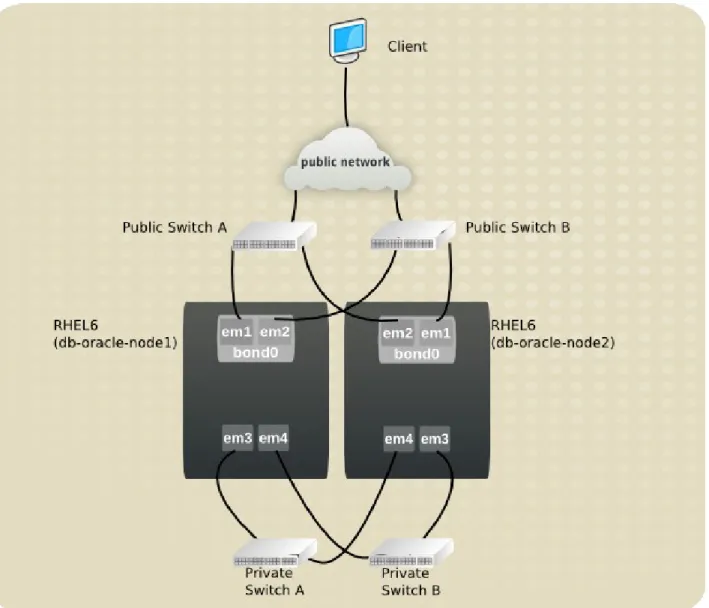
A pictorial representation of the environment used in this reference architecture is shown in the following Figure 2.1.1: Reference Architecture Overview.
2.2 Network Topology
The network topology used in this reference architecture consists of two public switches using link aggregation to connect the two switches together (Public Switch A and Public Switch B), creating a single logical switch. Ethernet device em1 on the server connects to Public Switch A, while Ethernet device em2 on the server connects to Public Switch B. Ethernet devices em1 and em2 are bonded together as a bond device, bond0, providing high availability for the public network traffic. Ethernet device em3 on each server connects to Private Switch A, while Ethernet device em4 on each server connects to Private Switch B. Ethernet devices em3 and em4 take advantage of Oracle's Highly Available Internet Protocol (HAIP) for Oracle's private interconnect. HAIP can load balance Ethernet traffic for up to four Ethernet devices. Due to the use of Oracle's HAIP, no bond device is created for the private Ethernet devices em3 and em4 on each node within the Oracle RAC Database 11.2.0.3 cluster. Figure 2.2.1: Network Toplogy shows the pictorial representation of the network topology.
2.3 Hardware Details
The following are the minimum hardware requirements to properly install Oracle RAC
Database 11g Release 2 (11.2.0.3) on a x86_64 system (minimum of two systems required): • Minimum of 1.5 GB of RAM for the installation of both Oracle Grid Infrastructure and
Oracle RAC Database, however 2 GB of memory or more is recommended
• The minimum of three Network Interface Cards (NIC) with the usage of direct attach storage or fibre channel storage; however, four NICs are recommended
• Console access that supports 1024 x 768 resolution to ensure correct display of Oracle's Universal Installer (OUI).
• All nodes within the Oracle RAC Database environment require the same chip
architecture. This reference architecture uses 64-bit processors on all nodes within the cluster.1
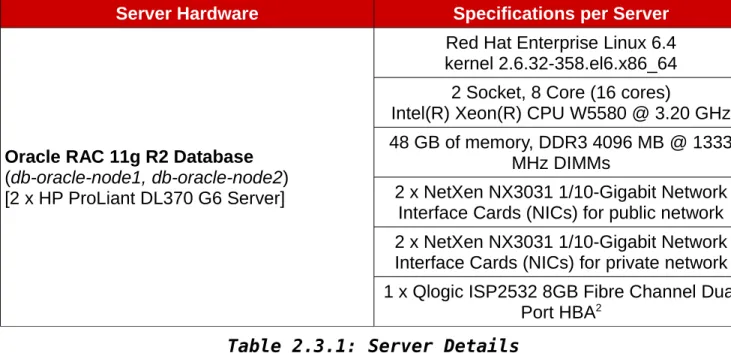
Table 2.3.1: Server Details specifies the hardware for each server used within this reference architecture. This hardware meets the minimum requirements for properly installing Oracle RAC Database 11g Release 2 (11.2.0.3) on two x86_64 systems.
Server Hardware Specifications per Server
Oracle RAC 11g R2 Database (db-oracle-node1, db-oracle-node2) [2 x HP ProLiant DL370 G6 Server]
Red Hat Enterprise Linux 6.4 kernel 2.6.32-358.el6.x86_64 2 Socket, 8 Core (16 cores)
Intel(R) Xeon(R) CPU W5580 @ 3.20 GHz 48 GB of memory, DDR3 4096 MB @ 1333
MHz DIMMs
2 x NetXen NX3031 1/10-Gigabit Network Interface Cards (NICs) for public network 2 x NetXen NX3031 1/10-Gigabit Network Interface Cards (NICs) for private network 1 x Qlogic ISP2532 8GB Fibre Channel Dual
Port HBA2 Table 2.3.1: Server Details
Table 2.3.2: Switch Details specifies the fibre channel and Ethernet switches used within this reference architecture.
1 Preparing your Cluster, Oracle Documentation -
http://docs.oracle.com/cd/E11882_01/rac.112/e17264/preparing.htm
2 Due to hardware limitations, this reference architecture uses only one dual port HBA. It is recommended to have at least two Fibre Channel Single Port HBAs for high availability.
Switch Hardware
Fibre Channel 2 x Brocade Silkworm Fibre Switches Public Network 1 x HP ProCurve Gigabit Switch
1 x Cisco Catalyst Switch Private Network (Private VLANs) 1 x Cisco Catalyst Switch
1 x HP ProCurve Gigabit Switch Table 2.3.2: Switch Details
Table 2.3.3: Storage Details specifies the storage used for storing Oracle data files within this reference architecture.
Storage Hardware Specifications
HP StorageWorks MSA2324fc Dual Controller Array
24 x 146 GB 15K SAS Hard disks Table 2.3.3: Storage Details
2.4 File System Layout & Disk Space Details
The following are the minimum disk space requirements for properly installing Oracle RAC Database 11g Release 2 (11.2.0.3) software based upon this reference architecture.
Software Disk Space
Oracle Grid Infrastructure Home 5.5 GB Oracle Database Home Enterprise Edition
(includes software files and data files)
8.9 GB
/tmp 1 GB
Table 2.4.1:Disk Space Requirements
NOTE: The actual amount of disk space consumed for Oracle Grid Infrastructure Home and Oracle Database Home Enterprise Edition may vary.
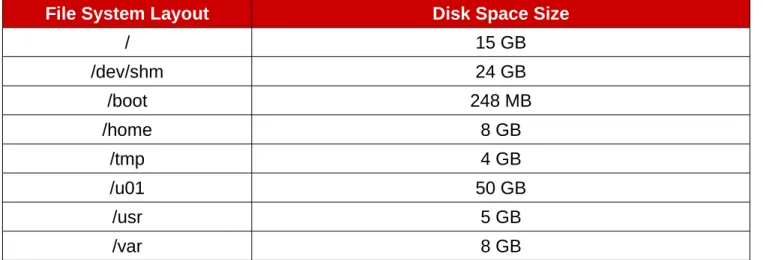
Table 2.4.2: File System Layout specifies the file system layout for the two servers used in this reference architecture. The layout ensures the disk space requirements to properly install the Oracle Grid Infrastructure and Oracle Database software for Oracle RAC Database 11g Release 2 (11.2.0.3).
File System Layout Disk Space Size
/ 15 GB /dev/shm 24 GB /boot 248 MB /home 8 GB /tmp 4 GB /u01 50 GB /usr 5 GB /var 8 GB
Table 2.4.2: File System Layout
Oracle RAC Database 11g Release 2 (11.2.0.3) recommends three volumes each of 1 GB in size to store the Oracle Cluster Registry (OCR) and voting disks within an Oracle ASM disk group with the use of normal redundancy. The OCR manages the Oracle Clusterware and Oracle RAC Database 11g Release 2 (11.2.0.3) configuration information. The voting disk manages any information pertaining to the node membership. While the size of the Oracle data files varies for each solution, the following are the Oracle data file sizes used for this reference architecture.
Volume Volume Size
Oracle Database Volume 1 (db1) 100 GB Oracle Database Volume 2 (db2) 100 GB Fast Recovery Area (fra) 200 GB Oracle Redo Log Volume (redo) 10 GB
OCR & Voting Disks (ocrvote1) 1 GB OCR & Voting Disks (ocrvote2) 1 GB OCR & Voting Disks (ocrvote3) 1 GB
2.5 Storage Layout
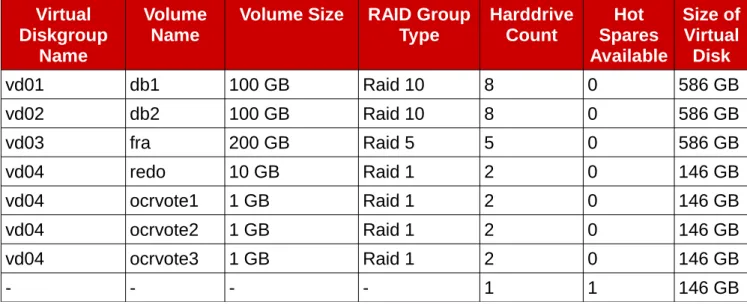
Table 2.5.1: Storage Disk Layout for Reference Architecture shows the storage disk layout for each volume.
Virtual Diskgroup
Name
Volume
Name Volume Size RAID GroupType HarddriveCount SparesHot Available Size of Virtual Disk vd01 db1 100 GB Raid 10 8 0 586 GB vd02 db2 100 GB Raid 10 8 0 586 GB vd03 fra 200 GB Raid 5 5 0 586 GB vd04 redo 10 GB Raid 1 2 0 146 GB vd04 ocrvote1 1 GB Raid 1 2 0 146 GB vd04 ocrvote2 1 GB Raid 1 2 0 146 GB vd04 ocrvote3 1 GB Raid 1 2 0 146 GB - - - - 1 1 146 GB
Table 2.5.1: Storage Disk Layout for Reference Architecture NOTE: The Hot Spare Available is a Global Hot Spare that can be applied to any virtual disk group in case of failure.
2.6 Swap Space
Swap space is determined by the amount of RAM found within the system. The following table displays the swap space recommendation. This reference architecture allocates 16 GB of RAM for swap space.
RAM Swap Space
2.5 GB up to 16 GB Equal to the size of RAM
Greater than 16 GB 16 GB of RAM
Table 2.6.1: Recommended Swap Space
NOTE: When calculating swap space, ensure not to include RAM assigned for hugepages. More information on hugepages can be found in Section 4.1.5 Enabling HugePages
2.7 Security: Firewall Settings
This section focuses on providing the details required to run iptables successfully for an Oracle RAC Database 11.2.0.3 environment. It is not uncommon for corporations to be running hardware based firewalls to protect their corporate networks. Due to this, enabling
iptables might not be required. However, for the purposes of this reference architecture,
iptables is enabled. For complete details, visit Section 3.3.4 Configuring Firewall Settings. The iptables configuration can be seen in its entirety at Appendix D iptables Configuration File
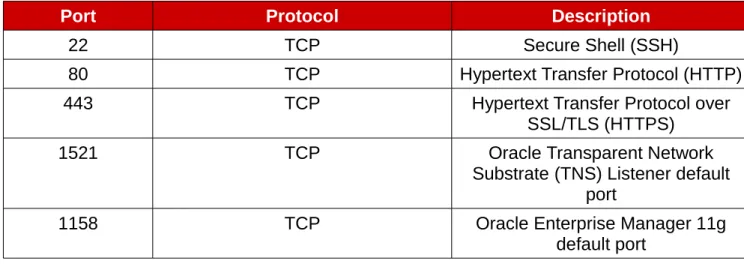
Table 2.7.1: Firewall Port Settings lists the enabled ports within this reference architecture.
Port Protocol Description
22 TCP Secure Shell (SSH)
80 TCP Hypertext Transfer Protocol (HTTP)
443 TCP Hypertext Transfer Protocol over
SSL/TLS (HTTPS)
1521 TCP Oracle Transparent Network
Substrate (TNS) Listener default port
1158 TCP Oracle Enterprise Manager 11g
default port Table 2.7.1: Firewall Port Settings
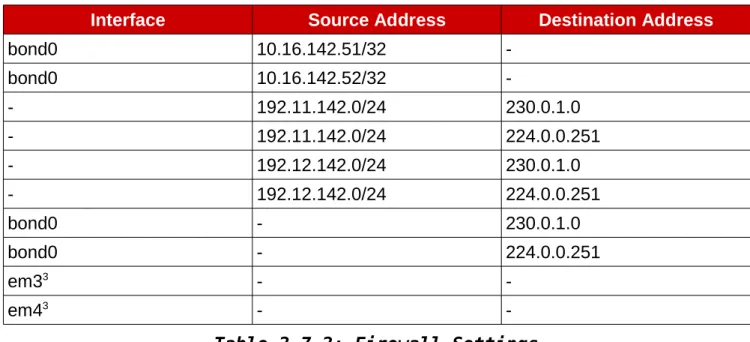
Table 2.7.2: Firewall Settings lists the source addresses and destination address allowed to accept input traffic.
Interface Source Address Destination Address bond0 10.16.142.51/32 -bond0 10.16.142.52/32 -- 192.11.142.0/24 230.0.1.0 - 192.11.142.0/24 224.0.0.251 - 192.12.142.0/24 230.0.1.0 - 192.12.142.0/24 224.0.0.251 bond0 - 230.0.1.0 bond0 - 224.0.0.251 em33 - -em43 -
-Table 2.7.2: Firewall Settings
2.8 Security: SELinux
Oracle RAC Database 11g Release 2 version 11.2.0.3 and later support SELinux. All systems in this reference architecture run with SELinux enabled and set to ENFORCING mode. Table 2.8.1: SELinux Packages lists the required SELinux packages. Version 3.7.19-211 is currently only available within the downloadable tar.gz file from Appendix K Configuration Files. It is important to note that at this time, the SELinux package 3.7.19-211 is not
supported. However, to take advantage of SELinux enablement with Oracle ASMLib, version 3.7.19-211 is required.
Package Version
selinux-policy 3.7.19-211
selinux-policy-targeted 3.7.19-211 Table 2.8.1: SELinux Packages
3 Oracle recommends to disable firewall traffic on the private interconnect. Due to this em3 and em4 allow all traffic.
3 Reference Architecture Configuration
Details
This reference architecture focuses on the deployment of Oracle RAC Database 11g Release 2 (11.2.0.3) with Oracle Automatic Storage Management (ASM) on Red Hat Enterprise Linux 6.4 x86_64. The configuration is intended to provide a comprehensive Red Hat | Oracle solution. The key solution components covered within this reference architecture consists of:
• Red Hat Enterprise Linux 6 Update 4
• Oracle Grid Infrastructure 11g Release 2 (11.2.0.3) • Oracle RAC Database 11g Release 2 (11.2.0.3) • Security-Enhanced Linux (SELinux)
• Device Mapper Multipathing • udev Rules
• Oracle ASMLib
3.1 Setting OS Hostname
Each node within the Oracle RAC Database 11g Release 2 (11.2.0.3) cluster requires a unique host name. The host names within this reference architecture are: db-oracle-node1 and db-oracle-node2. To set the host name, please follow the instructions below.
On each node, set the host name via the use of the hostname command. An example of setting db-oracle-node1 host name is shown below.
# hostname db-oracle-node1.cloud.lab.eng.bos.redhat.com
On each node, edit the /etc/sysconfig/network file's host name variable with the host name provided above. An example of the /etc/sysconfig/network file on db-oracle-node1 is displayed below.
# cat /etc/sysconfig/network
NETWORKING=yes
3.2 Network Configuration
The network configuration focuses on the proper setup of a public and private network interfaces along with the DNS configuration for the Single Client Access Name (SCAN). The public bonded network interface provides an Oracle environment with high availability in case of a network interface failure. The High Availability Internet Protocol (HAIP) provides the private network interfaces with failover and load balancing across each private network interface. SCAN provides the Oracle RAC Database 11g Release 2 (11.2.0.3) environment a single name that can be used by any client trying to access an Oracle Database within the cluster.
3.2.1 Configuring /etc/resolv.conf file
The resolver is a set of routines in the C library that provide access to the Internet Domain Name System (DNS). The resolver configuration file contains information that is read by the resolver routines the first time they are invoked by a process. The file is designed to be human readable and contains a list of keywords with values that provide various types of resolver information.4 The /etc/resolv.conf file for this reference architecture consists of two configuration options: nameserver and search. The search option is used to search for a host name part of a particular domain. The nameserver option is the IP address of the name server the systems (db-oracle-node1, db-oracle-node2) should query. If more than one nameserver is listed, the resolver library queries them in order. An example of the /etc/resolv.conf file used on each node of the reference architecture is displayed below.
cat /etc/resolv.conf
search cloud.lab.eng.bos.redhat.com nameserver 10.16.143.247
nameserver 10.16.143.248 nameserver 10.16.255.2
For more information, please visit the man pages of the resolv.conf file via the command:
# man resolv.conf
3.2.2 Configure SCAN via DNS
SCAN provides a single name in which a client server can use to connect to a particular Oracle Database. The main benefit of SCAN is the ability to keep a client connection string the same even if changes within the Oracle RAC Database 11g Release 2 environment occur, such as adding or removing of nodes within the cluster. The reason this works is because every client connection sends a request to the SCAN Listener, which then routes the traffic to an available VIP Listener within the Oracle RAC Database 11g Release 2 cluster to establish a database connection. The setup of SCAN requires the creation of a single name, no longer than 15 characters in length not including the domain suffix, resolving to three IP addresses using a round-robin algorithm from the DNS server. SCAN must reside in the same subnet as the public network within the Oracle RAC Database cluster and be resolvable without the
domain suffix. Within the reference environment, the domain is cloud.lab.eng.bos.redhat.com and SCAN name is db-oracle-scan
An example DNS entry for the SCAN is as follows:
db-oracle-scan IN A 10.16.142.53 IN A 10.16.142.54 IN A 10.16.142.55
An example of the DNS entry for the SCAN to enable reverse lookups is as follows:
53 IN PTR db-oracle-scan.cloud.lab.eng.bos.redhat.com. 54 IN PTR db-oracle-scan.cloud.lab.eng.bos.redhat.com. 55 IN PTR db-oracle-scan.cloud.lab.eng.bos.redhat.com.
On each node within the Oracle RAC cluster, verify the SCAN configuration within the DNS server is setup properly using the nslookup and host command as follows:
# nslookup db-oracle-scan Server: 10.16.143.247 Address: 10.16.143.247#53 Name: db-oracle-scan.cloud.lab.eng.bos.redhat.com Address: 10.16.142.54 Name: db-oracle-scan.cloud.lab.eng.bos.redhat.com Address: 10.16.142.55 Name: db-oracle-scan.cloud.lab.eng.bos.redhat.com Address: 10.16.142.53 # host db-oracle-scan
db-oracle-scan.cloud.lab.eng.bos.redhat.com has address 10.16.142.53 db-oracle-scan.cloud.lab.eng.bos.redhat.com has address 10.16.142.54 db-oracle-scan.cloud.lab.eng.bos.redhat.com has address 10.16.142.55
On each node within the Oracle RAC cluster, verify the SCAN configuration reverse lookup is setup properly using the nslookup and host command as follows:
# nslookup 10.16.142.53
Server: 10.16.143.247
Address: 10.16.143.247#53
53.142.16.10.in-addr.arpa name = db-oracle-scan.cloud.lab.eng.bos.redhat.com.
Repeat the above step for the reverse lookup on the remaining IP addresses used for the SCAN.
NOTE: The reference environment resolves the following IP address to the following host names: IP Hostname 10.16.142.53 db-oracle-scan 10.16.142.54 db-oracle-scan 10.16.142.55 db-oracle-scan
Table 3.2.2.1: SCAN IP & Hostnames For more information on SCAN, please refer to Oracle's documentation5.
3.2.3 Configure Virtual IP (VIP) via DNS
The virtual IP is an IP address assigned to each node within an Oracle RAC Database environment with the IP address residing in the public subnet. During the installation of the Oracle Grid Infrastructure, each VIP Listener registers with every SCAN Listener. The reason is because when a client sends a request, the SCAN Listener routes the incoming traffic to one of the VIP Listeners within the Oracle RAC Database cluster. If a client connection string uses the VIP to talk directly to the VIP Listener (as done in prior versions), every time
changes to the Oracle RAC Database environment are made, such as adding or removing nodes within the cluster, the client connection string would require updating. Due to this, Oracle recommends always using the SCAN for client connection string.
An example DNS entry for our VIPs is as follows:
db-oracle-node1-vip IN A 10.16.142.56 db-oracle-node2-vip IN A 10.16.142.57
On each node within the Oracle RAC cluster, verify the VIP address for db-oracle-node1-vip and db-oracle-node2-vip within the DNS server is setup properly using the nslookup and
host command. An example of checking db-oracle-node1-vip can be seen below.
# nslookup db-oracle-node1-vip Server: 10.16.143.247 Address: 10.16.143.247#53 Name: db-oracle-node1-vip.cloud.lab.eng.bos.redhat.com Address: 10.16.142.56 # host db-oracle-node1-vip
db-oracle-node1-vip.cloud.lab.eng.bos.redhat.com has address 10.16.142.56
5 Oracle Single Client Access Name (SCAN)
An example of the DNS entry for the SCAN to enable reverse lookups is as follows:
56 IN PTR db-oracle-node1-vip.cloud.lab.eng.bos.redhat.com. 57 IN PTR db-oracle-node2-vip.cloud.lab.eng.bos.redhat.com.
On each node within the Oracle RAC Database cluster, verify the VIP address reverse lookup for both VIP addresses (10.16.142.56 and 10.16.142.57) is setup properly using the
nslookup and host command . An example is shown using VIP address 10.16.142.56 below.
# nslookup 10.16.142.56
Server: 10.16.143.247
Address: 10.16.143.247#53
56.142.16.10.in-addr.arpa name = db-oracle-node1-vip.cloud.lab.eng.bos.redhat.com.
# host 10.16.142.56
56.142.16.10.in-addr.arpa domain name pointer db-oracle-node1-vip.cloud.lab.eng.bos.redhat.com.
NOTE: The VIP address should provide a 'Destintation Host Unreachable' response if an attempt to ping the VIP or VIP host name is attempted.
NOTE: This reference environment resolves the following Virtual IP addresses to the following host names:
IP Hostname
10.16.142.56 db-oracle-node1-vip
10.16.142.57 db-oracle-node2-vip
Table 3.2.3.1: Virtual IP & Hostnames
3.2.4 Public Network Configuration
The public network configuration consists of two network interfaces bonded together to provide high availability. The example below shows how to bond physical interfaces em1 and em2 with a bond device labeled bond0. If NetworkManager is installed, ensure it is disabled. Check the status of NetworkManager:
# chkconfig –-list | grep NetworkManager
NetworkManager 0:off 1:off 2:off 3:off 4:off 5:off 6:off
Disable NetworkManager:
# service NetworkManager stop
On each node, as the root user, execute the following command which creates a file named bonding.conf within the /etc/modprobe.d/ directory needed to create a bonded device for multiple network interfaces. The bonding.conf file is also part of Appendix K Configuration Files
# echo "alias bond0 bonding" > /etc/modprobe.d/bonding.conf
On each node, as the root user, create a backup of the ifcfg-em1 & ifcfg-em2 files, create the ifcfg-bond0 file and edit the ifcfg-em1 & ifcfg-em2 configuration files found within
/etc/sysconfig/network-scripts. An example can be seen below.
# cp scripts/ifcfg-em1 /etc/sysconfig/network-scripts/em1.bkup # cp scripts/ifcfg-em2 /etc/sysconfig/network-scripts/em2.bkup # cat /etc/sysconfig/network-scripts/ifcfg-bond0 DEVICE="bond0"
BONDING_OPTS="mode=1 miimon=100 primary=em1"
NM_CONTROLLED="no" IPADDR="10.16.142.51" NETMASK="255.255.248.0" GATEWAY="10.16.143.254" ONBOOT="yes" # cat /etc/sysconfig/network-scripts/ifcfg-em1 DEVICE="em1" BOOTPROTO="none" HWADDR="00:25:B3:A8:6F:18" IPV6INIT="no" NM_CONTROLLED="no" ONBOOT="yes" TYPE="Ethernet" UUID="3db45d28-e63c-401b-906a-ef095de4fc1e" SLAVE="yes" MASTER="bond0" # cat /etc/sysconfig/network-scripts/ifcfg-em2 DEVICE="em2" BOOTPROTO="none" HWADDR="00:25:B3:A8:6F:19" IPV6INIT="no” NM_CONTROLLED="no" ONBOOT="yes" TYPE="Ethernet" UUID="7d29d87f-52bb-4dc6-88ca-d0857c7d7fd9" SLAVE="yes" MASTER="bond0"
After all the network scripts are configured, restart the network service on each node via the command:
# service network restart
Shutting down interface bond0: [ OK ] Shutting down loopback interface: [ OK ] Bringing up loopback interface: [ OK ] Bringing up interface bond0: [ OK ]
Once the bond0 device is configured on each node, use the ping command to verify connectivity as follows:
On node one labeled db-oracle-node1,
# ping db-oracle-node2
PING db-oracle-node2.cloud.lab.eng.bos.redhat.com (10.16.142.52) 56(84) bytes of data.
64 bytes from db-oracle-node2.cloud.lab.eng.bos.redhat.com (10.16.142.52): icmp_seq=1 ttl=64 time=0.179 ms
On node two labeled db-oracle-node2,
# ping db-oracle-node1
PING db-oracle-node1.cloud.lab.eng.bos.redhat.com (10.16.142.51) 56(84) bytes of data.
64 bytes from db-oracle-node1.cloud.lab.eng.bos.redhat.com (10.16.142.51): icmp_seq=1 ttl=64 time=0.755 ms
NOTE: Please ensure a DNS entry that resolves to the appropriate hostname is set. This reference architecture resolves the following IP address to the following host names:
IP Hostname
10.16.142.51 db-oracle-node1
10.16.142.52 db-oracle-node2
Table 3.2.4.1: Public IP & Hostnames
3.2.5 Private Network Configuration
The private network configuration consists of two network interfaces em3 and em4. The private network is used to provide interconnect communication between all the nodes in the cluster. This is accomplished via Oracle's Redundant Interconnect, also known as Highly Available Internet Protocol (HAIP), that allows the Oracle Grid Infrastructure to activate and load balance traffic on up to four Ethernet devices for private interconnect communication. The example below shows how to set up physical interfaces em3 and em4 to be used with HAIP.
On each node, as the root user, create a backup of the ifcfg-em3 & ifcfg-em4 files, and edit the ifcfg-em3 & ifcfg-em4 configuration files found within /etc/sysconfig/network-scripts. An example of ifcfg-em3 and ifcfg-em4 on db-oracle-node1 is displayed below.
# cp scripts/ifcfg-em3 /etc/sysconfig/network-scripts/em3.bkup # cp scripts/ifcfg-em4 /etc/sysconfig/network-scripts/em4.bkup # cat /etc/sysconfig/network-scripts/ifcfg-em3 DEVICE="em3" BOOTPROTO="static" HWADDR="00:25:B3:A8:6F:18" IPV6INIT="no" NM_CONTROLLED="no" ONBOOT="yes" TYPE="Ethernet" UUID="3db45d28-e63c-401b-906a-ef095de4fc1e" IPADDR=”192.11.142.51” NETMASK=”255.255.255.0” MTU=”9000” # cat /etc/sysconfig/network-scripts/ifcfg-em4 DEVICE="em4" BOOTPROTO="static" HWADDR="00:25:B3:A8:6F:19" IPV6INIT="no” NM_CONTROLLED="no" ONBOOT="yes" TYPE="Ethernet" UUID="7d29d87f-52bb-4dc6-88ca-d0857c7d7fd9" IPADDR=”192.12.142.51” NETMASK=”255.255.255.0” MTU=”9000”
NOTE: The MTU size is set to 9000 for the enablement of Jumbo Frames. Ensure Jumbo Frames are enabled on the private Ethernet switches.
After all the network scripts are configured on each node, restart the network service on each node:
# service network restart
Shutting down interface bond0: [ OK ] Shutting down interface em3: [ OK ] Shutting down interface em4: [ OK ] Shutting down loopback interface: [ OK ] Bringing up loopback interface: [ OK ] Bringing up interface bond0: [ OK ] Bringing up interface em3: [ OK ] Bringing up interface em4: [ OK ]
NOTE: Ensure that all private Ethernet interfaces i.e. em3 and em4, are set to different subnets on each node. If different subnets are not used and connectivity is lost, this can cause a node reboot within the cluster. For the reference environment, subnets 192.11.142.X and 192.12.142.X are used on each node within the Oracle RAC Database 11.2.0.3 cluster. Once the Ethernet devices are configured on each node, use the ping command to verify connectivity as follows:
On node one labeled db-oracle-node1,
# ping 192.11.142.52
PING 192.11.142.52 (192.11.142.52) 56(84) bytes of data. 64 bytes from 192.11.142.52: icmp_seq=1 ttl=64 time=0.145 ms # ping 192.12.142.52
PING 192.12.142.52 (192.12.142.52) 56(84) bytes of data. 64 bytes from 192.12.142.52: icmp_seq=1 ttl=64 time=0.183 ms
On node two labeled db-oracle-node2,
# ping 192.11.142.51
PING 192.11.142.51 (192.11.142.51) 56(84) bytes of data. 64 bytes from 192.11.142.51: icmp_seq=1 ttl=64 time=0.138 ms # ping 192.12.142.51
PING 192.12.142.51 (192.12.142.51) 56(84) bytes of data. 64 bytes from 192.12.142.51: icmp_seq=1 ttl=64 time=0.164 ms
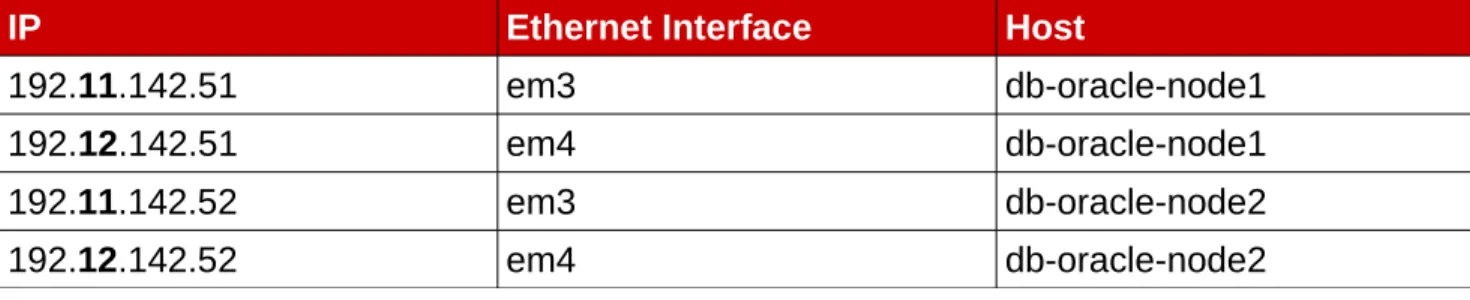
IP Ethernet Interface Host
192.11.142.51 em3 db-oracle-node1
192.12.142.51 em4 db-oracle-node1
192.11.142.52 em3 db-oracle-node2
192.12.142.52 em4 db-oracle-node2
3.2.6 NTP Configuration
The ntpd program is an operating system daemon which sets and maintains the system time, synchronizing with Internet standard time servers6. The ntpd program operates by exchanging messages with one or more configured servers at designated poll intervals3. Oracle RAC Databases require time synchronization for all nodes within the cluster. To configure the ntpd daemon, on each node, follow the instructions below.
1. Edit the /etc/ntp.conf file with a text editor such as vi.
# vi /etc/ntp.conf
2. Locate the following public server pool section, and modify to include the appropriate NTP servers. For the purposes of this reference architecture, only one NTP server is used, but three are recommended. The iburst option was added to speed up the time in which it takes to properly sync with the NTP servers.
# Use public servers from the pool.ntp.org project.
# Please consider joining the pool (http://www.pool.ntp.org/join.html). server 10.16.255.2 iburst
3. Save all the changes within the /etc/ntp.conf file
4. The following -x option within the /etc/sysconfig/ntpd file needs to be added to prevent the time synced by the NTP daemon to be adjusted backward.
Original /etc/sysconfig/ntpd file content:
OPTIONS=”-u ntp:ntp -p /var/run/ntpd.pid -g”
Modified /etc/sysconfig/ntpd file content:
OPTIONS=”-x -u ntp:ntp -p /var/run/ntpd.pid -g”
5. Save all the changes within the /etc/sysconfig/ntpd file 6. Restart the ntpd daemon via the command:
# service ntpd restart
Shutting down ntpd: [FAILED] Starting ntpd: [ OK ]
NOTE: Shutting down ntpd daemon provides a status of 'FAILED' if the ntpd daemon is currently off.
7. Ensure that the ntpd daemon is started when the system is booted.
# chkconfig ntpd on
3.3 OS Configuration
3.3.1 Accessing the RHN Repository
Instructions on how to register a system and manage subscriptions on Red Hat Enterprise Linux 6 can be found within the Red Hat Linux 6 Deployment Guide documentation7. The following table shows the required channels via the Red Hat Network to support the installation of Oracle.
Channel Source
rhel-x86_64-server-6 RHN Classic rhel-x86_64-server-supplementary-6 RHN Classic
Table 3.3.1.1: Required Channels
NOTE: The rhel-x86_64-server-supplementary-6 channel is a requirement for the
implementation of Oracle ASMLib found in Section 3.4.3.2 Configuring Oracle ASMLib. However, Oracle ASMLib is not required for the use of Oracle ASM disks. This reference architecture features both methods of implementation within Section 3.4.3.1 Oracle ASMLib Alternative: Configuring udev Rules and Section 3.4.3.2 Configuring Oracle ASMLib
3.3.2 Oracle RAC Database 11g Release 2 (11.2.0.3) Package
Requirements
A specific set of packages is required to properly deploy Oracle RAC Database 11g Release 2 (11.2.0.3) on Red Hat Enterprise Linux 6 (x86_64). The number of installed packages required varies depending on whether a default or minimal installation of Red Hat Enterprise Linux 6 (x86_64) is performed. For the purposes of this reference architecture, a minimal Red Hat Enterprise Linux 6 installation is performed to reduce the number of installed packages. A sample kickstart file as been provided within Appendix K Configuration Files. Red Hat Enterprise Linux 6 installation requires the following group packages:
Required Group Packages
@Base @Core
Table 3.3.2.1: Group Packages
7 Red Hat Enterprise Linux 6 Deployment Guide, https://access.redhat.com/site/documentation/en-US/Red_Hat_Enterprise_Linux/6/html-single/Deployment_Guide/index.html#entitlements
Oracle Grid Infrastructure 11.2 and Oracle RAC Database 11.2 require the following x86_64 RPM packages8: Required Packages cloog-ppl libXxf86misc compat-libcap1 libXxf86vm compat-libstdc++-33 libaio-devel cpp libdmx gcc libstdc++-devel gcc-c++ mpfr glibc-devel make glibc-headers ppl kernel-headers xorg-x11-utils libXmu xorg-x11-xauth libXt libXv ksh libXxf86dga
Table 3.3.2.2: Required Packages
After the installation of Red Hat Enterprise Linux 6 is completed on each node within the Oracle RAC Database cluster, create a file, req-rpm.txt, that contains the name of each RPM package listed above on a separate line. An example of the req-rpm.txt file is included in Appendix F Oracle Database Package Requirements Text File.
On each node, use the yum package manager to install the packages and any of their dependencies with the following command:
# yum install `awk '{print $1}' ./req-rpm.txt`
A minimum installation of Red Hat Enterprise Linux 6 does not install the X Window System server package, but only the required X11 client libraries. In order to run the Oracle Universal Installer (OUI), a system with the X Window System server package installed is required. Via a system with X Window System installed, SSH into node one of the Oracle RAC Database cluster with the Y option to ensure trusted X11 forwarding is set. The command is as follows:
# ssh -Y db-oracle-node1
Alternatively, if a system with the X Window System server package is unavailable, install the X Window System server package directly on node one of the Oracle RAC Database cluster.
# yum groupinstall "X Window System"
8 Linux OS Installation with Reduced Set of Packages for Running Oracle Database Server [ID 728346.1] via
3.3.3 Configuring SecurityEnhanced Linux (SELinux)
SELinux is an implementation of a mandatory access control (MAC) mechanism developed by the National Security Agency (NSA). The purpose of SELinux is to apply rules on files and processes based on defined policies. When policies are appropriately defined, a system running SELinux enhances application security by determining if an action from a particular process should be granted thus protecting against vulnerabilities within a system. The implementation of Red Hat Enterprise Linux 6 enables SELinux by default and appropriately sets it to the default setting of ENFORCING. Starting with Oracle Database 11g Release 2,
SELinux is supported for Red Hat Enterprise Linux 69. It is highly recommended that SELinux be kept in ENFORCING mode when running Oracle RAC Database 11g Release 2 (11.2.0.3). On each node, verify that SELinux is running and set to ENFORCING:
As the root user,
# sestatus
SELinux status: enabled SELinuxfs mount: /selinux Current mode: enforcing Mode from config file: enforcing Policy version: 24
Policy from config file: targeted
If the system is running in PERMISSIVE or DISABLED mode, modify the /etc/selinux/config file and set SELinux to enforcing as shown below.
SELINUX=enforcing
The modification of the /etc/selinux/config file takes effect after a reboot. To change the setting of SELinux immediately without a reboot, run the following command:
# setenforce 1
For more information on Security-Enhanced Linux, please visit the Red Hat Enterprise Linux 6 Security-Enhanced Linux User Guide
3.3.4 Configuring Firewall Settings
Firewall access and restrictions play a critical role in securing your Oracle RAC Database 11g Release 2 (11.2.0.3) environment. It is not uncommon for corporations to be running
hardware based firewalls to protect their corporate networks. Due to this, enabling iptables might not be required. However, the reference environment demonstrates how to successfully implement firewall settings for an Oracle RAC Database environment. The following iptables rules are used on each node:
# Generated by iptables-save v1.4.7 on Mon Aug 5 19:20:53 2013 *filter
:INPUT ACCEPT [0:0] :FORWARD ACCEPT [0:0]
:OUTPUT ACCEPT [25:2660]
-A INPUT -s 10.16.142.51/32 -i bond0 -j ACCEPT -A INPUT -s 10.16.142.52/32 -i bond0 -j ACCEPT -A INPUT -i em3 -j ACCEPT
-A INPUT -i em4 -j ACCEPT
-A INPUT -m state --state RELATED,ESTABLISHED -j ACCEPT -A INPUT -p icmp -j ACCEPT
-A INPUT -i lo -j ACCEPT
-A INPUT -s 192.11.142.0/24 -d 230.0.1.0 -j ACCEPT -A INPUT -s 192.11.142.0/24 -d 224.0.0.251 -j ACCEPT -A INPUT -s 192.12.142.0/24 -d 230.0.1.0 -j ACCEPT -A INPUT -s 192.12.142.0/24 -d 224.0.0.251 -j ACCEPT -A INPUT -i bond0 -d 230.0.1.0 -j ACCEPT
-A INPUT -i bond0 -d 224.0.0.251 -j ACCEPT
-A INPUT -p tcp -m state --state NEW -m tcp --dport 22 -j ACCEPT -A INPUT -p tcp -m state --state NEW -m tcp --dport 443 -j ACCEPT
-A INPUT -m state --state NEW -m tcp -p tcp -s 10.16.142.54 --dport 1521 -j ACCEPT
-A INPUT -m state --state NEW -m tcp -p tcp -s 10.16.142.54 --dport 1158 -j ACCEPT
-A INPUT -j REJECT --reject-with icmp-host-prohibited -A FORWARD -j REJECT --reject-with icmp-host-prohibited COMMIT
The key points from the iptables configuration are:
• Enable all traffic from the private interconnect interfaces em3 and em4 • Enable Oracle SCAN Listener Port 1521 for Oracle DB client access
• Enable Oracle Enterprise Manager 11g Port 1158 for Oracle DB client access • Enable SSH, HTTPS via ports 22 and 443
• Enable Oracle's Multicast address IPs: 230.0.1.0 and 224.0.0.251
Once the rules have been modified within the /etc/sysconfig/iptables, on each node within the Oracle RAC Database cluster, run the following command to activate:
# service iptables restart
iptables: Flushing firewall rules: [ OK ] iptables: Setting chains to policy ACCEPT: nat mangle filte[ OK ] iptables: Unloading modules: [ OK ] iptables: Applying firewall rules: [ OK ]
NOTE: A full listing of all the firewall settings within the /etc/sysconfig/iptables file for this reference architecture can be found at Appendix D iptables Configuration File.
3.3.5 Setting Virtual Memory
Tuning virtual memory requires the modification of five kernel parameters that affect the rate at which virtual memory is used within Oracle RAC Database cluster. It is important to note the recommended values are to be used as a starting point when setting virtual memory. A
brief description10 and recommended settings for the virtual memory parameters, as well as, the definition of dirty data are described below.
SWAPPINESS10 - A value from 0 to 100 which controls the degree to which the system swaps. A high value prioritizes system performance, aggressively swapping processes out of physical memory when they are not active. A low value prioritizes interactivity and avoids swapping processes out of physical memory for as long as possible, which decreases response latency. The default value is 60. The Oracle recommended value is 0.
DIRTY DATA – Dirty data is data that has been modified and held in the page cache for performance benefits. Once the data is flushed to disk, the data is clean.
DIRTY_RATIO10 – Contains, as a percentage of total system memory, the number of pages at
which a process which is generating disk writes will itself start writing out dirty data. The default value is 20. The recommended value is 80.
DIRTY_BACKGROUND_RATIO10 – Contains, as a percentage of total system memory, the number of
pages at which the background write back daemon will start writing out dirty data. The Oracle recommended value is 3.
DIRTY_EXPIRE_CENTISECS10 - Defines when dirty in-memory data is old enough to be eligible for
writeout. The default value is 3000, expressed in hundredths of a second. The Oracle recommended value is 500.
DIRTY_WRITEBACK_CENTISECS10 - Defines the interval of when writes of dirty in-memory data are written out to disk. The default value is 500, expressed in hundredths of a second. The Oracle recommended value is 100.
Prior to making any changes to the /etc/sysctl.conf ensure to create a backup on each node as follows:
# cp /etc/sysctl.conf /etc/sysctl.conf.bkup
The following is a snippet from the /etc/sysctl.conf file with the five virtual memory parameters set on each node with the recommended settings:
vm.swappiness = 0
vm.dirty_background_ratio = 3 vm.dirty_ratio = 80
vm.dirty_expire_centisecs = 500 vm.dirty_writeback_centisecs = 100
For the changes take effect immediately, run the following command on each node:
# sysctl -p
NOTE: A full listing of all the kernel parameters modified within the /etc/sysctl.conf file can be found at Appendix G Kernel Parameters.
3.3.6 Setting Shared Memory
Shared memory allows processes to communicate with each other by placing regions of memory into memory segments. In the case of Oracle, shared memory segments are used by the System Global Area (SGA) to store incoming data and control information. The size of Oracle's SGA impacts the amount of shared memory pages and shared memory segments to be set within a system. By default, Red Hat Enterprise Linux 6 provides a large amount of shared memory pages and segments, however, the appropriate allocation for a system depends on the amount of RAM within the system.
In order to allocate the appropriate amount of shared memory pages and shared memory segments for a system running an Oracle RAC database, the kernel parameters SHMALL, SHMMAX, and SHMMNI must be set on each node within the cluster.
SHMALL – is the maximum total amount of shared memory pages
SHMMAX – is the maximum size in bytes of a single shared memory segment SHMMNI – is the maximum total amount of shared memory segments
On each node within the Oracle RAC Database 11g Release 2 cluster, determine the
maximum amount of shared memory pages (SHMALL) in each system's page size in bytes. The following command can be used to obtain the system page size.
# getconf PAGE_SIZE
4096
Once the page size is captured, calculate SHMALL as follows: TOTAL RAM IN BYTES / PAGE_SIZE
For example, on a system with 48 GB of memory the SHMALL calculation would look as follows:
# echo “48 * 1024^3 / 4096” | bc
12582912
The calculation of SHMMAX, is as follows:
HALFOF TOTAL RAM INBYTES
For example, on a system with 48 GB of memory the SHMMAX calculation would look as follows:
# echo “48 * 1024^3 / 2” | bc
25769803776
As for SHMMNI, Oracle recommends the value of SHMMNI to be set to 4096.
NOTE: If the current value found within /etc/sysctl.conf for any parameter is higher than the value calculated for SHMMAX and SHMALL on any nodes within the Oracle RAC cluster, do not change the value found within the /etc/sysctl.conf file.
Since the values of SHMMAX and SHMALL calculated are smaller then the values already set, no changes to those parameters are made within /etc/sysctl.conf. However, an entry for SHMMNI is required on any of the Oracle RAC Database nodes within the cluster. A snippet of the
/etc/sysctl.conf file:
kernel.shmmax = 68719476736 kernel.shmall = 4294967296 kernel.shmmni = 4096
In order for the changes take effect immediately, on each node run the following command:
# sysctl -p
NOTE: A full listing of all the kernel parameters modified within the /etc/sysctl.conf file can be found at Appendix G Kernel Parameters.
3.3.7 Setting Semaphores
Red Hat Enterprise Linux 6 provides semaphores for synchronization of information between processes. The kernel parameter sem is composed of four parameters:
SEMMSL – is defined as the maximum number of semaphores per semaphore set SEMMNI – is defined as the maximum number of semaphore sets for the entire system SEMMNS – is defined as the total number of semaphores for the entire system
NOTE: SEMMNS is calculated by SEMMSL * SEMMNI
SEMOPM – is defined as the total number of semaphore operations performed per semop system call.
The following line is required within the /etc/sysctl.conf file of each node of the Oracle RAC Database cluster to provide sufficient semaphores for Oracle:
kernel.sem = 250 32000 100 128
In order for the changes take effect immediately, on each node run the following command:
# sysctl -p
NOTE: A full listing of all the kernel parameters modified within the /etc/sysctl.conf file can be found at Appendix G Kernel Parameters.
3.3.8 Ephemeral Network Ports
Oracle recommends that the ephemeral default port range be set starting at 9000 to 65500. This ensures that all well known ports, ports used by Oracle and other applications are avoided. To set the ephemeral port range, modify the /etc/sysctl.conf file on each node of the Oracle RAC Database cluster and add the following line:
In order for the changes take effect immediately, on each node of the Oracle RAC Database 11g Release 2 cluster run the following command:
# sysctl -p
NOTE: A full listing of all the kernel parameters modified within the /etc/sysctl.conf file can be found at Appendix G Kernel Parameters.
3.3.9 Optimizing Network Settings
Optimizing the network settings for the default and maximum buffers for the application sockets in Oracle is done by setting static sizes to RMEM and WMEM. The RMEM parameter represents the receive buffer size, while the WMEM represents the send buffer size. The recommended values by Oracle are modified within each node of the Oracle RAC Database cluster within the /etc/sysct.conf file.
net.core.rmem_default = 262144 net.core.rmem_max = 4194304 net.core.wmem_default = 262144 net.core.wmem_max = 1048576
In order to make the changes take effect immediately, on each node of the Oracle RAC Database cluster, run the following command:
# sysctl -p
NOTE: A full listing of all the kernel parameters modified within the /etc/sysctl.conf file can be found at Appendix G Kernel Parameters.
3.3.10 Increasing synchronous I/O Requests
The kernel parameter FS.AIO-MAX-NR sets the maximum number of on current asynchronous I/O requests. Oracle recommends setting the value to 1048576. In order to add FS-AIO-MAX-NR to 1048576, modify on each node of the Oracle RAC Database cluster the /etc/sysctl.conf file as follows:
fs.aio-max-nr = 1048576
In order for the changes take effect immediately, on each node of the Oracle RAC Database cluster run the following command:
# sysctl -p
NOTE: A full listing of all the kernel parameters modified within the /etc/sysctl.conf file can be found at Appendix G Kernel Parameters.
3.3.11 Increasing File Handles
The kernel parameter FS.FILE-MAX sets the maximum number of open file handles assigned to the Red Hat Enterprise Linux 6 operating system. Oracle recommends that for each Oracle RAC Database instance found within a system, allocate 512*PROCESSSES in addition to the open file handles already assigned to the Red Hat Enterprise Linux 6 operating system. PROCESSES within a database instance refers to the maximum number of processes that can be concurrently connected to the Oracle RAC Database by the oracle user. The default value for PROCESSES is 150. To properly calculate the FS.FILE-MAX for a system, first identify the current FS.FILE-MAX allocated on each node of the Oracle RAC Database cluster via the following command:
# cat /proc/sys/fs/file-max
4909067
Next, add all the PROCESSES together from each Oracle RAC Database instance found within the cluster and multiple by 512 as seen in the following command. The reference environment contains one Oracle RAC Database instance per server for a total of 300 PROCESSES (150 PROCESSES for each instance).
# echo “512 * 300” | bc
153600
NOTE: Since a Oracle RAC Database cluster has yet to be created within the reference environment, the default value of 150 PROCESSES is used for each instance. The FS.FILE-MAX parameter can be adjusted later if an increase in Oracle PROCESSES is required.
Finally, add the current FS.FILE-MAX value to each node within the Oracle RAC Database cluster with the new value found from multiplying 512*PROCESSES to obtain the new FS.FILE-MAX value.
# echo “4909067 + 153600” | bc
5062667
While the value of the FS.FILE-MAX parameter varies upon your Oracle RAC Database
environment, the reference environment sets the value at 6815744. Oracle recommends a value no smaller than 6815744. Due to the calculation in the above example equating to 5062667, the minimum Oracle recommended value is used. In order to add FS.FILE-MAX to 6815744, modify the /etc/sysctl.conf file on each node of the Oracle RAC Database cluster as follows:
fs.file-max = 6815744
In order for the changes take effect immediately, on each node of the Oracle RAC Database cluster run the following command:
NOTE: Oracle ASMLib does not open file descriptors for each device, but instead opens one file descriptor per Oracle process. The reference environment features both methods of implementation within Section 3.4.3.1 Oracle ASMLib Alternative: Configuring udev Rules and Section 3.4.3.2 Configuring Oracle ASMLib. However, during the installation of Oracle RAC Database cluster the FS.FILE-MAX kernel parameter must be set to at least 6815744 on each node.
NOTE: It is recommended to revisit the FS.FILE-MAX value if the PROCESSES value is increased for the Oracle RAC Database instances.
NOTE: A full listing of all the kernel parameters modified within the /etc/sysctl.conf file can be found at Appendix G Kernel Parameters.
3.3.12 Reverse Path Filtering
Red Hat Enterprise Linux 6 defaults to the use of Strict Reverse Path filtering. The reason strict mode is the default is to prevent IP spoofing from Distributed Denial-of-service (DDos) attacks. However, having strict mode enabled on the private interconnect of Oracle RAC Database cluster may cause disruption of interconnect communication. It is recommended to set the RP_FILTER from strict mode to loose mode. Loosening the security on the private
Ethernet interfaces should not be of concern as best practices recommend for an isolated private network that can only communicate between nodes specifically for Oracle's private interconnect. Add the following modifications to the /etc/sysctl.conf on each node of the Oracle RAC Database cluster as follows:
net.ipv4.conf.em3.rp_filter = 2 net.ipv4.conf.em4.rp_filter = 2
In order for the changes take effect immediately, on each node of the Oracle RAC Database 11g Release 2 cluster run the following command:
# sysctl -p
NOTE: A full listing of all the kernel parameters modified within the /etc/sysctl.conf file can be found at Appendix G Kernel Parameters.
3.3.13 User Accounts & Groups
Prior to the installation of Oracle RAC Database 11g Release 2 (11.2.0.3), Oracle
recommends the creation of a grid user for the Oracle Grid Infrastructure and an oracle
user for the Oracle RAC Database software installed on the system. For the purposes of the reference environment, the Oracle RAC Database software owner is the user oracle and the Oracle Grid Infrastructure software owner is the user grid. Each user is designated different groups to handle specific roles based on the software installed. However, the creation of separate users requires that both the oracle user and the grid user have a common primary group, the Oracle central inventory group (OINSTALL).
The following are the recommended system groups created for the installation of the Oracle RAC Database cluster and part of the oracle user.
OSDBA group (DBA) – determines OS user accounts with DBA privileges
OSOPER group (OPER) – an optional group created to assign limited DBA privileges (SYSOPER priviledge) to particular OS user accounts
The following are the recommended system groups created for the installation of the Oracle Grid Infrastructure and part of the grid user
OSDBA group (ASMDBA) – provides administrative access to Oracle ASM instances
OSASM group (ASMADMIN) – provides administrative access for storage files via the SYSASM priviledge
OSOPER group (ASMOPER) – an optional group created to assign limited DBA privileges with regards to ASM to particular OS user accounts
On each node within the Oracle RAC Database cluster, as the root user, create the following user accounts, groups, and group assignments using a consistent UID and GID assignments across your organization:
# groupadd --gid 54321 oinstall
# groupadd --gid 54322 dba
# groupadd --gid 54323 asmdba
# groupadd --gid 54324 asmoper
# groupadd --gid 54325 asmadmin
# groupadd --gid 54326 oper
# useradd --uid 54321 --gid oinstall --groups dba,oper,asmdba,asmoper oracle
# passwd oracle
# useradd --uid 54322 --gid oinstall --groups dba,asmadmin,asmdba,asmoper grid
# passwd grid
Verify the grid and oracle user correctly display the appropriate primary and
supplementary groups on each node of the Oracle RAC Database cluster via the commands:
# id oracle uid=54321(oracle) gid=54321(oinstall) groups=54321(oinstall),54322(dba),54323(asmdba),54324(asmoper),54326(oper) # id grid uid=54322(grid) gid=54321(oinstall) groups=54321(oinstall),54322(dba),54323(asmdba),54324(asmoper),54325(asmadmin)
3.3.14 Setting Shell Limits for the
Grid
and
Oracle
User
Oracle recommends the following settings for the soft and hard limits for the number of open file descriptors (nofile), number of processes (nproc), and size of the stack segment (stack) allowed by each user respectively. The purpose of setting these limits is to prevent a system wide crash that could be caused if an application, such as Oracle, were allowed to exhaust all of the OS resources under an extremely heavy workload.
Create a file labeled 99-grid-oracle-limits.conf within /etc/security/limits.d on each node of the Oracle RAC Database cluster as follows:
Within the /etc/security/limits.d/99-grid-oracle-limits.conf file, on each node of the Oracle RAC Database cluster, add the following soft and hard limits for the oracle and grid user:
oracle soft nproc 2047 oracle hard nproc 16384 oracle soft nofile 1024 oracle hard nofile 65536 oracle soft stack 10240 oracle hard stack 32768 grid soft nproc 2047 grid hard nproc 16384 grid soft nofile 1024 grid hard nofile 65536 grid soft stack 10240 grid hard stack 32768
.
NOTE: The reason that the /etc/security/limits.conf file is not directly modified is due to the order in which limit files are read in the system. After reading the /etc/security/limits.conf file, files within the /etc/security/limits.d/ directory are read. If two files contain the same entry, the entry read last takes presidence. For more information visit Red Hat Article: “What order are the limit files in the limits.d directory read in?”11
NOTE: Modifications made to the limits.conf file take effect immediately. However, please ensure that any previously logged in oracle or grid user sessions (if any) are logged out and logged back in for the changes to take effect.
On each node of the Oracle RAC Database cluster, as the root user, create a shell script labeled oracle-grid.sh within /etc/profile.d/ to create the appropriate ulimits for the oracle
and grid user. The contents of the oracle-grid.sh script is displayed below.
#Setting the appropriate ulimits for oracle and grid user if [ $USER = "oracle" ]; then
if [ $SHELL = "/bin/ksh" ]; then ulimit -u 16384 ulimit -n 65536 else ulimit -u 16384 -n 65536 fi fi
if [ $USER = "grid" ]; then
if [ $SHELL = "/bin/ksh" ]; then ulimit -u 16384 ulimit -n 65536 else ulimit -u 16384 -n 65536 fi fi
11 What order are the limits files in the limits.d directory read in? -
NOTE: While the ulimit values can be set directly within the /etc/profile file, it is recommended to create a custom shell script within /etc/profile.d instead. The oracle-grid.sh script can be downloaded from the Appendix K Configuration Files
As the oracle and grid users on each node, verify the ULIMIT values by running the following command:
# ulimit -a
core file size (blocks, -c) 0
data seg size (kbytes, -d) unlimited scheduling priority (-e) 0
file size (blocks, -f) unlimited pending signals (-i) 385878 max locked memory (kbytes, -l) 64
max memory size (kbytes, -m) unlimited open files (-n) 65536 pipe size (512 bytes, -p) 8 POSIX message queues (bytes, -q) 819200 real-time priority (-r) 0 stack size (kbytes, -s) 10240 cpu time (seconds, -t) unlimited max user processes (-u) 16384 virtual memory (kbytes, -v) unlimited file locks (-x) unlimited
3.4 Storage Configuration
The following storage configuration section provides recommendations for setting up device mapper multipath, the use of udev rules or Oracle ASMLib for ASM disk management, and the use of the tuned package for optimal performance.
3.4.1 Setting up DMMultipath
Device mapper multipath provides the ability to aggregate multiple I/O paths to a newly created device mapper path to achieve high availability, I/O load balancing, and persistent naming. The following procedures provides the recommendations for installing and
configuring device mapper multipath devices.
NOTE: Ensure Oracle RAC Database volumes are accessible via the operating system on all nodes within the Oracle RAC Database cluster prior to continuing with the section below. The following instructions are required on each node within the Oracle RAC Database 11g Release 2 Cluster.
1. As the root user, install the device-mapper-multipath package using the yum package manager.
# yum install device-mapper-multipath
2. Copy the multipath.conf file found within /usr/share/doc/device-mapper-multipath-0.4.9/ to /etc/
# cp /usr/share/doc/device-mapper-multipath-0.4.9/multipath.conf /etc/ 3. Capture the scsi id of the local disk(s) on the system.
# scsi_id --whitelisted --replace-whitespace –-device=/dev/sda
3600508b1001030353434363646301200
4. Uncomment and modify the blacklist section within the /etc/multipath.conf file to include the scsi id of the local disk on the system. Once complete, save the changes made to the multipath.conf file.
blacklist {
wwid 3600508b1001030353434363646301200
devnode "^(ram|raw|loop|fd|md|dm-|sr|scd|st)[0-9]*" devnode "^hd[a-z]"
}
5. Start the multipath daemon.
# service multipathd start
Starting multipathd daemon: [ OK ]
6. Enable the multipath daemon to ensure it is started upon boot time.
# chkconfig multipathd on
7. Identify the dm- device, size, and WWID of each device mapper volume for Oracle OCR and voting disks, data disks and recovery disks. In this example, volume mpathb is identified via the following command:
# multipath -ll
Figure 3.4.1.1: Multipath Device (mpathb) identifies the current multipath alias name, size, WWID, and dm device. This information is required for the application of a custom alias to each volume as shown in step 9.
NOTE: Due to the size of some the disks being the same, compare the WWID found on the system with the WWID located on the storage array to ensure the multipath alias name assigned corresponds with the name of the volume from the storage array.
8. Uncomment the defaults section found within the /etc/multipath.conf file.
defaults {
udev_dir /dev polling_interval 10
path_selector "round-robin 0" path_grouping_policy multibus
getuid_callout "/lib/udev/scsi_id --whitelisted --device=/dev/%n" prio alua path_checker readsector0 rr_min_io 100 max_fds 8192 rr_weight priorities failback immediate no_path_retry fail user_friendly_names yes }
NOTE: The standard options can be customized to better fit your storage array's capabilities. Check with your storage vendor for details.
9. Un-comment the multipath section found within the /etc/multipath.conf file and create an alias for each device mapper volume in order to enable persistent naming of those volumes. Once complete, save the changes made to the multipath.conf file. The output should resemble the example below. For reference, refer the Oracle data volumes created for the reference environment as displayed in Table 2.4.3: Oracle OCR, Voting Disk, & Data File Sizes.
/etc/multipath.conf multipaths { multipath { wwid 3600c0ff000d7e7a854a0f65101000000 alias db1 } multipath { wwid 3600c0ff000dabfe562a0f65101000000 alias db2 } multipath { wwid 3600c0ff000d7e7a874a0f65101000000 alias fra } multipath {
wwid 3600c0ff000dabfe585a0f65101000000 alias redo } multipath { wwid 3600c0ff000dabfe596a0f65101000000 alias ocrvote1 } multipath { wwid 3600c0ff000dabfe5a2a0f65101000000 alias ocrvote2 } multipath { wwid 3600c0ff000dabfe5b4a0f65101000000 alias ocrvote3 } }
10.Restart the device mapper multipath daemon.
# service multipathd restart ok
Stopping multipathd daemon: [ OK ] Starting multipathd daemon: [ OK ] 11.Verify the device mapper paths and aliases are displayed properly. Below is an
example of one device mapper device labeled fra.
# multipath -ll
fra (3600c0ff000d7e7a89e85ac5101000000) dm-10 HP,MSA2324fc size=186G features='1 queue_if_no_path' hwhandler='0' wp=rw |-+- policy='round-robin 0' prio=130 status=active
| |- 3:0:0:3 sdd 8:48 active ready running | |- 3:0:1:3 sdh 8:112 active ready running | |- 4:0:0:3 sdt 65:48 active ready running | `- 4:0:1:3 sdx 65:112 active ready running `-+- policy='round-robin 0' prio=10 status=enabled |- 3:0:2:3 sdl 8:176 active ready running |- 3:0:3:3 sdp 8:240 active ready running |- 4:0:2:3 sdab 65:176 active ready running `- 4:0:3:3 sdaf 65:240 active ready running
3.4.2 Partitioning Device Mapper Shared Disks
Partitioning of the device mapper shared disks is only required when using Oracle ASMLib. This reference architecture provides instructions to configure either Oracle ASMLib or udev rules. Partitions for each device mapper volume are created to comply with either option. On the first node of the Oracle RAC Database cluster, create a partition for each device mapper volume (db1,db2,fra,redo,ocrvote1,ocrvote2,ocrvote3) using parted as displayed below for device db1.
# parted /dev/mapper/db1 mklabel gpt mkpart primary "1 -1"