Zurich Open Repository and Archive University of Zurich Main Library Strickhofstrasse 39 CH-8057 Zurich www.zora.uzh.ch Year: 2012
An approach for collaborative code reviews using multi-touch technology
Müller, Sebastian ; Würsch, Michael ; Fritz, Thomas ; Gall, Harald CAbstract: Code reviews are an effective mechanism to improve software quality, but often fall short in the development of software. To improve the desirability and ease of code reviews, we introduce an approach that explores how multi-touch interfaces can support code reviews and can make them more collaborative. Our approach provides users with features to collaboratively find and investigate code smells, annotate source code and generate review reports using gesture recognition and a Microsoft Surface Table. In a preliminary evaluation, subjects generally liked the prototypical implementation of our approach for performing code review tasks.
DOI: https://doi.org/10.1109/CHASE.2012.6223031
Posted at the Zurich Open Repository and Archive, University of Zurich ZORA URL: https://doi.org/10.5167/uzh-62916
Conference or Workshop Item Accepted Version
Originally published at:
Müller, Sebastian; Würsch, Michael; Fritz, Thomas; Gall, Harald C (2012). An approach for collaborative code reviews using multi-touch technology. In: 5th International Workshop on Cooperative and Human Aspects of Software Engineering (CHASE 2012), Zurich, 2 June 2012 - 2 June 2012.
An Approach for Collaborative Code Reviews Using Multi-touch Technology
Sebastian M¨uller, Michael W¨ursch, Thomas Fritz, and Harald C. Gall s.e.a.l. - software architecture and evolution lab
Department of Informatics University of Zurich, Switzerland {smueller, wuersch, fritz, gall}@ifi.uzh.ch
Abstract—Code reviews are an effective mechanism to im-prove software quality, but often fall short in the development of software. To improve the desirability and ease of code re-views, we introduce an approach that explores how multi-touch interfaces can support code reviews and can make them more collaborative. Our approach provides users with features to collaboratively find and investigate code smells, annotate source code and generate review reports using gesture recognition and a Microsoft Surface Table. In a preliminary evaluation, subjects generally liked the prototypical implementation of our approach for performing code review tasks.
Keywords-Multi-touch; software metrics; code review; col-laboration; code smell; gesture
I. INTRODUCTION
Code reviews are known to help improve software qual-ity [1]. However, despite their benefits and good commercial tool support (e.g., [2], [3]), code reviews are not the first activity most developers choose to spend their available time on. In our research, we wanted to find ways to improve the desirability of performing code reviews by taking them out of their usual environment and putting them in a more collaborative environment.
Other research has already shown that collaboration can be effective and more productive than working individu-ally [4] and that interactive tabletops inherently support collaboration [5]. Most approaches that apply interactive tabletops for software development focus on activities that are already done in groups of people, such as planning meetings (e.g., [6], [7]).
We are interested in taking a development activity that is mostly done individually and making it more desirable and effective by putting it into a collaborative environment using an interactive tabletop. We investigated the use of a different modality than the typical point and click interfaces and developed an approach for theMicrosoft Surface Table (MST), a multi-touch interface, to allow multiple developers to review code simultaneously. Our approach uses software metrics and multiple visualizations to ease the process of identifying appropriate code for review in combination with an interface that allows for collaborative interaction with the code. We think that by making code reviews a group activity using a multi-touch interface, it becomes more desirable, effective and at the same time developers can learn from
each other. We developed a prototypical implementation of our approach and performed a preliminary evaluation to get a first feedback for the approach.
This paper makes the following contributions:
● It introduces an approach that attempts to make code
reviews more desirable and collaborative by combining software metrics, visualizations and gesture recognition with a multi-touch environment.
● It presents a full prototype of the approach along with
results of a preliminary evaluation in which 15 subjects used the prototype to perform code review tasks. II. COLLABORATIVECODEREVIEWAPPROACH
To support collaborative code reviews, we introduce our approach, SmellTagger, that combines software metrics, smell detection, visualizations, annotation support and ges-ture recognition with the multi-touch environment of the MST.
A. Example of Use
We introduce our approach by showing how several de-velopers can use it collaboratively to conduct a code review. Consider three developers, Sue, Alan and Paul, who are working on a part of a bigger software project. After having implemented several features over the past weeks, Sue, Alan and Paul have set aside some time to review the code of the implemented features. Since the three developers want to review the code collaboratively to also learn from each other and find out more about each other’s work, they decided to use our approach, calledSmellTagger.
Identifying Code Smells.First, Sue, Alan and Paul have to decide which code they should review since all changed code is too large and there is not enough time. The three developers have decided on a set of four code smells—God Class, Shotgun Surgery, Brain Class and Refused Parent Bequest—they want to focus on for their review. Code smells have been shown to be a good indicator for deeper problems in the code [8] and thus are a good identification mechanism for code to review. Our approach allows the developers to analyze their code and, based on software metrics and heuristics, automatically identify pieces of code that contain possible smells. The result is visualized on
Figure 1. Main page of SmellTagger’s interface showing identified code smells and options for further investigations. The colored and numbered rectangles denote different parts of the UI that are described in the text in more detail.
the MST as shown in Figure 1. In this case, SmellTagger identified eight cases of code smells in their code, four cases of Shotgun Surgery (upper left corner of Figure 1), two cases of Refused Parent Bequest (bottom left corner of Figure 1) and one case of each of the other two code smells: God Class (upper right corner of Figure 1) and Brain Class (bottom right corner of Figure 1).
Investigating Code Smells.Sue, Alan and Paul decide to start their code review with the class UndoableAction that was identified as a Shotgun Surgery code smell (denoted by rectangle 1 in Figure 1). Sue selects the element by touching the corresponding item on the surface for a more in-depth analysis. SmellTagger displays a menu with more information on the element that also serves as the starting point for further investigation (denoted by rectangle 2 in Figure 1). ForUndoableAction, the menu shows that the selected class contains one method, is invoked by methods in 145 different classes, calls methods in three classes, has 103 subtypes and no super types and is in a package that contains 80 classes in total. The “False Positive” menu item allows developers to mark the element as a false positive and neglect it for further inspection.
A Shotgun Surgery code smell is an indicator of ex-cessive low-level couplings that causes a change in one place to require cascading changes in related classes. Given the large number of elements that are calling the class
UndoableAction, Paul is interested in finding out more
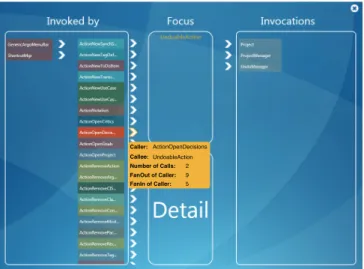
about the dependencies and therefore touches the item called Dependencies in the menu. SmellTagger now displays the call relations between UndoableAction, its callers on the left and its callees on the right, as shown in Figure 2. Different colors are used to indicate different packages the classes are part of,i.e., if two classes have the same color, they belong to the same package. When Paul selects a class on the left and touches the arrow next to it, a yellow box appears that displays the number of calls from the class to the element in focus, class UndoableAction, as well as the fan-in and the fan-out of the selected class. The three developers go over several classes to investigate the dependencies. The collaborative setting motivates the three developers to discuss their findings and they decide
thatUndoableActionshould be refactored to reduce the
number of low-level couplings. Therefore, Sue drags and drops the item in focus with her hand into the “Detail” area. A new window opens up that displays the source code of the class together with some basic software metrics and options to annotate arbitrary snippets of the code (see Figure 3). Annotating Code for Refactoring. After opening the class
UndoableAction in the code review editor, Sue, Alan
and Paul investigate the source code together and decide how the code should be refactored. To annotate the relevant parts of the code, Sue marks the code using her fingers and then selects to annotate it by recording an audio note. She records the group’s refactoring comments and saves them, which
Caller:ActionOpenDecisions Callee:UndoableAction Number of Calls: FanOut of Caller: FanIn of Caller: 2 9 5
Figure 2. Call relations betweenUndoableAction, its callers (Invoked by) and its callees (Invocations) in the project.
automatically attaches the audio file to the marked code. Sue closes the code review editor by drawing an ‘X’ onto the surface table and also closes the call relations interface, which brings them back to the main page.
Generating Review Report. Sue, Alan and Paul decide that they have attained enough insights on the code they wanted to analyze for now and want to generate a report with their findings. For general actions that are rarely used, such as the generation of a review report and other ones described later (see Section II-B), wooden cubes are provided that are placed on the edge of the MST or close to it. These cubes have a label on the top to represent the action and a bar-code like pattern on the bottom that is recognizable by the MST’s vision system. When Alan places the report cube anywhere on the surface, a review report with all findings of this session, such as the annotations, code smells and software metrics, is automatically generated. Finally, Alan emails the report to all three of them and they go for lunch. B. Approach
To support collaborative code reviews as presented in the example, our approach combines several aspects with the multi-touch environment of the MST: smell detection based on software metrics, various visualizations for code investi-gation, support for audio and keyboard based annotations of code snippets and gesture recognition for ease of interaction with the displayed information.
Smell Detection Based on Software Metrics. Our approach uses software metrics to identify code smells as starting points for code reviews. In particular, we use combinations of logical conditions and multiple software metrics to detect code smells, an approach previously suggested by Lanzaet al. [9]. These combinations are defined in an XML
syn-Notes
Code Selection Notes
Code note for line 58 - 68
Figure 3. Code review editor with software metrics and annotated source code snippet.
tax and can easily be adapted, extended or customized to particular project or team needs. The software metrics for any project, together with its structural information, such as inheritance or call relations, are retrieved using a web-service of theSOFAS platform1.
For our prototypical implementation, we retrieve 16 dif-ferent software metrics from this web service on difdif-ferent levels of abstraction: class, package and project level. With these 16 software metrics we predefined combinations for detecting four different kinds of code smells. Retrieving further software metrics requires no significant effort as long as they are supported by the web-service. Further combinations for identifying code smells can simply be added using our predefined XML syntax.
Visualization. We provide several visualizations that all support the code review process and with it the code inves-tigation. Each visualization is more suited for investigating certain code smells, such as the dependencies visualization for Shotgun Surgery in Figure 2. Additional to the dependen-cies visualization, we provide visualizations for displaying the type hierarchy of a class and for emphasizing various software metrics in a structural class graph.
One visualization of our approach presents the type hi-erarchy of a specific class in a UML-like representation, as shown in Figure 4. This visualization is well-suited for analyzing classes that are not in harmony with their subclasses and/or their parents, such as classes that suffer from a Refused Parent Bequest2 code smell. In this case, the class in focus isFigDependency. Using drag & drop to move an element into the area designated by “Focus”, one can easily change the class in focus. Dragging and dropping a class element into the “Detail” area results in the presentation of additional details about the dropped class,
1http://www.ifi.uzh.ch/seal/research/tools/sofas.html
2Refused Parent Bequest is an indicator of subclasses that inherit
Figure 4. Type hierarchy visualization of classFigDependency.
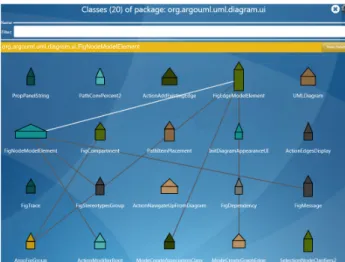
such as the source code and software metrics (see Figure 3). Another visualization uses a house metaphor to visualize software metrics of all classes in a package, as shown in Fig-ure 5. A three-dimensional variation of this visualization was initially presented by Boccuzzoet al.[10]. In this metaphor, well-designed classes are meant to be represented by normal looking houses, while classes that do not follow object-oriented design principles are represented by unnaturally-looking houses that are, for example, too narrow or too wide. Houses have three parameters that can be assigned to software metrics: the height of the roof and the width and height of the body rectangle. The edges between houses represent call or usage relations between classes. The line color indicates the intensity of the relation, the brighter a line, the more method calls and usage relations exist between the two classes. For the visualization shown in Figure 5, the height of the body rectangle is based on the number of methods in the class, the width on the number of lines of code and the roof height on McCabe’s Cyclomatic Complexity. This visualization is well-suited to identifyGod Classesthat are big and complex.
Similar to the house metaphor visualization, our approach also provides a visualization that uses kiviat diagrams to represent classes. The main difference in these represen-tations is that a kiviat diagram can be used to display an arbitrary number of software metrics. Figure 6 shows a kiviat diagram for the class FigNodeModelElement
that visualizes two sets of data with five software metrics each. The first data set, shown in light-green, visualizes the average values for the whole project. The second series, shown in dark-green, represents the values of the actual class
FigNodeModelElement. Thereby, this visualization
pro-vides a feasible way to compare the software metrics and properties of a class directly with other classes as well as with the average values of the whole project. The metrics
org.argouml.uml.diagram.ui.FigNodeModelElement
Figure 5. Visualization of software metrics using a house metaphor.
assigned to the axis in the kiviat diagram or the house parameters can easily be changed.
Figure 6. Visualization of software metrics in a kiviat diagram.
As described in the example (Section II-A), our main visualization provides an entry point for code reviews and, in particular, investigating code smells. Additional to the features already presented in the example, our approach provides support for searching and navigating a code base. By touching the icon in the middle of the screen (denoted by rectangle 3 in Figure 1) a developer can choose amongst several actions, such as an overview of the project metrics, a package overview, a sortable list of code elements and their metrics and a search interface.
Gestures.The MST comes with a set of built-in gestures that are primarily there for manipulating elements in the user interface such as moving, scaling or rotating an element or entire views. In addition to this limited set of gesture-supported actions, we wanted to explore gestures that allow easier interaction with the views. Therefore, we implemented support that allows a user to add auxiliary gestures. We used a simple gesture recognition algorithm to accurately recog-nize single-stroke gestures [11]. In our initial prototype, we added a gesture for closing views by drawing a cross on
the touch display on top of the view (as described in the example in Section II-A) and a gesture for accessing the settings of a view by drawing a question mark.
Interaction and Collaboration. Compared to traditional desktop computers, tabletops such as the MST, provide opportunities for face-to-face meetings and establishing co-located collaborative working environments. However, there are also some limitations that have to be considered. People seated around a MST do not share a common view angle, field of view and reachability. Elements that are clearly recognizable or reachable for one developer may not be for another developer. Therefore applications should provide means to enable every user to participate and access every piece of a user interface.
Our approach provides various features that might help to overcome these limitations and foster collaboration between users. For example, each view can be duplicated, rotated, resized and moved to allow two or more users annotate source code concurrently. SmellTagger automatically syn-chronizes the content between these multiple views. This way, we provide an orientation-independent user interface that can be easily accessed by every user around the MST. As described in the example in Section II-A, we use wooden cubes to provide access to general and rarely used actions, such as the generation of a review report. These actions can be used at any point in time without the need to integrate it into each view. In our initial prototype, we also have a cube that is used for a to-do list action. Consider a developer who wants to postpone the reviewing of certain code elements that contain code smells. By placing the corresponding tagged object (cube) on the surface, she can drag & drop elements with a code smell into a container that appears next to the tagged object. The developer can tag these elements with keywords and by removing the tagged object, the container and the contained elements are removed from the view. At any point in time, the developer can get back to reviewing these elements by simply placing the tagged object back onto the surface.
Prototypical Implementation. For our prototypical imple-mentation, we implemented all features and visualizations described in this section.
III. PRELIMINARYEVALUATION
In order to explore how different aspects of our approach are perceived and how users like the overall idea of col-laborative code reviews using a multi-touch surface, we performed a preliminary evaluation of our prototype appli-cation. For this exploratory study, we had 15 participants use our prototype, each individually, to perform code review tasks and answer several questions. In the future, we plan to conduct a multiple cases study with several participants performing collaborative code reviews to better assess the collaborative aspects of the approach.
A. Study Setup
We recruited 15 participants for our study. All participants were graduate students with a background in computer science. Each participant was asked to complete a set of 14 tasks and answer questions at the end of each task and after completing all 14 tasks. For the 14 tasks, we chose tasks related to code reviews, ranging from code exploration tasks, e.g., how many calls exist between two specific classes, over specific code smell detection tasks,e.g., does a certain code smell exist in the code base and which class is it located in, to tasks specifically tailored towards our prototype, e.g., record an audio note for a class with a code smell. During the tasks, we answered general questions from the participants about the visualizations. We used the ArgoUML project3as the code base for the tasks. After each task we asked a participant to rate statements on the ease of finding the relevant information for the task using our prototype. At the end of the study session, we also asked each participant to rate basic statements on the ease of using certain features as well as the whole prototype and whether the necessary information was provided to support the tasks. The rating was based on a five point Likert-scale with one being “strongly disagree” and five being “strongly agree”. Finally, we had the participants write down what they liked most, didn’t like and suggestions for improvement for the approach.
For this study, we used a version of the prototype that covered all previously described features except for the capability of marking code snippets rather than whole classes and for searching classes and methods. The latter two features have been added as a result of our study.
B. Results
Table I provides an overview of the participants’ answers to the basic statements about our approach. A more detailed description of our preliminary evaluation and the results is presented in [12].
Table I
PARTICIPANTS’ANSWERS TO STATEMENTS ABOUT OUR APPROACH. THE RATINGS ARE BASED ON A FIVE POINTLIKERT SCALE(1 =
”STRONGLY DISAGREE” , 5 = ”STRONGLY AGREE”).
Statement Mean
Prototype provides all functionality to perform review tasks 4.13 Prototype provides a useful overview of its functionalities 3.47 Prototype is easy to operate 4.27 Tagged objects are useful 4.07 Gestures are useful 3.13 Recording audio notes is an important feature 3.13 Outcome of a review process can be easily used 4.27 Ability to rotate, scale and translate elements improves user interaction
3.73
The participants completed all tasks successfully except for a single case in which a subject could not finish one of the 14 tasks. To perform all 14 tasks, it took a participant on average 25 minutes, ranging from a minimum of 18 minutes to a maximum of 40 minutes.
Participant comments on overall experience. When asked about our approach, the participants generally were very positive about their experience with the prototype and com-mented that it is “cool”, “awesome” and that “it is fun to work with the prototype”. Several stated explicitly that they most liked the new modality for doing code reviews, i.e., using a multi-touch device and that the “multi-touch device is really great”. All participants generally rated the ability of the multi-touch interface to foster collaboration during code review process as high (mean rating of 3.80).
Participant comments on visualizations and interaction. Par-ticipants commented very positively on the various visualiza-tions provided by our approach. They stated that the design of the code review interface for the MST was clear and crisp and that they liked the various levels of abstractions provided by the different visualizations. Subjects stated that they really like that you can “dig in and find all the needed details”, that it provides “easy access to all important info[rmation]”, and that it is “easy”, “intuitive” and “quick” to navigate through the information. One participant also stated that she most liked the “simple presentation of code in another format”. The provided gesture support was not necessarily considered a useful form of user input (mean rating of 3.13). However, this perception might simply stem from the fact that several subjects thought that the MST technology was rather slow, inaccurate and did not recognize the gestures well.
Suggestions to improve. The most common suggestions participants made were with respect to providing more help on the various features of the approach, a search functionality to find classes or methods and the capability to mark source code snippets instead of only whole classes. We have implemented the latter two in a newer version of the approach that we described in Section II-B. We are still working on a better integration of help for the various features.
C. Threats
There are several threats to the validity of our study, such as the low experience level of participants or the fact that each participant performed the tasks individually rather than having several people perform a code review collaboratively. However, as stated, this is only a preliminary study to get some initial feedback of the features and usability of our approach without a claim of generalizability. We plan on performing a study in a more collaborative setting with professional developers in the future.
IV. DISCUSSION ANDFUTUREWORK
With our approach, we wanted to develop an application for a new and emerging technology, such as multi-touch interfaces, that has the potential to make a development activity more fun, productive and collaborative. Rather than following traditional desktop applications with point-and-click interfaces, we therefore explored new ways to pro-vide the users with possibilities to use more natural and habitual finger and hand movements and to interact with the information in different ways. Ideally, a user should be able to interact with digital content as easy and natural as with real world content. In our approach we aim to get a step closer towards this idealized interaction model. For example, we provided features for moving and rotating objects with fingers, a concept widely used in real world, as well as the capability to capture audio notes rather than having to type everything in, since speaking is one of the most commonly used forms of communication. Even though not all gestures that SmellTagger provides may follow a real world example, we think that the change in modality and the interactivity that our approach allows can improve the desirability and productivity of code reviews and foster collaboration amongst team members.
In future work, we plan to enhance the feature set that SmellTagger provides to make collaborative code reviews even more efficient and desirable. For example, we plan to integrate speech recognition technology to automatically convert audio notes into text. With this feature, review reports can be analyzed completely as a text file without having to listen to audio files. We also plan to enhance our gesture recognition algorithm to recognize letters so that users can directly write their notes onto the surface. Furthermore, we plan to make to-do lists first class entities, so that users are able to send to-do lists via emails to other developers and exclude elements added to a to-do list from the ongoing code review. We think that this support might help to more efficiently integrate to-do lists and code reviews in general into existing software development processes.
V. RELATEDWORK
Work related to our approach can broadly be categorized into three areas: approaches using multi-touch interfaces to support software development activities, approaches for code reviews and visualizations of software metrics.
Multi-touch interfaces are not yet widely used to support typical activities in software engineering. Most approaches support some form of agile planning meetings or provide awareness about the current state of a software project. Morgan et al. [6] describe an application for tabletops that can be used in agile project planning meetings. They support both co-located and distributed teams by providing means to create, move and pile index cards. A similar approach is presented by Wang et al. [7] that allows to create, pass and toss story cards. In their approach, it is
possible to resize or rotate these cards. Ghanamet al. [13] also present a multi-touch augmented application to support synchronous planning meetings. Their approach provides an orientation-independent user interface and offers its users the possibility to create, move and modify story cards. All of these approaches only focus on planning meetings and are limited to creating, rotating and resizing cards on a multi-touch display.
An approach that supports awareness rather than planning meetings using multi-touch technology was presented by Hardy et al.[14]. In their approach, they use an interactive tabletop, called CoffeeTable, to provide an interactive desk that can serve as a shared workspace for a group of devel-opers working synchronously on a software project. They argue that this shared workspace can foster the collaboration between its users and can reduce disharmonies between developers. In our approach, we also try to take advantage of the collaborative setting, but we focus on supporting code reviews rather than awareness of the code.
The ideas Raab sketches in his position paper [15] are most closely related to our approach. He outlines three general steps of code reviews, namely marking, tagging and checking of code and discusses the use of interactive tabletop features to support these steps. Different to his paper, we provide a concrete approach with a prototypical implementation that also takes into account the detection of code smells, various visualizations for code exploration and concrete features for supporting code annotations and for integrating the code review into the software development process.
There are several commercial approaches for code re-views, such as gerrit [3] or CodeCollaborator [2], that provide a lot of functionality for annotating and reviewing code. Neither of these approaches tries to investigate the use of multi-touch devices or on how to improve collaboration and desirability of such code reviews.
Finally, several approaches have looked into visualizing metrics of source code. These approaches mostly use soft-ware metrics to change the size or shape of code repre-sentations (e.g., [9], [10]) or use more sophisticated repre-sentations such as kiviat diagrams (e.g., [16]) to visualize software metrics. We use these approaches as a basis for our visualization to support collaborative code reviews.
VI. CONCLUSION
Code reviews are used to improve the general quality of software, but are often neglected by developers. In this paper, we have introduced SmellTagger that supports a collaborative way of conducting code reviews using multi-touch technology. By shifting from traditional approaches to a more collaborative and interactive environment, we aim at improving the desirability and effectiveness of code reviews. We have shown how a combination of software metrics, visualizations and gesture recognition with the multi-touch
environment of the Microsoft Surface Table can support developers perform collaborative code reviews. We have implemented a prototype to show the feasibility of our approach and presented exploratory results from 15 subjects who used our prototype for code review related tasks and generally liked it.
REFERENCES
[1] R. A. Baker, Jr., “Code reviews enhance software quality,” in
Proc. of ICSE ’97, pp. 570–571, ACM, 1997.
[2] “http://smartbear.com/products/development-tools/code-review/.”
[3] “http://code.google.com/p/gerrit/.”
[4] J. T. Nosek, “The case for collaborative programming,” Com-munications of the ACM, vol. 41, pp. 105–108, 1998. [5] C. Shen, K. Ryall, C. Forlines, A. Esenther, F. D. Vernier,
K. Everitt, M. Wu, D. Wigdor, M. R. Morris, M. Hancock, and E. Tse, “Informing the design of direct-touch tabletops,”
IEEE Comp. Graphics and Applic., vol. 26, pp. 36–46, 2006. [6] R. Morgan and F. Maurer, “Maseplanner: A card-based dis-tributed planning tool for agile teams,” in Proc. of ICGSE ’06, pp. 132–138, IEEE Computer Society, 2006.
[7] X. Wang and F. Maurer, “Tabletop AgilePlanner: A tabletop-based project planning tool for agile software development teams,” inTabletop ’08, pp. 121 –128, 2008.
[8] M. Fowler, Refactoring: Improving the Design of Existing Code. Addison-Wesley, 1999.
[9] M. Lanza and R. Marinescu, Object-Oriented Metrics in Practice. Using Software Metrics to Characterize, Evaluate, and Improve the Design of Object-oriented Systems. Springer Verlag, 2010.
[10] S. Boccuzzo and H. Gall, “Cocoviz: Towards cognitive soft-ware visualizations,” in Proc. of VISSOFT ’07, pp. 72 –79, 2007.
[11] J. O. Wobbrock, A. D. Wilson, and Y. Li, “Gestures without libraries, toolkits or training: a $1 recognizer for user interface prototypes,” inProc. of UIST ’07, pp. 159–168, ACM, 2007. [12] S. M¨uller, “SmellTagger: augmenting design and code re-views with multi-touch technology,” Master’s thesis, Univer-sity of Zurich, 2011. https://www.merlin.uzh.ch/publication/ show/3694.
[13] Y. Ghanam, X. Wang, and F. Maurer, “Utilizing digital tabletops in collocated agile planning meetings,” in Proc. of the Agile 2008, pp. 51–62, IEEE Computer Society, 2008. [14] J. Hardy, C. Bull, G. Kotonya, and J. Whittle, “Digitally
annexing desk space for software development (nier track),” in Proc. of ICSE ’11, pp. 812–815, ACM, 2011.
[15] F. Raab, “Collaborative code reviews on interactive surfaces,” in Proc. of ECCE ’11, pp. 263–264, ACM, 2011.
[16] M. Pinzger, ArchView - Analyzing Evolutionary Aspects of Complex Software Systems. PhD thesis, University of Zurich, 2005.