starting out with > > >
From Control Structures through Objects
get with the programming
Through the power of practice and immediate personalized
feedback, MyProgrammingLab improves your performance.
My Program m i ngLab
Learn more at w w w . m y p r o g r a m m i n g l a b . c o m
TM
STARTING OUT WITH
JAVA"
From Control Structures
through Objects
FIFTH F D I I I O N
Tony Gaddis
Haywood Community College
PEARSON
Boston Columbus Indianapolis N e w York San Francisco Upper Saddle River
I'ditnrial Director: Marcia Morton lulitnr in Chief: Michael Hirsch Acquisition* Editor: Mart Goldstein Editorial Assistant: Chelsea Kharako/ova Director of Marketing: Patrice Jones Marketing Manager: Ye/ Mayan
Marketing Coordinator: kathryn Kerranti Marketing Assistant: Emma Snider
Director of Production: Vince O'Brien Managing Editor: \cff Holcomb
Senior Production Project Manager: Marilyn I loyd Production Editor: Pat Brown
Manufacturing Huycr: Pat Brown Art Director: Anthony (temmellaro Cover Designer: Joyce Cosentino Wells Cosxr Image: O Mock photo
Media Project Manager: John < assar
Text Permissions: | m n KennettA rcative Compliance l-ullScrsici Project Management: (ogender Taneja, Aptara*. Inc.
Composition: Aptara*, Inc.
Printer/Hinders: l J wards Brothers Cover printer: I ehigh-Phoeni* Color/ I lagerstosvn
Copyright O 201 1, 2010, 2<H)Kt 200$ by Pearson Education, Inc., publishing as Addison Wesley. All rights reserved.
Manufactured in the United States of America. I his publkattoii is protected by Copyright, and permission should be obtained from the publisher prior to any prohibited reproduction, storage in a retrieval system, or transmission in any form or by any meant, electronic, mechanical, photocopying, recording, or likewise. To obtain pcrnussion(s) t o use material from this w o r k , please submit a written request to Pearson I ducation. Inc., Permissions Department, One I ake Street, Upper Saddle River, New Jersey 1)7458* o r you may fax your request t o 201 2 lfi-12^1),
Many of the designations by manufacturers and wtlers to distinguish their products are claimed as trademarks* Where those designations appear m this book, and the publisher was aware of a trademark claim, the designations have been printed in initial caps o r all caps*
I ibrary of Congress ( atalnging-in-Publication Data
daddis,Ton)r,
Starting nui with Java : from control structures through o h j e v f s / l o n y daddis. — 5th ed. p, c m .
1SBN-IJ: 978-0*13-28558 *-V
ISBN-10t0-13-2B55834
1. Java (Computer program language) 2. Data structures <( omputer wience) I. Title*
QA76.73J3BG3320I3
005,I3'3—dc23 2012000361
10 9 8 7 6 5 4 3 2 1
PEARSON
SVE ISBN-13: 978-0-13-289038-0 SVLISBN-10: 0-13-289038-0
Chapter 1
Chapter 2
Chapter 3
Chapter 4
Chapter 5
Chapter 6
Chapter 7
Chapter 8
Chapter 9
Chapter 10
Chapter 11
Chapter 12
Chapter 13
Chapter 14
Chapter 15
Chapter 16
Preface xv
Introduction to Computers and Java
|ava Fundamentals
Decision Structures
Loops and Files
Methods
A First Look at Classes
Arrays and the ArrayLiat Class
A Second Look at Classes and Obfects
Text Processing and More about Wrapper
Inheritance
Exceptions and Advanced File I/O
A First Look at CUI Applications
Advanced CUI Applications
Applets and More
Recursion
Databases
Java™ Quick Reference
Index
Credits
Appendixes A - M
Case Studies 1-7
Classes
Companion
Companion
1
27
109
193
273
323
407
497
561
619
699
755
843
911
985
1013
1109
1111
1127
Website
Preface xv
Chapter
1 Introduction to Computers and Java 1
1.1 Introduction 1
1.2 Why Program? 1
1.3 Computer Systems: Hardware and Software 2
1.4 Programming Languages 6
1.5 What Is a Program Made Of? 9
1.6 The Programming Process 16
1.7 Object-Oriented Programming 19
Rreu'w Otiestiam •"»</ Fxereises 21
Programming Challenge 25
Chapter 2
Java Fundamentals 27
2.1 The Parts of a Java Program 27
2.2 The p r i n t and p r i n t i n Methods, and the |ava API 33
2.3 Variables and Literals 39
2.4 Primitive Data Types 44
2.5 Arithmetic Operators 54
2.6 Combined Assignment Operators 63
2.7 Conversion between Primitive Data Types 65
2.8 Creating Named Constants with f i n a l 69
2.9 The string Class 70
2.10 Scope 75
2.11
Comments 77
2.12 Programming Style 82
2.13 Reading Keyboard Input 84
2.14 Dialog Boxes 92
2.15 Common Errors to Avoid 99
Review {Juesliuiis and Exercises 100
Programming < hallengts 1
05
vffl Contents
Chapter 3
Decision Structures 109
3.1
The
if Statement 109
3.2
The
if-else Statement
119
3.3 Nested if Statements
1
22
3.4
The
if-else-if Statement
1
29
3.5 Logical Operators
1
35
3.6 Comparing string Objects 143
3.7 More about Variable Declaration and Scope 149
3.8 The Conditional Operator (Optional) 150
3.9 The switch Statement
1
52
3.10
Thesyatem.out.printf Method 162
3.11 Creating Objects with the DecinairorMt Class
1
74
3.12 Common Errors to Avoid 181
kt'vu-ir Qu&tiom and Exercises 182
Programmhtg Challenge 187
Chapter 4
Loops and Files 193
4.1 The Increment and Decrement Operators 193
4.2 The while Loop
1
97
4.3 Using the whiU Loop for Input Validation 204
4.4 The do-while Loop 208
4.5 The for Loop 211
4.6 Running Totals and Sentinel Values 220
4.7 Nested Loops 225
4.8 The
break and continue
Statements
(Optional) 233
4.9 Deciding Which Loop to Use 233
4.10 Introduction to File Input and Output 234
4.11
Generating Random Numbers with the Random Class 253
4.12 Common Errors to Avoid 259
Rfiitu-Questions andExorcism 260
Programming < 'JsiBtngtt 266
Chapter 5
Methods 273
5.1 Introduction to Methods 273
5.2 Passing Arguments to a Method 283
5.3 More about Local Variables 295
5.4 Returning a Value from a Method 297
5.5 Problem Solving with Methods 306
5.6 Common Errors to Avoid 310
Contents
i\
Chapter 6
A First Look at Classes 323
6.1 Objects and Classes 323
6.2 Writing a Simple Class, Step by Step 330
6.3 Instance Fields and Methods 347
6.4 Constructors 352
6.5 Passing Objects as Arguments 364
6.6 Overloading Methods and Constructors 376
6.7 Scope of Instance Fields 384
6.8 Packages and import Statements 386
6.9 Focus on Object-Oriented Design: Finding the Classes
and Their Responsibilities 388
6.10 Common Errors to Avoid 394
Renew Questions .inJ h'xenises 395
Programming Ckaltangai 400
Chapter 7
Arrays and the ArrayList Class 407
7.1 Introduction to Arrays 407
7.2 Processing Array Elements 417
7.3 Passing Arrays as Arguments to Methods 426
7.4 Some Useful Array Algonthms and Operations 430
7.5 Returning Arrays from Methods 443
7.6 String Arrays 445
7.7 Arrays of Objects 448
7.8 The Sequential Search Algorithm 451
7.9 Two-Dimensional Arrays 454
7.10 Arrays with Three or More Dimensions 466
7.1
1
The Selection Sort and the Binary Search Algorithms 467
7.12 Command-Line Arguments and Variable-Length Argument Lists . . . 472
7.1 3 The ArrayList Class 476
7.14 Common Errors to Avoid 485
Review Questions and Exerciut 485
/'} < igmmmtng < hjUenges 490
Chapter 8
A Second Look a t Classes a n d O b j e c t s 4 9 7
8.1 Static Class Members 497
8.2 Passing Objects as Arguments to Methods 504
8.3 Returning Objects from Methods 507
8.4 The t o S t r i n g Method 509
8.5 Writing an equals Method 513
8.6 Methods That Copy Objects 516
8.7 Aggregation 519
8.8 The t h i s Reference Variable 532
Contents
8.11 Focus on Object-Oriented Design: Class Collaboration 546
8.12 Common Errors to Avoid 550
Rvt'icu- (Jiifitions ami Exercises 551
Programming Challenges 555
Chapter 9
Text Processing and More about Wrapper Classes 561
9.1 Introduction to Wrapper Classes 561
9.2 Character Testing and Conversion with the Character Class 562
9.3 More string Methods 570
9.4
The strinqBuilder Class 584
9.5 Tokenizing Strings 595
9.6 Wrapper Classes for the Numeric Data Types 603
9.7 Focus on Problem Solving: The TeitScoreReader Class 606
9.8 Common Errors to Avoid 610
Review Questions and Exorcism 610
Programming < Utattenges 614
Chapter 10
Inheritance 6 1 9
10.1 What Is Inheritance? 619
10.2 Calling the Superclass Constructor 632
10.3 Overriding Superclass Methods 640
10.4 Protected Members 649
10.5 Chains of Inheritance 655
10.6
The
o b j e c t Class 661
10.7 Polymorphism 663
10.8 Abstract Classes and Abstract Methods 668
10.9 Interfaces 675
10.10 Common Errors to Avoid 687
Review Questions and Exercises 688
Programming < 'hallenget 693
Chapter
11 Exceptions and Advanced File I/O 699
11.1 Handling Exceptions 699
11.2 Throwing Exceptions 723
11.3 Advanced Topics: Binary Files, Random Access Files,
and Object Serialization 729
11.4 Common Errors to Avoid 746
Review Questions jihi Exercises 746
Programming Challenges 752
Chapter 12 A First Look at GUI Applications 755
12.1
Introduction
755
Contents
x l
1
2.3 Layout Managers 787
1
2.4 Radio Buttons and Check Boxes 804
12.5 Borders 815
12.6 Focus on Problem Solving: Extending Classes from Jpanel
. . . .
818
1
2.7 Splash Screens 830
12.8 Using Console Output to Debug a GUI Application 831
1
2.9 Common Errors to Avoid 836
Review Question! and Exercises 836
Programming Challenges 839
Chapter
1
3
Advanced GUI A p p l i c a t i o n s 843
13.1 The Swing and AWT Class Hierarchy 843
13.2 Read-Only Text Fields 844
13.3 Lists 846
13.4 Combo Boxes 862
13.5 Displaying Images in Labels and Buttons 868
13.6 Mnemonics and Tool Tips 874
13.7 File Choosers and Color Choosers 876
13.8 Menus 880
1
3.9 More about Text Components: Text Areas and Fonts 889
13.10 Sliders 893
13.11 Look and Feel 898
1
3.12 Common Errors to Avoid 900
Review Question! ami l-'xert-nn 901
Programming < 'hattenges 906
Chapter
14 A p p l e t s a n d M o r e 9 1 1
14.1 Introduction to Applets 911
14.2 A Brief Introduction to HTML 913
14.3 Creating Applets with Swing 922
14.4 Using AWT for Portability 931
14.5 Drawing Shapes 936
14.6 Handling Mouse Events 957
14.7 Timer Objects 967
14.8 Playing Audio 971
14.9 Common Errors to Avoid 976
Review Questions and Exercises 976
Programming Challenges 982
Chapter
15 Recursion 9 8 5
15.1 Introduction to Recursion 985
15.2 Solving Problems with Recursion 988
15.3 Examples of Recursive Methods 993
15.4 A Recursive Binary Search Method 999
15.5 The Towers of Hanoi 1002
• i i
Contents
Rci'tvic { hiestitins JH,! ixcrau-s
Programming
<
'.lullenges
1010
1007
Chapter 16
Databases 1013
16.1
Introduction
to
Database Management Systems
101
3
16.2
Tables,
Rows, and
Columns 1019
16.3
Introduction
to the SQL
SELECTStatement
1022
16.4
Inserting Rows
1044
16.5 Updating
and Deleting
Existing Rows 1048
16.6
Creating and Deleting
Tables
1057
16.7
Creating
a New
Database
with |DBC 1060
16.8 Scrollable
Result
Sets
1062
16.9 Result
Set
Metadata
1063
16.10 Displaying Query
Results
in a JTable 1067
16.11
Relational Data 1077
16.12
Advanced Topics 1099
16.13 Common Errors to
Avoid
1
101
Remit- QuuHom
.imi I
xcrnH-s
1101
Programming < "halUngti
1
1
06
Java™ Quick Reference 1109
Index 1111
Credits 1127
Companion Website:
Appendix A Getting Started with Alice
Appendix B The ASCII/Unicode Characters
Appendix C Operator Precedence and Associativity
Appendix D Java Key Words
Appendix E Installing the JDK and JDK Documentation
Appendix
F
Using the javadoc Utility
Appendix C More about
the
Math Class
Appendix H Packages
Appendix I Working with Records and Random Access Files
Appendix
J
More about JOptionPane Dialog Boxes
Appendix K Answers to Checkpoints
Appendix L Answers to Odd-Numbered Review Questions
Appendix M Installing Java DB
Case Study
1
Calculating Sales Commission
Case Study 2 The A m o r t i z a t i o n Class
Case Study 3 The PinTester Class
Case Study 4 Parallel Arrays
Case Study 5 The Feet Inches Class
Case Study 6 The SerialNumber Class
LOCATION OF VIDEONOTES IN THE TEXT
Chapter 1
Chapter 2
Chapter 3
Chapter 4
Chapter 5
Chapter 6
Chapter 7
Chapter 8
Chapter 9
Chapter 10
Chapter 11
Chapter 12
Compiling and Running a |ava Program, p. 14
Using an IDE, p. 15
Your First Java Program, p. 25
Displaying Console Output, p. 33
Declaring Variables, p. 39
Simple Math Expressions, p. 55
The Miles-per-Gallon Problem, p. 106
The i f Statement, p. 109
The i f - e l i e Statement, p. 119
The i f - e l w - i f Statement, p. 130
The Time Calculator Problem, p. 189
The while Loop, p. 197
The Pennies lor Pay Problem, p. 267
Passing Arguments to a Method, p. 283
Returning a Value from a Method, p. 297
The Retail Price Calculator Problem, p. 316
Writing Classes and Creating Objects, p. 331
Initializing an Object with a Constructor, p. 352
The Personal Information Class Problem, p. 401
Accessing Array Elements in a Loop, p. 411
Passing an Array to a Method, p. 426
The Charge Account Validation Problem, p. 491
Returning Objects from Methods, p. 507
Aggregation, p. 519
The BankAccount Class Copy Constructor Problem, p. 556
The Sentence Capitalizer Problem, p. 615
Inheritance, p. 619
Polymorphism, p. 663
The Employee and ProductionWorker Classes Problem, p.
Handling Exceptions, p. 699
I he Exception Pro|CCt Problem, p. 754
Creating a Simple GUI Application, p. 758
Handling Events, p. 771
The Monthly Sales Tax Problem, p. 840
693
Chapter 13
L O C A T I O N OF V I D E O N O T E S I N T H E T E X T
(continued)
The J L i a t Component, p. 846
The JComboBox Component, p. 862
The Image Viewer Problem, p. 906
Chapter 14
Creating an Applet, p. 923
The House Applet Problem, p. 982
W
elcome to Starting Out with Java: From Control Structures through Objects, Fifth Edition. This book is intended ior a one-semester or a two-quarter CSI course. Although it is written for students with no prior programming background, even experienced students will benefit from its depth of detail.C o n t r o l Structures First, T h e n Objects
This text first introduces the student t o the fundamentals of data types, input and output, control structures, methods, and objects created from standard library classes.
Next, the student learns to use arrays of primitive types and reference types. After ihis, the student progresses through more advanced topics, such as inheritance, polymorphism, the creation and management of packages, C U I applications, recursion, and database program-ming. From early in the book, applications are documented with ;avadoc comments, As the student progresses through the text, new ]*v*doc tags ^re covered and demonstrated.
As with all the books in the Starting Out With . . . series, the hallmark of this text is its clear, friendly, and easy-to-understand writing. In addition, it is rich in example programs that are concise and practical.
Changes in This E d i t i o n
This book's pedagogy, organization, and clear writing style remain the same as in the previous edition. Many improvements have been made, which arc summarized here:
* New Java " Topics Added: This edition discusses some of the new language features added in Java 7. Specifically, the ability to switch on a string expression is discussed in Chapter 3, type inference with the diamond operator is discussed in Chapter 7, and multi-catch exception handling is discussed in Chapter 11 •
• New Organization: In previous editions, CiUI programming with Suing was introduced in Chapter 7, and then revisited in Chapter 11. Many of the reviewers requested that CiUI
programming be postponed until inheritance had been covered- In this edition, the First Too/: at (1UI Applications chapter has been moved to ( lupter 12.1 lowever, the chapter has been written in a manner that it can still be covered immediately after Chapter 6, as in the previous editions. Instructors who prefer to follow the previous sequence of topics can still do so. (See the chapter dependency chart in Figure P-l for possible sequencing of the chapters.)
x v l Preface
A New Chapter on Databases New to this edition is l chapter 16, Databases. This chapter introduces the student to databases and SQL using JavaDB.
Expanded Coverage of (he t w i t c h Statement: In Chapter 3, the introduction to the switch statement has been rewritten, and enhanced with a flowchart- A section covering the abil-ity to switch on a string in Java 7 has also been added.
Coverage of S y s t o a . o u t . p r i n t f Has Been Expanded: The section on System.out . p r i n t ! in Chapter ) his been completely rewritten, and expanded to include diagrams and cover-age of additional format specifiers.
S y s t m . o u t . p r i n t f Is Used for Formatting Console Output: In this edition, System, o u t . p r i n t f is used when numbers and strings need to be formatted for output in console programs. The DecimalFonMt class is still introduced, but it is used to format numbers in CiUI applications,
I )iscussion of Nested I .oops Has Been h xpanded: In Chapter 4 the section on nested loops has been expanded to include an In the Spotlight section highlighting the use of nesred loops to print patterns.
Usage of Random Numbers Has Been I xpanded: In Chapter -1 the section on random numbers has been expanded, and rum includes In the Spotlight sections demonstrating how random numbers can be used to simulate the rolling of dice, and to determine the results of a coin toss.
A New Introduction [o Objects Has Been Added to Chapter 6: In Chapter <\ a new intro-duction to objects has been added to the beginning of the chapter. The new introintro-duction is much more practical and concrete than the previous introduction, discussing Java objects i ( M I Ihe stndeni I us alread) used, I he goal ol this new introduction is to slum; in \ famil-iar way, how programs consist of object*. This reinforces an object-oriented mind-set, and prepares the student to write his or her own classes.
New Motivational Examples of (lasses \\4\x Been Added to Chapter 6: In Chapter 6, new motivational examples of classes have been added. One of the new examples intro-duces a Die class that simulates a die that can be rolled in a game. Another example shows how a variation of the game of Cho-I Ian can he simulated with classes that represent the players, a dealer, and the dice.
Equipping CiUI Applications with a S t a t i c * * ! * Method Is Introduced Earlier: In the First
l.uok at iiVI Applications chapter, which is now Chapter 12, the topic of equipping a
CiUI class with a static main method has been moved to a point very early in the chapter. New Exercises and Programming Problems: New slu>rtcr algorithm workbench exercises, and new motivational programming problems have been added to main of the chapters.
Organization of t h e Text
Prelate x v l l
F i g u r e P - l C h a p t e r dependencies
I
(CovtrmOnM ChipleVS^ -e Java FundamentalsChapter 7 Arrays and t h t A r r e y L i s t Claim
Chapter 9 Text Processing
and Mora about Wrapper Classes
Depend On
Chapters A Second Look
at Classes and Objects
rndeOn
Chapter <0 Inheritance
i
I I
Chapter 16 Data basse
Chapter 12 A First Look at QUI Applications
^ C^wltuteOUIt
•h c h M M iHiouuot d
- CftaitM i t
V
r
Depends On
* D«pe rtd* On Chapter 14
Applets and More
Depends On
Chapter 11 Exceptions and Advanced File I/O
Depend* On Depend* On
Cnapferia Advanced GUI Applications
Brief Overview of Each Chapter
C h a p t e r 1 : I n t r o d u c t i o n t o C o m p u t e r s a n d J a v a . I his chapter provides an introduc-tion co the field o f computer science and covers the fundamentals of h a r d w a r e , software, and p r o g r a m m i n g languages. T h e elements o f a p r o g r a m , such as key w o r d s , variables, operators, and p u n c t u a t i o n , are discussed by e x a m i n i n g a simple p r o g r a m . A n overview o f entering source code, c o m p i l i n g , and executing a p r o g r a m is presented. A brief history o f Java is also given.
C h a p t e r 2 : J a v a F u n d a m e n t a l s . T h i s chapter gees scudents started in Java by introduc-ing data types, identifiers, variable declarations, constants, comments, p r o g r a m o u t p u t , ,\\M\ simple arithmetic operations. The conventions o f p r o g r a m m i n g style are also i n t r o d u c e d . Students learn t o read console i n p u t w i t h the Scanner class a n d w i t h d i a l o g boxes using JOptionPaaa.
w i l l Preface
S t r i n g objects with the equals, compareTo, equal s i gnoreCase, and compareToIgnoreCase methods. Formatting numeric output with the DecimalFormat class is covered, and the System.out.printf method is introduced.
C h a p t e r 4: Loops a n d Files. This chapter covers Java's repetition control structures. The while loop, do-while loop, and for loop are taught, along with common uses for these devices. Counters, accumulators, running totals, sentinels, and other application-related topics are discussed. Simple file operations for reading and writing text files are included.
C h a p t e r 5: M e t h o d s . In this chapter students learn how t o write void methods, value-returning methods, and methods that do and do not accept arguments. The concept of functional decomposition is discussed.
C h a p t e r 6: A First Look a t Classes. This chapter introduces students to designing classes for the purpose of instantiating objects. Students learn about class fields and
meth-ods, and U M I diagrams Are introduced as a design tool. Then constructors and overloading arc discussed. A BankAccount class is presented as a case study, and a section o n object-oriented design is included. This section leads the students through the process of identify-ing classes and their responsibilities within a problem domain. There is also a section that briefly explains packages and the import statement.
C h a p t e r 7: Arrays a n d t h e A r r o y L i s t Class. In this chapter students learn t o create and work with single and multi-dimensional arrays. Numerous array-processing lech-nu]ues arc demonstrated, such as summing the elements in an array, finding the highest and lowest values, and sequentially searching an array. Other topics, including ragged arrays and variable-length arguments (varargs), arc also discussed. The A r r a y L i s t class is intro-duced, and Java's generic types are briefly difCOftscd and demonstrated.
C h a p t e r 8: A Second Look a t Classes a n d Objects. I his chapter shows students how to write classes with added capabilities. Static methods and fields, interaction between objects, passing objects as arguments, and returning objects from methods arc discussed. Aggregation and the "has a " relationship is covered, as well as enumerated types. A section on obicct-orientcd design shows how to use CRC cards t o determine the collaborations among classes.
C h a p t e r 9: Text Processing a n d M o r e a b o u t W r a p p e r Classes. I his chapter dis-iiisses the numcru and Charaetaj wrapper i lasses. Methods lor converting numbers to strings, testing the case of characters, and converting the case of characters arc covered. Autoboxing and unboxing arc also discussed. More s t r i n g class methods arc covered, including using the s p l i t method t o tokenize strings. The chapter also covers the StringBuilder and StringTokenizer classes.
Prelate xix
C h a p t e r 1 1 : Exceptions a n d Advanced File I / O . In this chapter students learn to develop enhanced error trapping techniques using exceptions, I landling exceptions is cov-ered, as well as developing and throwing custom exceptions. The chapter discusses advanced techniques for working with sequential access, random access, text, and binary files.
C h a p t e r 12: A First Look a t C U I Applications. This chapter presents the basics of developing C U I applications with Swing. Fundamental Swing components and the basic concepts of event-driven programming are covered.
C h a p t e r 1 3 : Advanced CUI Applications. This chapter continues the study of GUI application development. More advanced components, menu systems, and look-and-fcel are covered.
C h a p t e r 14: Applets a n d M o r e . In this chapter students apply their knowledge of C U I development to the creation of applets. In addition to using Swing applet classes, AWT classes are discussed for portability. Drawing simple graphical shapes is discussed.
C h a p t e r 15: Recursion. This chapter presents recursion as a problem-solving technique. Numerous examples of recursive methods are demonstrated.
C h a p t e r 16: Databases. I his chapter introduces the student to database programming. The basic concepts ot database management systems and S<^l are first introduced. Then the student learns to use |1>KC to write database applications in |ava. Relational data is cov-ered, ami numerous example programs are presented throughout the chapter.
Features of t h e Text
Concept S t a t e m e n t s . Tach major section of the text starts with a concept statement that concisely summarizes the focus of the section.
Example P r o g r a m s . The text has an abundant number of complete and partial example programs, each designed to highlight the current topic. In most cases the programs are prac-tical, real-world examples.
< *
P r o g r a m O u t p u t . I ach example program is followed by a sample of its output, which shows students how the program functions.
C h e c k p o i n t s . Checkpoints, highlighted by the checkmark icon, appear at intervals throughout each chapter.They are designed to check students' knowledge soon after learn-ing a new topic. Answers for all Checkpoint questions arc provided in Appendix K, which can be downloaded from the book's resource page at www.pearsonhighered.com/gaddis.
Preface
< f l
T I P : Tips advise the student on the best techniques for approaching different program-ming problems and appear regularly throughout the text.
©
W A R N I N G ! Warnings caution students about certain Java features, programming tech-niques, or practices that can lead to malfunctioning programs or lost data.In t h e S p o t l i g h t . Main of the chapters provide an hi the Spotlight section that presents a programming problem, along with detailed, stcp-by-stcp analysis showing the student how to solve it.
f»
VldeoNotes* A scries of videos, developed specifically for this book, are available at www. pcnrsonhighered.com/gjddis. Icons appear throughout the text alerting the student to videos about specific topics.
Case Studies. Case studies that simulate real-world business applications arc intro-duced throughout the text and are provided on the book's resource page at www.pcarson-highered.com/gaddis.
C o m m o n Errors t o Avoid. Fach chapter provides a list of common errors and explana-tions o l how to avoid them.
Review Questions a n d Exercises. I ach chapter presents a thorough and diverse set of review questions and exercises. They include Multiple Choice and True/False, Find the Frror, Algorithm Workbench, and Short Answer,
P r o g r a m m i n g Challenges. Fach chapter offers a pool of programming challenges designed to solidify students' knowledge of topics at hand. In most cases the assignments present real-world problems to be solved.
Supplements
Student Online Resources
Many student resources are available for this book from the publisher. The following items are available on the Caddis Series resource page at \vww,pcarsonhighcrcd.com/gaddis:
• The source code for each example program in the bt>ok • Access ro the book s companion VidcoNotcs
• Appendixes A - I . [listed in the Contents)
• A collection of seven valuable Case Studies (listed in the (Contents)
• Links to download the Ja\a™ Fdition Development Kit
Links u>downlo,id numerous programming environments including jCRASP™, Eclipse TcxtPad™, NctBcans™, JCreator, and Drjava
Prelate x x i
I n t e g r a t e d D e v e l o p m e n t E n v i r o n m e n t (IDE) Resource Kits
Professors who adopt this text for their students can also order an accompanying kit that contains the following popular Java development environments:
Java™ SF Development Kit for Windows* Eclipse™ SDK for Windows*
NetBcans™ IDI
j(,RASI
m«ll>!
Drjava IDEBlue) IDE
TextPad* Text Editor for Windows*
The kit p r o v i d d access to a Web site containing written and video tutorials for Retting started in each IDF. Fur ordering information, please contact your campus Pearson Educa-tion representative or visit www.pearsonhighered.com/cs.
Online Practice a n d Assessment w i t h M y P r o g r a m m l n g L a b
MyProgrammingLab helps students fully grasp the logic, semantics, and syntax of program-ming. Through practice exercises and immediate, personalized feedback, MyProgrammingLab improves the programming competence of beginning students, who often struggle with the basic concepts and paradigms ot popular high-level programming languages. A sell siiulv and homework tool, the MyPrograminmgl ab course consists of hundreds of small practice problems organized around the structure ot this textbook. For students, the system auto-matically detects errors in the logic and syntax of their code submissions and otters targeted hints that enable students to figure out what went wrong—and why. For instructors, a com-prehensive gradebook tracks correct and incorrect answers and stores the code inputted by students for review.
MyProgrammingLab is offered to users of this book in partnership with Turing's Craft, the makers of the Code Lab interactive programming exercise system. For a full demonstration, to see feedback from instructors and students, or t o get started using MyProgrammingLab in your course, visit www.myprogramminglab.com.
I n s t r u c t o r Resources
H i e following supplements are available to qualified instructors:
• Answers to all of the Review Questions • Solutions for the Programming Challenges • PowerPoint Presentation slides for each chapter
Computerized lest Kinks Source Code
I ab Manual
Student Files for the Lab Manual Solutions to the Lab Manual
x x i i Preface
Acknowledgments
There have been many helping hands in the development and publication of this book. We
would like to thank the following faculty reviewers for their helpful suggestions and
expertise:
Reviewers of t h e Fourth Edition
|esse Cecil
College of the Siskiyous
Kay Chen
Bucks County Community College
Jose Cordova
University of Louisiana, Monroe
David Goldschmidt
College of St. Rose
Nancy I [arris
James Mailison University
Alan Jackson
Oaklami Community College (Ml)
Laurie Murphy
Pad fie Lutheran University
Elizabeth Riley
Macon State College
YuWu
University of North Texas
Reviewers of Previous Editions
Ahmad Abuhcjlch
University of Wisconsin, Rnrr tails
Colin Archibald
Valencia Community College
Ijaz Awani
Savannah State University
Bill Bane
larleton State University
N. Dwight Barncttc
Virginia lech
Asoltc Bhattacharyya
Sabit Xavier University, Chicago
Marvin Bishop
Manhattan College
\ leather Booth
University of Tennessee, Knoxville
David Boyd
Valtlosta University
Julius Brandstattcr
HoUen (..(/« / 'niversity
Kim Cannon
Greenville lech
Jame* Chcgwiddcn
Tarrant County College
Kay Chen
Rucks County Community College
Brad Chilton
Tarleton State University
Diane Christie
University of Wisconsin, Stout
C u t Cocking
Marquette University
Walter C. Daughcrity
Texas A & M University
Michael Dohcrty
Preface x x l l l
Jeanne VI. Douglas
University of Vermont
Sander Filer
California Polytechnic- University,
Pomona
Brooke Fstabrook-Fishmghawk
Mesa Community College
Mike Fry
Lebanon Valley College
Georgia R. Grant
College of San Mateo
Chris I laynes
Indiana University
K i t Welshman
Xorthern Virginia Community College
Dcedcc I Icrrera
Dodge City Community College
Mary I lovik
Lehigh Carbon Community College
Brian I toward
DePamv University
Norm (acobson
University of California, Irvine
Stephen Judd
University of Pennsylvania
I larry l.iclubach
Evergreen Valley College
Michael A. long
California State University, Chico
Tim Margush
University of Akron
Blaync E. May field
()klahoma State University
Scott Mcl-cod
Riverside Community College
Dean Mellas
Cerritos College
Georges Mcrx
Sm Diego Mesa College
Martin Meyers
California State University, Sacramento
Pati Milligan
Baylor University
Steve Newberry
Tarleton State University
Lynne O'Hanlon
/ os Angeles Pierce College
Merrill Parker
Chattanooga State Technical
Community College
Brvson R. Pavnc
North Georgia College and State
University
Rodney Pearson
Mississippi State University
Peter John Polito
Spring!teld ('allege
Charles Robert Putnam
California State University, Northrtdge
Y. B. Reddy
(iramhling State University
( .iroKn Sthauble
Colorado State University
HoiHIic Smith
Fresno City College
Daniel Spiegel
Kutztown University
Caroline St. Clair
North Central College
Karen Stanton
Los Medanos College
Peter van der Goes
Rose State College
Tuan A Vo
M/. San Antonio College
Xiaoying Vt'ang
x x l v Preface
I also want to thank everyone at Pearson for making the Starting Out With > . . scries so successful. 1 have worked so closely with the team at Pearson that I consider them among my closest friends. I am extremely fortunate to have Michael I Iirsch and Matt (ioldstein as my editors, and Chelsea Kharakozova as Editorial Assistant. They have guided mc through the process of revising [his hook, as well as many others. I am also fortunate to have Yc/ Alayan as Marketing Manager, and Kathryn Ferranti as Marketing Coordinator. Their hard work is truly inspiring, and they do a great job getting my hooks out to the academic com-munity. The production team of Marilyn Lloyd and Pat Brown worked tirelessly to make this book a reality. Thanks to you a l l !
About t h e A u t h o r
Introduction to
Computers and Java
TOPICS
1.1 Introduction 1.2 Why Program?
1.3 Computer Systems: Hardware and Software
1.4 1.5 1.6
l /
Programming Languages What Is a Program Made Ol?
The Programming Process Object-Oriented Programming
1-1
Introduction
llns book teaches programming using Java. |ava is a powerful language that runs on prac-tically every type of computer. It can be used to create large applications or small programs, known as applets, that arc part of a Website. Before plunging right into learning Java, how-ever, this chapter will review the fundamentals of computer hardware and software, and then Like .i broad look ,n compuier programming in pMicral.
,7
-1
Why Program?
C O N C E P T : Computers can do many different jobs because they are programmable.
Ever\* profession has tools that make the job easier to do. Carpenters use hammers, saws, and measuring tapes. Mechanics use wrenches, screwdrivers, and ratchets. Flectronics tech-nicians use probes, scopes, and meters. Some tools arc unique and can be categorized as belonging to a single profession. For example, surgeons have certain tools that arc designed specifically for surgical operations. Those tools probably aren*t used by anyone other than surgeons. There are some tools, however, that are used in several professions. Screwdrivers, for instance, arc used by mechanics, carpenters, and many others.
The computer is a tool used by so many professions that it cannot be easily categorized. It can perform so many different jobs that it is perhaps the most versatile tool ever made. To the accountant, computers balance books, analyze profits and losses, and prepare tax reports.
Chapter 1 Introduction to Computers and |ava
be programmed. It is a machine specifically designed t o follow instructions. Because of the computer's programmability, it doesn't belong to any single profession. Computers arc
designed to do whatever job their programs, or software* tell them to do.
Computer programmers do a very important job. They create software that transforms computers into the specialized tools of many trades. Without programmers, the users of computers would have no software, and without software, computers would not be able to do anything.
Computer programming is both an art and a science. It is an art because even aspect of .1 program should be carefully designed* Here are a few of the things that must be designed for any real-world computer program:
• The logical flow of the instructions • The mathematical procedures
• The layout of the programming statements • The appearance of the screens
• The way information is presented to the user • The program's "user friendliness*
• Manuals, help systems, and/or other forms of written documentation
There is also a science to programming. Because programs rarely work right the first time they are written, a lot of analyzing, experimenting, correcting, and redesigning is required. This demands patience and persistence o f the programmer. Writing software demands disci-pline as well. Programmers must learn special languages such as Java because computers do not understand Inglish or other human languages. Programming languages have strict rules that must be carefully followed.
Both the artistic and scientific nature of programming makes writing computer software like designing a car: Both cars and programs should be functional, efficient, powerful, easy to use, and pleasing to look at,
13
Computer Systems: Hardware and Software
C O N C E P T : All computer systems consist of similar hardware devices and software components.
Hardware
Hardware refers to the physical components that a computer is made of. A computet; as we
generally think of it, is not an individual device, but a system of devices. Like the instru-ments in a symphony orchestra, each device plays its o w n part. A typical computer system consists of the following major components:
• The central processing unit (CPLU • Main memory
• Secondary storage devices • Input devices
• Output devices
1.3 Computer Systems: Hardware and Software
Figure 1-1 The organization of a computer system
'
t
Stconduy SaonpOtvCMI ct s take a clover look at each of these devices.
The CPU
At the heart of a computer is its central processing unit* or CPU. The (TMJ s job is to fetch instructions, follow the instructions, and product some resulting data. Internally^ the central processing unit consists of two parts: the control unit and the arithmetic and logic unit (ALU).
The control unit coordinates all of the computer's operations. It is responsible for determin-ing where to get the next instruction and regulatdetermin-ing the other major components of the com-puter with control signals. The arithmetic and logic unit, as its name suggests, is designed to perform mathematical operations. The organization of the CiPU is shown in Figure 1*2.
Figure 1-2 The organization of the CPU
Instruction (Input)
Arithmetic andLog«
Unit
i
Control UnitResult (Output)
A program is .1 sequence of instructions stored in the computer's memory. When a computer is running a program, the CPU is engaged in a process known formally as the fetch/decode/
Chapter 1 Introduction to Computers and |ava
Vetch The CPU's control unit fetches, from main memory, the next instruction in the
sequence of program instructions.
Decode The instruction is encoded in the form of a number. The control unit decodes the
instruction and generates an electronic signal.
Execute The signal is routed to the appropriate component of the computer (such as the
A L U , a disk drive, or some other device). The signal causes the component to perform an operation.
These *teps are repeated as long as there are instructions to perform.
M a i n M e m o r y
Commonly known as random-access memory, or J M M , the computer's main memory is a device that holds information. SpeuhialK, K \ \ 1 holds the sequences of instructions in the programs that are running and the data those programs are using.
Memory is divided into sections that hold an equal amount of data. I.ich section is made of eight "switches** that may be either on or off. A switch in the on position usually represents the number I, whereas a switch in the off position usually represents the number 0. The com-puter stores data by setting the switches in a memon location to a pattern that represents a character or a number. Each of these switches is known as a hit* which stands for binary
digit* l a t h section of memory, which is a collection of eight bits, is known as a byte* Each
byte is assigned a unique number known as an address. I he addresses are ordered from lowest to highest. A byte is identified by its address in much the same way a post office box is identified by an address, hgure 1-1 shows a series of bytes with their addresses. In the illustration, sample data is stored in memory. The number 149 is stored in the byte at address I {>, and the number 72 is stored in the byte at address 2 i .
K A M is usually a volatile type of memory, used only for temporary storage. When the com-puter is turned off, the contents of R A M are erased.
Figure 1-3 Memory bytes and their addresses
H |U UJ
u> h i h|]* |d |d
J
ai
«J
el
af n ^
•J
si
-•r
! i l
mtl LaJ
u pi
*
ri
p
•J
id
HI
Secondary Storage
Secondary storage is a type of memory that can hold data for long periods of time—even when there is no power to the computer, Frequently used programs arc stored in secondary memory and loaded into main memory as needed. Important data, such .is word processing documents, payroll data, .ind inventory figures, is saved t o secondary storage as well.
1.3 Computer Systems: Hardware and Software
Fxtcrn.il hard drives can be used t o create backup copies of important data or to move data to another computer.
In addition to external hard drives, many types o f devices have been created for copying data, and for moving it to other computers. For many years floppy disk drives were popular. A floppy disk drive records data onto a small floppy disk, which can be removed from the drive. Floppy disks have many disadvantages, however. They hold only a small amount of data, and perform very slowly. Floppy disk drives are rarely used now, in favor of superior devices such as USB drives. USB drives are small devices that plug into the computers USB (Universal Serial Bus) port, and appear to the system as a disk drive. These drives do not actually contain a disk, however. They store data in a special type of memory known as flash
memory* USB drives arc inexpensive, reliable, and small enough to be carried in your pocket.
Optical devices such as the ( 7 ) (compact disci and the D V D (digital versatile disc) are also popular for data storage. Data is not recorded magnetically on an optical disc, but is encoded as a scries of pits on the disc surface. C D and DVD drives use a laser to detect the pits and thus read the encoded data. Optical discs hold large amounts of data, and because recordable C D and D V D drives are now commonplace, they make a good medium for creating backup copies of data.
I n p u t Devices
Input is any data (he computer collects from the outside world. The device that collects the data and sends it to the computer is called an input devne. Common input devices are the keyboard, mouse, scanner, and digital camera. Disk drives, optical drives, and USB drives can also be considered input devices because programs ,md data are retrieved from them and loaded into the computer's memory.
O u t p u t Devices
Output is any data the computer sends to the outside world. It might be a sales report, a list of names, or a graphic image. The data is sent t o an output device, which formats and pres-ents it. Common output devices are monitors and printers. Disk drives, USB drives, and C D recorders can also be considered output devices because the CPU sends data to them in order to be saved.
Software
As previously mentioned, software refers t o the programs that run on a computer. I here are two general categories of software: operating systems and application software. An operat-ing system is a set of programs that manages the computer s hardware devices and controls their processes. Most all modern operating systems are multitasking, which means they are capable of running multiple programs at once. Through a technique called time sharing, a multitasking system divides the allocation of hardware resources and the attention of the CPU among all the executing programs. U N I X , Linux, Mac OS, and Windows arc multi-tasking operating systems.
Chapter 1 Introduction to Computers and Java
< *
Checkpoint
MyProiramminjUb* wwu\myprogramminglabxom
1.1 Why is the computer used by so nuny different people, in so many different professions?
1.2 I,ist the five major hardware components of a computer system.
1-3 Internally, the CPU consists of what two units?
1.4 Describe the steps in the fetch/decode/execute cycle.
1.5 What is a memory address? What is its purpose?
1.6 Fxplain why computers have both main memory and secondary storage.
1.7 What does the term multitasking mean?
i
1.4
P r o g r a m m i n g Languages
C O N C E P T : A program is a set o l instructions a computer follows in order to perform a task, \ programming language is a special language used to write
computer programs.
What Is a Program?
Computers are designed to follow instructions. A computer program is a set of instructions that enable the computer to solve a problem or perform a task. I or example, suppose wc want the computer to calculate someone s gross pay. The following is a list of things the computer should do to perform this task.
1. Display a message on the screen: * H o * many hours did you work?" 2. Allow the user to enter the number of hours worked.
3. Once the user enters a number, store it in memory
l. Display a message on the screen: " I low much do you gel paid pel bour?" 5. Allow the user to enter an hourly pay rate.
6. Once the user enters a number, store it in memory
7. Once both the number of hours worked and the hourly pay rate are entered, multiply the two numbers and store the result in memory.
8. Display a message on the screen that shows the amount of money earned. The mes-sage must include the result of the calculation performed in Step 7.
Collectively, these instructions are called an algorithm. An algorithm is a set of well-defined steps for performing a task or solving a problem. Notice that these steps are sequentially ordered. Step I should be performed before Step 2, and so forth. It is important that these instructions be performed in their proper sequence.
Although you and I might easily understand the instructions in the pay-calculating algo-rithm, it is not ready to be executed on a computer. A computer's CPU can only process instructions that are written in machine language* If you were to look at a machine lan-guage program, you would sec a stream of binary numbers (numbers consisting of only Is and Os). The binary numbers form machine language instructions, which the CPU interprets as commands. I lere is an example of what a machine language instruction might look like:
1.4 Programming Languages
As you can imagine, the process of encoding an algorithm in machine language is very tedious and difficult. In addition, each different type of CPU has its own machine language. If you wrote a machine language program for computer A and then wanted to run it on computer B, which has a different type of CPU, you would have to rewrite the program in computer IVs machine language.
Programming languages, which use words instead of numbers, were invented to ease the task of programming. A program can be written in a programming language, which is much easier to understand than machine language, and then translated into machine language. Programmers use software to perform this translation. Many programming languages have been created. Tabic I -1 lists a few of the well-known ones.
Table 1-1 Programming languages
Language Description
HASH;
FORTRAN
COBOL
Pascal
C
C++
OP
|ava
JavaScript
Perl
PUP
Python
Ruby
Visual Basic
Beginners All-purpose Symbolic Instruction Code is a general-purpose, proce-dural programming language. It was originally designed to be simple enough for beginners to learn.
FORmula TRANslator is a procedural language designed for programming com-plex mathematical algorithms.
Common Business Oriented I anguage is a procedural language designed tor business applications.
Pascal is • structured, general-purpose, procedural language designed primarily for teaching programming.
C is a structured, general-purpose, procedural language developed at Bell Laboratories.
Based on the C language, C++ offers object-oriented features not found in C. C++ was also invented a: Bell 1 ahoratorics.
Pronounced * C sharp." It is a language invented by M i l rosoft for developing applnations based on the Microsoft , \ l I platform.
Java is an object-oriented language invented at Sun Microsystems. It may be used to develop standalone applications that operate on a single computer, applications that run over the Internet from a Web server, and applets that run in a Web browser.
JavaScript is a programming language that can be used in a Web site to perform simple operations. Despite its name, JavaScript is not related to Java.
A general-purpose programming language used widely on Internet servers.
A programming language used primarily for developing Web server applications and dynamic Web pages.
Python is an object-oriented programming language used in both business and acidemia. Many popular Web sites contain features developed in Python.
Ruby is a simple but powerful object-oriented programming language. It can be used for a variety of purposes, from small utility programs to large Web applications.
H Chapter 1 Introduction to Computers and Java
A History of Java
In 1991 a team was formed at Sun Microsystems to speculate about the important techno-logical trends that might emerge in the near future. The team, which was named the Green Team, concluded that computers would merge with consumer appliances. Their first project was to develop a handheld device named " 7 (pronounced star seven) that could be used to control a variety of home entertainment devices. In order for the unit to work, it had to use a programming language that could be processed by all the devices it controlled. This pre-sented a problem because different brands of consumer devices use different processors, each with its own machine language.
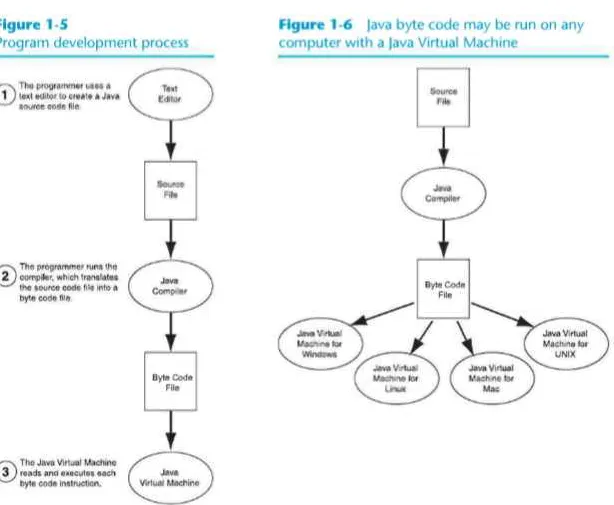
Because no such universal language existed, James Gosling, the team's lead engineer, created one. Program! written in this language, which was originally named Oak, were not trans-lated into the machine language of a specific processor, but were transtrans-lated into an interme-diate language known as byte voile. Another program would then translate the byte code into machine language that could be executed by the processor in a specific consumer device.
Unfortunately, the technology developed by the Green Team was ahead of iis time. No cus-tomers could be found, mostly because the computer-controlled consumer appliance indus-try was just beginning. But rather than abandoning their hard work and moving on toother projects, the team saw another opportunity: the Internet. The Internet is a perfect environ-ment lor a universal programming language such as Oak. It consists of numerous different computer platforms connected together in a single network.
To demonstrate the effectiveness of its language, which was renamed Java, the team used it to develop a Web browser. The browser, named I lot Java, was able to download and run small Java programs known as applets. This gave the browser the capability to display animation and interact with the user. !lot|ava was demonstrated at the 1995 SunWorld conference before a wowed audience, later the anntmnccment was made that Netscape would incorpo-rate Java technology into its Navigator browser. Other Internet companies rapidly followed, increasing the acceptance and the influence of the Java language. Today, Java is very popular for developing not only applets for the Internet but also stand-alone applications.
Java Applications and Applets
There arc two types of programs that may be created with Java: applications and applets. An application is a stand-alone program that runs on your computer. You have probably used several applications already, such as word processors, spreadsheets, database manag-ers, and graphics programs. Although ).i\.\ n u \ be used to write these types of applications, other languages such as G, (.*+, and Visual Basic arc also used.
In the previous section you learned that Java may also be used to create applets. The term
applet refers to a small application, in the same way that the term piglet refers to a small
pig. Unlike applications, an applet is designed to be transmitted over the Internet from a Web server, and then executed in a Web browser. Applets are important because they can be used to extend the capabilities o f a Web page significantly.
1.5 What Is a Program Made Of?
normally performed by an application, and embed it in a VC'cb site. When someone visits the Web site, the applet is downloaded to the visitor's browser and executed.
Security
Any time content is downloaded from a Web server to a visitor's computer, security is an important concern. Because Java is a full-featured programming language, at first you might be suspicious of any Web site that transmits an applet to your computer. After all, couldn't a Java applet do harmful things, such as deleting the contents of the hard drive or transmit-ting private information t o another computer? Fortunately, the answer is no. Web browsers run Java applets in a secure environment within your computer's memory and do not allow them to access resources, such as a disk drive, that are outside that environment.
15
w h a t Is a Program Made Of?
C O N C E P T : Nitre are certain elements thai are common 10 all programming language*.
Language Elements
All programming languages have some things m common. Tabic 1-2 lists the common ele-ments you will find in almost every language.
Table 1-2 The c o m m o n elements of a programming language
Language Klement Description ^ _ ^ ^ ^ ^ ^ ^ ^ ^ ^ ^ ^ ^ ^ ^
Key Words
Operators
Punctuation
Programmer-Defined
Names
Syntax
These arc words that have a special meaning in the programming lan-guage. They may be used for their intended purpose only. Key words arc also known as reserved words*
< >perators are symbols or words that perform operations on one or more operands. An operand is usually an item of data, such as a number.
Most programming languages require the use of punctuation
characters. These characters serve specific purposes, such as marking the beginning or ending of a statement, or separating items in a list.
Unlike key words, which are part of the programming language, these are words or names that arc defined by the programmer. They are used to identify storage locations in memory and parrs of the program that are created by the programmer. Programmer-defined names arc often called identifiers.
10 Chapter 1 Introduction to Computers and |ava
Let's look at an example Java program and identify an instance of each of these elements. Code Listing I • I shows the code lifting with each line numbered.
o
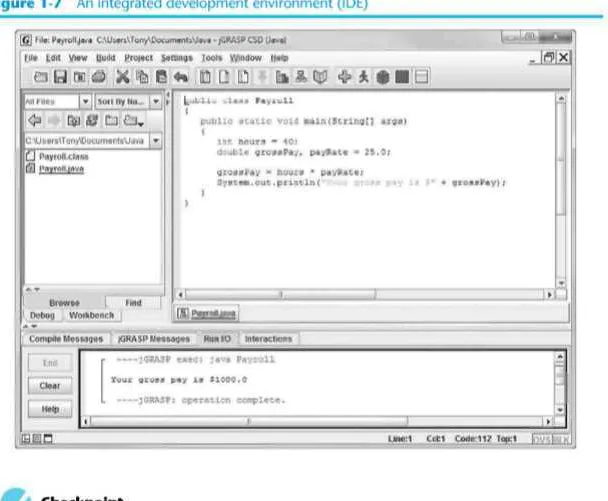
N O T E : The line numbers are not pan of the program. They are included t o help point out specific parts of the program.Code L i s t i n g 1-1 P a y r o l l . J a v a
1 public c l a s s Payroll
2 {
3 public s t a t i c void main(String[] args)
5 i n t hours - 40;
6 double grossPay, payRate - 25.0;
7
8 grossPay * hours * payRate;
9 System.out.println("Your gross pay i s S' * grossPay);
10 »
11 )
K e y W o r d s ( R e s e r v e d W o r d s )
Two of Javas key words appear in line I : public and class. In line 1 the words p u b l i c , s t a t i c , and void arc all key words. The w o r d * i n t in line 5 and double in line 6 are also key words.These words, which are always written in lowercase,each have a special meaning in |ava and can only be used for their intended purpose. As you will see, the programmer is allowed to make up his or her own names (or certain things in a program. Key words, how-ever, are reserved and cannot be used tor anything other than their designated purpose. Part of learning a programming language is learning the commonly used key words, what they mean, and how to use them.
Table I »3 shows a list of the Java key words.
Table 1-3 The Java key words
a b s t r a c t a s s e r t boolean
;.: CM!
b y t e
• 1
-c a t -c h char c l a s s
c o n s t c o n t i n u e d e f a u l t do double e l s e enum e x t e n d s
f a l s e
f i n a l f i n a l l y f l o a t for goto i f
implements import i n s t a n c e o f
i n t
i n t e r f a c e long n a t i v e new n u l l package p r i v a t e p r o t e c t e d
p u b l i c r e t u r n s h o r t s t a t i c s t r i c t f p super s w i t c h
synchronized t h i s
1.5 What Is a Program Made Of? I I
P r o g r a m m e r - D e f i n e d N a m e s
The words hours, pay Rate, and grossPay that appear in the program in lines 5, 6, 8, and 9 arc programmer-defined names. They arc not part of the Java language but arc names made up by the programmer. In this particular program, these arc the names of variables. As you will learn later in this chapter, variables are the names of memory locations that may hold data.
O p e r a t o r s
In line 8 the following line appears:
grossPay - hours * payRate;
The - and • symbols arc both operators. They perform operations on items of data, known as operands. The * operator multiplies us two operands, which in this example arc the vari-ables hours and payRate. The - symbol is called the assignment operator. It takes the value of the expression that appears at its right and stores it in the variable whose name appears
ii its left. In this c\ implc, the operator stores in t i n groUPa) variable the reside of the hours variable multiplied by the payRate variable. In other words, the statement says, "the grossPay variable is assigned the value of hours times payRate."
t u a t l o n
Notice that lines 5, 6 , 8, and 9 end with a semicolon. A semicolon in Java is similar to a period in I'nglish: It marks the end of a complete sentence (or statement, as ii is called in programming jargon). Semicolons do not appear at the end of every line in a Java program, however. There arc rules that govern where semicolons are ret)ui red and where they are not. I'art of learning Java is learning where to place semicolons and other punctuation symbols.
Lines a n d S t a t e m e n t s
Often, the contents of a program arc thought of in terms of lines and statements. A line is just that—a single line as it appears in the body of a program, (,'odc I isting I I is shown with each of its lines numbered. Most of the lines contain something meaningful; however, line 7 is empty. Blank lines arc only used to make a program more readable.
A statement is a complete instruction that causes the computer CO perform some action. I Icrc is the statement that appears in line 9 of Code Listing I - 1 :
System.out.println("Your gross pay i s $" + grossPay);
This statement causes the computer to display a message on the screen. Statements can be a combination of key words, operators, and programmer-defined names. Statements often OCCUpy only one line in a program, but sometimes they arc spread out over more than one