Hacking For Dummies
3
rd
Edition
Chapter 4
Hacking Methodology
ISBN: 978-0-470-55093-9
Copyright of Wiley Publishing, Inc.
Indianapolis, Indiana
Hacking Methodology
In This Chapter
▶ Examining steps for successful ethical hacking
▶ Gleaning information about your organization from the Internet
▶ Scanning your network
▶ Looking for vulnerabilities
B
efore you dive in head first with your ethical hacking, it’s critical to have at least a basic methodology to work from. Ethical hacking involves more than just penetrating and patching a system or network. Proven techniques can help guide you along the hacking highway and ensure that you end up at the right destination. Using a methodology that supports your ethical hacking goals separates the professionals from the amateurs and helps ensure that you make the most of your time and effort.Setting the Stage for Testing
In the past a lot of ethical hacking involved manual processes. Now, tools can automate various tasks. These tools allow you to focus on performing the tests and less on the specific steps involved. However, following a general methodol-ogy and understanding what’s going on behind the scenes will help you.
The process used for ethical hacking is basically the same as the one a mali-cious attacker would use — the primary differences lie in the goals and how you achieve them. Another key difference is that you, as an ethical hacker, will eventually attempt to assess all your information systems for vulnerabili-ties and properly address them, rather than run a single exploit or attack a small number of systems. Today’s attacks can come from any angle against any system, not just from the perimeter of your network and the Internet as you might have been taught in the past. Test every possible entry point, including partner, vendor, and client networks, as well as home users, wire-less LANs, and laptop computers. Any human being, computer system, or physical component that protects your computer systems — both inside and outside your buildings — is fair game.
When you start rolling with your ethical hacking, keep a log of the tests you perform, the tools you use, the systems you test, and your results. This infor-mation can help you do the following:
✓ Track what worked in previous tests and why.
✓ Help prove that you didn’t maliciously hack the systems.
✓ Correlate your testing with intrusion detection systems and other log files if trouble or questions arise.
✓ Document your final report.
In addition to taking general notes, taking screen captures of your results whenever possible is also helpful. These shots come in handy later should you need to show proof of what occurred, and they also will be useful as you generate your final report. Also, depending on the tools you use, these screen captures might be your only evidence of vulnerabilities or exploits when it comes time to write your final report. Chapter 3 lists the general steps involved in creating and documenting an ethical hacking plan.
Your main task is to simulate the information gathering and system com-promises carried out by someone with malicious intent. This task can be a partial attack on one computer or it can constitute a comprehensive attack against the entire network. Generally, you look for weaknesses that mali-cious users and external attackers might exploit. You want to assess inter-nal systems (processes and procedures that involve computers, networks, people, and physical infrastructures). Look for vulnerabilities; check how all your systems interconnect and how private systems and information are (or aren’t) protected from untrusted elements.
If you’re performing ethical hacking for a client, you may go the blind assessment route and start with just the company name and no other information. This blind assessment approach allows you to start from the ground up and gives you a better sense of the information and systems that malicious attackers can access publicly. However, keep in mind that this way of testing can take longer, and you may have an increased chance of missing some security vulnerabilities.
As an ethical hacker, you might not have to worry about covering your tracks or evading intrusion detection systems because everything you do is legiti-mate. But you might want to test systems stealthily. I discuss techniques that hackers use to conceal their actions in this book and outline some counter-measures for them, as well.
Seeing What Others See
Getting an outside look can turn up a ton of information about your organiza-tion and systems that others can see, through a process often called footprint-ing. Here’s how to gather the information:
✓ Use a Web browser to search for information about your organization.
Search engines, such as Google and Bing, are great places to start.
✓ Run network scans, probe open ports, and assess vulnerabilities to
determine specific information about your systems. As an insider, you can use port scanners and Windows share-finder tools, such as GFI LANguard, to see what’s accessible.
Whether you search generally or probe more technically, limit the amount of information you gather based on what’s reasonable for you. You might spend an hour, a day, or a week gathering this information — how much time you spend depends on the size of the organization and the complexity of its infor-mation systems.
Gathering public information
The amount of information you can gather about an organization’s business and information systems is staggering and widely available on the Internet. Your job is to find out what’s out there. This information allows malicious attackers and employees to target specific areas of the organization, includ-ing departments and key individuals.
Web search
Performing a Web search or simply browsing your organization’s Web site can turn up the following information:
✓ Employee names and contact info
✓ Important company dates
✓ Incorporation filings (for private companies)
✓ SEC filings (for public companies)
✓ Press releases about moves, organizational changes, and new products
✓ Mergers and acquisitions
✓ Patents and trademarks
✓ Presentations, articles, and Webcasts or Webinars
Microsoft is making headway into the search arena with Bing (www.bing. com). However, my favorite tool (and the favorite of many hackers) is still Google (www.google.com). This search engine ferrets out information — from word processing documents to graphics files — on any publicly acces-sible computer. And it’s free. Entire books have been written about using Google, so expect any hacker (ethical or otherwise) to be very well versed on this useful tool. (See Chapter 14 for more about Google hacking.)
With Google, you can search the Internet in several ways:
✓ By typing keywords: This kind of search often reveals hundreds and sometimes millions of pages of information — such as files, phone num-bers, and addresses — that you never guessed were available.
✓ By performing advanced Web searches: Google’s advanced search options can find sites that link back to your company’s Web site. This type of search often reveals a lot of information about partners, vendors, clients, and other affiliations.
✓ By using switches to dig deeper into a Web site: For example, if you want to find a certain word or file on your Web site, simply enter a line like one of the following into Google:
site:www.your_domain.com keyword site:www.your_domain.com filename
You can even do a generic filetype search across the entire Internet to see what turns up, such as:
Use this search for Flash .swf files, which can be downloaded and decom-piled to reveal sensitive information that can be used against your business, as I cover in detail in Chapter 14.
filetype:pdf company_name confidential
Use this search for PDF documents that might contain sensitive information that can be used against your business.
Web crawling
Web-crawling utilities, such as HTTrack Website Copier, can mirror your Web site by downloading every publicly accessible file from it. You can then inspect that copy of the Web site offline, digging into the following:
✓ The Web site layout and configuration
✓ Directories and files that might not otherwise be obvious or readily accessible
✓ The HTML and script source code of Web pages
✓ Comment fields
Comment fields often contain useful information such as names and e-mail addresses of the developers and internal IT personnel, server names, soft-ware versions, internal IP addressing schemes, and general comments about how the code works.
Web sites
The following Web sites may provide specific information about an organiza-tion and its employees:
✓ Government and business Web sites:
• www.hoovers.com and http://finance.yahoo.com give detailed information about public companies.
• www.sec.gov/edgar.shtml shows SEC filings of public companies. • www.uspto.gov offers patent and trademark registrations.
• The Web site for your state’s Secretary of State or similar organiza-tion can offer incorporaorganiza-tion and corporate officer informaorganiza-tion.
✓ Background checks and other personal information:
• ChoicePoint (www.choicepoint.com)
• USSearch (www.ussearch.com)
Mapping the network
When you map your network, you can search public databases and resources to see what other people know about your network.
Whois
The best starting point is to perform a Whois lookup by using any one of the Whois tools available on the Internet. You may have used Whois to check whether a particular Internet domain name is available.
For ethical hacking, Whois provides the following information that can give a hacker a leg up to start a social engineering attack or to scan a network:
✓ Internet domain name registration information, such as contact names,
phone numbers, and mailing addresses
✓ DNS servers responsible for your domain
You can look up Whois information at one of the following places:
✓ Whois.net (www.whois.net)
✓ A domain registrar’s site, such as www.godaddy.com
✓ Your ISP’s tech support site
My favorite Whois tool is DNSstuff.com (www.dnsstuff.com). Although this tool is no longer free and is used to sell many services, it’s still a good resource.
You can run DNS queries directly from the site to
✓ Display general domain-registration information
✓ Show which host handles e-mail (the Mail Exchanger or MX record) for a
domain
✓ Map the location of specific hosts
✓ Determine whether the host is listed on certain spam blacklists
A free site you can use for more basic Internet domain queries is www. dnstools.com.
The following list shows various lookup sites for other categories:
✓ Government:www.dotgov.gov
✓ Military:www.nic.mil
✓ APNIC: www.apnic.net (Regional Internet Registry for the Asia Pacific Region)
✓ ARIN: https://ws.arin.net/whois/index.html (Regional Internet Registry for North America, a portion of the Caribbean, and subequato-rial Africa)
✓ LACNIC:www.lacnic.net/en (Latin American and Caribbean Internet Addresses Registry)
✓ RIPE Network Coordination Centre: www.db.ripe.net/whois
(Europe, Central Asia, African countries north of the equator, and the Middle East)
If you’re not sure where to look for a specific country, https://www.arin. net/knowledge/rirs/countries.html has a reference guide.
Google Groups
Google Groups (http://groups.google.com) can reveal surprising public network information. Search for such information as your fully qualified domain names (FQDNs), IP addresses, and usernames. You can search mil-lions of Usenet posts that date back to 1981 for public and often very private information.
You might find some information that you didn’t realize was made public, such as the following:
✓ A tech-support or message board post that divulges too much
informa-tion about your systems. Many people who post messages like these don’t realize that their messages are shared with the world or how long they are kept.
✓ Confidential company information posted by disgruntled employees or
clients.
If you discover that confidential information about your company is posted online, you may be able to get it removed. Check out the Google Groups help page at http://groups.google.com/support for details.
Privacy policies
Check your Web site’s privacy policy. A good practice is to let your site’s users know what information is collected and how it’s being protected, but nothing more.
Web site to check out his privacy policy. He had posted the brand and model of firewall he was using, along with other technical information about his network. This type of information could certainly be used against him by bad guys. Not a good idea.
Scanning Systems
Active information gathering produces more details about your network and helps you see your systems from an attacker’s perspective. For instance, you can
✓ Use the information provided by your Whois searches to test other
closely related IP addresses and hostnames. When you map out and gather information about a network, you see how its systems are laid out. This information includes determining IP addresses, hostnames (typically external but occasionally internal), running protocols, open ports, available shares, and running services and applications.
✓ Scan internal hosts when and where they are within the scope of your
testing. (Hint: They really ought to be.) These hosts might not be visible to outsiders (at least you hope they’re not), but you absolutely need to test them to see what rogue employees and other insiders can access. A worst-case situation is that the hacker has set up shop on the inside. Just to be safe, examine your internal systems for weaknesses.
If you’re not completely comfortable scanning your systems, consider first using a lab with test systems or a system running virtual machine software, such as VMware Workstation or the open source alternative VirtualBox (www. virtualbox.org).
Hosts
Scan and document specific hosts that are accessible from the Internet and your internal network. Start by pinging either specific host names or IP addresses with one of these tools:
✓ The basic ping utility that’s built in to your operating system
Open ports
Scan for open ports by using network scanning tools:
✓ Scan network ports with SuperScan or Nmap (http://nmap.org). See
Chapter 8 for details.
✓ Listen to network traffic with a network analyzer, such as OmniPeek
(www.wildpackets.com) and Wireshark (www.wireshark.com). I cover this topic in various chapters throughout this book.
Scanning internally is easy. Simply connect your PC to the network, load the software, and fire away. Scanning from outside your network takes a few more steps, but it can be done. The easiest way to connect and get an “outside-in” perspective is to assign your computer a public IP address and plug that workstation into a switch or hub on the public side of your firewall or router. Physically, the computer is not on the Internet looking in, but this type of con-nection works just the same as long as it’s outside your firewall and router. You can also do this outside-in scan from home or a remote office location.
Determining What’s Running
on Open Ports
As an ethical hacker, you should glean as much information as possible after scanning your systems. You can often identify the following information:
✓ Protocols in use, such as IP, IPX, and NetBIOS
✓ Services running on the hosts, such as e-mail, Web servers, and database applications
✓ Available remote access services, such as Windows Terminal Services/
Remote Desktop, VNC, and Secure Shell (SSH)
✓ VPN services, such as PPTP, SSL, and IPSec
✓ Required authentication for network shares
You can look for the following sampling of open ports (your network-scanning program reports these as accessible or open):
✓ Ping (ICMP echo) replies; ICMP traffic is allowed to and from the host
✓ TCP port 21, showing that FTP is running
✓ TCP port 23, showing that telnet is running
✓ TCP ports 25 or 465 (SMTP and SMPTS), 110 or 995 (POP3 and POP3S), or
✓ TCP/UDP port 53, showing that a DNS server is running
✓ TCP ports 80, 443, and 8080, showing that a Web server or Web proxy
server is running
✓ TCP/UDP ports 135, 137, 138, 139 and, especially, 445, showing that an unprotected Windows host is running
Thousands of ports can be open — 65,536 each for both TCP and UDP, to be exact. I cover many popular port numbers when describing hacks throughout this book. A continually updated listing of all well-known port numbers (ports 0–1023) and registered port numbers (ports 1024–49151), with their associ-ated protocols and services, is locassoci-ated at www.iana.org/assignments/ port-numbers. You can also perform a port-number lookup at www.cotse. com/cgi-bin/port.cgi.
If you detect a Web server running on the system that you test, you can check the software version by using one of the following methods:
✓ Type the site’s name followed by a page that you know doesn’t exist, such as www.your_domain.com/1234.html. Many Web servers return an error page showing detailed version information.
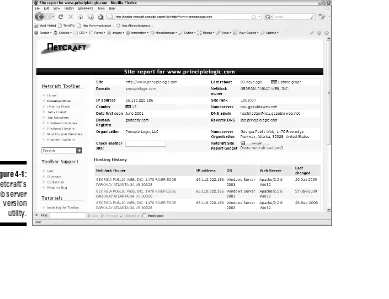
[image:12.639.126.515.386.685.2]✓ Use Netcraft’s What’s that site running? search utility (www.netcraft. com), which connects to your server from the Internet and displays the Web server version and operating system, as shown in Figure 4-1.
Figure 4-1:
You can dig deeper for more specific information on your hosts:
✓ NMapWin (http://sourceforge.net/projects/nmapwin) can
determine the system OS version.
✓ An enumeration utility (such as DumpSec at www.systemtools.com/
somarsoft/?somarsoft.com) can extract users, groups, and file and share permissions directly from Windows.
✓ Many systems return useful banner information when you connect to a
service or application running on a port. For example, if you telnet to an e-mail server on port 25 by entering telnet mail.your_domain.com 25 at a command prompt, you may see something like this:
220 mail.your_domain.com ESMTP all_the_version_info_
you_need_to_hack Ready
Most e-mail servers return detailed information, such as the version and the current service pack installed. After you have this information, you (and the bad guys) can determine the vulnerabilities of the system from some of the Web sites listed in the next section.
✓ A share-finder tool, such as the one built in to GFI LANguard, can find open Windows shares.
✓ An e-mail to an invalid address might return with detailed e-mail header information. A bounced message often discloses information that can be used against you, including internal IP addresses and software versions. On certain Windows systems, you can use this information to establish unauthenticated connections and sometimes even map drives. I cover these issues in Chapter 13.
Assessing Vulnerabilities
After finding potential security holes, the next step is to confirm whether they are vulnerabilities in your system or network. Before you test, perform some manual searching. You can research hacker message boards, Web sites, and vulnerability databases, such as these:
✓ Common Vulnerabilities and Exposures (http://cve.mitre.org/cve)
✓ US-CERT Vulnerability Notes Database (www.kb.cert.org/vuls)
✓ NIST National Vulnerability Database (http://nvd.nist.gov)
site contains the SANS Top 20 Vulnerabilities consensus list, which is compiled and updated by the SANS organization.
If you don’t want to research your potential vulnerabilities and can jump right into testing, you have a couple of options:
✓ Manual assessment: You can assess the potential vulnerabilities by connecting to the ports that are exposing the service or application and poking around in these ports. You should manually assess certain sys-tems (such as Web applications). The vulnerability reports in the pre-ceding databases often disclose how to do this — at least generally. If you have a lot of free time, performing these tests manually might work for you.
✓ Automated assessment: Manual assessments are a great way to learn, but people usually don’t have the time for most manual steps. If you’re like me, you scan for vulnerabilities automatically when you can.
Many great vulnerability assessment tools test for vulnerabilities on specific platforms (such as Windows and UNIX) and types of networks (either wired or wireless). They test for specific system vulnerabilities and some even focus on the SANS Top 20 list. Versions of these tools can map the business logic within a Web application; others can help software developers test for code flaws. The drawback to these tools is that they find only individual vulnerabilities; they often don’t correlate vulnerabilities across an entire network. However, the advent of event-correlation and vulnerability manage-ment applications is allowing these tools to correlate these vulnerabilities.
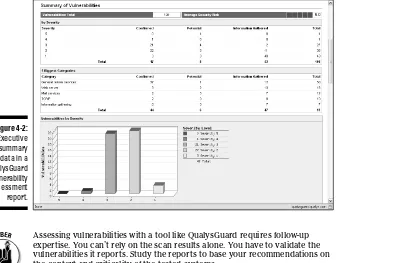
One of my favorite ethical hacking tools is a vulnerability scanner called QualysGuard Suite by Qualys (www.qualys.com). It’s both a port scanner and vulnerability assessment tool, and it offers a great deal of help for vul-nerability management. You don’t even need a computer to run it because QualysGuard is a Software as a Service (SaaS) commercial tool. Just browse to the Qualys Web site, log in to your account, and enter the IP address of the systems you want to test. Qualys also has an appliance that you can install on your network that allows you to scan internal systems. You simply sched-ule the assessment, and then the system runs tests and generates excellent reports, such as these:
✓ An executive report containing general information from the results of the scan, as shown in Figure 4-2.
✓ A technical report of detailed explanations of the vulnerabilities and specific countermeasures.
Figure 4-2:
Executive summary data in a QualysGuard vulnerability assessment report.
Assessing vulnerabilities with a tool like QualysGuard requires follow-up expertise. You can’t rely on the scan results alone. You have to validate the vulnerabilities it reports. Study the reports to base your recommendations on the context and criticality of the tested systems.
Penetrating the System
You can use identified critical security holes to do the following:
✓ Gain further information about the host and its data.
✓ Obtain a remote command prompt.
✓ Start or stop certain services or applications.
✓ Access other systems.
✓ Disable logging or other security controls.
✓ Capture screen shots.
✓ Access sensitive files.
✓ Perform SQL injection attacks.
✓ Launch another type of DoS attack.
✓ Upload a file proving your victory.
Metasploit (www.metasploit.com/framework) is great for exploiting many of the vulnerabilities you find and allows you to obtain complete system penetration. Ideally, you’ve already made your decision on whether to fully exploit the vulnerabilities you find. You might want to leave well enough alone by just demonstrating the existence of the vulnerabilities and not actually exploiting them.
Foreword ...xix
Introduction ... 1
Part I: Building the Foundation for Ethical Hacking ... 7
Chapter 1: Introduction to Ethical Hacking ... 9
Chapter 2: Cracking the Hacker Mindset ... 25
Chapter 3: Developing Your Ethical Hacking Plan ... 35
Chapter 4: Hacking Methodology ... 45
Part II: Putting Ethical Hacking in Motion ... 59
Chapter 5: Social Engineering ... 61
Chapter 6: Physical Security ... 75
Chapter 7: Passwords ... 85
Part III: Hacking the Network ... 115
Chapter 8: Network Infrastructure ... 117
Chapter 9: Wireless LANs ... 151
Part IV: Hacking Operating Systems ... 179
Chapter 10: Windows ... 181
Chapter 11: Linux ... 207
Chapter 12: Novell NetWare ... 229
Part V: Hacking Applications ... 247
Chapter 13: Communication and Messaging Systems ... 249
Chapter 14: Web Sites and Applications ... 277
Chapter 15: Databases and Storage Systems ... 303
Part VI: Ethical Hacking Aftermath ... 315
Chapter 16: Reporting Your Results ... 317
Chapter 17: Plugging Security Holes ... 323
Chapter 20: Ten Reasons Hacking Is the Only Effective Way to Test ... 343
Chapter 21: Ten Deadly Mistakes ... 347
Appendix: Tools and Resources ... 351
Foreword ...xix
Introduction ... 1
Who Should Read This Book? ... 1
About This Book ... 2
How to Use This Book ... 2
What You Don’t Need to Read ... 3
Foolish Assumptions ... 3
How This Book Is Organized ... 3
Part I: Building the Foundation for Ethical Hacking ... 4
Part II: Putting Ethical Hacking in Motion ... 4
Part III: Hacking the Network ... 4
Part IV: Hacking Operating Systems ... 4
Part V: Hacking Applications ... 5
Part VI: Ethical Hacking Aftermath ... 5
Part VII: The Part of Tens ... 5
Icons Used in This Book ... 6
Where to Go from Here ... 6
Part I: Building the Foundation for Ethical Hacking ... 7
Chapter 1: Introduction to Ethical Hacking . . . .9
Straightening Out the Terminology ... 9
Defi ning hacker ... 10
Defi ning malicious user ... 11
Recognizing How Malicious Attackers Beget Ethical Hackers ... 11
Ethical hacking versus auditing ... 12
Policy considerations ... 12
Compliance and regulatory concerns ... 12
Understanding the Need to Hack Your Own Systems ... 13
Understanding the Dangers Your Systems Face ... 14
Nontechnical attacks ... 14
Network infrastructure attacks ... 15
Operating system attacks ... 15
Application and other specialized attacks ... 16
Obeying the Ethical Hacking Commandments ... 16
Working ethically ... 16
Respecting privacy ... 17
Using the Ethical Hacking Process ... 17
Formulating your plan ... 18
Selecting tools ... 20
Executing the plan ... 22
Evaluating results ... 22
Moving on ... 23
Chapter 2: Cracking the Hacker Mindset. . . .25
What You’re Up Against ... 25
Who Breaks into Computer Systems ... 27
Why They Do It ... 29
Planning and Performing Attacks ... 32
Maintaining Anonymity ... 34
Chapter 3: Developing Your Ethical Hacking Plan. . . .35
Establishing Your Goals ... 36
Determining Which Systems to Hack ... 37
Creating Testing Standards ... 40
Timing... 40
Specifi c tests ... 41
Blind versus knowledge assessments ... 42
Location ... 43
Reacting to vulnerabilities you fi nd ... 43
Silly assumptions ... 43
Selecting Security Assessment Tools ... 44
Chapter 4: Hacking Methodology . . . .45
Setting the Stage for Testing ... 45
Seeing What Others See ... 47
Gathering public information ... 47
Mapping the network ... 50
Scanning Systems ... 52
Hosts ... 52
Open ports ... 53
Determining What’s Running on Open Ports ... 53
Assessing Vulnerabilities ... 55
Penetrating the System ... 57
Part II: Putting Ethical Hacking in Motion ... 59
Chapter 5: Social Engineering . . . .61
Social Engineering 101 ... 61
Before You Start ... 62
Understanding the Implications ... 65
Performing Social Engineering Attacks ... 66
Phishing for information ... 66
Building trust ... 68
Exploiting the relationship ... 69
Social Engineering Countermeasures ... 72
Policies ... 72
User awareness and training ... 73
Chapter 6: Physical Security . . . .75
Physical Security Vulnerabilities ... 76
What to Look For ... 78
Building infrastructure ... 78
Utilities ... 79
Offi ce layout and usage ... 80
Network components and computers ... 82
Chapter 7: Passwords . . . .85
Password Vulnerabilities ... 86
Organizational password vulnerabilities ... 86
Technical password vulnerabilities ... 88
Cracking Passwords ... 89
Cracking passwords the old-fashioned way ... 89
High-tech password cracking ... 91
Password-protected fi les ... 102
Other ways to crack passwords... 103
General Password-Cracking Countermeasures ... 109
Storing passwords ... 110
Policy considerations ... 110
Other considerations ... 111
Securing Operating Systems ... 113
Windows... 113
Linux and UNIX ... 114
Part III: Hacking the Network ... 115
Chapter 8: Network Infrastructure . . . .117
Network Infrastructure Vulnerabilities ... 119
Choosing Tools ... 120
Scanners and analyzers... 120
Vulnerability assessment ... 121
Scanning, Poking, and Prodding ... 121
Port scanners ... 122
SNMP scanning ... 128
Firewall rules ... 131
Network analyzers ... 134
The MAC-daddy attack ... 140
Denial of service ... 145
Common Router, Switch, and Firewall Weaknesses ... 147
Unsecured interfaces... 147
IKE weaknesses ... 148
General Network Defenses ... 149
Chapter 9: Wireless LANs . . . .151
Understanding the Implications of Wireless Network Vulnerabilities ... 152
Choosing Your Tools ... 154
Wireless LAN Discovery ... 156
Checking for worldwide recognition ... 156
Scanning your local airwaves ... 157
Wireless Network Attacks and Countermeasures ... 158
Encrypted traffi c ... 160
Countermeasures against encrypted traffi c attacks ... 164
Rogue wireless devices ... 165
Countermeasures against rogue wireless devices ... 170
MAC spoofi ng ... 170
Countermeasures against MAC spoofi ng ... 175
Queensland DoS attack ... 175
Countermeasures against DoS attacks ... 176
Physical security problems ... 176
Countermeasures against physical security problems... 176
Vulnerable wireless workstations ... 177
Countermeasures against vulnerable wireless workstations ... 177
Default confi guration settings ... 178
Countermeasures against default confi guration settings exploits ... 178
Part IV: Hacking Operating Systems ... 179
Chapter 10: Windows. . . .181
Windows Vulnerabilities ... 182
Choosing Tools ... 183
Free Microsoft tools ... 183
All-in-one assessment tools ... 184
Information Gathering ... 185
System scanning ... 185
NetBIOS ... 187
Null Sessions ... 190
Mapping ... 191
Gleaning information ... 192
Countermeasures against null session hacks ... 194
Share Permissions ... 196
Windows defaults... 196
Testing ... 197
Missing Patch Exploitation ... 198
Using Metasploit ... 200
Countermeasures against missing patch vulnerability exploits ... 205
Authenticated Scans ... 205
Chapter 11: Linux . . . .207
Linux Vulnerabilities ... 208
Choosing Tools ... 208
Information Gathering ... 209
System scanning ... 209
Countermeasures against system scanning ... 213
Unneeded and Unsecured Services ... 213
Searches ... 213
Countermeasures against attacks on unneeded services ... 216
.rhosts and hosts.equiv Files ... 218
Hacks using the .rhosts and hosts.equiv fi les ... 218
Countermeasures against .rhosts and hosts.equiv fi le attacks ... 219
NFS ... 220
NFS hacks ... 220
Countermeasures against NFS attacks ... 221
File Permissions ... 221
File permission hacks ... 222
Countermeasures against fi le permission attacks ... 222
Buffer Overfl ows ... 223
Attacks... 223
Countermeasures against buffer-overfl ow attacks ... 223
Physical Security ... 224
Physical security hacks ... 224
Countermeasures against physical security attacks ... 224
General Security Tests ... 225
Patching Linux ... 226
Distribution updates... 227
Chapter 12: Novell NetWare. . . .229
NetWare Vulnerabilities ... 229
Choosing Tools ... 230
Getting Started ... 230
Server access methods ... 231
Port scanning... 231
Authentication ... 233
rconsole ... 233
Server-console access ... 236
Intruder detection ... 237
Testing for rogue NLMs ... 238
Countermeasures against rogue NLM attacks ... 241
Cleartext packets ... 242
Solid Practices for Minimizing NetWare Security Risks ... 243
Rename admin ... 243
Disable eDirectory browsing ... 244
Remove bindery contexts ... 245
Audit the system ... 246
TCP/IP parameters ... 246
Patch ... 246
Part V: Hacking Applications ... 247
Chapter 13: Communication and Messaging Systems . . . .249
Messaging System Vulnerabilities ... 249
E-Mail Attacks ... 252
E-mail bombs ... 252
Banners ... 255
SMTP attacks ... 257
General best practices for minimizing e-mail security risks ... 266
Instant Messaging ... 267
IM vulnerabilities ... 267
Countermeasures against IM vulnerabilities ... 268
Voice over IP ... 270
VoIP vulnerabilities ... 270
Countermeasures against VoIP vulnerabilities ... 276
Chapter 14: Web Sites and Applications . . . .277
Choosing Your Web Application Tools ... 278
Web Vulnerabilities ... 280
Directory traversal ... 280
Countermeasures against directory traversals ... 282
Input fi ltering attacks ... 283
Default script attacks ... 292
Countermeasures against default script attacks ... 294
Unsecured login mechanisms ... 294
Countermeasures against unsecured login systems ... 297
General security scans for Web application vulnerabilities ... 297
Best Practices for Minimizing Web Security Risks ... 298
Obscurity ... 299
Firewalls ... 299
Source code analysis ... 300
Chapter 15: Databases and Storage Systems . . . .303
Databases ... 303
Choosing tools... 303
Finding databases on the network... 304
Cracking database passwords... 306
Scanning databases for vulnerabilities ... 307
Best Practices for Minimizing Database Security Risks ... 308
Storage Systems ... 309
Choosing tools... 309
Finding storage systems on the network ... 310
Rooting out sensitive text in network fi les ... 310
Best Practices for Minimizing Storage Security Risks ... 313
Part VI: Ethical Hacking Aftermath ... 315
Chapter 16: Reporting Your Results . . . .317
Pulling the Results Together ... 317
Prioritizing Vulnerabilities ... 319
Reporting Methods ... 320
Chapter 17: Plugging Security Holes . . . .323
Turning Your Reports into Action ... 323
Patching for Perfection ... 324
Patch management ... 325
Patch automation ... 325
Hardening Your Systems ... 326
Assessing Your Security Infrastructure ... 327
Chapter 18: Managing Security Changes. . . .329
Automating the Ethical Hacking Process ... 329
Monitoring Malicious Use ... 330
Outsourcing Ethical Hacking ... 332
Instilling a Security-Aware Mindset ... 333
Part VII: The Part of Tens ... 335
Chapter 19: Ten Tips for Getting Upper Management Buy-In . . . .337
Cultivate an Ally and Sponsor ... 337
Don’t Be a FUDdy Duddy ... 337
Demonstrate How the Organization Can’t Afford to Be Hacked ... 338
Outline the General Benefi ts of Ethical Hacking ... 339
Show How Ethical Hacking Specifi cally Helps the Organization ... 339
Get Involved in the Business ... 339
Establish Your Credibility ... 340
Speak on Management’s Level ... 340
Show Value in Your Efforts ... 340
Be Flexible and Adaptable ... 341
Chapter 20: Ten Reasons Hacking Is the Only
Effective Way to Test . . . .343
The Bad Guys Are Thinking Bad Thoughts, Using Good Tools, and Developing New Attack Methods ... 343
IT Governance and Compliance Is More Than High-Level Checklist Audits ... 343
Ethical Hacking Complements Audits and Security Evaluations ... 344
Someone’s Going to Ask How Secure Your Systems Are ... 344
The Law of Averages Is Working Against Businesses ... 344
Ethical Hacking Creates a Better Understanding of What the Business Is Up Against ... 344
If a Breach Occurs, You Have Something to Fall Back On ... 345
Ethical Hacking Brings Out the Worst in Your Systems ... 345
Ethical Hacking Combines the Best of Penetration Testing and Vulnerability Testing... 345
Ethical Hacking Can Uncover Operational Weaknesses That Might Go Overlooked For Years ... 345
Chapter 21: Ten Deadly Mistakes . . . .347
Not Getting Prior Approval in Writing ... 347
Assuming That You Can Find All Vulnerabilities during Your Tests .... 347
Assuming That You Can Eliminate All Security Vulnerabilities ... 348
Performing Tests Only Once ... 348
Thinking That You Know It All ... 348
Running Your Tests without Looking at Things from a Hacker’s Viewpoint ... 349
Not Testing the Right Systems ... 349
Not Using the Right Tools ... 349
Pounding Production Systems at the Wrong Time ... 349
Appendix: Tools and Resources . . . .351
Bluetooth ... 351
Certifi cations ... 352
Databases ... 352
Exploit Tools ... 352
General Research Tools ... 353
Hacker Stuff ... 354
Keyloggers ... 354
Laws and Regulations ... 354
Linux ... 355
Live Toolkits ... 355
Log Analysis ... 355
Messaging ... 355
Miscellaneous Tools ... 356
NetWare ... 356
Networks ... 356
Password Cracking ... 358
Patch Management ... 359
Security Education and Learning Resources ... 360
Security Methods and Models ... 360
Source Code Analysis ... 361
Storage ... 361
System Hardening ... 361
User Awareness and Training ... 362
Voice over IP ... 362
Vulnerability Databases ... 363
Web Applications ... 363
Windows ... 364
Wireless Networks ... 365