Shelve in Web Development /General User level: Intermediate RELATED
BOOKS FOR PROFESSIONALS BY PROFESSIONALS
®Kloostra
SOURCE CODE ONLINE
Joomla! 3 SEO and
Performance
Joomla! 3 SEO and Performance helps you to build websites that dominate search engine rankings and have super-fast load times, giving your sites an increased audience. This book takes a very practical approach full of real-world examples. It does not just provide instructions, but also teaches you the logic behind what you are doing. It will make you breathe SEO while building your websites, which is the only way to success.
Joomla! 3 SEO and Performance starts with the Joomla core SEO possibilities. It shows how even if you are a relative newcomer to Joomla, you will be able to build sites that rank high in Google without having to install complicated plugins. The remaining chapters dig much deeper, both into Joomla, and into the use of SEO plugins and extensions with a full chapter dedicated to SH404SEF, probably the best SEO extension for Joomla. In order to keep the visitors that you acquire, Joomla! 3 SEO and Performance also shows you how to make your website load faster. This is achieved using Joomla core features as well as plugins. You will be stunned how easy it is to achieve massive improvements!
For your convenience Apress has placed some of the front
matter material after the index. Please use the Bookmarks
Contents at a Glance
About the Author ����������������������������������������������������������������������������
xiii
About the Technical Reviewer ���������������������������������������������������������
xv
Introduction �����������������������������������������������������������������������������������
xvii
■
Chapter 16: SEO Site Audits �������������������������������������������������������
109
■
Chapter 17: Off-site SEO �������������������������������������������������������������
117
■
Chapter 18: Joomla Performance and Speed �����������������������������
127
■
Appendix A: Glossary������������������������������������������������������������������
159
■
Appendix B: Checklist �����������������������������������������������������������������
163
Introduction
This book is aimed at Joomla enthusiasts and professionals who want to increase the number of visitors totheir Joomla websites by improving their performance in search engines such asGoogle, Bing, and Yahoo!. This meansnot onlyranking high but also improving the presence of asite in the search pages. This book is written for Joomla 3, but it can be used perfectly for Joomla 2.5 as well.
It will show you how to optimize your Joomla website for search engines: first, by using only the Joomla core options and, later in the book, with extensions, includinga chapter dedicated to SH404SEF, which is probably the most popular full search engine optimization/search engine friendly (SEO/SEF) extension for Joomla. (Beginners can skip this chapter, as the book does not hingeon this subject.)
You will also gain general background information on SEO-related topics, as thisisnecessary for fully understanding what you are doing. The main focus of this book will be on on-site optimization, although some attention will also be paid to off-site optimization, such as linkbuilding and setting up Google Analytics and Webmaster Tools.
Second, the book is about performance, explaining how to create a lightning-fast website, first by optimizing the Joomla core options and, second, by using some specialized extensions.
To understand this book, you should have at least a basic background in managing Joomla, meaning that you understand the basics of creating articles and menus and are able to install and configure extensions. If you do not yet have this experience, it would be wise to read a starter book on Joomla first. An excellent primerwould be Beginning Joomla!: From Novice to Professional, by Dan Rahmel.
How Search Engines Work
Before we start optimizing Joomla for search engines, let’s quickly go through some of the basics of how Google ranks a web site. Feel free to skip this chapter, if this is already familiar to you. I will only discuss the basics here; more advanced search engine optimization (SEO) topics will be discussed as we go, while we are configuring Joomla.
You can attract an audience to your web site in many ways. Roughly, the most important ones are the following:
• Organic search (Google)
• Paid search (the ads around the organic traffic)
• Social media
• Links from other web sites to yours
• Visitors directly typing in your URL
In this book, I will focus mainly on the first method, organic search; the others are less Joomla-specific. I will, however, spend some time on the other channels too, to get you on track.
Organic search does not just mean getting a high rank in Google, it is also about being noticed on the search pages. If the result for your site stands out in a positive way, people might be more inclined to click it, even when yours is not the first site on the page, but the third or fourth. This is often underestimated, and grasping its importance can seriously get you more visitors.
Chapter 1 ■ how SearCh engineS work
The Scanning Process
Google is constantly scanning and crawling all web sites online with so-called robots, bots, or spiders. Nothing physical about these, but that’s just what they are called. This is an automated software procedure, used to determine how web sites are built up. How frequently your site is visited by these robots (as I will refer to them from now on) depends on your site. A small site that hardly changes and has been sitting there for years may only receive a weekly visit from a robot, but very dynamic sites such as news blogs may be spidered multiple times a day, up to thousands for very large sites.
Starting from the home page, these robots basically read all code, follow links (mainly internal but also external), and try to interpret what the web site is about. It is very important to understand that Google basically reads code. It cannot (yet) understand resources such as images, Flash, sound, video, etc. The robot almost acts like a blind person trying to understand the world around him. A lot of guidelines that Google recommends to web masters are actually retrieved from accessibility guidelines that help disabled persons read/hear web sites. Google uses context to understand these non-text resources, such as images. As an example, if you want to display an image of a bird, you should make sure it is named bird.jpg.
Google also uses the structure of the HTML of a page to guess what the web site is about, using the order in which content is created (important stuff first, less relevant later), but also it appreciates any effort in structuring the code, such as using the correct tags in your HTML. As an example: <section> elements are believed to be more relevant than <aside> and <footer> elements. Also, other elements, such as <h1>, <h2>, <p>, <quote>, etc., can be interpreted and used to build structure for headings, paragraphs, quotes, etc.
So for now, the main thing to remember is: Google basically reads text, at least as far as optimizing the actual web site is concerned, while also taking into account structure and hierarchy. This is an extremely simplified way of looking at things, but it may help you to understand the process.
Google also uses off-site factors, such as links and popularity on social media, but for a new site, that is only relevant once the site is live. I will pay some attention to off-site SEO later, but our main focus will be on-site SEO.
Google Updates: Panda, Penguin, and
Hummingbird
I could devote a full book to these updates, but basically, you should remember that Google wants you to create sites with relevant content that are useful for visitors and structured in such a way that Google can easily understand what is the sites are about. Try to avoid anything that sounds like a trick (hidden links, buying backlinks, stuffing keywords, etc.). Just ask yourself: is this really useful for my visitors, or am I just doing this because it should trick Google to believe that this is the case? Even if the trick still works, it probably will not in two years’ time, and you might fall hard.
Unique and Quality Content
Before anything else, you have to stand out from other web sites competing for the same Google ranking, so make sure you have interesting and unique content that your visitors love to come back to. Make sure you write for your visitors, keeping Google in your mind all the time, but prioritize the former. If you switch these around, and only write for Google, your visitors will get bored with your content and leave the site.
What is also very important: Google loves fresh content, so, if possible, maintain a blog, or allow your visitors to leave comments. If your visitors can leave comments, they may assist in creating content, though you may have to moderate this, of course.
For the rest of this book, I will assume that your actual content is fine, as this is not a book on SEO writing, though you will receive plenty of tips as we go.
Keywords vs. Themes/Topics
Probably, you already heard a lot about keywords in relationship to SEO. Some still think that SEO is basically just cramming a bunch of keywords in your text, and Google will automatically rank you for those superfluously used keywords. This may have been how things worked for a while, but certainly not anymore. It is even counterproductive now and seen as bad practice.
Today, search engines want you to write high-quality content, and you will probably agree that text with just a few unnaturally used keywords is not of high quality. Instead, write text that reads pleasantly and is spot on your topic. This will appeal to your visitors and probably also to Google. If you are an expert on your topic, most probably, your keywords will occur in a logical frequency anyhow.
However, this does not mean that keywords are not important. On the contrary, it is probably one of the most important stages in the SEO process. For example, the use of synonyms, alternative terms, singular/plural usage, etc., is perfectly natural and increases the chances of ranking higher, either for one of these alternative terms or for the general theme/topic.
And, most important, do not totally forget about the most logical keywords. If you have a web site about your architecture business, make sure to use at least the word
Chapter 1 ■ how SearCh engineS work
SERPs, Title, Metadata
You will probably use Google on a daily basis, so you will be familiar with how a page with search results will look like. In SEO terms, such a page is a SERP, which stands for search engine results page. Memorize this; we will be using this abbreviation a lot.
What you also have to be aware of, is the following: how the record for a web site looks like in the SERP is directly related to how you configured your site!
Let’s take a look at a random result that we find when we look for the keyword combination joomla seo. One of the results, as shown in Figure 1-1, is a page for the extension MijoSEF.
Figure 1-1. SERP snippet for joomla seo
You will always at least see three items here:
• Title
• URL
• Meta description
The URL speaks for itself, but title and meta description are extremely important.
Title
When we speak about the title in web design, this can mean two things:
• The title as a user would understand it when he/she is looking at a web page, i.e., the biggest headline displayed. While this is also a very important SEO factor that I will discuss later, this is not what we are talking about here.
• Page Title. To be exact: This is the <title> tag, as it is found in the source of a web page.
When you compare the excerpt from the Google SERP page and the snippet above, it is very easy to see that the title, as defined by the administrator of the web site, is actually taken over by Google. It corresponds to the result of the page in Google. This means that you can manipulate how your search results look in the SERP! You can imagine that this can be very powerful: before visitors even reach your site, you can interact with them.
I will talk a lot about the title tag later on. For now, it is important to remember that search engines allow 65–70 characters for this in their SERPs, which is why you should make sure to keep within those boundaries. You can make longer titles, but these will be broken off, which looks ugly and should be avoided.
Also, remember that people do read this to decide whether or not to click the result. Imagine what will happen if you limit the title to just the word Home, which is something you will see a lot with Joomla web sites....Not informative at all!
Meta Description
In addition, the meta description (Figure 1-3) is taken from the source of the web page we were just looking at.
Figure 1-2. Title element in source COE (common operating environment) view
Figure 1-3. Meta description in source code view
So, again, we have another means of influencing the way your web site looks in the SERPs. Only this time, we have some more space that we can use. If you limit the length of the meta description to something between 150 and 165 characters, you will usually be on the safe side, and no text will be cut off.
Chapter 1 ■ how SearCh engineS work
the user is looking for. This is no problem. Of course, you cannot put every keyword imaginable in the little space you have. As an example: on www.joomlaseo.com, I have a page about image optimization. The meta description I configured is the following:
There are many tools that help you to reduce image size without
reducing quality. Also you can use optimization techniques like sprites
and base64-encoding.
If someone searches for Joomla image optimization, this is also the snippet shown in Google. However, if somebody specifically searches for Joomla image optimization tinypng, Google will take a snippet from the body text to include this word and show it in the search page, like this:
Also you can use optimization techniques like sprites and
base64-encoding. … siteground joomla hosting. joomla seo logo …
tinypng-reduce-image-size-joomla.
In this case, it is okay that Google ignores my configured meta description (partially) and adds a correct snippet from the body text.
In contrast to the <title> element, the meta description is not used by Google to determine how your web site is ranked in the search results (unless you use duplicate meta descriptions on several pages of your web site, in which case you might be penalized!). This does not mean that meta descriptions are not important: to use meta descriptions positively, you should make them attractive for visitors, so that they will click the result, even if it is lower on the SERP. Use them as a mini ad for your site. I will discuss this in more detail later.
Keyword Analysis
I already mentioned that Google is less aimed at exact keywords these days, but more toward topics/themes. You should, however, make sure that the words you use to describe your theme match the words that users employ to search for it in Google. Also, a variety of keywords is better than using a limited set multiple times. This is why it is extremely important to perform keyword research.
When writing your content, you should make sure that you know the keywords that your visitors type into Google. Otherwise, you may lose a lot of potential traffic from not knowing the keywords that potential visitors are using. For example, if you write about an illness, it could be that many users would search for the Latin name of this illness. Keep in mind, however, that you should write primarily for humans, and then optimize for Google (in that order). So make sure to include keywords in a natural way. If you feel more comfortable doing so, you might start with writing your content just as you normally would and check correct use of keywords in the editing stage.
First, just brainstorm, and place yourself in the position of someone looking for books. Think of all the alternative terms that you could use to look for books, such as the following:
• Novel
• Biography
• Encyclopedia
• Etc.
Also look for combinations of words, such as
• Books online
• Books for women
Do not forget singular and plural forms of the same keyword. Especially if the list grows, you should organize this. Use a spreadsheet or another tool you like.
With the list of keywords you now have, go to google.com and search for the word
books, or any other keyword you have come up with, and scroll to the bottom of the page with results. At the bottom of the page, Google will show you further suggestions for phrases to search for (Figure 1-4), and these will probably be much used ones.
Figure 1-4. Suggestions from Google at the bottom of the SERP
Long-Tail Keywords and Local SEO
Chapter 1 ■ how SearCh engineS work
after, and if your site returns as a result, chances are very high that the searcher will like your site. This is what is called optimizing for long-tail keywords. The nice thing about sites that have been optimized really well is that these long-tail keywords pretty much emerge by themselves. Sometimes, proper sites can be found in the SERPs for thousands of keyword combinations, some of which you might not have known people searched for. The tools discussed in the next paragraph will help you to search for those.
Another way to optimize for specific situations is local SEO. If you are selling cars in, say, Timbuktu, you do not need to show up in searches for cars worldwide. Make sure you optimize for your local city or area. You can do this by using your city here and there in your body text or headers (prevent over-optimization), but also by emphasizing your address in a footer module repeated on every page (especially if you mark up the address with microdata).
It is well worth the effort to do some further reading on the subject. The relevant chapter from Moz’s SEO beginner’s guide is a very helpful start for that: www.moz.com/ beginners-guide-to-seo/keyword-research (the whole guide is very interesting as well).
Tools for Keyword Research
Apart from common sense and brainstorming, it can often pay off to use a tool for keyword research. A very basic but useful tool I access is the web site at www.seorch.eu. Under the menu Google Tools, it has the Suggest option, which will give you many additional options. You won’t receive metrics such as search volumes or popularity, but it might help you to build a list of keywords. There are also more advanced tools, however. Let’s start with some free ones.
Google AdWords Keyword Planner
Google AdWords is a tool aimed at advertisers whose ads you often see alongside the organic search results. Not that we want to do any advertising for now, but hidden in Google AdWords is a free tool that is very helpful in getting further details on your keywords: the Keyword Planner.
You can access the tool without a Google account (with endless CAPTCHAs), but without a Google account, you might as well stop reading this book, so go to
www.adwords.google.com, sign up, and navigate to Tools➤Keywordplanner.
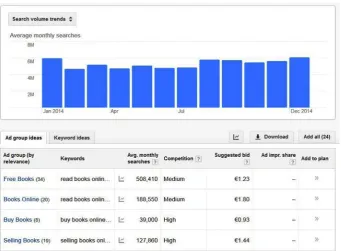
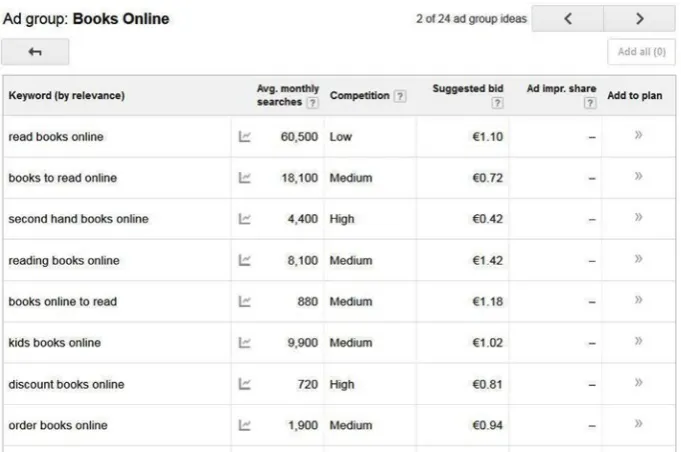
You first get an overview with search volumes for your combined set of keywords, which isn’t that useful, but below that you will be provided with a list of Ad group ideas. Just choose one that best describes your audience (you can repeat this for more groups) and click it (Figure 1-6).
Chapter 1 ■ how SearCh engineS work
You will be provided with a list of keywords related to this ad group. Check for relevant keywords, preferably looking for high search volume and low competition. You can order the rows by clicking the column headers, and you can also apply filers (maybe only look for low competition). Look, too, for long-tail keywords—keywords of low volume but extreme relevance, which might possibly lead to high conversion.
Make sure you keep the process organized, and use a spreadsheet tool if necessary. By the way, you might also want to check the web sites of your competitors. You can also use the AdWords tool to retrieve keywords from any web site on the Web.
This is just a brief introduction to how you can use the tool. If you spend some more time with it, you can obtain a wealth of information here.
WebCEO Keyword Research Tool
Another free tool that can be accessed if you register for an account is available at www.webceo.com. It requires that you to sign up for an account, but you get a lot of useful information in return, so I advise you to take a shot.
Once you have registered, you must first create a project by submitting a URL for your web site. Please do so. In the process, you can also connect to your Google Analytics account and provide some additional information about keywords and competitors, but most of that is not required and not needed for the step we perform now (it can be very useful later, though, as I will explain in Chapter 16).
[image:15.439.42.383.67.293.2]From the project navigation, click Keyword Research. This will give you a few options to choose from, as shown in Figure 1-7.
The following options are available:
• Get Suggestions: This is the one I will explain further.
• Spy on Competitors: Spying is a very useful SEO practice! Unfortunately, it is only available to paid subscribers.
• Keywords from Webmaster Tools: If you connect your Google Webmaster Tools account, you can import keywords from it.
• Keyword Basket: These are some options for your top keywords.
The Get Suggestions feature is an especially handy tool, as it allows you to retrieve useful suggestions quite easily. First, enter one (or more) of your earlier collected keywords in the Suggest field. A list of related keywords will then be shown, as you can see in Figure 1-8, in which I searched for suggestions for the set of keywords bookstore,
books online, and bookshop.
Figure 1-7. Keyword research options for WebCEO
Chapter 1 ■ how SearCh engineS work
You see a number of interesting columns listed. Global searches (Local searches can be added), Bid competition, and Search Trends pretty much speak for themselves, but the KEI is a crucial one here. KEI stands for Keyword Effectiveness Index, and the lower it is, the more interesting these keywords are to optimize for. A low KEI means that there are many global searches with low competition, while a high KEI indicates the opposite number of counts (maximum value is 100). So, in the example in Figure 1-8, reading books online seems to have a much more interesting value for us then the combination
read books online. Of course, you should diversify your keywords, so this is not a perfect example, but it shows the opportunities. Just play around with your own keywords.
There are plenty of other tools available, but most of those are part of paid packages, so for a beginning SEO agent, they are probably too costly.
Use Your Keywords
Assuming your web site is in place with the right template and layout, we can now start filling the web site with data, i.e., articles, modules, and menus. At this stage, we will have to think about how and where we start filling the web site with text and keywords.
Generally speaking, try to use your keywords as much as possible, in all relevant areas of the site, without stuffing the keyword. Of course, the article text is what you will have to pay most attention to, but other relevant areas could include the following:
• Domain
• URL
• Meta title
• Meta description
• H1-heading and in further H2 and H3 tags
• Images (name and alt-text)
• Links
Most of these bulleted items will be discussed in detail in separate chapters later in the book.
As far as article text is concerned, which is where most of your content will go, focus on your readers, but without forgetting about how Google would like you to write.
Although not a complete guide in SEO writing, the following few rules of thumb will be helpful to keep in mind:
Use your main keyword early in your sentences and paragraphs, if readability does not suffer. For example, compare the following two sentences:
• After hours of testing, we found out that bicycle X was the best.
Something else you need to pay attention to is the percentage of a single keyword used in your text, the keyword density. There is no exact ratio that you should stick to, but you should definitely not go far above 5% with this, meaning five occurrences of a single keyword within 100 words. Also, play with synonyms and abbreviations. Using alternatives for the same keyword allows you to play with the keyword density a bit. Using synonyms also makes you target related alternatives in Google.
There are several online tools available to check the ratio of the main keywords. A tool I often use is www.seorch.eu, which also gives you the keyword density for the most used words of your page.
Apart from the basic body text, also make sure to build your html headings correctly. Google has to understand the hierarchy of your text, and you must use your headlines to do so. In HTML, these are your <h1>, <h2>, <h3> tags, etc. I will go into more detail on the H1 issue later, but you will have to make sure that you always use an <h1> on every page, but never more than one! Google sees the <h1> as one of the most important SEO factors on a site, so use it correctly.
Google SEO Starter Guide
Everything discussed so far is basically what Google suggests to web masters building web sites. As long as you follow Google’s guides, you should be fine. If for any aspect of SEO you wonder whether it is really worthwhile, just check what Google says. If it says do it, do it! You want to be in its rankings, so play according to its rules. Google also created a pdf called the Google Search Engine Optimization Starter Guide, which you can find online at the following URL: www.google.com/en/webmasters/docs/search-engine-optimization-starter-guide.pdf.
Chapter 2
Preparing Your Joomla
Environment
There are some considerations before actually jumping into the search engine
optimization (SEO) settings of your Joomla installation. These are issues such as hosting, domain, URL, etc., so I will discuss these first.
Hosting
Hosting is extremely important for your site. At least make sure that you are on a reliable host. Preferably, look for hosts that specifically optimize for Joomla and for performance and security. In Chapter 18 on performance, I will pay closer attention to what you should look for in a good host.
Hosts that often have issues such as downtime, problems regarding file permissions, backdated PHP versions, or hacked sites can be bad for your site, as the IPs close to yours may get blacklisted, and you may suffer too, especially if you share the same server as a hacked site. Also, installation issues can sometimes occur.
Once you have chosen your host, also consider which package to choose. Sometimes, the upgraded packages offer advantages in performance, but SEO can also be a factor.
Having a dedicated IP address and being on a dedicated server can make you less vulnerable to other bad/blacklisted sites hosted near your environment. Having sites such as these sharing your IP number or server could also harm your SEO.
In addition, having an SSL certificate might be a good idea. While traditionally it is mainly used to secure payments from web shops, more and more sites are fully SSL-secured. This is also due to Google having announced that it prefers sites that fully run on SSL connections. Note that SSL can sometimes cost you some performance and is a bit more complex to install.
Domain/URL
An example is www.joomlaseo.com, which contains both the terms joomla and seo. While this could still be a good idea for some sites, it is not really necessary anymore.
Also, Google may look just a bit closer to your site to assess if its content is really reliable and matches the domain. This is because this technique has been abused many times in the past.
Branding is becoming more important these days, so opting for a good brand as the domain is more the way to go, in many cases. You can compete perfectly by using other areas of your site to use your keywords. An example is the company Moz. A few years ago, it changed its domain from SeoMoz.com to Moz.com. This helped build the brand, while it threw away its main keyword from its URL!
Some other points to consider:
• Keep it short to allow people to simply remember your URL. Many sites have about 10% of users who simply type in the URL.
• Choose a reliable extension (TLD or top-level domain), such as .com, .net, or a country-specific extension. Avoid extensions such as .guru, .info, etc. Also, TLDs that recently have become available (such as .ninja, etc.) should be avoided for the time being, until they have proven themselves.
• It can sometimes pay off to buy an already existing domain/site. These sites may have a long-standing reputation, and you may easily benefit from this, from an SEO perspective. You can acquire domains though www.flippa.com.
Joomla Version
Make sure you use Joomla 3. Joomla 2.5 and earlier versions are no longer supported. If you still use them, make sure you upgrade. They may soon contain security risks that will no longer be patched, whereas Joomla 3 contains many features that are beneficial for SEO. Also, make sure you always keep your current Joomla version up to date, as regards all your extensions. This avoids getting hacked. Hacked sites may get blacklisted by search engines, which could make all your SEO efforts useless. Some hosts offer auto-updating features that may help you to keep up to date.
Start on a Test Environment
Chapter 2 ■ preparing Your Joomla environment
Of course you can set the site to an offline status, but it is best to work locally—on your computer. Apart from working on the SEO aspects, you will also be working on your template, images, overrides, etc., and all this is much easier if you just work on your PC or Mac. (Advanced users can block access to all but their own IP in .htaccess.)
Creating an environment to run your web site locally is easy. There are several options, but XAMPP, which can be obtained from www.apachefriends.org (Figure 2-1), is used most frequently.
Figure 2-1. Download and installation of XAMPP
XAMPP installs a set of software including Apache, MySQL, PHP, and PERL, which is all you need to run your local web server. There are versions for Windows, Mac, and Linux.
Depending on your operating system, you can simply place your web site in the destined folder and access it with your browser.
Template
Optimizing your web site for search engines starts at a very early stage. Actually, you should be keeping this in mind when you are building your template. The reason is that Google likes structured content, and structure starts with the way the template is set up.
Custom or Template Provider?
Commercial templates can be as good as your own. Designs are often very attractive, though some say that, due to the included template frameworks, these templates are heavy and load slowly. If you stick to well-known template providers, this should not be an issue. Well-trusted template providers include
• YOOtheme
• JoomlArt
• RocketTheme
• Gavick
• Joomlabamboo
• Joomlashack
• JoomlaShine
The companies behind these providers are trustworthy, and their teams are technically skilled. Also check whether they are quick to update their templates when new features arrive in Joomla. Often, commercial templates contain many overrides for article display, and when something in the Joomla core article display is changed, these overrides may require updating too.
Performance is also something to look at. Slow templates give users a bad experience and may chase them away. More on this is included in Chapter 18.
Preferably, stay away from free templates. Quite often they are available on scammy download sites or bloated with hidden backlinks. They probably are more harmful than good to your SEO efforts. Only if you really trust the source of the free template should you probably go ahead and use it. This could be the case with the commercial template providers I mentioned previously. These providers usually offer two or three templates for free, and these should be fine to use.
By the way, the templates that come with Joomla 3 are pretty good, if the design suits you. The Protostar template is especially good. It will always include the latest Joomla updates with regard to microdata and other SEO improvements, and it is responsive to mobile usage.
Clean and Valid Code
Chapter 2 ■ preparing Your Joomla environment
Also, keep your HTML clean and readable, by avoiding inline JavaScript and CSS as much as possible. This simply keeps the text/code ratio as high as possible. Remember, SEO is a matter of dozens of little steps, and even the smallest step might just give you the edge over your competition.
HTML5
Using HTML5 gives you even more opportunities to create hierarchy in your code. Using tags such as <section>, <aside>, <article>, <footer>, etc., makes it even easier to distinguish the crucial parts of a page just by looking at the code. HTML5 was finally completed in October 2014 and provides a much cleaner and clearer way for HTML to be constructed. The previous HTML standard was completed in 1997 and contains few of the features and tags that allow a page to be optimized for SEO.
Usually, an <article> will receive greater SEO value then an <aside> or <footer> that is shown on every page of your site.
Order of Code
If possible, build your template in such a way that the most important parts of the page show up first in your code. This will not always be easy, but it can be done. The most important information on any page will usually be in the Component position (usually the actual article), not in the surrounding modules. So, you should aim to put the component as early in your code as possible.
If you put your main component before the sidebars, this would be ideal. Some template providers use this technique in their templates. The templates from JoomlaShine are an example. In the raw code, they place the main component before the sidebars. So, where usually the order will be
1. Left sidebar module 2. Component
[image:23.439.57.250.67.171.2]3. Right sidebar module
JoomlaShine manages to put the component first in the code, followed by the two sidebars. Then it cleverly uses CSS positioning, so that, visually, the left sidebar comes first, while in the HTML, the component comes first.
This is pretty advanced stuff, and you really do not have to follow it, but remember, it might just be this little step that you need to make a big difference.
Responsive Design
Make sure your template has a responsive design. The share of users watching your site on mobile devices is still growing. Some sites already have 50% of their audience on mobile devices. In addition, Google seems to move in a direction in which mobile design gets an advantage in the rankings. It actually announced that mobile design will be a ranking factor as of April 21, 2015.
Also, if you are starting with a new site, there are plenty of responsive templates on the market. There is not a single template provider that does not create responsive templates. If you have an older site, however, you might think of upgrading it soon.
Chapter 3
Joomla Global Configuration
As soon as you have installed Joomla, your first action will usually be to go to the Global Configuration settings. These settings are extremely important, not only for search engine optimization (SEO), but also for other areas of your configuration, such as setting the editor, e-mail settings, performance settings, cache, etc. If you optimize all the parameters in this menu, you will have a great start to building a well-optimized Joomla site in every aspect. I will first go through the fields that are important for SEO. In Chapter 18 on performance, we will change some additional settings.
Global Configuration: Site Name
For SEO, the most important parameters are all located on the first tab that you see, the Site tab. The other tabs are also important, but less so for SEO. I will, however, review them in the chapters about performance.
Back to the Site tab. The very first parameter we see is Site Name, under Site Settings (Figure 3-1).
Site Name is a mandatory setting that you probably entered during the installation of the site, and you can review it now. Keep it short, because it is used in many places, depending on your configuration (sometimes in the logo position or in your page titles). Later on, we will do further configuration and probably have to append things to the site name. The Site Name is often (but not always) used in two major locations:
• Occasionally, in the logo position (depending on your template)
• More frequently, as part of the page title (more on that later)
If your web site is for a brand, such as Coca-Cola or Joomla, the site name will probably be the actual brand name, but it can be anything. For example, for www.joomlaseo.com, the Site Name is simply Joomla SEO, which contains the two keywords it most wants to rank high for.
Global Configuration: SEO Settings
The SEO Settings section in Global Configuration (Figure 3-2) is extremely important. Setting these correctly before uploading your web site to the live server is crucial. Changes in these settings will usually change your URLs! Every time you perform an action in which URLs are changed for a live site, alarm bells should go off, as this could possibly lead to Google encountering removed URLs, which might very well lead to penalties (which results in a lowered ranking, either for this specific page or, with many errors, the whole site). Therefore, you should always plan these actions (more on this later). Preferably, set these settings correctly from the start, and never touch them again!
Figure 3-2. SEO Settings in Global Configuration
Chapter 3 ■ Joomla Global ConfiGuration
Search Engine Friendly URLs
SEF URLs, as the term Search Engine Friendly URLs is usually abbreviated, are switched on by default in Joomla versions 2.5 and higher. You should leave this untouched, but it is useful to recognize what this parameter does, as it will help you to understand more in demanding chapters later in the book.
So, take a minute to switch SEF URLs off (Figure 3-2), and check your site on the front end. Make sure your site has at least two articles and two menu items; otherwise, there is nothing to be demonstrated.
Check how the URLs in the navigation bar look now. For example, a single article can be displayed with a URL such as this:
index.php?option=com_content&view=article&id=4
The number 4 at the end of the URL corresponds to the ID of the article in the database. If you navigate through the menu, you will often see, too, an Item id in the URL referring to the menu item ID in the database, as in the following:
index.php?option=com_content&view=article&id=4&Itemid=110
Note that the same article is already displayed here through two URLs (remember this, as there will be much, much more about it later).
For the purpose of troubleshooting, it can sometimes be useful to view URLs such as this, as the component responsible for this URL is now visible—in this case, com_content. Apart from showing you this unusual example, those strange URLs make no sense, of course, so we are going to set the value for SEF URLs back to Yes (Figure 3-2). Users can now much better understand what the URL is about, and so does Google.
Suppose we now have a menu item called Portfolio. With SEF URLs switched on again, it will now have a URL such as the following, which is much cleaner:
index.php/portfolio
What you should keep in mind, though, is that the strange non-SEF links are not gone! If you remember one of these URLs, and type it in your browser’s address bar, you will still see the same page as previously. This means that we now have found three URLs for the same article…. It’s nothing that can’t be fixed, but we will need extensions for this, to be discussed later.
Use URL Rewriting
URL rewriting (Figure 3-2) sounds complicated, but it isn’t. The purpose of this parameter, for now, is to get rid of the index.php bit that is still displayed in our URLs. Imagine that we have a portfolio page that we created by linking a menu item called Portfolio to a list of portfolio items, the URL would be like this:
index.php does not tell us or Google anything, so we should get rid of it. To do so, we must to perform two actions at the same time. Note that your host should support URL rewriting, but if it doesn’t, move immediately to another host. This should really be a standard option.
• First, we need to set Use URL rewriting to Yes and save the page.
• Second, go to the root of the Joomla installation. You will find a bunch of directories and single files there. Now it depends a bit on which file we have to look at, but for the majority on Apache web servers or local XAMPP installations, this will be the htaccess.txt file. Now rename this file to .htaccess. (For IIS servers, rename web.config.txt to web.config.)
Windows users cannot perform the renaming in the Explorer window. To achieve this, go to a Command Prompt and browse the folder that holds the htaccess.txt, using the cd command, and issue the following command:
rename htaccess.txt .htaccess
You can also open up htaccess.txt in an editor such as Notepad and save it as .htaccess. I often hear that people find it scary to do this step, but I strongly advise you to do so now, in the early stages of your site development!
If we now navigate to the Portfolio page, the index.php part is gone. Next to that, we can now make full use of the Apache URL rewriting functionality, which gives us many advanced and useful options that we will use later.
Again, /index.php/portfolio is not gone. It is still accessible, giving us yet one more URL leading to the same content!
Adds Suffix to URL
Leave the default for parameter Adds Suffix to URL (Figure 3-2) set to No. It can add to the URL suffixes such as .php or .html. Adding non-SEF characters Adds Suffix to URL to URLs is really useless, and this is what this setting is for. Note that, historically, .html suffixes were considered good for SEO, but that is no longer the case.
Unicode Aliases
Leave the default for Unicode Aliases set to No (Figure 3-2). Most sites should not ever touch this. The setting allows for utf8 glyphs in the URL, which may be necessary for non-Latin characters in the URL, in rare cases, or for non-Western languages.
Include Site Name in Page Titles
Chapter 3 ■ Joomla Global ConfiGuration
Together with the meta description, the page title defines how our page is shown to anyone searching for information on Google. This title is the main headline showing up in Google, so it has a great influence on whether someone clicks the result for your site or not. If you set it up correctly, the CTR (Click Through Rate) in the SERP will go up. Again, remember to use the keyword early in the title, and make sure to limit this to
65 characters, to prevent breaking it off.
Before we set this option, you have to know how page titles are generated in Joomla.
• They are taken from the menu alias, if an article is directly linked to a menu, or
• They are taken from the actual article if the article is not directly linked to a menu, such as in blog or list views.
There are more possibilities, but these are the main ones. Note that titles can usually be overridden at some level.
So, when creating an article, always keep in mind the length of the title. If you don’t override it at some level, the title of the article will be prepended or appended to the site name (as defined in Global Configuration). The number of characters for both should not add up to more than 65.
Okay, so what are the options for this setting now? The Include Site Name in Page Titles option (Figure 3-2) allows you to use the site name that we just configured in the page titles. All three options could be fine for your site, so I’ll discuss them one by one:
• Before: If your Site Name contains your main keywords already, it is best to use the Before setting. This means that every page on your web site will contain the main keywords, possibly giving you some more freedom to set up article or menu titles. For example, on Joomlaseo.com, the site name is Joomla SEO. This means that if I write an article about Canonicalization (also with this article title), the page title will be set as Joomla SEO - Canonicalization (the dash is placed automatically). If I did not have the site name prepended, I would have to put Joomla SEO in the title of every article, which is not very convenient for readers.
• After: This is more useful if your site name is a brand name such as, say, Coca-Cola. You want people to know that they will be accessing a Coca-Cola site when they see it in the SERP, but it may not actually contain the main keyword (say, soda).
• No: There could be many reasons not to use the site name. It gives you more freedom to use the 65 characters available for a more unique page title.
These are just guidelines, so feel free to act independently, as long as you realize the goal: to include your keywords in your page titles in a natural way, with or without your site name included.
Global Configuration: Metadata Settings
In the introductory chapter on Google, I explained how important metadata are. Now, in the fields in your Global Configuration, under Metadata Settings (Figure 3-3), you have the opportunity to fill in something appropriate. If you do, this will ensure that no page ever shows empty metadata in the source, even if you forget to add it later for a specific article. For now, leave it empty. In Chapter 4, I will explain the reasoning behind this choice.
Site Meta Description
First, we find Site Meta Description (Figure 3-3). I will discuss the purpose of meta descriptions and how to configure them in much more detail later. For now, leave the field empty.
Figure 3-3. Metadata Settings in Global Configuration
Site Meta Keywords
Chapter 3 ■ Joomla Global ConfiGuration
Robots
The default setting for this is INDEX, FOLLOW, meaning that all pages must be indexed by the search engine’s robots, and the links have to be followed. Leave this on the default setting, which is exactly what you want.
One reason for deviating from this could be a situation in which, say, a copy of a production site is restored on another domain for testing purposes, and you want to avoid Google encountering two identical sites, which could lead to duplicate content penalties.
Another reason could regard a site that is under construction. As I mentioned earlier, it is best to work entirely in a local environment, but sometimes this is not feasible, such as in the case of a team having to work on the same project, and all its members must be able to access the project site from multiple locations.
In these two situations, you could consider setting the parameter to NOINDEX, NOFOLLOW, which would tell Google to completely ignore this site.
■
Tip
if you change this now,
change it back when the site goes live!
it has happened
to many projects before…. You spend a lot of time working on Seo and then forget this one
little parameter, and all your efforts are wasted, at least until you correct this.
The Robots parameter is also available in article and menu items. For specific pages, you might consider setting it to something alternative, such as NOINDEX, FOLLOW. This could be useful for pages that do not contain relevant information, such as the login page for your site. I will discuss this later.
Further parameters under Metadata Settings are not relevant for SEO, so they will not be discussed here.
Joomla Search
This paragraph is a bit of an odd one. It is not directly related to setting up your SEO configuration; however, setting up the Search component will allow you to gather very useful information from your users. Usually, you need tools such as Google Analytics to see what people are doing on your Joomla site and where they go. Using the Search component, you will be able to collect some very useful information.
First of all, the component allows your users to search the content of your web site, but you can also set it to collect the information that your users are looking for. Knowing this might reveal some questions that your users expect to find answers to on your site, also allowing you to add this information, if it isn’t there yet.
Then set Gather Search Statistics to Yes. Of course, do not forget to publish a Search module as well; otherwise, your users cannot search at all. From that moment on, all search queries will be logged, and you will see a screen like the one in Figure 3-5. Figure 3-4. Search component Options button
Figure 3-5. Logged search queries from users in the Search component
Chapter 4
Metadata
I already mentioned that on the Global Configuration screen, you should not enter a meta description. The reason is that if we set it there and do not set any further meta fields for specific articles or menus, all pages of our Joomla site will have the exact same meta description, meaning duplicate meta descriptions, and Google really doesn’t like these. You can imagine why. Actually, you are telling Google that all these pages are about exactly the same subject, and this is not very helpful to Google. Also, it is not useful for anyone reading this meta description as the summary of your page in the SERPs (search engine results pages). Most probably, Google will ignore your meta description for many pages and simply make up its own. I cannot stress enough how important it is to optimize individual meta descriptions and titles for all your pages. This really helps all these individual pages to receive good rankings in the SERPs, not just your home page. Most sites that I see that are badly optimized lack these.
This is why I advise you to leave the meta description empty in the Global Configuration! This may be contrary to advice you heard elsewhere, but Google would rather have you leave it blank, as opposed to having the same description duplicated all over the place. From the following link, check this YouTube video by the Google Webmaster folks for some background on their view: www.youtube.com/watch?v=W4gr88oHb-k.
Remember that the global settings are for the entire site. If on a lower level any of these metadata settings is set (in an article or menu item), it will override the global setting, so if you plan on providing meta descriptions on all lower levels too, feel free to fill in a global meta description. It will be overridden, in any case.
Metadata Setup per Article or per Menu Item
This is a good moment to reflect on further setup of the site. Many configuration options depend on how you link to your articles. The main difference is between the following two options:
• Will you link every article to its own menu item? This will often be the case on small brochure-like sites. For example, an article entitled Contact our business will be attached to a menu item called Contact.
Many choices we will make are dependent on this, so if the desired setup is already clear to you now, you will know which path to follow later in this book.
For now, also start to think about how your site has to be set up, as far as detailed metadata is concerned. You can set your metadata on one or two levels.
• On an article level
• On a menu item level
• On both of the preceding
There is a hierarchy in what level “wins.” Menu item settings override Article settings, which override the Global Configuration settings. As long as you ensure that every URL of your site has the correct meta description, it doesn’t matter how you achieve this from a search engine optimization (SEO) perspective, but it pays to take the most efficient route, which is usually to fill in metadata per article, and not in the menu items, except in some specific cases. I will talk about this in more detail later.
Metadata for Every Separate Page
So, the metadata settings that you configured in Global Configuration are just a start. For most of these settings (e-mail, cache, robots, etc.) one option globally is fine, but the meta description should be overwritten as much as possible on an article or menu level.
Meta Description
This is what you really have to override as much as possible. If you don’t set separate meta descriptions in your pages, they will all look the same in the SERP, or, more likely, Google will simply take a snippet from your page and show it, usually ending with three dots, because of broken-off sentences. Also, you might not end up very high in the rankings, while your click through rate (CTR) will be relatively low.
Chapter 4 ■ Metadata
So, the goal is to set up a unique meta description on every URL of your Joomla site, but how you should actually implement this depends on many factors. It can be achieved in multiple ways. One method is not better than any other, as long as you arrive at unique descriptions. This is true for simple Joomla content, i.e., articles for which you can set the meta description on three levels: globally, per menu, per article. For all metadata settings, menu settings always override article settings, and both override Global Configuration. So, for unique meta descriptions, you can choose to set them up as follows:
• Per Menu: In this case, leave the article meta description empty, to avoid doing things twice. This should work fine for simple sites, where every article is linked to its own menu item.
• Per Article: The option to work with menu settings could work fine, but any article not directly linked to a menu item will be missed and will have an empty meta description. This could be a separate article, but it also counts for articles that are linked to a menu item within a blog or list view. Any article that is missed will display the meta description shown in the Global Configuration, which should be avoided. Therefore, setting meta descriptions in the article is the best way to go. Leave the metadata settings in the menu items empty.
Metadata: Article
To actually set your meta description (and robots setting, see Chapter 12), go to the Publishing tab of your article (Figure 4-2).
I advise you to make a habit to enter the meta description immediately when you create the article, as it can be easy to forget it. (Remember: Make it unique and compelling, by using keywords and no more than 160 characters.) You can always add it later, if you prefer.
In case you prefer to set your keywords as well, this follows the exact same logic as the meta description, but best practice is simply to save yourself the effort and leave the Keywords field empty.
Metadata: Menu Item
For menu items, the meta description is simply available from a separate tab called Metadata (Figure 4-3).
Figure 4-3. Menu item Metadata tab
Figure 4-2. Article metadata
I advised you to set metadata on an article level, so if this menu item is simply a link to an individual article that already has a meta description, do not enter it here again.
However, there are also views that cannot receive a meta description from individual articles. If your menu is a link to a Featured articles view, or a weblinks list, etc., the actual URL on which this overview is shown does not have a meta description yet. For pages such as this, set it in the menu item metadata settings.
If you are not sure if the URL on the front end actually has a meta description, simply check the source view of the page and look for the following string:
Chapter 4 ■ Metadata
Make sure that every page that is accessible on the front end has a unique meta description. Basically, the only exception is pages for which you have set a Robots value to NOINDEX. These pages should not appear in Google and thus do not require a summary.
Page Title
Remember: Page titles make up the headline of the result of your pages in Google, configured through the <title> element in your HTML source code. Note that this is definitely not the main headline in the text of the page (this is referred to as the Heading, discussed later). You will also see the page title displayed in the browser tab (Figure 4-4).
Figure 4-4. Page title shown in browser tab
Unfortunately, the way page titles are configured in Joomla is sometimes a bit hard to understand and configure. You must first understand how they are created.
Your page titles will be created for you automatically, depending on your setup. First, it depends on whether or not you have configured Global Configuration to show your site name before or after the title or not at all (read again, just in case). Next, the page title will be created differently, depending on the page you are at.
• For articles linked directly to a menu item, the name of the menu item will be taken.
• For articles shown in a blog or list view, it will be the title of the actual article.
Let’s look at an example.
• Site name: Kung Fu Shoes (set up to be prepended)
• Article title: Great for walkers and hikers in the outdoors!
When this article would be shown in a blog view, not linked to a menu, the page title would be
This is a perfect title. It is 61 characters and has a few nice keywords (shoes, walkers, hikers, outdoors). Now let’s see what the page title will be when this article is linked directly to a menu item called Great. The page title will now be taken from the menu item, leading to a title like this, for the same article, as follows:
Kung Fu Shoes – Great
This is too short, and the keywords walkers, hikers, and outdoors are missed! Luckily, you can overcome this, and you really should.
• Go to the corresponding menu item, in this case, menu item Great.
• Go to the Page Display tab.
• There, you will find a field for Browser Page Title.
Now this field can be used to set a more useful page title (do not forget Site Name might be appended or prepended, if configured), as shown in Figure 4-5.
Figure 4-5. Page Display tab for alternative Browser Page Title
Use this! Remember: This action will arrange how the search result looks like in Google. Many Joomla site administrators often forget to do this. You still sometimes see web sites in the rankings of Google that still only show the word Home as the page title. Imagine how bad their CTR will be....
Managing Metadata
Managing metadata can be a daunting task if your site grows larger. The only way to verify correct metadata is to enter the separate articles or menus and check them. Especially if your Joomla back end is a bit slower, it can take ages to verify these.
Chapter 4 ■ Metadata
OSMeta especially works very close to the Joomla core. It simply updates the core metadata fields and makes them available in a nice overview, allowing you to update them from both Joomla and the extension. Page titles can also be set, which cannot be done in Joomla (apart from changing the Joomla article). The basic version is free, while the PRO version allows for some advanced features (metadata for menu items and K2 support). Additional information about these extensions can be found later in this book.
Robots
Among the metadata information in individual articles and menu items, we also find the Robots parameter. In our Global Configuration, we have already set the parameter Robots to INDEX, FOLLOW, meaning that all pages of our web site should be indexed and followed by Google and other search engines. For the majority of the pages on your site, this will be the desired setting, and you should not have to worry about this field anymore. However, there might be exceptions.
Some pages of your site might as well not show up in the search engine indexes. Pages such as login pages or pages with your terms and conditions only serve a very specific purpose for visitors already on the site, but they will not be the pages you want to attract visitors with. Actually, these pages are not valuable for inclusion in the Google index. In fact, they are more or less diluting the value of the other pages on your site a bit. By only allowing pages with true value to be indexed, these pages might only get a small ranking advantage.
Some even say, too, that blog and list view pages should be altered. For these pages, it could be an option to set the Robots parameter to NOINDEX, FOLLOW. This means: Do not index this page, but just go ahead with crawling the links that you find on it. (There are also reasons not to do so; see Chapter 5 on URL structure). For pages with search results, this is definitely the best value.
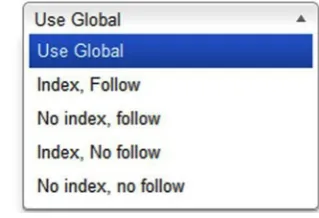
[image:39.439.172.332.427.536.2]If you are going to change this value for Robots for separate articles, you can set this in the actual article (Publishing tab). For the blog/list views, set it in the menu item (Metadata tab), as shown in Figure 4-6.
The parameter allows you to choose among four different options, as follows:
• INDEX, FOLLOW: This is the default value. It tells search engines to treat this page as a completely normal page, meaning it should include the site in the search engine’s index and follow any link that it finds, in order to keep spidering the site.
• NOINDEX, FOLLOW: Do not index this page but keep following all links encountered on it. This could be a useful value for pages that do not offer additional value by themselves but provide access to articles that are. You could use this value for pages with search results or category lists, etc.
• INDEX, NOFOLLOW: Include this site in the index, but do not follow any links.
• NOINDEX, NOFOLLOW: Do not include this site in the index and follow no links. This is the value already discussed under the global Robots setting, allowing you to prevent any access to robots. This is useful for keeping this page (or complete site) out of Google.
Chapter 5
URL Structure
Using a valid and logical URL structure is vital to your search engine optimization (SEO) efforts. It plays a major role in Google algorithms. These rules are not hard to guess; they are the same as those you would want URLs to adhere to yourself, as a user.
• They should be short, so that they are easy to remember.
• They should be readable to humans and search engines (search engine friendly [SEF]), not something like this:
/index.php?option=com_content&view=article&id=1.
We have already achieved this by setting Use SEF URLs in our Global Configuration.
• Avoid extensions such as .php, .html, etc. They are meaningless and can be easily avoided. Also, avoid including the term index. php in the URL (achieved by URL rewriting), or anything you can do to avoid meaningless characters.
• Use hyphens instead of spaces to connect words in the URL (no underscores or other diacriticals), as in /url-with-multiple-words. Happily, this is how Joomla already works, so there’s no need for you to worry.
• Use your keywords in the URL. If someone posts a link to this page in a forum or such simply by pasting in the URL, this has the advantage of automatically including the keyword, as in the following: www.website.com/keyword.
• Preferably, URLs should not be more than two levels deep. So, avoid URLs such as the following (unless you’re Amazon.com):
/level1/level2/level/3/level4/page.html.
• Use a logical structure if you have multiple levels. A good example could be /webshop/shoes/sneakers.
URLs in Joomla
First, the URL structure of a Joomla site is defined by the menu structure. Only if the menu structure does not provide for a URL (an article not accessible through a menu item) is it defined by the category/article structure. An article that is linked to a menu item will simply receive a URL based on the menu item alias it is linked to. If the same article is linked to a second menu item, it will also receive a URL for the second menu item alias. I will give you a few examples of what this could result in, as understanding this mechanism is crucial for building great URLs.
• An article is linked to a menu item called Shoe repair. The URL will be /shoe-repair.
• An article is linked to a menu item called Shoe repair, and this is a submenu of the menu item called Maintenance. The URL will be /maintenance/shoe-repair.
• The article is not accessible through any menu. The URL is will be /123-article-alias (more on this unusual number later).
• The article is not accessible through any menu, and it is a member of a category. The URL will be 8-category-alias/123-article-alias.
• The article is available in a blog view under the menu item called Shoe repair. The URL will be /shoe-repair/123-article-alias.
Based on Alias
The way in which URLs are set up resembles slightly the logic of page titles. Where page titles are derived from the title of an article or menu item, a URL is created by its alias. Whether this is the alias of the menu item or of the article again depends on how the article is linked (menu item vs. blog view), as in the preceding examples. Now, usually, this will give us a nice URL, but it does give us an extra option to further tweak it. You could use this so that your page titles are attuned to humans as much as possible, while the URL is optimized a bit more for Google.
Second, in the case of menu items, we have the same issue here as with page titles: the default menu item alias is simply derived from the menu item title, with lowercase letters and with hyphens instead of spaces. As menu item titles are usually very short, they are nondescriptive. However, you could manipulate the alias so that it contains your keywords more.
Chapter 5 ■ UrL StrUCtUre
Example 1: Menu Item URL with Keyword
Say we have a contact page for a shoe brand, which is FootXXX. Now our domain is also footxxx.com, so the URL for the contact page is then footxxx.com/contact. Now, if you change the alias for the menu item for the contact page to contact-for-shoes, you managed to squeeze in the main keyword in your URL, making it footxxx.com/contact-for-shoes....This is illustrated in Figure 5-1.
Figure 5-1. An improved alias for a menu item equals a better URL
This example may not seem very practical, but there may definitely be situations in which you can make good use of this technique.
Example 2: Shorter URL
Let’s assume we have a site with a blog, simply linked through the menu item called Blog, and that we recently published an article entitled “The Future of SEO in the 20th Century.” In this case, the URL will be based on the menu item + the article ID + the article alias. If you simply leave the article alias to what Joomla generates for you, it will simply take the article title and replace spaces for hyphens. The URL for this article will be
/blog/123-the-future-of-seo-in-the-20th-century
This is a very long URL, and it is hard to remember and type. You can solve this by using a shorter alias, maybe seo-future, resulting in a much nicer URL, as follows:
/blog/123-seo-future