~Make Your System Difficult for Attackers to Operate Inside~
December 2013
System Design Guide
for Thwarting
Targeted Email Attacks
IT SECURITY CENTER (ISEC)
This document is available for download at the following URL:
System Design Guide for Thwarting Targeted Email Attacks
Contents
Introduction ... 1
DOCUMENT SERIES ... 1
INTENDED READERS AND HOW TO UTILIZE THIS GUIDE ... 2
CHARACTERISTICS OF TARGETED EMAIL ATTACKS ... 2
1. Executive Summary ... 3
1.1 OVERALL STRUCTURE OF CYBERSPACE ISSUE ... 3
1.2 IMPACT AND ISSUE OF TARGETED EMAIL ATTACKS ... 4
1.3 SET OF SYSTEM DESIGN MEASURES ... 6
2. Overview of System Design Measures ... 7
2.1 FULL PICTURE OF ATTACK AND APPROACH FOR DERIVING COUNTERMEASURES ... 7
2.1.1 Need and Background of System Design Measures ... 8
2.1.2 Full Picture of Attack (Attack Scenario) ... 11
2.1.3 Approach for Deriving Countermeasures ... 17
2.2 SET OF SYSTEM DESIGN MEASURES ... 19
2.2.1 Block Connect-Back Traffic with Firewall ... 21
2.2.2 Block Connect-Back Traffic with Access Control at Proxy Server ... 23
2.2.3 Block Connect-Back Traffic with Proxy Authentication... 25
2.2.4 Monitor and Analyze Proxy Authentication Log ... 27
2.2.5 Uncover Connect-Back Traffic through Forced-Disconnection ... 29
2.2.6 Segment Network for Operation Terminals and User PCs ... 31
2.2.7 Implement Network Segmentation and Access Control ... 35
2.2.8 Ban to Cache Highly-Privileged Admin Account ... 37
2.2.9 Ban to Share Files Among User PCs ... 39
2.2.10 Monitor and Analyze Access Log for Trap Accounts ... 41
2.3 ORGANIZATIONAL APPROACH ... 43
3 Support Documentation ... 45
3.1 TARGETED EMAIL ATTACK SCENARIO IN DETAIL... 45
3.2 SYSTEM DESIGN MEASURES BASED ON SYSTEM DESIGN MODEL ... 49
3.3 TOOLS USED FOR INFILTRATION ... 56
3.4 ANALYSIS RESULT OF PROXY SERVER LOG ... 60
3.5 ANALYSIS OF STATISTICS DATA ... 62
1
Introduction
Over the past few years, sensitive information that could affect the national interests or businesses have been stolen from government agencies and companies through targeted email attacks, and that is posing a serious problem. The data like the sender, message and file name of the attachment of targeted emails are so masterfully faked that it is quite difficult to notice and stop them at the so-to-speak “entry point” when their recipient receives them.
On the premises that some targeted emails will manage to infiltrate the internal system of targeted organizations, IPA has analyzed a full picture of and techniques used by targeted email attacks after their successful infiltration and formulated the defense measures against the attacks at the system design level.
Based on the result of the aforementioned analysis, this guide breaks down a targeted attack into seven phases and explains an attacker’s objective and characteristics/patterns of the attack at each phase. The guise also introduces the system design measures focusing on hacking and information theft that occur deep inside the internal system, which the traditional security measures have failed to cover. The system design measures introduced in this guide are independent of specific technologies or solutions. Instead, they aim to make the internal system difficult for the attacker to infiltrate and operate inside, meaning “move around and do things freely”, by revising the current system design and settings.
IPA hopes this guide will help government agencies and companies understand targeted emails attacks better and improve their system design and operation to prevent the damage that can be caused by the attacks.
Document Series
This guide is a sequel to the Design and Operational Guide to Protect against "Advanced Persistent Threats” released in November 2011, and focuses on the measures against targeted email attacks based on the analysis of the newly found facts and actual incidents. IPA used to collectively refer these attacks as advanced persistent attacks but decided to change them to “targeted email attacks” for their
characteristic of being very target-specific.
2
Intended Readers and How to Utilize This Guide
This guide is expected to be used by those responsible for the following roles at each standpoint, as a guidance to design their internal system with a comprehensive and panoramic view.
Network administrators/operators
Business system and server administrators/operators
System integrators (system developers)
System design staff and procurement staff
Characteristics of Targeted Email Attacks
Targeted email attacks are recognized as an exceptional problem different from the traditional information security issues due to their specific intentionality, purposefulness, consistency and that the targeted (stolen) information could affect the national interests and intellectual property. At the same time, targeted email attacks are an important political issue many governments have positioned as a “cyberspace issue”. It helps to understand that the true nature of the issue by reviewing the meaning and difference between the traditional concept of “information security, management or cyber security” and “cyberspace” from the standpoint of all relevant fields.
The “cyberspace issue” is different from the rest in a way that it is not simply a technical aspect but also involves with other aspects, such as international politics, market interests (international public goods), intellectual property, national security, military operations and national crisis
management.
3
1
. Executive Summary
Beyond the concept of the word “cyber security” that has been traditionally used, the concept of “cyberspace” that is often seen these days has an extensive scope of the coverage including the field of international politics, which alone includes various aspects. This guide emphasizes the explanation for the stuff, such as deciphering the problem structure and organizing the points of those aspects, to zero in on what the true nature of the issue is.
This guide has been developed to provide the necessary security measures to the organization that are a target of targeted email attacks executed under the scope of cyberspace and have decided they must defend their confidential information that could impact not only the organizations themselves but
also national interests.
The system design measures introduced in this guide were narrowed down to the measures that were effective in response to the attack techniques used in targeted email attacks. They were developed with one thing in mind: that the organizations can understand a full picture of the targeted email attack and what the real issue is, and select the measures well balanced in need, cost-performance and priority accordingly to each organization.
1.1
Overall Structure of Cyberspace Issue
The concept of “cyberspace” was first introduced by the U.S. government (the Department of State and Department of Defense) in January 2010. After that, in May 2011, the White House released the “International Strategy for Cyberspace1”.
It showed that the U.S. now recognized and “added cyberspace, which is one of the international public goods, as a fifth domain2” to air, land, sea and space, and did not focused just on cyber attacks anymore.
After that, since 2013, international talks on the establishment of international rules regarding cyberspace have been started, for example, through the U.S.-Japan Cyber Dialogue3 and U.S.-China Summit.
The themes of the issue and supposed threats in this movement are “destruction of critical
infrastructures and theft of confidential information (e.g. defense secrets and intellectual property)” as well as interstate matters (economy, intellectual property, diplomacy, national security, and national crisis management).
It is a different dimension from the traditional, simple cyberattack (cybersecurity) issue.
1 Ministry of Internal Affairs and Communications “Trend in International Argument on Cyberspace”:
http://www.soumu.go.jp/menu_seisaku/ictseisaku/cyberspace_rule/index.html (in Japanese)
2 US Embassy website in Japan: The Release of President Obama Administration’s International Strategy for Cyberspace
http://japanese.japan.usembassy.gov/j/p/tpj-20110517a.html (in Japanese)
4
Unlike the cybersecurity issue, because the cyberspace issue is extended to such a wide scope of areas, non-traditional areas such as the field of international politics, economics, diplomacy, and military, are becoming involved.
Understanding the difference in the implication and background of the concept presented by the word “cyberspace” and traditional “cyber security” becomes important when considering the true nature of the issue and an organization’s position in the situation, or the impact on the organization.
Becoming aware that it is not just the word “cyber security” has been replaced by the word “cyberspace” can be all it is required to gain insight into the true nature of the issue.
1.2
Impact and Issue of Targeted Email Attacks
Based on the background mentioned in 1.1, one of the themes that has an important role and need to be addressed is targeted email attacks. The question of “who are doing them for what purpose” has remained unsolved for a long time. Even though targeted email attacks have been around since 2003 (see 2.1.2 Column: HIstory of Targeted Email Attacks), no one could answer who and why for all these years. Things changed in 2011 after the U.S. government began to handle targeted email attacks as a “cyberspace issue” and the pieces of the answer for “who and why” have started to become open to the public.
While targeted email attacks have been known for ten years, the analysis of their full scope and concrete countermeasures (periodically-issued security alerts) were not sufficiently done or given.
This guide’s first principle was to shed light on a full picture of the targeted email attacks instead of part of them we were able to get a glimpse of until now. Because if we know the purpose, context and full picture of the attacks, it becomes possible to identify where the countermeasures can be implemented and decide priorities; in other words, can consider the necessary and appropriate countermeasures.
As seen in the actual incidents at home and abroad, the purpose and context behind the targeted email attacks are assumed to be the monitoring and gathering of information in a target organization and/or destruction of its information systems. Thus, organizations need to be aware that a target is not the individuals within an organization but the whole organization including its affiliated
companies and business partners. For this, this guide tries to provide the security measures in an attempt to protect an organization’s all IT infrastructure and information systems.
5
6
1.3
Set of System Design Measures
When the Design and Operational Guide to Protect against “Advanced Persistent Treats4”, which is a
prequel to this guide, was developed, the areas of the expertise from which people participated in the study were system development (system integrators) and cyber security (virus analysts, SOC operators, academic researchers). The experts from each area sat around the same table and through the exchange of information and insight, discussions and multi-field correlations, we could understand and establish the images of how an targeted email attack would take place at the first phase of the attack (the initial
compromise phase where malware attached to a targeted email does its work).
For this guide, in addition to the same areas of the expertise as in the previous study, the experts from the field of attack analysis (forensics), penetration testing, operations management, crisis management and public administration have participated, and through the same roundtable study as before, uncovered the full scope of an targeted email attack at the deep infiltration phases, which were the
core of the attack.
We assume a reason why it has been said that targeted email attacks are difficult to understand is due to a limitation imposed by the way that the past studies were conducted from a single point of view (area of expertise). Through the multi-field study scheme like one we used to develop this guide, it is possible to notice the things one have missed before. The set of the system design measures has been developed through such scheme and reflects the expertise from each field extensively throughout the guide.
Based on a similar perspective, we tried to make the set of the system design measures play a role of the interface between relevant parties, such as a contractor and contractee, field management unit and budget management unit, business management unit and development unit, and user and vendor (supplier). When considering the measures and response actions, the most important thing is for the relevant parties to have the same understanding, goal and perception of the issue.
Figure 1.3-1 Collaboration among Experts
7
2
. Overview of System Design Measures
This chapter explains a full picture of the attack operation of a targeted email attack and how to design the internal system to defend against the targeted email attacks. In addition, the approaches taken by IPA Security Threat and Countermeasure Study Group to derive the countermeasures are also introduced.
2 . 1
Full Picture of Attack and Approach for Deriving
Countermeasures
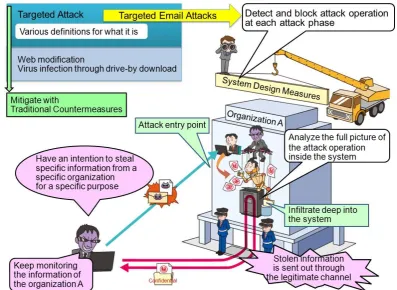
The set of the system design measures was developed as a “system design specification” to detect and block the attacks at each phase by analyzing the complete process of targeted email attacks (a full picture of “the attack operations conducted by the attacker” on the targeted system) in detail.
Based on the analysis of the attacker’s operations on the targeted system (indicated by the red arrow in the figure below) and the attacker’s state of mind, the measures focus on making the system difficult for the attacker to operate inside, inducing the attacker to make mistakes and detecting
[image:10.595.103.501.429.719.2]the presence of the attacks that are trying to infiltrate deeper into the system as early as possible. Note that there exist various definitions for what a targeted email attack is and that has been a cause of confusion. In this guide, we call an attack operation that follows a certain series of actions – send a fraud email and gain a foothold into the internal system, infiltrate the system deeper and stole the targeted information - as a targeted email attack, and distinguish it from other targeted attacks.
8
2 . 1 . 1
Need and Background of System Design
Measures
(1) Nature of Attack
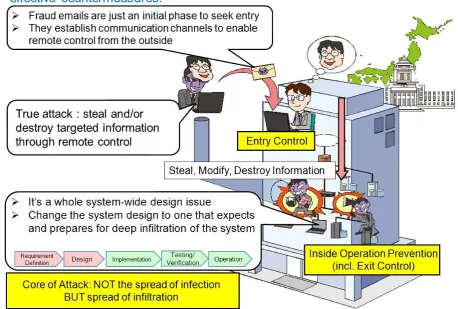
From an image the word “targeted email attacks” may provoke, they are often recognized as a problem of fraud emails and malware infection. However, the research conducted by IPA Security Threat and Countermeasure Study Group shows that fraud emails and malware infection are just a very initial phase of a grand scheme for the attacker to gain a foothold into the internal system to establish communication paths to enable remote control from the outside, and the true attack takes place later, in which the remote attacker infiltrates the internal system deeper to steal and/or destroy the targeted information. Thus, it can be said that the nature of the targeted email attacks is “not the spread of infection but spread of infiltration”.
[image:11.595.74.533.389.698.2]By understanding this nature correctly, we can formulate effective countermeasures. Misunderstanding the full picture of the targeted email attacks is one of the reasons why the current countermeasures fail to show real effectiveness.
9 (2) Need for System Design Measures
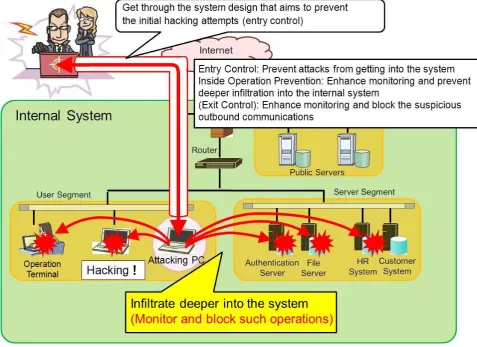
Because the goal of the targeted email attacks is to steal the information and/or disrupt the business, and the attacker tries to infiltrate as deeper as possible (to hack the internal system), the subjects of the security measures are not the individual PCs and servers but need to be the whole system-wide design.
The traditional system design intended to prevent the attacker’s initial hacking attempts (the entry control measures). Because targeted email attacks will get them through and infiltrate deep into the internal system, the system design needs to be changed to one that aims to prevent the spread of infiltration and enhance monitoring (the inside operation prevention measures)on the premises
that the attacks will manage to infiltrate deep into the system.
The set of the system design measures has been developed as a new system design method from the above perspective based on the analysis of the attack techniques used in the actual attacks.
[image:12.595.57.535.336.683.2]In this guide, the exit control measures introduced in the prequel, the Design and Operational Guide to Protect against "Advanced Persistent Threats”, are included in the inside operation prevention measures.
Figure 2.1.1-2 Attacker’s Activities to Be Stopped
10
・Make the system difficult for the attacker to operate inside
・Set up the traps to detect the attacker’s operation inside the system
・Enable the system administrators to become aware of the attempts of deeper infiltration
(the presence of the attack operations inside the system) as early as possible
(THAT leads to blocking and preventing the attacks!!)
Note that the Study Group on the Protection against Advanced Persistent Threats (APTs) at National Information Security Center (NISC) and IPA Security Threat and Countermeasure Study Group have been collaborating and the set of the system design measures is to be used as a guideline in a
cybersecurity initiative for the government agencies. Also, part of the outcome of the Study Group on the Protection against APTs, NISC, will be reflected in this guide.
The Study Group on the Protection against APTs, NISC, has been formed by a policy implemented by the government to deal with the attacks that target the nation’s important information and some members of IPA Security Threat and Countermeasure Study Group participate in it as well.
The activities of the Study Group on the Protection against APTs, NISC, can be read in the article, the “Initiative to Strengthen the Protection against APTs on the Basis of Risk Assessment”, in the page eighteen of the “Annual Report on Information Security of the Government Agencies5”.
11
2.1.2
Full Picture of Attack (Attack Scenario)
A targeted email attack has seven phases. With the intention to accomplish a specific mission like stealing information, the whole attack is planned in advance and executed as planned.
It is difficult to find out a full picture of the attack and formulate the effective measures by just
investigating part of the attack, such as the analysis of fraud emails or malware. Every single targeted email attack is a customized, manual attack. We can understand the full picture and formulate the workable measures only by deciphering what the attacker’s mission is and investigating and analyzing the complete picture of the attack plan comprehensively through a multidimensional perspective.
Figure 2.1.2-1 Targeted Email Attack - Attack Scenario
(1) Attack Scenario: Overall Flow
Below is a basic pattern of the targeted email attacks derived from the analysis (for more details, see
3.1 Targeted Email Attack Scenario in Detail. The scope of this guide is from ④ Attacking Infrastructure Building to ⑥Mission Execution.
12
The following summarizes the attacking operation at each phase.
a. ① Planning Phase and ② Preparation Phase
These phases are for reconnaissance and attack planning. The actions taken by the attacker at these phases include, but not limited to, selecting a target, obtaining the email address that belong to the target, email correspondences between the target and organizations involved with the target that can be exploited to draft targeted emails, clarifying the criteria of success at these phases, preparing targeted emails attached with malware, and setting up an environment to remotely control the compromised devices.
b. ③ Initial Compromise Phase
At this phase, malware-ridden targeted emails are sent to the target (and/or related organizations) simultaneously.
The goal is to infiltrate the internal system of the target and establish a “communication channel for remote control (connect-back channel)” with some devices on the internal system. Prevention of attacks at this phase is within the scope of the entry control measures (e.g. sharing information about fraud emails, monitoring and detecting malware, patching vulnerabilities, blocking access to malicious websites). In the actual incidents, it is difficult to prevent targeted email attacks at this phase and the attacks often succeed in moving into the next phase of the attack process.
c. ④ Attacking Infrastructure Building Phase
From this phase, the attack is transformed into an “infiltration into the internal system by the remote attacker” via one or more connect-back channels. The attacker attacks the internal system manually by trial and error using various tools. Once the attack reaches this phase, the defenders need to “change their mindset and think how they can detect the presence of the attack and deter the deeper infiltration”. The attack process at ④ Attacking Infrastructure Building phase is the following:
Record success and failure of the infiltration attempts and keep tabs on the targets (“target management”) to exploit them on a continuous basis.
Steal the ID/password hash from the compromised user PC and prepare to exploit other devices.
After this phase, it isn’t about malware infection anymore and becomes a careful, manual hacking conducted by the attacker, and moves to ⑤ Penetration/Exploration Phase.
【Characteristics of Attack】
Because communications via connect-back channels are established as legitimate ones that use and follow the protocols and network design rules defined by the system, it is difficult to detect in most cases.
13
After establishing a connect-back channel between the compromised user PC and the C&C server, the attacker downloads the tools to be used in the further attack. (For more details, see
3.3 Tools Used for Infiltration).
d. ⑤ Penetration/Exploration Phase
This phase is the core of the targeted email attacks and the reason why we express our image of the targeted email attacks as NOT the “spread of infection” BUT “spread of infiltration”. The attack process at ⑤ Penetration/Exploration phase is the following.
Using the administrative account information obtained from the user PCs, hijack the key devices such as file servers, authorization servers (e.g. Active Directory), operation terminals and operations management servers.
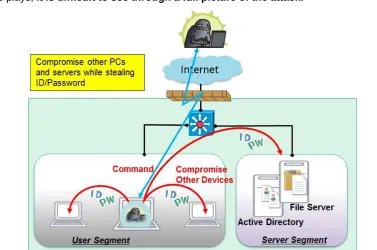
Ensure multiple PCs that are remotely controllable and set up an attacking infrastructure that consists of the compromised PCs with different roles – one to command the attack inside, one to compromise others, one to lie hidden, one to explore and gather information and one to send out stolen information.
Infiltrate deeper into other segments and connected systems.
【Characteristics of Attack】
The compromise spreads to the devices on the same segment the authentication servers (Active Directory) network devices operations management servers.
[image:16.595.123.501.483.733.2] Because the attacking infrastructure is decentralized based on the role each compromised device plays, it is difficult to see through a full picture of the attack.
Figure 2.1.2-3 Image of System Compromise
14 e. ⑥ Mission Execution Phase
At this phase, the attacker transmits the target information stolen from the hijacked devices under the control of the attacker with the administrator privileges to the outside in bits and pieces through the multiple data send-out PCs. For this, if the defender looks for the stolen information “in one piece”, it will be difficult to detect. The stolen information is sent out through the connect-back channels, which makes it more difficult to detect.
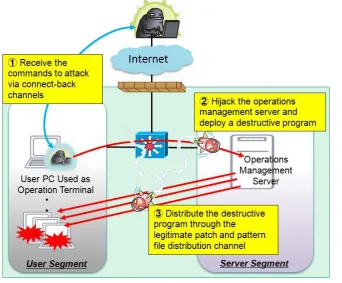
So far, only the attacks that aim to steal confidential information have been confirmed in Japan, but from the incidents observed in other countries, it has been confirmed the attacks that aim to destroy the system follow the same steps up to ⑤ Penetration/Exploration phase as well.
[image:17.595.131.474.298.581.2]Which means since the information system is under the control of the attacker at this phase, what will happen and how the consequence will impact the organization depend on the attacker’s intention.
Figure 2.1.2-4 Image of Destruction of the System
f. ⑦ Re-Infiltration
At this phase, the attacker continuously infiltrates and explores the target system through the existing connect-back channels. At the same time, to set up yet another attacking PC and establish a new connect-back channel, the attacker often keeps sending targeted emails attached with malware to the same organization.
For this reason, it is sometimes difficult to determine whether the attack was over or not. Once targeted, it is important to assume that the attacker will be coming back and to continuously monitor if connect-back channels exist.
15 (2) Details of the Attack Scenario
Overview of the core of the attack - ④ Attack Infrastructure Building, ⑤Penetration/Exploration and ⑥Mission Execution phase - and the details of the attack techniques at each phase are described in
3.1 Targeted Email Attack Scenario in Detail. They are for those who define the system requirements, system designers and system operators to refer to when designing a system based on the set of the system design measures.
Based on the set of the system design measures, those involved should consider which system design measures to employ while balancing with the overall system design which depends onthe characteristics of the system and the environment in which it operates.
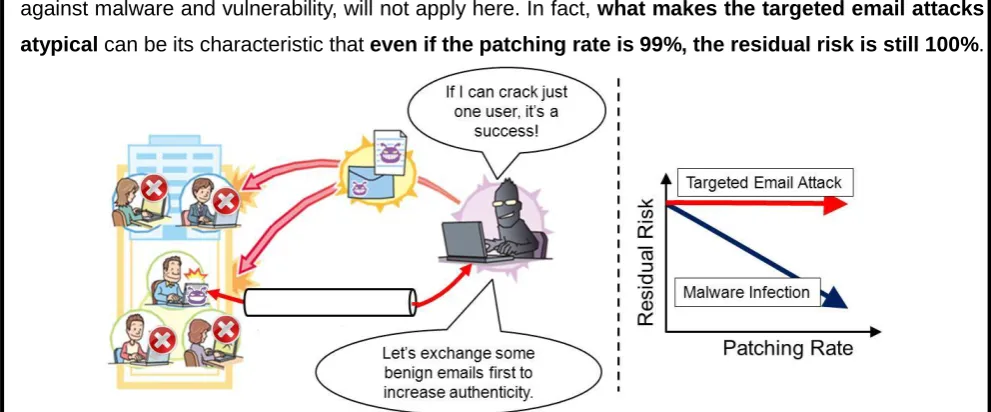
Relation between Email, Vulnerability and Residual Risk
Even if it’s just one person, if someone within the organization opens a malware link or file attached to a fraud email, a remote control path (connect-back channel) for the attacker is established and the targeted email attacksucceeds to infiltrate the system.
For the organizations that have a large number of staff, have offices in dispersed locations, or have departments that require active contact with the outside organizations, it is very hard to completely stop the fraud emails.
In addition, because of the recent increase in the targeted email attacks that try to establish a benign email correspondence with the target first6, which makes the receiver open the attachment more easily, the infiltration rate seems to be getting higher every year.
[image:18.595.49.545.476.682.2]A traditional approach of “the higher the patching rate, the lower the risk”, taken as a measure against malware and vulnerability, will not apply here. In fact, what makes the targeted email attacks atypical can be its characteristic that even if the patching rate is 99%, the residual risk is still 100%.
Figure 2.1.2-5 Relation between Email Opening Rate and Residual Risk
16
Challenge at Requirement Definition and System Design
At the phase of requirement definition and system design, first the possible threats that will be the premises of the system design are analyzed and then design the system (e.g. network topology, security features, product selection).
If the targeted email attack is picked up as a possible threat, the system design needs to premise that the attacker will infiltrate deep into the internal system, but most system design case studies show there is little information available to have such premises and that makes it difficult for organizations to design the system to prevent deeper infiltration or monitor the system.
The set of the system design measures was developed to “provide the system designers and operators the information” about the “premises (possible threats) and the system design measures based on them”.
History of Targeted Email Attacks
Targeted email attacks are an attack technique that has emerged all over the world since about 2003. They have been around for a quite long time, yet their full picture or intention is still poorly understood.
After the U.S. government released the doctrine for a “cyberspace operation” in 2011, cyberspy operations through targeted email attacks become an international political issue.
17
2.1.3
Approach for Deriving Countermeasures
In this section, an approach taken by the IPA Threat and Countermeasure Study Group to derive the system design measures is introduced.
(1) Procedure Used to Derive System Design Measures
The Study Group’s consideration of the system design measures followed the approach below.
① Analyze the attack procedure at each phase in detail and develop an attack scenario
based on the analysis of the attack techniques used in target email attacks (through case study research) and system-compromise detection techniques.
② Draw up a system design model (system configuration diagram) of a target system.
③ Based on the attack procedure at each phase in the attack scenario, conduct the mock attacks
on the system design model (system configuration diagram) and see if the attacks succeed or fail. (Done focusing on ④ Attacking Infrastructure Building, ⑤ Penetration/Exploration and ⑥ Mission Execution)
④ Using the result, discuss the system design measures that would detect and prevent those attacks, categorize them into the “enhanced-monitoring measures” and “blocking measures” for further analysis and developed the set of the system design measures.
The set of the system design measures has been developed through the mock attacks using the real attack scenarios on the realistic system configuration drawn up based on the information obtained through the interviews to the companies. They are concrete, implementable measures to prevent attacks from infiltrating deeper into the internal system. The figure below shows the approach in a glance.
18 (2) Key Points of System Design Measures
With targeted email attacks, not depending solely on the automatic defense enabled by the blocking measures but knowing a full picture of the attack as early as possible, such as knowing the answer to the questions like “at which phase the attack stealthily compromising the internal system is right now?” or “is it already at the final phase of sending out the stolen information or destroying the system?”, will help the organization avoid the worst case scenario. The “enhanced-monitoring measures” would enable that. The key points we focused when formulated the measures are the following. (For more details, see 3.2 System Design Measures Based on System Design Model).
Conduct the mock attacks based on the attack objective (criteria of success) and techniques at each phase of the attack scenario, adding the psychological elements that could possibly affect the attacker (Identify where the attacker may likely make a mistake)
If the attack succeeds, formulate the design measures that can prevent the attack, verify its behavior and shape the measures.
Conduct the mock attacks to verify the effectiveness of the measures again.
(3) Organization of the Set of the System Design Measures
The set of the system design measures consists of the “list of technical design measures (system design outline)” and “implementation guide (how to use the technical design measures in combination and operational issues)”.
In addition, some support information which will help the reader understand the goal of this guide and possible threats, customize the design measures and implement them into the reader’s system
accordingly to its environment and characteristics is provided in the later chapter. Also, some other helpful information, such as about the organizational approach toward the incidents (a response system to escalate the information within the organization when a critical attack happens), and the relationship between the design measures and corresponding emergency mitigation measures, is provided in 3.2 System Design Meausres Based on System Design Model. Below is an image of the organization of the set of the system design measures.
19
2.2
Set of System Design Measures
This chapter introduces the contents of the set of the system design measures. The IPA Threat and Countermeasure Study Group has derived the “enhanced-monitoring measures” from the intrusion-detection perspective and “blocking measures” from the intrusion-prevention perspective.
The “enhanced-monitoring measures” are the design measures focused on letting the system defender and operators detect the attacker’s attacking infrastructure building and inside
operations within the system as early as possible by setting up the traps and enhancing monitoring. The “blocking measures” are the design measures focused on enabling to avoid the attacks such as establishing connect-back channels, hacking/hijacking servers and stealing passwords by designing the system to expect and prepare for the attacks predicted in the attack scenarios.
In some cases, the venders may differ for the system design/development and operation/maintenance. Even so, as a contractor, the organization should check with the contractee (respective vendors) to see if the measures work for the organization and consider the deployment of the enhanced-monitoring and blocking measures. The set of the system design measures is intended to be used as an interface in such contract negotiations between the parties. In the following, the system design measures at the attacking infrastructure building phase and penetration/exploration phase - the core of the targeted email attack – are explained.
(1) Attacking Infrastructure Building Phase
The goals of the measures at the attacking infrastructure building phase are below: ① To detect and block the connect-back traffic
② To detect and block the attacker’s penetration/exploration operation
Table 2.2-1 System Design Measures at the Attacking Infrastructure Building Phase (1/2)
No. Measures Description Device
Bl o c k in g M e a s u re
s B① Block connect-back traffic with Firewall (FW) (See 2.2.1)
Block connect-back traffic at firewall based on the design of network communication paths
・FW
・Proxy Server
B② Block connect-back traffic with access control at proxy server (See 2.2.2)
Block connect-back traffic with access control at the proxy server
・Proxy Server
B③ Block connect-back traffic with proxy authentication (See 2.2)
Block illegitimate communications with proxy authentication
・Proxy Server
En h a n c e d M o n ito ri n g M e a s u re
s EM① Monitor and analyze the proxy authentication log (See 2.2.4)
Analyze the proxy server’s authentication log and look for connect-back traffic
・Proxy Server
EM② Uncover connect-back traffic through forced-disconnection (See 2.2.5)
Disconnect all communications that go through the proxy server and uncover connect-back traffic that try to reconnect with the C&C server by checking the logs recorded after the event of forced disconnection.
・Proxy Server
EM③ Detect http communications that mimic browser communications
Using the proxy server, monitor the difference in the characteristics between the browser’s HTTP communications and HTTP communications mimicked by malware.
【Work In Progress】
・Proxy Server
20
Table 2.2-1 System Design Measures at the Attacking Infrastructure Building Phase (2/2)
No. Measures Description Device
En h a n c e d -M o n ito ri n
g EM④ Monitor the specific services
using the unused IP addresses
Set up monitoring devices (e.g. decoy server7) with the unused IP addresses and monitor the indicators that might suggest the penetration/exploration operation by the attacker 【Work In Progress】
・Network
(2) Penetration/Exploration Phase
The goals of the measures at the penetration/exploration phase are below: ① To prevent the attack from infiltrating the internal system deeper
② To Prevent the attack from stealing the account information from the user PCs Table 2.2-2 System Design Measures at the Penetration/Exploration Phase
No. Measures Description Devices
Bl o c k in g M e a s u re s
B④ Segment network for operation terminals and user PCs (See 2.2.6)
Segment the network for the user PCs and operation terminals and make sure that the user PCs cannot access the operation terminals.
・User PC ・Operation
Terminal
B⑤ Implement network segmentation and access control (See 2.2.7)
Implement proper network segmentation and access control between network segments
・Network Devices
B⑥ Ban to cache highly-privileged admin account (See 2.2.8)
Do not cache the highly-privileged administrative account information (e.g. Domain Admins)
・User PCs
B⑦ Ban to share files among user PCs (See 2.2.9)
Prohibit (disable) file sharing among the user PCs and allow to share with only minimally necessary devices such as file servers.
・User PCs
En h a n c e d -M o n ito ri n g M e a s u re s
EM⑤ Monitor and analyze access log for trap accounts (See 2.2.10)
Set up the trap accounts on the user PCs and detect the login attempts using the trap accounts by the attacker.
・User PCs ・Authentication
Server (AD)
EM⑥ Monitor the listening ports newly opened
Monitor the listening ports newly opened for connect-back channels 【Work In Progress】
・Server
EM⑦ Monitor hacking commands Monitor the use of the commands that are unlikely used for operation/maintenance but often used for hacking 【Work In Progress】
・Server
B: Blocking Measures EM: Enhanced-Monitoring Measures
In the following sections, each system design measure is further explained. For those marked 【Work In Progress】, we are still working to verify the technical issues and effect on operation/maintenance. They will be updated upon completion.
21
[image:24.595.60.539.72.276.2]2.2.1
Block Connect-Back Traffic with Firewall
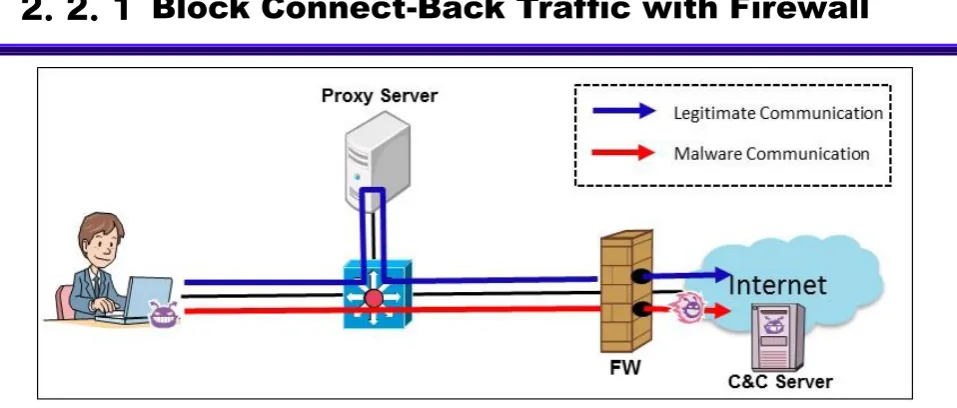
Figure 2.2.1-1 Attacking Image: Before Implementing the Measure
There are a certain number of malware that do not support the proxy settings. This measure sets a rule that a program must use the proxy server to access the external network, aiming to block the malware’s connect-back traffic that does not follow the rules at the firewall (FW).
(1) System Design Overview
Figure 2.2.1-2 Image of the System Design Measure
22
【Implementation①: Enable the browser’s proxy settings】
For the user PCs that access the Internet, mandate the use of the organization’s proxy server in the browsers. In combination with the implementation ②, deny the user PCs on which the proxy settings in the browser are disabled access to the Internet directly.
【Implementation②: Set the rules on FW that deny access from the user segments to the outside】
Set and apply the following rules to block the outbound traffic on the FW.
Permit the outbound traffic via the proxy server only and block the outbound traffic from the devices that attempt to access the Internet directly without using the proxy server
Block the outbound port 80 and 443 traffic that have not gone through the proxy server for they can be a connect-back traffic to the C&C server
Design the services that need to access the outside network over the port 80 and 443 to use the proxy server (except the special devices deployed in the DMZ)
Table 2.2.1-1 Examples of the Services That Should Use the Proxy Server
Services Applied For
Windows Server Update Services (WSUS) Communicate with the Windows Update Server (80,443)
System Center Configuration Manager
(SCCM)
E.g. Update non-Microsoft products, asset management
Anti-virus software Update virus pattern files
Security patch management software Obtain things like the latest patch and virus pattern files
Others E.g. License verification
【NOTE】
If software uses the online update feature and does not support the proxy settings, consider alternative way, such as offline update via the file server.
(2) Operational Issues
【Operation①: Check the FW access log (block entries) periodically】
Periodically monitor the access log (block entries) of the FW and see if there is connect-back traffic attempted by the user PCs. If there are access log entries (block entries) that suggest a user PC has attempted to connect the Internet directly over the port 80 or 443 but was blocked and failed, investigate the user PC, for it may be infected with malware.
【Operation②: Review the FW access control rules】
Periodically review the FW access control rules and see if there are still necessary.
23
2 . 2 . 2
Block Connect-Back Traffic with Access
[image:26.595.98.507.501.739.2]Control at Proxy Server
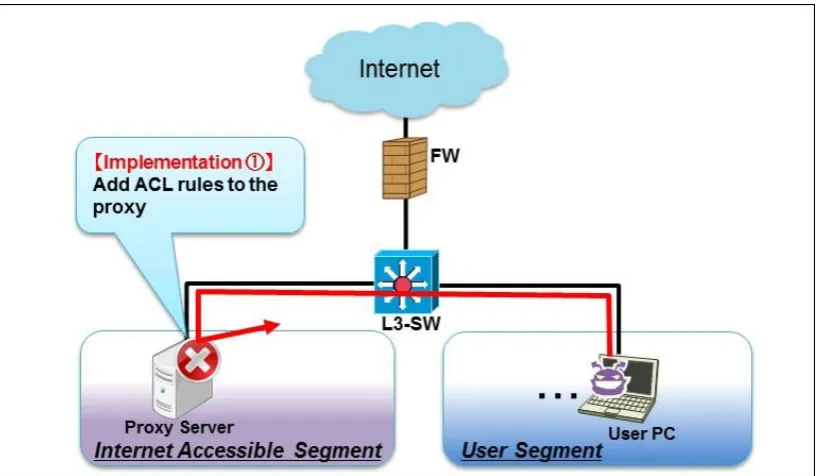
Figure 2.2.2-1 Attacking Image: Before Implementing the Measure
The CONNECT method is a feature of HTTP1.1 to request a proxy server for a tunnel connection. In general, it is used to tunnel the data encrypted by the protocols such as SSL/TLS. Some malware are known to exploit this feature and issue a CONNECT request to the proxy server to connect the Internet.
This measure aims to permit only the CONNECT requests issued by the programs that do need to access external servers over the HTTPS port (typically TCP/443 is used) to pass, and block all other traffic.
(1) System Design Overview
24
For the outbound traffic from the user PCs to the Internet through the proxy server, configure the proxy server to limit the ports that can be used to the minimum (e.g. HTTP and HTTS only), and block all traffic that use the ports other than the permitted, legitimate ones at the proxy server. By designing this way, it makes it possible to detect and block the malware’s connect-back traffic that uses the ports the organization does not normally use.
【Implementation①: Add the ACL rules to the proxy server】
Add the ACL rules that block all traffic “that use the CONNECT method but do not use 443/TCP”. # Deny all CONNECT requests that do not use the SSL-designated port
acl SSL_ports port 443
acl CONNECT method CONNECT http_access deny CONNECT ! SSL_ports [ snip ]
# Modify the log format, for example, to log the time in a format that is easy to understand logformat combined %>a %ui %un [%tl] “%rm %ru HTTP/%rv” %>Hs %<st “%{Referer}>h” “%{User-Agent}>h” %Ss:%Sh
access_log /var/log/squid/access.log combined
Figure 2.2.2-3 Example of ACL rules on Squid
【NOTE】
If the business systems are using the CONNECT method for something other than SSL communications, allocate the port numbers for those use and add them to the ACL rule as well.
(2) Operational Issues
【Operation①: Check the proxy server’s access log (block entries) periodically】
Periodically monitor the access log (block entries) of the proxy server and see if there are connect-back traffic attempted by the user PCs. If there are access log entries (block entries) that suggest a user PC used the CONNECT method and attempted to connect the Internet via the unpermitted ports, investigate the user PC, for it may be infected with malware.
(See:3.4 Analysis Rusult of Proxy Server Log)
When a CONNECT request is made via the unpermitted port, a log entry like below will be recorded.
(src IP address) - - [30/Jul/2013:20:52:11 +0900] “CONNECT (dst IP Address):(port number) HTTP/1.1” 403
3355 (referrer) (user agent) TCP_DENIED:NONE
Figure 2.2.2-4 Example of access.log Output
【Operation②: Review the proxy server’s access control rules】
25
2 . 2 . 3
Block Connect-Back Traffic with Proxy
[image:28.595.87.517.458.710.2]Authentication
Figure 2.2.3-1 Attacking Image: Before Implementing the Measure
There are a certain number of malware programs that do not support the proxy authentication. This measure aims to block the connect-back traffic using the proxy authentication when a malware that does not support the proxy authentication tries to connect the external network through the proxy server.
In addition, by using it in combination with 2.2.4 Monitor and Analyze Proxy Authentication Log, we can expect a synergistic effect.
(1) System Design Overview
Figure 2.2.3-2 Image of the System Design Measure
Implement user authentication for the traffic that goes through the proxy server and permit only those
26
successfully authenticated to pass it through. By designing this way, it makes it possible to block the malware’s connect-back traffic that does not support the proxy authentication at the proxy server.
【Implementation①: Enable Proxy Authentication】
It is recommended that a proxy server satisfy the following requirements.
Have a user management functionality or is able to use a directory service
Can authenticate by user
Can use a safer authentication method such as the Digest or NTLM authentication
【NOTE】
It is not recommended to use the Basic authentication since it sends the ID/PW in plain text into the network.
【Implementation②: Disable the browser’s autocomplete function】
If the browser’s autocomplete function8 is enabled and used, the ID/PW is stored on the user PC, which allows the attacker to steal the user credential. Make sure that the users cannot use the autocomplete function through some means, such as a group policy, and have them enter the ID/PW each time they open a browser.
(2) Operational Issues
【Operation①: Manage user accounts properly】
Manage the user accounts used for the proxy authentication properly. To make sure that unnecessary accounts are all deleted, a periodic review is needed as people’s duty and department change within the organization. By linking and using an authentication server (e.g. Active Directory or LDAP server), a total user management can be achieved.
【Operation②: Monitor and analyze the authentication log of the proxy server】
Monitor and analyze the authentication log of the proxy server, look for indicators of unauthorized access. (For more details, see 2.2.4 Monitor and Analyze Proxy Authentication Log).
8 A browser function that presents possible word entries the user may be about to enter based on the past input history when the user
27
[image:30.595.91.511.426.670.2]2.2.4
Monitor and Analyze Proxy Authentication Log
Figure 2.2.4-1 Attacking Image: Before Implementing the Measure
There are malware programs that obtain user credentials stored in the user PCs through some means, such as through the autocomplete function, and get by proxy authentication. This measure aims to improve the capability to conduct further investigation into the malware and attacker utilizing the authentication log recorded by the proxy server.
In addition, by implementing this in combination with 2.2.3 Block Connect-Back Traffic with Proxy Authentication, we can expect a higher effect.
(1) System Design Overview
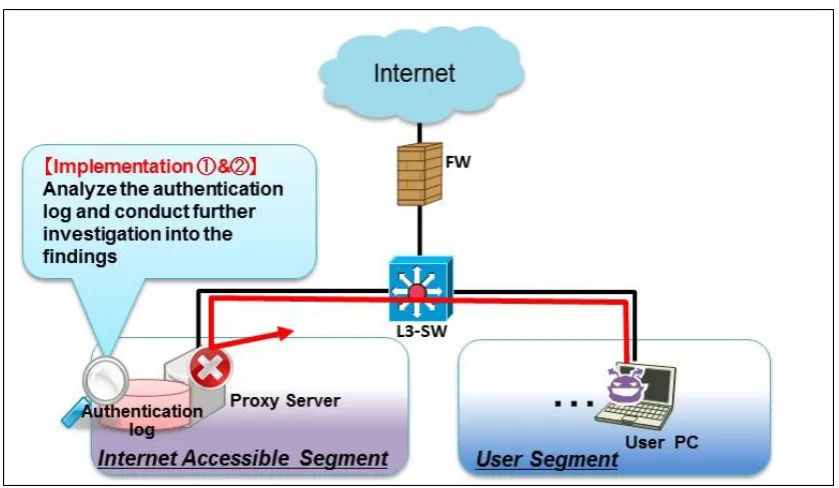
Figure 2.2.4-2 Image of the System Design Measure
Enable proxy authentication and configure it to log the results of user authentication (success/failure). By designing this way, it is expected to detect possible connect-back channels from the authentication log and deal with them early.
28 【Implementation①: Enable proxy authentication】
Employ the implementation requirements suggested in 2.2.3 Block Connect-Back Traffic with Proxy Authentication. It is recommended that the ID/PW used for authentication be not shared among the users and be issued to each user.
(2) Operational Issues
【Operation①: Analyze authentication log of the proxy server】
Monitor the entries about the success and failure logged in the proxy server’s authentication log periodically and see if malicious acts like the following have been attempted.
Brute force attacks9 against a specific user ID
If a specific user ID is targeted by brute force attack, a huge volume of failure entries for the specific user ID will be logged within a short period of time. Thus, if a more than certain amount of failure entries is logged within a certain period of time, the user PC with that problematic user ID should be checked out.
Different IDs being tried for a specific PW
If the attacker attempts to find the correct ID that matches a specific password by trying different IDs against the specific password, the authentication log will show a failure entry for the different user IDs sent from a specific user PC. Look through the log to check that such events have not taken place for the user PCs per IP address.
User ID reuse
If the attacker tries to exploit the user ID/PW reuse and it works, the authentication log will show success entries for the same user ID from the different user PCs. Look through the log to check that such events have not taken place for the user PCs per IP address. Note that an IP address may be assigned by DHCP. In that case, check must take into account the expiration date of the IP address.
【Operation②: Conduct further investigation into the findings from the log analysis】
Based on the findings from the authentication log analysis done in operation①, identify and investigate the user PCs that are possibly being exploited for unauthorized communication. Since the user IDs used in the suspicious success entries are most likely compromised, change their password and conduct investigation into the user PC used by the owner of the compromised user ID.
29
2 . 2 . 5
Uncover Connect-Back Traffic through
[image:32.595.97.499.375.614.2]Forced-Disconnection
Figure 2.2.5-1 Attacking Image: Before Implementing the Measure
To receive the instructions from the C&C server, malware tries to maintain the connection with it. This measure aims to uncover connect-back traffic that automatically tries to reconnect to the C&C server by periodically forcibly disconnecting all the outbound connections through the proxy server.
(1) System Design Overview
Figure 2.2.5-2 Image of the System Design Measure
Block all outbound communications that go through the proxy server mandatorily at the FW. This will prompt the malware to try to reconnect the C&C server to recover its connect-back channel. The measure makes it possible to discover unauthorized communications early by logging such traffic on the proxy server.
【Implementation①: Enable the browser’s proxy settings】
【Implementation②: Set the rules that deny outbound traffic on the FW】
30
and configure to make all business traffic go through the proxy server to access the external network.
(2) Operational Issues
【Operation①: Planned forced-disconnection of outbound traffic】
By mandatorily cutting off all communications that go through the proxy server using the filtering feature of the FW or server in the off-peak business hours like at night, uncover the malware’s connect-back channels that regularly try to reconnect to the C&C server. To check the regularity, it is effective to perform mandatory disconnection at least twice.
In addition, if the business traffic is present in the proxy server’s traffic log, it makes harder to distinguish the malware traffic from business traffic. Thus, it is recommended to notify the employees and staff of keeping their PC power-on but unused during the mandatory
disconnection in advance.
【NOTE】
The business servers are assumed to obtain data like the pattern files and update information from the outside. Therefore, it is recommended that the servers’ access to the Internet be permitted.
【Operational Issue②: Analyze traffic logs】
31
2.2.6
Segment Network for Operation Terminals and
[image:34.595.97.518.499.741.2]User PCs
Figure 2.2.6-1 Attacking Image: Before Implementing the Measure
At the penetration/exploration phase, the attacks have been observed where the ID/PW required for operation and maintenance was stolen and exploited. This measure aims to prevent the operational information from being stolen by the attacker who has infiltrated into the system, and stop unauthorized access to the operation servers by applying network segmentation for the operation terminals and user PCs.
In addition, by implementing this in combination with 2.2.7 Implement Network Segmentation and Accesss Control, we can expect a highly positive effect.
(1) System Design Overview
Figure 2.2.6-2 Image of the System Design Measure
32
Configure the network in such a way that even if the user PCs are infected with malicious programs, the operation terminals are unreachable and cannot be hijacked by segmenting their network. Also, as for the critical servers such as the Active Directory, mitigate the risk of unauthorized access by limiting the devices that are allowed to access Active Directory’s management features to the specific terminals. By designing this way, it makes it possible to prevent the attacker who has managed to hijack a user PC from gaining a direct access to the operation servers.
【Implementation①: Set up a dedicated PC as operation terminal】
Prepare operation terminals that meet the following requirements and permit management and maintenance operation of servers and network devices only from those operation terminals.
No Internet connection (services) allowed, such as emailing and browsing (it is recommended to use an operations management server located within the internal network for security patch deployment and pattern file update)
Do not store credential information for servers and network devices in the operation terminals in any way
In the case where some business departments run their own system individually, they tend not to have a dedicated operation terminal separately due to their small system size. Even so, the organization should have those business departments set up a dedicated operation terminal and maintain the segmentation as an organization-wide effort.
【Implementation②: Configure a network segment dedicated for operations management】 Configure a network segment dedicated for operations management that cannot be accessed from other segments, and put the operation terminals there. In addition, make sure access from the user segments to operations management segment is prohibited.
Figure 2.2.6-3 Image of Operations Management Segment
33
Also, make sure that the operation servers are not accessible from the user segments via the SSH port or other ports that the operation terminals use for the operations management, such as the port used by web client GUI. Moreover, make the operations management segment a dedicated segment available only for the system administrators and closed to the general users.
When performing remote maintenance, design the network to do it via a transit server10 by setting up the transit server that provides the authentication, user management and log management function in front of the operation servers. By designing this way, it makes unauthorized access to the operation servers difficult and makes it easier to find indicators of unauthorized access from authentication logs,
【Implementation ③: Limit the devices allowed to access Active Directory’s administrative functions】
Because Active Directory holds the credentials for all users in its administration domain, it tends to be targeted for infiltration. Thus, access to Active Directory’s administrative functions should be treated with special caution and it is important to implement access control through a policy to allow only the specific devices to access with the administrative privilege.
(2) Operation Issues
【Operation ①: Use and manage administrator accounts properly】
Manage the operation terminals properly to make sure that unauthorized users cannot use them.
【Operation ②: Ensure security of the operation terminals】
Implement anti-virus measures and software vulnerability countermeasures to leave the operation terminals vulnerable.
(3) Emergency Mitigation
If configuring a network segment dedicated for operations management or having NIC for an operation terminal is infeasible, consider taking the following emergency mitigation measures to reduce the risk of hijacking of operation terminals.
Connect an operation terminal to a user segment but do not keep it connected all the time. When system management is required, connect the operation terminal to the user segment and after operation is done, disconnect it from the user segment.
Connect the operation terminal to a user segment but make sure it is dedicated for management works only and separated from the PCs that use the Internet and emails for work.
Filter access to the operation server through IP address or such to make sure it is accessible only from the operations management terminal.
10
34
35
2.2.7
Implement Network Segmentation and Access
[image:38.595.75.537.130.345.2] [image:38.595.62.521.527.743.2]Control
Figure 2.2.7-1 Attacking Image: Before Implementing the Measure
Occasionally, the cases are observed where the attacker exploits a flat network topology and breach all parts of the system at the Penetration/Exploration phase.
This measure aims to confine the breach and prevent the attacker from infiltrating deeper into the servers.
In addition, by implementing this in combination with 2.2.6 Segment Network for Operation Terminals and User PCs, we can expect a higher effect.
(1) System Design Overview
Figure 2.2.7-2 Image of the System Design Measure
36
It is important to design and implement appropriate network segmentation of the internal network in terms of the role and access requirements of each network, such as server segment, user segments and operations management segment, and minimize the communications between the segments. By implementing the proper network segmentation and access control, it will make the attacker’s penetration attempt more difficult.
【Implementation ①: Implement network segmentation for business networks and access control】
Prevent the deeper infiltration by dividing the internal network into segments with network devices and minimizing the communications between them.
It is recommended that access control lists (ACL) be designed based on the matrix like the following - whether to permit the communications between two segments or which port to use for permitted communications. Table below is a sample model of segmentation and the real segmentation must be more detailed. The permit/denied notation in the table is just an example.
Table.2.2.7-1 Example: Access Control Design Destination Segment Internet DMZ Server User
(Gen.) User (Device) Operation Management S ourc e S e gment
Internet ○ × × × ×
DMZ ○ ○ × × ×
Server ○※1 ○ ×× × ×
User (Gen.) × × ○ × × User
(Devices) × × ○ × ×
Operations
Management × × ○
※2 ×
×
Legend: ○:Permitted, ×: Denied
※1 Assume the traffic from the proxy server or operations management server
※2 Include the communications required for patch management for the operation terminals and/or other necessary operation
(2) Operational Issues
【Operation ①: Revise ACL Periodically】
37
[image:40.595.85.517.494.743.2]2.2.8
Ban to Cache Highly-Privileged Admin Account
Figure 2.2.8-1 Attacking Image: Before Implementing the Measure
The attacker who has succeeded at infiltrating the internal system tries to steal the account information from the compromised user PC. If the information on a highly-privileged admin account, such as a Domain Admins group account, is stored in cache on the compromised user PC, the theft of that account information will greatly increase the risk of unauthorized access to the authentication servers (e.g. Active Directory). Nevertheless, the admin privileges may be required for operations like software autoupdate or remote maintenance and which left us few options: we just need to store the highly-privileged account information securely.
This measure aims to manage user accounts in a way that does not affect the authentication servers (Active Directory) or operation servers while allowing the necessary operations that require the admin privileges like remote patch distribution.
(1) System Design Overview
38
Use a highly-privileged account like a domain administrator only on the specific operation terminal and do not use it for the normal activity such as emailing and browsing. As for the operations with which the admin privileges are required on a user PC, such as for remote help desk support, design the system to execute the necessary operations with the local admin privileges only. By allowing the users the least privileges necessary for their work, even if the attacker manages to steal the user account information stored in the compromised user PC, it makes it possible to prevent the attacker from hijacking other devices (user PCs or servers) except the primarily-compromised one because the user account privileges for other PCs or servers are independent of those for the compromised user PC and the stolen user account privileges do not work on them.
【Implementation ①: Allow the least user account privileges for the accounts on the user PC】 Design the accounts on the user PCs in the following way to allow the least privileges.
Domain user: the Standard privileges on the user PC
Local user: the Administrator privileges on the user PC
Do not use the Domain Admins group lightly and design the user accounts following the least-privilege principle, for example, by having the user execute the programs with local administrator privileges. For the services and scheduled tasks on the user PC, avoid executing them with a highly-privileged account, such as a Domain Users group account, to the extent possible.
【Implementation ②: Use the Administrator account at a minimum】
By assigning an administrator account that is just for performing the activities that require the administrator privileges and using it only on a specific operation terminal, it makes it possible to prevent the administrator account information from carelessly being stolen and widely used.
(2) Operational Issues
【Operation ①: Do not log on to the user PC with a Domain Admins group account】
39
[image:42.595.92.507.430.667.2]2.2.9
Ban to Share Files Among User PCs
Figure 2.2.9-1 Attacking Image: Before Implementing the Measure
Occasionally, the cases are observed where the attacker exploits a file sharing feature on the user PC and infiltrate further into the network at the Penetration/Exploration phase. Nevertheless, banning file sharing completely can be difficult since it is used for operation as well, such as communication with an authentication server (Active Directory).
This measure aims to prevent deeper infiltration by limiting with whom the user PCs can share files to the devices that are absolutely necessary to share.
(1) System Design Overview
Figure 2.2.9-2 Image of the System Design Measure
40
【Implementation ①: Disable the file sharing feature on the user PCs】
Disable the file sharing feature on the user PCs. Consider an option like banning new file sharing on a mandatory basis through an Active Directory group policy11.
【Implementation ②: Block communications between user PCs】
If employing the Implementation ① is difficult, block communications between the user PCs using the access control feature that comes with a personal firewall, and permit to accept only the communications required for operation, such as auto-distribution of virus pattern files and security patches.
【Implementation ③: Utilize Windows Security Settings】
Microsoft Windows offers a remote maintenance tool for the servers and PCs called PsExec12. The attacker sometimes tries unauthorized access by exploiting PsExec, sending specific commands remotely and executing .exe files on the server. With the server operating systems including and later than Windows Server 2008, the User Account Control (UAC) feature is enabled by default, making PsExec unusable. Thus, if using Windows Server 2008 or later as an Active Directory or file server, keep the UAC feature enabled as it comes.
(2) Operation Issues
【Operation ①: Monitor suspicious processes】
If using Active Directory or file servers that run on a Windows OS, do not use PsECE for remote maintenance as an operational rule. In addition, monitor if a ”PsExecsvr” process is invoked not to miss an indicator of attacks.
11
Enable or Disable File Sharing with Group Policy
http://technet.microsoft.com/en-us//library/cc754359%28v=ws.10%29.aspx
12 Microsoft Technet Windows Sysinternals PsExec v2.0
41
2.2.10
Monitor and Analyze Access Log for Trap
[image:44.595.105.495.515.740.2]Accounts
Figure 2.2.10-1 Attacking Image: Before Implementing the Measure
By exploiting the account information (ID/PW) stolen from the user PCs and servers the attacker succeeded in infiltrating, the attacker tries unauthorized access to more high-value servers
(authentications servers (Active Directory) and operations management servers). To distinguish such unauthorized access from legitimate access is quite difficult because it is done with the legitimate user accounts.
This measure aims to distinguish between unauthorized access from truly legitimate access by setting up a trap account that is not used for work on the user PCs and monitoring intensively.
(1) System Design Overview